The first error is in the line
ans = raw_input().lower()("This is one of those times when only Yes/No will do!"
                          "n"  "So what will it be? Yes? No?")
The result of lower() is a string, and parentheses after that mean that the object on the left (the string) gets called. Therefore, you get your error. You want
ans = raw_input("This is one of those times when only Yes/No will do!n"
                "So what will it be? Yes? No?").lower()
Also,
if ans() == 'yes' or 'no':
does not what you expect. Again, ans is a string, and parentheses mean that the object on the left (the string) gets called. Therefore, you get your error.
Also, or is a logical operator. Even after removing the parentheses after ans, the code gets evaluated as:
if (ans == 'yes') or ('no'):
Since a non-empty string ('no') evaluates to the boolean value True, this expression is always True. You simply want
if ans in ('yes', 'no'):
Additionally, you want to unindent the last lines. All in all, try:
name = raw_input("Welcome soldier. What is your name? ")
print('Ok, ' + name + ' we need your help.')
ans = raw_input("Do you want to help us? (Yes/No)").lower()
while True:
    if ans in ('yes', 'no'):
        break
    print("This is one of those times when only Yes/No will do!n")
    ans = raw_input("So what will it be? Yes? No?").lower()

if ans == "yes":
    print("Good!")
elif ans == "no":
    print("I guess I was wrong about you..." 'n' "Game over.")

Every programming language has certain keywords with specific, prebuilt functionalities and meanings.
Naming your variables or functions after these keywords is most likely going to raise an error. We’ll discuss one of these cases in this article — the TypeError: 'str' object is not callable error in Python.
The TypeError: 'str' object is not callable error mainly occurs when:
- You pass a variable named
stras a parameter to thestr()function. - When you call a string like a function.
In the sections that follow, you’ll see code examples that raise the TypeError: 'str' object is not callable error, and how to fix them.
Example #1 – What Will Happen If You Use str as a Variable Name in Python?
In this section, you’ll see what happens when you used a variable named str as the str() function’s parameter.
The str() function is used to convert certain values into a string. str(10) converts the integer 10 to a string.
Here’s the first code example:
str = "Hello World"

print(str(str))
# TypeError: 'str' object is not callable
In the code above, we created a variable str with a value of «Hello World». We passed the variable as a parameter to the str() function.
The result was the TypeError: 'str' object is not callable error. This is happening because we are using a variable name that the compiler already recognizes as something different.
To fix this, you can rename the variable to a something that isn’t a predefined keyword in Python.
Here’s a quick fix to the problem:
greetings = "Hello World"

print(str(greetings))
# Hello World
Now the code works perfectly.
Example #2 – What Will Happen If You Call a String Like a Function in Python?
Calling a string as though it is a function in Python will raise the TypeError: 'str' object is not callable error.
Here’s an example:
greetings = "Hello World"

print(greetings())
# TypeError: 'str' object is not callable
In the example above, we created a variable called greetings.
While printing it to the console, we used parentheses after the variable name – a syntax used when invoking a function: greetings().
This resulted in the compiler throwing the TypeError: 'str' object is not callable error.
You can easily fix this by removing the parentheses.
This is the same for every other data type that isn’t a function. Attaching parentheses to them will raise the same error.
So our code should work like this:
greetings = "Hello World"

print(greetings)
# Hello World
Summary
In this article, we talked about the TypeError: 'str' object is not callable error in Python.
We talked about why this error might occur and how to fix it.
To avoid getting this error in your code, you should:
- Avoid naming your variables after keywords built into Python.
- Never call your variables like functions by adding parentheses to them.
Happy coding!
Learn to code for free. freeCodeCamp’s open source curriculum has helped more than 40,000 people get jobs as developers. Get started
So you have encountered the exception, i.e., TypeError: ‘str’ object is not callable. In the following article, we will discuss type errors, how they occur and how to resolve them.
What is a TypeError?
The TypeError occurs when you try to operate on a value that does not support that operation. The most common reason for an error in a Python program is when a certain statement is not in accordance with the prescribed usage. The Python interpreter immediately raises a type error when it encounters an error, usually along with an explanation. For instance:
val1 = 100
val2 = "random text"

print(val1/val2)
When you try to divide an integer value with a string, it results in a type error.

Like any TypeError, the ‘str’ object is not callable occurs when we try to perform an operation not supported by that datatype. In our case, here it’s the ‘string’ datatype. Let’s see some examples of where it can occur and how we can resolve them.
Example 1:
str = "This is text number 1"
string2 = "This is text number 2"

print(str(str) + string2)
In the code above, we have deliberately defined the first variable name with a reserved keyword called str. Moreover, the second variable, string2, follows Python’s naming conventions. In the print statement, we use the str method on the str variable, this confuses the Python’s interpreter, and it raises a type error, as shown in the image below.

Example 2:
string1 = "This is text number 1"
string2 = "This is text number 2"

print("%s %s" (string1,string2))
Contrary to example 1, where we had defined a variable with the str reserved keyword, which raised an error. In the example 2 code, we are using the ‘ % ‘ operator to perform string formatting. However, there is a minor issue in the syntax. We have omitted the % before the tuple. Missing this symbol can raise a similar error.

How to resolve this error?
The solution to example 1:
In Python, the str() function converts values into a string. It takes an object as an argument and converts it into a string. The str is a pre-defined function and also a reserved keyword. Therefore, it can’t be used as a variable name as per Python’s naming conventions.
To resolve the error, use another variable name.
string1 = "This is text number 1"
string2 = "This is text number 2"

print(str(string1) + string2)

The solution to example 2:
In example 2, we tried to use string formatting to display string1 and string2 together. However, not using the % operator before the tuples of values TypeError: ‘str’ object is not a callable error that gets thrown. To resolve it, use the % operator in its proper place.
string1 = "This is text number 1"
string2 = "This is text number 2"

print("%s %s" %(string1,string2))

TypeError: ‘str’ object is not callable Selenium
This error is likely due to accidentally invoking a function() which is actually a property. Please check your code for this.
TypeError ‘str’ object is not callable BeautifulSoup/Django/Collab
Irrespective of the library used, this error can creep in if you have used some reserved keyword as a variable or redefined some property or a function of the library. Please check your code for such things.
TypeError ‘str’ object is not callable matplotlib
Somewhere in the code, you might have used plt.xlabel = “Some Label”. This will change the import of matplotlib.pyplot. Try to close the Notebook and restart your Kernel. After the restart, rerun your code, and everything should be fine.
FAQs
How do I fix the str object that is not callable?
To fix this error, you need to ensure that no variable is named after the str reserved keyword. Change it if this is the case.
What does str object is not callable mean?
TypeError generally occurs if an improper naming convention has been used, in other words, if the str keyword is used as a variable name.
TypeError ‘str’ object is not callable pyspark
This error is likely due to accidentally overwriting one of the PySpark functions with a string. Please check your code for this.
Conclusion
In this article, we discussed where the ‘str’ object is not callable error can occur and how we can resolve it. This is an easy error to fix. We must ensure we don’t use the reserved keywords for naming variables. In addition, we also have to avoid redefining default methods.
Trending Python Articles
-
![[Fixed] Module Seaborn has no Attribute Histplot Error](https://www.pythonpool.com/wp-content/uploads/2023/01/Fixed-Module-Seaborn-has-no-Attribute-Histplot-Error-300x157.webp)
[Fixed] Module Seaborn has no Attribute Histplot Error
●January 18, 2023
-

Thonny: Text Wrapping Made Easy
by Rahul Kumar Yadav●January 18, 2023
-
![[Fixed] JavaScript error: IPython is Not Defined](https://www.pythonpool.com/wp-content/uploads/2023/01/javascript-error-ipython-is-not-defined-300x157.webp)
[Fixed] JavaScript error: IPython is Not Defined
by Rahul Kumar Yadav●January 18, 2023
-
![[Fixed] “io.unsupportedoperation not readable” Error](https://www.pythonpool.com/wp-content/uploads/2023/01/io.unsupportedoperation-not-readable--300x157.webp)
[Fixed] “io.unsupportedoperation not readable” Error
by Rahul Kumar Yadav●January 18, 2023
Table of Contents
Hide
- What is typeerror: ‘str’ object is not callable in Python?
- Scenario 1 – Declaring a variable name called “str”
- Solving typeerror: ‘str’ object is not callable in Python.
- Scenario 2 – String Formatting Using %
One of the most common errors in Python programming is typeerror: ‘str’ object is not callable, and sometimes it will be painful to debug or find why this issue appeared in the first place.
Python has a built-in method str() which converts a specified value into a string. The str() method takes an object as an argument and converts it into a string.
Since str() is a predefined function and a built-in reserved keyword in Python, you cannot use it in declaring it as a variable name or a function name. If you do so, Python will throw a typeerror: ‘str‘ object is not callable.
Let us take a look at few scenarios where you could reproduce this error.
Scenario 1 – Declaring a variable name called “str”
The most common scenario and a mistake made by developers are declaring a variable named ‘str‘ and accessing it. Let’s look at a few examples of how to reproduce the ‘str’ object is not callable error.
str = "Hello, "
text = " Welcome to ItsMyCode"

print(str(str + text))

# Output
Traceback (most recent call last):
  File "c:ProjectsTryoutslistindexerror.py", line 4, in <module>
    print(str(str + text))
TypeError: 'str' object is not callable
In this example, we have declared ‘str‘ as a variable, and we are also using the predefined str() method to concatenate the string.
str = "The cost of apple is "
x = 200
price= str(x)
print((str + price))

# output
Traceback (most recent call last):
  File "c:ProjectsTryoutslistindexerror.py", line 3, in <module>
    price= str(x)
TypeError: 'str' object is not callable
The above code is similar to example 1, where we try to convert integer x into a string. Since str is declared as a variable and if you str() method to convert into a string, you will get object not callable error.
Solving typeerror: ‘str’ object is not callable in Python.
Now the solution for both the above examples is straightforward; instead of declaring a variable name like “str” and using it as a function, declare a more meaningful name as shown below and make sure that you don’t have “str” as a variable name in your code.
text1 = "Hello, "
text2 = " Welcome to ItsMyCode"

print(str(text1 + text2))

# Output
Hello,  Welcome to ItsMyCode
text = "The cost of apple is "
x = 200
price= str(x)
print((text + price))
# Output
The cost of apple is 200Scenario 2 – String Formatting Using %
Another hard-to-spot error that you can come across is missing the % character in an attempt to append values during string formatting.
If you look at the below code, we have forgotten the string formatting % to separate our string and the values we want to concatenate into our final string.
print("Hello %s its %s day"("World","a beautiful"))

# Output
Traceback (most recent call last):
  File "c:ProjectsTryoutslistindexerror.py", line 1, in <module>
    print("Hello %s its %s day"("World","a beautiful"))
TypeError: 'str' object is not callable
print("Hello %s its %s day"%("World","a beautiful"))

# Output
Hello World its a beautiful day
In order to resolve the issue, add the % operator before replacing the values ("World","a beautiful") as shown above.
Srinivas Ramakrishna is a Solution Architect and has 14+ Years of Experience in the Software Industry. He has published many articles on Medium, Hackernoon, dev.to and solved many problems in StackOverflow. He has core expertise in various technologies such as Microsoft .NET Core, Python, Node.JS, JavaScript, Cloud (Azure), RDBMS (MSSQL), React, Powershell, etc.
Sign Up for Our Newsletters
Subscribe to get notified of the latest articles. We will never spam you. Be a part of our ever-growing community.
By checking this box, you confirm that you have read and are agreeing to our terms of use regarding the storage of the data submitted through this form.
In Python, the str() function is used for converting a certain value into a string. It takes an object as an argument and converts it into a string. As str is the name of a pre-defined function in Python and is a reserved keyword, it cannot be used anywhere else. So if you use str for naming a variable or a function, the Python compiler will throw an error. As a result, you will encounter a “TypeError ‘str’ object is not callable in Python” error.
In this article, we will look at a process to resolve this error.
Cause of TypeError: ‘str’ object is not callable in Python
This is a common error that occurs when the user declares a variable with the same name as inbuilt function str() used in the code.
Python compiler treats str as a variable name, but in our program, we are also using in-built function str() as a function. Due to this python compiler get confused and generate an error: typeerror: ‘str’ object is not callable
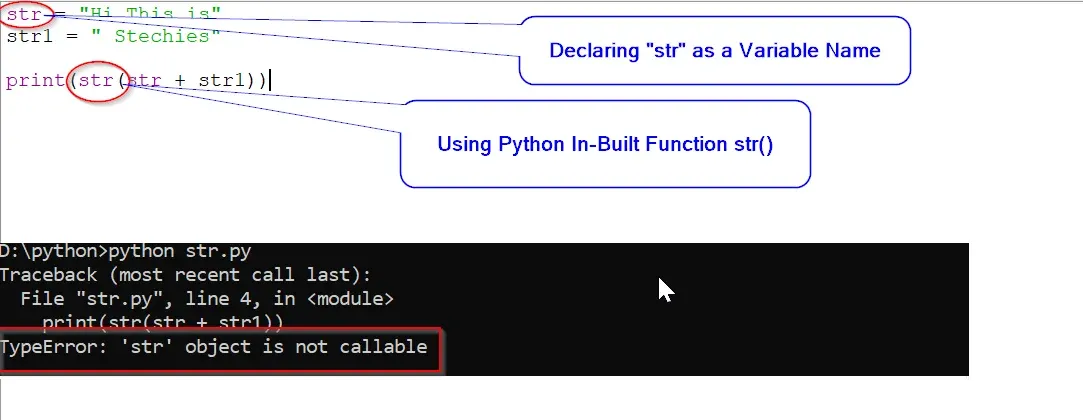
Example:
str = "Hi This is"
str1 = " Stechies"

print(str(str + str1))
Output:
Traceback (most recent call last):
  File "str.py", line 4, in <module>
    print(str(str + str1))
TypeError: 'str' object is not callable
In the above example, we are joining two string variables with (+) operator, but we declared a variable named as “str” and on the next line we are using str() function.
So python compiler takes “str” as a variable, not as function due to which error “TypeError: ‘str’ object is not callable” occurs.
How to Resolve typeerror: ‘str’ object is not callable
To resolve this error, you need to change the name of the variable whose name is similar to the in-built function str() used in the code.
Correct Example:
str2 = "Hi This is"
str1 = " STechies"

print(str(str2 + str1))
Output:
Hi This is STechiesIn the above example, we have just changed the name of variable “str” to “str2”.
Conclusion: Don’t use any variable which has the same name as any in-built python function used in your code.
This error occurs when you try to call a string as if it were a function. This error can occur if you override the built-in str() function or you try to access elements in a string using parentheses instead of square brackets.
You can solve this error by ensuring you do not override the str() function or any function names. For example:
my_str = 'Python is fun!'

my_int = 15

my_int_as_str = str(15)
If you want to access elements in a string, use square brackets. For example,
my_str = 'Python is fun!'

first_char = my_str[0]
This tutorial will go through the error in detail, and we will go through an example to learn how to solve the error.
Table of contents
- TypeError: ‘str’ object is not callable
- What is a TypeError?
- What does Callable Mean?
- Example #1: Using Parenthesis to Index a String
- Solution
- Example #2: String Formatting Using
- Solution
- Example #3: Using the Variable Name “str”
- Solution
- Summary
TypeError: ‘str’ object is not callable
What is a TypeError?
TypeError tells us that we are trying to perform an illegal operation for a specific Python data type.
What does Callable Mean?
Callable objects in Python have the __call__ method. We call an object using parentheses. To verify if an object is callable, you can use the callable() built-in function and pass the object to it. If the function returns True, the object is callable, and if it returns False, the object is not callable.
Let’s test the callable() built-in function with a string:
string = "research scientist"

print(callable(string))
False
We see that callable returns false on the string.
Let’s test the callable() function with the square root method from the math module:
from math import sqrt

print(callable(sqrt))
True
We see that callable returns True on the sqrt method. All methods and functions are callable objects.
If we try to call a string as if it were a function or a method, we will raise the error “TypeError: ‘str’ object is not callable.”
Example #1: Using Parenthesis to Index a String
Let’s look at an example of a program where we define a for loop over a string:
string = "research scientist"

for i in range(len(string)):

    print(string(i))
---------------------------------------------------------------------------
TypeError                                 Traceback (most recent call last)
      1 for i in range(len(string)):
      2     print(string(i))
      3

TypeError: 'str' object is not callable
To index a string, you have to use square brackets. If you use parentheses, the Python interpreter will treat the string as a callable object. Strings are not callable. Therefore you will raise the error “TypeError: ‘str’ object is not callable”.
Solution
We need to replace the parentheses with square brackets to solve this error.
string = "research scientist"

for i in range(len(string)):

    print(string[i])
r
e
s
e
a
r
c
h

s
c
i
e
n
t
i
s
t
The code runs with no error and prints out each character in the string.
Example #2: String Formatting Using
The TypeError can also occur through a mistake in string formatting. Let’s look at a program that takes input from a user. This input is the price of an item in a store with a seasonal discount of 10%. We assign the input to the variable price_of_item. Then we calculate the discounted price. Finally, we can print out the original price and the discounted price using string formatting.
price_of_item = float(input("Enter the price of the item"))

discount_amount = 0.1

discounted_price = price_of_item - (price_of_item * discount_amount)

rounded_discounted_price = round(discounted_price,2)

print('The original price was %s, the price after the discount is %s'(price_of_item, rounded_discounted_price))
With string formatting, we can replace the %s symbols with the values price_of_item and rounded_discounted_price. Let’s see what happens when we try to run the program.
Enter the price of the item17.99

---------------------------------------------------------------------------
TypeError                                 Traceback (most recent call last)
1 print('The original price was %s, the price after the discount is %s'(price_of_item, rounded_discounted_price))

TypeError: 'str' object is not callable
The code returns an error because we forgot to include the % operator to separate the string and the values we want to add to the string. The Python interpreter tries to call ‘The original price was %s, the price after 10% discount is %s‘ because the string has parentheses following it.
Solution
To solve this error, we need to add the % between the string
‘The original price was %s, the price after the discount is %s‘ and (price_of_item, rounded_discounted_price)
price_of_item = float(input("Enter the price of the item"))

discount_amount = 0.1

discounted_price = price_of_item - (price_of_item * discount_amount)

rounded_discounted_price = round(discounted_price,2)

print('The original price was %s, the price after the discount is %s'%(price_of_item, rounded_discounted_price))
Enter the price of the item17.99

The original price was 17.99, the price after the discount is 16.19
The code successfully prints the original price and the rounded price to two decimal places.
Example #3: Using the Variable Name “str”
Let’s write a program that determines if a user is too young to drive. First, we will collect the current age of the user using an input() statement. If the age is above 18, the program prints that the user is old enough to drive. Otherwise, we calculate how many years are left until the user can drive. We use the int() method to convert the age to an integer and then subtract it from 18.
Next, we convert the value to a string to print to the console. We convert the value to a string because we need to concatenate it to a string.
str = input("What is your age? ")

if int(str) >= 18:

    print('You are old enough to drive!')

else:

    years_left = 18 - int(str)

    years_left = str(years_left)

    print('You are not old enough to drive, you have ' + years_left + ' year(s) left')
Let’s see what happens when we run the program:
What is your age? 17

---------------------------------------------------------------------------
TypeError                                 Traceback (most recent call last)
      3 else:
      4     years_left = 18 - int(str)
      5     years_left = str(years_left)
      6     print('You are not old enough to drive, you have ' + years_left + ' year(s) left')
      7

TypeError: 'str' object is not callable
We raise the error “TypeError: ‘str’ object is not callable” because we tried to use the str() method to convert the integer value years_left. However, earlier in the program we declared a variable called “str“. From that point on, the Python interpreter sees “str” as a string in the program and not a function. Therefore, when we try to call str() we are instead trying to call a string.
Solution
To solve this error, we need to rename the user input to a suitable name that describes the input. In this case, we can use “age“.
age = input("What is your age? ")

if int(age) >= 18:

    print('You are old enough to drive!')

else:

    years_left = 18 - int(age)

    years_left = str(years_left)

    print('You are not old enough to drive, you have ' + years_left + 'year(s) left')
Now we have renamed the variable, we can safely call the str() function. Let’s run the program again to test the outcome.
What is your age? 17

You are not old enough to drive, you have 1 year(s) left
The code runs and tells the user they have 1 year left until they can drive.
Summary
Congratulations on reading to the end of this tutorial!
For further reading on the ‘not callable’ TypeError, go to the article: How to Solve Python TypeError: ‘module’ object is not callable.
Go to the online courses page on Python to learn more about coding in Python for data science and machine learning.
Have fun and happy researching!
Have you ever seen the TypeError object is not callable when running one of your Python programs? We will find out together why it occurs.
The TypeError object is not callable is raised by the Python interpreter when an object that is not callable gets called using parentheses. This can occur, for example, if by mistake you try to access elements of a list by using parentheses instead of square brackets.
I will show you some scenarios where this exception occurs and also what you have to do to fix this error.
Let’s find the error!
What Does Object is Not Callable Mean?
To understand what “object is not callable” means we first have understand what is a callable in Python.
As the word callable says, a callable object is an object that can be called. To verify if an object is callable you can use the callable() built-in function and pass an object to it. If this function returns True the object is callable, if it returns False the object is not callable.
callable(object)
Let’s test this function with few Python objects…
Lists are not callable
>>> numbers = [1, 2, 3]
>>> callable(numbers)
False
Tuples are not callable
>>> numbers = (1, 2, 3)
>>> callable(numbers)
False
Lambdas are callable
>>> callable(lambda x: x+1)
True
Functions are callable
>>> def calculate_sum(x, y):
...     return x+y
...
>>> callable(calculate_sum)
True
A pattern is becoming obvious, functions are callable objects while data types are not. And this makes sense considering that we “call” functions in our code all the time.
What Does TypeError: ‘int’ object is not callable Mean?
In the same way we have done before, let’s verify if integers are callable by using the callable() built-in function.
>>> number = 10
>>> callable(number)
False
As expected integers are not callable 🙂
So, in what kind of scenario can this error occur with integers?
Create a class called Person. This class has a single integer attribute called age.
class Person:
    def __init__(self, age):
        self.age = age
Now, create an object of type Person:
john = Person(25)
Below you can see the only attribute of the object:
print(john.__dict__)
{'age': 25}
Let’s say we want to access the value of John’s age.
For some reason the class does not provide a getter so we try to access the age attribute.
>>> print(john.age())
Traceback (most recent call last):
  File "callable.py", line 6, in <module>
    print(john.age())
TypeError: 'int' object is not callable
The Python interpreter raises the TypeError exception object is not callable.
Can you see why?
That’s because we have tried to access the age attribute with parentheses.
The TypeError‘int’ object is not callable occurs when in the code you try to access an integer by using parentheses. Parentheses can only be used with callable objects like functions.
What Does TypeError: ‘float’ object is not callable Mean?
The Python math library allows to retrieve the value of Pi by using the constant math.pi.
I want to write a simple if else statement that verifies if a number is smaller or bigger than Pi.
import math

number = float(input("Please insert a number: "))

if number < math.pi():
    print("The number is smaller than Pi")
else:
    print("The number is bigger than Pi")
Let’s execute the program:
Please insert a number: 4
Traceback (most recent call last):
  File "callable.py", line 12, in <module>
    if number < math.pi():
TypeError: 'float' object is not callable
Interesting, something in the if condition is causing the error ‘float’ object is not callable.
Why?!?
That’s because math.pi is a float and to access it we don’t need parentheses. Parentheses are only required for callable objects and float objects are not callable.
>>> callable(4.0)
False
The TypeError‘float’ object is not callable is raised by the Python interpreter if you access a float number with parentheses. Parentheses can only be used with callable objects.
What is the Meaning of TypeError: ‘str’ object is not callable?
The Python sys module allows to get the version of your Python interpreter.
Let’s see how…
>>> import sys
>>> print(sys.version())
Traceback (most recent call last):
  File "<stdin>", line 1, in <module>
TypeError: 'str' object is not callable
No way, theobject is not callable error again!
Why?
To understand why check the official Python documentation for sys.version.

That’s why!
We have added parentheses at the end of sys.version but this object is a string and a string is not callable.
>>> callable("Python")
False
The TypeError‘str’ object is not callable occurs when you access a string by using parentheses. Parentheses are only applicable to callable objects like functions.
Error ‘list’ object is not callable when working with a List
Define the following list of cities:
>>> cities = ['Paris', 'Rome', 'Warsaw', 'New York']Now access the first element in this list:
>>> print(cities(0))
Traceback (most recent call last):
  File "<stdin>", line 1, in <module>
TypeError: 'list' object is not callable
What happened?!?
By mistake I have used parentheses to access the first element of the list.
To access an element of a list the name of the list has to be followed by square brackets. Within square brackets you specify the index of the element to access.
So, the problem here is that instead of using square brackets I have used parentheses.
Let’s fix our code:
>>> print(cities[0])
Paris
Nice, it works fine now.
The TypeError‘list’ object is not callable occurs when you access an item of a list by using parentheses. Parentheses are only applicable to callable objects like functions. To access elements in a list you have to use square brackets instead.
Error ‘list’ object is not callable with a List Comprehension
When working with list comprehensions you might have also seen the “object is not callable” error.
This is a potential scenario when this could happen.
I have created a list of lists variable called matrix and I want to double every number in the matrix.
>>> matrix = [[1, 2, 3], [4, 5, 6], [7, 8, 9]]
>>> [[2*row(index) for index in range(len(row))] for row in matrix]
Traceback (most recent call last):
  File "<stdin>", line 1, in <module>
  File "<stdin>", line 1, in <listcomp>
  File "<stdin>", line 1, in <listcomp>
TypeError: 'list' object is not callable
This error is more difficult to spot when working with list comprehensions as opposed as when working with lists.
That’s because a list comprehension is written on a single line and includes multiple parentheses and square brackets.
If you look at the code closely you will notice that the issue is caused by the fact that in row(index) we are using parentheses instead of square brackets.
This is the correct code:
>>> [[2*row[index] for index in range(len(row))] for row in matrix]
[[2, 4, 6], [8, 10, 12], [14, 16, 18]]
Conclusion
Now that we went through few scenarios in which the errorobject is not callable can occur you should be able to fix it quickly if it occurs in your programs.
I hope this article has helped you save some time! 🙂
Related posts:

I’m a Tech Lead, Software Engineer and Programming Coach. I want to help you in your journey to become a Super Developer!
Mistakes are easily made when you are naming variables. One of the more common mistakes is calling a variable “str”. If you try to use the Python method with the same name in your program, “typeerror: ‘str’ object is not callable” is returned.
In this guide, we talk about what the Python error means and why it is raised. We walk through two examples of this error in action so you learn how to solve it.

Find Your Bootcamp Match
- Career Karma matches you with top tech bootcamps
- Access exclusive scholarships and prep courses
Select your interest
First name
Last name
Phone number
By continuing you agree to our Terms of Service and Privacy Policy, and you consent to receive offers and opportunities from Career Karma by telephone, text message, and email.
The Problem: typeerror: ‘str’ object is not callable
Our error message is a TypeError. This tells us we’re trying to execute an operation on a value whose data type does not support that specific operation.
Take a look at the rest of our error message:
typeerror: 'str' object is not callable
When you try to call a string like you would a function, an error is returned. This is because strings are not functions. To call a function, you add () to the end of a function name.
This error commonly occurs when you assign a variable called “str” and then try to use the str() function. Python interprets “str” as a string and you cannot use the str() function in your program.
Let’s take a look at two example scenarios where this error has occurred.
Example Scenario: Declaring a Variable Called “str”
We write a program that calculates how many years a child has until they turn 18. We then print this value to the console.
Let’s start by collecting the current age of the young person by using an input() statement:
str = input("What is your age? ")
Next, we calculate how many years a young person has left until they turn 18. We do this by subtracting the value a user has given our program from 18:
years_left = 18 - int(str)
We use the int() method to convert the age integer. This allows us to subtract the user’s age from 18.
Next, we convert this value to a string and print it to the console. We convert the value to a string because we need to concatenate it into a string. To do so, all values must be formatted as a string.
Let’s convert the value of “years_left” and print it to the console:
years_left = str(years_left)
print("You have " + years_left + " years left until you turn 18.")
This code prints out a message informing us of how many years a user has left until they turn 18. Run our code and see what happens:
What is your age? 7
Traceback (most recent call last):
  File "main.py", line 5, in <module>
	years_left = str(years_left)
TypeError: 'str' object is not callable
Our code returns an error. We have tried to use the str() method to convert the value of “years_left”. Earlier in our program, we declared a variable called “str”. Python thinks “str” is a string in our program, not a function.
To solve this error, we rename the variable “str” to “age”:
age = input("What is your age? ")
years_left = 18 - int(age)
years_left = str(years_left)
print("You have " + years_left + " years left until you turn 18.")
As we have renamed our variable, Python will use the str() function when we call it. There is no longer a variable occupying that name. Let’s run our code again:
What is your age? 7
You have 11 years left until you turn 18.
Our code successfully calculates how many years a young person has left until they turn 18.
Example Scenario: String Formatting Using %
This error is also caused by a mistake in string formatting.
Let’s add a few new features to our last program. First, we ask a user for their name. Second, we’re going to craft the message that tells a user how many years they have left until they turn 18 using the % formatting syntax.
Begin by asking a user for their name:
name = input("What is your name? ")
Next, we revise our print() statement to use the % string formatting syntax. We do this because the % syntax is easier to read when formatting multiple values into a string. Here is the code we use to format the message we will show a user:
print("%s, you have %s years left until you turn 18."(name, age))
Our final program looks like this:
name = input("What is your name? ")
age = input("What is your age? ")

years_left = 18 - int(age)
years_left = str(years_left)

print("%s, you have %s years left until you turn 18."(name, age))
Our code replaces the string type %s symbol with the values “name” and “age”, respectively. Let’s run our code and see what happens:
Traceback (most recent call last):
  File "main.py", line 7, in <module>
	print("%s, you have %s years left until you turn 18."(name, age))
TypeError: 'str' object is not callable
Our code returns an error because we have forgotten to use the % operator to separate our string and the values we want to add to our string.
Our code thinks we are trying to call “%s, you have %s years left until you turn 18.” as a function because the string is followed by parenthesis.
To solve this error, we add a percentage sign between “%s, you have %s years left until you turn 18.” and (name, age) in our code:

«Career Karma entered my life when I needed it most and quickly helped me match with a bootcamp. Two months after graduating, I found my dream job that aligned with my values and goals in life!»
Venus, Software Engineer at Rockbot
print("%s, you have %s years left until you turn 18." % (name, age))

This revision fixes the error:
What is your name? Alex
What is your age? 7
Alex, you have 11 years left until you turn 18.
Conclusion
The “typeerror: ‘str’ object is not callable” error is raised when you try to call a string as a function. To solve this error, make sure you do not use “str” as a variable name.
If this does not solve the problem, check if you use the % operator to format strings. A % sign should appear between a string and the values into which you want to add to a string.
Now you’re ready to solve this common Python error like a pro!