Отключение запроса на изменение пароля при первом подключении
Posted: 13 октября, 2016 in MS SQL
При создании нового пользователя в MS SQL, автоматом ставится галочка, что пользователь должен сменить пароль при первом подключении через Microsoft Management Studio. Через графический интерфейс эту галочку снять нельзя, будешь вылезать ошибка:
Msg 15128, Level 16, State 1, Line 1
The CHECK_POLICY and CHECK_EXPIRATION options cannot be turned OFF when
MUST_CHANGE is ON.
Но это можно обойти, если задать пароль через SQL запрос.
Заходим в Microsoft Management Studio с правами администратора, создаем новый запрос и вставляем следующий код:
USE Master
GO
ALTER LOGIN test_must_change WITH PASSWORD = ‘samepassword’
GO
ALTER LOGIN test_must_change WITH
CHECK_POLICY = OFF,
CHECK_EXPIRATION = OFF;
Где ‘samepassword’ — пароль пользователя, а test_must_change — имя пользователя, котому меняем пароль.
После выполенеия запроса, галочка смены пароля при первом подключении через Microsoft Management Studio будет отжата.
Last week one of my team members was supposed to create a SQL Authenticated ID on a SQL Server 2005 instance. This was as per the request of the Application team who would be using it for an Application.
Since this is a routine task, the DBA created the ID. After passing on the credentials to the Application team, they started complaining that the application is unable to connect to the database using that ID. When the DBA tried connecting to the instance using that ID he got Reason: The password of the account has expired error. In SSMS the Login Properties looked like this.
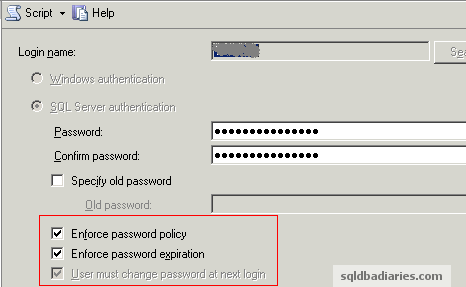
Since this is an application id, the requirement is the password should never expire. But the DBA had forgot to uncheck the Enforce password policy and User must change password at next login checkbox while creating the ID (these are by default selected). When the application tried connecting to the instance for the first time, the password had expired and it prompted it to be changed. Now the DBA realized the mistake he had done, he uncheck Enforce password policy option and clicked on Ok in SSMS. It was not supposed to be that easy and he got the following error message.
The CHECK_POLICY and CHECK_EXPIRATION options cannot be turned OFF when MUST_CHANGE is ON.
(Microsoft SQL Server, Error: 15128)
Since the password had already expired, SQL Server was not allowing to be changed with the existing options. Also you will notice that in the above screenshot the User must change password at next login checkbox is grayed out. The only option to overcome this situation was to change the password after disabling the Login Policy check. Here is the query which was used to fix this issue.
ALTER LOGIN [LoginName]
WITH PASSWORD = 'newpassword',
CHECK_POLICY = OFF,
CHECK_EXPIRATION = OFF
With this query, the password was successfully changed and the Policy check was disabled as per the requirement.
-
October 20, 2009 at 10:09 am
#215771
Receive the error 15128 because MUST_CHANGE is on. How to get around this. This is a sql acocunt and should not have a password that expires.
-
Roy Ernest
SSC-Dedicated
Points: 38780
Remove the Enforce password policy. You can use the GUI to do that.
-Roy
-
Patti Johnson
SSCertifiable
Points: 7054
-
Roy Ernest
SSC-Dedicated
Points: 38780
SSMS SQL Server Management studio. Or you can do it using T-SQL. ALTER LOGIN
-Roy
-
Patti Johnson
SSCertifiable
Points: 7054
I tried both ways alter login and then ssms. Both ways gave me the error.
This is what I did to get around the issue.
I logged in to SSMS using the sql account. When prompted to change the password I did. The sql account had sysadmin role. I opened up the sql account login and unchecked the 2 options for password expiration and the other option and it worked without error.
with all that said, I am wondering if it has something to do with the security of the user who logged that defined the sql account. That login should have been able to make that change.
-
K. Brian Kelley
SSC Guru
Points: 114532
The interface has to be aware of the password change ability. So if you’re using an older client (not SQL Server Native Client), they’ll get the error that says they can’t login, but they won’t be able to do so because that interface won’t present the change password prompt.
K. Brian Kelley
@kbriankelley -
henid
SSC Journeyman
Points: 77
What you also can do:
-In MSSMS
-Activate the user property
-change to a temporary password then save and close
-activate again and then disable Enforce Password
-than save with the original password
Enjoy!
-
perl1
SSC Enthusiast
Points: 128
HI Thank you so much this this worked for me …:-)
-
Lidia Joubert
SSC-Addicted
Points: 461
Thanks Patti — you saved what is left of my sanity.
-
chirag.patel19
SSC Journeyman
Points: 81
//** Use this query and you will all set**//txtPost_CommentEmoticon(‘:-)’);
USE Master
GO
ALTER LOGIN SQL_Account WITH PASSWORD = ‘currentpassword(SamePassword)’
GO
ALTER LOGIN SQL_Account WITH
CHECK_POLICY = OFF,
CHECK_EXPIRATION = OFF;:-)
Viewing 10 posts — 1 through 9 (of 9 total)

- Remove From My Forums
-
Вопрос
-
How to set SQL Server Login MUST_CHANGE, CHECK_POLICY, CHECK_EXPIRATION all to OFF with T-SQL. SSMS will not allow me to change policies to OFF. Error: 15128 — The CHECK_POLICY and CHECK_EXPIRATION options cannot be turned OFF when MUST_CHANGE is
on. I am attempting to change these options in a test environment. Thanks, Richard
Ответы
-
-
Предложено в качестве ответа
Eric__Zhang
30 марта 2015 г. 8:40 -
Помечено в качестве ответа
Eric__Zhang
7 апреля 2015 г. 8:42
-
Предложено в качестве ответа

Yesterday I received a report of issue from one of my customer stated that he couldn’t access to the SQL Server, I checked and found that the account was set with “Enforce password expiration”, and “User must change password at next login”. When I tried to change the password and uncheck all the checkboxes (shown below) then got the dialog.

Yes. “The CHECK_POLICY and CHECK_EXPIRATION options cannot be turned OFF when MUST_CHANGE is ON. (Microsoft SQL Server, Error: 15128)”.

Oops, my bad, using the GUI I changed the password first (without changing in password policy options), and unchecked the checkboxes later, each step would be done separately and great, everything works like a charm.
But I still want to make it by using command line by doing the following using the “New Query”
To change password
USE master
GO
ALTER LOGIN [login name] WITH PASSWORD = ‘same password’
GO
And then turn off the password policy
ALTER LOGIN [login name] WITH
CHECK_POLICY = OFF,
CHECK_EXPIRATION = OFF;
GO
That’s it, everything done.
-
Question
-
How to set SQL Server Login MUST_CHANGE, CHECK_POLICY, CHECK_EXPIRATION all to OFF with T-SQL. SSMS will not allow me to change policies to OFF. Error: 15128 — The CHECK_POLICY and CHECK_EXPIRATION options cannot be turned OFF when MUST_CHANGE is
on. I am attempting to change these options in a test environment. Thanks, RichardThursday, March 26, 2015 8:34 PM
Answers
-
-
Proposed as answer by
Eric__Zhang
Monday, March 30, 2015 8:40 AM -
Marked as answer by
Eric__Zhang
Tuesday, April 7, 2015 8:42 AM
Thursday, March 26, 2015 8:53 PM
-
Proposed as answer by
-
Question
-
How to set SQL Server Login MUST_CHANGE, CHECK_POLICY, CHECK_EXPIRATION all to OFF with T-SQL. SSMS will not allow me to change policies to OFF. Error: 15128 — The CHECK_POLICY and CHECK_EXPIRATION options cannot be turned OFF when MUST_CHANGE is
on. I am attempting to change these options in a test environment. Thanks, RichardThursday, March 26, 2015 8:34 PM
Answers
-
-
Proposed as answer by
Eric__Zhang
Monday, March 30, 2015 8:40 AM -
Marked as answer by
Eric__Zhang
Tuesday, April 7, 2015 8:42 AM
Thursday, March 26, 2015 8:53 PM
-
Proposed as answer by