Table of Contents
Hide
- What is TypeError: split is not a function error?
- How to fix TypeError: split is not a function error?
- Solution 1: Convert the value into a string
- Solution 2 – Performing the type check
- Conclusion
If we call the split() method on the value that is not of a string type, JavaScript will throw a TypeError: split is not a function.
In this tutorial, we will look at what is TypeErrror: split is not a function error and how to resolve them with examples.
Let us take a simple example to demonstrate this issue
// documnet.location returns an object
const str = document.location
path = str.split("/")
Output
TypeError: str.split is not a functionIn the above example, we have declared a variable and assigned the object into it.
In the next statement, we call the String.split() method on the location object, and hence we get a TypeError: split is not a function.
We can also check the variable type using typeof() to confirm the datatype.
const str = document.location
console.log("The type of variable is",typeof(str))
Output
The type of variable is objectHow to fix TypeError: split is not a function error?
The String.split() method can only be used on the string values and not on any other types.
There are two ways to fix this issue in JavaScript.
Solution 1: Convert the value into a string
We can easily resolve the issue by converting the location object into a string before calling the split() method.
If we know the value can be converted to a valid string, then we can use the toString() method in JavaScript that returns the string representing the object.
Let us take an example to resolve the issue using the toString() method.
// Get the location and convert to String object
const str = document.location.toString()
console.log(str)
console.log("The object type is", typeof(str))

// Split the string object into an Array
path = str.split("/")
console.log(path)
Output
https://itsjavascript.com/javascript-typeerror-string-split-is-not-a-function

The object type is string

['https:', '', 'itsjavascript.com', 'javascript-typeerror-string-split-is-not-a-function']
Solution 2 – Performing the type check
We can also perform a type check on the variable to check if it’s a string before calling the split() method.
Example – Type check using if/else
// Get the location and convert to String object
const str = document.location.toString()

//Split the string object into an Array
if (typeof str === 'string') {
    path = str.split("/")
    console.log(path)
}
else {
    console.log("Not a vaild string object")
}
Output
['https:', '', 'itsjavascript.com', 'javascript-typeerror-string-split-is-not-a-function']Example – Type check using ternary operator
const str = document.location.toString()
const result = typeof str === 'string' ? str.split('/') : "";
console.log(result)
Output
['https:', '', 'itsjavascript.com', 'javascript-typeerror-string-split-is-not-a-function']Conclusion
The TypeError: split is not a function occurs if we call a split() method on the value that is not of a type string. We can resolve the issue by converting the value into string before calling the split() method or by performing a type check; we can mitigate this error.
Related Tags
- split(),
- toString(),
- TypeError,
- typeof
Sign Up for Our Newsletters
Get notified on the latest articles
By checking this box, you confirm that you have read and are agreeing to our terms of use regarding the storage of the data submitted through this form.
Why am I getting…
Uncaught TypeError: string.split is not a function
…when I run…
var string = document.location;
var split = string.split('/');
asked Apr 13, 2012 at 18:02

erikvimzerikvimz
5,0866 gold badges43 silver badges60 bronze badges
1
Change this…
var string = document.location;
to this…
var string = document.location + '';
This is because document.location is a Location object. The default .toString() returns the location in string form, so the concatenation will trigger that.
You could also use document.URL to get a string.
7
maybe
string = document.location.href;
arrayOfStrings = string.toString().split('/');
assuming you want the current url

dstarh
4,8665 gold badges34 silver badges67 bronze badges
answered Apr 13, 2012 at 18:05

chepe263chepe263
2,76422 silver badges38 bronze badges
run this
// you'll see that it prints Object
console.log(typeof document.location);
you want document.location.toString() or document.location.href

Matt
40.8k29 gold badges108 silver badges147 bronze badges
answered Apr 13, 2012 at 18:07
dstarhdstarh
4,8665 gold badges34 silver badges67 bronze badges
1
document.location isn’t a string.
You’re probably wanting to use document.location.href or document.location.pathname instead.

kapa
76.9k21 gold badges158 silver badges174 bronze badges
answered Apr 13, 2012 at 18:06

Denys SéguretDenys Séguret
366k84 gold badges773 silver badges746 bronze badges
1
In clausule if, use ().
For example:
stringtorray = "xxxx,yyyyy,zzzzz";
if (xxx && (stringtoarray.split(',') + "")) { ...

derloopkat
6,09915 gold badges39 silver badges44 bronze badges
answered Jul 25, 2020 at 22:53

The weakly typed nature of JavaScript is often both a blessing and a curse. It is great being able to code quickly and efficiently without having to worry about type safety. Of course, without this type safety, it can be easy to make mistakes and try to use methods before finding out the hard way that they do not exist. An example of such a mistake is the .split is not a function error.
The Problem
First and foremost it is important to understand the usage of the split() method. It can only be used on strings so the first potential problem is that you have tried to use it on a variable that is not a string. For example:
Code language: JavaScript (javascript)
let myVar = true; console.log(myVar.split()); // ❌ split is not a function error
As mentioned before, JavaScript is a weakly typed language which means the type of a variable can be dynamic and implicitly changed at runtime. With the value of a variable changing throughout the course of a script’s execution, it is possible that the variable you once thought was a string has since changed to a different type. Here’s an example of what that might look like:
let myVar = 'hello world'; console.log(myVar.split('')); // ✔️ this works fine myVar = 123; console.log(myVar.split('')); // ❌ split is not a function errorCode language: JavaScript (javascript)
As you can see here the value of myVar was once a string which meant the .split() method worked fine. Once it changed to a number, however, the error occurs.
The Solution
In most cases, the easiest thing you can do is simply make sure the variable you are working with is a string before you try to use split() with it. This can be achieved with some simple logic that you could do inline or as part a of a function:
Code language: JavaScript (javascript)
let myVar = true; const arr = typeof myVar === 'string' ? myVar.split('') : []; // ✔️ this works fine console.log(arr);
What should you do if you actually want to use the value whether or not it is a string? Fortunately, most types in JavaScript have a native toString() method that converts a value to its closest string representation. In the following example we combine the logic from the previous example with toString():
Code language: JavaScript (javascript)
let myVar = 'hello world'; console.log(myVar.split('')); // ✔️ this works fine myVar = 123; const arr = (typeof myVar === 'string' ? myVar : myVar.toString()).split(''); // ✔️ this also works fine console.log(arr);
In this example the value is converted to a string if necessary before using split() on it. This is helpful to understand the importance of using toString() to ensure the value is a string but to make this even cleaner you could simply use toString() on the value without first checking if it is a string and get the same result — with less code!
Code language: JavaScript (javascript)
const arr = myVar.toString().split('');
Conclusion
Hopefully this will help you use split() properly and safely. The simplest and most important part is to make sure you are actually working with a string. Other than that, you can tailor your solution to fit your specific use case. Let us know if you have any other ideas about how to approach this error or if you have other errors you would like us to cover.
In this article, I will help you to know the cause of the error “TypeError: split is not a function” in JavaScript and give some examples to fix it easily. Let’s go into detail now.
Why does the “TypeError: split is not a function” in JavaScript happen?
There are some cases where your program will throw the above error, but the most common one is using the split() method on a value that is not of type string.
The error message occurs as follows:
Uncaught TypeError: split is not a functionExample:
var date = new Date();
var str = (date).slice(1, 10);
console.log(str);
Output:
Uncaught TypeError: date.split is not a functionExample:
var date = new Date();
var str = (date).slice(1, 10);
console.log(str);
Output:
Uncaught TypeError: date.split is not a functionAbove, I used two variables with a different value than the string to call the split() method, and the result is that the two program examples both throw the Uncaught TypeError: slice is not a function.
How to fix this error?
Fixing this error is not complicated. You must convert its value into a string and use the typical split() method.
Here are some solutions to fix this error.
Use toString() method
toString() method helps us convert a certain value into a string. Most cases of converting some values into a string using this method because it appears in most objects in JavaScript.
Example:
// Example with Number
var num = 1431817912;

// Convert Date to String
var strNum = num.toString();

console.log(strNum.split("1"));

// Example with Date
var date = new Date();

// Convert Date to String
var strDate = date.toString();
var strDate1 = date.toDateString();

console.log(strDate.split(" "));
console.log(strDate1.split(" "));
Output:
(5) ['', '43', '8', '79', '2']
(8) ['Wed', 'Nov', '09', '2022', '17:58:02', 'GMT+0700', '(Indochina', 'Time)']
(4) ['Wed', 'Nov', '09', '2022']
In the above example, we see that for the date example, we have two ways to use: the toString() method and the toDateString() method to convert to string. Still, the two returned results are different because the toDateString() method will only have the date and year without the time. So depending on your needs, you will choose between the toDateString() or toString() method.
Plus an empty string
For this method, you use the (+) operator to add the value of the Number or Date variable to convert it to a string.
Example:
// Example with Number
var num = 1431817912;

// Convert Date to String
var strNum = num + "";

console.log(strNum.split("1"));

// Example with Date
var date = new Date();

// Convert Date to String
var strDate = date + "";

console.log(strDate.split(" "));
Output:
(5) ['', '43', '8', '79', '2']
(8) ['Wed', 'Nov', '09', '2022', '17:58:02', 'GMT+0700', '(Indochina', 'Time)']
Summary
In this article, I have shown you how to fix the error “TypeError: split is not a function” in JavaScript. Try it again. It will help you understand and remember it longer. I hope this article helps you and your program. Good luck.
Maybe you are interested:
- TypeError: getFullYear() is not a Function in JavaScript
- TypeError: toLocaleDateString is not a function in JavaScript
- TypeError: Cannot read property ‘filter’ of Undefined in JavaScript

My name is Tom Joseph, and I work as a software engineer. I enjoy programming and passing on my experience. C, C++, JAVA, and Python are my strong programming languages that I can share with everyone. In addition, I have also developed projects using Javascript, html, css.
Job: Developer
Name of the university: UTC
Programming Languages: C, C++, Javascript, JAVA, python, html, css
TypeError: .split is not a function occurs when we call split() function on object which is not an string. split() function can be only called on string. To resolve this issue, convert value to string using toString() ,method before calling split().
Let’s see with help of simple example.
|
var countryList = [ ‘India’, ‘China’, ‘Bhutan’]; var commaCountryList = countryList.split(‘,’); console.log(commaCountryList); |
Output
|
var commaCountryList = countryList.split(‘,’); ^ TypeError: countryList.split is not a function at Object.<anonymous> (HelloWorld.js:4:36) at Module._compile (internal/modules/cjs/loader.js:959:30) at Object.Module._extensions..js (internal/modules/cjs/loader.js:995:10) at Module.load (internal/modules/cjs/loader.js:815:32) at Function.Module._load (internal/modules/cjs/loader.js:727:14) at Function.Module.runMain (internal/modules/cjs/loader.js:1047:10) at internal/main/run_main_module.js:17:11 |
We got this error because countryList is not an string, it is an array.
Convert countryList to string using toString() method and it should work as expected.
|
var countryList = [ ‘India’, ‘China’, ‘Bhutan’]; var commaCountryList = countryList.toString().split(‘,’); console.log(commaCountryList); |
Output:
|
[ ‘India’, ‘China’, ‘Bhutan’ ] |
toString()method converted array to string and we were able to callsplit()method on it.
You can also check if it is type of string before calling split() to make sure that split() is being called on string only.
|
var countryList = [ ‘India’, ‘China’, ‘Bhutan’]; var commaCountryList = typeof countryList === ‘string’ ? countryList.split(‘,’):»; console.log(commaCountryList); |
Output:
As you can see countryList is not a string, so result is empty string.
We used ternary operator to check if countryList is string or not. If it is a string, call the split() method, otherwise return empty string.
If you are getting this issue, while working on document.location object then you need to first convert document.location to string using toString() method before calling split() method.
|
var str = document.location; var splitArr = str.split(‘/’); |
When you execute the code, you will get TypeError: .split is not a function as we are calling split() on document.location rather than string object.
If you print typeof for document.location, it will print object.
|
// you’ll see that it will print Object console.log(typeof document.location); |
To solve the issue, convert document.location to string first.
Here is one of the solution:
|
var str = document.location + »; var splitArr = str.split(‘/’); |
Notice + '' at the end, it will convert document.location to string and we can call split() method on it.
Read also: map is not a function in JavaScript.
That’s all about how to resolve TypeError: split is not a function in JavaScript.
«метод split()» в JavaScript разбивает строку в массив подстрок, используя разделитель для определения места разбиения.
Синтаксис split в javascript
При развитии строки по разделителю(separator) — разделитель будет уничтожен.
str.split([separator][, limit]);
Значения параметров split в javascript
Два аргумента в split в javascript ^
Аргумент separator в split в javascript
регулярное выражение или строка, по которой делить str
Аргумент limit в split в javascript
максимальное количество кусков, на которые может быть разбита строка
Пример работы метода split в JavaScript
Разберем пример работы метода split в JavaScript. Чтобы это увидеть нам потребуется:
Создадим переменную с неким текстом:
var example = «П р и в е т М и р»;
Далее применим метод «split» к данной строке и разделитель буте пробел » «:
var result = example.split(» «);
Выведем результат работы метода split с помощью document.write();
document.write(result);
Соберем весь код примера работы метода split:
Код примера работы метода split в JavaScript
<script>
var example = "П р и в е т  М и р";
var result = example.split(" ");
document.write(result);
</script>
Результат работы кода метода split в JavaScript
Далее нам остается вывести код данного примера работы метода прямо здесь:
Тип данных после работы split в JavaScript
После того, как был применен метод split в JavaScript — какой ти переменной возвращается?
Для того, чтобы определить тип данных после split в JavaScript нам потребуется
Нам нужно проделать вс те же действия , что мы произвели во втором пункте .
И только в последнюю сроку добавим typeof — для определения типа возвращенного значения:
document.write(typeof result);
Соберем весь код определения возвращаемого значения split в JavaScript
код определения возвращаемого значения split в JavaScript
<script>
var example = "П р и в е т  М и р";
var result = example.split(" ");
document.write(typeof  result);
</script>
Результат работы кода определения возвращаемого значения split в JavaScript
js split is not a function
Одной из проблем, которая встречается довольно часто это : «js split is not a function«.
Чтобы понять, почему это происходит давайте пробуем её воспроизвести…
Возьмем все тот же код и в последней строке… поскольку мы знаем, что наш массив состоит из ячеек разделенных запятой, то и попробуем разбить уже полученный массив еще раз по разделителю «запятая»
<script>
var example = "П р и в е т  М и р";
var result = example.split(" ");
document.write(result.split(","));
</script>
Получение ошибки js split is not a function
После выполнения выше приведенного кода вы поучите ошибку «js split is not a function«:
Нажмите, чтобы открыть в новом окне.
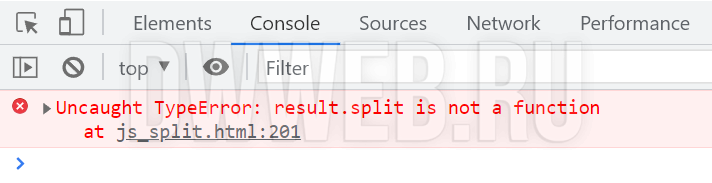
Исправление ошибки js split is not a function
Не могу придумать вразумительный пример… ну … вот до чего додумался(придумается более интересный пример, — перепишу)…
Как вы наверное помните. что в переменной result(выделено фиолетовым) находится объект.
Если мы его превратим в строку с помощью toString — выделено красным, то весь код благополучно сработает и ошибки не будет:
<script>
var example = "П р и в е т  М и р";

var result = example.split(" ").toString();

document.write(result.split(","));
</script>
Пример исправленной ошибки «js split is not a function«
Чтобы убедить в исправленной ошибке «js split is not a function» — разместим выше приведенный код прямо здесь:
Почему результат одинаковый?
Почему приведенный результат не отличается от примера, который был разобран в выше идущих пунктах?
Выше я и говорил… что это не очень удачный пример, но как говорится… какой есть…
Мы превратили строку «П р и в е т М и р» в массив(объект) по пробелу…
var
result
= example.split(» «)
У нас получился такой массив : П,р,и,в,е,т,М,и,р …
Далее мы превратили этот массив в строку добавив к выше приведенной строке toString
var
result
= example.split(» «).
toString()
;
и он имел тот же вид… П,р,и,в,е,т,М,и,р и лишь отличается типом…
После того, как мы получили строку, теперь мы можем использовать запятую в качестве разделителя…
document.write(result.split(«,»));
ну и собственно у нас опять поменялся только тип… а вид остался такой же… уж извините за такой пример… 
смайлы