Форум КриптоПро
»
Общие вопросы
»
Общие вопросы
»
Ошибка при работе с плагином КриптоПро ЭЦП Browser plug-in

Neidl |
|
|
Статус: Новичок Группы: Участники
|
Добрый день. Не работает плагин КриптоПро ЭЦП Browser plug-in ни в одном из браузеров (chrome, yandex, edge). Пишет плагин не загружен, хотя установлен и сам плагин и расширение в браузерах. При попытке добавления какого либо сайта в доверенные выдает следующую ошибку:
Отредактировано пользователем 22 июня 2022 г. 14:36:05(UTC) |
 |
|


 Screenshot_1.png
 |
nickm |
|
|
Статус: Активный участник Группы: Участники Сказал(а) «Спасибо»: 232 раз |
Автор: Neidl Пишет плагин не загружен Скрин окна браузера со страницы проверки плагина можете показать? Может какое другое расширение его блокирует? |
|
|
|


|
Neidl |
|
|
Статус: Новичок Группы: Участники
|
Это персональный компьютер, стоит дома. Антивирус касперский отключен. Из плагинов стоит контур.плагин и плагин гис нр.
Отредактировано пользователем 22 июня 2022 г. 15:01:11(UTC) |
|
|
|
|
nickm |
|
|
Статус: Активный участник Группы: Участники Сказал(а) «Спасибо»: 232 раз |
А это какой браузер? Я бы сделал так: После бы проверил работу расширения. На время тестирования заглянул бы в консоль разработчика в браузере, возможно она что-нибудь да прояснила бы. |
|
|
|
|
Neidl |
|
|
Статус: Новичок Группы: Участники
|
Извиняюсь за беспокойство. В общем все решилось. Что то все таки видимо с плагином было не так. Ставил сегодня плагин с оф. сайта, в качестве установочного файла использовался cadesplugin.exe. Оказалось что до этого плагин ставили с помощью установочного пакета cadescom-64.exe. Вот тут похоже что то и пошло не так. Сделал восстановление плагина через «установка и удаление программ», все заработало. |
|
|
|
|
BupTyc |
|
|
Статус: Новичок Группы: Участники
|
Добрый день! Появилась точно такая же ошибка. Но была выполнена переустановка КриптоПро, cades-plugin. Так же проблема сопровождается и на браузерах которые ранее небыли установлены на ПК. Спутник браузер, Google. Изначально пользовался браузером Яндекс. Но при этом работает всё прекрасно в браузере IE |
|
|
|
| Пользователи, просматривающие эту тему |
|
Guest |
Форум КриптоПро
»
Общие вопросы
»
Общие вопросы
»
Ошибка при работе с плагином КриптоПро ЭЦП Browser plug-in
Быстрый переход
Вы не можете создавать новые темы в этом форуме.
Вы не можете отвечать в этом форуме.
Вы не можете удалять Ваши сообщения в этом форуме.
Вы не можете редактировать Ваши сообщения в этом форуме.
Вы не можете создавать опросы в этом форуме.
Вы не можете голосовать в этом форуме.
Good evening,
I keep getting the following errors:
-
Uncaught TypeError: Cannot read properties of undefined (reading ‘add’)
-
Uncaught TypeError: Cannot read properties of undefined (reading ‘remove’)
I want to add a class when I hover over an element. After many tries, I just have to ask because I can’t figure it out.
What I want to achieve is that when someone hovers over a img, H3 or P all 3 elements get the «opacity» class. Is there a way to do this without getting a error?
My code:
(Database is connected, just removed the login details.)
function opacityIn(elm) {
  var element = document.getElementsByName(elm.id);
  element.classList.add("opacity");


}

function opacityOut(elm) {
  var element = document.getElementsByName(elm.id);
  element.classList.remove("opacity");
}
.opacity
{
opacity: 0.5;
filter:alpha(opacity=50);
}<div class="ProjectsGroup" style="">
<?php
$servername = "...";
$username = "...";
$password = "...";
$dbname = "...";
// Create connection
$conn = new mysqli($servername, $username, $password, $dbname);
// Check connection
if ($conn->connect_error) {
die("Connection failed: " . $conn->connect_error);
}
$sql = "SELECT id, img, title, beschrijving FROM portfolio";
$result = $conn->query($sql);
if ($result->num_rows > 0) {
// output data of each row
while($row = $result->fetch_assoc()) {
$class = $i++ % 2 ? 'projRight' : 'projLeft';
echo '
<div class="' . $class . '">
<img class="" id="'. $row["id"] .'" name="'. $row["id"] .'" onClick="" onmouseover="opacityIn(this)" onmouseOut="opacityOut(this)" src="'. $row["img"] .'" alt=" '. $row["title"] .'" >
<h3 class="" id="'. $row["id"] .'" name="'. $row["id"] .'" onClick="" onmouseover="opacityIn(this)" onmouseOut="opacityOut(this)" > '. $row["title"] .' </h3>
<p class="" id="'. $row["id"] .'" name="'. $row["id"] .'" onClick="" onmouseover="opacityIn(this)" onmouseOut="opacityOut(this)" > '. $row["beschrijving"] .' </p>
</div>
';
}
} else {
echo "0 results";
}
$conn->close();
?>
</div>asked Jan 28, 2022 at 19:32

1
By passing in this, you already have access to the element directly, you don’t need to do a weird thing with document.getElementsByName (and either way, you should be using document.getElementById, ...ByName is for «p» giving all <p> tags)
function opacityIn(elm) {
  elm.classList.add("opacity");
}

function opacityOut(elm) {
  elm.classList.remove("opacity");
}
.opacity {
opacity: 0.5;
filter: alpha(opacity=50);
}<div class="' . $class . '">
<img class="" id="'. $row[" id "] .'" name="'. $row[" id "] .'" onClick="" onmouseover="opacityIn(this)" onmouseOut="opacityOut(this)" src="https://images.ctfassets.net/hrltx12pl8hq/4f6DfV5DbqaQUSw0uo0mWi/6fbcf889bdef65c5b92ffee86b13fc44/shutterstock_376532611.jpg?fit=fill&w=800&h=300" alt=" '. $row[" title "] .'">
<h3 class="" id="'. $row[" id "] .'" name="'. $row[" id "] .'" onClick="" onmouseover="opacityIn(this)" onmouseOut="opacityOut(this)">this is the h3</h3>
<p class="" id="'. $row[" id "] .'" name="'. $row[" id "] .'" onClick="" onmouseover="opacityIn(this)" onmouseOut="opacityOut(this)">this is the paragraph</p>
</div>answered Jan 28, 2022 at 19:38

SamathingamajigSamathingamajig
9,6822 gold badges14 silver badges32 bronze badges
The “cannot read property of undefined” error occurs when you attempt to access a property or method of a variable that is undefined. You can fix it by adding an undefined check on the variable before accessing it.

Depending on your scenario, doing any one of the following might resolve the error:
- Add an
undefinedcheck on the variable before accessing it. - Access the property/method on a replacement for the
undefinedvariable. - Use a fallback result instead of accessing the property.
- Check your code to find out why the variable is
undefined.
1. Add undefined check on variable
To fix the “cannot read property of undefined” error, check that the value is not undefined before accessing the property.
For example, in this code:
const auth = undefined;

console.log(auth); // undefined

// ❌ TypeError: Cannot read properties of undefined (reading 'user')
console.log(auth.user.name);
We can fix the error by adding an optional chaining operator (?.) on the variable before accessing a property. If the variable is undefined or null, the operator will return undefined immediately and prevent the property access.
const auth = undefined;

console.log(auth); // undefined

// ✅ No error
console.log(auth?.user?.name); // undefined
The optional chaining operator also works when using bracket notation for property access:
const auth = undefined;

console.log(auth); // undefined

// ✅ No error
console.log(auth?.['user']?.['name']); // undefined
This means that we can use it on arrays:
const arr = undefined;

console.log(arr?.[0]); // undefined

// Array containing an object
console.log(arr?.[2]?.prop); // undefined
Note
Before the optional chaining was available, the only way to avoid this error was to manually check for the truthiness of every containing object of the property in the nested hierarchy, i.e.:
const a = undefined;

// Optional chaining
if (a?.b?.c?.d?.e) {
  console.log(`e: ${e}`);
}

// No optional chaining
if (a && a.b && a.b.c && a.b.c.d && a.b.c.d.e) {
  console.log(`e: ${e}`);
}
2. Use replacement for undefined variable
In the first approach, we don’t access the property or method when the variable turns out to be undefined. In this solution, we provide a fallback value that we’ll access the property or method on.
For example:
const str = undefined;

const result = (str ?? 'old str').replace('old', 'new');

console.log(result); // 'new str'
The null coalescing operator (??) returns the value to its left if it is not null or undefined. If it is, then ?? returns the value to its right.
console.log(5 ?? 10); // 5
console.log(undefined ?? 10); // 10
The logical OR (||) operator can also do this:
console.log(5 || 10); // 5
console.log(undefined || 10); // 10
3. Use fallback value instead of accessing property
Another way to solve the “cannot read property of undefined” error is to avoid the property access altogether when the variable is undefined and use a default fallback value instead.
We can do this by combining the optional chaining operator (?.) and the nullish coalescing operator (??).
For example:
const arr = undefined;

// Using "0" as a fallback value
const arrLength = arr?.length ?? 0;

console.log(arrLength); // 0


const str = undefined;

// Using "0" as a fallback value
const strLength = str?.length ?? 0;

console.log(strLength); // 0
4. Find out why the variable is undefined
The solutions above are handy when we don’t know beforehand if the variable will be undefined or not. But there are situations where the “cannot read property of undefined” error is caused by a coding error that led to the variable being undefined.
It could be that you forgot to initialize the variable:
let doubles;

let nums = [1, 2, 3, 4, 5];

for (const num of nums) {
  let double = num * 2;

  // ❌ TypeError: cannot read properties of undefined (reading 'push')
  doubles.push(double);
}

console.log(doubles);
In this example, we call the push() method on the doubles variable without first initializing it.
let doubles;

console.log(doubles); // undefined
Because an uninitialized variable has a default value of undefined in JavaScript, accessing a property/method causes the error to be thrown.
The obvious fix for the error, in this case, is to assign the variable to a defined value.
// ✅ "doubles" initialized before use
let doubles = [];

let nums = [1, 2, 3, 4, 5];

for (const num of nums) {
  let double = num * 2;

  //  push() called - no error thrown
  doubles.push(double);
}

console.log(doubles); // [ 2, 4, 6, 8, 10 ]
Another common mistake that causes this error is accessing an element from an array variable before accessing an Array property/method, instead of accessing the property/method on the actual array variable.
const array = [];

// ❌ TypeError: Cannot read properties of undefined (reading 'push')
array[0].push('html');
array[0].push('css');
array[0].push('javascript');

console.log(array);
Accessing the 0 property with bracket indexing gives us the element at index 0 of the array. The array has no element, so arr[0] evaluates to undefined and calling push() on it causes the error.
To fix this, we need to call the method on the array variable, not one of its elements.
const array = [];

// ✅ Call push() on "array" variable, not "array[0]"
array.push('html');
array.push('css');
array.push('javascript');

console.log(array); // [ 'html', 'css', 'javascript' ]
Conclusion
In this article, we saw some helpful ways of resolving the “cannot read property of undefined” error in JavaScript. They might not resolve the error totally in your case, but they should assist you during your debugging.
11 Amazing New JavaScript Features in ES13
This guide will bring you up to speed with all the latest features added in ECMAScript 13. These powerful new features will modernize your JavaScript with shorter and more expressive code.

Sign up and receive a free copy immediately.

Ayibatari Ibaba is a software developer with years of experience building websites and apps. He has written extensively on a wide range of programming topics and has created dozens of apps and open-source libraries.
Электронные подписи используются в течение последнего десятилетия всё чаще. Благодаря им, нет необходимости посещать локацию заключения сделки, чтобы подтвердить документы. Всё можно сделать дистанционно, находясь в любой точке мира — главное, чтобы были компьютер и интернет. Это улучшает комфортность и даёт новые возможности бизнесу, а также ЭЦП безопасны и надёжны, ведь подделать их невозможно.
Однако иногда бывает, что техника подводит, и появляются какие-либо сложности с использование электронно-цифровой подписи. И эти проблемы обычно негативно влияют на бизнес, задерживают его. В этой статье рассмотрим ошибку Cannot read properties of undefined (reading ‘CreateObjectAsync’), которая возникает при подтверждении документов на сайте Госзакупок. Узнаем, как решить эту проблему максимально быстро и самостоятельно, начав от простых действий.
Содержание
- Перезагрузка компьютера
- Переход на другой браузер
- Установка расширения CryptoPro Extension for CAdES Browser Plug-in
- Переустановка КриптоПро ЭЦП
- Обновление сертификатов в КриптоПро ЭЦП
- Отключение расширения браузера
- Отключение антивируса
- Обновление браузера

Перезагрузка компьютера
Перезагрузка — панацея от многих компьютерных проблем. Это самое быстрое, что можно сделать, если что-то работает не так, как надо и в большинстве случаев это простое действие действительно помогает. Поэтому начните с перезагрузки вашего компьютера.
Во время этого перезагрузится не только компьютер, но также и браузер, в котором вы пользовались Госзакупками, и программа КриптоПро ЭЦП, что тоже может помочь решить проблему. После успешной загрузки компьютера попробуйте снова совершить действие, при котором появилась ошибка Cannot read properties of undefined (reading ‘CreateObjectAsync’).
Переход на другой браузер
Некоторые пользователи советуют использовать браузер Спутник или Internet Explorer. Первый вариант рекомендуется больше. Скачивать и устанавливать необходимо не просто браузер Спутник, а ту версию, которая поддерживает криптографию https://www.sputnik-lab.com/news/suspend.
Internet Explorer тоже некоторым помог решить эту ошибку. Но этот вариант немного хуже, чем Спутник, потому что данный браузер больше не поддерживается разработчиком и в последних версиях Windows его нет. Однако по мнению многих, он лучше всех работает с сайтами, подобным Госзакупкам.
Установка расширения CryptoPro Extension for CAdES Browser Plug-in
При появлении ошибки Cannot read properties of undefined (reading ‘CreateObjectAsync’) некоторым помогло расширение CryptoPro Extension for CAdES Browser Plug-in. Это расширение для браузера Google Chrome и оно будет работать только в нём. Установите его, а потом попробуйте снова подтвердить документ на Госзакупках.

Переустановка КриптоПро ЭЦП
КриптоПро ЭЦП — это программа, которая устанавливается на компьютер. Она обеспечивает связь между сайтом, где происходит подтверждение документов, и электронными сертификатами подписей, которые хранятся на компьютере. Естественно, что если в этой программе сбой, то подтвердить документы не получится и появится ошибка.
Поэтому, если описанные способы не помогают, то рекомендуется переустановить КриптоПро ЭЦП. Для этого её надо сначала удалить с компьютера, а потом скачать с сайта разработчика и установить заново https://www.cryptopro.ru/products/cades/plugin. Если вы затрудняетесь удалить программу, то попробуйте просто установить её заново, тогда программа заменит все свои файлы на компьютере и это с большой вероятностью тоже поможет решить проблему с ошибкой.
Обновление сертификатов в КриптоПро ЭЦП
КриптоПро ЭЦП знает о сертификатах ровно столько, сколько ей укажет пользователь компьютера. Программа запоминает указанные пути хранения сертификатов. Если сертификаты на компьютере были переносы в другое месте или если произошёл какой то сбой от которого КриптоПро ЭЦП потеряла пути их хранения, то нужно указать их заново.
Для этого откройте приложение КриптоПро ЭЦП и перейдите в раздел “Сервис”. Нажмите на кнопку “Обзор” и заново укажите путь на файл сертификата”.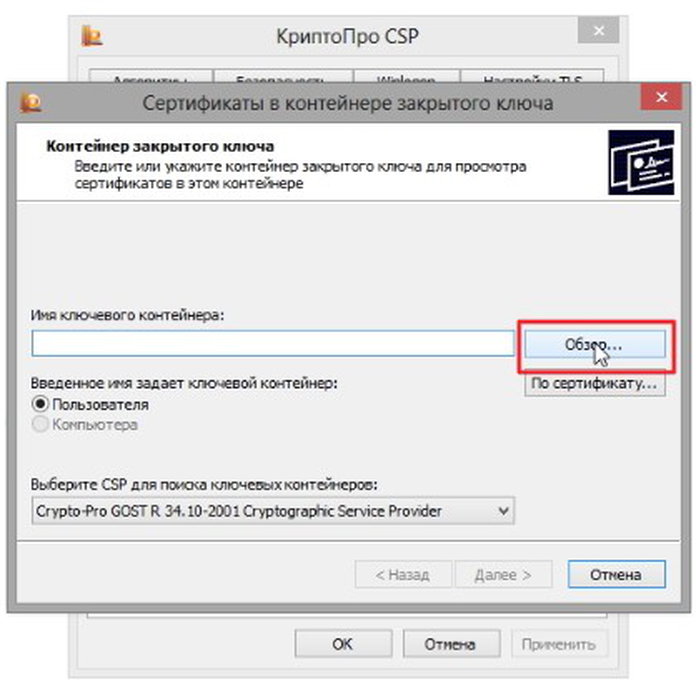
Отключение расширения браузера
Расширения браузера, даже полезные, могут мешать работать КриптоПро ЭЦП. Поэтому рекомендуется их временно отключить и попробовать подтвердить документ на Госзакупках заново.
Даже если вы не устанавливали в браузер новые расширения, всё равно следует их отключить. Потому что некоторые расширения обновляются и меняют свой алгоритм работы, а также часто бывает, что пользователь случайно и не замечая того, сам устанавливает расширения в свой браузер.
Отключение антивируса
Многие пользователи знают, что антивирусы часто срабатывают ложно. И даже совершенно безобидные файлы помечают как вредоносные. Это приводит к нарушению работы некоторых программ, и с КриптоПро ЭЦП это тоже может быть.
Поэтому на время пользования КриптоПро ЭЦП, если появляется ошибка, рекомендуется отключать антивирус. Также рекомендуется переустановить КриптоПро ЭЦП именно с отключенным антивирусом.
Вам будет это интересно: Чем опасна электронная подпись для физических лиц?
Обновление браузера
Современные браузеры часто обновляются. Это делается не только для того, чтобы улучшить его функциональность и добавить новые возможности, но и для защиты. Потому что новые способы взломов и атак появляются тоже часто. Когда дело касается ЭЦП, безопасность на первом месте. Поэтому программа КриптоПро ЭЦП может не работать с устаревшей версией браузера. Обновление браузера в этом случае решает проблему.
Кстати, на компьютерах с устаревшей версий Windows XP обновить браузер не получится, потому что разработчики перестали поддерживать эту операционную систему. Однако, несмотря на это, ею всё ещё некоторые пользуются. В этом случае нужно использовать более современный компьютер, чтобы установить на него актуальную версию браузера.
.png)
Если при подписании на сайте ЕИС (ЕРУЗ) https://zakupki.gov.ru/ возникает ошибка «Cannot read properties of undefined (reading ‘CreateObjectAsync’)», мы рекомендуем в первую очередь использовать браузер Chromium GOST, так как ЕИС корректно работает именно в нём. Если вы планируете работать в Яндекс.Браузере — необходимо выполнить дополнительные настройки.
Если вы хотите использовать другой браузер, в котором возникает эта ошибка — рекомендуем обратиться в техническую поддержку ЕИС для уточнения сроков исправления ошибки в нужном для вас браузере.
Настройте для работы браузер Chromium GOST
1. Установите браузер:
- Автоматически с нашего Веб-диска. После установки переходите к пункту 2 инструкции.
- Вручную по ссылке https://github.com/deemru/Chromium-Gost/releases/. На открывшейся странице выберите версию браузера, которая соответствует разрядности вашей операционной системы, разрядность вашей системы можно определить следующими способами:
а) Нажать правой кнопкой мыши на Мой компьютер — Свойства.
б) Нажать комбинацию клавиш Win+Pause.
в) Нажать правой кнопкой мыши на Пуск — Система.
г) Воспользоваться инструкцией от Microsoft.
.png)
Запустите скачанный файл и следуйте подсказкам на экране для установки
2. Запустите браузер Chromium GOST и откройте в нём ссылку https://chrome.google.com/webstore/detail/cryptopro-extension-for-c/iifchhfnnmpdbibifmljnfjhpififfog. Проверьте, что расширение с открывшейся страницы установлено (должна отобразиться кнопка «Удалить из Chrome»):
.png)
Если вы видите кнопку «Установить» — нажмите её для установки расширения:
.png)
3. Повторите подписание документов в ЕИС
Настроить для работы Яндекс.Браузер
1. Скачайте браузер по ссылке https://browser.yandex.ru/ . Если Яндекс.Браузер уже установлен и ранее ЕИС (ЕРУЗ) работал в нём корректно, то переходите к пункту 4.
2. В Яндекс.Браузере зайдите в раздел «Настройки» — «Системные», либо откройте в нем ссылку: browser://settings/system
Включите настройку «Подключаться к сайтам, использующим шифрование по ГОСТ. Требуется КриптоПро»:
.png)
3. Установите расширение https://chrome.google.com/webstore/detail/cryptopro-extension-for-c/iifchhfnnmpdbibifmljnfjhpififfog так же, как это описано ранее в инструкции про Chromium GOST.
4. Повторите подписание в ЕИС. Если ошибка сохранилась, для нормальной работы портала в Яндекс.Браузере нужно выключить расширение из каталога Opera:
.png)
Откройте «Настройки» — «Дополнения», либо откройте в браузере ссылку browser://tune/
Отключите расширение Каталог КриптоПро ЭЦП переведя ползунок в левое положение:
.png)
Внимание! Изменение этой настройки может негативно повлиять работу на некоторых сайтах, например на www.sberbank-ast.ru, www.rts-tender.ru и https://etp.gpb.ru/ . Решение об отключении вы принимаете самостоятельно!
Перезапустите браузер и повторите подписание в ЕИС.
updates.use(async (context, next) => {
    if (context.is("message") && context.isOutbox || context.is('message') && context.senderType == "group") return;
    if (context.text) {
        console.log(chalk.yellow(`@id${context.senderId} ${ context.isChat ? "#" + context.chatId : "" }, text: ${ context.text.slice(0, 360) }`));
    }


    if (!chats[context.chatId]) {
        let months = new Date().getMonth()
        let days = new Date().getDate()
        let hour = new Date().getHours()
        let minute = new Date().getMinutes()
        let second = new Date().getSeconds()

        chats[context.chatId] = {
            reg: `${nols(days)}.${nols(months)}.${new Date().getFullYear()}, ${nols(hour)}:${nols(minute)}:${nols(second)}`,
            ownerid: 0,
            rules: 0,
            maxwarns: 3,
            jointext: 0,
            botname: "бот",
            users: {}
        }
}
   if (!chats[context.chatId].users[context.senderId]) {
    const [user_info] = await vk.api.users.get({ user_id: context.senderId });
    chats[context.chatId].users[context.senderId] = {
            rank: 0,
            warns: 0,
            autokick: 0,
            vkid: context.senderId,
            banned: 0,
            name: `${user_info.user_id}`,
            muted: 0
        }
}
Ошибка:
Handle polling update error: TypeError: Cannot read property 'user_id' of undefined
As a JavaScript developer, I’m sure you’ve encountered the frustrating runtime TypeError Cannot read properties of undefined. TypeScript gives you two ways of interpreting null and undefined types, also known as Type Check Modes, and one of them can avoid this easily overlooked TypeError.
Until TypeScript 2.0, there was only one type check mode — regular — and it considersnull and undefined as subtypes of all other types. This means null and undefined values are valid values for all types.
TypeScript 2.0 introduced Strict Type Check Mode (also referred to as strict null checking mode). Strict Type Check differs from Regular Type Check because it considers null and undefined types of their own.
I’ll show you how Regular Type Check handles undefined (the same applies to null) and how Strict Type Check prevents you from introducing unwanted behavior in our code, like that infamous TypeError Cannot read properties of undefined.
When undefined becomes a problem
The function translatePowerLevel below takes a number as argument and returns strings one, two, many or it's over 9000!.
function translatePowerLevel(powerLevel: number): string {

  if (powerLevel === 1) {

    return 'one';

  }

  if (powerLevel === 2) {

    return 'two';

  }

  if (powerLevel > 2 && powerLevel <= 9000) {

    return 'many';

  }

  if (powerLevel > 9000) {

    return 'it's over 9000!';

  }

}
However, this code doesn’t handle 0, a valid input — yes, looking at you, Yamcha.

Yamcha’s Power Level
When JavaScript reaches the end of a function that has no explicit return, it returns undefined.
The translatePowerLevel function return value is typed explicitly as string, but it is possibly also returning undefined when the argument powerLevel has the value 0. Why is TypeScript not triggering an error?
In Regular Type Check Mode, TypeScript is aware that a function might return undefined. But at the same time, TypeScript infers the return type to be only of type string because TypeScript is widening the undefined type to string type.
As another example, if you assign null or undefined to variables while in Regular Type Check Mode, TypeScript will infer these variables to be of type any.
const coffee = null;

const tea = undefined;
Interpreting undefined or null as subtypes of all other types can lead to runtime problems. For example, if you try to get the length of the result of translateNumber(0), which is undefined, JavaScript will throw this TypeError at runtime: Cannot read properties of undefined (reading 'length').
const powerLevel = translatePowerLevel(0); // undefined

console.log(powerLevel.length); // Uncaught TypeError: Cannot read properties of undefined (reading 'length')
Unfortunately, TypeScript’s Regular Type Check Mode is not able to alert you to when you may have made that mistake.
Strict Type Check Mode to the Rescue
Strict Type Check Mode changes how TypeScript interprets undefined and null values. But first, let‘s enable Strict Type Check Mode.
How to Enable Strict Type Check Mode in TypeScript
In the root of your project, there should be a tsconfig.json file. This is the TypeScript’s configuration file and you can read more about it here.
// tsconfig.json example

{

  "compilerOptions": {

    "module": "system",

    "noImplicitAny": true,

    "removeComments": true,

    "preserveConstEnums": true,

    "outFile": "../../built/local/tsc.js",

    "sourceMap": true

  },

  "include": ["src/**/*"],

  "exclude": ["node_modules", "**/*.spec.ts"]

}
Inside compilerOptions property, all we need to do is add the property "strictNullChecks": true.
It will look something like this:
// tsconfig.json

{

  "compilerOptions": {

    "module": "system",

    "noImplicitAny": true,

    "removeComments": true,

    "preserveConstEnums": true,

    "outFile": "../../built/local/tsc.js",

    "sourceMap": true,

    "strictNullChecks": true

  },

  "include": ["src/**/*"],

  "exclude": ["node_modules", "**/*.spec.ts"]

}
Now that we have switched to Strict Type Check Mode, TypeScript throws this error for translatePowerLevel function: Function lacks ending return statement and return type does not include 'undefined'.
That error message is telling you the function is returning undefined implicitly, but its return type does not include undefined in it.
Awesome! TypeScript is now aware the return type does not match all possible return values, and this could lead to problems at runtime! But how can you match the return type to all possible return values?
You can either add a return statement so the function always returns a string (solution #1), or change the return type from string to string | undefined (solution #2).
Match All Possible Return Values: Solution #1
Adding a return statement so it is always explicitly returning a value — in the code below, it is now returning the string zero.
// Solution #1: add a return statement so it always returns a string

function translatePowerLevel(powerLevel: number): string {

  if (powerLevel === 1) {

    return 'one';

 }

 if (powerLevel === 2) {

    return 'two';

  }

  if (powerLevel > 2 && powerLevel <= 9000) {

    return 'many';

  }

  if (powerLevel > 9000) {

    return 'it's over 9000!';

  }

  // new return statement

  return 'zero';

}
Match All Possible Return Values: Solution #2
Make the undefined return type explicit so wherever translatePowerLevel is used, you have to handle nullish values as well.
// Solution #2: return type as string | undefined

function translatePowerLevel(powerLevel: number): string | undefined {

  if (powerLevel === 1) {

    return 'one';

  }

  if (powerLevel === 2) {

    return 'two';

  }

  if (powerLevel > 2 && powerLevel <= 9000) {

    return 'many';

  }

  if (powerLevel > 9000) {

    return 'it's over 9000!';

  }

}
If you were to compile the following code again using Solution #2, TypeScript would throw the error Object is possibly 'undefined'.
const powerLevel = translatePowerLevel(0); // undefined

console.log(powerLevel.length); // Object is possibly 'undefined'.
When you choose a solution like Solution #2, TypeScript expects you to write code that handles possible nullish values.
There’s no reason not to use Strict Type Check Mode
Now you understand how TypeScript interprets null and undefined types and how you can migrate your project to Strict Mode.
If you are starting a new project, you should definitely enable Strict Type Check Mode from the beginning. And in case you will migrate from Regular to Strict Type Check, our team can help with strategies to do so in a less painful way.
At Bitovi we highly recommend using — or migrating to — Strict Type Check Mode for Angular application development, as it can help you produce better, more reliable code.
Need more help?
Bitovi has expert Angular consultants eager to help support your project. Schedule your free consultation call to get started.
The TypeError: Cannot read property of undefined is one of the most common type errors in JavaScript. It occurs when a property is read or a function is called on an undefined variable.
Install the JavaScript SDK to identify and fix these undefined errors
Error message:
TypeError: Cannot read properties of undefined (reading x)Error type:
TypeErrorWhat Causes TypeError: Cannot Read Property of Undefined
Undefined means that a variable has been declared but has not been assigned a value.
In JavaScript, properties and functions can only belong to objects. Since undefined is not an object type, calling a function or a property on such a variable causes the TypeError: Cannot read property of undefined.
TypeError: Cannot Read Property of Undefined Example
Here’s an example of a JavaScript TypeError: Cannot read property of undefined thrown when a property is attempted to be read on an undefined variable:
function myFunc(a) {
console.log(a.b);
}

var myVar;
myFunc(myVar);
Since the variable myVar is declared but not initialized, it is undefined. When it is passed to the myFunc function, the property b is attempted to be accessed. Since a is undefined at that point, running the code causes the following error:
TypeError: Cannot read properties of undefined (reading 'b')How to Avoid TypeError: Cannot Read Property of Undefined
When such an error is encountered, it should be ensured that the variable causing the error is assigned a value:
function myFunc(a) {
    console.log(a.b);
}

var myVar = {
    b: 'myProperty'
};

myFunc(myVar);
In the above example, the myVar variable is initialized as an object with a property b that is a string. The above code runs successfully and produces the following output on the browser console:
myPropertyTo avoid coming across situations where undefined variables may be accessed accidentally, an if check should be added before dealing with such variables:
if (myVar !== undefined) {
    ...
}

if (typeof(myVar) !== 'undefined') {
    ...
}
Updating the previous example to include an if check:
function myFunc(a) {
    if (a !== undefined) {
        console.log(a.b);
    }
}

var myVar;
myFunc(myVar);
Running the above code avoids the error since the property b is only accessed if a is not undefined.
Here is how you can handle errors using a try { } catch (e) { } block.
// Caught errors
try {

  //Place your code inside this try, catch block
  //Any error can now be caught and managed

} catch (e) {
  Rollbar.error("Something went wrong", e);
  console.log("Something went wrong", e);
}
Here is how you can setup a JavaScript Error handler: Setup JavaScript Error Handler
Where TypeError Resides in the JavaScript Exception Hierarchy
JavaScript provides a number of core objects that allow for simple exception and error management. Error handling is typically done through the generic Error object or from a number of built-in core error objects, shown below:
- Error
- InternalError
- RangeError
- ReferenceError
- SyntaxError
- TypeError
- Cannot read property of undefined
As seen from the hierarchy above, TypeError is a built-in JavaScript error object that allows for the administration of such errors. The “Cannot read property of undefined” TypeError is a descendant of the TypeError object.
Track, Analyze and Manage Errors With Rollbar
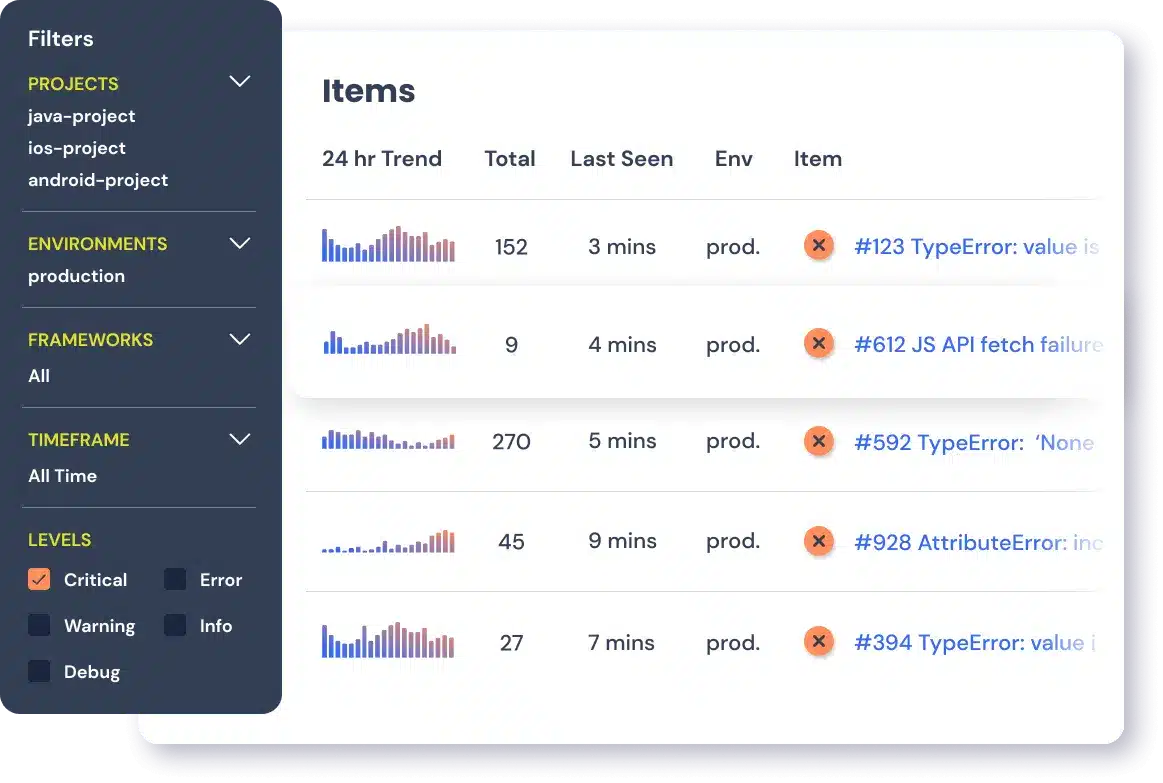
Managing errors and exceptions in your code is challenging. It can make deploying production code an unnerving experience. Being able to track, analyze, and manage errors in real-time can help you to proceed with more confidence. Rollbar automates error monitoring and triaging, making fixing JavaScript errors easier than ever. Sign Up Today!
We’ll often run into errors like “Cannot read properties of undefined (reading ‘id’)”. It’s one of the most common errors that developers encounter during web development. Let’s dig in and understand this error, what it means, and how we can debug it.
Breaking down the Message
TypeError: Cannot read properties of undefined (reading 'id')
In older browsers, this might also be shown as:
Cannot read property 'id' of undefined
TypeError is a subset of JavaScript Error that is thrown when code attempts to do something that does not exist on the target object. In this case, our code expects to have an object with a id property, but that object was not present. id is commonly used on HTMLElement, but it could be a custom data object from a remote API as well.
This is a blocking error, and script execution will stop when this error occurs.
Understanding the Root Cause
This error can be thrown for a lot of reasons, as it is not uncommon to look for the id property of an element, or when iterating over a collection of data. For example, let’s say we’re looking for an element in the DOM and reading it’s id.
For example, if we had a function that acts on a string argument, but is called without a string, we would see this error.
var myElement = document.querySelector('#my-element');
console.log(myElement.id);But if the query #my-element doesn’t exist in the document, we’ll get null back, which obviously doesn’t have an id property.
Alternatively, you might be making a network request that you expect to return a JSON object with an id property.
fetch('/my/api')
  .then(resp => resp.json())
  .then(json => console.log(json.id));
If the API returns an error object, or something else you don’t expect, json may not be defined or not have the expected shape. Or, worse, if the API has a operational failure it can return an HTML error page instead of JSON, leading to errors like SyntaxError: Unexpected Token <.
How to Fix It
So how do we fix this and prevent it from happening again?
1. Understand why your object is undefined

First and foremost, you need to understand why this happened before you can fix it. You are probably not doing exactly the same thing we are, so the reason your object is undefined may be somewhat different. Consider:
- Are you relying on a network response to be a certain shape?
- Are you processing user-input?
- Is an external function or library calling into your code?
Or maybe its just a logical bug somewhere in your code.
2. Add Defensive Checking

Anytime you don’t completely control the input into your code, you need to be defensively checking that arguments have the correct shape. API response change, functions get updated, and users do terrible, terrible things.
For instance, if you have a fetch request that receives a JSON response with a foo string property, you might have a defensive check that looks like this:
fetch("https://example.com/api")
  .then(resp => {
    return resp.json();
  })
  .then(json => {
    if (!json || !json.id) {
      // Record an error, the payload is not the expected shape.
    }
  });
3. Monitor Your Environment

You’ll need to make sure that the issue is really fixed and that the problem stops happening. Mistakes happen, APIs change, and users are unpredictable. Just because your application works today, doesn’t mean an error won’t be discovered tomorrow. Tracking when exceptional events happen to your users gives you the context to understand and fix bugs faster. Check out TrackJS Error Monitoring for the fastest and easiest way to get started.