Climbing the walls with this one!
I can’t attach any phones, and I am receiving the following information from testexchangeconnectivity.com.
testing Exchange ActiveSync
Exchange ActiveSync test Failed
Test Steps
Attempting to resolve the host name mail.mydomain.com in DNS.
Host successfully resolved
Additional Details
IP(s) returned: 81.137.xxx.xx
Testing TCP Port 443 on host mail.mydomain.com to ensure it is listening and open.
The port was opened successfully.
Testing SSL Certificate for validity.
The certificate passed all validation requirements.
Test Steps
Validating certificate name
Successfully validated the certificate name
Additional Details
Found hostname mail.mydomain.com in Certificate Subject Common name
Testing certificate date to ensure validity
Date Validation passed. The certificate is not expired.
Additional Details
Certificate is valid: NotBefore = 12/23/2009 11:47:08 AM, NotAfter = 12/23/2012 11:47:08 AM»
Testing Http Authentication Methods for URL https://mail.mydomain.com/Microsoft-Server-Activesync/
Http Authentication Methods are correct
Additional Details
Found all expected authentication methods and no disallowed methods. Methods Found: Basic
Attempting an ActiveSync session with server
Errors were encountered while testing the ActiveSync session
Test Steps
Attempting to send OPTIONS command to server
OPTIONS response was successfully received and is valid
Additional Details
Headers received: MicrosoftOfficeWebServer: 5.0_Pub
Pragma: no-cache
Public: OPTIONS, POST
Allow: OPTIONS, POST
MS-Server-ActiveSync: 3.0.4215.0
MS-ASProtocolVersions: 1.0,2.0,2.1
MS-ASProtocolCommands: Sync,SendMail,SmartForward,SmartReply,GetAttachment,GetHierarchy,CreateCollection,DeleteCollection,MoveCollection,FolderSync,FolderCreate,FolderDelete,FolderUpdate,MoveItems,GetItemEstimate,MeetingResponse
Content-Length: 0
Date: Tue, 12 Jan 2010 23:54:55 GMT
Server: Microsoft-IIS/6.0
X-Powered-By: ASP.NET
Attempting FolderSync command on ActiveSync session
FolderSync command test failed
Tell me more about this issue and how to resolve it
Additional Details
Exchange ActiveSync returned an HTTP 500 response.
OWA works fine and can’t say there is any other Exchange issues, not that I’m aware of anyway.
Followed a few KB articles. Turned off forms based auth, deleted and recreated virtual directories, checked vdirs configuration, opened and closed ports, split the atom and successfully collided proton beams to find Higgs Boson…and still no joy!!!
I’d be extremely grateful for anyone who can help before I lose the remainder of my hair.
TIA

-
Форум
-
Технические форумы
-
Microsoft
-
Exchange Server

ROOT
Случайный прохожий
-
#1
Добрый день! Не работает activesync из интернета в почтовом сервере exchange 2019. Проброшен 443 порт. OWA открывается нормально а ActiveSync нет. TestExchangeConnectivityAnalyzer дает ошибку
Выполняется запуск сеанса ActiveSync на этом сервере. При проверке сеанса Exchange ActiveSync произошли ошибки.
Не удалось выполнить тест команды FolderSync.
Служба Exchange ActiveSync вернула ответ HTTP 500 (внутренняя ошибка сервера). Заголовки отклика HTTP:
ROOT
Случайный прохожий
-
#2
UPD! Нашел решение сам
Дело было вот в этом. Может кому поможет…
To check whether inheritance is disabled on the user:
- Open Active Directory Users and Computers.
- On the menu at the top of the console, click View > Advanced Features.
- Locate and right-click the mailbox account in the console, and then click Properties.
- Click the Security tab.
- Click Advanced.
- Make sure that the check box for «Include inheritable permissions from this object’s parent» is selected.
-
Форум
-
Технические форумы
-
Microsoft
-
Exchange Server
-
На данном сайте используются cookie-файлы, чтобы персонализировать контент и сохранить Ваш вход в систему, если Вы зарегистрируетесь.
Продолжая использовать этот сайт, Вы соглашаетесь на использование наших cookie-файлов.
Hi,
Form your last reply; I understand that the issue still remained. I suggest that we could
follow KB articles below to recreate all the virtual directories:
Note: Please backup your IIS configuration
file before moving forward.
We need to remove the following virtual directories before rebuilding:
o
Exadmin
o
Exchange
o
ExchWeb
o
Microsoft-Server-ActiveSync
o
OMA
o
Public
o
Exchange-oma
Title: How to reset the default virtual directories
that are required to provide Outlook Web Access, Exchange ActiveSync, and Outlook Mobile Access services in Exchange Server 2003
URL:
http://support.microsoft.com/kb/883380
Note: Please use the
Method 2 to reset the default virtual directories.
Then we need to follow the KB article below to rebuild exchange-oma virtual directory:
Title: Exchange ActiveSync and Outlook Mobile Access
errors occur when SSL or forms-based authentication is required for Exchange Server 2003
URL:
http://support.microsoft.com/kb/817379
Then use the mobile device to synchronize with the server to verify the issue still remained or not.
Note: please use the mobile device
to complete the test. Towards the SBS 2003, ExRCA is not 100% accurate.
Thx,
James
Please remember to click “Mark as Answer” on the post that helps you, and to click “Unmark as Answer” if a marked post does not actually answer your question. This can be beneficial to other community members reading the thread.
-
Marked as answer by
Monday, November 14, 2011 1:14 AM
Hi,
Form your last reply; I understand that the issue still remained. I suggest that we could
follow KB articles below to recreate all the virtual directories:
Note: Please backup your IIS configuration
file before moving forward.
We need to remove the following virtual directories before rebuilding:
o
Exadmin
o
Exchange
o
ExchWeb
o
Microsoft-Server-ActiveSync
o
OMA
o
Public
o
Exchange-oma
Title: How to reset the default virtual directories
that are required to provide Outlook Web Access, Exchange ActiveSync, and Outlook Mobile Access services in Exchange Server 2003
URL:
http://support.microsoft.com/kb/883380
Note: Please use the
Method 2 to reset the default virtual directories.
Then we need to follow the KB article below to rebuild exchange-oma virtual directory:
Title: Exchange ActiveSync and Outlook Mobile Access
errors occur when SSL or forms-based authentication is required for Exchange Server 2003
URL:
http://support.microsoft.com/kb/817379
Then use the mobile device to synchronize with the server to verify the issue still remained or not.
Note: please use the mobile device
to complete the test. Towards the SBS 2003, ExRCA is not 100% accurate.
Thx,
James
Please remember to click “Mark as Answer” on the post that helps you, and to click “Unmark as Answer” if a marked post does not actually answer your question. This can be beneficial to other community members reading the thread.
-
Marked as answer by
Monday, November 14, 2011 1:14 AM
For some users Microsoft Connectivity Analyser is trowing error :
Attempting the FolderSync command on the Exchange ActiveSync session.
The test of the FolderSync command failed.Tell me more about this issue and how to resolve it
Additional Details
Exchange ActiveSync returned an HTTP 500 response (Internal Server Error). HTTP
Test-ActivesyncConnectivity for the same user is generation error :
Error : [System.Net.WebException]: Der Remoteserver hat einen Fehler zurückgegeben: (500)
Interner Serverfehler.
If you search for solution in Internet almost all solutions are to activate the Inheritance for the affected user. But this is not helping.
So after some more research I found that in the test-ActiveSyncConnectivity error with |FL we see that the ActiveSyncDevices are mentioned:
Für den Benutzergerätecontainer ‘CN=ExchangeActiveSyncDevices,CN=username,OU=Users,OU=OU1,OU=User,DC=domain,DC=com’ in Active Directory konnten keine Sicherheitseinstellungen übernommen werden. Löschen Sie den Container, sofern dieser leer ist.”
in English
Exception message: Security settings couldn’t be applied to the user device container ‘CN=ExchangeActiveSyncDevices,CN=username,OU=Users,OU=OU1,OU=User,DC=domain,DC=com’ in Active Directory. Delete the container if it’s empty.
The Solution was to delete the CN=ExchangeActiveSyncDevices from ADSI.edit for the affected user.
Home » Blog » How To » Resolve Exchange ActiveSync Error (500) Internal Server Error
The trend of mobile devices is increasing day by day to execute almost all types of tasks effortlessly. Even users can sync their mail account on smartphones to access mailbox items anywhere. To execute this Microsoft has provided a built-in feature called ActiveSync to access emails via smartphones. Exchange ActiveSync is a sync protocol that permits users to access mailbox items including emails, calendars, journals and tasks from Exchange Server account. It is an XML based application that works on HTTP and HTTPS and even permit users to access data in offline mode. Sometimes these feature trouble users by propelling following error while working “HTTP 500 (Internal Server Error)”.
The following error message does not permit users to access any of the mailbox data on mobile device until it gets resolved. It becomes necessary for users to troubleshoot this problem as it might result in data loss. To resolve the issue it is necessary to what causes this issue. If the root of the error has been detected and fixed the future doors to this error message can be avoided.
Cause
The above discussed error only arrives when one of the following conditions are true:
- The internet service is unavailable on following device
- Sync of data is executed after removal of respective mailbox
- Windows Integrated Authentication is disabled on active directory of Exchange Server
Resolution
When permission inheritance settings are disabled on Active Directory than Exchange Server does not have appropriate permissions to sync mailbox on phone. The error could also be a result of situations when user is member of protected groups on Exchange Server just like Domain Admins or Backup Operators. To resolve the issue
- Open Active Directory users and computers
- From the View menu click on Advanced Features
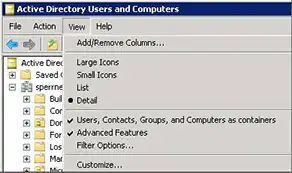
Navigate and selectExchangeActiveSyncDevices and right click on it to select Properties tab.
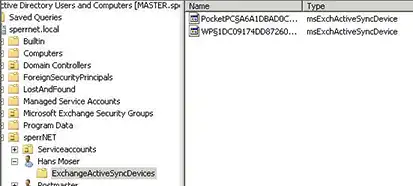
Check on ‘Securities’ tab and click on ‘Advanced’.
In MS Exchange 2010 allow special permissions to ‘Exchange Servers’ group which is responsible for ‘Create/Delete msExchActiveSyncDevices objects’.
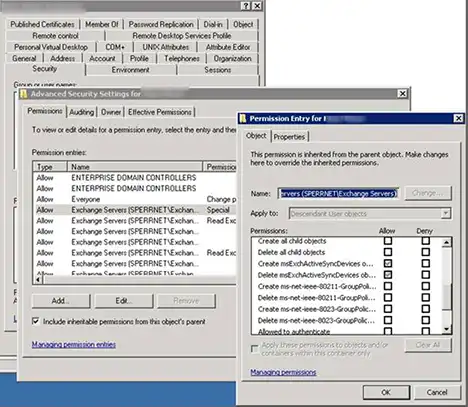
Make sure the option ‘Include inheritable permissions from the object’s parent’is enabled.
It is recommended not to use protected groups for emailing purpose. If required to access rights assigned to protected group it is recommend having multiple Active Directory account. One for user account added to protected group and another for user account implied for emailing other times.