Кодовая ошибка SKYUI 1 возникает при первом запуске Skyrim Script Extender (SKSE). Этот расширитель скриптов используется для моддинга и является одной из самых полных мод-программ, которые не предназначены для обычного пользователя.
SKSE находится в стадии разработки, поэтому пользователи время от времени сталкиваются с сообщениями об ошибке каждый раз, когда выпускается новое обновление для Skyrim через Steam. Проблема в основном возникает по двум причинам: либо неправильно выполнена установка, либо есть какая-то проблема с исполняемым SKSE64.
Содержание
- 1 Причины кодовой ошибки SKYUI 1 при запуске Skyrim через SKSE?
- 2 Запуск SKSE64 от имени администратора
- 3 Правильная установка SKSE
- 3.1 Через диспетчер модов
- 3.2 Как установить вручную?
Причины кодовой ошибки SKYUI 1 при запуске Skyrim через SKSE?
С ошибкой SKYUI Error Code 1 можно столкнуться по следующим причинам:
- Отсутствуют права администратора. Поскольку SKSE модифицирует установленную игру Skyrim, для выполнения некоторых действий требуется доступ администратора.
- Установка SKSE выполнена неправильно.
Перед применением решений нужно убедиться, что Skyrim обновлен до последней версии в Steam. Кроме того, войдите в систему под учетной записью администратора.
Запуск SKSE64 от имени администратора
Skyrim Script Extender требует доступа администратора для правильной установки. Также при каждом запуске скрипта требуется больше разрешений, чем для обычного пользователя.
Щелкните правой кнопкой мыши на SKSE64 в каталоге установки приложения и выберите пункт Свойства.
На вкладке Совместимость отметьте флажком поле «Запускать эту программу от имени администратора».
Примените изменения на «ОК». Запустите приложение и проверьте, исчезло ли сообщение об кодовой ошибке SKYUI 1.
Если не установили SKSE должным образом на компьютере, скорее всего, увидите сообщение об ошибке. Если отсутствуют какие-либо файлы или некоторые модули, программа не сможет запустится. В этом решении рассмотрим, как правильно установить SKSE с помощью двух способов.
Через диспетчер модов
Загрузите SKSE с официального сайта. Затем откройте папку SKSE64_2_00_04 и перейдите в раздел Data, где увидите папку Scripts. Щелкните на ней правой кнопкой мыши и создайте архив. Можно использовать любое программное обеспечение для архивирования, доступное в интернете.
Присвойте имя созданному архиву, например, SKSE64-Scripts, чтобы было легко его распознать.
Теперь нужно установить архив с помощью любого менеджера, который используете для моддинга. Этот метода работает с Vortex, MO2 или WB. Когда придет время обновления, снимите отметку с созданного архива skse64-scripts перед установкой новой версии.
После того как установили архив, нужно сделать ярлык для SKSE64loader.exe и использовать его, чтобы запустить игру.
Пользователи MO2 не столкнуться с какими-либо проблемами, поскольку загрузчик уже распознан в нем. Тем кто использует WB нужно скопировать созданный ярлык в папку Apps, расположенную в каталоге MOPY.
Как установить вручную?
Если не используете менеджер модов, следуйте этому подходу. Здесь скопируем/вставим несколько строк.
Загрузите SKSE с официального сайта. Извлеките содержимое в доступное место. Перейдите в папку SKSE64_2_00_04 и откройте вторую папку SKSE64_2_00_04.
Выделите следующие файлы:
- skse64_1_5_3.dll;
- skse64_loader.exe;
- skse64_steam_loader.dll.
Скопируйте их и вставьте в папку SSE с игрой. По умолчанию эта папка находится в следующей локации:
X:/Steam/SteamApps/Common/Skyrim Special Edition
Где (X) – диск, на котором установлен Steam.
Теперь перейдите к папке Scripts, расположенной внутри SKSE64_2_00_04. Отметьте все файлы .PEX и скопируйте их.
Теперь вставьте в папку Scripts игры. Эта папка расположена по пути:
X:/SteamApps/Common/Skyrim Special Edition/Data/scripts.
Кликните правой кнопкой мыши на exe-файл в папке с игрой и выберите Отправить на – Рабочий стол (ярлык), который будем использовать для ее запуска.
Вот это два метода, которые используются для установки SKSE. Однако рекомендуется использовать первый метод с помощью менеджера модов, поскольку он стабильнее и менее подвержен проблемам.
-
Partition Wizard
-
Partition Magic
- Look! Here Are Top 3 Solutions to SKYUI Error Code 1
By Irene | Follow |
Last Updated February 28, 2020
You get SKYUI error code 1 error message when launching the Skyrim Script Extender (SKSE) utility for modding. How to get rid of the SKYUI error code 1? If you don’t know, don’t worry, this post from MiniTool will show you some top solutions.
The Skyrim Script Extender (SKSE) is a tool used by many Skyrim mods to expand scripting capabilities and add additional functionality to the game. It is one of the most extensive mod programs.
If you are a Skyrim player, you may get the SKYUI Error Code 1 when launching the Skyrim Script Extender (SKSE). Here is the full error message:
SKYUI ERROR CODE 1
The Skyim Script Extender (SKSE) is not running.
SkyUI will not work correctly!
This message may also appear if a new Skyrim Patch has been released. In this case, wait until SKSE has been updated, then install the new version.
For help, see the SkyUl mod description.
OK
How to fix SKYUI error code 1 SKSE not running error on your PC? After analyzing several posts on how to fix SKYUI error code 1 SKSE64, here I have summarized some effective methods that are worth trying. If you don’t know how to fix the error, try the following methods one by one.
Solution 1. SKSE64 as an Administrator
Skyrim Script Extender (SKSE) requires administrator privileges when you install and run it on your computer. To make sure it works properly, you should run Skyim Script Extender as an administrator. If you don’t know how to do that, follow the steps below.
Step 1. Right-click on SKSE64 from the directory and select Properties.
Step 2. Switch to the compatibility tab and check the option Run this program as an administrator to run it as Administrator.
Step 3. Click Apply and OK button to save changes and exit.
Then you can re-launch the application and check if the error message SKYUI error code 1 disappears.
Solution 2. Install SKSE with Mod Manager
If SKSE is not properly installed on your computer, you may get the SKYUI error code 1. Check out the following steps to learn how to install SKSE properly on your computer.
Step 1. Download SKSE and extract the archive
Step 2. Open the SKSE folder and double click on the Data folder.
Step 3. You can find a folder named Scripts. Right click on the Scripts folder and select Add to archive. If you don’t have archiving software installed on your PC, just downtown one from the Internet.
Step 4. Rename the created archive to SKSE64-Scripts.
Step 5. Then can use any mod manager are using to install the archive.
This method is suitable for Vortex, MO2 or WB. When an update is needed, simply uncheck the current skse64 script archive and use the new version.
Solution 3. Install SKSE Manually
You can also install SKSE manually without a mod manager. If you don’t know how to install SKSE manually, you can follow the steps below.
Step 1. Download SKSE. Then extract the archive so you can access it easily.
Step 2. Open the folder, find the files listed below:
skse64_1_5_3.dll
skse64_loader.exe
skse64_steam_loader.dll
Step 3. Copy the above listed files and paste them to your SSE game folder. The default location should be:
C:Program FilesSteam (x86)SteamApps CommonSkyrim Special Edition
Step 4. Go to Data -> Scripts folder in the SKSE folder (here the Data folder is not the one inside Skyrim special edition).
Step 5. In the Scripts folder, copy all the .PEX files and paste them to the game’s script folder. This folder is usually located in the following directory where (X) is the directory where Steam is installed.
C:Program FilesSteam (x86)SteamAppsCommonSkyrim Special EditionDatascripts
Step 6. Right-click on .exe file in the game folder and choose Send to > Desktop (Shortcut) from the menu. Then use the shortcut to launch the game.
Now you should know how to install SKSE on your Skyrim. Have you successfully installed the SKSE? If you find that installing SKSE manually is complicated, just try installing it with Mod Manager.
After reading this post, now you should know how to fix the SKYUI error code 1 error message. Which method works for you? Do you have better solutions? We are glad to have you share it with us.
-
Partition Wizard
-
Partition Magic
- Look! Here Are Top 3 Solutions to SKYUI Error Code 1
By Irene | Follow |
Last Updated February 28, 2020
You get SKYUI error code 1 error message when launching the Skyrim Script Extender (SKSE) utility for modding. How to get rid of the SKYUI error code 1? If you don’t know, don’t worry, this post from MiniTool will show you some top solutions.
The Skyrim Script Extender (SKSE) is a tool used by many Skyrim mods to expand scripting capabilities and add additional functionality to the game. It is one of the most extensive mod programs.
If you are a Skyrim player, you may get the SKYUI Error Code 1 when launching the Skyrim Script Extender (SKSE). Here is the full error message:
SKYUI ERROR CODE 1
The Skyim Script Extender (SKSE) is not running.
SkyUI will not work correctly!
This message may also appear if a new Skyrim Patch has been released. In this case, wait until SKSE has been updated, then install the new version.
For help, see the SkyUl mod description.
OK
How to fix SKYUI error code 1 SKSE not running error on your PC? After analyzing several posts on how to fix SKYUI error code 1 SKSE64, here I have summarized some effective methods that are worth trying. If you don’t know how to fix the error, try the following methods one by one.
Solution 1. SKSE64 as an Administrator
Skyrim Script Extender (SKSE) requires administrator privileges when you install and run it on your computer. To make sure it works properly, you should run Skyim Script Extender as an administrator. If you don’t know how to do that, follow the steps below.
Step 1. Right-click on SKSE64 from the directory and select Properties.
Step 2. Switch to the compatibility tab and check the option Run this program as an administrator to run it as Administrator.
Step 3. Click Apply and OK button to save changes and exit.
Then you can re-launch the application and check if the error message SKYUI error code 1 disappears.
Solution 2. Install SKSE with Mod Manager
If SKSE is not properly installed on your computer, you may get the SKYUI error code 1. Check out the following steps to learn how to install SKSE properly on your computer.
Step 1. Download SKSE and extract the archive
Step 2. Open the SKSE folder and double click on the Data folder.
Step 3. You can find a folder named Scripts. Right click on the Scripts folder and select Add to archive. If you don’t have archiving software installed on your PC, just downtown one from the Internet.
Step 4. Rename the created archive to SKSE64-Scripts.
Step 5. Then can use any mod manager are using to install the archive.
This method is suitable for Vortex, MO2 or WB. When an update is needed, simply uncheck the current skse64 script archive and use the new version.
Solution 3. Install SKSE Manually
You can also install SKSE manually without a mod manager. If you don’t know how to install SKSE manually, you can follow the steps below.
Step 1. Download SKSE. Then extract the archive so you can access it easily.
Step 2. Open the folder, find the files listed below:
skse64_1_5_3.dll
skse64_loader.exe
skse64_steam_loader.dll
Step 3. Copy the above listed files and paste them to your SSE game folder. The default location should be:
C:Program FilesSteam (x86)SteamApps CommonSkyrim Special Edition
Step 4. Go to Data -> Scripts folder in the SKSE folder (here the Data folder is not the one inside Skyrim special edition).
Step 5. In the Scripts folder, copy all the .PEX files and paste them to the game’s script folder. This folder is usually located in the following directory where (X) is the directory where Steam is installed.
C:Program FilesSteam (x86)SteamAppsCommonSkyrim Special EditionDatascripts
Step 6. Right-click on .exe file in the game folder and choose Send to > Desktop (Shortcut) from the menu. Then use the shortcut to launch the game.
Now you should know how to install SKSE on your Skyrim. Have you successfully installed the SKSE? If you find that installing SKSE manually is complicated, just try installing it with Mod Manager.
After reading this post, now you should know how to fix the SKYUI error code 1 error message. Which method works for you? Do you have better solutions? We are glad to have you share it with us.

-
The Elder Scrolls 5: Skyrim
-
Новости2103
-
Мнения1394
-
Юмор2338
-
Файлы9504
-
Читы272
-
Гайды139
-
Cкриншоты54
-
Галерея44571
-
Форум4475
-
Игроки

Всем привет. Установлен Skyrim SE 1.5.97.0.8 + 3 длс, репак от хатаба. В первый раз сам пробовал поставить skse последней версии для поддержки SkyUI, но по какой то причине skse не хотел работать и следовательно SkyUI тоже. Попытался исправить сам с помощью nmm и vortex, вертел папками туда сюда и всё запорол. Подскажите, какая версия skse лучше подойдет для 1.5.97.0.8, и как в моём случае правильно всё установить, для стабильной работы модов?
Игру я кстати переустановил, так что она теперь как чистый лист.

solarr
прежде всего, SKSE не устанавливается мод-менеджерами — ТОЛЬКО вручную.
Соответственно, запуск игры не с ярлыка, а с SKSE (если запуск идет через мод-менеджер, то нужно выставить там)
Что значит «не захотел работать»? В чем это выражалось?
ArXangel_ann
Я и вручную пробовал. Заходя через сксе, выходило это:
Хотя играть было можно, лишь интерфейс инвентаря перемешал стоковый и SkyUI.

короче, идешь сюда https://skse.silverlock.org/
тут качаешь то, что выделено
Спойлер

Открываешь архив зипом, внутри папка «skse64_2_00_20«
Содержимое этой папки (НЕ саму папку) кидаешь в папку игры (НЕ в Data) — в корень, где находится исполняемый файл SkyrimSE.exe
С этих пор запуск игры ТОЛЬКО через skse64_loader.exe
solarr
Ну всё же написано — старая версия СКСЕ
ArXangel_ann
Сделал. Что теперь со SkyUI?
ArXangel_ann
«Ну всё же написано — старая версия СКСЕ»
В том то и дело, до этого я скачал ту же версию(2.0.20) на том же сайте. Но почему то словил ошибку.
solarr
Ну хз, может SkyUI не той версии
Теперь работает? через сксе нормально запускается?
solarr написал:
Что теперь со SkyUI?
устанавливается как обычный мод, любым мод-менеджером. Не нексе последняя версия

solarr
Попробуй другой репак. Надеюсь skse64_loader.exe от администратора запускал?
Хотя если уж качать по новой, то можно сразу AE версию
ArXangel_ann
Даже не знаю. Активировал SkyUI в менеджере, зашел через экзешник. Никаких ошибок не было, но и мод тоже не работал) Будто я его и не скачивал вовсе.
airstorm
Экзешник по другому и не запускается.
>»Попробуй другой репак.» А какой посоветуешь?
solarr
Я сейчас играю в The Elder Scrolls V: Skyrim — Anniversary Edition [v 1.6.342.0 + DLCs + Mods] Repack от dixen18.
Никаких проблем нет, ни с чёрным экраном, ни с буквами в книгах.
Есть ещё нормальный репак The Elder Scrolls V: Skyrim — Anniversary Edition [v 1.6.342.0.8 + DLCs + Mods] от Chovka . Там пофиксили несколько мелочей. Вроде проблем нет.
solarr написал:
Активировал SkyUI в менеджере, зашел через экзешник
Ты же через мод-менеджер игру запускаешь? или просто через экзешник в папке?
Это настолько простые моды, что от репака не зависят. Сам репак может быть глючным, но это касается вылетов и зависонов, а не работы модов. На АЕ все ещё нет и половины тех модов, что есть на SE (это так, для справки)
ArXangel_ann Экзешник можно запустить напрямую через менеджер, поэтому второе.
А так, проблему я решил, скачав другой репак с более свежей версией. Спасибо за помощь.
solarr
а откуда скачивали? просто не хочется наткнутся на трояны или на еще что)

Народ, если у кого та же проблема, у меня вылечилось так: SKSE_loader — идем в свойства, на вкладке Совместимость убираем галочку запускать от имени администратора.
У меня пиратка такая же — стимовская от Xatabа 1.5.97.0.8 + 3 длс и тоже даже без модов сбрасывалась на рабочий стол вскоре после загрузки с выдачей сообщения, как на скрине автора.
Надеюсь, кому-то тоже может будет полезно.
Авторизуйтесь, чтобы принять участие в обсуждении.

На чтение 5 мин. Просмотров 720 Опубликовано 20.04.2021
Код ошибки SKYUI 1 – это ошибка, с которой сталкиваются игроки Skyrim, когда они установили и пытаются запустить Skyrim Script Extender (SKSE). SKSE используется для моддинга и является одной из обширных программ модификаций, которая не предназначена для обычного пользователя. 
SKSE все еще находится в разработке, поэтому пользователи могут время от времени сталкиваться с сообщением об ошибке всякий раз, когда выпускается новое обновление для Skyrim через Steam. Это сообщение об ошибке в основном указывает на две вещи: либо вы неправильно выполнили установку, либо возникла проблема с исполняемым файлом SKSE64.
Содержание
- Что вызывает ‘Код ошибки SKYUI 1’ при запуске Skyrim через SKSE?
- Решение 1. Запуск SKSE64 от имени администратора
- Решение 2. Правильная установка SKSE
- Использование Менеджера модов
- Установка вручную
Что вызывает ‘Код ошибки SKYUI 1’ при запуске Skyrim через SKSE?
Это сообщение об ошибке является очень общим и может возникать в различных пользователи по простейшим причинам. Некоторые из причин, по которым появляется это сообщение об ошибке, помимо прочего:
- Права администратора: SKSE требует, чтобы вы запустить его с правами администратора. Это связано с тем, что программа модифицирует существующую игру Skyrim, некоторые из выполняемых ею действий требуют повышения прав.
- Неправильная установка: выполненная вами установка SKSE может быть выполнена некорректно. . Установка SKSE – очень специфическая задача, требующая выполнения каждого шага. Любой пропуск может вызвать сообщение об ошибке.
Прежде чем переходить к решениям, убедитесь, что на вашем компьютере установлен Skyrim, обновленный до последняя сборка от Steam. Кроме того, вы также должны войти в систему как администратор на своем компьютере.
Решение 1. Запуск SKSE64 от имени администратора
Как указано в причинах, Skyrim Script Extender (SKSE) требует прав администратора для правильной установки на ваш компьютер. Кроме того, он также требует повышения при каждом запуске, потому что технически он работает поверх Skyrim в Steam. Для этого требуется больше разрешений, чем у обычных приложений.
- Щелкните правой кнопкой мыши SKSE64 в каталоге и выберите Свойства .
- Выберите вкладку совместимость и проверьте параметр Запустить эту программу от имени администратора .

- Нажмите Применить , чтобы сохранить изменения и выход. Теперь запустите приложение и проверьте, исчезло ли сообщение об ошибке.
Решение 2. Правильная установка SKSE
Это сообщение об ошибке может появиться, если вы неправильно установили SKSE на свой компьютер. Если в SKSE отсутствуют какие-либо файлы или отсутствуют некоторые модули, он не сможет запуститься. Вместо того, чтобы выдавать конкретное сообщение об ошибке, он возвращает общую ошибку «Код ошибки SKYUI 1».. Здесь будет рассмотрено, как правильно установить SKSE на ваш компьютер двумя способами.
Использование Менеджера модов
- Загрузите SKSE с официального сайта.
- Теперь откройте папку SKSE64_2_00_04 и перейдите в Data . Здесь вы увидите скрипты . Щелкните его правой кнопкой мыши и создайте архив . Вы можете использовать любое программное обеспечение для архивирования, доступное в Интернете.

- Теперь переименуйте созданный архив в «SKSE64-Scripts» или что-нибудь подобное, чтобы вы могли легко его распознать.
- Теперь вам просто нужно установить архив с помощью того менеджера, который вы используете для модификации. Этот метод работает с Vortex, MO2 или WB. а когда придет время обновлять, просто снимите отметку с текущего архива skse64-scripts и выберите новую версию.
Теперь, после того как вы установили архив, вам нужно будет создайте ярлык для SKSE64loader.exe и используйте его для запуска игры. У пользователей MO2 проблем не возникнет, так как в ней уже распознается загрузчик. Пользователи WB могут легко скопировать созданный нами ярлык в папку Apps в папке MOPY , чтобы двоичный файл SKSE также был доступен в WB.
Установка вручную
Если вы не используете менеджер модов, вы можете легко следовать этому подходу вручную и установить SKSE на свой компьютер. Здесь мы скопируем и вставим несколько строк.
- Загрузите SKSE с официального сайта.
- Теперь извлеките содержимое в доступное место. Теперь откройте папку SKSE64_2_00_04 и откройте вторую папку SKSE64_2_00_04 .

- Теперь, как на изображении выше, выделите следующие файлы:
skse64_1_5_3.dllskse64_loader.exeskse64_steam_loader. dll
Скопируйте эти файлы и вставьте их в папку с игрой SSE. Эта папка обычно находится по следующему пути:
X:/Steam/SteamApps/Common/Skyrim Special Edition
Здесь (X) – это драйвер, в котором находится Steam. установлен.
- Теперь перейдите в папку Scripts , которая находится внутри SKSE64_2_00_04 папки (не в папку Data внутри Специальное издание Skyrim). Теперь, когда вы находитесь в папке Scripts, выделите все файлы .PEX и скопируйте их.

- Теперь вставьте их в папку сценария игры. Эта папка обычно находится в следующем каталоге, где (X) – это каталог, в который установлен Steam.
X:/SteamApps/Common/Skyrim Special Edition/Data/scripts.
- Теперь щелкните правой кнопкой мыши на exe в папке с игрой и выберите Отправить на> Рабочий стол (ярлык) . Вы можете использовать это для запуска игры.
Это два метода, которые используются для установки SKSE на ваш Skyrim. Однако мы рекомендуем вам использовать первый метод (с помощью диспетчера модов), поскольку он имеет большую стабильность и менее подвержен проблемам.
Примечание: SKSE находится в стадии альфа, в настоящее время то и дело претерпевает несколько доработок. Каждый раз, когда выпускается новый патч, обязательно обновляйте его, чтобы удалить все ошибки и ввести новые функции.

Many Skyrim players encounter the SKYUI Error Code 1 while trying to launch Skyrim Script Extender (SKSE). SKSE is a popular modding tool that expands both scripting capabilities and functionality for mods. However, every now and then, whenever a new update is released for Skyrim through Steam, players get the error message, stating:
“SkyUI Error Code 1: The Skyrim Script Extender is not running. SkyUI will not work correctly!”
If you’re also getting this error with SKSE64 not working, don’t worry. Follow this simple guide, and you’ll get rid of the problem in no time.
What causes ‘SKYUI Error Code 1’ when launching SKSE?
After a thorough investigation, we found the following to be the most common reasons for this error:
- The Skyrim Script Extender or the game itself may not have the elevated privileges to access certain system files.
- Some of the Mod Manager settings on your computer may not be properly configured.
- The SKSE may not be installed correctly on your computer.
How to fix SKYUI Error Code 1, SKSE Not Working
Here are 3 solutions that’ve proved useful to many Skyrim players:
Fix 1 – Run SKSE64 as Administrator
The Skyrim Script Extender requires administrator rights to mod the existing Skyrim game. Here’s how you run the program as an admin:
1. Go to game’s directory, right-click on the SKSE64 executable file and select Properties.
2. Click on the Compatibility tab and check the box for Run this program as an administrator.
3. Click Apply > OK to save your changes.

Now launch SKSE again to check if the SkyUI Error Code 1 has been rectified.
Fix 2 – Tweak Mod Manager Settings
Sometimes the improper settings in your Mod Manager may trigger the SKSE not working issue on your computer. Follow the steps below to properly configure these settings and get rid of the issue.
1. Open your Mod Manager as administrator and go to Settings from the menu bar located at the top of the screen.
2. In the General tab, check all the boxes present under the Associations section.

3. Click OK and then restart the Mod Manager to make sure that the settings are applied.
Launch Skyrim through SKSE, and if the error still exists, proceed to the next solution.
Fix 3 – Install Skyrim Script Extender properly
It is possible that the SKSE is not installed correctly which is causing this error message to appear. You can fix it by installing the application properly on your computer using any of the two methods mentioned below:
Using Mod Manager:
1. Launch your favorite browser and download Skyrim Script Extender from the official website.
2. Open the SKSE64_2_00_17 folder and navigate into Data.
3. In the Data folder, right-click on the Scripts folder and select Add to archive from the menu list.
4. Now select this newly created archive folder and rename it to SKSE64-Scripts.
5. Next, install the archive using whichever Mod Manager you are using with Skyrim. This method works with Vortex, MO2, and WB.
6. After the archive is installed, you will need to create a shortcut to SKSE64loader.exe and use this to start your game. MO2 automatically recognizes this shortcut whereas WB users will have to copy the shortcut into the Apps folder, located in the MOPY folder.
Installing Manually:
If you are not using the mod manager, you can easily install the SKSE manually by following the steps below:
1. Download SKSE from the official website.
2 Open the SKSE64_2_00_17 folder and locate the following two folders and three files:
Data folder
Src folder
skse64_1_5_3.dll
skse64_loader.exe
skse64_steam_loader.dll

3. Copy the items mentioned above and paste them into the Skyrim Special Edition folder in your game’s directory.
X:/Steam/SteamApps/Common/Skyrim Special Edition
Here, X is the drive where Steam is installed.
4. Now go to the Scripts folder inside the SKSE64_2_00_17 folder and copy all the .PEX files present in that folder.
5. Paste them in the Scripts folder that is located in your game’s directory.
X:/SteamApps/Common/Skyrim Special Edition/Data/scripts.
6. Now you can make a shortcut of the game’s executable file on your desktop to launch it quickly.
We hope this guide helped you solve the SKYUI Error Code 1.
If you have any questions or suggestions, feel free to leave them in the comments below. Thanks for reading!
Featured Image: Reddit
READ NEXT
- LOOT Not Detecting Skyrim and Skyrim SE
- Skyrim Crashes on Startup, Crash to desktop – Easy FIX
TES Skyrim SkyUI Error Code 1 The Skyrim Script Extender (SKSE) is not running. SkyUI will not work correctly!
При заходе в игру вылетает ошибка которая указана в заголовке вопроса, помогите пожалуйста решить данную проблему.

22245 просмотров
больше 5 лет назад
 The Elder Scrolls V Skyrim
2 ответа
 1
1
 1
1

Здравствуйте, все дело в том что скорее всего у вас проблемы с Script Extender (SKSE) — а точнее либо это дополнение повреждено, или просто не установлено. Значит если у вас лицензия то попробуйте сделать то что я скажу, и возможно ошибка будет исправлена.
Итак, поехали.
1.Заходим в Стим, далее переходим в раздел с установленными играми на вашем компьютере. Ну или же можно просто зайти в Библиотеку.
2.Выключаем заранее антивирус, и все подобные программы, ради того чтобы избежать возможных проблем.
3.Теперь находите в Библиотеке TES Skyrim и кликаете по игре ПКМ.
4.Нажимаете на Проверить целостность кэша, и ждете пока все нужные файлы для игры докачаются автоматически. После этого можно заходить в игру и тестировать изменения.
Желаю вам удачи, и буду очень рад если моя информация окажется полезной для вас. Не забывайте после проделанной работы обязательно отписать мне в комментарии, и сказать как прошел весь процесс. Держите нас в курсе событий!
Ответ дан
больше 5 лет назад
2


Никогда не любил Скайрим, но чисто от скуки решил поискать решение, вообщем господа чекаем инфу, если что взята с Американского Стим форума, и переводить в ручную я не смог.
Вообщем как я понял нужно установить/обновить мод SKYUI и запускать его и игру от Имени Администратора, вот и вся суть перевода.
[SOLVED] Код ошибки SKYUI 1 появляется, но я получил SKSE, и мода работает «отлично» от того, что я могу сказать !?
Я получил свои моды, загруженные blabla, но каждый раз, когда я начинаю, он дает мне сообщение об ошибке 1.
Что мне не хватает и как это решить?
Вещи, которые я пробовал и делал:
Щелкните правой кнопкой мыши SKSE_loader.exe [Я также сделал так, чтобы он ВСЕГДА загружался как admin]
Я получил паровую загрузку, поэтому она должна быть актуальной
Я всегда запускаю skyrim visa приложение SKSE на пар.
Не могли бы вы мне помочь? Ура!
Исправлено его, загрузив его manaully и перетащив папки и элементы, которые мне нужны, в папку skyrim. Кажется, мой MCM тоже работает! : D
Ответ дан
больше 5 лет назад
0
Введите ваш ответ


Символов нужно 2
Skyrim is one of the most intensively modded games in the modding community with the help of a few tools like Skyrim Script Extender or SKYSE. However, people have been getting the “SkyUI Error Code 1: The Skyrim Script Extender is not running. SkyUI will not work correctly!” message while trying to launch Skyrim with Mods.

We have provided a detailed explanation behind this issue and have also provided fixes and some workarounds that will help you in fixing this issue on your computer. Make sure to follow the guide carefully to avoid further escalation of the issue.
What Causes the SkyUI Error Code 1?
After some intense investigation, we found the following to be the most common triggers behind this problem.
- Admin Permissions: In some cases, the Skyrim Script Extender or the game itself might be missing admin permissions due to which it might be unable to access some system files and the error code 1 might be triggered while launching the game with mods enabled. Therefore, it is recommended that you provide administrative permissions to the game.
- Faulty Installation: It is possible that either the game, the SKYSE, or the mods haven’t been properly installed on your computer due to which you are facing this error while trying to launch the game with mods and SkyrimSE is unable to load.
- Mod Manager Settings: You might also see the SKYUI Error Code 1 on your computer if you have misconfigured some of the Mod Manager settings on your computer. Follow the guide below to properly configure these settings and get rid of the issue.
- Game Installation Location: If the game hasn’t been installed on the root directory on your computer, you might encounter the Error Code 1 while trying to launch it. It is specifically recommended that you avoid installing the game on any other directory or partition to avoid this issue.
Now that you are familiar with most of the reasons behind the occurrence of the SkyUI Error Code 1 message, we will move on towards fixing the error.
Before you start:
- First of all, navigate to the game’s directory and rename your “skse64_launcher.exe” file as “SkyrimSELauncher.exe” and check if the error code 1 is terminated.
- If you are trying to install “Enderal” with the “Skyrim Special Edition”, you will encounter Error Code 1. To eliminate this error, make sure that you are running Enderal with the “2011” version of the Skyrim because it is only compatible with that version.
Fixing the skyui error code 1:
Solution 1: Run Skyrim Script Extender as administrator
- Right-click on the “SKSE64” executable file, located in the game’s directory, and select “Properties.”
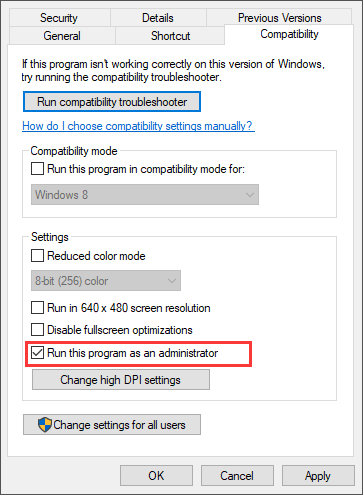
- Now navigate to the “Compatability” tab and check the box parallel to “Run this program as an administrator”.

Running SKSE - Click on the “Apply” button to save the changes and launch Skyrim through SKSE again to check if the skyui error code 1 special edition has been rectified.
Solution 2: Reinstall Skyrim Script Extender
Through Mod Manager:
- Launch your favorite browser download the Skyrim Script Extender from its official website.
- Now open the “SKSE64_2_00_17” folder that you have just downloaded and navigate to the “Data” folder present in it.
- In that folder, right-click on the “Scripts” folder and select “Add to Archive” from the pop-up list.

Adding to Archive - Now select this newly created archive folder and rename it to “SKSE64-Scripts”.
- Install this folder by using the Mod Manager you are using with Skyrim. This method is compatible with “Vortex, MO2, and WB” managers.
- We also recommend you to move the “Data” folder and the “src” folder present in the “SKSE64_2_00_17” folder into the “Skyrim Special Edition” folder located in your game’s directory.
- When it is installed, you will have to create a “SKSE64loader.exe” shortcut to start your game. MO2 manager automatically recognizes this shortcut whereas WB users will have to copy the shortcut into the “Apps” folder, located in the “MOPY” folder.
Install Manually:
- Launch your favorite browser download the Skyrim Script Extender from its official website.
- Now open the “SKSE64_2_00_17” folder that you have just downloaded and locate the following three files and 2 folders.
skse64_1_5_3.dll
skse64_loader.exe
skse64_steam_loader.dll
Data folder
Src folder

Copying the files - Now copy the items mentioned above and paste them into the “Skyrim Special Edition” folder in your game’s directory.
C:/Steam/SteamApps/Common/Skyrim Special Edition
- Now navigate to the “Scripts” folder present inside the “SKSE64_2_00_17” folder that you have downloaded from the internet and select all the “.PEX” files present in that folder.
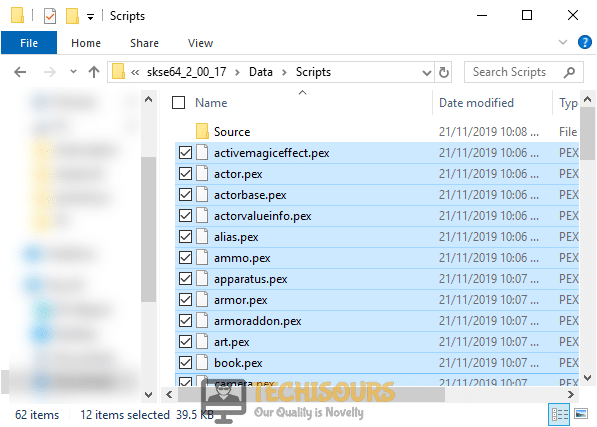
Copying .PEX files - Copy the selected items and paste them in the “Scripts” folder that is located in your game’s directory.
C:/SteamApps/Common/Skyrim Special Edition/Data/scripts.
- Now you can make a shortcut of the game’s executable file on your desktop to launch it quickly.
Solution 3: Tweak settings in Mod manager
- Launch the Mod Manager as administrator and open its “Settings” from the menu bar located at the top of the screen.
- Navigate to the “General” tab and check all the boxes present under the “Association” section.
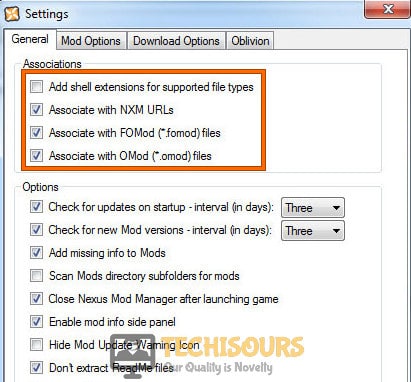
Tweak settings in Mod manager - Now click on the “OK” button to save the changes and restart the Mod Manager to make sure that the settings are applied, open Skyrim, and check if the skyui error code 1 is eliminated.
Solution 4: Change the location of the game folder
- Create a “Game” folder in your “C directory” and move the “Skyrim” folder from the Steam folder into this newly created folder.
- Now launch SKSE as an administrator and start your game through it. As soon as you try to open Skyrim, you will encounter an error message that will state that Steam files are missing.
- Just launch Steam, right-click on the game and select “Properties”.
- Under the “Local” tab, click on the “Browse local files” to go to the location of the game.
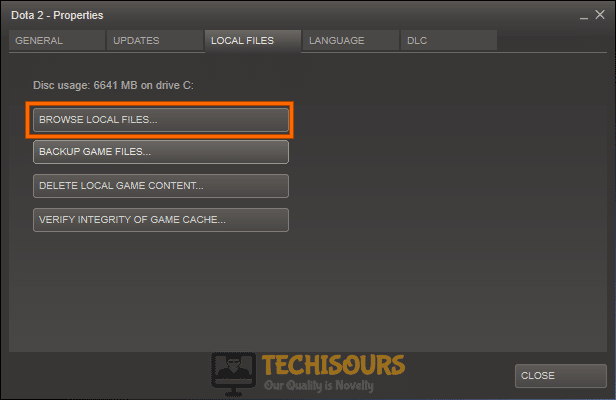
Choose Browse Local files - Now open SKSE from the new location in the directory and check whether you encounter skyui error code 1 again.
Workaround:
- Make sure that “SKSE” and “SKUI” are installed on your computer.
- Open the “Plugins.txt” file that is located in your game’s folder in the directory and type “*” before the names of the mods.
C:/Steam/SteamApps/Common/Skyrim Special Edition
For example:
*RSkyrimChildren.esm
*Lanterns Of Skyrim - All In One - Main.esm
*SkyUI_SE.esp
If you are still unable to fix this issue, you can contact us for any further assistance.
Back to top button

Best Answer
lexeo007
,
25 July 2020 — 10:33 am
Bloody Hell, just figured out why i cant find them.. cuz onedrive had copied them and saved them to a separate folder that was causing them to give me the errors even when i reinstalled everything more than once. Also thx to HadToRegister & Pickysaurus for trying to help out.
Go to the full post »
#1


Posted 25 July 2020 — 03:58 am
lexeo007
-

- Premium Member
-

- 55 posts
Regular
Hey guys & gals, I decided to reinstall my Skyrim se again after i kept getting this error I’ve had a similar error once before but not like this.. I decided to do a fresh install so i have no mods or plugins installed and even reinstalled Vortex again. but every time i load vortex i received theses same errors always, btw i don’t have anything installed yet but the error just keeps showing up..
 Back to top
#2
HadToRegister
Posted 25 July 2020 — 04:06 am
HadToRegister
-

- Premium Member
-
- 19,962 posts
Awake at stupid o’clock
Hey guys & gals, I decided to reinstall my Skyrim se again after i kept getting this error I’ve had a similar error once before but not like this.. I decided to do a fresh install so i have no mods or plugins installed and even reinstalled Vortex again. but every time i load vortex i received theses same errors always, btw i don’t have anything installed yet but the error just keeps showing up..
From the error message, it says that you’re running the wrong version of Mods with the Version of the Script Extender.
Are you using SKyrim SE mods or accidentally using Skyrim mods?
Have you updated SKSE64?
- Back to top
#3
HadToRegister
Posted 25 July 2020 — 04:12 am
HadToRegister
-
- Premium Member
-
- 19,962 posts
Awake at stupid o’clock
OK, after re-reading your OP.
How did you uninstall Vortex and SKyrim SE?
Because it sounds like Vortex is still using your old install, along with Skyrim SE.
So…..when you decided to uninstall Vortex and SKyrim SE
Did you just delete everything without using vortex to PURGE and UNINSTALL the Mods?
Also, did you use Steam to Uninstall SkyRim SE, which would’ve left all of the files, and mods installed with Vortex, still in the folders?
- Back to top
#4
lexeo007
Posted 25 July 2020 — 04:14 am
lexeo007
-
- Premium Member
-
- 55 posts
Regular
Yeah i’m using Skyrim SE mods, and i also have the SE build 2.0.17, unless the mods aren’t updated or something, but even when i deleted them the error still shows
- Back to top
#5
lexeo007
Posted 25 July 2020 — 04:19 am
lexeo007
-
- Premium Member
-
- 55 posts
Regular
yeah i also purged and uninstalled vortex, i’m currently reinstalling Skyrim atm
- Back to top
#6
HadToRegister
Posted 25 July 2020 — 04:53 am
HadToRegister
-
- Premium Member
-
- 19,962 posts
Awake at stupid o’clock
yeah i also purged and uninstalled vortex, i’m currently reinstalling Skyrim atm
Did you uninstall the mods before you uninstalled Vortex?
And when you uninstalled Skyrim, did you make sure that the SKyrim folder was empty?
The reason I ask, is because there’s been quite a few cases where people uninstall everything with Vortex, and then Uninstall their game with Steam, but Steam leaves the Game folder full of stuff it doesn’t know to delete
- Back to top
#7
lexeo007
Posted 25 July 2020 — 07:48 am
lexeo007
-
- Premium Member
-
- 55 posts
Regular
yeah i did all that, i still haven’t even made a mod or download folder and as soon as vortex is loaded and i press manage is says that error. idk whats wrong its doing my head in
- Back to top
#8
Pickysaurus
Posted 25 July 2020 — 09:37 am
Pickysaurus
-

- Admin
-

- 19,921 posts
Community Manager
The screenshot is fairly clearly showing you that the DLLs with the problem are not managed by Vortex, meaning they’re in your DataSKSE folder loose
- Back to top
#9
lexeo007
Posted 25 July 2020 — 10:33 am
lexeo007
-
- Premium Member
-
- 55 posts
Regular
✓ Best Answer
Bloody Hell, just figured out why i cant find them.. cuz onedrive had copied them and saved them to a separate folder that was causing them to give me the errors even when i reinstalled everything more than once. Also thx to HadToRegister & Pickysaurus for trying to help out.
- Back to top
Содержание
- 1 Что вызывает «SKYUI Error Code 1» при запуске Skyrim через SKSE?
- 1.1 Решение 1. Запуск SKSE64 от имени администратора
- 1.2 Решение 2. Правильная установка SKSE
- 1.3 Использование менеджера модов
- 1.4 Установка вручную
SKYUI Error Code 1 — ошибка, с которой сталкиваются игроки Skyrim, когда они установили и пытаются запустить Skyrim Script Extender (SKSE). SKSE используется для моддинга и является одной из обширных мод-программ, которая не предназначена для обычного пользователя.
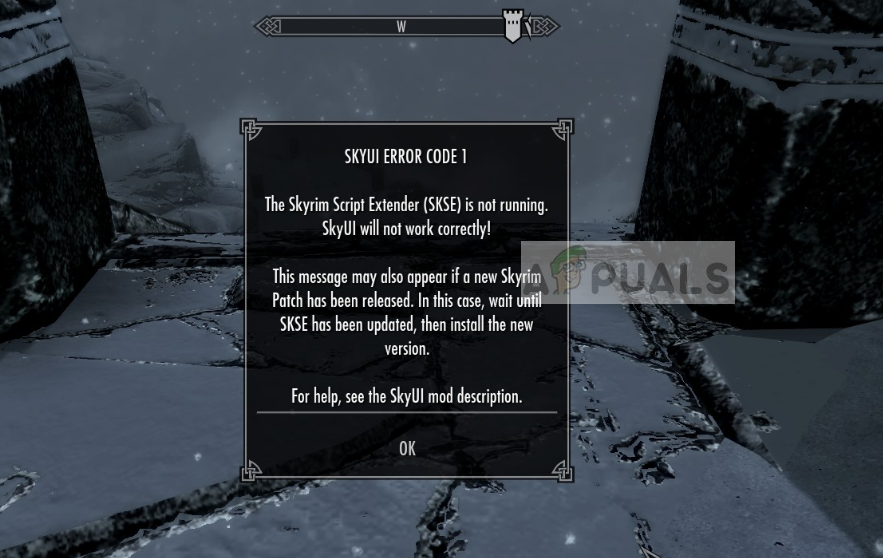 SKYUI Код ошибки 1
SKSE все еще находится в стадии разработки, поэтому пользователи могут время от времени сталкиваться с сообщениями об ошибках при каждом выпуске нового обновления для Skyrim через Steam. Это сообщение об ошибке в основном указывает на две вещи: либо вы неправильно выполнили установку, либо возникли проблемы с исполняемым файлом SKSE64.
Что вызывает «SKYUI Error Code 1» при запуске Skyrim через SKSE?
Это сообщение об ошибке очень общее и может появиться у разных пользователей по самым простым причинам. Некоторые из причин появления этого сообщения об ошибках, но не ограничиваются:
- Права администратора: SKSE требует, чтобы вы запускали его с правами администратора. Это потому, что программа модифицирует существующую игру Skyrim, некоторые действия, которые она выполняет, требуют повышения прав.
- Неправильная установка: Выполненная вами установка SKSE может быть выполнена неправильно. Установка SKSE — это очень специфическая задача, которая требует от вас выполнения каждого шага. Любой пропуск может вызвать сообщение об ошибке.
Прежде чем перейти к решениям, убедитесь, что на вашем компьютере установлена надлежащая версия Skyrim, которая обновлена до последней версии Steam. Кроме того, вы также должны войти в систему как администратор на вашем компьютере.
Решение 1. Запуск SKSE64 от имени администратора
Как упомянуто в причинах, Skyrim Script Extender (SKSE) требует права администратора для правильной установки на ваш компьютер. Кроме того, он также требует повышения при запуске, потому что технически он работает поверх Skyrim в Steam. Для этого требуется больше разрешений, чем в обычных приложениях.
- Щелкните правой кнопкой мыши на SKSE64 в каталоге и выберите свойства.
- Выберите вкладку совместимость а также проверять опция Запустите эту программу от имени администратора.
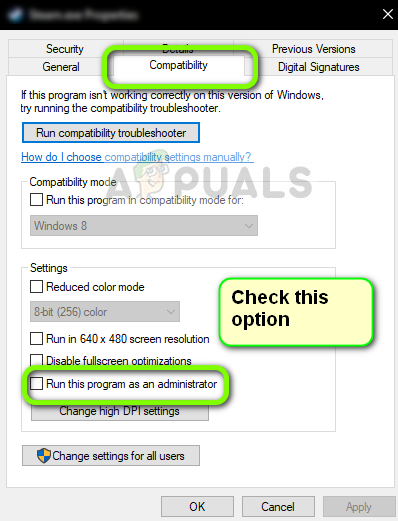 Получение SKSE для запуска в качестве администратора
- Нажмите Применять сохранить изменения и выйти. Теперь запустите приложение и проверьте, исчезло ли сообщение об ошибке.
Решение 2. Правильная установка SKSE
Если вы не установили SKSE должным образом на вашем компьютере, может появиться это сообщение об ошибке. Если в SKSE отсутствуют какие-либо файлы или отсутствуют некоторые модули, он не сможет запуститься. Вместо того, чтобы выдавать конкретное сообщение об ошибке, он возвращает общую ошибку «SKYUI Error Code 1». Здесь вы узнаете, как правильно установить SKSE на свой компьютер двумя способами.
Использование менеджера модов
- Скачать СКСЭ с официального сайта.
- Сейчас открыть папка SKSE64_2_00_04 далее перейдите в Данные Теперь вы увидите Сценарии присутствует здесь. Щелкните правой кнопкой мыши на нем и создать архив. Вы можете использовать любое программное обеспечение для архивирования, доступное в Интернете.
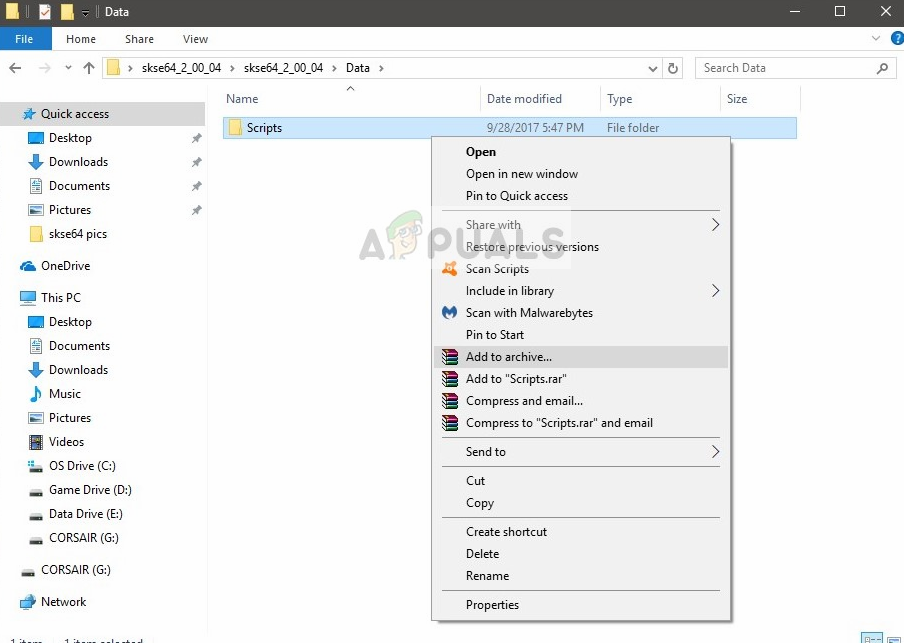 Папка архивирования скриптов
- Сейчас переименовать созданный архив в «SKSE64-Scripts» или что-то подобное, чтобы вы могли легко распознать его.
- Теперь вам просто нужно установить архив используя тот менеджер, который вы используете для моддинга. Этот метод работает с Vortex, MO2 или WB. и когда придет время для обновления, просто снимите текущий архив skse64-scripts в пользу новой версии.
Теперь, после того как вы установили архив, вам нужно будет сделать ярлык в SKSE64loader.exe и используйте это, чтобы начать игру. У пользователей MO2 проблем не будет, так как загрузчик уже распознан в нем. Пользователи ВБ могут легко скопировать созданный нами ярлык на Программы папка в Mopy папку, чтобы они могли иметь двоичный файл SKSE в WB.
Установка вручную
Если вы не используете менеджер модов, вы можете легко следовать этому ручному подходу и установить SKSE на свой компьютер. Здесь мы скопируем и вставим несколько строк.
- Скачать СКСЭ с официального сайта.
- Теперь извлеките содержимое в доступное место. Сейчас открыть SKSE64_2_00_04 и откройте вторая папка SKSE64_2_00_04.
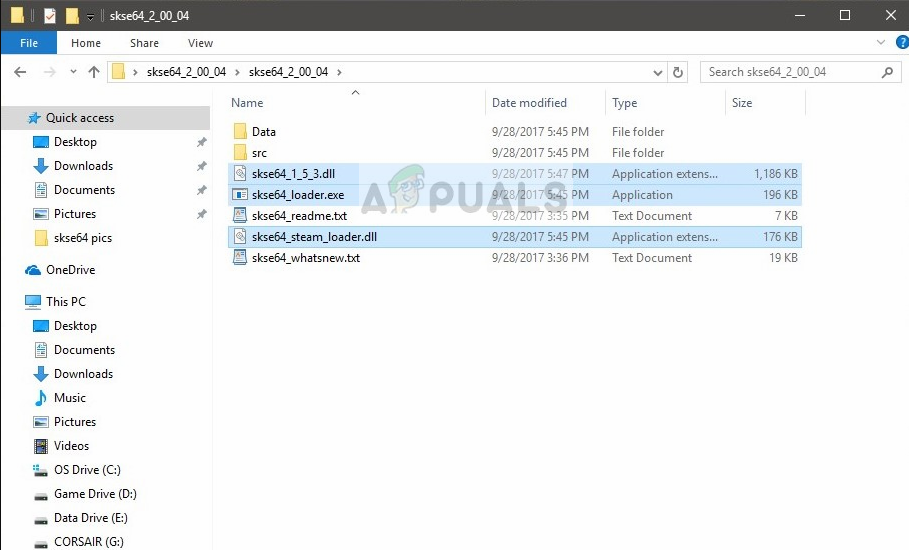 Выбор файлов SKSE для копирования
- Теперь, как на изображении выше, выделите следующие файлы:
skse64_1_5_3.dll
skse64_loader.exe
skse64_steam_loader.dll
копия эти файлы и вставьте их в папку с игрой SSE. Эта папка обычно находится по следующему пути:
X: / Steam / SteamApps / Общие / Skyrim Special Edition
Здесь (X) — драйвер, на котором установлен Steam.
- Теперь перейдите к Сценарии папка присутствует внутри Папка SKSE64_2_00_04 (Не в папке «Данные» внутри специальной версии Skyrim). Теперь, когда вы находитесь в папке Scripts, выделите все файлы .PEX и скопировать их.
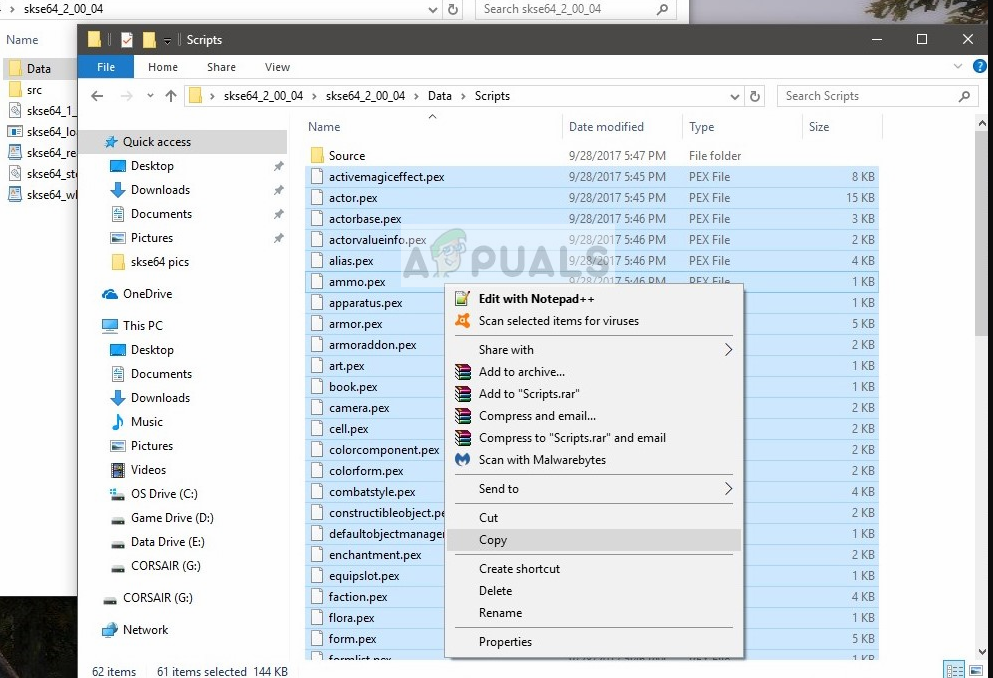 Копирование всех файлов .PEX
- Сейчас вставьте их в папке скриптов игры. Эта папка обычно находится в следующем каталоге, где (X) — каталог, в котором установлен Steam.
X: / SteamApps / Common / Skyrim Special Edition / Данные / Скрипты.
- Сейчас щелкните правой кнопкой мыши на EXE в папке с игрой и выберите Отправить> Рабочий стол (ярлык). Вы можете использовать это для запуска игры.
Это два метода, которые используются для установки SKSE на ваш Skyrim. Тем не менее, мы рекомендуем вам использовать первый метод (используя Mod Manager), так как он имеет большую стабильность и менее подвержен проблемам.
Замечания: SKSE находится в стадии альфа, в настоящее время проходит несколько разработок время от времени. Каждый раз, когда выпускается новый патч, обязательно обновите его, чтобы удалить все ошибки и ввести новые функции.