REST API использует строку состояния в HTTP ответе (статус ответа), чтобы информировать Клиентов о результате запроса.
Вообще HTTP определяет 40 стандартных кодов состояния (статусов ответа), которые делятся на пять категорий. Ниже выделены только те коды состояния, которые часто используются в REST API.
| Категория | Описание |
|---|---|
| 1xx: Информация | В этот класс содержит заголовки информирующие о процессе передачи. Это обычно предварительный ответ, состоящий только из Status-Line и опциональных заголовков, и завершается пустой строкой. Нет обязательных заголовков. Серверы НЕ ДОЛЖНЫ посылать 1xx ответы HTTP/1.0 клиентам. |
| 2xx: Успех | Этот класс кодов состояния указывает, что запрос клиента был успешно получен, понят, и принят. |
| 3xx: Перенаправление | Коды этого класса сообщают клиенту, что для успешного выполнения операции необходимо сделать другой запрос, как правило, по другому URI. Из данного класса пять кодов 301, 302, 303, 305 и 307 относятся непосредственно к перенаправлениям. |
| 4xx: Ошибка клиента | Класс кодов 4xx предназначен для указания ошибок со стороны клиента. |
| 5xx: Ошибка сервера | Коды ответов, начинающиеся с «5» указывают на случаи, когда сервер знает, что произошла ошибка или он не может обработать запрос. |
Коды состояний в REST
Звездочкой * помечены популярные (часто используемые) коды ответов.
200 * (OK)
Запрос выполнен успешно. Информация, возвращаемая с ответом зависит от метода, используемого в запросе, например при:
- GET Получен объект, соответствующий запрошенному ресурсу.
- HEAD Получены поля заголовков, соответствующие запрошенному ресурсу, тело ответа пустое.
- POST Запрошенное действие выполнено.
201 * (Created — Создано)
REST API отвечает кодом состояния 201 при каждом создании ресурса в коллекции. Также могут быть случаи, когда новый ресурс создается в результате какого-либо действия контроллера, и в этом случае 201 также будет подходящем ответом.
Ссылка (URL) на новый ресурс может быть в теле ответа или в поле заголовка ответа Location.
Сервер должен создать ресурс перед тем как вернуть 201 статус. Если это невозможно сделать сразу, тогда сервер должен ответить кодом 202 (Accepted).
202 (Accepted — Принято)
Ответ 202 обычно используется для действий, которые занимают много времени для обработки и не могут быть выполнены сразу. Это означает, что запрос принят к обработке, но обработка не завершена.
Его цель состоит в том, чтобы позволить серверу принять запрос на какой-либо другой процесс (возможно, пакетный процесс, который выполняется только один раз в день), не требуя, чтобы соединение агента пользователя с сервером сохранялось до тех пор, пока процесс не будет завершен.
Сущность, возвращаемая с этим ответом, должна содержать указание на текущее состояние запроса и указатель на монитор состояния (расположение очереди заданий) или некоторую оценку того, когда пользователь может ожидать выполнения запроса.
203 (Non-Authoritative Information — Неавторитетная информация)
Предоставленная информация взята не из оригинального источника (а, например, из кэша, который мог устареть, или из резервной копии, которая могла потерять актуальность). Этот факт отражен в заголовке ответа и подтверждается этим кодом. Предоставленная информация может совпадать, а может и не совпадать с оригинальными данными.
204 * (No Content — Нет контента)
Код состояния 204 обычно отправляется в ответ на запрос PUT, POST или DELETE, когда REST API отказывается отправлять обратно любое сообщение о состоянии проделанной работы.
API может также отправить 204 статус в ответ на GET запрос, чтобы указать, что запрошенный ресурс существует, но не имеет данных для добавления их в тело ответа.
Ответ 204 не должен содержать тело сообщения и, таким образом, всегда завершается первой пустой строкой после полей заголовка.
205 — (Reset Content — Сброшенное содержимое)
Сервер успешно обработал запрос и обязывает клиента сбросить введенные пользователем данные. В ответе не должно передаваться никаких данных (в теле ответа). Обычно применяется для возврата в начальное состояние формы ввода данных на клиенте.
206 — (Partial Content — Частичное содержимое)
Сервер выполнил часть GET запроса ресурса. Запрос ДОЛЖЕН был содержать поле заголовка Range (секция 14.35), который указывает на желаемый диапазон и МОГ содержать поле заголовка If-Range (секция 14.27), который делает запрос условным.
Запрос ДОЛЖЕН содержать следующие поля заголовка:
- Либо поле Content-Range (секция 14.16), который показывает диапазон, включённый в этот запрос, либо Content-Type со значением multipart/byteranges, включающими в себя поля Content-Range для каждой части. Если в заголовке запроса есть поле Content-Length, его значение ДОЛЖНО совпадать с фактическим количеством октетов, переданных в теле сообщения.
- Date
- ETag и/или Content-Location, если ранее был получен ответ 200 на такой же запрос.
- Expires, Cache-Control, и/или Vary, если значение поля изменилось с момента отправления последнего такого же запроса
Если ответ 206 — это результат выполнения условного запроса, который использовал строгий кэш-валидатор (подробнее в секции 13.3.3), в ответ НЕ СЛЕДУЕТ включать какие-либо другие заголовки сущности. Если такой ответ — результат выполнения запроса If-Range, который использовал «слабый» валидатор, то ответ НЕ ДОЛЖЕН содержать другие заголовки сущности; это предотвращает несоответствие между закэшированными телами сущностей и обновлёнными заголовками. В противном случае ответ ДОЛЖЕН содержать все заголовки сущностей, которые вернули статус 200 (OK) на тот же запрос.
Кэш НЕ ДОЛЖЕН объединять ответ 206 с другими ранее закэшированными данными, если поле ETag или Last-Modified в точности не совпадают (подробнее в секции 16.5.4)
Кэш, который не поддерживает заголовки Range и Content-Range НЕ ДОЛЖЕН кэшировать ответы 206 (Partial).
300 — (Multiple Choices — Несколько вариантов)
По указанному URI существует несколько вариантов предоставления ресурса по типу MIME, по языку или по другим характеристикам. Сервер передаёт с сообщением список альтернатив, давая возможность сделать выбор клиенту автоматически или пользователю.
Если это не запрос HEAD, ответ ДОЛЖЕН включать объект, содержащий список характеристик и адресов, из которого пользователь или агент пользователя может выбрать один наиболее подходящий. Формат объекта определяется по типу данных приведённых в Content-Type поля заголовка. В зависимости от формата и возможностей агента пользователя, выбор наиболее подходящего варианта может выполняться автоматически. Однако эта спецификация не определяет никакого стандарта для автоматического выбора.
Если у сервера есть предпочтительный выбор представления, он ДОЛЖЕН включить конкретный URI для этого представления в поле Location; агент пользователя МОЖЕТ использовать заголовок Location для автоматического перенаправления к предложенному ресурсу. Этот запрос может быть закэширован, если явно не было указано иного.
301 (Moved Permanently — Перемещено навсегда)
Код перенаправления. Указывает, что модель ресурсов REST API была сильно изменена и теперь имеет новый URL. Rest API должен указать новый URI в заголовке ответа Location, и все будущие запросы должны быть направлены на указанный URI.
Вы вряд ли будете использовать этот код ответа в своем API, так как вы всегда можете использовать версию API для нового API, сохраняя при этом старый.
302 (Found — Найдено)
Является распространенным способом выполнить перенаправление на другой URL. HTTP-ответ с этим кодом должен дополнительно предоставит URL-адрес куда перенаправлять в поле заголовка Location. Агенту пользователя (например, браузеру) предлагается в ответе с этим кодом сделать второй запрос на новый URL.
Многие браузеры реализовали этот код таким образом, что нарушили стандарт. Они начали изменять Тип исходного запроса, например с POST на GET. Коды состояния 303 и 307 были добавлены для серверов, которые хотят однозначно определить, какая реакция ожидается от клиента.
303 (See Other — Смотрите другое)
Ответ 303 указывает, что ресурс контроллера завершил свою работу, но вместо отправки нежелательного тела ответа он отправляет клиенту URI ресурса. Это может быть URI временного сообщения о состоянии ресурса или URI для уже существующего постоянного ресурса.
Код состояния 303 позволяет REST API указать ссылку на ресурс, не заставляя клиента загружать ответ. Вместо этого клиент может отправить GET запрос на URL указанный в заголовке Location.
Ответ 303 не должен кэшироваться, но ответ на второй (перенаправленный) запрос может быть кэшируемым.
304 * (Not Modified — Не изменен)
Этот код состояния похож на 204 (Нет контента), так как тело ответа должно быть пустым. Ключевое различие состоит в том, что 204 используется, когда нет ничего для отправки в теле, тогда как 304 используется, когда ресурс не был изменен с версии, указанной заголовками запроса If-Modified-Since или If-None-Match.
В таком случае нет необходимости повторно передавать ресурс, так как у клиента все еще есть ранее загруженная копия.
Все это экономит ресурсы клиента и сервера, так как только заголовки должны быть отправлены и приняты, и серверу нет необходимости генерировать контент снова, а клиенту его получать.
305 — (Use Proxy — Используйте прокси)
Доступ к запрошенному ресурсу ДОЛЖЕН быть осуществлен через прокси-сервер, указанный в поле Location. Поле Location предоставляет URI прокси. Ожидается, что получатель повторит этот запрос с помощью прокси. Ответ 305 может генерироваться ТОЛЬКО серверами-источниками.
Заметьте: в спецификации RFC 2068 однозначно не сказано, что ответ 305 предназначен для перенаправления единственного запроса, и что он должен генерироваться только сервером-источником. Упущение этих ограничений вызвало ряд значительных последствий для безопасности.
Многие HTTP клиенты (такие, как Mozilla и Internet Explorer) обрабатывают этот статус некорректно прежде всего из соображений безопасности.
307 (Temporary Redirect — Временный редирект)
Ответ 307 указывает, что rest API не будет обрабатывать запрос клиента. Вместо этого клиент должен повторно отправить запрос на URL, указанный в заголовке Location. Однако в будущих запросах клиент по-прежнему должен использоваться исходный URL.
Rest API может использовать этот код состояния для назначения временного URL запрашиваемому ресурсу.
Если метод запроса не HEAD, тело ответа должно содержать короткую заметку с гиперссылкой на новый URL. Если код 307 был получен в ответ на запрос, отличный от GET или HEAD, Клиент не должен автоматически перенаправлять запрос, если он не может быть подтвержден Клиентом, так как это может изменить условия, при которых был создан запрос.
308 — (Permanent Redirect — Постоянное перенаправление) (experimental)
Нужно повторить запрос на другой адрес без изменения применяемого метода.
Этот и все последующие запросы нужно повторить на другой URI. 307 и 308 (как предложено) Схож в поведении с 302 и 301, но не требуют замены HTTP метода. Таким образом, например, отправку формы на «постоянно перенаправленный» ресурс можно продолжать без проблем.
400 * (Bad Request — Плохой запрос)
Это общий статус ошибки на стороне Клиента. Используется, когда никакой другой код ошибки 4xx не уместен. Ошибки могут быть как неправильный синтаксис запроса, неверные параметры запроса, запросы вводящие в заблуждение или маршрутизатор и т.д.
Клиент не должен повторять точно такой же запрос.
401 * (Unauthorized — Неавторизован)
401 сообщение об ошибке указывает, что клиент пытается работать с закрытым ресурсом без предоставления данных авторизации. Возможно, он предоставил неправильные учетные данные или вообще ничего. Ответ должен включать поле заголовка WWW-Authenticate, содержащего описание проблемы.
Клиент может повторить запрос указав в заголовке подходящее поле авторизации. Если это уже было сделано, то в ответе 401 будет указано, что авторизация для указанных учетных данных не работает. Если в ответе 401 содержится та же проблема, что и в предыдущем ответе, и Клиент уже предпринял хотя бы одну попытку проверки подлинности, то пользователю Клиента следует представить данные полученные в ответе, владельцу сайта, так как они могут помочь в диагностике проблемы.
402 — (Payment Required — Требуется оплата)
Этот код зарезервирован для использования в будущем.
Предполагается использовать в будущем. В настоящий момент не используется. Этот код предусмотрен для платных пользовательских сервисов, а не для хостинговых компаний. Имеется в виду, что эта ошибка не будет выдана хостинговым провайдером в случае просроченной оплаты его услуг. Зарезервирован, начиная с HTTP/1.1.
403 * (Forbidden — Запрещено)
Ошибка 403 указывает, что rest API отказывается выполнять запрос клиента, т.е. Клиент не имеет необходимых разрешений для доступа. Ответ 403 не является случаем, когда нужна авторизация (для ошибки авторизации используется код 401).
Попытка аутентификация не поможет, и повторные запросы не имеют смысла.
404 * (Not Found — Не найдено)
Указывает, что rest API не может сопоставить URL клиента с ресурсом, но этот URL может быть доступен в будущем. Последующие запросы клиента допустимы.
404 не указывает, является ли состояние временным или постоянным. Для указания постоянного состояния используется код 410 (Gone — Пропал). 410 использоваться, если сервер знает, что старый ресурс постоянно недоступен и более не имеет адреса.
405 (Method Not Allowed — Метод не разрешен)
API выдает ошибку 405, когда клиент пытался использовать HTTP метод, который недопустим для ресурса. Например, указан метод PUT, но такого метода у ресурса нет.
Ответ 405 должен включать Заголовок Allow, в котором перечислены поддерживаемые HTTP методы, например, Allow: GET, POST.
406 (Not Acceptable — Неприемлемый)
API не может генерировать предпочитаемые клиентом типы данных, которые указаны в заголовке запроса Accept. Например, запрос клиента на данные в формате application/xml получит ответ 406, если API умеет отдавать данные только в формате application/json.
В таких случаях Клиент должен решить проблему данных у себя и только потом отправлять запросы повторно.
407 — (Proxy Authentication Required — Требуется прокси-аутентификация)
Ответ аналогичен коду 401, за исключением того, что аутентификация производится для прокси-сервера. Механизм аналогичен идентификации на исходном сервере.
Пользователь должен сначала авторизоваться через прокси. Прокси-сервер должен вернуть Proxy-Authenticate заголовок, содержащий запрос ресурса. Клиент может повторить запрос вместе с Proxy-Authenticate заголовком. Появился в HTTP/1.1.
408 — (Request Timeout — Таймаут запроса)
Время ожидания сервером передачи от клиента истекло. Клиент не предоставил запрос за то время, пока сервер был готов его принят. Клиент МОЖЕТ повторить запрос без изменений в любое время.
Например, такая ситуация может возникнуть при загрузке на сервер объёмного файла методом POST или PUT. В какой-то момент передачи источник данных перестал отвечать, например, из-за повреждения компакт-диска или потери связи с другим компьютером в локальной сети. Пока клиент ничего не передаёт, ожидая от него ответа, соединение с сервером держится. Через некоторое время сервер может закрыть соединение со своей стороны, чтобы дать возможность другим клиентам сделать запрос.
409 * (Conflict — Конфликт)
Запрос нельзя обработать из-за конфликта в текущем состоянии ресурса. Этот код разрешается использовать только в тех случаях, когда ожидается, что пользователь может самостоятельно разрешить этот конфликт и повторить запрос. В тело ответа СЛЕДУЕТ включить достаточное количество информации для того, чтобы пользователь смог понять причину конфликта. В идеале ответ должен содержать такую информацию, которая поможет пользователю или его агенту исправить проблему. Однако это не всегда возможно и это не обязательно.
Как правило, конфликты происходят во время PUT-запроса. Например, во время использования версионирования, если сущность, к которой обращаются методом PUT, содержит изменения, конфликтующие с теми, что были сделаны ранее третьей стороной, серверу следует использовать ответ 409, чтобы дать понять пользователю, что этот запрос нельзя завершить. В этом случае в ответной сущности должен содержаться список изменений между двумя версиями в формате, который указан в поле заголовка Content-Type.
410 — (Gone — Исчез)
Такой ответ сервер посылает, если ресурс раньше был по указанному URL, но был удалён и теперь недоступен. Серверу в этом случае неизвестно и местоположение альтернативного документа, например, копии. Если у сервера есть подозрение, что документ в ближайшее время может быть восстановлен, то лучше клиенту передать код 404. Появился в HTTP/1.1.
411 — (Length Required — Требуется длина)
Для указанного ресурса клиент должен указать Content-Length в заголовке запроса. Без указания этого поля не стоит делать повторную попытку запроса к серверу по данному URI. Такой ответ естественен для запросов типа POST и PUT. Например, если по указанному URI производится загрузка файлов, а на сервере стоит ограничение на их объём. Тогда разумней будет проверить в самом начале заголовок Content-Length и сразу отказать в загрузке, чем провоцировать бессмысленную нагрузку, разрывая соединение, когда клиент действительно пришлёт слишком объёмное сообщение.
412 — (Precondition Failed — Предварительное условие не выполнено)
Возвращается, если ни одно из условных полей заголовка запроса не было выполнено.
Когда клиент указывает rest API выполнять запрос только при выполнении определенных условий, а API не может выполнить запрос при таких условиях, то возвращается ответ 412.
Этот код ответа позволяет клиенту записывать предварительные условия в метаинформации текущего ресурса, таким образом, предотвращая применение запрошенного метода к ресурсу, кроме того, что ожидается.
413 — (Request Entity Too Large — Сущность запроса слишком большая)
Возвращается в случае, если сервер отказывается обработать запрос по причине слишком большого размера тела запроса. Сервер может закрыть соединение, чтобы прекратить дальнейшую передачу запроса.
Если проблема временная, то рекомендуется в ответ сервера включить заголовок Retry-After с указанием времени, по истечении которого можно повторить аналогичный запрос.
414 — (Request-URI Too Long — Запрос-URI Слишком длинный)
Сервер не может обработать запрос из-за слишком длинного указанного URL. Эту редкую ошибку можно спровоцировать, например, когда клиент пытается передать длинные параметры через метод GET, а не POST, когда клиент попадает в «чёрную дыру» перенаправлений (например, когда префикс URI указывает на своё же окончание), или когда сервер подвергается атаке со стороны клиента, который пытается использовать дыры в безопасности, которые встречаются на серверах с фиксированной длиной буфера для чтения или обработки Request-URI.
415 (Unsupported Media Type — Неподдерживаемый медиа тип)
Сообщение об ошибке 415 указывает, что API не может обработать предоставленный клиентом Тип медиа, как указано в заголовке запроса Content-Type.
Например, запрос клиента содержит данные в формате application/xml, а API готов обработать только application/json. В этом случае клиент получит ответ 415.
Например, клиент загружает изображение как image/svg+xml, но сервер требует, чтобы изображения использовали другой формат.
428 — (Precondition Required — Требуется предварительное условие)
Код состояния 428 указывает, что исходный сервер требует, чтобы запрос был условным.
Его типичное использование — избежать проблемы «потерянного обновления», когда клиент ПОЛУЧАЕТ состояние ресурса, изменяет его и ОТПРАВЛЯЕТ обратно на сервер, когда тем временем третья сторона изменила состояние на сервере, что привело к конфликту. Требуя, чтобы запросы были условными, сервер может гарантировать, что клиенты работают с правильными копиями.
Ответы с этим кодом состояния ДОЛЖНЫ объяснять, как повторно отправить запрос.
429 — (Too Many Requests — Слишком много запросов)
Пользователь отправил слишком много запросов за заданный промежуток времени.
Представления ответа ДОЛЖНЫ включать подробности, объясняющие условие, и МОГУТ включать заголовок Retry-After, указывающий, как долго ждать, прежде чем делать новый запрос.
431 — (Request Header Fields Too Large — Слишком большие поля заголовка запроса)
Код состояния 431 указывает на то, что сервер не желает обрабатывать запрос, поскольку его поля заголовка слишком велики. Запрос МОЖЕТ быть отправлен повторно после уменьшения размера полей заголовка запроса.
Его можно использовать как в случае, когда совокупность полей заголовка запроса слишком велика, так и в случае неисправности одного поля заголовка. В последнем случае представление ответа ДОЛЖНО указывать, какое поле заголовка было слишком большим.
444 — (No Response — Нет ответа) (Nginx)
Код ответа Nginx. Сервер не вернул информацию и закрыл соединение. (полезно в качестве сдерживающего фактора для вредоносных программ)
451 — (Unavailable For Legal Reasons — Недоступен по юридическим причинам)
Доступ к ресурсу закрыт по юридическим причинам. Наиболее близким из существующих является код 403 Forbidden (сервер понял запрос, но отказывается его обработать). Однако в случае цензуры, особенно когда это требование к провайдерам заблокировать доступ к сайту, сервер никак не мог понять запроса — он его даже не получил. Совершенно точно подходит другой код: 305 Use Proxy. Однако такое использование этого кода может не понравиться цензорам. Было предложено несколько вариантов для нового кода, включая «112 Emergency. Censorship in action» и «460 Blocked by Repressive Regime»
500 * (Internal Server Error — Внутренняя ошибка сервера)
Общий ответ при ошибке в коде. Универсальное сообщение о внутренней ошибке сервера, когда никакое более определенное сообщение не подходит.
Большинство веб-платформ автоматически отвечают этим кодом состояния, когда при выполнении кода обработчика запроса возникла ошибка.
Ошибка 500 никогда не зависит от клиента, поэтому для клиента разумно повторить точно такой же запрос, и надеяться что в этот раз сервер отработает без ошибок.
501 (Not Implemented — Не реализован)
Серверу либо неизвестен метод запроса, или ему (серверу) не хватает возможностей выполнить запрос. Обычно это подразумевает будущую доступность (например, новая функция API веб-сервиса).
Если же метод серверу известен, но он не применим к данному ресурсу, то нужно вернуть ответ 405.
502 — (Bad Gateway — Плохой шлюз)
Сервер, выступая в роли шлюза или прокси-сервера, получил некорректный ответ от вышестоящего сервера, к которому он обратился. Появился в HTTP/1.0.
503 — (Service Unavailable — Служба недоступна)
Сервер не может обработать запрос из-за временной перегрузки или технических работ. Это временное состояние, из которого сервер выйдет через какое-то время. Если это время известно, то его МОЖНО передать в заголовке Retry-After.
504 — (Gateway Timeout — Таймаут шлюза)
Сервер, в роли шлюза или прокси-сервера, не дождался в рамках установленного таймаута ответа от вышестоящего сервера текущего запроса.
505 — (HTTP Version Not Supported — Версия HTTP не поддерживается)
Сервер не поддерживает или отказывается поддерживать указанную в запросе версию протокола HTTP.
510 — (Not Extended — Не расширен)
В запросе не соблюдена политика доступа к ресурсу. Сервер должен отправить обратно всю информацию, необходимую клиенту для отправки расширенного запроса. Указание того, как расширения информируют клиента, выходит за рамки данной спецификации.
—
Источники и более подробная информация:
- https://restapitutorial.ru/httpstatuscodes.html
- https://www.restapitutorial.com/httpstatuscodes.html
- https://restfulapi.net/http-status-codes/
- https://developer.mozilla.org/en-US/docs/Web/HTTP/Status/428
Some Background
REST APIs use the Status-Line part of an HTTP response message to inform clients of their request’s overarching result.
RFC 2616 defines the Status-Line syntax as shown below:
Status-Line = HTTP-Version SP Status-Code SP Reason-Phrase CRLF
A great amount of applications are using Restful APIs that are based on the HTTP protocol for connecting their clients. In all the calls, the server and the endpoint at the client both return a call status to the client which can be in the form of:
- The success of API call.
- Failure of API call.
In both the cases, it is necessary to let the client know so that they can proceed to the next step. In the case of a successful API call they can proceed to the next call or whatever their intent was in the first place but in the case of latter they will be forced to modify their call so that the failed call can be recovered.
RestCase
To enable the best user experience for your customer, it is necessary on the part of the developers to make excellent error messages that can help their client to know what they want to do with the information they get. An excellent error message is precise and lets the user know about the nature of the error so that they can figure their way out of it.
A good error message also allows the developers to get their way out of the failed call.
Next step is to know what error messages to integrate into your framework so that the clients on the end point and the developers at the server are constantly made aware of the situation which they are in. in order to do so, the rule of thumb is to keep the error messages to a minimum and only incorporate those error messages which are helpful.
HTTP defines over 40 standard status codes that can be used to convey the results of a client’s request. The status codes are divided into the five categories presented here:
- 1xx: Informational — Communicates transfer protocol-level information
- 2xx: Success -Indicates that the client’s request was accepted successfully.
- 3xx: Redirection — Indicates that the client must take some additional action in order to complete their request.
- 4xx: Client Error — This category of error status codes points the finger at clients.
- 5xx: Server Error — The server takes responsibility for these error status codes.
If you would ask me 5 years ago about HTTP Status codes I would guess that the talk is about web sites, status 404 meaning that some page was not found and etc. But today when someone asks me about HTTP Status codes, it is 99.9% refers to REST API web services development. I have lots of experience in both areas (Website development, REST API web services development) and it is sometimes hard to come to a conclusion about what and how use the errors in REST APIs.
There are some cases where this status code is always returned, even if there was an error that occurred. Some believe that returning status codes other than 200 is not good as the client did reach your REST API and got response.
Proper use of the status codes will help with your REST API management and REST API workflow management.
If for example the user asked for “account” and that account was not found there are 2 options to use for returning an error to the user:
-
Return 200 OK Status and in the body return a json containing explanation that the account was not found.
-
Return 404 not found status.
The first solution opens up a question whether the user should work a bit harder to parse the json received and to see whether that json contains error or not. -
There is also a third solution: Return 400 Error — Client Error. I will explain a bit later why this is my favorite solution.
It is understandable that for the user it is easier to check the status code of 404 without any parsing work to do.
I my opinion this solution is actually miss-use of the HTTP protocol
We did reach the REST API, we did got response from the REST API, what happens if the users misspells the URL of the REST API – he will get the 404 status but that is returned not by the REST API itself.
I think that these solutions should be interesting to explore and to see the benefits of one versus the other.
There is also one more solution that is basically my favorite – this one is a combination of the first two solutions, he is also gives better Restful API services automatic testing support because only several status codes are returned, I will try to explain about it.
Error handling Overview
Error responses should include a common HTTP status code, message for the developer, message for the end-user (when appropriate), internal error code (corresponding to some specific internally determined ID), links where developers can find more info. For example:
‘{ «status» : 400,
«developerMessage» : «Verbose, plain language description of the problem. Provide developers suggestions about how to solve their problems here»,
«userMessage» : «This is a message that can be passed along to end-users, if needed.»,
«errorCode» : «444444»,
«moreInfo» : «http://www.example.gov/developer/path/to/help/for/444444,
http://tests.org/node/444444»,
}’
How to think about errors in a pragmatic way with REST?
Apigee’s blog post that talks about this issue compares 3 top API providers.
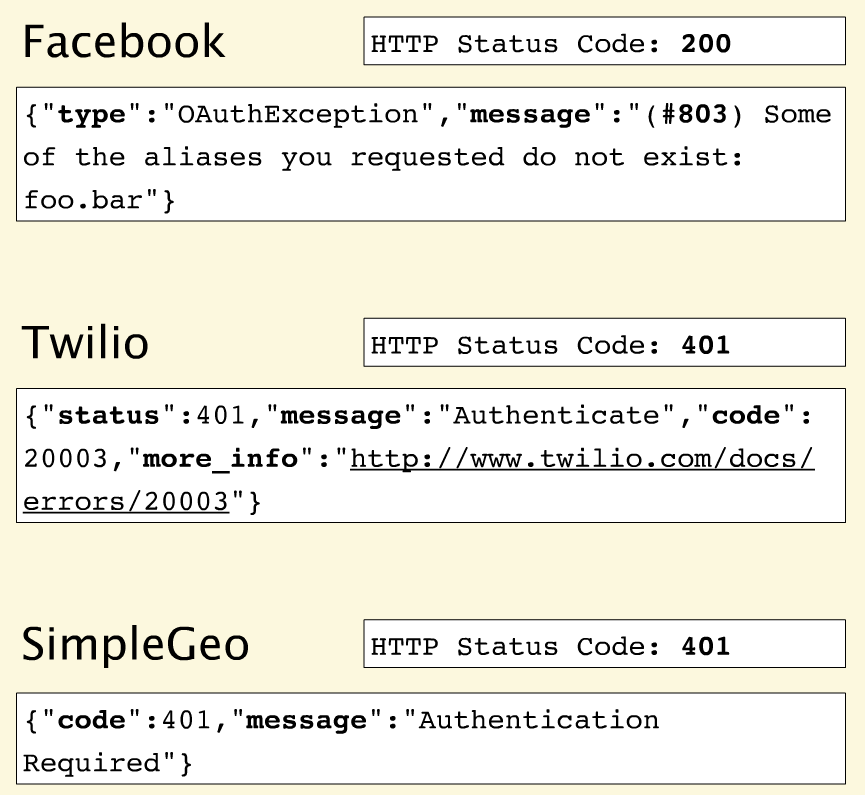
No matter what happens on a Facebook request, you get back the 200 status code — everything is OK. Many error messages also push down into the HTTP response. Here they also throw an #803 error but with no information about what #803 is or how to react to it.
Twilio
Twilio does a great job aligning errors with HTTP status codes. Like Facebook, they provide a more granular error message but with a link that takes you to the documentation. Community commenting and discussion on the documentation helps to build a body of information and adds context for developers experiencing these errors.
SimpleGeo
Provides error codes but with no additional value in the payload.
Error Handling — Best Practises
First of all: Use HTTP status codes! but don’t overuse them.
Use HTTP status codes and try to map them cleanly to relevant standard-based codes.
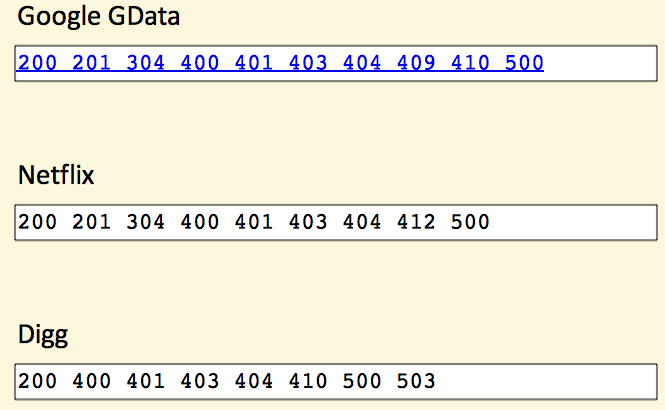
There are over 70 HTTP status codes. However, most developers don’t have all 70 memorized. So if you choose status codes that are not very common you will force application developers away from building their apps and over to wikipedia to figure out what you’re trying to tell them.
Therefore, most API providers use a small subset.
For example, the Google GData API uses only 10 status codes, Netflix uses 9, and Digg, only 8.
How many status codes should you use for your API?
When you boil it down, there are really only 3 outcomes in the interaction between an app and an API:
- Everything worked
- The application did something wrong
- The API did something wrong
Start by using the following 3 codes. If you need more, add them. But you shouldn’t go beyond 8.
- 200 — OK
- 400 — Bad Request
- 500 — Internal Server Error
Please keep in mind the following rules when using these status codes:
200 (OK) must not be used to communicate errors in the response body
Always make proper use of the HTTP response status codes as specified by the rules in this section. In particular, a REST API must not be compromised in an effort to accommodate less sophisticated HTTP clients.
400 (Bad Request) may be used to indicate nonspecific failure
400 is the generic client-side error status, used when no other 4xx error code is appropriate. For errors in the 4xx category, the response body may contain a document describing the client’s error (unless the request method was HEAD).
500 (Internal Server Error) should be used to indicate API malfunction 500 is the generic REST API error response.
Most web frameworks automatically respond with this response status code whenever they execute some request handler code that raises an exception. A 500 error is never the client’s fault and therefore it is reasonable for the client to retry the exact same request that triggered this response, and hope to get a different response.
If you’re not comfortable reducing all your error conditions to these 3, try adding some more but do not go beyond 8:
- 401 — Unauthorized
- 403 — Forbidden
- 404 — Not Found
Please keep in mind the following rules when using these status codes:
A 401 error response indicates that the client tried to operate on a protected resource without providing the proper authorization. It may have provided the wrong credentials or none at all.
403 (Forbidden) should be used to forbid access regardless of authorization state
A 403 error response indicates that the client’s request is formed correctly, but the REST API refuses to honor it. A 403 response is not a case of insufficient client credentials; that would be 401 (“Unauthorized”). REST APIs use 403 to enforce application-level permissions. For example, a client may be authorized to interact with some, but not all of a REST API’s resources. If the client attempts a resource interaction that is outside of its permitted scope, the REST API should respond with 403.
404 (Not Found) must be used when a client’s URI cannot be mapped to a resource
The 404 error status code indicates that the REST API can’t map the client’s URI to a resource.
RestCase
Conclusion
I believe that the best solution to handle errors in a REST API web services is the third option, in short:
Use three simple, common response codes indicating (1) success, (2) failure due to client-side problem, (3) failure due to server-side problem:
- 200 — OK
- 400 — Bad Request (Client Error) — A json with error more details should return to the client.
- 401 — Unauthorized
- 500 — Internal Server Error — A json with an error should return to the client only when there is no security risk by doing that.
I think that this solution can also ease the client to handle only these 4 status codes and when getting either 400 or 500 code he should take the response message and parse it in order to see what is the problem exactly and on the other hand the REST API service is simple enough.
The decision of choosing which error messages to incorporate and which to leave is based on sheer insight and intuition. For example: if an app and API only has three outcomes which are; everything worked, the application did not work properly and API did not respond properly then you are only concerned with three error codes. By putting in unnecessary codes, you will only distract the users and force them to consult Google, Wikipedia and other websites.
Most important thing in the case of an error code is that it should be descriptive and it should offer two outputs:
- A plain descriptive sentence explaining the situation in the most precise manner.
- An ‘if-then’ situation where the user knows what to do with the error message once it is returned in an API call.
The error message returned in the result of the API call should be very descriptive and verbal. A code is preferred by the client who is well versed in the programming and web language but in the case of most clients they find it hard to get the code.
As I stated before, 404 is a bit problematic status when talking about Restful APIs. Does this status means that the resource was not found? or that there is not mapping to the requested resource? Everyone can decide what to use and where 🙂
Handling 404 Errors
We’re handling validation errors and invalid JSON errors. The last big thing
is to properly handle 404 errors. In showAction and updateAction,
we’re throwing a special type of exception class to trigger a 404 response.
But in reality, the 404 response isn’t JSON: it’s a big HTML page. You can
see this by browsing to a made-up programmer:
And actually, if we go to a completely made-up URL, we also see this same
HTML page:
Internally, Silex throws that same exception to cause this 404 page.
Somehow, we need to be able to return JSON for all exceptions and
while we are at it we should use the API problem detail format.
Writing the Test
First, what should we do?… anyone? Bueller?
You know, write a test! Copy the GET scenario, but use a
fake programmer name.
# features/api/programmer.feature
# ...

Scenario: Proper 404 exception on no programmer
  When I request "GET /api/programmers/fake"
  Then the response status code should be 404
  And the "Content-Type" header should be "application/problem+json"
  And the "type" property should equal "about:blank"
  And the "title" property should equal "Not Found"
For the type field, I’m going to use about:blank. Why? When we don’t
have any extra information about an error beyond the status code, the spec
says we should use this. I’m also going to check that title equals Not Found.
Again, the spec says that if we use about:blank for type, then title
should contain the standard status code’s description. 404 means “Not Found”.
Using the Exception Listener on all /api URLs
Now let’s roll up our sleeves and get to work! We’ll go back to the exception listener
function. We want to handle any exception, as long as the URL starts with /api.
We can pass a handle to this object into my anonymous function in order to get Silex’s
Request. With it, the getPathInfo function gives us a clean version of the URL
that we can check:
// src/KnpU/CodeBattle/Application.php
// ...

public function configureListeners()
{
    $app = $this;

    $this->error(function(Exception $e, $statusCode) use ($app) {
        // only act on /api URLs
        if (strpos($app['request']->getPathInfo(), '/api') !== 0) {
            return;
        }

        // ...

        return $response;
    });
}
If you’re not using Silex, just make sure you can check the current URL to
see if it’s for your API. Alternatively, you may have some other logic to
know if the current request is for your API.
Always Create an ApiProblem
Next, we need an ApiProblem object so we can create our application/problem+json
response. If the exception is an instance of ApiProblemException, then
that’s easy! If not, we need to do our best to create one:
// src/KnpU/CodeBattle/Application.php
// ...

$this->error(function(Exception $e, $statusCode) use ($app) {
    // only act on /api URLs
    if (strpos($app['request']->getPathInfo(), '/api') !== 0) {
        return;
    }

    if ($e instanceof ApiProblemException) {
        $apiProblem = $e->getApiProblem();
    } else {
        $apiProblem = new ApiProblem($statusCode);
    }

    // ...
});
In this second case, the only information we have is the status code. This
is where we should use about:blank as the type. But instead of doing
that here, let’s add a bit of logic into ApiProblem:
// src/KnpU/CodeBattle/Api/ApiProblem.php
// ...

public function __construct($statusCode, $type = null)
{
    $this->statusCode = $statusCode;
    $this->type = $type;

    if (!$type) {
        // no type? The default is about:blank and the title should
        // be the standard status code message
        $this->type = 'about:blank';
        $this->title = isset(Response::$statusTexts[$statusCode])
            ? Response::$statusTexts[$statusCode]
            : 'Unknown HTTP status code :(';
    } else {
        if (!isset(self::$titles[$type])) {
            throw new InvalidArgumentException('No title for type '.$type);
        }

        $this->title = self::$titles[$type];
    }
}
First, make $type optional. Then, if nothing is passed, set it to about:blank.
Next, Silex’s Response class has a nice map of status codes and their
short description. We can use it to get a consistent title.
Back in configureListeners, the rest is exactly like before: use ApiProblem
to create a JsonResponse and set the application/problem+json Content-Type
header on it. Now, if an exception is thrown from anywhere in the system
for a URL beginning with /api, the client will get back an API problem
response. It took a little bit of work, but this is huge!
// src/KnpU/CodeBattle/Application.php
// ...

$this->error(function(Exception $e, $statusCode) use ($app) {
    // ...

    $response = new JsonResponse(
        $apiProblem->toArray(),
        $statusCode
    );
    $response->headers->set('Content-Type', 'application/problem+json');

    return $response;
});
To make sure it’s working, head back to the terminal and run the tests:
The green lights prove that even the 404 page is being transformed into a
proper API problem response.
The type key should be a URL
We’re now returning an API problem response whenever something goes wrong in
our app. We can create these manually, like we did for validation errors.
Or we can let them happen naturally, like when a 404 page occurs. We also
have a very systematic way to create error responses, so that they stay consistent.
One last problem is that the type should be a URL, not just a string.
One simple solution would be to prefix the type with the URL to some
documentation page and use our code as the anchor. Let’s do this inside our
anonymous function, unless it’s set to about:blank:
// src/KnpU/CodeBattle/Application.php
// ...

$data = $apiProblem->toArray();
if ($data['type'] != 'about:blank') {
    $data['type'] = 'http://localhost:8000/api/docs/errors#'.$data['type'];
}
$response = new JsonResponse(
    $data,
    $statusCode
);
Of course, creating that page is still up to you. But we’ll talk more about
documentation in the next episode.
Run the tests to see if we broke anything:
Ah, we did! The scenario that is checking for invalid JSON is expecting the
header to equal invalid_body_format. Tweak the scenario so the URL doesn’t
break things:
# features/api/programmer.feature
# ...

Scenario: Error response on invalid JSON
  # ...
  And the "type" property should contain "/api/docs/errors#invalid_body_format"
Run the tests again. Ok, all greeen!
This tutorial uses a deprecated micro-framework called Silex. The fundamentals of REST are still ? valid, but the code we use can’t be used in a real application.
What PHP libraries does this tutorial use?
// composer.json
{
    "require": {
        "silex/silex": "~1.0", // v1.3.2
        "symfony/twig-bridge": "~2.1", // v2.7.3
        "symfony/security": "~2.4", // v2.7.3
        "doctrine/dbal": "^2.5.4", // v2.5.4
        "monolog/monolog": "~1.7.0", // 1.7.0
        "symfony/validator": "~2.4", // v2.7.3
        "symfony/expression-language": "~2.4" // v2.7.3
    },
    "require-dev": {
        "behat/mink": "~1.5", // v1.5.0
        "behat/mink-goutte-driver": "~1.0.9", // v1.0.9
        "behat/mink-selenium2-driver": "~1.1.1", // v1.1.1
        "behat/behat": "~2.5", // v2.5.5
        "behat/mink-extension": "~1.2.0", // v1.2.0
        "phpunit/phpunit": "~5.7.0", // 5.7.27
        "guzzle/guzzle": "~3.7" // v3.9.3
    }
}If you’re encountering some oddities in the API, here’s a list of resolutions to
some of the problems you may be experiencing.
400 error for an unsupported API version
You should use the X-GitHub-Api-Version header to specify an API version. For example:
$ curl --header "X-GitHub-Api-Version:2022-11-28" https://api.github.com/zenIf you specify a version that does not exist, you will receive a 400 error.
For more information, see «API Versions.»
404 error for an existing repository
Typically, we send a 404 error when your client isn’t properly authenticated.
You might expect to see a 403 Forbidden in these cases. However, since we don’t
want to provide any information about private repositories, the API returns a
404 error instead.
To troubleshoot, ensure you’re authenticating correctly, your OAuth access token has the required scopes, third-party application restrictions are not blocking access, and that the token has not expired or been revoked.
Not all results returned
Most API calls accessing a list of resources (e.g., users, issues, etc.) support
pagination. If you’re making requests and receiving an incomplete set of results, you’re
probably only seeing the first page. You’ll need to request the remaining pages
in order to get more results.
It’s important to not try and guess the format of the pagination URL. Not every
API call uses the same structure. Instead, extract the pagination information from
the link header, which is returned with every request. For more information about pagination, see «Using pagination in the REST API.»
Basic authentication errors
On November 13, 2020 username and password authentication to the REST API and the OAuth Authorizations API were deprecated and no longer work.
Using username/password for basic authentication
If you’re using username and password for API calls, then they are no longer able to authenticate. For example:
curl -u my_user:my_password https://api.github.com/user/repos
Instead, use a personal access token when testing endpoints or doing local development:
curl -H 'Authorization: Bearer my_access_token' https://api.github.com/user/repos
For OAuth Apps, you should use the web application flow to generate an OAuth token to use in the API call’s header:
curl -H 'Authorization: Bearer my-oauth-token' https://api.github.com/user/repos
Timeouts
If GitHub takes more than 10 seconds to process an API request, GitHub will terminate the request and you will receive a timeout response.
REST APIs use the Status-Line part of an HTTP response message to inform clients of their request’s overarching result. RFC 2616 defines the Status-Line syntax as shown below:
Status-Line = HTTP-Version SP Status-Code SP Reason-Phrase CRLF
HTTP defines these standard status codes that can be used to convey the results of a client’s request. The status codes are divided into five categories.
- 1xx: Informational – Communicates transfer protocol-level information.
- 2xx: Success – Indicates that the client’s request was accepted successfully.
- 3xx: Redirection – Indicates that the client must take some additional action in order to complete their request.
- 4xx: Client Error – This category of error status codes points the finger at clients.
- 5xx: Server Error – The server takes responsibility for these error status codes.
1xx Status Codes [Informational]
|
Status Code |
Description |
|---|---|
|
100 Continue |
An interim response. Indicates to the client that the initial part of the request has been received and has not yet been rejected by the server. The client SHOULD continue by sending the remainder of the request or, if the request has already been completed, ignore this response. The server MUST send a final response after the request has been completed. |
|
101 Switching Protocol |
Sent in response to an Upgrade request header from the client, and indicates the protocol the server is switching to. |
|
102 Processing (WebDAV) |
Indicates that the server has received and is processing the request, but no response is available yet. |
|
103 Early Hints |
Primarily intended to be used with the |
2xx Status Codes [Success]
|
Status Code |
Description |
|---|---|
|
200 OK |
Indicates that the request has succeeded. |
|
201 Created |
Indicates that the request has succeeded and a new resource has been created as a result. |
|
202 Accepted |
Indicates that the request has been received but not completed yet. It is typically used in log running requests and batch processing. |
|
203 Non-Authoritative Information |
Indicates that the returned metainformation in the entity-header is not the definitive set as available from the origin server, but is gathered from a local or a third-party copy. The set presented MAY be a subset or superset of the original version. |
|
204 No Content |
The server has fulfilled the request but does not need to return a response body. The server may return the updated meta information. |
|
205 Reset Content |
Indicates the client to reset the document which sent this request. |
|
206 Partial Content |
It is used when the |
|
207 Multi-Status (WebDAV) |
An indicator to a client that multiple operations happened, and that the status for each operation can be found in the body of the response. |
|
208 Already Reported (WebDAV) |
Allows a client to tell the server that the same resource (with the same binding) was mentioned earlier. It never appears as a true HTTP response code in the status line, and only appears in bodies. |
|
226 IM Used |
The server has fulfilled a GET request for the resource, and the response is a representation of the result of one or more instance-manipulations applied to the current instance. |
3xx Status Codes [Redirection]
|
Status Code |
Description |
|---|---|
|
300 Multiple Choices |
The request has more than one possible response. The user-agent or user should choose one of them. |
|
301 Moved Permanently |
The URL of the requested resource has been changed permanently. The new URL is given by the |
|
302 Found |
The URL of the requested resource has been changed temporarily. The new URL is given by the |
|
303 See Other |
The response can be found under a different URI and SHOULD be retrieved using a GET method on that resource. |
|
304 Not Modified |
Indicates the client that the response has not been modified, so the client can continue to use the same cached version of the response. |
|
305 Use Proxy (Deprecated) |
Indicates that a requested response must be accessed by a proxy. |
|
306 (Unused) |
It is a reserved status code and is not used anymore. |
|
307 Temporary Redirect |
Indicates the client to get the requested resource at another URI with same method that was used in the prior request. It is similar to |
|
308 Permanent Redirect (experimental) |
Indicates that the resource is now permanently located at another URI, specified by the |
4xx Status Codes (Client Error)
|
Status Code |
Description |
|---|---|
|
400 Bad Request |
The request could not be understood by the server due to incorrect syntax. The client SHOULD NOT repeat the request without modifications. |
|
401 Unauthorized |
Indicates that the request requires user authentication information. The client MAY repeat the request with a suitable Authorization header field |
|
402 Payment Required (Experimental) |
Reserved for future use. It is aimed for using in the digital payment systems. |
|
403 Forbidden |
Unauthorized request. The client does not have access rights to the content. Unlike 401, the client’s identity is known to the server. |
|
404 Not Found |
The server can not find the requested resource. |
|
405 Method Not Allowed |
The request HTTP method is known by the server but has been disabled and cannot be used for that resource. |
|
406 Not Acceptable |
The server doesn’t find any content that conforms to the criteria given by the user agent in the |
|
407 Proxy Authentication Required |
Indicates that the client must first authenticate itself with the proxy. |
|
408 Request Timeout |
Indicates that the server did not receive a complete request from the client within the server’s allotted timeout period. |
|
409 Conflict |
The request could not be completed due to a conflict with the current state of the resource. |
|
410 Gone |
The requested resource is no longer available at the server. |
|
411 Length Required |
The server refuses to accept the request without a defined Content- Length. The client MAY repeat the request if it adds a valid |
|
412 Precondition Failed |
The client has indicated preconditions in its headers which the server does not meet. |
|
413 Request Entity Too Large |
Request entity is larger than limits defined by server. |
|
414 Request-URI Too Long |
The URI requested by the client is longer than the server can interpret. |
|
415 Unsupported Media Type |
The media-type in |
|
416 Requested Range Not Satisfiable |
The range specified by the |
|
417 Expectation Failed |
The expectation indicated by the |
|
418 I’m a teapot (RFC 2324) |
It was defined as April’s lool joke and is not expected to be implemented by actual HTTP servers. (RFC 2324) |
|
420 Enhance Your Calm (Twitter) |
Returned by the Twitter Search and Trends API when the client is being rate limited. |
|
422 Unprocessable Entity (WebDAV) |
The server understands the content type and syntax of the request entity, but still server is unable to process the request for some reason. |
|
423 Locked (WebDAV) |
The resource that is being accessed is locked. |
|
424 Failed Dependency (WebDAV) |
The request failed due to failure of a previous request. |
|
425 Too Early (WebDAV) |
Indicates that the server is unwilling to risk processing a request that might be replayed. |
|
426 Upgrade Required |
The server refuses to perform the request. The server will process the request after the client upgrades to a different protocol. |
|
428 Precondition Required |
The origin server requires the request to be conditional. |
|
429 Too Many Requests |
The user has sent too many requests in a given amount of time (“rate limiting”). |
|
431 Request Header Fields Too Large |
The server is unwilling to process the request because its header fields are too large. |
|
444 No Response (Nginx) |
The Nginx server returns no information to the client and closes the connection. |
|
449 Retry With (Microsoft) |
The request should be retried after performing the appropriate action. |
|
450 Blocked by Windows Parental Controls (Microsoft) |
Windows Parental Controls are turned on and are blocking access to the given webpage. |
|
451 Unavailable For Legal Reasons |
The user-agent requested a resource that cannot legally be provided. |
|
499 Client Closed Request (Nginx) |
The connection is closed by the client while HTTP server is processing its request, making the server unable to send the HTTP header back. |
5xx Status Codes (Server Error)
|
Status Code |
Description |
|---|---|
|
500 Internal Server Error |
The server encountered an unexpected condition that prevented it from fulfilling the request. |
|
501 Not Implemented |
The HTTP method is not supported by the server and cannot be handled. |
|
502 Bad Gateway |
The server got an invalid response while working as a gateway to get the response needed to handle the request. |
|
503 Service Unavailable |
The server is not ready to handle the request. |
|
504 Gateway Timeout |
The server is acting as a gateway and cannot get a response in time for a request. |
|
505 HTTP Version Not Supported (Experimental) |
The HTTP version used in the request is not supported by the server. |
|
506 Variant Also Negotiates (Experimental) |
Indicates that the server has an internal configuration error: the chosen variant resource is configured to engage in transparent content negotiation itself, and is therefore not a proper endpoint in the negotiation process. |
|
507 Insufficient Storage (WebDAV) |
The method could not be performed on the resource because the server is unable to store the representation needed to successfully complete the request. |
|
508 Loop Detected (WebDAV) |
The server detected an infinite loop while processing the request. |
|
510 Not Extended |
Further extensions to the request are required for the server to fulfill it. |
|
511 Network Authentication Required |
Indicates that the client needs to authenticate to gain network access. |
6. REST Specific HTTP Status Codes
200 (OK)
It indicates that the REST API successfully carried out whatever action the client requested and that no more specific code in the 2xx series is appropriate.
Unlike the 204 status code, a 200 response should include a response body. The information returned with the response is dependent on the method used in the request, for example:
- GET an entity corresponding to the requested resource is sent in the response;
- HEAD the entity-header fields corresponding to the requested resource are sent in the response without any message-body;
- POST an entity describing or containing the result of the action;
- TRACE an entity containing the request message as received by the end server.
201 (Created)
A REST API responds with the 201 status code whenever a resource is created inside a collection. There may also be times when a new resource is created as a result of some controller action, in which case 201 would also be an appropriate response.
The newly created resource can be referenced by the URI(s) returned in the entity of the response, with the most specific URI for the resource given by a Location header field.
The origin server MUST create the resource before returning the 201 status code. If the action cannot be carried out immediately, the server SHOULD respond with a 202 (Accepted) response instead.
202 (Accepted)
A 202 response is typically used for actions that take a long while to process. It indicates that the request has been accepted for processing, but the processing has not been completed. The request might or might not be eventually acted upon, or even maybe disallowed when processing occurs.
Its purpose is to allow a server to accept a request for some other process (perhaps a batch-oriented process that is only run once per day) without requiring that the user agent’s connection to the server persist until the process is completed.
The entity returned with this response SHOULD include an indication of the request’s current status and either a pointer to a status monitor (job queue location) or some estimate of when the user can expect the request to be fulfilled.
204 (No Content)
The 204 status code is usually sent out in response to a PUT, POST, or DELETE request when the REST API declines to send back any status message or representation in the response message’s body.
An API may also send 204 in conjunction with a GET request to indicate that the requested resource exists, but has no state representation to include in the body.
If the client is a user agent, it SHOULD NOT change its document view from that which caused the request to be sent. This response is primarily intended to allow input for actions to take place without causing a change to the user agent’s active document view. However, any new or updated metainformation SHOULD be applied to the document currently in the user agent’s dynamic view.
The 204 response MUST NOT include a message-body and thus is always terminated by the first empty line after the header fields.
301 (Moved Permanently)
The 301 status code indicates that the REST API’s resource model has been significantly redesigned, and a new permanent URI has been assigned to the client’s requested resource. The REST API should specify the new URI in the response’s Location header, and all future requests should be directed to the given URI.
You will hardly use this response code in your API as you can always use the API versioning for the new API while retaining the old one.
302 (Found)
The HTTP response status code 302 Found is a common way of performing URL redirection. An HTTP response with this status code will additionally provide a URL in the Location header field. The user agent (e.g., a web browser) is invited by a response with this code to make a second. Otherwise identical, request to the new URL specified in the location field.
Many web browsers implemented this code in a manner that violated this standard, changing the request type of the new request to GET, regardless of the type employed in the original request (e.g., POST). RFC 1945 and RFC 2068 specify that the client is not allowed to change the method on the redirected request. The status codes 303 and 307 have been added for servers that wish to make unambiguously clear which kind of reaction is expected of the client.
303 (See Other)
A 303 response indicates that a controller resource has finished its work, but instead of sending a potentially unwanted response body, it sends the client the URI of a response resource. The response can be the URI of the temporary status message, or the URI to some already existing, more permanent, resource.
Generally speaking, the 303 status code allows a REST API to send a reference to a resource without forcing the client to download its state. Instead, the client may send a GET request to the value of the Location header.
The 303 response MUST NOT be cached, but the response to the second (redirected) request might be cacheable.
304 (Not Modified)
This status code is similar to 204 (“No Content”) in that the response body must be empty. The critical distinction is that 204 is used when there is nothing to send in the body, whereas 304 is used when the resource has not been modified since the version specified by the request headers If-Modified-Since or If-None-Match.
In such a case, there is no need to retransmit the resource since the client still has a previously-downloaded copy.
Using this saves bandwidth and reprocessing on both the server and client, as only the header data must be sent and received in comparison to the entirety of the page being re-processed by the server, then sent again using more bandwidth of the server and client.
307 (Temporary Redirect)
A 307 response indicates that the REST API is not going to process the client’s request. Instead, the client should resubmit the request to the URI specified by the response message’s Location header. However, future requests should still use the original URI.
A REST API can use this status code to assign a temporary URI to the client’s requested resource. For example, a 307 response can be used to shift a client request over to another host.
The temporary URI SHOULD be given by the Location field in the response. Unless the request method was HEAD, the entity of the response SHOULD contain a short hypertext note with a hyperlink to the new URI(s). If the 307 status code is received in response to a request other than GET or HEAD, the user agent MUST NOT automatically redirect the request unless it can be confirmed by the user, since this might change the conditions under which the request was issued.
400 (Bad Request)
400 is the generic client-side error status, used when no other 4xx error code is appropriate. Errors can be like malformed request syntax, invalid request message parameters, or deceptive request routing etc.
The client SHOULD NOT repeat the request without modifications.
401 (Unauthorized)
A 401 error response indicates that the client tried to operate on a protected resource without providing the proper authorization. It may have provided the wrong credentials or none at all. The response must include a WWW-Authenticate header field containing a challenge applicable to the requested resource.
The client MAY repeat the request with a suitable Authorization header field. If the request already included Authorization credentials, then the 401 response indicates that authorization has been refused for those credentials. If the 401 response contains the same challenge as the prior response, and the user agent has already attempted authentication at least once, then the user SHOULD be presented the entity that was given in the response, since that entity might include relevant diagnostic information.
403 (Forbidden)
A 403 error response indicates that the client’s request is formed correctly, but the REST API refuses to honor it, i.e., the user does not have the necessary permissions for the resource. A 403 response is not a case of insufficient client credentials; that would be 401 (“Unauthorized”).
Authentication will not help, and the request SHOULD NOT be repeated. Unlike a 401 Unauthorized response, authenticating will make no difference.
404 (Not Found)
The 404 error status code indicates that the REST API can’t map the client’s URI to a resource but may be available in the future. Subsequent requests by the client are permissible.
No indication is given of whether the condition is temporary or permanent. The 410 (Gone) status code SHOULD be used if the server knows, through some internally configurable mechanism, that an old resource is permanently unavailable and has no forwarding address. This status code is commonly used when the server does not wish to reveal exactly why the request has been refused, or when no other response is applicable.
405 (Method Not Allowed)
The API responds with a 405 error to indicate that the client tried to use an HTTP method that the resource does not allow. For instance, a read-only resource could support only GET and HEAD, while a controller resource might allow GET and POST, but not PUT or DELETE.
A 405 response must include the Allow header, which lists the HTTP methods that the resource supports. For example:
Allow: GET, POST
406 (Not Acceptable)
The 406 error response indicates that the API is not able to generate any of the client’s preferred media types, as indicated by the Accept request header. For example, a client request for data formatted as application/xml will receive a 406 response if the API is only willing to format data as application/json.
If the response could be unacceptable, a user agent SHOULD temporarily stop receipt of more data and query the user for a decision on further actions.
412 (Precondition Failed)
The 412 error response indicates that the client specified one or more preconditions in its request headers, effectively telling the REST API to carry out its request only if certain conditions were met. A 412 response indicates that those conditions were not met, so instead of carrying out the request, the API sends this status code.
415 (Unsupported Media Type)
The 415 error response indicates that the API is not able to process the client’s supplied media type, as indicated by the Content-Type request header. For example, a client request including data formatted as application/xml will receive a 415 response if the API is only willing to process data formatted as application/json.
For example, the client uploads an image as image/svg+xml, but the server requires that images use a different format.
500 (Internal Server Error)
500 is the generic REST API error response. Most web frameworks automatically respond with this response status code whenever they execute some request handler code that raises an exception.
A 500 error is never the client’s fault, and therefore, it is reasonable for the client to retry the same request that triggered this response and hope to get a different response.
The API response is the generic error message, given when an unexpected condition was encountered and no more specific message is suitable.
501 (Not Implemented)
The server either does not recognize the request method, or it cannot fulfill the request. Usually, this implies future availability (e.g., a new feature of a web-service API).
References :
https://www.iana.org/assignments/http-status-codes/http-status-codes.xhtml
Содержание
- WordPress REST API does not respond: What’s the problem?
- What is the WordPress REST API?
- How can I enable the WordPress REST API in my website?
- How do I know if the unreachable REST API is my issue?
- I do not want to enable the REST API in general, but for your plugin. Is this possible?
- I am using a plugin like “JWT Auth”. Is it compatible?
- Permalinks are broken
- I can read data but not write?
- REST API не работает корректно
- Ответ не является допустимым ответом JSON.
- Not Found
- Как исправить ошибку обновления редактора WordPress
WordPress REST API does not respond: What’s the problem?
If you only see a loading animation, but the actual content in one of our plugins does not load, your WordPress REST API is most likely not reachable.
What is the WordPress REST API?
A REST API is generally a standardized method that many applications on the Internet use to communicate between server and client. WordPress v4.7 introduced the WordPress REST API, which allows modern WordPress plugins to use this standard method for communication instead of the WordPress specific way of communication.
How can I enable the WordPress REST API in my website?
The WordPress REST API is enabled by default in your WordPress website. It is a standard method of communication and there is no additional risk to have it activated compared to other methods how WordPress plugins communicate between client and server. But some WordPress plugins allow you as WordPress admin to disable the REST API. The reason for deactivation is usually the desire for better performance or security concerns. For both aspects, however, disabling the REST API is usually not a suitable means.
We know the following plugins that allow you to disable the REST API. By default, none of these plugins disable the REST API, but they can optionally disable it:
Additionally, you can restrict access to the REST API in your web server configuration (usually Apache2 or NGINX). This can be done intentionally or accidentally by rejecting requests that start with /wp-json/ .
How do I know if the unreachable REST API is my issue?
You can easily check if an unreachable REST API is the problem when you see only a loading animation in a devowl.io WordPress plugin. Just follow these steps:
- Open a new tab where you access your website.
- Right-click into the web page to open the panel “Inspect” (Google Chrome) or “Inspect Element” (Mozilla Firefox). Here you can go to the “Console” tab.
- Now open the page on which you see the loading animation that does not disappear.
- In the console, you should see an entry marked red as an error, which indicates an error 401, 403, 404 or 500 (depending on your plugin/configuration to disable the REST API).
If you see an error like this, you need to make sure that the WordPress REST API is reachable again.
I do not want to enable the REST API in general, but for your plugin. Is this possible?
This depends on the configuration of the plugin you use to restrict access to the REST API. For example, with Cerber Security, Anti-spam & Malware Scan you can disable the REST API using namespaces. Each plugin that uses the WordPress REST API must register a namespace in which all endpoints are registered. For example, if you access /wp-json/realmedialibrary/v1 in your WordPress REST API, the namespace is called realmedialibrary/v1 .
We use for the devowl.io WordPress plugins the following namespaces:
- Real Media Library: realmedialibrary/v1
- Real Physical Media: real-physical-media/v1
- Real Category Management: real-category-library/v1
- Real Thumbnail Generator: real-thumbnail-generator/v1
- Real Custom Post Order: real-custom-post-order/v1
- Real Cookie Banner: real-cookie-banner/v1 (must be available for everyone, not only for logged-in users)
Besides WordPress plugins, we also use third-party packages that are consumed by our plugins. For this, you still have to release the following name ranges:
- Real Product Manager (license and update client, all plugins): real-product-manager-wp-client/v1
- Real Queue (queue management, currently only used in Real Cookie Banner): real-queue/v1
I am using a plugin like “JWT Auth”. Is it compatible?
If you need to use a plugin like JWT Auth you also need to whitelist our plugins. In case of JWT Auth, you have to read the section “Whitelisting Endpoints” in its README file and add our plugins to the allowed endpoints. The endpoints can be found in the paragraph above.
Permalinks are broken
If you use Apache2 as web server, the .htaccess file defines how URLs of your website look like. This file is created automatically and sometimes manipulated by plugins. If something went wrong with the creation, this can also be a reason why the WP REST API can no longer be accessible.
So, you can rewrite the rules in the .htaccess file:
- Go to Settings > Permalinks in your WordPress backend.
- Save the unchanged settings. Saving will trigger the rules to be rewritten.
I can read data but not write?
You are using Real Cookie Banner and cannot save your licence or create folders in Real Media Library? A typical error message text is:
Missing parameter(s): terms (or similar field names)
The most commonly identified cause of this behaviour with previous clients was that your server is configured to forward URLs without an ending slash / to URLs with an ending slash / (or vice versa).
You can track this by checking the respective requests via F12 > Network to see if a POST request is redirected. A POST request must not be redirected and therefore leads to errors, as data to be saved (your input) is not redirected.
It is best to check your .htaccess file to see if you can exclude /wp-json from URL forwarding.
Источник
REST API не работает корректно
Плагин «Здоровье сайта» показывает две ошибки:
1) REST API не смог корректно обработать параметр запроса context
2) Плагин предотвращает обновления отключением wp_version_check(). (подозреваю, что это из-за п.1)
Сервер nginx+php7.4 без Apache. Движок и плагины обновлены до последних версий.
В шаблоне были инструкции по блокировке REST API — убрал их. Больше ничего не нашёл.
Отключение всех плагинов и шаблона проблему не решает (режим решения проблем). Настройки пермалинков обновлял. Гугл ничего полезного не даёт.
Есть идеи, в какую строну копать?
у вас открывается что-то по адресу
вашсайт/wp-json/wp/v2/users/
?
Плагин «Здоровье сайта» показывает две ошибки:
1) REST API не смог корректно обработать параметр запроса context
в предыдущих версиях такое могло показываться и в виде ложного срабатывания.
Поэтому стоит смотреть не на это конкретное сообщение, а на работу REST API в целом, например функционирование редактора блоков.
2) Плагин предотвращает обновления отключением wp_version_check().
иногда тоже ложно срабатывает при просрочке wp_cron
Обновление плагинов и тем в консоли у вас работает?
Проверка обновлений, сами обновления?
у вас открывается что-то по адресу
вашсайт/wp-json/wp/v2/users/
Да, выдаёт информацию о пользователе.
например функционирование редактора блоков.
Насколько я вижу — работает нормально.
Обновление плагинов и тем в консоли у вас работает?
Да. Специально изменил у одного плагина цифру в версии — сразу же выпало предупреждение о необходимости обновиться и обновление прошло успешно.
иногда тоже ложно срабатывает при просрочке wp_cron
Принудительно запустил все запланированные задачи — не помогло, ничего не изменилось.
Вообще, эта ошибка (про обновление) появилась именно после удаления кода, отключающего REST API. По самому REST API была ошибка 404 (что логично), но после удаления кода показывает проблему с контекстом.
В итоге, как я понял, всё работает хорошо, но всё же, что-то мешает проверке пройти нормально. Чисто из исследовательского интереса хотелось бы выяснить причину. И может ли это как быть связано с настройками сервера? Сервер у меня свой, могу поковырять настройки, если укажете, куда смотреть.
эта ошибка (про обновление) появилась именно после удаления кода, отключающего REST API
настройки ЧПУ вы обновляли…
проверка тоже далека от абсолютного совершенства
можете с плагином попробовать, https://ru.wordpress.org/plugins/health-check/
там чуть более свежий код этого компонента (+доп инструменты)
Да и в целом, если все работает и не создает реальных проблем, то наверное можно и отложить поиск проблем на ровном месте на неопределенное время (до обновления WP до следующего значимого выпуска (к концу марта) или плагина health-check)
Собственно, весь разговор именно о нём. Это он мне такие ошибки показывает.
если все работает и не создает реальных проблем, то наверное можно и отложить поиск проблем
Хорошо, согласен. Просто не люблю, когда остаётся что-то непонятное, да ещё и в виде ошибки.
Собственно, весь разговор именно о нём. Это он мне такие ошибки показывает.
есть плагин, есть штатный компонент WordPress 5.2+
в плагине есть инструменты, в штатном компоненте их нет.
Сравните кстати, с деактивированным плагином, будут ли те же замечания или они пропадут ?
есть плагин, есть штатный компонент WordPress 5.2+
Даже не подозревал о таком. Всегда плагин ставил.
Сравните кстати, с деактивированным плагином, будут ли те же замечания или они пропадут ?
Источник
Ответ не является допустимым ответом JSON.
Ошибка публикации. Ответ не является допустимым ответом JSON.
не могу сделать ни одной записи в блог
ошибка Elementor плагин
«Ошибка публикации. Ответ не является допустимым ответом JSON.»
Не хостинг, локальный сервер
Не могу корректно настроить
Что делать? Заранее спасибо.
Страница, с которой нужна помощь: [войдите, чтобы увидеть ссылку]
Инструменты — здоровье сайта
загляните, есть ли замечания там.
впрочем, по локальному хостингу может быть много нерешаемых и странных проблем, лучше использовать хостинг реальный
«загляните, есть ли замечания там.»
3 рекомендуемых улучшения
3 рекомендуемых улучшения
Одно или несколько рекомендуемых расширений отсутствуют
Производительность
Расширения PHP выполняют многие задачи на сервере для обеспечения работы вашего сайта. Обычно любые изменения в них производятся системным администратором сервера.
Команда хостинга WordPress поддерживает список требуемых и рекомендуемых расширений в этом руководстве (откроется в новой вкладке).
Внимание! Рекомендуемое расширение imagick не установлено или отключено.
Запланированное задание пропущено
Производительность
REST API выдал неожиданный результат
Производительность
REST API — один из способов коммуникации WordPress и других приложений с сервером. К примеру, экран редактора блоков использует его для отображения и сохранения ваших записей и страниц.
Запрос к REST API завершился с неожиданным результатом: (404) 404 Not Found
Not Found
The requested URL was not found on this server.
Источник
Как исправить ошибку обновления редактора WordPress

Приветствуем вас! Иногда при редактировании сообщения или страницы вы можете увидеть ошибку обновления или ошибку публикации в редакторе WordPress гутенберг. Эта ошибка не дает никаких подсказок, что делает ее особенно сложной для новичков. К счастью, есть несколько распространенных причин и обходных путей, которые могут помочь вам решить эту проблему, если вы с ней столкнетесь. Мы объясним, что вызывает эту проблему и как избежать этого в будущем.
Почему WordPress иногда не может обновлять или публиковать контент
По сути, WordPress иногда использует набор API (методов программирования), называемых REST API, для отправки и получения запросов к базе данных.
Если он не может отправлять и получать эти запросы, некоторые части вашего веб-сайта могут не работать. Сюда входит редактор блоков WordPress, который использует API для отправки запросов на обновление и публикации.
Почему WordPress не может использовать REST API?
Теперь вам может быть интересно, если я не вносил никаких изменений в свой веб-сайт, почему REST API перестал работать сам по себе? Существует ряд сценариев, которые могут помешать WordPress использовать REST API. Например, возможно, вы не подключены к интернету или потеряли связь.
Другие причины могут быть немного сложнее. Например, вы могли случайно изменить URL-адрес сайта, плагины могут быть причиной проблемы или сторонняя служба может блокировать вызовы API. Давайте посмотрим, как устранить и исправить ошибку обновления WordPress.
Шаг 1. Проверьте подключение к Интернету и URL-адрес сайта.
Наиболее частой причиной ошибки обновления в WordPress является потеря соединения Wi-Fi. Если ваш компьютер теряет подключение к интернету, когда вы пишете статью в блоге, WordPress не сможет сохранить ваши изменения.
Убедитесь, что вы подключены к инету, посетив другие веб-сайты в новой вкладке браузера. Если ваш интернет работает нормально, то следующее, что вам нужно проверить, — это настройка URL-адреса вашего сайта WordPress.
Просто перейдите на страницу «Настройки» — «Общие» и убедитесь, что параметры «Адрес сайта» и «Адрес WordPress» указаны правильно. Должны быть одинаковые URL-адреса в обоих полях.

Если настройки URL-адреса вашего сайта выглядят нормально, и вы подключены к интернету, вы можете перейти к дальнейшему устранению неполадок.
Шаг 2. Проверьте статус REST API с помощью WordPress Site Health
WordPress поставляется со встроенным инструментом работоспособности сайта, который показывает важную информацию о безопасности и производительности сайта.
Просто перейдите на страницу «Инструменты» — «Здоровье сайта» , чтобы просмотреть отчет. Если REST API не работает, вы увидите это в разделе рекомендуемых улучшений как «REST API обнаружил неожиданный результат» . У нас на тестовом сайте данной ошибки нет, но у вас она может быть.

Он также может показать вам некоторую отладочную информацию, которая может объяснить, что произошло, когда WordPress сделал вызов REST API. Изучение этого может дать вам некоторое представление о том, какой плагин или сторонняя служба могут вызывать проблему. Однако, если это не дает вам никакой подсказки, вы можете перейти к следующему шагу.
Шаг 3. Отключите все плагины WordPress
Если какой-то плагин WordPress вызывает некорректное поведение REST API, то самый простой способ выяснить это — деактивировать все плагины.
Вы можете перейти на страницу «Плагины» , установить флажок и нажать «Деактивировать» и «Применить» .

После этого вы можете перейти в редактор записи и попробовать обновить. Если ошибка обновления удалась, это означает, что причиной проблемы был один из ваших плагинов.
Теперь вы можете активировать свои плагины WordPress по одному и попытаться воспроизвести ошибку. Как только вы найдете плагин, вызывающий проблему, вы можете обратиться за поддержкой к автору плагина или найти альтернативный плагин.
Но, если отключение всех плагинов не привело к исчезновению ошибки, перейдите к следующему шагу.
Шаг 4. Проверьте службу брандмауэра веб-сайта
Если вы используете службу брандмауэра веб-сайта, такую как Sucuri или Cloudflare, то есть вероятность, что эти службы могут блокировать запросы REST API.
Это может произойти, если их фильтры брандмауэра сочтут ваш IP-адрес подозрительным. Они также могут блокировать запросы REST API, если ваш сайт подвергается атаке DDOS. Если вы используете Cloudflare, вы можете временно отключить Cloudflare, чтобы посмотреть, решит ли это вашу проблему.
Обычно вы найдете настройки Cloudflare в разделе «Домены» на панели управления хостингом. Если вы используете Sucuri, вы можете обратиться в их службу поддержки, и они могут внести ваш IP-адрес в белый список или сообщить, что вызывает проблему.
Плагины и службы брандмауэра являются наиболее частой причиной ошибки обновления. Однако, если вы все еще видите ошибку, вы можете сделать еще несколько вещей.
Шаг 5. Включите и просмотрите журнал отладки WordPress
WordPress поставляется со встроенной функцией для ведения журнала всех ошибок WordPress. Он не регистрирует ошибки REST API, но поможет вам узнать, есть ли другие проблемы, которые могут вызывать ошибку.
Просто добавьте следующие строки в свой файл wp-config.ph:
Не забудьте сохранить изменения и загрузить файл обратно на свой сервер. Теперь вы можете попробовать опубликовать или обновить сообщение в WordPress, чтобы воспроизвести ошибку.
После этого вы можете подключиться к своей учетной записи хостинга WordPress с помощью FTP-клиента и перейти в папку / wp-content / . Отсюда вы можете загрузить файл debug.log на свой компьютер.

Вы можете открыть файл отладки в текстовом редакторе, например, в блокноте. Он может содержать несколько ошибок, предупреждений или уведомлений, обнаруженных WordPress, когда вы работали со своим сайтом или, когда его посещал пользователь.

Если вы видите что-то, что указывает на файл плагина или темы, это может указать вам на ошибку. Затем вы можете упомянуть об этой ошибке, когда просите поддержки на форумах WordPress.org или у вашего хостинг-провайдера.
Шаг 6. Временно переключитесь на классический редактор WordPress
Временное решение этой ошибки — включить классический редактор. Это старый редактор WordPress, который не использует REST API для обновления и публикации контента.
Вы можете включить его, просто установив и активировав плагин Classic Editor. После активации вы можете просто отредактировать сообщение, над которым работали. Вы сможете сохранить и опубликовать его, не увидев сбоя обновления или ошибки публикации в WordPress.
Если все остальное не помогло, возможно, вам придется обратиться за поддержкой. Вы можете начать с прямого обращения к своему хостинг-провайдеру. У них есть доступ к журналам сервера и дополнительным инструментам. Это также может быть вызвано неправильно настроенным сервером или сбоями на их стороне. Ну что у нас на этом все. Всем пока!
Источник