-
nikgor27
Junior

Появилась у меня Radeon VII от msi с ошибкой 43, почитав форумы понял, что ошибка 43 на этой карте это 99% смэрть гпу и ремонту не подлежит, так ее и спрятал в долгий ящик. Но вот только что стало скучно и решил разобрать: первое, что увидел — пара бга шариков, которые вывалились из под чипа и прилипли к куску пыли.. Может ли это быть тот самый 1% или если она настолько грелась, что вывалились шарики, то гпушке уже не помочь? И если есть смысл заморачиваться, то где вообще такую карту реболлят и как найти трафарет? (поштучто паять шарики вряд-ли осилю, больно большой чип)
-
gehka3
Катярко

- Звідки: Днепр
Повідомлення
17.05.2021 19:44
nikgor27
А уверен что именно шары из под чипа вывалились? Они там худо бедно но достаточно плотно на подложку чипа запаиваются на заводе, вариант с недогревом при сборке — маловероятен, всё ж вокруг сидит нормально, визуально припой адекватно разошёлся по рассыпухе?
Снимай на сухую, осматривай для подтвердить незапаявшиеся шары, ищи трафареты/универсалы подбирай — и вперёд
-
nikgor27
Junior
Повідомлення
17.05.2021 22:27
gehka3: ↑
17.05.2021 19:44
nikgor27
А уверен что именно шары из под чипа вывалились? Они там худо бедно но достаточно плотно на подложку чипа запаиваются на заводе, вариант с недогревом при сборке — маловероятен, всё ж вокруг сидит нормально, визуально припой адекватно разошёлся по рассыпухе?Снимай на сухую, осматривай для подтвердить незапаявшиеся шары, ищи трафареты/универсалы подбирай — и вперёд
Да, если под чип с фонариком заглянуть, то видно как раз 2 пустующих пятака
-
gehka3
Катярко
- Звідки: Днепр
Повідомлення
17.05.2021 22:35
nikgor27
Подбирай свинцовые по размеру, можно чуть подрасплюснуть (но проходить должен «со скрипом»), подсовывай на место отсутствующих с флюсом — и на пропай 
-
gehka3
Катярко
- Звідки: Днепр
Повідомлення
18.05.2021 07:43
nikgor27
Серьёзно, если шар сразу по ряду первому и есть возможность подсунуть шар на площадку, свинец — при разогреве расширится и запаяется на площадки, если там не окислено в черноту
Паяй на безсвинце профиле, флюс загони под всю подложку (разогрей нижним, под углом плату, подкидывай с подьёма и феном продувай дабы растеклось под всей подложкой, без перебора в количестве)
Но я бы для начала подлез на площадки доски щупом для понять что за контакты без шаров остались, если нету даташита/распиновки — если там питалово или минусовой — не стоит заморачиваться и не в том дело
-
Yuri
Member
Повідомлення
19.05.2021 16:45
nikgor27: ↑
17.05.2021 18:19
Появилась у меня Radeon VII от msi с ошибкой 43, почитав форумы понял, что ошибка 43 на этой карте это 99% смэрть гпу и ремонту не подлежит, так ее и спрятал в долгий ящик. Но вот только что стало скучно и решил разобрать: первое, что увидел — пара бга шариков, которые вывалились из под чипа и прилипли к куску пыли.. Может ли это быть тот самый 1% или если она настолько грелась, что вывалились шарики, то гпушке уже не помочь? И если есть смысл заморачиваться, то где вообще такую карту реболлят и как найти трафарет? (поштучто паять шарики вряд-ли осилю, больно большой чип)
3+ года назад в msi rx560 ошибку 43 вылечил перепрошивкой bios — был прошит для майнинга с неправильной контрольной суммой. Видеокарта на компе дочки и сейчас работает. Может поможет 
Содержание
- [SOLVED] Radeon VII driver issues / error
- maytiffins
- maytiffins
- Graphics
- Graphics
- [SOLVED] Radeon VII driver issues / error
- maytiffins
- maytiffins
- Ошибка видеокарты код 43. Система Windows остановила это устройство.
- Как исправить ошибку код 43 AMD Radeon
- 1 Способ — исправляем ошибку 43 при помощи патча драйверов.
- 2 Способ. Переустановка драйверов и операционной системы.
- 3 Способ. Проверка оборудования.
[SOLVED] Radeon VII driver issues / error
maytiffins
Prominent



I am using a Radeon VII for compute alongside a 980ti which I am using for display. I have connected the R7 to a 1x riser however it is having error code 43 in device manager. The card was working fine in another computer and there were no errors
I have tried using the latest drivers (19.6.2) which brings me to this error, I have had some issues trying to install the 19.5.2 driver which resulted in blue screen on startup.
I don’t know what could be causing this issue, but I will play around with the riser because it was working previously without it.
Other info:
OS: Win 10 1903
MB: Gigabyte AX370M-DS3H
CPU: 1700X
maytiffins
Prominent
Yes I did consider that, until I realised that my Benq monitor could only use its maximum resolution (1080p @ 144 Hz) over DVI, and otherwise would be capped at 60 Hz.
I updated the chipset driver and BIOS to F31 which got the Radeon VII to work on the 3rd PCIe slot and starts without errors on the latest windows (1903) and AMD drivers (19.6.2)
After that I ran into a small issue of the number of available PCIe lanes, so I couldn’t run both SATA controllers on the motherboard so now I have no SATA ports left.
The only port that is on the same controller as the M.2 drive is directly underneath the 16x slot so the 980ti is barely in place. It nearly blocks the riser from going in the third slot, but the screws keep it place, just.
Источник
Graphics
- Subscribe to RSS Feed
- Mark Topic as New
- Mark Topic as Read
- Float this Topic for Current User
- Bookmark
- Subscribe
- Mute
- Printer Friendly Page
Just received a Radeon VII as a gift, the card has had nothing but issues since installing. Try to run Division 2 or Overwatch the games will run for about 30 secs to a minute then black screen. After black screen the system will sometimes hard lock and reboot followed by a hang during system startup. Upon logging back into windows the GPU will show an error code 43 in device manager. Sometimes it can be cleared by clean rebooting other times it will stay in this error state. I have tried numerous drivers starting with 19.3.3 and progressing backward to 19.2.2 . The only way to get the GPU to perform at all in Division 2 was to undervolt/cap fps/apply manual fan curve, best it managed was about 3 hours of gaming. Even then it was a rare occurrence as card is back to insta crashing in games. Also after a game crashes if I try to open wattman or even catalyst control center system will black screen followed by hard lock. I have opened a trouble ticket with AMD and essentially they are dragging their feet on RMA request. I tried to call them today to get a status update, got a technician and he literally ran the clock with me on hold till 5 then hung up (call placed at 4:40PM did not get tech on phone till 4:50). I am all ears to any ideas or perhaps something stupidly simple I am overlooking.
Источник
Graphics
- Subscribe to RSS Feed
- Mark Topic as New
- Mark Topic as Read
- Float this Topic for Current User
- Bookmark
- Subscribe
- Mute
- Printer Friendly Page
Just received a Radeon VII as a gift, the card has had nothing but issues since installing. Try to run Division 2 or Overwatch the games will run for about 30 secs to a minute then black screen. After black screen the system will sometimes hard lock and reboot followed by a hang during system startup. Upon logging back into windows the GPU will show an error code 43 in device manager. Sometimes it can be cleared by clean rebooting other times it will stay in this error state. I have tried numerous drivers starting with 19.3.3 and progressing backward to 19.2.2 . The only way to get the GPU to perform at all in Division 2 was to undervolt/cap fps/apply manual fan curve, best it managed was about 3 hours of gaming. Even then it was a rare occurrence as card is back to insta crashing in games. Also after a game crashes if I try to open wattman or even catalyst control center system will black screen followed by hard lock. I have opened a trouble ticket with AMD and essentially they are dragging their feet on RMA request. I tried to call them today to get a status update, got a technician and he literally ran the clock with me on hold till 5 then hung up (call placed at 4:40PM did not get tech on phone till 4:50). I am all ears to any ideas or perhaps something stupidly simple I am overlooking.
Источник
[SOLVED] Radeon VII driver issues / error
maytiffins
Prominent
I am using a Radeon VII for compute alongside a 980ti which I am using for display. I have connected the R7 to a 1x riser however it is having error code 43 in device manager. The card was working fine in another computer and there were no errors
I have tried using the latest drivers (19.6.2) which brings me to this error, I have had some issues trying to install the 19.5.2 driver which resulted in blue screen on startup.
I don’t know what could be causing this issue, but I will play around with the riser because it was working previously without it.
Other info:
OS: Win 10 1903
MB: Gigabyte AX370M-DS3H
CPU: 1700X
maytiffins
Prominent
Yes I did consider that, until I realised that my Benq monitor could only use its maximum resolution (1080p @ 144 Hz) over DVI, and otherwise would be capped at 60 Hz.
I updated the chipset driver and BIOS to F31 which got the Radeon VII to work on the 3rd PCIe slot and starts without errors on the latest windows (1903) and AMD drivers (19.6.2)
After that I ran into a small issue of the number of available PCIe lanes, so I couldn’t run both SATA controllers on the motherboard so now I have no SATA ports left.
The only port that is on the same controller as the M.2 drive is directly underneath the 16x slot so the 980ti is barely in place. It nearly blocks the riser from going in the third slot, but the screws keep it place, just.
Источник
Ошибка видеокарты код 43. Система Windows остановила это устройство.
«Ошибка видеокарты код 43» — отображаемая в диспетчере устройств, это универсальный код ошибки, который означает проблему драйвера, либо устройства.
Ошибка 43 очень часто появляется на видеокартах AMD при майнинге криптовалют. Рекомендуем установить специальную систему сделанную именно под майнинг — Hive OS (бесплатна для 3 ферм). Инструкцию для ее установки можно прочитать тут: специализированная система для майнинга криптовалют.
Откройте диспетчер задач, и проверьте состояние видеокарт. Если отображается сообщение: «Система Windows остановила это устройство, так как оно сообщило о возникновении неполадок. (Код 43)» Это означает, что устройство AMD Radeon на вашем ПК не может работать должным образом.
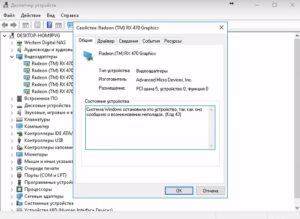
Windows 7/8/8.1 по умолчанию поддерживают только 4 видеокарты, В ОС WIndows 10 — данные ограничения отсутствуют.
Как исправить ошибку код 43 AMD Radeon
Ошибка 43 — квалифицируется как ошибка подписи драйверов, она может появиться после прошивки BIOSa видеокарты, или после установки более 4 видеокарт на 1 ферму.
В 80% случаев — это ошибка драйвера устройства, решается данная проблема установкой патча.
Рассмотрим по порядку варианты решений этой проблемы:
1 Способ — исправляем ошибку 43 при помощи патча драйверов.
Распаковываем архив и запускаем atikmdag-patcher.exe двойным кликом.
В появившемся окне вы увидите столбик «Found» — это означает что программа обнаружила файлы, которые необходимо пропатчить. Нажимаем «Yes» и перезагружаем сразу компьютер. 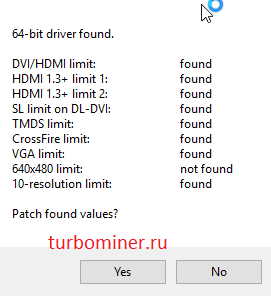
Если ошибка пропала, поздравляем!
Если после перезагрузки не на всех видеокартах пропала ошибка 43, значит система успела внести свой вклад до выключения компьютера.
1 Запускам atikmdag-patcher.exe. В окне программы будет написано: «Restore from backup?», нажимаем «Да»
2 Заново запускаем atikmdag-patcher.exe. В окне программы будет написано: «Patch found values», нажимаем «Да» и перезагружаем компьютер.
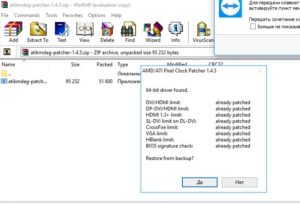
Если ошибка 43 так и не пропала, то переходим к следующему этапу.
2 Способ. Переустановка драйверов и операционной системы.
Если проблема возникла с видеокартами nvidia то просто удаляем драйвера через панель управления.
Для удаления драйверов видеокарт AMD нужно использовать специальную утилиту — softportal.com/ddu. Запускаем программу и удаляем драйвера.
Скачиваем новые драйвера c официального сайта. Для AMD скачиваем специальную версию для майнинга — ссылка.
Устанавливаем драйвера. Если ошибка пропала, то все отлично, если нет, то переустанавливаем операционную систему (используйте версию отличную от текущей), устанавливаем драйвера и затем патч.
Если же это тоже не помогло, переходим к следующему способу.
3 Способ. Проверка оборудования.
Подключите только одну видеокарту в слот PCI-E на материнской плате без райзера, и проверьте, подключен ли кабель дополнительного питания на видеокарте. Запустите компьютер, если ошибка пропала, значит проблема была в райзере.
Если видеокарта прошивалась, то загрузите оригинальный BIOS и установите видеокарту в материнскую плату, если ошибка пропала, значит неправильно выполнена прошивка.
При сохранении кода ошибки попробуйте установить другую видеокарту, в тот же слот PCI-E материнской платы. Если ошибка исчезла, значит предыдущая карта не исправна, несите по гарантии в магазин.
Если ошибка видеокарты код 43 появилась на ферме для майнинга, то рекомендуем снести «глючный» Windows и установить Hive OS
Источник
In most cases, updating your drivers should fix this issue
by Milan Stanojevic
Milan has been enthusiastic about technology ever since his childhood days, and this led him to take interest in all PC-related technologies. He’s a PC enthusiast and he… read more
Updated on October 31, 2022
Reviewed by
Vlad Turiceanu

Passionate about technology, Windows, and everything that has a power button, he spent most of his time developing new skills and learning more about the tech world. Coming… read more
- The code 43 error is specific to AMD and it’s mostly caused by outdated graphics card drivers.
- Quickly and seamlessly keep your GPU and other drivers updated by using a third-party app.
- You can also get rid of the AMD Radeon code 43 error with the Windows hardware troubleshooter.
XINSTALL BY CLICKING THE DOWNLOAD FILE
This software will repair common computer errors, protect you from file loss, malware, hardware failure and optimize your PC for maximum performance. Fix PC issues and remove viruses now in 3 easy steps:
- Download Restoro PC Repair Tool that comes with Patented Technologies (patent available here).
- Click Start Scan to find Windows issues that could be causing PC problems.
- Click Repair All to fix issues affecting your computer’s security and performance
- Restoro has been downloaded by 0 readers this month.
Graphics card issues are among the common problems on Windows 10, with the AMD error code 43 being the latest reported by users. There are various causes of this problem but it is not the most difficult issue to fix.
This guide will show you the surefire ways to fix the AMD error code 43 easily on your PC.
What does code 43 mean?
Error code 43 shows that Windows cannot establish communication with a drive or the needed driver has crashed. When it comes to AMD, this error can sometimes be accompanied by an error message that reads: Windows has stopped this device because it has reported problems. (code 43).
Below are some of the causes of this issue:
- Faulty drivers – The AMD graphics device driver error code 43 can be caused by outdated or faulty driver installation. You can fix this by rolling back or updating your drivers.
- Hardware problems – External devices or some of your PC hardware can also lead to the AMD error code 43 issue as reported on the forums of different sites like Promox, VFIO, and Unraid. To solve this, you need to run the Hardware and Devices troubleshooter.
How do I fix AMD Error code 43 on Windows 10?
1. Update your drivers
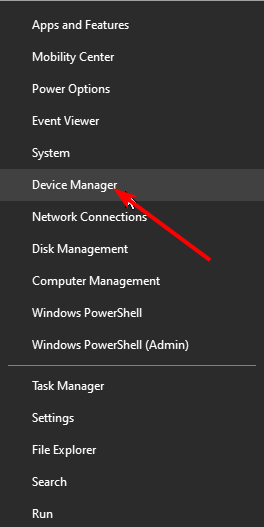
- Press the Windows key + X and select Device Manager.
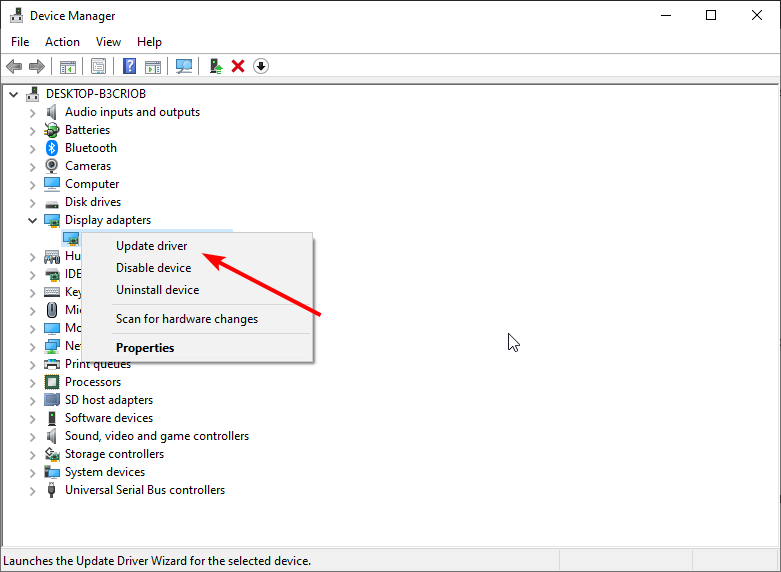
- Double-click Display adapters section to expand, right-click the AMD driver, and select Update driver.
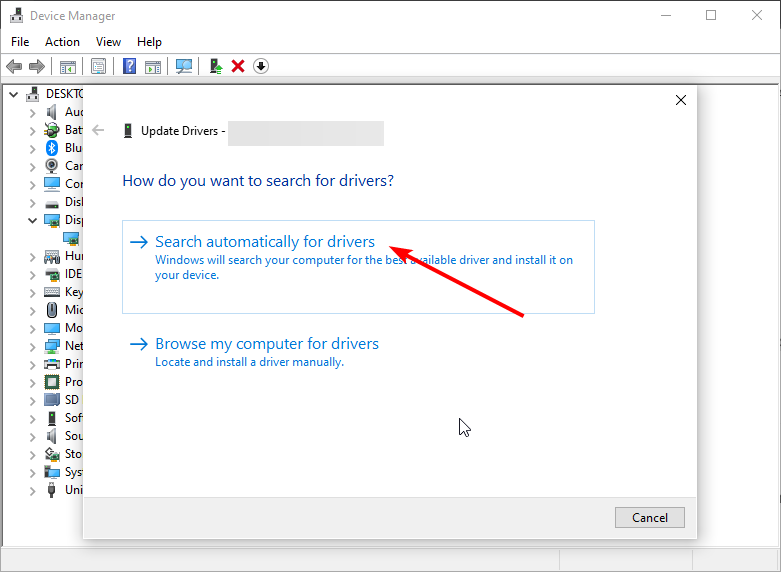
- Choose Search automatically for drivers and install any available update.
- If Windows says there is no update and the issue persists, choose the Browse my computer for drivers option.
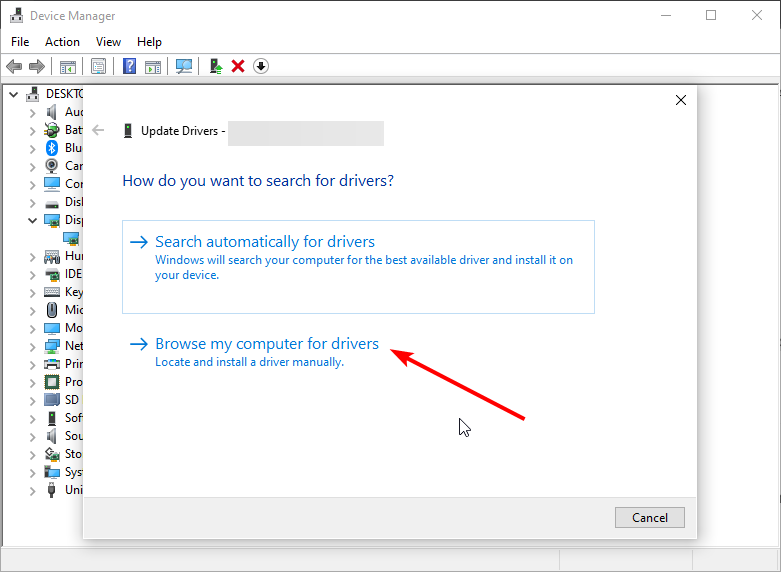
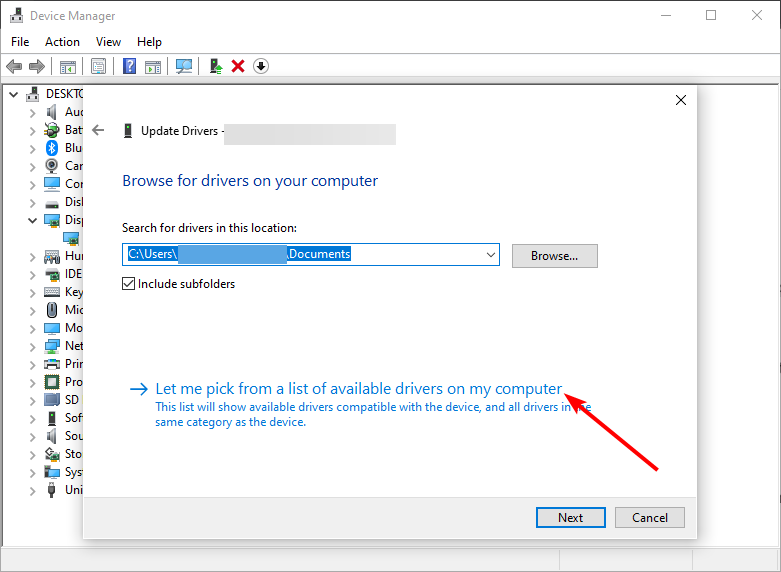
- Now, choose Let me pick from a list available drivers on my computer.
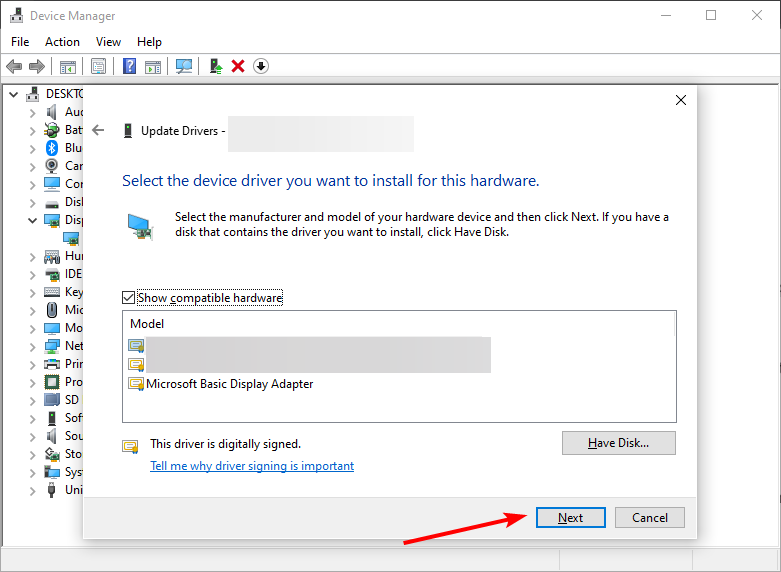
- Finally, choose the default driver and click Next.
The AMD error code 43 appears graphic card drivers are outdated. Aside from using the default Windows driver updater, you can download and install the latest drivers from your PC manufacturer’s website.
However, it must be noted that the manual way is not the most reliable method to update your drivers since it will not always find the latest available versions, especially recent releases.
One simple way to update the drivers automatically without the need to manually find your GPU model and the compatible driver on their site is to use a third-party app.
Various errors are the result of a malfunctioning driver. When this is the case, you may need to update or reinstall completely this specific component. As the process is not straight-forward to complete, we recommend using an automated tool for the job. Here’s how to do it:
- Download and install DriverFix.
- Launch the app.
- Wait for the software to detect all your faulty drivers.
- You will now be presented with a list of all the drivers that have issues, and you just need to select the ones you’d liked fixed.
- Wait for DriverFix to download and install the newest drivers.
- Restart your PC for the changes to take effect.

DriverFix
Keep your Windows safe from any type of errors caused by corrupted drivers, by installing and using DriverFix today!
Disclaimer: this program needs to be upgraded from the free version in order to perform some specific actions.
2. Roll back drivers
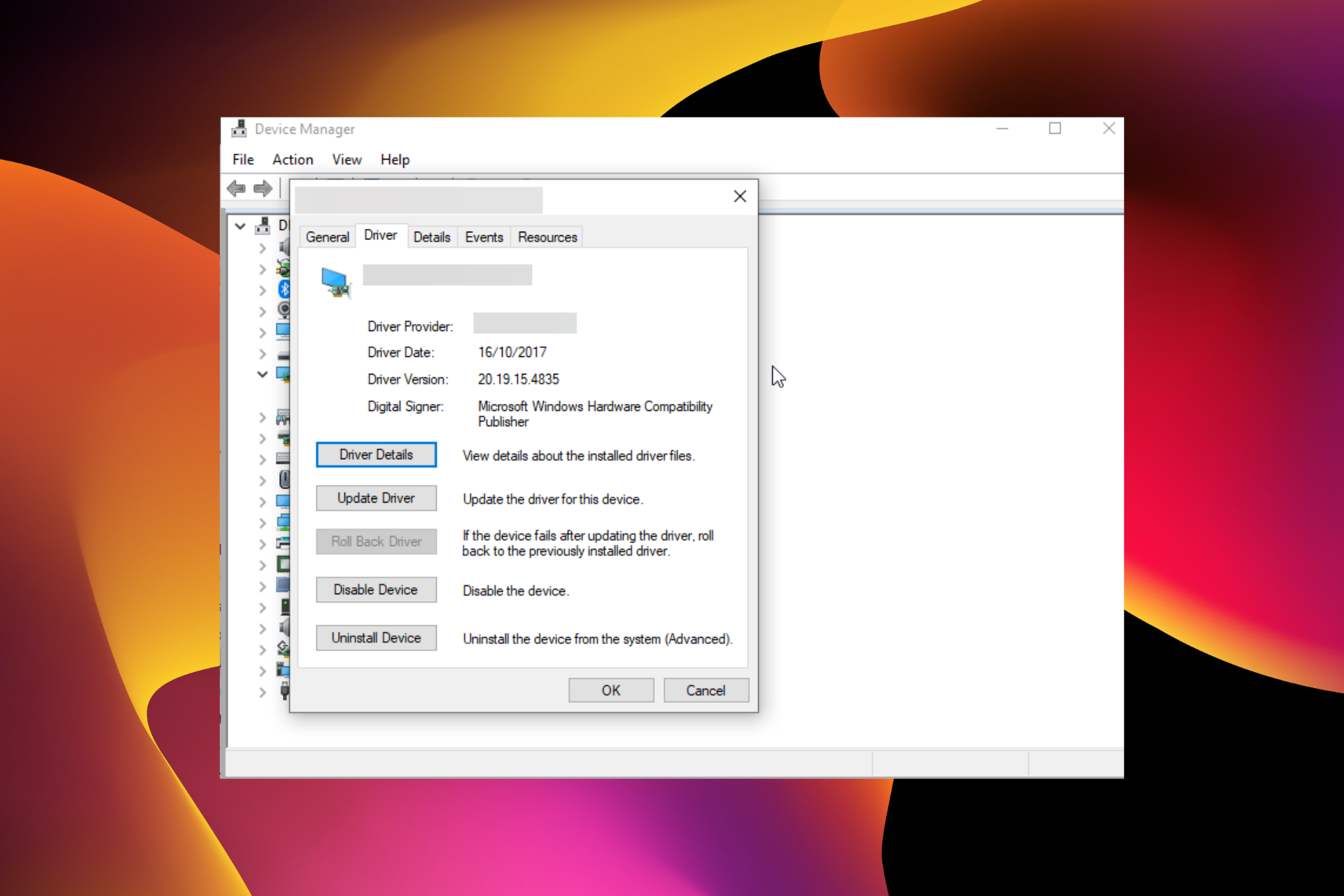
- Open the Device Manager, expand the Display adapters option, and double-click your driver.
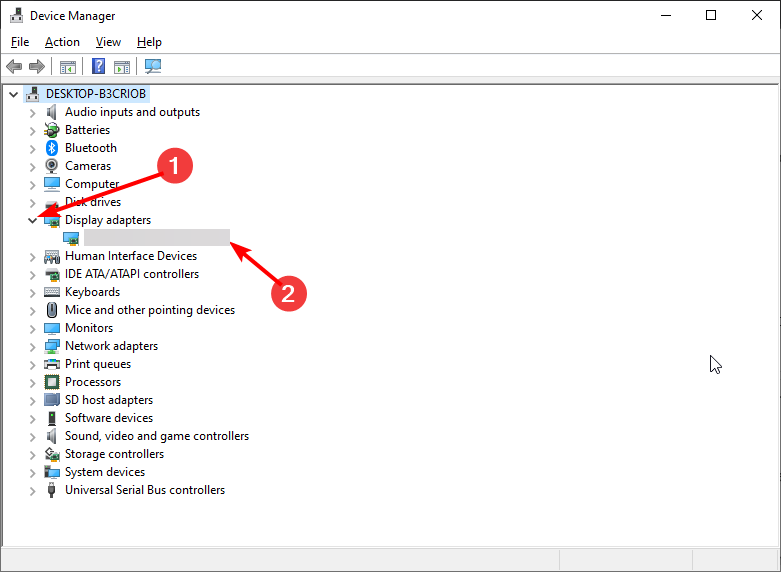
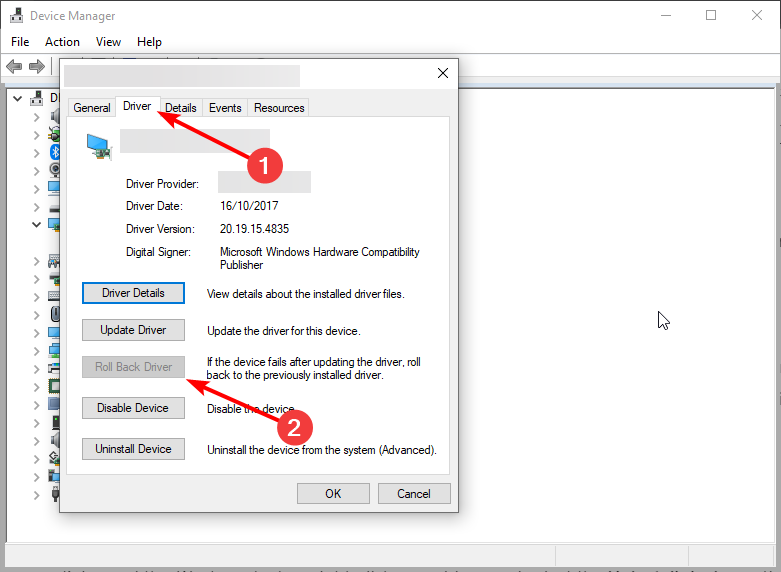
- Choose the Driver tab at the top.
- Click the Roll Back Driver button.
Some PC issues are hard to tackle, especially when it comes to corrupted repositories or missing Windows files. If you are having troubles fixing an error, your system may be partially broken.
We recommend installing Restoro, a tool that will scan your machine and identify what the fault is.
Click here to download and start repairing.
If you started noticing the AMD error code 43 after installing a new driver, you might need to roll back your driver to the previous version. This should fix the issue and wait till another updated version of the driver is available before updating it.
3. Uninstall and reinstall your drivers
- Disconnect your PC from the internet and open the Device Manager.
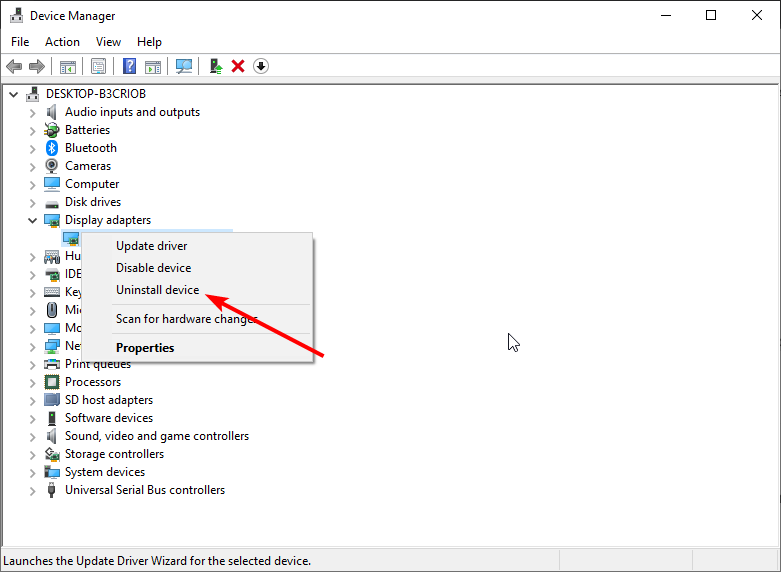
- Expand the Display adapters, right-click your driver, and select the Uninstall device option.
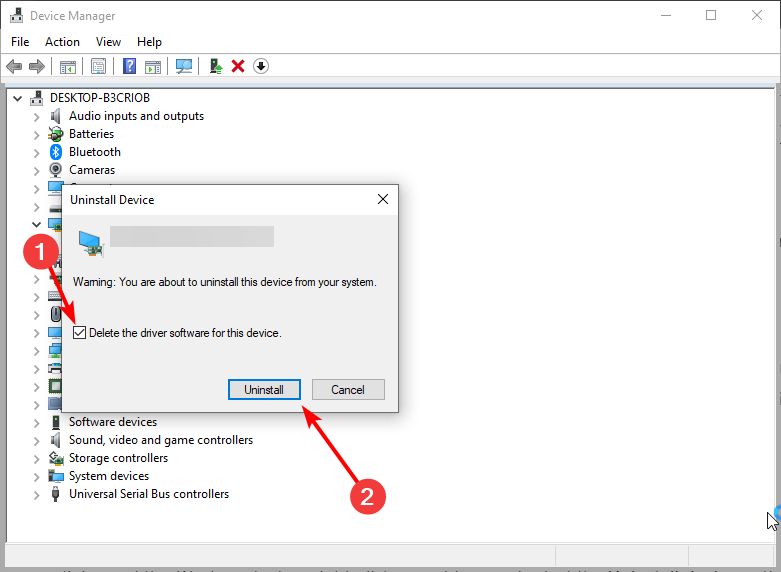
- Check the box for Delete the driver software for this device and click Uninstall.
- Restart your computer and your graphics controller should now be listed as Microsoft Basic Display Adapter.
- Finally, go to the AMD official website to download and install the latest version of your driver.
If updating and rolling back your driver does not fix the AMD code 43 issue, you need to uninstall your drivers. You can uninstall and reinstall the integrated and dedicated drivers on your PC if you have the two of them.
Lastly, it is important to turn off your internet before you start this solution. This is to prevent the automatic installation of the driver after you remove it.
4. Run the Hardware and Devices troubleshooter
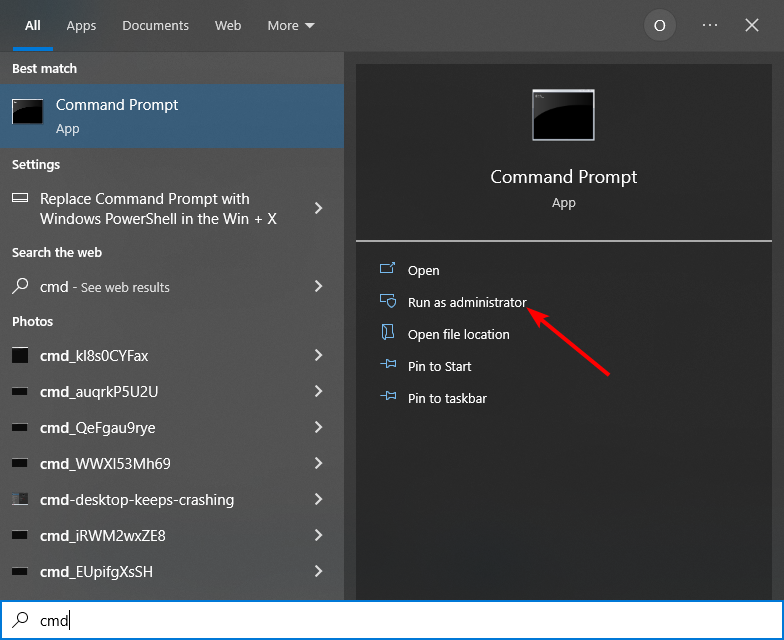
- Press the Windows key + S, type cmd, and click Run as administrator under Command Prompt.
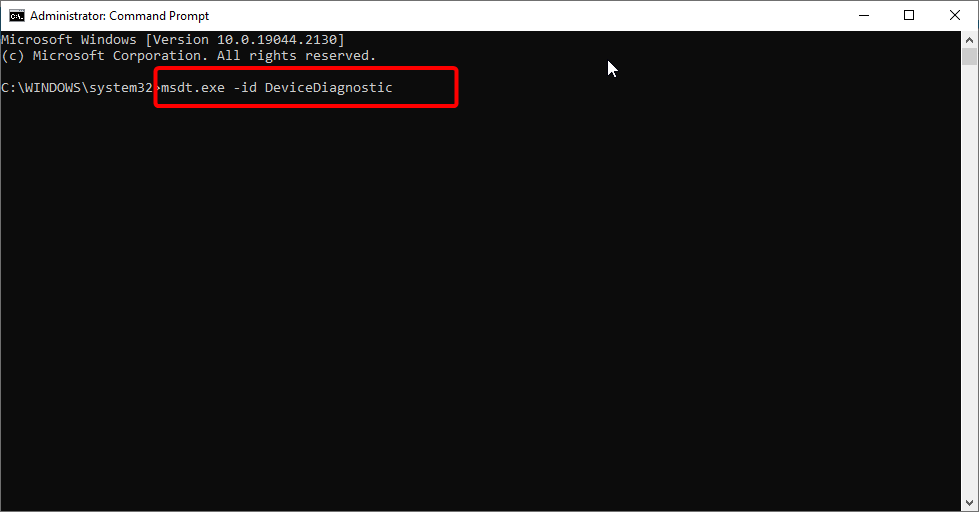
- Type the command below and hit the command below: msdt.exe -id DeviceDiagnostic
- Now, wait for the command to finish running.
If you’re getting AMD error code 43, it might be down to hardware issues. In this case, running the Hardware and Devices Troubleshooter should solve the problem.
AMD Error Code 43 can be down to various factors and in most cases, updating your driver should do.
If you want to know how to fix the most common AMD driver installation problem, check our detailed guide on the topic to do it quickly.
Feel free to let us know the solution that helped you fix the problem in the comments below.
Still having issues? Fix them with this tool:
SPONSORED
If the advices above haven’t solved your issue, your PC may experience deeper Windows problems. We recommend downloading this PC Repair tool (rated Great on TrustPilot.com) to easily address them. After installation, simply click the Start Scan button and then press on Repair All.

Newsletter
In most cases, updating your drivers should fix this issue
by Milan Stanojevic
Milan has been enthusiastic about technology ever since his childhood days, and this led him to take interest in all PC-related technologies. He’s a PC enthusiast and he… read more
Updated on October 31, 2022
Reviewed by
Vlad Turiceanu
Passionate about technology, Windows, and everything that has a power button, he spent most of his time developing new skills and learning more about the tech world. Coming… read more
- The code 43 error is specific to AMD and it’s mostly caused by outdated graphics card drivers.
- Quickly and seamlessly keep your GPU and other drivers updated by using a third-party app.
- You can also get rid of the AMD Radeon code 43 error with the Windows hardware troubleshooter.
XINSTALL BY CLICKING THE DOWNLOAD FILE
This software will repair common computer errors, protect you from file loss, malware, hardware failure and optimize your PC for maximum performance. Fix PC issues and remove viruses now in 3 easy steps:
- Download Restoro PC Repair Tool that comes with Patented Technologies (patent available here).
- Click Start Scan to find Windows issues that could be causing PC problems.
- Click Repair All to fix issues affecting your computer’s security and performance
- Restoro has been downloaded by 0 readers this month.
Graphics card issues are among the common problems on Windows 10, with the AMD error code 43 being the latest reported by users. There are various causes of this problem but it is not the most difficult issue to fix.
This guide will show you the surefire ways to fix the AMD error code 43 easily on your PC.
What does code 43 mean?
Error code 43 shows that Windows cannot establish communication with a drive or the needed driver has crashed. When it comes to AMD, this error can sometimes be accompanied by an error message that reads: Windows has stopped this device because it has reported problems. (code 43).
Below are some of the causes of this issue:
- Faulty drivers – The AMD graphics device driver error code 43 can be caused by outdated or faulty driver installation. You can fix this by rolling back or updating your drivers.
- Hardware problems – External devices or some of your PC hardware can also lead to the AMD error code 43 issue as reported on the forums of different sites like Promox, VFIO, and Unraid. To solve this, you need to run the Hardware and Devices troubleshooter.
How do I fix AMD Error code 43 on Windows 10?
1. Update your drivers
- Press the Windows key + X and select Device Manager.
- Double-click Display adapters section to expand, right-click the AMD driver, and select Update driver.
- Choose Search automatically for drivers and install any available update.
- If Windows says there is no update and the issue persists, choose the Browse my computer for drivers option.
- Now, choose Let me pick from a list available drivers on my computer.
- Finally, choose the default driver and click Next.
The AMD error code 43 appears graphic card drivers are outdated. Aside from using the default Windows driver updater, you can download and install the latest drivers from your PC manufacturer’s website.
However, it must be noted that the manual way is not the most reliable method to update your drivers since it will not always find the latest available versions, especially recent releases.
One simple way to update the drivers automatically without the need to manually find your GPU model and the compatible driver on their site is to use a third-party app.
Various errors are the result of a malfunctioning driver. When this is the case, you may need to update or reinstall completely this specific component. As the process is not straight-forward to complete, we recommend using an automated tool for the job. Here’s how to do it:
- Download and install DriverFix.
- Launch the app.
- Wait for the software to detect all your faulty drivers.
- You will now be presented with a list of all the drivers that have issues, and you just need to select the ones you’d liked fixed.
- Wait for DriverFix to download and install the newest drivers.
- Restart your PC for the changes to take effect.
DriverFix
Keep your Windows safe from any type of errors caused by corrupted drivers, by installing and using DriverFix today!
Disclaimer: this program needs to be upgraded from the free version in order to perform some specific actions.
2. Roll back drivers
- Open the Device Manager, expand the Display adapters option, and double-click your driver.
- Choose the Driver tab at the top.
- Click the Roll Back Driver button.
Some PC issues are hard to tackle, especially when it comes to corrupted repositories or missing Windows files. If you are having troubles fixing an error, your system may be partially broken.
We recommend installing Restoro, a tool that will scan your machine and identify what the fault is.
Click here to download and start repairing.
If you started noticing the AMD error code 43 after installing a new driver, you might need to roll back your driver to the previous version. This should fix the issue and wait till another updated version of the driver is available before updating it.
3. Uninstall and reinstall your drivers
- Disconnect your PC from the internet and open the Device Manager.
- Expand the Display adapters, right-click your driver, and select the Uninstall device option.
- Check the box for Delete the driver software for this device and click Uninstall.
- Restart your computer and your graphics controller should now be listed as Microsoft Basic Display Adapter.
- Finally, go to the AMD official website to download and install the latest version of your driver.
If updating and rolling back your driver does not fix the AMD code 43 issue, you need to uninstall your drivers. You can uninstall and reinstall the integrated and dedicated drivers on your PC if you have the two of them.
Lastly, it is important to turn off your internet before you start this solution. This is to prevent the automatic installation of the driver after you remove it.
4. Run the Hardware and Devices troubleshooter
- Press the Windows key + S, type cmd, and click Run as administrator under Command Prompt.
- Type the command below and hit the command below: msdt.exe -id DeviceDiagnostic
- Now, wait for the command to finish running.
If you’re getting AMD error code 43, it might be down to hardware issues. In this case, running the Hardware and Devices Troubleshooter should solve the problem.
AMD Error Code 43 can be down to various factors and in most cases, updating your driver should do.
If you want to know how to fix the most common AMD driver installation problem, check our detailed guide on the topic to do it quickly.
Feel free to let us know the solution that helped you fix the problem in the comments below.
Still having issues? Fix them with this tool:
SPONSORED
If the advices above haven’t solved your issue, your PC may experience deeper Windows problems. We recommend downloading this PC Repair tool (rated Great on TrustPilot.com) to easily address them. After installation, simply click the Start Scan button and then press on Repair All.
Newsletter
-
#1
Карта amd Radeon vega VII
Работала максимум в 60г, среднее 50 по показателям msi afterburner.
Почему карта могла сломаться от того что работала в дубаке, почему в мире существует антилогика? Я понимаю летом она майнила в 40г жару но тут то -10 и у окна стояла и…
Ваши варианты что с ней не так.
Бп рабочий т.к новый купил.
Остальные комплектующие тоже рабочие.
ПО все новое и рабочее.
-
#2
Ваши варианты что с ней не так.
Эта ошибка возникает, когда драйвер устройства графики уведомляет Windows о том, устройство не работает надлежащим образом. Это может указывать на проблему с оборудованием, сбой драйвера или программного обеспечения драйвера. Чтобы устранить эту ошибку, выполните следующие действия.
-
#3
Карта amd Radeon vega VII
Работала максимум в 60г, среднее 50 по показателям msi afterburner.
Почему карта могла сломаться от того что работала в дубаке, почему в мире существует антилогика? Я понимаю летом она майнила в 40г жару но тут то -10 и у окна стояла и…
Ваши варианты что с ней не так.
Бп рабочий т.к новый купил.
Остальные комплектующие тоже рабочие.
ПО все новое и рабочее.
пользуйся поиском тема уже обсасывалась и не раз.
-
#4
Тоже ,точно так же … «Приказала долго жить».
Буквально неделю назад. Отвал одной из банок памяти. Ошибка 43 в винде , под линуксом память вообще не определяется. Продажа на запчасти… Увы.(
-
#5
пользуйся поиском тема уже обсасывалась и не раз.
Там про сбой ПО пишут ,когда дело не в ПО а в карте это же логично
-
#6
Карта amd Radeon vega VII
Работала максимум в 60г, среднее 50 по показателям msi afterburner.
Почему карта могла сломаться от того что работала в дубаке, почему в мире существует антилогика? Я понимаю летом она майнила в 40г жару но тут то -10 и у окна стояла и…
Ваши варианты что с ней не так.
Бп рабочий т.к новый купил.
Остальные комплектующие тоже рабочие.
ПО все новое и рабочее.
Довы*****лся! То он иммерсионку делал, то СЖО, то проца, то для асика, потом ваще заявил что водоблок сделает лучше чем те, которые продаются, ну а че, на заводе станок есть, дырок насверлил и водоблок готов)))
-
#7
Карта amd Radeon vega VII
Ошибка 43 это
1. БИОС, карта не может поднять память
2. Память
3. Контроллер памяти
4. пятаки-межслойный обрыв
У веги память на кристале, потому если апдейт БИОС не поможет — ГПУ трупак
-
#8
Там про сбой ПО пишут ,когда дело не в ПО а в карте это же логично
всегда писали по слабый охлад , поэтому нужно всегда прикручивать доп.охлад.
-
#9
Довы*****лся! То он иммерсионку делал, то СЖО, то проца, то для асика, потом ваще заявил что водоблок сделает лучше чем те, которые продаются, ну а че, на заводе станок есть, дырок насверлил и водоблок готов)))
Так карта не моя, не я покупал,за знакомого спрашиваю а не за себя, мне то пофик деньги не я вкладывал в нее.
А т.к дубалай то не удивительно что у него техника летит в то время как цпу работает долго нежели карты в майнинге.
-
#10
Карта amd Radeon vega VII
Работала максимум в 60г, среднее 50 по показателям msi afterburner.
Почему карта могла сломаться от того что работала в дубаке, почему в мире существует антилогика? Я понимаю летом она майнила в 40г жару но тут то -10 и у окна стояла и…
Ваши варианты что с ней не так.
Бп рабочий т.к новый купил.
Остальные комплектующие тоже рабочие.
ПО все новое и рабочее.
-
#11
HBM память, не ремонтно пригодные дрова, увы.
-
#12
Работала максимум в 60г, среднее 50 по показателям msi afterburner.
Да плевать… а краюшек чипа, где контроллер памяти грелся в 90 или память жарилась
-
#13
всегда писали по слабый охлад .
У меня не слабый был, градусов было 40-50 в msi afterburner,где тут слабый?
-
#14
Да плевать… а краюшек чипа, где контроллер памяти грелся в 90 или память жарилась
Не знаю , левый кулер не работал последнее время, остальные два на 100% работали.
Память вроде справа где чип, а слева крайни кулер что там?
-
#15
101 раз уже такое было банка памяти сдохла , ремонт около 3000 , могу дать контакты мастера из Краснодара
-
#16
101 раз уже такое было банка памяти сдохла , ремонт около 3000 , могу дать контакты мастера из Краснодара
А в Москве нету?
-
#17
101 раз уже такое было банка памяти сдохла , ремонт около 3000 , могу дать контакты мастера из Краснодара
Радион 7, какую вы там банку за три косаря решили менять?
-
#18
Год назад так ушла 1080ti у предыдущего владельца стоял водоблок и 31.12.21 2060 Super, за два дня до отвала перешел с TON на ETH из-за пилы, а еще за день вырубили свет, покупалось все б/у, продал на з/ч.
-
#19
Карта amd Radeon vega VII
Работала максимум в 60г, среднее 50 по показателям msi afterburner.
Почему карта могла сломаться от того что работала в дубаке, почему в мире существует антилогика? Я понимаю летом она майнила в 40г жару но тут то -10 и у окна стояла и…
Ваши варианты что с ней не так.
Бп рабочий т.к новый купил.
Остальные комплектующие тоже рабочие.
ПО все новое и рабочее.
Пользуясь случаем, продам рабочую без майнинга Radeon VII. А твоя уже труп (
-
#20
101 раз уже такое было банка памяти сдохла , ремонт около 3000 , могу дать контакты мастера из Краснодара
Шо ты мелишь?
Yes i know, it was in his system. And it was the same outcome.
And do you think that those videos about the rx480 and eli’s videos are aplicable to my radeon vii ? Because if that is the case i might try it with my uncle considering he has all of the equipment for it. It would just require us to shop for parts.
Its a matter of troubleshooting.
First thing pull all gpu drivers, update motherboard chipset drivers, pull the gpu from the system, clean the pcie slot carefully with a duster, clean the gpu pins using electronic grade contact cleaner or 70+% isopropyl alcohol.
Update the motherboard bios too.
Fully and squarely insert gpu, try different monitor cable, have 2 separate power supply 8pin pcie connectors going to the gpu.

TechPowerUp
Extensive repository of graphics card BIOS image files. Our database covers submissions categorized by GPU vendor, type, and board partner variant.
www.techpowerup.com
TechPowerUp
Extensive repository of graphics card BIOS image files. Our database covers submissions categorized by GPU vendor, type, and board partner variant.
www.techpowerup.com
TechPowerUp
Extensive repository of graphics card BIOS image files. Our database covers submissions categorized by GPU vendor, type, and board partner variant.
www.techpowerup.com
TechPowerUp
Extensive repository of graphics card BIOS image files. Our database covers submissions categorized by GPU vendor, type, and board partner variant.
www.techpowerup.com
TechPowerUp
Extensive repository of graphics card BIOS image files. Our database covers submissions categorized by GPU vendor, type, and board partner variant.
www.techpowerup.com
Get this tool and download 1 of several files above.

AMDVBFlash / ATI ATIFlash (3.31) Download
AMD AMDVBFlash is used to flash the graphics card BIOS. The version released by ATI was called ATIFlash or just WinFlash. It supports all AMD Radeo
www.techpowerup.com
Follow my F7GOS Easy AMD Flash video link in my signature.
Other option
You may need to do a force flash in an administrator privileged command prompt. (Find cmd in start menu right click and open as administrator)
If that is not performed you may receive the stupid 0FL error.
Then follow this command
Enter this command first
Amdvbflash.exe -unlockrom 0
Then enter this command
amdvbflash -f -p 0 XXXX .rom
Note: XXXX is the name of the VBIOS file you downloaded. You can also change the downloaded file name to a simple name.
Otherwise you do it this way:
Create a new text file in your ATIFlash directory, name it FLASH.bat, and place this code into it:
@Echo off
cls
echo Flashing card 0 with BIOS.rom…
echo.
amdvbflash -p 0 -f BIOS.rom
echo.
pause
Assuming the new BIOS you want to flash onto your card is named BIOS.rom, this is the BIOS it will use for flashing.
Save your changes, then run the batch file by double-clicking on it.
Once you’ve received a success message, reboot your computer for the new BIOS to come into effect. If you can boot into Windows successfully, then that’s good! (Note: your screen may flicker for a bit, because you basically have a new card, and Windows is trying to recognize it. If you want to be thorough, go ahead and do a clean re-install of your graphics drivers.)
«Ошибка видеокарты код 43» — отображаемая в диспетчере устройств, это универсальный код ошибки, который означает проблему драйвера, либо устройства.
Ошибка 43 очень часто появляется на видеокартах AMD при майнинге криптовалют. Рекомендуем установить специальную систему сделанную именно под майнинг — Hive OS (бесплатна для 3 ферм). Инструкцию для ее установки можно прочитать тут: специализированная система для майнинга криптовалют.
Откройте диспетчер задач, и проверьте состояние видеокарт. Если отображается сообщение: «Система Windows остановила это устройство, так как оно сообщило о возникновении неполадок. (Код 43)» Это означает, что устройство AMD Radeon на вашем ПК не может работать должным образом.
Windows 7/8/8.1 по умолчанию поддерживают только 4 видеокарты, В ОС WIndows 10 — данные ограничения отсутствуют.
Содержание:
- Исправление ошибки при помощи патчинга драйвера
- Переустановка ОС и драйверов
- Проблемы с аппаратным обеспечением
Как исправить ошибку код 43 AMD Radeon
Ошибка 43 — квалифицируется как ошибка подписи драйверов, она может появиться после прошивки BIOSa видеокарты, или после установки более 4 видеокарт на 1 ферму.
В 80% случаев — это ошибка драйвера устройства, решается данная проблема установкой патча.
Рассмотрим по порядку варианты решений этой проблемы:
1 Способ — исправляем ошибку 43 при помощи патча драйверов.
Воспользуемся программой atikmdag-patcher-1.4.6 (кликаем тут для скачивания)
Распаковываем архив и запускаем atikmdag-patcher.exe двойным кликом.
В появившемся окне вы увидите столбик «Found» — это означает что программа обнаружила файлы, которые необходимо пропатчить. Нажимаем «Yes» и перезагружаем сразу компьютер.
Если ошибка пропала, поздравляем!
Если после перезагрузки не на всех видеокартах пропала ошибка 43, значит система успела внести свой вклад до выключения компьютера.
1 Запускам atikmdag-patcher.exe. В окне программы будет написано: «Restore from backup?», нажимаем «Да»
2 Заново запускаем atikmdag-patcher.exe. В окне программы будет написано: «Patch found values», нажимаем «Да» и перезагружаем компьютер.
Если ошибка 43 так и не пропала, то переходим к следующему этапу.
2 Способ. Переустановка драйверов и операционной системы.
Если проблема возникла с видеокартами nvidia то просто удаляем драйвера через панель управления.
Для удаления драйверов видеокарт AMD нужно использовать специальную утилиту — softportal.com/ddu. Запускаем программу и удаляем драйвера.
Скачиваем новые драйвера c официального сайта. Для AMD скачиваем специальную версию для майнинга — ссылка.
Устанавливаем драйвера. Если ошибка пропала, то все отлично, если нет, то переустанавливаем операционную систему (используйте версию отличную от текущей), устанавливаем драйвера и затем патч.
Если же это тоже не помогло, переходим к следующему способу.
3 Способ. Проверка оборудования.
Подключите только одну видеокарту в слот PCI-E на материнской плате без райзера, и проверьте, подключен ли кабель дополнительного питания на видеокарте. Запустите компьютер, если ошибка пропала, значит проблема была в райзере.
Возможно будет интересно: где и какие купить райзеры PCI-E
Если видеокарта прошивалась, то загрузите оригинальный BIOS и установите видеокарту в материнскую плату, если ошибка пропала, значит неправильно выполнена прошивка.
При сохранении кода ошибки попробуйте установить другую видеокарту, в тот же слот PCI-E материнской платы. Если ошибка исчезла, значит предыдущая карта не исправна, несите по гарантии в магазин.
Если ошибка видеокарты код 43 появилась на ферме для майнинга, то рекомендуем снести «глючный» Windows и установить Hive OS