This is very interesting crash and I think it should be considered as Qt bug. This problem arise only under very special circumstances. But one after another.
You will identify this problem when your application stopped/exited immediately after the start without any visible error message. It looks like the application isn’t executed at all. When you check application log (Computer -> manage -> Event viewer -> Windows logs -> Application), you will see Error logs:

The most interesting part of this log is crash location: ntdll.dll
Faulting application name: Skipper.exe, version: 3.0.1.1120, time stamp: 0x53e9c8d7
Faulting module name: ntdll.dll, version: 6.1.7601.18247, time stamp: 0x521ea8e7
Exception code: 0xc0000005
Fault offset: 0x0002e3be
Faulting process id: 0x1c88
Faulting application start time: 0x01cfb606553e594b
Faulting application path: T:S2Skipper.exe
Faulting module path: C:WindowsSysWOW64ntdll.dll
Report Id: 98cc8228-21f9-11e4-ab5d-005056c00008
At first sight it seems like some problem inside the windows. But the opposite is true, the problem (as almost always) is inside your app ;-).
As the next step, you can try to debug this executable via Visual Studio to see what happens inside. Simply open executable as project together with .pdb files and execute it. Now you can see that application is correctly executed but crashes as soon as it touches Qt library. The location of crash is inside ntdll.dll in RtlHeapFree() function.

So the problem is inside the Qt, right? Almost true, but not for the 100%. When I tried to run this application on computers of my colleagues, everything works ok. So why the application doesn’t work on my computer too?
Resolution
The problem is in new Qt5 plugin system. Besides the common Qt5*.dll files which are loaded immediately after the application start, Qt5 is also loading plugins/platform-plugins dynamically when the application is executed. To locate this plugins, Qt5 uses following method to identify directories where to search for plugins:
QStringList QCoreApplication::libraryPaths()
For some strange reason this library returns as first directory path where Qt5 libraries were compiled and after that location based on the executable. So if your Qt5 path is C:Qt5, this will be the first path where all plugins are searched for, no matter if the correct version of plugin is located in APPplugins or APPplatforms. I think this is serious bug in Qt5.
Where is the problem?
And here we’re getting to the core of the whole problem.
If application is compiled on computer with one compiler and used on second computer which contains the same path to which original computer has installed Qt, the application will load all plugins from your folder instead of itself folder.
In case your computer will contain different version of Qt, different compiler or different platform, application loads incorrect libraries and crashes. Completely, silently and without easy way to determine what’s wrong.
Solution?
The solution is simple, but it isn’t achievable from outside of the Qt library. It would be necessary to Qt as first tried to load libraries from application directory. And only if no plugins were found in application directory, the application would try to search for plugins in Qt directory.
Qt change solution
The simplest way how to fix this issue inside the Qt library would be to rename/update appendApplicationPathToLibraryPaths function to prependApplicationPathToLibraryPaths and change
void QCoreApplicationPrivate::prependApplicationPathToLibraryPaths()
{
#ifndef QT_NO_LIBRARY
    QStringList *app_libpaths = coreappdata()->app_libpaths;
    if (!app_libpaths)
        coreappdata()->app_libpaths = app_libpaths = new QStringList;
    QString app_location = QCoreApplication::applicationFilePath();
    app_location.truncate(app_location.lastIndexOf(QLatin1Char('/')));
#ifdef Q_OS_WINRT
    if (app_location.isEmpty())
        app_location.append(QLatin1Char('/'));
#endif
    app_location = QDir(app_location).canonicalPath();
    if (QFile::exists(app_location) && !app_libpaths->contains(app_location))
        //CHANGE THIS ROW: app_libpaths->append(app_location);
        //TO FOLLOWING
        app_libpaths->prepend(app_location);
#endif
}
InApp solution
Unfortunately it isn’t possible to simply change this behavior from your app. All of these operations happen directly in QCoreApplication constructor so if you try to change it after, it’s too late.
The temporary solution before this problem will be resolved is to reinitialize library paths before QCoreApplication is initialized. It’s necessary to clean libray paths, compute new paths and re-initialize QCoreApplication::libraryPaths before QCoreApplication object is initialized. This can be done in main.cpp of your application before you will create QApplication/QCoreApplication object.
  QString executable = argv[0];
  QString executablePath = executable.mid(0,executable.lastIndexOf("\"));
  QString installPathPlugins = QLibraryInfo::location(QLibraryInfo::PluginsPath);
  QCoreApplication::removeLibraryPath(installPathPlugins);
  QCoreApplication::addLibraryPath(installPathPlugins);
  QCoreApplication::addLibraryPath(executablePath);
It’s not a nice solution, but it works. I tried to report this issue also to bugreports.QtProject, so maybe in later version this will be fixed.
Содержание
- Qt creator error 0xc0000005
- Qt creator error 0xc0000005
- Qt5 application crashed with error 0xc0000005
- Resolution
- Where is the problem?
- Solution?
- Qt change solution
- InApp solution
Qt creator error 0xc0000005
Hello everybody,
I’m having a hard time installing Qt Creator on windows 7 x64
I’ve tried the offline installer, online installer:
qt-creator-opensource-windows-x86_64-6.0.0.exe
qt-unified-windows-x86-4.2.0-online.exe
Both give me an immediate error:
«The application was unable to start correctly (0xc0000005).
Click OK to close the application»
Any ideas what might be the issue?

@Mojofarmer QtCreator 6 is based on Qt6 which does not support Windows 7 anymore.
You will have to stay with QtCreator 5.
Or, better, upgrade to a more recent Windows version, as Windows 7 reached end of life quite some time ago already.
Thanks a lot jslum!
I’ll give Qt5 a try first, not too excited about having to upgrade my OS right now.
Downloading qt-everywhere-src-5.15.2.zip from:
https://download.qt.io/archive/qt/5.15/5.15.2/ should get me up and running just like qt-creator-opensource-windows-x86_64-6.0.0.exe would have, right?
@Mojofarmer Use the Qt online installer to install Qt and QtCreator offline installer from https://download.qt.io/official_releases/qtcreator/5.0/5.0.3/ to install QtCreator 5.
@jsulm Thanks a lot for your help jslum!
FWIW I’ve made a relevant FR asking for Win7 support in the online installer (essentially, asking to add QtCreator 5 back to the available component repos) at https://bugreports.qt.io/browse/QTBUG-100421.
Also, if anybody’s looking, a full directory of older Creator versions can be found at https://download.qt.io/official_releases/qtcreator/ (there doesn’t seem to be a direct link to past versions on the main website).
I had success with @jsulm’s suggestion; using the latest online installer (you can install the Qt5 toolchains with it still) and then separately installing Qt Creator 5 alongside it (in a different directory). It does leave the non-working Qt Creator 6 installed but it mostly doesn’t hurt anything, just takes up some extra drive space.
Источник
Qt creator error 0xc0000005
Hi all,
I’m experiencing a strange problem. A qt application I’ve made runs correctly on a windows system for some time, then it suddenly stops running (client says he didn’t do anything and that it just stopped working). Once this happens, the application cannot start anymore (tried reinstalling the app but no luck).
This is what I get from the Windows event data:
Any clues to what might be causing this problem?

@nwoki
I’ll be amazed if anyone can tell you anything from this information! ( error 0xc0000005 is «Access violation error», so memory is being accessed wrong, that’s about it) But we’ll see.
@nwoki
I’ll be amazed if anyone can tell you anything from this information! ( error 0xc0000005 is «Access violation error», so memory is being accessed wrong, that’s about it) But we’ll see.
I know. And that’s about it for the info i get from the application under windows. I can’t reproduce this problem on Linux. Anyone got any clues on how I can get more debug info for you guys?
A qt application I’ve made runs correctly on a windows system for some time, then it suddenly stops running (client says he didn’t do anything and that it just stopped working). Once this happens, the application cannot start anymore (tried reinstalling the app but no luck).
How long is «some time»? A few minutes? A few hours? A few days?
What do you mean by «the application cannot start anymore»? What happens when you try to start it?
Finally, how does the crash occur? Does it crash while your client is in the middle of using it, or does it crash at startup?
@nwoki Well it would be good to start with a windows vm development environment that you can reproduce the problem. That will let you attach to a debugger and get some useful information.
Another way is to build with map files and debug info. Then based on the crash/memory dump you can find which line of code your app crashed on. This can be daunting and a bit complicated if you’ve never done it before. And adding debug symbols may change the app enough that it «works» which doesn’t really help since you know there’s an issue but it gets masked by the debug binary.
Finally, this is why everything I write has massive amounts of logging. I even use kind of a «call stack» type thing in my logging code. So every function that is entered and exited gets a log message. This lets me narrow down a crash on a customer’s system with nothing more than a log file they provide. That isn’t helpful if you didn’t do it from the start though as it would take a lot of time. Something to note for the future.
If I had to throw out a complete guess, you probably have mixed Qt versions on the target system. Try using a dependency walker to see what Qt (and other) DLLs it is linking to and using. That is the usual culprit when something that worked before stops working with no update. It usually means a DLL got updated somewhere and broke it.
A qt application I’ve made runs correctly on a windows system for some time, then it suddenly stops running (client says he didn’t do anything and that it just stopped working). Once this happens, the application cannot start anymore (tried reinstalling the app but no luck).
How long is «some time»? A few minutes? A few hours? A few days?
A few days/1 week
What do you mean by «the application cannot start anymore»? What happens when you try to start it?
When launched the application doesn’t start. From the windows Event viewer i can see the application throw an error there but no window is ever presented. I don’t think the application ever gets to launch
Finally, how does the crash occur? Does it crash while your client is in the middle of using it, or does it crash at startup?
On startup. Doesn’t even show initial screen
Using the profiler as suggested by @ambershark I get the following.
This is the first time debugging a problem of this kind (I usually develop under linux). I see there are some problems «hooking modules». Might that be somewhere to start off from?
Hi, the profiler says the crash is inside dvr.exe and not in a Qtxxx dll.
So you could try using Process Monitor.
Start procmon.exe and set it to filter out all events except for your dvr.exe (that way you will not get swamped by thousands of events from other programs like explorer.exe etc.)
Then start dvr.exe and when it crashes, look in procmon.exe’s window to see what the last events were before dying.
@nwoki The hook module issues aren’t a problem. That is normal and you can ignore that.
If you can duplicate this crash on a virtual machine or on the customer’s machine then you could install a debugger (like WinDbg) and run the application in there to see what the backtrace shows. I’m a linux guy too so I’m not sure WinDbg will do what you need but it sounds like it should.
This would be equivalent to gdb ./dvr in linux and then when it crashes doing a bt . That should give you some insight as to what is crashing. If you can’t duplicate it on your machine you are stuck with adding logging (a lot of work), or doing the map file and debug info in your exe so you can find where the crash happened based on a crash log from the customer.
A quick update. I got the client to give me his computer for debugging next week. I’ll update you with the info on what @hskoglund and @ambershark advised to do. Thanks
@hskoglund Hi, finally got my hands on the client’s pc. This is what happens with ProcMon (hope I’m using it correctly. Not a power windows user.)

This is basically what happens when i launch the process and then veiw the process tree. For the events, I have this.

QtCharts having problems?
Hi, yeah if you run dvr.exe again a few times and it always crashes after loading the qtchartsqml2.dll, then it could be worthwhile to try a version of dvr.exe rebuilt without any Qt Charts functionality. Simplest would be to comment out those pieces of code, remove «QT += charts» the from the .pro file, rebuild dvr.exe and run the modified version on the client’s pc.
But first thing you should do on that client’s pc is to update the graphics driver, that might be an easier way to solve the problem 🙂
Did some more tests, as suggested, removed the QtCharts from the application and tried to force angle with
Without charts 
Now the last thing it seems to load before crashing si the QWebProcess.exe file. I tried to run it by itself and it as visible in the process monitor. I then check the process when launched with Qt and I found this:
Might this have anything to do with the crash?
I’m starting to begin to think that it’s a problem related to the intel drivers of the card as i’ve found others with problems like mine here and here.
Plus, this is the only computer that presents this problem. My windows machine, and that of my collegues that have a dedicated graphics card, run the application without any fuss.
Using windows debugger, I get the following error
First time I get this sort of error. Anyone know what might be the cause for it?
Hi, that baadfood address in ecx is a fallback value for uninitialized objects on the heap, it could be that you’re trying to set the QAction text for a bad QWidget/OpenGL window. Again, this could mean that the Intel graphics driver needs to be updated.
So, turns out that the only error message that was telling the truth was the one regarding the QAction : Qt5Widgets!QAction::setText+0x1: .
What was happening was the following:
I’ve implemented a «Recent files» QMenu where i set the last 5 recent files used by the client. What happened in this particular case was that the client removed some recent files that were stashed by my application (their path url) and so when I want to load them into the menu with:
the application crashed.
What threw me off was the first part of the debug message
which led me to think it was a problem concerning the graphical driver of the client as he told me he had done some updates lately and that the access error was related to the QWidgets.dll file.
Once I fixed that, the application went back to normal. Thankyou @ambershark and @hskoglund (you’re last comment helped me find the problem) for your help. I’ve also learned a few things on debugging under windows (i’m a linux guy).
OOI. What actually crashed? The code you show? Do you mean m_recentFilesActions.at(i) was nullptr /invalid?
was the culprit as the QFileInfo was not being created seeing that the recent file had been moved.
@nwoki
I really do not understand this, for two reasons:
When you try to create a QFileInfo(QString filepath) it does not fail if the path does not exist. If it did, there would be no point in having e.g. a QFileInfo::exists() function. AFAIK, the QFileInfo methods treat the filepath as a string to parse to produce results for extracting segments; they only try to access the file when a function which needs to do so is called. I therefore assume QFileInfo(recentFiles.at(i)).fileName()); would return the filename part of whatever you passed in.
Even if that were not true, then either it would throw some exception possibly or it would return, say, an empty string for the filename. You would pass that to your rf->setText() , and whatever that did it would not «crash» on trying to set some text.
I should be obliged if a Qt expert would correct me if the above is not true? Otherwise I do not see how in itself it would lead to the behaviour you have previously shown, which is why I asked.

Hope this helps you.
@Limer I had no idea a non-GUI thread was involved!
@nwoki I’m with @JonB on this . I don’t understand why it’s failing.
QFileInfo fi(«»).fileName() for instance should not crash at all. It’s perfectly valid. So if your recents list had a cleaned up file it shouldn’t have mattered at all.
I only typically have linux environments to test with and it works fine in linux (but you already knew that). So if it fails in windows that is a Qt bug not a bug in your software. Assuming it’s a crash in QFileInfo().fileName() which at worst should return an empty string, not crash.
Glad you got it working but it may be a «fake» fix since there is no reason that should have crashed in windows or elsewhere.
There was no mention in this posting about a non-gui thread at all. Not sure where you got that idea.
Источник
Qt5 application crashed with error 0xc0000005
This is very interesting crash and I think it should be considered as Qt bug. This problem arise only under very special circumstances. But one after another.
You will identify this problem when your application stopped/exited immediately after the start without any visible error message. It looks like the application isn’t executed at all. When you check application log (Computer -> manage -> Event viewer -> Windows logs -> Application), you will see Error logs:
The most interesting part of this log is crash location: ntdll.dll
At first sight it seems like some problem inside the windows. But the opposite is true, the problem (as almost always) is inside your app ;-).
As the next step, you can try to debug this executable via Visual Studio to see what happens inside. Simply open executable as project together with .pdb files and execute it. Now you can see that application is correctly executed but crashes as soon as it touches Qt library. The location of crash is inside ntdll.dll in RtlHeapFree() function.
So the problem is inside the Qt, right? Almost true, but not for the 100%. When I tried to run this application on computers of my colleagues, everything works ok. So why the application doesn’t work on my computer too?
Resolution
The problem is in new Qt5 plugin system. Besides the common Qt5*.dll files which are loaded immediately after the application start, Qt5 is also loading plugins/platform-plugins dynamically when the application is executed. To locate this plugins, Qt5 uses following method to identify directories where to search for plugins:
For some strange reason this library returns as first directory path where Qt5 libraries were compiled and after that location based on the executable. So if your Qt5 path is C:Qt5, this will be the first path where all plugins are searched for, no matter if the correct version of plugin is located in APPplugins or APPplatforms. I think this is serious bug in Qt5.
Where is the problem?
And here we’re getting to the core of the whole problem.
If application is compiled on computer with one compiler and used on second computer which contains the same path to which original computer has installed Qt, the application will load all plugins from your folder instead of itself folder.
In case your computer will contain different version of Qt, different compiler or different platform, application loads incorrect libraries and crashes. Completely, silently and without easy way to determine what’s wrong.
Solution?
The solution is simple, but it isn’t achievable from outside of the Qt library. It would be necessary to Qt as first tried to load libraries from application directory. And only if no plugins were found in application directory, the application would try to search for plugins in Qt directory.
Qt change solution
The simplest way how to fix this issue inside the Qt library would be to rename/update appendApplicationPathToLibraryPaths function to prependApplicationPathToLibraryPaths and change
InApp solution
Unfortunately it isn’t possible to simply change this behavior from your app. All of these operations happen directly in QCoreApplication constructor so if you try to change it after, it’s too late.
Источник
|
19 / 17 / 6 Регистрация: 09.01.2014 Сообщений: 337 |
|
|
1 |
|
|
25.09.2017, 14:14. Показов 5368. Ответов 15
Здравствуйте. Собрал приложение Qt, закинул все недостающие dll,qt.conf итд. У меня на пк все работает хорошо, но на других машинах программа крашится при запуске. ошибка 0xc0000005.
__________________
0 |

|
184 / 176 / 57 Регистрация: 25.09.2014 Сообщений: 828 |
|
|
25.09.2017, 18:03 |
2 |
|
Все, что угодно. Либо выводи в программе какой-то лог, либо пиши его в файл, либо там запускай IDE и программу в дебаг-режиме для проверки.
1 |
|
зомбяк 1564 / 1213 / 345 Регистрация: 14.05.2017 Сообщений: 3,936 |
|
|
25.09.2017, 18:40 |
3 |
|
либо отладчиком памяти ищи место, где программа обращается по неинициализированному адресу
1 |
|
19 / 17 / 6 Регистрация: 09.01.2014 Сообщений: 337 |
|
|
25.09.2017, 20:12 [ТС] |
4 |
|
Мне кажется, что я не совсем корректно объяснил в чем суть моей проблемы — я написал программу в Qt. Через IDE Qt программа работает идеально, но ее цель — работать на пк, не имеющем установленной среды разработки Qt. Я собрал свой проект динамически и скопировал в траекторию сборки (release) недостающие dll. Таким образом программа запускается через .exe на моем пк и все работает. Но если я ту же самую папку с exe и dll копирую на второй пк, где нет Qt — то при запуске вылетает ошибка.
0 |
|
3433 / 2812 / 1249 Регистрация: 29.01.2016 Сообщений: 9,426 |
|
|
25.09.2017, 21:15 |
5 |
|
У меня на пк все работает хорошо, но на других машинах программа крашится Чем отличаются другие машины от твоего ПК (кроме отсутствия Qt)?
1 |


|
19 / 17 / 6 Регистрация: 09.01.2014 Сообщений: 337 |
|
|
25.09.2017, 21:18 [ТС] |
6 |
|
Абсолютно ни чем(по моему мнению). на моем ноутбуке установлена та же самая винда, что и на моем компе (она на триале сейчас). даже пакеты Visual C++ Redistributable установлены одинаковые.
0 |
|
3433 / 2812 / 1249 Регистрация: 29.01.2016 Сообщений: 9,426 |
|
|
25.09.2017, 21:20 |
7 |
|
Через IDE Qt программа работает идеально Это не гарантирует, что в ней нет ошибок. Есть такое понятие — UB. Добавлено через 2 минуты
даже пакеты Visual C++ Redistributable установлены одинаковые. Это здесь при чём? Ты же mingw собирал прогу?
1 |
|
19 / 17 / 6 Регистрация: 09.01.2014 Сообщений: 337 |
|
|
25.09.2017, 21:23 [ТС] |
8 |
|
Да, собирал через mingw. я это просто к тому, что мои 2 компа, не считая железа — практически двойники.
0 |
|
3433 / 2812 / 1249 Регистрация: 29.01.2016 Сообщений: 9,426 |
|
|
25.09.2017, 21:25 |
9 |
|
на моем ноутбуке установлена та же самая винда, что и на моем компе Какая? Добавлено через 1 минуту
1 |
|
19 / 17 / 6 Регистрация: 09.01.2014 Сообщений: 337 |
|
|
25.09.2017, 21:42 [ТС] |
10 |
|
ОС — windows 7 домашняя расширенная. Кликните здесь для просмотра всего текста
Qt Creator 4.4.0 Собрано Sep 4 2017 в 04:09:56 Ревизия 60b8712a42 © 2008-2017 The Qt Company Ltd. Все права защищены. The program is provided AS IS with NO WARRANTY OF ANY KIND, INCLUDING THE WARRANTY OF DESIGN, MERCHANTABILITY AND FITNESS FOR A PARTICULAR PURPOSE. Ниже приложу и результат сборки(release) и сам проект(QtCustomPlos).
0 |
|
3433 / 2812 / 1249 Регистрация: 29.01.2016 Сообщений: 9,426 |
|
|
25.09.2017, 21:45 |
11 |
|
Qt Это qt creator. Qt тоже 5.9.1?
1 |
|
19 / 17 / 6 Регистрация: 09.01.2014 Сообщений: 337 |
|
|
25.09.2017, 22:08 [ТС] |
12 |
|
А как проверить? У меня что-то не получается найти… Добавлено через 3 минуты
0 |
|
3433 / 2812 / 1249 Регистрация: 29.01.2016 Сообщений: 9,426 |
|
|
25.09.2017, 23:31 |
13 |
|
Почитай: Добавлено через 4 минуты
1 |
|
19 / 17 / 6 Регистрация: 09.01.2014 Сообщений: 337 |
|
|
26.09.2017, 01:05 [ТС] |
14 |
|
К сожалению, я брал эти dll из правильных каталогов и решение автора мне не поможет, но вскрылось еще кое что интересно: Добавлено через 1 час 12 минут
0 |
|
34 / 36 / 17 Регистрация: 16.04.2017 Сообщений: 478 Записей в блоге: 4 |
|
|
26.09.2017, 14:26 |
15 |
|
Для корректного переброса не достаточно просто перенести dll.
0 |
|
3433 / 2812 / 1249 Регистрация: 29.01.2016 Сообщений: 9,426 |
|
|
27.09.2017, 06:14 |
16 |
|
Я вообще ума ни приложу — что за фигня… Всё-таки, у тебя .dll (qt-овские) не оттуда взяты. Меняю qt-овские .dll (в папке release: Qt5Core.dll, Qt5Gui.dll, Qt5PrintSupport.dll, Qt5Widgets.dll) на .dll из папки Qt5.9.15.9.1mingw53_32bin и программа запускается. Только папка platforms отдельно должна лежать, а не в папке plugins (как пишут). У тебя qt-овские .dll, скорее всего, взяты из папке bin qt creator (хотя — не факт, там другая ошибка при этом возникает). Ты qt creator отдельно ставил (В пакете с Qt 5.9.1 идёт qt creator 4.3.1, а у тебя 4.4.0)?
0 |
Hello everyone,
I have made small computer game using QT in CLion.
At beginning I show main menu with four rect items created as buttons, I connect it to some slots f.e start() — slot which start game, showHelp() — showing help informations, showScores() — top scores and the last one is quit connected to close() slot.Let me explain how my code works — I running for first time application then all items in the main menu working. When I click the start button it bring me to start method and all code from this method working as I wish.
If the player health is equal 0 or lower program showing gameOverWindow() and in this window have two buttons. One is playAgain and this button restarting game, next one moving to main menu — this menu which are displayed at start of my program.The problem that arises is when I click play again button it successful restart game, but sometimes it crashing my application at showGameOverWindow or after when I back to mainMenuWindow with those error information:
pure virtual method called terminate called without an active exception
but not always, sometimes it’s this exit code:
Process finished with exit code -1073741819 (0xC0000005)
When it doesn’t crash after that cases program will always crash after clicking any button in mainMenu without play game button.
Any help would be appreciated
Source code:
Code which checking health is under or equal 0
//some useless code before
if (game->health->getHealth() <= 0){
int score = game->score->getScore();
game->scene->clear();
game->ShowGameOverWindow(score);
}
To copy to clipboard, switch view to plain text mode
ShowGameOverWindow
void Game::ShowGameOverWindow(int score){
setBackgroundBrush(QImage("../Sources/Pictures/gameover.png"));
float height = window()->height();
float width = window()->width();
drawPanel(0,0,860,600,Qt::black,0.35);
drawPanel(width/4+30,height/4,400,400,Qt::lightGray,0.75);
backMenuButton = new Button(QString("../Sources/Pictures/Menu/ok-inactive.png"),
QString("../Sources/Pictures/Menu/ok-active.png"));
int qxPos = width-320;
int qyPos = height-110;
backMenuButton->setPos(qxPos, qyPos);
connect(backMenuButton, SIGNAL(clicked()), this, SLOT(displayMainMenu()));
scene->addItem(backMenuButton);
playAgainButton = new Button(QString("../Sources/Pictures/Menu/again-inactive.png"),
QString("../Sources/Pictures/Menu/again-active.png"));
int pxPos = width/3-30;
int pyPos = height-110;
playAgainButton->setPos(pxPos, pyPos);
playAgainButton->setSize(200,51);
connect(playAgainButton,SIGNAL(clicked()), this, SLOT(start()));
scene->addItem(playAgainButton);
}
To copy to clipboard, switch view to plain text mode
start game slot
void Game::start() {
scene->clear();
scene->setSceneRect(0,0,800,600);
setFixedSize(800,600);
setBackgroundBrush(QImage("../Sources/Pictures/gameBackground.png"));
player = new Player();
player->setFocus();
player->resetPos();
scene->addItem(player);
score = new Score();
score->resetScore();
score->setPos(score->x()+600, score->y()+9);
scene->addItem(score);
health = new Health();
health->resetHealth();
health->setPos(health->x()+380, health->y()+9);
scene->addItem(health);
if(!mainTimer->isActive()) {
connect(mainTimer, SIGNAL(timeout()), this, SLOT(mainLoop()));
mainTimer->start(0);
}
counting(1000);
auto * timerHurdle = new QTimer();
QObject::connect(timerHurdle,SIGNAL(timeout()),player,SLOT(spawnHurdle()));
timerHurdle->start(2000);
auto * timerHeart = new QTimer();
QObject::connect(timerHeart,SIGNAL(timeout()),player,SLOT(spawnHeart()));
timerHeart->start(10000);
}
To copy to clipboard, switch view to plain text mode
Display main menu
void Game::displayMainMenu() {
scene->clear();
scene->setSceneRect(0,0,1030,768);
setFixedSize(1030,768);
setBackgroundBrush(QImage("../Sources/Pictures/Menu/background.png"));
// buttons and properties
playButton = new Button(QString("../Sources/Pictures/Menu/start-inactive.png"),
QString("../Sources/Pictures/Menu/start-active.png"));
int bxPos = playButton->boundingRect().width()/8 + 3;
int byPos = 380;
playButton->setPos(bxPos, byPos);
connect(playButton,SIGNAL(clicked()), this, SLOT(start()));
scene->addItem(playButton);
scoreButton = new Button(QString("../Sources/Pictures/Menu/scores-inactive.png"),
QString("../Sources/Pictures/Menu/scores-active.png"));
int sxPos = scoreButton->boundingRect().width()/8 + 3;
int syPos = 450;
scoreButton->setPos(sxPos, syPos);
connect(scoreButton,SIGNAL(clicked()), this, SLOT(showScores()));
scene->addItem(scoreButton);
helpButton = new Button(QString("../Sources/Pictures/Menu/help-inactive.png"),
QString("../Sources/Pictures/Menu/help-active.png"));
int hxPos = helpButton->boundingRect().width()/8 + 3;
int hyPos = 520;
helpButton->setPos(hxPos, hyPos);
connect(helpButton,SIGNAL(clicked()), this, SLOT(showHelp()));
scene->addItem(helpButton);
quitButton = new Button(QString("../Sources/Pictures/Menu/quit-inactive.png"),
QString("../Sources/Pictures/Menu/quit-active.png"));
int qxPos = quitButton->boundingRect().width()/8 + 3;
int qyPos = 610;
quitButton->setPos(qxPos, qyPos);
connect(quitButton,SIGNAL(clicked()), this, SLOT(close()));
scene->addItem(quitButton);
backButton = new Button(QString("../Sources/Pictures/Menu/back-inactive.png"),
QString("../Sources/Pictures/Menu/back-active.png"));
int backxPos = scene->width()/2 - 40;
int backyPos = 610;
backButton->setPos(backxPos, backyPos);
connect(backButton,SIGNAL(clicked()), this, SLOT(displayMainMenu()));
scene->addItem(backButton);
parchmentImage = new QLabel();
QPixmap img("../Sources/Pictures/Menu/paper.png");
parchmentImage->setPixmap(img);
double x = img.width();
double y = img.height();
parchmentImage->setGeometry(300,250,x,y);
scene->addWidget(parchmentImage);
info = new TextInformation();
info->setPosition(300,270);
scene->addItem(info);
if(backButton->isVisible()) { scene->removeItem(backButton); }
if(info->isVisible()) { scene->removeItem(info); }
info->setProperties(Qt::black,"arial",16,300,270);
parchmentImage->setHidden(true);
playButton->setEnabled(true);
scoreButton->setEnabled(true);
helpButton->setEnabled(true);
quitButton->setEnabled(true);
}
To copy to clipboard, switch view to plain text mode
If the problem is too hard to imagine I can make short video to show you how I really looks or even paste more source code.
Описание вопросов
- В гибридном программировании VS и Qt я столкнулся с проблемой 0xC0000005, смущенным днем, теперь прилагается решение.
описание проблемы

Решение
- Поместите UI :: youclassname * ui; заменить его здесь в пользовательский интерфейс :: youclassname ui;,То есть использовать обычные переменные, не используйте указатели
- Что такое правда, неясно
Ручка блог:Qt Binding интерфейс пользовательского интерфейса и четырех методов класса Qt
Qt Binding интерфейс пользовательского интерфейса и четырех методов класса Qt
/ **************************** QT заголовочный файл объявляет пространство имен ************ ***** *********** /

namespace Ui {
    class Widget;
}


public:
    explicit Widget(QWidget *parent = 0);
private:
    Ui::Widget *ui;


Widget::Widget(QWidget *parent) :
    QWidget(parent),
    ui(new Ui::Widget)
    {...}


ui->setupUi(this);
/ / / / Должен быть после setupui
ui->pushButton->setToolTip("666");


/ *************************************************** *************************************************************** *************************** ******************** /

private:
    Ui::MyForm form;


form.setupUi(this);
form.btnDel->setEnabled(false);


/ *************************************************** ************************** *************** /

class Form : public QWidget, private Ui::Form
{public:
    explicit Form(QWidget *parent = 0);
	...
}

   setupUi(this);
   pushButton->setToolTip("666");


/ ***************************** vs & Qt Как использовать: ************* *************** /

#include "ui_sokit.h"
...
class Sokit :public QWidget
{
	Q_OBJECT
public:
	explicit Sokit(QWidget *parent = 0);
private:
	Ui::sokit ui;// значение ObjectName Sokit здесь - это значение ObjectName интерфейса дизайнера.
	......
}


#include "sokit.h"
Sokit::Sokit(QWidget *parent) :QWidget(NULL)
{
	ui.setupUi(this);
	ui.label->setText("666");// Обратите внимание на разницу между этим и Qtcreater
	......
}
Есть также хороший пост
VS2013 Компилированные программы QT Невозможно найти информацию о отладке
Qt Creator Project в Project Project
QT5.6 + OpenC2.49 + VS2015 сгенерированный метод исполняемого пакета EXE
Интерфейс QT закрывает главное окно. Если коробка QDialog не закрывается, программа не может выйти.
Приветствую! Наша любимая операционная система полна неожиданных сюрпризов, и один из них – это ошибка приложения под кодом 0xc0000005. Беда в том, что у этой ошибки нет конкретной расшифровки источника проблемы, т.е. случиться она может почти из-за чего угодно! Но хорошая новость в том, что 90% проблем можно исправить следуя этой инструкции.
Возникает эта проблема при запуске какой-нибудь программы или игры, а у некоторых даже при попытке открыть любую программу на компьютере! При этом может выдаваться похожее окно:
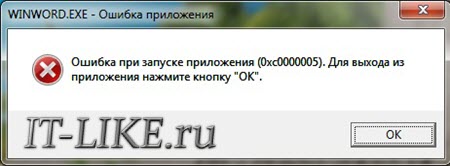
А сообщения могут быть разными, например:
- Error: access violation 0xC0000005
- Exception 0xc0000005 EXCEPTION_ACCESS_VIOLATION
- Ошибка при инициализации приложения (0xc0000005)
или система может вовсе уйти в нокаут, оставив на экране лишь печальный синий экран смерти. В Windows 8/10 x64 могут не работать 32-битные приложения. В любом случае следуйте инструкции сверху вниз, пробуя различные варианты, пока всё не наладится.
Ошибка 0xc0000005 после обновления Windows 7/8
В течении 2013-2014 годов Microsoft выпустила несколько обновлений для своих операционных систем, которые могут приводить к данной проблеме. В зависимости от настроек системы, эти обновления могут устанавливаться как в ручном режиме, так и полностью автоматически.
Факт: на пиратской Windows 7 вероятность лицезреть ошибку в разы выше, чем на лицензионной ОС. Но и законные владельцы виндовс могут столкнуться с неприятностью. Тут уж как сложатся звёзды 🙂 От меня совет: используйте только оригинальные сборки винды, а не всякие там супер-мега-пупер-зверь сборки 😉
Решение проблемы: удалить некоторые обновления. Сделать это можно несколькими способами.
Удаление обновлений из командной строки, самое простое
В Windows 7 введите в строку поиска меню «Пуск» строчку:
wusa.exe /uninstall /kb:2859537
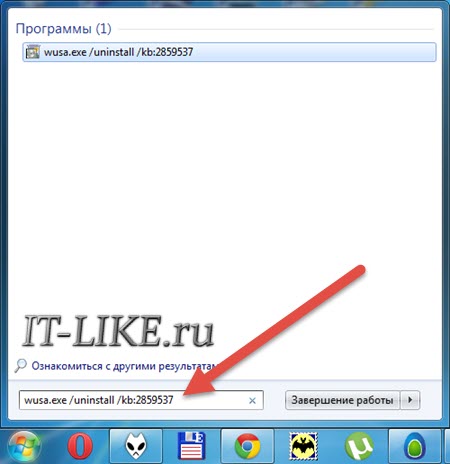
В Windows 8 нажмите «Win+X» и введите:
exe /uninstall /kb:2859537
Нажмите «Enter», и немного подождите. Если обновление под номером 2859537 у вас установлено, то утилита удалит его. Проверьте, не решена ли ваша проблема. Если нет, то снова откройте меню «Пуск» и в строку поиска введите:
wusa.exe /uninstall /kb:2872339
Нажмите энтер, и снова проверьте. При отрицательном результате повторяем действия ещё с двумя обновлениями:
wusa.exe /uninstall /kb:2882822
wusa.exe /uninstall /kb:971033
После каждого шага желательно перезагружаться.
Удаление обновлений из Панели управления
Заходим в
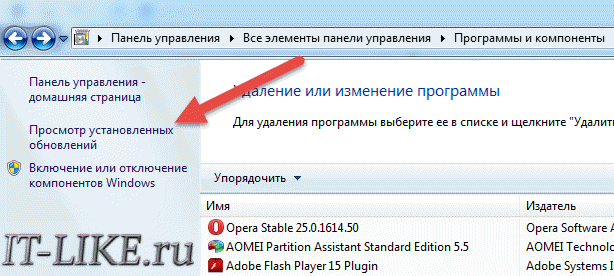
Просматриваем список с обновлениями Microsoft Windows и ищем в скобках совпадения из: KB2859537, KB2872339, KB2882822, KB971033
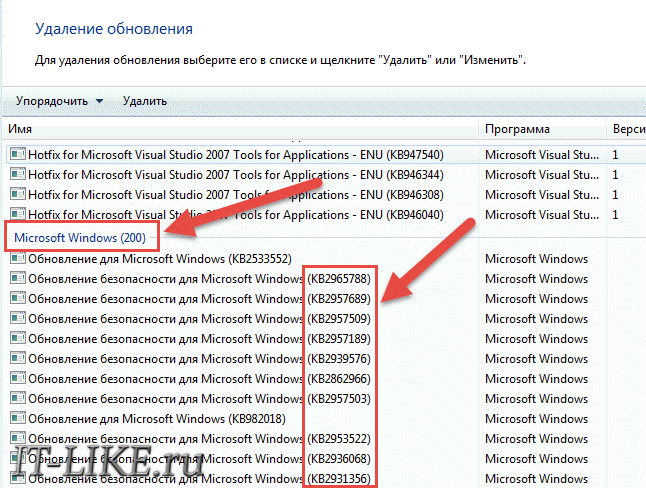
Удаляем. В списке около 200 строчек, поэтому первый способ мне видится более быстрым. Посмотрите видео, чтобы было понятней как всё делается.
Если не получается ни первым, ни вторым способом
Возможно, проблема окажется серьёзней и первые два способа не сработают из-за самой ошибки при запуске приложений 0xc0000005, т.е. она будет появляться при попытке запуска панели управления или утилиты wusa.exe. Тогда попробуйте запуститься в безопасном режиме. Для Windows 7 нужно при запуске компьютера нажимать клавишу «F8» пока не появится меню загрузки и там выбрать «Безопасный режим»
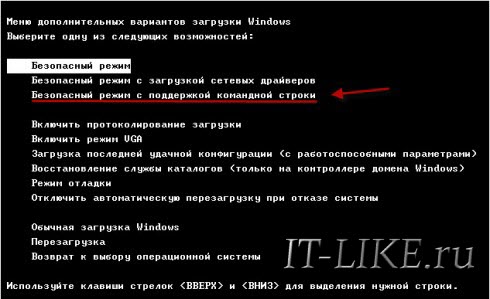
А там уже попробовать удалить обновления первым или вторым способом.
В особо сложных случаях и этот вариант не пройдёт. Тогда нужно использовать средство устранения неполадок. Чтобы загрузить среду восстановления нужно так же при запуске компьютера нажимать «F8» и в меню выбрать «Устранение неполадок компьютера»
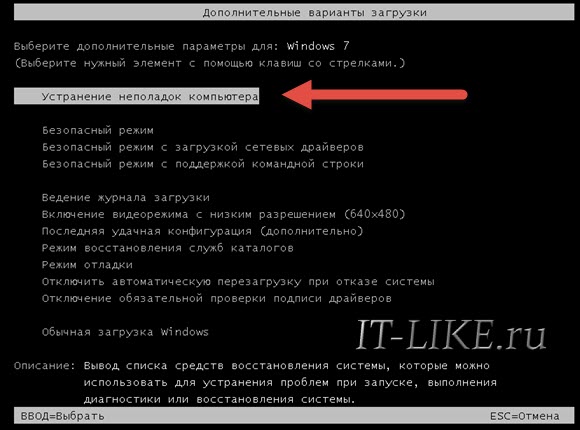
Далее будет предложено выбрать язык и ввести пароль администратора. Но такого пункта в меню может не оказаться, особенно если у вас Windows 8.1/10. Тогда нужно загрузиться с установочного диска или флешки, но вместо установки Windows выбрать «Восстановление системы», а затем в окошке нажать на «Командная строка».
Для продолжения работы нужно знать на каком диске установлена операционная система, обычно это диск «C:», а определить это можно очень просто. Введите в командную строку команду:
notepad
таким образом мы запустим самый обычный блокнот. Теперь заходим в меню и кликаем по «Компьютер»
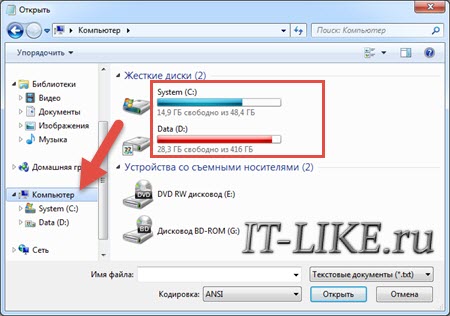
Здесь вы уже разберётесь: системный диск тот, на котором есть папка «Windows». Вернёмся к нашим «баранам», в командной строке введите команду:
DISM /Image:C: /Get-Packages
Где C: это буква диска, на котором установлена операционная система. В результате выполнения команды вы получите много-много информации, среди которой нужно найти записи, содержащие номера одного или всех пакетов обновлений из перечня: KB2859537, KB2872339, KB2882822, KB971033. Привожу для примера:
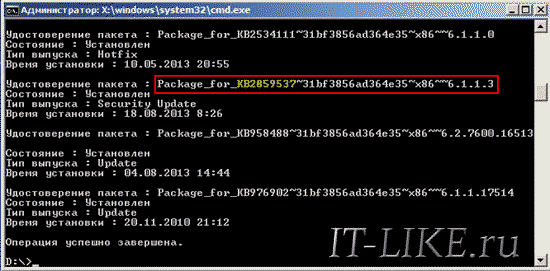
На картинке красным отмечено то, что нужно скопировать в буфер обмена. В командной строке это делается так: выделяем левой кнопкой мыши, а чтобы скопировать кликаем по выделению правой кнопкой, и всё. Чтобы облегчить себе задачу поиска нужной информации среди бесконечных букв и цифр сделайте так: скопируйте всё содержание окна в буфер и вставьте его в блокноте, а там уже пользуйтесь обычным поиском.
Далее, введите в командную строку:
DISM /Image:C: /Remove-Package /PackageName:здесь_имя_пакета_которое_скопировали
Т.е. должно получится наподобие (всё на одной строчке):
DISM /Image:C: /Remove-Package /PackageName:Package_for_KB2859537~31bf8906ad456e35~x86~~6.1.1.3
Нажимаем энтер, и, если нашли ещё другие пакеты обновления, то проделываем тоже самое и с ними. В результате этой процедуры пакеты будут удалены и пропадут из списка установленных, но останутся в журнале виндовс, т.ч. не пугайтесь, если что 🙂
И на закуску другой, более простой, а для кого-то может и единственный, метод:
- Заходим в папку и удаляем там всё что удаётся удалить
- Загружаемся в безопасном режиме и восстанавливаемся до более ранней точки восстановления системы
- Перезагружаемся
На заметку: можно избежать установки нежелательных пакетов при ручном режиме обновлений Windows. Нужно просто найти такой пакет в списке на установку и нажать «Скрыть».
Не всегда ошибку можно исправить удалив злосчастные обновления, т.к., как я уже писал, причины могут быть разными. Хороший вариант – это откат системы до точки восстановления на тот момент, когда ещё всё работало. Просто вспомните, когда это началось и найдите точку восстановления на дату пораньше. Кстати, так можно решить проблему и в случае пакетов обновления, просто восстановившись на точку, когда они ещё небыли установлены.
Далее попытаемся исправить ситуацию, восстановив системные файлы с помощью утилит dism и sfc. Запустите командную строку от админа и выполните по очереди две команды:
dism /online /cleanup-image /restorehealth
sfc /scannow

Команды выполняются довольно долго, после окончания работы нужно перезагрузиться. Они проверяют системные файлы, и в случае отклонения от исходных вариантов, они автоматически восстанавливаются из хранилища. В процессе восстановления, возможно, будет запрошен установочный диск с Windows или флешка.
К слову, ошибка запуска приложения 0xc0000005 связана с ошибочными операциями с оперативной памятью (RAM) – «memory access violation». Одним из способов лечения является отключение функции DEP (Data Execution Prevention) или внесение программы в список исключений. Как это сделать читайте в статье по ссылке, которую я привёл.
Частой проблемой могут быть вирусы в системе. Причём не сами вирусы являются причиной возникновения ошибки, но они как бы проявляют проблему, т.е. получается наложение нескольких факторов. В любом случае систему нужно тщательно пролечить от вирусов.
Сбойный модуль оперативной памяти так же может стать причиной. Особенно, если всё это началось после расширения или модернизации оперативной памяти компьютера. В этом случае нужно временно убрать новый модуль памяти и протестировать работу системы. Если проблема устранена, то, соответственно, сбойный модуль нужно поменять на рабочий. Протестировать память на ошибки можно с помощью утилиты MemTest86.
Неправильные драйверы так же могут стать нашей головной болью. В частности, это касается драйверов видеокарты. Вспомните, не обновляли ли вы какие-нибудь драйвера. Попробуйте скачать более новый драйвер или откатиться до предыдущей версии. Сделать это можно в диспетчере устройств, в свойствах устройства на вкладке «Драйвер»
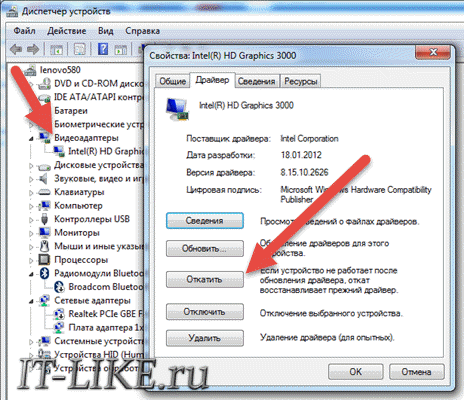
Иногда, ошибка 0xc0000005 возникает когда настройки профиля вашего принтера конфликтуют с приложениями. В этом случае не поможет даже переустановка Windows. Нужно обновить драйвера принтера или зайти в настройки принтера и создать новый чистый профиль.
Неполадки в реестре Windows могут служить корнем многих проблем, в т.ч. и нашей ошибки. На помощь могут прийти утилиты чистки реестра, коих в сети огромное множество. Это вариант не для новичков, т.к. можно окончательно загубить систему.
Для владельцев лицензионных ОС
Вы можете обратиться в техническую поддержку Microsoft и вам обязаны помочь, т.к. это чисто их «бока». Позвонить им можно в будние дни с 8:00 до 20:00, а в субботу с 10:00 до 19:00 по МСК, по телефонам:
- Россия: 8 (800) 200-8001
- Украина: 0 (800) 308-800
- Беларусь: 8 (820) 0071-0003
В любое время можно обратиться за помощью через форму обратной связи.
Владельцам предустановленных Windows нужно обращаться производителю компьютера или ноутбука, а они уже передадут информацию в Майкрософт.
Если ничего не помогает, могу посочувствовать и предложить полностью переустановить Windows 7/8/10. Радикальный метод, который у многих стоит на первом месте 🙂
Ну что ещё сказать
Если проблема коснулась только одного приложения, то попробуйте, для начала, просто переустановить его. Если есть английская, не русифицированная версия, то используйте её, иногда такое прокатывает. «Ломать» нормальную работу программ умеют всякие «взломщики», поэтому пользователям нелицензионных программ грех жаловаться на нестабильную работу компьютера и появление ошибки 0xc0000005 в любых ипостасях 🙂
Ну вот и всё, успехов! Если остались вопросы – добро пожаловать в комментарии, постараюсь помочь.