Получение и обработка информации — один из важнейших элементов любого языка программирования, особенно если речь идет о получении информации от пользователей.
Python, будучи медленным относительно таких языков, как C или Java, предлагает продвинутые инструменты для получения, анализа и обработки данных от конечного пользователя.
В этом материале речь пойдет о том, какие функции Python можно использовать для этих целей.
Для получения информации с клавиатуры в Python есть функции input() или raw_input() (о разнице между ними чуть позже). У них есть опциональный параметр prompt, который является выводимой строкой при вызове функции.
Когда input() или raw_input() вызываются, поток программы останавливается до тех пор, пока пользователь не введет данные через командную строку. Для ввода нужно нажать Enter после завершения набора текста. Обычно Enter добавляет символ новой строки (n), но не в этом случае. Введенная строка просто будет передана приложению.
Интересно, что кое-что поменялось в принципе работе функции между Python 2 и Python 3, что отразилось в разнице между input() и raw_input(). Об этом дальше.
Сравнение функций input и raw_input
Разница между этими функциями зависит от версии Python. Так, в Python 2 функция raw_input() используется для получения ввода от пользователя через командную строку, а input() оценивает ее и попробует запустить как код Python.
В Python 3 от raw_input() избавились, оставив только input(). Она используется для получения ввода пользователя с клавиатуры. Возможности input() из Python 2 в Python 3 работать не будут. Для той же операции нужно использовать инструкцию eval(input()).
Взгляните на пример функции raw_input в Python 2.
# Python 2

txt = raw_input("Введите что-нибудь, чтобы проверить это: ")
print "Это то, что вы только что ввели?", txt
Вывод
Введите что-нибудь, чтобы проверить это: Привет, мир!

Это то, что вы только что ввели? Привет, мир!
А вот как она работает в Python 3
# Python 3

txt = input("Введите что-нибудь, чтобы проверить это: ")
print("Это то, что вы только что ввели?", txt)
Вывод
Введите что-нибудь, чтобы проверить это: Привет, мир 3!

Это то, что вы только что ввели? Привет, мир 3!
Дальше в материале будет использоваться метод input из Python 3, если не указано другое.
Строковый и числовой ввод
По умолчанию функция input() конвертирует всю получаемую информацию в строку. Прошлый пример продемонстрировал это.
С числами нужно работать отдельно, поскольку они тоже изначально являются строками. Следующий пример показывает, как можно получить информацию числового типа:
# Ввод запрашивается и сохраняется в переменной
test_text = input ("Введите число: ")

# Преобразуем строку в целое число.
# функция float() используется вместо int(),
# для преобразования пользовательского ввода в десятичный формат,
test_number = int(test_text)

# Выводим в консоль переменную
print ("Введенное число: ", test_number)
Вывод
Введите число: 13
Введенное число: 13
Того же можно добиться и таким образом:
test_number = int(input("Введите число: "))
Здесь сразу после сохранения ввода происходит преобразование и присваивание значения переменной.
Нужно лишь отметить, что если пользователь ввел не целое число, то код вернет исключение (даже если это число с плавающей точкой).
Обработка исключений ввода
Есть несколько способов, как можно удостовериться в том, что пользователь ввел корректные данные. Один из них — перехватывать все возможные ошибки, которые могут возникнуть.
Вот такой код считается небезопасным:
test2word = input("Сколько вам лет? ")
test2num = int(test2word)
print("Ваш возраст ", test2num)
Запустим его и введем следующее:
Сколько вам лет? Пять
При вызове функции int() со строкой Пять появится исключение ValueError, и программа остановит работу.
Вот как можно сделать код безопаснее и обработать ввод:
test3word = input("Введите свое счастливое число: ")

try:
    test3num = int(test3word)
    print("Это правильный ввод! Ваше счастливое число: ", test3num)
except ValueError:
    print("Это не правильный ввод. Это не число вообще! Это строка, попробуйте еще раз.")
Этот блок оценит ввод. Если он является целым числом, представленным в виде строки, то функция input() конвертирует его в целое число. Если нет, то программа выдаст исключение, но вместо ошибки оно будет перехвачено. В результате вызовется вторая инструкция print.
Вот так будет выглядеть вывод с исключением.
Введите свое счастливое число: Семь
Это не правильный ввод. Это не число вообще! Это строка, попробуйте еще раз.
Такой код можно объединить с другой конструкцией, например, циклом for, чтобы убедиться, что код будет выполняться постоянно, до тех пор, пока пользователь не введет те данные, которые требуются.
Полный пример
# Создадим функцию для демонстрации примера
def example():

    # Бесконечный цикл, который продолжает выполняться
    # до возникновения исключения
    while True:
        test4word = input("Как вас зовут? ")

        try:
            test4num = int(input("Сколько часов вы играете на своем мобильном телефоне?" ))

        # Если полученный ввод не число, будет вызвано исключение
        except ValueError:
            # Цикл будет повторяться до правильного ввода
            print("Error! Это не число, попробуйте снова.")

        # При успешном преобразовании в целое число,
        # цикл закончится.
        else:
            print("Впечатляет, ", test4word, "! Вы тратите", test4num*60, "минут или", test4num*60*60, "секунд на игры в своем телефоне!")
            break

# Вызываем функцию
example()
Вывод:
Как вас зовут? Александр
Сколько часов вы играете на своем мобильном телефоне? 3
Впечетляет, Александр! Вы тратите 180 минут или 10800 секунд на игры в своем телефоне!
Выводы
В этой статье вы узнали, как встроенные инструменты Python используются для получения пользовательского ввода в разных форматах. Также научились обрабатывать исключения и ошибки, которые могут возникнуть в процессе.
Здравствуйте. Когда я на строчке n = int(input()) ввел enter, мне выдало ошибку: ValueError: invalid literal for int() with base 10: »
Но я не до конца понял, это значит не соответствие типа данных (вроде присвоило None и не может вывести) или это без всякого присвоения просто ошибка?
П.С. Я совсем новичок в Питоне поэтому извините если вопрос глупый.
-
Вопрос заданболее двух лет назад
-
375 просмотров
Пригласить эксперта
ValueError — это исключение, возникающее в случаях, когда в функцию передан аргумент с неподдерживаемым значением.
Когда вы вводите данные с клавиатуры, по умолчанию такие данные являются строкой. Но вы пытаетесь эти данные преобразовать в число с помощью функции int(). Если бы вы ввели число, и нажали enter, тогда бы в переменной n было бы число. А так, скорее всего вы ввели либо не числовые символы, или вообще ничего не ввели и нажали enter. В таком случае разумеется Python не может преобразовать данные в число. Думаю тут все логично.
Напиши вот так:
n = input()
try:
 n = int(n)
except:
print('Вы ввели не число')-
Показать ещё
Загружается…
29 янв. 2023, в 03:07
300000 руб./за проект
29 янв. 2023, в 02:16
700000 руб./за проект
29 янв. 2023, в 01:54
5000 руб./за проект
Минуточку внимания

Содержание
- Заголовок
- Чтение Traceback 1
- Чтение Traceback 2
- Некоторые ошибки с примерами кода
- Ошибки в синтаксисе
- Ошибки в логике
- Контест №1
Заголовок
Создайте файл solution.py со следующим кодом:
for coord in vector: print(coord) |
Наш код подразумевает печать содержимого переменной vector.
Запустим написанный скрипт, получим следующий вывод:
$ python3 solution.py
Traceback (most recent call last):
  File "solution.py", line 1, in <module>
    for coord in vector:
NameError: name 'vector' is not defined
Сообщение означает, что при исполнении кода возникла ошибка.
При этом Python сообщает нам кое-что ещё.
Разберём это сообщение детально.
Чтение Traceback 1
Исходное сообщение нужно мысленно разделить на две части.
Первая часть это traceback-сообщение:
Traceback (most recent call last):
  File "solution.py", line 1, in <module>
    for coord in vector:
Вторая часть — сообщение о возникшей ошибке:
NameError: name 'vector' is not defined
Разберём первую часть.
Traceback в грубом переводе означает «отследить назад».
Traceback показывает последовательность/стэк вызовов, которая, в конечном итоге, вызвала ошибку.
Первая строка:
Traceback (most recent call last):
является заголовочной.
Она сообщает, что в последующих строках будет изложен стэк вызовов (он показан отступами).
Обратите внимание на сообщение в скобках, оно указывает на порядок вызовов.
В данном случае (он же случай по умолчанию) тот вызов, в котором произошла ошибка, будет в последовательности вызовов указан последним.
Вторая и третья строки:
File "solution.py", line 1, in <module>
  for coord in vector:
показывают информацию о вызове (в нашем случае он один).
Во-первых, здесь есть информация о файле, в котором произошёл вызов («solution.py»), затем указан номер строки, где этот вызов происходит («line 1»), в конце стоит информация о том, откуда произошёл вызов («<module>»).
В нашем случае вызов происходит непосредственно из модуля, т.е. не из функции.
Наконец, вывод содержит не только номер строки, но и саму строку «for coord in vector:».
Заключительная строка сообщения:
NameError: name 'vector' is not defined
содержит вид (тип) ошибки («NameError»), и после двоеточия содержит подсказку.
В данном случае она означает, что имя «vector» не определено.
В самом деле, если взглянуть снова на код, то можно убедиться, что мы нигде не объявили переменную «vector».
Подведём итоги.
При попытке запуска мы получили следующий вывод
$ python3 solution.py
Traceback (most recent call last):
  File "solution.py", line 1, in <module>
    for coord in vector:
NameError: name 'vector' is not defined
Он говорит нам о возникновении ошибки.
Эта ошибка обнаружилась интерпретатором в первой строке файла «solution.py».
Сама ошибка является ошибкой имени и указывает на необъявленное имя — «vector».
Чтение Traceback 2
Оберните код из solution.py в функцию:
def print_vector(vector): for coord in vector: print(coord) print_vector(5) |
Запустим наш код
$ python3 solution.py
Traceback (most recent call last):
  File "solution.py", line 5, in <module>
    print_vector(5)
  File "solution.py", line 2, in print_vector
    for coord in vector:
TypeError: 'int' object is not iterable
На этот раз сообщение об ошибке сложнее, однако структура у него та же.
Часть со стеком вызовов увеличилась:
Traceback (most recent call last):
  File "solution.py", line 5, in <module>
    print_vector(5)
  File "solution.py", line 2, in print_vector
    for coord in vector:
Поскольку «most recent call last», читать будем её сверху вниз.
Вызовов на этот раз два.
Первый вызов:
File "solution.py", line 5, in <module>
  print_vector(5)
Произошел в пятой строке.
Судя по строчке кода, это вызов написанной нами функции print_vector(5) с аргументом 5.
Следом за ней второй вызов:
File "solution.py", line 2, in print_vector
  for coord in vector:
Этот вызов происходит внутри функции print_vector, содержащейся в файле «solution.py».
Вызов находится в строке 2.
Сама же ошибка имеет вид:
TypeError: 'int' object is not iterable
Как и в первом примере, сообщение об ошибке содержит её тип и подсказку.
В нашем случае произошла ошибка типа.
В подсказке же указано, что объект типа int не является итерируемым, т.е. таким объектом, который нельзя использовать в цикле for.
Итог:
$ python3 solution.py
Traceback (most recent call last):
  File "solution.py", line 5, in <module>
    print_vector(5)
  File "solution.py", line 2, in print_vector
    for coord in vector:
TypeError: 'int' object is not iterable
В нашем коде возникла ошибка.
Её вызвала последовательность вызовов.
Первый вызов произошел непосредственно из модуля — в строке 5 происходит вызов функции print_vector(5).
Внутри этой функции ошибка возникла в строчке 2, содержащей проход по циклу.
Сообщение об ошибке означает, что итерироваться по объекту типа int нельзя.
В нашем случае мы вызвали функцию print_vector от числа (от 5).
Некоторые ошибки с примерами кода
Ошибки в синтаксисе
Наиболее частая ошибка, которая возникает в программах на Python — SyntaxError: когда какое-то утверждение записано не по правилам языка, например:
$ python3
>>> print "hello"
  File "<stdin>", line 1
    print "hello"
                ^
SyntaxError: Missing parentheses in call to 'print'. Did you mean print("hello")?
Тот же тип ошибки возникнет, если забыть поставить двоеточие в цикле:
$ python3
>>> for i in range(5)
  File "<stdin>", line 1
    for i in range(5)
                ^
SyntaxError: invalid syntax
При неправильном использовании пробелов и табуляций в начале строки возникает IndentationError:
$ python3
>>> for i in range(5):
    print(i)
  File "<stdin>", line 2
    print(i)
        ^
IndentationError: expected an indented block
А теперь посмотрим, что будет, если в первой строке цикла воспользоваться пробелами, а во второй — табуляцией:
$ python3
>>> for i in range(5):
        print(i) # здесь пробелы
        print(i**2) # здесь табуляция
    File "<stdin>", line 3
      print(i**2)
                ^
TabError: inconsistent use of tabs and spaces in indentation
NameError возникает при обращении к несуществующей переменной:
$ python3
>>> words = "Hello"
>>> word
Traceback (most recent call last):
  File "<stdin>", line 1, in <module>
NameError: name 'word' is not defined
Ошибки в логике
Напишем простую программу на деление с остатком и сохраним как sample.py:
n = input()
m = input()
print(n % m)
и запустим её:
$ python3 sample.py
5
3
Traceback (most recent call last):
  File "sample.py", line 3, in <module>
    print(n % m)
TypeError: not all arguments converted during string formatting
Возникла ошибка TypeError, которая сообщает о неподходящем типе данных. Исправим программу:
n = int(input())
m = int(input())
print(n % m)
запустим на неподходящих данных:
$ python3 sample.py
xyz
Traceback (most recent call last):
  File "sample.py", line 1, in <module>
    n = int(input())
ValueError: invalid literal for int() with base 10: 'xyz'
Возникнет ValueError.
Эту ошибку ещё можно воспринимать как использование значения вне области допустимых значений (ОДЗ).
Теперь запустим программу на числовых данных:
$ python3 sample.py
1
0
Traceback (most recent call last):
  File "sample.py", line 3, in <module>
    print(n % m)
ZeroDivisionError: integer division or modulo by zero
При работе с массивами нередко возникает ошибка IndexError. Она возникает при выходе за пределы массива:
$ python3
>>> L1 = [1, 2, 3]
>>> L1[3]
Traceback (most recent call last):
  File "<stdin>", line 1, in <module>
IndexError: list index out of range
Что будет, если вызвать бесконечную рекурсию? Опишем её в программе endless.py
def noend():
    print("Hello!")
    noend()
noend()
Через некоторое время после запуска возникнет RecursionError:
Traceback (most recent call last):
  File "endless.py", line 4, in <module>
    noend()
  File "endless.py", line 3, in noend
    noend()
  File "endless.py", line 3, in noend
    noend()
  File "endless.py", line 3, in noend
    noend()
  [Previous line repeated 993 more times]
  File "endless.py", line 2, in noend
    print("Hello!")
RecursionError: maximum recursion depth exceeded while calling a Python object
User input is one of the most used functionalities of various computer applications. You will find yourself coding user input many times throughout your career. Thus, today’s tutorial is going to be about Python Input Function.
In this tutorial, I will be covering multiple topics about user input, such as, how to –
- Use Python input function.
- Take integer input from the user in Python
- Accept floating values from the user in Python.
Along with all these, you will also be learning, how to type cast a variable from one data type to another.
We will be using in-built functions of Python libraries to perform all the above-mentioned tasks, so get ready.
To learn how to take user input, first, let’s understand what is this input function?
The input( ) is an in-built function of Python Library which is used for taking input from the user in Python. This function was known by the name of raw_input earlier in Python 2. It was later changed to a much simpler name ‘input’ in Python 3.
The raw_input function is obsolete in Python 3 which means, if you are using the latest version of Python then you will not be able to use it.
The Syntax of Python Input Function
Input has a very simple syntax similar to various other in-built functions of Python library. Take a look –
input(prompt)
The Python input function accepts only one parameter and that too is optional. This parameter is prompt. Moreover, the prompt could be any text or expression which prompts the user for input. Although the parameter prompt is optional but using it is highly recommended.
For best practice always try to write an easy to understand prompt, such as – “Enter your e-mail” or “Enter your first name”.
How does the Python input function work?
When Python interpreter comes across an input expression, it first checks whether there is any prompt to display or not. Consequently, if the input function call contains a prompt, then the interpreter prints it on the screen after checking it for any errors.
Once the prompt has been displayed to the user then the interpreter waits for the user to enter the value and press the enter key. After that, the interpreter evaluates the value entered by the user and proceeds ahead to execute the next statement. That is how the Python input function works.
What does Python input function return?
The output of the input function is always a string. The input function of Python library takes the data from the user and then it converts it into a string. After that, you can process that string in whatever way you want.
In case you are not familiar with strings in Python then I suggest you check out these suggested readings –
- Single line strings in Python
- Multi-line strings in Python
Where can I find input ( ) function in Python architecture?
The Python input( ) function is defined into the builtins module in Python 3 and __builtin__ in Python 2 just like every other in-built objects, identifiers or methods. You can read more about the builtins module here.
[bctt tweet=”The Python input( ) function is defined into the builtins module in Python 3″ username=”@RebellionRider”]
Hard way to use Python input function.
>>import builtins
>>#import __builtin__
>>user-inp = builtins.input(“Enter some value: “)
Examples of Python Input Function!
Now that I have explained all the details of the input function, it’s time to do some practical examples.
How to take a “string input” from the user.
The most common type of input is the string type. Such as username is a string input so is the password. Now suppose you want the user to input his or her name. Therefore code for accepting the name of the user in Python will be –
f_name = input (“Enter your first name:”)
print("welcome", f_name)
Here we have two statements. Let’s see what is happening in these two statements—
Statement 1: In the first statement we have the input function call. The string which is written inside the parenthesis (“Enter your first name”) is the prompt which will get displayed on the screen. In the same statement, we have also declared a variable f_name.
On execution, the interpreter will take the input from the user and convert it into the string and then save it into the variable f_name.
Statement 2: the Second statement is a simple print statement which is displaying back the value stored into the variable f_name.
This statement will help us to see if the input function worked as it was desired to be or not?
How to take an “integer input” from the user.
The only short coming of the Python input function is that it converts the inputted value into a string.
Which means if a user enters an integer value then the function will convert it into a string. For example
salary = input (“Please enter your salary: ”)
print(type(age))
Ideally the above code should accept an integer value from the user and store it as an integer into the variable. But when you will execute the above code, you will find out that the variable “age” belongs to a string class instead of an integer. In other words the data type of the variable age is string not the integer.
That is because the input function converts the inputted data into string before storing or processing it further.
Python is a dynamically typed programming language. Which means unlike various other high-level programming languages we cannot specify the datatype of the variable while declaring it. In addition the data type of the variable gets decided by the data which is getting stored into it automatically.
Now you asked, so what if it converts the data into string? For the naked human eyes, it doesn’t matter but for Python engine the data type of the variable matters a lot. For example
Let’s say you want to add a 1000$ bonus to the inputted salary. For that you wrote this code
salary = input (“Please enter your salary: ”)
bonus = salary + 1000;
print(“Your Salary after bonus is: ”)
Now if you will execute this code you will get a type error.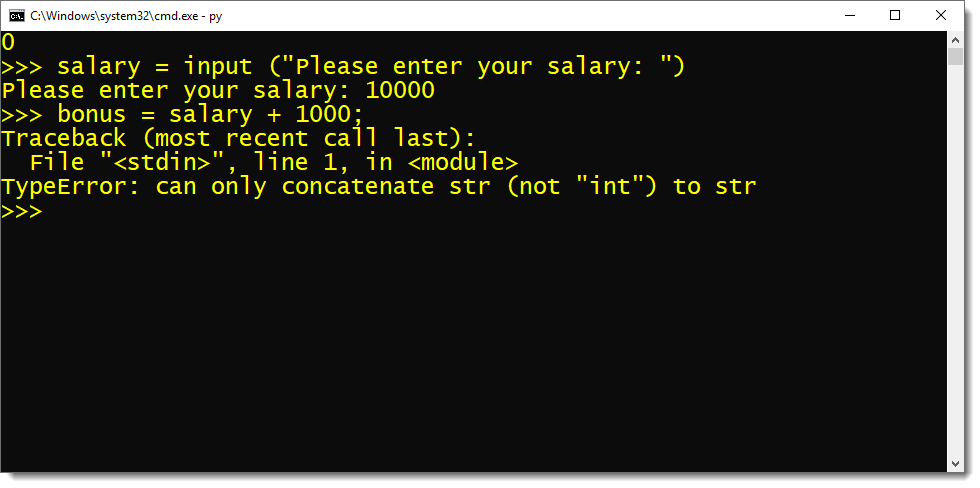
The reason for that error is, in Python, you cannot perform an arithmetic expression between a string and an integer. According to Python Programming norms, an arithmetic operation can only be performed between two compatible data types like an integer, a float or a real number.
The process of converting the data type of an object from one to another is called typecasting.

Typecasting is the only solution!
Let me tell you that there is no way we can stop Python input function from converting the inputted data to a string. It is going to do that no matter what!
The only solution is to reconvert the inputted data from string to the intended datatype. To do that we can take help of some of the other in-built functions of Python library.
How to do Type casting?
I must say, in Python Programming, type casting an object is very simple. Python provides us with very simple in-built functions to convert the data type of the object. Three most commonly used functions for type casting of Python libraries are –
- int( )
- float ( )
- str ( )
int( ): The int( ) function converts the object of any data type into an integer.
float ( ): As the name suggests, the float ( ) functions convert the object of any data type into a float.
str ( ): The str ( ) function of Python library type casts the object of any data type into a string.
Now that I have explained, what is type casting and how to do that. Let’s come back to our topic and learn how to accept integer input from the user in Python.
There are two ways to type cast the inputted value. You can type cast the value either
- Before it gets stored into the variable or
- After it is stored in the variable.
Let’s learn both these ways.
How to take integer input – Typecast after value gets stored
In this approach, we convert the datatype of the inputted value after it is stored into the variable. As we want the inputted value to be an integer thus we will use the in-built function int ( ) of Python library.
salary = input ("Enter Your Salary: ")
bonus = int(salary)+1000
print("After bonus your salary is: ", bonus)
Except for the int function call in statement 2, everything is pretty much the same. In the statement 3, I called the int( ) function and passed the name of the variable “salary” to its parameter.
On execution, the int( ) function call will convert the data type of the value stored into the variable salary into the integer.
How to take integer input – Type cast before value gets stored
This is the most common approach for taking an integer input from the user in Python. In this approach, we typecast the value into an integer before it gets stored into the variable. To do that I will call the int( ) function in the first statement. Like this.
salary = int(input ("Enter Your Salary: "))
bonus = salary+1000
print("After bonus your salary is: ", bonus)
To typecast the value into an integer we need to perform a nesting of function. As you can see we did the same in the above code. We passed the Python input( ) function as the parameter of the int( ) function.
This contraption of nested function call will convert the data type of the value entered by the user from string to an integer before it gets saved into the variable.
That is how we take an integer input using Python input function in Python Programming language.
If you are like me who learns faster by watching videos, then check out this tutorial on YouTube channel.
How to take float input in Python Programming.
In this section I will quickly show you, how you can take a floating value as input using Python input function.
The approach will remain the same, we will simply tweak the type casting. Therefore this time I will type cast the inputted value from string to float instead of integer. To do that we will use the in-built function float( ) of Python library.
salary = float(input ("Enter Your Salary: "))
bonus = salary+1000
print("After bonus your salary is: ", bonus)
On execution of this code, the value which is entered by the user and which is getting stored into the salary variable will be of floating data type.
Info: At any point in any above given code you can use the type( ) function to determine the datatype of the variable. For example, if you want to determine the data type of the variable salary then you can use this statement.>>print(type(salary))
That is it for this tutorial. We have learnt a lot today. In this tutorial I have demonstrated to you how to:
- Take a string, an integer and a floating input using Python input( )
- Type-cast an object, and
- Use type( ) function and find out the data type of the object
I think that’s enough for this tutorial. If you enjoyed this article, please do share on your social media. Thanks for reading.
Good luck and god speed.
Errors
Errors or mistakes in a program are often referred to as bugs. They are almost always the fault of the programmer. The process of finding and eliminating errors is called debugging. Errors can be classified into three major groups:
- Syntax errors
- Runtime errors
- Logical errors
Syntax errors
Python will find these kinds of errors when it tries to parse your program, and exit with an error message without running anything. Syntax errors are mistakes in the use of the Python language, and are analogous to spelling or grammar mistakes in a language like English: for example, the sentence Would you some tea? does not make sense – it is missing a verb.
Common Python syntax errors include:
- leaving out a keyword
- putting a keyword in the wrong place
- leaving out a symbol, such as a colon, comma or brackets
- misspelling a keyword
- incorrect indentation
- empty block
Note
it is illegal for any block (like an if body, or the body of a function) to be left completely empty. If you want a block to do nothing, you can use the pass statement inside the block.
Python will do its best to tell you where the error is located, but sometimes its messages can be misleading: for example, if you forget to escape a quotation mark inside a string you may get a syntax error referring to a place later in your code, even though that is not the real source of the problem. If you can’t see anything wrong on the line specified in the error message, try backtracking through the previous few lines. As you program more, you will get better at identifying and fixing errors.
Here are some examples of syntax errors in Python:
myfunction(x, y):
    return x + y

else:
    print("Hello!")

if mark >= 50
    print("You passed!")

if arriving:
    print("Hi!")
esle:
    print("Bye!")

if flag:
print("Flag is set!")
Runtime errors
If a program is syntactically correct – that is, free of syntax errors – it will be run by the Python interpreter. However, the program may exit unexpectedly during execution if it encounters a runtime error – a problem which was not detected when the program was parsed, but is only revealed when a particular line is executed. When a program comes to a halt because of a runtime error, we say that it has crashed.
Consider the English instruction flap your arms and fly to Australia. While the instruction is structurally correct and you can understand its meaning perfectly, it is impossible for you to follow it.
Some examples of Python runtime errors:
- division by zero
- performing an operation on incompatible types
- using an identifier which has not been defined
- accessing a list element, dictionary value or object attribute which doesn’t exist
- trying to access a file which doesn’t exist
Runtime errors often creep in if you don’t consider all possible values that a variable could contain, especially when you are processing user input. You should always try to add checks to your code to make sure that it can deal with bad input and edge cases gracefully. We will look at this in more detail in the chapter about exception handling.
Logical errors
Logical errors are the most difficult to fix. They occur when the program runs without crashing, but produces an incorrect result. The error is caused by a mistake in the program’s logic. You won’t get an error message, because no syntax or runtime error has occurred. You will have to find the problem on your own by reviewing all the relevant parts of your code – although some tools can flag suspicious code which looks like it could cause unexpected behaviour.
Sometimes there can be absolutely nothing wrong with your Python implementation of an algorithm – the algorithm itself can be incorrect. However, more frequently these kinds of errors are caused by programmer carelessness. Here are some examples of mistakes which lead to logical errors:
- using the wrong variable name
- indenting a block to the wrong level
- using integer division instead of floating-point division
- getting operator precedence wrong
- making a mistake in a boolean expression
- off-by-one, and other numerical errors
If you misspell an identifier name, you may get a runtime error or a logical error, depending on whether the misspelled name is defined.
A common source of variable name mix-ups and incorrect indentation is frequent copying and pasting of large blocks of code. If you have many duplicate lines with minor differences, it’s very easy to miss a necessary change when you are editing your pasted lines. You should always try to factor out excessive duplication using functions and loops – we will look at this in more detail later.
Exercise 1
-
Find all the syntax errors in the code snippet above, and explain why they are errors.
-
Find potential sources of runtime errors in this code snippet:
dividend = float(input("Please enter the dividend: "))
divisor = float(input("Please enter the divisor: "))
quotient = dividend / divisor
quotient_rounded = math.round(quotient)
-
Find potential sources of runtime errors in this code snippet:
for x in range(a, b):
    print("(%f, %f, %f)" % my_list[x])
-
Find potential sources of logic errors in this code snippet:
product = 0
for i in range(10):
    product *= i

sum_squares = 0
for i in range(10):
    i_sq = i**2
sum_squares += i_sq

nums = 0
for num in range(10):
    num += num
Handling exceptions
Until now, the programs that we have written have generally ignored the fact that things can go wrong. We have have tried to prevent runtime errors by checking data which may be incorrect before we used it, but we haven’t yet seen how we can handle errors when they do occur – our programs so far have just crashed suddenly whenever they have encountered one.
There are some situations in which runtime errors are likely to occur. Whenever we try to read a file or get input from a user, there is a chance that something unexpected will happen – the file may have been moved or deleted, and the user may enter data which is not in the right format. Good programmers should add safeguards to their programs so that common situations like this can be handled gracefully – a program which crashes whenever it encounters an easily foreseeable problem is not very pleasant to use. Most users expect programs to be robust enough to recover from these kinds of setbacks.
If we know that a particular section of our program is likely to cause an error, we can tell Python what to do if it does happen. Instead of letting the error crash our program we can intercept it, do something about it, and allow the program to continue.
All the runtime (and syntax) errors that we have encountered are called exceptions in Python – Python uses them to indicate that something exceptional has occurred, and that your program cannot continue unless it is handled. All exceptions are subclasses of the Exception class – we will learn more about classes, and how to write your own exception types, in later chapters.
The try and except statements
To handle possible exceptions, we use a try-except block:
try:
    age = int(input("Please enter your age: "))
    print("I see that you are %d years old." % age)
except ValueError:
    print("Hey, that wasn't a number!")
Python will try to process all the statements inside the try block. If a ValueError occurs at any point as it is executing them, the flow of control will immediately pass to the except block, and any remaining statements in the try block will be skipped.
In this example, we know that the error is likely to occur when we try to convert the user’s input to an integer. If the input string is not a number, this line will trigger a ValueError – that is why we specified it as the type of error that we are going to handle.
We could have specified a more general type of error – or even left the type out entirely, which would have caused the except clause to match any kind of exception – but that would have been a bad idea. What if we got a completely different error that we hadn’t predicted? It would be handled as well, and we wouldn’t even notice that anything unusual was going wrong. We may also want to react in different ways to different kinds of errors. We should always try pick specific rather than general error types for our except clauses.
It is possible for one except clause to handle more than one kind of error: we can provide a tuple of exception types instead of a single type:
try:
    dividend = int(input("Please enter the dividend: "))
    divisor = int(input("Please enter the divisor: "))
    print("%d / %d = %f" % (dividend, divisor, dividend/divisor))
except(ValueError, ZeroDivisionError):
    print("Oops, something went wrong!")
A try-except block can also have multiple except clauses. If an exception occurs, Python will check each except clause from the top down to see if the exception type matches. If none of the except clauses match, the exception will be considered unhandled, and your program will crash:
try:
    dividend = int(input("Please enter the dividend: "))
    divisor = int(input("Please enter the divisor: "))
    print("%d / %d = %f" % (dividend, divisor, dividend/divisor))
except ValueError:
    print("The divisor and dividend have to be numbers!")
except ZeroDivisionError:
    print("The dividend may not be zero!")
Note that in the example above if a ValueError occurs we won’t know whether it was caused by the dividend or the divisor not being an integer – either one of the input lines could cause that error. If we want to give the user more specific feedback about which input was wrong, we will have to wrap each input line in a separate try-except block:
try:
    dividend = int(input("Please enter the dividend: "))
except ValueError:
    print("The dividend has to be a number!")

try:
    divisor = int(input("Please enter the divisor: "))
except ValueError:
    print("The divisor has to be a number!")

try:
    print("%d / %d = %f" % (dividend, divisor, dividend/divisor))
except ZeroDivisionError:
    print("The dividend may not be zero!")
In general, it is a better idea to use exception handlers to protect small blocks of code against specific errors than to wrap large blocks of code and write vague, generic error recovery code. It may sometimes seem inefficient and verbose to write many small try-except statements instead of a single catch-all statement, but we can mitigate this to some extent by making effective use of loops and functions to reduce the amount of code duplication.
How an exception is handled
When an exception occurs, the normal flow of execution is interrupted. Python checks to see if the line of code which caused the exception is inside a try block. If it is, it checks to see if any of the except blocks associated with the try block can handle that type of exception. If an appropriate handler is found, the exception is handled, and the program continues from the next statement after the end of that try-except.
If there is no such handler, or if the line of code was not in a try block, Python will go up one level of scope: if the line of code which caused the exception was inside a function, that function will exit immediately, and the line which called the function will be treated as if it had thrown the exception. Python will check if that line is inside a try block, and so on. When a function is called, it is placed on Python’s stack, which we will discuss in the chapter about functions. Python traverses this stack when it tries to handle an exception.
If an exception is thrown by a line which is in the main body of your program, not inside a function, the program will terminate. When the exception message is printed, you should also see a traceback – a list which shows the path the exception has taken, all the way back to the original line which caused the error.
Error checks vs exception handling
Exception handling gives us an alternative way to deal with error-prone situations in our code. Instead of performing more checks before we do something to make sure that an error will not occur, we just try to do it – and if an error does occur we handle it. This can allow us to write simpler and more readable code. Let’s look at a more complicated input example – one in which we want to keep asking the user for input until the input is correct. We will try to write this example using the two different approaches:
# with checks

n = None
while n is None:
    s = input("Please enter an integer: ")
    if s.lstrip('-').isdigit():
        n = int(s)
    else:
        print("%s is not an integer." % s)

# with exception handling

n = None
while n is None:
    try:
        s = input("Please enter an integer: ")
        n = int(s)
    except ValueError:
        print("%s is not an integer." % s)
In the first code snippet, we have to write quite a convoluted check to test whether the user’s input is an integer – first we strip off a minus sign if it exists, and then we check if the rest of the string consists only of digits. But there’s a very simple criterion which is also what we really want to know: will this string cause a ValueError if we try to convert it to an integer? In the second snippet we can in effect check for exactly the right condition instead of trying to replicate it ourselves – something which isn’t always easy to do. For example, we could easily have forgotten that integers can be negative, and written the check in the first snippet incorrectly.
Here are a few other advantages of exception handling:
- It separates normal code from code that handles errors.
- Exceptions can easily be passed along functions in the stack until they reach a function which knows how to handle them. The intermediate functions don’t need to have any error-handling code.
- Exceptions come with lots of useful error information built in – for example, they can print a traceback which helps us to see exactly where the error occurred.
The else and finally statements
There are two other clauses that we can add to a try-except block: else and finally. else will be executed only if the try clause doesn’t raise an exception:
try:
    age = int(input("Please enter your age: "))
except ValueError:
    print("Hey, that wasn't a number!")
else:
    print("I see that you are %d years old." % age)
We want to print a message about the user’s age only if the integer conversion succeeds. In the first exception handler example, we put this print statement directly after the conversion inside the try block. In both cases, the statement will only be executed if the conversion statement doesn’t raise an exception, but putting it in the else block is better practice – it means that the only code inside the try block is the single line that is the potential source of the error that we want to handle.
When we edit this program in the future, we may introduce additional statements that should also be executed if the age input is successfully converted. Some of these statements may also potentially raise a ValueError. If we don’t notice this, and put them inside the try clause, the except clause will also handle these errors if they occur. This is likely to cause some odd and unexpected behaviour. By putting all this extra code in the else clause instead, we avoid taking this risk.
The finally clause will be executed at the end of the try-except block no matter what – if there is no exception, if an exception is raised and handled, if an exception is raised and not handled, and even if we exit the block using break, continue or return. We can use the finally clause for cleanup code that we always want to be executed:
try:
    age = int(input("Please enter your age: "))
except ValueError:
    print("Hey, that wasn't a number!")
else:
    print("I see that you are %d years old." % age)
finally:
    print("It was really nice talking to you.  Goodbye!")
Exercise 2
-
Extend the program in exercise 7 of the loop control statements chapter to include exception handling. Whenever the user enters input of the incorrect type, keep prompting the user for the same value until it is entered correctly. Give the user sensible feedback.
-
Add a try-except statement to the body of this function which handles a possible
IndexError, which could occur if the index provided exceeds the length of the list. Print an error message if this happens:def print_list_element(thelist, index): print(thelist[index])
-
This function adds an element to a list inside a dict of lists. Rewrite it to use a try-except statement which handles a possible
KeyErrorif the list with the name provided doesn’t exist in the dictionary yet, instead of checking beforehand whether it does. Includeelseandfinallyclauses in your try-except block:def add_to_list_in_dict(thedict, listname, element): if listname in thedict: l = thedict[listname] print("%s already has %d elements." % (listname, len(l))) else: thedict[listname] = [] print("Created %s." % listname) thedict[listname].append(element) print("Added %s to %s." % (element, listname))
The with statement
Using the exception object
Python’s exception objects contain more information than just the error type. They also come with some kind of message – we have already seen some of these messages displayed when our programs have crashed. Often these messages aren’t very user-friendly – if we want to report an error to the user we usually need to write a more descriptive message which explains how the error is related to what the user did. For example, if the error was caused by incorrect input, it is helpful to tell the user which of the input values was incorrect.
Sometimes the exception message contains useful information which we want to display to the user. In order to access the message, we need to be able to access the exception object. We can assign the object to a variable that we can use inside the except clause like this:
try:
    age = int(input("Please enter your age: "))
except ValueError as err:
    print(err)
err is not a string, but Python knows how to convert it into one – the string representation of an exception is the message, which is exactly what we want. We can also combine the exception message with our own message:
try:
    age = int(input("Please enter your age: "))
except ValueError as err:
    print("You entered incorrect age input: %s" % err)
Note that inserting a variable into a formatted string using %s also converts the variable to a string.
Raising exceptions
We can raise exceptions ourselves using the raise statement:
try:
    age = int(input("Please enter your age: "))
    if age < 0:
        raise ValueError("%d is not a valid age. Age must be positive or zero.")
except ValueError as err:
    print("You entered incorrect age input: %s" % err)
else:
    print("I see that you are %d years old." % age)
We can raise our own ValueError if the age input is a valid integer, but it’s negative. When we do this, it has exactly the same effect as any other exception – the flow of control will immediately exit the try clause at this point and pass to the except clause. This except clause can match our exception as well, since it is also a ValueError.
We picked ValueError as our exception type because it’s the most appropriate for this kind of error. There’s nothing stopping us from using a completely inappropriate exception class here, but we should try to be consistent. Here are a few common exception types which we are likely to raise in our own code:
TypeError: this is an error which indicates that a variable has the wrong type for some operation. We might raise it in a function if a parameter is not of a type that we know how to handle.ValueError: this error is used to indicate that a variable has the right type but the wrong value. For example, we used it whenagewas an integer, but the wrong kind of integer.NotImplementedError: we will see in the next chapter how we use this exception to indicate that a class’s method has to be implemented in a child class.
We can also write our own custom exception classes which are based on existing exception classes – we will see some examples of this in a later chapter.
Something we may want to do is raise an exception that we have just intercepted – perhaps because we want to handle it partially in the current function, but also want to respond to it in the code which called the function:
try:
    age = int(input("Please enter your age: "))
except ValueError as err:
    print("You entered incorrect age input: %s" % err)
    raise err
Exercise 3
- Rewrite the program from the first question of exercise 2 so that it prints the text of Python’s original exception inside the
exceptclause instead of a custom message. - Rewrite the program from the second question of exercise 2 so that the exception which is caught in the
exceptclause is re-raised after the error message is printed.
Debugging programs
Syntax errors are usually quite straightforward to debug: the error message shows us the line in the file where the error is, and it should be easy to find it and fix it.
Runtime errors can be a little more difficult to debug: the error message and the traceback can tell us exactly where the error occurred, but that doesn’t necessarily tell us what the problem is. Sometimes they are caused by something obvious, like an incorrect identifier name, but sometimes they are triggered by a particular state of the program – it’s not always clear which of many variables has an unexpected value.
Logical errors are the most difficult to fix because they don’t cause any errors that can be traced to a particular line in the code. All that we know is that the code is not behaving as it should be – sometimes tracking down the area of the code which is causing the incorrect behaviour can take a long time.
It is important to test your code to make sure that it behaves the way that you expect. A quick and simple way of testing that a function is doing the right thing, for example, is to insert a print statement after every line which outputs the intermediate results which were calculated on that line. Most programmers intuitively do this as they are writing a function, or perhaps if they need to figure out why it isn’t doing the right thing:
def hypotenuse(x, y):
    print("x is %f and y is %f" % (x, y))
    x_2 = x**2
    print(x_2)
    y_2 = y**2
    print(y_2)
    z_2 = x_2 + y_2
    print(z_2)
    z = math.sqrt(z_2)
    print(z)
    return z
This is a quick and easy thing to do, and even experienced programmers are guilty of doing it every now and then, but this approach has several disadvantages:
-
As soon as the function is working, we are likely to delete all the print statements, because we don’t want our program to print all this debugging information all the time. The problem is that code often changes – the next time we want to test this function we will have to add the print statements all over again.
-
To avoid rewriting the print statements if we happen to need them again, we may be tempted to comment them out instead of deleting them – leaving them to clutter up our code, and possibly become so out of sync that they end up being completely useless anyway.
-
To print out all these intermediate values, we had to spread out the formula inside the function over many lines. Sometimes it is useful to break up a calculation into several steps, if it is very long and putting it all on one line makes it hard to read, but sometimes it just makes our code unnecessarily verbose. Here is what the function above would normally look like:
def hypotenuse(x, y):
    return math.sqrt(x**2 + y**2)
How can we do this better? If we want to inspect the values of variables at various steps of a program’s execution, we can use a tool like pdb. If we want our program to print out informative messages, possibly to a file, and we want to be able to control the level of detail at runtime without having to change anything in the code, we can use logging.
Most importantly, to check that our code is working correctly now and will keep working correctly, we should write a permanent suite of tests which we can run on our code regularly. We will discuss testing in more detail in a later chapter.
Logging
Sometimes it is valuable for a program to output messages to a console or a file as it runs. These messages can be used as a record of the program’s execution, and help us to find errors. Sometimes a bug occurs intermittently, and we don’t know what triggers it – if we only add debugging output to our program when we want to begin an active search for the bug, we may be unable to reproduce it. If our program logs messages to a file all the time, however, we may find that some helpful information has been recorded when we check the log after the bug has occurred.
Some kinds of messages are more important than others – errors are noteworthy events which should almost always be logged. Messages which record that an operation has been completed successfully may sometimes be useful, but are not as important as errors. Detailed messages which debug every step of a calculation can be interesting if we are trying to debug the calculation, but if they were printed all the time they would fill the console with noise (or make our log file really, really big).
We can use Python’s logging module to add logging to our program in an easy and consistent way. Logging statements are almost like print statements, but whenever we log a message we specify a level for the message. When we run our program, we set a desired log level for the program. Only messages which have a level greater than or equal to the level which we have set will appear in the log. This means that we can temporarily switch on detailed logging and switch it off again just by changing the log level in one place.
There is a consistent set of logging level names which most languages use. In order, from the highest value (most severe) to the lowest value (least severe), they are:
- CRITICAL – for very serious errors
- ERROR – for less serious errors
- WARNING – for warnings
- INFO – for important informative messages
- DEBUG – for detailed debugging messages
These names are used for integer constants defined in the logging module. The module also provides methods which we can use to log messages. By default these messages are printed to the console, and the default log level is WARNING. We can configure the module to customise its behaviour – for example, we can write the messages to a file instead, raise or lower the log level and change the message format. Here is a simple logging example:
import logging

# log messages to a file, ignoring anything less severe than ERROR
logging.basicConfig(filename='myprogram.log', level=logging.ERROR)

# these messages should appear in our file
logging.error("The washing machine is leaking!")
logging.critical("The house is on fire!")

# but these ones won't
logging.warning("We're almost out of milk.")
logging.info("It's sunny today.")
logging.debug("I had eggs for breakfast.")
There’s also a special exception method which is used for logging exceptions. The level used for these messages is ERROR, but additional information about the exception is added to them. This method is intended to be used inside exception handlers instead of error:
try:
    age = int(input("How old are you? "))
except ValueError as err:
    logging.exception(err)
If we have a large project, we may want to set up a more complicated system for logging – perhaps we want to format certain messages differently, log different messages to different files, or log to multiple locations at the same time. The logging module also provides us with logger and handler objects for this purpose. We can use multiple loggers to create our messages, customising each one independently. Different handlers are associated with different logging locations. We can connect up our loggers and handlers in any way we like – one logger can use many handlers, and multiple loggers can use the same handler.
Exercise 4
- Write logging configuration for a program which logs to a file called
log.txtand discards all logs less important thanINFO. - Rewrite the second program from exercise 2 so that it uses this logging configuration instead of printing messages to the console (except for the first print statement, which is the purpose of the function).
- Do the same with the third program from exercise 2.
Answers to exercises
Answer to exercise 1
-
There are five syntax errors:
- Missing
defkeyword in function definition elseclause without anif- Missing colon after
ifcondition - Spelling mistake (“esle”)
- The
ifblock is empty because theprintstatement is not indented correctly
- Missing
-
- The values entered by the user may not be valid integers or floating-point numbers.
- The user may enter zero for the divisor.
- If the
mathlibrary hasn’t been imported,math.roundis undefined.
-
a,bandmy_listneed to be defined before this snippet.- The attempt to access the list element with index
xmay fail during one of the loop iterations if the range fromatobexceeds the size ofmy_list. - The string formatting operation inside the
printstatement expectsmy_list[x]to be a tuple with three numbers. If it has too many or too few elements, or isn’t a tuple at all, the attempt to format the string will fail.
-
- If you are accumulating a number total by multiplication, not addition, you need to initialise the total to
1, not0, otherwise the product will always be zero! - The line which adds
i_sqtosum_squaresis not aligned correctly, and will only add the last value ofi_sqafter the loop has concluded. - The wrong variable is used: at each loop iteration the current number in the range is added to itself and
numsremains unchanged.
- If you are accumulating a number total by multiplication, not addition, you need to initialise the total to
Answer to exercise 2
-
Here is an example program:
person = {}

properties = [
    ("name", str),
    ("surname", str),
    ("age", int),
    ("height", float),
    ("weight", float),
]

for property, p_type in properties:
    valid_value = None

    while valid_value is None:
        try:
            value = input("Please enter your %s: " % property)
            valid_value = p_type(value)
        except ValueError:
            print("Could not convert %s '%s' to type %s. Please try again." % (property, value, p_type.__name__))

    person[property] = valid_value
-
Here is an example program:
def print_list_element(thelist, index):
    try:
        print(thelist[index])
    except IndexError:
        print("The list has no element at index %d." % index)
-
Here is an example program:
def add_to_list_in_dict(thedict, listname, element):
    try:
        l = thedict[listname]
    except KeyError:
        thedict[listname] = []
        print("Created %s." % listname)
    else:
        print("%s already has %d elements." % (listname, len(l)))
    finally:
        thedict[listname].append(element)
        print("Added %s to %s." % (element, listname))
Answer to exercise 3
-
Here is an example program:
person = {}

properties = [
    ("name", str),
    ("surname", str),
    ("age", int),
    ("height", float),
    ("weight", float),
]

for property, p_type in properties:
    valid_value = None

    while valid_value is None:
        try:
            value = input("Please enter your %s: " % property)
            valid_value = p_type(value)
        except ValueError as ve:
            print(ve)

    person[property] = valid_value
-
Here is an example program:
def print_list_element(thelist, index):
    try:
        print(thelist[index])
    except IndexError as ie:
        print("The list has no element at index %d." % index)
        raise ie
Answer to exercise 4
-
Here is an example of the logging configuration:
import logging
logging.basicConfig(filename='log.txt', level=logging.INFO)
-
Here is an example program:
def print_list_element(thelist, index):
    try:
        print(thelist[index])
    except IndexError:
        logging.error("The list has no element at index %d." % index)
-
Here is an example program:
def add_to_list_in_dict(thedict, listname, element):
    try:
        l = thedict[listname]
    except KeyError:
        thedict[listname] = []
        logging.info("Created %s." % listname)
    else:
        logging.info("%s already has %d elements." % (listname, len(l)))
    finally:
        thedict[listname].append(element)
        logging.info("Added %s to %s." % (element, listname))