22 Jan 2017 | Автор: dd |
Неспешно знакомлюсь с системой виртуализации ProxMox VE, которая примечательна тем, что из коробки поддерживает одновременно KVM и OpenVZ. И, помимо этого, при крайне простом веб-интерфейсе, поддерживает все фичи виртуализации KVM в бесплатном режиме, хотя и выкидывает, при каждом заходе в админку, уведомление “у вас отсутствует подписка”. Что разительно отличает данную систему от VMware ESXi, которая в бесплатном режиме держит всего один камень, а также требует, как минимум, 2IP для создания виртуальной фермы серверов, ибо один забирает под сервер и не имеет собственной реализации NAT.
Всем удобная система, но напоролся на отвратительный баг, по которому в Mozilla Firefox с завидным постоянством отваливается браузерная noVNC консоль доступа к виртуальной машине через веб-консоль управления. Соединение просто прекращается, показывает форму логина и выдает ошибку Server disconnected (code: 1006). Причем наглухо, так что приходится скакать с бубном, пытаясь реанимировать noVNC соединение, ибо все новые начинают запускаться с этой же ошибкой.
Что только не ковырял, но лечится это только путем удаления куков для урла вебморды ProxMox и перечиткой сертификата, находящегося в разделе Дополнительно -> Сертификаты -> Просмотр сертификатов -> Серверы -> PVE Cluster Manager CA
Но поскольку noVNC консоль висла каждые пару минут, то стал искать пути как с этим жить и что делать, ибо в Vivaldi оказались те же проблемы. И случайно обнаружил очень занятный ценебаг-цефич: у меня установлена Mozilla Aurora, еще со времен протечки памяти Firefox. И вот при запуске Aurora стартует тот же самый Firefox 50.1.0, просто вторым окном. Но из него noVNC соединение работает вообще без нареканий, а из первого окна, где постоянно отваливалось – теперь максимум что, может зависнуть сессия noVNC, которую просто закрываешь и стартуешь новую консоль.
Очень странно конечно, но не менее странно, чем отвал сертификата ProxMox в процессе работы.
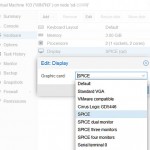 Еще одним вариантом быстрого доступа к консоли виртуальной машины с проблемами noVNC, является использование протокола SPICE (Simple Protocol for Independent Computing Environments) созданного как раз для доступа к десктопным VE машинам. В винде уже имеется встроенный виндовый клиент доступа RemoteViewer, но лучше установить свежий родной клиент. Тем более что там же можно взять драйвер редиректа USB.
Для использования SPICE соединения, следует погасить виртуальную машину, после чего в управлении виртуальной машиной PROXMOX, драйвер дисплея виртуальной машины надо переключить в SPICE режим, как показано на картинке. После старта виртуалки можно запускать соединение, либо с помощью виндового Remote Viewer, либо дополнительно установленного VirtViewer – последний работает как то по-стабильней.
З.Ы в процессе поиска решения, нашел самый угарный коммент о том, что чел обнаружил на своем сервере виртуализации установленный netcat6, который и выдавал эту ошибку. После того как он запустил команду “apt-get remove netcat6″ у него отлично заработало novnc. Если кто не понял, то повторять не надо.
Rating: 3.1/10 (19 votes cast)
Rating: -3 (from 3 votes)
Ошибка 1006 noVNC соединения к виртуальной машине Proxmox VE, 3.1 out of 10 based on 19 ratings
Теги: proxmox, виртуализация
cat /etc/pve/storage.cfg

dir: local
        path /var/lib/vz
        content backup,vztmpl,iso

lvmthin: local-lvm
        thinpool data
        vgname pve
        content images,rootdir

lvm: nas-lvm
        vgname fileserver
        content rootdir,images
        shared 1

----------------------------------------------------

qm config 100
bootdisk: sata0
cores: 2
ide2: none,media=cdrom
memory: 8192
name: vm1
net0: virtio=62:E7:F8:94:D3:9B,bridge=vmbr0
numa: 0
onboot: 1
ostype: l26
sata0: local-lvm:vm-100-disk-0,cache=writethrough,size=10G
scsihw: virtio-scsi-pci
smbios1: uuid=f330a6eb-be01-4294-bd35-d4f861be7b4f
sockets: 2
unused0: nas-lvm:vm-100-disk-0
vmgenid: 09ef5296-96ed-4d7c-9a0c-00264d050e4f

----------------------------------------------------
qm showcmd 100 --pretty
/usr/bin/kvm
  -id 100
  -name vm1
  -chardev 'socket,id=qmp,path=/var/run/qemu-server/100.qmp,server,nowait'
  -mon 'chardev=qmp,mode=control'
  -chardev 'socket,id=qmp-event,path=/var/run/qmeventd.sock,reconnect=5'
  -mon 'chardev=qmp-event,mode=control'
  -pidfile /var/run/qemu-server/100.pid
  -daemonize
  -smbios 'type=1,uuid=f330a6eb-be01-4294-bd35-d4f861be7b4f'
  -smp '4,sockets=2,cores=2,maxcpus=4'
  -nodefaults
  -boot 'menu=on,strict=on,reboot-timeout=1000,splash=/usr/share/qemu-server/bootsplash.jpg'
  -vnc unix:/var/run/qemu-server/100.vnc,password
  -cpu kvm64,+lahf_lm,+sep,+kvm_pv_unhalt,+kvm_pv_eoi,enforce
  -m 8192
  -device 'pci-bridge,id=pci.2,chassis_nr=2,bus=pci.0,addr=0x1f'
  -device 'pci-bridge,id=pci.1,chassis_nr=1,bus=pci.0,addr=0x1e'
  -device 'vmgenid,guid=09ef5296-96ed-4d7c-9a0c-00264d050e4f'
  -device 'piix3-usb-uhci,id=uhci,bus=pci.0,addr=0x1.0x2'
  -device 'usb-tablet,id=tablet,bus=uhci.0,port=1'
  -device 'VGA,id=vga,bus=pci.0,addr=0x2'
  -device 'virtio-balloon-pci,id=balloon0,bus=pci.0,addr=0x3'
  -iscsi 'initiator-name=iqn.1993-08.org.debian:01:543f2de9734'
  -drive 'if=none,id=drive-ide2,media=cdrom,aio=threads'
  -device 'ide-cd,bus=ide.1,unit=0,drive=drive-ide2,id=ide2,bootindex=200'
  -device 'ahci,id=ahci0,multifunction=on,bus=pci.0,addr=0x7'
  -drive 'file=/dev/pve/vm-100-disk-0,if=none,id=drive-sata0,cache=writethrough,format=raw,aio=threads,detect-zeroes=on'
  -device 'ide-hd,bus=ahci0.0,drive=drive-sata0,id=sata0,bootindex=100'
  -netdev 'type=tap,id=net0,ifname=tap100i0,script=/var/lib/qemu-server/pve-bridge,downscript=/var/lib/qemu-server/pve-bridgedown,vhost=on'
  -device 'virtio-net-pci,mac=62:E7:F8:94:D3:9B,netdev=net0,bus=pci.0,addr=0x12,id=net0,bootindex=300'
  -machine 'type=pc'

----------------------------------------------------

qm config 108
balloon: 2048
bootdisk: scsi0
cores: 2
ide2: local:iso/debian-10.0.0-amd64-netinst.iso,media=cdrom
memory: 4096
name: vm2
net0: virtio=FE:4E:C9:11:F4:E8,bridge=vmbr0,firewall=1
numa: 0
onboot: 1
ostype: l26
scsi0: local-lvm:vm-108-disk-0,size=32G
scsihw: virtio-scsi-pci
smbios1: uuid=54533428-5577-44f6-a20c-c814059aee8c
sockets: 2
vmgenid: 4a86e4fd-1f92-495a-9c35-f32e1a3067d3

----------------------------------------------------

qm showcmd 108 --pretty
/usr/bin/kvm
  -id 108
  -name vm2
  -chardev 'socket,id=qmp,path=/var/run/qemu-server/108.qmp,server,nowait'
  -mon 'chardev=qmp,mode=control'
  -chardev 'socket,id=qmp-event,path=/var/run/qmeventd.sock,reconnect=5'
  -mon 'chardev=qmp-event,mode=control'
  -pidfile /var/run/qemu-server/108.pid
  -daemonize
  -smbios 'type=1,uuid=54533428-5577-44f6-a20c-c814059aee8c'
  -smp '4,sockets=2,cores=2,maxcpus=4'
  -nodefaults
  -boot 'menu=on,strict=on,reboot-timeout=1000,splash=/usr/share/qemu-server/bootsplash.jpg'
  -vnc unix:/var/run/qemu-server/108.vnc,password
  -cpu kvm64,+lahf_lm,+sep,+kvm_pv_unhalt,+kvm_pv_eoi,enforce
  -m 4096
  -device 'pci-bridge,id=pci.1,chassis_nr=1,bus=pci.0,addr=0x1e'
  -device 'pci-bridge,id=pci.2,chassis_nr=2,bus=pci.0,addr=0x1f'
  -device 'vmgenid,guid=4a86e4fd-1f92-495a-9c35-f32e1a3067d3'
  -device 'piix3-usb-uhci,id=uhci,bus=pci.0,addr=0x1.0x2'
  -device 'usb-tablet,id=tablet,bus=uhci.0,port=1'
  -device 'VGA,id=vga,bus=pci.0,addr=0x2'
  -device 'virtio-balloon-pci,id=balloon0,bus=pci.0,addr=0x3'
  -iscsi 'initiator-name=iqn.1993-08.org.debian:01:543f2de9734'
  -drive 'file=/var/lib/vz/template/iso/debian-10.0.0-amd64-netinst.iso,if=none,id=drive-ide2,media=cdrom,aio=threads'   -device 'ide-cd,bus=ide.1,unit=0,drive=drive-ide2,id=ide2,bootindex=200'
  -device 'virtio-scsi-pci,id=scsihw0,bus=pci.0,addr=0x5'
  -drive 'file=/dev/pve/vm-108-disk-0,if=none,id=drive-scsi0,format=raw,cache=none,aio=native,detect-zeroes=on'          -device 'scsi-hd,bus=scsihw0.0,channel=0,scsi-id=0,lun=0,drive=drive-scsi0,id=scsi0,bootindex=100'
  -netdev 'type=tap,id=net0,ifname=tap108i0,script=/var/lib/qemu-server/pve-bridge,downscript=/var/lib/qemu-server/pve-bridgedown,vhost=on'
  -device 'virtio-net-pci,mac=FE:4E:C9:11:F4:E8,netdev=net0,bus=pci.0,addr=0x12,id=net0,bootindex=300'
-machine 'type=pc'Содержание
- Одминский блог
- Ошибка 1006 noVNC соединения к виртуальной машине Proxmox VE
- [SOLVED] Promox 6: problem with noVNC — failed to connect to server
- hermelin
- starnetwork
- «noVNC — failed to connect to server» on Chrome or Edge Chromium, works on Firefox
- Elrendhel
- Elrendhel
- Console -> noVNC — Failed to connect to server
- ursus
- Moayad
- ursus
- Moayad
- ursus
- gdmax
- Proxmox VNC «Failed to connect to server»
- marciglesias17
- Moayad
- marciglesias17
- Moayad
- Psydown
- marciglesias17
- marciglesias17
Одминский блог
Блог о технологиях, технократии и методиках борьбы с граблями
Ошибка 1006 noVNC соединения к виртуальной машине Proxmox VE
Неспешно знакомлюсь с системой виртуализации ProxMox VE, которая примечательна тем, что из коробки поддерживает одновременно KVM и OpenVZ. И, помимо этого, при крайне простом веб-интерфейсе, поддерживает все фичи виртуализации KVM в бесплатном режиме, хотя и выкидывает, при каждом заходе в админку, уведомление “у вас отсутствует подписка”. Что разительно отличает данную систему от VMware ESXi, которая в бесплатном режиме держит всего один камень, а также требует, как минимум, 2IP для создания виртуальной фермы серверов, ибо один забирает под сервер и не имеет собственной реализации NAT.
Всем удобная система, но напоролся на отвратительный баг, по которому в Mozilla Firefox с завидным постоянством отваливается браузерная noVNC консоль доступа к виртуальной машине через веб-консоль управления. Соединение просто прекращается, показывает форму логина и выдает ошибку Server disconnected (code: 1006). Причем наглухо, так что приходится скакать с бубном, пытаясь реанимировать noVNC соединение, ибо все новые начинают запускаться с этой же ошибкой.
Что только не ковырял, но лечится это только путем удаления куков для урла вебморды ProxMox и перечиткой сертификата, находящегося в разделе Дополнительно -> Сертификаты -> Просмотр сертификатов -> Серверы -> PVE Cluster Manager CA
Но поскольку noVNC консоль висла каждые пару минут, то стал искать пути как с этим жить и что делать, ибо в Vivaldi оказались те же проблемы. И случайно обнаружил очень занятный ценебаг-цефич: у меня установлена Mozilla Aurora, еще со времен протечки памяти Firefox. И вот при запуске Aurora стартует тот же самый Firefox 50.1.0, просто вторым окном. Но из него noVNC соединение работает вообще без нареканий, а из первого окна, где постоянно отваливалось – теперь максимум что, может зависнуть сессия noVNC, которую просто закрываешь и стартуешь новую консоль.
Очень странно конечно, но не менее странно, чем отвал сертификата ProxMox в процессе работы.
Еще одним вариантом быстрого доступа к консоли виртуальной машины с проблемами noVNC, является использование протокола SPICE (Simple Protocol for Independent Computing Environments) созданного как раз для доступа к десктопным VE машинам. В винде уже имеется встроенный виндовый клиент доступа RemoteViewer, но лучше установить свежий родной клиент. Тем более что там же можно взять драйвер редиректа USB.
Для использования SPICE соединения, следует погасить виртуальную машину, после чего в управлении виртуальной машиной PROXMOX, драйвер дисплея виртуальной машины надо переключить в SPICE режим, как показано на картинке. После старта виртуалки можно запускать соединение, либо с помощью виндового Remote Viewer, либо дополнительно установленного VirtViewer – последний работает как то по-стабильней.
З.Ы в процессе поиска решения, нашел самый угарный коммент о том, что чел обнаружил на своем сервере виртуализации установленный netcat6, который и выдавал эту ошибку. После того как он запустил команду “apt-get remove netcat6″ у него отлично заработало novnc. Если кто не понял, то повторять не надо.
Источник
hermelin
Active Member
after upgrade to Promox 6, I have probem with noVNC console from webbrowser (Chrome,Firefox tested). After some time I cannot connect noVNC console to VM with error «failed to connect to server». After shutdown and start of VM everything work ok — for some time. Same problem is on VM with linux and Windows. This behaviour is at random for different VM. Some VM with noVNC works, other doesn’t working, at the moment.
Thanks for help
Error in log is
starnetwork
Active Member
same for me:
# pveversion
pve-manager/6.0-6/c71f879f (running kernel: 5.0.18-1-pve)
# pveversion —verbose
proxmox-ve: 6.0-2 (running kernel: 5.0.18-1-pve)
pve-manager: 6.0-6 (running version: 6.0-6/c71f879f)
pve-kernel-5.0: 6.0-6
pve-kernel-helper: 6.0-6
pve-kernel-5.0.18-1-pve: 5.0.18-3
pve-kernel-5.0.15-1-pve: 5.0.15-1
ceph: 14.2.2-pve1
ceph-fuse: 14.2.2-pve1
corosync: 3.0.2-pve2
criu: 3.11-3
glusterfs-client: 5.5-3
ksm-control-daemon: 1.3-1
libjs-extjs: 6.0.1-10
libknet1: 1.10-pve2
libpve-access-control: 6.0-2
libpve-apiclient-perl: 3.0-2
libpve-common-perl: 6.0-4
libpve-guest-common-perl: 3.0-1
libpve-http-server-perl: 3.0-2
libpve-storage-perl: 6.0-7
libqb0: 1.0.5-1
lvm2: 2.03.02-pve3
lxc-pve: 3.1.0-64
lxcfs: 3.0.3-pve60
novnc-pve: 1.0.0-60
proxmox-mini-journalreader: 1.1-1
proxmox-widget-toolkit: 2.0-7
pve-cluster: 6.0-5
pve-container: 3.0-5
pve-docs: 6.0-4
pve-edk2-firmware: 2.20190614-1
pve-firewall: 4.0-7
pve-firmware: 3.0-2
pve-ha-manager: 3.0-2
pve-i18n: 2.0-2
pve-qemu-kvm: 4.0.0-5
pve-xtermjs: 3.13.2-1
qemu-server: 6.0-7
smartmontools: 7.0-pve2
spiceterm: 3.1-1
vncterm: 1.6-1
zfsutils-linux: 0.8.1-pve1
Источник
«noVNC — failed to connect to server» on Chrome or Edge Chromium, works on Firefox
Elrendhel
New Member
My first Proxmox VE and it’s working incredibly well! All of my VMs work fine, no problems other than the problem defined below.
However, I do have a minor problem when attempting to use the WebGUI Interface and the Console section under each VM. The error is stated as «noVNC — failed to connect to server». This appears at the top of the console section that remains black, and it only impact me while I’m using Chrome or Edge Chromium. It seems to work fine when using Firefox.
My install is fresh on Proxmox CE 7.1-10, and Chrome is my browser of choice.
I have tried the following:
- disabled Chrome security for a few minutes (Settings > Security & Privacy > Security > No Protection) and that did not help whatsoever.
- I have tried using a different Display such as VMWare, Standard VGA, and VirtIO-GPU, and rebooted each VM after each change to no avail.
- I have tried to switch to a different TTY with Ctrl + Alt + F1 or Ctrl + Alt + F2, but this did nothing as well.
This happens for both my Linux VMs (Ubuntu) and my single Windows VM.

Proxmox Retired Staff
seems to be a browser issue in that case (if it works with one but not the others, then likely it’s not an issue on the PVE end).
maybe you have some add-ons on your chrome/edge that are messing with it? have you tried clearing browser cache and/or using incognito mode without extensions?
it’s also possible that some antivirus software don’t like your browser making external connections (various internet security etc. software can block this)
Best regards,
Oguz
Do you already have a Commercial Support Subscription? — If not, Buy now and read the documentation
Elrendhel
New Member
Thank you for taking the time to assist me! I would entirely agree that it is something to do with the way that Chrome (and by extension Edge Chromium) operates. Specifically, I think it’s the way that they treat security via the HTTPS protocol.
Yes, I did in fact try several other strategies but neglected to site them, my bad:
- I have deleted all browser-cache and windows temp file-cache, same problem.
- I have disabled all «extensions», same problem.
- I have tried incognito mode with no extensions, same problem.
- I did try to import the self-signed certificate into Chrome, but it didn’t get rid of the HTTPS error. Of course same problem.
- I created a whole new windows profile with no other programs set to autoload, and all AV disabled and all of the above. Of course same problem.
I still think that if I fix the HTTPS issue, Chrome (and Chromium based Edge) will start working properly to allow noVNC to operate.
Is there a better way to get the HTTPS certificate issue fixed?
Also, I would point out a discrepancy in the way that Proxmox is reporting the problem. While the top of the noVNC screen shouts «Can’t connect to server» (screenshot attached), when I look at the error message in the Task Log, it says «Connection Timed Out» (screenshot attached as well), if that helps.
Thank you again for your assistance in this endeavor, it is greatly appreciated!
Источник
Console -> noVNC — Failed to connect to server
ursus
New Member
I have the newest version of ProxMox installed (7.0-14+1) — I did not upgrade but have installed all updated packages. I am getting the dreaded noVNC error in all the browsers that I have (I have tried Mac: Safari, Chrome and Firefox. Windows: Chrome and Firefix). This is not normally a problem as I can just SSH to the machines and work that way, no real need for the console. I would now like to install a new Debian VM and cannot connect to install — major problem! I have tried to reboot the Proxmox server i.e. restarted the Hardware but even this did not help. I have read in the forums that something similar happened if you updated from 5 to 6 without doing some preliminary steps, but I started with 7.
Thank you for any help given
ursus

Moayad
Proxmox Staff Member
Are you mean that you installed the updated packages manually or using apt?
Could you please post the output of pveversion -v . However, did you try to renew the certificate for your PVE with pvecm updatecerts -f command?
Best regards,
Moayad
Do you already have a Commercial Support Subscription? — If not, Buy now and read the documentation
ursus
New Member
Yes, I installed and updated the packages manually.
here is the output from: pveversion -v
and the result of pvecm updatecerts -f:
and the updatecerts command did not change my situation!
Moayad
Proxmox Staff Member
Best regards,
Moayad
Do you already have a Commercial Support Subscription? — If not, Buy now and read the documentation
ursus
New Member
gdmax
New Member
HI guys,
I have the same issue with the new Ver. 7.1-10 especially with FreeNas11.3 / TrueNas12u8 VM ( i have tried both )
I noticed that after adding the PCI Device Passthrough of the LSI raid card on the Truenas VM Hardware section the VNC won’t start, if i remove the PCI Device , the Truenass boot o.k but i won’t see my drives.
before upgrading to the new Proxmox Ver ( new install from scratch ) i had Proxmox 6.3.3 Ver with Freenas 11.3 working grate for a Year+ now
even though my Prec h710 Raid card isn’t on IT mode ( i just configured each of the 4 SAS/SATA 2 TB drives as Raid 0 on different Virtual group for each Drive )
Specs: Del T320 / 96 GB ram
CPU: 20 x Intel(R) Xeon(R) CPU E5-2470 v2 @ 2.40GHz (1 Socket )
Kernel Version : Linux 5.13.19-4-pve #1 SMP PVE 5.13.19-8 (Mon, 31 Jan 2022 10:09:37 +0100)
PVE Manager Version: pve-manager/7.1-10/6ddebafe
needless to say the my CPU support IOMMU
All VTd on Bios are enabled
Источник
Proxmox VNC «Failed to connect to server»
marciglesias17
Member
I have one of my nodes in Cluster with 6.1.17 version but VNC no connect.

Moayad
Proxmox Staff Member
Best regards,
Moayad
Do you already have a Commercial Support Subscription? — If not, Buy now and read the documentation
marciglesias17
Member
Moayad
Proxmox Staff Member
Please post output of command: pveversion -v
Also check if there any firewall or antivirus that not allow TLS traffic
Best regards,
Moayad
Do you already have a Commercial Support Subscription? — If not, Buy now and read the documentation
Psydown
New Member
marciglesias17
Member
marciglesias17
Member
Please post output of command: pveversion -v
Also check if there any firewall or antivirus that not allow TLS traffic
pve6+1
lvm2: 2.03.02-pve4
lxc-pve: 4.0.2-1
lxcfs: 4.0.3-pve2
novnc-pve: 1.1.0-1
proxmox-mini-journalreader: 1.1-1
proxmox-widget-toolkit: 2.2-1
pve-cluster: 6.1-8
pve-container: 3.1-5
pve-docs: 6.2-4
pve-edk2-firmware: 2.20200229-1
pve-firewall: 4.1-2
pve-firmware: 3.1-1
pve-ha-manager: 3.0-9
pve-i18n: 2.1-2
pve-qemu-kvm: 5.0.0-2
pve-xtermjs: 4.3.0-1
qemu-server: 6.2-2
smartmontools: 7.1-pve2
spiceterm: 3.1-1
vncterm: 1.6-1
zfsutils-linux: 0.8.3-pve1
Источник
proxmox:troubleshooting:nonvc_fails_to_connect_with_server_disconnected_code:1006
Table of Contents
Proxmox — Troubleshooting — noNVC fails to connect with Server disconnected (code: 1006)
Trying to connect to a console within Proxmox returns the following error message: Server disconnected (code: 1006).
TASK ERROR: command '/usr/bin/termproxy 5901 --path /nodes/pve --perm Sys.Console -- /bin/login -f root' failed: exit code 1
Regenerate Certificates
SSH into the Proxmox host.
pvecm updatecerts --force
systemctl restart pvedaemon.service
systemctl restart pveproxy.service
NOTE: The certificates are out of sync, so regenerate them.
Revert to default SSL configuration
rm -rf /etc/pve/pve-root-ca.pem
rm -rf /etc/pve/priv/pve-root-ca.key
rm -rf /etc/pve/nodes/pve/pve-ssl.pem
rm -rf /etc/pve/nodes/pve/pve-ssl.key
rm /etc/pve/pve-root-ca.pem /etc/pve/priv/pve-root-ca.key

pvecm updatecerts -f
systemctl restart pveproxy
Check Logs
cat /var/log/daemon.log | grep -e pveproxy -e pvedaemon
returns:
...
Jul 21 09:11:48 pve pvedaemon[191274]: <root@pam> successful auth for user 'root@pam'
Jul 21 09:11:55 pve pvedaemon[192394]: starting termproxy UPID:pve:0002EF8A:002A3230:60F7D6CB:vncshell::root@pam:
Jul 21 09:11:55 pve pvedaemon[191276]: <root@pam> starting task UPID:pve:0002EF8A:002A3230:60F7D6CB:vncshell::root@pam:
Jul 21 09:12:05 pve pvedaemon[192394]: command '/usr/bin/termproxy 5900 --path /nodes/pve --perm Sys.Console -- /bin/login -f root' failed: exit code 1
Jul 21 09:12:05 pve pvedaemon[191276]: <root@pam> end task UPID:pve:0002EF8A:002A3230:60F7D6CB:vncshell::root@pam: command '/usr/bin/termproxy 5900 --path /nodes/pve --perm Sys.Console -- /bin/login -f root' failed: exit code 1
Jul 21 09:12:14 pve pvedaemon[192565]: starting vnc proxy UPID:pve:0002F035:002A39AA:60F7D6DE:vncproxy:102:root@pam:
Jul 21 09:12:14 pve pvedaemon[191276]: <root@pam> starting task UPID:pve:0002F035:002A39AA:60F7D6DE:vncproxy:102:root@pam:
Jul 21 09:12:29 pve pvedaemon[191276]: <root@pam> end task UPID:pve:0002F035:002A39AA:60F7D6DE:vncproxy:102:root@pam: OK
Jul 21 09:12:33 pve pvedaemon[192703]: starting lxc termproxy UPID:pve:0002F0BF:002A4103:60F7D6F1:vncproxy:202:root@pam:
Jul 21 09:12:33 pve pvedaemon[191274]: <root@pam> starting task UPID:pve:0002F0BF:002A4103:60F7D6F1:vncproxy:202:root@pam:
Jul 21 09:12:33 pve pvedaemon[191276]: <root@pam> successful auth for user 'root@pam'
...
NOTE: The vncproxy is failing.
Check if the websockify service is running
ps aux |grep websoc
NOTE: The socat package needs to be installed on the server.
Another Approach
Obtain a certificate to allow the Proxmox web interface to work over https.
Then, add this certificate to the list of trusted certificates on the remote PC being used to access Proxmox.
openssl s_client -showcerts -connect 192.168.1.95:8006 /dev/null | openssl x509 -outform PEM > pve.pem
NOTE: Where:
-
192.168.1.95:8006 is the address of the web interface of the Proxmox hypervisor.
-
pve.pem is the output file of the certificate.
Then just add this certificate and set the rights to it Always trust.
Reload the Proxmox web page and access to the console should work.
But why?
Using another VNC client I can connect to VM.
In the browser console:
Data URI scheme cursor supported
util.js:214 >> RFB.constructor
util.js:214 >> Display.constructor
util.js:214 User Agent: Mozilla/5.0 (Macintosh; Intel Mac OS X 10_11_1) AppleWebKit/537.36 (KHTML, like Gecko) Chrome/46.0.2490.86 Safari/537.36
util.js:214 Browser: webkit 537.36
util.js:214 Setting viewport to full display region
util.js:214 << Display.constructor
util.js:216 Using native WebSockets
util.js:214 >> Keyboard.allKeysUp
util.js:214 << Keyboard.allKeysUp
util.js:214 Setting viewport to full display region
util.js:218  Msg: noVNC ready: native WebSockets, canvas rendering
util.js:214 << RFB.constructor
util.js:214 >> Keyboard.allKeysUp
util.js:214 << Keyboard.allKeysUp
util.js:218
util.js:214 >> RFB.connect
util.js:216 connecting to ws://192.168.1.193:8080/
util.js:216 Detected binaryType support in WebSockets
util.js:214 << RFB.connect
util.js:214 >> WebSock.onopen
util.js:216 Server choose sub-protocol: binary
util.js:218  Msg: Starting VNC handshake
util.js:214 << WebSock.onopen
util.js:216 Server ProtocolVersion: 003.008
util.js:218  Msg: Sent ProtocolVersion: 003.008
util.js:214 >> WebSock.onclose
util.js:218 WebSocket on-close event
util.js:214 >> Keyboard.allKeysUp
util.js:214 << Keyboard.allKeysUp
util.js:220  Msg: Server disconnected (code: 1006)Util.Error @ util.js:220RFB._updateState @ rfb.js:470RFB._fail @ rfb.js:540(anonymous function) @ rfb.js:208(anonymous function) @ websock.js:314
util.js:214 << WebSock.onclose
util.js:214 >> Keyboard.allKeysUp
util.js:214 << Keyboard.allKeysUp
util.js:218
On the server:
./launch.sh --listen 8080 --vnc 192.168.1.193:5901 --web /var/www/htdocs/app/webroot/noVNC/
Warning: could not find self.pem
Using local websockify at /var/www/htdocs/app/webroot/noVNC/utils/websockify/run
Starting webserver and WebSockets proxy on port 8080
WebSocket server settings:
  - Listen on :8080
  - Flash security policy server
  - Web server. Web root: /var/www/htdocs/app/webroot/noVNC
  - No SSL/TLS support (no cert file)
  - proxying from :8080 to 192.168.1.193:5901


Navigate to this URL:

    http://bibidibuppi:8080/vnc.html?host=crististore&port=8080

Press Ctrl-C to exit


robert - - [18/Nov/2015 17:36:20] "GET / HTTP/1.1" 101 -
robert - - [18/Nov/2015 17:36:20] 192.168.1.107: Plain non-SSL (ws://) WebSocket connection
robert - - [18/Nov/2015 17:36:20] 192.168.1.107: Version hybi-13, base64: 'False'
robert - - [18/Nov/2015 17:36:20] connecting to: 127.0.0.1:5901
Reaping zombies, active child count is 0
Ignoring interrupted syscall
And then nothing happens. Actually I get the Server disconnected (code: 1006) in the browser console.
Hello,
New to Proxmox which is installed on a former daily driver. Intel i5-4460 quad core with 16 GB of RAM.
Attempted to start my first VM using all 4 cores and 8 GB RAM using an Ubuntu ISO. I first tried 20.04 Server and then 18.04 server. No dice.
Receiving a «Failed to connect to server» message with noVNC.
Syslog: Mar 16 18:56:37 johnny5 pvedaemon[1567]: <root@pam> end task UPID:johnny5:00001610:0001BACB:605145AB:vncproxy:100:root@pam: connection timed out
pveversion:
proxmox-ve: 6.3-1 (running kernel: 5.4.73-1-pve)
pve-manager: 6.3-2 (running version: 6.3-2/22f57405)
pve-kernel-5.4: 6.3-1
pve-kernel-helper: 6.3-1
pve-kernel-5.4.73-1-pve: 5.4.73-1
ceph-fuse: 12.2.11+dfsg1-2.1+b1
corosync: 3.0.4-pve1
criu: 3.11-3
glusterfs-client: 5.5-3
ifupdown: 0.8.35+pve1
ksm-control-daemon: 1.3-1
libjs-extjs: 6.0.1-10
libknet1: 1.16-pve1
libproxmox-acme-perl: 1.0.5
libproxmox-backup-qemu0: 1.0.2-1
libpve-access-control: 6.1-3
libpve-apiclient-perl: 3.0-3
libpve-common-perl: 6.2-6
libpve-guest-common-perl: 3.1-3
libpve-http-server-perl: 3.0-6
libpve-storage-perl: 6.3-1
libqb0: 1.0.5-1
libspice-server1: 0.14.2-4~pve6+1
lvm2: 2.03.02-pve4
lxc-pve: 4.0.3-1
lxcfs: 4.0.3-pve3
novnc-pve: 1.1.0-1
proxmox-backup-client: 1.0.5-1
proxmox-mini-journalreader: 1.1-1
proxmox-widget-toolkit: 2.4-3
pve-cluster: 6.2-1
pve-container: 3.3-1
pve-docs: 6.3-1
pve-edk2-firmware: 2.20200531-1
pve-firewall: 4.1-3
pve-firmware: 3.1-3
pve-ha-manager: 3.1-1
pve-i18n: 2.2-2
pve-qemu-kvm: 5.1.0-7
pve-xtermjs: 4.7.0-3
qemu-server: 6.3-1
smartmontools: 7.1-pve2
spiceterm: 3.1-1
vncterm: 1.6-2
zfsutils-linux: 0.8.5-pve1
VM config:
root@johnny5:/etc/pve# qm config 100
agent: 1
boot: order=scsi0;ide2;net0
cores: 4
ide2: system_storage_ssd:iso/ubuntu-18.04.5-live-server-amd64.iso,media=cdrom
memory: 8192
name: test
net0: virtio=CE:24:36:BF:82:FB,bridge=vmbr0
numa: 0
ostype: l26
scsi0: nvme_pool:vm-100-disk-0,size=100G
scsihw: virtio-scsi-pci
smbios1: uuid=0d9c625c-4eca-454f-ac38-0a62310ca501
sockets: 1
vmgenid: 6c8181c1-9923-4edf-a0e5-f550fc58a6d8
I have no production or any important information on this at all at the moment. Still in the learning phase before I truly start building this puppy out.