
-
Call of Duty: WWII
-
Новости433
-
Мнения273
-
Юмор38
-
Файлы4
-
Читы23
-
Гайды2
-
Cкриншоты10
-
Галерея691
-
Форум135
-
Игроки

Друзья помогите. При запуске игры на первой миссии где трое сидят в сарае и общаются, игра вылетает с такой ошибкой. Скрин прилагается.Комп достаточно мощный. Intel core i7-4510u CPU @ 2.00Ghz, 8,0GB RAM. И видюха тоже мощная. Помогите как решить эту проблему? DirectX стоит 10.


svan-80
Комп достаточно мощный. Intel core i7-4510u CPU @ 2.00Ghz, 8,0GB RAM. И видюха тоже мощная. Помогите как решить эту проблему? DirectX стоит 10.
Это мощный комп по твоему? Видеокарта какая? Dx11 поддерживает?
Protocol10
Видео карта: NVIDIA GeForce 840M 2GB. Поддерживает DirectX 11, Переустанавливал DirectX.
svan-80
Мнде уж. Комп у тебя даже близко не мощный, друг. Не потянет он эту игру.
Protocol10
по минимальным требованиям игры. Мой комп тянет.
Операционная Система: Windows 7 64-Bit or later
Процессор: Intel® Core™ i3 3225 3.3 GHz or AMD Ryzen™ 5 1400
Оперативная память: 8 GB ОЗУ
Видеокарта: NVIDIA® GeForce® GTX 660 @ 2 GB / GTX 1050 or ATI® Radeon™ HD 7850 @ 2GB / AMD RX 550
Место на диске: 41.7 GB

svan-80
посмотри температурки видеокарты, в ноутах обычно очень плохое охлаждение которое забивается пылью и пересыхает термопаста.
Промониторь ЭМ ЭС АЙ Афтербёрнером при хорошей нагрузке в игре или 3д стресстесте.
Ryazancev
делал тест не выявило сильной перегрузки. Показатели не высокие были. Но с..ка не запускается!!!!
svan-80
Спойлер
погугли вот таким запросом есть много чего.
произошла критическая ошибка directx dxgi_error_device_removed
Такая же ошибка. Все стандартные способы перепробывал.
Такая же фигня ! Да и все что моно было обновлено!

Та же история(
Если решение будет найдено — отпишитесь плиз.
Сам подозреваю что стоит лок на FPS, и остается ждать патчей.
Спасибо вам за советы!! Но проблема не решена и видимо не решаема в виду ошибки в репаке. Обновлено все оборудование. У меня DirectX 12 и ноут у меня достаточной мощный. И тянет последние игры хотя бы на среднем уровне. Но вылетает с такой ошибкой постоянно. Я качал другие репаки и такая же проблема. Пробовал качать и устанавливать с отключенным антивирусом, запускал от имени администратора и все равно вылетает с такой ошибкой. НО…. Я понизил графику до минимума и сделал на полный экран и играл. Конечно постоянно вылетал но не так часто. И прошел уже за день всю игру. Игра клевая, но короткая. Если у вас есть другое решение проблемы пишите. Может мое решение кому поможет. Удачи всем.
Для NVIDIA:
1) Поставьте новый драйвер. В плане не по версии, а чистый. Т.е. перезагрузите драйвер, даже если он у вас самый новый.
2) В настройках отключите оверлей.
3)Перегрузите Пк.
После этого все должно быть нормально.
Abdent
Подскажи, пожалуйста, Оверлей это режим «в окне»? И где его надо выключить, в самой игре? Я включаю, режим » в окне э», выкручиваю все на минимум и вылеты, как у автора темы.
Подскажите как решить пожалуйста. Купил игру за 2к и такая фигня незнаю как решить очень нужна помощь

Может у кого была такая ошибка так подскажите пожалуйста

Иван Петин Кострома
Вам же пишут что минимальные требования SP1 Win7 Update…обновите свою винду и обновите directx 11…
Все минимальные требования и даже выше есть

Protocol10
у меня GTX 1050 эта же ошибка

Protocol10
i5 4460 gtx 1050 ti 8г озу тянет, на средних. твой коммент не обоснованный.
была аналогичная проблема, помог только откат на старые драйвера нвидиа, на последних дровах и минуту не поиграешь как выскакивает ошибка, все остальные способы бесполезны
Авторизуйтесь, чтобы принять участие в обсуждении.

Некоторые игроки столкнулись с ошибкой DirectX при игре в Call of Duty: WWII (см. скриншот ниже)
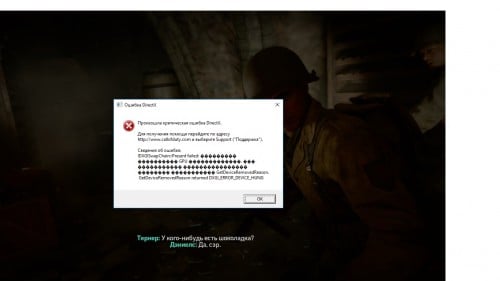
Данная ошибка означает недостаточный вольтаж видеочипа. Происходит это из-за нехватки напряжения графического процессора GPU, т.к. заводские настройки низкие и видеокарта не справляется с игровыми нагрузками. Лечится данная проблема с помощью программы MSI AfterBurner 2.3.1 Final. Стоит сказать, что на ноутбуке данное решение проблемы не помогает.
Если вы относитесь к числу этих игроков, то вот шаги, которые смогут вам помочь:
1. Открываете программу MSI AfterBurner.
2. Внизу интерфейса нажмите на кнопку дополнительных настроек “Settings”.
3. В открывшемся окне поставьте галочки на пунктах:
“Разблокировать управление напряжением”
“Разблокировать мониторинг напряжения”
4. Нажмите “ОК” и перезапустите программу нажав “ДА”.
5. В первом окне “Core Voltage (mV)” ползунком увеличьте напряжение на 12 единиц. Пример с видеокартой GeForce GTX 570 – с 1013mV до 1025mV. Можно и больше, но мне хватило. Если будете экспериментировать и прибавлять, то смотрите за температурой видеокарты.
6. Зафиксируйте настройки кнопкой “Apply”.
Теперь проблема должна быть решена. Приятной игры без зависаний и вылетов на высоких настройках!
Ошибка DirectX в этой игре означает нехватку вольтажа видеокарты. Проблемы с игрой и плохая производительность происходит из-за слабой видеокарты. По сути, ты можешь решить эту проблему двумя способами: разогнать видеокарту или купить более новую модель, чтобы игра запускалась без ошибок.

Примечание: Инструкция по повышению производительности видеокарты не предназначена для новичков в компьютерных делах. Все действия ты делаешь на свой страх и риск. Изменение вольтажа видеочипа может привести к плохим последствиям и видеокарта сгорит. Если у тебя ноутбук — не нужно применять эту инструкцию.
Устранение ошибки DirectX через программу MSI AfterBurner 2.3.1 Final:
- Открой программу MSI AfterBurner
- Нажми на кнопку «Settings».
- В окне выставь галочки в таких пунктах: «Разблокировать управление напряжением» и «Разблокировать мониторинг напряжения»
- Нажми «ОК» и перезагрузи программу, подтвердив действие
- В первом окне «Core Voltage (mV)» увеличь напряжение на 12 единиц
- Примени все изменения, нажав кнопку «Apply».
Как пример, можно взять видеокарту GeForce GTX 570, на которой вольтаж был увеличен с 1013mV до 1025mV. Ты можешь увеличить вольтаж ещё на несколько единиц, но помни, что видеокарта может не выдержать сильное напряжение и даже сгорит. Если ты будешь добавлять напряжение, то не забывай о температуре видеокарты. Неопытным пользователям настоятельно рекомендую не делать такие процедуры без специалиста или IT-шника.
Этот способ повышает частоту кадров и общую производительность игры, но не стоит забывать об износе устройства. Если ты планируешь запускать современные игры — купи новую модель видеокарты. Помни, что разгон (увеличение вольтажа видеокарты) уменьшает срок её службы примерно в два раза.

-
- Sep 4, 2013
-
- 1,612
-
- 4
-
- 20,465
- 385
-
#2
-
- Mar 19, 2018
-
- 3
-
- 0
-
- 10
- 0

-
#3
realy? but i was playing that with low quality before updating the directX
-
- Sep 4, 2013
-
- 1,612
-
- 4
-
- 20,465
- 385
-
- Mar 19, 2018
-
- 3
-
- 0
-
- 10
- 0
-
#5
https://us.answers.acer.com/app/answers/detail/a_id/32163/~/how-to-change-nvidia-optimus-graphics-settings
i have done it but there is no difference
| Thread starter | Similar threads | Forum | Replies | Date |
|---|---|---|---|---|
|
N
|
Question Out of video memory error on multiple games with 4090 | Graphics Cards | 7 | Saturday at 10:32 AM |
|
|
Question Code 43 error with Nvidia Tesla K80 + RTX 3060 ? | Graphics Cards | 0 | Wednesday at 11:36 PM |
|
M
|
Question Does DirectX 12 better work ray tracing in gamming? | Graphics Cards | 2 | Jan 22, 2023 |
|
K
|
Question External screen flickering | Graphics Cards | 0 | Jan 22, 2023 |
|
R
|
Question DirectX / Direct3D error ? | Graphics Cards | 11 | Dec 17, 2022 |
|
|
Question DirectX 12 issues | Graphics Cards | 2 | Nov 5, 2022 |
|
|
Question Fix for fatal DirectX error «DXGI_ERROR_DEVICE_REMOVED» ? | Graphics Cards | 6 | Sep 2, 2022 |
|
E
|
Info Sapphire Radeon RX6400 LP vs MSI GTX 1050 Ti OC LP — RX6400 better in everything except DirectX 9 | Graphics Cards | 9 | Jul 31, 2022 |
|
M
|
Question GTX 1060 crashes, BSoD, artifacts | Graphics Cards | 3 | Jul 7, 2022 |
|
C
|
[SOLVED] All Games Crash While Using DirectX 11 | Graphics Cards | 1 | May 22, 2022 |


- Advertising
- Cookies Policies
- Privacy
- Term & Conditions
- Topics
Try these solutions to resolve DirectX encountered an unrecoverable error
by Matthew Adams
Matthew is a freelancer who has produced a variety of articles on various topics related to technology. His main focus is the Windows OS and all the things… read more
Updated on September 26, 2022
Reviewed by
Vlad Turiceanu

Passionate about technology, Windows, and everything that has a power button, he spent most of his time developing new skills and learning more about the tech world. Coming… read more
- DirectX encountered an unrecoverable error is a frequent error message with Call of Duty games.
- As expected, the error refers to a DirectX failure.
- One of the solutions to this problem is to ensure that your device meets the game requirements.
- Updating the graphics drivers in Windows 10 is equally important.
XINSTALL BY CLICKING THE DOWNLOAD FILE
This software will repair common computer errors, protect you from file loss, malware, hardware failure and optimize your PC for maximum performance. Fix PC issues and remove viruses now in 3 easy steps:
- Download Restoro PC Repair Tool that comes with Patented Technologies (patent available here).
- Click Start Scan to find Windows issues that could be causing PC problems.
- Click Repair All to fix issues affecting your computer’s security and performance
- Restoro has been downloaded by 0 readers this month.
Some Call of Duty fanatics has encountered a DirectX unrecoverable error when they launch their games in Windows.
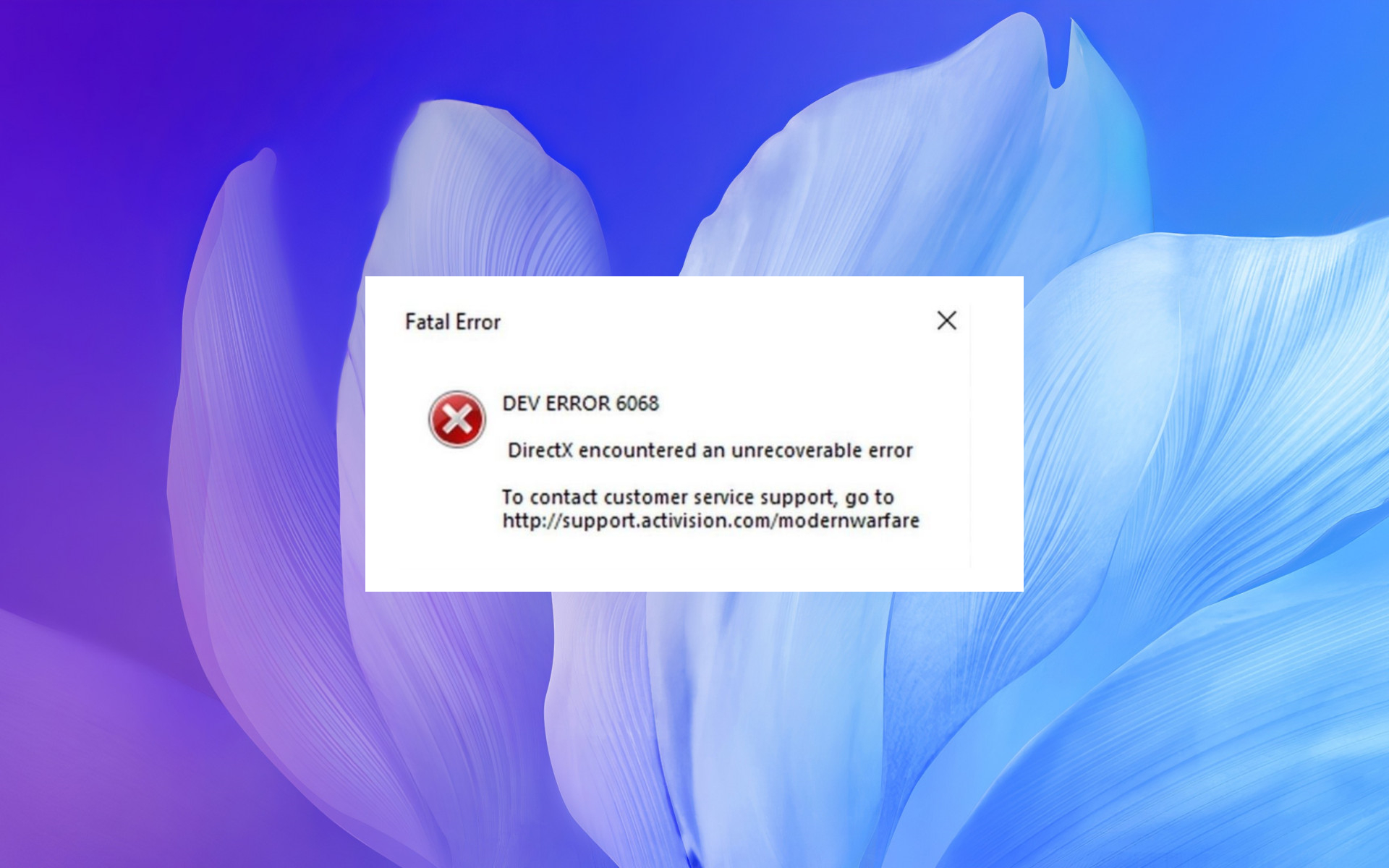
When that occurs, the game doesn’t start and returns this message: DirectX encountered an unrecoverable error, check the readme for possible solutions.
DirectX is a series of APIs (Application Programming Interfaces) essential for multimedia software. The latest DirectX versions ensure better graphics quality for Windows games.
The issue is more frequent for COD titles but might also occur when starting other Windows games. So let’s quickly go through some common scenarios.
Why am I getting DirectX encountered an unrecoverable error message?
You could encounter DirectX encountered an unrecoverable error message for multiple reasons. Some of the common causes are listed below.
- Faulty hardware could result in this error.
- There are some bugs or glitches present in the game.
- The system drivers aren’t up to date.
- You aren’t running the latest available or compatible version of DirectX.
- Your PC isn’t installed with the latest update.
- Your PC doesn’t meet the software requirements for COD Warzone.
- There are some problems with your internet connection.
Where can the unrecoverable error be found, and what does it look like?
- DEV error 6066 DirectX encountered an unrecoverable error (others various can include DEV error 6068, DEV error 6071, or DEV error 5761)
- DirectX encountered an unrecoverable error Dxgi_error_device_removed
- DirectX encountered an unrecoverable error Warzone
- Call of Duty WW2 DirectX encountered an unrecoverable error
- DirectX encountered an unrecoverable error in Modern Warfare
- DirectX encountered an unrecoverable error Plutonium
- Black Ops 2 DirectX encountered an unrecoverable error
- DirectX encountered an unrecoverable error Fivem
- DirectX encountered an unrecoverable error Vanguard
- Recursive error DirectX encountered an unrecoverable error
- DirectX encountered an unrecoverable error in Windows 7
If you have a game returning the DirectX unrecoverable error, this is how you can resolve the issue to get it up and running.
How can I fix DirectX unrecoverable error in Windows 10?
1. Reinstall the graphics card driver
- Press Win + R to open Run.
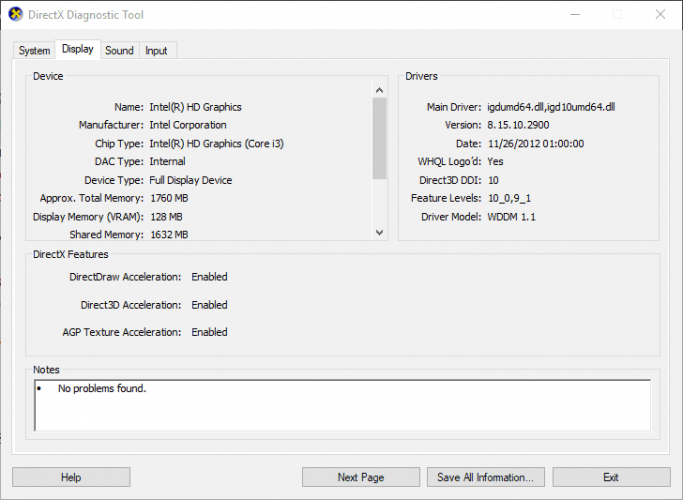
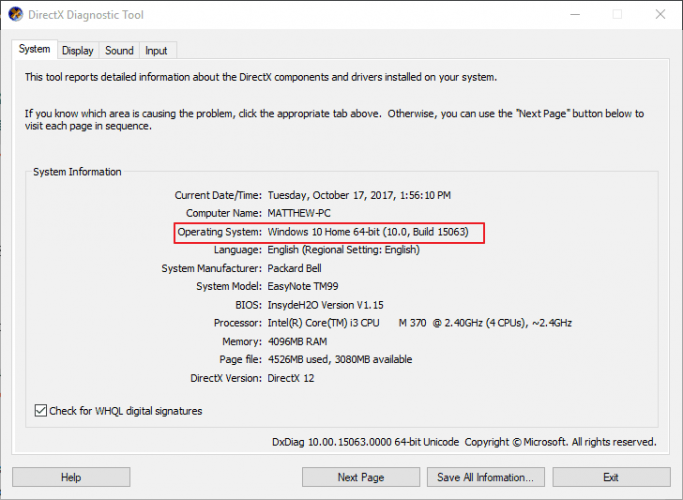
- Type dxdiag to open the DirectX Diagnostic Tool.
- Note down the graphics card and manufacturer details included in the display tab.
- Note down the 32 or 64-bit OS.
- Open the video card manufacturer’s website, and click on the drivers or download center hyperlink. Then, enter your graphics card in the search box.
- Select to download the most updated video card driver that’s compatible with your Windows platform.
- Right-click on the Start menu and select Device Manager.
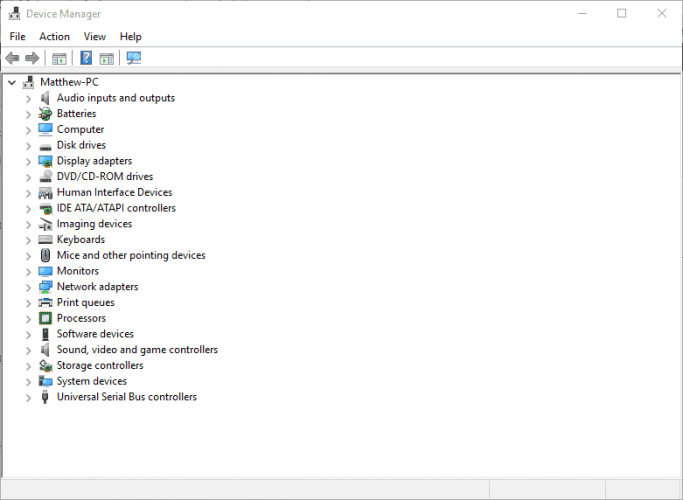
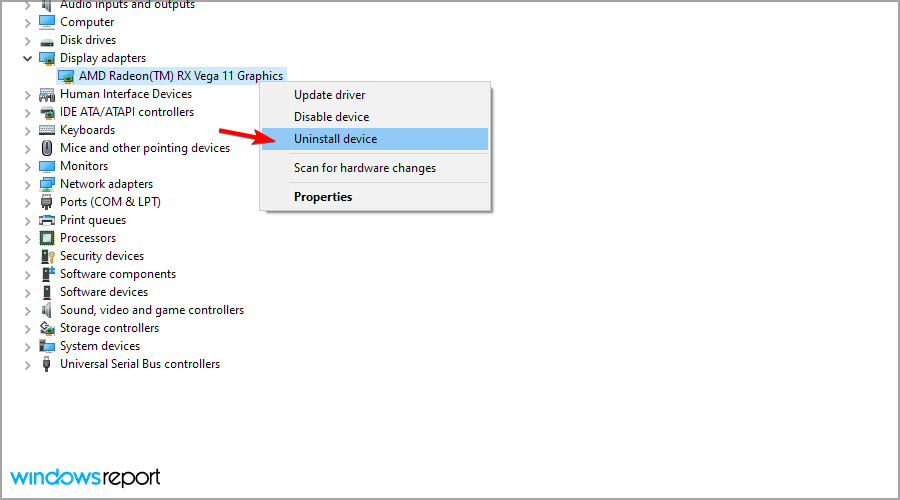
- Expand the Display adapters section and right-click your listed graphics card to open its context menu.
- Select the Uninstall device option on the context menu.
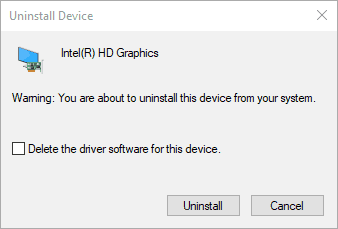
- Check the Delete the driver settings for this device checkbox, and then press the Uninstall button.
- Restart the Windows OS.
- Click Cancel if a prompt window opens for detecting the graphics card driver.
- Then install the downloaded graphics card driver by selecting its installer in File Explorer. You might also need to extract the zip folder first.
1.1 Update drivers automatically
Downloading drivers manually is a process that carries the risk of getting the wrong driver installed, which may lead to severe malfunctions in your system.
The safer and easier way to update drivers on a Windows computer is by using an automatic tool such as DriverFix.
This tool automatically identifies each device on your computer and matches it with the latest driver versions from an extensive online database.
Drivers can then be updated in batches or one at a time without requiring the user to make complex decisions.
Some PC issues are hard to tackle, especially when it comes to corrupted repositories or missing Windows files. If you are having troubles fixing an error, your system may be partially broken.
We recommend installing Restoro, a tool that will scan your machine and identify what the fault is.
Click here to download and start repairing.
You can also schedule regular scans and automatic updates, so you won’t have to check on your drivers manually.

DriverFix
You need to keep your drivers updated at all times, and DriverFix will also make your PC faster!
2. Check the game’s DirectX system requirements
- Open the game’s Steam page.
- The DirectX system requirement for the game is listed at the bottom of the Steam page. Click a system requirement page link on a publisher’s website.
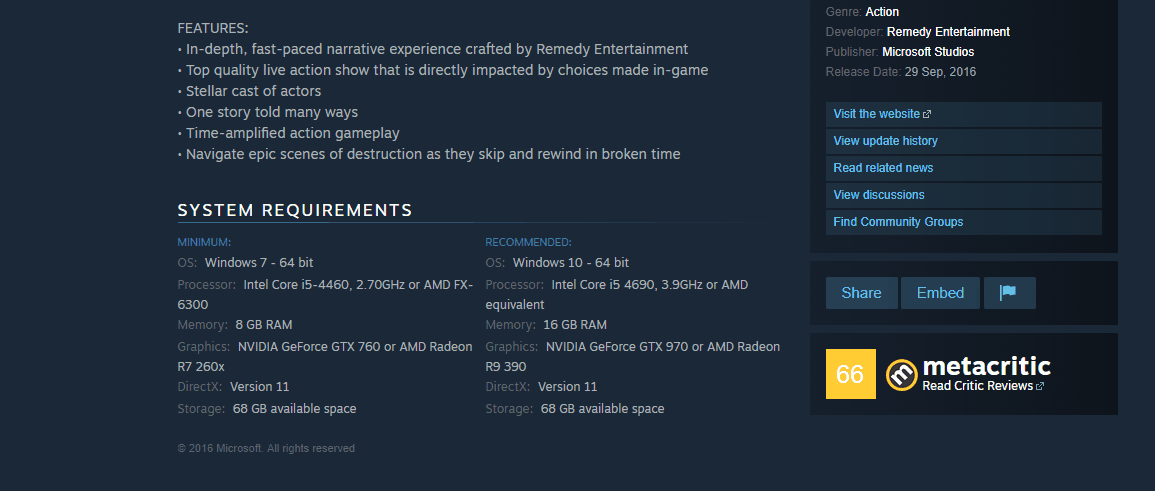
- Press the Win + R to open Run.
- Enter dxdiag in the text box and press OK.
- Check the DirectX version listed.
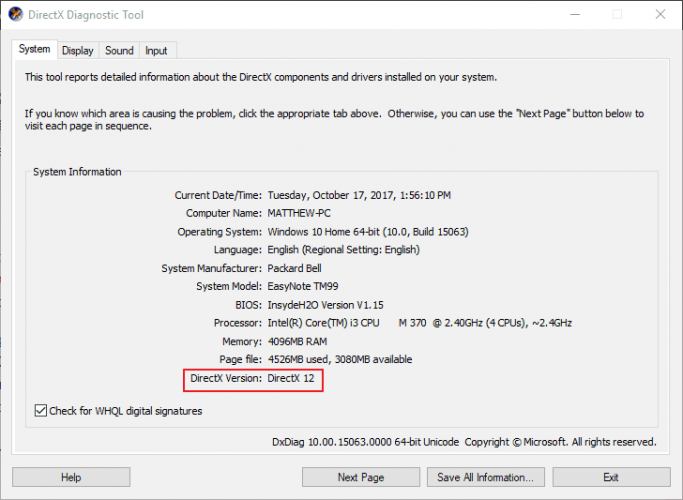
The DirectX unrecoverable error will probably occur if your DirectX version doesn’t meet the minimum DX system requirements for a game.
You may or may not be able to update DirectX, but much depends on your Windows platform. For example, only Windows 10 currently supports DirectX 12.
Nevertheless, Microsoft has the DirectX End-User Runtime Web Installer, with which you can update more outdated DX versions.
Aside from that, you might have to upgrade your Windows OS to get the latest DirectX. You can also ensure you have the latest DirectX version for a platform by updating Windows.
The Windows updates will usually automatically update DirectX if there’s a more recent version, so make sure your Windows Update service isn’t switched off.
- Fix: Can’t install DirectX in Windows 10/11
- League of Legends DirectX errors [Quick Guide]
- How to fix DirectX errors on Windows 11
- DirectX function GetDeviceRemovedReason failed with error
- DirectX 11 issues in FIFA 21 [Quick Solutions]
3. Configure the Display Scaling
- Right-click on the desktop and select Display Settings.
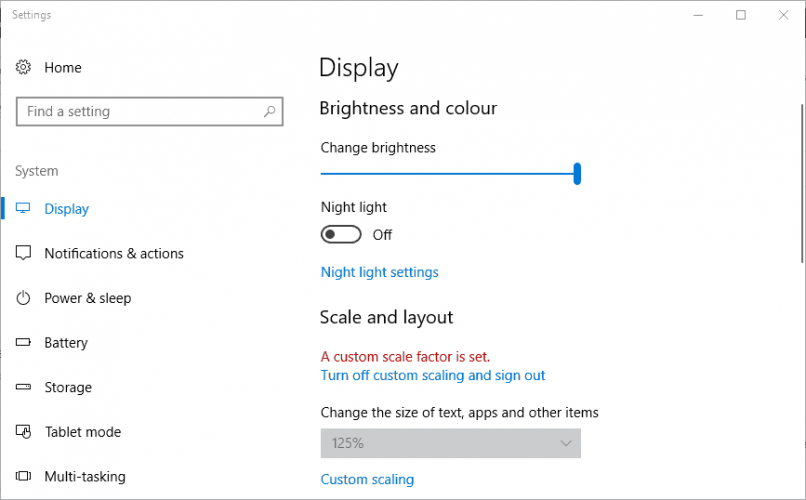
- Click Custom scaling to enter a custom DPI scale value.
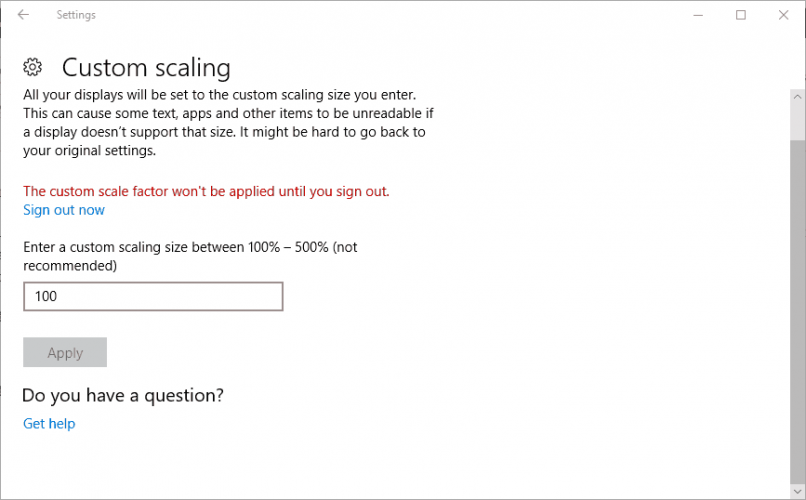
- Enter 100 in the text box if that isn’t your current DPI scale value, and click the Apply button.
- Then click Sign out to apply the custom scale factor.
- In Windows 8, drag the DPI scaling bar’s slider to the left.
4. Edit the Registry
- Press Win + R to open the Run dialogue.
- Type Regedit and press OK.
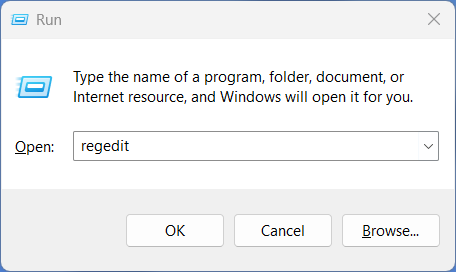
- Navigate to this registry location:
ComputerHKEY_CLASSES_ROOTPROTOCOLSFiltertext/xml - Click File.
- Select Export, enter a file title and click Save to back up the selected registry branch.
- Right-click text/XML, select the Delete option, and press the Yes button to confirm.
- Close the Registry Editor.
How do I fix the DirectX encountered an unrecoverable error on Windows 11?
While the above solutions are also applicable for a Windows 11 PC, we have a dedicated guide for Windows 11 users to help them resolve the DirectX errors on their PCs.
You can check out our guide on 8 Methods you can use to Fix DirectX Errors on Windows 11 and apply the solutions, one by one, to resolve the error.
Why do I keep getting DirectX errors?
You will keep receiving DirectX errors because of the below-mentioned reasons.
- Unexpected bugs in the game.
- Corrupt game files.
- Outdated system drivers.
- Outdated DirectX.
- Your PC doesn’t meet the minimum requirements for the game.
- Third-party apps are conflicting.
- Your Firewall is blocking the game.
Those are a few potential fixes that might resolve the DirectX unrecoverable error. We also have an article that will provide different resolutions for DirectX issues.
If you have any further fixes for the DX unrecoverable error, please share them below.
Still having issues? Fix them with this tool:
SPONSORED
If the advices above haven’t solved your issue, your PC may experience deeper Windows problems. We recommend downloading this PC Repair tool (rated Great on TrustPilot.com) to easily address them. After installation, simply click the Start Scan button and then press on Repair All.

Newsletter
Try these solutions to resolve DirectX encountered an unrecoverable error
by Matthew Adams
Matthew is a freelancer who has produced a variety of articles on various topics related to technology. His main focus is the Windows OS and all the things… read more
Updated on September 26, 2022
Reviewed by
Vlad Turiceanu
Passionate about technology, Windows, and everything that has a power button, he spent most of his time developing new skills and learning more about the tech world. Coming… read more
- DirectX encountered an unrecoverable error is a frequent error message with Call of Duty games.
- As expected, the error refers to a DirectX failure.
- One of the solutions to this problem is to ensure that your device meets the game requirements.
- Updating the graphics drivers in Windows 10 is equally important.
XINSTALL BY CLICKING THE DOWNLOAD FILE
This software will repair common computer errors, protect you from file loss, malware, hardware failure and optimize your PC for maximum performance. Fix PC issues and remove viruses now in 3 easy steps:
- Download Restoro PC Repair Tool that comes with Patented Technologies (patent available here).
- Click Start Scan to find Windows issues that could be causing PC problems.
- Click Repair All to fix issues affecting your computer’s security and performance
- Restoro has been downloaded by 0 readers this month.
Some Call of Duty fanatics has encountered a DirectX unrecoverable error when they launch their games in Windows.
When that occurs, the game doesn’t start and returns this message: DirectX encountered an unrecoverable error, check the readme for possible solutions.
DirectX is a series of APIs (Application Programming Interfaces) essential for multimedia software. The latest DirectX versions ensure better graphics quality for Windows games.
The issue is more frequent for COD titles but might also occur when starting other Windows games. So let’s quickly go through some common scenarios.
Why am I getting DirectX encountered an unrecoverable error message?
You could encounter DirectX encountered an unrecoverable error message for multiple reasons. Some of the common causes are listed below.
- Faulty hardware could result in this error.
- There are some bugs or glitches present in the game.
- The system drivers aren’t up to date.
- You aren’t running the latest available or compatible version of DirectX.
- Your PC isn’t installed with the latest update.
- Your PC doesn’t meet the software requirements for COD Warzone.
- There are some problems with your internet connection.
Where can the unrecoverable error be found, and what does it look like?
- DEV error 6066 DirectX encountered an unrecoverable error (others various can include DEV error 6068, DEV error 6071, or DEV error 5761)
- DirectX encountered an unrecoverable error Dxgi_error_device_removed
- DirectX encountered an unrecoverable error Warzone
- Call of Duty WW2 DirectX encountered an unrecoverable error
- DirectX encountered an unrecoverable error in Modern Warfare
- DirectX encountered an unrecoverable error Plutonium
- Black Ops 2 DirectX encountered an unrecoverable error
- DirectX encountered an unrecoverable error Fivem
- DirectX encountered an unrecoverable error Vanguard
- Recursive error DirectX encountered an unrecoverable error
- DirectX encountered an unrecoverable error in Windows 7
If you have a game returning the DirectX unrecoverable error, this is how you can resolve the issue to get it up and running.
How can I fix DirectX unrecoverable error in Windows 10?
1. Reinstall the graphics card driver
- Press Win + R to open Run.
- Type dxdiag to open the DirectX Diagnostic Tool.
- Note down the graphics card and manufacturer details included in the display tab.
- Note down the 32 or 64-bit OS.
- Open the video card manufacturer’s website, and click on the drivers or download center hyperlink. Then, enter your graphics card in the search box.
- Select to download the most updated video card driver that’s compatible with your Windows platform.
- Right-click on the Start menu and select Device Manager.
- Expand the Display adapters section and right-click your listed graphics card to open its context menu.
- Select the Uninstall device option on the context menu.
- Check the Delete the driver settings for this device checkbox, and then press the Uninstall button.
- Restart the Windows OS.
- Click Cancel if a prompt window opens for detecting the graphics card driver.
- Then install the downloaded graphics card driver by selecting its installer in File Explorer. You might also need to extract the zip folder first.
1.1 Update drivers automatically
Downloading drivers manually is a process that carries the risk of getting the wrong driver installed, which may lead to severe malfunctions in your system.
The safer and easier way to update drivers on a Windows computer is by using an automatic tool such as DriverFix.
This tool automatically identifies each device on your computer and matches it with the latest driver versions from an extensive online database.
Drivers can then be updated in batches or one at a time without requiring the user to make complex decisions.
Some PC issues are hard to tackle, especially when it comes to corrupted repositories or missing Windows files. If you are having troubles fixing an error, your system may be partially broken.
We recommend installing Restoro, a tool that will scan your machine and identify what the fault is.
Click here to download and start repairing.
You can also schedule regular scans and automatic updates, so you won’t have to check on your drivers manually.
DriverFix
You need to keep your drivers updated at all times, and DriverFix will also make your PC faster!
2. Check the game’s DirectX system requirements
- Open the game’s Steam page.
- The DirectX system requirement for the game is listed at the bottom of the Steam page. Click a system requirement page link on a publisher’s website.
- Press the Win + R to open Run.
- Enter dxdiag in the text box and press OK.
- Check the DirectX version listed.
The DirectX unrecoverable error will probably occur if your DirectX version doesn’t meet the minimum DX system requirements for a game.
You may or may not be able to update DirectX, but much depends on your Windows platform. For example, only Windows 10 currently supports DirectX 12.
Nevertheless, Microsoft has the DirectX End-User Runtime Web Installer, with which you can update more outdated DX versions.
Aside from that, you might have to upgrade your Windows OS to get the latest DirectX. You can also ensure you have the latest DirectX version for a platform by updating Windows.
The Windows updates will usually automatically update DirectX if there’s a more recent version, so make sure your Windows Update service isn’t switched off.
- Fix: Can’t install DirectX in Windows 10/11
- League of Legends DirectX errors [Quick Guide]
- How to fix DirectX errors on Windows 11
- DirectX function GetDeviceRemovedReason failed with error
- DirectX 11 issues in FIFA 21 [Quick Solutions]
3. Configure the Display Scaling
- Right-click on the desktop and select Display Settings.
- Click Custom scaling to enter a custom DPI scale value.
- Enter 100 in the text box if that isn’t your current DPI scale value, and click the Apply button.
- Then click Sign out to apply the custom scale factor.
- In Windows 8, drag the DPI scaling bar’s slider to the left.
4. Edit the Registry
- Press Win + R to open the Run dialogue.
- Type Regedit and press OK.
- Navigate to this registry location:
ComputerHKEY_CLASSES_ROOTPROTOCOLSFiltertext/xml - Click File.
- Select Export, enter a file title and click Save to back up the selected registry branch.
- Right-click text/XML, select the Delete option, and press the Yes button to confirm.
- Close the Registry Editor.
How do I fix the DirectX encountered an unrecoverable error on Windows 11?
While the above solutions are also applicable for a Windows 11 PC, we have a dedicated guide for Windows 11 users to help them resolve the DirectX errors on their PCs.
You can check out our guide on 8 Methods you can use to Fix DirectX Errors on Windows 11 and apply the solutions, one by one, to resolve the error.
Why do I keep getting DirectX errors?
You will keep receiving DirectX errors because of the below-mentioned reasons.
- Unexpected bugs in the game.
- Corrupt game files.
- Outdated system drivers.
- Outdated DirectX.
- Your PC doesn’t meet the minimum requirements for the game.
- Third-party apps are conflicting.
- Your Firewall is blocking the game.
Those are a few potential fixes that might resolve the DirectX unrecoverable error. We also have an article that will provide different resolutions for DirectX issues.
If you have any further fixes for the DX unrecoverable error, please share them below.
Still having issues? Fix them with this tool:
SPONSORED
If the advices above haven’t solved your issue, your PC may experience deeper Windows problems. We recommend downloading this PC Repair tool (rated Great on TrustPilot.com) to easily address them. After installation, simply click the Start Scan button and then press on Repair All.