Случается так, что принтер не хочет функционировать в нормальном режиме. Причин может быть масса, порой они зависят от определённой модели устройства. Далее разберём, почему HP Laserjet 1020 не печатает.
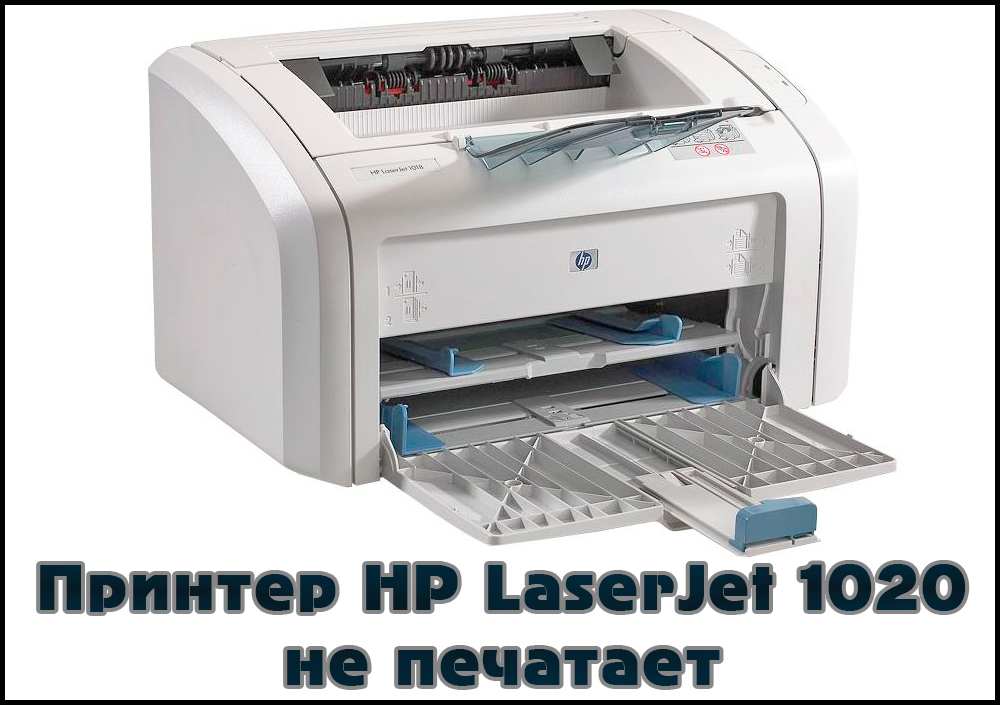
Как решить проблему, когда принтер HP Laserjet 1020 отказывается печатать.
Неполадки заключены либо в самом аппарате, либо в программной части компьютера. При последнем случае исправить всё гораздо быстрее и легче. Хотя если все драйвера стоят правильно, а принтер не распечатывает документы, это ещё не значит, что он сломан.
Тонер
Первым делом следует проверить уровень краски в картриджах. Как правило, именно отсутствие или низкий уровень тонера являются виной того, что машина не печатает — оно и очевидно — печатать попросту нечем. Заниматься разборкой и заправкой принтера самостоятельно не стоит, если только вы не являетесь профессионалом. Иначе рискуете испортить устройство. Лучше довериться мастеру, который с лёгкостью поменяет вам картридж за невысокую плату. Заправить картридж, как правило, тоже стоит недорого. Тем более что делать это приходится раз в несколько месяцев, если вы не используете принтер слишком часто.
ВАЖНО. Аппараты Laserjet 1020, 1018 и 1022 имеют взаимозаменяемые детали, к которым относится и картридж. Если всё-таки решили менять самостоятельно, можете использовать картридж от этих устройств. Нечёткая или грязная печать, кстати, тоже являются следствием нехватки чернил.
Драйверы
Это тоже довольно распространённая причина наравне с заправкой, по которой принтер не работает. Если с уровнем краски всё ОК, то дело, скорее всего, в неправильной работе драйверов. Заменить «дрова» можно несколькими способами. Сначала попробуйте просто скачать через официальный сайт.
- Отключаем устройство от ПК.
- Открываем раздел «Устройства и принтеры» (может называться немного по-другому) в Панели управления.
- Удаляем наше устройство.
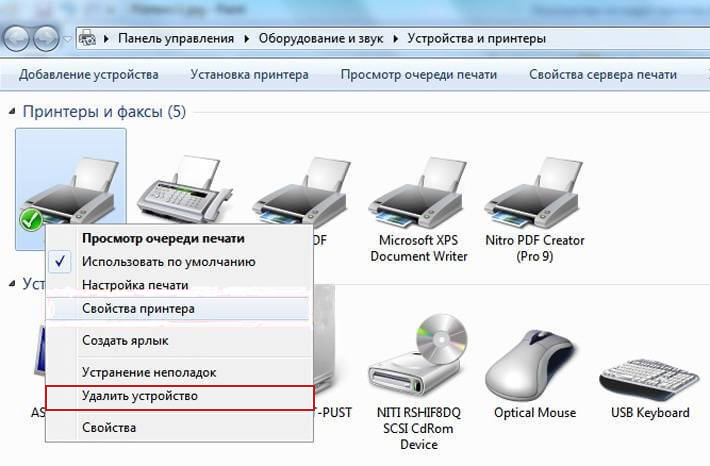
- Скачиваем драйвер для вашей версии Windows для Laserjet 1020 с официального сайта HP.
- Запускаем и следуем инструкциям по установке.
Если это не помогло, можно переустановить драйверы другим способом. А именно — при помощи программы HP Scan and Print Doctor. Она самостоятельно найдёт проблемные компоненты и перезагрузит их.
Другие проблемы
Аппарат может не выводить файлы на печать и по некоторым другим причинам.
- Повреждённый USB-порт или кабель. В таком случае стоит попробовать воспользоваться разными портами или купить новый USB-кабель. Обычно неполадки с проводом возникают, если он имеет явные видимые дефекты.
- Подключение через USB большого количества устройств. Если у вас слабый ПК, то он может не поддерживать одновременно мышь, клавиатуру, принтер и ещё что-нибудь, подключённые по USB. Попробуйте просто отключить лишнее.
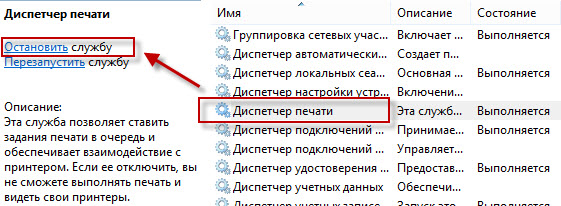
- Диспетчер печати. Попробуйте перезагрузить эту программу: открываем Диспетчер задач, находим там в разделе «Службы» соответствующую службу, останавливаем, перезагружаем компьютер.
Теперь вы знаете основные причины, по которым HP Laserjet 1020 отказывается распечатывать файлы.
Кроме них могут быть и другие, но если вы проверите, установлены ли драйвера и проведёте заправку картриджа вовремя, то, скорее всего, решите ситуацию.

Пользователи порой сталкиваются с необходимостью устранения неполадки, которая связана с тем, что не печатает принтер hp laserjet 1020. В различных ОС, работающих с hp данной модели, причины неполадки могут быть схожими, но их решения часто отличаются друг от друга.
В целом для начала вы можете попробовать устранить неполадку при помощи специальной утилиты «HP Print and Scan Doctor». Ее даже не нужно устанавливать. Все что вам потребуется – это скачать ее и запустить. Если же данная программа не поможет вам и нр laserjet 1020 не печатает по-прежнему, то обратите внимание на следующие действия.
- Прежде всего, убедитесь в том, что у вашего HP устройства нет неисправностей аппаратного типа. К примеру, возможно, ваше устройство слишком сильно шумит или на мониторе ПК часто выскакивает сообщение об ошибке. Также убедитесь в том, что световые индикаторы, расположенные на панели девайса, не мигают.
- Произведите перезагрузку своего персонального компьютера, после чего проверьте очередь печати. Для этого откройте раздел с подключенными к ПК устройствами и откройте окно нужного принтера. Если очередь пуста, то неисправность устранена. Но если очередь заполнена, то очистите ее, кликнув в окне устройства по соответствующему пункту. Если же очередь никак не хочет очищаться, то перейдите к дальнейшим действиям.
- Еще одна причина того, что hp laserjet 1020 не печатает, может заключаться в поврежденном кабеле USB. Произведите его замену на новое изделие. Можете попробовать поменять тонкий кабель такого типа на классический (желательно на тот, который шел в комплекте с печатающим устройством). Кроме того, примите во внимание, что не рекомендуется использоваться USB-кабели, длина которых превышает 3 метра.
- Также не забудьте проверить подключение девайса к ПК. Для этого отключите кабель USB от оргтехники и персонального компьютера, подождите несколько секунд и снова установите его на место. Если после этого ничего распечатать вам не удастся, то переподключите кабель к другому USB-гнезду системного блока. Произведите перезагрузку ПК и попробуйте произвести пробную распечатку любого документа. Довольно частая причина плохой работы Hp LaseJet 1020 бывает связана с тем, что из строя вышел порт ПК.
- Также вам следует проверить конфигурацию драйвера печатающего устройства. Особенно этот шаг актуален в том случае, если к вашему ПК подключено несколько принтеров, к примеру, ноутбуком вы можете пользоваться и в офисе, и дома. Следовательно, есть вероятность того, что по умолчанию у вас выбран не тот принтер, что нужен. Для проверки конфигурации процесса печати вам следует открыть раздел с принтерами и факсами, после чего убедиться в том, что значок принтера по умолчанию стоит рядом с Hp LaseJet 1020. Если же его рядом нет, то просто кликните по иконке своего девайса правой кнопкой мыши и выберите соответствующий пункт.
- Возможной проблемой является также то, что на принтере просто приостановлена печать. Кликните по значку своего принтера правой кнопкой мыши, чтобы открыть контекстное меню, после чего перейдите: «Открыть» => «Принтер». Обратите внимание на пункт «Приостановить печать» — снимите рядом с ним отметку (галочку), если она там стоит.
- Если ваш девайс по-прежнему отказывается печатать, в таком случае источником проблемы может стать недостаточное количество оперативной памяти. Обычно для процесса печати требуется около 200 Мб – и это, не считая других программных приложений, открытых во время печати на компьютере. Следовательно, если объема ОЗУ будет недостаточно, то устройство будет выдавать во время печати абсолютно белые листы.
Одной из распространенных болячек HP 1020 является выход из строя платы форматера. В этом случае компьютер перестает видеть печатающее устройство и никакие действия пользователя по устранению проблемы не помогают. В этом случае может помочь только замена платы форматера, но ее цена часто соизмерима со стоимостью самого аппарата и поэтому производить ее замену, как правило, экономически нецелесообразно.
Но если ничего из перечисленного выше вам не поможет, то можете смело обратиться за помощью в сервисный центр. А лучше всего вызвать знающего мастера на дом.
- Sign up
- Sign in
- HP Community
- Printers
- LaserJet Printing
- Laserjet 1020 won’t print from Windows10; HP assistant can’t…


Create an account on the HP Community to personalize your profile and ask a question
Your account also allows you to connect with HP support faster, access a personal dashboard to manage all of your devices in one place, view warranty information, case status and more.

01-09-2017
09:51 PM

HP Recommended
- Mark as New
- Permalink
Product: Laserjet 1020
Operating System: Microsoft Windows 10 (64-bit)
Printer and Computer not communicating. It worked sporadically in the past. Print job is in cue but not printing. Tried to see if I have latest drivers and updates, but totally frustrated. Couldn’t find downloadable drivers on website. Downloaded HP Assistant and it doesn’t find printer (though it is checked on «Devices and Printer»). HP Print and Scan Doc doesn’t find printer. Tired unplugging and different USB ports. No help.
1 ACCEPTED SOLUTION


Rainbow23
11,381
756
595
22,279
HP Support Agent
7 REPLIES 7
Rainbow23
11,381
756
595
22,280
HP Support Agent
01-11-2017
01:11 AM
HP Recommended
- Mark as New
- Permalink
At first it worked fine, but again it’s stalling with a one page PDF waiting in cue for 5 -10 min. before printing. This has been an ongoing problem and I’ve uninstalled and reinstalled drivers before.
It’s odd that in the list of programs, the HP Laserjet is listsed, but without the Publisher’s name and without the size of the file.
Also, the HP Support Assistant can’t seem to find the printer, even though the Laserjet 1020 is checked in my Printers and Devices as my default Printer. Need an assistant to work the Assistant. LOL
01-11-2017
01:13 AM
HP Recommended
- Mark as New
- Permalink
Is this a typical ongoing problem with W10? Windows updates disable printer? You don’t have a good fix/update to make the software smoothly and reliably compatible?
Rainbow23
11,381
756
595
22,248
HP Support Agent
01-11-2017
01:51 PM
HP Recommended
- Mark as New
- Permalink
@happywriter, thank you for your reply, I’ll be more than glad to help you out.
I understand that the HP Support Assistant is not working.
Don’t worry as I have a few steps that should help fix this issue.
This issue could occur if the HP Support Assistant is corrupted.
Hence, you need you uninstall HP Support Assistant from control panel first and then uninstall HP Support Solution Framework and then download and install HP Support Assistant again. HP Support Solution Framework will automatically get installed after HP Support Assistant is installed.
Please follow the steps in the link: http://hp.care/2fvNQNc
Let me know how that works.
I hope you have a good day ahead.
Rainbow23 — HP Support.
01-16-2017
10:54 PM
HP Recommended
- Mark as New
- Permalink
The printer is working but very very slowly communicating with my computer. I uninstalled and reinstalled the assistant, but it still does not find the HP Printer. Solution didn’t work.
01-23-2017
11:22 PM
HP Recommended
- Mark as New
- Permalink
Did the uninstall, download and reinstall and still is NOT working.
Rainbow23
11,381
756
595
22,198
HP Support Agent
01-24-2017
12:00 PM
HP Recommended
- Mark as New
- Permalink
@happywriter,
Welcome to HP Forums, this is a great place to get support, find answers and tips.
Thank you for posting your query, I’ll be more than glad to help you out.
I understand that you are unable to print from your HP LaserJet 1020 Printer.
Don’t worry as I have a few steps that should help fix this issue.
And here’s the step by step guide for you in the link: http://hp.care/2jO8j1k
Let me know how that works.
I hope you have a good day ahead.
Rainbow23 — HP Support.

Be alert for scammers posting fake support phone numbers and/or email addresses on the community.
If you think you have received a fake HP Support message, please report it to us by clicking on «Flag Post».
† The opinions expressed above are the personal opinions of the authors, not of HP. By using this site, you accept the Terms of Use and Rules of Participation.

-
English
Open Menu

† The opinions expressed above are the personal opinions of the authors, not of HP. By using this site, you accept the <a href=»https://www8.hp.com/us/en/terms-of-use.html» class=»udrlinesmall»>Terms of Use</a> and <a href=»/t5/custom/page/page-id/hp.rulespage» class=»udrlinesmall»> Rules of Participation</a>.
- Sign up
- Sign in
- HP Community
- Printers
- LaserJet Printing
- Laserjet 1020 won’t print from Windows10; HP assistant can’t…
Create an account on the HP Community to personalize your profile and ask a question
Your account also allows you to connect with HP support faster, access a personal dashboard to manage all of your devices in one place, view warranty information, case status and more.
01-09-2017
09:51 PM
HP Recommended
- Mark as New
- Permalink
Product: Laserjet 1020
Operating System: Microsoft Windows 10 (64-bit)
Printer and Computer not communicating. It worked sporadically in the past. Print job is in cue but not printing. Tried to see if I have latest drivers and updates, but totally frustrated. Couldn’t find downloadable drivers on website. Downloaded HP Assistant and it doesn’t find printer (though it is checked on «Devices and Printer»). HP Print and Scan Doc doesn’t find printer. Tired unplugging and different USB ports. No help.
1 ACCEPTED SOLUTION
Rainbow23
11,381
756
595
22,279
HP Support Agent
7 REPLIES 7
Rainbow23
11,381
756
595
22,280
HP Support Agent
01-11-2017
01:11 AM
HP Recommended
- Mark as New
- Permalink
At first it worked fine, but again it’s stalling with a one page PDF waiting in cue for 5 -10 min. before printing. This has been an ongoing problem and I’ve uninstalled and reinstalled drivers before.
It’s odd that in the list of programs, the HP Laserjet is listsed, but without the Publisher’s name and without the size of the file.
Also, the HP Support Assistant can’t seem to find the printer, even though the Laserjet 1020 is checked in my Printers and Devices as my default Printer. Need an assistant to work the Assistant. LOL
01-11-2017
01:13 AM
HP Recommended
- Mark as New
- Permalink
Is this a typical ongoing problem with W10? Windows updates disable printer? You don’t have a good fix/update to make the software smoothly and reliably compatible?
Rainbow23
11,381
756
595
22,248
HP Support Agent
01-11-2017
01:51 PM
HP Recommended
- Mark as New
- Permalink
@happywriter, thank you for your reply, I’ll be more than glad to help you out.
I understand that the HP Support Assistant is not working.
Don’t worry as I have a few steps that should help fix this issue.
This issue could occur if the HP Support Assistant is corrupted.
Hence, you need you uninstall HP Support Assistant from control panel first and then uninstall HP Support Solution Framework and then download and install HP Support Assistant again. HP Support Solution Framework will automatically get installed after HP Support Assistant is installed.
Please follow the steps in the link: http://hp.care/2fvNQNc
Let me know how that works.
I hope you have a good day ahead.
Rainbow23 — HP Support.
01-16-2017
10:54 PM
HP Recommended
- Mark as New
- Permalink
The printer is working but very very slowly communicating with my computer. I uninstalled and reinstalled the assistant, but it still does not find the HP Printer. Solution didn’t work.
01-23-2017
11:22 PM
HP Recommended
- Mark as New
- Permalink
Did the uninstall, download and reinstall and still is NOT working.
Rainbow23
11,381
756
595
22,198
HP Support Agent
01-24-2017
12:00 PM
HP Recommended
- Mark as New
- Permalink
@happywriter,
Welcome to HP Forums, this is a great place to get support, find answers and tips.
Thank you for posting your query, I’ll be more than glad to help you out.
I understand that you are unable to print from your HP LaserJet 1020 Printer.
Don’t worry as I have a few steps that should help fix this issue.
And here’s the step by step guide for you in the link: http://hp.care/2jO8j1k
Let me know how that works.
I hope you have a good day ahead.
Rainbow23 — HP Support.
Be alert for scammers posting fake support phone numbers and/or email addresses on the community.
If you think you have received a fake HP Support message, please report it to us by clicking on «Flag Post».
† The opinions expressed above are the personal opinions of the authors, not of HP. By using this site, you accept the Terms of Use and Rules of Participation.
-
English
Open Menu

† The opinions expressed above are the personal opinions of the authors, not of HP. By using this site, you accept the <a href=»https://www8.hp.com/us/en/terms-of-use.html» class=»udrlinesmall»>Terms of Use</a> and <a href=»/t5/custom/page/page-id/hp.rulespage» class=»udrlinesmall»> Rules of Participation</a>.
В большинстве случаев лазерный принтер HP 1020 отказывается печатать из-за очевидных проблем, справиться с которыми будет под силу даже новичку.
На заметку!
Заправка комплектного картриджа HP 12A (Q2612A) в Москве с выездом мастера — 500 рублей.
Оформить заявку
Поэтому если у вас нет гарантии, не спешите тратить деньги на сервисные центры. Воспользуйтесь инструкцией, пошагово выполняя предложенный алгоритм действий.
Будьте внимательны, руководство не содержит информацию по поводу механических поломок HP LaserJet 1020. Устранение таких неисправностей невозможно без профессиональной помощи или соответствующих навыков у пользователя.
Опознать ошибки печати у HP 1020 поможет подсветка знака «Внимание» (цифра 1). Это говорит нам об одной из проблем, вызванной сбоем работоспособности:
- картриджа HP 12A (Q2612A);
- фиксатора крышки принтера;
- ролика захвата бумаги;
- внутренней памяти или несовместимости форматов / знаков.

Но если у вас перманентно горят оба индикатора после включения аппарата, тогда за ней стоит серьезная поломка, починить которую можно только в сервисном центре.
Для более точной диагностики используйте фирменное программное обеспечение от HP — Print and Scan Doctor [загрузка на сайте службы поддержки].
Проблема №1. Картридж или недостаток тонера
Пользователи часто упускают момент, когда в комплектном картридже заканчивается тонер. Тут все очень просто, вам остается купить новый расходник или заказать заправку 12A (Q2612A).
С другой стороны, принтер может перестать печатать сразу после заправки картриджа, если была произведена неквалифицированная сборка.
Рекомендуем проверить:
- наличие токопроводящей смазки на контакта;
- отсутствие заклинивших валов и шестерни;
- правильную фиксацию дозирующего лезвия.
Проблема №2. Фиксация закрытой крышки
Закрытая крышка на корпусе аппарата — далеко не гарантия того, что печатающее устройство это считало. Ошибка может быть вызвана сбоем фиксатора.
Закройте / откройте крышку несколько раз. Не помогло? Отправляйтесь в сервисный центр!
Проблема №3. Износ ролика захвата бумаги
Не заметить пустой лоток для бумаги сложно. Наверняка захват листов не происходит по причине износа прорезиненного ролика податчика.
Шаг 1. Откройте крышку HP 1020. Достаньте картридж Q2612A. Извлеките ролик, нажав на боковые защелки.

Шаг 2. Проверните резинку так, чтобы сдвинуть гладкую поверхность на нерабочую зону. В новом положении у ролика появится шершавый прихват.

Проблема №4. Переполнена память | ошибка чтения документа
Очистите очередь на печать, и перезагрузите принтер.
При повторной потере работоспособности, но уже из-за одного документа, разбейте его на файлы меньшего размера. Также может помочь смена расширений, например, c .pdf на .png и так далее.
Заправка картриджей и обслуживание лазерных принтеров HP в Москве с выездом мастера от сервисного центра ТонерДруг!

HP Print and Scan Doctor
Для устранения неполадок есть специальная утилита HP Print and Scan Doctor. Она не требует установки. Просто скачиваете и запускаете.
Переустановка драйвера
Если принтер раньше работал, а теперь перестал, то первым делом, я бы переустановил драйвер.
Скачать драйвер для HP LaserJet 1020 можно здесь.
- Отключаем принтер от компьютера и заходим в меню «Пуск» > «Устройства и принтеры».
- Удаляем установленный HP LaserJet 1020.
- Запускаем скачанный файл и следуем инструкциям мастера.
Пробуем печатать.
Если печать не идет, то с помощью этой статьи удаляем драйвер принтера и устанавливаем его заново.
Если все равно не печатает
- Проверить, а лучше попробовать с другим USB кабелем.
- Если запасного USB-шнура нет, то можно подключить этот же кабель в другой разъем. Возможно, что-то не так с портом USB.
- Если у вас стационарный компьютер и принтер подключен к передней панели — подключить агрегат в задней панели. USB-порты спереди корпуса подключены к материнской плате через переходник. Возможно, он дает дополнительные наводки и из-за этого не идет печать.
- Смотреть рекомендации в статье — Почему не печатает принтер.
Печатайте с удовольствием.
Ура заработало!
Оказывается вот как надо было делать!
Заходим в HP Device Manager — Device — Diagnose HPLIP Driver….
Откроется HP-doctor -Konsole
Вот то что там было….
По вопросам там все понятно… обновили PPD ну еще всякая хз зачем… но все заработало…
Код: Выделить всё
HP Linux Imaging and Printing System (ver. 3.15.6)
Self Diagnse Utility and Healing Utility ver. 1.0
Copyright (c) 2001-15 Hewlett-Packard Development Company, LP
This software comes with ABSOLUTELY NO WARRANTY.
This is free software, and you are welcome to distribute it
under certain conditions. See COPYING file for more details.
warning: mandrake distro is not found in AUTH_TYPES
Checking for Deprecated items....
error: This distro (i.e unknown 2014.1) is either deprecated or not yet supported.
The diagnosis is limited on unsupported platforms. Do you want to continue?(y=yes*, n=no):yes
error: Please enter 'y', 'n', 'q' or press <enter> for the default of 'y'.
The diagnosis is limited on unsupported platforms. Do you want to continue?(y=yes*, n=no):y
Checking for HPLIP updates....
error: Failed to locate hp-upgrade utility
Checking for Dependencies....
warning: unknown-2014.1 version is not supported. Using unknown-0 versions dependencies to verify and install...
---------------
| SYSTEM INFO |
---------------
Kernel: 3.14.44-nrj-desktop-2rosa-x86_64 #1 SMP PREEMPT Thu Jun 11 15:04:56 UTC 2015 GNU/Linux
Host: alnicx-HP-ProBook-4530s
Proc: 3.14.44-nrj-desktop-2rosa-x86_64 #1 SMP PREEMPT Thu Jun 11 15:04:56 UTC 2015 GNU/Linux
Distribution: unknown 2014.1
Bitness: 64 bit
-----------------------
| HPLIP CONFIGURATION |
-----------------------
HPLIP-Version: HPLIP 3.15.6
HPLIP-Home: /usr/share/hplip
warning: HPLIP-Installation: Auto installation is not supported for unknown distro 2014.1 version
Current contents of '/etc/hp/hplip.conf' file:
# hplip.conf. Generated from hplip.conf.in by configure.
[hplip]
version=3.15.6
[dirs]
home=/usr/share/hplip
run=/var/run
ppd=/usr/share/ppd/HP
ppdbase=/usr/share/ppd
doc=/usr/share/doc/hplip-3.15.6
html=/usr/share/doc/hplip-3.15.6
icon=/usr/share/applications
cupsbackend=/usr/lib/cups/backend
cupsfilter=/usr/lib/cups/filter
drv=/usr/share/cups/drv/hp
bin=/usr/bin
# Following values are determined at configure time and cannot be changed.
[configure]
network-build=yes
libusb01-build=no
pp-build=yes
gui-build=yes
scanner-build=yes
fax-build=yes
dbus-build=yes
cups11-build=no
doc-build=yes
shadow-build=no
hpijs-install=yes
foomatic-drv-install=no
foomatic-ppd-install=no
foomatic-rip-hplip-install=no
hpcups-install=yes
cups-drv-install=yes
cups-ppd-install=yes
internal-tag=3.15.6
restricted-build=no
ui-toolkit=qt4
qt3=no
qt4=yes
policy-kit=no
lite-build=no
udev_sysfs_rules=no
hpcups-only-build=no
hpijs-only-build=no
Current contents of '/var/lib/hp/hplip.state' file:
Current contents of '~/.hplip/hplip.conf' file:
[settings]
systray_visible = 0
systray_messages = 0
[last_used]
device_uri = "hp:/usb/HP_LaserJet_1020?serial=FN0CF3E"
printer_name =
working_dir = .
[commands]
scan = /usr/bin/xsane -V %SANE_URI%
[refresh]
rate = 30
enable = false
type = 1
[polling]
enable = false
interval = 5
device_list =
[fax]
voice_phone =
email_address =
[upgrade]
notify_upgrade = false
last_upgraded_time = 1449608703
pending_upgrade_time = 0
[installation]
date_time = 09.12.2015 00:07:26
version = 3.15.6
<Package-name> <Package-Desc> <Required/Optional> <Min-Version> <Installed-Version> <Status> <Comment>
--------------------------
| External Dependencies |
--------------------------
gs GhostScript - PostScript and PDF language interpreter and previewer REQUIRED 7.05 9.14 OK -
scanimage scanimage - Shell scanning program OPTIONAL 1.0 1.0.24 OK -
xsane xsane - Graphical scanner frontend for SANE OPTIONAL 0.9 0.999 OK -
error: cups CUPS - Common Unix Printing System REQUIRED 1.1 - INCOMPAT 'CUPS may not be installed or not running'
policykit PolicyKit - Administrative policy framework OPTIONAL - 0.113 OK -
network network -wget OPTIONAL - 1.16.1 OK -
avahi-utils avahi-utils OPTIONAL - 0.6.31 OK -
dbus DBus - Message bus system REQUIRED - 1.8.4 OK -
-------------------------
| General Dependencies |
-------------------------
error: libcrypto libcrypto - OpenSSL cryptographic library REQUIRED - 1.0.1 MISSING 'libcrypto needs to be installed'
python-dbus Python DBus - Python bindings for DBus REQUIRED 0.80.0 1.2.0 OK -
error: reportlab Reportlab - PDF library for Python OPTIONAL 2.0 - MISSING 'reportlab needs to be installed'
python-notify Python libnotify - Python bindings for the libnotify Desktop notifications OPTIONAL - - OK -
pyqt4 PyQt 4- Qt interface for Python (for Qt version 4.x) REQUIRED 4.0 4.11.2 OK -
python-xml Python XML libraries REQUIRED - 2.1.0 OK -
error: libusb libusb - USB library REQUIRED - 1.0 MISSING 'libusb needs to be installed'
error: cups-image CUPS image - CUPS image development files REQUIRED - - MISSING 'cups-image needs to be installed'
error: libnetsnmp-devel libnetsnmp-devel - SNMP networking library development files REQUIRED 5.0.9 - MISSING 'libnetsnmp-devel needs to be installed'
error: sane-devel SANE - Scanning library development files REQUIRED - - MISSING 'sane-devel needs to be installed'
pil PIL - Python Imaging Library (required for commandline scanning with hp-scan) OPTIONAL - 1.1.7 OK -
python2X Python 2.2 or greater - Python programming language REQUIRED 2.2 2.7.9 OK -
pyqt4-dbus PyQt 4 DBus - DBus Support for PyQt4 REQUIRED 4.0 4.11.2 OK -
error: libjpeg libjpeg - JPEG library REQUIRED - - MISSING 'libjpeg needs to be installed'
libpthread libpthread - POSIX threads library REQUIRED - 2.19 OK -
error: python-devel Python devel - Python development files REQUIRED 2.2 2.7.9 MISSING 'python-devel needs to be installed'
error: cups-devel CUPS devel- Common Unix Printing System development files REQUIRED - - MISSING 'cups-devel needs to be installed'
sane SANE - Scanning library REQUIRED - - OK -
---------------
| COMPILEDEP |
---------------
error: libtool libtool - Library building support services REQUIRED - - MISSING 'libtool needs to be installed'
error: gcc gcc - GNU Project C and C++ Compiler REQUIRED - 4.9.2 MISSING 'gcc needs to be installed'
make make - GNU make utility to maintain groups of programs REQUIRED 3.0 4.0 OK -
----------------------
| Python Extentions |
----------------------
cupsext CUPS-Extension REQUIRED - 3.15.6 OK -
hpmudext IO-Extension REQUIRED - 3.15.6 OK -
-----------------------
| Scan Configuration |
-----------------------
scanext Scan-SANE-Extension REQUIRED - 3.15.6 OK -
hpaio HPLIP-SANE-Backend REQUIRED - 3.15.6 OK 'hpaio found in /etc/sane.d/dll.conf'
-----------------------
| Other Dependencies |
-----------------------
------------------------------
| DISCOVERED SCANNER DEVICES |
------------------------------
device `v4l:/dev/video0' is a Noname HP HD Webcam [Fixed] virtual device
--------------------------
| DISCOVERED USB DEVICES |
--------------------------
Device URI Model
-------------------------------- ----------------
hp:/usb/HP_LaserJet_1020?serial= HP LaserJet 1020
FN0CF3E
---------------------------------
| INSTALLED CUPS PRINTER QUEUES |
---------------------------------
HP-LaserJet-1020
----------------
Type: Printer
Device URI: hp:/usb/HP_LaserJet_1020?serial=FN0CF3E
PPD: /etc/cups/ppd/HP-LaserJet-1020.ppd
PPD Description: HP LaserJet 1020 Foomatic/foo2zjs-z1 (recommended)
Printer status: printer HP-LaserJet-1020 is idle. enabled since Ср 09 дек 2015 00:06:42
error: Required plug-in status: Not installed
Communication status: Good
--------------
| PERMISSION |
--------------
USB HP-LaserJet-1020 Required - - OK Node:'/dev/bus/usb/004/008' Perm:' root scanner rw- rw- rw- rw- rw-'
error: User needs to be member of group 'lp' to enable print, scan & fax.
error: User needs to be member of group 'lpadmin' to manage printers.
Checking Permissions....
Permissions are correct.
Checking for Configured Queues....
error: PPD file for 'HP-LaserJet-1020' is not correct. Need to choose correct PPD file.
Do you want to remove and re-configure? (y=yes*, n=no, q=quit) ? y
You do not have permission to delete a printer. You need authentication.
Username: root
Password:
' HP-LaserJet-1020' removed successfully.
Re-configuring this printer by hp-setup...
HP Linux Imaging and Printing System (ver. 3.15.6)
Printer/Fax Setup Utility ver. 9.0
Copyright (c) 2001-15 Hewlett-Packard Development Company, LP
This software comes with ABSOLUTELY NO WARRANTY.
This is free software, and you are welcome to distribute it
under certain conditions. See COPYING file for more details.
(Note: Defaults for each question are maked with a '*'. Press <enter> to accept the default.)
--------------------------------
| SELECT CONNECTION (I/O) TYPE |
--------------------------------
Num Connection Description
Type
-------- ---------- ----------------------------------------------------------
0* usb Universal Serial Bus (USB)
1 net Network/Ethernet/Wireless (direct connection or JetDirect)
2 par Parallel Port (LPT:)
Enter number 0...2 for connection type (q=quit, enter=usb*) ? 0
Using connection type: usb
Setting up device: hp:/usb/HP_LaserJet_1020?serial=FN0CF3E
------------------------
| PLUG-IN INSTALLATION |
------------------------
HP Linux Imaging and Printing System (ver. 3.15.6)
Plugin Download and Install Utility ver. 2.1
Copyright (c) 2001-15 Hewlett-Packard Development Company, LP
This software comes with ABSOLUTELY NO WARRANTY.
This is free software, and you are welcome to distribute it
under certain conditions. See COPYING file for more details.
(Note: Defaults for each question are maked with a '*'. Press <enter> to accept the default.)
-----------------------------------------
| PLUG-IN INSTALLATION FOR HPLIP 3.15.6 |
-----------------------------------------
Option Description
---------- --------------------------------------------------
d Download plug-in from HP (recomended)
p Specify a path to the plug-in (advanced)
q Quit hp-plugin (skip installation)
Enter option (d=download*, p=specify path, q=quit) ? d
-------------------
| DOWNLOAD PLUGIN |
-------------------
Checking for network connection...
Downloading plug-in from:
Downloading plug-in: [ ] 0% warning: mandrake distro is not found in AUTH_TYPES
Receiving digital keys: /usr/bin/gpg --homedir /root/.hplip/.gnupg --no-permission-warning --keyserver pgp.mit.edu --recv-keys 0xA59047B9
----------------------
| INSTALLING PLUG-IN |
----------------------
Creating directory plugin_tmp
Verifying archive integrity... All good.
Uncompressing HPLIP 3.15.6 Plugin Self Extracting Archive...........................................
HP Linux Imaging and Printing System (ver. 3.15.6)
Plugin Installer ver. 3.0
Copyright (c) 2001-15 Hewlett-Packard Development Company, LP
This software comes with ABSOLUTELY NO WARRANTY.
This is free software, and you are welcome to distribute it
under certain conditions. See COPYING file for more details.
Plug-in version: 3.15.6
Installed HPLIP version: 3.15.6
Number of files to install: 38
You must agree to the license terms before installing the plug-in:
LICENSE TERMS FOR HP Linux Imaging and Printing (HPLIP) Driver Plug-in
These License Terms govern your Use of the HPLIP Driver Plug-in Software (the
"Software"). USE OF THE SOFTWARE INCLUDING, WITHOUT LIMITATION, ANY
DOCUMENTATION, IS SUBJECT TO THESE LICENSE TERMS AND THE APPLICABLE AS-IS
WARRANTY STATEMENT. BY DOWNLOADING AND INSTALLING THE SOFTWARE, YOU ARE AGREEING
TO BE BOUND BY THESE TERMS. IF YOU DO NOT AGREE TO ALL OF THESE TERMS, DO NOT
DOWNLOAD AND INSTALL THE SOFTWARE ON YOUR SYSTEM.
1. License Grant. HP grants you a license to Use one copy of the Software with
HP printing products only. "Use" includes using, storing, loading, installing,
executing, and displaying the Software. You may not modify the Software or
disable any licensing or control features of the Software.
2. Ownership. The Software is owned and copyrighted by HP or its third party
suppliers. Your license confers no title to, or ownership in, the Software and
is not a sale of any rights in the Software. HP's third party suppliers may
protect their rights in the Software in the event of any violation of these
license terms.
3. Copies and Adaptations. You may only make copies or adaptations of the
Software for archival purposes or when copying or adaptation is an essential
step in the authorized Use of the Software. You must reproduce all copyright
notices in the original Software on all copies or adaptations. You may not copy
the Software onto any public network.
4. No Disassembly. You may not Disassemble the Software unless HP's prior
written consent is obtained. "Disassemble" includes disassembling, decompiling,
decrypting, and reverse engineering. In some jurisdictions, HP's consent may not
be required for limited Disassembly. Upon request, you will provide HP with
reasonably detailed information regarding any Disassembly.
5. No Transfer. You may not assign, sublicense or otherwise transfer all or any
part of these License Terms or the Software.
6. Termination. HP may terminate your license, upon notice, for failure to
comply with any of these License Terms. Upon termination, you must immediately
destroy the Software, together with all copies, adaptations and merged portions
in any form.
7. Export Requirements. You may not export or re-export the Software or any copy
or adaptation in violation of any applicable laws or regulations.
8. U.S. Government Restricted Rights. The Software has been developed entirely
at private expense. It is delivered and licensed, as defined in any applicable
DFARS, FARS, or other equivalent federal agency regulation or contract clause,
as either "commercial computer software" or "restricted computer software",
whichever is applicable. You have only those rights provided for such Software
by the applicable clause or regulation or by these License Terms.
9. DISCLAIMER OF WARRANTIES. TO THE MAXIMUM EXTENT PERMITTED BY APPLICABLE LAW,
HP AND ITS SUPPLIERS PROVIDE THE SOFTWARE "AS IS" AND WITH ALL FAULTS, AND
HEREBY DISCLAIM ALL OTHER WARRANTIES AND CONDITIONS, EITHER EXPRESS, IMPLIED, OR
STATUTORY, INCLUDING, BUT NOT LIMITED TO, WARRANTIES OF TITLE AND
NON-INFRINGEMENT, ANY IMPLIED WARRANTIES, DUTIES OR CONDITIONS OF
MERCHANTABILITY, OF FITNESS FOR A PARTICULAR PURPOSE, AND OF LACK OF VIRUSES ALL
WITH REGARD TO THE SOFTWARE. Some states/jurisdictions do not allow exclusion of
implied warranties or limitations on the duration of implied warranties, so the
above disclaimer may not apply to you in its entirety.
10. LIMITATION OF LIABILITY. Notwithstanding any damages that you might incur,
the entire liability of HP and any of its suppliers under any provision of this
agreement and your exclusive remedy for all of the foregoing shall be limited to
the greater of the amount actually paid by you separately for the Software or
U.S. $5.00. TO THE MAXIMUM EXTENT PERMITTED BY APPLICABLE LAW, IN NO EVENT SHALL
HP OR ITS SUPPLIERS BE LIABLE FOR ANY SPECIAL, INCIDENTAL,
INDIRECT, OR CONSEQUENTIAL DAMAGES WHATSOEVER (INCLUDING, BUT NOT LIMITED TO,
DAMAGES FOR LOSS OF PROFITS OR CONFIDENTIAL OR OTHER INFORMATION, FOR BUSINESS
INTERRUPTION, FOR PERSONAL INJURY, FOR LOSS OF PRIVACY ARISING OUT OF OR IN ANY
WAY RELATED TO THE USE OF OR INABILITY TO USE THE SOFTWARE, OR OTHERWISE IN
CONNECTION WITH ANY PROVISION OF THIS AGREEMENT, EVEN IF HP OR ANY SUPPLIER HAS
BEEN ADVISED OF THE POSSIBILITY OF SUCH DAMAGES AND EVEN IF THE REMEDY FAILS OF
ITS ESSENTIAL PURPOSE. Some states/jurisdictions do not allow the exclusion or
limitation of incidental or consequential damages, so the above limitation or
exclusion may not apply to you.
Do you accept the license terms for the plug-in (y=yes*, n=no, q=quit) ? y
Done.
Done.
---------------------
| PRINT QUEUE SETUP |
---------------------
Please enter a name for this print queue (m=use model name:'HP_LaserJet_1020'*, q=quit) ?HP_LaserJet_1020
Using queue name: HP_LaserJet_1020
Locating PPD file... Please wait.
Found PPD file: drv:///hp/hpcups.drv/hp-laserjet_1020.ppd
Description:
Note: The model number may vary slightly from the actual model number on the device.
Does this PPD file appear to be the correct one (y=yes*, n=no, q=quit) ? y
Enter a location description for this printer (q=quit) ?y
Enter additonal information or notes for this printer (q=quit) ?y
Adding print queue to CUPS:
Device URI: hp:/usb/HP_LaserJet_1020?serial=FN0CF3E
Queue name: HP_LaserJet_1020
PPD file: drv:///hp/hpcups.drv/hp-laserjet_1020.ppd
Location: y
Information: y
Firmware download successful.
---------------------
| PRINTER TEST PAGE |
---------------------
Would you like to print a test page (y=yes*, n=no, q=quit) ? y
warning: hp-testpage should not be run as root/superuser.
HP Linux Imaging and Printing System (ver. 3.15.6)
Testpage Print Utility ver. 6.0
Copyright (c) 2001-15 Hewlett-Packard Development Company, LP
This software comes with ABSOLUTELY NO WARRANTY.
This is free software, and you are welcome to distribute it
under certain conditions. See COPYING file for more details.
Printing test page to printer HP_LaserJet_1020...
Test page has been sent to printer.
note: If an error occured, or the test page failed to print, refer to the HPLIP website
note: at: http://hplip.sourceforge.net for troubleshooting and support.
Done.
Done.
Checking for HP Properitery Plugin's....
Plugin's are missing. Press 'y' to install the plugin(y=yes*, n=no):y
Пароль:
(Note: Defaults for each question are maked with a '*'. Press <enter> to accept the default.)
-----------------------------------------
| PLUG-IN INSTALLATION FOR HPLIP 3.15.6 |
-----------------------------------------
The driver plugin for HPLIP 3.15.6 appears to already be installed.
Do you wish to download and re-install the plug-in? (y=yes*, n=no, q=quit) ? n
Diagnose completed...
More information on Troubleshooting,How-To's and Support is available on http://hplipopensource.com/hplip-web/index.html
Please close this terminal manually.
HP Linux Imaging and Printing System (ver. 3.15.6)
Self Diagnse Utility and Healing Utility ver. 1.0
Copyright (c) 2001-15 Hewlett-Packard Development Company, LP
This software comes with ABSOLUTELY NO WARRANTY.
This is free software, and you are welcome to distribute it
under certain conditions. See COPYING file for more details.
warning: mandrake distro is not found in AUTH_TYPES
Checking for Deprecated items....
error: This distro (i.e unknown 2014.1) is either deprecated or not yet supported.
The diagnosis is limited on unsupported platforms. Do you want to continue?(y=yes*, n=no):yes
error: Please enter 'y', 'n', 'q' or press <enter> for the default of 'y'.
The diagnosis is limited on unsupported platforms. Do you want to continue?(y=yes*, n=no):y
Checking for HPLIP updates....
error: Failed to locate hp-upgrade utility
Checking for Dependencies....
warning: unknown-2014.1 version is not supported. Using unknown-0 versions dependencies to verify and install...
---------------
| SYSTEM INFO |
---------------
Kernel: 3.14.44-nrj-desktop-2rosa-x86_64 #1 SMP PREEMPT Thu Jun 11 15:04:56 UTC 2015 GNU/Linux
Host: alnicx-HP-ProBook-4530s
Proc: 3.14.44-nrj-desktop-2rosa-x86_64 #1 SMP PREEMPT Thu Jun 11 15:04:56 UTC 2015 GNU/Linux
Distribution: unknown 2014.1
Bitness: 64 bit
-----------------------
| HPLIP CONFIGURATION |
-----------------------
HPLIP-Version: HPLIP 3.15.6
HPLIP-Home: /usr/share/hplip
warning: HPLIP-Installation: Auto installation is not supported for unknown distro 2014.1 version
Current contents of '/etc/hp/hplip.conf' file:
# hplip.conf. Generated from hplip.conf.in by configure.
[hplip]
version=3.15.6
[dirs]
home=/usr/share/hplip
run=/var/run
ppd=/usr/share/ppd/HP
ppdbase=/usr/share/ppd
doc=/usr/share/doc/hplip-3.15.6
html=/usr/share/doc/hplip-3.15.6
icon=/usr/share/applications
cupsbackend=/usr/lib/cups/backend
cupsfilter=/usr/lib/cups/filter
drv=/usr/share/cups/drv/hp
bin=/usr/bin
# Following values are determined at configure time and cannot be changed.
[configure]
network-build=yes
libusb01-build=no
pp-build=yes
gui-build=yes
scanner-build=yes
fax-build=yes
dbus-build=yes
cups11-build=no
doc-build=yes
shadow-build=no
hpijs-install=yes
foomatic-drv-install=no
foomatic-ppd-install=no
foomatic-rip-hplip-install=no
hpcups-install=yes
cups-drv-install=yes
cups-ppd-install=yes
internal-tag=3.15.6
restricted-build=no
ui-toolkit=qt4
qt3=no
qt4=yes
policy-kit=no
lite-build=no
udev_sysfs_rules=no
hpcups-only-build=no
hpijs-only-build=no
Current contents of '/var/lib/hp/hplip.state' file:
Current contents of '~/.hplip/hplip.conf' file:
[settings]
systray_visible = 0
systray_messages = 0
[last_used]
device_uri = "hp:/usb/HP_LaserJet_1020?serial=FN0CF3E"
printer_name =
working_dir = .
[commands]
scan = /usr/bin/xsane -V %SANE_URI%
[refresh]
rate = 30
enable = false
type = 1
[polling]
enable = false
interval = 5
device_list =
[fax]
voice_phone =
email_address =
[upgrade]
notify_upgrade = false
last_upgraded_time = 1449608703
pending_upgrade_time = 0
[installation]
date_time = 09.12.2015 00:07:26
version = 3.15.6
<Package-name> <Package-Desc> <Required/Optional> <Min-Version> <Installed-Version> <Status> <Comment>
--------------------------
| External Dependencies |
--------------------------
gs GhostScript - PostScript and PDF language interpreter and previewer REQUIRED 7.05 9.14 OK -
scanimage scanimage - Shell scanning program OPTIONAL 1.0 1.0.24 OK -
xsane xsane - Graphical scanner frontend for SANE OPTIONAL 0.9 0.999 OK -
error: cups CUPS - Common Unix Printing System REQUIRED 1.1 - INCOMPAT 'CUPS may not be installed or not running'
policykit PolicyKit - Administrative policy framework OPTIONAL - 0.113 OK -
network network -wget OPTIONAL - 1.16.1 OK -
avahi-utils avahi-utils OPTIONAL - 0.6.31 OK -
dbus DBus - Message bus system REQUIRED - 1.8.4 OK -
-------------------------
| General Dependencies |
-------------------------
error: libcrypto libcrypto - OpenSSL cryptographic library REQUIRED - 1.0.1 MISSING 'libcrypto needs to be installed'
python-dbus Python DBus - Python bindings for DBus REQUIRED 0.80.0 1.2.0 OK -
error: reportlab Reportlab - PDF library for Python OPTIONAL 2.0 - MISSING 'reportlab needs to be installed'
python-notify Python libnotify - Python bindings for the libnotify Desktop notifications OPTIONAL - - OK -
pyqt4 PyQt 4- Qt interface for Python (for Qt version 4.x) REQUIRED 4.0 4.11.2 OK -
python-xml Python XML libraries REQUIRED - 2.1.0 OK -
error: libusb libusb - USB library REQUIRED - 1.0 MISSING 'libusb needs to be installed'
error: cups-image CUPS image - CUPS image development files REQUIRED - - MISSING 'cups-image needs to be installed'
error: libnetsnmp-devel libnetsnmp-devel - SNMP networking library development files REQUIRED 5.0.9 - MISSING 'libnetsnmp-devel needs to be installed'
error: sane-devel SANE - Scanning library development files REQUIRED - - MISSING 'sane-devel needs to be installed'
pil PIL - Python Imaging Library (required for commandline scanning with hp-scan) OPTIONAL - 1.1.7 OK -
python2X Python 2.2 or greater - Python programming language REQUIRED 2.2 2.7.9 OK -
pyqt4-dbus PyQt 4 DBus - DBus Support for PyQt4 REQUIRED 4.0 4.11.2 OK -
error: libjpeg libjpeg - JPEG library REQUIRED - - MISSING 'libjpeg needs to be installed'
libpthread libpthread - POSIX threads library REQUIRED - 2.19 OK -
error: python-devel Python devel - Python development files REQUIRED 2.2 2.7.9 MISSING 'python-devel needs to be installed'
error: cups-devel CUPS devel- Common Unix Printing System development files REQUIRED - - MISSING 'cups-devel needs to be installed'
sane SANE - Scanning library REQUIRED - - OK -
---------------
| COMPILEDEP |
---------------
error: libtool libtool - Library building support services REQUIRED - - MISSING 'libtool needs to be installed'
error: gcc gcc - GNU Project C and C++ Compiler REQUIRED - 4.9.2 MISSING 'gcc needs to be installed'
make make - GNU make utility to maintain groups of programs REQUIRED 3.0 4.0 OK -
----------------------
| Python Extentions |
----------------------
cupsext CUPS-Extension REQUIRED - 3.15.6 OK -
hpmudext IO-Extension REQUIRED - 3.15.6 OK -
-----------------------
| Scan Configuration |
-----------------------
scanext Scan-SANE-Extension REQUIRED - 3.15.6 OK -
hpaio HPLIP-SANE-Backend REQUIRED - 3.15.6 OK 'hpaio found in /etc/sane.d/dll.conf'
-----------------------
| Other Dependencies |
-----------------------
------------------------------
| DISCOVERED SCANNER DEVICES |
------------------------------
device `v4l:/dev/video0' is a Noname HP HD Webcam [Fixed] virtual device
--------------------------
| DISCOVERED USB DEVICES |
--------------------------
Device URI Model
-------------------------------- ----------------
hp:/usb/HP_LaserJet_1020?serial= HP LaserJet 1020
FN0CF3E
---------------------------------
| INSTALLED CUPS PRINTER QUEUES |
---------------------------------
HP-LaserJet-1020
----------------
Type: Printer
Device URI: hp:/usb/HP_LaserJet_1020?serial=FN0CF3E
PPD: /etc/cups/ppd/HP-LaserJet-1020.ppd
PPD Description: HP LaserJet 1020 Foomatic/foo2zjs-z1 (recommended)
Printer status: printer HP-LaserJet-1020 is idle. enabled since Ср 09 дек 2015 00:06:42
error: Required plug-in status: Not installed
Communication status: Good
--------------
| PERMISSION |
--------------
USB HP-LaserJet-1020 Required - - OK Node:'/dev/bus/usb/004/008' Perm:' root scanner rw- rw- rw- rw- rw-'
error: User needs to be member of group 'lp' to enable print, scan & fax.
error: User needs to be member of group 'lpadmin' to manage printers.
Checking Permissions....
Permissions are correct.
Checking for Configured Queues....
error: PPD file for 'HP-LaserJet-1020' is not correct. Need to choose correct PPD file.
Do you want to remove and re-configure? (y=yes*, n=no, q=quit) ? y
You do not have permission to delete a printer. You need authentication.
Username: root
Password:
' HP-LaserJet-1020' removed successfully.
Re-configuring this printer by hp-setup...
HP Linux Imaging and Printing System (ver. 3.15.6)
Printer/Fax Setup Utility ver. 9.0
Copyright (c) 2001-15 Hewlett-Packard Development Company, LP
This software comes with ABSOLUTELY NO WARRANTY.
This is free software, and you are welcome to distribute it
under certain conditions. See COPYING file for more details.
(Note: Defaults for each question are maked with a '*'. Press <enter> to accept the default.)
--------------------------------
| SELECT CONNECTION (I/O) TYPE |
--------------------------------
Num Connection Description
Type
-------- ---------- ----------------------------------------------------------
0* usb Universal Serial Bus (USB)
1 net Network/Ethernet/Wireless (direct connection or JetDirect)
2 par Parallel Port (LPT:)
Enter number 0...2 for connection type (q=quit, enter=usb*) ? 0
Using connection type: usb
Setting up device: hp:/usb/HP_LaserJet_1020?serial=FN0CF3E
------------------------
| PLUG-IN INSTALLATION |
------------------------
HP Linux Imaging and Printing System (ver. 3.15.6)
Plugin Download and Install Utility ver. 2.1
Copyright (c) 2001-15 Hewlett-Packard Development Company, LP
This software comes with ABSOLUTELY NO WARRANTY.
This is free software, and you are welcome to distribute it
under certain conditions. See COPYING file for more details.
(Note: Defaults for each question are maked with a '*'. Press <enter> to accept the default.)
-----------------------------------------
| PLUG-IN INSTALLATION FOR HPLIP 3.15.6 |
-----------------------------------------
Option Description
---------- --------------------------------------------------
d Download plug-in from HP (recomended)
p Specify a path to the plug-in (advanced)
q Quit hp-plugin (skip installation)
Enter option (d=download*, p=specify path, q=quit) ? d
-------------------
| DOWNLOAD PLUGIN |
-------------------
Checking for network connection...
Downloading plug-in from:
Downloading plug-in: [ ] 0% warning: mandrake distro is not found in AUTH_TYPES
Receiving digital keys: /usr/bin/gpg --homedir /root/.hplip/.gnupg --no-permission-warning --keyserver pgp.mit.edu --recv-keys 0xA59047B9
----------------------
| INSTALLING PLUG-IN |
----------------------
Creating directory plugin_tmp
Verifying archive integrity... All good.
Uncompressing HPLIP 3.15.6 Plugin Self Extracting Archive...........................................
HP Linux Imaging and Printing System (ver. 3.15.6)
Plugin Installer ver. 3.0
Copyright (c) 2001-15 Hewlett-Packard Development Company, LP
This software comes with ABSOLUTELY NO WARRANTY.
This is free software, and you are welcome to distribute it
under certain conditions. See COPYING file for more details.
Plug-in version: 3.15.6
Installed HPLIP version: 3.15.6
Number of files to install: 38
You must agree to the license terms before installing the plug-in:
LICENSE TERMS FOR HP Linux Imaging and Printing (HPLIP) Driver Plug-in
These License Terms govern your Use of the HPLIP Driver Plug-in Software (the
"Software"). USE OF THE SOFTWARE INCLUDING, WITHOUT LIMITATION, ANY
DOCUMENTATION, IS SUBJECT TO THESE LICENSE TERMS AND THE APPLICABLE AS-IS
WARRANTY STATEMENT. BY DOWNLOADING AND INSTALLING THE SOFTWARE, YOU ARE AGREEING
TO BE BOUND BY THESE TERMS. IF YOU DO NOT AGREE TO ALL OF THESE TERMS, DO NOT
DOWNLOAD AND INSTALL THE SOFTWARE ON YOUR SYSTEM.
1. License Grant. HP grants you a license to Use one copy of the Software with
HP printing products only. "Use" includes using, storing, loading, installing,
executing, and displaying the Software. You may not modify the Software or
disable any licensing or control features of the Software.
2. Ownership. The Software is owned and copyrighted by HP or its third party
suppliers. Your license confers no title to, or ownership in, the Software and
is not a sale of any rights in the Software. HP's third party suppliers may
protect their rights in the Software in the event of any violation of these
license terms.
3. Copies and Adaptations. You may only make copies or adaptations of the
Software for archival purposes or when copying or adaptation is an essential
step in the authorized Use of the Software. You must reproduce all copyright
notices in the original Software on all copies or adaptations. You may not copy
the Software onto any public network.
4. No Disassembly. You may not Disassemble the Software unless HP's prior
written consent is obtained. "Disassemble" includes disassembling, decompiling,
decrypting, and reverse engineering. In some jurisdictions, HP's consent may not
be required for limited Disassembly. Upon request, you will provide HP with
reasonably detailed information regarding any Disassembly.
5. No Transfer. You may not assign, sublicense or otherwise transfer all or any
part of these License Terms or the Software.
6. Termination. HP may terminate your license, upon notice, for failure to
comply with any of these License Terms. Upon termination, you must immediately
destroy the Software, together with all copies, adaptations and merged portions
in any form.
7. Export Requirements. You may not export or re-export the Software or any copy
or adaptation in violation of any applicable laws or regulations.
8. U.S. Government Restricted Rights. The Software has been developed entirely
at private expense. It is delivered and licensed, as defined in any applicable
DFARS, FARS, or other equivalent federal agency regulation or contract clause,
as either "commercial computer software" or "restricted computer software",
whichever is applicable. You have only those rights provided for such Software
by the applicable clause or regulation or by these License Terms.
9. DISCLAIMER OF WARRANTIES. TO THE MAXIMUM EXTENT PERMITTED BY APPLICABLE LAW,
HP AND ITS SUPPLIERS PROVIDE THE SOFTWARE "AS IS" AND WITH ALL FAULTS, AND
HEREBY DISCLAIM ALL OTHER WARRANTIES AND CONDITIONS, EITHER EXPRESS, IMPLIED, OR
STATUTORY, INCLUDING, BUT NOT LIMITED TO, WARRANTIES OF TITLE AND
NON-INFRINGEMENT, ANY IMPLIED WARRANTIES, DUTIES OR CONDITIONS OF
MERCHANTABILITY, OF FITNESS FOR A PARTICULAR PURPOSE, AND OF LACK OF VIRUSES ALL
WITH REGARD TO THE SOFTWARE. Some states/jurisdictions do not allow exclusion of
implied warranties or limitations on the duration of implied warranties, so the
above disclaimer may not apply to you in its entirety.
10. LIMITATION OF LIABILITY. Notwithstanding any damages that you might incur,
the entire liability of HP and any of its suppliers under any provision of this
agreement and your exclusive remedy for all of the foregoing shall be limited to
the greater of the amount actually paid by you separately for the Software or
U.S. $5.00. TO THE MAXIMUM EXTENT PERMITTED BY APPLICABLE LAW, IN NO EVENT SHALL
HP OR ITS SUPPLIERS BE LIABLE FOR ANY SPECIAL, INCIDENTAL,
INDIRECT, OR CONSEQUENTIAL DAMAGES WHATSOEVER (INCLUDING, BUT NOT LIMITED TO,
DAMAGES FOR LOSS OF PROFITS OR CONFIDENTIAL OR OTHER INFORMATION, FOR BUSINESS
INTERRUPTION, FOR PERSONAL INJURY, FOR LOSS OF PRIVACY ARISING OUT OF OR IN ANY
WAY RELATED TO THE USE OF OR INABILITY TO USE THE SOFTWARE, OR OTHERWISE IN
CONNECTION WITH ANY PROVISION OF THIS AGREEMENT, EVEN IF HP OR ANY SUPPLIER HAS
BEEN ADVISED OF THE POSSIBILITY OF SUCH DAMAGES AND EVEN IF THE REMEDY FAILS OF
ITS ESSENTIAL PURPOSE. Some states/jurisdictions do not allow the exclusion or
limitation of incidental or consequential damages, so the above limitation or
exclusion may not apply to you.
Do you accept the license terms for the plug-in (y=yes*, n=no, q=quit) ? y
Done.
Done.
---------------------
| PRINT QUEUE SETUP |
---------------------
Please enter a name for this print queue (m=use model name:'HP_LaserJet_1020'*, q=quit) ?HP_LaserJet_1020
Using queue name: HP_LaserJet_1020
Locating PPD file... Please wait.
Found PPD file: drv:///hp/hpcups.drv/hp-laserjet_1020.ppd
Description:
Note: The model number may vary slightly from the actual model number on the device.
Does this PPD file appear to be the correct one (y=yes*, n=no, q=quit) ? y
Enter a location description for this printer (q=quit) ?y
Enter additonal information or notes for this printer (q=quit) ?y
Adding print queue to CUPS:
Device URI: hp:/usb/HP_LaserJet_1020?serial=FN0CF3E
Queue name: HP_LaserJet_1020
PPD file: drv:///hp/hpcups.drv/hp-laserjet_1020.ppd
Location: y
Information: y
Firmware download successful.
---------------------
| PRINTER TEST PAGE |
---------------------
Would you like to print a test page (y=yes*, n=no, q=quit) ? y
warning: hp-testpage should not be run as root/superuser.
HP Linux Imaging and Printing System (ver. 3.15.6)
Testpage Print Utility ver. 6.0
Copyright (c) 2001-15 Hewlett-Packard Development Company, LP
This software comes with ABSOLUTELY NO WARRANTY.
This is free software, and you are welcome to distribute it
under certain conditions. See COPYING file for more details.
Printing test page to printer HP_LaserJet_1020...
Test page has been sent to printer.
note: If an error occured, or the test page failed to print, refer to the HPLIP website
note: at: http://hplip.sourceforge.net for troubleshooting and support.
Done.
Done.
Checking for HP Properitery Plugin's....
Plugin's are missing. Press 'y' to install the plugin(y=yes*, n=no):y
Пароль:
(Note: Defaults for each question are maked with a '*'. Press <enter> to accept the default.)
-----------------------------------------
| PLUG-IN INSTALLATION FOR HPLIP 3.15.6 |
-----------------------------------------
The driver plugin for HPLIP 3.15.6 appears to already be installed.
Do you wish to download and re-install the plug-in? (y=yes*, n=no, q=quit) ? n
Diagnose completed...
More information on Troubleshooting,How-To's and Support is available on http://hplipopensource.com/hplip-web/index.html
Please close this terminal manually.
HP Linux Imaging and Printing System (ver. 3.15.6)
Self Diagnse Utility and Healing Utility ver. 1.0
Copyright (c) 2001-15 Hewlett-Packard Development Company, LP
This software comes with ABSOLUTELY NO WARRANTY.
This is free software, and you are welcome to distribute it
under certain conditions. See COPYING file for more details.
warning: mandrake distro is not found in AUTH_TYPES
Checking for Deprecated items....
error: This distro (i.e unknown 2014.1) is either deprecated or not yet supported.
The diagnosis is limited on unsupported platforms. Do you want to continue?(y=yes*, n=no):yes
error: Please enter 'y', 'n', 'q' or press <enter> for the default of 'y'.
The diagnosis is limited on unsupported platforms. Do you want to continue?(y=yes*, n=no):y
Checking for HPLIP updates....
error: Failed to locate hp-upgrade utility
Checking for Dependencies....
warning: unknown-2014.1 version is not supported. Using unknown-0 versions dependencies to verify and install...
---------------
| SYSTEM INFO |
---------------
Kernel: 3.14.44-nrj-desktop-2rosa-x86_64 #1 SMP PREEMPT Thu Jun 11 15:04:56 UTC 2015 GNU/Linux
Host: alnicx-HP-ProBook-4530s
Proc: 3.14.44-nrj-desktop-2rosa-x86_64 #1 SMP PREEMPT Thu Jun 11 15:04:56 UTC 2015 GNU/Linux
Distribution: unknown 2014.1
Bitness: 64 bit
-----------------------
| HPLIP CONFIGURATION |
-----------------------
HPLIP-Version: HPLIP 3.15.6
HPLIP-Home: /usr/share/hplip
warning: HPLIP-Installation: Auto installation is not supported for unknown distro 2014.1 version
Current contents of '/etc/hp/hplip.conf' file:
# hplip.conf. Generated from hplip.conf.in by configure.
[hplip]
version=3.15.6
[dirs]
home=/usr/share/hplip
run=/var/run
ppd=/usr/share/ppd/HP
ppdbase=/usr/share/ppd
doc=/usr/share/doc/hplip-3.15.6
html=/usr/share/doc/hplip-3.15.6
icon=/usr/share/applications
cupsbackend=/usr/lib/cups/backend
cupsfilter=/usr/lib/cups/filter
drv=/usr/share/cups/drv/hp
bin=/usr/bin
# Following values are determined at configure time and cannot be changed.
[configure]
network-build=yes
libusb01-build=no
pp-build=yes
gui-build=yes
scanner-build=yes
fax-build=yes
dbus-build=yes
cups11-build=no
doc-build=yes
shadow-build=no
hpijs-install=yes
foomatic-drv-install=no
foomatic-ppd-install=no
foomatic-rip-hplip-install=no
hpcups-install=yes
cups-drv-install=yes
cups-ppd-install=yes
internal-tag=3.15.6
restricted-build=no
ui-toolkit=qt4
qt3=no
qt4=yes
policy-kit=no
lite-build=no
udev_sysfs_rules=no
hpcups-only-build=no
hpijs-only-build=no
Current contents of '/var/lib/hp/hplip.state' file:
Current contents of '~/.hplip/hplip.conf' file:
[settings]
systray_visible = 0
systray_messages = 0
[last_used]
device_uri = "hp:/usb/HP_LaserJet_1020?serial=FN0CF3E"
printer_name =
working_dir = .
[commands]
scan = /usr/bin/xsane -V %SANE_URI%
[refresh]
rate = 30
enable = false
type = 1
[polling]
enable = false
interval = 5
device_list =
[fax]
voice_phone =
email_address =
[upgrade]
notify_upgrade = false
last_upgraded_time = 1449608703
pending_upgrade_time = 0
[installation]
date_time = 09.12.2015 00:07:26
version = 3.15.6
<Package-name> <Package-Desc> <Required/Optional> <Min-Version> <Installed-Version> <Status> <Comment>
--------------------------
| External Dependencies |
--------------------------
gs GhostScript - PostScript and PDF language interpreter and previewer REQUIRED 7.05 9.14 OK -
scanimage scanimage - Shell scanning program OPTIONAL 1.0 1.0.24 OK -
xsane xsane - Graphical scanner frontend for SANE OPTIONAL 0.9 0.999 OK -
error: cups CUPS - Common Unix Printing System REQUIRED 1.1 - INCOMPAT 'CUPS may not be installed or not running'
policykit PolicyKit - Administrative policy framework OPTIONAL - 0.113 OK -
network network -wget OPTIONAL - 1.16.1 OK -
avahi-utils avahi-utils OPTIONAL - 0.6.31 OK -
dbus DBus - Message bus system REQUIRED - 1.8.4 OK -
-------------------------
| General Dependencies |
-------------------------
error: libcrypto libcrypto - OpenSSL cryptographic library REQUIRED - 1.0.1 MISSING 'libcrypto needs to be installed'
python-dbus Python DBus - Python bindings for DBus REQUIRED 0.80.0 1.2.0 OK -
error: reportlab Reportlab - PDF library for Python OPTIONAL 2.0 - MISSING 'reportlab needs to be installed'
python-notify Python libnotify - Python bindings for the libnotify Desktop notifications OPTIONAL - - OK -
pyqt4 PyQt 4- Qt interface for Python (for Qt version 4.x) REQUIRED 4.0 4.11.2 OK -
python-xml Python XML libraries REQUIRED - 2.1.0 OK -
error: libusb libusb - USB library REQUIRED - 1.0 MISSING 'libusb needs to be installed'
error: cups-image CUPS image - CUPS image development files REQUIRED - - MISSING 'cups-image needs to be installed'
error: libnetsnmp-devel libnetsnmp-devel - SNMP networking library development files REQUIRED 5.0.9 - MISSING 'libnetsnmp-devel needs to be installed'
error: sane-devel SANE - Scanning library development files REQUIRED - - MISSING 'sane-devel needs to be installed'
pil PIL - Python Imaging Library (required for commandline scanning with hp-scan) OPTIONAL - 1.1.7 OK -
python2X Python 2.2 or greater - Python programming language REQUIRED 2.2 2.7.9 OK -
pyqt4-dbus PyQt 4 DBus - DBus Support for PyQt4 REQUIRED 4.0 4.11.2 OK -
error: libjpeg libjpeg - JPEG library REQUIRED - - MISSING 'libjpeg needs to be installed'
libpthread libpthread - POSIX threads library REQUIRED - 2.19 OK -
error: python-devel Python devel - Python development files REQUIRED 2.2 2.7.9 MISSING 'python-devel needs to be installed'
error: cups-devel CUPS devel- Common Unix Printing System development files REQUIRED - - MISSING 'cups-devel needs to be installed'
sane SANE - Scanning library REQUIRED - - OK -
---------------
| COMPILEDEP |
---------------
error: libtool libtool - Library building support services REQUIRED - - MISSING 'libtool needs to be installed'
error: gcc gcc - GNU Project C and C++ Compiler REQUIRED - 4.9.2 MISSING 'gcc needs to be installed'
make make - GNU make utility to maintain groups of programs REQUIRED 3.0 4.0 OK -
----------------------
| Python Extentions |
----------------------
cupsext CUPS-Extension REQUIRED - 3.15.6 OK -
hpmudext IO-Extension REQUIRED - 3.15.6 OK -
-----------------------
| Scan Configuration |
-----------------------
scanext Scan-SANE-Extension REQUIRED - 3.15.6 OK -
hpaio HPLIP-SANE-Backend REQUIRED - 3.15.6 OK 'hpaio found in /etc/sane.d/dll.conf'
-----------------------
| Other Dependencies |
-----------------------
------------------------------
| DISCOVERED SCANNER DEVICES |
------------------------------
device `v4l:/dev/video0' is a Noname HP HD Webcam [Fixed] virtual device
--------------------------
| DISCOVERED USB DEVICES |
--------------------------
Device URI Model
-------------------------------- ----------------
hp:/usb/HP_LaserJet_1020?serial= HP LaserJet 1020
FN0CF3E
---------------------------------
| INSTALLED CUPS PRINTER QUEUES |
---------------------------------
HP-LaserJet-1020
----------------
Type: Printer
Device URI: hp:/usb/HP_LaserJet_1020?serial=FN0CF3E
PPD: /etc/cups/ppd/HP-LaserJet-1020.ppd
PPD Description: HP LaserJet 1020 Foomatic/foo2zjs-z1 (recommended)
Printer status: printer HP-LaserJet-1020 is idle. enabled since Ср 09 дек 2015 00:06:42
error: Required plug-in status: Not installed
Communication status: Good
--------------
| PERMISSION |
--------------
USB HP-LaserJet-1020 Required - - OK Node:'/dev/bus/usb/004/008' Perm:' root scanner rw- rw- rw- rw- rw-'
error: User needs to be member of group 'lp' to enable print, scan & fax.
error: User needs to be member of group 'lpadmin' to manage printers.
Checking Permissions....
Permissions are correct.
Checking for Configured Queues....
error: PPD file for 'HP-LaserJet-1020' is not correct. Need to choose correct PPD file.
Do you want to remove and re-configure? (y=yes*, n=no, q=quit) ? y
You do not have permission to delete a printer. You need authentication.
Username: root
Password:
' HP-LaserJet-1020' removed successfully.
Re-configuring this printer by hp-setup...
HP Linux Imaging and Printing System (ver. 3.15.6)
Printer/Fax Setup Utility ver. 9.0
Copyright (c) 2001-15 Hewlett-Packard Development Company, LP
This software comes with ABSOLUTELY NO WARRANTY.
This is free software, and you are welcome to distribute it
under certain conditions. See COPYING file for more details.
(Note: Defaults for each question are maked with a '*'. Press <enter> to accept the default.)
--------------------------------
| SELECT CONNECTION (I/O) TYPE |
--------------------------------
Num Connection Description
Type
-------- ---------- ----------------------------------------------------------
0* usb Universal Serial Bus (USB)
1 net Network/Ethernet/Wireless (direct connection or JetDirect)
2 par Parallel Port (LPT:)
Enter number 0...2 for connection type (q=quit, enter=usb*) ? 0
Using connection type: usb
Setting up device: hp:/usb/HP_LaserJet_1020?serial=FN0CF3E
------------------------
| PLUG-IN INSTALLATION |
------------------------
HP Linux Imaging and Printing System (ver. 3.15.6)
Plugin Download and Install Utility ver. 2.1
Copyright (c) 2001-15 Hewlett-Packard Development Company, LP
This software comes with ABSOLUTELY NO WARRANTY.
This is free software, and you are welcome to distribute it
under certain conditions. See COPYING file for more details.
(Note: Defaults for each question are maked with a '*'. Press <enter> to accept the default.)
-----------------------------------------
| PLUG-IN INSTALLATION FOR HPLIP 3.15.6 |
-----------------------------------------
Option Description
---------- --------------------------------------------------
d Download plug-in from HP (recomended)
p Specify a path to the plug-in (advanced)
q Quit hp-plugin (skip installation)
Enter option (d=download*, p=specify path, q=quit) ? d
-------------------
| DOWNLOAD PLUGIN |
-------------------
Checking for network connection...
Downloading plug-in from:
Downloading plug-in: [ ] 0% warning: mandrake distro is not found in AUTH_TYPES
Receiving digital keys: /usr/bin/gpg --homedir /root/.hplip/.gnupg --no-permission-warning --keyserver pgp.mit.edu --recv-keys 0xA59047B9
----------------------
| INSTALLING PLUG-IN |
----------------------
Creating directory plugin_tmp
Verifying archive integrity... All good.
Uncompressing HPLIP 3.15.6 Plugin Self Extracting Archive...........................................
HP Linux Imaging and Printing System (ver. 3.15.6)
Plugin Installer ver. 3.0
Copyright (c) 2001-15 Hewlett-Packard Development Company, LP
This software comes with ABSOLUTELY NO WARRANTY.
This is free software, and you are welcome to distribute it
under certain conditions. See COPYING file for more details.
Plug-in version: 3.15.6
Installed HPLIP version: 3.15.6
Number of files to install: 38
You must agree to the license terms before installing the plug-in:
LICENSE TERMS FOR HP Linux Imaging and Printing (HPLIP) Driver Plug-in
These License Terms govern your Use of the HPLIP Driver Plug-in Software (the
"Software"). USE OF THE SOFTWARE INCLUDING, WITHOUT LIMITATION, ANY
DOCUMENTATION, IS SUBJECT TO THESE LICENSE TERMS AND THE APPLICABLE AS-IS
WARRANTY STATEMENT. BY DOWNLOADING AND INSTALLING THE SOFTWARE, YOU ARE AGREEING
TO BE BOUND BY THESE TERMS. IF YOU DO NOT AGREE TO ALL OF THESE TERMS, DO NOT
DOWNLOAD AND INSTALL THE SOFTWARE ON YOUR SYSTEM.
1. License Grant. HP grants you a license to Use one copy of the Software with
HP printing products only. "Use" includes using, storing, loading, installing,
executing, and displaying the Software. You may not modify the Software or
disable any licensing or control features of the Software.
2. Ownership. The Software is owned and copyrighted by HP or its third party
suppliers. Your license confers no title to, or ownership in, the Software and
is not a sale of any rights in the Software. HP's third party suppliers may
protect their rights in the Software in the event of any violation of these
license terms.
3. Copies and Adaptations. You may only make copies or adaptations of the
Software for archival purposes or when copying or adaptation is an essential
step in the authorized Use of the Software. You must reproduce all copyright
notices in the original Software on all copies or adaptations. You may not copy
the Software onto any public network.
4. No Disassembly. You may not Disassemble the Software unless HP's prior
written consent is obtained. "Disassemble" includes disassembling, decompiling,
decrypting, and reverse engineering. In some jurisdictions, HP's consent may not
be required for limited Disassembly. Upon request, you will provide HP with
reasonably detailed information regarding any Disassembly.
5. No Transfer. You may not assign, sublicense or otherwise transfer all or any
part of these License Terms or the Software.
6. Termination. HP may terminate your license, upon notice, for failure to
comply with any of these License Terms. Upon termination, you must immediately
destroy the Software, together with all copies, adaptations and merged portions
in any form.
7. Export Requirements. You may not export or re-export the Software or any copy
or adaptation in violation of any applicable laws or regulations.
8. U.S. Government Restricted Rights. The Software has been developed entirely
at private expense. It is delivered and licensed, as defined in any applicable
DFARS, FARS, or other equivalent federal agency regulation or contract clause,
as either "commercial computer software" or "restricted computer software",
whichever is applicable. You have only those rights provided for such Software
by the applicable clause or regulation or by these License Terms.
9. DISCLAIMER OF WARRANTIES. TO THE MAXIMUM EXTENT PERMITTED BY APPLICABLE LAW,
HP AND ITS SUPPLIERS PROVIDE THE SOFTWARE "AS IS" AND WITH ALL FAULTS, AND
HEREBY DISCLAIM ALL OTHER WARRANTIES AND CONDITIONS, EITHER EXPRESS, IMPLIED, OR
STATUTORY, INCLUDING, BUT NOT LIMITED TO, WARRANTIES OF TITLE AND
NON-INFRINGEMENT, ANY IMPLIED WARRANTIES, DUTIES OR CONDITIONS OF
MERCHANTABILITY, OF FITNESS FOR A PARTICULAR PURPOSE, AND OF LACK OF VIRUSES ALL
WITH REGARD TO THE SOFTWARE. Some states/jurisdictions do not allow exclusion of
implied warranties or limitations on the duration of implied warranties, so the
above disclaimer may not apply to you in its entirety.
10. LIMITATION OF LIABILITY. Notwithstanding any damages that you might incur,
the entire liability of HP and any of its suppliers under any provision of this
agreement and your exclusive remedy for all of the foregoing shall be limited to
the greater of the amount actually paid by you separately for the Software or
U.S. $5.00. TO THE MAXIMUM EXTENT PERMITTED BY APPLICABLE LAW, IN NO EVENT SHALL
HP OR ITS SUPPLIERS BE LIABLE FOR ANY SPECIAL, INCIDENTAL,
INDIRECT, OR CONSEQUENTIAL DAMAGES WHATSOEVER (INCLUDING, BUT NOT LIMITED TO,
DAMAGES FOR LOSS OF PROFITS OR CONFIDENTIAL OR OTHER INFORMATION, FOR BUSINESS
INTERRUPTION, FOR PERSONAL INJURY, FOR LOSS OF PRIVACY ARISING OUT OF OR IN ANY
WAY RELATED TO THE USE OF OR INABILITY TO USE THE SOFTWARE, OR OTHERWISE IN
CONNECTION WITH ANY PROVISION OF THIS AGREEMENT, EVEN IF HP OR ANY SUPPLIER HAS
BEEN ADVISED OF THE POSSIBILITY OF SUCH DAMAGES AND EVEN IF THE REMEDY FAILS OF
ITS ESSENTIAL PURPOSE. Some states/jurisdictions do not allow the exclusion or
limitation of incidental or consequential damages, so the above limitation or
exclusion may not apply to you.
Do you accept the license terms for the plug-in (y=yes*, n=no, q=quit) ? y
Done.
Done.
---------------------
| PRINT QUEUE SETUP |
---------------------
Please enter a name for this print queue (m=use model name:'HP_LaserJet_1020'*, q=quit) ?HP_LaserJet_1020
Using queue name: HP_LaserJet_1020
Locating PPD file... Please wait.
Found PPD file: drv:///hp/hpcups.drv/hp-laserjet_1020.ppd
Description:
Note: The model number may vary slightly from the actual model number on the device.
Does this PPD file appear to be the correct one (y=yes*, n=no, q=quit) ? y
Enter a location description for this printer (q=quit) ?y
Enter additonal information or notes for this printer (q=quit) ?y
Adding print queue to CUPS:
Device URI: hp:/usb/HP_LaserJet_1020?serial=FN0CF3E
Queue name: HP_LaserJet_1020
PPD file: drv:///hp/hpcups.drv/hp-laserjet_1020.ppd
Location: y
Information: y
Firmware download successful.
---------------------
| PRINTER TEST PAGE |
---------------------
Would you like to print a test page (y=yes*, n=no, q=quit) ? y
warning: hp-testpage should not be run as root/superuser.
HP Linux Imaging and Printing System (ver. 3.15.6)
Testpage Print Utility ver. 6.0
Copyright (c) 2001-15 Hewlett-Packard Development Company, LP
This software comes with ABSOLUTELY NO WARRANTY.
This is free software, and you are welcome to distribute it
under certain conditions. See COPYING file for more details.
Printing test page to printer HP_LaserJet_1020...
Test page has been sent to printer.
note: If an error occured, or the test page failed to print, refer to the HPLIP website
note: at: http://hplip.sourceforge.net for troubleshooting and support.
Done.
Done.
Checking for HP Properitery Plugin's....
Plugin's are missing. Press 'y' to install the plugin(y=yes*, n=no):y
Пароль:
(Note: Defaults for each question are maked with a '*'. Press <enter> to accept the default.)
-----------------------------------------
| PLUG-IN INSTALLATION FOR HPLIP 3.15.6 |
-----------------------------------------
The driver plugin for HPLIP 3.15.6 appears to already be installed.
Do you wish to download and re-install the plug-in? (y=yes*, n=no, q=quit) ? n
Diagnose completed...
More information on Troubleshooting,How-To's and Support is available on http://hplipopensource.com/hplip-web/index.html
Please close this terminal manually.