I have installed every necessary code in Python from Kivy, but the last one I need which one is python -m pip install kivy gets me an error like this:
ERROR: Dependency for context.pyx not resolved: config.pxi
ERROR: Dependency for compiler.pyx not resolved: config.pxi
ERROR: Dependency for context_instructions.pyx not resolved: config.pxi
ERROR: Dependency for fbo.pyx not resolved: config.pxi
ERROR: Dependency for gl_instructions.pyx not resolved: config.pxi
ERROR: Dependency for instructions.pyx not resolved: config.pxi
ERROR: Dependency for opengl.pyx not resolved: config.pxi
ERROR: Dependency for opengl_utils.pyx not resolved: config.pxi
ERROR: Dependency for shader.pyx not resolved: config.pxi
ERROR: Dependency for stencil_instructions.pyx not resolved: config.pxi
ERROR: Dependency for scissor_instructions.pyx not resolved: config.pxi
ERROR: Dependency for texture.pyx not resolved: config.pxi
ERROR: Dependency for vbo.pyx not resolved: config.pxi
ERROR: Dependency for vertex.pyx not resolved: config.pxi
ERROR: Dependency for vertex_instructions.pyx not resolved: config.pxi
ERROR: Dependency for cgl.pyx not resolved: config.pxi
ERROR: Dependency for cgl_mock.pyx not resolved: config.pxi
ERROR: Dependency for cgl_gl.pyx not resolved: config.pxi
ERROR: Dependency for cgl_glew.pyx not resolved: config.pxi
ERROR: Dependency for cgl_sdl2.pyx not resolved: config.pxi
ERROR: Dependency for svg.pyx not resolved: config.pxi
----------------------------------------
ERROR: Command errored out with exit status 1: python setup.py egg_info Check the logs for full command output.
I use windows 10, please help!

Oddthinking
23.8k19 gold badges83 silver badges121 bronze badges
asked Dec 1, 2019 at 11:51
19
This worked for me:
matham commented 15 days ago
We are not likely to release a 1.11.1 version for 3.8 to pypi. However, you can install kivy master using:
pip install kivy[base] kivy_examples --pre --extra-index-url https://kivy.org/downloads/simple/

eyllanesc
230k18 gold badges147 silver badges217 bronze badges
answered Dec 15, 2019 at 18:02

Try using pip install kivy==2.0.0rc2 or pip install kivy==2.0.0rc1
The command: pip install kivy==2.0.0rc2
Works with Windows 10 Pro and Python 3.8.3
And I test it with this code:
from kivy.app import App
from kivy.uix.button import Button

class TestApp(App):
    def build(self):
        return Button(text= " Hello Kivy World ")

TestApp().run()

Ophir Carmi
2,5411 gold badge23 silver badges41 bronze badges
answered Sep 2, 2020 at 21:46

1
This works in macOS Catalina 10.15.6 with python 3.8.0+
pip install kivy==2.0.0rc2
answered Sep 10, 2020 at 5:28

FGrungeFGrunge
461 silver badge4 bronze badges
If you are using conda environment:
conda install -c conda-forge kivy
works in python 3.8
answered Nov 19, 2020 at 10:07

karenkaren
8221 gold badge6 silver badges22 bronze badges
I am windows 10, with 3.8.2
seems pip install kivy==2.0.0rc2 worked. At least it installed.
time to tell if I can develop with it using 3.8.2
answered Sep 11, 2020 at 21:15

Содержание
- Ошибка подпроцесса при установке Kivy на Windows. Что делать?
- ERROR: Command errored out with exit status 1: while installing kivy #7140
- Comments
- C:Userspavan>python -m pip install docutils pygments pypiwin32 kivy_deps.sdl2==0.1.* kivy_deps.glew==0.1.* Requirement already satisfied: docutils in c:userspavanappdatalocalprogramspythonpython39libsite-packages (0.16) Requirement already satisfied: pygments in c:userspavanappdatalocalprogramspythonpython39libsite-packages (2.7.1) Requirement already satisfied: pypiwin32 in c:userspavanappdatalocalprogramspythonpython39libsite-packages (223) ERROR: Could not find a version that satisfies the requirement kivy_deps.sdl2==0.1.* (from versions: 0.3.0, 0.3.1) ERROR: No matching distribution found for kivy_deps.sdl2==0.1.*
- So i changed my comment as «C:Userspavan>python -m pip install docutils pygments pypiwin32 kivy_deps.sdl2==0.3.* kivy_deps.glew==0.3.*» After the package is installed.Then i entered 3rd command 3. python -m pip install kivy==1.11.1 For this i got error for that i downloaded and installed microsoft c++ build tools,again i used command as «pip install —pre —extra-index-url https://kivy.org/downloads/simple kivy[base]» for this i got following error
- C:Userspavan>pip install —pre —extra-index-url https://kivy.org/downloads/simple kivy[base] Looking in indexes: https://pypi.org/simple, https://kivy.org/downloads/simple Collecting kivy[base] Using cached Kivy-2.0.0rc3.tar.gz (23.6 MB) Installing build dependencies . error ERROR: Command errored out with exit status 1: command: ‘c:userspavanappdatalocalprogramspythonpython39python.exe’ ‘c:userspavanappdatalocalprogramspythonpython39libsite-packagespip’ install —ignore-installed —no-user —prefix ‘C:UserspavanAppDataLocalTemppip-build-env-l6clgiwroverlay’ —no-warn-script-location —no-binary :none: —only-binary :none: -i https://pypi.org/simple —extra-index-url https://kivy.org/downloads/simple —pre — setuptools wheel ‘cython>=0.24, =0.24 Using cached Cython-0.29.14.tar.gz (2.1 MB) ERROR: Could not find a version that satisfies the requirement kivy_deps.gstreamer_dev
- ERROR: Command errored out with exit status 1: ‘c:userspavanappdatalocalprogramspythonpython39python.exe’ ‘c:userspavanappdatalocalprogramspythonpython39libsite-packagespip’ install —ignore-installed —no-user —prefix ‘C:UserspavanAppDataLocalTemppip-build-env-l6clgiwroverlay’ —no-warn-script-location —no-binary :none: —only-binary :none: -i https://pypi.org/simple —extra-index-url https://kivy.org/downloads/simple —pre — setuptools wheel ‘cython>=0.24,
- Ошибка подпроцесса при установке Kivy на Windows. Что делать?
- pip install kivy in virtualenv fails with error: ‘../include/config.pxi’ not found #5391
- Comments
- Versions
- Description
- Code and Logs
- Relevant bits from strace
- Full traceback
- Steps to reproduce
- Versions
- Description
- Code and Logs
- Installation on Linux
- Installation components
- Installing Python
- Ubuntu
- Fedora
- Source installation Dependencies
- Ubuntu
- Fedora
- Using software packages (PPA etc.)
- Ubuntu / Kubuntu / Xubuntu / Lubuntu (Saucy and above)
- Debian (Jessie or newer)
- Linux Mint
- Bodhi Linux
- OpenSuSE
- Gentoo
- Device permissions
Ошибка подпроцесса при установке Kivy на Windows. Что делать?
Я пытался установить Kivy через pip по инструкции с официального сайта, однако, при попытке установки консоль выдаёт следующую ошибку:
Если это важно, у меня стоит python 3.10.
Как решить данную проблему?
- Вопрос задан 06 февр. 2022
- 3481 просмотр

Потихонечку откатываемся на python 3.8
Также, если есть желание, перед установкой любой библиотеки, желательно почитать офф. инструкцию по установке:
Kivy 2.0.0 officially supports Python versions 3.6 — 3.9. — второе предложение в инструкции!
Потихонечку откатываемся на python 3.8
А если серьёзно, у вас он работает с 3.9?
3.7, 3.8, 3.9 — тут вообще без разницы, абсолютно.
Тем более, последние версии не опытным пользователям привозят только вагон и маленькую тележку проблем.
Если без разницы, тогда почему 3.8?
Какие проблемы привозит 3.9 в отличие от 3.8?
Как вариант, меньшее количество пакетов, доступных через pip install. Конечно, можно большинство пакетов в Python 3.9, 3.10. установить из исходников, но новички этим заниматься не будут!
Источник
ERROR: Command errored out with exit status 1: while installing kivy #7140
As you people suggested i run the command inthe command window as follows.
- python -m pip install —upgrade pip setuptools wheel
- python -m pip install docutils pygments pypiwin32 kivy_deps.sdl2==0.1.* kivy_deps.glew==0.1.*
—> for this command i got following error
C:Userspavan>python -m pip install docutils pygments pypiwin32 kivy_deps.sdl2==0.1.* kivy_deps.glew==0.1.*
Requirement already satisfied: docutils in c:userspavanappdatalocalprogramspythonpython39libsite-packages (0.16)
Requirement already satisfied: pygments in c:userspavanappdatalocalprogramspythonpython39libsite-packages (2.7.1)
Requirement already satisfied: pypiwin32 in c:userspavanappdatalocalprogramspythonpython39libsite-packages (223)
ERROR: Could not find a version that satisfies the requirement kivy_deps.sdl2==0.1.* (from versions: 0.3.0, 0.3.1)
ERROR: No matching distribution found for kivy_deps.sdl2==0.1.*
=0.2.0 (from versions: 0.3.0, 0.3.1)
ERROR: No matching distribution found for kivy_deps.gstreamer_dev
ERROR: Command errored out with exit status 1: ‘c:userspavanappdatalocalprogramspythonpython39python.exe’ ‘c:userspavanappdatalocalprogramspythonpython39libsite-packagespip’ install —ignore-installed —no-user —prefix ‘C:UserspavanAppDataLocalTemppip-build-env-l6clgiwroverlay’ —no-warn-script-location —no-binary :none: —only-binary :none: -i https://pypi.org/simple —extra-index-url https://kivy.org/downloads/simple —pre — setuptools wheel ‘cython>=0.24,
The text was updated successfully, but these errors were encountered:
Источник
Ошибка подпроцесса при установке Kivy на Windows. Что делать?
Я пытался установить Kivy через pip по инструкции с официального сайта, однако, при попытке установки консоль выдаёт следующую ошибку:
Если это важно, у меня стоит python 3.10.
Как решить данную проблему?
- Вопрос задан 06 февр. 2022
- 3481 просмотр
Потихонечку откатываемся на python 3.8
Также, если есть желание, перед установкой любой библиотеки, желательно почитать офф. инструкцию по установке:
Kivy 2.0.0 officially supports Python versions 3.6 — 3.9. — второе предложение в инструкции!
Потихонечку откатываемся на python 3.8
А если серьёзно, у вас он работает с 3.9?
3.7, 3.8, 3.9 — тут вообще без разницы, абсолютно.
Тем более, последние версии не опытным пользователям привозят только вагон и маленькую тележку проблем.
Если без разницы, тогда почему 3.8?
Какие проблемы привозит 3.9 в отличие от 3.8?
Как вариант, меньшее количество пакетов, доступных через pip install. Конечно, можно большинство пакетов в Python 3.9, 3.10. установить из исходников, но новички этим заниматься не будут!
Источник
pip install kivy in virtualenv fails with error: ‘../include/config.pxi’ not found #5391
Versions
- Python: 2.7.12
- OS: Ubuntu 16.04 LTS
- Kivy: 1.10.0, master (7991cef)
- Kivy installation method: pip + virtualenv
Description
(As the included code makes this issue rather long, here is the structure of the headings so you can head straight for the bit most relevant to you.)
I am attempting to install kivy in a virtualenv, following the official instructions. However, when I reach the step where I run pip install kivy I get the following error (full traceback and steps to reproduce further down):
Where should config.pxi come from, and what should it contain? Am I missing an installation step, or is this due to an assumption in Kivy’s setup.py?
By inserting traces, I found the installation process looks for config.pxi in these locations:
Code and Logs
The problem occurs both with pip install kivy==1.10.0 and with pip install git+https://github.com/kivy/kivy.git@master .
Relevant bits from strace
(Thanks to Julia Evans for her zine explaining strace !)
Full traceback
Steps to reproduce
If you do not want to use Vagrant, look for this code block in the Vagrantfile below:
Because the steps to reproduce include sudo apt-get install , I have placed
them in a Vagrantfile. Vagrant makes it trivial to create and destroy virtual
machines that have the same environment every time. This is useful for
reproducible development environments, but also to demonstrate bugs.
Vagrant usage
- Install Vagrant from https://www.vagrantup.com
- Create a directory, and place the contents below in a file called Vagrantfile
- cd to the directory and run vagrant up
That’s it! The problem mentioned above will occur at the end of the provisioning. From there, you might want to:
- vagrant ssh to SSH into the virtual machine
- vagrant halt to shut down the machine; vagrant up to restart it
- vagrant destroy + vagrant up to recreate the machine from scratch
- vagrant provision to rerun the provisioning script.
Vagrantfile
Call this file Vagrantfile . See the previous section for usage.
The text was updated successfully, but these errors were encountered:
This error does not occur with
It may have to do with 00b2ddb, ‘path changes for config.pxi’.
Edit: kivy==1.91.1 was a typo, I meant that the last working version is 1.9.1 .
Hi, @sietse, is it possible that the exact commands are:
These didn’t yield any errors for me (but cython and 1.91.1 did).
Hi @rubencabrera, thank you for looking at this issue. The combination that I am reporting a problem with is
, which fails with the following error:
A quick overview of other version combinations, to save you some experimentation:
- Cython==0.23 plus kivy==1.91.1 was a typo: Kivy ‘one point ninety-one’ does not exist. I have edited my post above accordingly.
- Cython==0.23 plus kivy==1.9.1 is the most recent combination proposed by the docs that works.
- Cython==0.25 plus kivy==1.10.1 (suggested by the official documentation since 2017-07-24) throws an error because there is no Kivy 1.10.1 on PyPI.
Do you know anything about config.pxi , what it should contain, and why Cython fails to find it in /tmp/pip-build-PQ2L9G/kivy/kivy/graphics/../include/config.pxi ,
./../include/config.pxi , or $HOME/.virtualenvs/kivy/local/lib/python2.7/site-packages/Cython/Includes/../include/config.pxi ?
Confirm,
Cython 0.25 results in config.pxi error while installing kivy 1.10.0
I’m using virtualenv in Debian 8.9.
I also confirm this issue with cython==0.25 and kivy==1.10.1 on Ubuntu 16.04 64bit Python 3.5.
FWIW, cython==0.25 and kivy==1.9.1 also throws the same error.
However, cython==0.24 and kivy==1.9.1 works and cython==0.24 and kivy==1.10.0 works.
EDIT: cython==0.24 and kivy==1.10.0 works for me.
I run into a similar error (at least the beginning of the traceback is quite similar). I will downgrade cython and try it with kivy==1.9.1. Nevertheless, here are my configurations and traceback.
Versions
- Python: 2.7.14 (custom/manual python, not the «build-in python»)
- OS: Lubuntu (32bit) 16.04.3 LTE
- Kivy: 1.10 (cython==0.25)
- Kivy installation method: «on ubuntu inside a virtualenv» (actually I am using pipenv)
Description
I try to install kivy using pipenv. I follow the Ubuntu example for «Dependencies with SDL2» found on kivy docs.
Code and Logs
/Projects/CalcGame/v0.1.7$ pipenv install kivypipenv: command not found arbo@TINY-HAPPY:
Источник
Installation on Linux
To install Kivy on Linux using pip , please follow the main installation guide . Otherwise, continue to the PPA instructions below .
Installation components
Following, are additional information linked to from some of the steps in the main pip installation guide , specific to Linux.
Installing Python
Python and python-pip must be installed from the package manager:
Ubuntu
Fedora
You will likely need to do this preliminary step which installs the rpmfusion-free repository unless you have some other 3rd-party repo installed which has the required packages. See rpmfusion.org for complete installation instructions, but only the rpmfusion-free repo is needed for acquiring kivy dependencies (though rpmfusion-nonfree is recommended by rpm fusion installation instructions) as shown in this step.
After you ensure that a 3rd-party repository containing any packages that dnf is otherwise unable to find, continue installing dependencies:
Source installation Dependencies
To install Kivy from source, please follow the installation guide until you reach the Kivy install step and then install the dependencies below before continuing. Additionally, if you’d like to be able to use the x11 window backend do:
Ubuntu
Fedora
Using software packages (PPA etc.)
Ubuntu / Kubuntu / Xubuntu / Lubuntu (Saucy and above)
Add one of the PPAs as you prefer
$ sudo add-apt-repository ppa:kivy-team/kivy
$ sudo add-apt-repository ppa:kivy-team/kivy-daily
$ sudo apt-get update
$ sudo apt-get install python3-kivy
optionally the gallery of Examples — kivy-examples
$ sudo apt-get install kivy-examples
Debian (Jessie or newer)
Add one of the PPAs to your sources.list in apt manually or via Synaptic
Notice: Wheezy is not supported — You’ll need to upgrade to Jessie at least!
Add the GPG key to your apt keyring by executing
sudo apt-key adv —keyserver keyserver.ubuntu.com —recv-keys A863D2D6
apt-key adv —keyserver keyserver.ubuntu.com —recv-keys A863D2D6
Refresh your package list and install python-kivy and/or python3-kivy and optionally the examples found in kivy-examples
Linux Mint
Find out on which Ubuntu release your installation is based on, using this overview.
Continue as described for Ubuntu above, depending on which version your installation is based on.
Bodhi Linux
Find out which version of the distribution you are running and use the table below to find out on which Ubuntu LTS it is based.
Ubuntu 10.04 LTS aka Lucid (No packages, just manual install)
Ubuntu 12.04 LTS aka Precise
Ubuntu 14.04 LTS aka Trusty
Ubuntu 16.04 LTS aka Xenial
Continue as described for Ubuntu above, depending on which version your installation is based on.
OpenSuSE
To install kivy go to http://software.opensuse.org/package/python-Kivy and use the “1 Click Install” for your openSuse version. You might need to make the latest kivy version appear in the list by clicking on “Show unstable packages”. We prefer to use packages by ” devel:languages:python”.
If you would like access to the examples, please select python-Kivy-examples in the upcoming installation wizard.
Gentoo
There is a kivy ebuild (kivy stable version)
available USE-flags are:
cairo: Standard flag, let kivy use cairo graphical libraries. camera: Install libraries needed to support camera. doc: Standard flag, will make you build the documentation locally. examples: Standard flag, will give you kivy examples programs. garden: Install garden tool to manage user maintained widgets. gstreamer: Standard flag, kivy will be able to use audio/video streaming libraries. spell: Standard flag, provide enchant to use spelling in kivy apps.
Device permissions
When you app starts, Kivy uses Mtdev to scan for available multi-touch devices to use for input. Access to these devices is typically restricted to users or groups with the appropriate permissions.
If you do not have access to these devices, Kivy will log an error or warning specifying these devices, normally something like:
In order to use these devices, you can add your user to a group that has the required permissions. For example, in Ubuntu, you can add the user to the ‘input’ group:
Note that you need to log out then back in again for these permissions to be applied.
Источник
I tried to install kivy on my computer but it shows the following big massive Error:
Please Help me out
C:Windowssystem32>python -m pip install kivy==1.11.1
Collecting kivy==1.11.1
Using cached Kivy-1.11.1.tar.gz (23.6 MB)
ERROR: Command errored out with exit status 1:
command: ‘C:Python38python.exe’ -c ‘import sys, setuptools, tokenize; sys.argv[0] = ‘»‘»‘C:UsersssAppDataLocalTemppip-install-0e34cajtkivysetup.py'»‘»‘; file='»‘»‘C:UsersssAppDataLocalTemppip-install-0e34cajtkivysetup.py'»‘»‘;f=getattr(tokenize, ‘»‘»‘open'»‘»‘, open)(file);code=f.read().replace(‘»‘»‘rn'»‘»‘, ‘»‘»‘n'»‘»‘);f.close();exec(compile(code, file, ‘»‘»‘exec'»‘»‘))’ egg_info —egg-base ‘C:UsersssAppDataLocalTemppip-pip-egg-info-r0fp0iez’
cwd: C:UsersssAppDataLocalTemppip-install-0e34cajtkivy
Complete output (395 lines):
WARNING: Skipping page https://github.com/kivy-garden/garden/archive/master.zip because the HEAD request got Content-Type: application/zip.The only supported Content-Type is text/html
ERROR: Command errored out with exit status 1:
command: ‘C:Python38python.exe’ -u -c ‘import sys, setuptools, tokenize; sys.argv[0] = ‘»‘»‘C:UsersssAppDataLocalTemppip-wheel-4t65l8n9cythonsetup.py'»‘»‘; file='»‘»‘C:UsersssAppDataLocalTemppip-wheel-4t65l8n9cythonsetup.py'»‘»‘;f=getattr(tokenize, ‘»‘»‘open'»‘»‘, open)(file);code=f.read().replace(‘»‘»‘rn'»‘»‘, ‘»‘»‘n'»‘»‘);f.close();exec(compile(code, file, ‘»‘»‘exec'»‘»‘))’ bdist_wheel -d ‘C:UsersssAppDataLocalTemppip-wheel-wwdb4jib’
cwd: C:UsersssAppDataLocalTemppip-wheel-4t65l8n9cython
Complete output (321 lines):
Unable to find pgen, not compiling formal grammar.
running bdist_wheel
running build
running build_py
creating build
creating buildlib.win-amd64-3.8
copying cython.py -> buildlib.win-amd64-3.8
creating buildlib.win-amd64-3.8Cython
copying CythonCodeWriter.py -> buildlib.win-amd64-3.8Cython
copying CythonCoverage.py -> buildlib.win-amd64-3.8Cython
copying CythonDebugging.py -> buildlib.win-amd64-3.8Cython
copying CythonShadow.py -> buildlib.win-amd64-3.8Cython
copying CythonStringIOTree.py -> buildlib.win-amd64-3.8Cython
copying CythonTestUtils.py -> buildlib.win-amd64-3.8Cython
copying CythonUtils.py -> buildlib.win-amd64-3.8Cython
copying Cython_init_.py -> buildlib.win-amd64-3.8Cython
creating buildlib.win-amd64-3.8CythonBuild
copying CythonBuildBuildExecutable.py -> buildlib.win-amd64-3.8CythonBuild
copying CythonBuildCythonize.py -> buildlib.win-amd64-3.8CythonBuild
copying CythonBuildDependencies.py -> buildlib.win-amd64-3.8CythonBuild
copying CythonBuildDistutils.py -> buildlib.win-amd64-3.8CythonBuild
copying CythonBuildInline.py -> buildlib.win-amd64-3.8CythonBuild
copying CythonBuildIpythonMagic.py -> buildlib.win-amd64-3.8CythonBuild
copying CythonBuild_init_.py -> buildlib.win-amd64-3.8CythonBuild
creating buildlib.win-amd64-3.8CythonCompiler
copying CythonCompilerAnalysedTreeTransforms.py -> buildlib.win-amd64-3.8CythonCompiler
copying CythonCompilerAnnotate.py -> buildlib.win-amd64-3.8CythonCompiler
copying CythonCompilerAutoDocTransforms.py -> buildlib.win-amd64-3.8CythonCompiler
copying CythonCompilerBuffer.py -> buildlib.win-amd64-3.8CythonCompiler
copying CythonCompilerBuiltin.py -> buildlib.win-amd64-3.8CythonCompiler
copying CythonCompilerCmdLine.py -> buildlib.win-amd64-3.8CythonCompiler
copying CythonCompilerCode.py -> buildlib.win-amd64-3.8CythonCompiler
copying CythonCompilerCodeGeneration.py -> buildlib.win-amd64-3.8CythonCompiler
copying CythonCompilerCythonScope.py -> buildlib.win-amd64-3.8CythonCompiler
copying CythonCompilerDebugFlags.py -> buildlib.win-amd64-3.8CythonCompiler
copying CythonCompilerErrors.py -> buildlib.win-amd64-3.8CythonCompiler
copying CythonCompilerExprNodes.py -> buildlib.win-amd64-3.8CythonCompiler
copying CythonCompilerFlowControl.py -> buildlib.win-amd64-3.8CythonCompiler
copying CythonCompilerFusedNode.py -> buildlib.win-amd64-3.8CythonCompiler
copying CythonCompilerFuture.py -> buildlib.win-amd64-3.8CythonCompiler
copying CythonCompilerInterpreter.py -> buildlib.win-amd64-3.8CythonCompiler
copying CythonCompilerLexicon.py -> buildlib.win-amd64-3.8CythonCompiler
copying CythonCompilerMain.py -> buildlib.win-amd64-3.8CythonCompiler
copying CythonCompilerMemoryView.py -> buildlib.win-amd64-3.8CythonCompiler
copying CythonCompilerModuleNode.py -> buildlib.win-amd64-3.8CythonCompiler
copying CythonCompilerNaming.py -> buildlib.win-amd64-3.8CythonCompiler
copying CythonCompilerNodes.py -> buildlib.win-amd64-3.8CythonCompiler
copying CythonCompilerOptimize.py -> buildlib.win-amd64-3.8CythonCompiler
copying CythonCompilerOptions.py -> buildlib.win-amd64-3.8CythonCompiler
copying CythonCompilerParseTreeTransforms.py -> buildlib.win-amd64-3.8CythonCompiler
copying CythonCompilerParsing.py -> buildlib.win-amd64-3.8CythonCompiler
copying CythonCompilerPipeline.py -> buildlib.win-amd64-3.8CythonCompiler
copying CythonCompilerPyrexTypes.py -> buildlib.win-amd64-3.8CythonCompiler
copying CythonCompilerPythran.py -> buildlib.win-amd64-3.8CythonCompiler
copying CythonCompilerScanning.py -> buildlib.win-amd64-3.8CythonCompiler
copying CythonCompilerStringEncoding.py -> buildlib.win-amd64-3.8CythonCompiler
copying CythonCompilerSymtab.py -> buildlib.win-amd64-3.8CythonCompiler
copying CythonCompilerTreeFragment.py -> buildlib.win-amd64-3.8CythonCompiler
copying CythonCompilerTreePath.py -> buildlib.win-amd64-3.8CythonCompiler
copying CythonCompilerTypeInference.py -> buildlib.win-amd64-3.8CythonCompiler
copying CythonCompilerTypeSlots.py -> buildlib.win-amd64-3.8CythonCompiler
copying CythonCompilerUtilityCode.py -> buildlib.win-amd64-3.8CythonCompiler
copying CythonCompilerUtilNodes.py -> buildlib.win-amd64-3.8CythonCompiler
copying CythonCompilerVersion.py -> buildlib.win-amd64-3.8CythonCompiler
copying CythonCompilerVisitor.py -> buildlib.win-amd64-3.8CythonCompiler
copying CythonCompiler_init_.py -> buildlib.win-amd64-3.8CythonCompiler
creating buildlib.win-amd64-3.8CythonRuntime
copying CythonRuntime_init_.py -> buildlib.win-amd64-3.8CythonRuntime
creating buildlib.win-amd64-3.8CythonDistutils
copying CythonDistutilsbuild_ext.py -> buildlib.win-amd64-3.8CythonDistutils
copying CythonDistutilsextension.py -> buildlib.win-amd64-3.8CythonDistutils
copying CythonDistutilsold_build_ext.py -> buildlib.win-amd64-3.8CythonDistutils
copying CythonDistutils_init_.py -> buildlib.win-amd64-3.8CythonDistutils
creating buildlib.win-amd64-3.8CythonDebugger
copying CythonDebuggerCygdb.py -> buildlib.win-amd64-3.8CythonDebugger
copying CythonDebuggerDebugWriter.py -> buildlib.win-amd64-3.8CythonDebugger
copying CythonDebuggerlibcython.py -> buildlib.win-amd64-3.8CythonDebugger
copying CythonDebuggerlibpython.py -> buildlib.win-amd64-3.8CythonDebugger
copying CythonDebugger_init_.py -> buildlib.win-amd64-3.8CythonDebugger
creating buildlib.win-amd64-3.8CythonDebuggerTests
copying CythonDebuggerTestsTestLibCython.py -> buildlib.win-amd64-3.8CythonDebuggerTests
copying CythonDebuggerTeststest_libcython_in_gdb.py -> buildlib.win-amd64-3.8CythonDebuggerTests
copying CythonDebuggerTeststest_libpython_in_gdb.py -> buildlib.win-amd64-3.8CythonDebuggerTests
copying CythonDebuggerTests_init_.py -> buildlib.win-amd64-3.8CythonDebuggerTests
creating buildlib.win-amd64-3.8CythonPlex
copying CythonPlexActions.py -> buildlib.win-amd64-3.8CythonPlex
copying CythonPlexDFA.py -> buildlib.win-amd64-3.8CythonPlex
copying CythonPlexErrors.py -> buildlib.win-amd64-3.8CythonPlex
copying CythonPlexLexicons.py -> buildlib.win-amd64-3.8CythonPlex
copying CythonPlexMachines.py -> buildlib.win-amd64-3.8CythonPlex
copying CythonPlexRegexps.py -> buildlib.win-amd64-3.8CythonPlex
copying CythonPlexScanners.py -> buildlib.win-amd64-3.8CythonPlex
copying CythonPlexTiming.py -> buildlib.win-amd64-3.8CythonPlex
copying CythonPlexTraditional.py -> buildlib.win-amd64-3.8CythonPlex
copying CythonPlexTransitions.py -> buildlib.win-amd64-3.8CythonPlex
copying CythonPlex_init_.py -> buildlib.win-amd64-3.8CythonPlex
creating buildlib.win-amd64-3.8CythonTests
copying CythonTestsTestCodeWriter.py -> buildlib.win-amd64-3.8CythonTests
copying CythonTestsTestCythonUtils.py -> buildlib.win-amd64-3.8CythonTests
copying CythonTestsTestJediTyper.py -> buildlib.win-amd64-3.8CythonTests
copying CythonTestsTestStringIOTree.py -> buildlib.win-amd64-3.8CythonTests
copying CythonTestsxmlrunner.py -> buildlib.win-amd64-3.8CythonTests
copying CythonTests_init_.py -> buildlib.win-amd64-3.8CythonTests
creating buildlib.win-amd64-3.8CythonBuildTests
copying CythonBuildTestsTestCyCache.py -> buildlib.win-amd64-3.8CythonBuildTests
copying CythonBuildTestsTestInline.py -> buildlib.win-amd64-3.8CythonBuildTests
copying CythonBuildTestsTestIpythonMagic.py -> buildlib.win-amd64-3.8CythonBuildTests
copying CythonBuildTestsTestStripLiterals.py -> buildlib.win-amd64-3.8CythonBuildTests
copying CythonBuildTests_init_.py -> buildlib.win-amd64-3.8CythonBuildTests
creating buildlib.win-amd64-3.8CythonCompilerTests
copying CythonCompilerTestsTestBuffer.py -> buildlib.win-amd64-3.8CythonCompilerTests
copying CythonCompilerTestsTestCmdLine.py -> buildlib.win-amd64-3.8CythonCompilerTests
copying CythonCompilerTestsTestFlowControl.py -> buildlib.win-amd64-3.8CythonCompilerTests
copying CythonCompilerTestsTestGrammar.py -> buildlib.win-amd64-3.8CythonCompilerTests
copying CythonCompilerTestsTestMemView.py -> buildlib.win-amd64-3.8CythonCompilerTests
copying CythonCompilerTestsTestParseTreeTransforms.py -> buildlib.win-amd64-3.8CythonCompilerTests
copying CythonCompilerTestsTestSignatureMatching.py -> buildlib.win-amd64-3.8CythonCompilerTests
copying CythonCompilerTestsTestTreeFragment.py -> buildlib.win-amd64-3.8CythonCompilerTests
copying CythonCompilerTestsTestTreePath.py -> buildlib.win-amd64-3.8CythonCompilerTests
copying CythonCompilerTestsTestTypes.py -> buildlib.win-amd64-3.8CythonCompilerTests
copying CythonCompilerTestsTestUtilityLoad.py -> buildlib.win-amd64-3.8CythonCompilerTests
copying CythonCompilerTestsTestVisitor.py -> buildlib.win-amd64-3.8CythonCompilerTests
copying CythonCompilerTests_init_.py -> buildlib.win-amd64-3.8CythonCompilerTests
creating buildlib.win-amd64-3.8CythonUtility
copying CythonUtility_init_.py -> buildlib.win-amd64-3.8CythonUtility
creating buildlib.win-amd64-3.8CythonTempita
copying CythonTempitacompat3.py -> buildlib.win-amd64-3.8CythonTempita
copying CythonTempita_looper.py -> buildlib.win-amd64-3.8CythonTempita
copying CythonTempita_tempita.py -> buildlib.win-amd64-3.8CythonTempita
copying CythonTempita_init_.py -> buildlib.win-amd64-3.8CythonTempita
creating buildlib.win-amd64-3.8pyximport
copying pyximportpyxbuild.py -> buildlib.win-amd64-3.8pyximport
copying pyximportpyximport.py -> buildlib.win-amd64-3.8pyximport
copying pyximport_init_.py -> buildlib.win-amd64-3.8pyximport
creating buildlib.win-amd64-3.8CythonIncludes
copying CythonIncludesopenmp.pxd -> buildlib.win-amd64-3.8CythonIncludes
creating buildlib.win-amd64-3.8CythonIncludescpython
copying CythonIncludescpythonarray.pxd -> buildlib.win-amd64-3.8CythonIncludescpython
copying CythonIncludescpythonbool.pxd -> buildlib.win-amd64-3.8CythonIncludescpython
copying CythonIncludescpythonbuffer.pxd -> buildlib.win-amd64-3.8CythonIncludescpython
copying CythonIncludescpythonbytearray.pxd -> buildlib.win-amd64-3.8CythonIncludescpython
copying CythonIncludescpythonbytes.pxd -> buildlib.win-amd64-3.8CythonIncludescpython
copying CythonIncludescpythonceval.pxd -> buildlib.win-amd64-3.8CythonIncludescpython
copying CythonIncludescpythoncobject.pxd -> buildlib.win-amd64-3.8CythonIncludescpython
copying CythonIncludescpythoncomplex.pxd -> buildlib.win-amd64-3.8CythonIncludescpython
copying CythonIncludescpythondatetime.pxd -> buildlib.win-amd64-3.8CythonIncludescpython
copying CythonIncludescpythondict.pxd -> buildlib.win-amd64-3.8CythonIncludescpython
copying CythonIncludescpythonexc.pxd -> buildlib.win-amd64-3.8CythonIncludescpython
copying CythonIncludescpythonfloat.pxd -> buildlib.win-amd64-3.8CythonIncludescpython
copying CythonIncludescpythonfunction.pxd -> buildlib.win-amd64-3.8CythonIncludescpython
copying CythonIncludescpythongetargs.pxd -> buildlib.win-amd64-3.8CythonIncludescpython
copying CythonIncludescpythoninstance.pxd -> buildlib.win-amd64-3.8CythonIncludescpython
copying CythonIncludescpythonint.pxd -> buildlib.win-amd64-3.8CythonIncludescpython
copying CythonIncludescpythoniterator.pxd -> buildlib.win-amd64-3.8CythonIncludescpython
copying CythonIncludescpythonlist.pxd -> buildlib.win-amd64-3.8CythonIncludescpython
copying CythonIncludescpythonlong.pxd -> buildlib.win-amd64-3.8CythonIncludescpython
copying CythonIncludescpythonlongintrepr.pxd -> buildlib.win-amd64-3.8CythonIncludescpython
copying CythonIncludescpythonmapping.pxd -> buildlib.win-amd64-3.8CythonIncludescpython
copying CythonIncludescpythonmem.pxd -> buildlib.win-amd64-3.8CythonIncludescpython
copying CythonIncludescpythonmethod.pxd -> buildlib.win-amd64-3.8CythonIncludescpython
copying CythonIncludescpythonmodule.pxd -> buildlib.win-amd64-3.8CythonIncludescpython
copying CythonIncludescpythonnumber.pxd -> buildlib.win-amd64-3.8CythonIncludescpython
copying CythonIncludescpythonobject.pxd -> buildlib.win-amd64-3.8CythonIncludescpython
copying CythonIncludescpythonoldbuffer.pxd -> buildlib.win-amd64-3.8CythonIncludescpython
copying CythonIncludescpythonpycapsule.pxd -> buildlib.win-amd64-3.8CythonIncludescpython
copying CythonIncludescpythonpylifecycle.pxd -> buildlib.win-amd64-3.8CythonIncludescpython
copying CythonIncludescpythonpystate.pxd -> buildlib.win-amd64-3.8CythonIncludescpython
copying CythonIncludescpythonpythread.pxd -> buildlib.win-amd64-3.8CythonIncludescpython
copying CythonIncludescpythonref.pxd -> buildlib.win-amd64-3.8CythonIncludescpython
copying CythonIncludescpythonsequence.pxd -> buildlib.win-amd64-3.8CythonIncludescpython
copying CythonIncludescpythonset.pxd -> buildlib.win-amd64-3.8CythonIncludescpython
copying CythonIncludescpythonslice.pxd -> buildlib.win-amd64-3.8CythonIncludescpython
copying CythonIncludescpythonstring.pxd -> buildlib.win-amd64-3.8CythonIncludescpython
copying CythonIncludescpythontuple.pxd -> buildlib.win-amd64-3.8CythonIncludescpython
copying CythonIncludescpythontype.pxd -> buildlib.win-amd64-3.8CythonIncludescpython
copying CythonIncludescpythonunicode.pxd -> buildlib.win-amd64-3.8CythonIncludescpython
copying CythonIncludescpythonversion.pxd -> buildlib.win-amd64-3.8CythonIncludescpython
copying CythonIncludescpythonweakref.pxd -> buildlib.win-amd64-3.8CythonIncludescpython
copying CythonIncludescpython_init_.pxd -> buildlib.win-amd64-3.8CythonIncludescpython
creating buildlib.win-amd64-3.8CythonIncludesDeprecated
copying CythonIncludesDeprecatedpython.pxd -> buildlib.win-amd64-3.8CythonIncludesDeprecated
copying CythonIncludesDeprecatedpython_bool.pxd -> buildlib.win-amd64-3.8CythonIncludesDeprecated
copying CythonIncludesDeprecatedpython_buffer.pxd -> buildlib.win-amd64-3.8CythonIncludesDeprecated
copying CythonIncludesDeprecatedpython_bytes.pxd -> buildlib.win-amd64-3.8CythonIncludesDeprecated
copying CythonIncludesDeprecatedpython_cobject.pxd -> buildlib.win-amd64-3.8CythonIncludesDeprecated
copying CythonIncludesDeprecatedpython_complex.pxd -> buildlib.win-amd64-3.8CythonIncludesDeprecated
copying CythonIncludesDeprecatedpython_dict.pxd -> buildlib.win-amd64-3.8CythonIncludesDeprecated
copying CythonIncludesDeprecatedpython_exc.pxd -> buildlib.win-amd64-3.8CythonIncludesDeprecated
copying CythonIncludesDeprecatedpython_float.pxd -> buildlib.win-amd64-3.8CythonIncludesDeprecated
copying CythonIncludesDeprecatedpython_function.pxd -> buildlib.win-amd64-3.8CythonIncludesDeprecated
copying CythonIncludesDeprecatedpython_getargs.pxd -> buildlib.win-amd64-3.8CythonIncludesDeprecated
copying CythonIncludesDeprecatedpython_instance.pxd -> buildlib.win-amd64-3.8CythonIncludesDeprecated
copying CythonIncludesDeprecatedpython_int.pxd -> buildlib.win-amd64-3.8CythonIncludesDeprecated
copying CythonIncludesDeprecatedpython_iterator.pxd -> buildlib.win-amd64-3.8CythonIncludesDeprecated
copying CythonIncludesDeprecatedpython_list.pxd -> buildlib.win-amd64-3.8CythonIncludesDeprecated
copying CythonIncludesDeprecatedpython_long.pxd -> buildlib.win-amd64-3.8CythonIncludesDeprecated
copying CythonIncludesDeprecatedpython_mapping.pxd -> buildlib.win-amd64-3.8CythonIncludesDeprecated
copying CythonIncludesDeprecatedpython_mem.pxd -> buildlib.win-amd64-3.8CythonIncludesDeprecated
copying CythonIncludesDeprecatedpython_method.pxd -> buildlib.win-amd64-3.8CythonIncludesDeprecated
copying CythonIncludesDeprecatedpython_module.pxd -> buildlib.win-amd64-3.8CythonIncludesDeprecated
copying CythonIncludesDeprecatedpython_number.pxd -> buildlib.win-amd64-3.8CythonIncludesDeprecated
copying CythonIncludesDeprecatedpython_object.pxd -> buildlib.win-amd64-3.8CythonIncludesDeprecated
copying CythonIncludesDeprecatedpython_oldbuffer.pxd -> buildlib.win-amd64-3.8CythonIncludesDeprecated
copying CythonIncludesDeprecatedpython_pycapsule.pxd -> buildlib.win-amd64-3.8CythonIncludesDeprecated
copying CythonIncludesDeprecatedpython_ref.pxd -> buildlib.win-amd64-3.8CythonIncludesDeprecated
copying CythonIncludesDeprecatedpython_sequence.pxd -> buildlib.win-amd64-3.8CythonIncludesDeprecated
copying CythonIncludesDeprecatedpython_set.pxd -> buildlib.win-amd64-3.8CythonIncludesDeprecated
copying CythonIncludesDeprecatedpython_string.pxd -> buildlib.win-amd64-3.8CythonIncludesDeprecated
copying CythonIncludesDeprecatedpython_tuple.pxd -> buildlib.win-amd64-3.8CythonIncludesDeprecated
copying CythonIncludesDeprecatedpython_type.pxd -> buildlib.win-amd64-3.8CythonIncludesDeprecated
copying CythonIncludesDeprecatedpython_unicode.pxd -> buildlib.win-amd64-3.8CythonIncludesDeprecated
copying CythonIncludesDeprecatedpython_version.pxd -> buildlib.win-amd64-3.8CythonIncludesDeprecated
copying CythonIncludesDeprecatedpython_weakref.pxd -> buildlib.win-amd64-3.8CythonIncludesDeprecated
copying CythonIncludesDeprecatedstdio.pxd -> buildlib.win-amd64-3.8CythonIncludesDeprecated
copying CythonIncludesDeprecatedstdlib.pxd -> buildlib.win-amd64-3.8CythonIncludesDeprecated
copying CythonIncludesDeprecatedstl.pxd -> buildlib.win-amd64-3.8CythonIncludesDeprecated
creating buildlib.win-amd64-3.8CythonIncludeslibc
copying CythonIncludeslibcerrno.pxd -> buildlib.win-amd64-3.8CythonIncludeslibc
copying CythonIncludeslibcfloat.pxd -> buildlib.win-amd64-3.8CythonIncludeslibc
copying CythonIncludeslibclimits.pxd -> buildlib.win-amd64-3.8CythonIncludeslibc
copying CythonIncludeslibclocale.pxd -> buildlib.win-amd64-3.8CythonIncludeslibc
copying CythonIncludeslibcmath.pxd -> buildlib.win-amd64-3.8CythonIncludeslibc
copying CythonIncludeslibcsetjmp.pxd -> buildlib.win-amd64-3.8CythonIncludeslibc
copying CythonIncludeslibcsignal.pxd -> buildlib.win-amd64-3.8CythonIncludeslibc
copying CythonIncludeslibcstddef.pxd -> buildlib.win-amd64-3.8CythonIncludeslibc
copying CythonIncludeslibcstdint.pxd -> buildlib.win-amd64-3.8CythonIncludeslibc
copying CythonIncludeslibcstdio.pxd -> buildlib.win-amd64-3.8CythonIncludeslibc
copying CythonIncludeslibcstdlib.pxd -> buildlib.win-amd64-3.8CythonIncludeslibc
copying CythonIncludeslibcstring.pxd -> buildlib.win-amd64-3.8CythonIncludeslibc
copying CythonIncludeslibctime.pxd -> buildlib.win-amd64-3.8CythonIncludeslibc
copying CythonIncludeslibc_init_.pxd -> buildlib.win-amd64-3.8CythonIncludeslibc
creating buildlib.win-amd64-3.8CythonIncludeslibcpp
copying CythonIncludeslibcppalgorithm.pxd -> buildlib.win-amd64-3.8CythonIncludeslibcpp
copying CythonIncludeslibcppcast.pxd -> buildlib.win-amd64-3.8CythonIncludeslibcpp
copying CythonIncludeslibcppcomplex.pxd -> buildlib.win-amd64-3.8CythonIncludeslibcpp
copying CythonIncludeslibcppdeque.pxd -> buildlib.win-amd64-3.8CythonIncludeslibcpp
copying CythonIncludeslibcppforward_list.pxd -> buildlib.win-amd64-3.8CythonIncludeslibcpp
copying CythonIncludeslibcppfunctional.pxd -> buildlib.win-amd64-3.8CythonIncludeslibcpp
copying CythonIncludeslibcppiterator.pxd -> buildlib.win-amd64-3.8CythonIncludeslibcpp
copying CythonIncludeslibcpplimits.pxd -> buildlib.win-amd64-3.8CythonIncludeslibcpp
copying CythonIncludeslibcpplist.pxd -> buildlib.win-amd64-3.8CythonIncludeslibcpp
copying CythonIncludeslibcppmap.pxd -> buildlib.win-amd64-3.8CythonIncludeslibcpp
copying CythonIncludeslibcppmemory.pxd -> buildlib.win-amd64-3.8CythonIncludeslibcpp
copying CythonIncludeslibcpppair.pxd -> buildlib.win-amd64-3.8CythonIncludeslibcpp
copying CythonIncludeslibcppqueue.pxd -> buildlib.win-amd64-3.8CythonIncludeslibcpp
copying CythonIncludeslibcppset.pxd -> buildlib.win-amd64-3.8CythonIncludeslibcpp
copying CythonIncludeslibcppstack.pxd -> buildlib.win-amd64-3.8CythonIncludeslibcpp
copying CythonIncludeslibcppstring.pxd -> buildlib.win-amd64-3.8CythonIncludeslibcpp
copying CythonIncludeslibcpptypeindex.pxd -> buildlib.win-amd64-3.8CythonIncludeslibcpp
copying CythonIncludeslibcpptypeinfo.pxd -> buildlib.win-amd64-3.8CythonIncludeslibcpp
copying CythonIncludeslibcppunordered_map.pxd -> buildlib.win-amd64-3.8CythonIncludeslibcpp
copying CythonIncludeslibcppunordered_set.pxd -> buildlib.win-amd64-3.8CythonIncludeslibcpp
copying CythonIncludeslibcpputility.pxd -> buildlib.win-amd64-3.8CythonIncludeslibcpp
copying CythonIncludeslibcppvector.pxd -> buildlib.win-amd64-3.8CythonIncludeslibcpp
copying CythonIncludeslibcpp_init_.pxd -> buildlib.win-amd64-3.8CythonIncludeslibcpp
creating buildlib.win-amd64-3.8CythonIncludesnumpy
copying CythonIncludesnumpymath.pxd -> buildlib.win-amd64-3.8CythonIncludesnumpy
copying CythonIncludesnumpy_init_.pxd -> buildlib.win-amd64-3.8CythonIncludesnumpy
creating buildlib.win-amd64-3.8CythonIncludesposix
copying CythonIncludesposixdlfcn.pxd -> buildlib.win-amd64-3.8CythonIncludesposix
copying CythonIncludesposixfcntl.pxd -> buildlib.win-amd64-3.8CythonIncludesposix
copying CythonIncludesposixioctl.pxd -> buildlib.win-amd64-3.8CythonIncludesposix
copying CythonIncludesposixmman.pxd -> buildlib.win-amd64-3.8CythonIncludesposix
copying CythonIncludesposixresource.pxd -> buildlib.win-amd64-3.8CythonIncludesposix
copying CythonIncludesposixselect.pxd -> buildlib.win-amd64-3.8CythonIncludesposix
copying CythonIncludesposixsignal.pxd -> buildlib.win-amd64-3.8CythonIncludesposix
copying CythonIncludesposixstat.pxd -> buildlib.win-amd64-3.8CythonIncludesposix
copying CythonIncludesposixstdio.pxd -> buildlib.win-amd64-3.8CythonIncludesposix
copying CythonIncludesposixstdlib.pxd -> buildlib.win-amd64-3.8CythonIncludesposix
copying CythonIncludesposixstrings.pxd -> buildlib.win-amd64-3.8CythonIncludesposix
copying CythonIncludesposixtime.pxd -> buildlib.win-amd64-3.8CythonIncludesposix
copying CythonIncludesposixtypes.pxd -> buildlib.win-amd64-3.8CythonIncludesposix
copying CythonIncludesposixunistd.pxd -> buildlib.win-amd64-3.8CythonIncludesposix
copying CythonIncludesposixwait.pxd -> buildlib.win-amd64-3.8CythonIncludesposix
copying CythonIncludesposix_init_.pxd -> buildlib.win-amd64-3.8CythonIncludesposix
copying CythonCompilerCode.pxd -> buildlib.win-amd64-3.8CythonCompiler
copying CythonCompilerFlowControl.pxd -> buildlib.win-amd64-3.8CythonCompiler
copying CythonCompilerParseTreeTransforms.pxd -> buildlib.win-amd64-3.8CythonCompiler
copying CythonCompilerParsing.pxd -> buildlib.win-amd64-3.8CythonCompiler
copying CythonCompilerScanning.pxd -> buildlib.win-amd64-3.8CythonCompiler
copying CythonCompilerVisitor.pxd -> buildlib.win-amd64-3.8CythonCompiler
copying CythonRuntimerefnanny.pyx -> buildlib.win-amd64-3.8CythonRuntime
copying CythonDebuggerTestscodefile -> buildlib.win-amd64-3.8CythonDebuggerTests
copying CythonDebuggerTestscfuncs.c -> buildlib.win-amd64-3.8CythonDebuggerTests
copying CythonPlexActions.pxd -> buildlib.win-amd64-3.8CythonPlex
copying CythonPlexScanners.pxd -> buildlib.win-amd64-3.8CythonPlex
copying CythonUtilityCConvert.pyx -> buildlib.win-amd64-3.8CythonUtility
copying CythonUtilityCpdefEnums.pyx -> buildlib.win-amd64-3.8CythonUtility
copying CythonUtilityCppConvert.pyx -> buildlib.win-amd64-3.8CythonUtility
copying CythonUtilityMemoryView.pyx -> buildlib.win-amd64-3.8CythonUtility
copying CythonUtilityTestCythonScope.pyx -> buildlib.win-amd64-3.8CythonUtility
copying CythonUtilityTestCyUtilityLoader.pyx -> buildlib.win-amd64-3.8CythonUtility
copying CythonUtilityAsyncGen.c -> buildlib.win-amd64-3.8CythonUtility
copying CythonUtilityBuffer.c -> buildlib.win-amd64-3.8CythonUtility
copying CythonUtilityBuiltins.c -> buildlib.win-amd64-3.8CythonUtility
copying CythonUtilityCapsule.c -> buildlib.win-amd64-3.8CythonUtility
copying CythonUtilityCMath.c -> buildlib.win-amd64-3.8CythonUtility
copying CythonUtilityCommonStructures.c -> buildlib.win-amd64-3.8CythonUtility
copying CythonUtilityComplex.c -> buildlib.win-amd64-3.8CythonUtility
copying CythonUtilityCoroutine.c -> buildlib.win-amd64-3.8CythonUtility
copying CythonUtilityCythonFunction.c -> buildlib.win-amd64-3.8CythonUtility
copying CythonUtilityEmbed.c -> buildlib.win-amd64-3.8CythonUtility
copying CythonUtilityExceptions.c -> buildlib.win-amd64-3.8CythonUtility
copying CythonUtilityExtensionTypes.c -> buildlib.win-amd64-3.8CythonUtility
copying CythonUtilityFunctionArguments.c -> buildlib.win-amd64-3.8CythonUtility
copying CythonUtilityImportExport.c -> buildlib.win-amd64-3.8CythonUtility
copying CythonUtilityMemoryView_C.c -> buildlib.win-amd64-3.8CythonUtility
copying CythonUtilityModuleSetupCode.c -> buildlib.win-amd64-3.8CythonUtility
copying CythonUtilityObjectHandling.c -> buildlib.win-amd64-3.8CythonUtility
copying CythonUtilityOptimize.c -> buildlib.win-amd64-3.8CythonUtility
copying CythonUtilityOverflow.c -> buildlib.win-amd64-3.8CythonUtility
copying CythonUtilityPrinting.c -> buildlib.win-amd64-3.8CythonUtility
copying CythonUtilityProfile.c -> buildlib.win-amd64-3.8CythonUtility
copying CythonUtilityStringTools.c -> buildlib.win-amd64-3.8CythonUtility
copying CythonUtilityTestUtilityLoader.c -> buildlib.win-amd64-3.8CythonUtility
copying CythonUtilityTypeConversion.c -> buildlib.win-amd64-3.8CythonUtility
copying CythonUtilityarrayarray.h -> buildlib.win-amd64-3.8CythonUtility
copying CythonUtilityCppSupport.cpp -> buildlib.win-amd64-3.8CythonUtility
running build_ext
building ‘Cython.Plex.Scanners’ extension
error: Microsoft Visual C++ 14.0 is required. Get it with «Build Tools for Visual Studio»: https://visualstudio.microsoft.com/downloads/
—————————————-
ERROR: Failed building wheel for cython
ERROR: Failed to build one or more wheels
Traceback (most recent call last):
File «C:Python38libsite-packagessetuptoolsinstaller.py», line 128, in fetch_build_egg
subprocess.check_call(cmd)
File «C:Python38libsubprocess.py», line 364, in check_call
raise CalledProcessError(retcode, cmd)
subprocess.CalledProcessError: Command ‘[‘C:Python38python.exe’, ‘-m’, ‘pip’, ‘—disable-pip-version-check’, ‘wheel’, ‘—no-deps’, ‘-w’, ‘C:UsersssAppDataLocalTemptmp2u3gv0c3’, ‘—quiet’, ‘—find-links’, ‘https://github.com/kivy-garden/garden/archive/master.zip’, ‘cython!=0.27,!=0.27.2,<=0.29.10,>=0.24′]’ returned non-zero exit status 1.
 The above exception was the direct cause of the following exception:

 Traceback (most recent call last):
   File "<string>", line 1, in <module>
   File "C:UsersssAppDataLocalTemppip-install-0e34cajtkivysetup.py", line 1073, in <module>
     setup(
   File "C:Python38libsite-packagessetuptools__init__.py", line 162, in setup
     _install_setup_requires(attrs)
   File "C:Python38libsite-packagessetuptools__init__.py", line 157, in _install_setup_requires
     dist.fetch_build_eggs(dist.setup_requires)
   File "C:Python38libsite-packagessetuptoolsdist.py", line 699, in fetch_build_eggs
     resolved_dists = pkg_resources.working_set.resolve(
   File "C:Python38libsite-packagespkg_resources__init__.py", line 779, in resolve
     dist = best[req.key] = env.best_match(
   File "C:Python38libsite-packagespkg_resources__init__.py", line 1064, in best_match
     return self.obtain(req, installer)
   File "C:Python38libsite-packagespkg_resources__init__.py", line 1076, in obtain
     return installer(requirement)
   File "C:Python38libsite-packagessetuptoolsdist.py", line 758, in fetch_build_egg
     return fetch_build_egg(self, req)
   File "C:Python38libsite-packagessetuptoolsinstaller.py", line 130, in fetch_build_egg
     raise DistutilsError(str(e)) from e
 distutils.errors.DistutilsError: Command '['C:\Python38\python.exe', '-m', 'pip', '--disable-pip-version-check', 'wheel', '--no-deps', '-w', 'C:\Users\ss\AppData\Local\Temp\tmp2u3gv0c3', '--quiet', '--find-links', 'https://github.com/kivy-garden/garden/archive/master.zip', 'cython!=0.27,!=0.27.2,<=0.29.10,>=0.24']' returned non-zero exit status 1.
Using setuptools
User distribution detected, avoid portable command.
Using this graphics system: OpenGL
WARNING: A problem occurred while running pkg-config --libs --cflags gstreamer-1.0 (code 1)

b"'pkg-config' is not recognized as an internal or external command,rnoperable program or batch file.rn"

WARNING: A problem occurred while running pkg-config --libs --cflags gstreamer-1.0 (code 1)

b"'pkg-config' is not recognized as an internal or external command,rnoperable program or batch file.rn"

WARNING: A problem occurred while running pkg-config --libs --cflags sdl2 SDL2_ttf SDL2_image SDL2_mixer (code 1)

b"'pkg-config' is not recognized as an internal or external command,rnoperable program or batch file.rn"

ERROR: Dependency for context.pyx not resolved: config.pxi
ERROR: Dependency for compiler.pyx not resolved: config.pxi
ERROR: Dependency for context_instructions.pyx not resolved: config.pxi
ERROR: Dependency for fbo.pyx not resolved: config.pxi
ERROR: Dependency for gl_instructions.pyx not resolved: config.pxi
ERROR: Dependency for instructions.pyx not resolved: config.pxi
ERROR: Dependency for opengl.pyx not resolved: config.pxi
ERROR: Dependency for opengl_utils.pyx not resolved: config.pxi
ERROR: Dependency for shader.pyx not resolved: config.pxi
ERROR: Dependency for stencil_instructions.pyx not resolved: config.pxi
ERROR: Dependency for scissor_instructions.pyx not resolved: config.pxi
ERROR: Dependency for texture.pyx not resolved: config.pxi
ERROR: Dependency for vbo.pyx not resolved: config.pxi
ERROR: Dependency for vertex.pyx not resolved: config.pxi
ERROR: Dependency for vertex_instructions.pyx not resolved: config.pxi
ERROR: Dependency for cgl.pyx not resolved: config.pxi
ERROR: Dependency for cgl_mock.pyx not resolved: config.pxi
ERROR: Dependency for cgl_gl.pyx not resolved: config.pxi
ERROR: Dependency for cgl_glew.pyx not resolved: config.pxi
ERROR: Dependency for cgl_sdl2.pyx not resolved: config.pxi
ERROR: Dependency for svg.pyx not resolved: config.pxi
----------------------------------------
ERROR: Command errored out with exit status 1: python setup.py egg_info Check the logs for full command output.
I am trying to install kivy on my to get started with a project but when i do
pip install kivy
it installs for a while and throw me this error
c:usersuserappdatalocaltemppip-build-r0fj_elckivykivygraphicsgl_redirect.h(8): fatal error C1083: Cannot open include file: 'GL/glew.h':
  error: command 'C:\Program Files\Microsoft Visual Studio 14.0\VC\BIN\cl.exe' failed with exit status 2

 ----------------------------------------
 Failed building wheel for kivy
and ends up with
c:usersuserappdatalocaltemppip-build-r0fj_elckivykivygraphicsgl_redirect.h(8): fatal error C1083: Cannot open include file: 'GL/glew.h': No such file or directory
 error: command 'C:\Program Files\Microsoft Visual Studio 14.0\VC\BIN\cl.exe' failed with exit status 2

----------------------------------------
Command "d:pycharmprojectsenvironmentsscraptestingscriptspython.exe -u -c "import setuptools, tokenize;__file__='C:\Users\User\AppData\Local\Temp\pip-build-r0fj_elc\kivy\setup.py';f=getattr(tokenize, 'open', open)(__file__);code=f.read().replace('rn', 'n');f.close();exec(compile(code, __file__, 'exec'))" install --record C:UsersUserAppDataLocalTemppip-wk6wljj6-recordinstall-record.txt --single-version-externally-managed --compile --install-headers d:pycharmprojectsenvironmentsscraptestingincludesitepython3.5kivy" failed with error code 1 in C:UsersUserAppDataLocalTemppip-build-r0fj_elckivy

(scrapTesting) D:PycharmProjectsEnvironmentsscrapTestingsplash_testing>
any help , and also i’m following kivy documentations for installlation
I am trying to install kivy on my to get started with a project but when i do
pip install kivy
it installs for a while and throw me this error
c:usersuserappdatalocaltemppip-build-r0fj_elckivykivygraphicsgl_redirect.h(8): fatal error C1083: Cannot open include file: 'GL/glew.h':
  error: command 'C:\Program Files\Microsoft Visual Studio 14.0\VC\BIN\cl.exe' failed with exit status 2

 ----------------------------------------
 Failed building wheel for kivy
and ends up with
c:usersuserappdatalocaltemppip-build-r0fj_elckivykivygraphicsgl_redirect.h(8): fatal error C1083: Cannot open include file: 'GL/glew.h': No such file or directory
 error: command 'C:\Program Files\Microsoft Visual Studio 14.0\VC\BIN\cl.exe' failed with exit status 2

----------------------------------------
Command "d:pycharmprojectsenvironmentsscraptestingscriptspython.exe -u -c "import setuptools, tokenize;__file__='C:\Users\User\AppData\Local\Temp\pip-build-r0fj_elc\kivy\setup.py';f=getattr(tokenize, 'open', open)(__file__);code=f.read().replace('rn', 'n');f.close();exec(compile(code, __file__, 'exec'))" install --record C:UsersUserAppDataLocalTemppip-wk6wljj6-recordinstall-record.txt --single-version-externally-managed --compile --install-headers d:pycharmprojectsenvironmentsscraptestingincludesitepython3.5kivy" failed with error code 1 in C:UsersUserAppDataLocalTemppip-build-r0fj_elckivy

(scrapTesting) D:PycharmProjectsEnvironmentsscrapTestingsplash_testing>
any help , and also i’m following kivy documentations for installlation
-
#2
По
Ссылка скрыта от гостей
ссылке ты найдёшь, как правильно установить kivy на windows
-
#3
По
Ссылка скрыта от гостей
ссылке ты найдёшь, как правильно установить kivy на windows
Если бы, я пробовала, после
python -m pip install kivy==1.11.1
вылетает тот же букет:
-
1590693830356..jpg
373,8 КБ
· Просмотры: 136
-
1590693861903..jpg
321,1 КБ
· Просмотры: 169
-

1590693879453..jpg
339,8 КБ
· Просмотры: 175
-
#4
Если бы, я пробовала, после
python -m pip install kivy==1.11.1
вылетает тот же букет:
Если во время установки вы столкнулись с ошибкой MemoryError , добавьте после pip параметр –no-cache-dir .
-
#5
Если во время установки вы столкнулись с ошибкой MemoryError , добавьте после pip параметр –no-cache-dir .
Вы издеваетесь?
Считаете, что я не в состоянии прочитать документацию, которую вы мне скинули?
И какая memoryerror?!
На вложения посмотрите

-
#6
может вы умеете выкладывать ошибки текстом ?
-
#7
может вы умеете выкладывать ошибки текстом ?
Я бы с радостью, но если вы откроете вложения, что делается в один клик, увидите, что выложу я все в лучше случае дня за два

-
#8
Добрый день.
Сейчас сделаем).
В классическом варианте kivy не работает с версией python 3.8
Но подружить их всё же можно, и умный человек подсказал когда-то такую команду:
Код:
pip install kivy[base] kivy_examples --pre --extra-index-url https://kivy.org/downloads/simple/.Но здесь есть проблема,может Вы и не столкнётесь с ней,тогда пройдёт всё нормально.
У меня же провайдер заблокировал (привет Роскомнадзору)домен org и поэтому соединение было отклонено.
Вынужден был прервать процесс,т.к.это надолго и тщетно.
Решение под рукой-это туннель VPN на системном уровне,для этого я пользуюсь софтом Softether vpn client.
И после запуска туннеля у нас всё скачивается как по маслу.
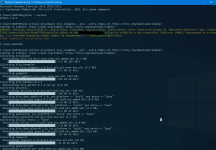
Зависимостей много и после этой команды они все установились,как можно видеть.
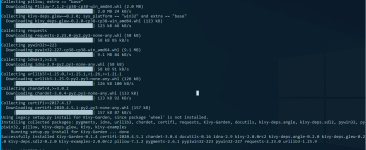
Ну и в конце проверяем версию kivy,убеждаемся,что всё в порядке.
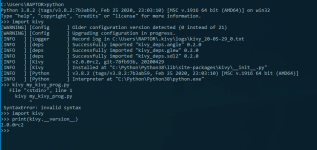
-
#9
Добрый день.
Сейчас сделаем).
В классическом варианте kivy не работает с версией python 3.8
Но подружить их всё же можно, и умный человек подсказал когда-то такую команду:Код:
pip install kivy[base] kivy_examples --pre --extra-index-url https://kivy.org/downloads/simple/.Но здесь есть проблема,может Вы и не столкнётесь с ней,тогда пройдёт всё нормально.
У меня же провайдер заблокировал (привет Роскомнадзору)домен org и поэтому соединение было отклонено.
Вынужден был прервать процесс,т.к.это надолго и тщетно.
Решение под рукой-это туннель VPN на системном уровне,для этого я пользуюсь софтом Softether vpn client.
И после запуска туннеля у нас всё скачивается как по маслу.
Посмотреть вложение 41175
Зависимостей много и после этой команды они все установились,как можно видеть.
Посмотреть вложение 41176
Ну и в конце проверяем версию kivy,убеждаемся,что всё в порядке.
Посмотреть вложение 41177
Спасибо большое! Всё установилось
Можно пожалуйста еще вопрос-чайник:
Как открыть kivy и начать пользоваться?
-
#10
Как открыть kivy и начать пользоваться?
А его и не надо как бы открывать.
Если у Вас никаких ошибок не выбивает и картина точно такая же,то всё отлично.
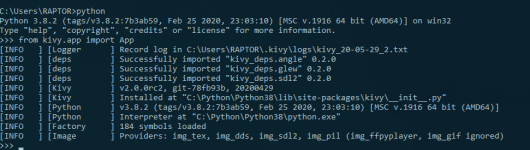
Пишите код на python, при этом на сайте kivy специальный раздел есть с модулями и виджетами.
На виджеты нужно ссылаться в коде и kivy при запуске будет обрабатывать такой файл с кодом на python.
Есть в ютубе целые курсы посвящённые этому от создания калькулятора,до приложений.
-
#11
А его и не надо как бы открывать.
Если у Вас никаких ошибок не выбивает и картина точно такая же,то всё отлично.
Посмотреть вложение 41260
Пишите код на python, при этом на сайте kivy специальный раздел есть с модулями и виджетами.
На виджеты нужно ссылаться в коде и kivy при запуске будет обрабатывать такой файл с кодом на python.
Есть в ютубе целые курсы посвящённые этому от создания калькулятора,до приложений.
Спасибо!
-
#12
А его и не надо как бы открывать.
Если у Вас никаких ошибок не выбивает и картина точно такая же,то всё отлично.
Посмотреть вложение 41260
Пишите код на python, при этом на сайте kivy специальный раздел есть с модулями и виджетами.
На виджеты нужно ссылаться в коде и kivy при запуске будет обрабатывать такой файл с кодом на python.
Есть в ютубе целые курсы посвящённые этому от создания калькулятора,до приложений.
Если вам будет не сложно, могли бы вы прояснить ситуацию с моим старым вопросом?
-
#13
Если вам будет не сложно, могли бы вы прояснить ситуацию с моим старым вопросом?
Забыла ссылку:

Как ускорить голосового ассистента
Доброе время суток читающим Вопрос не носит срочного характера, но тем не менее наметить планы работ хотелось бы в ближайшие неделю—две Суть заключается в следующем: есть голосовой помощник на python, пока что запускался только на винде, на linux еще не успела попробовать, работаю в Atom (вдруг…
codeby.net
-
#14
Если вам будет не сложно, могли бы вы прояснить ситуацию с моим старым вопросом?
С радостью бы,но не сталкивался с подобным и некомпетентен в той области.
Если только Коллеги и другие Жители Форума Вам подскажут.
Знаю,что сам код на python разогнать реально,если придерживаться некоторых
Ссылка скрыта от гостей
Последнее редактирование: 30.05.2020
-
#15
С радостью бы,но не сталкивался с подобным и некомпетентен в той области.
Если только Коллеги и другие Жители Форума Вам подскажут.
Знаю,что сам код на python разогнать реально,если придерживаться некоторыхСсылка скрыта от гостей
Спасибо)
|
0 / 0 / 0 Регистрация: 02.08.2022 Сообщений: 4 |
|
|
1 |
|
|
03.08.2022, 21:57. Показов 553. Ответов 7
Добрый день. Создайте виртуальную среду с именем kivy_venvв вашем текущем каталоге: python -m virtualenv kivy_venv», когда я вставляю «python -m virtualenv kivy_venv», то у меня вылезает текст » «-m» не является внутренней или внешней
__________________
0 |

|
Автоматизируй это!
6430 / 4129 / 1133 Регистрация: 30.03.2015 Сообщений: 12,224 Записей в блоге: 29 |
|
|
04.08.2022, 06:05 |
2 |
|
гггг, добавь скрин командной строки -посмотреть как ты это написал
1 |

|
0 / 0 / 0 Регистрация: 02.08.2022 Сообщений: 4 |
|
|
04.08.2022, 12:33 [ТС] |
3 |
|
По поводу этой строки проблем больше нет(она буквально решилась сама по себе : /), но теперь другая строка выдаёт туже ошибку
0 |
|
Автоматизируй это!
6430 / 4129 / 1133 Регистрация: 30.03.2015 Сообщений: 12,224 Записей в блоге: 29 |
|
|
04.08.2022, 12:45 |
4 |
|
очевидно что неверно пишешь опять пробел добавил из-за чего наверное и прошлая ошибка была. Как в инструкции то написано? ничего не пропустил?
0 |
|
0 / 0 / 0 Регистрация: 02.08.2022 Сообщений: 4 |
|
|
04.08.2022, 12:58 [ТС] |
5 |
|
«Активируйте виртуальную среду. Вам нужно будет выполнить этот шаг из текущего каталога каждый раз, когда вы запускаете новый терминал. Это настраивает среду, так что новый kivy_venv Используется Python. Для Windows CMD по умолчанию командной строке выполните: kivy_venvScripts activate source kivy_venv/Scripts/activate source kivy_venv/bin/activate»
0 |
|
Автоматизируй это!
6430 / 4129 / 1133 Регистрация: 30.03.2015 Сообщений: 12,224 Записей в блоге: 29 |
|
|
04.08.2022, 13:06 |
6 |
|
гггг, хосспаде какие то переводы непонятные, ты открой просто документацию питона и посмотри как активировать на виндовс венв https://docs.python.org/3/tuto… t=activate kivy_venvScriptsactivate.bat надо запустить а как велики твои знания питона? я спрашиваю ибо если ты с венв впервые сталкиваешься, то как собрался писать приложения? Основы уже надежно усвоены?
0 |
|
0 / 0 / 0 Регистрация: 02.08.2022 Сообщений: 4 |
|
|
04.08.2022, 13:24 [ТС] |
7 |
|
Я не так давно на Python, изучил команды для оконных приложений, работал с помощью tkinter, вызывать само оконное приложение, разместить на ней кнопки, Лэйблы, устанавливать цвет окна. менять иконку. название окна и т.п. и в каком-то ролике услышал. что лучше всего пользоваться Kivy. так как он удобнее для оконных приложений и вот я здесь. Просто я хочу заниматься разработкой приложений, как компьютерных. так и на телефоны. До Пайтона я сидел в Visual studio писал на языке C#, но сам Visual потребовал от меня ключа активации и я пытался найти этот ключ и установить. но ничего так и не получилось, поэтому я и решил начать изучать что то новое
0 |
|
701 / 340 / 120 Регистрация: 09.12.2020 Сообщений: 920 |
|
|
05.08.2022, 14:37 |
8 |
|
начать изучать новый язык из за истекшей лицензии на IDE — новый уровень.
3 |
|
IT_Exp Эксперт 87844 / 49110 / 22898 Регистрация: 17.06.2006 Сообщений: 92,604 |
05.08.2022, 14:37 |
|
8 |
Уведомления
- Начало
- » Python для новичков
- » Не могу установить фреймворк kivy для питона
#1 Июль 23, 2019 16:54:47
Не могу установить фреймворк kivy для питона
Всем привет ! Я столкнулся с такой проблемой что не могу установить фреймворк для питона (версия 3.7.2)
Когда перешел на сайт фрейма.Делал все точно как по инструкции.Но когда вводил в консоль команду вышла такая ошибка,уже 2 день мучаюсь.Помогите пожалуйста.Ниже прикрепил скриншот с консоли
Прикреплённый файлы:  -f1ploAyTL4.jpg (223,3 KБ)
Офлайн
- Пожаловаться
#2 Июль 24, 2019 02:17:34
Не могу установить фреймворк kivy для питона
Офлайн
- Пожаловаться
#3 Июль 24, 2019 07:02:20
Не могу установить фреймворк kivy для питона
Так я говорю я все делал по этой инфе,и в консоли выходит такая ошибка (ниже прикрепил файл)
Офлайн
- Пожаловаться
#5 Июль 24, 2019 13:24:52
Не могу установить фреймворк kivy для питона
Спасибо ! Я сам нашел способ.Я сначала полностью удалил киви.Потом заного установил.Позже зашел в настройки пайчарма.Танцы с бубном и в итоге все заработало ) Спасибо тебе за внимание и оказанную помощь ! 
Офлайн
- Пожаловаться
- Начало
- » Python для новичков
- » Не могу установить фреймворк kivy для питона
os : linux(ubuntu 16.04 LTS, 64-bit)
python_version : 3.6.3
- Using virtualenv.
- I tried to install many version of kivy with many different versions of cython but always i got same error which is like below.
- After giving «pip install kivy» this install some packages:
certifi (2017.11.5)
chardet (3.0.4)
Cython (0.26)
docutils (0.14)
idna (2.6)
Kivy-Garden (0.1.4)
pip (9.0.1)
Pygments (2.2.0)
requests (2.18.4)
setuptools (38.4.0)
urllib3 (1.22)
wheel (0.30.0)
x86_64-linux-gnu-gcc -pthread -DNDEBUG -g -fwrapv -O2 -Wall -Wstrict-prototypes -g -fstack-protector-strong -Wformat -Werror=format-security -Wdate-time -D_FORTIFY_SOURCE=2 -fPIC -I/tmp/pip-build-c8ofsvs6/kivy/kivy/include -I/usr/include/python3.6m -I/home/ubuntu/venv/include/python3.6m -c /tmp/pip-build-c8ofsvs6/kivy/kivy/_event.c -obuild/temp.linux-x86_64-3.6/tmp/pip-build-c8ofsvs6/kivy/kivy/_event.o
/tmp/pip-build-c8ofsvs6/kivy/kivy/_event.c:4:20: fatal error: Python.h: No such file or directory
compilation terminated.
error: command ‘x86_64-linux-gnu-gcc’ failed with exit status 1---------------------------------------- Failed building wheel for kivy Running setup.py clean for kivy Failed to build kivy Installing collected packages: kivy Running setup.py install for kivy ... error Complete output from command /home/ubuntu/venv/bin/python3 -u -c "import setuptools, tokenize;__file__='/tmp/pip-build-c8ofsvs6/kivy/setup.py';f=getattr(tokenize,‘open’, open)(file);code=f.read().replace(‘rn’,
‘n’);f.close();exec(compile(code, file, ‘exec’))» install
—record /tmp/pip-vcdy_iv_-record/install-record.txt —single-version-externally-managed —compile —install-headers /home/ubuntu/venv/include/site/python3.6/kivy:
Using distutils
and last
>     > Detected compiler is unix
>     >     skipping '/tmp/pip-build-c8ofsvs6/kivy/kivy/_event.c' Cython extension (up-to-date)
>     >     building 'kivy._event' extension
>     >     creating build/temp.linux-x86_64-3.6
>     >     creating build/temp.linux-x86_64-3.6/tmp
>     >     creating build/temp.linux-x86_64-3.6/tmp/pip-build-c8ofsvs6
>     >     creating build/temp.linux-x86_64-3.6/tmp/pip-build-c8ofsvs6/kivy
>     >     creating build/temp.linux-x86_64-3.6/tmp/pip-build-c8ofsvs6/kivy/kivy
>     >     x86_64-linux-gnu-gcc -pthread -DNDEBUG -g -fwrapv -O2 -Wall -Wstrict-prototypes -g -fstack-protector-strong -Wformat -Werror=format-security -Wdate-time -D_FORTIFY_SOURCE=2 -fPIC -I/tmp/pip-build-c8ofsvs6/kivy/kivy/include -I/usr/include/python3.6m -I/home/ubuntu/venv/include/python3.6m -c /tmp/pip-build-c8ofsvs6/kivy/kivy/_event.c -o
>     > build/temp.linux-x86_64-3.6/tmp/pip-build-c8ofsvs6/kivy/kivy/_event.o
>     >     /tmp/pip-build-c8ofsvs6/kivy/kivy/_event.c:4:20: fatal error: Python.h: No such file or directory
>     >     compilation terminated.
>     >      error: command 'x86_64-linux-gnu-gcc' failed with exit status 1
>     >
>     >     ---------------------------------------- Command "/home/ubuntu/venv/bin/python3 -u -c "import setuptools,
>     > tokenize;__file__='/tmp/pip-build-c8ofsvs6/kivy/setup.py';f=getattr(tokenize,
>     > 'open', open)(__file__);code=f.read().replace('rn',
>     > 'n');f.close();exec(compile(code, __file__, 'exec'))" install
>     > --record /tmp/pip-vcdy_iv_-record/install-record.txt --single-version-externally-managed --compile --install-headers /home/ubuntu/venv/include/site/python3.6/kivy" failed with error code
>     > 1 in /tmp/pip-build-c8ofsvs6/kivy/
- I have also tried with cython 0.25.2