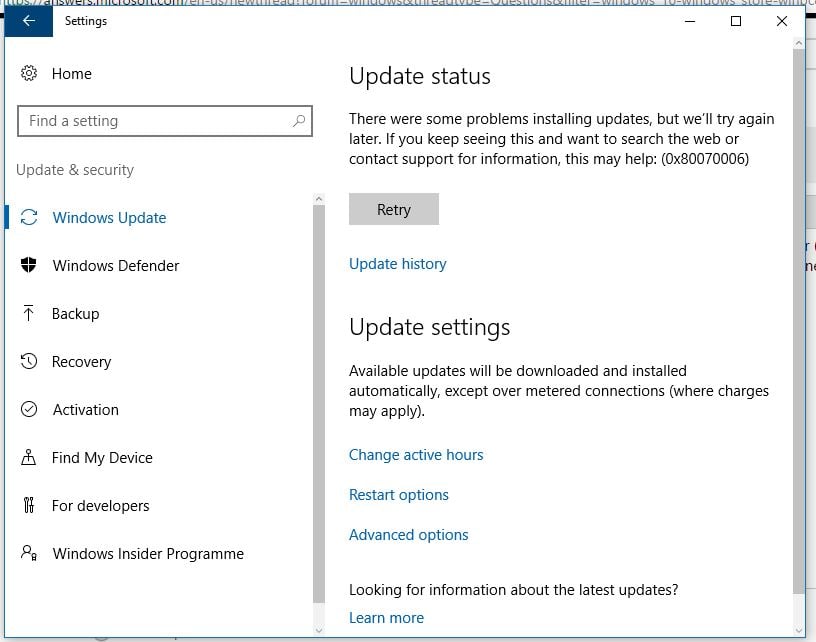
Ошибка 0x80070006 – довольно старая проблема, которая начала появляется у пользователей Windows 10 еще со времен установки этой операционной системы, т.е. пару лет назад.
К счастью, баг был исправлен и люди могут устанавливать свои «десятки» без получения данной ошибки. В противоположность только что сказанному, ошибка 0x80070006 все еще может появляться у многих пользователей во время поиска обновлений или попыткой их установки.
В обычном случае, ошибки Центра обновлений Windows возникают из-за некорректной работы служб этого сервиса или из-за антивирусного программного обеспечения. Как раз исправлением этого мы сейчас и займемся.
Заметка: некоторые люди уведомляют, что ошибка 0x80070006 отбирает у них возможность загружать приложения через Windows Store и сохранять их на карты Micro SD, установленные в Windows Phone. Если ваша ситуация обстоит именно так, то попробуйте сохранить их на внутреннее хранилище. Большинству людей с этим багом помогает именно этот шаг.
Решения для ошибки 0x80070006
Метод №1 Запуск Поиска и исправления проблем для Центра обновления Windows
- Нажмите комбинацию клавиш Win+X и выберите пункт «Панель управления».
- Выберите «Просмотра – Категории».
- Под пунктом «Система и безопасность», нажмите на «Поиск и исправление проблем».
- Затем нажмите на ссылку «Устранение неполадок с помощью Центра обновления Windows».
Дождитесь окончания процесса исправления проблем, а затем проверьте наличие ошибки 0x80070006 в Центре обновления Windows.
Метод №2 Отключение Антивируса и проверка настроек Брандмауэра Windows
Антивирусное программное обеспечение, особенно то, которое является разработкой сторонних разработчиков, довольно часто создает конфликты с внутренними программами Windows, что приводит к невозможности загрузок обновления с Центра обновления Windows. В связи с этим, мы рекомендуем вам временно отключить ваш Антивирус и проверить корректность настроек Брандмауэра Windows.
- Нажмите комбинацию клавиш Win+R, впишите Firewall.cpl и нажмите Enter.
- Выберите опцию «Включение или отключение брандмауэра Windows».
- Выставьте следующие настройки:
- «Параметры для частной сети – Отключить брандмауэр Windows(не рекомендуется)»
- «Параметры для общественной сети – Отключить брандмауэр Windows(не рекомендуется)»
- Затем нажмите «ОК» и проверьте наличие ошибки 0x80070006 в Центре обновления Windows.
Метод №3 Сброс компонентов Центра обновления Windows
Мы рекомендуем вам создать бэкап своего Реестра Windows, прежде чем выполнять следующие действия:
- Нажмите правой кнопкой мыши на «Пуск» и выберите «Командная строка(администратор)».
- Введите следующие команды для приостановки служб BITS, Центра обновления Windows, Криптографии, Установщика Windows:
- net stop bits
- net stop wuauserv
- net stop appidsvc
- net stop cryptsvc
- Затем впишите команду Del “%ALLUSERSPROFILE%Application DataMicrosoftNetworkDownloaderqmgr* и нажмите Enter.
- После введения предыдущей команды, введите cd /d %windir%system32 и нажмите Enter.
- Теперь вам нужно выполнить повторную регистрацию файлов Центра обновления и BITS. Вписывайте следующие команды и нажимайте Enter после каждой из них:
- regsvr32.exe atl.dll
- regsvr32.exe urlmon.dll
- regsvr32.exe mshtml.dll
- regsvr32.exe shdocvw.dll
- regsvr32.exe browseui.dll
- regsvr32.exe jscript.dll
- regsvr32.exe vbscript.dll
- regsvr32.exe scrrun.dll
- regsvr32.exe msxml.dll
- regsvr32.exe msxml3.dll
- regsvr32.exe msxml6.dll
- regsvr32.exe actxprxy.dll
- regsvr32.exe softpub.dll
- regsvr32.exe wintrust.dll
- regsvr32.exe dssenh.dll
- regsvr32.exe rsaenh.dll
- regsvr32.exe gpkcsp.dll
- regsvr32.exe sccbase.dll
- regsvr32.exe slbcsp.dll
- regsvr32.exe cryptdlg.dll
- regsvr32.exe oleaut32.dll
- regsvr32.exe ole32.dll
- regsvr32.exe shell32.dll
- regsvr32.exe initpki.dll
- regsvr32.exe wuapi.dll
- regsvr32.exe wuaueng.dll
- regsvr32.exe wuaueng1.dll
- regsvr32.exe wucltui.dll
- regsvr32.exe wups.dll
- regsvr32.exe wups2.dll
- regsvr32.exe wuweb.dll
- regsvr32.exe qmgr.dll
- regsvr32.exe qmgrprxy.dll
- regsvr32.exe wucltux.dll
- regsvr32.exe muweb.dll
- regsvr32.exe wuwebv.dll
- Теперь вам нужно сбросить каталог Winsock. Впишите команду netsh winsock reset, а затем команду netsh winhttp reset proxy.
- И напоследок, вам нужно заново запустить службы BITS, Центра обновления Windows, Криптографии, Установщика Windows:
- net start bits
- net start wuauserv
- net start appidsvc
- net start cryptsvc
После этих многочисленных операций в Командной строке, проверьте, были ли наконец-то исправлена ошибка 0x80070006, которая беспокоила вас во время установки обновлений в Центре обновления Windows.
- Remove From My Forums
-
Question
-
Hi everybody,
we experience some failing updates on Windows 7 devices, mostly Office 2013 — 32bit updates.
Error code is 8007006e
what I’ve done so far (nothing helped):
sfc /scannow
remove office compeltely, restart, install office again.
download update and install it manually
googling for the error message does not deliver any helpful information.
any help is appreciated. do you need any more information?
All replies
-
Hi,
Depending on your description, you may have the same problem as the following link:
https://community.spiceworks.com/topic/458274-windows-update-error
It turns out that the issue was that these updates were not needed and Windows Update was not picking up the installation. It kept thinking these updates were needed and would fail because there were already installed. So you had to hide the updates
to resume normal functionality.Best regards,
Hurry
Please remember to mark the reply as an answer if they help.
If you have feedback for TechNet Subscriber Support, contact tnmff@microsoft.com -
Hi,
Depending on your description, you may have the same problem as the following link:
https://community.spiceworks.com/topic/458274-windows-update-error
It turns out that the issue was that these updates were not needed and Windows Update was not picking up the installation. It kept thinking these updates were needed and would fail because there were already installed. So you had to hide the updates
to resume normal functionality.Best regards,
Hurry
Please remember to mark the reply as an answer if they help.
If you have feedback for TechNet Subscriber Support, contact tnmff@microsoft.comHi Hurry,
systeminfo and dism say that this KB ist not installed or at least it can’t find them (so I assume that they are not installed).
And since these updates were released in September I suggest that they are needed / required.
And in general: hiding updates from installation is a «no go!»
-
Edited by
Tuesday, October 23, 2018 10:01 AM
-
Edited by
-
Hi,
Thank you for your reply.
That may be another reason, try to refer to the following article:
How To Fix Windows Update Error 8007006E
Hope to be able to help you.
Best regards,
Hurry
Please remember to mark the reply as an answer if they help.
If you have feedback for TechNet Subscriber Support, contact tnmff@microsoft.com -
Hi,
Is there anything else I can do to help you on this issue?
Please feel free to contact me if you have any questions.
Best regards,
Hurry
Please remember to mark the reply as an answer if they help.
If you have feedback for TechNet Subscriber Support, contact
tnmff@microsoft.com -
Hi Hurry,
the latest Updates can’t be installed neither, so I don’t think it because «windows doesn’t know that these updates are not required anymore».
I will try to clean up catroot2 folder and see if this helps.
regards
edit: so renaming catroot2 didn’t help at all.
by the way: error 8007 indicates that it’s an issue with win32 and 006e means «cannot open device or file specified»
https://docs.microsoft.com/en-us/windows/desktop/debug/system-error-codes—0-499-
if now anybody can tell me how I can check which file(s) it is, that would be awesome!
-
Edited by
zaikun
Thursday, October 25, 2018 2:37 PM
-
Edited by
-
Hi,
Thank you for your reply.
If it isn’t work, I hope you can give a feedback.
Sincerely hope to help you solve this problem.
Best regards,
Hurry
Please remember to mark the reply as an answer if they help.
If you have feedback for TechNet Subscriber Support, contact
tnmff@microsoft.com -
Hi Hurry,
removing catroot2 didn’t help neither,
any further hints?
-
Hi Hurry,
this website doesn’t look trustworthy.
On top: the software has lots of functions and tools — which exactly am I supposed to run?
-
Hi,
Thank you for your reply.
This website is worth trusting. So you don’t have to worry. I have dowloaded it by clicking Installer (36.37 MB)-Direct Download.
Sincerely hope to help you solve this problem.
Best regards,
Hurry
Please remember to mark the reply as an answer if they help.
If you have feedback for TechNet Subscriber Support, contact
tnmff@microsoft.com -
Hi Hurry,
I have downloaded and installed it.
But which tools should I run? the software is huge and has lots of functions.
-
Hi,
Thank you for your reply.
Double hit directly to open this software. If you look at the problem from this aspect of the update alone, you only need to do the following in the figure below:
But it can’t be ruled out for other reasons, and if it’s convenient, it’s recommended that you try something you think is important.
Best regards,
Hurry
Please remember to mark the reply as an answer if they help.
If you have feedback for TechNet Subscriber Support, contact
tnmff@microsoft.com -
Hi,
Is there anything else I can do to help you on this issue?
Please feel free to contact me if you have any questions.
Best regards,
Hurry
Please remember to mark the reply as an answer if they help.
If you have feedback for TechNet Subscriber Support, contact
tnmff@microsoft.com -
Hello Hurry,
I tested the tool and ran the suggested tool, but it didn’t help, unfortunately.
any further suggestions?
regards
-
Hi,
Thank you for your feedback.
If it’s convenient, it is recommended that you try to collect some log files. And then share it with me through Onedrive link. I will try my best to help you analyze.
Thank you for your cooperation.
Best regards,
Hurry
Please remember to mark the reply as an answer if they help.
If you have feedback for TechNet Subscriber Support, contact
tnmff@microsoft.com -
Hi,
How things are going there on this issue?
Please let me know if you would like further assistance.Best regards,
Hurry
Please remember to mark the reply as an answer if they help.
If you have feedback for TechNet Subscriber Support, contact
tnmff@microsoft.com -
Hi,
Is there anything else I can do to help you on this issue?
Please feel free to contact me if you have any questions.
Best regards,
Hurry
Please remember to mark the reply as an answer if they help.
If you have feedback for TechNet Subscriber Support, contact
tnmff@microsoft.com -
Hi Hurry,
if you have some time, I can provide log files if you tell me how to do that.
And sorry for the long time it took me to respond.
kind regards
Программа установки Windows 10 может время от времени сталкиваться с ошибками по разным причинам. Одной из таких ошибок является код 0x80070006. В этом посте я расскажу, как можно исправить ошибку установки Windows 10 с кодом 0x80070006 .
Ошибка говорит
Windows не может установить необходимые файлы. Проблемы с сетью могут препятствовать доступу Windows к файлу. Убедитесь, что компьютер подключен к сети, и перезапустите установку. Код ошибки: 0x80070006.
Как говорится в сообщении об ошибке, оно вызвано нестабильной/ненадежной сетью. Кроме того, проблемы с сетевым оборудованием могут вызвать его. Аппаратное обеспечение включает в себя сетевые адаптеры, а также сетевые маршрутизаторы. Давайте посмотрим на исправления для этого.

Содержание
- Код ошибки установки Windows 10 0x80070006
- 1] Проверьте ваш роутер и интернет соединение
- 2] Запустите средство устранения неполадок с сетью.
- 3] Используйте другой порт USB
- 4] Создайте загрузочный USB-накопитель.
- 5] Получить новый файл образа Windows
Код ошибки установки Windows 10 0x80070006
Некоторые из эффективных способов исправить ошибку установки Windows 10 с кодом 0x80070006:
- Проверьте свой роутер и интернет соединение.
- Запустите средство устранения неполадок с сетью
- Используйте другой порт USB.
- Восстановите загрузочный USB-накопитель.
- Получите новый файл образа Windows.
Код ошибки 0x80070006 возникает при установке Windows 10.
1] Проверьте ваш роутер и интернет соединение
Ненадежная сеть является одной из важных причин, которые нарушают установку Windows 10. Первое, что вы должны сделать, это проверить, стабильно ли ваше интернет-соединение и имеет ли он достаточную скорость. Если соединение медленное, процесс установки не удастся. Во-вторых, перезагрузите маршрутизатор с его панели администратора или просто вручную выключите его и включите через 10 секунд, чтобы полностью перезагрузить его. Наконец, проверьте, правильно ли он подключен. Возможно, что маршрутизатор постоянно включается и выключается из-за слабого соединения.
2] Запустите средство устранения неполадок с сетью.
Windows 10 предлагает встроенное средство устранения неполадок в сети. Это может сбросить адаптеры, удалить любые кэшированные настройки и так далее. Обязательно запустите его, а затем попробуйте снова загрузить установочный файл.
3] Используйте другой порт USB
Если вы используете загрузочное USB-устройство хранения данных для запуска программы установки Windows 10, рекомендуется проверить целостность USB-порта, к которому подключено устройство. Переключите USB-порт или попробуйте использовать другое загрузочное USB-устройство и проверьте, это исправит ваши проблемы.
4] Создайте загрузочный USB-накопитель.
Возможно, что используемый вами загрузочный USB-накопитель столкнулся с некоторыми проблемами. Снова создайте еще один загрузочный USB-диск с правильной конфигурацией и проверьте, устраняет ли это ваши проблемы.
5] Получить новый файл образа Windows
Если описанный выше способ не работает должным образом, вы можете попытаться получить более новый установочный образ с помощью Media Creation Tool, а затем создать загрузочный USB-накопитель. После завершения установите Windows 10, используя его, чтобы увидеть, если проблема не устранена.
Помогли ли эти советы устранить ошибку установки Windows 10 с кодом 0x80070006? Дайте нам знать в комментариях.
Windows 10 множество ошибок при обновлении функций. Одной из таких ошибок, является ошибка 0x8007000e при обновлении. Этот код ошибки часто бывает при загрузки и установке обновления компонентов системы. Основной причиной этой ошибки является нехватка памяти, места на диске или проблемы в самом «Центре обновления Windows». Давайте разберем, что делать и как исправить код ошибки 0x8007000e в Windows 10.
Исправить ошибку 0x8007000e обновления Windows 10
Способ 1. В большинстве случаях эта ошибка возникает при нехватке памяти или нехватке места на диске. По этому, перезагрузите ПК, и попробуйте обновиться. Уберите все лишние программы, которые сжирают ОЗУ-память и освободите место на диске. Также удалите сторонний антивирус. Ниже пункты помогут вам.
- Как отключить лишние программы в автозагрузке.
- Как освободить место на диске.
- Удалите сторонний антивирус.
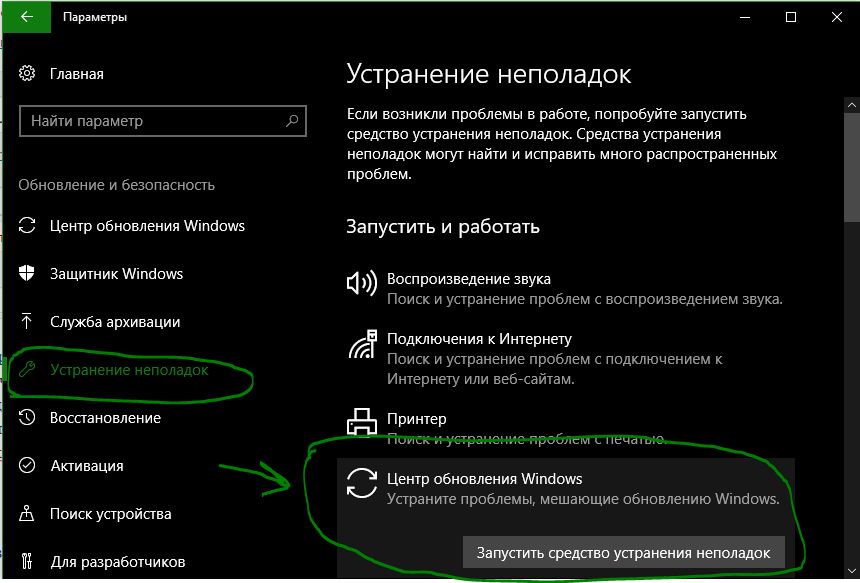
Способ 2. Запустите средство устранение неполадок. Для этого откройте «Параметры» > «Обновление и безопасность» > «Устранение неполадок» > справа «Центр обновления Windows».
Также советую воспользоваться специальной утилитой от Microsoft по устранению неполадок при обновлениях.
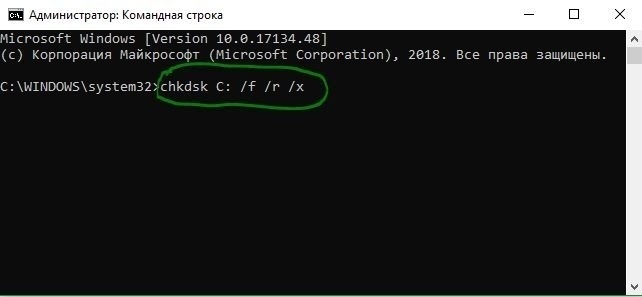
Способ 3. Откройте командную строку от имени администратора и выполните команды по очереди, дожидаясь окончание процесса после каждой:

sfc /scannowchkdsk C: /f /r /x
Способ 4. Скачайте Media Update с официального сайта Microsoft и попробуйте обновить систему через него. Перейдите на сайт и нажмите «Обновить сейчас«.
Если ничего не помогло, то рекомендую обратится к этому руководству. Оно устраняет много ошибок связанных с обновлениями Windows 10.
Смотрите еще:
- Исправить код ошибки 0x80070002 в Windows 10
- Исправить ошибку 0x80070005 обновления Windows 10
- Ошибка 0x80070003 Центра обновления Windows 10
- Исправить ошибку 0x80070057 в Windows 10
- Ошибка 0x80070091: Папка не пуста
[ Telegram | Поддержать ]
Содержание
- Вариант 1: Запуск средства устранения неполадок
- Вариант 2: Очистка кеша обновлений
- Способ 1: Очистка кеша вручную
- Способ 2: Reset Windows Update Tool
- Вариант 3: Восстановление поврежденных системных файлов
- Вариант 4: Откат к точке восстановления
- Вопросы и ответы
Вариант 1: Запуск средства устранения неполадок
Ошибка 0x800706be в Windows 10 нередко вызывается повреждением кешированных файлов обновлений, но у нее могут быть и другие причины, в том числе сбои в работе компонентов системы. Если причины не являются критическими, восстановить работу «Центра обновлений» можно сбросом кеша, но для начала стоит попробовать воспользоваться встроенным в операционную систему «Средством устранения неполадок».
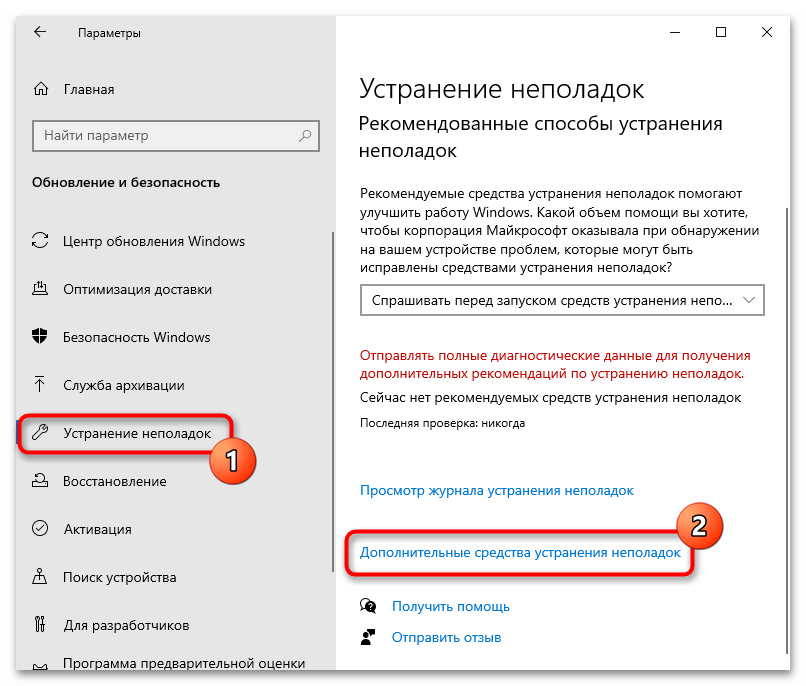
- Откройте приложение «Параметры», перейдите в раздел «Обновление и безопасность» → «Устранение неполадок» и нажмите «Дополнительные средства устранения неполадок».
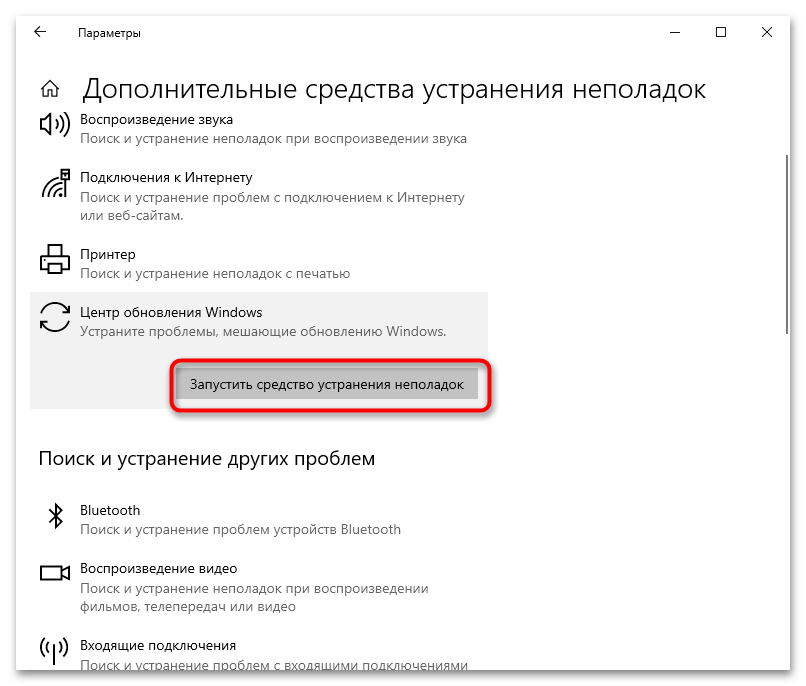
- В следующем окне выберите модуль «Центр обновления Windows» и нажмите по появившейся кнопке запуска инструмента.
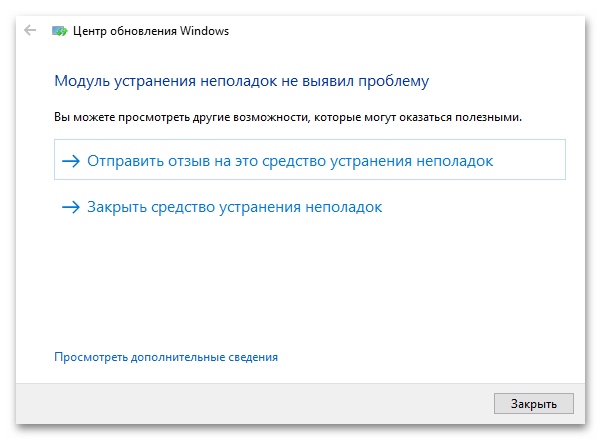
- Запустится приложение поиска и устранения проблем в работе «Центра обновления». Если неполадки будут обнаружены, утилита предложит исправить их в автоматическом режиме.
Вариант 2: Очистка кеша обновлений
Если «Средство устранения неполадок» не помогло или не выявило проблему, что нередко случается, удалите все временные файлы обновлений. Существует два способа это сделать: вручную и с помощью тулзы Reset Windows Uрdate Tool.
Способ 1: Очистка кеша вручную
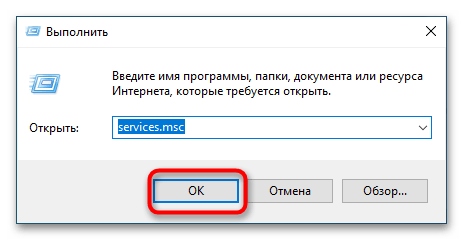
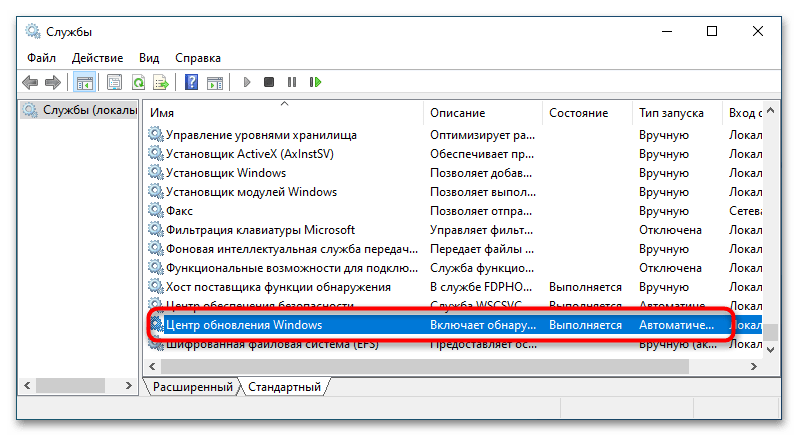
- Запустите штатную оснастку «Службы», для чего вызовите нажатием Win + R диалоговое окошко быстрого выполнения команд, введите в него
services.mscи нажмите клавишу ввода. - Отыщите в открывшемся окне оснастки службу «Центра обновлений Windows».
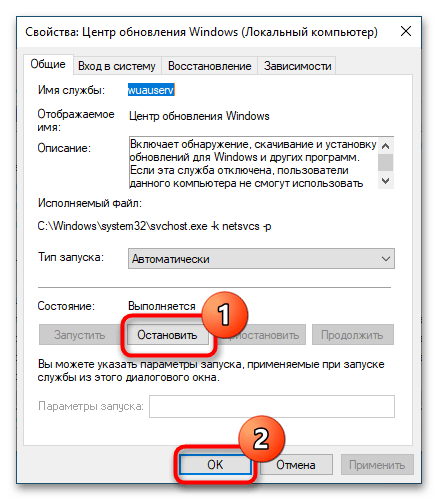
- Открыв ее свойства двойным кликом, нажмите на «Остановить» и сохраните настройки.
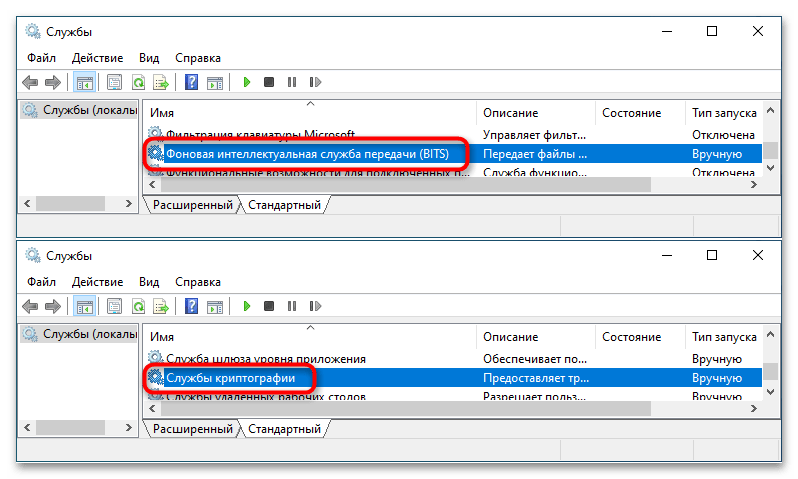
- Аналогичным образом найдите «Службы криптографии» и «Фоновая интеллектуальная служба передачи» и остановите их.
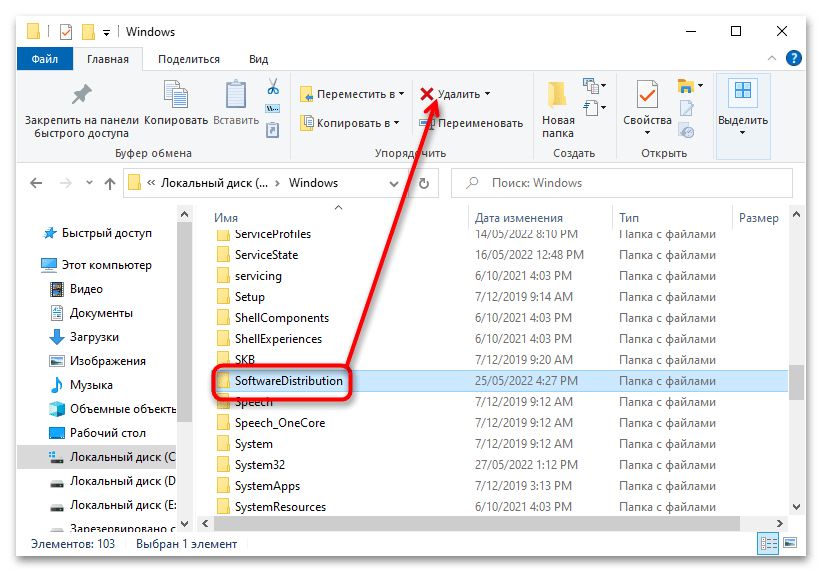
- Перейдите в расположение
C:Windowsи удалите либо переименуйте каталог «SoftwareDistribution». - Затем зайдите в папку
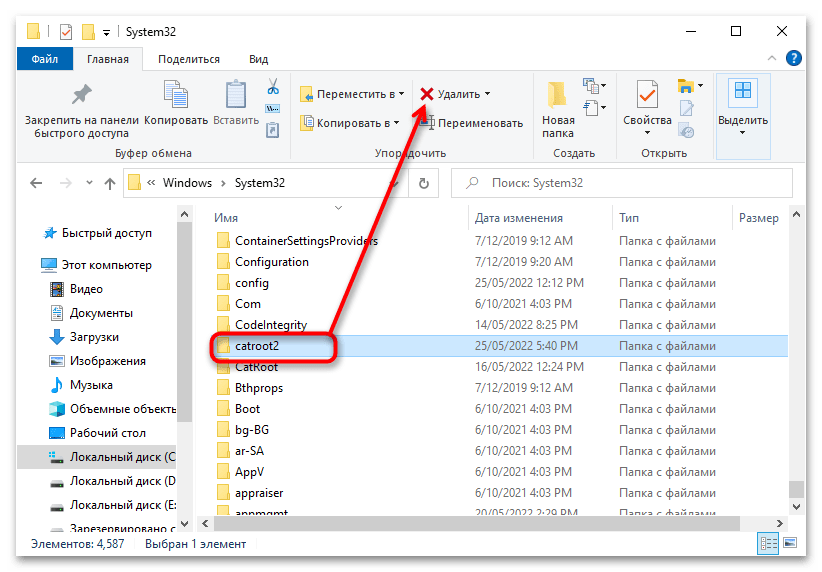
C:WindowsSystem32и удалите или переименуйте директорию «catroot2». - Вернитесь в окно управления службами, запустите ранее остановленные службы и проверьте работу «Центра обновлений».
Способ 2: Reset Windows Update Tool
Более удобным решением является использование бесплатной утилиты Reset Windows Update Tool, автоматизирующей процедуру очистки кеша обновлений.
Скачать Reset Windows Update Tool с официального сайта
- Скачайте, установите и запустите утилиту.
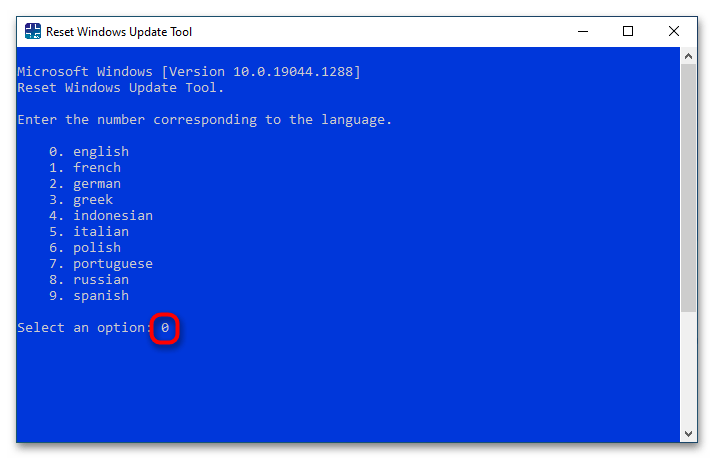
- Нажмите в открывшейся консоли «0», чтобы выбрать английский язык. Подтвердите выбор нажатием клавиши ввода.
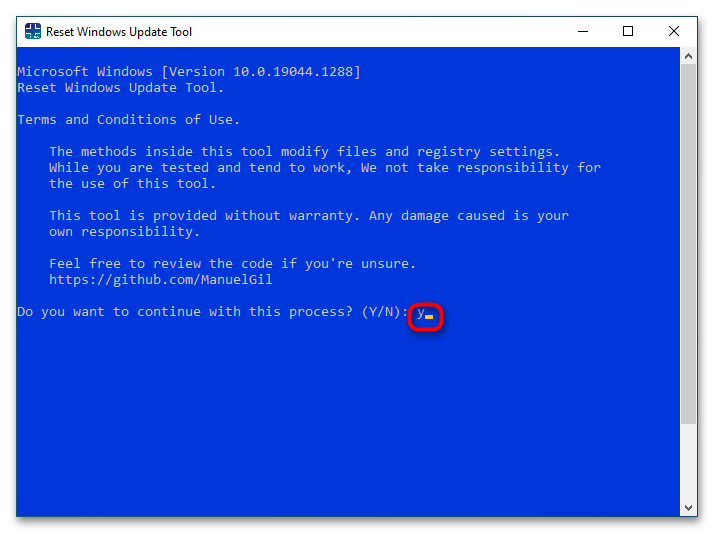
- Примите лицензионное соглашение, введя «Y» и нажав Enter.
- Из появившегося списке опций выберите пункт под номером 2 «Resets the Windows Update Components» и нажмите клавишу Enter.
- Дождитесь завершения процедуры сброса и перезагрузите Windows.

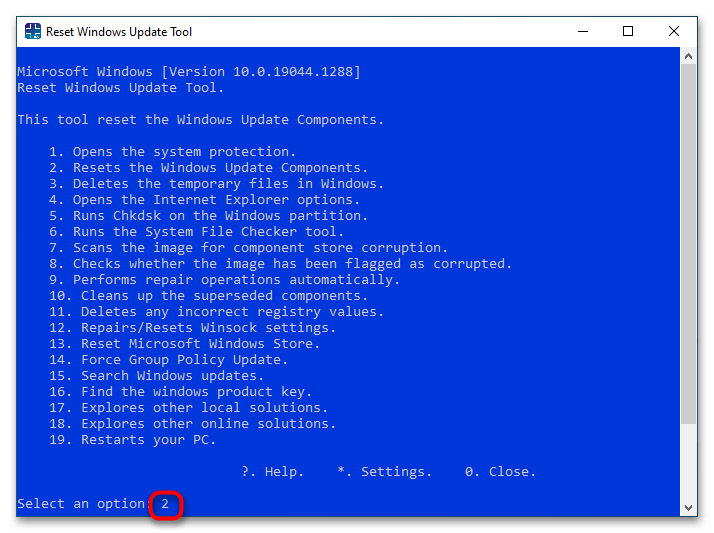
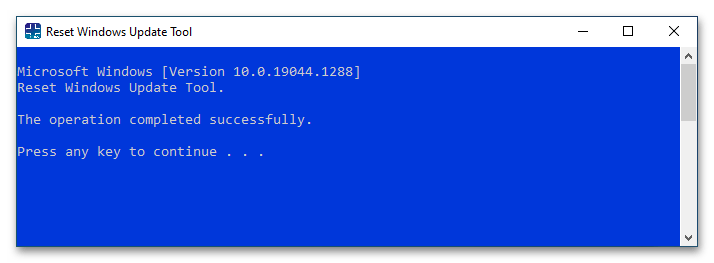
Если ошибка не исчезнет, дополнительно воспользуйтесь опциями 6, 11, 12 и 13.
Вариант 3: Восстановление поврежденных системных файлов
Нельзя исключать, что появление ошибки 0x800706be связано с удалением или повреждением некоторых системных файлов, отвечающих за работу «Центра обновлений». Просканируйте Windows на предмет таких повреждений и выполните восстановление в случае их обнаружения.
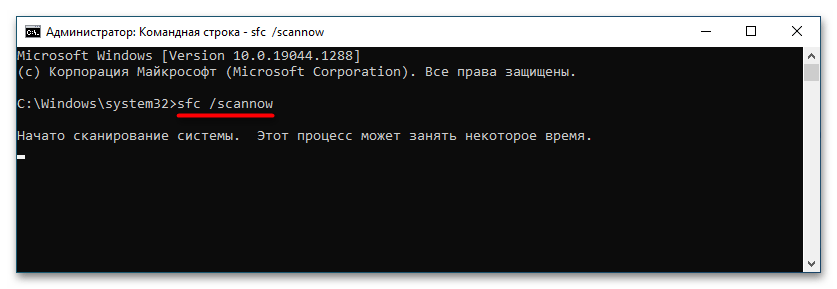
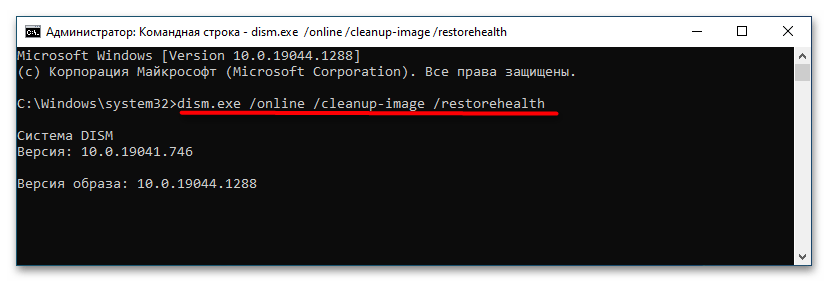
- Откройте от имени администратора «Командную строку» или «PowerShell» и выполните команду
sfc /scannow. Процедура не требует контроля со стороны пользователя, восстановление будет выполнено в автоматическом режиме. - Если команда вернет ошибку, выполните тут же в консоли команду восстановления хранилища компонентов
dism.exe /online /cleanup-image /restorehealth, а затем повторите командуsfc /scannow.
Вариант 4: Откат к точке восстановления
Это универсальный способ, позволяющий устранять множество неполадок, вызванных повреждением системных файлов, ключей реестра и некорректной работой новых версий драйверов.
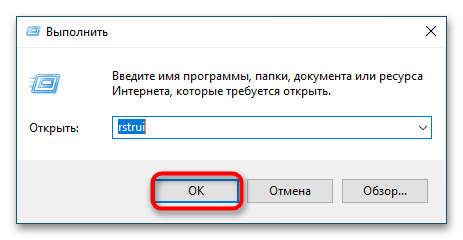
- Нажмите на клавиатуре Win + R, введите в открывшемся диалоговом окошке команду
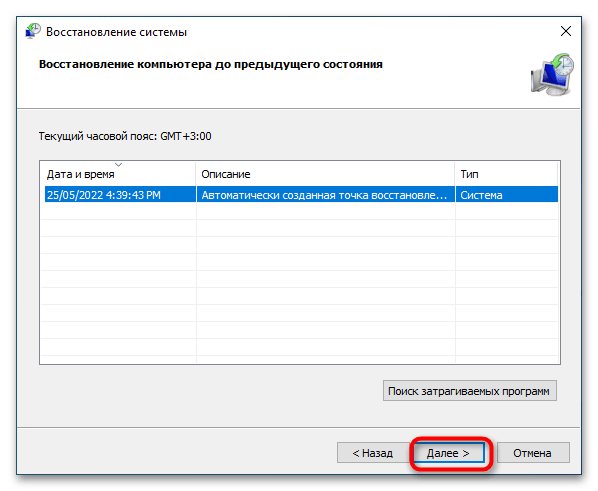
rstrui. - Запустится мастер отката к точкам восстановления. Нажмите «Далее», выберите ближайшую точку восстановления, снова нажмите «Далее» и проследуйте указаниям мастера.
Наконец, вы можете сбросить Windows 10 к исходным настройкам или переустановить систему традиционным способом, если другие варианты не принесли положительного результата.
Подробнее:
Восстанавливаем ОС Windows 10 к исходному состоянию
Возвращаем Windows 10 к заводскому состоянию
Методы отката обновления в ОС Windows 10
Установка обновлений Windows 10
Еще статьи по данной теме:
- Remove From My Forums
-
Question
-
Hi everybody,
we experience some failing updates on Windows 7 devices, mostly Office 2013 — 32bit updates.
Error code is 8007006e
what I’ve done so far (nothing helped):
sfc /scannow
remove office compeltely, restart, install office again.
download update and install it manually
googling for the error message does not deliver any helpful information.
any help is appreciated. do you need any more information?
All replies
-
Hi,
Depending on your description, you may have the same problem as the following link:
https://community.spiceworks.com/topic/458274-windows-update-error
It turns out that the issue was that these updates were not needed and Windows Update was not picking up the installation. It kept thinking these updates were needed and would fail because there were already installed. So you had to hide the updates
to resume normal functionality.Best regards,
Hurry
Please remember to mark the reply as an answer if they help.
If you have feedback for TechNet Subscriber Support, contact tnmff@microsoft.com -
Hi,
Depending on your description, you may have the same problem as the following link:
https://community.spiceworks.com/topic/458274-windows-update-error
It turns out that the issue was that these updates were not needed and Windows Update was not picking up the installation. It kept thinking these updates were needed and would fail because there were already installed. So you had to hide the updates
to resume normal functionality.Best regards,
Hurry
Please remember to mark the reply as an answer if they help.
If you have feedback for TechNet Subscriber Support, contact tnmff@microsoft.comHi Hurry,
systeminfo and dism say that this KB ist not installed or at least it can’t find them (so I assume that they are not installed).
And since these updates were released in September I suggest that they are needed / required.
And in general: hiding updates from installation is a «no go!»
-
Edited by
Tuesday, October 23, 2018 10:01 AM
-
Edited by
-
Hi,
Thank you for your reply.
That may be another reason, try to refer to the following article:
How To Fix Windows Update Error 8007006E
Hope to be able to help you.
Best regards,
Hurry
Please remember to mark the reply as an answer if they help.
If you have feedback for TechNet Subscriber Support, contact tnmff@microsoft.com -
Hi,
Is there anything else I can do to help you on this issue?
Please feel free to contact me if you have any questions.
Best regards,
Hurry
Please remember to mark the reply as an answer if they help.
If you have feedback for TechNet Subscriber Support, contact
tnmff@microsoft.com -
Hi Hurry,
the latest Updates can’t be installed neither, so I don’t think it because «windows doesn’t know that these updates are not required anymore».
I will try to clean up catroot2 folder and see if this helps.
regards
edit: so renaming catroot2 didn’t help at all.
by the way: error 8007 indicates that it’s an issue with win32 and 006e means «cannot open device or file specified»
https://docs.microsoft.com/en-us/windows/desktop/debug/system-error-codes—0-499-
if now anybody can tell me how I can check which file(s) it is, that would be awesome!
-
Edited by
zaikun
Thursday, October 25, 2018 2:37 PM
-
Edited by
-
Hi,
Thank you for your reply.
If it isn’t work, I hope you can give a feedback.
Sincerely hope to help you solve this problem.
Best regards,
Hurry
Please remember to mark the reply as an answer if they help.
If you have feedback for TechNet Subscriber Support, contact
tnmff@microsoft.com -
Hi Hurry,
removing catroot2 didn’t help neither,
any further hints?
-
Hi Hurry,
this website doesn’t look trustworthy.
On top: the software has lots of functions and tools — which exactly am I supposed to run?
-
Hi,
Thank you for your reply.
This website is worth trusting. So you don’t have to worry. I have dowloaded it by clicking Installer (36.37 MB)-Direct Download.
Sincerely hope to help you solve this problem.
Best regards,
Hurry
Please remember to mark the reply as an answer if they help.
If you have feedback for TechNet Subscriber Support, contact
tnmff@microsoft.com -
Hi Hurry,
I have downloaded and installed it.
But which tools should I run? the software is huge and has lots of functions.
-
Hi,
Thank you for your reply.
Double hit directly to open this software. If you look at the problem from this aspect of the update alone, you only need to do the following in the figure below:
But it can’t be ruled out for other reasons, and if it’s convenient, it’s recommended that you try something you think is important.
Best regards,
Hurry
Please remember to mark the reply as an answer if they help.
If you have feedback for TechNet Subscriber Support, contact
tnmff@microsoft.com -
Hi,
Is there anything else I can do to help you on this issue?
Please feel free to contact me if you have any questions.
Best regards,
Hurry
Please remember to mark the reply as an answer if they help.
If you have feedback for TechNet Subscriber Support, contact
tnmff@microsoft.com -
Hello Hurry,
I tested the tool and ran the suggested tool, but it didn’t help, unfortunately.
any further suggestions?
regards
-
Hi,
Thank you for your feedback.
If it’s convenient, it is recommended that you try to collect some log files. And then share it with me through Onedrive link. I will try my best to help you analyze.
Thank you for your cooperation.
Best regards,
Hurry
Please remember to mark the reply as an answer if they help.
If you have feedback for TechNet Subscriber Support, contact
tnmff@microsoft.com -
Hi,
How things are going there on this issue?
Please let me know if you would like further assistance.Best regards,
Hurry
Please remember to mark the reply as an answer if they help.
If you have feedback for TechNet Subscriber Support, contact
tnmff@microsoft.com -
Hi,
Is there anything else I can do to help you on this issue?
Please feel free to contact me if you have any questions.
Best regards,
Hurry
Please remember to mark the reply as an answer if they help.
If you have feedback for TechNet Subscriber Support, contact
tnmff@microsoft.com -
Hi Hurry,
if you have some time, I can provide log files if you tell me how to do that.
And sorry for the long time it took me to respond.
kind regards
- Remove From My Forums
-
Question
-
Hi everybody,
we experience some failing updates on Windows 7 devices, mostly Office 2013 — 32bit updates.
Error code is 8007006e
what I’ve done so far (nothing helped):
sfc /scannow
remove office compeltely, restart, install office again.
download update and install it manually
googling for the error message does not deliver any helpful information.
any help is appreciated. do you need any more information?
All replies
-
Hi,
Depending on your description, you may have the same problem as the following link:
https://community.spiceworks.com/topic/458274-windows-update-error
It turns out that the issue was that these updates were not needed and Windows Update was not picking up the installation. It kept thinking these updates were needed and would fail because there were already installed. So you had to hide the updates
to resume normal functionality.Best regards,
Hurry
Please remember to mark the reply as an answer if they help.
If you have feedback for TechNet Subscriber Support, contact tnmff@microsoft.com -
Hi,
Depending on your description, you may have the same problem as the following link:
https://community.spiceworks.com/topic/458274-windows-update-error
It turns out that the issue was that these updates were not needed and Windows Update was not picking up the installation. It kept thinking these updates were needed and would fail because there were already installed. So you had to hide the updates
to resume normal functionality.Best regards,
Hurry
Please remember to mark the reply as an answer if they help.
If you have feedback for TechNet Subscriber Support, contact tnmff@microsoft.comHi Hurry,
systeminfo and dism say that this KB ist not installed or at least it can’t find them (so I assume that they are not installed).
And since these updates were released in September I suggest that they are needed / required.
And in general: hiding updates from installation is a «no go!»
-
Edited by
Tuesday, October 23, 2018 10:01 AM
-
Edited by
-
Hi,
Thank you for your reply.
That may be another reason, try to refer to the following article:
How To Fix Windows Update Error 8007006E
Hope to be able to help you.
Best regards,
Hurry
Please remember to mark the reply as an answer if they help.
If you have feedback for TechNet Subscriber Support, contact tnmff@microsoft.com -
Hi,
Is there anything else I can do to help you on this issue?
Please feel free to contact me if you have any questions.
Best regards,
Hurry
Please remember to mark the reply as an answer if they help.
If you have feedback for TechNet Subscriber Support, contact
tnmff@microsoft.com -
Hi Hurry,
the latest Updates can’t be installed neither, so I don’t think it because «windows doesn’t know that these updates are not required anymore».
I will try to clean up catroot2 folder and see if this helps.
regards
edit: so renaming catroot2 didn’t help at all.
by the way: error 8007 indicates that it’s an issue with win32 and 006e means «cannot open device or file specified»
https://docs.microsoft.com/en-us/windows/desktop/debug/system-error-codes—0-499-
if now anybody can tell me how I can check which file(s) it is, that would be awesome!
-
Edited by
zaikun
Thursday, October 25, 2018 2:37 PM
-
Edited by
-
Hi,
Thank you for your reply.
If it isn’t work, I hope you can give a feedback.
Sincerely hope to help you solve this problem.
Best regards,
Hurry
Please remember to mark the reply as an answer if they help.
If you have feedback for TechNet Subscriber Support, contact
tnmff@microsoft.com -
Hi Hurry,
removing catroot2 didn’t help neither,
any further hints?
-
Hi Hurry,
this website doesn’t look trustworthy.
On top: the software has lots of functions and tools — which exactly am I supposed to run?
-
Hi,
Thank you for your reply.
This website is worth trusting. So you don’t have to worry. I have dowloaded it by clicking Installer (36.37 MB)-Direct Download.
Sincerely hope to help you solve this problem.
Best regards,
Hurry
Please remember to mark the reply as an answer if they help.
If you have feedback for TechNet Subscriber Support, contact
tnmff@microsoft.com -
Hi Hurry,
I have downloaded and installed it.
But which tools should I run? the software is huge and has lots of functions.
-
Hi,
Thank you for your reply.
Double hit directly to open this software. If you look at the problem from this aspect of the update alone, you only need to do the following in the figure below:
But it can’t be ruled out for other reasons, and if it’s convenient, it’s recommended that you try something you think is important.
Best regards,
Hurry
Please remember to mark the reply as an answer if they help.
If you have feedback for TechNet Subscriber Support, contact
tnmff@microsoft.com -
Hi,
Is there anything else I can do to help you on this issue?
Please feel free to contact me if you have any questions.
Best regards,
Hurry
Please remember to mark the reply as an answer if they help.
If you have feedback for TechNet Subscriber Support, contact
tnmff@microsoft.com -
Hello Hurry,
I tested the tool and ran the suggested tool, but it didn’t help, unfortunately.
any further suggestions?
regards
-
Hi,
Thank you for your feedback.
If it’s convenient, it is recommended that you try to collect some log files. And then share it with me through Onedrive link. I will try my best to help you analyze.
Thank you for your cooperation.
Best regards,
Hurry
Please remember to mark the reply as an answer if they help.
If you have feedback for TechNet Subscriber Support, contact
tnmff@microsoft.com -
Hi,
How things are going there on this issue?
Please let me know if you would like further assistance.Best regards,
Hurry
Please remember to mark the reply as an answer if they help.
If you have feedback for TechNet Subscriber Support, contact
tnmff@microsoft.com -
Hi,
Is there anything else I can do to help you on this issue?
Please feel free to contact me if you have any questions.
Best regards,
Hurry
Please remember to mark the reply as an answer if they help.
If you have feedback for TechNet Subscriber Support, contact
tnmff@microsoft.com -
Hi Hurry,
if you have some time, I can provide log files if you tell me how to do that.
And sorry for the long time it took me to respond.
kind regards
Windows 10 множество ошибок при обновлении функций. Одной из таких ошибок, является ошибка 0x8007000e при обновлении. Этот код ошибки часто бывает при загрузки и установке обновления компонентов системы. Основной причиной этой ошибки является нехватка памяти, места на диске или проблемы в самом «Центре обновления Windows». Давайте разберем, что делать и как исправить код ошибки 0x8007000e в Windows 10.
Исправить ошибку 0x8007000e обновления Windows 10
Способ 1. В большинстве случаях эта ошибка возникает при нехватке памяти или нехватке места на диске. По этому, перезагрузите ПК, и попробуйте обновиться. Уберите все лишние программы, которые сжирают ОЗУ-память и освободите место на диске. Также удалите сторонний антивирус. Ниже пункты помогут вам.
- Как отключить лишние программы в автозагрузке.
- Как освободить место на диске.
- Удалите сторонний антивирус.
Способ 2. Запустите средство устранение неполадок. Для этого откройте «Параметры» > «Обновление и безопасность» > «Устранение неполадок» > справа «Центр обновления Windows».
Также советую воспользоваться специальной утилитой от Microsoft по устранению неполадок при обновлениях.
Способ 3. Откройте командную строку от имени администратора и выполните команды по очереди, дожидаясь окончание процесса после каждой:
sfc /scannowchkdsk C: /f /r /x
Способ 4. Скачайте Media Update с официального сайта Microsoft и попробуйте обновить систему через него. Перейдите на сайт и нажмите «Обновить сейчас«.
Если ничего не помогло, то рекомендую обратится к этому руководству. Оно устраняет много ошибок связанных с обновлениями Windows 10.
Смотрите еще:
- Исправить код ошибки 0x80070002 в Windows 10
- Исправить ошибку 0x80070005 обновления Windows 10
- Ошибка 0x80070003 Центра обновления Windows 10
- Исправить ошибку 0x80070057 в Windows 10
- Ошибка 0x80070091: Папка не пуста
[ Telegram | Поддержать ]

- Remove From My Forums
-
Question
-
Hi everybody,
we experience some failing updates on Windows 7 devices, mostly Office 2013 — 32bit updates.
Error code is 8007006e
what I’ve done so far (nothing helped):
sfc /scannow
remove office compeltely, restart, install office again.
download update and install it manually
googling for the error message does not deliver any helpful information.
any help is appreciated. do you need any more information?
All replies
-
Hi,
Depending on your description, you may have the same problem as the following link:
https://community.spiceworks.com/topic/458274-windows-update-error
It turns out that the issue was that these updates were not needed and Windows Update was not picking up the installation. It kept thinking these updates were needed and would fail because there were already installed. So you had to hide the updates
to resume normal functionality.Best regards,
Hurry
Please remember to mark the reply as an answer if they help.
If you have feedback for TechNet Subscriber Support, contact tnmff@microsoft.com -
Hi,
Depending on your description, you may have the same problem as the following link:
https://community.spiceworks.com/topic/458274-windows-update-error
It turns out that the issue was that these updates were not needed and Windows Update was not picking up the installation. It kept thinking these updates were needed and would fail because there were already installed. So you had to hide the updates
to resume normal functionality.Best regards,
Hurry
Please remember to mark the reply as an answer if they help.
If you have feedback for TechNet Subscriber Support, contact tnmff@microsoft.comHi Hurry,
systeminfo and dism say that this KB ist not installed or at least it can’t find them (so I assume that they are not installed).
And since these updates were released in September I suggest that they are needed / required.
And in general: hiding updates from installation is a «no go!»
-
Edited by
Tuesday, October 23, 2018 10:01 AM
-
Edited by
-
Hi,
Thank you for your reply.
That may be another reason, try to refer to the following article:
How To Fix Windows Update Error 8007006E
Hope to be able to help you.
Best regards,
Hurry
Please remember to mark the reply as an answer if they help.
If you have feedback for TechNet Subscriber Support, contact tnmff@microsoft.com -
Hi,
Is there anything else I can do to help you on this issue?
Please feel free to contact me if you have any questions.
Best regards,
Hurry
Please remember to mark the reply as an answer if they help.
If you have feedback for TechNet Subscriber Support, contact
tnmff@microsoft.com -
Hi Hurry,
the latest Updates can’t be installed neither, so I don’t think it because «windows doesn’t know that these updates are not required anymore».
I will try to clean up catroot2 folder and see if this helps.
regards
edit: so renaming catroot2 didn’t help at all.
by the way: error 8007 indicates that it’s an issue with win32 and 006e means «cannot open device or file specified»
https://docs.microsoft.com/en-us/windows/desktop/debug/system-error-codes—0-499-
if now anybody can tell me how I can check which file(s) it is, that would be awesome!
-
Edited by
zaikun
Thursday, October 25, 2018 2:37 PM
-
Edited by
-
Hi,
Thank you for your reply.
If it isn’t work, I hope you can give a feedback.
Sincerely hope to help you solve this problem.
Best regards,
Hurry
Please remember to mark the reply as an answer if they help.
If you have feedback for TechNet Subscriber Support, contact
tnmff@microsoft.com -
Hi Hurry,
removing catroot2 didn’t help neither,
any further hints?
-
Hi Hurry,
this website doesn’t look trustworthy.
On top: the software has lots of functions and tools — which exactly am I supposed to run?
-
Hi,
Thank you for your reply.
This website is worth trusting. So you don’t have to worry. I have dowloaded it by clicking Installer (36.37 MB)-Direct Download.
Sincerely hope to help you solve this problem.
Best regards,
Hurry
Please remember to mark the reply as an answer if they help.
If you have feedback for TechNet Subscriber Support, contact
tnmff@microsoft.com -
Hi Hurry,
I have downloaded and installed it.
But which tools should I run? the software is huge and has lots of functions.
-
Hi,
Thank you for your reply.
Double hit directly to open this software. If you look at the problem from this aspect of the update alone, you only need to do the following in the figure below:
But it can’t be ruled out for other reasons, and if it’s convenient, it’s recommended that you try something you think is important.
Best regards,
Hurry
Please remember to mark the reply as an answer if they help.
If you have feedback for TechNet Subscriber Support, contact
tnmff@microsoft.com -
Hi,
Is there anything else I can do to help you on this issue?
Please feel free to contact me if you have any questions.
Best regards,
Hurry
Please remember to mark the reply as an answer if they help.
If you have feedback for TechNet Subscriber Support, contact
tnmff@microsoft.com -
Hello Hurry,
I tested the tool and ran the suggested tool, but it didn’t help, unfortunately.
any further suggestions?
regards
-
Hi,
Thank you for your feedback.
If it’s convenient, it is recommended that you try to collect some log files. And then share it with me through Onedrive link. I will try my best to help you analyze.
Thank you for your cooperation.
Best regards,
Hurry
Please remember to mark the reply as an answer if they help.
If you have feedback for TechNet Subscriber Support, contact
tnmff@microsoft.com -
Hi,
How things are going there on this issue?
Please let me know if you would like further assistance.Best regards,
Hurry
Please remember to mark the reply as an answer if they help.
If you have feedback for TechNet Subscriber Support, contact
tnmff@microsoft.com -
Hi,
Is there anything else I can do to help you on this issue?
Please feel free to contact me if you have any questions.
Best regards,
Hurry
Please remember to mark the reply as an answer if they help.
If you have feedback for TechNet Subscriber Support, contact
tnmff@microsoft.com -
Hi Hurry,
if you have some time, I can provide log files if you tell me how to do that.
And sorry for the long time it took me to respond.
kind regards
- Remove From My Forums
-
Question
-
Hi everybody,
we experience some failing updates on Windows 7 devices, mostly Office 2013 — 32bit updates.
Error code is 8007006e
what I’ve done so far (nothing helped):
sfc /scannow
remove office compeltely, restart, install office again.
download update and install it manually
googling for the error message does not deliver any helpful information.
any help is appreciated. do you need any more information?
All replies
-
Hi,
Depending on your description, you may have the same problem as the following link:
https://community.spiceworks.com/topic/458274-windows-update-error
It turns out that the issue was that these updates were not needed and Windows Update was not picking up the installation. It kept thinking these updates were needed and would fail because there were already installed. So you had to hide the updates
to resume normal functionality.Best regards,
Hurry
Please remember to mark the reply as an answer if they help.
If you have feedback for TechNet Subscriber Support, contact tnmff@microsoft.com -
Hi,
Depending on your description, you may have the same problem as the following link:
https://community.spiceworks.com/topic/458274-windows-update-error
It turns out that the issue was that these updates were not needed and Windows Update was not picking up the installation. It kept thinking these updates were needed and would fail because there were already installed. So you had to hide the updates
to resume normal functionality.Best regards,
Hurry
Please remember to mark the reply as an answer if they help.
If you have feedback for TechNet Subscriber Support, contact tnmff@microsoft.comHi Hurry,
systeminfo and dism say that this KB ist not installed or at least it can’t find them (so I assume that they are not installed).
And since these updates were released in September I suggest that they are needed / required.
And in general: hiding updates from installation is a «no go!»
-
Edited by
Tuesday, October 23, 2018 10:01 AM
-
Edited by
-
Hi,
Thank you for your reply.
That may be another reason, try to refer to the following article:
How To Fix Windows Update Error 8007006E
Hope to be able to help you.
Best regards,
Hurry
Please remember to mark the reply as an answer if they help.
If you have feedback for TechNet Subscriber Support, contact tnmff@microsoft.com -
Hi,
Is there anything else I can do to help you on this issue?
Please feel free to contact me if you have any questions.
Best regards,
Hurry
Please remember to mark the reply as an answer if they help.
If you have feedback for TechNet Subscriber Support, contact
tnmff@microsoft.com -
Hi Hurry,
the latest Updates can’t be installed neither, so I don’t think it because «windows doesn’t know that these updates are not required anymore».
I will try to clean up catroot2 folder and see if this helps.
regards
edit: so renaming catroot2 didn’t help at all.
by the way: error 8007 indicates that it’s an issue with win32 and 006e means «cannot open device or file specified»
https://docs.microsoft.com/en-us/windows/desktop/debug/system-error-codes—0-499-
if now anybody can tell me how I can check which file(s) it is, that would be awesome!
-
Edited by
zaikun
Thursday, October 25, 2018 2:37 PM
-
Edited by
-
Hi,
Thank you for your reply.
If it isn’t work, I hope you can give a feedback.
Sincerely hope to help you solve this problem.
Best regards,
Hurry
Please remember to mark the reply as an answer if they help.
If you have feedback for TechNet Subscriber Support, contact
tnmff@microsoft.com -
Hi Hurry,
removing catroot2 didn’t help neither,
any further hints?
-
Hi Hurry,
this website doesn’t look trustworthy.
On top: the software has lots of functions and tools — which exactly am I supposed to run?
-
Hi,
Thank you for your reply.
This website is worth trusting. So you don’t have to worry. I have dowloaded it by clicking Installer (36.37 MB)-Direct Download.
Sincerely hope to help you solve this problem.
Best regards,
Hurry
Please remember to mark the reply as an answer if they help.
If you have feedback for TechNet Subscriber Support, contact
tnmff@microsoft.com -
Hi Hurry,
I have downloaded and installed it.
But which tools should I run? the software is huge and has lots of functions.
-
Hi,
Thank you for your reply.
Double hit directly to open this software. If you look at the problem from this aspect of the update alone, you only need to do the following in the figure below:
But it can’t be ruled out for other reasons, and if it’s convenient, it’s recommended that you try something you think is important.
Best regards,
Hurry
Please remember to mark the reply as an answer if they help.
If you have feedback for TechNet Subscriber Support, contact
tnmff@microsoft.com -
Hi,
Is there anything else I can do to help you on this issue?
Please feel free to contact me if you have any questions.
Best regards,
Hurry
Please remember to mark the reply as an answer if they help.
If you have feedback for TechNet Subscriber Support, contact
tnmff@microsoft.com -
Hello Hurry,
I tested the tool and ran the suggested tool, but it didn’t help, unfortunately.
any further suggestions?
regards
-
Hi,
Thank you for your feedback.
If it’s convenient, it is recommended that you try to collect some log files. And then share it with me through Onedrive link. I will try my best to help you analyze.
Thank you for your cooperation.
Best regards,
Hurry
Please remember to mark the reply as an answer if they help.
If you have feedback for TechNet Subscriber Support, contact
tnmff@microsoft.com -
Hi,
How things are going there on this issue?
Please let me know if you would like further assistance.Best regards,
Hurry
Please remember to mark the reply as an answer if they help.
If you have feedback for TechNet Subscriber Support, contact
tnmff@microsoft.com -
Hi,
Is there anything else I can do to help you on this issue?
Please feel free to contact me if you have any questions.
Best regards,
Hurry
Please remember to mark the reply as an answer if they help.
If you have feedback for TechNet Subscriber Support, contact
tnmff@microsoft.com -
Hi Hurry,
if you have some time, I can provide log files if you tell me how to do that.
And sorry for the long time it took me to respond.
kind regards
- Remove From My Forums
-
Question
-
Hi everybody,
we experience some failing updates on Windows 7 devices, mostly Office 2013 — 32bit updates.
Error code is 8007006e
what I’ve done so far (nothing helped):
sfc /scannow
remove office compeltely, restart, install office again.
download update and install it manually
googling for the error message does not deliver any helpful information.
any help is appreciated. do you need any more information?
All replies
-
Hi,
Depending on your description, you may have the same problem as the following link:
https://community.spiceworks.com/topic/458274-windows-update-error
It turns out that the issue was that these updates were not needed and Windows Update was not picking up the installation. It kept thinking these updates were needed and would fail because there were already installed. So you had to hide the updates
to resume normal functionality.Best regards,
Hurry
Please remember to mark the reply as an answer if they help.
If you have feedback for TechNet Subscriber Support, contact tnmff@microsoft.com -
Hi,
Depending on your description, you may have the same problem as the following link:
https://community.spiceworks.com/topic/458274-windows-update-error
It turns out that the issue was that these updates were not needed and Windows Update was not picking up the installation. It kept thinking these updates were needed and would fail because there were already installed. So you had to hide the updates
to resume normal functionality.Best regards,
Hurry
Please remember to mark the reply as an answer if they help.
If you have feedback for TechNet Subscriber Support, contact tnmff@microsoft.comHi Hurry,
systeminfo and dism say that this KB ist not installed or at least it can’t find them (so I assume that they are not installed).
And since these updates were released in September I suggest that they are needed / required.
And in general: hiding updates from installation is a «no go!»
-
Edited by
Tuesday, October 23, 2018 10:01 AM
-
Edited by
-
Hi,
Thank you for your reply.
That may be another reason, try to refer to the following article:
How To Fix Windows Update Error 8007006E
Hope to be able to help you.
Best regards,
Hurry
Please remember to mark the reply as an answer if they help.
If you have feedback for TechNet Subscriber Support, contact tnmff@microsoft.com -
Hi,
Is there anything else I can do to help you on this issue?
Please feel free to contact me if you have any questions.
Best regards,
Hurry
Please remember to mark the reply as an answer if they help.
If you have feedback for TechNet Subscriber Support, contact
tnmff@microsoft.com -
Hi Hurry,
the latest Updates can’t be installed neither, so I don’t think it because «windows doesn’t know that these updates are not required anymore».
I will try to clean up catroot2 folder and see if this helps.
regards
edit: so renaming catroot2 didn’t help at all.
by the way: error 8007 indicates that it’s an issue with win32 and 006e means «cannot open device or file specified»
https://docs.microsoft.com/en-us/windows/desktop/debug/system-error-codes—0-499-
if now anybody can tell me how I can check which file(s) it is, that would be awesome!
-
Edited by
zaikun
Thursday, October 25, 2018 2:37 PM
-
Edited by
-
Hi,
Thank you for your reply.
If it isn’t work, I hope you can give a feedback.
Sincerely hope to help you solve this problem.
Best regards,
Hurry
Please remember to mark the reply as an answer if they help.
If you have feedback for TechNet Subscriber Support, contact
tnmff@microsoft.com -
Hi Hurry,
removing catroot2 didn’t help neither,
any further hints?
-
Hi Hurry,
this website doesn’t look trustworthy.
On top: the software has lots of functions and tools — which exactly am I supposed to run?
-
Hi,
Thank you for your reply.
This website is worth trusting. So you don’t have to worry. I have dowloaded it by clicking Installer (36.37 MB)-Direct Download.
Sincerely hope to help you solve this problem.
Best regards,
Hurry
Please remember to mark the reply as an answer if they help.
If you have feedback for TechNet Subscriber Support, contact
tnmff@microsoft.com -
Hi Hurry,
I have downloaded and installed it.
But which tools should I run? the software is huge and has lots of functions.
-
Hi,
Thank you for your reply.
Double hit directly to open this software. If you look at the problem from this aspect of the update alone, you only need to do the following in the figure below:
But it can’t be ruled out for other reasons, and if it’s convenient, it’s recommended that you try something you think is important.
Best regards,
Hurry
Please remember to mark the reply as an answer if they help.
If you have feedback for TechNet Subscriber Support, contact
tnmff@microsoft.com -
Hi,
Is there anything else I can do to help you on this issue?
Please feel free to contact me if you have any questions.
Best regards,
Hurry
Please remember to mark the reply as an answer if they help.
If you have feedback for TechNet Subscriber Support, contact
tnmff@microsoft.com -
Hello Hurry,
I tested the tool and ran the suggested tool, but it didn’t help, unfortunately.
any further suggestions?
regards
-
Hi,
Thank you for your feedback.
If it’s convenient, it is recommended that you try to collect some log files. And then share it with me through Onedrive link. I will try my best to help you analyze.
Thank you for your cooperation.
Best regards,
Hurry
Please remember to mark the reply as an answer if they help.
If you have feedback for TechNet Subscriber Support, contact
tnmff@microsoft.com -
Hi,
How things are going there on this issue?
Please let me know if you would like further assistance.Best regards,
Hurry
Please remember to mark the reply as an answer if they help.
If you have feedback for TechNet Subscriber Support, contact
tnmff@microsoft.com -
Hi,
Is there anything else I can do to help you on this issue?
Please feel free to contact me if you have any questions.
Best regards,
Hurry
Please remember to mark the reply as an answer if they help.
If you have feedback for TechNet Subscriber Support, contact
tnmff@microsoft.com -
Hi Hurry,
if you have some time, I can provide log files if you tell me how to do that.
And sorry for the long time it took me to respond.
kind regards
Ошибка 0x80070006 – довольно старая проблема, которая начала появляется у пользователей Windows 10 еще со времен установки этой операционной системы, т.е. пару лет назад.
К счастью, баг был исправлен и люди могут устанавливать свои «десятки» без получения данной ошибки. В противоположность только что сказанному, ошибка 0x80070006 все еще может появляться у многих пользователей во время поиска обновлений или попыткой их установки.
В обычном случае, ошибки Центра обновлений Windows возникают из-за некорректной работы служб этого сервиса или из-за антивирусного программного обеспечения. Как раз исправлением этого мы сейчас и займемся.
Заметка: некоторые люди уведомляют, что ошибка 0x80070006 отбирает у них возможность загружать приложения через Windows Store и сохранять их на карты Micro SD, установленные в Windows Phone. Если ваша ситуация обстоит именно так, то попробуйте сохранить их на внутреннее хранилище. Большинству людей с этим багом помогает именно этот шаг.
Решения для ошибки 0x80070006
Метод №1 Запуск Поиска и исправления проблем для Центра обновления Windows
- Нажмите комбинацию клавиш Win+X и выберите пункт «Панель управления».
- Выберите «Просмотра – Категории».
- Под пунктом «Система и безопасность», нажмите на «Поиск и исправление проблем».
- Затем нажмите на ссылку «Устранение неполадок с помощью Центра обновления Windows».
Дождитесь окончания процесса исправления проблем, а затем проверьте наличие ошибки 0x80070006 в Центре обновления Windows.
Метод №2 Отключение Антивируса и проверка настроек Брандмауэра Windows
Антивирусное программное обеспечение, особенно то, которое является разработкой сторонних разработчиков, довольно часто создает конфликты с внутренними программами Windows, что приводит к невозможности загрузок обновления с Центра обновления Windows. В связи с этим, мы рекомендуем вам временно отключить ваш Антивирус и проверить корректность настроек Брандмауэра Windows.
- Нажмите комбинацию клавиш Win+R, впишите Firewall.cpl и нажмите Enter.
- Выберите опцию «Включение или отключение брандмауэра Windows».
- Выставьте следующие настройки:
- «Параметры для частной сети – Отключить брандмауэр Windows(не рекомендуется)»
- «Параметры для общественной сети – Отключить брандмауэр Windows(не рекомендуется)»
- Затем нажмите «ОК» и проверьте наличие ошибки 0x80070006 в Центре обновления Windows.
Метод №3 Сброс компонентов Центра обновления Windows
Мы рекомендуем вам создать бэкап своего Реестра Windows, прежде чем выполнять следующие действия:
- Нажмите правой кнопкой мыши на «Пуск» и выберите «Командная строка(администратор)».
- Введите следующие команды для приостановки служб BITS, Центра обновления Windows, Криптографии, Установщика Windows:
- net stop bits
- net stop wuauserv
- net stop appidsvc
- net stop cryptsvc
- Затем впишите команду Del “%ALLUSERSPROFILE%Application DataMicrosoftNetworkDownloaderqmgr* и нажмите Enter.
- После введения предыдущей команды, введите cd /d %windir%system32 и нажмите Enter.
- Теперь вам нужно выполнить повторную регистрацию файлов Центра обновления и BITS. Вписывайте следующие команды и нажимайте Enter после каждой из них:
- regsvr32.exe atl.dll
- regsvr32.exe urlmon.dll
- regsvr32.exe mshtml.dll
- regsvr32.exe shdocvw.dll
- regsvr32.exe browseui.dll
- regsvr32.exe jscript.dll
- regsvr32.exe vbscript.dll
- regsvr32.exe scrrun.dll
- regsvr32.exe msxml.dll
- regsvr32.exe msxml3.dll
- regsvr32.exe msxml6.dll
- regsvr32.exe actxprxy.dll
- regsvr32.exe softpub.dll
- regsvr32.exe wintrust.dll
- regsvr32.exe dssenh.dll
- regsvr32.exe rsaenh.dll
- regsvr32.exe gpkcsp.dll
- regsvr32.exe sccbase.dll
- regsvr32.exe slbcsp.dll
- regsvr32.exe cryptdlg.dll
- regsvr32.exe oleaut32.dll
- regsvr32.exe ole32.dll
- regsvr32.exe shell32.dll
- regsvr32.exe initpki.dll
- regsvr32.exe wuapi.dll
- regsvr32.exe wuaueng.dll
- regsvr32.exe wuaueng1.dll
- regsvr32.exe wucltui.dll
- regsvr32.exe wups.dll
- regsvr32.exe wups2.dll
- regsvr32.exe wuweb.dll
- regsvr32.exe qmgr.dll
- regsvr32.exe qmgrprxy.dll
- regsvr32.exe wucltux.dll
- regsvr32.exe muweb.dll
- regsvr32.exe wuwebv.dll
- Теперь вам нужно сбросить каталог Winsock. Впишите команду netsh winsock reset, а затем команду netsh winhttp reset proxy.
- И напоследок, вам нужно заново запустить службы BITS, Центра обновления Windows, Криптографии, Установщика Windows:
- net start bits
- net start wuauserv
- net start appidsvc
- net start cryptsvc
После этих многочисленных операций в Командной строке, проверьте, были ли наконец-то исправлена ошибка 0x80070006, которая беспокоила вас во время установки обновлений в Центре обновления Windows.
Windows 7
- Recluse
- 25.06.2020
- 66 243
- 7
- 04.08.2022
- 93
- 92
- 1
Комментарии к статье (7)
-
- Вадим
- 04.08.2022 11:58
Супер, нужно было обновление на виндовс 7, нигде нет, сама не обновляет пишет данную ошибку, с офф сайта, ничего не качает, там открывается всплывающие окно очень узкое, и только крестик стоит и всё. Спасибо!
-
- Nice1ce
- 31.07.2022 08:52
Спасибо, теперь смогу нормально ставить обновления на компьютер)
-
- kavi
- 23.11.2021 13:00
Интересно, а сколько примерно занимает поиск обновлений?
-
- Recluse
- 24.11.2021 18:14
По моему опыту, обычно данное время равняется от получаса до нескольких часов.
-
- Креветочка
- 18.11.2021 15:13
Искренне от всей души благодарю за данную статью! Проблема решилась, все супер, компьютер наконец-то может обновить все свои штучки.
Спасибо! -
- Гость
- 08.09.2021 10:19
офф сайт не пашет ничерта
-
- Recluse
- 08.09.2021 10:46
Если не удается скачать с официального сайта, попробуйте скачать нужное обновление с торрент раздачи.
Добавить комментарий
Содержание
- Исправляем ошибку 8007000e при обновлении Windows 7
- Причины возникновения
- Как исправить?
- Установка пакетов вручную
- Удаление предыдущих обновлений
- Проверка и очистка системных файлов
- Как исправить ошибку обновления 8007000e Windows 7
- Устранение неполадок
- Устранение неполадок вручную
- Программа для обновлений
- Подведя итоги
- (Решено) Ошибка обновления Windows 8007000e | Быстро и легко!
- Попробуйте эти исправления:
- Исправление 1. Установите последнюю версию IE для Windows 7.
- Исправление 2: запустите средство устранения неполадок Центра обновления Windows.
- Исправление 3: перезапустите службу Windows Update.
- Исправление 4: запустите инструмент DISM
- Исправление 5: Запустите проверку системных файлов
- Исправление 6. Загрузите обновления из каталога Центра обновления Майкрософт вручную.
- Эта проблема сохраняется?
- Хотите, чтобы мы решили проблему за вас?
- Dadaviz
- Ошибка обновления 8007000E в Windows 7 — как исправить
- Что это за ошибка Windowsupdate_8007000E
- Исправляем ошибки 8007000E и dt000
- Ошибки 80072EFE и 8007000e при обновлении Windows 7
- Исправление ошибки 80072EFE при обновлении Windows 7
- Исправление ошибки 8007000e при обновлении Windows 7
Исправляем ошибку 8007000e при обновлении Windows 7

Windows 7 на протяжении многих лет сохраняет лидерство в рейтинге популярных ОС и имеет поклонников по всему миру. Но несмотря на это система имеет множество изъянов, полностью искоренить которые у разработчиков не получается. Один из них – ошибка обновления Windows 7 с кодом 8007000e. Ниже мы подробно расскажем о способах устранения проблемы и восстановления работоспособности Центра обновления Windows.
Причины возникновения
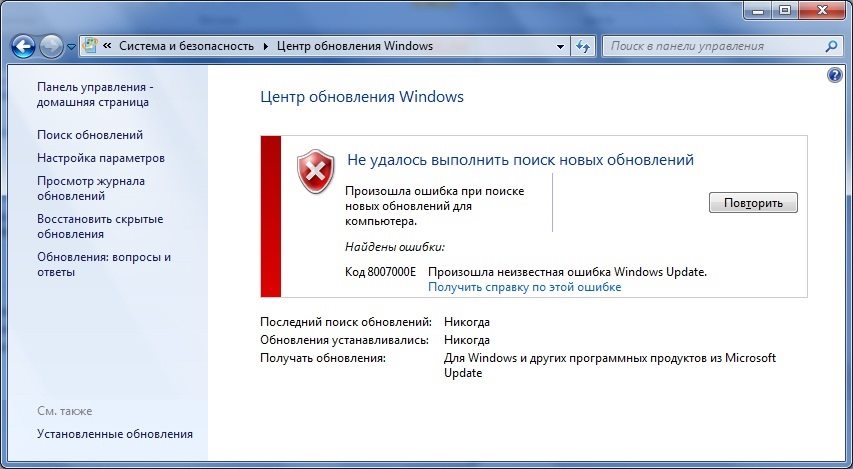
Ошибка обновления Windows 7 (код 8007000e) возникает при попытке установить новые системные компоненты. Существует ряд причин, которые приводят к сбою процесса обновления:
Как исправить?
Существует ряд простых способов обойти или решить проблему с установкой обновлений.
Установка пакетов вручную
Этот способ нужно проверить в первую очередь. Для этого:
Для наглядности рекомендуется посмотреть видеоинструкцию по распаковке обновлений вручную:
Удаление предыдущих обновлений
Один из эффективных методов. Для этого:
Проверка и очистка системных файлов
Данный метод проверяет целостность объектов Windows. Для этого:

Это все способы устранения ошибки обновления с кодом 8007000e, которые помогают в 90% случаев. Также можно откатить систему с помощью точки восстановления или полностью переустановить Windows. Удачи!
Источник
Как исправить ошибку обновления 8007000e Windows 7
Практически каждый день система Windows 7 проводит обновление, скачивая необходимые файлы с официального ресурса. Но, к сожалению и при стандартном обновлении может произойти ошибка. Чаще всего появляется ошибка обновления 8007000e и как ее исправить знают немногие. В этой статье мы расскажем, как исправить ошибку обновления 8007000e Windows 7.
Устранение неполадок
Перед тем как решать проблему вручную следует обратиться к специальной встроенной программе под названием «Устранение неполадок». Как правило, данный инструмент временно выключает программу Wuauserv и за небольшой промежуток времени меняет название раздела с хранимым там кэшем. Чтобы включить устранение неполадок вам нужно сделать следующее:
1. В строке поиска Windows введите два слова: Устранение неполадок, и выберите предоставленный результат.
2. На открывшейся странице Устранения неполадок компьютера, нажмите на раздел «Система и безопасность».
3. Далее нажмите на кнопку «Дополнительно» и поставьте галочку рядом со строкой «Автоматически применять исправления». Чтобы подтвердить действие система попросит указать, что вы включаете этот режим на правах администратора – подтверждаем.
4. После этого можно начать автоматический процесс исправления ошибок, на данную процедуру может уйти несколько минут. Выполнив исправление ошибок, начните установку всех необходимых обновлений, и всё, проблема будет устранена.
Устранение неполадок вручную
Если вам не удалось запустить автоматическое исправление неполадок, то делать это придется вручную. Как правило, на это может уйти немного больше времени, но особых сложностей не будет:
1. Откройте диспетчер задач, нажав на кнопки Ctrl+Alt+Delete одновременно, и выберите вкладку «Службы».
2. Далее отыщите службу под названием Wuauserv и, нажав на нее правой кнопкой мыши, выберите строку «Остановить».
3. Теперь переходим к командной строке, в которой вводим следующую команду: netstopwuauserv. Задать данную команду можно только на правах администратора.
4. Выполнив команду, открываем мой компьютер и заходим в папку Windows. Там вам нужно отыскать другую папку под названием SoftwareDistribution, в ней хранятся файлы с обновлениями. Удалите все находящиеся там файлы и после включите службу Wuauserv, также как ее и выключали. Через некоторое время система сама начнет автоматически искать обновление, но уже без ошибки.
Программа для обновлений
Также вы можете использовать программу WSUS Offline Update, которую можно скачать с интернета совершенно бесплатно. При включении, программа WSUS Offline Update проводит полную проверку на наличие обновлений и по случаю устанавливает необходимые файлы без каких-либо ошибок.
Подведя итоги
Теперь вы знаете, как исправить ошибку обновления 8007000e windows 7. Как правило, используя данные рекомендации можно легко устранить такие ошибки как 8007000e или Windowsupdate_dt000. Если же нет, то придется пойти на крайние меры и переустановить всю систему.
Источник
(Решено) Ошибка обновления Windows 8007000e | Быстро и легко!
Windows Update Error 8007000e Quickly Easily
Если вы видите код ошибки 8007000e при выполнении обновления Windows, не паникуйте. В этой статье представлены шесть исправлений, чтобы решить эту проблему!
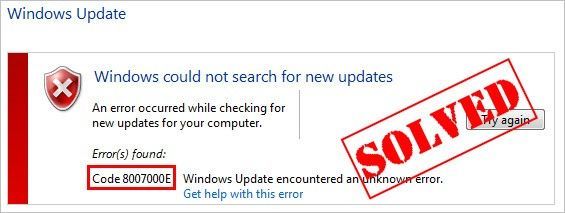
Если вы видите код ошибки 8007000e при выполнении обновления Windows, ты не одинок. Об этом сообщают многие пользователи Windows. Этот код ошибки обычно появляется при попытке обновления до новой сборки системы Windows. Причина в том, что некоторые файлы обновлений отсутствуют или повреждены.
Хорошая новость в том, что вы можете это исправить. Вы легко сможете решить проблему, используя одно из решений, перечисленных ниже.
Попробуйте эти исправления:
Возможно, вам не придется пробовать их все. Просто двигайтесь вниз по списку, пока не найдете тот, который работает.
Исправление 1. Установите последнюю версию IE для Windows 7.
Пойдите и проверьте Центр обновления Windows еще раз, чтобы узнать, можете ли вы выполнить обновление Windows или нет. Если вы можете выполнить обновление Windows, значит, вы устранили эту проблему.
Исправление 2: запустите средство устранения неполадок Центра обновления Windows.
Вы можете скачать и запустить средство устранения неполадок Центра обновления Windows для автоматической диагностики и решения любых проблем, связанных с Центром обновления Windows. Вот как это сделать:
Средство устранения неполадок попытается решить проблему за вас. Вы можете перезагрузить компьютер и повторить попытку обновления Windows. Если по-прежнему не работает, попробуйте следующее исправление.
Исправление 3: перезапустите службу Windows Update.
Вы можете увидеть этот код ошибки, если что-то не так со службой Центра обновления Windows. Вы можете попробовать перезапустить службу Windows Update, чтобы решить эту проблему. Вот как это сделать:
C: Windows SoftwareDistribution DataStore
C: Windows SoftwareDistribution Скачать
Пойдите и проверьте Центр обновления Windows еще раз, чтобы узнать, можете ли вы выполнить обновление Windows или нет. Если по-прежнему не работает, попробуйте следующее исправление.
Исправление 4: запустите инструмент DISM
Эта неприятная проблема, вероятно, вызвана поврежденными файлами обновления Windows. В этом случае запускается инструмент обслуживания образов развертывания и управления ими (DISM) может решить эту проблему. Просто следуйте пошаговым инструкциям, чтобы запустить инструмент DISM:
Посмотрите, сможете ли вы выполнить обновление Windows. Если проблема не исчезнет, попробуйте запустить средство проверки системных файлов.
Исправление 5: Запустите проверку системных файлов
Проверка системных файлов может сканировать системные файлы Windows на наличие повреждений и восстанавливать поврежденные файлы. Если вам не удается установить обновления Windows, это может быть вызвано некоторой ошибкой, связанной с повреждением. В этом случае запуск средства проверки системных файлов может помочь вам решить эту проблему.
Снова запустите Центр обновления Windows, чтобы проверить, работает ли это исправление. Если вам по-прежнему не удается установить обновления для вашей системы Windows, попробуйте следующее исправление.
Исправление 6. Загрузите обновления из каталога Центра обновления Майкрософт вручную.
Если все перечисленные выше исправления не помогли вам, вы можете попробовать загрузить обновления, которые вам не удалось установить, с Каталог Центра обновления Майкрософт и установите их вручную.
Перед загрузкой обновлений Windows вручную вам необходимо знать тип системы вашей ОС Windows. Вы можете выполнить следующие шаги, чтобы просмотреть информацию о типе системы:
Чтобы загрузить и установить обновления Windows вручную:
Эта проблема сохраняется?
Хотите, чтобы мы решили проблему за вас?
Если ни одно из вышеперечисленных исправлений не помогло или у вас просто нет времени или уверенности, чтобы устранить проблему самостоятельно, попросите нас исправить ее за вас.
Надеюсь, одно из приведенных выше исправлений поможет вам решить эту досадную проблему. Пожалуйста, оставьте свой комментарий ниже, если у вас есть вопросы!
Источник
Dadaviz
Ошибка обновления 8007000E в Windows 7 — как исправить
Версия Windows 7 последние годы удерживает лидерство на рынке среди операционных систем. Ее работа считается одной из самых стабильных. Но, как и везде, случаются досадные ситуации. В Windows 7 пользователям не редко приходится сталкиваться с проблемами при обновлениях, чаще всего возникает ошибка «Windowsupdate_8007000E» или «Windowsupdate_dt000». Хотя это и не приятный момент, но к счастью существуют несколько простых способов в исправлении данного конфликта.
Что это за ошибка Windowsupdate_8007000E
Причины в основном довольно простые: было прервано интернет-соединение во время загрузки обновлений, перегрузка процессора, устанавливаемые файлы антивирус посчитал не надежными, кривые предыдущие апдейты системы и многое другое. В редких случаях некоторые пользователи связывают ее с оперативной памятью.
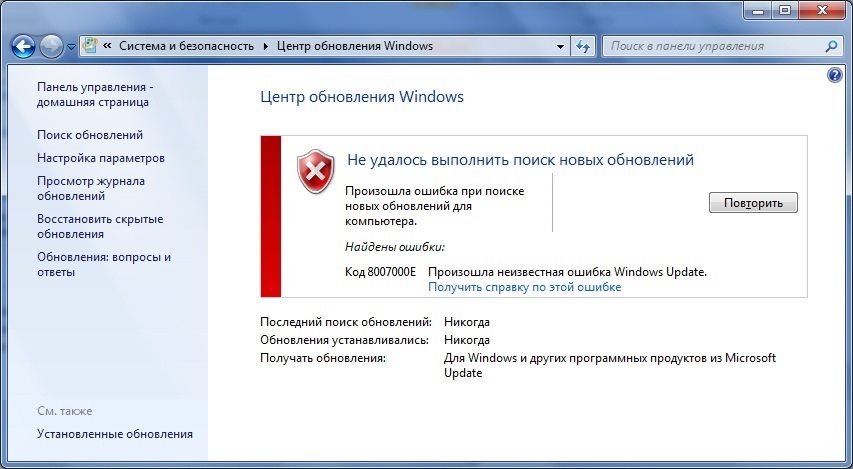
Если сбой «Windowsupdate_8007000E» возникает после недавней установки ОС, то возможно ваша сборка оказалась битой. Это возникает по причине скачивания «пиратских версий» операционных систем из ненадежных источников. В таком варианте следует либо купить лицензионную версию, либо обратиться к другому источнику в интернете. Желательно искать и устанавливать чистые образы Виндовс, не нагруженные дополнительным ПО.
Исправляем ошибки 8007000E и dt000
Для начала стоит проверить вариант с ручным способом установки апдейтов. Нужно будет загрузить пакет обновлений KB3102810 или KB3083324. Делайте это с официального сайта Microsoft. Перейдя к ним на страницу, в поле поиска вставьте название вышеуказанных апдейтов. Перед вами откроется страница с несколькими версиями софта: выберите только тот вариант, что подходит именно под вашу версию и разрядность.
Если виной всему становятся недавние обновления, тогда, если логически предположить, их следует удалить. Проследуйте на ваш диск С. Примерно на предпоследнем месте будет папка «Windows». В ней следует отыскать еще одну с названием «SoftwareDistribution». Тут нужно удалить папку «Download» (но прежде зайдите в нее и удалите все содержимое в ней). Перезагрузите компьютер.
Еще один простой способ – проверить все системные файлы на предмет ошибок. Сделайте это через командную строку. В ней следует прописать sfc /scannow. После нажатия клавиши «Enter» система проверит себя. Найти командную строку можно в меню «Пуск», а потом «Стандартные». Обязательно запускаете службу от администратора. Эта команда позволит проверить все системные файлы на предмет ошибок.
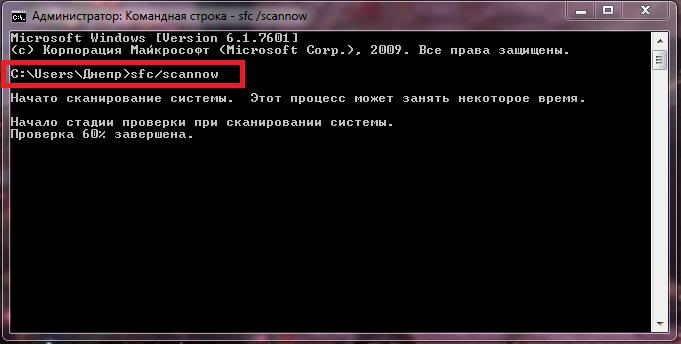 Проверка системных файлов
Другие советы для устранения ошибки центра обновления:
Тут можно узнать всю интересующую вас информацию, как изменить и найти файл hosts.
Ошибки «Windowsupdate_8007000E» или «Windowsupdate_dt000» устраняются довольно легко, лишь в редких случаях рекомендуется полностью переустановить Windows 7. Для предотвращения проблем в будущем отключайте возможность ОС получать обновления.
Источник
Ошибки 80072EFE и 8007000e при обновлении Windows 7

В этой статье рассматривается исправление ошибок 80072EFE и 8007000e при обновлении Windows 7. Мы устраним проблемы и восстановим работоспособность Центра обновления Windows.
Исправление ошибки 80072EFE при обновлении Windows 7
Если при обновлении системы через Центр обновления Windows вы получаете ошибку 80072EFE, то скорее всего нужно вручную установить агент обновления Windows, либо у вас проблемы с серверами DNS.
Для Windows 7 (SP1) и Windows Server 2008 R2 (SP1)
Для Windows 8 и Windows Server 2012:
Так же можно попробовать изменить настройки DNS в свойствах подключения локальной сети:
Панель управленияСеть и ИнтернетСетевые подключения
 Настройки dns сервера Windows
Теперь перезагружаем ПК и смотрим заработал ли Центр обновления.
Исправление ошибки 8007000e при обновлении Windows 7
Лично я после данных манипуляций в Windows 7 получил ошибку 8007000e, для исправления которой мне помогло установить 2 патча KB3102810 и KB3083324.
Помогла статья или вы нашли другое решение? Напишите об этом в комментариях, чтобы помочь другим!
Источник
- Remove From My Forums
-
Question
-
Hi everybody,
we experience some failing updates on Windows 7 devices, mostly Office 2013 — 32bit updates.
Error code is 8007006e
what I’ve done so far (nothing helped):
sfc /scannow
remove office compeltely, restart, install office again.
download update and install it manually
googling for the error message does not deliver any helpful information.
any help is appreciated. do you need any more information?
All replies
-
Hi,
Depending on your description, you may have the same problem as the following link:
https://community.spiceworks.com/topic/458274-windows-update-error
It turns out that the issue was that these updates were not needed and Windows Update was not picking up the installation. It kept thinking these updates were needed and would fail because there were already installed. So you had to hide the updates
to resume normal functionality.Best regards,
Hurry
Please remember to mark the reply as an answer if they help.
If you have feedback for TechNet Subscriber Support, contact tnmff@microsoft.com -
Hi,
Depending on your description, you may have the same problem as the following link:
https://community.spiceworks.com/topic/458274-windows-update-error
It turns out that the issue was that these updates were not needed and Windows Update was not picking up the installation. It kept thinking these updates were needed and would fail because there were already installed. So you had to hide the updates
to resume normal functionality.Best regards,
Hurry
Please remember to mark the reply as an answer if they help.
If you have feedback for TechNet Subscriber Support, contact tnmff@microsoft.comHi Hurry,
systeminfo and dism say that this KB ist not installed or at least it can’t find them (so I assume that they are not installed).
And since these updates were released in September I suggest that they are needed / required.
And in general: hiding updates from installation is a «no go!»
-
Edited by
Tuesday, October 23, 2018 10:01 AM
-
Edited by
-
Hi,
Thank you for your reply.
That may be another reason, try to refer to the following article:
How To Fix Windows Update Error 8007006E
Hope to be able to help you.
Best regards,
Hurry
Please remember to mark the reply as an answer if they help.
If you have feedback for TechNet Subscriber Support, contact tnmff@microsoft.com -
Hi,
Is there anything else I can do to help you on this issue?
Please feel free to contact me if you have any questions.
Best regards,
Hurry
Please remember to mark the reply as an answer if they help.
If you have feedback for TechNet Subscriber Support, contact
tnmff@microsoft.com -
Hi Hurry,
the latest Updates can’t be installed neither, so I don’t think it because «windows doesn’t know that these updates are not required anymore».
I will try to clean up catroot2 folder and see if this helps.
regards
edit: so renaming catroot2 didn’t help at all.
by the way: error 8007 indicates that it’s an issue with win32 and 006e means «cannot open device or file specified»
https://docs.microsoft.com/en-us/windows/desktop/debug/system-error-codes—0-499-
if now anybody can tell me how I can check which file(s) it is, that would be awesome!
-
Edited by
zaikun
Thursday, October 25, 2018 2:37 PM
-
Edited by
-
Hi,
Thank you for your reply.
If it isn’t work, I hope you can give a feedback.
Sincerely hope to help you solve this problem.
Best regards,
Hurry
Please remember to mark the reply as an answer if they help.
If you have feedback for TechNet Subscriber Support, contact
tnmff@microsoft.com -
Hi Hurry,
removing catroot2 didn’t help neither,
any further hints?
-
Hi Hurry,
this website doesn’t look trustworthy.
On top: the software has lots of functions and tools — which exactly am I supposed to run?
-
Hi,
Thank you for your reply.
This website is worth trusting. So you don’t have to worry. I have dowloaded it by clicking Installer (36.37 MB)-Direct Download.
Sincerely hope to help you solve this problem.
Best regards,
Hurry
Please remember to mark the reply as an answer if they help.
If you have feedback for TechNet Subscriber Support, contact
tnmff@microsoft.com -
Hi Hurry,
I have downloaded and installed it.
But which tools should I run? the software is huge and has lots of functions.
-
Hi,
Thank you for your reply.
Double hit directly to open this software. If you look at the problem from this aspect of the update alone, you only need to do the following in the figure below:
But it can’t be ruled out for other reasons, and if it’s convenient, it’s recommended that you try something you think is important.
Best regards,
Hurry
Please remember to mark the reply as an answer if they help.
If you have feedback for TechNet Subscriber Support, contact
tnmff@microsoft.com -
Hi,
Is there anything else I can do to help you on this issue?
Please feel free to contact me if you have any questions.
Best regards,
Hurry
Please remember to mark the reply as an answer if they help.
If you have feedback for TechNet Subscriber Support, contact
tnmff@microsoft.com -
Hello Hurry,
I tested the tool and ran the suggested tool, but it didn’t help, unfortunately.
any further suggestions?
regards
-
Hi,
Thank you for your feedback.
If it’s convenient, it is recommended that you try to collect some log files. And then share it with me through Onedrive link. I will try my best to help you analyze.
Thank you for your cooperation.
Best regards,
Hurry
Please remember to mark the reply as an answer if they help.
If you have feedback for TechNet Subscriber Support, contact
tnmff@microsoft.com -
Hi,
How things are going there on this issue?
Please let me know if you would like further assistance.Best regards,
Hurry
Please remember to mark the reply as an answer if they help.
If you have feedback for TechNet Subscriber Support, contact
tnmff@microsoft.com -
Hi,
Is there anything else I can do to help you on this issue?
Please feel free to contact me if you have any questions.
Best regards,
Hurry
Please remember to mark the reply as an answer if they help.
If you have feedback for TechNet Subscriber Support, contact
tnmff@microsoft.com -
Hi Hurry,
if you have some time, I can provide log files if you tell me how to do that.
And sorry for the long time it took me to respond.
kind regards