I Receive An Error When I Try To Update Elementor Pro
Table Of Contents
- I Receive This Error – “Update: Could Not Copy File”
- I Receive This Error – “Update Failed: Download failed. Unauthorized”
- Please deactivate and reactivate the license following these steps:
- Once you have done the steps above, please follow these steps:
- Does the issue persist?
This guide lists some of the specific errors you may receive when trying to update the Elementor plugin.
I Receive This Error – “Update: Could Not Copy File”
This occurs generally when you work with Elementor Pro from a localhost and/or with any Windows Server.
- You can install a plugin to solve this issue (which is an incompatibility issue between Easy Digital Downloads, Windows and WordPress).
- If this did not help, ask your hosting company to verify your permission settings.
- If nothing helped, you can download Elementor Pro via your Elementor Account in https://my.elementor.com. You will find the file in Purchases > View Details and Downloads. Once the file downloaded, go to your WP Dashboard, delete Elementor Pro, then in Plugins, click on “Add New” and upload the file of the new version downloaded from elementor.com.
I Receive This Error – “Update Failed: Download failed. Unauthorized”
In order to be able to update your plugin, you need to have an active license.
Please deactivate and reactivate the license following these steps:
- First, log in at https://my.elementor.com/
- Go to My Account > View websites
- Next to the website in question, click on Deactivate Site
Once you have done the steps above, please follow these steps:
- Go to your website’s WordPress dashboard > Elementor > License
- Click on the Disconnect button (if there is one) and afterward, click on the Connect & Activate button and attempt to update the plugin again.
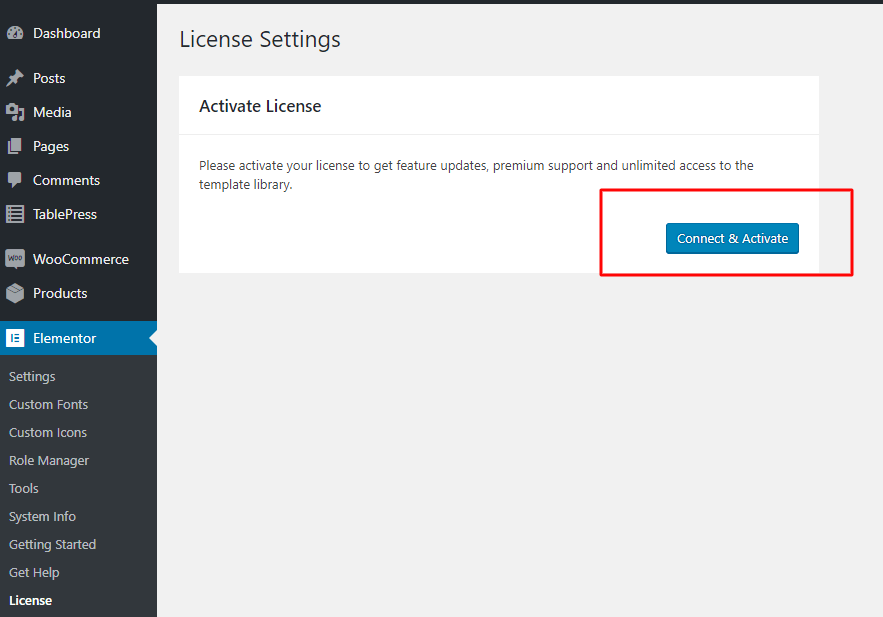
Does the issue persist?
If the issue persists, then this may be related to a permissions error. In this case, delete the current plugin and upload the newest version of the plugin via FTP, as explained here, in the section labeled, “I receive an error message when I try to update Elementor Pro”.
More information about update issues may be found on our Update Issues guide.
Share it on social networks
Related content
Get Started With Elementor Today
Join millions of professionals who use Elementor to build WordPress websites faster and better than ever before
Не работают стили CSS в некоторых виджетах
Ситуация: создали виджет, внесли корректировки в визуальную часть, при просмотре страницы через кнопку “Посмотреть изменения” все работает отлично, но стоит зайти на страницу в режиме Инкогнито – виджет не отображает стили. Обновление CSS в ручном режиме не помогает.
Данная ошибка может ввести в заблуждение, т.к. при редактировании и внутреннем просмотре страницы вы видите изменения.
Это связано с тем, что у вас блокируется и не погружается встроенный файл стилей CSS.
Для того, чтобы решить проблему, необходимо убедится, что сайт работает полностью по HTTPS или HTTP протоколу. Если на сервере у вас настроен редирект на HTTPS, а в настройках URL адрес сайта указан с HTTP – возникнет конфликт и браузер будет частично блокировать стили, т.к. сочтет соединение не безопасным, особенно это отразится на сторонних расширениях.
Что нужно сделать:
- Проверить наличие редиректа в админ панели хостинг провайдера (у Beget > Раздел – Сайты)
- Проверить наличие SSL сертификата и его актуальность
- Если вручную прописываете редирект, проверьте свой .htaccess
- В админ панели WordPress откройте раздел Настройки > Общие. Обратите внимание на то, чтобы ваш домен начинался с HTTPS.
- Проверьте “Здоровье сайта” в разделе админ панели WordPress – Инструменты > Здоровье Сайта
-
Posts
-
hello I got this message when updating Elementor plug in ‘An error occurred while updating Elementor Pro: Download failed. Unauthorized’
I am in china on business and must use a vpn to access the internet here so I believe that may be the issue.
my website will not open and comes up as ‘Fatal error: Uncaught Error: Call to undefined method ElementorCoreSettingsPageManager::get_page() in /home/powerb95/public_html/wp-content/plugins/elementor-pro/modules/custom-css/module.php:132 Stack trace: #0 /home/powerb95/public_html/wp-includes/class-wp-hook.php(286): ElementorProModulesCustomCssModule->add_page_settings_css(……’
Hi there,
Please contact support for the Elementor theme directly for help with this.
We only provide support for sites hosted on WordPress.com in this forum. We’re not able to help with a site using the open source WordPress software, nor can we help with themes developed for that software by other companies.
Contact
- The topic ‘An error occurred while updating Elementor Pro: Download failed. Unauthorized’ is closed to new replies.