Сегодня мы рассмотрим метод List pop() в Python. Обычно у нас есть различные встроенные методы для удаления любого элемента из списка в Python. У нас есть del, remove(), а также метод pop() для выполнения этой задачи. Но у каждого из них есть свои отличия. Давайте узнаем, как использовать метод pop() и каковы преимущества использования этого метода.
Содержание
- Работа метода List pop() в Python
- Использование списка pop()
- Ошибки при использовании метода List pop()
- 1. IndexError
- 2. Ошибка при пустом списке
- List pop() в стеке Python
По сути, метод pop() в Python выводит последний элемент в списке, если не передан параметр. При передаче с некоторым индексом метод выталкивает элемент, соответствующий индексу.
Синтаксис:
#pop() method syntax in Python
pop(index)
- Когда передается индекс, метод удаляет элемент по индексу, а также возвращает то же самое.
- Когда ничего не передается, метод удаляет последний элемент и возвращает его там, где функция была ранее вызвана.
Использование списка pop()
Взгляните на пример кода ниже, он иллюстрирует использование встроенного метода pop() в python.
list1=[0,1,2,3,4,5,6,7,8,9,10]

#pop last element
print("pop() returns :",list1.pop(),"; currently list=",list1)

#pop element at index 0
print("pop(0) returns :",list1.pop(0),"; currently list=",list1)

#pop element at index 1
print("pop(1) returns :",list1.pop(1),"; currently list=",list1)

#pop element at index 2
print("pop(2) returns :",list1.pop(2),"; currently list=",list1)

#pop element at index 3
print("pop(3) returns :",list1.pop(3),"; currently list=",list1)

#pop element at index 4
print("pop(4) returns :",list1.pop(4),"; currently list=",list1)
Вывод:

- Сначала мы инициализируем список list1, как [0,1,2,3,4,5,6,7,8,9,10]. В этом списке мы выполняем соответствующую операцию pop, передавая отдельные индексы.
- pop() – как было сказано ранее, по умолчанию pop() возвращает и удаляет последний элемент из списка. В нашем случае последний элемент был 10, который появляется последовательно.
- pop(0) – выталкивает элемент в list1 в 0-й позиции, которая в нашем случае равна 0.
- Точно так же все операции pop(1), pop(2), pop(3) и pop(4) возвращают элементы по их соответствующим индексам. Это 2, 4, 6 и 8, поскольку мы продолжаем выталкивать элементы из списка.
Ошибки при использовании метода List pop()
1. IndexError
При использовании метода List pop() мы сталкиваемся с ошибкой IndexError, если индекс, переданный методу, превышает длину списка.
Эта ошибка возникает в основном, когда индекс предоставил ее вне диапазона списка. Давайте посмотрим на небольшой пример этого:
list1=["John","Charles","Alan","David"]

#when index passed is greater than list length
print(list1.pop(10))
Вывод:
Traceback (most recent call last):
  File "C:/Users/sneha/Desktop/test.py", line 4, in <module>
    print(list1.pop(10))
IndexError: pop index out of range

Process finished with exit code 1
В этом примере ясно, что индекс, предоставленный методу pop(), 10 больше, чем длина списка (4). Следовательно, мы получаем IndexError.
2. Ошибка при пустом списке
Как и в предыдущем разделе, когда мы пытаемся выполнить метод List pop() для пустого списка, мы сталкиваемся с той же самой IndexError. Например:
l1=[]
#for empty lists
print(l1.pop())
Вывод:
Traceback (most recent call last):
  File "C:/Users/sneha/Desktop/test.py", line 4, in <module>
    print(list1.pop())
IndexError: pop from empty list

Process finished with exit code 1
Итак, мы можем сделать вывод, что при выполнении метода list pop() для пустого списка выдается IndexError.
Следовательно, мы должны проверить, прежде чем применять метод pop(), что список, с которым мы имеем дело, не пуст. Простая проверка длины может решить нашу проблему.
l1=[]
#for empty lists check length before poping elements!
if len(l1)>0:
    print(l1.pop())
else:
    print("Empty list! cannot pop()")
Вывод:
Empty list! cannot pop()
Оператор if-else в Python проверяет, является ли список пустым или нет, и извлекает элемент из списка только тогда, когда len (l1)> 0, т.е. когда список l1 не пуст.
List pop() в стеке Python
Как мы видели в нашем руководстве по Python Stack Tutorial, pop() также является операцией стека, используемой для удаления последней переданной задачи или элемента. Давайте посмотрим, как мы можем реализовать метод list pop() в стеке с помощью списков.
stack=[] #declare a stack

print("Pushing tasks into stack...")
for i in range(5):
    stack.append(i)

print("stack=",stack)

print("Poping tasks from stack:")
#performing repetitive pop() on stack
while len(stack)>0:
    print("pop()=",stack.pop(),";  Currently in Stack:",stack)
Вывод:

- После объявления списка стека мы нажимаем 5 элементов, непрерывно отправляя задачи (элементы) с помощью метода append().
- Как только наша инициализация стека завершена, мы повторяем элементы pop(), пока стек не станет пустым.
- Обратите внимание, что при извлечении элементов из стека мы использовали условие len (stack)> 0 с помощью цикла while. Это гарантирует, что операция pop выполняется только тогда, когда стек не пуст.
Description
I am getting a pop from empty list error from the warnings.filers.pop(0) call in get_params(). I am using Dask to parallelize the computation of fitting a bunch of MeanShift objects. I only get this error on one machine (a remote linux machine), but it works fine on my home compute (running ubuntu 14)
Steps/Code to Reproduce
Expected Results
Should just fit the MeanShifts and move on
Actual Results
Traceback (most recent call last):
File «tda_profile.py», line 34, in
_tda.fit(train_features, train_targets)
File «/home/ben/tda/tda_parallel_test.py», line 652, in fit
fits = fits.compute()
File «/home/ben/anaconda3/lib/python3.5/site-packages/dask/base.py», line 86, in compute
return compute(self, *_kwargs)[0]
File «/home/ben/anaconda3/lib/python3.5/site-packages/dask/base.py», line 179, in compute
results = get(dsk, keys, *_kwargs)
File «/home/ben/anaconda3/lib/python3.5/site-packages/dask/threaded.py», line 57, in get
**kwargs)
File «/home/ben/anaconda3/lib/python3.5/site-packages/dask/async.py», line 484, in get_async
raise(remote_exception(res, tb))
dask.async.IndexError: pop from empty list
Traceback
File «/home/ben/anaconda3/lib/python3.5/site-packages/dask/async.py», line 267, in execute_task
result = execute_task(task, data)
File «/home/ben/anaconda3/lib/python3.5/site-packages/dask/async.py», line 249, in execute_task
return func(*args2)
File «/home/ben/anaconda3/lib/python3.5/site-packages/sklearn/cluster/mean_shift.py», line 391, in fit
cluster_all=self.cluster_all, n_jobs=self.n_jobs)
File «/home/ben/anaconda3/lib/python3.5/site-packages/sklearn/cluster/mean_shift.py», line 191, in mean_shift
(seed, X, nbrs, max_iter) for seed in seeds)
File «/home/ben/anaconda3/lib/python3.5/site-packages/sklearn/externals/joblib/parallel.py», line 800, in call
while self.dispatch_one_batch(iterator):
File «/home/ben/anaconda3/lib/python3.5/site-packages/sklearn/externals/joblib/parallel.py», line 658, in dispatch_one_batch
self._dispatch(tasks)
File «/home/ben/anaconda3/lib/python3.5/site-packages/sklearn/externals/joblib/parallel.py», line 566, in _dispatch
job = ImmediateComputeBatch(batch)
File «/home/ben/anaconda3/lib/python3.5/site-packages/sklearn/externals/joblib/parallel.py», line 180, in init
self.results = batch()
File «/home/ben/anaconda3/lib/python3.5/site-packages/sklearn/externals/joblib/parallel.py», line 72, in call
return [func(_args, *_kwargs) for func, args, kwargs in self.items]
File «/home/ben/anaconda3/lib/python3.5/site-packages/sklearn/externals/joblib/parallel.py», line 72, in
return [func(_args, *kwargs) for func, args, kwargs in self.items]
File «/home/ben/anaconda3/lib/python3.5/site-packages/sklearn/cluster/mean_shift.py», line 75, in _mean_shift_single_seed
bandwidth = nbrs.get_params()[‘radius’]
File «/home/ben/anaconda3/lib/python3.5/site-packages/sklearn/base.py», line 227, in get_params
warnings.filters.pop(0)
Versions
import platform; print(platform.platform())
Linux-3.10.0-327.el7.x86_64-x86_64-with-centos-7.2.1511-Core
import sys; print(«Python», sys.version)
Python 3.5.2 |Anaconda 4.1.1 (64-bit)| (default, Jul 2 2016, 17:53:06)
[GCC 4.4.7 20120313 (Red Hat 4.4.7-1)]
import numpy; print(«NumPy», numpy.version)
NumPy 1.11.1
import scipy; print(«SciPy», scipy.version)
SciPy 0.17.1
import sklearn; print(«Scikit-Learn», sklearn.version)
Scikit-Learn 0.17.1
Hello everyone, total python brainlet here, I have been stuck at this problem for hours on end and I seem to never get rid of it. The objective of the code was for the pop() function to stop at the specific number written below but it doesn’t. It just keeps going until it encounters this error.
Traceback (most recent call last):
  File "<pyshell#112>", line 11, in <module>
    s.pop()
  File "<pyshell#109>", line 9, in pop
    return self.items.pop()
IndexError: pop from empty list
This is the main code, I have run out of ideas and I have no clue on how to accomplish this without succumbing to frustration. I would greatly appreciate if anyone would give feedback as to how one could solve this.
while True:
	c = 1
	l = 10
	print("What do you want to do with the stack?")
	uinput = int(input("Choices: 1=Push, 2=Pop, 3=Display, 4 =Quit"))
        #fine
	if uinput == 1:
		c+= 1
		s.push(input("Enter want you want to add to the stack."))
        #error cause
	elif uinput == 2:
		while l != 0:
			l= c - 1
			print(s.pop())
        #fine
	elif uinput == 3:
		if c >= 1:
			print(s.peek())
		else:
			print("Please push")
        #fine
	elif uinput == 4:
		import sys
		sys.exit()
Additional code, if it would help.
class Stack:
	def __init__(self):
		self.items =[]
	def push(self, item):
		self.items.append(item)
	def pop(self):
		return self.items.pop()
	def peek(self):
		return self.items[len(self.items)-1]
This tutorial shows you everything you need to know to help you master the essential pop() method of the most fundamental container data type in the Python programming language.
Definition and Usage:
The list.pop() method removes and returns the last element from an existing list. The list.pop(index) method with the optional argument index removes and returns the element at the position index.
Here’s a short example:
>>> lst = [1, 2, 3]
>>> lst.pop()
3
>>> lst
[1, 2]
In the first line of the example, you create the list lst. You then remove and return the final element 3 from the list. The result is the list with only two elements [1, 2].
Code Puzzle — Try It Yourself:
You can also solve a code puzzle about the list.pop() method and track your Python skills on our interactive Finxter app.
Syntax:
You can call this method on each list object in Python. Here’s the syntax:
list.pop(index=-1)
Arguments:
| Argument | Description |
|---|---|
index |
Optional argument. You can define the index of the element to be removed and returned. The default argument leads to the removal of the last list element with index -1. |
Return value:
The method list.pop() has return value Object. It removes the particular element from the list (default: the last element) and returns it directly to the caller.
Video:
Python List pop()
Related articles:
- The Ultimate Guide to Python Lists
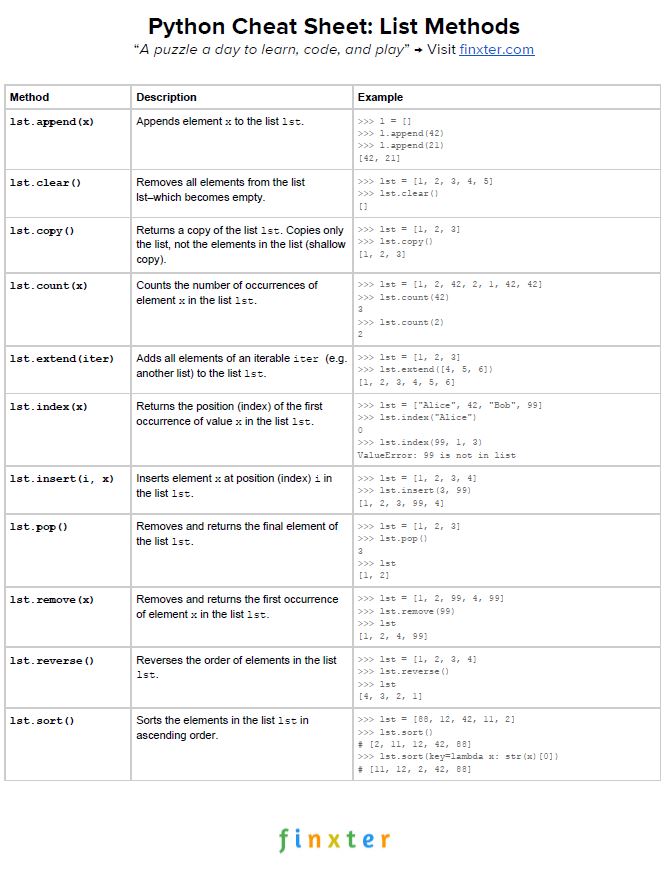
Here’s your free PDF cheat sheet showing you all Python list methods on one simple page. Click the image to download the high-resolution PDF file, print it, and post it to your office wall:
Python List pop() By Index
You can use the list.pop(index) method to with the optional index argument to remove and return the element at position index from the list.
Here’s an example:
>>> customers = ['Alice', 'Bob', 'Ann', 'Frank']
>>> customers.pop(2)
'Ann'
>>> customers
['Alice', 'Bob', 'Frank']
>>> customers.pop(0)
'Alice'
>>> customers
['Bob', 'Frank']
After creating the list with four elements, you first remove and return the second element 'Ann'. Then, you remove and return the first element 'Alice'. The resulting list has only two elements left.
Python List pop() First / Front / Left / Head
The list.pop(index) method to with the optional index argument to remove and return the element at position index from the list. So if you want to remove the first element from the list, simply set index=0 by calling list.pop(0). This will pop the first element from the list.
Here’s an example:
>>> primes = [1, 2, 3, 5, 7, 11]
>>> primes.pop(0)
1
>>> primes
[2, 3, 5, 7, 11]
The pop(0) method removes the first element 1 from the list of prime numbers given in the example.
Python List pop() By Value
In the previous two examples, you’ve seen how to pop elements by index. But can you also pop by value?
Yes, you can by using the list.index(value) method which gives you the index of the element value in the list. Now, you can use the list.pop(index) method on this index to remove the value from the list and get the result as a return value.
Here’s an example where you want to pop the element 7 from the list and store the result in the variable some_prime.
>>> primes = [1, 2, 3, 5, 7, 11]
>>> some_prime = primes.pop(primes.index(7))
>>> some_prime
7
If you’re not interested in the return value but you only want to remove the first occurrence of the value x in the list, use the list.remove(x) method.
Related Article:
- Python List remove()
Python List pop() Multiple Elements
If you can pop one element from a Python list, the natural question is if you can also pop multiple elements at the same time?
The answer no. You cannot directly pop multiple element from a list. But you can do it indirectly with a simple list comprehension statement.
Python List pop() First n Elements
Say, you want to pop the first n elements from a list. How do you do this?
You simply create a list of values using list comprehension [list.pop(0) for i in range(n)] to remove and return the first n elements of the list.
Here’s another example:
>>> lst = ['a', 'b', 'c', 'd', 'e', 'f']
>>> popped = [lst.pop(0) for i in range(5)]
>>> popped
['a', 'b', 'c', 'd', 'e']
>>> lst
['f']
The popped list contains the first five elements. The original list has only one element left.
Python List pop() Last n Elements
Say, you want to pop the last n elements from a list. How do you do this?
You simply create a list of values using list comprehension [list.pop() for i in range(n)] to remove and return the last n elements of the list.
Here’s another example:
>>> lst = ['a', 'b', 'c', 'd', 'e', 'f']
>>> [lst.pop() for i in range(5)]
['f', 'e', 'd', 'c', 'b']
>>> lst
['a']
The popped list contains the last five elements. The original list has only one element left.
Python List pop() Time Complexity
The time complexity of the pop() method is constant O(1). No matter how many elements are in the list, popping an element from a list takes the same time (plus minus constant factors).
The reason is that lists are implemented with arrays in cPython. Retrieving an element from an array has constant complexity. Removing the element from the array also has constant complexity. Thus, retrieving and removing the element as done by the pop() method has constant runtime complexity too.
I’ve written a short script to evaluate runtime complexity of the pop() method in Python:
import matplotlib.pyplot as plt
import time

y = []
for i in [100000 * j for j in range(5,15)]:
    lst = list(range(i))
    t0 = time.time()
    x = lst.pop(0)
    t1 = time.time()
    y.append(t1-t0)


plt.plot(y)
plt.xlabel("List elements (10**5)")
plt.ylabel("Time (sec)")
plt.show()
The resulting plot shows that the runtime complexity is linear, even if the number of elements increases drastically:

(Okay, there are some bumps but who really cares?)
Note that the runtime complexity is still linear if we pop the last element or any other arbitrary element from the list.
Python List pop() vs remove()
What’s the difference between the list.pop() and the list.remove() methods?
- The
list.remove(element)method removes the first occurrence of theelementfrom an existinglist. It does not, however, remove all occurrences of the element in the list! - The
list.pop()method removes and returns the last element from an existinglist. Thelist.pop(index)method with the optional argumentindexremoves and returns the element at the positionindex.
So, the remove method removes by value and the pop method removes by index. Also, the remove method returns nothing (it operates on the list itself) and the pop method returns the removed object.
Python List Pop and Push (Stack)
Python doesn’t have a built-in stack data structure because it’s not needed. You can simply create an empty list and call it stack. Then, you use the stack.append(x) method to push element x to the stack. And you sue the stack.pop() method to push the topmost element from the stack.
Here’s an example that shows how to push three values to the stack and then removing them in the traditional First-In Last-Out (FILO) order of stacks.
>>> stack = []
>>> stack.append(5)
>>> stack.append(42)
>>> stack.append("Ann")
>>> stack.pop()
'Ann'
>>> stack.pop()
42
>>> stack.pop()
5
>>> stack
[]
Python List pop() Without Remove
Want to pop() an element from a given list without removing it? Don’t do it! Instead, use simple indexing. To get an element with index i from list, simply use indexing scheme list[i]. This will keep the original element in the list without removing it.
Python List pop() If Not Empty
How can you pop() an element only if the list is not empty in a single line of code? Use the ternary operator in Python lst.pop() if lst else None as follows:
>>> lst = [1, 2, 3]
>>> for i in range(5):
	print(lst.pop() if lst else None)


3
2
1
None
None
You try to pop the leftmost element five times from a list with only three values. However, there’s no error message because of your proficient use of the ternary operator that checks in a single line if the list is empty. If it is empty, it doesn’t pop but return the None value.
If you don’t use the ternary operator in this example, Python will throw an IndexError as you try to pop from an empty list:
>>> lst = [1, 2, 3]
>>> for i in range(5):
	print(lst.pop())


3
2
1
Traceback (most recent call last):
  File "<pyshell#15>", line 2, in <module>
    print(lst.pop())
IndexError: pop from empty list
Can you pop a whole slice at once? Well, you can remove a whole slice by using the del keyword: to remove slice lst[start:stop] from the list, you can call del lst[start:stop]. However, you won’t get the slice as a return value so you may want to store the slice in a separate variable first, before removing it from the list.
Python List pop() While Iterating
It’s always dangerous to change a list over which you currently iterate.
Why? Because the iterator is created only once in the loop definition and it will stubbornly give you the indices it prepared in the beginning. If the loop changes, the indices of the elements change, too. But the iterator doesn’t adapt the indices to account for those changes. Here’s an example:
>>> lst = list(range(10))
>>> for i in range(len(lst)):
	lst.pop(i)


0
2
4
6
8
Traceback (most recent call last):
  File "<pyshell#20>", line 2, in <module>
    lst.pop(i)
IndexError: pop index out of range
Wow—this was unexpected, wasn’t it? You popped only every second element from the list. Why? Because in the first iteration, the index variable i=0. Now, we remove this from the list. The element 1 in the list has now index 0 after removal of the previous leading element. But in the second loop iteration, the loop variable has index i=1. This is the next element to be popped. But you have skipped popping the element 1 from the list at position index 0! Only every other element is popped as a result.
Alternatives Ways to Remove Elements From a List
There are some alternative ways to remove elements from the list. See the overview table:
| Method | Description |
|---|---|
lst.remove(x) |
Remove an element from the list (by value) |
lst.pop() |
Remove an element from the list (by index) and return the element |
lst.clear() |
Remove all elements from the list |
del lst[3] |
Remove one or more elements from the list (by index or slice) |
| List comprehension | Remove all elements that meet a certain condition |
Next, you’ll dive into each of those methods to gain some deep understanding.
remove() — Remove An Element by Value
To remove an element from the list, use the list.remove(element) method you’ve already seen previously:
>>> lst = ["Alice", 3, "alice", "Ann", 42]
>>> lst.remove("Ann")
>>> lst
['Alice', 3, 'alice', 42]
Try it yourself:
The method goes from left to right and removes the first occurrence of the element that’s equal to the one to be removed.
Removed Element Does Not Exist
If you’re trying to remove element x from the list but x does not exist in the list, Python throws a Value error:
>>> lst = ['Alice', 'Bob', 'Ann']
>>> lst.remove('Frank')
Traceback (most recent call last):
  File "<pyshell#19>", line 1, in <module>
    lst.remove('Frank')
ValueError: list.remove(x): x not in list
pop() — Remove An Element by Index
Per default, the pop() method removes the last element from the list and returns the element.
>>> lst = ['Alice', 'Bob', 'Ann']
>>> lst.pop()
'Ann'
>>> lst
['Alice', 'Bob']
But you can also define the optional index argument. In this case, you’ll remove the element at the given index—a little known Python secret!
>>> lst = ['Alice', 'Bob', 'Ann']
>>> lst.pop(1)
'Bob'
>>> lst
['Alice', 'Ann']
clear() — Remove All Elements
The clear() method simply removes all elements from a given list object.
>>> lst = ['Alice', 'Bob', 'Ann']
>>> lst.clear()
>>> lst
[]
del — Remove Elements by Index or Slice
This trick is also relatively unknown among Python beginners:
- Use
del lst[index]to remove the element at index. - Use
del lst[start:stop]to remove all elements in the slice.
>>> lst = list(range(10))
>>> lst
[0, 1, 2, 3, 4, 5, 6, 7, 8, 9]
>>> del lst[5]
>>> lst
[0, 1, 2, 3, 4, 6, 7, 8, 9]
>>> del lst[:4]
>>> lst
[4, 6, 7, 8, 9]
Related blog articles:
- Check out my full slicing tutorial that makes you a master slicer in 15 minutes or so!
List Comprehension — Remove Elements Conditionally
Okay, this is kind of cheating because this method does not really remove elements from a list object. It merely creates a new list with some elements that meet your condition.
List comprehension is a compact way of creating lists. The simple formula is [ expression + context ].
- Expression: What to do with each list element?
- Context: What list elements to select? It consists of an arbitrary number of for and if statements.
The example [x for x in range(3)] creates the list [0, 1, 2].
You can also define a condition such as all odd values x%2==1 in the context part by using an if condition. This leads us to a way to remove all elements that do not meet a certain condition in a given list.
>>> lst = list(range(10))
>>> lst_new = [x for x in lst if x%2]
>>> lst_new
[1, 3, 5, 7, 9]
While you iterate over the whole list lst, the condition x%2 requires that the elements are odd.
Related blog articles:
- Check out my full list comprehension tutorial for maximal learning!
Python List pop() Thread Safe
Do you have a multiple threads that access your list at the same time? Then you need to be sure that the list operations (such as pop()) are actually thread safe.
In other words: can you call the pop() operation in two threads on the same list at the same time? (And can you be sure that the result is meaningful?)
The answer is yes (if you use the cPython implementation). The reason is Python’s global interpreter lock that ensures that a thread that’s currently working on it’s code will first finish its current basic Python operation as defined by the cPython implementation. Only if it terminates with this operation will the next thread be able to access the computational resource. This is ensured with a sophisticated locking scheme by the cPython implementation.
The only thing you need to know is that each basic operation in the cPython implementation is atomic. It’s executed wholly and at once before any other thread has the chance to run on the same virtual engine. Therefore, there are no race conditions. An example for such a race condition would be the following: the first thread reads a value from the list, the second threads overwrites the value, and the first thread overwrites the value again invalidating the second thread’s operation.
All cPython operations are thread-safe. But if you combine those operations into higher-level functions, those are not generally thread safe as they consist of many (possibly interleaving) operations.
Where to Go From Here?
The list.remove(element) method removes the first occurrence of element from the list.
You’ve learned the ins and outs of this important Python list method.
If you keep struggling with those basic Python commands and you feel stuck in your learning progress, I’ve got something for you: Python One-Liners (Amazon Link).
In the book, I’ll give you a thorough overview of critical computer science topics such as machine learning, regular expression, data science, NumPy, and Python basics—all in a single line of Python code!
Get the book from Amazon!
OFFICIAL BOOK DESCRIPTION: Python One-Liners will show readers how to perform useful tasks with one line of Python code. Following a brief Python refresher, the book covers essential advanced topics like slicing, list comprehension, broadcasting, lambda functions, algorithms, regular expressions, neural networks, logistic regression and more. Each of the 50 book sections introduces a problem to solve, walks the reader through the skills necessary to solve that problem, then provides a concise one-liner Python solution with a detailed explanation.

While working as a researcher in distributed systems, Dr. Christian Mayer found his love for teaching computer science students.
To help students reach higher levels of Python success, he founded the programming education website Finxter.com. He’s author of the popular programming book Python One-Liners (NoStarch 2020), coauthor of the Coffee Break Python series of self-published books, computer science enthusiast, freelancer, and owner of one of the top 10 largest Python blogs worldwide.
His passions are writing, reading, and coding. But his greatest passion is to serve aspiring coders through Finxter and help them to boost their skills. You can join his free email academy here.
Я использую нижнюю строку в цикле в моем коде
importer = exporterslist.pop(0)
Если список экспортеров не имеет записей или это null, он возвращает error: IndexError: pop from empty list. Как я могу обойти список экспортеров без записей в нем?
Я могу придумать одну идею: если список экспортеров не равен нулю, importer = exporterslist.pop(0) иначе получить следующую запись в цикле. Если идея верна, как ее кодировать на python?
5 ответов
Лучший ответ
Вы на правильном пути.
if exporterslist: #if empty_list will evaluate as false.
    importer = exporterslist.pop(0)
else:
    #Get next entry? Do something else?
14
NightShadeQueen
4 Июл 2015 в 03:01
Вы также можете использовать .pop (), только если в списке есть элементы, определив, равна ли длина списка 1 или более:
if len(exporterslist) > 1:
    importer = exporterslist.pop()
0
Josh Woods
9 Авг 2016 в 00:31
Вы также можете использовать попробовать / кроме
try:
    importer = exporterslist.pop(0)
except IndexError as e:
    print(e)
Если вы всегда хлопаете спереди, вы можете найти deque лучше использовать deque.popleft () как 0(1).
7
Padraic Cunningham
4 Июл 2015 в 19:47
Вот этот..
exporterslist.pop(0) if exporterslist else False
..это примерно так же, как принятый ответ @ nightshadequeen просто короче:
>>> exporterslist = []
>>> exporterslist.pop(0) if exporterslist else False
False
Или, может быть, вы можете использовать это, чтобы вообще не получить возврата:
exporterslist.pop(0) if exporterslist else None
>>> exporterslist = []
>>> exporterslist.pop(0) if exporterslist else None
>>>
6
Gergely M
16 Окт 2017 в 17:16
Использовать это:
if exporterslist:
    importer = exporterslist.pop(0)
2
Utsav T
17 Дек 2019 в 00:07