This issue occurs mostly when the maximum allowed concurrent connections to MySQL has exceeded.
The max connections allowed is stored in the gloobal variable max_connections.
You can check it by show global variables like max_connections; in MySQL
You can fix it by the following steps:
Step1:
Login to MySQL and run this command: SET GLOBAL max_connections = 100;
Now login to MySQL, the too many connection error fixed. This method does not require server restart.
Step2:
Using the above step1 you can resolve ths issue but max_connections will roll back to its default value when mysql is restarted.
In order to make the max_connection value permanent, update the my.cnf file.
Stop the MySQL server: Service mysql stop
Edit the configuration file my.cnf: vi /etc/mysql/my.cnf
Find the variable max_connections under mysqld section.
[mysql]
max_connections = 300
Set into higher value and save the file.
Start the server: Service mysql start
Note:
Before increasing the max_connections variable value, make sure that, the server has adequate memory for new requests and connections.
MySQL pre-allocate memory for each connections and de-allocate only when the connection get closed. When new connections are querying, system should have enough resources such memory, network and computation power to satisfy the user requests.
Also, you should consider increasing the open tables limit in MySQL server to accommodate the additional request. And finally. it is very important to close the connections which are completed transaction on the server.
How to interpret “MySQL error 1040 – Too many connections ! ” ?
When a client tries to log into MySQL it may sometimes be rejected and receive an error message saying that there are “too many connections“. This means that the maximum number of clients that may be connected to the server has been reached. Either the client will have to wait for another client to log off, or the administrator will have to increase the maximum number of connections allowed.
Information about connections to a server can be found using the SHOW STATUS statement:
SHOW STATUS LIKE 'max_used_connections';
Prerequisite – Few points to remember before working or troubleshooting MySQL ” Too many connections ! ” error
- MySQL does not have it’s own thread handling mechanism / implementation and it completely relies on the thread handling implementation of the underlying operating system.
- MySQL system variable max_connections control the maximum number of clients the server permits to connect simultaneously, You may have to increase max_connections if more clients attempt to connect simultaneously then the server is configured to handle (Explained more in detail – “Too many connections”).
- How MySQL connection handling (both connects and disconnects) works ?
- MySQL Clients connects to MySQL Server via a simple and regular TCP-IP connect message though port 3306 on the Server instance
- The incoming connection requests are queued and then processed by the receiver thread one by one, All that receiver thread does is create user thread. It’s actually user thread which handles the client-server protocol for connection management, Which involves allocate and initialize the corresponding THD for user authentication based on credentials stored on THD’s security policies / directories and finally if successfully authorized in the connection phase, the user thread will enter command phase
- The receiver thread will either create a new OS thread or reuse and existing “free” OS thread if available in the thread cache. So we strongly recommend increasing thread cache in cases where number of connections fluctuates between ver few connections and having many connections. But there are three things which a thread might need to wait for: A mutex, a database lock, or IO.
- THD basically is a large data structure used for several purposes like connection management, authorization and even unto to query execution, So how much THD consumes memory is directly proportionate to the query execution complexities and connection traffic.
MySQL error – Too many connections, How to fix ?
Recently one of customers ( among the top 5 largest e-commerce companies in the world ) called us to check how graceful their connection handling works during peak hours of business, They had issues in the past with ” ERROR 1040: Too many connections “ and that clearly explains the maximum number of clients that may be connected to the server has been reached so either the client will have to wait for another client to log off, or the administrator will have to increase the maximum number of connections allowed. so wanted us to do a detailed health-check on MySQL connection management and address “Too many connections” error proactively, We have explained below on how we could successfully reproduce this issue and recommended the fix:
Goal: Manage 50,000 connections on MySQL 8.0 (Ubuntu)
The default setting for system variable max_connections is “151”and we are benchmarking 50K connections so the first step before benchmarking is to increase max_connections to 50000. we increased max_connections to 50000 dynamically and what happened after that was not expected, We have copied the results below:
root@MDB1:~# mysql -uroot -pMDB@PassWd2020 -se "select @@max_connections"
@@max_connections
697
We got only 697 connections, Let’s interpret MySQL error log before proceeding to next steps.. We have copied the same below:
2020-01-30T19:52:35.136192Z0 [Warning] Changed limits: max_open_files: 5129 (requested 10000)
2020-01-30T19:54:13.241937Z0 [Warning] Changed limits: max_connections: 4152 (requested 10000)
2020-01-30T19:57:47.51617Z0 [Warning] Changed limits: table_open_cache: 533 (requested 15000)
This is due to open files limitations for MySQL so let’s increase now the number of allowed open files for MySQL, The following steps we did to fix this resource limit issue:
- Option 1 – Locate the systemd configuration folder for MySQL and create file /etc/systemd/system/mysqld.service.d/override.conf (file can be called anything ending with .conf).
- Add LimitNOFILE=55000 in the file override.conf
- Add TasksMax=55000 in the file override.conf
- Add LimitNPROC=55000 in the file override.conf
- Option 2 – We can also create/modify the override file by using native systemctl command like: systemctl edit mysql
root@MDB1:~# cat /etc/systemd/system/mysql.service.d/override.conf
[Service]
LimitNOFILE=55000
TasksMax=55000
LimitNPROC=55000
** MySQL uses some files for additional work and we need to set LimitNOFILE, TasksMax and LimitMPROC higher to get 50000 connections, lets set it to 55000 and reload the systemd daemon and restart the MySQL service.
Reload the systmed daemon and restart the MySQL service:
root@MDB1:~# systemctl daemon-reload
root@MDB1:~# systemctl restart mysql
Now let’s check max_connections to confirm the change applied:
root@MDB1:~# mysql -uroot -pMDB@PassWd2020 -se "select @@max_connections"
mysql: [Warning] Using a password on the command line interface can be insecure.
@@max_connections
50000
Conclusion
We have no fixed value recommendations for system variable max_connections, It completely depends on your application load and how your application does connection handling. We advice our customers to avoid too many connections opened concurrently because each thread connected needs memory and there is also resource intensive context switching causing overall performance degradation, Thanks for reading and comments are welcome !
References
- https://mysqlserverteam.com/mysql-connection-handling-and-scaling/
- http://mysql-nordic.blogspot.com/2019/04/mysql-error-too-many-connections.html
- https://dev.mysql.com/doc/refman/5.7/en/using-systemd.html

Book your appointment for 30 minutes ( absolutely free ) MinervaDB consulting
— На основе оценок
3
человек
Ошибка Mysql connect error [localhost]: (1040) Too many connections (400) возникает в случае превышения лимита одновременных соединений с базой данных MySQL.
Причины ошибки
Как сказано выше, причина проста — «Много одновременных соединений с БД». Стоит понимать, что имеется ввиду БД с которой работает Битрикс, но с этой БД может и работать другой сайт по удаленному подключению. Причины:
- Много пользователей на сайте;
- DDos атака на сайт;
- DDos атака на сайт, который использует данную БД через удаленное подключение;
- Ошибка в скрипте сайта (в следствии чего, сайт не может закрывать запросы, при этом образовывается много SLEEP запросов);
- Ошибка в скрипте сайта, который использует удаленное подключение (в следствии чего, сайт не может закрывать запросы, при этом образовывается много SLEEP запросов);
Методы обнаружения проблемы
Чтобы обнаружить, в чем именно проблема, нужноузнать количество соединений к MySql и проанализировать их (время, какой пользователь делает, с какого IP).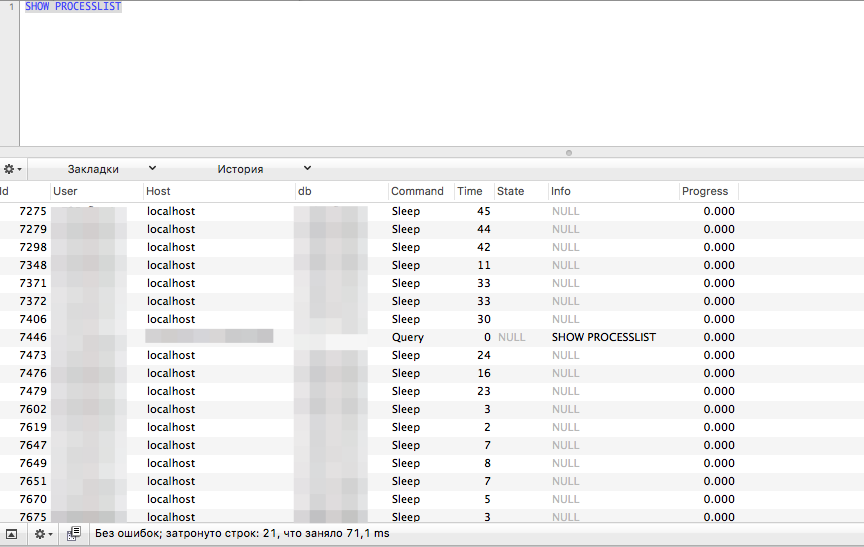
Пример анализа запросов к БД
Как исправить
Есть всего 3 варианта исправления: увеличить количество одновременных соединений (если проблема связанна с большим посещением сайта реальных пользователей ), отражение DDOS атаки, или оптимизацией кода сайта. Как вы понимаете, универсального рецепта нет и быть не может. Если вам не помогло увеличения лимита, и вы не знаете что делать в случае DDOS или как оптимизировать код сайта — обращайтесь к профессионалам.
Вас могут заинтересовать следующие услуги