Обновлено: 28.01.2023
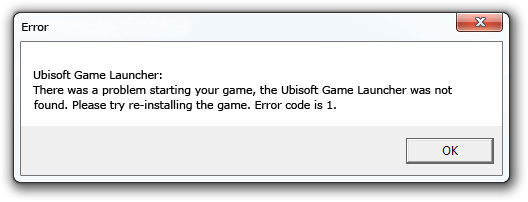
При запуске одной из игр компании Юбисофт появляется окно с ошибкой — «Unable to find the Ubisoft Game launcher. Ubisoft Game Launcher: error code 2» при использовании английской версии, и ошибка «Не найден Ubisoft Game Launcher. Ubisoft Game Launcher: код ошибки 2» при использовании русской. Переустановка игры или Uplay не помогает, не паникуйте, статья описывает подробнейшее решение проблемы.
Часто игроки сталкиваются с ошибками в играх Assassin’s Creed, Far Cry и Splinter cell, вызывают сбои проблемы определения Гейм Лаунчера от Юбисофт в операционной системе либо с подключением приложения к интернету.
Статья рассматривает все действенные способы устранения кода ошибки 2 и подробно описывает действия по пунктам.
Часто ошибки запуска Ubisoft Game Launcher вызывают антивирусы и файерволы. Прежде чем приступить к дальнейшим действиям проверьте карантин вашего антивирусного программного обеспечения, возможно, внутри находится исполнительный файл Юбисофт Гейм Лаунчера, и файлы, связанные с работой софта, например, uplay_r1_loader64.dll, libcef.dll или ubiorbitapi_r2_loader.dll.
Настоятельно рекомендуется отключить ваше антивирусные продукты, перед тем как продолжить исправление ошибки «Ubisoft Game Launcher: error code 2».
Переустановка программы
Для начала давайте разберемся в функционале ubisoft game launcher — это софт, отвечающий за процесс авторизации пользователя в сервисе Uplay, а также за защиту продуктов компании Юбисофт от нелицензионного использования, пришедшая на смену StarForce.

Исправление hosts
Перед тем как что-то удалять или устанавливать, попытаемся отделаться малой кровью. Простейший способ избавится от кода ошибки 2, юбисофт гейм лаунчера, не дающего присоединиться к любимым играм, произвести проверку файла hosts.
Продвинутые пользователи ПК неоднократно сталкивались с файлом, и знают месторасположение и содержимое HOSTS. Иногда сторонние программы могут изменять системные документы, именно поэтому важно, чтобы в документе hosts не содержалось лишней информации, блокирующей работу Юбисофт Гейм Лаунчера и вызывающей код ошибки 2.
Восстановите hosts к первозданному виду, выполнив следующие действия:
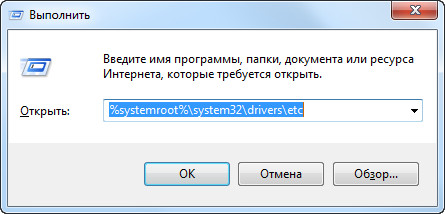
- Откройте меню «Пуск» (Start) , «Выполнить» (Run) , затем впишите %systemroot%system32driversetc , и нажмите кнопку OK .
- Создайте резервную копию, изменив имя документа hosts на hosts.old .
Далее, создайте новый файл со стандартными настройками в любой папке жесткого диска, например, на рабочем столе:
Данная процедура решает проблемы приложения в подавляющем большинстве случаев, если при запуске игр по-прежнему появляется ошибка «Ubisoft Game Launcher: error code 2», решение найдется дальше в статье.
Способы решения
Существует несколько методов решения, подходящих для лицензионных версий игр и пиратских.
Внимание! Если установлена нелицензионная игра, убедитесь, что используемое на компьютере антивирусное программное обеспечение не блокирует работу «таблетки», или вообще, не удалило кряк, перед тем, как приступить к следующим шагам.
Совместимость
Некоторые пользователи испытывают неприятности при запуске из-за проблем совместимости. Ошибки решаются следующим образом:
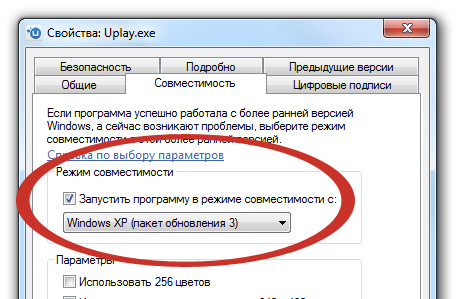
- Найдите папку, c установленным Юплеем на компьютере, по умолчанию, фолдер находится по адресу:
C:Program Files (x86)UbisoftUbisoft Game Launcher (64-битные системы).
C:Program FilesUbisoftUbisoft Game Launcher (32-битные). - В каталоге найдите Uplay.exe и вызовите свойства файла щелкнув правой кнопкой мыши.
- В свойствах перейдите на вкладку совместимость и выберите режим совместимости с Windows XP.
- Осталось применить изменения и запустить игру.
Полное удаление и переустановка
Наиболее частой причиной появления ошибок служит неполное удаление файлов программ и записей реестра перед переустановкой. Чтобы полностью очистить компьютер, проделайте следующие действия.
- Сперва нужно удалить UGL и Uplay с вашего компьютера, зайдите в «Пуск» -> «Панель управления» -> «Программы и компоненты»
- Найдите Uplay в списке и выберите удалить.
- Вручную удалите оставшиеся от работы софта файлы, находящиеся по следующим адресам:
C:Program FilesUbisoftUbisoft Game Launcher (32-разрядные системы)
C:Program Files (x86)UbisoftUbisoft Game Launcher (64-разрядные системы). - Очистите реестр, например, используя CСleaner, софтина бесплатна и отлично справляется с задачей.
- Последним шагом заново установите клиент Юплей, скачайте Uplay, с официального сайта. По окончании установки запустите игру и наслаждайтесь процессом.
Очистка реестра
Следующим шагом очистите реестр, используйте CCleaner, но программа не всегда справляется с поставленной задачей. Чтобы удалить хвосты программы наверняка придется действовать вручную.
- Откройте меню Пуск, в поиске наберите regedit.exe и нажмите enter .
- Откроется Редактор реестра, перейдите в папку HKEY_LOCAL_MACHINESOFTWAREWow6432NodeUbisoft , если установлена 64-битная версия ОС, или HKEY_LOCAL_MACHINESOFTWAREUbisoft , если 32-битная.
- Удалите папки Launcher и Ubisoft game launcher.
Кроме устранения ошибки Ubisoft Game Launcher: Error code 2 чистка реестра решает проблему пользователей, у которых не устанавливается Ubisoft Game Launcher, вылетая на половине прогресса.
Полное удаление программы
Отключение ненужных служб и удаление временных файлов
Сперва попробуйте удалить Ubisoft Game Launcher, используя «Программы и компоненты», находящиеся в панели управления. Убедитесь, что любое антивирусное ПО в системе выключено. Полная переустановка игры может не понадобиться, если после проделанных действий приложение по-прежнему выдает ошибку, попробуйте переустановить игру.
Сначала нужно закрыть все ненужные программы из автозагрузки и фоновых служб.
Также удалите временные файлы из вашей системы. В меню Пуск в строке поиска наберите %TEMP% и нажмите Enter , откроется ваша папка Temp , удалите все содержимое фолдера.
Удаление оставшихся папок
Сделайте резервные копии сохранений
Перед дальнейшими действиями, сделайте бэкап ваших сохранений, чтобы не потерять сэйвы при переустановке. Перейдите к следующей папке:
C:Program Files (x86)UbisoftUbisoft Game Launchersavegames и скопируйте содержимое на рабочий стол. По окончании действий, скопируйте фолдер обратно.
Продолжим исправление ошибки «Ubisoft Game Launcher: Error code 2», проделайте следующие действия, обязательно следуя порядку, очередность важна:
Please start the game you want to play instead // 2GB RAM is requived

Please HELP me. All time is writing error : Please start the game you want to play instead I NEED HELP I PAYED FOR THIS GAME. I really want to play
SKYPE: twiler_sk [for help] OR write me here please
[WINDOWS 10]
In order to create threads, posts, and interact with the Ubisoft forums you need to have a Ubisoft account with a verified email address.
Verifying your email address also improves the security of your Ubisoft account, helps us provide you better support, and ensures you don’t miss out on exclusive content, newsletters, and other special offers.
The email address for your Ubisoft account is currently:
We have sent you an e-mail to enable you to verify your email address. Please read and follow the instructions provided to complete this process.
Решения не помогли
В большинстве случаев вышеописанных манипуляций достаточно для решения проблем с UGL, если методы, описанные в статье, не сработали, дело в использовании пиратской игры и специфического кряка.
Выключив защитное ПО, установите UGL из пиратского релиза либо полностью переустановите игру.


Assassin’s Creed Revelations
16 ноя. 2012 в 5:11
Ошибка «Ubisoft Game Launcher Код ошибки 1/ Код ошибки 2»
16 ноя. 2012 в 14:02
16 ноя. 2012 в 14:07
7 июн. 2013 в 6:15
7 июн. 2013 в 6:15
17 июн. 2013 в 0:57
Сделал так, он пишет что лаунчер уже установлен, а игра всё равно не запускается!!
22 июл. 2013 в 9:35
у меня запускается лаунчер и начинается обновление, которому конца и края нет. почему?
28 июл. 2013 в 3:27
купил игру скачал захожу мне выскакивает пустая табличка и всё
ЧТО ДЕЛАТЬ ДЕНЬГИ ЖАЛКО
24 фев. 2014 в 8:30
У меня нету такой строки, единственное что там написано: 192.0.0.1 localhost
Вчера столкнулся с проблемой запуска Ubisoft Game Launcher’а, он упорно не хотел запускаться вываливаясь с ошибкой «Ubisoft Game Launcher: Error code 1». Переустановка Ubisoft Game Launcher не помогла, а поиграть в Splinter Cell: Conviction сильно хотелось.
Пришлось немного по рыться в интернете и как оказалось проблема не на столько редкая и решение нашлось быстро на форуме поддержки Ubosift.
Итак, для решения проблемы с ошибкой «Ubisoft Game Launcher: Error code 1», необходимо выполнить следующие шаги:
Выполнить удаление «Ubisoft Game Launcher» через «Установка/Удаление программ» в Windows XP или «Программы и компоненты» в Windows Vista/7/8. Если «Ubisoft Game Launcher» отсутствует в списке программ или вы удалили его ранее, то пропустите этот шаг.
Выполнить удаление «Uplay» через «Установка/Удаление программ» в Windows XP или «Программы и компоненты» в Windows Vista/7/8. Если «Uplay» отсутствует в списке программ или вы удалили его ранее, то пропустите этот шаг.
После удаления программ необходимо вручную удалить каталоги с оставшимися файлами. C:Program FilesUbisoftUbisoft Game Launcher (для 32-битной версии Windows) или C:Program Files (x86)UbisoftUbisoft Game Launcher (для 64-битной версии Windows). Это шаг очень важный, ни в коем случае не пропускайте его, иначе придётся всё повторить сначала!
Читайте также:
- Watch dogs legion ошибка unable to find
- Как включить капли на противогазе в anomaly
- Как запустить battlefield 4 через origin
- Готика 2 новый баланс как включить ускорение
- Battlefield 1942 вылетает при загрузке карты
Тема создана для решения технических проблем связанных с игрой Assassin’s Creed: Братство Крови на платформе PC. Прежде чем задавать свой вопрос ознакомьтесь со списком уже решенных вопросв:
Обязательно прочитайте
Эти советы пригодятся вам не только в АСВ.
Как сохраняться в Братстве крови? У меня после очередного входа в игру исчезает сохраненная сессия.
Всегда запускайте игру от имени администратора (группа учетных записей на вашем компьютере)
Как запустить игру от имени администратора читайте здесь
Если вы используете Win 7 или Win Vista, а проблема при запуске от имени администратора не исчезает, укажите приложению запуск в режиме совместимости с Win XP.
Дополнения Исчезновение да Винчи: где взять, как играть
Игра пишет, что нет интернета, хотя все сайты открываются
Проверьте настройки файерволла? Доступ должен быть разрешен для обеих программ (и для игры и для лаунчера). Доступ разрешен? Тогда нефик было качать пиратку. Она изменила ваши файлы, и теперь их придется править вручную.
Ищите файл
С:windowssystem32driversetchosts
И удаляйте следующие строки:
Quote
127.0.0.1 static3.cdn.ubi.com
127.0.0.1 ubisoft-orbit.s3.amazonaws.com
127.0.0.1 onlineconfigservice.ubi.com
127.0.0.1 orbitservice.ubi.com
127.0.0.1 ubisoft-orbit-savegames.s3.amazonaws.com
Сохраните файл (мы не несем ответственности за любые изменения в работе вашей машины, которые могут быть вызваны редактированием файла «hosts», а тем более за те изменения, которые были вызваны неумелым редактированием).
Нет доступа к сетевой игре. При попытке подключиться к игре, все зависает или выбрасывает.
Не удаётся подключиться к мультиплееру.
Возможно, вам поможет это.
Не работает эксклюзивный контент. Пишет, что «Ключ уже использован».
На диске есть несколько ключей. Один — для активации игры (он написан большим жирным шрифтом), другие — для активации определенных DLC. Важно, что игру иногда удается активировать ключом на DLC (фактически, использовав его). Для того, чтобы получить свой законный контент, создайте новую учетную запись, активируйте игру при помощи «жирного» кода, а затем уже активируйте DLC из-под новой учетной записи.
Не могу получить награды. При попытке нажать на uPlay пишет, что «В данный момент сервис недоступен»
Попробуйте загрузить uPlay через основное меню синглплеерной части игры. Ищите страницу, где написано Action и Rewards. Вам нужно второе.
После установки патча пропали сохранения и достижения.
Перенесите сохранения из C:UsersAssassin’s Creed BrotherhoodSAVES
в папку C:UsersпользовательSaved GamesAssassin’s Creed BrotherhoodSAVES
А чтобы вернуть достижения, надо переместить и файл OPTIONS.
Ничего не помогло
Попробуйте скачатьотсюда свежий патч. Некоторые говорят, что помогает.
Все равно не помогло
Пишем в тех. поддержку Акеллы: их баги — им и решать. О том, как писать в техподдержку, читаем здесь.
Last Updated on Monday, 29 December 2014 10:52
Written by DarkKnightH20
Tuesday, 22 March 2011 06:46
 The PC version of this game is finally out! Steam users and those who order the actual disc / CD will be thrilled to begin their fun adventure with this game. While the console release was a while ago, many have not yet played this game and held out for the PC versions. This guide isn’t just to help PC users troubleshoot and fix their gaming problems, but also Xbox 360 and Playstation 3 users. Check out our game fixes below and if you know of any others, we would love to hear them.
Just a FYI here, but these game fixes apply to also the collector’s edition.
Commonly Used Paths
C:\Users\USERNAME\Saved Games\Assassin’s Creed Brotherhood\ACBrotherhood.ini
C:\Program Files\Ubisoft\Ubisoft Game Launcher\settings.ini
Multiplayer Connection Issues – Cannot Connect / Join Games / Host Games
The culprit may very well be that Assassins Creed Brotherhood uses port 1000 for multiplayer. Many ISP’s (Internet Service Providers) actually have this port blocked thus preventing connection in the first place. Not all ISP’s are like this though, so it can be caused by other things too. Belgium in particular is infamous for blocking all ports below the port 1024. If your port 1024 is NOT blocked by your ISP then try the below. This also applies to the error “An Internet connection is required to play this game. Failed to connect to the Ubisoft master servers. Please verify that your Internet connection is functional and try again”:
— Disable your firewall and/or if you use a router, then make sure that port 1000 is NOT blocked
— Make sure you are NOT using any proxies / connected to a proxy server
— Restart your computer or game
This problem is being looked at by the developers already because they are aware of it. Expect a patch to be released soon. There is no set date for it yet though.
“This Code Was Already Used” Game Error
After getting the game from Steam or elsewhere, some users find after they install it, register it, entered the code, then try to play the game, they get this “this code was already used” error message. This seems to be more common with the Collector’s Edition, but that may be a coincidence. I suggest contacting support and having them give you a new key if possible. Depending on how you got the game, you may also be able to return it for a new one and thus get a new key.
Run the Game In Windowed / Window Mode
We are currently unaware of any game solutions for this problem. If you have any, please comment, as we and many others would LOVE to know!
“Please start the game you want to play instead”
If you are experiencing this error, then try to run the game through other means. For example, launch the exe directly instead of using a shortcut or vice-versa. Try launching the game with Steam too. If that does not work, then reinstall the game.
“The Ubisoft server is not available at this time. Please try again later.”
This is usually encountered when attempting to join multiplayer or when entering things like exclusive content key codes or uplay. Unfortunately, the only thing to do is wait. Their servers are likely swamped at the moment from all the publicity the game has been getting. This is normal for new releases. Try again during off hours or after some of the game buzz has died down a bit.
Assassins Creed Brother Game Fix – No Audio / Sound / Music or Crackling Noise
The usual methods of solving game sound issues apply here.
— Use the latest game patch
— Update your sound card drivers
— Run the game in Windows XP Compatibility mode
If that does not help, then use DXDIAG:
Step 1) Go to Start -> Run — type in “DXDIAG” (without quotes)
Step 2) Click on the “Sound” tab and by the “DirectSound” button in the “DirectX Features” area slide the Hardware Sound Acceleration Level slider to the left — from “Full acceleration” to “No acceleration”
An alternative to this method is:
Step 1) Go to My Computer -> Control Panel -> Sound and Audio Devices
Step 2) Under the Volume tab, click the “advanced” button in the “Speaker Settings” section
Step 3) You *can* try selecting your speaker setup as “Desktop stereo speakers” if it isn’t already
Step 4) Go to the “Performance” tab and slide the hardware acceleration slider from Full to None and also try dragging the Sample rate conversion quality slider from “Best” to “Good”
“Error 80029564 has occurred, contact support”
Apparently version 2.03 helps with this. No solutions are available at this time.
Game Error “You have been disconnected from the host”
There’s not much that can be done about this. Await patches and ensure that you have a stable internet connection.
Game Randomly Crashes While Playing or is Lagging / Freezing / Game Fails to Launch with Launcher
If your game has these symptoms or is stuttering / jittery (odd frame rate), then the below suggestions may help you. These suggestions also help with “Assassin’s Creed has stopped working. Windows is trying to find a solution to the problem”.
— Set your game to Windows XP Compatibility mode
— Disable VSYNC
— Patch the game
— Lower the graphics settings (i.e. Anti-Aliasing (AA), Multisampling, etc)
— Though a terrible recommendation, sometimes running the game with two cores helps (load task manager -> processes tab -> right click the game’s exe -> set affinity -> leave only CPU 0 and 1 selected)
— Update your graphics card / video card drivers by grabbing the latest and greatest versions at NVIDIA, ATI’s, etc. website, as these can offer increased frames per second (FPS), texture glitch fixes, and other bug fixes like black screens (an error this may fix is the bug with lighting)
— If your game failed to launch / has launch failure, crashes to desktop (CTD / C2D), or has a black screen when it launches, then try running the game under an administrator account
Game Settings Not Saved / Lost / Reverting, Trophies Disappearing
This appears to be happening for some people. While I have no suggestions for the trophies specifically, I do suggest trying to reinstall the game. Sometimes the INI is lost and it doesn’t re-spawn or a directory / file was set to “Read-Only”. Ensuring that the config file exists and making sure it doesn’t say “Read Only” is a good idea. Also when installing it do so with full administrative privileges / rights and disable any security software. Several people who’ve encountered this problem have formatted their computers, which fixed it, but is NOT a viable option for most people.
Solve Assassins Creed Brotherhood Multiplayer Freezes / Crashes
Many of the PC users have been experiencing crashes or game freezes after trying to enter multiplayer mode. This usually results with the game being locked up in full screen mode and it forces you to restart your computer. The problem may be related to Realtek sound cards. Of course, other game problems may cause it too, but there is definitely a trend. Try these fixes.
— Windows 7 and Windows Vista users should set their exe’s to Windows XP Compatibility mode
— Unhook any microphones connected or headsets (doesn’t help if you want to use voice chat though)
— Try the game sound fixes suggestions below
— Get a new audio card (NOT a good way to solve the problem)
— Disable Punkbuster
Assassin’s Creed: Brotherhood Mouse Acceleration / Sensitivity
Not only does AC:B suffer from mouse problems, but so does Assassin’s Creed: 2. It may feel like the mouse movement is lags / is lagging, or is jumpy / jumping around. Some people call it mouse movement stuttering. At the moment, we do not know of a good fix for this, but we’re actively looking. Many games allow you to modify their INI files to fix this, but this very well may not apply to this game, nor Assassin’s Creed 2. Let us know if you have any solutions for this. We will be actively looking.
How to Get Preorder Content / Deluxe Content
If you pre-ordered the game, then you you may have the extra Digital Premium Edition content. This includes things like a Soundtrack, Collectible Trading Cards, Movie, The Original Codex Written by Altaïr, and more. They’re located: Programs Files\Steam\Steamapps\Common\Assassins Creed Brotherhood\ in the deluxe content folder.
Xbox 360 The Da Vinci Disappearance DLC “Title Update needs to be Installed” Error Fix
If you have the Xbox 360 console version of Assassins Creed: Brotherhood, then you may have the above error message. The AC:B team is working on it so do not worry. The game fix for this is as follows:
— Delete ONLY Title Update 5 — (the folder is located in My Xbox Channel -> System Settings -> Memory > Games)
— Restart the Xbox 360
— Download the most recent update available
Playstation 3 / PS3 Da Vinci Disappearance “Title Update needs to be Installed” Game Error Solution
The Xbox 360 game fix for that error message is different than the Playstation 3 version and more annoying.
— Delete the entire game except for your Save Data
— Install the game again and apply all
Xbox 360 / Playstation 3 (PS3) Crashing, Sound Broken (Or No Sound), Freezes
Apply all the latest patches. These patches have solved many of the problems (such as failed launch). Verify as well that your disc isn’t scratched. If the updates are not showing, then make sure to verify that you are connected to the internet before starting the game.
PC Patch Info
Patch v1.01: Download
Release Notes:
Single Player
– Fixes an issue that prevents the player to access the DaVinci Disappearance DLC under certain circumstances.
– Fixes 2 random crashes.
– Fixes an infinite loading problem in the game menu.
Multiplayer
– Fixes a bug where a player may not appear on radar in Assassinate game mode.
– Fixes a bug where the player may get stuck in a white screen in certain conditions.
Note: I am sure you can find the patch for download on other mirrors if that server is slow. People commonly mirror this sort of thing at places like MegaUpload (MU), RapidShare (RS), Hotfile (HF), MediaFire (MF), and more.
PC Assassins Creed: Brotherhood Minimum & Recommended Hardware / System Requirements
Assassins Creed Brotherhood Minimum System Requirements
OS: Windows XP (32-64 bits) /Windows Vista(32-64 bits)/Windows 7 (32-64 bits)
CPU: Intel Core 2 Duo 1.8 GHZ or AMD Athlon X2 64 2.4GHZ
RAM: 1.5 GB Windows XP / 2 GB Windows Vista Windows 7
VIDEO: 256 MB DirectX 9.0-compliant card with Shader Model 3.0 or higher (see supported list*)
DX: 9.0
HARD DRIVE: 8 GB
SOUND: DirectX 9.0 -compliant sound card
PERIPHERALS: Keyboard, mouse, optional controller
Supported Video Cards: ATI RADEON HD 2000/3000/4000/5000/6000 series, NVIDIA GeForce 8/9/100/200/300/400/500 series
Note: This product does not support Windows 98 / ME / 2000 / NT
Assassins Creed Brotherhood Recommended System Requirements
OS: Windows XP (32-64 bits) /Windows Vista(32-64 bits)/Windows 7 (32-64 bits)
CPU: Intel Core 2 Duo E6700 2.6 GHz or AMD Athlon 64 X2 6000+ or better
RAM: 1.5 GB Windows XP / 2 GB Windows Vista Windows 7
VIDEO: GeForce 8800 GT or ATI Radeon HD 4700 or better
SOUND: 5.1 sound card
PERIPHERALS: joystick optional (Xbox 360 Controller for Windows recommended)
Supported Video Cards: ATI RADEON HD 2000/3000/4000/5000/6000 series, NVIDIA GeForce 8/9/100/200/300/400/500 series
Note: This product does not support Windows 98 / ME / 2000 / NT
Incoming search terms:
- please start the game you want to play instead
- assassins creed brotherhood crash
- assassins creed brotherhood no sound
- assassins creed brotherhood lag fix
- assassins creed brotherhood lag
- assassins creed brotherhood sound problem
- assassins creed brotherhood crashes
- assassins creed brotherhood crash
- assassins creed brotherhood no sound
- assassins creed brotherhood sound problem
- assassins creed brotherhood pc lag
- assassins creed brotherhood lag fix pc
- assassins creed brotherhood save problem
- assassins creed brotherhood sound fix
This entry was posted on Tuesday, March 22nd, 2011 at 6:46 AM and is filed under .
You can follow any responses to this entry through the RSS 2.0 feed.
You can leave a response, or trackback from your own site.