20.01.2021
Марат
1721
0
php | header | 404 |
header 404. Как отправить на сервер заголовок header 404.
Ошибка отправки заголовка header 404. Все темы с примерами!
Всё о header(«HTTP/1.0 404 «)
- Код php заголовка 404
- Ошибка отправки header 404
- Для чего отправлять header 404, видео
- Пример отправки header 404
- Проверить попал ли в header 404
- Скачать можно здесь
Код php заголовка 404
Для того, чтобы отправить заголовок на сервер header 404 надо написать вот такую строчку:
header(«HTTP/1.0 404 «);
Естественно, что отправка 404 на сервер с помощью header должна осуществляться в самом верху страницы.
ВНИМАНИЕ! ЭТО ВАЖНО!
В самом верху страницы — это значит, что никакого, символа, ни точки, ни пробела ни переноса — вообще ничего, если у вас есть впереди php код, то код должен быть таким:
<?
здесь может быть сколько угодно кода php //
НО! — никакого echo, print_r, var_dump и других выводящих функций!
header(«HTTP/1.0 404 «);
exit ;//
используется в том случае, если требуется остановить выполнение ниже идущего кода.
?>
Ошибка отправки header 404
Если вы отправите заголовок header 404, как показано ниже, то вы получите ошибку отправки header 404:
<?
здесь код
?>
<br> Привет мир
<?
header(«HTTP/1.0 404 «);
?>
Пример ошибки отправки header 404:
Если перед отправкой заголовка header 404 будет выводящий код, то получите ошибку.
Давайте сделаем ошибку отправки header 404 специально!!
Поместим какой-то текст произвольного содержания, перед отправкой header 404 :
echo ‘Здесь текст, который выводится ранее, чем header 404’;
header(«HTTP/1.0 404 «);
Посмотрим это на скрине:
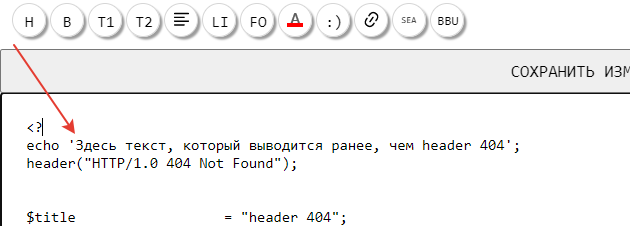
Вывод ошибки отправки header 404
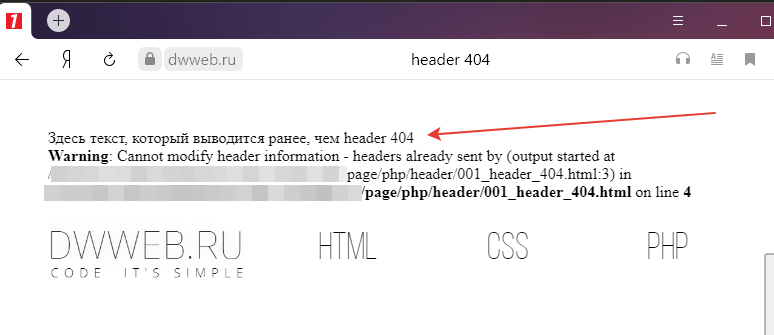
Здесь текст, который выводится ранее, чем header 404
Warning: Cannot modify header information — headers already sent by (output started at
путь/page/php/header/001_header_404.html:3) in
путь/page/php/header/001_header_404.html on line 4
Вывод ошибки отправки header 404 на странице
Для чего отправлять header 404
Чтобы не гадать — по какой из причин вам может понадобится использовать отправку заголовка header 404 -приведу собственную причину использования header 404.
На нашем сайте используется единая точка входа, — по всем запросам в адресной строке… будут перенаправляться на ту страницу, на которую настроена переадресация!
И даже те, страницы, которые не существуют… все равно будут перенаправляться… на главную.
Вот как раз для такого случая…
Естественно, что ничего не понятно!
Я делал специальное видео, где использовал приведенный код!
Видео — использование header 404
Друзья!
Мне очень нужны подписчики!
Пожалуйста подпишись на Дзене!
Заранее спасибо!
Пример отправки header 404
Для того, чтобы разобраться в том, как работает отправка заголовка header 404 нам потребуется какая-то страница, которая не существует!
Вообще любая!
Например такая :
У вас должна открыться такая страница 404 (несколько тем посвятили теме 404)
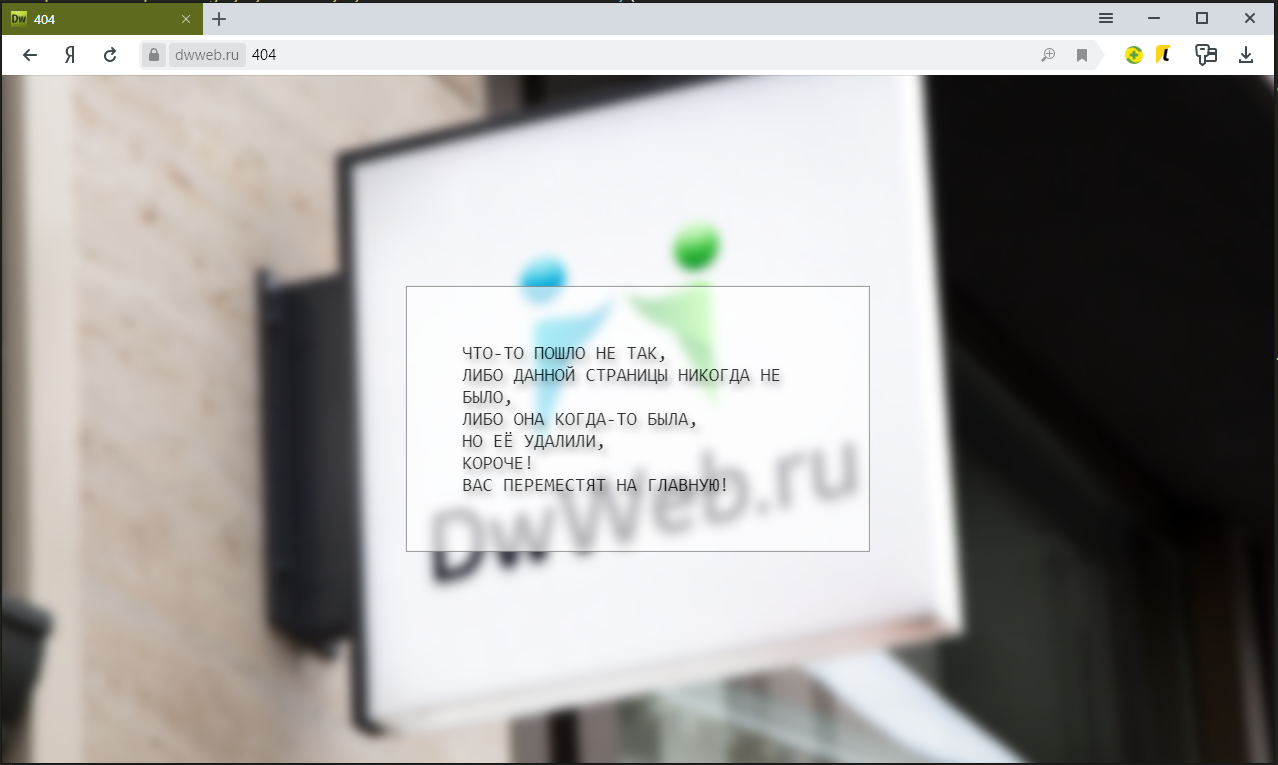
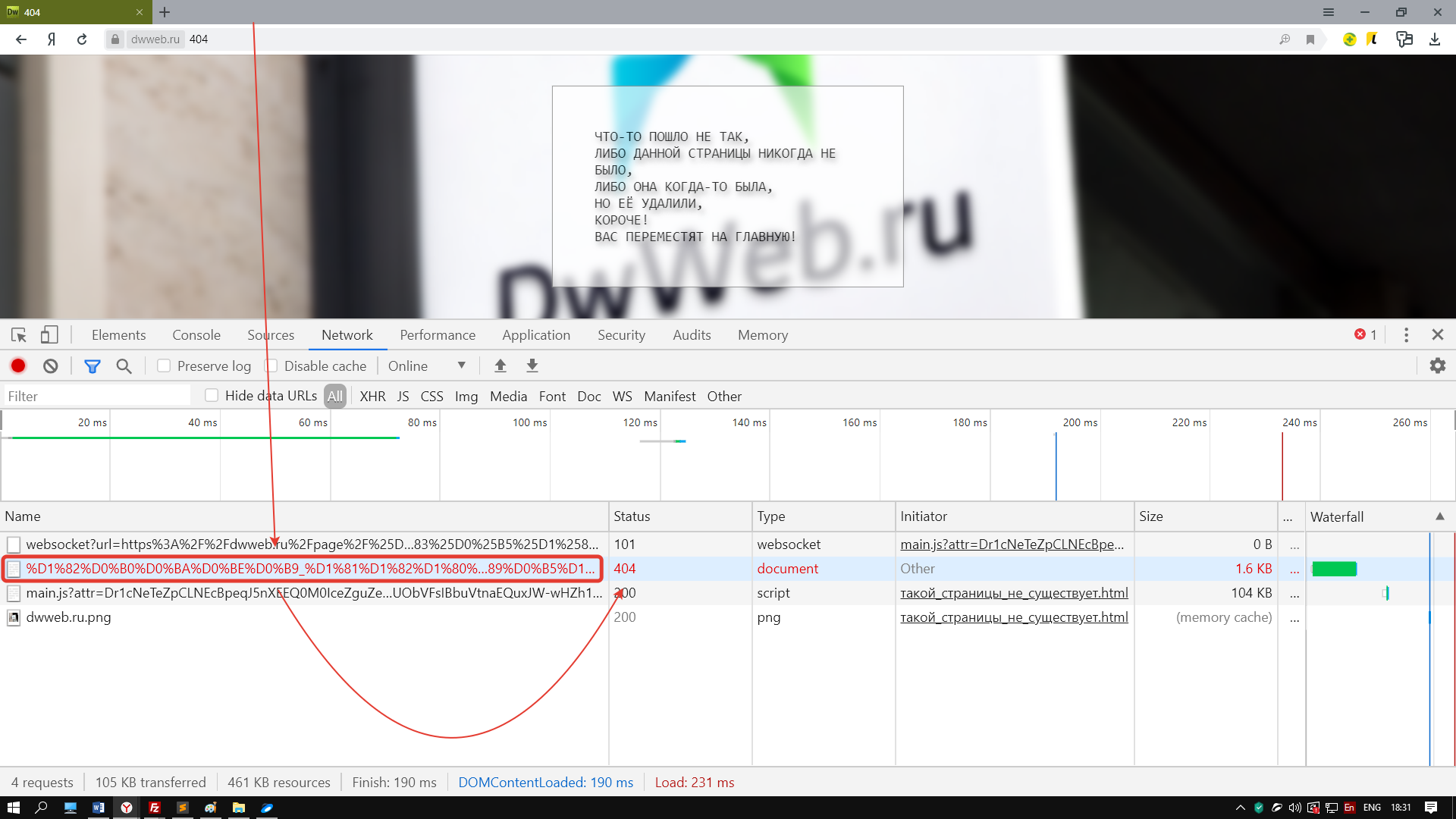
Но где здесь отправленный header 404 через php!? Этот скрин я вам привел специально — если вы захотите, то сделал отдельный архив -> сложил 404 через php + задний фон второй вариант 404 через php
И теперь, чтобы увидеть, где заголовок надо -> нажимаем ctrl + U
Нажмите, чтобы открыть в новом окне.
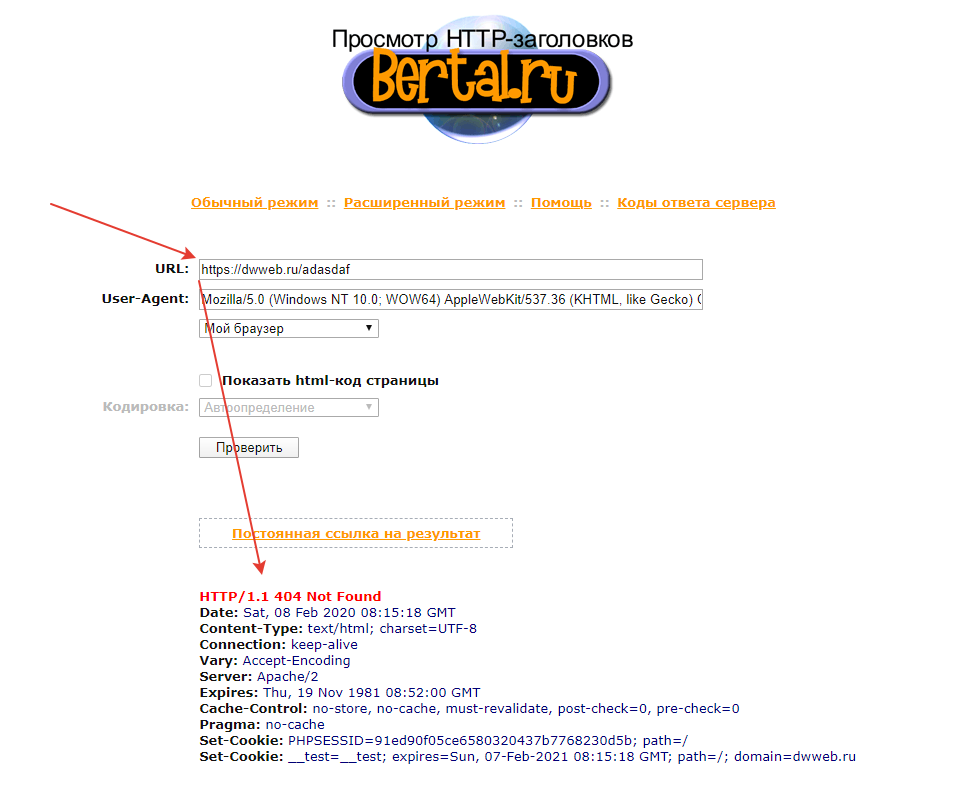
Проверить попал ли в header 404
Как проверить правильно ли был отправлен заголовок с помощью header 404!?
Если у вас возникли проблемы с пониманием того, что происходит заголовками, то существует огромное количество сайтов, которые могут показать всё, что вы отправляете!
Выбрал первый попавший… https://bertal.ru/ — заходим на сайт в вставляем в адресную строку свой адрес страницы.
Нажмите, чтобы открыть в новом окне.
P.S.
Вообще… после случая с санкциями… пошел посмотреть, а что вообще творится со страницами на моем другом сайте и обнаружил, что робот проиндексировал папки(директории) – как отдельные страницы – и описанная тема… как раз востребована была там.
Можете не благодарить, лучше помогите!
Название скрипта :php header 404
COMMENTS+
BBcode
Генерация ошибки 404 средствами PHP
Что такое страница 404
Страница 404 является страницей, которая должна показываться пользователю вместо страницы, на которую он ссылается, но которой уже нет (или, и не было). Вместе с этой страницей, WEB сервер должен передавать заголовок страницы 404.
Зачем нужна страница 404
Генерировать страницу 404 необходимо, во-первых для того чтобы сообщить пользователю об отсутствии запрашиваемой страницы, и во-вторых, отправляемый заголовок сообщит поисковым системам о том, что запрашиваемой страницы не существует, и они не будут индексировать подобные страницы.
Какая должна быть страница 404
Данная страница должна чётко и ясно указать пользователю, что запрашиваемая страница не найдена. Страница 404 должна быть выполнена в общем стиле сайта, чтобы посетитель сразу, визуально понимал, на каком сайте он находится. Эта страница должна быть не только в общем стиле сайта, но и содержать всю навигацию, для того чтобы посетитель мог самостоятельно выполнить поиск нужной информации. И как было сказано выше, в заголовке страницы WEB сервер должен передавать данные об этой странице (404).
Как отправить заголовок страницы 404 средствами PHP
Сделать это можно при помощи функции header:
header(«HTTP/1.0 404 Not Found»);
или можно вот так:
header($_SERVER[‘SERVER_PROTOCOL’].» 404 Not Found»);
Последний пример более универсален, так как определяет версию протокола автоматически, используя элемент суперглобального массива $_SERVER.
Не забываем оставлять комментарии и отзывы, нам важно ваше мнение!
А еcли статья Вам очень понравилась и Вы считаете, что она достойна внимания. Тогда просто поделитесь ею, в социальной сети:
 Я решил перенести большую часть файлов со старого сайта на новый. И у меня возник вопрос — «А не обвинит ли меня Yandex в использовании неуникальных статей?», т.к. у меня одни и те же материалы будут на разных страницах.
Я написал письмо в службу поддержки yandex, и мне пришло письмо, в котором сообщалось, что переживать не надо. Единственно, настоятельно желательно, чтобы я каким-то способом закрыл старые странички от индексирования (через robots.txt, вызов ошибки 404 или перенаправление) и удалил странички из базы по адресу http://webmaster.yandex.ru/delurl.xml. Удалять по указанному адресу желательно, чтобы быстрее прекратилась индексация страниц.
По некоторым причинам я предпочел способ вызова ошибки 404. Ошибка 404 вызывается в том случае, если ресурс на который идет ссылка не обнаружен. И тут я обнаружил, что у меня то и нет вызова этой ошибки, т.е. какие бы данные пользователь не ввел бы на старом сайте, что-то все равно выводится. Такая ситуация на мой взгляд не допустима, и я пошел с ней бороться.
Мой сайт написан был на php, поэтому я очень быстро нашел команду для вызова ошибки 404. Она имеет вид:
header("HTTP/1.0 404 Not Found");
exit;
Казалось бы все просто, но нет же. Никак эти две команды не хотели работать. Тогда я почитал дополнительно материал и выяснил, что header() должна вызываться до отправки любого другого вывода. Т.е. она должна быть исключительно самой первой при выводе, поэтому ее нельзя использовать внутри require_once().
Но как оказалось существуют три замечательные функции, которые позволяют решить эту проблему:
-
ob_start() — задает начало области, которую надо поместить в буфер, я поместил ее самой первой при выводе.
- ob_end_flush() — окончание задания буфер и сразу вывод. Т.е. первые две функции задают область, которую сначала нужно вывести в буфер, а потом сразу вывести.
- ob_end_clean() — очищает буфер, и следующая команда как бы выводится самой первой.
С использованием этих команд организация вызова ошибки 404 выглядит следующим образом:
- Самая первая команда — ob_start()
- Далее идет основное содержание, которое пока копируется в буфер.
- Проверка на предмет вызова ошибки 404. Например, проверка наличия определенного значения. Если после проверки имеются причины вызвать ошибку, то задается код:
ob_end_clean() ;
header("HTTP/1.0 404 Not Found");
exit;
Тем самым будет выдано сообщение об ошибке и осуществлен выход.
- Выводим содержимое буфера командой ob_end_flush(). Идея в том, что если была вызвана ошибка, то сюда не попадем. Если ошибки не было, то выводим буфер.
Далее в файле .htaccess можно указать файл, который будет сопоставляться ошибке 404, но это уже совершенно другая история…
In this tutorial, we are going to show you how to send a “404 Not Found” header using PHP.
This can be especially useful in cases when you need to display a 404 message if a particular database record does not exist.
By sending a 404 HTTP status code to the client, we can tell search engines and other crawlers that the resource does not exist.
To send a 404 to the client, we can use PHP’s http_response_code function like so.
//Send 404 response to client.
http_response_code(404)
//Include custom 404.php message
include 'error/404.php';
//Kill the script.
exit;
Note that this function is only available in PHP version 5.4 and after.
If you are using a PHP version that is older than 5.4, then you will need to use the header function instead.
//Use header function to send a 404
header($_SERVER["SERVER_PROTOCOL"]." 404 Not Found", true, 404);
//Include custom message.
include 'errors/404.php';
//End the script
exit;
In the code above, we.
- Send the response code to the client.
- We include a PHP file that contains our custom “404 Not Found” error. This file is not mandatory, so feel free to remove it if you want to.
- We then terminated the PHP script by calling the exit statement.
If you run one of the code samples above and check the response in your browser’s developer tools, then you will see something like this.
Request URL:http://localhost/test.php
Request Method:GET
Status Code:404 Not Found
Remote Address:[::1]:80
Referrer Policy:no-referrer-when-downgrade
Note the Status Code segment of the server’s HTTP response. This is the 404 header.
When should I use this?
In most cases, your web server will automatically handle 404 errors if a resource does not exist.
However, what happens if your script is dynamic and it selects data from your database? What if you have a dynamic page such as users.php?id=234 and user 234 does not exist?
The file users.php will exist, so your web server will send back a status of “200 OK”, regardless of whether a user with the ID 234 exists or not.
In cases like this, we may need to manually send a 404 Not Found header.
Why isn’t PHP showing the same 404 message as my web server?
You might notice that your web server does not serve its default “404 Not Found” error message when you manually send the header with PHP.
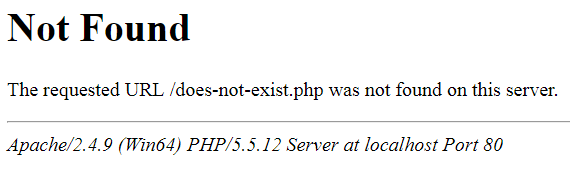
The default message that Apache displays whenever a resource could not be found.
This is because, as far as the web server is concerned, the file does exist and it has already done its job.
One solution to this problem is to make sure that PHP and your web server display the exact same 404 message.
For example, with Apache, you can specify the path of a custom error message by using the ErrorDocument directive.
ErrorDocument 404 /errors/404.php
The Nginx web server also allows you to configure custom error messages.
Website error pages are perhaps one of the most overlooked pieces of a fully rounded website. Not only are they important but they give you the opportunity to have a little fun. Although many web developers rely on server logs to keep an eye out for hits on error pages, I’m going to take a different approach by using a PHP generated email. In addition, we will spice up the design a bit, add basic navigation and link to the website sitemap.
About Error Pages


The most common error page — the one in which you are most likely to be familiar with — is the «404 Not Found page». More people encounter this type of error page than any other. Other common error messages you may have come across are 500 Internal Server Error, 400 Bad Request or 403 Forbidden. Wondering what the number is for? It simply refers to the HTTP code.


Default error pages are quite boring (as you can see above) and offer no purpose to visitors other than letting them know some boring error happened. For these reasons, it is a great idea to provide custom pages for the most common errors encountered. This tutorial will only cover two: the «404 Not Found» and «403 Forbidden».
Check for custom error page support
First, check to make sure your hosting provider allows you to use your own error pages. Almost all of them do, and most of them even provide a configuration area within your control panel to help you quickly create the pages. In this tutorial we will configure an Apache web server (the most common). This is easier than you might think.
Configure .htaccess
Next, connect to your server via FTP or control panel and navigate to the document root directory (usually www or public_html) which contains your website files. We will be looking for the .htaccess file. It is sometimes hidden so make sure you are viewing all files including hidden ones. If your server doesn’t have one, you can create one using any text editor. Make sure to make a backup of the .htaccess file if your server already has one.
Add the following lines to your .htaccess file:
1 |
ErrorDocument 404 /error/404.php |
2 |
ErrorDocument 403 /error/403.php |
The first half (ErrorDocument 404) is telling the server we are going to define the location of the 404 error document. The second half defines the actual location of the error document. In this case we will put it in the «error» directory and call them 404.php and 403.php, respectively.
Now save the .htaccess file and upload it to the document root directory.
Design the Custom Error Pages
It is best to stay with the same design as your website already uses so that you don’t confuse your visitors and risk losing them. You should also include helpful elements such as a polite error message, suggested links, a search feature, or a link to your sitemap. These features will depend on the level of content your website provides and what you feel will be most helpful.


As you can see below, the 404 Not Found page for Nettuts+ has stated the error and emphasized the search feature by including it in the body beneath the error message. You could take this a step further by including a short list of links to possible pages which might encourage the visitor to continue exploring more of the site (keep it simple and short though) -or even a humorous image (every one likes laughing right?). For small websites it may be a good idea to include a visible sitemap as well.


Here is something I put together for this tutorial that you can use for your website as well (included in the download above). It’s very simple so you will be able to put the content of it directly into your existing website template. As you can see, I attempted to include a little bit of a humorous element while also stating the error politely and including some options to help the visitor either find what they were looking for or continue browsing the website.
You’ll notice it does not specify the HTTP error code in the body of the page. Instead I chose to only use the error code in the title of the page. The reason for this is to keep things as simple and user friendly as possible. Most people don’t care what 404 or 403 means, they want to know what’s going on in plain English. For people who want the error code, it is still available via the title.
If you want to see some really great 404 designs visit:
- http://www.smashingmagazine.com/2009/01/29/404-error-pages-reloaded-2/
- http://www.smashingmagazine.com/2007/08/17/404-error-pages-reloaded/
- http://www.smashingmagazine.com/2007/07/25/wanted-your-404-error-pages/
- http://blogof.francescomugnai.com/2008/08/the-100-most-funny-and-unusual-404-error-pages/
The Auto-Mailer PHP and Why We Will Use Email Notification
This is the part of the tutorial in which some web guru’s might argue with. You can use your web server’s logs to check for error pages and much, much more. Why do I choose email notifications?
- I don’t want to log into my server every day and dig through all that extra information.
- I am available by email almost literally all day, the fastest way to reach me is email (or twitter). With this in mind, I want to know about 404 and 403 errors fairly quick so email is best.
- An increasing number of people are starting websites, while most of those people know almost nothing about web hosting let alone server logs. These people will only be running small sites; so email is ideal.
- Being notified right away allows me to quickly take action if a website of mine is being «harvested» (ThemeForest templates), if someone is attempting to access something restricted repeatedly or if I have a broken link somewhere.
So with all that said, let’s get on with the code shall we!
The Code
First, we will create a file named error-mailer.php which will be used to collect information about our visitor and send the email. Once you have created the file we will start by specifying our email and email settings.
1 |
<?php
|
2 |
|
3 |
# The email address to send to
|
4 |
$to_email = 'YOUR-EMAIL@DOMAIN.com'; |
5 |
|
6 |
# The subject of the email, currently set as 404 Not Found Error or 403 Forbidden Error
|
7 |
$email_subject = $error_code.' Error'; |
8 |
|
9 |
# The email address you want the error to appear from
|
10 |
$from_email = 'FROM-EMAIL@DOMAIN.COM'; |
11 |
|
12 |
# Who or where you want the error to appear from
|
13 |
$from_name = 'YourDomainName.com'; |
Then we will collect information about our visitor such as IP address, requested URI, User Agent, etc. The following code will collect that information.
1 |
# Gather visitor information
|
2 |
$ip = getenv ("REMOTE_ADDR"); // IP Address |
3 |
$server_name = getenv ("SERVER_NAME"); // Server Name |
4 |
$request_uri = getenv ("REQUEST_URI"); // Requested URI |
5 |
$http_ref = getenv ("HTTP_REFERER"); // HTTP Referer |
6 |
$http_agent = getenv ("HTTP_USER_AGENT"); // User Agent |
7 |
$error_date = date("D M j Y g:i:s a T"); // Error Date |
Now we will write the script to email the information to us with the details specified earlier.
1 |
# Send the email notification
|
2 |
require_once('phpMailer/class.phpmailer.php'); |
3 |
$mail = new PHPMailer(); |
4 |
|
5 |
$mail->From = $from_email; |
6 |
$mail->FromName = $from_name; |
7 |
$mail->Subject = $email_subject; |
8 |
$mail->AddAddress($to_email); |
9 |
$mail->Body = |
10 |
"There was a ".$error_code." error on the ".$server_name." domain". |
11 |
"nnDetailsn----------------------------------------------------------------------". |
12 |
"nWhen: ".$error_date. |
13 |
"n(Who) IP Address: ".$ip. |
14 |
"n(What) Tried to Access: http://".$server_name.$request_uri. |
15 |
"n(From where) HTTP Referer: ".$http_ref. |
16 |
"nnUser Agent: ".$http_agent; |
17 |
|
18 |
$mail->Send(); |
19 |
|
20 |
?>
|
We are using the phpMailer class to do this as demonstrated by Jeffrey via the ThemeForest blog to create a nice AJAX contact form. This version of the phpMailer class is for PHP 5/6 so if your server is running PHP 4 you will need to use the corresponding version by downloading it here.
404.php and 403.php Error Pages
The last thing we need to do is customize the error pages we designed earlier by sending the proper headers and set the $error_code variable by inserting the following code at the beginning of each page respectively (separated by ——-).
1 |
<?php
|
2 |
|
3 |
header("HTTP/1.0 404 Not Found"); |
4 |
$error_code = '404 Not Found'; // Specify the error code |
5 |
require_once('error-mailer.php'); // Include the error mailer script |
6 |
|
7 |
?>
|
8 |
------- |
9 |
<?php
|
10 |
|
11 |
header("HTTP/1.0 403 Forbidden"); |
12 |
$error_code = '403 Forbidden'; // Specify the error code |
13 |
require_once('error-mailer.php'); // Include the error mailer script |
14 |
|
15 |
?>
|
What we are doing here first is setting the correct HTTP header to return 404 Not Found and 403 Forbidden, respectively. When search engines accidentally land on this page we want to make sure they know what kind of page it is, instead of thinking that it’s a normal web page named 404.php or 403.php.
Then we specify the error code to be used in the mailer script and include the mailer script so it can do its work. This way if we make a change to the mailer script, we only need to edit one file instead of two or more (if you setup additional custom error pages).
Conclusion
There you have it! Your own custom error pages that are search engine friendly, and let you know via email when you’ve had a visitor as well as all the information you will need to fix any problems. A few last things to consider:
- Internet Explorer requires error pages that are at least 512 byes in size (if you use the example files you’ll be fine)
- High traffic websites have the potential to generate A LOT of emails so make sure you setup some sort of email filter for these error notifications so they don’t flood your inbox. I use Gmail so I just have a label and filter setup for these emails.
Did you find this post useful?

I’m a freelance designer and web developer, an author and reviewer at ThemeForest.net, a writer for the ThemeForest blog and occasionally net.tutsplus.com. When I actually manage to get away from the computer, I’m hiking, watching movies or spending time with my girlfriend in sunny Las Vegas. – View my web.appstorm.net posts here.
Если пользователь вобьет в адресную строку
некорректный URL мы должны показать страницу
с ошибкой. Пусть контент страницы с ошибкой
будет хранится в соответствующем файле:
<div>

	page not found

</div>
Для того, чтобы определить некорректность
запроса, нам необходимо проверить существование
файла контента, соответствующего запрошенному URL:
<?php

	$path = 'view' . $url . '.php';
if (file_exists($path)) {
// файл есть
} else {
// файла нет
}
?>
Давайте будем отдавать файл контента, если
он есть, и файл с ошибкой, если контента нет:
<?php

	$path = 'view' . $url . '.php';
if (file_exists($path)) {
$content = file_get_contents($path);
} else {
$content = file_get_contents('view/404.php');
}
?>
В случае с ошибкой мы должны отправить в
браузер заголовок с 404 ошибкой, чтобы
явно сообщить о том, что страница не найдена.
Сделаем это:
<?php

	$path = 'view' . $url . '.php';
if (file_exists($path)) {
$content = file_get_contents($path);
} else {
header('HTTP/1.0 404 Not Found');
$content = file_get_contents('view/404.php');
}
?>
Реализуйте в вашем движке отдачу страницы
с 404 ошибкой.