- Главная»
- Уроки»
- PHP»
- Создаем единую страницу для обработки ошибок
- Метки урока:
- php
- кодинг
- разное
Создаем единую страницу для обработки ошибок
В данном уроке представлено очень простое решение для обработки различных ошибок HTTP, таких как 404, 500 и так далее, в одном файле PHP. Нужно создать массив кодов ошибок и установить правила перенаправления на наш PHP файл. То есть, можно использовать одну страницу для обработки нескольких ошибок.
Перенаправление
В файле .htaccess вашего сервера нужно установить правила для обработки ошибок. В нашем случае мы будем перенаправлять все ошибки в наш файл errors.php, который будет формировать страницу HTML для посетителя. Добавляем в файл .htaccess следующие правила:
ErrorDocument 400 /errors.php
ErrorDocument 403 /errors.php
ErrorDocument 404 /errors.php
ErrorDocument 405 /errors.php
ErrorDocument 408 /errors.php
ErrorDocument 500 /errors.php
ErrorDocument 502 /errors.php
ErrorDocument 504 /errors.php
PHP
Теперь создаем файл errors.php, который должен располагаться в корневом каталоге вашего сервера (так как такое его местоположение установлено в заданных нами выше правилах в файле .htaccess).
$status = $_SERVER['REDIRECT_STATUS'];
$codes = array(
       400 => array('400 Плохой запрос', 'Запрос не может быть обработан из-за синтаксической ошибки.'),
       403 => array('403 Запрещено', 'Сервер отказывает в выполнении вашего запроса.'),
       404 => array('404 Не найдено', 'Запрашиваемая страница не найдена на сервере.'),
       405 => array('405 Метод не допускается', 'Указанный в запросе метод не допускается для заданного ресурса.'),
       408 => array('408 Время ожидания истекло', 'Ваш браузер не отправил информацию на сервер за отведенное время.'),
       500 => array('500 Внутренняя ошибка сервера', 'Запрос не может быть обработан из-за внутренней ошибки сервера.'),
       502 => array('502 Плохой шлюз', 'Сервер получил неправильный ответ при попытке передачи запроса.'),
       504 => array('504 Истекло время ожидания шлюза', 'Вышестоящий сервер не ответил за установленное время.'),
);

$title = $codes[$status][0];
$message = $codes[$status][1];
if ($title == false || strlen($status) != 3) {
       $message = 'Код ошибки HTTP не правильный.';
}

echo '<h1>Внимание! Обнаружена ошибка '.$title.'!</h1>
<p>'.$message.'</p>';
Готово!
Конечно, код PHP может формировать и более информативную страницу для пользователя. При формировании разметки стоит учесть рекомендации для страниц, выводящих информацию об ошибках.
5 последних уроков рубрики «PHP»
-

Фильтрация данных с помощью zend-filter
Когда речь идёт о безопасности веб-сайта, то фраза «фильтруйте всё, экранируйте всё» всегда будет актуальна. Сегодня поговорим о фильтрации данных.
-

Контекстное экранирование с помощью zend-escaper
Обеспечение безопасности веб-сайта — это не только защита от SQL инъекций, но и протекция от межсайтового скриптинга (XSS), межсайтовой подделки запросов (CSRF) и от других видов атак. В частности, вам нужно очень осторожно подходить к формированию HTML, CSS и JavaScript кода.
-

Подключение Zend модулей к Expressive
Expressive 2 поддерживает возможность подключения других ZF компонент по специальной схеме. Не всем нравится данное решение. В этой статье мы расскажем как улучшили процесс подключение нескольких модулей.
-

Совет: отправка информации в Google Analytics через API
Предположим, что вам необходимо отправить какую-то информацию в Google Analytics из серверного скрипта. Как это сделать. Ответ в этой заметке.
-

Подборка PHP песочниц
Подборка из нескольких видов PHP песочниц. На некоторых вы в режиме online сможете потестить свой код, но есть так же решения, которые можно внедрить на свой сайт.
mjt at jpeto dot net 
13 years ago
I strongly recommend, that you use
header($_SERVER["SERVER_PROTOCOL"]." 404 Not Found");
instead of
header("HTTP/1.1 404 Not Found");
I had big troubles with an Apache/2.0.59 (Unix) answering in HTTP/1.0 while I (accidentially) added a "HTTP/1.1 200 Ok" - Header.
Most of the pages were displayed correct, but on some of them apache added weird content to it:
A 4-digits HexCode on top of the page (before any output of my php script), seems to be some kind of checksum, because it changes from page to page and browser to browser. (same code for same page and browser)
"0" at the bottom of the page (after the complete output of my php script)
It took me quite a while to find out about the wrong protocol in the HTTP-header.
Marcel G 
12 years ago
Several times this one is asked on the net but an answer could not be found in the docs on php.net ...
If you want to redirect an user and tell him he will be redirected, e. g. "You will be redirected in about 5 secs. If not, click here." you cannot use header( 'Location: ...' ) as you can't sent any output before the headers are sent.
So, either you have to use the HTML meta refresh thingy or you use the following:
<?php
header( "refresh:5;url=wherever.php" );
echo 'You'll be redirected in about 5 secs. If not, click <a href="wherever.php">here</a>.';
?>
Hth someone
Dylan at WeDefy dot com 
15 years ago
A quick way to make redirects permanent or temporary is to make use of the $http_response_code parameter in header().
<?php
// 301 Moved Permanently
header("Location: /foo.php",TRUE,301);// 302 Found
header("Location: /foo.php",TRUE,302);
header("Location: /foo.php");// 303 See Other
header("Location: /foo.php",TRUE,303);// 307 Temporary Redirect
header("Location: /foo.php",TRUE,307);
?>
The HTTP status code changes the way browsers and robots handle redirects, so if you are using header(Location:) it's a good idea to set the status code at the same time. Browsers typically re-request a 307 page every time, cache a 302 page for the session, and cache a 301 page for longer, or even indefinitely. Search engines typically transfer "page rank" to the new location for 301 redirects, but not for 302, 303 or 307. If the status code is not specified, header('Location:') defaults to 302.
mandor at mandor dot net 
16 years ago
When using PHP to output an image, it won't be cached by the client so if you don't want them to download the image each time they reload the page, you will need to emulate part of the HTTP protocol.
Here's how:
<?php// Test image.
$fn = '/test/foo.png';// Getting headers sent by the client.
$headers = apache_request_headers(); // Checking if the client is validating his cache and if it is current.
if (isset($headers['If-Modified-Since']) && (strtotime($headers['If-Modified-Since']) == filemtime($fn))) {
// Client's cache IS current, so we just respond '304 Not Modified'.
header('Last-Modified: '.gmdate('D, d M Y H:i:s', filemtime($fn)).' GMT', true, 304);
} else {
// Image not cached or cache outdated, we respond '200 OK' and output the image.
header('Last-Modified: '.gmdate('D, d M Y H:i:s', filemtime($fn)).' GMT', true, 200);
header('Content-Length: '.filesize($fn));
header('Content-Type: image/png');
print file_get_contents($fn);
}?>
That way foo.png will be properly cached by the client and you'll save bandwith. :)
php at ober-mail dot de 
3 years ago
Since PHP 5.4, the function `http_response_code()` can be used to set the response code instead of using the `header()` function, which requires to also set the correct protocol version (which can lead to problems, as seen in other comments).
bebertjean at yahoo dot fr 
14 years ago
If using the 'header' function for the downloading of files, especially if you're passing the filename as a variable, remember to surround the filename with double quotes, otherwise you'll have problems in Firefox as soon as there's a space in the filename.
So instead of typing:
<?php
header("Content-Disposition: attachment; filename=" . basename($filename));
?>
you should type:
<?php
header("Content-Disposition: attachment; filename="" . basename($filename) . """);
?>
If you don't do this then when the user clicks on the link for a file named "Example file with spaces.txt", then Firefox's Save As dialog box will give it the name "Example", and it will have no extension.
See the page called "Filenames_with_spaces_are_truncated_upon_download" at
http://kb.mozillazine.org/ for more information. (Sorry, the site won't let me post such a long link...)
tim at sharpwebdevelopment dot com 
4 years ago
The header call can be misleading to novice php users.
when "header call" is stated, it refers the the top leftmost position of the file and not the "header()" function itself.
"<?php" opening tag must be placed before anything else, even whitespace.
nospam at nospam dot com 
6 years ago
<?php// Response codes behaviors when using
header('Location: /target.php', true, $code) to forward user to another page:$code = 301;
// Use when the old page has been "permanently moved and any future requests should be sent to the target page instead. PageRank may be transferred."$code = 302; (default)
// "Temporary redirect so page is only cached if indicated by a Cache-Control or Expires header field."$code = 303;
// "This method exists primarily to allow the output of a POST-activated script to redirect the user agent to a selected resource. The new URI is not a substitute reference for the originally requested resource and is not cached."$code = 307;
// Beware that when used after a form is submitted using POST, it would carry over the posted values to the next page, such if target.php contains a form processing script, it will process the submitted info again!
// In other words, use 301 if permanent, 302 if temporary, and 303 if a results page from a submitted form.
// Maybe use 307 if a form processing script has moved.
?>
yjf_victor 
7 years ago
According to the RFC 6226 (https://tools.ietf.org/html/rfc6266), the only way to send Content-Disposition Header with encoding is:
Content-Disposition: attachment;
filename*= UTF-8''%e2%82%ac%20rates
for backward compatibility, what should be sent is:
Content-Disposition: attachment;
filename="EURO rates";
filename*=utf-8''%e2%82%ac%20rates
As a result, we should use
<?php
$filename = '中文文件名.exe'; // a filename in Chinese characters$contentDispositionField = 'Content-Disposition: attachment; '
. sprintf('filename="%s"; ', rawurlencode($filename))
. sprintf("filename*=utf-8''%s", rawurlencode($filename));header('Content-Type: application/octet-stream');header($contentDispositionField);readfile('file_to_download.exe');
?>
I have tested the code in IE6-10, firefox and Chrome.
sk89q 
14 years ago
You can use HTTP's etags and last modified dates to ensure that you're not sending the browser data it already has cached.
<?php
$last_modified_time = filemtime($file);
$etag = md5_file($file);
header("Last-Modified: ".gmdate("D, d M Y H:i:s", $last_modified_time)." GMT");
header("Etag: $etag");
if (@
strtotime($_SERVER['HTTP_IF_MODIFIED_SINCE']) == $last_modified_time ||
trim($_SERVER['HTTP_IF_NONE_MATCH']) == $etag) {
header("HTTP/1.1 304 Not Modified");
exit;
}
?>
David 
5 years ago
It seems the note saying the URI must be absolute is obsolete. Found on https://en.wikipedia.org/wiki/HTTP_location
«An obsolete version of the HTTP 1.1 specifications (IETF RFC 2616) required a complete absolute URI for redirection.[2] The IETF HTTP working group found that the most popular web browsers tolerate the passing of a relative URL[3] and, consequently, the updated HTTP 1.1 specifications (IETF RFC 7231) relaxed the original constraint, allowing the use of relative URLs in Location headers.»
ben at indietorrent dot org 
10 years ago
Be aware that sending binary files to the user-agent (browser) over an encrypted connection (SSL/TLS) will fail in IE (Internet Explorer) versions 5, 6, 7, and 8 if any of the following headers is included:
Cache-control:no-store
Cache-control:no-cache
See: http://support.microsoft.com/kb/323308
Workaround: do not send those headers.
Also, be aware that IE versions 5, 6, 7, and 8 double-compress already-compressed files and do not reverse the process correctly, so ZIP files and similar are corrupted on download.
Workaround: disable compression (beyond text/html) for these particular versions of IE, e.g., using Apache's "BrowserMatch" directive. The following example disables compression in all versions of IE:
BrowserMatch ".*MSIE.*" gzip-only-text/html
dev at omikrosys dot com 
13 years ago
Just to inform you all, do not get confused between Content-Transfer-Encoding and Content-Encoding
Content-Transfer-Encoding specifies the encoding used to transfer the data within the HTTP protocol, like raw binary or base64. (binary is more compact than base64. base64 having 33% overhead).
Eg Use:- header('Content-Transfer-Encoding: binary');
Content-Encoding is used to apply things like gzip compression to the content/data.
Eg Use:- header('Content-Encoding: gzip');
chris at ocproducts dot com 
6 years ago
Note that 'session_start' may overwrite your custom cache headers.
To remedy this you need to call:
session_cache_limiter('');
...after you set your custom cache headers. It will tell the PHP session code to not do any cache header changes of its own.
shutout2730 at yahoo dot com 
14 years ago
It is important to note that headers are actually sent when the first byte is output to the browser. If you are replacing headers in your scripts, this means that the placement of echo/print statements and output buffers may actually impact which headers are sent. In the case of redirects, if you forget to terminate your script after sending the header, adding a buffer or sending a character may change which page your users are sent to.
This redirects to 2.html since the second header replaces the first.
<?php
header("location: 1.html");
header("location: 2.html"); //replaces 1.html
?>
This redirects to 1.html since the header is sent as soon as the echo happens. You also won't see any "headers already sent" errors because the browser follows the redirect before it can display the error.
<?php
header("location: 1.html");
echo "send data";
header("location: 2.html"); //1.html already sent
?>
Wrapping the previous example in an output buffer actually changes the behavior of the script! This is because headers aren't sent until the output buffer is flushed.
<?php
ob_start();
header("location: 1.html");
echo "send data";
header("location: 2.html"); //replaces 1.html
ob_end_flush(); //now the headers are sent
?>
jp at webgraphe dot com 
19 years ago
A call to session_write_close() before the statement
<?php
header("Location: URL");
exit();
?>
is recommended if you want to be sure the session is updated before proceeding to the redirection.
We encountered a situation where the script accessed by the redirection wasn't loading the session correctly because the precedent script hadn't the time to update it (we used a database handler).
JP.
David Spector 
1 year ago
Please note that there is no error checking for the header command, either in PHP, browsers, or Web Developer Tools.
If you use something like "header('text/javascript');" to set the MIME type for PHP response text (such as for echoed or Included data), you will get an undiagnosed failure.
The proper MIME-setting function is "header('Content-type: text/javascript');".
mzheng[no-spam-thx] at ariba dot com 
14 years ago
For large files (100+ MBs), I found that it is essential to flush the file content ASAP, otherwise the download dialog doesn't show until a long time or never.
<?php
header("Content-Disposition: attachment; filename=" . urlencode($file));
header("Content-Type: application/force-download");
header("Content-Type: application/octet-stream");
header("Content-Type: application/download");
header("Content-Description: File Transfer");
header("Content-Length: " . filesize($file));
flush(); // this doesn't really matter.$fp = fopen($file, "r");
while (!feof($fp))
{
echo fread($fp, 65536);
flush(); // this is essential for large downloads
}
fclose($fp);
?>
razvan_bc at yahoo dot com 
5 years ago
<?php
/* This will give an error. Note the output
 * above, which is before the header() call */
header('Location: http://www.example.com/');
exit;
?>

this example is pretty good BUT in time you use "exit" the parser will still work to decide what's happening next the "exit" 's action should do ('cause if you check the manual exit works in others situations too).
SO MY POINT IS : you should use :
<?php
header
('Location: http://www.example.com/');
die();?>
'CAUSE all die function does is to stop the script ,there is no other place for interpretation and the scope you choose to break the action of your script is quickly DONE!!!
there are many situations with others examples and the right choose for small parts of your scrips that make differences when you write your php framework at well!
Thanks Rasmus Lerdorf and his team to wrap off parts of unusual php functionality ,php 7 roolez!!!!!
Angelica Perduta 
2 years ago
I made a script that generates an optimized image for use on web pages using a 404 script to resize and reduce original images, but on some servers it was generating the image but then not using it due to some kind of cache somewhere of the 404 status. I managed to get it to work with the following and although I don't quite understand it, I hope my posting here does help others with similar issues:
header_remove();
header("Cache-Control: no-store, no-cache, must-revalidate, max-age=0");
header("Cache-Control: post-check=0, pre-check=0", false);
header("Pragma: no-cache");
// ... and then try redirecting
// 201 = The request has been fulfilled, resulting in the creation of a new resource however it's still not loading
// 302 "moved temporarily" does seems to load it!
header("location:$dst", FALSE, 302); // redirect to the file now we have it
scott at lucentminds dot com 
13 years ago
If you want to remove a header and keep it from being sent as part of the header response, just provide nothing as the header value after the header name. For example...
PHP, by default, always returns the following header:
"Content-Type: text/html"
Which your entire header response will look like
HTTP/1.1 200 OK
Server: Apache/2.2.11 (Unix)
X-Powered-By: PHP/5.2.8
Date: Fri, 16 Oct 2009 23:05:07 GMT
Content-Type: text/html; charset=UTF-8
Connection: close
If you call the header name with no value like so...
<?php
header
( 'Content-Type:' );?>
Your headers now look like this:
HTTP/1.1 200 OK
Server: Apache/2.2.11 (Unix)
X-Powered-By: PHP/5.2.8
Date: Fri, 16 Oct 2009 23:05:07 GMT
Connection: close
Vinay Kotekar 
8 years ago
Saving php file in ANSI  no isuess but when saving the file in UTF-8 format for various reasons remember to save the file without any BOM ( byte-order mark) support.
Otherwise you will face problem of headers not being properly sent
eg.
<?php header("Set-Cookie: name=user");?>

Would give something like this :-
Warning: Cannot modify header information - headers already sent by (output started at C:wwwinfo.php:1) in C:wwwinfo.php on line 1
Cody G. 
12 years ago
After lots of research and testing, I'd like to share my findings about my problems with Internet Explorer and file downloads.
Take a look at this code, which replicates the normal download of a Javascript:
<?php
if(strstr($_SERVER["HTTP_USER_AGENT"],"MSIE")==false) {
header("Content-type: text/javascript");
header("Content-Disposition: inline; filename="download.js"");
header("Content-Length: ".filesize("my-file.js"));
} else {
header("Content-type: application/force-download");
header("Content-Disposition: attachment; filename="download.js"");
header("Content-Length: ".filesize("my-file.js"));
}
header("Expires: Fri, 01 Jan 2010 05:00:00 GMT");
if(strstr($_SERVER["HTTP_USER_AGENT"],"MSIE")==false) {
header("Cache-Control: no-cache");
header("Pragma: no-cache");
}
include("my-file.js");
?>
Now let me explain:
I start out by checking for IE, then if not IE, I set Content-type (case-sensitive) to JS and set Content-Disposition (every header is case-sensitive from now on) to inline, because most browsers outside of IE like to display JS inline. (User may change settings). The Content-Length header is required by some browsers to activate download box. Then, if it is IE, the "application/force-download" Content-type is sometimes required to show the download box. Use this if you don't want your PDF to display in the browser (in IE). I use it here to make sure the box opens. Anyway, I set the Content-Disposition to attachment because I already know that the box will appear. Then I have the Content-Length again.
Now, here's my big point. I have the Cache-Control and Pragma headers sent only if not IE. THESE HEADERS WILL PREVENT DOWNLOAD ON IE!!! Only use the Expires header, after all, it will require the file to be downloaded again the next time. This is not a bug! IE stores downloads in the Temporary Internet Files folder until the download is complete. I know this because once I downloaded a huge file to My Documents, but the Download Dialog box put it in the Temp folder and moved it at the end. Just think about it. If IE requires the file to be downloaded to the Temp folder, setting the Cache-Control and Pragma headers will cause an error!
I hope this saves someone some time!
~Cody G.
Anonymous 
13 years ago
I just want to add, becuase I see here lots of wrong formated headers.
1. All used headers have first letters uppercase, so you MUST follow this. For example:
Location, not location
Content-Type, not content-type, nor CONTENT-TYPE
2. Then there MUST be colon and space, like
good: header("Content-Type: text/plain");
wrong: header("Content-Type:text/plain");
3. Location header MUST be absolute uri with scheme, domain, port, path, etc.
good: header("Location: http://www.example.com/something.php?a=1");
4. Relative URIs are NOT allowed
wrong: Location: /something.php?a=1
wrong: Location: ?a=1
It will make proxy server and http clients happier.
Refugnic 
12 years ago
My files are in a compressed state (bz2). When the user clicks the link, I want them to get the uncompressed version of the file.
After decompressing the file, I ran into the problem, that the download dialog would always pop up, even when I told the dialog to 'Always perform this operation with this file type'.
As I found out, the problem was in the header directive 'Content-Disposition', namely the 'attachment' directive.
If you want your browser to simulate a plain link to a file, either change 'attachment' to 'inline' or omit it alltogether and you'll be fine.
This took me a while to figure out and I hope it will help someone else out there, who runs into the same problem.
bMindful at fleetingiamge dot org 
19 years ago
If you haven't used, HTTP Response 204 can be very convenient. 204 tells the server to immediately termiante this request. This is helpful if you want a javascript (or similar) client-side function to execute a server-side function without refreshing or changing the current webpage. Great for updating database, setting global variables, etc.
header("status: 204"); (or the other call)
header("HTTP/1.0 204 No Response");
nobileelpirata at hotmail dot com 
15 years ago
This is the Headers to force a browser to use fresh content (no caching) in HTTP/1.0 and HTTP/1.1:
<?PHP
header( 'Expires: Sat, 26 Jul 1997 05:00:00 GMT' );
header( 'Last-Modified: ' . gmdate( 'D, d M Y H:i:s' ) . ' GMT' );
header( 'Cache-Control: no-store, no-cache, must-revalidate' );
header( 'Cache-Control: post-check=0, pre-check=0', false );
header( 'Pragma: no-cache' );
?>
jamie 
14 years ago
The encoding of a file is discovered by the Content-Type, either in the HTML meta tag or as part of the HTTP header. Thus, the server and browser does not need - nor expect - a Unicode file to begin with a BOM mark. BOMs can confuse *nix systems too. More info at http://unicode.org/faq/utf_bom.html#bom1
On another note: Safari can display CMYK images (at least the OS X version, because it uses the services of QuickTime)
er dot ellison dot nyc at gmail dot com 
7 years ago
DO NOT PUT space between location and the colon that comes after that ,
// DO NOT USE THIS :
header("Location : #whatever"); // -> will not work !
// INSTEAD USE THIS ->
header("Location: #wahtever"); // -> will work forever !
hamza dot eljaouhari dot etudes at gmail dot com 
4 years ago
// Beware that adding a space between the keyword "Location" and the colon causes an Internal Sever Error
//This line causes the error
7
header('Location : index.php&controller=produit&action=index');
// While It must be written without the space
header('Location: index.php&controller=produit&action=index');
ASchmidt at Anamera dot net 
4 years ago
Setting the "Location: " header has another undocumented side-effect!
It will also disregard any expressly set "Content-Type: " and forces:
"Content-Type: text/html; charset=UTF-8"
The HTTP RFCs don't call for such a drastic action. They simply state that a redirect content SHOULD include a link to the destination page (in which case ANY HTML compatible content type would do). But PHP even overrides a perfectly standards-compliant
"Content-Type: application/xhtml+xml"!
cedric at gn dot apc dot org 
12 years ago
Setting a Location header "returns a REDIRECT (302) status code to the browser unless the 201 or a 3xx status code has already been set". If you are sending a response to a POST request, you might want to look at RFC 2616 sections 10.3.3 and 10.3.4. It is suggested that if you want the browser to immediately GET the resource in the Location header in this circumstance, you should use a 303 status code not the 302 (with the same link as hypertext in the body for very old browsers). This may have (rare) consequences as mentioned in bug 42969.
My file .htaccess handles all requests from /word_here to my internal endpoint /page.php?name=word_here. The PHP script then checks if the requested page is in its array of pages.
If not, how can I simulate an error 404?
I tried this, but it didn’t result in my 404 page configured via ErrorDocument in the .htaccess showing up.
header($_SERVER["SERVER_PROTOCOL"]." 404 Not Found");
Am I right in thinking that it’s wrong to redirect to my error 404 page?

asked Sep 4, 2009 at 19:29

2
The up-to-date answer (as of PHP 5.4 or newer) for generating 404 pages is to use http_response_code:
<?php
http_response_code(404);
include('my_404.php'); // provide your own HTML for the error page
die();
die() is not strictly necessary, but it makes sure that you don’t continue the normal execution.
answered Jan 11, 2017 at 14:28

bladeblade
11.3k7 gold badges36 silver badges37 bronze badges
2
What you’re doing will work, and the browser will receive a 404 code. What it won’t do is display the «not found» page that you might be expecting, e.g.:
Not Found
The requested URL /test.php was not found on this server.
That’s because the web server doesn’t send that page when PHP returns a 404 code (at least Apache doesn’t). PHP is responsible for sending all its own output. So if you want a similar page, you’ll have to send the HTML yourself, e.g.:
<?php
header($_SERVER["SERVER_PROTOCOL"]." 404 Not Found", true, 404);
include("notFound.php");
?>
You could configure Apache to use the same page for its own 404 messages, by putting this in httpd.conf:
ErrorDocument 404 /notFound.php

Kzqai
22.4k24 gold badges104 silver badges134 bronze badges
answered Sep 4, 2009 at 19:50

JW.JW.
50.1k36 gold badges114 silver badges141 bronze badges
3
Try this:
<?php
header("HTTP/1.0 404 Not Found");
?>
answered Sep 4, 2009 at 19:36

Ates GoralAtes Goral
136k26 gold badges135 silver badges190 bronze badges
2
Create custom error pages through .htaccess file
1. 404 — page not found
 RewriteEngine On
 ErrorDocument 404 /404.html
2. 500 — Internal Server Error
RewriteEngine On
ErrorDocument 500 /500.html
3. 403 — Forbidden
RewriteEngine On
ErrorDocument 403 /403.html
4. 400 — Bad request
RewriteEngine On
ErrorDocument 400 /400.html
5. 401 — Authorization Required
RewriteEngine On
ErrorDocument 401 /401.html
You can also redirect all error to single page. like
RewriteEngine On
ErrorDocument 404 /404.html
ErrorDocument 500 /404.html
ErrorDocument 403 /404.html
ErrorDocument 400 /404.html
ErrorDocument 401 /401.html
answered Mar 30, 2016 at 10:34

Irshad KhanIrshad Khan
5,5162 gold badges42 silver badges39 bronze badges
1
Did you remember to die() after sending the header? The 404 header doesn’t automatically stop processing, so it may appear not to have done anything if there is further processing happening.
It’s not good to REDIRECT to your 404 page, but you can INCLUDE the content from it with no problem. That way, you have a page that properly sends a 404 status from the correct URL, but it also has your «what are you looking for?» page for the human reader.
answered Sep 4, 2009 at 19:50

EliEli
96.3k20 gold badges75 silver badges81 bronze badges
try putting
ErrorDocument 404 /(root directory)/(error file)
in .htaccess file.
Do this for any error but substitute 404 for your error.

StackedQ
3,9011 gold badge27 silver badges41 bronze badges
answered May 20, 2018 at 19:41

In the Drupal or WordPress CMS (and likely others), if you are trying to make some custom php code appear not to exist (unless some condition is met), the following works well by making the CMS’s 404 handler take over:
<?php
  if(condition){
    do stuff;
  } else {
    include('index.php');
  }
?>
answered Jan 28, 2019 at 19:38

Mike GodinMike Godin
3,5663 gold badges27 silver badges29 bronze badges
Immediately after that line try closing the response using exit or die()
header($_SERVER["SERVER_PROTOCOL"]." 404 Not Found");
exit;
or
header($_SERVER["SERVER_PROTOCOL"]." 404 Not Found");
die();
answered May 25, 2018 at 4:22

4
try this once.
$wp_query->set_404();
status_header(404);
get_template_part('404');

answered Mar 31, 2020 at 4:24

1
Опубликовано:
10 апреля 2015
Обновлено:
11 апреля 2019
73 395
Сайты развиваются: создаются новые разделы, меняется структура, удаляются страницы или переделываются их адреса. Часто за всеми этими процессами уследить очень сложно даже опытному веб-мастеру. Чем старше сайт – тем больше вероятность того, что каждый день он получают процент пользователей, попадающих на страницы, которых больше не существует. Как это отследить? Как оповестить робота и клиента, что таких страниц больше нет? Что показывать пользователю на странице 404? Отвечаю!

404 NOT FOUND – что означает?
Определение: “404 ошибка сервера (not found) — самая распространенная ошибка при пользовании Интернетом, основная причина — ошибка в написании адреса Web-страницы. Сервер понял запрос, но не нашёл соответствующего ресурса по указанному URI.”
Для чего нужна 404 страница?
1. Поисковому роботу необходимо сообщить, что такой страницы не существует, для этого используется 404 код ответа сервера. Это очень важно, чтобы не плодились дубли и не размывать релевантность страниц в индексе поисковых систем.
Проверить ответ это очень просто, наберите несуществующий адрес страницы тут – http://bertal.ru/.
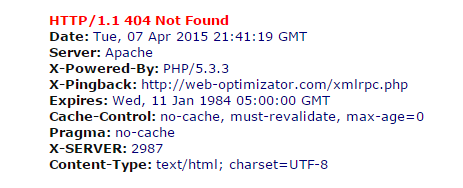
2. Пользователю необходимо сообщить, что запрашиваемой страницы больше (или вообще) не существует, и предоставить возможность работать с сайтом дальше.
Как настроить ответ сервера?
404 ошибка сервера через htaccess
Если Ваш сервер или CMS не настроены атоматически, то придётся это сделать Вам самим – добавьте в htaccess строчку:
1 |
ErrorDocument 404 http://www.site.ru/404.php |
Теперь, когда пользователь введёт неверный адрес, то он будет направлен на этот адрес. Страница может располагаться где угодно, но мы для примера поместили ее в корне сайта: /404.php.
404 ошибка сервера в PHP
Велосипеда изобретать не надо – существует специальная функция header, которая успешно поможет Вам это сделать.
1 |
header(«HTTP/1.0 404 Not Found»); |
Как должна выглядеть страница 404?
- В дизайне сайта (а не страница по умолчанию вашего хостинга)
- Содержать информацию о том, что произошла ошибка
- Иметь форму поиска по сайту
- Иметь небольшую карту сайта с основными разделами.
Креативные 404 страницы – вред или польза?
Смешное оформление 404 страницы – это красиво и оригинально, но не стоит слишком сильно увлекаться. Не стоит забывать, чтобы пользователю в первую очередь необходимо решить какие-то задачи на вашем сайте, а не зависать на 404 странице, Вы должны максимально упростить и помочь ему в достижении его целей.

Как отследить, сколько таких пользователей попадают на страницу 404?
Яндекс.Метрика
Для этого удобно использовать “Параметры визитов”.
В код счётчика необходимо добавить строчку: params:window.yaParams||{ }});
Таким образом, должно получиться как-то так:
1 2 3 4 5 6 7 8 |
w.yaCounterХХХХХХХХ = new Ya.Metrika({id:ХХХХХХХХ, webvisor:true, clickmap:true, trackLinks:true, accurateTrackBounce:true, trackHash:true, ut:"noindex", params:window.yaParams||{ }}); |
На самой же странице 404 в любом месте необходимо разместить следующий JS-код:
1 2 3 |
var url = document.location.pathname + document.location.search var url_referrer = document.referrer; var yaParams = {error404: {page: url, from: url_referrer}}; |
Где url – текущий адрес страницы 404, а url_referrer – адрес, с которого на него попали. Таким образом, мы в Яндекс.Метрике сможем отлеживать не только все 404 страницы, но и адреса, по которым на неё перешли.
Отчёт в Метрике необходимо смотреть тут: все отчеты -> содержание -> параметры визитов.
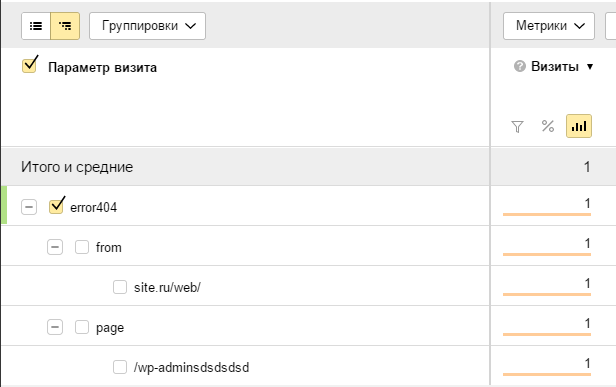
Подробнее о параметрах визита в Яндекс.Метрике: http://help.yandex.ru/metrika/content/visit-params.xml
Google.Analytics
Для отслеживания ошибок используем “события”. Добавляем JS-код в тело страницы:
1 2 3 4 5 6 7 8 9 |
jQuery(document).ready(function() { var url = document.location.pathname + document.location.search var url_referrer = document.referrer; ga('send', {'hitType': 'event', 'eventCategory': 'page-404', 'eventAction': url, 'eventLabel': url_referrer }); }); |
Где hitType – тип события, eventCategory – категория, eventAction – адрес ошибки, url_referrer – откуда на 404 страницу попали.
Отчёт в Гугл.Аналитикс: Поведение -> События -> Обзор.
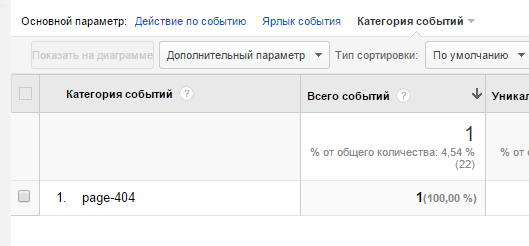
Подробнее о настройке событий в Аналитикс: https://support.google.com/analytics/answer/1033068?hl=ru
Как использовать полученные данные?
Если ошибки 404 внутри сайта – исправьте все ссылки на правильные или уберите вовсе. Если эти ссылки с внешних ресурсов? и Вам никак не повлиять на них, то поставьте 301 редирект на максимально релевантные страницы. Любите своих клиентов и не заставляйте их думать или что-то искать на Вашем сайте.
Страница 404 призвана сообщать пользователю, что заданный им url (адрес страницы) не существует.
Такие неправильные урлы еще можно назвать «битыми ссылками».
Многие сайты делают свои страницы 404 для удобства своих пользователей. Часто это красивые и интересные страницы, которые вызывают у пользователя улыбку вместо разочарования от того, что адрес страницы неправильный.
При создании страницы 404 есть важная техническая составляющая, которая сильно влияет на ранжирование сайтов в поисковых системах, если все не настроено правильно.
Если вы озадачились созданием страницы 404, то вам нужно учитывать три момента:
1) Переадресация со всех неправильно введенных url на страницу 404 в .htaccess.
2) Правильный ответ сервера после переадресации (http-код страницы должен быть 404, а не 200).
3) Закрытие страницы 404 от индексации в robots.txt
Сразу отмечу, что все вышеизложенное написано для самописных сайтов, преимущественно на php. Для wordpress существуют плагины по настройке того же самого. Но в этой статье мы рассмотрим, как все выглядит в реальности. %)
ЕСЛИ КРАТКО, то нужно сделать следующее:
I. В файле .htaccess добавить строку:
—————
ErrorDocument 404 http://mysite.com/404.php
—————
Это перенаправит все неправильные (битые) ссылки на страницу — 404.php. Детали ниже в статье.
II. В файле 404.php в самом начале php-кода пишите:
—————
—————
Это даст правильный ответ о статусе страницы. Не 200, не 302, а 404 — потому что страницы, на которую якобы хотел перейти пользователь — не существует. Как это проверить — читайте ниже.
III. В файле rodots.txt делаете следующую запись:
—————
User-agent: *
Disallow:
Disallow: /404.php
—————-
Это закрывает страницу 404.php от индексации поисковыми системами. В этом пункте будьте аккуратны. Детали читайте ниже.
Дальше каждый пункт расписан в деталях! Если вам достаточно короткого описания… то благодарности принимаются в виде комментариев и лайков.

Переадресация (редирект) неправильных url на страницу 404
Первое, что вы делаете – создаете саму страницу 404, чтобы было куда людей посылать %).
Перенаправление url настраивается в файле .htaccess
Просто вписываете строчку:
ErrorDocument 404 http://mysite.com/404.php
Где «mysite.com» – ваш домен, а http://mysite.com/404.php — путь к реальной странице. Если ваш сайт на html, то строка будет выглядеть как:
ErrorDocument 404 http://mysite.com/404.html
Проверка очень проста. После заливки на хостинг файла .htaccess с вышеуказанной строкой, делаете проверку, вводя заведомо не существующий урл (битая ссылка), например: http://mysite.com/$%$%
Если переадресация на созданную вами страницу произошла, значит все работает.
Итак, полностью файл .htaccess, где настроена ТОЛЬКО переадресация на 404 будет выглядеть так:
____________________________
RewriteEngine on
ErrorDocument 404 http://mysite.com/404.html
____________________________
Правильный ответ сервера (http-код страницы)
Очень важно, чтобы при перенаправлении был правильный ответ сервера, а именно – 404 Not Found.
Тут следует объяснить отдельно.
Любому url при запросе назначается статус (http-код страницы).
• Для всех существующих страниц, это: HTTP/1.1 200 OK
• Для страниц перенаправленных: HTTP/1.1 302 Found
• Если страницы не существует, это должен быть HTTP/1.1 404 Not Found
То есть, какой бы урл не был введен, ему присваивается статус, определенный код ответа сервера.
Проверить ответ сервера можно:
1. Консоль браузера, закладка Network. Нажмите F12 для Chrome. Или Ctrl + Shift + I — подходит и для Chrome и для Opera.
2. На такой ресурсе как bertal.ru
3. SEARCH CONCOLE GOOGLE – Сканирование/Посмотреть как GOOGLE бот.
Когда у вас не было перенаправления через .htaccess на страницу 404, то на любой несуществующий url, введенный пользователем, а также на битые ссылки был ответ «HTTP/1.1 404 Not Found»
Итак, после краткой теоретической части, вернемся к нашим
баранам
настройкам.
После того, как вы настроили перенаправление на свою авторскую страницу 404 через .htaccess, как описано выше, то вводя битую ссылку (неверный url, который заведомо не существует), типа http://mysite.com/$%$%, ответ сервера будет:
— сначала HTTP/1.1 302 Found (перенаправление),
— а затем HTTP/1.1 200 OK (страница существует).
Проверьте через bertal.ru.
Чем это грозит? Это будет означать, что гугл в свою базу данных (индекс) может внести все битые ссылки, как существующие страницы с содержанием страницы 404. По сути — дубли страниц. А это невероятно вредно для поисковой оптимизации (SEO).
В этом случае нужно сделать две вещи:
1) Настроить правильный ответ сервера на странице 404.
2) Закрыть от индексирования страницу 404. Это делается через файл robots.txt
Настраиваем ответ сервера HTTP/1.1 404 Not Found для несуществующих страниц
Ответ сервера настраивается благодаря функции php в самом начале страницы 404.php:
Пишите ее вначале файла 404.php.
В результате мы должны получить ответ на битую ссылку:
Пример страницы 404.php. Вот как это выглядит +/-:
Естественно, что у вас скорее всего сайт полностью на php и динамический, то просто вставляете строку с ответом сервера в начало — перед всеми переменными и подключенными шаблонами.
Закрыть страницу 404 от индексирования
Закрыть страницу от индексирования можно в файле rodots.txt. Будьте внимательны с этим инструментом, ведь через этот файл ваш сайт, по сути, общается с поисковыми роботами!
Полный текст файла rodots.txt, где ТОЛЬКО закрыта индексация 404 страницы, выглядит так:
____________________________
User-agent: *
Disallow:
Disallow: /404.php
____________________________
Первая строка User-agent: * сообщает, что правило для всех поисковых систем.
Вторая строка Disallow: сообщает что весь сайт открыт для индексации.
Третья строка Disallow: /404.php закрывает индексацию для страницы /404.php, которая находится в корневой папке.
Замечания по коду: «/404.php» означает путь к странице. Если на вашем сайте страница 404.php (или 404.html соответственно) находится в какой-то папке, то путь будет выглядеть:
/holder/404.php
где «holder» — название папки.
Вот, собственно и все по странице 404. Проверьте работу страницы, перенаправления битых ссылок, и ответы серверов.
Повторюсь: Все вышеизложенное для самописных сайтов. Если вы используете wordpress, то можете поискать приличный плагин для настройки ошибки 404.
Благодарности принимаются в виде комментариев 🙂
Читать также:
Быстро создать свой сайт на WordPress
Сколько стоит создать сайт
Как залить сайт на хостинг
Зарегистрировать торговую марку самостоятельно
Самое ценное на сайте
Сайт бесплатно – это миф!
Продвижение сайта
Резервная копия сайта (бэкап)
PHP: пишем собственную страницу обработки ошибок Apache (404 и др.)
У нормального хостера проблема решается очень легко: достаточно написать свой файл .htaccess
и положить его в корневую папку сайта.
Синтаксис нужной нам директивы:
ErrorDocument код-ошибки документ
Примеры:
ErrorDocument 403 /error.html
ErrorDocument 404 /bad_urls.php
ErrorDocument 500 http://my.server.com/cgi-bin/error
Тремя показанными ошибками, как самыми частыми, и ограничимся. Добавив к файлу .htaccess директивы, на всякий случай отключающие устаревшие «волшебные кавычки» и явно указывающие кодировку сайта (у нас русскоязычная windows), получим вот что:
AddDefaultCharset windows-1251
php_flag magic_quotes_gpc off
php_flag magic_quotes_runtime off
php_flag magic_quotes_sybase off
ErrorDocument 403 /error.php?e=403
ErrorDocument 404 /error.php?e=404
ErrorDocument 500 /error.php?e=500
Проблемы с созданием файла под именем
.htaccess?
Пользуйтесь не проводничком и блокнотиком, а нормальным файл-менеджером, например, Far
Пока не умеете с ним работать (там есть и отличные плагины FTP/SFTP для закачки файлов на сайты), нет смысла работать и с хостами 🙂
Имейте в виду, что если вы напишете в директиве ErrorDocument полный адрес скрипта обработки ошибок вида
http://my.server.com/error.php?e=404 вместо /error.php?e=404, то будет редирект 302 на указанный URL вместо корректной обработки ошибки 404. Ну и неправильный юзвериный адрес исчезнет из адресной строки браузера 🙂
Но! При указании относительного адреса обработчика error.php ссылки, выданные на страницу обработчика как относительные (то есть, <a href="my.php">link<a> или <a href="/my.php">link<a>, будут восприниматься скриптом как адреса от неправильного URL. Правильно в этом случае выдавать <a href="http://my.server.com/my.php">link<a> (где my.server.com — имя вашего сервера), а эту самую my.server.com получать из настроек сайта.
Саму обработку для удобства сделаем одним файлом error.php — не писать же кучу отдельных документов? Наш обработчик будет параметром получать номер ошибки. Файл error.php, как видно из директивы ErrorDocument, нужно также скопировать в корневую папку сайта.
Вот пример кода такого обработчика ошибок сервера:
<?php
require_once ("functions.php");

$id=get_int('e');
if (empty($e)) { redirect (); }
title ("Ошибка $e");
include "header.php";
$emsgs = array (
 403 => 'Сервер не отвечает', 404 => 'Документ не найден', 500 => 'Внутренняя ошибка сервера'
);
$emsg = 'Описание ошибки не найдено';
if (array_key_exists($e, $search_array)) $emsg = $emsgs[$e];
echo '
 <p>Что-то пошло не так... Сервер вернул код ошибки '.$e.' ('.$emsg.')
 <p>Инфа для пользователя и ссылки, куда податься, обычный HTML
';
if (isset ($_SERVER['REQUEST_URI']))
 echo '<p>Вы пытались перейти на адрес : '.request_url().'</p>';
if (isset ($_SERVER['HTTP_REFERER']))
 echo '<p>Вы пришли с адреса: '.$_SERVER['HTTP_REFERER'].'</p>';
include "footer.php";
?>
Здесь
require_once ("functions.php");
подключает гипотетическую библиотеку функций сайта, нам, в общем-то, для примера достаточно трёх.
1. Функция redirect просто отправляет юзера туда, откуда он пришёл (на случай, если сам error.php вызван напрямую и без обязательного параметра):
function redirect () {
 if (isset ($_SERVER['HTTP_REFERER'])) {
  header('Location: '.$_SERVER['HTTP_REFERER']);
 }
 else {
  header('Location: index.php');
 }
}
2. Функция get_int возвращает целое число, полученное из параметра URL-адреса $_GET с именем $name или пустую строку, если допустимое число не передано. Функция может выглядеть, например, так:
function get_int($name) {
 $var='';
 if (isset($_GET[$name])) $var = 0 + intval(htmlspecialchars(trim($_GET[$name])));
 return $var;
}
3. Функция title сохраняет переданную ей величину в статической переменной, скажем,
 function title ($str) {
  static $title='';
  if (!empty($str)) $title=$str;
  return $title;
 }
чтобы потом файл, выводящий разметку страницы, мог этой переменной воспользоваться для формирования заголовка окна браузера, допустим, так:
<title><?php echo title(''); ?></title>
(код может быть помещён в файл header.php — стандартную «шапку» всех страниц сайта). Так что, директивы
include "header.php";
include "footer.php";
как раз подключают стандартные «шапку» и «подвал» сайта.
Наконец, два последних условия позволяют выяснить, куда юзер хотел попасть и откуда он пришёл,
при желании, любую из выдаваемых строк можно сделать ссылкой средствами HTML.
Ах, да, часто в качестве ссылки на текущий адрес лепят просто $_SERVER['REQUEST_URI'], забывая, что это
имя скрипта, начиная от корневой директории виртуального хоста
но никак не полный путь.
Функция request_url как раз и пытается грамотно получить на PHP текущий полный URL-адрес страницы, с учётом того, что соединение может быть не по 80 порту и не по http, а по https. Вот эта волшебная функция, считаем, что она там же, в functions.php:
function request_url() {
 $result = '';
 $port = 80;
 if (isset($_SERVER['HTTPS']) && ($_SERVER['HTTPS']=='on')) {
  $result .= 'https://';
  $port = 443;
 }
 else $result .= 'http://';
 $result .= $_SERVER['SERVER_NAME'];
 if ($_SERVER['SERVER_PORT'] != $port) $result .= ':'.$_SERVER['SERVER_PORT'];
 return $result.$_SERVER['REQUEST_URI'];
}
Что у нас вышло можно увидеть, например, щёлкнув по этой несуществующей ссылке
на страницу моего блога.
19.02.2015, 14:50 [14120 просмотров]
К этой статье пока нет комментариев, Ваш будет первым
Website error pages are perhaps one of the most overlooked pieces of a fully rounded website. Not only are they important but they give you the opportunity to have a little fun. Although many web developers rely on server logs to keep an eye out for hits on error pages, I’m going to take a different approach by using a PHP generated email. In addition, we will spice up the design a bit, add basic navigation and link to the website sitemap.
About Error Pages


The most common error page — the one in which you are most likely to be familiar with — is the «404 Not Found page». More people encounter this type of error page than any other. Other common error messages you may have come across are 500 Internal Server Error, 400 Bad Request or 403 Forbidden. Wondering what the number is for? It simply refers to the HTTP code.


Default error pages are quite boring (as you can see above) and offer no purpose to visitors other than letting them know some boring error happened. For these reasons, it is a great idea to provide custom pages for the most common errors encountered. This tutorial will only cover two: the «404 Not Found» and «403 Forbidden».
Check for custom error page support
First, check to make sure your hosting provider allows you to use your own error pages. Almost all of them do, and most of them even provide a configuration area within your control panel to help you quickly create the pages. In this tutorial we will configure an Apache web server (the most common). This is easier than you might think.
Configure .htaccess
Next, connect to your server via FTP or control panel and navigate to the document root directory (usually www or public_html) which contains your website files. We will be looking for the .htaccess file. It is sometimes hidden so make sure you are viewing all files including hidden ones. If your server doesn’t have one, you can create one using any text editor. Make sure to make a backup of the .htaccess file if your server already has one.
Add the following lines to your .htaccess file:
1 |
ErrorDocument 404 /error/404.php |
2 |
ErrorDocument 403 /error/403.php |
The first half (ErrorDocument 404) is telling the server we are going to define the location of the 404 error document. The second half defines the actual location of the error document. In this case we will put it in the «error» directory and call them 404.php and 403.php, respectively.
Now save the .htaccess file and upload it to the document root directory.
Design the Custom Error Pages
It is best to stay with the same design as your website already uses so that you don’t confuse your visitors and risk losing them. You should also include helpful elements such as a polite error message, suggested links, a search feature, or a link to your sitemap. These features will depend on the level of content your website provides and what you feel will be most helpful.


As you can see below, the 404 Not Found page for Nettuts+ has stated the error and emphasized the search feature by including it in the body beneath the error message. You could take this a step further by including a short list of links to possible pages which might encourage the visitor to continue exploring more of the site (keep it simple and short though) -or even a humorous image (every one likes laughing right?). For small websites it may be a good idea to include a visible sitemap as well.


Here is something I put together for this tutorial that you can use for your website as well (included in the download above). It’s very simple so you will be able to put the content of it directly into your existing website template. As you can see, I attempted to include a little bit of a humorous element while also stating the error politely and including some options to help the visitor either find what they were looking for or continue browsing the website.
You’ll notice it does not specify the HTTP error code in the body of the page. Instead I chose to only use the error code in the title of the page. The reason for this is to keep things as simple and user friendly as possible. Most people don’t care what 404 or 403 means, they want to know what’s going on in plain English. For people who want the error code, it is still available via the title.
If you want to see some really great 404 designs visit:
- http://www.smashingmagazine.com/2009/01/29/404-error-pages-reloaded-2/
- http://www.smashingmagazine.com/2007/08/17/404-error-pages-reloaded/
- http://www.smashingmagazine.com/2007/07/25/wanted-your-404-error-pages/
- http://blogof.francescomugnai.com/2008/08/the-100-most-funny-and-unusual-404-error-pages/
The Auto-Mailer PHP and Why We Will Use Email Notification
This is the part of the tutorial in which some web guru’s might argue with. You can use your web server’s logs to check for error pages and much, much more. Why do I choose email notifications?
- I don’t want to log into my server every day and dig through all that extra information.
- I am available by email almost literally all day, the fastest way to reach me is email (or twitter). With this in mind, I want to know about 404 and 403 errors fairly quick so email is best.
- An increasing number of people are starting websites, while most of those people know almost nothing about web hosting let alone server logs. These people will only be running small sites; so email is ideal.
- Being notified right away allows me to quickly take action if a website of mine is being «harvested» (ThemeForest templates), if someone is attempting to access something restricted repeatedly or if I have a broken link somewhere.
So with all that said, let’s get on with the code shall we!
The Code
First, we will create a file named error-mailer.php which will be used to collect information about our visitor and send the email. Once you have created the file we will start by specifying our email and email settings.
1 |
<?php
|
2 |
|
3 |
# The email address to send to
|
4 |
$to_email = 'YOUR-EMAIL@DOMAIN.com'; |
5 |
|
6 |
# The subject of the email, currently set as 404 Not Found Error or 403 Forbidden Error
|
7 |
$email_subject = $error_code.' Error'; |
8 |
|
9 |
# The email address you want the error to appear from
|
10 |
$from_email = 'FROM-EMAIL@DOMAIN.COM'; |
11 |
|
12 |
# Who or where you want the error to appear from
|
13 |
$from_name = 'YourDomainName.com'; |
Then we will collect information about our visitor such as IP address, requested URI, User Agent, etc. The following code will collect that information.
1 |
# Gather visitor information
|
2 |
$ip = getenv ("REMOTE_ADDR"); // IP Address |
3 |
$server_name = getenv ("SERVER_NAME"); // Server Name |
4 |
$request_uri = getenv ("REQUEST_URI"); // Requested URI |
5 |
$http_ref = getenv ("HTTP_REFERER"); // HTTP Referer |
6 |
$http_agent = getenv ("HTTP_USER_AGENT"); // User Agent |
7 |
$error_date = date("D M j Y g:i:s a T"); // Error Date |
Now we will write the script to email the information to us with the details specified earlier.
1 |
# Send the email notification
|
2 |
require_once('phpMailer/class.phpmailer.php'); |
3 |
$mail = new PHPMailer(); |
4 |
|
5 |
$mail->From = $from_email; |
6 |
$mail->FromName = $from_name; |
7 |
$mail->Subject = $email_subject; |
8 |
$mail->AddAddress($to_email); |
9 |
$mail->Body = |
10 |
"There was a ".$error_code." error on the ".$server_name." domain". |
11 |
"nnDetailsn----------------------------------------------------------------------". |
12 |
"nWhen: ".$error_date. |
13 |
"n(Who) IP Address: ".$ip. |
14 |
"n(What) Tried to Access: http://".$server_name.$request_uri. |
15 |
"n(From where) HTTP Referer: ".$http_ref. |
16 |
"nnUser Agent: ".$http_agent; |
17 |
|
18 |
$mail->Send(); |
19 |
|
20 |
?>
|
We are using the phpMailer class to do this as demonstrated by Jeffrey via the ThemeForest blog to create a nice AJAX contact form. This version of the phpMailer class is for PHP 5/6 so if your server is running PHP 4 you will need to use the corresponding version by downloading it here.
404.php and 403.php Error Pages
The last thing we need to do is customize the error pages we designed earlier by sending the proper headers and set the $error_code variable by inserting the following code at the beginning of each page respectively (separated by ——-).
1 |
<?php
|
2 |
|
3 |
header("HTTP/1.0 404 Not Found"); |
4 |
$error_code = '404 Not Found'; // Specify the error code |
5 |
require_once('error-mailer.php'); // Include the error mailer script |
6 |
|
7 |
?>
|
8 |
------- |
9 |
<?php
|
10 |
|
11 |
header("HTTP/1.0 403 Forbidden"); |
12 |
$error_code = '403 Forbidden'; // Specify the error code |
13 |
require_once('error-mailer.php'); // Include the error mailer script |
14 |
|
15 |
?>
|
What we are doing here first is setting the correct HTTP header to return 404 Not Found and 403 Forbidden, respectively. When search engines accidentally land on this page we want to make sure they know what kind of page it is, instead of thinking that it’s a normal web page named 404.php or 403.php.
Then we specify the error code to be used in the mailer script and include the mailer script so it can do its work. This way if we make a change to the mailer script, we only need to edit one file instead of two or more (if you setup additional custom error pages).
Conclusion
There you have it! Your own custom error pages that are search engine friendly, and let you know via email when you’ve had a visitor as well as all the information you will need to fix any problems. A few last things to consider:
- Internet Explorer requires error pages that are at least 512 byes in size (if you use the example files you’ll be fine)
- High traffic websites have the potential to generate A LOT of emails so make sure you setup some sort of email filter for these error notifications so they don’t flood your inbox. I use Gmail so I just have a label and filter setup for these emails.
Did you find this post useful?

I’m a freelance designer and web developer, an author and reviewer at ThemeForest.net, a writer for the ThemeForest blog and occasionally net.tutsplus.com. When I actually manage to get away from the computer, I’m hiking, watching movies or spending time with my girlfriend in sunny Las Vegas. – View my web.appstorm.net posts here.
 Я решил перенести большую часть файлов со старого сайта на новый. И у меня возник вопрос — «А не обвинит ли меня Yandex в использовании неуникальных статей?», т.к. у меня одни и те же материалы будут на разных страницах.
Я написал письмо в службу поддержки yandex, и мне пришло письмо, в котором сообщалось, что переживать не надо. Единственно, настоятельно желательно, чтобы я каким-то способом закрыл старые странички от индексирования (через robots.txt, вызов ошибки 404 или перенаправление) и удалил странички из базы по адресу http://webmaster.yandex.ru/delurl.xml. Удалять по указанному адресу желательно, чтобы быстрее прекратилась индексация страниц.
По некоторым причинам я предпочел способ вызова ошибки 404. Ошибка 404 вызывается в том случае, если ресурс на который идет ссылка не обнаружен. И тут я обнаружил, что у меня то и нет вызова этой ошибки, т.е. какие бы данные пользователь не ввел бы на старом сайте, что-то все равно выводится. Такая ситуация на мой взгляд не допустима, и я пошел с ней бороться.
Мой сайт написан был на php, поэтому я очень быстро нашел команду для вызова ошибки 404. Она имеет вид:
header("HTTP/1.0 404 Not Found");
exit;
Казалось бы все просто, но нет же. Никак эти две команды не хотели работать. Тогда я почитал дополнительно материал и выяснил, что header() должна вызываться до отправки любого другого вывода. Т.е. она должна быть исключительно самой первой при выводе, поэтому ее нельзя использовать внутри require_once().
Но как оказалось существуют три замечательные функции, которые позволяют решить эту проблему:
-
ob_start() — задает начало области, которую надо поместить в буфер, я поместил ее самой первой при выводе.
- ob_end_flush() — окончание задания буфер и сразу вывод. Т.е. первые две функции задают область, которую сначала нужно вывести в буфер, а потом сразу вывести.
- ob_end_clean() — очищает буфер, и следующая команда как бы выводится самой первой.
С использованием этих команд организация вызова ошибки 404 выглядит следующим образом:
- Самая первая команда — ob_start()
- Далее идет основное содержание, которое пока копируется в буфер.
- Проверка на предмет вызова ошибки 404. Например, проверка наличия определенного значения. Если после проверки имеются причины вызвать ошибку, то задается код:
ob_end_clean() ;
header("HTTP/1.0 404 Not Found");
exit;
Тем самым будет выдано сообщение об ошибке и осуществлен выход.
- Выводим содержимое буфера командой ob_end_flush(). Идея в том, что если была вызвана ошибка, то сюда не попадем. Если ошибки не было, то выводим буфер.
Далее в файле .htaccess можно указать файл, который будет сопоставляться ошибке 404, но это уже совершенно другая история…
Если пользователь вобьет в адресную строку
некорректный URL мы должны показать страницу
с ошибкой. Пусть контент страницы с ошибкой
будет хранится в соответствующем файле:
<div>

	page not found

</div>
Для того, чтобы определить некорректность
запроса, нам необходимо проверить существование
файла контента, соответствующего запрошенному URL:
<?php

	$path = 'view' . $url . '.php';
if (file_exists($path)) {
// файл есть
} else {
// файла нет
}
?>
Давайте будем отдавать файл контента, если
он есть, и файл с ошибкой, если контента нет:
<?php

	$path = 'view' . $url . '.php';
if (file_exists($path)) {
$content = file_get_contents($path);
} else {
$content = file_get_contents('view/404.php');
}
?>
В случае с ошибкой мы должны отправить в
браузер заголовок с 404 ошибкой, чтобы
явно сообщить о том, что страница не найдена.
Сделаем это:
<?php

	$path = 'view' . $url . '.php';
if (file_exists($path)) {
$content = file_get_contents($path);
} else {
header('HTTP/1.0 404 Not Found');
$content = file_get_contents('view/404.php');
}
?>
Реализуйте в вашем движке отдачу страницы
с 404 ошибкой.