-
#1
I have been playing the stable version and not the beta so when I installed it and then installed the patch, and I start the game but I get an RGL error saying : error on creating shaders: out of video memory when it gets to the loading scenes.

-
#2
angrysully said:
I have been playing the stable version and not the beta so when I installed it and then installed the patch, and I start the game but I get an RGL error saying : error on creating shaders: out of video memory when it gets to the loading scenes.
Just like the error states , problem is with your video memory . Make sure load textures on demand is clicked , go into rgl_config.txt find line render_buffer_size = whatever and change it to a lower number . Beta version has many new textures and its harder on your computer then the previous version .
-
#3
Vympel said:
angrysully said:
I have been playing the stable version and not the beta so when I installed it and then installed the patch, and I start the game but I get an RGL error saying : error on creating shaders: out of video memory when it gets to the loading scenes.
Just like the error states , problem is with your video memory . Make sure load textures on demand is clicked , go into rgl_config.txt find line render_buffer_size = whatever and change it to a lower number . Beta version has many new textures and its harder on your computer then the previous version .
I set it to 1 but still no success, my texture detail is at 100 perhaps lowering that and other graphic settings may fix.
-
#4
Setting textures from 100 to 50, and shadow from ultra high to low fixed it
-
#5
angrysully said:
Setting textures from 100 to 50, and shadow from ultra high to low fixed it
I didn’t restart the mod before starting a game and it crashed upon starting as rome and when I try to get back in, it gives me the error.
-
#6
angrysully said:
angrysully said:
Setting textures from 100 to 50, and shadow from ultra high to low fixed it
I didn’t restart the mod before starting a game and it crashed upon starting as rome and when I try to get back in, it gives me the error.
Lets see your rgl_log .
-
#7
first_time = 0
texture_detail = 10
render_buffer_size = 7
max_framerate = 120
start_windowed = 0
use_pixel_shaders = 0
use_vertex_shaders = 1
fake_reflections = 1
show_framerate = 0
use_ondemand_textures = 1
use_ondemand_textures_mt = 1
disable_music = 0
disable_sound = 0
disable_frequency_variation = 0
cheat_mode = 0
enable_blood = 1
enable_edit_mode = 0
force_single_threading = 0
debug_mode = 0
display_width = 1920
display_height = 1080
display_bits = 32
antialiasing = 0
sample_quality = 0
alpha2coverage = 0
force_vsync = 0
shadowmap_quality = 0
shader_quality = 0
postfx_dof = 0
postfx_hdr = 0
postfx_autoexp = 0
flora_degrade_distance = 100.0000
flora_lod_detail = 0
use_instancing = 0
use_secure_connection = 0
max_number_of_connections = 16
look_for_server_on_this_machine = 0
music_volume = 0.0000
sound_volume = 0.5004
mouse_sensitivity = 0.5000
invert_mouse = 0
enable_lighting = 1
enable_particles = 1
enable_blood = 1
enable_character_shadows = 1
enable_accurate_shadows = 1
number_of_corpses = 3
grass_density = 50
combat_speed = 2
friend_combat_difficulty = 2
adapter_format = 0
reduce_combat_ai = 0
reduce_campaign_ai = 0
combat_difficulty = 2
display_labels = 1
display_targeting_reticule = 1
display_attack_direction = 0
turn_camera_with_horse_in_first_person = 2
verbose_damage = 1
verbose_shot_difficulty = 1
battle_size = 8.0833
attack_direction_control = 2
defend_direction_control = 1
lance_control = 2
anisotropic_filtering = 1
enable_environment_shadows = 1
verbose_casualties = 1
verbose_experience = 1
realistic_shadows_on_plants = 2
number_of_ragdolls = 3
gamma = 2.2000
character_detail = 0.5000
character_shadow_detail = 0.5000
control_mouse_movement_y_scale = 1.5000
blood_stains = 1
use_winmm_audio = 0
enable_version_check = 1
enable_aspect_ratio_control = 1
realistic_headshots = 0
auto_gfx_quality = 0
-
#8
This is rgl_config , I need the rgl_log generated when the game crashes.
-
#9
Hmm, I searched for it but not getting a log. I almost get the loading bar to finish but I get the error right when it goes to loading scene so It doesn’t generate a log.
edit: I can run regular warbands on full settings but can’t even put this on low settings to get it to work.
-
#10
render_buffer_size = 5
use_vertex_shaders = 0
enable_blood = 0
force_single_threading = 1
display_width = 1920 (REDUCE)
display_height = 1080
Try this I guess .
-
#11
Got it to work and hopefully it stays that way, thanks.
-
#12
I have the same problem as he does. I can only find rgl_log but not rgl_config in my MBW folder.
Here is the log though
Starting new log file.
Version: 1.143
— OS: Microsoft Windows 7 Service Pack 1 (build 7601), 64-bit
— RAM: Available physical RAM: 3297MB/4096MB
— CPU: Intel(R) Core(TM) i5-2410M CPU @ 2.30GHz (GenuineIntel)
— L2 cache size: 256K
— CPU Features: FPU MMX SSE SSE2 SSE3 SSSE3 EST HTT
— Number of CPUs: 4 ( Speed: ~2294MHz / ~2294MHz / ~2294MHz / ~2294MHz )
— GPU:
— D3D9 Adapter: 0 / Driver: nvumdshim.dll / Description: NVIDIA GeForce GT 525M
— Texture Memory: 3766 ( Available Texture Memory: 3754 )
Received stats and achievements from Steam
Processing Ini File {
Module_name = Brytenwalda
Num Hints = 12
Setting Map Min X = -178.012619
Setting Map Max X = 185.339508
Setting Map Min Y = -232.722122
Setting Map Max Y = 197.089081
Setting Time Multiplier = 0.250000
Setting Seeing Range Multiplier = 6.500000
Setting Track Spotting Multiplier = 0.800000
Setting player_wounded_treshold = 5.000000
Setting hero_wounded_treshold = 15.000000
Setting Skill Prisoner Management Bonus = 5
Setting Skill Leadership Bonus = 3
Setting Base Companion Limit = 20
Setting player_xp_multiplier = 1.000000
Setting hero_xp_multiplier = 1.000000
Setting regulars_xp_multiplier = 1.000000
Setting damage_interrupt_attack_treshold = 3.000000
Setting damage_interrupt_attack_treshold_mp = 3.000000
Setting armor_soak_factor_against_cut = 0.750000
Setting armor_soak_factor_against_pierce = 0.650000
Setting armor_soak_factor_against_blunt = 0.600000
Setting armor_reduction_factor_against_cut = 0.750000
Setting armor_reduction_factor_against_pierce = 0.650000
Setting armor_reduction_factor_against_blunt = 0.600000
Setting horse_charge_damage_multiplier = 5.000000
Setting couched_lance_damage_multiplier = 0.650000
Setting fall_damage_multiplier = 4.000000
Setting shield_penetration_offset = 25.000000
Setting shield_penetration_factor = 2.000000
Setting missile_damage_speed_power = 1.900000
Setting melee_damage_speed_power = 2.000000
Setting multiplayer_walk_enabled = 0
Setting mission_object_prune_time = 180
Scan Module Textures = 1
Scan Module Sounds = 1
Loading Resource test
Loading Module Resource textures_face_gen
Loading Resource shaders
Loading Resource textures
Loading Resource materials
Loading Resource uimeshes
Loading Resource helpers
Loading Resource map_tree_meshes
Loading Resource map_icon_meshes
Loading Resource particle_meshes
Loading Resource skeletons
Loading Resource tree_meshes
Loading Resource xtree_meshes
Loading Module Resource grass_meshes
Loading Resource plant_meshes
Loading Resource body_meshes
Loading Resource object_meshes
Loading Resource object_bodies
Loading Resource goods_meshes
Loading Resource item_meshes1
Loading Resource horse_a
Loading Resource arabian_castle
Loading Resource food
Loading Module Resource beards
Loading Resource village_houses
Loading Resource village_houses_a
Loading Resource village_houses_b
Loading Module Resource hair
Loading Resource interiors_a
Loading Resource interiors_b
Loading Resource interiors_c
Loading Resource arena
Loading Resource map_icons_b
Loading Resource castle_a
Loading Resource dungeon
Loading Resource stone_houses
Loading Resource snowy_houses
Loading Resource snowy_castle
Loading Resource castle_b
Loading Resource square_keep
Loading Resource anim_b
Loading Resource weapon_meshes_c
Loading Resource xtree_meshes_b
Loading Resource map_icons_c
Loading Module Resource pictures
Loading Module Resource user_interface_b
Loading Resource user_interface_c
Loading Resource scene_encounter_spot
Loading Resource interior_thirsty_lion
Loading Resource scene_small_tavern
Loading Resource weapon_meshes1
Loading Resource weapon_meshes_b
Loading Resource houses1
Loading Resource wall_meshes1
Loading Resource town_houses
Loading Resource doors
Loading Resource churches
Loading Resource town_houses_b
Loading Resource castle_c
Loading Resource castle_d
Loading Resource castle_e
Loading Resource castle_f
Loading Resource castle_g
Loading Resource castle_h
Loading Resource castle_i
Loading Resource gatehouse
Loading Resource viking_houses
Loading Resource fake_houses
Loading Resource town_houses_c
Loading Resource particles_2
Loading Resource prisons
Loading Resource prisons_b
Loading Resource interiors_d
Loading Module Resource op_terrain_borders_textures
Loading Module Resource op_terrain_borders_materials
Loading Module Resource op_terrain_borders
Loading Module Resource op_terrain_borders_b
Loading Resource skyboxes
Loading Resource object_b
Loading Resource tree_e_meshes
Loading Resource destroy
Loading Resource xtree_meshes_c
Loading Module Resource grass_meshes_b
Loading Resource interiors_steppe
Loading Resource grooming_horse
Loading Resource town_houses_d
Loading Resource horses_b
Loading Resource ani_horse_mounted
Loading Resource deneme2
Loading Resource horse_skeleton
Loading Resource steppe_fake_houses
Loading Resource tableau_shields
Loading Resource instruments
Loading Resource custom_banner
Loading Resource simple_primitives
Loading Resource ani_man_walk
Loading Resource ani_twohanded
Loading Resource ani_onehanded
Loading Resource ani_death
Loading Resource ani_stand_guardsman
Loading Resource ani_human_mounted
Loading Resource ani_lady_stand
Loading Resource ani_poses
Loading Resource ani_stand_shopkeeper
Loading Resource ani_man_cheer
Loading Resource ani_stand_onhorse
Loading Resource ani_throw_stone
Loading Resource ani_strikes
Loading Resource ani_equip_arms
Loading Resource ani_run_p
Loading Resource ani_run_forward_left_right
Loading Resource uni_strikes3
Loading Resource ani_walk_sideways
Loading Resource ani_run_sideways
Loading Resource ani_stand
Loading Resource ani_crouch_down
Loading Resource ani_low_walk
Loading Resource ani_turn_man
Loading Resource ani_attacks_single
Loading Resource ani_lancer
Loading Resource ani_attacks
Loading Resource ani_kicks
Loading Resource ani_parry_attack
Loading Resource ani_walk_backward
Loading Resource ani_run_lookingsides
Loading Resource ani_defends
Loading Resource ani_walk_lookingsides
Loading Resource ani_jump
Loading Resource ani_wedding
Loading Resource arabian_props
Loading Resource uni_jump
Loading Resource uni_stances
Loading Resource uni_equip
Loading Resource uni_strike
Loading Resource uni_throws
Loading Resource uni_fistswing
Loading Resource uni_lord_stand
Loading Resource uni_defence
Loading Resource uni_sideways
Loading Resource dart
Loading Resource armors_new_b
Loading Resource armors_new_arena
Loading Resource rock
Loading Resource raw_materials
Loading Resource gauntlets_new
Loading Resource bride_dress
Loading Resource ui_server_filter
Loading Resource ship
Loading Resource arabian_houses
Loading Resource object_c
Loading Resource tree_f
Loading Resource interiors_arabian
Loading Resource arabian_village
Loading Resource valleyProps
Loading Resource workshops
Loading Resource barrier_primitives
Loading Resource town_houses_e
Loading Module Resource animalesdecaza
Loading Module Resource animals
Loading Module Resource animals2
Loading Module Resource otrositems
Loading Module Resource arcosyflechas
Loading Module Resource armadurasmedias
Loading Module Resource armadurasmedias2
Loading Module Resource armaduraspesadas
Loading Module Resource armaduraspesadas2
Loading Module Resource armaduraspesadas3
Loading Module Resource battlebanners
Loading Module Resource botasycalzado
Loading Module Resource capasycabeza
Loading Module Resource capasycabeza2
Loading Module Resource coronas
Loading Module Resource hachas
Loading Module Resource desnudos1
Loading Module Resource desnudosypantalones
Loading Module Resource escudos1
Loading Module Resource escudos2
Loading Module Resource escudos3
Loading Module Resource escudos4
Loading Module Resource escudos5
Loading Module Resource espadas1
Loading Module Resource sail
Loading Module Resource espadas2
Loading Module Resource espadas3
Loading Module Resource gorros1
Loading Module Resource std_banners
Loading Module Resource std_banners_default
Loading Module Resource std_flags_vertical
Loading Module Resource gorros2
Loading Module Resource seaxycuchillos
Loading Module Resource iconos1
Loading Module Resource lanzasyhastas
Loading Module Resource Companions_Overview_mesh
Loading Module Resource sceneprops1
Loading Module Resource sceneprops2
Loading Module Resource sceneprops3
Loading Module Resource Tempered_mat
Loading Module Resource Tempered_mesh
Overwritten module resource is ignored due to the module switching: core_ui_meshes
Loading Module Resource command_cursor
Loading Module Resource tunicalarga
Loading Module Resource tunicas1
Loading Module Resource tunicas2
Loading Module Resource tunicas3
Loading Module Resource tunicas4
Loading Module Resource tunicas5
Loading Module Resource tunicas6
Loading Module Resource tunicasyropavaria
Loading Module Resource yelmos1
Loading Module Resource yelmos2
Loading Module Resource yelmos3
Loading Module Resource vegetacion
Loading Module Resource vestuariomujeres
Loading Module Resource AD_shields
Loading Module Resource vympels_armory
Loading Module Resource vcof_helms
} //Processing Ini File Finished
Loading Music…
Loading Textures…
Finished Loading Textures…
L8 Format is supported
WARNING: UNABLE TO MAP GAME PRESENTATION CODE: prsnt_game_escape
Loading Module…
Loading item kinds…
Loading dialogs…
Loading mission templates…
Loading party templates…
ERROR: Error on creating shaders: Out of video memory!
-
#13
Install this http://forums.taleworlds.com/index.php/topic,183782.0.html overwrite original files in Textures directory with these smaller ones . Turn off sound and use Directx 7 mode , enable textures on demand . Thats it from me nothing else I can recommend besides getting a better video card or waiting for next version.
-
#14
Hi I have the same error as angrysully.
strangely it only occured after I set the 2990 VA as in your recommendation in the forum here.
Before, I got runtime errors on the game, no matter which screen, after roughly half an hour of gaming.
I stopped using battlesizer, no progress.
I am on a vista machine, 8gb ram and a freakingly good graphics card ( brand new roughly 350 € )
Edit: found the error I think — I start now with WSE directly, not over steam..
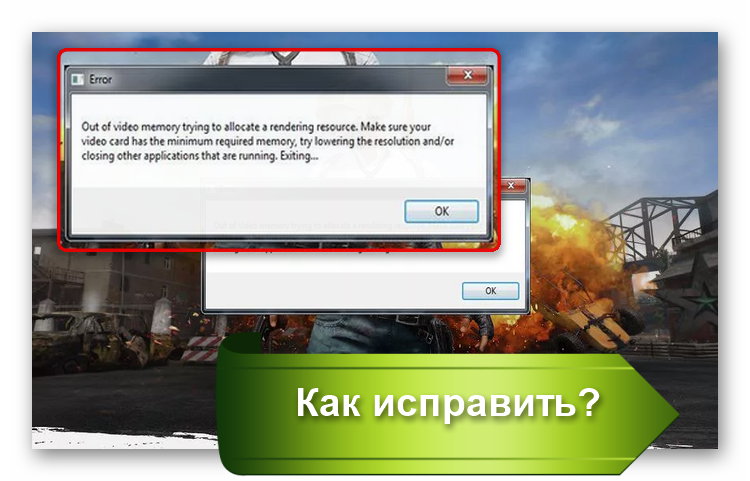
Современные игры становятся все более продвинутыми, особенно в плане графики. Не удивительно, что при попытке насладиться очередной адвенчурой, задав самые высокие характеристики, можно столкнуться с ошибками. Но иногда они происходят и по другим причинам. Например, на экране может появиться сообщение с текстом «Out of video memory trying to allocate a texture». Что делать в этой ситуации? Прежде всего перевести ошибку. Она означает, что при попытке выделить текстуру система столкнулась с нехваткой видеопамяти. Рассмотрим основные причины такой ошибки.
Содержание
- ПК не соответствует требованиям игры, поэтому появляется сообщение «Out of video memory»
- Как посмотреть характеристики своего ПК
- Чтобы уточнить, какая видеокарта у вас установлена, то проще всего:
- Как проверить, что для загрузки текстур не хватает оперативной памяти
- Увеличиваем виртуальную память, чтобы системе хватало ресурсов для выделения текстур
- Обновление драйверов для видеокарты для качественного отображения текстур
- Изменение настроек видеокарты для повышения производительности в играх
- Настройка видеоадаптеров от Intel
- Как настроить видеокарту AMD
- Изменение параметров видеокарты NVIDIA
ПК не соответствует требованиям игры, поэтому появляется сообщение «Out of video memory»
Перед тем, как приобрести или установить очередную игру, нужно всегда проверять ее минимальные системные требования и максимальные, если вы планируете играть «на вышке». Если определенные аппаратные компоненты, в частности видеокарта или оперативная память, не вытягивают игрушку, то она будет постоянно вылетать или будет появляться всплывающее окно с соответствующей ошибкой.
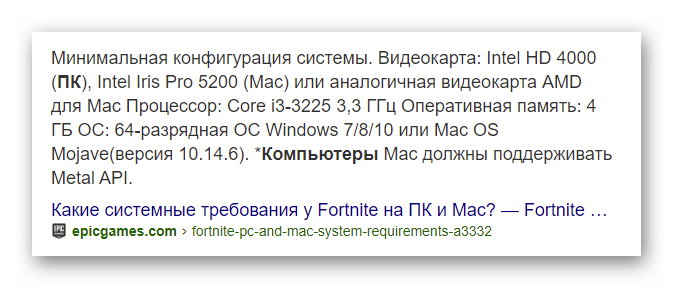
Например, популярная игра Fortnite пойдет только при условии, что на ПК стоит процессор i3, оперативки не менее 4 Гб, а видеокарта не ниже Intel HD 4000. Однако это минимальные требования. Нужно понимать, что тот же процессор бывает разных поколений. То есть i3, выпущенный 10-15 лет назад, будет заметно уступать современной версии. Поэтому лучше отталкиваться от рекомендуемых системных требований. Опять же, для Fortnite это означает, что нужен процессор i5, 8 Гб оперативки и видеокарта не ниже GTX 660 или Radeon HD 7870. Даже если чипы уже устаревшие, игра в этом случае все равно должна работать без сбоев и ошибок типа «Out of video memory trying to allocate a texture».
Читайте также: Не удалось запустить: Ошибка инициализации при запуске игры [135dec40:3fbbecd0:00000064:00000000].
Как посмотреть характеристики своего ПК
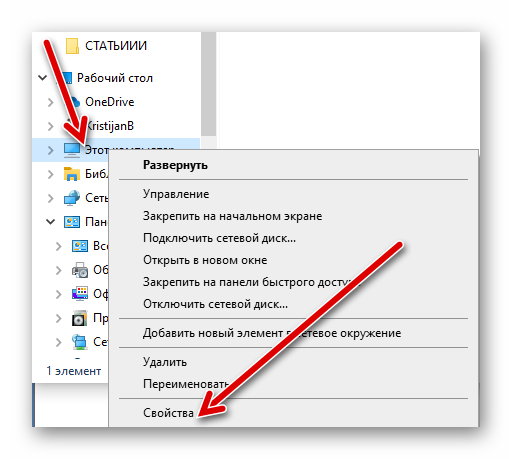
Сделать это очень просто:
- Переходим в проводник.
- Нажимаем на «Этот компьютер» правой клавишей мыши.
- Выбираем свойства.
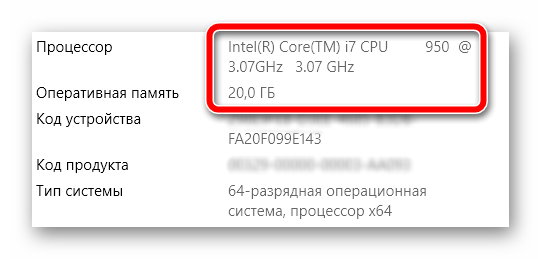
Тут представлена основная информация о процессоре, оперативке.
Чтобы уточнить, какая видеокарта у вас установлена, то проще всего:
- Перейти в диспетчер устройств.
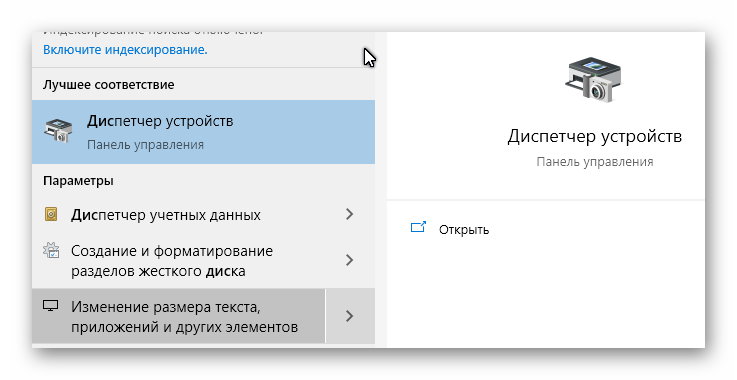
- Посмотреть, какая карта указана в списке в категории «Видеоадаптеры».
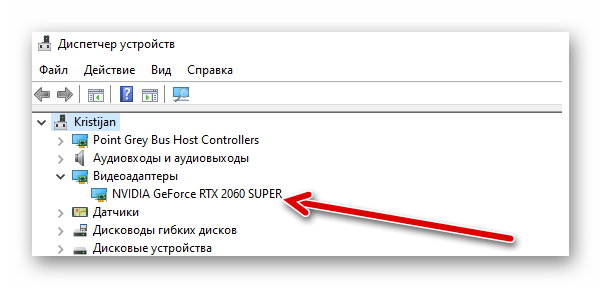
- Посмотреть в интернете более точные характеристики видеокарты.
Как проверить, что для загрузки текстур не хватает оперативной памяти
Обычно ошибка «Out of video memory trying to allocate a texture» возникает при переходе в игре в новую или иную локацию. В этот момент система должна использовать намного больше ресурсов. Тоже самое происходит при сетевых играх. Это объясняется тем, что при перемещении в локацию происходит подгрузка с игрового сервера. Это говорит о том, что ПК не достает внутренней памяти, чтобы прогрузить все необходимые объекты.
Полезно! Подобные проблемы обычно не возникают на 64-разрядных системах с ОЗУ не менее 8 Гб.
Соответственно, чтобы понять, в чем проблема, нужно вычислить необходимый объем файла подкачки. Сделать это очень просто:
- Одновременно зажимаем клавиши Ctrl, и Alt Delete.
- Выбираем «Диспетчер задач».
- Изучаем вкладку «Производительность», где отображается объем задействованной памяти.
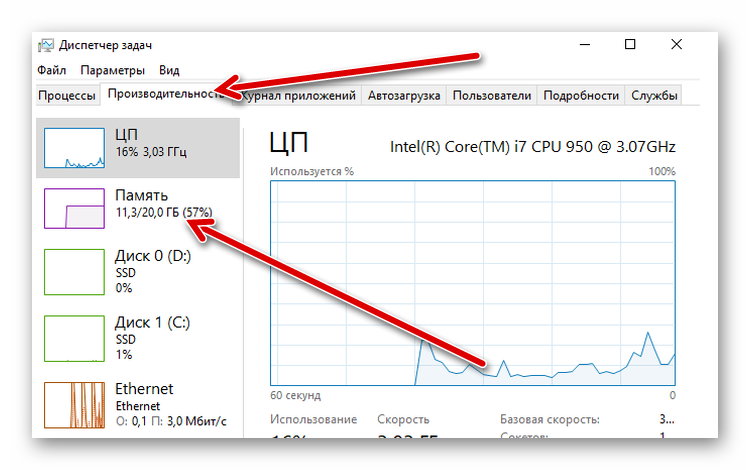
- Умножаем занятую память на 2. Допустим, если занято 2 Гб, значит получаем 4 Гб.
- Вычитаем из полученного значения общий объем памяти. Например, 4 Гб – 20 Гб = -16 Гб. Отрицательное значение говорит о том, что памяти достаточно и есть запас. Если вышел ноль, то объем памяти на грани. А если выходит положительное значение, например, 2 или 4 Гб, то это говорит о недостающем объеме.
Без необходимости увеличивать файл подкачки не стоит. Если же это необходимо, то нужно помнить, что его нельзя повышать более чем в 3 раза от общего объема памяти ПК. То есть, если у вас 4 Гб оперативки, то подкачку можно повысить не более, чем до 12 Гб.
Увеличиваем виртуальную память, чтобы системе хватало ресурсов для выделения текстур
Это старинный трюк, который позволяет разогнать ПК и решить часть проблем, связанных с недостающим объемом подкачки. Для такой манипуляции:
- Щелкаем по значку «Этот компьютер» и выбираем «Свойства».
- Переходим в «Дополнительные параметры системы» (справа).
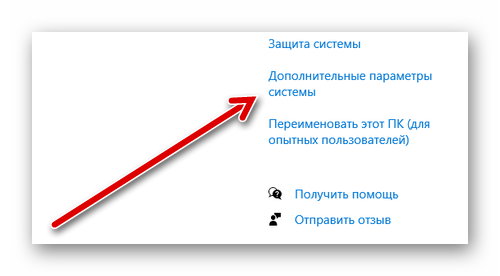
- Во вкладке «Дополнительно» находим «Быстродействие» и жмем на «Параметры».
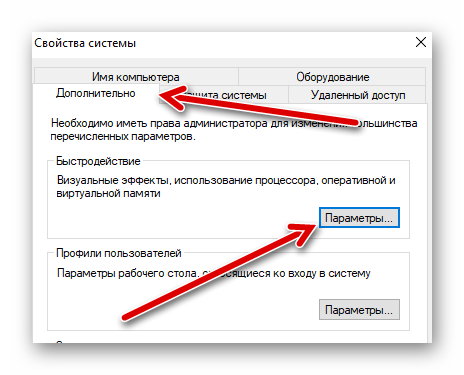
- Снова выбираем «Дополнительно» и в пункте «Виртуальная память» нажимаем «Изменить».
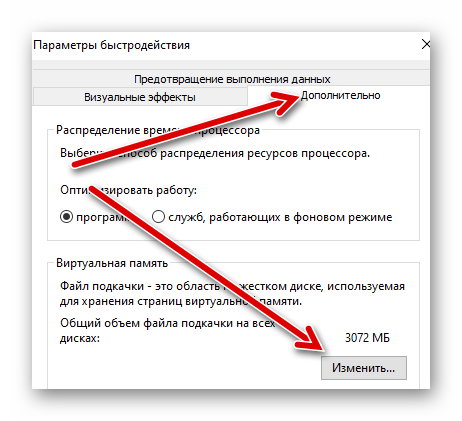
- Активируем строку «Указать размер» и в мегабайтах вписываем требуемое значение (но помним, что оно не должно превышать общего параметра более чем в три раза).
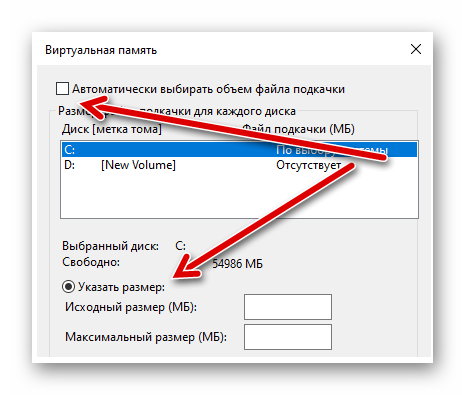
- Жмем «Задать», потом Ok.
Это позволит задать размер файла подкачки на Windows 10. Если у вас другая версия системы, то нужно зайти в свойства «Мой компьютер» и там выбрать «Свойства системы». После этого нужно также найти дополнительные параметры и выбрать в них «Быстродействие».
После этого нужно выполнить перезагрузку ПК и снова попробовать загрузить игру. Если ошибка с загрузкой текстур не исчезла, то пробуем другие решения.
Обновление драйверов для видеокарты для качественного отображения текстур
Видеокарта отвечает за все выводимые на монитор изображения, поэтому если глючит она, то будут постоянно происходить сбои. Чаще всего проблемы возникают, когда пользователь не хочет обновлять драйверы, не видит оповещения или установленные файлы содержат ошибку.
Чтобы обновить файлы видеокарты, необходимо:
- Перейти в диспетчер устройств.
- Найти в списке «Видеоадаптеры».
- Щелкнуть по названию видеокарты правой клавишей и выбрать «Обновить драйвер».
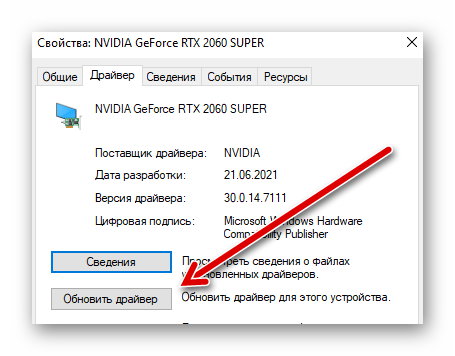
После этого система должна автоматически найти обновления. Если этого не произошло (с Windows 10 происходит крайне редко), то можно перейти на сайт разработчика видеоадаптера, выбрать модель чипа и загрузить драйверы вручную.
Также вам будет интересно: Ошибка Net::ERR_UNKNOWN_URL_SCHEME — как исправить?
Изменение настроек видеокарты для повышения производительности в играх
Подобное решение позволяет оптимизировать видеокарту и использовать все её ресурсы. Все зависит от конкретного производителя адаптера.
Настройка видеоадаптеров от Intel
Если в ваше ПК установлена такая карта, то:
- Переходим в «Панель управления».
- Находим Intel HD Graphics.
- Выбираем настройки 3D.
- Жмем «Сканировать», чтобы отобразился список игр и добавляем необходимую для адаптации.
- Нажимаем «Применить».
Как настроить видеокарту AMD
Для изменений настроек такого видеоадаптера достаточно перейти в панель управления и найти пункт с указанием AMD Radeon. Далее достаточно перейти в «Игры» и выбрать «Глобальные настройки».
Изменение параметров видеокарты NVIDIA
Для оптимизации такого видеоадаптера, необходимо:
- Найти «Панель управления NVIDIA». Обычно она скрывается в скрытых значках. Для этого нужно нажать на иконку NVIDIA и выбрать нужный пункт.
- Нажать на «Регулировка настроек изображения».
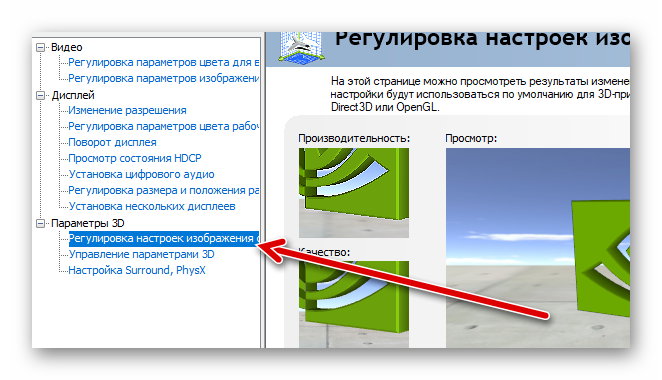
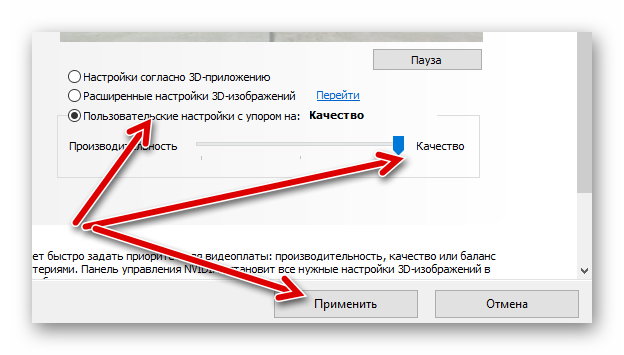
- Передвинуть ползунок до максимального качества (предварительно нужно отметить пункт «пользовательские настройки»).
- Нажать «Применить».
Если ни один из способов не помог, то нужно задуматься о приобретении дополнительной оперативной памяти (если её совсем мало), видеокарты (недешевое удовольствие) или опустить графические настройки игры на более низкие. Также стоит попробовать проверить, не вышел ли обновленный патч на игру.
Обновлено: 28.01.2023


Mount & Blade: Warband
16 мар. 2015 в 9:51
This comes up a lot and crashes the game, it’s kind of annoying. Anyone know any solutions? I’m pretty ♥♥♥♥♥ with this sort of stuff.
16 мар. 2015 в 14:13
Well. it says you’re out of video memory. I’m just guessing, but I don’t think it means that you need to feed the dog. 🙂
First, are you running any mods?
Second, what’s your general system specs?
Lastly, what video options are you using when running the game? (Options Menu)
Let’s face it — Not all modders are producing lean mods. Some of them are using uncompressed/non-optimized texture sets that have a lot of dead weight in them. These textures have to be loaded up, every time they’re called for by a scene/unit in the game. And, if there are a great many different units, each with custom texture sets, all battling it out on a revamped battlefield, that’s a lot of memory overload.
Possible solutions if you’re not running any mods:
Lower the number of units per battle.
Lower your video settings by:
1) Choose «Load Textures on Demand» in the launcher settings.
2) Experiment with lowering texture detail. (Won’t effect most mod packs, though, I wouldn’t think) in the launcer settings.
3) In the Options Menu, in game, turn down all the settings that effect plants, grass and the like.
Set Shaders to «medium», but that shouldn’t effect your overhead as much as some other settings will.
Feel free to turn down «Character Detail», since you won’t be staring at yourself all the time.
Turn character shadowsto Low or Off, as well, since you won’t be staring at your feet a lot.
Set corpses to something low, like 10, so the vid card can dump those textures if they’re not needed.
And, very, very important — Turn «Ragdolls» down to something very low, like 5 and «Blood» to «Only Near Player.» «Ragdolls» uses ragdoll physics which is processed by your vidcard, NOT your CPU. Blood is a high res sprite effect, not a shader, so whenever it’s loaded, there could be multiple instances being tracked for multiple figures, which is more overhead than you need. Turn it to «Only near player.»
Turn on «Fast Water Reflections» and don’t use HDR until you’re sure you can get everything else running well.
Warband will attempt to «automate» all of these settings if you choose for it to automatically set them for you. However, if it doesn’t fully recognize your card, since the game is fairly old, this may not do you any good.
Post back with your specs, any mods you’re running, and the results of your tests.
PS — If you’re running Floris, you can download a reduced resolution texture set for it that may help you. Some other mods have special submods for low-capacity systems, as well, so check the forums/downloads for any mod you may be running.
Error on creating shaders out of video memory mount and blade что делать

Mount & Blade: With Fire and Sword
12 Oct, 2018 @ 3:45pm
I could do with some help on Mount and blade with this problem, error on creating shaders: out of video memory. I cant really figure out what to do i have been able to run this before so some help on how to fix this would be awesome!
13 Oct, 2018 @ 2:54pm
I had the same issue, and going to the other discussion forums, found that it seems to be an issue with the video card, and an update from steam. Changing the texture quality slider from 100 to 80 seemed to fix the issue for me.
31 Oct, 2018 @ 7:10pm
go into rgl.log and change l1 channel and l2 channel to 2048k each
28 Nov, 2019 @ 2:24am
hi guys, same problem here since some days.
do you mean the l2 cache size? there is no l1/2 channel or anything like this.
i change the l2 cache size from original 256k to 2048k without any effect, M&B restored during the loading screen the original size.
i changed nothing on my PC(hardware/os) since the last gameplay.
any idea.
ps. it does’nt matter which module is active(native,enhanced,improved). it all works few weeks ago.
Error on creating shaders: Out of video memory!

New comments cannot be posted and votes cannot be cast
Try running it with Direct X 7.
In regard to the armor textures, did you try the missing/black armor textures fix in the bug reports thread?
Note the rgl_log.txt is created from scratch each time you load the game so you must post it immediately after a crash.
error on creating shaders: out of video memory
Hmm, I searched for it but not getting a log. I almost get the loading bar to finish but I get the error right when it goes to loading scene so It doesn’t generate a log.
edit: I can run regular warbands on full settings but can’t even put this on low settings to get it to work.
Vympel
Grandmaster Knight

render_buffer_size = 5
use_vertex_shaders = 0
enable_blood = 0
force_single_threading = 1
display_width = 1920 (REDUCE)
display_height = 1080
Try this I guess .
angrysully

Banned
Got it to work and hopefully it stays that way, thanks.
aznremix416
Recruit

I have the same problem as he does. I can only find rgl_log but not rgl_config in my MBW folder.
Here is the log though
Starting new log file.
Version: 1.143
— OS: Microsoft Windows 7 Service Pack 1 (build 7601), 64-bit
— RAM: Available physical RAM: 3297MB/4096MB
— CPU: Intel(R) Core(TM) i5-2410M CPU @ 2.30GHz (GenuineIntel)
— L2 cache size: 256K
— CPU Features: FPU MMX SSE SSE2 SSE3 SSSE3 EST HTT
— Number of CPUs: 4 ( Speed:
— GPU:
— D3D9 Adapter: 0 / Driver: nvumdshim.dll / Description: NVIDIA GeForce GT 525M
— Texture Memory: 3766 ( Available Texture Memory: 3754 )
Received stats and achievements from Steam
Processing Ini File Module_name = Brytenwalda
Num Hints = 12
Setting Map Min X = -178.012619
Setting Map Max X = 185.339508
Setting Map Min Y = -232.722122
Setting Map Max Y = 197.089081
Setting Time Multiplier = 0.250000
Setting Seeing Range Multiplier = 6.500000
Setting Track Spotting Multiplier = 0.800000
Setting player_wounded_treshold = 5.000000
Setting hero_wounded_treshold = 15.000000
Setting Skill Prisoner Management Bonus = 5
Setting Skill Leadership Bonus = 3
Setting Base Companion Limit = 20
Setting player_xp_multiplier = 1.000000
Setting hero_xp_multiplier = 1.000000
Setting regulars_xp_multiplier = 1.000000
Setting damage_interrupt_attack_treshold = 3.000000
Setting damage_interrupt_attack_treshold_mp = 3.000000
Setting armor_soak_factor_against_cut = 0.750000
Setting armor_soak_factor_against_pierce = 0.650000
Setting armor_soak_factor_against_blunt = 0.600000
Setting armor_reduction_factor_against_cut = 0.750000
Setting armor_reduction_factor_against_pierce = 0.650000
Setting armor_reduction_factor_against_blunt = 0.600000
Setting horse_charge_damage_multiplier = 5.000000
Setting couched_lance_damage_multiplier = 0.650000
Setting fall_damage_multiplier = 4.000000
Setting shield_penetration_offset = 25.000000
Setting shield_penetration_factor = 2.000000
Setting missile_damage_speed_power = 1.900000
Setting melee_damage_speed_power = 2.000000
Setting multiplayer_walk_enabled = 0
Setting mission_object_prune_time = 180
Scan Module Textures = 1
Scan Module Sounds = 1
Loading Resource test
Loading Module Resource textures_face_gen
Loading Resource shaders
Loading Resource textures
Loading Resource materials
Loading Resource uimeshes
Loading Resource helpers
Loading Resource map_tree_meshes
Loading Resource map_icon_meshes
Loading Resource particle_meshes
Loading Resource skeletons
Loading Resource tree_meshes
Loading Resource xtree_meshes
Loading Module Resource grass_meshes
Loading Resource plant_meshes
Loading Resource body_meshes
Loading Resource object_meshes
Loading Resource object_bodies
Loading Resource goods_meshes
Loading Resource item_meshes1
Loading Resource horse_a
Loading Resource arabian_castle
Loading Resource food
Loading Module Resource beards
Loading Resource village_houses
Loading Resource village_houses_a
Loading Resource village_houses_b
Loading Module Resource hair
Loading Resource interiors_a
Loading Resource interiors_b
Loading Resource interiors_c
Loading Resource arena
Loading Resource map_icons_b
Loading Resource castle_a
Loading Resource dungeon
Loading Resource stone_houses
Loading Resource snowy_houses
Loading Resource snowy_castle
Loading Resource castle_b
Loading Resource square_keep
Loading Resource anim_b
Loading Resource weapon_meshes_c
Loading Resource xtree_meshes_b
Loading Resource map_icons_c
Loading Module Resource pictures
Loading Module Resource user_interface_b
Loading Resource user_interface_c
Loading Resource scene_encounter_spot
Loading Resource interior_thirsty_lion
Loading Resource scene_small_tavern
Loading Resource weapon_meshes1
Loading Resource weapon_meshes_b
Loading Resource houses1
Loading Resource wall_meshes1
Loading Resource town_houses
Loading Resource doors
Loading Resource churches
Loading Resource town_houses_b
Loading Resource castle_c
Loading Resource castle_d
Loading Resource castle_e
Loading Resource castle_f
Loading Resource castle_g
Loading Resource castle_h
Loading Resource castle_i
Loading Resource gatehouse
Loading Resource viking_houses
Loading Resource fake_houses
Loading Resource town_houses_c
Loading Resource particles_2
Loading Resource prisons
Loading Resource prisons_b
Loading Resource interiors_d
Loading Module Resource op_terrain_borders_textures
Loading Module Resource op_terrain_borders_materials
Loading Module Resource op_terrain_borders
Loading Module Resource op_terrain_borders_b
Loading Resource skyboxes
Loading Resource object_b
Loading Resource tree_e_meshes
Loading Resource destroy
Loading Resource xtree_meshes_c
Loading Module Resource grass_meshes_b
Loading Resource interiors_steppe
Loading Resource grooming_horse
Loading Resource town_houses_d
Loading Resource horses_b
Loading Resource ani_horse_mounted
Loading Resource deneme2
Loading Resource horse_skeleton
Loading Resource steppe_fake_houses
Loading Resource tableau_shields
Loading Resource instruments
Loading Resource custom_banner
Loading Resource simple_primitives
Loading Resource ani_man_walk
Loading Resource ani_twohanded
Loading Resource ani_onehanded
Loading Resource ani_death
Loading Resource ani_stand_guardsman
Loading Resource ani_human_mounted
Loading Resource ani_lady_stand
Loading Resource ani_poses
Loading Resource ani_stand_shopkeeper
Loading Resource ani_man_cheer
Loading Resource ani_stand_onhorse
Loading Resource ani_throw_stone
Loading Resource ani_strikes
Loading Resource ani_equip_arms
Loading Resource ani_run_p
Loading Resource ani_run_forward_left_right
Loading Resource uni_strikes3
Loading Resource ani_walk_sideways
Loading Resource ani_run_sideways
Loading Resource ani_stand
Loading Resource ani_crouch_down
Loading Resource ani_low_walk
Loading Resource ani_turn_man
Loading Resource ani_attacks_single
Loading Resource ani_lancer
Loading Resource ani_attacks
Loading Resource ani_kicks
Loading Resource ani_parry_attack
Loading Resource ani_walk_backward
Loading Resource ani_run_lookingsides
Loading Resource ani_defends
Loading Resource ani_walk_lookingsides
Loading Resource ani_jump
Loading Resource ani_wedding
Loading Resource arabian_props
Loading Resource uni_jump
Loading Resource uni_stances
Loading Resource uni_equip
Loading Resource uni_strike
Loading Resource uni_throws
Loading Resource uni_fistswing
Loading Resource uni_lord_stand
Loading Resource uni_defence
Loading Resource uni_sideways
Loading Resource dart
Loading Resource armors_new_b
Loading Resource armors_new_arena
Loading Resource rock
Loading Resource raw_materials
Loading Resource gauntlets_new
Loading Resource bride_dress
Loading Resource ui_server_filter
Loading Resource ship
Loading Resource arabian_houses
Loading Resource object_c
Loading Resource tree_f
Loading Resource interiors_arabian
Loading Resource arabian_village
Loading Resource valleyProps
Loading Resource workshops
Loading Resource barrier_primitives
Loading Resource town_houses_e
Loading Module Resource animalesdecaza
Loading Module Resource animals
Loading Module Resource animals2
Loading Module Resource otrositems
Loading Module Resource arcosyflechas
Loading Module Resource armadurasmedias
Loading Module Resource armadurasmedias2
Loading Module Resource armaduraspesadas
Loading Module Resource armaduraspesadas2
Loading Module Resource armaduraspesadas3
Loading Module Resource battlebanners
Loading Module Resource botasycalzado
Loading Module Resource capasycabeza
Loading Module Resource capasycabeza2
Loading Module Resource coronas
Loading Module Resource hachas
Loading Module Resource desnudos1
Loading Module Resource desnudosypantalones
Loading Module Resource escudos1
Loading Module Resource escudos2
Loading Module Resource escudos3
Loading Module Resource escudos4
Loading Module Resource escudos5
Loading Module Resource espadas1
Loading Module Resource sail
Loading Module Resource espadas2
Loading Module Resource espadas3
Loading Module Resource gorros1
Loading Module Resource std_banners
Loading Module Resource std_banners_default
Loading Module Resource std_flags_vertical
Loading Module Resource gorros2
Loading Module Resource seaxycuchillos
Loading Module Resource iconos1
Loading Module Resource lanzasyhastas
Loading Module Resource Companions_Overview_mesh
Loading Module Resource sceneprops1
Loading Module Resource sceneprops2
Loading Module Resource sceneprops3
Loading Module Resource Tempered_mat
Loading Module Resource Tempered_mesh
Overwritten module resource is ignored due to the module switching: core_ui_meshes
Loading Module Resource command_cursor
Loading Module Resource tunicalarga
Loading Module Resource tunicas1
Loading Module Resource tunicas2
Loading Module Resource tunicas3
Loading Module Resource tunicas4
Loading Module Resource tunicas5
Loading Module Resource tunicas6
Loading Module Resource tunicasyropavaria
Loading Module Resource yelmos1
Loading Module Resource yelmos2
Loading Module Resource yelmos3
Loading Module Resource vegetacion
Loading Module Resource vestuariomujeres
Loading Module Resource AD_shields
Loading Module Resource vympels_armory
Loading Module Resource vcof_helms
> //Processing Ini File Finished
Loading Music.
Loading Textures.
Finished Loading Textures.
L8 Format is supported
WARNING: UNABLE TO MAP GAME PRESENTATION CODE: prsnt_game_escape
Loading Module.
Loading item kinds.
Loading dialogs.
Loading mission templates.
Loading party templates.
ERROR: Error on creating shaders: Out of video memory!
Читайте также:
- Невервинтер как быстро прокачаться до 80
- Uexterior cell buffer fallout 4 что это
- Краснолюдский спирт ведьмак 3 где найти
- Сколько стоят утиные ловушки в hay day
- Hustle castle что такое
- Всадники Кальрадии »
- Forum »
- Mount & Blade »
- Ремонтная мастерская »
- Архив мастерской по старым играм »
- RGL ERROR — как бороться?
- Печать
Страницы: 1 … 3 4 [5] Вниз
Теги:

Тема: RGL ERROR — как бороться? (Прочитано 153226 раз)
0 Пользователей и 1 Гость просматривают эту тему.
Версия Mount Blade 1.011(Огнем и Мечом)
Но этот мод под версию игры 1.010/1.011 Истории Героя , а не ОиМ
Да и другие тоже наверно делались под ИГ или Вврбанд и работать под (Огнем и Мечом) они не обязаны

Записан
Понятно.Спасибо))Буду искать Историю Героя х)))))
Записан
У меня нет папки Mount&Blade с файлом RGL config. Что делать, если её нет, и невозможно поставить большее значение рендер_буфер_сайз? Помогите, как сделать это? Пытался найти через поисковик компьютера, кроме файла АрДжиЭла Великих Битв и Варбанда, у меня никаких нет. Можно ли повысить размер этого буфера каким нибудь другим способом, либо найти эту папку?
Записан
Мне кто-нибудь поможет? Проблема, нет папки с этим RGL_config для КЛАССИКИ МиБа. Будьте людьми!
Записан
Помогите с этой проблеммой(get_object failed for: troll_skel)что делать не знаю,ни какой мод не работает,все работала!
Записан
Помогите пожалуйста.
Установил мод Imperium Romanum и при загрузке выдает: RLG ERROR get_object failed for texture: roman_swords1_norm
подскажите что делать
Записан
Помогите с этой проблеммой(get_object failed for: troll_skel)что делать не знаю,ни какой мод не работает,все работала!
Судя по troll, у тебя не правильно поставлен ТЛД 1.011, поэтому придётся переустанавливать игру. Ещё раз скажу — мод TLD для классики, а не для WB. А коли руки неправильно заточены, нечего лезть. Там же написано — при использовании этого способа, другие модули, включая оригинал МиБ не будут запускаться.
Помогите пожалуйста.
Установил мод Imperium Romanum и при загрузке выдает: RLG ERROR get_object failed for texture: roman_swords1_norm
подскажите что делать
Либо мод не до конца скачан, либо плохо разархивирован, либо ты поставил на классику.
Записан
Здравствуйте! у меня есть одна проблема, установил мод «Prophesy of Pendor 2.5» на M&B История героя v1.011, когда хочу начать новую игру, быструю битву или обучение появляется окно RGL ERROR пишет что-то типа не могу найти файл troll_skel. Подскажите, пожалуйста, что делать.
Записан
Спасите! Скачал обновление 1.015, у меня была 1.014(Думал, исправит постоянные вылеты из игры). Вот значит, скачал, установил, захожу в игру «Обработка .ini файла» так очень долго, решил свернуть игру, посмотреть, нет ли ошибки, так и есть! Пишет: «RGL error attempt to reregister mesh robe». Так постоянно. Копался в настройках, делал все возможное, ничего не происходит  Надеюсь на вашу помощь, всадники Кальрадии!
Записан
- Ник в M&B: RA_Preobraz_LG_FOXinBOX_Rek
ERROR: Load error: Invalid number of troops: 1986617708 Мод POP 3.6.Помогите!
Записан

Играю с battle sizer’ом, и при сражении более 100 человек выскакивает ошибка:
RGL error
Unable to restore vertex buffer
У меня windows 7 и соответственно 11 directX, 2 видеокарты 5850 cross-fire, 4 гб оперативы. Что делать?
Эта ошибка с сообщением о ‘RGL error — unable to restore vertex buffer’ связана с тем, что сама игра не может адресовать больше оперативной памяти (здесь затрагивается эта проблема и приводится решение: http://mbx.streetofeyes.com/index.php/topic,2520.0.html) сама утилита LAA Large Address Aware, тут www.techpowerup.com/forums/showthread.php?t=112556
Принцип такой запускаем программу LAA Large Address Aware и открываем файл mount&blade.exe через неё или просто перетягиваем файл и ставим птичку в Large Address Aware и нажимаем save все готово. Модераторов, прошу перенести в шапку решение этой серьезной проблемы об ошибке.
« Последнее редактирование: 06 Ноября, 2013, 02:02 от Elvis_Presley »
Записан
Ребят подскажите, скачал и установил мод TLD, во время загрузки выдает ошибку RGL error: get_shader failed for: windy_flora.
Как сней бороться? Ставлю на классик версия 1.011
Записан
Добрый день! Проблема такова RGL ERROR Unable to open file CommonRes/Costumes_a.brf. Версия игры — Warband 1.153, мод — Русь 13 век 0.321. Установлена игра согласно данным сайта, пропатченая до англ. версии и всё такое. Запускаю с помощью WSE 3.2 по-моему. Ошибка появляется в момент запуска Новой игры или Быстрого боя, до главно меню прогружается нормально. Прошу помочь, 
Записан
Добрый день! Проблема такова RGL ERROR Unable to open file CommonRes/Costumes_a.brf. Версия игры — Warband 1.153, мод — Русь 13 век 0.321. Установлена игра согласно данным сайта, пропатченая до англ. версии и всё такое. Запускаю с помощью WSE 3.2 по-моему. Ошибка появляется в момент запуска Новой игры или Быстрого боя, до главно меню прогружается нормально. Прошу помочь,
Плз народ хватит тупить, когда же вы все поймете что costumes_a.brf файл истории героя!!! на варбанде нету такого файла!!! Если версия мода для варбанда это требует переустанови мод, переустанови игру…
Записан
- Ник в M&B: Gohryt
Думай реще, делай вещи и все будет в норме!
При запуске Русь 13 век (Путь воина). через WSELoader, выдает
RGL Error
—————————
Unable to open ModulesNativesounds.txt
Типа невозмозно открыть файл? Почему?
Записан
Записан
- Ник в M&B: [RUSMNB]Vanok
- Фракция: Вегиры


И помните: «Хватит набивать посты» (NightHawkreal)
Rgl error:out of video memory:could not get reguered memory for vertex buffer (0:5),с такой ошибкой кто-нибудь сталкивался!Играю в Clash of Kings в одном квесте при заходе в битву происходит,сначала выдавало ошибку про visual+c,но тем не менее кое как прошел.А вот решил по новой сыграть и выдало эту ошибку!
Записан
Решил поиграть в Mount and Blade The red Wars
Но при запуске игры выдаёт
Rgl errors
Unable to open file:CommonRes/wb_mp_objects_a.brf
Помогите пожалуйста.
Записан
- Фракция: Норды
Некромант, wb_mp_objects_a.brf — это файл, добавленный каким-то патчем, т.к. он датирован 10.05.2012, в то время, как Варбанд вышел в 2010-ом. Скорее всего у тебя старая версия игры, в которой этого файла нет. А этот мод рассчитан на более новые версии, например 1.153 и выше. И да, если у тебя пиратка, то с вопросами по игре обращайся туда, откуда скачивал.
Записан
- Фракция: Вегиры
МиБ без модов, как водка без пива — деньги на ветер. (с) NightHawkreal
Установил сборку модов Mount (История героя) v 1.11 При установке на всякий отрубил антивирус. Установка прошла,поставил пару модов понравившихся. При запуске любого мода или оригинала вылетает ошибка RGL error get object failed for skel_jawa. Винда 7, проц I5, GTX 580 видюха и 16 Гб ОЗУ, так что на железо не пеняю в ошибке. Переустанавливал раза три — не помогло. Пробовал ставить в совместимости с ХР сервис пак 3 и с виндой 7 и тоже не помогло! Подскажите, в чём проблема!!!!
Записан
- Фракция: Вегиры
Делай что должен и будь что будет!
Записан
- Ник в M&B: [RUSMNB]Vanok
- Фракция: Вегиры
И помните: «Хватит набивать посты» (NightHawkreal)
Svaor, вот статья с подробным описанием способа решения различных проблем — http://rusmnb.ru/index.php?action=article;topic=4307.0
Нет там решения моей проблемы… Вот что интересно! Сам Натив и мод Средиземье не запускаются, выдавая описанную мною ошибку, а мод Звёздные войны работет. Ничего не понимаю!!!
Записан
- Фракция: Вегиры
Делай что должен и будь что будет!
Помогите пожалуйста!!!!!!!!!! RGL ERROR и далее вот такое :Unable to open file:ModulesOgniem i MieczemResourcetest_materials.brf что тут поможет?
Записан
- Фракция: Сестры войны
- Печать
Страницы: 1 … 3 4 [5] Вверх
Теги:


Кто смог решить вылет игры с ошибкой «ran out of video memory»
такая ошибка появляется где, то минут через 20-30, причем на забугорных форумах тоже пишут про данную ошибку.
комп не тормоз i7, Ram 8 gb, Гигабайт Geforce GTX 560 1 gb, win 7
Nairon
Та же проблема — спрашивал в стимкомьюнити, но и там не нашел решения. Может попробовать переустановить?
та же проблема. первый день играл норм без вылетов, на второй день уже вылетала эта ошибка
Путем экспериментов, нашел 1 способ, заходим в Control-Panel Nvidia (что в трее торчит), заходим в Параметры 3D, выбираем пункт Установка конфигурации PhysX и меняем обработку графики с автоматического выбора на графический чип видеокарты. У меня перестало вылетать, может кому поможет 🙂
Nairon
спасибо, я попробую сегодня вечерком сыграть, потом отпишусь)

Спасибо, всё пробовал винду просто так и на 32 битную ничего не помогало, вылетает хоть ты тресни на на 64 битной просто лагало жутко, комп мощный всё номально летает. Отпишусь как протестю.
Спасибо большое, помогло ни лагов ни вылетов, очень благодарен)
где найти эту понель Н-видиа?
Данная панель будет только у видеокарт Geforce Nvidia, щелкай правой кнопкой по экрану и она будет в менюшке 🙂
Интересно… Я пользователь Ati Radeon 3800HD (1gb)…
Предлагаете открыть Cataclism Controler?
Про карты Ати хрен знает … не пользовался 🙂
Nairon
Вот хреново… ошибка та же, а подсказать никто не может =(

Нужно попробовать способ. У меня кстати в другом прикол, всё норм идёт на 306. драйверах Нвидия. но если поставить 310 игра виснет минут через 5-10 🙂
Shimuto
В чем прикол ? В установке бета драйверов?
AMRubin
бета драйвера норм всегда были. Тут дело даже в том что на драйверах Сертифицированных (не бета) 306.23 игра идёт норм, но на следующих 306.97 физикс начинает лагать и вылетать игра.

такая же проблема, и предложенный способ не прокатит — у меня и так уже давно стоит эта опция! ща попробуем дрова обновить…
UPD: обновил, проблема не исчезла, но перестала быть такой острой + фпс вроде как несколько повысился.

Была проблема с GTX660от palit оказывается,те 2 гига ,что на карте берется из системной памяти,интегрированная dx.diag пишет.Поменял от MSI GTX660-ti проблема исчезла.физикс требует не менее 2 гигов памяти,у меня 4 гига -свободно 2.99-1 под резерв системы,остаеться1.6-1.7гига,при всех отключенных процессах .Вот и думайте …пора переходить на 64-разрядную систему.
Как устранить эту ошибку Out of video memory trying to allocate a rendering resource. Make sure your video card has minimum required memory, try lowering the resolution and or closing other applications that are running. Exiting…
Вообщем появляется такая ошибка, говорю что она значит если перевести на русский:
Отображение ресурса пытается выделится из видео памяти. Вы должны убедится что ваша видеокарта имеет нужный объем памяти для этого, попытайтесь понизить разрешение, или закройте другие программы которые могут нагружать систему. Выход…
39457 просмотров
больше 5 лет назад
 Error
Error
6 ответов
 0
0


Пасаны, была такая проблема, решил включением службы sysmain. Кто не знает, откройте диспетчер задач, там найдите службы и включите sysmain. Я его как то отключил и забыл, вот хорошо что вспомнил. Мне помогло, надеюсь вам тоже
Ответ дан
7 мес. назад
0
В диспечере задач нужно убрать все задачи , которые употребляют «память» (пкм по панели задач — диспечер задач) . Потом заходишь в игру и , если есть ошибка , то смотри другие комменты или меняй видеокарту, а если ей нет , то быстро ставишь минимсальные настройки и играешь с ними. мне помогло
Ответ дан
год назад
0

Мне кажется в вашем случае можно просто сделать откат Windows на то время как все было нормально. Самого меня эта функция очень часто спасала и предотвращала большие проблемы, когда дело доходило чуть ли не до переустановки операционной системы.
Если что не волнуйтесь, вашиперсональные файлы и данные не будут никак затронуты, а процесс отката повлияет лишь на систему и её документы. И да, когда вы будете делать откат, автоматически создастся образ ОС и вы всегда сможете вернутся на сегодняшний день. Пробуйте.
Ответ дан
больше 5 лет назад
0

Тогда здесь понятно в чём дело. У вас не полностью удалилась та программа из-за которой появилась эта ошибка, такое бывает особенно с софтом который предназначен для нетипичных целей. Вообщем смотрите, скачиваете программу CCleaner с интернета, она бесплатна. Запускаете её, и производите чистку компьютера. И обязательно выберите Реестр системы когда будете начинать очистку.
После этого всего следы той программы должны будут стереться, и игры возможно запустятся. Если это не поможет, не волнуйтесь я предложу ещё несколько способов, думаю за сегодня мы вместе справимся.
Ответ дан
больше 5 лет назад
0

Я играю в игры через Steam, и такая штука у меня на каждой игре появляется, а также сбрасывает на рабочий стол. А на пиратских игр у меня просто дико тормозит и плавает игра. Дело в том я скачал программу Action! для видеосъемки игрушек, и после нее у меня начался весь этот хаос. Программу я удалил, но от этого легче не стало.
Ответ дан
больше 5 лет назад
0

Добрый день дорогой участник нашего портала. Я бы хотел бы узнать в какой именно игре происходит эта ошибка, потому что как вы сами понимаете она может возникать при запуске определенных задач или приложений, по этому для того чтобы выяснить из-за чего она происходит нужно знать это.
Назовите игру или прикрепите скриншот чтобы я смог сделать подробный разбор, и прислать вам нужные инструкции которые помогут справится с этой бедой. Буду ожидать вашего ответа, не волнуйтесь я думаю за сегодня мы это исправим!
Ответ дан
больше 5 лет назад
0
#privet ya top Gamer in the World
Введите ваш ответ


Символов нужно 2
-
Tetsuro
- Level 2

- Posts: 19
- Joined: Sat Jan 22, 2011 2:41 pm
Out of (video?) memory!
Hello,
I have a problem with mine PC configuration. It has a lot of RAM, 4 GB for the system and 1 GB for the graphic card but when I play games I have a lot of problems like weird graphics, graphic that load very slow and some error messages.
Those games aren’t complex (Mount & Blade and Titan Quest), but I continue to have problems as Wine or something else does not see all the memory I have. The graphic card is an nVidia GT430, a pretty recent card.
Please help me! 
-
Tetsuro
- Level 2
- Posts: 19
- Joined: Sat Jan 22, 2011 2:41 pm
Post
by Tetsuro » Sun Feb 27, 2011 11:27 am
It seems to work better with Low or Medium detaisl but it worked flawlessy (with details at High) with the previous system (an old Athlon with 2GB RAM) with 512 MB and a 9500GT (a weaker card).
Could be the PCI Express bus? Maybe Wine Does not support 1GB cards? Drivers of newer nVidias are broken or what? 
-
Tetsuro
- Level 2
- Posts: 19
- Joined: Sat Jan 22, 2011 2:41 pm
Post
by Tetsuro » Sun Feb 27, 2011 1:08 pm
I’ve resolved giving this command on the Terminal: winetricks videomemorysize=1024 (for people with 512 MB of video RAM you could set 512 instead of 1024).
Hope it will be of help for other users.
-
Jim Hall
Out of (video?) memory!
Post
by Jim Hall » Mon Feb 28, 2011 2:32 pm
On Sun, Feb 27, 2011 at 12:08 PM, Tetsuro <wineforum-user@winehq.org> wrote:
I’ve resolved giving this command on the Terminal: winetricks
videomemorysize=1024 (for people with 512 MB of video RAM you could set 512
instead of 1024).Hope it will be of help for other users.
That command doesnt work for me. I receive a «command not found» from
winetricks. Anybody have any clues?
Jim
————— next part —————
An HTML attachment was scrubbed…
URL: <http://www.winehq.org/pipermail/wine-us … chment.htm>
-
Tetsuro
- Level 2
- Posts: 19
- Joined: Sat Jan 22, 2011 2:41 pm
Re: Out of (video?) memory!
Post
by Tetsuro » Mon Feb 28, 2011 2:59 pm
Jim Hall wrote:On Sun, Feb 27, 2011 at 12:08 PM, Tetsuro <wineforum-user@winehq.org> wrote:
I’ve resolved giving this command on the Terminal: winetricks
videomemorysize=1024 (for people with 512 MB of video RAM you could set 512
instead of 1024).Hope it will be of help for other users.
That command doesnt work for me. I receive a «command not found» from
winetricks. Anybody have any clues?Jim
————— next part —————
An HTML attachment was scrubbed…
URL: <http://www.winehq.org/pipermail/wine-us … chment.htm>
Are you sure you have installed Winetricks?
winetricks videomemorysize=512
The above is the exact command to write in a Terminal window.
And this is the result it gives (I set 1024 instead of 512):
alessandro@alessandro-desktop:~$ winetricks videomemorysize=1024
Setting video memory size to 1024
Executing early_wine regedit c:winetrickstmpset-video.reg
Install of videomemorysize=1024 done
winetricks done.
-

dimesio
- Moderator

- Posts: 13142
- Joined: Tue Mar 25, 2008 10:30 pm
Re: Out of (video?) memory!
Post
by dimesio » Mon Feb 28, 2011 4:29 pm
Jim Hall wrote:
That command doesnt work for me. I receive a «command not found» from
winetricks. Anybody have any clues?
Make sure you have the latest winetricks.
-
Jim Hall
Out of (video?) memory!
Post
by Jim Hall » Mon Feb 28, 2011 10:20 pm
On Mon, Feb 28, 2011 at 3:29 PM, dimesio <wineforum-user@winehq.org> wrote:
Jim Hall wrote:
That command doesnt work for me. I receive a «command not found» from
winetricks. Anybody have any clues?Make sure you have the latest winetricks.
tetsuro,
This is the first I’ve heard about installing a shell script. So I went to
the Wine Wiki page about winetricks, and right near the end is a section
about installing. I guess that makes me a monkey’s uncle. Because I hadn’t
installed it, I took your command literally and didn’t include «sh». All is
now well, my output matches yours.
dimesio,
I have version «20110123». Should be the newest.
Jim
————— next part —————
An HTML attachment was scrubbed…
URL: <http://www.winehq.org/pipermail/wine-us … chment.htm>
-
Tetsuro
- Level 2
- Posts: 19
- Joined: Sat Jan 22, 2011 2:41 pm
Post
by Tetsuro » Sat Apr 23, 2011 1:12 pm
I continue to have those problems. It’s really irritating, there are no solutions? 
-
nickiee
- Newbie

- Posts: 1
- Joined: Thu Apr 21, 2011 8:16 am
Post
by nickiee » Mon Apr 25, 2011 1:09 pm
Maybe there is some problem in your graphics card or ram. change the ram slot cause one time when i changed my slot the games started running while before they don’t. so maybe it will help you and check your graphic card also.
good luck
-
Tetsuro
- Level 2
- Posts: 19
- Joined: Sat Jan 22, 2011 2:41 pm
Post
by Tetsuro » Mon Apr 25, 2011 2:22 pm
nickiee wrote:Maybe there is some problem in your graphics card or ram. change the ram slot cause one time when i changed my slot the games started running while before they don’t. so maybe it will help you and check your graphic card also.
good luck
It’s probably the graphic card but why? I mean the problem shows itself in just one game (Mount & Blade), maybe it’s Wine that cannot map the data on mine graphic card that is relatively new (nVidia GT430) and with plenty of RAM (1GB). It’s like Wine doesn’t understand that it has 1 gig (but I forced it before) or just write outside the graphic memory (and the game cannot find the data).
I’m not the only one to have this problem, I think it could be software related.
-
vitamin
- Moderator
- Posts: 6605
- Joined: Sat Feb 23, 2008 2:29 pm
Post
by vitamin » Tue Apr 26, 2011 8:16 pm
Tetsuro wrote:I continue to have those problems. It’s really irritating, there are no solutions?
Then increase the «memory size». It’s not a real memory size anyway. If you have for example 1GB, then you can safely set 2GB for VM size. If game uses too much of it things might get slow, but continue to work.
-
Jim Hall
Out of (video?) memory!
Post
by Jim Hall » Wed Apr 27, 2011 11:45 am
On Tue, Apr 26, 2011 at 8:16 PM, vitamin <wineforum-user@winehq.org> wrote:
Tetsuro wrote:
I continue to have those problems. It’s really irritating, there are no
solutions?
Then increase the «memory size». It’s not a real memory size anyway. If you
have for example 1GB, then you can safely set 2GB for VM size. If game uses
too much of it things might get slow, but continue to work.
And where would this be done, please?
Jim
————— next part —————
An HTML attachment was scrubbed…
URL: <http://www.winehq.org/pipermail/wine-us … chment.htm>
-
jjmckenzie
- Moderator
- Posts: 1153
- Joined: Wed Apr 27, 2011 11:01 pm
Out of (video?) memory!
Post
by jjmckenzie » Sun May 01, 2011 11:59 am
On 4/27/11 9:44 AM, Jim Hall wrote:
On Tue, Apr 26, 2011 at 8:16 PM, vitamin<wineforum-user@winehq.org> wrote:
Tetsuro wrote:
I continue to have those problems. It’s really irritating, there are no
solutions?
Then increase the «memory size». It’s not a real memory size anyway. If you
have for example 1GB, then you can safely set 2GB for VM size. If game uses
too much of it things might get slow, but continue to work.And where would this be done, please?
Registry. Search the forums for more information on ‘setting Video
Memory Size’.
James McKenzie
This is a community forum and not official technical support. —
If you need official support: Contact Us
The following comments are owned by whoever posted them. We are not responsible for them in any way.
Error: Out of Video Memory: Unable to Create Vertex Buffer on qualified systems [FIXED]
Hello Fellow CX Users,
I had been having a problem with mount and blade where it would not use my full Video Memory, so the game would crash with this error or cause texture bugs. This is apparently due to either a Win32 RAM limitation (2GB, although i suspect this is unrelated), or according to some users on the M&B forum, the game’s code was not designed well for certain graphics cards (seems more probable). Keep in mind that I am Using Direct X 7 Render mode with max resolution and graphics, with the exception of Corpse count, which is at 20, and ragdolls, which is at 5. The game appears to be steady enough to accept some more weight but I don’t want to push it.
This issue was very frustrating, so I want to offer my solution to anyone else who is having this problem, because it took alot of work to find the solution.
TO FIX:
1) Open your bottle’s registry editor by going to Programs > Run Command and select your bottle, and enter ‘regedit’ (no quotes) then Run.
2) In the navigation menu of the registry editor, locate HKEY_CURRENT_USER > Software > Wine > Direct 3D
3) In the Direct3D folder, you should see PixelShaderMode and VertexShaderMode if you have assigned settings at least once (I think), right click on the blank space beneath these entries and select New > String Value.
4) Name the string value ‘VideoMemorySize’ no quotes.
5) Right click on VideoMemorySize and select Modify.
6) enter your maximum video(virtual) memory, which can be found in your system overview. (Top Bar > Apple > About this Mac > More Info… > Hardware > Graphics/Display) ENTER THIS VALUE IN MB. So for example, I have 1GB of VRAM, meaning my video memory max is 1024 MB.
For those of you who are wary before editing your SysReg, what you are doing here is reminding this bottle exactly how much VRAM you have, so there is no confusion or wasted VRAM. You may find this to work very well on other games with memory issues!
I hope this works, but remember, as always, you are editing your SysReg at your OWN RISK! I can’t be expected to be able to answer any questions, I am sort of a computer n00b, I am just sharing a fix that worked immaculately for me and neither me or Crossover are responsible for you screwing up your SysReg and melting your computer! 😉
That said if my new Macbook Pro isn’t melting, I think you will be ok! The Designers seem to have designed this machine especially for those of us who don’t have enough overheating issues in our lives.
Have fun murdering those Vaegirs and Khergits, I know I will!
-Andrew
query: exactly which brand/model of video GPU are you using,
and which version of MacOS & Crossover?
.
System Specs:
MacBook Pro 17″ 2011
2.3 GHz Intel Core i7
4GB DDR3 RAM
AMD Radeon 6750M 2GB VRAM
Mac OS X 10.6.6
CXG 10.1
Hope that helps,
-Andrew
What if you run this game via steam in crossover? will I still be able to change it? Also I went into the registry It did not have a Direct 3D folder inside.
Please make sure your game is fully updated at first. There have been some updates that made the game use more video memory than it should have — and the games developers have fixed the issue since.
Dustin Mccloy wrote:
What if you run this game via steam in crossover? will I still be
able to change it? Also I went into the registry It did not have a
Direct 3D folder inside.
For anyone else who runs into this, you’d need to make the Direct3D folder then and the key as well.
CrossOver Forums: the place to discuss running Windows applications on Mac and Linux