Содержание
- 1 Что вызывает ошибку «Недостаточно памяти» при Fallout
- 1.1 Решение 1. Используйте патч 4 ГБ
- 1.2 Решение 2. Используйте мод удаления заикания для Fallout New Vegas
Fallout New Vegas — одна из самых революционных ролевых игр от первого лица, и большинство игроков считают ее лучшей игрой в Fallout. Тем не менее, игра на ПК выглядит немного глючной, а у некоторых людей порт неисправен.
Во время игры появляется сообщение «Out of Memory», и сразу после этого игра вылетает. Несмотря на то, что название предполагает, что играющему ПК может просто не хватить выделенной памяти графической карты, ошибка также появилась для пользователей игровых ПК, которые определенно не страдают от таких проблем.
Что вызывает ошибку «Недостаточно памяти» при Fallout
Причиной ошибки обычно является тот факт, что игра почему-то не может использовать более 2 ГБ ОЗУ по умолчанию, и ее необходимо изменить с помощью модов. Также есть еще один полезный мод, который можно использовать для решения проблемы.
Решение 1. Используйте патч 4 ГБ
Патч 4 ГБ для Fallout: New Vegas — инструмент, используемый для загрузки игры с флагом исполняемого файла Large Address Aware, который позволяет исполняемому файлу игры использовать 4 ГБ адресного пространства виртуальной памяти, что фактически может остановить ошибку «Недостаточно памяти» от появления.
Этот патч действительно будет работать с Steam-версией игры, и вы сможете легко установить его, так как разработчики упростили процесс, как это было раньше.
- Перейдите по этой ссылке и прокрутите вниз, пока не увидите кучу вкладок. Перейдите на вкладку «Файлы» и нажмите кнопку «Ручная загрузка» на сайте. Сохраните файл в папке «Загрузки».
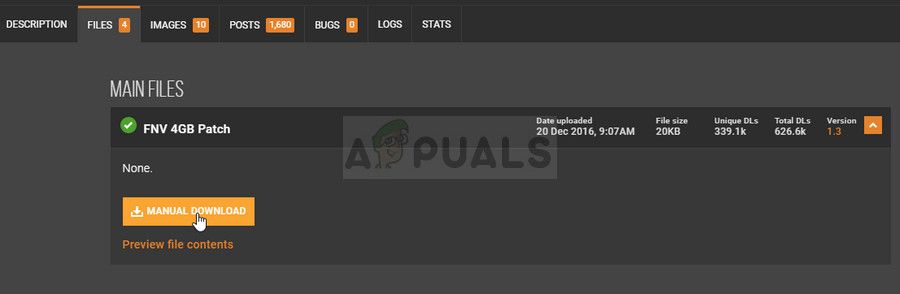
- Найдите файл, который вы только что загрузили, и выберите опцию Извлечь в…, поскольку это должен быть файл 7zip. Перейдите к папке установки Fallout New Vegas, которая должна отображаться ниже, если вы не использовали вместо этого другую библиотеку Steam:
C >> ProgramFiles (x86) >> Steam >> SteamApp >> общие >> Fallout New Vegas
- Извлеките файл 7zip здесь. Найдите файл FalloutNVpatch.exe в папке, щелкните по нему правой кнопкой мыши и выберите пункт «Запуск от имени администратора» в появившемся контекстном меню.
- Теперь патчер запустится и создаст резервную копию исходного исполняемого файла игры.
- Вы также должны сделать файлы .ini для игры доступными только для чтения. В той же папке установки Fallout New Vegas в строке поиска в верхнем правом углу введите «* .ini» в строке поиска.
- Все файлы .ini должны отображаться. Щелкните правой кнопкой мыши по каждому из них, оставайтесь на вкладке «Общие» и установите флажок рядом с параметром «Только для чтения» в разделе «Атрибуты» в нижней части окна «Свойства».
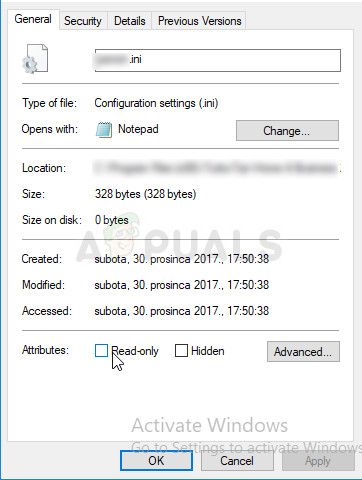
- Запустите игру через Steam и проверьте, не появляется ли на вашем компьютере ошибка «Недостаточно памяти» при игре в Fallout New Vegas.
Решение 2. Используйте мод удаления заикания для Fallout New Vegas
Использование этого мода из Nexus Mods в сочетании с патчем 4 ГБ определенно должно решить проблему для вас, как это было сделано для некоторых других пользователей онлайн. Этот патч также очень полезен для компьютеров нижнего уровня, у которых были проблемы с производительностью при запуске игры, поэтому мод должен быть полезен в любом случае.
- Перейдите по этой ссылке и прокрутите вниз, пока не увидите кучу вкладок. Перейдите на вкладку «Файлы» и нажмите кнопку «Ручная загрузка» на сайте. Сохраните файл в папке «Загрузки».
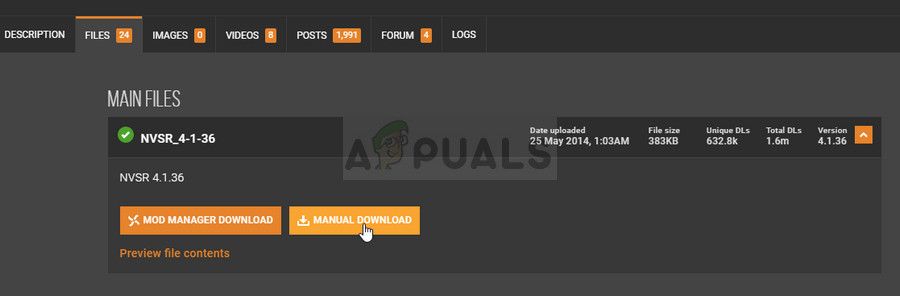
- Найдите папку «Данные», которую вы только что загрузили, и перейдите к «Данные >> NVSE >> Плагины» и выберите все файлы в папке «Плагины», щелкните правой кнопкой мыши выделенную область и выберите «Копировать» в появившемся контекстном меню.
- Перейдите в папку установки Fallout New Vegas, которая должна отображаться ниже, если вы не использовали вместо этого другую библиотеку Steam:
C >> ProgramFiles (x86) >> Steam >> SteamApp >> общие >> Fallout New Vegas
- Найдите и дважды щелкните папку «Данные» в папке Fallout New Vegas. Щелкните правой кнопкой мыши в любом месте папки «Данные» и выберите «Создать» >> «Папка» в контекстном меню. Назовите эту папку NVSE. В папке NVSE создайте папку с именем «Плагины» и вставьте все файлы, которые вы скопировали в описанных выше шагах. Проверьте, не выходит ли игра из строя.
-
Проблемы с клиентом игры / установкой
-
-
Уже зарегистрированы? Войти
-
Регистрация
- VK
- Youtube
- Discord
- Patreon
- Boosty
- 0

Out of memory и баг с анимацией от первого лица
Ответ от
tfever
Вопрос
Здравствуйте, постоянно вылетает с табличкой out of memory (из модов стоит основной модуль, потом редизайн и расы, а также пару текстурных паков с вашего сайта), enb.
Вторая проблема, заключается в том, что есть косяки с анимацией от первого лица, не успеваю заскринить, но суть в том,что рука, которая держит оружие (винтовку, снайперку, пистолет), начинает быстро прокручиваться сверху вниз, то есть как бы рука с пистолетом из нормального положения оказывается наверху экрана(будто бы камера внизу, у героя на животе или ниже), иногла вовсе исчезает. Все это происходит меньше чем за секунду, то есть вот так постоянно колбасит. Неприятно.
Из мелкого, где лежат текстуры к плакатам? Хочу поставить дефолтные, ибо порно картинки не вписываюся в атмосферу детской комнаты с кубиками и машинками.
И еще такой косяк, когда вхожу в помещение,камера автоматически ставится в пол, а не ровно как надо. дезориентирует.
Поделиться сообщением
Ссылка на сообщение
- Сортировать по голосам
- Сортировать по дате
6 ответов на этот вопрос
Рекомендуемые сообщения
- 0
16 минут назад, tfever сказал:
4Гб патч ставили?
Поделиться сообщением
Ссылка на сообщение
- 0
8 минут назад, TwilightKhan сказал:
Разве он не в сборке? Есть иконка
Поделиться сообщением
Ссылка на сообщение
- 0
поставьте заново всё из вот этого
если у вас 7-ка, то вместо тик фикса ставить nvsr
Поделиться сообщением
Ссылка на сообщение
- 0
7 часов назад, TwilightKhan сказал:поставьте заново всё из вот этого
если у вас 7-ка, то вместо тик фикса ставить nvsr
Не помогло nvsr( у меня 7)
Поделиться сообщением
Ссылка на сообщение
- 0
Сколько модов установлено что возникает Out Of Memory? ENBoost правильно поставил, со своими конфигами? Обычно Out of Memory возникает из-за большого кол-во текстур (NPC в основном). И на всякий: сколько оперативной памяти в компьютере?
Поделиться сообщением
Ссылка на сообщение
- 0
Привет, поставь пропатченый exe, должно помочь с out of memory.
Поделиться сообщением
Ссылка на сообщение
Для публикации сообщений создайте учётную запись или авторизуйтесь
Вы должны быть пользователем, чтобы оставить комментарий
Войти
Уже есть аккаунт? Войти в систему.
Войти

- VK
- Youtube
- Discord
Новые статьи в базе знаний
Последние обновления файлов
Новое из галереи
- Уже зарегистрированы? Войти
-
Регистрация
-
Главная
- Назад
- Главная
-
Горячее!
-
Поиск
-
Правила
-
О нас
-
Пожертвование
- Новости
-
Форум
- Назад
- Форум
-
Чат
-
Файлы
- Назад
- Файлы
-
Последние обновления модов
-
Последние комментарии к модам
- Галерея
-
База знаний
- Назад
- База знаний
-
FAQ
-
Цитаты
- Блоги
-
Активность
- Назад
- Активность
-
Лидеры
-
Пользователи в сети
Recently I’ve been getting an «Out of memory» pop up and then a crash on my fnv game, but the thing is im using fnv4gb and I have been for a while so I’m not sure what’s causing it.
I’m under the 130 plug in limit so it can’t be that either.
The only recent mods I’ve installed is a radio station, hunting rifle retexture and a loading screen replacer, so nothing big.
I’d appreciate any help.
LOAD ORDER :
FalloutNV.esm=1
DeadMoney.esm=1
HonestHearts.esm=1
OldWorldBlues.esm=1
LonesomeRoad.esm=1
GunRunnersArsenal.esm=1
ClassicPack.esm=1
MercenaryPack.esm=1
TribalPack.esm=1
CaravanPack.esm=1
YUP — Base Game + All DLC.esm=1
Advanced Recon Tech.esm=1
Military Explansion Program.esm=1
AWorldOfPain(Preview).esm=1
More Traits.esm=1
NVInteriors_ComboEdition.esm=0
Interior Lighting Overhaul — Core.esm=1
Interior Lighting Overhaul — L38PS.esm=1
NVR-Strip.esm=1
Project Nevada — Core.esm=1
Project Nevada — Equipment.esm=1
JIP Selective-Fire.esm=1
rePopulated Wasteland.esm=1
SomeguySeries.esm=1
Weapon Mod Expansion.esm=1
Weapons.of.the.New.Millenia.esm=1
ELECTRO-CITY — CompletedWorkorders.esm=1
ELECTRO-CITY — Highways and Byways.esm=1
oHUD.esm=1
FCOMaster.esm=1
Project Nevada — Cyberware.esp=1
RustTownV1Master.esm=1
NVWillow.esp=0
factions reloaded raiders v2.esp=1
MikotoBeauty.esm=1
Niner.esm=1
WMVM.esm=1
Lings.esm=1
NevadaSkies.esm=1
YUP — NPC Fixes (Base Game + All DLC).esp=1
FalloutNV_lang.esp=1
MMUE POP.esp=0
The Mod Configuration Menu.esp=1
The Weapon Mod Menu.esp=1
Alternative Start.esp=1
populatedcasino.esp=1
GoodspringsPlayerHome.esp=1
RustTownAdditions3.esp=1
SMOTS-EC patch.esp=1
NVR-NPCs.esp=1
NVR-Version_10.esp=1
PerkEveryLevel.esp=1
CRL9K_ThisMachineSound.esp=1
NewVegasBounties.esp=1
NewVegasBountiesII.esp=1
More Traits Update.esp=1
DrugsAreBadMKay.esp=1
FeelingIrradiated.esp=1
Rustyhwys.esp=1
Advanced Recon Gear.esp=1
Advanced Recon Tech.esp=1
GRA-WRP-Patch-Two_Unofficial.esp=1
Weapons.of.the.New.Millenia.Cheat.Cabinet.esp=0
Weapons.of.the.New.Millenia.Honest.Hearts.Grunt.Patch.esp=1
Weapons.of.the.New.Millenia.Leveled.Lists.esp=1
1nivVSLArmors.esp=1
DragsModernGunslinger.esp=1
JRougeRangerCoats4Loot.esp=1
NCR Ranger Helmet Neck Cover.esp=1
NCR Rearmament v1.5.esp=1
RCSS.esp=1
Roberts_NewVegas.esp=1
FCO — Roberts Patch.esp=1
Follower Home Marker.esp=1
UnlimitedCompanions.esp=1
Mojave Nights.esp=1
Sorter — Combined.esp=1
Bullet Impact Increased LOD.esp=1
dD — Enhanced Blood Main NV.esp=1
WMX-AWOP-Overhaul.esp=0
Weapon Mod Expansion.esp=1
EVE FNV — ALL DLC.esp=1
Project Nevada — EVE All DLC.esp=1
Interior Lighting Overhaul — Ultimate Edition.esp=1
ILO — GS Shack.esp=0
ILO — A World of Pain.esp=1
CustomLighting.esp=1
CustomLighting II.esp=1
Improved Ballistics Effects V2.esp=1
MikotoBeauty.esp=1
Beards.esp=1
DLC Weapon Integration.esp=1
FCO — GlowingOne.esp=1
FP gun follows crosshairs.esp=1
DYNAVISION 3.esp=1
Frozen World.esp=1
EnhancedGrass.esp=1
FNV Realistic Wasteland Lighting — Darker Nights.esp=1
JRougeRangerCoats4Free.esp=1
Karma Perks.esp=1
MoreBeardAndMoustacheStyles.esp=1
DoubleVendorMoney.esp=1
NoBlurMenus2.esp=1
LightUpAndSmokeThoseCigarettes_edisleado.esp=1
Ultimate Invisible Wall Remover.esp=1
NVR-Minimum.esp=1
HeliosOne.esp=1
CNR_Beta.esp=1
ILO — Rust Town 2.esp=0
behemoth.esp=1
CasinoHeists.esp=1
LexFONVclothingI.esp=1
FNV NPCs Travel.esp=1
HN66FoggierKatanaNV.esp=1
TitanFallout.esp=1
Crossbow.esp=1
TFH Rugged Race.esp=1
Project Hat+Hair.esp=1
wirlwindremover.esp=1
ItemBrowser.esp=1
The Storyteller.esp=1
JIP Companions Command & Control.esp=1
SignatureWeapons.esp=1
Better Burned Man.esp=1
JIP Improved Recipe Menu.esp=1
DustydistanceNV.esp=0
CONELRAD 640-1240.esp=1
LingsPrettyThings.esp=1
Cass’s Armor Rearmored.esp=1
Zan_AutoPurge_SmartAgro_NV.esp=1
NevadaSkies — Ultimate DLC Edition.esp=1
NevadaSkies — TTW Edition.esp=0
NevadaSkies — Basic Edition.esp=0
NevadaSkies — Darker Nights.esp=0
A Better Cass.esp=1
DynDOLODs max tile does not need to match TexGen size. That’s fine. I am just trying to understand what settings you used.
The DynDOLOD max tile setting defines the size/quality of the resulting texture atlas. Default is typically fine (for me). It’s settings rather depends on available VRAM / performance requirement than anything else.
Yes, you can just not check those worldspaces (the mods ships with decent static/tree LOD generated by DynDOLOD anyways) and skip them.
For a test I am going to ask you to try the opposite: Try generating a single of its worldspaces and see if the memory error still happens.
Then upload/post
..DynDOLODEdit ScriptsDynDOLODcacheDynDOLOD_TES5_*_flat_textures_used.txt
..DynDOLODEdit ScriptsDynDOLODcacheDynDOLOD_TES5_*_textures_used.txt
..DynDOLODEdit ScriptsDynDOLODcacheDynDOLOD_TES5_*_textures_used.txt
..DynDOLODEdit ScriptsDynDOLODcacheDynDOLOD_TES5_atlas_map_*.txt
..DynDOLODEdit ScriptsDynDOLODcacheDynDOLOD_TES5_flat_atlas_map_*.txt
for whichever worldspace you have the error first with?
What Windows version (32/64 bit) do you have? How much RAM is installed?
Can you try to track DynDOLOD.exe memory usage in Task Manager. Just the ballpark max number you see when the error happens.

Posts : 487
Join date : 2014-10-15
Location : Turkey
Character sheet
Name: —
Faction:
Level:

 Subject: Fallout NV Out Of Memory Problem Wed Dec 17, 2014 6:52 pm Subject: Fallout NV Out Of Memory Problem Wed Dec 17, 2014 6:52 pm |
|
|
|
|
|
Hey guys I need some help,I just return to play Fallout NV but i am getting Out Of Memory error after 10 mins of the game did anyone see that problem and fixed it ? Thanks for answers I love you all. _________________
|


Posts : 107
Join date : 2014-10-20
Age : 37
Location : Over thataways a bit
| Subject: Re: Fallout NV Out Of Memory Problem Wed Dec 17, 2014 7:03 pm |
|
|
|
|
|
Are you using FNV4GB? http://www.nexusmods.com/newvegas/mods/55061/? if you aren’t already using it. |
Posts : 487
Join date : 2014-10-15
Location : Turkey
Character sheet
Name: —
Faction:
Level:
| Subject: Re: Fallout NV Out Of Memory Problem Wed Dec 17, 2014 8:34 pm |
|
|
|
|
|
I cant use it i dont know why but it doesnt start the game with nvse. _________________
|

Posts : 2266
Join date : 2014-10-19
Location : USA
Character sheet
Name: ———————-
Faction: ———————
Level: ———————-
| Subject: Re: Fallout NV Out Of Memory Problem Wed Dec 17, 2014 9:08 pm |
|
|
|
|
|
It does start with nvse automatically if there is nvse in the folder. FNV4GB fixed that problem for me. _________________
|


Posts : 26
Join date : 2014-07-23
Age : 26
| Subject: Re: Fallout NV Out Of Memory Problem Thu Dec 18, 2014 12:38 am |
|
|
|
|
|
I agree with alonewolf003, using FNV4GB seemed to fix the problem for me. Are you using the updated version? It makes it a lot easier to use with NVSE. http://www.nexusmods.com/newvegas/mods/55061/? |

Posts : 28
Join date : 2014-12-16
Age : 35
Location : Indonesia
| Subject: Re: Fallout NV Out Of Memory Problem Fri Dec 26, 2014 11:03 pm |
|
|
|
|
|
i had this problem to, i dont really know what cause it. i use mostly hight tex pack and no enb.. still lookinf for the fix.. _________________ |
Guest
| Subject: Re: Fallout NV Out Of Memory Problem Wed Jul 22, 2015 6:21 pm |
|
|
|
|
|
I have this issue with steam version too. If I’ll not found solution of this problemn I’ll be forced to become «very bad girl» and use pirate repack. = |

Posts : 40
Join date : 2019-05-03
| Subject: Re: Fallout NV Out Of Memory Problem Thu Jul 04, 2019 11:07 pm |
|
|
|
|
|
I know its been like a few years but has anyone found anything close to a fix for this? |

Posts : 336
Join date : 2015-01-04
Age : 27
Location : Germany
| Subject: Re: Fallout NV Out Of Memory Problem Thu Jul 04, 2019 11:15 pm |
|
|
|
|
|
@TheBayrain Don’t use the «updated» version, because it is obsolete. Everything works with NVSE _________________ |



Posts : 40
Join date : 2019-05-03
| Subject: Re: Fallout NV Out Of Memory Problem Fri Jul 05, 2019 7:50 am |
|
|
|
|
Already go the both of those, thanks for the work tho |
Posts : 487
Join date : 2014-10-15
Location : Turkey
Character sheet
Name: —
Faction:
Level:
| Subject: Re: Fallout NV Out Of Memory Problem Fri Jul 05, 2019 10:03 am |
|
|
|
|
If you’re using ENB, don’t forget configuring your enblocal.ini file. Some settings there will fix this problem. Here, check this topic ; https://www.nexusmods.com/newvegas/mods/51670 you can find more information in the posts section. _________________
|
Posts : 40
Join date : 2019-05-03
| Subject: Re: Fallout NV Out Of Memory Problem Fri Jul 05, 2019 7:11 pm |
|
|
|
|
« Done and done, I had already reconfigured my ENB file |
Posts : 869
Join date : 2017-11-23
Location : Hiding from wolves, unable to specify
Character sheet
Name: Character
Faction: Dependent
Level: Basement
| Subject: Re: Fallout NV Out Of Memory Problem Sat Jul 06, 2019 1:48 am |
|
|
|
|
|
I use the enbboost file without an enb preset, and it does wonders. |
Posts : 40
Join date : 2019-05-03
| Subject: Re: Fallout NV Out Of Memory Problem Sat Jul 06, 2019 8:58 am |
|
|
|
|
|
One simple fix is getting rid of Nevada Skies and replacing them with Western Skies and Rainy Day, merging those two plugins |
Posts : 427
Join date : 2016-10-14
Location : Shady Sands
Character sheet
Name: Character
Faction:
Level:
| Subject: Re: Fallout NV Out Of Memory Problem Sat Jul 06, 2019 5:20 pm |
|
|
|
|
|
Do not use Project Nevada — Extra options, that mod is not finished. I learned this just recently. You can always tone down any VRAM heavy graphic mods as well _________________ |

Fallout New Vegas-«out of memory» on windows 8.1
-
Thread startercggx
-
Start dateMar 5, 2014
-
- Aug 16, 2012
-
- 10
-
- 0
-
- 10,510
- 0
-
#1

-
- Apr 6, 2009
-
- 50,449
-
- 2,266
-
- 153,390
- 5,985
-
#8
Try removing them and the game itself. Start with a fresh install of the game and see if the system remains stable. Then add the mods one at a time, testing for stability after each to determine the culprit.
Painful, but worth a shot.
-
- Apr 6, 2009
-
- 50,449
-
- 2,266
-
- 153,390
- 5,985
-
#2
-
- Aug 16, 2012
-
- 10
-
- 0
-
- 10,510
- 0
-
#3
-
- Apr 6, 2009
-
- 50,449
-
- 2,266
-
- 153,390
- 5,985
-
#4
-
- Aug 16, 2012
-
- 10
-
- 0
-
- 10,510
- 0
-
#5
-
- Apr 6, 2009
-
- 50,449
-
- 2,266
-
- 153,390
- 5,985
-
#6
-
- Aug 16, 2012
-
- 10
-
- 0
-
- 10,510
- 0
-
#7
-
- Apr 6, 2009
-
- 50,449
-
- 2,266
-
- 153,390
- 5,985
-
#8
Try removing them and the game itself. Start with a fresh install of the game and see if the system remains stable. Then add the mods one at a time, testing for stability after each to determine the culprit.
Painful, but worth a shot.
- Advertising
- Cookies Policies
- Privacy
- Term & Conditions
- Topics