Troubleshooting Code 800A0035 – File not found
Code 800A0035 is a straightforward error to solve. The secret is to read the Windows Script Error message carefully, then check the file path. Guy bet’s there is a typo.
Introduction to Error Code 800A0035
Code 800A0035 is runtime error more common with an .ASP file than a .VBS. The error is pointing to a file type or the wrong path rather than a pure scripting mistake.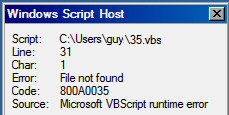
The Symptoms You Get 800A0035
When you get a pop-up message box put on your detective hat, and pay close attention to the line number. My point is that its the line in the script and not the file name following Script:
The Cause of Error 800A0035
In the example above, Line 31: is the source of the error. Char 1: is not always very useful as the error could be anywhere on the line, and WSH still blames char 1.
The cause of error 800A0035 is most likely to be a spelling mistake in the file, however, Geoffery unearthed a bizarre problem where his files had an extra .extension. For example instead of being info.txt, it was info.txt.txt.
The Solution
Before you find the root cause you may want to confirm the diagnosis by using a reference to a different file, preferably on a different drive. If that works, then revisit the name of the original script. Should you be hard-coding a path in your script, try copying and pasting from the bar in Windows Explorer.
‡
Example 1: Script to map a printer
In this example, the actual file was called Input.txt.txt, thus either rename that to the more normal single .txt, else change the script!
‘ VBScript example snippet to demonstrate error 800A0035 .
‘ f1 is the Input file handle, so Set f1 = OPEN input Set f1 = fso.GetFile(«D:SMDRInput.txt»)
©
See More Windows Update Error Codes 8004 Series
• Error 800A101A8 Object Required •Error 800A0046 •Error 800A10AD •Error 800A000D
• Error 80048820 •Error 800A0401 •Review of SolarWinds Permissions Monitor
• Error 80040E14 • Error 800A03EA • Error 800A0408 • Error 800A03EE
 Guy Recommends: WMI Monitor and It’s Free!
Windows Management Instrumentation (WMI) is one of the hidden treasures of Microsoft operating systems. Fortunately, SolarWinds have created the WMI Monitor so that you can examine these gems of performance information for free. Take the guess work out of which WMI counters to use for applications like Microsoft Active Directory, SQL or Exchange Server.
Download your free copy of WMI Monitor
Do you need additional help?
- For interpreting the WSH messages check Diagnose 800 errors.
- For general advice try my 7 Troubleshooting techniques.
- See master list of 0800 errors.
- Codes beginning 08004…
- Codes beginning 08005…
- Codes beginning 08007…
- Codes beginning 0800A…
Give something back?
Would you like to help others? If you have a good example of this error, then please email me, I will publish it with a credit to you:
If you like this page then please share it with your friends
About The Author

Guy Thomas
INTELLIGENT WORK FORUMS
FOR COMPUTER PROFESSIONALS
Contact US
Thanks. We have received your request and will respond promptly.
Log In
Come Join Us!
Are you a
Computer / IT professional?
Join Tek-Tips Forums!
- Talk With Other Members
- Be Notified Of Responses
To Your Posts - Keyword Search
- One-Click Access To Your
Favorite Forums - Automated Signatures
On Your Posts - Best Of All, It’s Free!
*Tek-Tips’s functionality depends on members receiving e-mail. By joining you are opting in to receive e-mail.
Posting Guidelines
Promoting, selling, recruiting, coursework and thesis posting is forbidden.
Students Click Here
Microsoft VBScript runtime error ‘800a0035’Microsoft VBScript runtime error ‘800a0035’(OP) 4 Aug 08 12:18 Using the following command in ASP code running on IIS: Set pfFile=fs.OpenTextFile(szFileName,1,false) Produces the following error: Microsoft VBScript runtime error ‘800a0035’ File not found The file is a network file. It does exist. Anonymous Access is enabled with a network user that has access to the file. The anonymous user shows up in the Event Log of the IIS server with a successful logon. The Logged in user also has access to the file and can view the file directly in Microsoft Explorer. What is causing OpenTextFile to not be able to find this file? Red Flag SubmittedThank you for helping keep Tek-Tips Forums free from inappropriate posts. |
Join Tek-Tips® Today!
Join your peers on the Internet’s largest technical computer professional community.
It’s easy to join and it’s free.
Here’s Why Members Love Tek-Tips Forums:
 Talk To Other Members
- Notification Of Responses To Questions
- Favorite Forums One Click Access
- Keyword Search Of All Posts, And More…
Register now while it’s still free!
Already a member? Close this window and log in.
Join Us Close

10 Years Ago
Hi all,
Basically, everything works fine with my app when I work on my own computer. However, when I put it on another computer, I get an error. The error occurs when it tries to instance a class coming from an exterior dll.
I tought that it somehow was not finding the path to the dll in question … but that’s not the case, it’s just that it doesn’t work properly on the other machine. (creating an instance of the COM component with CLSID {xxxxx} from the IClassFactory failed due to the following error: 800a0035) . But the dll is here …
Any help would be more than welcome … I have no clue on how to solve this …
Many many thanks,
Michael
Recommended Answers
Is it the same version of the DLL?
It looks like that is a File Not Found error.
Are there any problems with permissions for the current user to get to the file?
Jump to Post
All 3 Replies

thines01
401
Postaholic
Team Colleague
Featured Poster
10 Years Ago
Is it the same version of the DLL?
It looks like that is a File Not Found error.
Are there any problems with permissions for the current user to get to the file?
Edited
10 Years Ago
by thines01 because:
n/a
10 Years Ago
Is it the same version of the DLL?
It looks like that is a File Not Found error.
Are there any problems with permissions for the current user to get to the file?
Many thanks for your help
Yes, same version.
I don’t think it didn’t find the file because the ddl in question is here … And then, I’m quite suprised to not have an error when using Directory.SetCurrentDirectory(defaultDir); but when instancing a class …
10 Years Ago
800a0035 error for not found file so you need to register the com dll at the new machine use «regsrv32 FullPathComName.dll» command first
Reply to this topic
Be a part of the DaniWeb community
We’re a friendly, industry-focused community of developers, IT pros, digital marketers,
and technology enthusiasts meeting, networking, learning, and sharing knowledge.
10 Years Ago
Hi all,
Basically, everything works fine with my app when I work on my own computer. However, when I put it on another computer, I get an error. The error occurs when it tries to instance a class coming from an exterior dll.
I tought that it somehow was not finding the path to the dll in question … but that’s not the case, it’s just that it doesn’t work properly on the other machine. (creating an instance of the COM component with CLSID {xxxxx} from the IClassFactory failed due to the following error: 800a0035) . But the dll is here …
Any help would be more than welcome … I have no clue on how to solve this …
Many many thanks,
Michael
Recommended Answers
Is it the same version of the DLL?
It looks like that is a File Not Found error.
Are there any problems with permissions for the current user to get to the file?
Jump to Post
All 3 Replies
thines01
401
Postaholic
Team Colleague
Featured Poster
10 Years Ago
Is it the same version of the DLL?
It looks like that is a File Not Found error.
Are there any problems with permissions for the current user to get to the file?
Edited
10 Years Ago
by thines01 because:
n/a
10 Years Ago
Is it the same version of the DLL?
It looks like that is a File Not Found error.
Are there any problems with permissions for the current user to get to the file?
Many thanks for your help
Yes, same version.
I don’t think it didn’t find the file because the ddl in question is here … And then, I’m quite suprised to not have an error when using Directory.SetCurrentDirectory(defaultDir); but when instancing a class …
10 Years Ago
800a0035 error for not found file so you need to register the com dll at the new machine use «regsrv32 FullPathComName.dll» command first
Reply to this topic
Be a part of the DaniWeb community
We’re a friendly, industry-focused community of developers, IT pros, digital marketers,
and technology enthusiasts meeting, networking, learning, and sharing knowledge.
I am pretty new to all this VBS stuff because basically all I need to do is to make one simple VBS script, which I have possibly written, however, my problem is that it gives me 800A0035 or 800A004C error when I execute it for the first time on a particular PC, as soon as I execute it for the second time, it runs just OK and does what it is supposed to do. Incidentally, on my own computer it works OK even on the first execution.
I know that the errors have something to do with the wrong paths but I have checked my script several times and I am 100% positive that they are correct.
Here is the script:
Set objFSO = CreateObject("Scripting.FileSystemObject")
objFSO.MoveFile "rar.bat" , "rarp.bat"
'HideBat.vbs
CreateObject("Wscript.Shell").Run "rarp.bat", 0, True
What the script is supposed to do is to rename the rar.bat file to rarp.bat and run that batch file (rarp.bat) without popping up the command prompt. What the batch file does is not relevant, I guess, but anyway, it just runs WinRAR.
The rar.bat file and the VBS script are in the same folder, that’s why I have used relative paths in the script. I cannot use absolute paths because I need to run the script on several computers.
I have read somewhere on the internet that by default VBS script first looks for the files in C:WindowsSystem32 when relative paths are used. I have even tried using absolute paths in the script but it didn’t work either. Here is how I need them to look like: %systemdrive%users%username%appdataroamingrar.bat but this simply didn’t work in the VBS script.
I really think that what I need is really a simple script but apparently it’s pretty hard to get it working properly. I will be very grateful to those who help me.
Thank you a lot in advance.
Regards.
|
Skydiver_vrn 0 / 0 / 0 Регистрация: 01.07.2014 Сообщений: 14 |
||||
|
1 |
||||
|
VBS Разрешение отклонено01.07.2014, 09:03. Показов 24153. Ответов 11 Метки нет (Все метки)
Вот такой скрипт, ругается на строка 11 символ 9 разрешение отклонено
__________________
0 |

|
2617 / 547 / 109 Регистрация: 21.03.2012 Сообщений: 1,051 |
|
|
01.07.2014, 10:11 |
2 |
|
… разрешение отклонено Причина — отсутствуют необходимые полномочия. Проверяйте список управления доступом для соответствующей папки.
0 |


|
0 / 0 / 0 Регистрация: 01.07.2014 Сообщений: 14 |
|
|
01.07.2014, 11:54 [ТС] |
3 |
|
Dmitrii, Так запускаю скрипт вручную под доменным админом у которого есть все права на эту папку. Добавлено через 1 час 40 минут
0 |
|
2617 / 547 / 109 Регистрация: 21.03.2012 Сообщений: 1,051 |
|
|
01.07.2014, 18:29 |
4 |
|
… под доменным админом у которого есть все права на эту папку 1. Какая версия ОС?
Поигрался с правами, теперь пишет «путь не найден» Покажите подробный список управления доступом. Для каждой записи должны быть видны: тип, маска доступа, точка наследования, область действия.
0 |
|
Skydiver_vrn 0 / 0 / 0 Регистрация: 01.07.2014 Сообщений: 14 |
||||
|
02.07.2014, 08:17 [ТС] |
5 |
|||
|
Dmitrii, С доступом вроде разобрался сам, сегодня скрипт отработал ночью запускал через bat-ник
но удалились только файлы которые были вне папок, папки на месте остались, и новая ошибка «Предполагается наличие Then строка 7 символ 174» Добавлено через 12 минут
0 |
|
0 / 0 / 0 Регистрация: 01.07.2014 Сообщений: 14 |
|
|
03.07.2014, 14:52 [ТС] |
6 |
|
Dmitrii, Снова удалились только файлы, никакой ошибки не выскочило. Помогите пожалуйста, я чайник в написании скриптов. Добавлено через 5 часов 55 минут
0 |
|
Dmitrii 2617 / 547 / 109 Регистрация: 21.03.2012 Сообщений: 1,051 |
||||
|
04.07.2014, 20:47 |
7 |
|||
|
Попробуйте такой вариант: Кликните здесь для просмотра всего текста
2 |
|
ComSpec 3455 / 1993 / 635 Регистрация: 26.02.2014 Сообщений: 1,457 |
||||||||
|
04.07.2014, 22:27 |
8 |
|||||||
|
Dmitrii, поправки:
.
3 |
|
17951 / 7587 / 889 Регистрация: 25.12.2011 Сообщений: 11,317 Записей в блоге: 17 |
|
|
05.07.2014, 14:21 |
9 |
|
Вот такая папка тоже не удалится «111;222»
3 |


|
Dmitrii 2617 / 547 / 109 Регистрация: 21.03.2012 Сообщений: 1,051 |
||||
|
06.07.2014, 21:37 |
10 |
|||
|
РешениеС учётом справедливых замечаний от ComSpec и Dragokas имеем следующий вариант: Кликните здесь для просмотра всего текста
2 |
 Сообщение было отмечено Skydiver_vrn как решение
|
0 / 0 / 0 Регистрация: 01.07.2014 Сообщений: 14 |
|
|
15.07.2014, 11:19 [ТС] |
11 |
|
Всем огромное спасибо! Всё работает. А может стоит куда то вынести сей скрипт, он же достаточно универсальный, может ещё какойнибудь такойже как я чайник сможет применить в своей системе…
0 |
|
17951 / 7587 / 889 Регистрация: 25.12.2011 Сообщений: 11,317 Записей в блоге: 17 |
|
|
15.07.2014, 13:47 |
12 |
|
Skydiver_vrn, в принципе можно. Добавил.
0 |
Я довольно новичок во всех этих вещах VBS, потому что в основном все, что мне нужно сделать, это сделать один простой сценарий VBS, который я, возможно, написал, однако моя проблема в том, что он дает мне 800A0035 or 800A004C ошибка, когда я запускаю его в первый раз на конкретном ПК, как только я запускаю его во второй раз, он работает нормально и делает то, что должен делать. Кстати, на моем собственном компьютере он работает нормально даже при первом запуске. Я знаю, что ошибки как-то связаны с неправильными путями, но я несколько раз проверял свой скрипт и на 100% уверен, что они верны.
Вот сценарий:
Set objFSO = CreateObject("Scripting.FileSystemObject")
objFSO.MoveFile "rar.bat" , "rarp.bat"
'HideBat.vbs
CreateObject("Wscript.Shell").Run "rarp.bat", 0, True
Что скрипт должен делать, так это переименовывать rar.bat файл в rarp.bat и запустите этот командный файл (rarp.bat) без появления командной строки. Что делает пакетный файл, я думаю, не имеет значения, но в любом случае он просто запускается WinRAR.
Компания rar.bat файл и сценарий VBS находятся в одной папке, поэтому я использовал относительные пути в сценарии. Я не могу использовать абсолютные пути, потому что мне нужно запустить скрипт на нескольких компьютерах.
Я где-то читал в Интернете, что по умолчанию сценарий VBS сначала ищет файлы в C:WindowsSystem32 когда используются относительные пути. Я даже пытался использовать абсолютные пути в скрипте, но это тоже не сработало. Вот как мне нужно, чтобы они выглядели: %systemdrive%users%username%appdataroamingrar.bat но это просто не работало в сценарии VBS.
Я действительно думаю, что мне нужен действительно простой скрипт, но, по-видимому, довольно сложно заставить его работать должным образом. Буду очень благодарен тем, кто мне поможет.
Заранее большое спасибо.
С уважением.

17 Years Ago
The data that is entered is creating the error page when I suibmit it ti the db. Can anyone help? :confused:
HTTP 500.100 — Internal Server Error — ASP error
Internet Information Services———————————————————————————
Technical Information (for support personnel)
Error Type:
Microsoft VBScript runtime (0x800A0035)
File not found
/threecubePlus_IIS/formProcess.asp, line 31
Browser Type:
Mozilla/4.0 (compatible; MSIE 6.0; Windows NT 5.1)Page:
POST 181 bytes to /threecubePlus_IIS/formProcess.aspPOST Data:
myTitle=eryeryre&thefile=C%3A%5CDocuments+and+Settings%5CStuart.BLUEBEEN0DT01%5CDesktop%5Csite.png&myName=erreery&submit=Submit&myAddress1=&myAddress2=&myCity=&myCounty=&myPostCode=Time:
Friday, May 06, 2005, 5:11:11 PM
More information:
Microsoft Support
do you have an include file or something? or is your page called formProcess.asp
post the page that might help but by my guess doest the dbase have a error if null field?
Be a part of the DaniWeb community
We’re a friendly, industry-focused community of developers, IT pros, digital marketers,
and technology enthusiasts meeting, networking, learning, and sharing knowledge.
- Remove From My Forums
-
Question
-
User-1279243669 posted
Hi,
I’m using the following code to return file_info into an asp page using Vis Web Dev Express:
Dim fs,f
        fs = Server.CreateObject("Scripting.FileSystemObject")
        f = fs.GetFile("\10.64.148.102eventmanagerEvent_Log.trc")
        Response.Write("Last update was: " & DateDiff("s", f.DateLastModified, Now) & " seconds ago")
        f = Nothing
        fs = Nothing
%>

    </asp:Label>
    </p>
    <p>
    <asp:Label ID="Label4" runat="server" Font-Bold="True" Font-Names="Arial"
            ForeColor="#3366FF" >
___
The code runs when I run it as a local build, but does not run when I upload it to my website.
The file was recently removed, and a new one created. My local build still sees it, but the uploaded code on my website does not. Before the file was re-created, the code on the website saw the file. I believe all the file permissions are the same as
the previous file. I’ve tried using the ip-address and server-name, both give me the error:__
Exception from HRESULT: 0x800A0035 (CTL_E_FILENOTFOUND)
Description:
An unhandled exception occurred during the execution of the current web request. Please review the stack trace for more information about the error and where it originated in the code.Exception Details: System.IO.FileNotFoundException: Exception from HRESULT: 0x800A0035 (CTL_E_FILENOTFOUND)
Source Error:
Line 37: Dim fs,f
Line 38:         fs = Server.CreateObject("Scripting.FileSystemObject")
Line 39:         f = fs.GetFile("\10.64.148.102eventmanagerEvent_Log.trc")
Line 40:         Response.Write("Event Log Last Updated: " & f.DateLastModified)
Line 41:         f = Nothing
___
But this error is not returned using a local build of the code.
Any help much appreciated.