If you try to call a float as if it were a function, you will raise the error “TypeError: ‘float’ object is not callable”.
To solve this error, ensure you use operators between terms in mathematical operations and that you do not name any variables “float.
This tutorial will go through how to solve this error with the help of code examples.
Table of contents
- TypeError: ‘float’ object is not callable
- What is a TypeError?
- What Does Callable Mean?
- Example #1
- Solution
- Example #2
- Solution
- Summary
TypeError: ‘float’ object is not callable
What is a TypeError?
TypeError occurs in Python when you perform an illegal operation for a specific data type.
What Does Callable Mean?
Calling a function means the Python interpreter executes the code inside the function. In Python, we can only call functions. We can call functions by specifying the name of the function we want to use followed by a set of parentheses, for example, function_name(). Let’s look at an example of a working function that returns a string.
# Declare function

def simple_function():

    print("Hello World!")

# Call function

simple_function()
Hello World!
We declare a function called simple_function in the code, which prints a string. We can then call the function, and the Python interpreter executes the code inside simple_function().
If we try to call a floating-point number, we will raise the TypeError:
number = 5.6

number()
---------------------------------------------------------------------------
TypeError                                 Traceback (most recent call last)
      1 number = 5.6
      2
----≻ 3 number()

TypeError: 'float' object is not callable
Example #1
Let’s look at an example to prove the sum of squares formula for two values. We define two variables with floating-point values, calculate the left-hand side and right-hand side of the formula, and then print if they are equal.
a = 3.0
b = 4.0
lhs = a ** 2 + b ** 2
rhs = (a + b)(a + b) - 2*a*b
print(lhs == rhs)
Let’s run the code to see what happens:
---------------------------------------------------------------------------
TypeError                                 Traceback (most recent call last)
      2 b = 4.0
      3 lhs = a ** 2 + b ** 2
----≻ 4 rhs = (a + b)(a + b) - 2*a*b
      5 print(lhs == rhs)

TypeError: 'float' object is not callable
The error occurs because we do not have the multiplication operator * between the two (a + b) terms. The Python interpreter sees this as a call to (a + b) with parameters (a + b).
Solution
We need to put a multiplication operator between the two (a + b) terms to solve the error. Let’s look at the revised code:
a = 3.0
b = 4.0
lhs = a ** 2 + b ** 2
rhs = (a + b)*(a + b) - 2*a*b
print(lhs == rhs)
Let’s run the code to see what happens:
True
We get a True statement, proving that the sum of squares formula works.
Example #2
Let’s look at an example of converting a weight value in kilograms to pounds. We give the conversion value the name “float” and then take the input from the user, convert it to a floating-point number then multiply it by the conversion value.
float = 2.205

weight = float(input("Enter weight in kilograms:  "))

weight_in_lbs = weight * float

print(f'{weight} kg is equivalent to {round(weight_in_lbs, 1)} lbs')
Let’s run the code to see what happens:
Enter weight in kilograms:  85
---------------------------------------------------------------------------
TypeError                                 Traceback (most recent call last)
      1 float = 2.205
      2
----≻ 3 weight = float(input("Enter weight in kilograms:  "))
      4
      5 weight_in_lbs = weight * float

TypeError: 'float' object is not callable
The error occurs because we assigned the value 2.205 to “float“. Then we tried to call the built-in float() method, but float is now a floating-point number.
Solution
We can name our conversion variable something more meaningful to solve this error. Let’s call it “conversion”. Then we can call the float() method safely. Let’s look at the revised code:
conversion = 2.205

weight = float(input("Enter weight in kilograms:  "))

weight_in_lbs = weight * conversion

print(f'{weight} kg is equivalent to {round(weight_in_lbs,1)} lbs')
Let’s run the code to get the result:
Enter weight in kilograms:  85
85.0 kg is equivalent to 187.4 lbs
The program takes the input from the user in kilograms, multiplies it by the conversion value and returns the converted value to the console.
Summary
Congratulations on reading to the end of this tutorial! To summarize, TypeError ‘float’ object is not callable occurs when you try to call a float as if it were a function. To solve this error, ensure any mathematical operations you use have all operators in place. If you multiply values, there needs to be a multiplication operator between the terms. Ensure that you name your float objects after their purpose in the program and not as “float”.
For further reading on “not callable” errors, go to the article: How to Solve Python TypeError: ‘dict’ object is not callable
To learn more about Python, specifically for data science and machine learning, go to the online courses page on Python.
Have fun and happy researching!
I am trying to use values from an array in the following equation:
for x in range(len(prof)):
    PB = 2.25 * (1 - math.pow(math.e, (-3.7(prof[x])/2.25))) * (math.e, (0/2.25)))
When I run I receive the following error:
Traceback (most recent call last):
  File "C:/Users/cwpapine/Desktop/1mPro_Chlavg", line 240, in <module>
    PB = float(2.25 * (1 - math.pow(math.e, (-3.7(prof[x])/2.25))) * (math.e, (0/2.25)))
TypeError: 'float' object is not callable
What is the cause, and how can the problem be resolved?

user
3,9355 gold badges17 silver badges34 bronze badges
asked Aug 3, 2011 at 16:21

2
There is an operator missing, likely a *:
-3.7 need_something_here (prof[x])
The «is not callable» occurs because the parenthesis — and lack of operator which would have switched the parenthesis into precedence operators — make Python try to call the result of -3.7 (a float) as a function, which is not allowed.
The parenthesis are also not needed in this case, the following may be sufficient/correct:
-3.7 * prof[x]
As Legolas points out, there are other things which may need to be addressed:
2.25 * (1 - math.pow(math.e, (-3.7(prof[x])/2.25))) * (math.e, (0/2.25)))
                                  ^-- op missing
                                                    extra parenthesis --^
               valid but questionable float*tuple --^
                                     expression yields 0.0 always --^

MSeifert
141k35 gold badges328 silver badges344 bronze badges
answered Aug 3, 2011 at 16:23
1
The problem is with -3.7(prof[x]), which looks like a function call (note the parens). Just use a * like this -3.7*prof[x].
answered Aug 3, 2011 at 16:24

Joel BurgetJoel Burget
1,3288 silver badges17 bronze badges
1
You have forgotten a * between -3.7 and (prof[x]).
Thus:
for x in range(len(prof)):
    PB = 2.25 * (1 - math.pow(math.e, (-3.7 * (prof[x])/2.25))) * (math.e, (0/2.25)))
Also, there seems to be missing an ( as I count 6 times ( and 7 times ), and I think (math.e, (0/2.25)) is missing a function call (probably math.pow, but thats just a wild guess).

geekygeek
3231 gold badge3 silver badges11 bronze badges
answered Aug 3, 2011 at 16:24

LegolasLegolas
1,43210 silver badges11 bronze badges
2
While this may not be an answer to this question in particular, another reason you could get this error is if you have defined «range» as a variable.
range = 0
for x in range(len(array)):
#will give an error, because it's trying to multiply "range" with "(len(array))"
The solution would be to rename your variable to a synonym (period) or append something to it (range1, range_a)
answered May 26, 2022 at 22:18

The question has been answered but for others, the reason for the same error might be highly possible due to the following reason:
Sometimes, when you use a variable name same as one of the inbuilt functions and when you try to call that inbuilt function later on, its gonna give you a type error.
For example, somewhere in your code you define a variable as:
sum = 0
Maybe to use it as an accumulator variable in global dataframe.
Now, later when you’re defining a function in which you want to call the inbuilt function sum() , its gonna give an type error as you have over-written an in-built function name.
That’s why, you should avoid the use in-built function names like str, range, sum, etc.. as one of the variable names in your code.
answered Aug 31, 2022 at 20:55

LuminLumin
163 bronze badges
1
Table of Contents
Hide
- What is TypeError: the ‘float’ object is not callable?
- Scenario 1: When you try to call the reserved keywords as a function
- Solution
- Scenario 2: Missing an Arithmetic operator while performing the calculation
- Solution
- Conclusion
The TypeError: ‘float’ object is not callable error occurs if you call floating-point value as a function or if an arithmetic operator is missed while performing the calculations or the reserved keywords are declared as variables and used as functions,
In this tutorial, we will learn what float object is is not callable error means and how to resolve this TypeError in your program with examples.
There are two main scenarios where developers get this TypeError is:
- When you try to call the reserved keywords as a function
- Missing an Arithmetic operator while performing the calculation
Scenario 1: When you try to call the reserved keywords as a function
Using the reserved keywords as variables and calling them as functions are developers’ most common mistakes when they are new to Python. Let’s take a simple example to reproduce this issue.
item_price = [5.2, 3.3, 5.4, 2.7]
sum = 5.6
sum = sum(item_price)
print("The sum of all the items is:", str(sum))
Output
Traceback (most recent call last):
  File "c:PersonalIJSCodemain.py", line 3, in <module>
    sum = sum(item_price)
TypeError: 'float' object is not callable
If you look at the above code, we have declared the sum as a variable and stored a floating-point value. However, in Python, the sum() is a reserved keyword and a built-in method that adds the items of an iterable and returns the sum.
Since we have declared sum as a variable and used it as a function to add all the items in the list, Python will throw TypeError.
Solution
We can fix this error by renaming the sum variable to total_price, as shown below.
item_price = [5.2, 3.3, 5.4, 2.7]
total_price = 5.6
total_price = sum(item_price)
print("The sum of all the items is:", str(total_price))
Output
The sum of all the items is: 16.6
Scenario 2: Missing an Arithmetic operator while performing the calculation
While performing mathematical calculations, if you miss an arithmetic operator within your code, it leads to TypeError: ‘float’ object is not callable error.
Let us take a simple example to calculate the tax for the order. In order to get the tax value, we need to multiply total_value*(tax_percentage/100).
item_price = [5.2, 3.3, 5.4, 2.7]
tax_percentage = 5.2
total_value = sum(item_price)
tax_value = total_value(tax_percentage/100)
print(" The tax amount for the order is:", tax_value)
Output
Traceback (most recent call last):
  File "c:PersonalIJSCodemain.py", line 5, in <module>
    tax_value = total_value(tax_percentage/100)
TypeError: 'float' object is not callable
We have missed out on the multiplication operator while calculating the tax value in our code, leading to TypeError by the Python interpreter.
Solution
We can fix this issue by adding a multiplication (*) operator to our code, as shown below.
item_price = [5.2, 3.3, 5.4, 2.7]
tax_percentage = 5.2
total_value = sum(item_price)
tax_value = total_value*(tax_percentage/100)
print(" The tax amount for the order is:", tax_value)
Output
The tax amount for the order is: 0.8632000000000002
Conclusion
The TypeError: ‘float’ object is not callable error raised when you try to call the reserved keywords as a function or miss an arithmetic operator while performing mathematical calculations.
Developers should keep the following points in mind to avoid the issue while coding.
- Use descriptive and unique variable names.
- Never use any built-in function, modules, reserved keywords as Python variable names.
- Ensure that arithmetic operators is not missed while performing calculations.
- Do not override built-in functions like
sum(),round(), and use the same methods later in your code to perform operations.

Srinivas Ramakrishna is a Solution Architect and has 14+ Years of Experience in the Software Industry. He has published many articles on Medium, Hackernoon, dev.to and solved many problems in StackOverflow. He has core expertise in various technologies such as Microsoft .NET Core, Python, Node.JS, JavaScript, Cloud (Azure), RDBMS (MSSQL), React, Powershell, etc.
Sign Up for Our Newsletters
Subscribe to get notified of the latest articles. We will never spam you. Be a part of our ever-growing community.
By checking this box, you confirm that you have read and are agreeing to our terms of use regarding the storage of the data submitted through this form.
Floating-point values are not callable. This is because floating points store numerical values. They are not functions that return a particular value when called. If you try to call a floating-point value as if it were a function, you encounter a “TypeError: ‘float’ object is not callable” error.
In this guide, we discuss how this error works and why you may find it in your code. We walk through an example scenario to help you learn how to fix it.

Find Your Bootcamp Match
- Career Karma matches you with top tech bootcamps
- Access exclusive scholarships and prep courses
Select your interest
First name
Last name
Phone number
By continuing you agree to our Terms of Service and Privacy Policy, and you consent to receive offers and opportunities from Career Karma by telephone, text message, and email.
TypeError: ‘float’ object is not callable
A set of parentheses denotes a function call. A function call instructs the contents of a function to run. Only functions can be called. Other values, like floating points, do not return values, and so they cannot be called.
The “TypeError: ‘float’ object is not callable” error happens if you follow a floating point value with parenthesis. This can happen if:
- You have named a variable “float” and try to use the float() function later in your code.
- You forget an operand in a mathematical problem.
Let’s look at both of these potential scenarios in detail.
Scenario #1: Naming a Variable “float”
Let’s write a program that calculates the tips each member of the wait staff at a restaurant are due. The restaurant splits all the tips equally.
We start by asking the user to tell the program how much was received in tips and how many staff members were working on a particular day using the input() method:
staff_working = input("How many staff were working today? ")
float = float(input("How much was earned in tips? "))
Next, we write a math equation that calculates how much each member of the wait staff is due in tips:
staff_due = float / float(staff_working)
rounded = round(staff_due, 2)

print(rounded)
We round the amount that each staff member is due to two decimal places so that we have a monetary value that we can give to each staff member in tips. We print this rounded amount to the console. Next, run our code and see what happens:
How many staff were working today? 7
How much was earned in tips? 300
Traceback (most recent call last):
  File "main.py", line 5, in <module>
	rounded = round(staff_due, 2)
TypeError: 'float' object is not callable
Our code returns an error. This is because we have assigned a floating point value to a variable called “float”. Later in our code, we try to use the float() function to convert a value to a float. Because we have assigned “float” a numerical value, our code cannot call the float() function.
To solve this problem, we need to rename our “float” variable:
staff_working = input("How many staff were working today? ")
earned_in_tips = float(input("How much was earned in tips?"))

staff_due = earned_in_tips / float(staff_working)
rounded = round(staff_due, 2)

print(rounded)
We have renamed the variable “float” to “earned_in_tips”. Let’s run our code:
How many staff were working today? 7
How much was earned in tips? 300
42.86
Our code runs successfully. Each member of the wait staff is due $42.86 in tips.
Scenario #2: Missing Mathematical Operator
The cause of the “TypeError: ‘float’ object is not callable” error can often be down to a missing mathematical operator.
The restaurant is offering a bonus program where the restaurant applies a 5% increase to all the tips earned in a day. This means that the wait staff will earn more money at the end of the day, depending on how much in tips they collect.
To account for this increase, we need to revise our formula for calculating the tips due to be given to the staff members:
staff_working = input("How many staff were working today? ")
earned_in_tips = float(input("How much was earned in tips? "))

staff_due = 1.05 (earned_in_tips / float(staff_working))
rounded = round(staff_due, 2)

print(rounded)
Our code calculates the amount each staff member is due by dividing how much is earned in tips by the number of staff working. We multiply this by 1.05 to calculate a 5% increase in the total tips due for each staff member. Let’s run our code:
How many staff were working today? 7
How much was earned in tips? 300
Traceback (most recent call last):
  File "main.py", line 4, in <module>
	staff_due = 1.05 (earned_in_tips / float(staff_working))
TypeError: 'float' object is not callable
We encounter an error. This is because we have forgotten a mathematical operator in our code. 1.05 is followed immediately by a set of parenthesis. Python treats this as a function call on the 1.05 value. Our “staff_due” formula should include a multiplication sign (*):
staff_due = 1.05 * (earned_in_tips / float(staff_working))
Our new code separates the 1.05 value and the result of our math equation in brackets with a multiplication sign. Let’s run our code:
How many staff were working today? 7
How much was earned in tips? 300
45.0
Each member of the wait staff is entitled to $45.00 from the tip pot. This includes the 5% bonus the restaurant is offering its staff.
Conclusion
The “TypeError: ‘float’ object is not callable” error is raised when you try to call a floating-point number as a function.
You can solve this problem by ensuring that you do not name any variables “float” before you use the float() function. If that does not solve the problem, make sure that your code includes all the right mathematical operands.
Now you’re ready to solve this common Python error like a pro!
Have you ever seen the TypeError object is not callable when running one of your Python programs? We will find out together why it occurs.
The TypeError object is not callable is raised by the Python interpreter when an object that is not callable gets called using parentheses. This can occur, for example, if by mistake you try to access elements of a list by using parentheses instead of square brackets.
I will show you some scenarios where this exception occurs and also what you have to do to fix this error.
Let’s find the error!
What Does Object is Not Callable Mean?
To understand what “object is not callable” means we first have understand what is a callable in Python.
As the word callable says, a callable object is an object that can be called. To verify if an object is callable you can use the callable() built-in function and pass an object to it. If this function returns True the object is callable, if it returns False the object is not callable.
callable(object)
Let’s test this function with few Python objects…
Lists are not callable
>>> numbers = [1, 2, 3]
>>> callable(numbers)
False
Tuples are not callable
>>> numbers = (1, 2, 3)
>>> callable(numbers)
False
Lambdas are callable
>>> callable(lambda x: x+1)
True
Functions are callable
>>> def calculate_sum(x, y):
...     return x+y
...
>>> callable(calculate_sum)
True
A pattern is becoming obvious, functions are callable objects while data types are not. And this makes sense considering that we “call” functions in our code all the time.
What Does TypeError: ‘int’ object is not callable Mean?
In the same way we have done before, let’s verify if integers are callable by using the callable() built-in function.
>>> number = 10
>>> callable(number)
False
As expected integers are not callable 🙂
So, in what kind of scenario can this error occur with integers?
Create a class called Person. This class has a single integer attribute called age.
class Person:
    def __init__(self, age):
        self.age = age
Now, create an object of type Person:
john = Person(25)
Below you can see the only attribute of the object:
print(john.__dict__)
{'age': 25}
Let’s say we want to access the value of John’s age.
For some reason the class does not provide a getter so we try to access the age attribute.
>>> print(john.age())
Traceback (most recent call last):
  File "callable.py", line 6, in <module>
    print(john.age())
TypeError: 'int' object is not callable
The Python interpreter raises the TypeError exception object is not callable.
Can you see why?
That’s because we have tried to access the age attribute with parentheses.
The TypeError‘int’ object is not callable occurs when in the code you try to access an integer by using parentheses. Parentheses can only be used with callable objects like functions.
What Does TypeError: ‘float’ object is not callable Mean?
The Python math library allows to retrieve the value of Pi by using the constant math.pi.
I want to write a simple if else statement that verifies if a number is smaller or bigger than Pi.
import math

number = float(input("Please insert a number: "))

if number < math.pi():
    print("The number is smaller than Pi")
else:
    print("The number is bigger than Pi")
Let’s execute the program:
Please insert a number: 4
Traceback (most recent call last):
  File "callable.py", line 12, in <module>
    if number < math.pi():
TypeError: 'float' object is not callable
Interesting, something in the if condition is causing the error ‘float’ object is not callable.
Why?!?
That’s because math.pi is a float and to access it we don’t need parentheses. Parentheses are only required for callable objects and float objects are not callable.
>>> callable(4.0)
False
The TypeError‘float’ object is not callable is raised by the Python interpreter if you access a float number with parentheses. Parentheses can only be used with callable objects.
What is the Meaning of TypeError: ‘str’ object is not callable?
The Python sys module allows to get the version of your Python interpreter.
Let’s see how…
>>> import sys
>>> print(sys.version())
Traceback (most recent call last):
  File "<stdin>", line 1, in <module>
TypeError: 'str' object is not callable
No way, theobject is not callable error again!
Why?
To understand why check the official Python documentation for sys.version.

That’s why!
We have added parentheses at the end of sys.version but this object is a string and a string is not callable.
>>> callable("Python")
False
The TypeError‘str’ object is not callable occurs when you access a string by using parentheses. Parentheses are only applicable to callable objects like functions.
Error ‘list’ object is not callable when working with a List
Define the following list of cities:
>>> cities = ['Paris', 'Rome', 'Warsaw', 'New York']Now access the first element in this list:
>>> print(cities(0))
Traceback (most recent call last):
  File "<stdin>", line 1, in <module>
TypeError: 'list' object is not callable
What happened?!?
By mistake I have used parentheses to access the first element of the list.
To access an element of a list the name of the list has to be followed by square brackets. Within square brackets you specify the index of the element to access.
So, the problem here is that instead of using square brackets I have used parentheses.
Let’s fix our code:
>>> print(cities[0])
Paris
Nice, it works fine now.
The TypeError‘list’ object is not callable occurs when you access an item of a list by using parentheses. Parentheses are only applicable to callable objects like functions. To access elements in a list you have to use square brackets instead.
Error ‘list’ object is not callable with a List Comprehension
When working with list comprehensions you might have also seen the “object is not callable” error.
This is a potential scenario when this could happen.
I have created a list of lists variable called matrix and I want to double every number in the matrix.
>>> matrix = [[1, 2, 3], [4, 5, 6], [7, 8, 9]]
>>> [[2*row(index) for index in range(len(row))] for row in matrix]
Traceback (most recent call last):
  File "<stdin>", line 1, in <module>
  File "<stdin>", line 1, in <listcomp>
  File "<stdin>", line 1, in <listcomp>
TypeError: 'list' object is not callable
This error is more difficult to spot when working with list comprehensions as opposed as when working with lists.
That’s because a list comprehension is written on a single line and includes multiple parentheses and square brackets.
If you look at the code closely you will notice that the issue is caused by the fact that in row(index) we are using parentheses instead of square brackets.
This is the correct code:
>>> [[2*row[index] for index in range(len(row))] for row in matrix]
[[2, 4, 6], [8, 10, 12], [14, 16, 18]]
Conclusion
Now that we went through few scenarios in which the errorobject is not callable can occur you should be able to fix it quickly if it occurs in your programs.
I hope this article has helped you save some time! 🙂
Related posts:

I’m a Tech Lead, Software Engineer and Programming Coach. I want to help you in your journey to become a Super Developer!
Python supports a distinct data type to store floating points or decimal numbers, and that data type is known as Python float. Floating-point values are the numbers with decimal values, and Float is their data type.
Floating-point values are like other data types present in Python, but they represent decimal numerical values. But if we treat them as a function and call them using parenthesis, we get the
TypeError: ‘float’ object is not callable
Error.
In this Python tutorial, we will discuss this Python error and learn why it raises and how to solve it. We will also discuss some Python code snippet that causes this error and solve them so that you can have a better understanding of this error. So let’s get started with the error itself.
The Python Error
TypeError: 'float' object is not callable
is divided into two statements, Error Type and Error Message, separated with a colon
:
.
-
Error Type
(
TypeError
):
TypeError is one of the most common Python standard exceptions, and it raises when we perform an incorrect operation on a Python object. -
Error Message(
'float' object is not callable
): This is the error message, which tells us that we are calling a Python float object as a function, which is invalid in Python.
Error Reason
Float objects are used in Python to store floating-point numbers, but if we call a float variable as a function by putting a parenthesis after its variable name, we receive the
TypeError: ‘float’ object is not callable
error.
Example
# a floating point number
my_num = 300.23

# call the float number as a function
my_num()
Output
Traceback (most recent call last):
File "main.py", line 5, in <module>
my_num()
TypeError: 'float' object is not callable
Break the Code
In the above example, we are getting the error because when we put the parenthesis
()
after a variable name, Python treats it as a function calling statement. But in the above example,
my_num
it is not a function. It is a float number. That’s why Python threw the error
'float' object is not callable
, which simply means we can not call the float objects functions.
Common Error Example
There are two common major cases when many new Python learners commit the mistake and encounter this error.
-
Scenario 1:
Used float as a variable name and used the
float()
function afterward. -
Scenario 2:
Forget to put the math operator between the opening parenthesis and the float number.
Scenario 1 (Used float as a variable name)
The most common mistake that many new python learners do is when they use the
float
keywords as a variable name to store a floating-point number, and in the same program, they also use the
float()
function to convert an object to a floating-point object.
Example
# define a variable by name float
float = 12.0

height = float(input("Enter your height in inches: "))
foot = height/float
print(f"Your height is: {round(foot,2)} Feet")
Output
Enter your height in inches: 56.4
Traceback (most recent call last):
File "main.py", line 4, in <module>
height = float(input("Enter your height in inches: "))
TypeError: 'float' object is not callable
Break the Code
In the above example, we are trying to convert the user entered height in inches to feet. But we are receiving the
TypeError: 'float' object is not callable
error at line 4.
This is because, in line 2, we have defined a variable by name
float
whose value is
12.0
, that represents the value to convert the inches to feet. But, in line 4, we are using the Python
float()
function to convert the user input height to a floating-point number.
But now for Python
float
is not a function anymore. It is a floating-point variable whose value is 12.0. that is defined in line 2. By which it will not call the actual Python inbuilt function
float().
Instead, it will call the
float
variable a function, which will lead to the
TypeError: 'float' object is not callable
error.
Solution
The solution for the above scenario is very simple. All we need to do is change the name of the
float
variable to something else. This is also very important. While we want to write good code in Python, we never use keywords and function names to define a variable.
Solution 1
# define a variable by name inch
inch = 12.0

height = float(input("Enter your height in inches: "))
foot = height/inch
print(f"Your height is: {round(foot,2)} Feet")
Output
Enter your height in inches: 67.4
Your height is: 5.62 Feet
Scenario 2 (Forget to put the math operator )
In mathematics, if we do not put any operator between the number and the opening parenthesis
(,
then we treat that expression as a multiplication symbol between the number outside the parenthesis and the number inside the parenthesis.
For instance(in mathematics)
2.0(3.0+4.0) = 14.0But in Python programming, we need to specify the Arithmetic operator between the number and the opening or closing parenthesis; else, we get the error.
for instance (in python)
2.0 (3.0 +4.0) = error
Example
#floating point numberss
a= 2.0
b= 3.0
c= 4.0

#expression
result = a(b+c)

print(result)
Output
Traceback (most recent call last):
File "main.py", line 7, in <module>
result = a(b+c)
TypeError: 'float' object is not callable
Break the code
If we look at the error code statement, we can see that the error occurred on line 7 with the
result = a(b+c)
statement. This is because we forget to put the
*
operator after variable
a
. The Python interpreter mishandles the floating-point variable
a
with the function calling statement.
Solution
The solution to this problem is also very straightforward. All we need to do is place the Arithmetic operator between variable
a
and
(
parenthesis.
solution 2
#floating point numbers
a= 2.0
b= 3.0
c= 4.0

#expression
result = a*(b+c)

print(result)
Output
14.0
Conclusion
In this Python tutorial, we learned what is
TypeError: ‘float’ object is not callable
error in Python and how to solve it. If we look closely at the error message, we can tell that the error is related to the float and calling a function. The only reason this error occurs is when we write a function calling statement using a Python floating-point variable or value.
If you have a basic knowledge of Python floats and functions, debugging this error would be a piece of cake for you. If you are still getting this error in your Python program, you can share your code in the comment section. We will be happy to help you in debugging.
People are also reading:
-
PHP XML Parsing Functions
-
Python NameError name is not defined Solution
-
Best XML Editors
-
Python IndexError: tuple index out of range Solution
-
How to Convert HTML Tables into CSV Files in Python?
-
Python TypeError: unhashable type: ‘slice’ Solution
-
Face Detection in Python
-
Python AttributeError: ‘NoneType’ object has no attribute ‘append’Solution
-
HOG Feature Extraction in Python
-
Python typeerror: ‘list’ object is not callable Solution
Typeerror float object is not callable error occurs when we declare any variable with the name float( User defined name). As We know, Float is also a reserve a keyword in python. Hence when we typecast any object into a float object. It captures the reference of the float variable(User Define) in the place of Python default Float object. That is why the interpreter throws this error.
Usually, any callable object in python is something that can accept arguments and return some value after processing it. Python functions and class constructor comes into that category. As we all know that variable can not accept arguments, Hence float object is not callable.
Typeerror float object is not callable ( Real Scenario):
Well, We have already understood the root cause. But there will be two main scenarios in programming where this error occurs. Hence we will address them with a solution.
Scenario 1: float as a variable name-
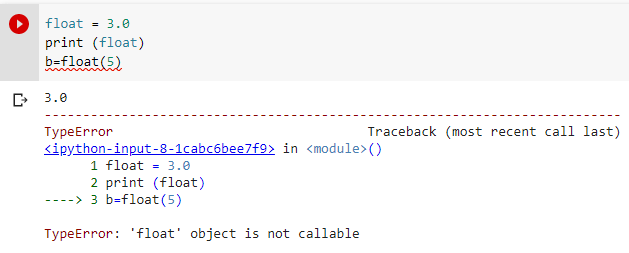
Firstly let’s see the code.
float = 3.0
print (float)
b=float(5)
Here we have given variable name as a float. Which later on conflicts with float typecasting operation. Here is the output for this piece of code.
Solution float object is not callable :
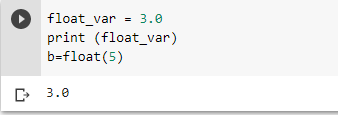
We can choose different variable names. Let’s say we give it the name float_var. Now It will fix the issue.
Scenario 2: Variable name and function name are the same-
There can be any scenario where the user-defined function name is the same as the variable which holds its return value. It will be more clear with the below example.
def operation(a):
  return 2*a

operation=operation(2.0)
print(operation(6))
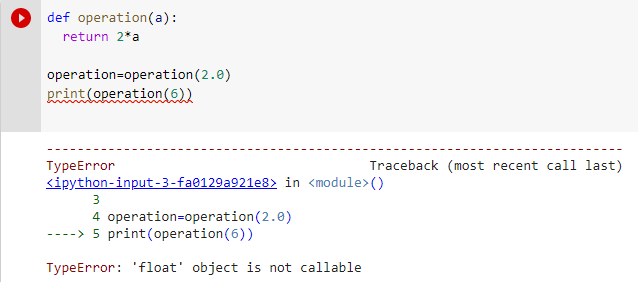
As we can see, In the above code operation is twice. First as a function name and second as a variable that holds its value.
Also when we run the above code we get the error float object is not callable.
Solution –
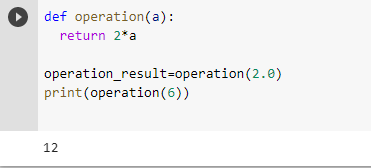
As we have done earlier. Here we again need to change either the variable name or function name.
def operation(a):
  return 2*a

operation_result=operation(2.0)
print(operation(6))
Now the above code works well.
Thanks
Data Science Learner Team

Join our list
Subscribe to our mailing list and get interesting stuff and updates to your email inbox.
We respect your privacy and take protecting it seriously
Thank you for signup. A Confirmation Email has been sent to your Email Address.
Something went wrong.
So you have been presented with the TypeError: ‘float’ object is not callable in Python, but unsure how to fix? Well read on so we can get you a solution.
First things an overview of a Float
A float is any number that can contain a decimal place separating an integer from the fractions to the right of the decimal point.
As an example, in the below code, we have the exact same number. But when a computer comes to read it, it treats them differently, due to the fact that b has a decimal point and a fraction to the right of it.
a = 1
b = 1.0

print (type(a))
print (type(b))

Output:
<class 'int'>
<class 'float'>
So how in a piece of code would this error occur?
In the below code, the error occurs. The reason behind this is that float is an actual function that changes a value to a float data type.
As a result, you cannot assign a variable name as “float” and then call it separately in its code. Python specifically does not allow a programmer to use a function as a variable name.
a= float(10)
b= float(11)
c= float(12)
float = a

d = float(a/b*c)
print(d)

Output:
d = float(a/b*c)
TypeError: 'float' object is not callable
So how is this fixed?
In order to fix this, we rename the variable “float” to something else, and make sure that the new name is not another function name!
As can be seen when we do this, the below output runs as expected with no errors:
a= float(10)
b= float(11)
c= float(12)
float_value = a   ===> This line was corrected from above from "float" to "float_value"

d = float(a/b*c)
print(d)

Output:
10.909090909090908
In summary the crux of this problem is that when creating a variable, it cannot be a function name.
You can see similar posts here on TypeErrors.
Have you seen these posts?
TypeError: ‘float’ object is not callable
TypeError: ‘int’ object is not callable
Improve Article
Save Article
Improve Article
Save Article
In this article, we are going to see how to fix TypeError: ‘numpy.float’ object is not callable in Python. There is only one case in which we can see this error:
If we try to call a NumPy array as a function, we are most likely to get such an error.
Example:
Python3
import numpy as np
a = np.array([1,2,3])
a()
Output:
TypeError: 'numpy.ndarray' object is not callable
In the older version of Numpy, we used to see “numpy.float64” instead of “numpy.ndarray”.
Solution:
This can be solved simply by removing the parenthesis after the array.
Python3
import numpy as np
a = np.array([1,2,3])
a
Output:
array([1, 2, 3])
Here version of NumPy is ‘1.21.2’.
Note: In the earlier version of Numpy, we also used to get this error while using Python min() or max() function with a NumPy array. In the recent versions of NumPy, this is solved. In the earlier versions, this particular error was supposed to be solved using np.max() or np.min() instead of min() and max().