Please Help me. I’m running a simple python program that will display the data from mySQL database in a tkinter form…
from Tkinter import *
import MySQLdb

def button_click():
    root.destroy()

root = Tk()
root.geometry("600x500+10+10")
root.title("Ariba")

myContainer = Frame(root)
myContainer.pack(side=TOP, expand=YES, fill=BOTH)

db = MySQLdb.connect ("localhost","root","","chocoholics")
s = "Select * from member"
cursor = db.cursor()
cursor.execute(s)
rows = cursor.fetchall()

x = rows[1][1] + " " + rows[1][2]
myLabel1 = Label(myContainer, text = x)
y = rows[2][1] + " " + rows[2][2]
myLabel2 = Label(myContainer, text = y)
btn = Button(myContainer, text = "Quit", command=button_click, height=1, width=6)

myLabel1.pack(side=TOP, expand=NO, fill=BOTH)
myLabel2.pack(side=TOP, expand=NO, fill=BOTH)
btn.pack(side=TOP, expand=YES, fill=NONE)
Thats the whole program….
The error was
x = rows[1][1] + " " + rows[1][2]
IndexError: tuple index out of range

y = rows[2][1] + " " + rows[2][2]
IndexError: tuple index out of range
Can anyone help me??? im new in python.
Thank you so much….
In Python, lists, tuples are indexed. It means each value in a tuple is associated with index position (0 to n-1) to access that value. Where N represent the total number of values in list or tuple. When user try access an item in a tuple that is out of range the Python returns an error that says “IndexError: tuple index out of range”.
Lets consider a below example for tuple of fruits. Where index of value start from 0 and up to (number of element -1).
fruits = ("Apple", "Banana", "Grapes", "Papaya", "Litchi")
This tuple fruits is having five values and each element is associated with index number as below:
| Apple | Banana | Grapes | Papaya | Litchi |
| 0 | 1 | 2 | 3 | 4 |
To access the value “Grapes” from fruits tuple, we would use this code:
Our code returns: Grapes. here we accessing the value at the index position 2 and print it to the console. Same way we can try with other values in tuple.
Now lets consider an example to create this IndexError, Try to access value by using index value out of range (3 to 6) where index position 5 is out of range and this example will throw exception as “IndexError: tuple index out of range“.
fruits = ("Apple", "Banana", "Grapes", "Papaya", "Litchi")
for i in range(2, 6):
    print(fruits[i])
Output
Grapes
papaya
Lichi

Traceback (most recent call last):
  File "main.py", line 4, in <module>
    print(fruits[i])
IndexError: tuple index out of range
Our code prints out the values Grapes, Papaya and Litchi. These are the last three values in our tuple. Then throw exception as “IndexError: tuple index out of range” because index position 5 is out of the range for elements in the tuple.
The Solution
Our range() statement creates a list of numbers between the range of 2 and 6. This number list is inclusive of 2 and exclusive of 6. Our fruits tuble is only indexed up to 4. This means that our loop range will try to access a fruit at the index position 5 in our tuple because 5 is in our range.
Now lets try to run this below updated program for loop range 2 to 5 then observe the result. To learn more on for loop follow link Python: for loop
fruits = ("Apple", "Banana", "Grapes", "Papaya", "Litchi")
for i in range(2, 5):
    print(fruits[i])
Output
Our code successfully prints out the last three items in our list because now accessing items at the index positions 2, 3, and 4 which is in range of fruit tuple indexes.
Conclusion
The IndexError: tuple index out of range error occurs when you try to access an item in a tuple that does not exist. To solve this problem, make sure that whenever you access an item from a tuple that the item for which you are looking exists.
To learn more on exception handling follow the link Python: Exception Handling.
If this blog for solving IndexError help you to resolve problem make comment or if you know other way to handle this problem write in comment so that it will help others.
“Learn From Others Experience»
The IndexError: tuple index out of range error occurs when you access an item that does not exist in the tuple. The python error IndexError: tuple index out of range occurs when an item in a tuple is accessed using invalid index. The access index should be within the tuple index range. The error will be thrown if the index is out of range in python. To solve this error, make sure the item you are searching for is accessed from a tuple
The tuple is an ordered collection of objects. The tuples are indexed starting at 0 up to the total number of elements length. You can reach the elements in the tuple using reverse indexing stating -1. If an element is accessed outside the permitted tuple index range, then the error IndexError: tuple index out of range is thrown.
Otherwise, at a specific index, you attempt to access an object but the object is not currently available in that index. In this case the index error tuple index out of range will be thrown by the python tuple.
Exception
The stack trace of the index error will appear as shown below. The stack trace will display the line this error is being thrown at.
Traceback (most recent call last):
  File "/Users/knatarajan2/Desktop/test.py", line 2, in <module>
    print a[5]
IndexError: tuple index out of range
[Finished in 0.0s with exit code 1]
How to reproduce this error
If an object is accessed beyond the permissible tuple range, the object can not be located at that location. Hence the error “IndexError: out-of-range tuple index” is thrown. The index ranges from 0 through to the total tuple items. In the example below, the index range is from 0 to 4 and reverse index is -5 to -1. The accessed index 5 is out of range of tuple.
test.py
a = ( 'A', 'B', 'C', 'D', 'E' )
print a[5]
Output
Traceback (most recent call last):
  File "/Users/python/Desktop/test.py", line 2, in <module>
    print a[5]
IndexError: tuple index out of range
[Finished in 0.0s with exit code 1]
Root Cause
The tuple is an ordered collection of objects. The objects are managed using the indexes. The index values starts from 0 up to the total value count. The reverse index starts with -1 unto the total number of items negative. If an object is accessed using an index outside the range of a tuple, the error will be thrown.
Forward index of the tuple
Python allows two forms of indexation, forward indexing and backward indexing. The index forwards begins at 0 and finishes with the number of items in the tuple. The forward index is used to iterate a tuple in the forward direction.
| Index | 0 | 1 | 2 | 3 | 4 |
| Value | A | B | C | D | E |
Backward index of the tuple
The reverse index starts from-1 and the index ends with the negative value of the number of elements in the tuple. The backward index is used in reverse direction to iterate the elements. The objects in the tuple is printed in the reverse sequence of the index. The reverse index shall be as shown below
| Index | -5 | -4 | -3 | -2 | -1 |
| Value | A | B | C | D | E |
Solution 1
The index value should be within the permissible range of the index value. Typically, the tuple contains index beginning at 0 to the length of the tuple. The negative index value beginning at -1 would point to the tuple’s last index
test.py
a = ( 'A', 'B', 'C', 'D', 'E' )
print a[3]
Output
D
[Finished in 0.1s]
Solution 2
If the tuple is created dynamically, then the tuple length is unknown. The tuple is iterated and the elements are retrieved based on the index. The index value is uncertain in this situation. If an index retrieves the element in the tuple the index value should be validated with the tuple length.
a = ( 'A', 'B', 'C', 'D', 'E' )
index = 3
if index < len(a) :
	print a[index]
Output
D
[Finished in 0.1s]
Solution 3
The python membership operator is used to iterate all elements with in the tuple. The membership operator gets all the elements in the tuple without using the element index. The loop helps to iterate all the elements in the tuple. The example below shows how to use a membership in a loop. The error IndexError: tuple index out of range will be resolved by the membership operators.
test.py
a = ( 'A', 'B', 'C', 'D', 'E' )
for item in a:
	print item
Output
A
B
C
D
E
[Finished in 0.0s]Like lists, Python tuples are indexed. This means each value in a tuple has a number you can use to access that value. When you try to access an item in a tuple that does not exist, Python returns an error that says “tuple index out of range”.
In this guide, we explain what this common Python error means and why it is raised. We walk through an example scenario with this problem present so that we can figure out how to solve it.

Find Your Bootcamp Match
- Career Karma matches you with top tech bootcamps
- Access exclusive scholarships and prep courses
Select your interest
First name
Last name
Phone number
By continuing you agree to our Terms of Service and Privacy Policy, and you consent to receive offers and opportunities from Career Karma by telephone, text message, and email.
Problem Analysis: IndexError: tuple index out of range
Tuples are indexed starting from 0. Every subsequent value in a tuple is assigned a number that is one greater than the last. Take a look at a tuple:
birds = ("Robin", "Collared Dove", "Great Tit", "Goldfinch", "Chaffinch")
This tuple contains five values. Each value has its own index number:
| Robin | Collared Dove | Great Tit | Goldfinch | Chaffinch |
| 1 | 2 | 3 | 4 |
To access the value “Robin” in our tuple, we would use this code:
Our code returns: Robin. We access the value at the index position 1 and print it to the console. We could do this with any value in our list.
If we try to access an item that is outside our tuple, an error will be raised.
An Example Scenario
Let’s write a program that prints out the last three values in a tuple. Our tuple contains a list of United Kingdom cities. Let’s start by declaring a tuple:
cities = ("Edinburgh", "London", "Southend", "Bristol", "Cambridge")
Next, we print out the last three values. We will do this using a for loop and a range() statement. The range() statement creates a list of numbers between a particular range so that we can iterate over the items in our list whose index numbers are in that range.
Here is the code for our for loop:
for i in range(3, 6):
	print(birds[i])
Let’s try to run our code:
Goldfinch
Chaffinch
Traceback (most recent call last):
  File "main.py", line 4, in <module>
	print(birds[i])
IndexError: tuple index out of range
Our code prints out the values Goldfinch and Chaffinch. These are the last two values in our list. It does not print out a third value.
The Solution
Our range() statement creates a list of numbers between the range of 3 and 6. This list is inclusive of 3 and exclusive of 6. Our list is only indexed up to 4. This means that our loop will try to access a bird at the index position 5 in our tuple because 5 is in our range.
Let’s see what happens if we try to print out birds[5] individually:
Our code returns:
Traceback (most recent call last):
  File "main.py", line 3, in <module>
	print(birds[5])
IndexError: tuple index out of range
The same error is present. This is because we try to access items in our list as if they are indexed from 1. Tuples are indexed from 0.
To solve this error, we need to revise our range() statement so it only prints the last three items in our tuple. Our range should go from 2 to 5:
for i in range(2, 5):
	print(birds[i])
Let’s run our revised code and see what happens:
Great Tit
Goldfinch
Chaffinch
Our code successfully prints out the last three items in our list. We’re now accessing items at the index positions 2, 3, and 4. All of these positions are valid so our code now works.
Conclusion
The IndexError: tuple index out of range error occurs when you try to access an item in a tuple that does not exist. To solve this problem, make sure that whenever you access an item from a tuple that the item for which you are looking exists.
The most common cause of this error is forgetting that tuples are indexed from 0. Start counting from 0 when you are trying to access a value from a tuple. As a beginner, this can feel odd. As you spend more time coding in Python, counting from 0 will become second-nature.
Now you’re ready to solve this Python error like an expert!
IndexError: tuple index out of range
Tuples in Python are a series of objects that are immutable. They are like lists. The elements of a tuple are accessed the same way a list element is accessed – by mentioning indices. But when using tuples you might have encountered «IndexError: tuple index out of range«. This happens when you are trying to access an element that is out of bounds of the tuple.
The way to solve this error is by mentioning the correct index. Let us look a little more closely at this error and its solution.
Examples of IndexError: tuple index out of range
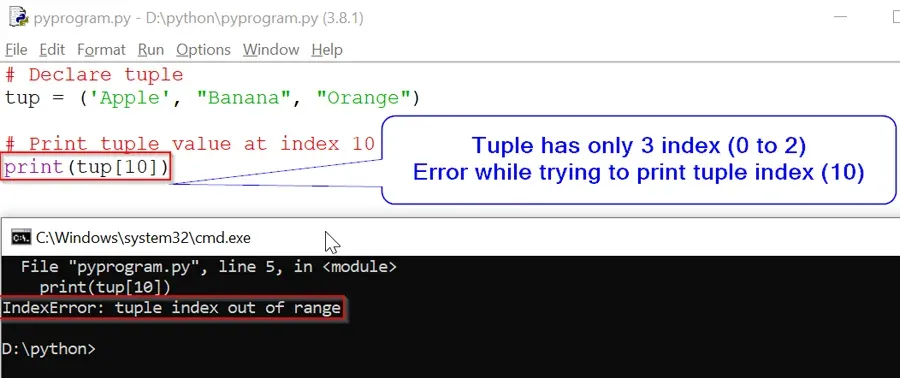
Take a look at this piece of code below:
# Declare tuple
tup = ('Apple', "Banana", "Orange")

# Print tuple value at index 10
print(tup[10])
Output:
File "pyprogram.py", line 5, in <module>
print(tup[10])
IndexError: tuple index out of range
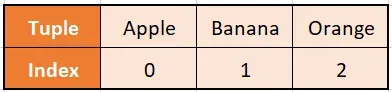
As tuple has only 3 index and we are trying to print the value at index 10
Solution:
# Declare tuple
tup = ('Apple', "Banana", "Orange")

print(tup[0])
print(tup[1])
print(tup[2])
In the code above, there is a tuple called tup having three elements. So the index value starts from 0 and ends at 2. A print() method is called on the tuple to print out all of its elements.
The solution code executes successfully as the indices mentioned in the print() are 0,1 and 2. These indices are all within the range of the tuple, so the IndexError: tuple index out of range error is avoided.
Example with While Loop
# Declare tuple
tup = ('Apple', "Banana", "Orange")

print('Print length of Tuple: ',len(tup))

i=0

# While loop less then and equal to tuple "tup" length.
while i <= len(tup):
    print(tup[i])
    i += 1
Output:
  File "pyprogram.py", line 10
        print(tup[i])
            ^
SyntaxError: invalid character in identifier
len() function count length of tuple as «3» so while loop runs for 4 time starting from 0 because value of i is 0, due to which when our while loop print the value of tup[«3»] it goes out of range because out tuple «tup» has only 3 elements.
Correct Code:
# Declare tuple
tup = ('Apple', "Banana", "Orange")
i=0

print('Print length of Tuple: ',len(tup))

# While loop less than tuple "tup" length.
while i < len(tup):
    print(tup[i])
    i += 1
Output
Print length of Tuple:  3
Apple
Banana
Orange
The tuple called «tup» has 3 elements. So, the index starts from 0 and ends at 2. In the solution code, there is a variable i having a value of 0. This variable is used as an incrementor in the while loop. The loop checks whether i is less than length of the tuple. Then, it prints out the element in the ith index.
So, the loop runs 3 times starting from 0 and going up to 2, while i is incremented at every iteration. It stops iterating when i=4 and it is greater than the length of the tuple. Thus, the IndexError: tuple index out of range is avoided, as the code does not try to access the 4th element that is out of range.
Индексирование кортежей
x = (1, 2, 3)
x[0]  # 1
x[1]  # 2
x[2]  # 3
x[3]  # IndexError: tuple index out of range
Индексирование с отрицательными числами начнется с последнего элемента как -1:
x[-1] # 3
x[-2] # 2
x[-3] # 1
x[-4] # IndexError: tuple index out of range
Индексирование ряда элементов
print(x[:-1])   # (1, 2)
print(x[-1:])   # (3,)
print(x[1:3])   # (2, 3)
Кортежи неизменны
Одним из основных отличий между list s и tuple с в Python является то , что кортежи являются неизменяемыми, то есть, один не может добавлять или изменять элементы , как только кортеж инициализируются. Например:
>>> t = (1, 4, 9)
>>> t[0] = 2
Traceback (most recent call last):
  File "<stdin>", line 1, in <module>
TypeError: 'tuple' object does not support item assignment
Точно так же, кортежи не имеют .append и .extend методы , как list делает. Используя += возможно, но он изменяет связывание переменной, а не сам кортеж:
>>> t = (1, 2)
>>> q = t
>>> t += (3, 4)
>>> t
(1, 2, 3, 4) #output
>>> q
(1, 2) #output
Будьте осторожны при размещении изменяемых объектов, таких как lists , внутри кортежей. Это может привести к очень запутанным результатам при их изменении. Например:
>>> t = (1, 2, 3, [1, 2, 3])
(1, 2, 3, [1, 2, 3]) #output
>>> t[3] += [4, 5]
Будет как поднимать ошибку и изменить содержимое списка в кортеже:
TypeError: 'tuple' object does not support item assignment
>>> t
(1, 2, 3, [1, 2, 3, 4, 5]) #output
Вы можете использовать += оператору «добавить» в кортеж — это работает, создавая новый кортеж с новым элементом вы «добавленным» и назначить его в текущей переменной; старый кортеж не изменен, но заменен!
Это позволяет избежать преобразования в список и из списка, но это медленный процесс, и это плохая практика, особенно если вы собираетесь добавлять несколько раз.
Кортеж является элементарным измеримым и уравновешенным
hash( (1, 2) )  # ok
hash(([], {"hello"})  # не ок, поскольку списки и множества не хешируемы
Таким образом, кортеж можно поставить внутри set или в качестве ключа в dict только тогда , когда каждый из его элементов может.
{ (1, 2) } #  ок
{([], {"hello"}) ) # не ок
Кортеж
Синтаксически, кортеж — это список значений через запятую:
t = 'a', 'b', 'c', 'd', 'e'
Хотя это и необязательно, обычно заключать кортежи в скобки:
t =('a', 'b', 'c', 'd', 'e')
Создайте пустой кортеж с круглыми скобками:
t0 = ()
type(t0)            # <type 'tuple'>
Чтобы создать кортеж с одним элементом, необходимо добавить заключительную запятую:
t1 = 'a',
type(t1)              # <type 'tuple'>
Обратите внимание, что одно значение в скобках не является кортежем:
t2 =('a')
type(t2)              # <type 'str'>
Для создания одноэлементного кортежа необходимо использовать завершающую запятую.
t2 =('a',)
type(t2)              # <type 'tuple'>
Обратите внимание , что для одноэлементных кортежей рекомендуется (см PEP8 на задней запятые ) использовать круглые скобки. Кроме того , ни один белый пробел после запятой ведомой (см PEP8 на пробельных символов )
t2 =('a',)           # нотация одобрена PEP8
t2 = 'a',             # использовать эту нотацию PEP8 не рекомендует
t2 =('a', )          # использовать эта нотацию PEP8 не рекомендует
Другой способ создать кортеж является встроенной функцией tuple .
t = tuple('lupins')
print(t)              #('l', 'u', 'p', 'i', 'n', 's')
t = tuple(range(3))
print(t)              # (0, 1, 2)
Эти примеры основаны на материалах из книги Think Python Аллен B. Дауни.
Упаковка и распаковка кортежей
Кортежи в Python — это значения, разделенные запятыми. Заключение круглых скобок для ввода кортежей не является обязательным, поэтому два назначения
a = 1, 2, 3 # a является кортежем (1, 2, 3)
а также
a = (1, 2, 3) # a является кортежем (1, 2, 3)
эквивалентны. Присваивания a = 1, 2, 3 также называют упаковки , потому что пакеты значения вместе в кортеже.
Обратите внимание, что кортеж с одним значением также является кортежем. Чтобы сообщить Python, что переменная является кортежем, а не единственным значением, вы можете использовать запятую
a = 1  # a имеет значение 1
a = 1, # a это кортеж (1,)
Запятая нужна также, если вы используете скобки
a = (1,) # a это кортеж (1,)
a = (1)  # a имеет значение 1 и не является кортежем
Для распаковки значений из кортежа и выполнения нескольких назначений используйте
# unpacking AKA multiple assignment
x, y, z = (1, 2, 3)
# x == 1
# y == 2
# z == 3
Символ _ может быть использован в качестве одноразового использования имени переменной , если нужно только некоторые элементы кортежа, действуя в качестве заполнителя:
 a = 1, 2, 3, 4
_, x, y, _ = a
# x == 2
# y == 3
Одноэлементные кортежи:
x, = 1,  # x это означение 1
x  = 1,  # x это кортеж (1,)
В Python 3 целевой переменной с * префикс может быть использован в качестве вдогонку всех переменных:
first, *more, last = (1, 2, 3, 4, 5)
#first == 1
#more == [2, 3, 4]
#last == 5
Реверсивные элементы
Обратные элементы в кортеже
colors = "red", "green", "blue"
rev = colors[::-1]
# rev: ("blue", "green", "red")

colors = rev
# colors: ("blue", "green", "red")
Или с использованием обратного (обратное дает итерацию, которая преобразуется в кортеж):
rev = tuple(reversed(colors))
# rev: ("blue", "green", "red")

colors = rev
# colors: ("blue", "green", "red")
Встроенные функции кортежей
Кортежи поддерживают следующие встроенные функции
сравнение
Если элементы одного типа, python выполняет сравнение и возвращает результат. Если элементы разных типов, он проверяет, являются ли они числами.
- Если числа, проведите сравнение.
- Если один из элементов является числом, то возвращается другой элемент.
- В противном случае типы сортируются по алфавиту.
Если мы достигли конца одного из списков, более длинный список будет «больше». Если оба списка одинаковы, возвращается 0.
tuple1 =('a', 'b', 'c', 'd', 'e')
tuple2 =('1','2','3')
tuple3 =('a', 'b', 'c', 'd', 'e')

cmp(tuple1, tuple2) # 1

cmp(tuple2, tuple1) # -1

cmp(tuple1, tuple3) # 0
Длина кортежа
Функция len возвращает общую длину кортежа
len(tuple1) # 5
Max кортежа
Функция max возвращает элемент из кортежа с максимальным значением
max(tuple1) #'e'

max(tuple2) # '3'
Min кортежа
Функция min возвращает элемент из кортежа со значением min
min(tuple1) # 'a'

min(tuple2) # '1'
Преобразовать список в кортеж
Встроенная функция tuple преобразует список в кортеж.
list = [1,2,3,4,5]
tuple(list)

>>>Out: (1, 2, 3, 4, 5)
Конкатенация кортежей
Используйте + для конкатенации двух кортежей
tuple1 + tuple2

>>>Out:('a', 'b', 'c', 'd', 'e', '1', '2', '3')