There are a bunch of syntax errors here. Let’s start with the line:
if[ ( ${file: -4} == "$1" ) || ( ${file: -4 } == "$2" ) ]{
-
You need a space between
ifand[(or whatever comes after it). As written, the shell is treating «if[» as the name of a command, which isn’t what you want at all. -
The
[ ... ]style of conditional doesn’t understand||(it uses-oinstead), requires that all shell metacharacters (like parentheses) be escaped or quoted, might not understand==(just=is the standard), and will get very confused if any of the unquoted variable/parameter references are blank. -
ifconditionals end withthen(either on the next line, or after a;) not{
You could fix it like this:
if [ ( "${file: -4}" = "$1" ) -o ( "${file: -4}" = "$2" ) ]; then
Or, since you’re using bash (instead of a more basic shell), you can use the [[ ... ]] conditional style, which has much cleaner syntax:
if [[ "${file: -4}" = "$1" || "${file: -4}" = "$2" ]]; then
Next, remove the do before ffmpeg. do is part of the syntax for for and while loops; you already have one above (where it belongs), and this one just doesn’t make sense. This is what’s causing the error you see.
Next, the way you’re replacing the file’s extension won’t work right. The variable reference "${file%.extension}"$3 will try to remove «.extension» (not the variable, just the string) from the end of $file. It also has $3 outside the quotes, which can cause trouble. You could fix it by using "${file%$extension}$3" instead, but frankly I’d just use "${file%.*}$3" to remove the extension no matter what length it is (and I’d also redo the if comparisons similarly, but that’s more complicated).
Finally, you need a fi (after the ffmpeg line) to end the conditional. Every if needs a then and a fi.
And just as a stylistic thing, you don’t need ; at the end of a line in shell; it’s only needed when you’re putting multiple commands (or things like do and then) on the same line. Anyway, here’s my quick rewrite:
#!/bin/bash

# $1 is the first parameter passed
# $2 is the second parameter passed
# $3 is the third parameter passed

for file in *.*; do
    #comparing the file types in the directory to the first 2 parameters passed
    if [[  "${file: -4}" = "$1" || "${file: -4}" = "$2"  ]]; then
        #converting such files to the type of the first parameter using the FFMPEG comand
        ffmpeg -i "$file" "${file%.*}$3"
    fi
done
I have a «syntax error near unexpected token `do» error, using a for loop in a .sh. Here is the code :
#!/bin/sh

# some code

for flux in $(ls -d /home/eai/*/*/*) ; do
  FICHIER=$(ls -p -tr $flux | grep -v / | head -n 1)
  if [[ $FICHIER ]] ; then
     # some code
  fi
done
Different ways to execute the script, and the output :
1) sh script.sh or bash script.sh
'cript_1409.sh: line 24: syntax error near unexpected token `do
'cript_1409.sh: line 24: `for flux in $(ls -d /home/eai/*/*/*); do
2) ./script.sh
-bash: ./script_1409.sh: /bin/sh^M: bad interpreter: No such file or directory
What I tried :
1) Use different syntax for the loop.
for flux in $(ls -d /home/eai/*/*/*) ; do
  FICHIER=$(ls -p -tr $flux | grep -v / | head -n 1)
  if [[ $FICHIER ]] ; then
     # some code
  fi
) &
done
or
for flux in $(ls -d /home/eai/*/*/*)
do
  FICHIER=$(ls -p -tr $flux | grep -v / | head -n 1)
    if [[ $FICHIER ]] ; then
      # some code
    fi
done
2) Change the #!/bin/sh to #!/bin/bash.
3) Change the extension .sh to .bash and retry all the execution commands aforementioned.
Tried searching around and couldn’t find a direct answer to my problem, as all other codes out there appear to be doing what I’m doing. I’m working on a shell scripting exercise to calculate averages for a class, and I’ve made it to this point using our reference scripts, however I’m getting errors about the syntax (error at bottom of code)
#!/bin/bash

avg=0
temp_total=0
number_of_args=$#

# First see the sufficient cmd args
if [ $# -lt 2 ] ; then
        echo -e "Oops! I need at least 2 command line args to calculate an averagen"
        echo -e "Syntax: $0: number1 number2 ... numberNn"
        echo -e "Example:$0 5 4nt$0 56 66 34"
        exit 1
fi

# now calculate the average of the numbers given on command line as cmd args for i in $*
do
     # addition of all the numbers on cmd args
        temp_total='expr $temp_total + $i '
done

avg='expr $temp_total / $number_of_args '
echo "The average of all the numbers is $avg"
So, the error I’m getting is
./avg.sh: line 16: syntax error near unexpected token `do'
./avg.sh: line 16: `do'
I can’t find anything particularly wrong around that area, so I was hoping someone could help me out! Thanks!
edit: In particular, I’ve tried removing the comments on the off chance that they were causing issues, to no avail. I re-typed the section as well. I also tried finding different ways to handle that portion, but most averaging scripts seem to handle it in a very similar fashion, so I’m at a loss!
Have you ever seen the message “syntax error near unexpected token” while running one of your Bash scripts?
In this guide I will show you why this error occurs and how to fix it.
Why the Bash unexpected token syntax error occurs?
As the error suggests this is a Bash syntax error, in other words it reports bad syntax somewhere in your script or command. There are many things that can go wrong in a Bash script and cause this error. Some common causes are missing spaces next to commands and lack of escaping for characters that have a special meaning for the Bash shell.
Finding the syntax error reported when you execute your script is not always easy. This process often requires you to change and retest your script multiple times.
To make your life easier I have analysed different scenarios in which this syntax error can occur. For every scenario I will show you the script or command with the error and the fix you need to apply to solve the problem.
Let’s get started!
One Approach to Fix Them All
Considering that this syntax error can occur in multiple scenarios you might not be able to find your exact error in the list below.
Don’t worry about it, what matters is for you to learn the right approach to identify what’s causing the error and knowing how to fix it.
And going through the examples below you will learn how to do that.
In some of the examples I will show you how to fix this error if it happens while executing a single command in a Bash shell.
In other examples we will look at Bash scripts that when executed fail with the “unexpected token” error.
To fix the error in a single command it’s usually enough to add or remove some incorrect characters that cause the syntax error in the command.
Knowing how to fix the error in a script can take a bit more time, and for that I will use the following 5-step process:
- Run the script that contains the syntax error.
- Take note of the line mentioned by the Bash error.
- Execute the line with the error in a Bash shell to find the error fast (without having to change the script and rerun it multiple times).
- Update your script with the correct line of code.
- Confirm the script works.
Makes sense?
It’s time for the first scenario.
Let’s say I have the following file on my Linux system:
-rw-r--r-- 1 ec2-user ec2-user 28 Jun 28 22:29 report(july).csvAnd I want to rename it to report_july.csv.
I can use the following command, right?
mv report(july).csv report_july.csvWhen I run it I get the following error:
-bash: syntax error near unexpected token `('But, why?
Because parentheses () are used in Bash to create a subshell. In other words they are special characters.
And Bash special character need to be escaped if used as normal characters in a command. The backslah is used to escape characters.
I will update the command to include the backslash before both parentheses:
mv report(july).csv report_july.csvNo errors this time:
-rw-r--r-- 1 ec2-user ec2-user 28 Jun 28 22:29 report_july.csvLesson 1: Remember to escape Bash special characters when you use them as normal characters (literals) in a filename or string in general.
First error fixed!
Syntax Error Near Unexpected Token Then (Example 1)
And here is the second scenario.
When I run the following script:
#!/bin/bash

DAY="Monday"

if[ $DAY == "Monday" ]; then
  echo "Today is Monday"
else
  echo "Today is not Monday"
fi
I get back the error below:
(localhost)$ ./unexpected_token.sh
./unexpected_token.sh: line 5: syntax error near unexpected token `then'
./unexpected_token.sh: line 5: `if[ $DAY == "Monday" ]; then'
Can you see why?
The error is caused by the missing space between if and the open square bracket ( [ ).
And the reason is the following:
if is a shell builtin command and you might be thinking you are using if here. But in reality the shell sees if[ that is not a known command to the shell.
At that point the shell doesn’t know how to handle then given that it hasn’t found if before, and it stops the script with the error above.
The correct script is:
#!/bin/bash

DAY="Monday"

if [ $DAY == "Monday" ]; then
  echo "Today is Monday"
else
  echo "Today is not Monday"
fi
I have just added a space between if and [ so the shell can see the if command.
And the output of the script is correct:
(localhost)$ ./unexpected_token.sh
Today is Monday
Lesson 2: Spaces are important in Bash to help the shell identify every command.
Syntax Error Near Unexpected Token Then (Example 2)
While writing Bash scripts, especially at the beginning, it’s common to do errors like the one below:
(localhost)$ for i in {0..10} ; do echo $i ; then echo "Printing next number" ; doneWhen you run this one-liner here’s what you get:
-bash: syntax error near unexpected token `then'Let’s find out why…
The syntax of a for loop in Bash is:
for VARIABLE in {0..10}
do
  echo command1
  echo command2
  echo commandN
done
And using a single line:
for VARIABLE in {0..10}; do echo command1; echo command2; echo commandN; doneSo, as you can see the semicolon is used in Bash to separate commands when you want to write them on a single line.
The reason why the semicolons were not required in the first version of the script is that the newline is a command separator too.
Now, let’s go back to our error…
The one-liner that was failing with an error contains the then statement that as you can see is not part of the structure of a for loop.
The error is telling us:
- There is a syntax error.
- The token ‘then‘ is unexpected.
Let’s confirm the one-liner runs well after removing then:
(localhost)$ for i in {0..10} ; do echo $i ; echo "Printing next number" ; done
0
Printing next number
1
Printing next number
2
Printing next number
3
Printing next number
4
Printing next number
5
Printing next number
6
Printing next number
7
Printing next number
8
Printing next number
9
Printing next number
10
Printing next number
All good!
Lesson 3: When you see a syntax error verify that you are using Bash loops or conditional constructs in the right way and you are not adding any statements that shouldn’t be there.
Syntax Error Near Unexpected Token Done
I have created a simple script in which an if statement is nested inside a while loop. It’s a very common thing to do in Bash.
#!/bin/bash

COUNTER=0

while true
do
  if [ $COUNTER -eq 0 ]; then
    echo "Stopping the script..."
    exit 1
  done
fi
This script might seem ok, but when I run it I get the following…
./unexpected_token.sh: line 8: syntax error near unexpected token `done'
./unexpected_token.sh: line 8: `  done'
Why?
The done and fi statements are correctly used to close the while loop and the if conditional statement. But they are used in the wrong order!
The if statement is nested into the while loop so we should be closing the if statement first, using fi. And after that we can close the while loop using done.
Let’s try the script:
(localhost)$ ./unexpected_token.sh
Stopping the script...
All good now.
Lesson 4: Nested loops and conditional statements need to be closed in the same order in which they are opened.
Syntax Error Near Unexpected Token fi
Let’s look at another scenario in which this syntax error can occur with the fi token:
#!/bin/bash

for NAME in 'John' 'Mark' 'Kate'
do
    if [ "$NAME" == 'Mark' ] then
        echo 'Hello Mark!'
    fi
done
And this is what I get when I run it:
./unexpected_token.sh: line 7: syntax error near unexpected token `fi'
./unexpected_token.sh: line 7: `    fi'
In this case the Bash shell identifies the if statement and because of that it expects then after it.
As you can see then is there, so what’s the problem?
There is no command separator between the [ ] command (yes….it’s a command) and the then statement.
So, what’s the fix?
Add a command separator immediately after the closing square bracket. We will use the semicolon ( ; ) as command separator.
Our script becomes:
#!/bin/bash

for NAME in 'John' 'Mark' 'Kate'
do
    if [ "$NAME" == 'Mark' ]; then
        echo 'Hello Mark!'
    fi
done
And if I run it I get the correct output:
(localhost)$ ./unexpected_token.sh
Hello Mark!
Lesson 5: Remember to specify command separators in your Bash scripts. Either the semicolon or the newline.
Conclusion
You now have what you need to understand what causes this syntax error in your scripts. You can apply the 5 lessons I have explained in this guide to find a fix.
Take the time to review the lessons at the end of each section so they become part of your Bash knowledge.
If you have any questions please feel free to write them in the comments below.
Now, let’s say you have saved your Bash script using Windows.
And when you run it in Linux you are seeing a syntax error that you can’t really explain because the script looks correct to you.
You might be having the problem explained in this article.
Enjoy your scripting!
Related FREE Course: Decipher Bash Scripting
Related posts:

I’m a Tech Lead, Software Engineer and Programming Coach. I want to help you in your journey to become a Super Developer!
I’m Jason, your friendly neighborhood junior QA (Quality Assurance) here at PaperCut. This is the story about the time I solved “syntax error near unexpected token `do”.
Settle in — it’s a page-turner! Or wheel scroller. Or perhaps finger-dragger?
I had to capture a large number of example spool files on MacOS for analysis. The easiest way to do this is to:
- pause the CUPS print queue
- print to it
- copy the spool file
- resume the printer.
Given PaperCut’s a vendor neutral kind of company, I was doing this across a large number of printer and copier brands. That meant I had more than a couple of print queues (ok, I had dozens), and doing this manually was not the smart thing.
So I wrote a simple script:
#!/bin/bash

# Check for disabled print queues

if [ -z $(lpstat -p | awk '/disabled/ {print $2}') ] &> /dev/null;
then
   	echo "\tNothing to do."
   	exit
else
   	echo "Processing:"
   	for printer in $(lpstat -p | awk '/disabled/ {print $2}')
   	do
          	cupsenable "$printer"
echo "\tEnabled $printer"
done
fi
Except when I ran it, I received the following error:
home/jason/cups-disable-all.sh: line 10: syntax error near unexpected token do
I’ll admit it, I spent quite a bit of time checking my syntax for errors (it’s right there in the error message!) only to find out it was my choice of text editor that caused me grief.
My primary workstation is a Windows laptop; my target machine is MacOS. When editing on Windows, I had Windows Line Endings (CR+LF) not Unix Line Endings (LF).
A quick change in Notepad++ and my script ran without problems:
Edit -> EOL Conversion -> Unix (LF)

Here’s hoping this little tip will help out future junior QAs at PaperCut and elsewhere!
We’re often on the lookout for new QAs and all sorts of tech types. Visit the PaperCut careers page to see if there’s something that takes your fancy.
Кодирование в терминале Linux Bash стало преобладающей практикой в секторе кодирования. Инженеры-программисты и студенты, изучающие язык программирования, сталкиваются с различными ошибками. Если вы неоднократно сталкивались с такими ошибками, как Синтаксическая ошибка рядом с неожиданным токеном ‘(‘ или Синтаксическая ошибка Bash рядом с неожиданным токеном, вы можете попробовать использовать методы, описанные в статье, и стать опытным программистом. Прочитайте методы, описанные в статье, в разделе порядок описан и исправьте ошибки в командных строках вашего файла.
Linux Bash — интерпретатор командной строки для системы на базе Linux, заменяющий Bourne Shell или sh. Файлы именуются в формате .sh в сценариях Linux Bash. Если в коде сценария оболочки есть проблемы с форматированием, вы можете столкнуться с синтаксической ошибкой. Если ошибка близка к символу (, оболочка подскажет вам ошибку в строке и отобразит ошибку в соответствующей строке. Поскольку Linux Bash является интерпретатором, строка с ошибкой будет возвращена вам в Терминал, и он прекратит сканирование остальных команд в сценарии. Следовательно, вам необходимо исправить ошибку в конкретной командной строке и перейти к следующей, чтобы исправить непредвиденную ошибку токена в сценарии оболочки. Причины синтаксиса ошибка рядом с неожиданным токеном в Linux Bash перечислены ниже в этом разделе, как показано ниже:
-
Кодирование с помощью escape-последовательностей. Если вы написали код в сценарии Bash, escape-последовательности или кавычки в сценарии могут вызвать ошибки. Чтобы исправить ошибку, управляющие последовательности и кавычки должны быть записаны в правильном формате.
-
Неправильный синтаксис в файле кодирования. Синтаксис в коде может привести к синтаксической ошибке, если команда написана с неправильным синтаксисом, например, с изменением порядка циклов.
-
Неправильное использование команды. Если вы неправильно используете команду, например, присваиваете неверное значение, у вас может возникнуть синтаксическая ошибка.
-
Несовместимая ОС в системах. Если оболочка для сценария кодирования несовместима между системами Unix и DOS, у вас может возникнуть непредвиденная ошибка.
-
Проблемы в сценарии оболочки bash. Проблемы, выполняемые в сценарии оболочки bash в файле, скопированном из другой системы, могут привести к непредвиденной ошибке токена.
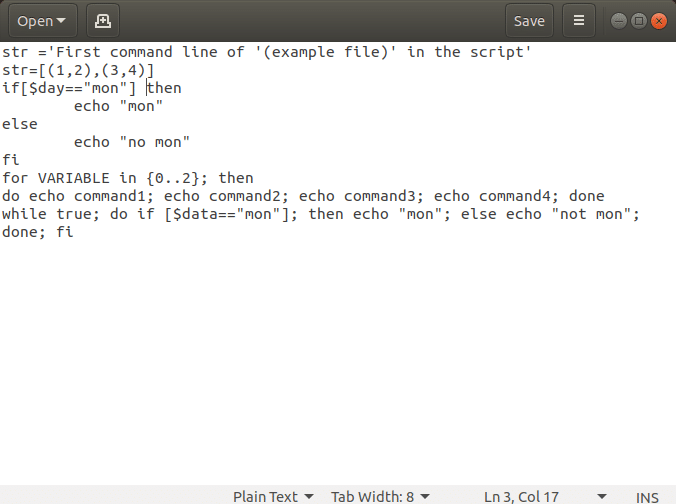
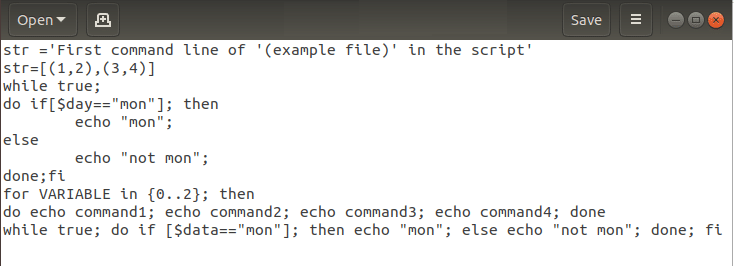
Рассмотрим файл с именем example.sh, созданный в сценариях Linux Bash со следующими командными строками для пояснений. Файл примера допускает синтаксические ошибки и включает все возможные команды, которые можно использовать в сценарии оболочки.
str= ‘First command line of ‘(example file)’ in the script’
str= [(1,2),(3,4)]
if[ $day == “mon” ] then
 echo “mon”
else
 echo “no mon”
fi
for VARIABLE in {0..2}; then
do echo command1; echo command2; echo command3; echo command4; done
while true; do if [ $ day == “mon” ]; then echo “mon”; else echo “not mon”; done; fi
Способ 1: исправить ошибки в каждой командной строке вручную
Первый способ исправить ошибки — исправить синтаксическую ошибку вручную в каждой командной строке скрипта. В этом разделе обсуждаются шаги по устранению синтаксических ошибок рядом с неожиданным токеном в командных строках. Процесс исправления непредвиденной ошибки токена в Терминале описан ниже. Запустите файл в Терминале, введя команду ./example.sh и нажав клавишу Enter.
2. Обратите внимание на строки с непредвиденной ошибкой токена в командных строках результата ниже.
3. Исправьте ошибку в каждой строке, следуя описанным ниже методам по отдельности и сохранив файл.
4. После внесения изменений снова запустите файл и проверьте, устранена ли синтаксическая ошибка в файле.
Шаг I: Чтение содержимого файла
Первым шагом к устранению синтаксической ошибки в командной строке является чтение файла в Терминале. ЕСЛИ есть проблемы с файлом, возможно, вы не сможете просмотреть файл. Обычная практика просмотра файла заключается в запуске файла с помощью команды ./example.sh, но вы не можете изменить содержимое файла. Варианты просмотра содержимого файла и изменения командных строк для исправления синтаксической ошибки рядом с неожиданным токеном ‘(‘ обсуждаются ниже.
Вариант 1: через CAT-команду
Первый вариант — использовать команду cat для просмотра файла в сценарии оболочки. Прочтите содержимое файла с неожиданной ошибкой токена с помощью команды cat, введя команду cat –v example.sh в Терминале.
Примечание 1. Файл example.sh используется в пояснительных целях, и вам необходимо ввести имя файла с непредвиденной ошибкой токена.
Примечание 2. Команда cat –v используется для отображения всех невидимых символов, которые могут представлять собой возврат каретки или пробел без разрыва.
Вариант 2: Через команду VX
Если вы не можете использовать команду cat, вы можете попробовать использовать команду vx для просмотра и изменения команд в файле, используя шаг, указанный ниже. Введите команду sh –vx ./example.sh в Терминале, чтобы открыть файл.
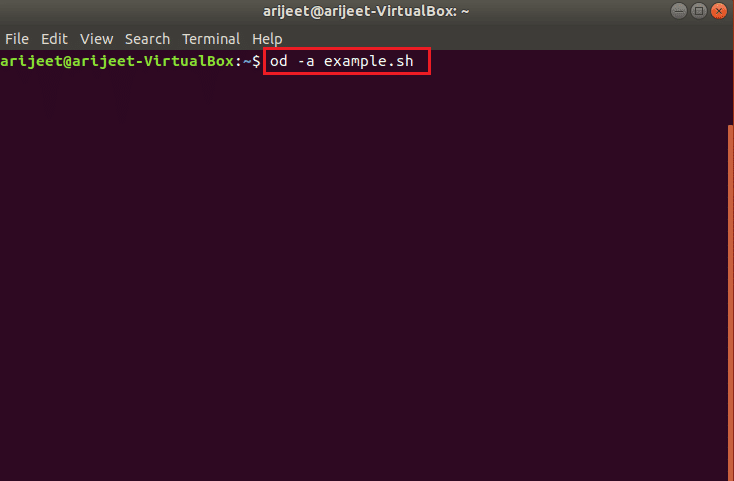
Вариант 3: Через od –a Command
3. Если в командной строке есть несколько невидимых символов, вы можете использовать команду od –a для просмотра файла. Если содержимое файла не видно в файле кода, вы можете попробовать прочитать файл, используя команду od –a example.sh для изменения кода.
Шаг II. Удалите разрывы строк Windows
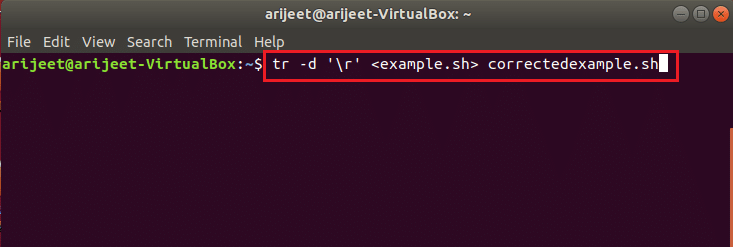
Если в сценарии оболочки есть разрывы строк Windows, вы можете использовать консольные команды, чтобы удалить разрывы строк и скопировать строки кода в новый файл, чтобы исправить ошибку.
Введите следующую команду в Терминале, чтобы сохранить содержимое файла в другой файл с именем correctedexample.sh, чтобы удалить разрывы строк Windows в сценарии.
tr –d ‘r’ <example.sh> correctedexample.sh
Шаг III: Установите разрешения для вновь созданного файла
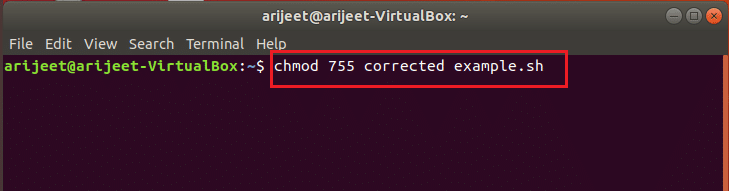
Вам необходимо установить разрешение для вновь созданного файла для редактирования файла, чтобы файл можно было выполнить в оболочке. Введите команду как chmod 755 correctedexample.sh в Терминале, чтобы предоставить права доступа к файлу и запустить файл. Теперь вы можете просмотреть исправленный файл и исправить проблемы с форматированием, а также исправить синтаксическую ошибку рядом с неожиданным токеном ‘(‘ в файле.
Шаг IV: форматирование кода в файле
Второй шаг — отформатировать строки кода по отдельности и вручную изменить командные строки в файле. Варианты форматирования файла для исправления синтаксической ошибки рядом с неожиданным токеном ‘(‘ обсуждаются ниже в этом разделе.
Вариант 1: заменить одинарные кавычки двойными кавычками
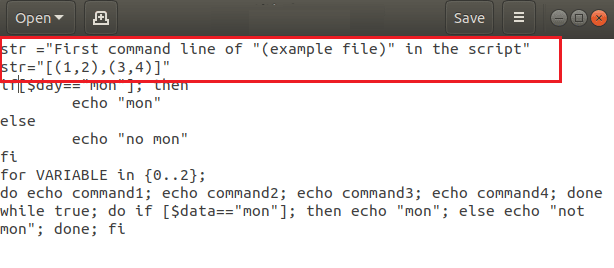
Если вы используете одинарные кавычки в командной строке, вам нужно изменить команду, заменив одинарную кавычку двойными, чтобы исправить синтаксическую ошибку. В файле example.sh удалите строки кода, содержащие ‘ и ‘ или одинарные кавычки в команде, и замените одинарные кавычки двойными кавычками или » и ». Здесь, в файле примера, вам нужно изменить код как str= «Первая командная строка «(файл примера)» в скрипте»
Примечание. Двойные кавычки необходимы для команд типа параметра, таких как str= “[(1,2),(3,4)]».
Вариант 2: добавить $ к строковым строкам
Если вы добавили строковые значения в скрипт, вам нужно добавить $ к строковым значениям, чтобы исправить синтаксическую ошибку в скрипте. Добавьте $ для командных строк со строковыми значениями, чтобы исправить непредвиденную ошибку. Здесь, в файле примера, измените командную строку как;
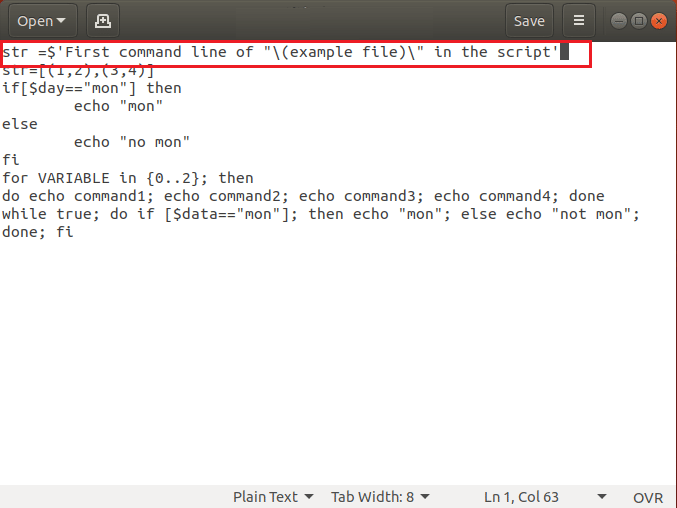
str= $ ‘First command line of ‘(example file)’ in the script’
Примечание. Если вы используете $ в строковом значении, вы можете обойти escape-последовательность обратной косой черты, поскольку командные строки декодируются по стандарту ANSI C. Другими словами, используя $ для строкового значения, вы можете избежать использования двойных кавычек вместо одинарных в командных строках.
Вариант 3: преобразовать вкладки в пробелы
Пробелы, которые вы оставили между двумя операторами в команде, должны быть пробелами, а не табуляцией, чтобы исправить синтаксическую ошибку в сценарии. Если вы получаете ошибку на Cygwin, вы можете попробовать преобразовать вкладки в кодах в пробелы, чтобы исправить ошибку. Командная строка представлена ниже как;
do echo command1; echo command2; echo command3; echo command4; done
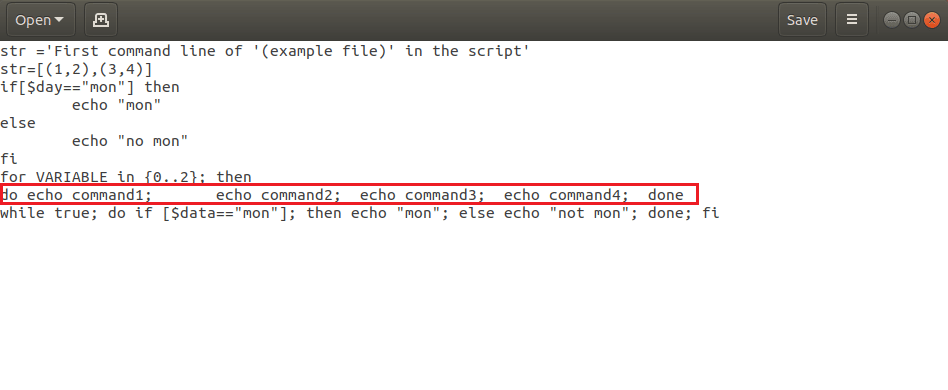
Приведенную выше команду следует переписать, как показано ниже, чтобы исправить ошибку.
do echo command1; echo command2; echo command3; echo command4; done
Вариант 4. Используйте escape-символы
Если вы используете символ bash, важно использовать escape-символ вместе с символом bash, чтобы исправить синтаксическую ошибку. Круглые скобки или () являются специальными символами bash в файле, поэтому вам нужно будет использовать escape-символ или обратную косую черту в командной строке, чтобы экранировать обычные символы для выполнения команды. Команда str= ‘Первая командная строка ‘(пример файла)’ в команде script’ не выдаст ошибку в Терминале, поскольку используется escape-символ.
Вариант 5. Используйте пробелы между символами
Сценарий оболочки распознает команды и операторы в сценарии по значениям по умолчанию. Вам необходимо обеспечить правильное использование пробелов между символами, чтобы оболочка могла идентифицировать команду, указанную в сценарии. Пробел — это символ, который используется для различения двух символов в командной строке. В коде нет пробела между if и [, which gives the unexpected token error as the if[ command is not identified by the shell. If the code is changed to if [ $ day == “mon” ]; тогда ошибка может быть решена с помощью команды бюллетеня оболочки, если она идентифицируется оболочкой.
Вариант 6. Используйте разделитель команд для операторов
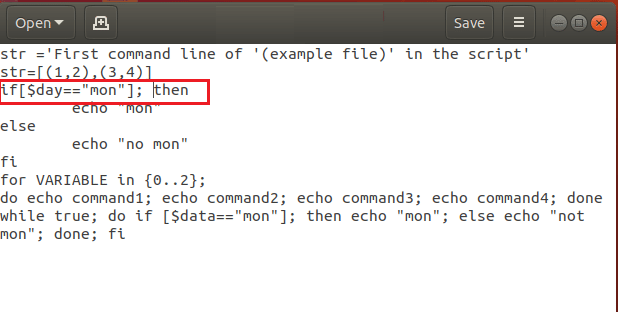
Различные команды в сценарии оболочки должны быть разделены на операторы, чтобы Терминал мог идентифицировать отдельные команды. Вам нужно использовать разделитель команд, чтобы исправить синтаксическую ошибку в Linux Bash. Операторы в команде должны быть разделены разделителем команд, таким как точка с запятой или ; или новую строку, нажав клавишу Enter. Например, команда в коде if [ $ day == “mon” ] тогда нужно изменить, как если бы [ $ day == “mon” ]; затем исправить ошибку. Поскольку точка с запятой используется в качестве разделителя команд между символами [ and then, you can fix this error.
Option 7: Remove Additional Statements
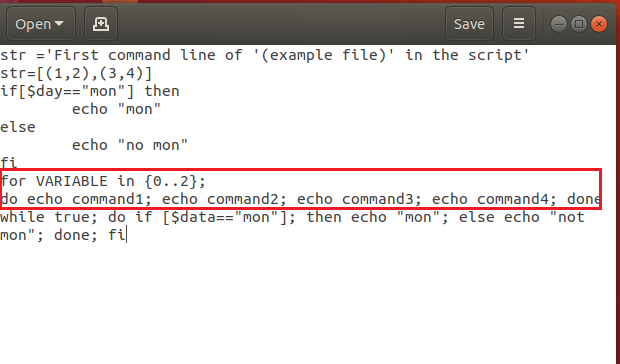
Sometimes, you may have added additional statements or may have mixed up the codes in case of multiple nested loops. You need to remove the additional statements on the command lines to fix the Syntax error near unexpected token ‘(’ in the Linux Bash. The bash loops for…done or and the constructional constructs if… fi needs to be in the correct syntax. The example file has the wrong syntax in the for loop has the term then which is used in the if statement. Modifying the code as the following code will fix the unexpected token error. The statement then is an additional statement in the code and removing the term will fix the error.
for VARIABLE in {0..2}; do echo command1; echo command2; echo command3; echo command4; done
Option 8: Ensure Order of Closing of Statements is Correct
If you are using many nested or conditional construct statements in the shell script, you have to ensure that the loops are closed in the order they are opened. You can use a new line separator to avoid conflicts with the loops. The order of closing the nested loops and conditional statements should be correct and must not be altered. The loops in the code while true; do if [ $ day == “mon” ]; затем эхо «мон»; иначе эхо «не пн»; Выполнено; fi нужно закрывать в правильном порядке. Изменение кода, как показано ниже, может исправить непредвиденную ошибку токена, поскольку порядок закрытия операторов исправлен.
while true; do if [ $ day == “mon” ]; then echo “mon”; else echo “not mon”; fi; done
Способ 2: переписать код
Если вы скопировали код и вставили его в новый файл в Терминале, вы можете попробовать переписать код вручную, чтобы исправить ошибку. Ошибки в коде можно исправить, если вы написали код без каких-либо ошибок формата в сценарии оболочки. Это связано с тем, что скрытые символы и проблемы с форматированием в текстовом редакторе, таком как Microsoft Word, которые вы могли использовать для копирования и вставки кода, могли привести к ошибке.
Способ 3: используйте команду Dos2unix.exe
Если вы используете операционную систему Unix, вы можете писать коды с символом перевода строки как n, чтобы перейти к следующей строке в файле. Однако, если вы используете ОС Windows, вам нужно перейти к следующей строке в коде, используя возврат каретки и перевод строки или rn в файле. Если вы выполняете код, написанный в ОС Windows, в Cygwin, вы можете получить синтаксическую ошибку рядом с неожиданным токеном ‘(‘.
Чтобы исправить ошибку, вам нужно очистить символы возврата каретки, используя инструмент командной строки DOS в Unix в качестве конвертера формата текстового файла. Введите следующую команду как dos2unix.exe example.sh в терминале, и вы сможете преобразовать файл в формат Unix.

***
В статье обсуждались основные методы исправления синтаксической ошибки Bash рядом с неожиданным токеном ‘(‘ в сценарии. Если вы используете Linux Bash, вы можете использовать методы, описанные в этом разделе, для исправления синтаксической ошибки Bash рядом с неожиданным токеном. Если вы Если вы прочитали всю статью и нашли ее содержание полезным, сообщите нам о своих предложениях и вопросах в разделе комментариев.
I’m very new to bash and linux in general, so bear with me here.
I’m currently writing a menu in bash. I wanted to run what I had so far to see my progress, but got the weird error in the title of this post. I’ve tried messing around with the done part at the end of the code but it doesn’t seem to make any difference. My code is as follows:
#!/bin/bash

    function menu {
        echo "==========================================="
        echo "Menu by me"
        echo "==========================================="
        echo ""
        echo "Please choose from the options below using the corresponding numbers:"
        echo ""
        echo "1: Show the manual path"
        echo "2: Add an item to the manual path"
        echo "3: Set the manual path to /man"
        echo "4: Enter a filename"
        echo "5: Edit the file"
        echo "6: Display the head of the file"
        echo "7: Display the tail of the file"
        echo "8: Display a long list of processes"
        echo "9: Display the number of processes running for a specific user"
        echo "0: Quit the program"
        echo ""
        echo "Enter your selection here:"

        read answer

        case "$answer" in
                1) echo "no"
                ;;

        esac
}
done
I’ve no idea what’s causing this error, and other forums kicking around the Internet are for much more complex and too confusing for me to apply to my own work.
Содержание
- Bash Syntax Error Near Unexpected Token: How to Fix It
- One Approach to Fix Them All
- Syntax Error Near Unexpected Token ‘(‘
- Syntax Error Near Unexpected Token Then (Example 1)
- Syntax Error Near Unexpected Token Then (Example 2)
- Syntax Error Near Unexpected Token Done
- Syntax Error Near Unexpected Token fi
- Conclusion
- Fix: Syntax Error near unexpected token `(‘
- What causes Syntax Error near unexpected token `(‘?
- Solution 1: Checking Syntax and Format of commands
- Solution 2: Troubleshooting your shell script
- Solution 3: Using ‘dos2unix.exe’ command
- Uncaught SyntaxError: Unexpected token — что это означает?
- Что делать с ошибкой Uncaught SyntaxError: Unexpected token
Bash Syntax Error Near Unexpected Token: How to Fix It
Have you ever seen the message “syntax error near unexpected token” while running one of your Bash scripts?
In this guide I will show you why this error occurs and how to fix it.
Why the Bash unexpected token syntax error occurs?
As the error suggests this is a Bash syntax error, in other words it reports bad syntax somewhere in your script or command. There are many things that can go wrong in a Bash script and cause this error. Some common causes are missing spaces next to commands and lack of escaping for characters that have a special meaning for the Bash shell.
Finding the syntax error reported when you execute your script is not always easy. This process often requires you to change and retest your script multiple times.
To make your life easier I have analysed different scenarios in which this syntax error can occur. For every scenario I will show you the script or command with the error and the fix you need to apply to solve the problem.
Let’s get started!
Table of Contents
One Approach to Fix Them All
Considering that this syntax error can occur in multiple scenarios you might not be able to find your exact error in the list below.
Don’t worry about it, what matters is for you to learn the right approach to identify what’s causing the error and knowing how to fix it.
And going through the examples below you will learn how to do that.
In some of the examples I will show you how to fix this error if it happens while executing a single command in a Bash shell.
In other examples we will look at Bash scripts that when executed fail with the “unexpected token” error.
To fix the error in a single command it’s usually enough to add or remove some incorrect characters that cause the syntax error in the command.
Knowing how to fix the error in a script can take a bit more time, and for that I will use the following 5-step process:
- Run the script that contains the syntax error.
- Take note of the line mentioned by the Bash error.
- Execute the line with the error in a Bash shell to find the error fast (without having to change the script and rerun it multiple times).
- Update your script with the correct line of code.
- Confirm the script works.
It’s time for the first scenario.
Syntax Error Near Unexpected Token ‘(‘
Let’s say I have the following file on my Linux system:
And I want to rename it to report_july.csv.
I can use the following command, right?
When I run it I get the following error:
Because parentheses () are used in Bash to create a subshell. In other words they are special characters.
And Bash special character need to be escaped if used as normal characters in a command. The backslah is used to escape characters.
I will update the command to include the backslash before both parentheses:
No errors this time:
Lesson 1: Remember to escape Bash special characters when you use them as normal characters (literals) in a filename or string in general.
First error fixed!
Syntax Error Near Unexpected Token Then (Example 1)
And here is the second scenario.
When I run the following script:
I get back the error below:
Can you see why?
The error is caused by the missing space between if and the open square bracket ( [ ).
And the reason is the following:
if is a shell builtin command and you might be thinking you are using if here. But in reality the shell sees if[ that is not a known command to the shell.
At that point the shell doesn’t know how to handle then given that it hasn’t found if before, and it stops the script with the error above.
The correct script is:
I have just added a space between if and [ so the shell can see the if command.
And the output of the script is correct:
Lesson 2: Spaces are important in Bash to help the shell identify every command.
Syntax Error Near Unexpected Token Then (Example 2)
While writing Bash scripts, especially at the beginning, it’s common to do errors like the one below:
When you run this one-liner here’s what you get:
Let’s find out why…
The syntax of a for loop in Bash is:
And using a single line:
So, as you can see the semicolon is used in Bash to separate commands when you want to write them on a single line.
The reason why the semicolons were not required in the first version of the script is that the newline is a command separator too.
Now, let’s go back to our error…
The one-liner that was failing with an error contains the then statement that as you can see is not part of the structure of a for loop.
The error is telling us:
- There is a syntax error.
- The token ‘then‘ is unexpected.
Let’s confirm the one-liner runs well after removing then:
Lesson 3: When you see a syntax error verify that you are using Bash loops or conditional constructs in the right way and you are not adding any statements that shouldn’t be there.
Syntax Error Near Unexpected Token Done
I have created a simple script in which an if statement is nested inside a while loop. It’s a very common thing to do in Bash.
This script might seem ok, but when I run it I get the following…
The done and fi statements are correctly used to close the while loop and the if conditional statement. But they are used in the wrong order!
The if statement is nested into the while loop so we should be closing the if statement first, using fi. And after that we can close the while loop using done.
Let’s try the script:
Lesson 4: Nested loops and conditional statements need to be closed in the same order in which they are opened.
Syntax Error Near Unexpected Token fi
Let’s look at another scenario in which this syntax error can occur with the fi token:
And this is what I get when I run it:
In this case the Bash shell identifies the if statement and because of that it expects then after it.
As you can see then is there, so what’s the problem?
There is no command separator between the [ ] command (yes….it’s a command) and the then statement.
So, what’s the fix?
Add a command separator immediately after the closing square bracket. We will use the semicolon ( ; ) as command separator.
Our script becomes:
And if I run it I get the correct output:
Lesson 5: Remember to specify command separators in your Bash scripts. Either the semicolon or the newline.
Conclusion
You now have what you need to understand what causes this syntax error in your scripts. You can apply the 5 lessons I have explained in this guide to find a fix.
Take the time to review the lessons at the end of each section so they become part of your Bash knowledge.
If you have any questions please feel free to write them in the comments below.
Now, let’s say you have saved your Bash script using Windows.
And when you run it in Linux you are seeing a syntax error that you can’t really explain because the script looks correct to you.
You might be having the problem explained in this article.
Enjoy your scripting!
Related FREE Course : Decipher Bash Scripting
Источник
Fix: Syntax Error near unexpected token `(‘
The error message syntax error near unexpected token `(‘ occurs in a Unix-type environment, Cygwin, and in the command-line interface in Windows. This error will most probably be triggered when you try to run a shell script which was edited or created in older DOS/Windows or Mac systems.
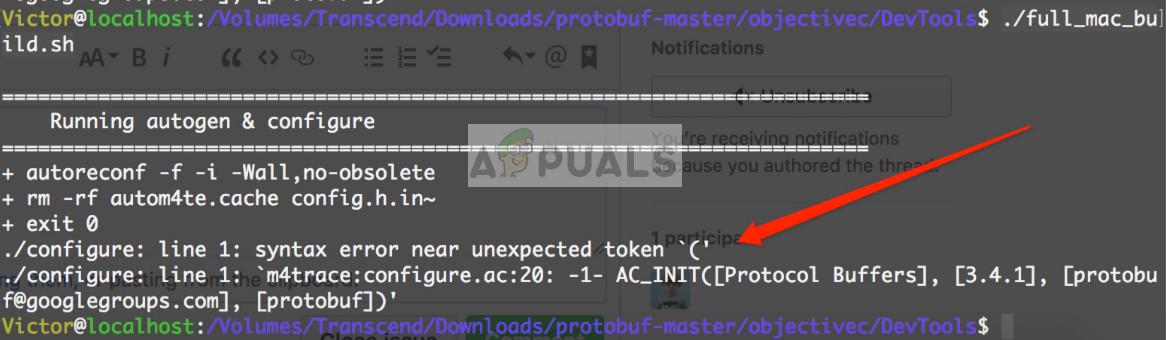 Syntax Error near unexpected token `(‘
This error message also surfaces when you are entering commands in the Linux command line for everyday tasks such as copying files manually etc. The main reasons why this error message occurs is either because of bad syntax or problem of the OS in interpreting another system’s commands/shell.
What causes Syntax Error near unexpected token `(‘?
The reasons for this error message are very diverse and cannot be listed in one article as there are thousands of possibilities of syntax going wrong when executing commands. The core reasons for this error are:
- Bad syntax when executing any command in either platform. Either you are not using the command correctly or have entered the wrong syntax.
- The shell is not compatible between Unix/DOS systems.
- There are issues running the bash shell script from another source.
In this article, we assume that you know the basics of coding and have an idea what you are doing. If you are a beginner, it is best that you follow in-depth tutorials of the language/command which you are trying to execute. You probably have made a mistake of some syntax.
Solution 1: Checking Syntax and Format of commands
The first and foremost reason why you might experience this error message is that of bad syntax in your code or you not following the exact format of the commands. Each command has a predefined format which you can see in its documentation. Several parameters are optional which others are mandatory.
Furthermore, extra care should be taken for extra space, use of double quotes, and the mandatory parameters required. If any of them are missing or have been declared incorrectly, you will not be able to execute your code.
For example, instead of the following code
You need to execute it as
Also, make sure that you are executing your commands/shell script correctly if it is spanning several lines.
Because of the parameter type, the double quotes are necessary. An extra space might also ruin your code and force the error message. Make sure that you check the official documentation of the command you are executing and see if there is a problem there.
Solution 2: Troubleshooting your shell script
If are using a shell script which works in the source system but returns an error in the target, you can troubleshoot the script by checking the variables which are stored during the execution and then see what is causing the issue. This is a very common cause as in several cases, the shell tries to interpret an unprintable character.
Try running the shell with the parameter of ‘vx’. This will show us what commands are being run and what values are stored in the script. Through here you can troubleshoot and diagnose what is going wrong.
For example, execute the script in the terminal after including ‘vx’ as:
You can check the contents of the script using the ‘cat’ command as:
Solution 3: Using ‘dos2unix.exe’ command
In Windows/DOS text files, a new line is a combination of a Carriage Return (r) followed by a Line Feed (n). In Mac (before Mac OS X), a line break used a simple Carriage Return (r). Unix/Linux and Mac OS X use Line Feed (n) line breaks. If you are using Cygwin, it will fail to process the scripts made by DOS/Windows and older Mac because of the extra Carriage Return (r) character.
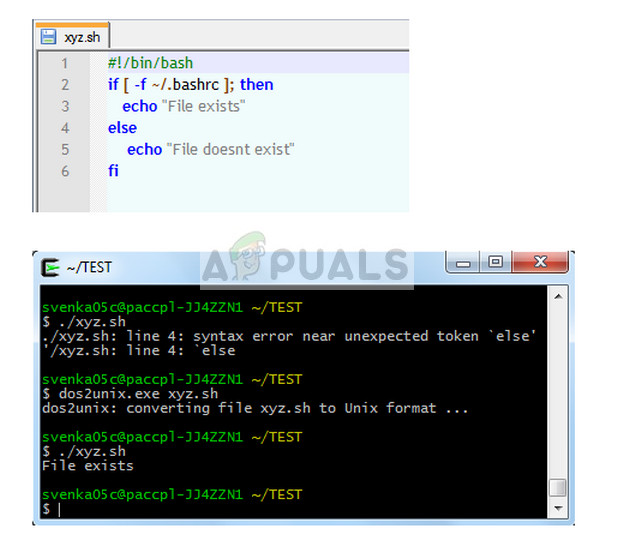 Using ‘dos2unix.exe’ command
Here you can make of ‘dos2unix.exe’ command which will convert the script to the correct format and then you can execute it without any issues.
To conclude, you need research your commands and type of platform you are using and make sure there are not any discrepancies. Since we cannot cover each and every possibility, you would have an idea what kinds of errors can occur and how to fix them.
Источник
Uncaught SyntaxError: Unexpected token — что это означает?
Самая популярная ошибка у новичков.
Когда встречается. Допустим, вы пишете цикл for на JavaScript и вспоминаете, что там нужна переменная цикла, условие и шаг цикла:
for var i = 1; i // какой-то код
>
После запуска в браузере цикл падает с ошибкой:
❌ Uncaught SyntaxError: Unexpected token ‘var’
Что значит. Unexpected token означает, что интерпретатор вашего языка встретил в коде что-то неожиданное. В нашем случае это интерпретатор JavaScript, который не ожидал увидеть в этом месте слово var, поэтому остановил работу.
Причина — скорее всего, вы пропустили что-то из синтаксиса: скобку, кавычку, точку с запятой, запятую, что-то подобное. Может быть, у вас была опечатка в служебном слове и язык его не распознал.
Что делать с ошибкой Uncaught SyntaxError: Unexpected token
Когда интерпретатор не может обработать скрипт и выдаёт ошибку, он обязательно показывает номер строки, где эта ошибка произошла (в нашем случае — в первой же строке):

Если мы нажмём на надпись VM21412:1, то браузер нам сразу покажет строку с ошибкой и подчеркнёт непонятное для себя место:
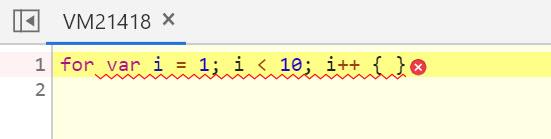
По этому фрагменту сразу видно, что браузеру не нравится слово var. Что делать теперь:
- Проверьте, так ли пишется эта конструкция на вашем языке. В случае JavaScript тут не хватает скобок. Должно быть for (var i=1; i ВКонтактеTelegramТвиттер
Источник