-
#1
Hi guys,
in PM 6 I got the «permission denied — invalid PVE ticket (401)» when using WEB GUI on one of the cluster nodes.
It logged me out of WEB GUI as soon as I started browsing the effected node via HTTP, even if I originally connected to another node.
Other nodes work fine.
I solved it by restarting services:
root@p37:~# systemctl restart pvedaemon pveproxy
It might be a bug. Seems i’m not the only with with the problem, but I guess writing the solution that worked for me, is the point of this forum post.
Here is the version info
Code:
proxmox-ve: 6.2-2 (running kernel: 5.4.65-1-pve)
pve-manager: 6.2-12 (running version: 6.2-12/b287dd27)
pve-kernel-5.4: 6.2-7
pve-kernel-helper: 6.2-7
pve-kernel-5.4.65-1-pve: 5.4.65-1
pve-kernel-5.4.34-1-pve: 5.4.34-2
ceph-fuse: 12.2.11+dfsg1-2.1+b1
corosync: 3.0.4-pve1
criu: 3.11-3
glusterfs-client: 5.5-3
ifupdown: 0.8.35+pve1
ksm-control-daemon: 1.3-1
libjs-extjs: 6.0.1-10
libknet1: 1.16-pve1
libproxmox-acme-perl: 1.0.5
libpve-access-control: 6.1-3
libpve-apiclient-perl: 3.0-3
libpve-common-perl: 6.2-2
libpve-guest-common-perl: 3.1-3
libpve-http-server-perl: 3.0-6
libpve-storage-perl: 6.2-8
libqb0: 1.0.5-1
libspice-server1: 0.14.2-4~pve6+1
lvm2: 2.03.02-pve4
lxc-pve: 4.0.3-1
lxcfs: 4.0.3-pve3
novnc-pve: 1.1.0-1
proxmox-backup-client: 0.9.0-2
proxmox-mini-journalreader: 1.1-1
proxmox-widget-toolkit: 2.3-1
pve-cluster: 6.2-1
pve-container: 3.2-2
pve-docs: 6.2-6
pve-edk2-firmware: 2.20200531-1
pve-firewall: 4.1-3
pve-firmware: 3.1-3
pve-ha-manager: 3.1-1
pve-i18n: 2.2-1
pve-qemu-kvm: 5.1.0-3
pve-xtermjs: 4.7.0-2
qemu-server: 6.2-15
smartmontools: 7.1-pve2
spiceterm: 3.1-1
vncterm: 1.6-2
zfsutils-linux: 0.8.4-pve2
-
#2
is this not because of an accidental cache clear or session time-out ?

-
#3
usually it’s caused by the PVE node having the wrong time..
-
#4
My nodes have the same time, they use ntp. This is the first thing I checked.
-
#5
is this not because of an accidental cache clear or session time-out ?
No, I did try different browsers, cleared cache, different client PCs, .. etc
It did not work anywhere and started working everywhere after restart of those services on the host.
-
#6
Coworker got the same errors, while it worked for me. FYI He was able to fix it after manually removing cookies. No need to restart pve stuff.
-
#7
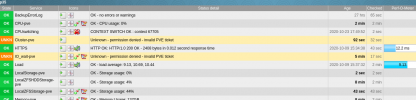
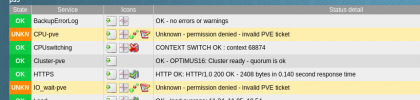
Now even our monitoring system get’s kicked out and then just works again.. something strange is happening.. i think we should open a bug…
-
1605806414060.png
60 KB
· Views: 22
-
#8
As the problems were with only one node, I did systemctl restart pvedaemon pveproxy on that node and no more errors with logging in, not with our monitoring system or with our desktops. This for sure is a bug. Should I open a bug report? @fabian
Workaround would be, to do a cronjob restart of pvedaemon pveproxy every few hours…
-
#9
Got exactly same issue on 1 out of 4 nodes now. Definitely a bug.
Code:
proxmox-ve: 6.2-2 (running kernel: 5.4.65-1-pve)
pve-manager: 6.2-15 (running version: 6.2-15/48bd51b6)
pve-kernel-5.4: 6.2-7
pve-kernel-helper: 6.2-7
pve-kernel-5.3: 6.1-6
pve-kernel-5.4.65-1-pve: 5.4.65-1
pve-kernel-5.4.34-1-pve: 5.4.34-2
pve-kernel-5.3.18-3-pve: 5.3.18-3
pve-kernel-5.3.18-2-pve: 5.3.18-2
pve-kernel-5.3.10-1-pve: 5.3.10-1
ceph-fuse: 12.2.11+dfsg1-2.1+b1
corosync: 3.0.4-pve1
criu: 3.11-3
glusterfs-client: 5.5-3
ifupdown: residual config
ifupdown2: 3.0.0-1+pve3
ksm-control-daemon: 1.3-1
libjs-extjs: 6.0.1-10
libknet1: 1.16-pve1
libproxmox-acme-perl: 1.0.5
libpve-access-control: 6.1-3
libpve-apiclient-perl: 3.0-3
libpve-common-perl: 6.2-2
libpve-guest-common-perl: 3.1-3
libpve-http-server-perl: 3.0-6
libpve-storage-perl: 6.2-9
libqb0: 1.0.5-1
libspice-server1: 0.14.2-4~pve6+1
lvm2: 2.03.02-pve4
lxc-pve: 4.0.3-1
lxcfs: 4.0.3-pve3
novnc-pve: 1.1.0-1
proxmox-backup-client: 0.9.4-1
proxmox-mini-journalreader: 1.1-1
proxmox-widget-toolkit: 2.3-6
pve-cluster: 6.2-1
pve-container: 3.2-2
pve-docs: 6.2-6
pve-edk2-firmware: 2.20200531-1
pve-firewall: 4.1-3
pve-firmware: 3.1-3
pve-ha-manager: 3.1-1
pve-i18n: 2.2-2
pve-qemu-kvm: 5.1.0-4
pve-xtermjs: 4.7.0-2
qemu-server: 6.2-18
smartmontools: 7.1-pve2
spiceterm: 3.1-1
vncterm: 1.6-2
zfsutils-linux: 0.8.4-pve2
Time is same/correct on all 4 nodes
Last edited: Nov 19, 2020
-
#10
could you check the logs of pvedaemon and pveproxy for anything suspicious? they should log once a day that the auth key got rotated, if you don’t see that message but a warning/error instead then the pmxcfs might have problems..
-
#11
Next time I notice logging out, I will grep syslog for pveproxy and pvedaemon.
-
#12
Coworker got the same errors, while it worked for me. FYI He was able to fix it after manually removing cookies.
No need to restart pve stuff.
There you go
Well, restarting a service does more than just that. It also reinitiates sessions and regenerates relevant ID’s. Much same as clearing cookies.
Could it be browser and services have a proxy in between which strips or rewrites part of the header ?
-
#13
There you go
Well, restarting a service does more than just that. It also reinitiates sessions and regenerates relevant ID’s. Much same as clearing cookies.
Could it be browser and services have a proxy in between which strips or rewrites part of the header ?
PVE does not have any session state server side..
-
#14
PVE does not have any session state server side..
Not even the session-id generated for the cookies ?
-
#15
there is no session-id generated for the cookies. PVE uses a signature based ticket mechanism for the cookies, which allows all nodes in a cluster to verify the tickets without needing per-session state that is synchronized.
-
#16
there is no session-id generated for the cookies. PVE uses a signature based ticket mechanism for the cookies, which allows all nodes in a cluster to verify the tickets without needing per-session state that is synchronized.
Thanks for explaining. If i understand correctly this implies the signature is valid across service restarts and no new tickets have to be issues after restart ?
-
#17
yes. the expiration of sessions is entirely time based.
-
#18
yes. the expiration of sessions is entirely time based.
now it is clear to me. As an admin i still call such a session albeit not based on a session-ID it does use a form of session identifier (ticket, right ?) Time based or not, as long as connectivity is permitted a session exists, although here purely in an permit window based on what i assume is the ticket stored in the cookie.
-
#19
Save Solution >>> Login per SSH in every Node and run:
service pve-cluster restart && service pvedaemon restart && service pvestatd restart && service pveproxy restart
-
#20
systemctl restart pvedaemon and pveproxy shuld suffice.
The problem
Exactly two hours after restarting HA, Proxmox integration no longer works with error: 401 Unauthorized: permission denied — invalid PVE ticket
Environment
- Home Assistant Core release with the issue: 0.111.3
- Last working Home Assistant Core release (if known): 0.110.x
- Operating environment (Home Assistant/Supervised/Docker/venv): Home Assistant
- Integration causing this issue: Proxmox VE
- Link to integration documentation on our website: https://www.home-assistant.io/integrations/proxmoxve/
Problem-relevant configuration.yaml
proxmoxve:
  - host: <ip address>
    username: <user>
    password: <pwd>
    verify_ssl: false
    realm: pam
    nodes:
      - node: pve
        vms:
          - 100
          - 102
          - 103
        containers:
          - 101
Traceback/Error logs
Logger: homeassistant.helpers.entity
Source: components/proxmoxve/binary_sensor.py:96
First occurred: 17:40:58 (1026 occurrences)
Last logged: 19:53:10

Update for binary_sensor.pve_hassio_running fails
Update for binary_sensor.pve_omv_running fails
Update for binary_sensor.pve_hassio_test_running fails
Update for binary_sensor.pve_lamp_running fails
Traceback (most recent call last):
  File "/usr/src/homeassistant/homeassistant/helpers/entity.py", line 279, in async_update_ha_state
    await self.async_device_update()
  File "/usr/src/homeassistant/homeassistant/helpers/entity.py", line 472, in async_device_update
    await self.hass.async_add_executor_job(self.update)
  File "/usr/local/lib/python3.7/concurrent/futures/thread.py", line 57, in run
    result = self.fn(*self.args, **self.kwargs)
  File "/usr/src/homeassistant/homeassistant/components/proxmoxve/binary_sensor.py", line 83, in update
    item = self.poll_item()
  File "/usr/src/homeassistant/homeassistant/components/proxmoxve/binary_sensor.py", line 96, in poll_item
    .get(self._item_type.name)
  File "/usr/local/lib/python3.7/site-packages/proxmoxer/core.py", line 105, in get
    return self(args)._request("GET", params=params)
  File "/usr/local/lib/python3.7/site-packages/proxmoxer/core.py", line 94, in _request
    resp.reason, resp.content))
proxmoxer.core.ResourceException: 401 Unauthorized: permission denied - invalid PVE ticket - b''
Additional information
HassOS is a proxmox virtual machine
Skip to content
Description
After logged into the web front end, PVE constantly asking me to login again.
Since it’s impossible to stay login, I can’t upload big ISO image(like Windows), a window says Permission denied (invalid ticket 401) will popup during the process.
After some searching in PVE forum, I found out this is a system time issue. Execute the command
journalctl -u pvedaemon
to check pvedaemon journal, it shows the system start time is 8 hours behind the current time.
Reference
- proxmox安装后的初始化工作 — 设置服务器时间
- 轻松解决Linux+Windows双系统时间不一致问题
Solution
I found two solutions, one works(for me), another doesn’t.
Solution 1
Install ntpdate to sync time to a ntp server(which didn’t help me).
- Install ntpdate
apt install ntp ntpdate
- Sync time
ntpdate -u ntp.aliyun.com
# you can use other ntp server, like time.windows.com
Solution 2
Set the motherboard bios time(or RTC, Rea-Time Clock) as the linux standard local time.
- Execute command
timedatectl set-local-rtc 1
hwclock --localtime --systohc
The final result

The local time is the same as the RTC time, and the universal time is different.
Эта проблема
Ровно через два часа после перезапуска HA интеграция Proxmox больше не работает с ошибкой: 401 Unauthorized: в разрешении отказано — недействительный билет PVE
Среда
- Выпуск Home Assistant Core с ошибкой: 0.111.3
- Последний рабочий выпуск Home Assistant Core (если известен): 0.110.x
- Операционная среда (Домашний помощник / Под наблюдением / Докер / Venv): Домашний помощник
- Интеграция, вызывающая эту проблему: Proxmox VE
- Ссылка на документацию по интеграции на нашем сайте: https://www.home-assistant.io/integrations/proxmoxve/
Актуальные для проблемы configuration.yaml
proxmoxve:
  - host: <ip address>
    username: <user>
    password: <pwd>
    verify_ssl: false
    realm: pam
    nodes:
      - node: pve
        vms:
          - 100
          - 102
          - 103
        containers:
          - 101
Журналы трассировки / ошибок
Logger: homeassistant.helpers.entity
Source: components/proxmoxve/binary_sensor.py:96
First occurred: 17:40:58 (1026 occurrences)
Last logged: 19:53:10

Update for binary_sensor.pve_hassio_running fails
Update for binary_sensor.pve_omv_running fails
Update for binary_sensor.pve_hassio_test_running fails
Update for binary_sensor.pve_lamp_running fails
Traceback (most recent call last):
  File "/usr/src/homeassistant/homeassistant/helpers/entity.py", line 279, in async_update_ha_state
    await self.async_device_update()
  File "/usr/src/homeassistant/homeassistant/helpers/entity.py", line 472, in async_device_update
    await self.hass.async_add_executor_job(self.update)
  File "/usr/local/lib/python3.7/concurrent/futures/thread.py", line 57, in run
    result = self.fn(*self.args, **self.kwargs)
  File "/usr/src/homeassistant/homeassistant/components/proxmoxve/binary_sensor.py", line 83, in update
    item = self.poll_item()
  File "/usr/src/homeassistant/homeassistant/components/proxmoxve/binary_sensor.py", line 96, in poll_item
    .get(self._item_type.name)
  File "/usr/local/lib/python3.7/site-packages/proxmoxer/core.py", line 105, in get
    return self(args)._request("GET", params=params)
  File "/usr/local/lib/python3.7/site-packages/proxmoxer/core.py", line 94, in _request
    resp.reason, resp.content))
proxmoxer.core.ResourceException: 401 Unauthorized: permission denied - invalid PVE ticket - b''
Дополнительная информация
HassOS — виртуальная машина proxmox
Все 16 Комментарий
Привет, @ k4ds3 , могли бы вы взглянуть на эту проблему, поскольку она помечена как интеграция ( proxmoxve ), для которой вы указаны как владелец кода ? Спасибо!
(сообщение CodeOwnersMention)
Я пробовал тестовую установку с версией 0.110, и интеграция работает правильно, обновляя билет через 2 часа.
Таким образом, предполагается, что версия 0.111 испортила интеграцию.
@ K4ds3 , @jhollowe есть идеи?
То же самое и здесь. Перезагрузил установку HomeAssistant вчера в 14:11, в 16:11. Я получаю те же ошибки в журналах, что и @maxalbani, но с разными именами binary_sensor.name:
последняя строка каждой записи та же 401:
proxmoxer.core.ResourceException: 401 Unauthorized: в разрешении отказано — недействительный билет PVE — b »
Я использую HomeAssistant 0.111.3
Интересно. Как часто HA опрашивает ваш PVE? библиотека proxmoxer должна обновлять билет, если он опрашивается не реже одного раза в два часа.
Интересно. Как часто HA опрашивает ваш PVE? библиотека proxmoxer должна обновлять билет, если он опрашивается не реже одного раза в два часа.
Поскольку билет действителен в течение первых двух часов, HA обновляет датчики примерно каждые 30 секунд, так что проблема не в этом.
Что-то изменилось с версией HA 0.111.x, потому что до 0.110 все работало правильно.
Посмотрю сегодня после работы.
Я планирую добавить аутентификацию токена API для этой интеграции, чтобы попытаться решить эту проблему.
Обновление аутентификации было удалено из интеграции, поскольку теперь оно обрабатывается библиотекой подключений. Я запускаю hass с отладочной сборкой библиотеки, чтобы узнать, в чем проблема.
На данный момент я бы рекомендовал вернуться к 0,110, если вам это нужно в настоящее время. Вы также можете вручную повторно добавить старый код обновления интеграции, если хотите использовать 0.111.
На данный момент я бы рекомендовал вернуться к 0,110, если вам это нужно в настоящее время. Вы также можете вручную повторно добавить старый код обновления интеграции, если хотите использовать 0.111.
Как я могу вручную повторно добавить старый код продления на Hassio?
Спасибо за работу!
@maxalbani Я не уверен. С хассио (Домашний помощник) это может быть сложно.
@maxalbani Я не уверен. С хассио (Домашний помощник) это может быть сложно.
Я тоже так думал …
Есть ли у вас прогноз решения проблемы?
Похоже, что-то странное происходит с библиотекой, обновляющей билет. Я думаю, что это проблема с библиотекой, работающей в асинхронных рабочих потоках, поэтому каждый поток пытается обновиться, а PVE это не нравится. Сейчас у меня запущен тест, в котором опрашивается только один контейнер. Если это не поможет, я буду знать, в чем проблема. Мне просто нужно ждать 2 часа каждый раз, когда я что-то меняю.
Я могу просто вернуться к коду обновления интеграции, но я хотел бы попытаться заставить его работать со встроенным обновлением библиотеки.
нашли и исправили проблему. Библиотека обновляла билет аутентификации, но отправляла только исходный билет (сеанс не извлекал cookie из аутентификации).
Я получу новую версию библиотеки, а затем обновлю интеграцию, чтобы использовать фиксированную версию (и провести на ней надлежащее тестирование).
Есть какие-либо Новости?
Спасибо
Все еще ждем объединения PR.
Вы также можете просто вручную обновить зависимость proxmoxer до версии 1.1.1.
Была ли эта страница полезной?
0 / 5 — 0 рейтинги
Recommend Projects
-

React
A declarative, efficient, and flexible JavaScript library for building user interfaces.
-
Vue.js
🖖 Vue.js is a progressive, incrementally-adoptable JavaScript framework for building UI on the web.
-

Typescript
TypeScript is a superset of JavaScript that compiles to clean JavaScript output.
-
TensorFlow
An Open Source Machine Learning Framework for Everyone
-
Django
The Web framework for perfectionists with deadlines.
-

Laravel
A PHP framework for web artisans
-
D3
Bring data to life with SVG, Canvas and HTML. 📊📈🎉

Recommend Topics
-
javascript
JavaScript (JS) is a lightweight interpreted programming language with first-class functions.
-
web
Some thing interesting about web. New door for the world.
-
server
A server is a program made to process requests and deliver data to clients.
-
Machine learning
Machine learning is a way of modeling and interpreting data that allows a piece of software to respond intelligently.
-
Visualization
Some thing interesting about visualization, use data art
-
Game
Some thing interesting about game, make everyone happy.
Recommend Org
-
Facebook
We are working to build community through open source technology. NB: members must have two-factor auth.
-
Microsoft
Open source projects and samples from Microsoft.
-
Google
Google ❤️ Open Source for everyone.
-
Alibaba
Alibaba Open Source for everyone
-
D3
Data-Driven Documents codes.
-
Tencent
China tencent open source team.


