Windows диск отсутствует exception processing message c0000013
Windows — Диск отсутствует (ошибка c0000013) — данная ошибка иногда возникает при запуске некоего приложения или установке новой программы, а также после работы с съемным носителем.
Windows — Диск отсутствует решение проблемы
Для начала надо открыть редактор реестра. Для этого в меню «Пуск» надо найти строку «Выполнить»,

Нажать, появится окно, вставить туда слово: «regedit». Нажать ОК .

И тут пользователь говорит: «А у меня нет «Выполнить»!». Такое бывает, если в свойствах панели задач, в вкладке «Пуск», в настройках снят флажок «выполнить». Можно поставить флажок и продолжать. Альтернативно, можно воспользоваться поиском и найти regedit. Появится иконка программы, делаем двойной клик.
Редактор реестра открылся. Видим справа пустое окно, слева колонку, там Компьютер и папки. Выбираем ветку (папку) HKEY_LOCAL_MACHINE, давим на крестик. Выбираем SYSTEM, нажимаем плюс, снова выпадают папки, ищем СurrentControlSet, опять раскрываем, находим Control, снова крестик, выпадает огромное количество папок, в самом низу ищем Windows, кликаем по ней. В правом окне выбираем параметр ErrorMode, двойной клик. Открывается окошко, синим подсвечивается значение 0. Его нужно поменять на 2. Нажимаем ОК и закрываем редактор реестра.

Проблема с выскакивающим, надоедливым окном Wndows диск отсутствует exception processing message c0000013 — решена!
Если появляется сообщение, что редактирование реестра запрещается администратором, а администратор это Вы, то ищем
gpedit.msc , запускаем, ищем: «Групповая политика», нажимаем — «политика локальный компьютер», переходим- «конфигурация пользователя», дальше- «административные шаблоны»,выбираем – система.Там надо изменить параметр: «Сделать недоступным средство редактирования реестра», выбрать радиокнопку: «отключено».
Снова запускаем regedit.
В домашней версии Виндовс нет gpedit.msc. Исправить это можно установив дополнительный патч.
Если редактор реестра не запускается, и Вы уверены, что не запрещали себе ничего делать, значит, это сделали вирусы. В таком случае, я бы советовал найти файл regedit в папке Windows, скопировать и вставить в другую папку, изменить название и запустить. И избавиться от вирусов, само собой.
- Remove From My Forums
-
Question
-
Hello,
I am suddently getting the error: ‘The application was unable to start correctly (0xc0000013)’ when running a web role in the dev fabric.
It comes in a Message Box titled «WaWebHost.exe — Application Error». Inside the message box it says «The application was unable to start correctly (0xc0000013). Click OK to close the application.»
After a short time, another Message Box comes up titled: «Microsoft Visual Studio». In the box I get «Windows Azure Tools for Microsoft Visual Studio. Role instances did not start within the time allows. Please try again. If you continue to encounter this
behaviour please try shutting down the Development Fabric»What I have done:
1. Deinstall Azure SDK & Azure Tools for VS 2010
2. Reboot
3. Reinstall Azure SDK & Azure Tools for VS 2010
Did not help.
Did it again 🙂
Didn’t help either.
Now that sometimes I also get the error «Sys Tray is already running»
I am now blocked.
Any help is much appreciated.
Kind Regards
Vlad
Answers
-
Well, the only thing that helped me was:
1) Reinstall Windows 7
2) Reinstall VS 2010
3) Reinstall Windows Azure SDK
4) Reinstall Windows Azure Tools for VS 2010
5) Reinstall SQL Server 2008 R2 Express
It took me 2 days to get my machine fully operable again.
-
Marked as answer by
Friday, October 15, 2010 9:39 AM
-
Marked as answer by
- Remove From My Forums
-
Question
-
Hello,
I am suddently getting the error: ‘The application was unable to start correctly (0xc0000013)’ when running a web role in the dev fabric.
It comes in a Message Box titled «WaWebHost.exe — Application Error». Inside the message box it says «The application was unable to start correctly (0xc0000013). Click OK to close the application.»
After a short time, another Message Box comes up titled: «Microsoft Visual Studio». In the box I get «Windows Azure Tools for Microsoft Visual Studio. Role instances did not start within the time allows. Please try again. If you continue to encounter this
behaviour please try shutting down the Development Fabric»What I have done:
1. Deinstall Azure SDK & Azure Tools for VS 2010
2. Reboot
3. Reinstall Azure SDK & Azure Tools for VS 2010
Did not help.
Did it again 🙂
Didn’t help either.
Now that sometimes I also get the error «Sys Tray is already running»
I am now blocked.
Any help is much appreciated.
Kind Regards
Vlad
Answers
-
Well, the only thing that helped me was:
1) Reinstall Windows 7
2) Reinstall VS 2010
3) Reinstall Windows Azure SDK
4) Reinstall Windows Azure Tools for VS 2010
5) Reinstall SQL Server 2008 R2 Express
It took me 2 days to get my machine fully operable again.
-
Marked as answer by
Friday, October 15, 2010 9:39 AM
-
Marked as answer by
01.09.2018
Просмотров: 3387
| Цифровое название ошибки | 0x00000013 |
| Название BSoD | EMPTY_THREAD_REAPER_LIST |
| Причина появления | Поврежден список потока |
| Операционные системы | Windows XP, 7 |
Синий экран смерти EMPTY_THREAD_REAPER_LIST с цифровым кодом 0x00000013 переводится как «Поврежден список потока». Это значит, что при запуске определенной операции на Windows был использован поток, не зарегистрированный в списке. Возникает такая неполадка при разгоне системы или добавления новых комплектующих, которые не совместимы с версией BIOS и самой операционной системой.
Параметры ошибки EMPTY_THREAD_REAPER_LIST:
- Цифровой код ошибки;
- 4 параметра, которые поясняют ошибку. Они предназначенные для отладочного ПО;
- Адрес места ошибки (он не всегда указывается);
- Имя драйвера, который вызвал BSoD.
Способы решения ошибки 0x00000013

Добавил(а) microsin
После запуска некоторых программ (к примеру, консольных утилит из пакета MinGW) Windows выдает ошибку отсуствия диска (Exception Processing Message C0000013 Parameters 75b3bf7c 4 75b3bf7c 75b3bf7c).

Пока активно это окно, то не запускаются многие программы Windows (например, mspaint).
Лечится так: запустите regedit, перейдите в ветвь реестра HKEY_LOCAL_MACHINE -> SYSTEM -> СurrentControlSet -> Control -> Windows, параметр ErrorMode поменяйте с 0 на 2. Изменение вступит в силу немедленно, перезагрузка Windows не потребуется.
Если при попытке выполнить команду «Regedit» появляется сообщение о том, что редактирование реестра запрещено администратором системы, то выполните следующее: кнопка Пуск -> Выполнить -> введите команду gpedit.msc -> Групповая политика –> политика локальный компьютер -> конфигурация пользователя –> административные шаблоны –> система. Здесь нужно исправить параметр «Сделать недоступными средства редактирования реестра», по умолчанию значение «не задано», выберите положение «отключено». После этого попробуйте снова запустить regedit.
[Ссылки]
1. Exception Processing Message C0000013 regedit site:microsoft.com.
-
- Nov 19, 2020
-
- 1
-
- 0
-
- 10
- 0

-
#1
I have found two workarounds so far. The first one is just booting via the UEFI. Just opening it on startup, and exiting it, tends to do the job.
I have also found that when I turn the PSU off and on, the first boot after that will be successful. If I restart after that, the BSOD just returns.
Once booted, the PC works as intended. For the most part that is. In the last few weeks, I noticed AVG using about 70% of my CPU, so I uninstalled it.
I wanted to try and install Panda instead, but every time I try to install it, I get a BSOD about halfway through the process. It also happened when trying to install Adobe Acrobat DC last week.
But except for that, the PC still works as intended. I can still play games on it, etc.
My setup (5 years old):
- Intel Core i7 4790K (I have not overclocked it yet)
- Asus Z97K Motherboard
- Corsair Vengeance 2x8GB 1600MHz DDR3 Memory
- Samsung SSD 850 EVO 250GB
- MSI GTX980 4GB
- Corsair RM650 PSU
- Windows 10 Home
The things I tried/checked:
- Checked if the CMOS battery might be dead -> it is not
- Ran MemTest86 -> no errors found
- Googled the stop code -> didn’t find anything helpful
- Updated SSD Firmware -> the problem persists
- Ran chkdsk on the SSD (even though I doubt if it is a useful tool for SSD’s, since it was designed for HDD’s) -> no bad sectors found
- Tried running diagnostic scan for SSD in Samsung Magician -> feature not supported for my SSD
- Ran a Malwarebytes scan -> no malware was found
Since the recent crashes when installing software, I am suspecting that it might have something to do with either my SSD or my Windows installation, although I am in no way sure of this.
I am thinking about re-installing windows, but before I take such a drastic step I wanted to check here if anyone could help me finding a lead as to what is causing these BSOD’s.
I don’t want all my Windows settings lost if the problem is caused by the motherboard, CPU or RAM.
You can check out the dump files right here.
EDIT:
So about a day after posting this thread, I couldn’t boot into Windows at all. My workarounds didn’t work anymore, and instead of giving BSOD’s, it just went into some kind of boot loop for a few times, followed by the troubleshoot-menu. Because I wanted to make sure my personal files were safe first, I installed Windows on an external HDD in order to boot into my system. I copied all my personal files from the SSD to another external HDD, and then wiped the SSD to be sure that if the problem was indeed Windows-related, it would be fixed (wasn’t sure if a «repair Windows» option would do the job).
I installed Windows on the SSD, and I have rebooted several times for driver updates and register changes since, and I haven’t encountered a single BSOD anymore. So I think that the boot files of Windows got corrupted somehow. I didn’t really find the cause for that, but at least I found a solution that didn’t require purchasing new hardware. Now I can only hope that the problem won’t return.
Last edited: Nov 23, 2020
-
- Nov 4, 2012
-
- 9,820
-
- 153
-
- 55,890
- 2,199
-
#2
Second you want to check for drive errors that could cause the drive to delay finding data. Google for Crystaldiskinfo.exe. it can read the drive smart error data to see if it is failing. When windows can not read data from the drive it will call for a reset of the interface and try again. Since widows will try to move data from bad spots on the drive 5 minutes after the system goes idle it could mean the drive is going bad or the drive has very little room left on it for the system to move blocks of data around. Solid state drives have firmware that kind of fight with windows. Often you can boot a system into bios and leave it powered on but not running windows so that the ssd firmware can finish its cleanup routines. Powered on in bios for a few hours.
note: dump files show a size of zero bytes this would indicate the could not be written to
you might be able to tell the system to write dump files to different drive when the system crashes. Assuming the problem is not in the driver for the drive controller.
Last edited: Nov 21, 2020
-
- Nov 4, 2012
-
- 9,820
-
- 153
-
- 55,890
- 2,199
-
#2
Second you want to check for drive errors that could cause the drive to delay finding data. Google for Crystaldiskinfo.exe. it can read the drive smart error data to see if it is failing. When windows can not read data from the drive it will call for a reset of the interface and try again. Since widows will try to move data from bad spots on the drive 5 minutes after the system goes idle it could mean the drive is going bad or the drive has very little room left on it for the system to move blocks of data around. Solid state drives have firmware that kind of fight with windows. Often you can boot a system into bios and leave it powered on but not running windows so that the ssd firmware can finish its cleanup routines. Powered on in bios for a few hours.
note: dump files show a size of zero bytes this would indicate the could not be written to
you might be able to tell the system to write dump files to different drive when the system crashes. Assuming the problem is not in the driver for the drive controller.
Last edited: Nov 21, 2020
-
- Nov 4, 2012
-
- 9,820
-
- 153
-
- 55,890
- 2,199
-
#3
0xc0000013. I do not think this is a bugcheck code. I think it is a error code that indicates that a drive was disconnected. It would happen when a drive does not respond within some time out period. Normally you would update the bios and CPU chipset drivers from the motherboard vendors website as a first fix attempt.
Second you want to check for drive errors that could cause the drive to delay finding data. Google for Crystaldiskinfo.exe. it can read the drive smart error data to see if it is failing. When windows can not read data from the drive it will call for a reset of the interface and try again. Since widows will try to move data from bad spots on the drive 5 minutes after the system goes idle it could mean the drive is going bad or the drive has very little room left on it for the system to move blocks of data around. Solid state drives have firmware that kind of fight with windows. Often you can boot a system into bios and leave it powered on but not running windows so that the ssd firmware can finish its cleanup routines. Powered on in bios for a few hours.note: dump files show a size of zero bytes this would indicate the could not be written to
you might be able to tell the system to write dump files to different drive when the system crashes. Assuming the problem is not in the driver for the drive controller.
you could also get this problem with a loose connector to the drive. I have seen cases where a connector can connect and disconnect several times a second just because of thermal expansion and fan vibration. putting the drive on a different sata port with a different connector might help. I would guess a 5 year old system is more likely to be having the ssd drive shrinking in size due to bad blocks being mapped as bad by the ssd firmware. make sure you have plenty of free space on the drive , you might also want to turn off the windows paging subsystem, reboot and delete the pagefile.sys (if not already deleted) then turn the virtual memory back on and reboot again. it will create a new pagefile.sys that will not have bad blocks in it.
-
- Nov 4, 2012
-
- 9,820
-
- 153
-
- 55,890
- 2,199
-
#4
you could also get this problem with a loose connector to the drive. I have seen cases where a connector can connect and disconnect several times a second just because of thermal expansion and fan vibration. putting the drive on a different sata port with a different connector might help. I would guess a 5 year old system is more likely to be having the ssd drive shrinking in size due to bad blocks being mapped as bad by the ssd firmware. make sure you have plenty of free space on the drive , you might also want to turn off the windows paging subsystem, reboot and delete the pagefile.sys (if not already deleted) then turn the virtual memory back on and reboot again. it will create a new pagefile.sys that will not have bad blocks in it. (booting into bios to let the firmware run would also fix bad blocks in a pagefile.sys but would take longer for the system to scan and repair)
| Thread starter | Similar threads | Forum | Replies | Date |
|---|---|---|---|---|
|
W
|
Question Error: «Startup Repair couldn’t repair your PC» ? | Windows 10 | 0 | Jan 20, 2023 |
|
|
Question «Smart Disk Capability Disabled’ On Startup From Restart | Windows 10 | 4 | Jan 17, 2023 |
|
P
|
Question Windows crashes on startup | Windows 10 | 6 | Jan 15, 2023 |
|
T
|
[SOLVED] Computer scanning C: drive every startup | Windows 10 | 3 | Jan 9, 2023 |
|
C
|
[SOLVED] Error 0xc000021A on startup ? | Windows 10 | 2 | Dec 18, 2022 |
|
|
Question random crash on startup and shutdown | Windows 10 | 2 | Nov 17, 2022 |
|
|
[SOLVED] error code 0xc00000428 And can’t access startup settings | Windows 10 | 13 | Nov 14, 2022 |
|
F
|
Question Windows 10 needs to startup twice each time | Windows 10 | 10 | Oct 22, 2022 |
|
F
|
Question Bsod once on every cold startup | Windows 10 | 11 | Sep 30, 2022 |
|
M
|
Question Startup error — windows cannot access the specified device or path microsoft.your.phone.[version] | Windows 10 | 3 | Aug 23, 2022 |


- Advertising
- Cookies Policies
- Privacy
- Term & Conditions
- Topics

Я могу предложить вам решение и исправление этой ошибки. Я думаю, это вызвано программой под названием dit.exe которая установлена в некотором программном обеспечении card reader, чтобы позволить вам видеть название дисков и для них есть отдельные иконки. Она запускается при старте и в ней довольно много бесполезных процессов. Сначала вы должны проверить, чтобы увидеть, если это вызывает у вас проблемы. Запустите msconfig и если она появляется в списке автозапуска отключите её и перезагрузите компьютер. Если это не решает вашей проблемы, удалите dit.exe из папки Windows (вы можете также избавиться от dit.dll, диета.ini и ditxp.exe) . Теперь вы должны сделать registry sweep, чтобы избавиться от любых dit.exe записей.
Если вы по преженему получаете это сообщение об ошибке, которое появляется через некоторое время, это означает, что некоторые записи в реестре поменялись автоматически, и могут иметь заражение вирусами или вредоносными программами, которые меняют их значение в реестре, теперь мы должны изменить некоторые настройки реестра обратно на ту же стадию, как и должно быть. Вот несколько шагов для решения этой проблемы, пожалуйста, выполните следующие действия.
Шаги
Быстрое решение
HKEY_LOCAL_MACHINESYSTEMCurrentControlSetControlWindows , найдите ключи реестра ErrorMode и измените значение данных 2 и нажмите на кнопку «ОК». По умолчанию значение ключа Errormode должно быть 0X00000000(2)
Я объясню вам, как это сделать.
1. Нажмите на Пуск >> а затем нажмите на Выполнить.
2. Вы получите окно, в которое вы должны ввести regedit.
3. Редактор реестра будет открыт перед вами, здесь вы должны найти ключ реестра и нужно нажать на знак плюс HKEY_LOCAL_MACHINE.
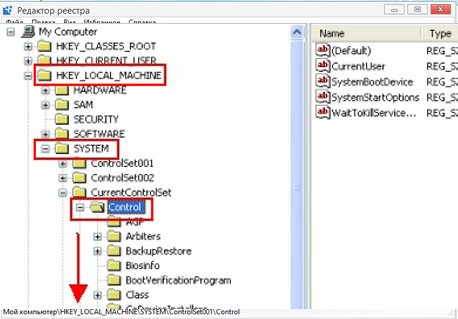
4. Нажмите на знак плюс Система
5. Нажмите на знак плюс CurrentControlSet.
6. Нажмите на знак плюс Контроль.
7. Нажмите на Windows.
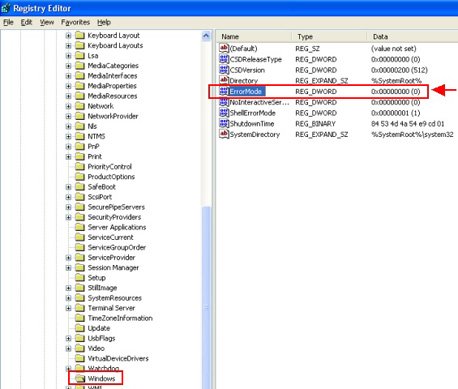
8. Когда вы нажмёте на Windows вам будет выдано ErrorMode на правой боковой панели.
9. Дважды щелкните на ErrorMode и измените значение данных на 2 и нажмите на кнопку » ОК». 0X00000000(2) , значение по умолчанию Errormode должно быть 0X00000000(2) .
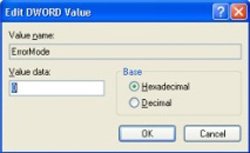
Наконец, перезагрузите компьютер и проблема будет решена.
- Распечатать
Оцените статью:
- 5
- 4
- 3
- 2
- 1
(5 голосов, среднее: 5 из 5)
Поделитесь с друзьями!
- Remove From My Forums
-
Вопрос
-
I was trying to load a digital photo frame via usb with photos. It never recognised the USB.
But ever since shutting the computer and turning on this morning the errorException Processing Message
0xc0000013 parametersWindows no Disk
0x759692A0There was no folder created.
The other thing i noticed was our external hard drive was on I: but it has now become F:.
I didn’t do anything with that.Any suggestions
Ответы
-
Hi,
Have you installed similar software? Also, did everything work normally with the same USB storage device on the same computer before? Also, how it works with other computers now?
Based on my research, the issue could be resulted by a virtual DVD/CD or a floppy drive. Therefore, please check if you have any virtual drive or floppy drive. If it is possible, please disable it and check if it helps.
Thanks.
Nicholas Li — MSFT
Nicholas Li — MSFT
-
Помечено в качестве ответа
12 января 2009 г. 9:43
-
Помечено в качестве ответа