
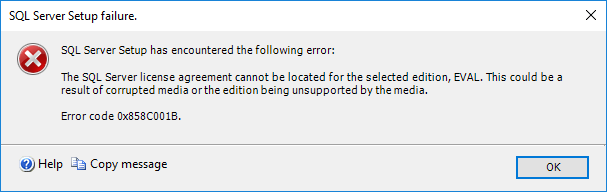
Столкнулся с ошибкой вида:
TITLE: SQL Server Setup failure.
------------------------------

SQL Server Setup has encountered the following error:

The SQL Server license agreement cannot be located for the selected edition, EVAL. This could be a result of corrupted media or the edition being unsupported by the media.

Error code 0x858C001B.

For help, click: https://go.microsoft.com/fwlink?LinkID=20476&ProdName=Microsoft%20SQL%20Server&EvtSrc=setup.rll&EvtID=50000&EvtType=0xFDC38F1F%25400xA40CEF17%25401420%254027

------------------------------
BUTTONS:

OK
------------------------------
Вместо EVAL может быть также Datacenter | Enterprise | Standard | Web | Business Intelligence | Workgroup | Express.
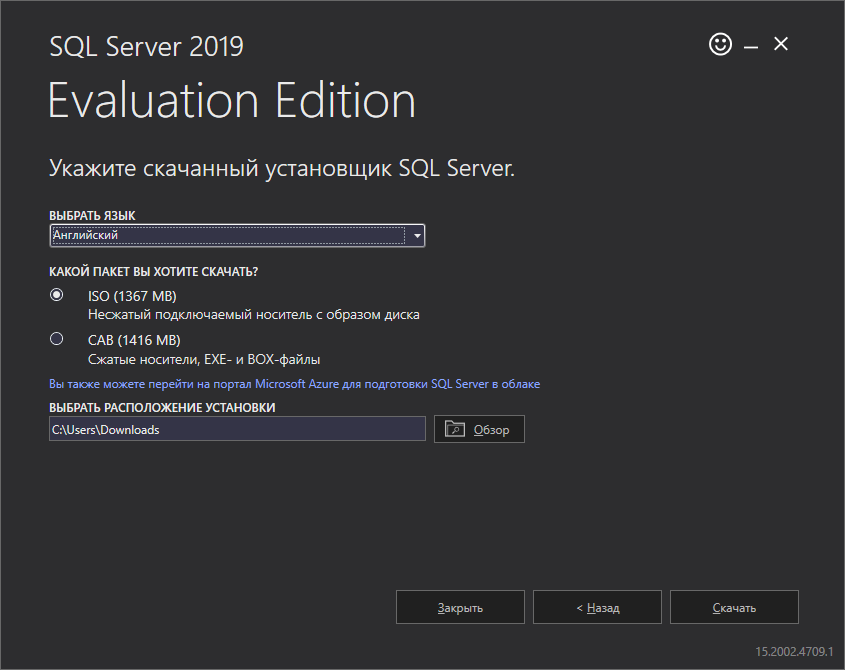
Проблема была связана с тем, что MSSQL сервер я скачал русский, а Windows Server 2016, на который я собирался установить MSSQL, английский.
MUI Language должен соответствовать версии языка SQL.
Решение простое, если не хотим переустанавливать Windows, то скачиваем версию SQL для Английского языка.
Installing SQL Server 20xx (in my case, SQL Server 2014), you may find out the “license agreement cannot be located” error, code 0x858C001B. This error is due to the language settings of the computer where you are trying yo install SQL Server. Here how to solve it.
The error message is showed in a pop up:
SQL Server Setup has encountered the following error:
The SQL Server license agreement cannot be located for the selected edition, <VERSION>. This could be a result of corrupted media or the edition being unsupported by the media.
Error code 0x858C001B.
To solve this issue, choose one of the following options:
- Download a new SQL installer, with the same language of the operative system;
- MUI Language must also match SQL language version (even if you have for example en-US locales and en-US SQL installation media and different MUI language then you may get this error!) If you need to use another MUI, which SQL installation is, just switch to matched MUI corresponding with SQL installation and then after installation switch it back;
- Add the corresponding language pack in the operative system.
Obviously, the first one is the simplier solution.
Finally, below some hints to change the language settings.
To change the operating system user interface settings
1. If not already installed, install the operating system MUI that matches your localized version of SQL Server.
2. In Control Panel, open Regional and Language Options.
3. On the Languages tab, for Language used in menus and dialogs, select a value from the list.
This setting will affect the user interface language of SQL Server, so it must match your localized version of SQL Server.
4. Click Apply to confirm the change, and OK to close the window.
To change the operating system user local settings
1. If not already installed, install the operating system MUI that matches your localized version of SQL Server.
2. In Control Panel, open Regional and Language Options.
3. On the Regional Options tab, for Select an item to match its preferences, select a value from the list.
This setting will affect culture-specific data formatting.
4. Click Apply to confirm the change, and OK to close the window.
To change the system local settings
1. If not already installed, install the operating system MUI that matches your localized version of SQL Server.
2. In Control Panel, open Regional and Language Options.
3. On the Advanced tab, for Select a language to match the language version of the non-Unicode programs you want to use, select a value from the list.This setting will allow SQL Server Setup to choose the best default collation for your SQL Server installation.
4. Click Apply to confirm the change, and OK to close the window
Содержание
- Tutorials, tips&tricks, snippets..
- #KISS: KEEP IT SIMPLE, STUPID!
- SQL Server Installation Error 0x858C001B (the “language error”)
- Sql server setup has encountered the following error 0x858c001b
- Вопрос
- Ответы
- Все ответы
- Sql server setup has encountered the following error 0x858c001b
- Answered by:
- Question
- Sql server setup has encountered the following error 0x858c001b
- Answered by:
- Question
- Sql server setup has encountered the following error 0x858c001b
- Answered by:
- Question
Tutorials, tips&tricks, snippets..
#KISS: KEEP IT SIMPLE, STUPID!
SQL Server Installation Error 0x858C001B (the “language error”)
Installing SQL Server 20xx (in my case, SQL Server 2014), you may find out the “license agreement cannot be located” error, code 0x858C001B. This error is due to the language settings of the computer where you are trying yo install SQL Server. Here how to solve it.
The error message is showed in a pop up:
SQL Server Setup has encountered the following error:
The SQL Server license agreement cannot be located for the selected edition, . This could be a result of corrupted media or the edition being unsupported by the media.
Error code 0x858C001B.
To solve this issue, choose one of the following options:
- Download a new SQL installer, with the same language of the operative system;
- MUI Language must also match SQL language version (even if you have for example en-US locales and en-US SQL installation media and different MUI language then you may get this error!) If you need to use another MUI, which SQL installation is, just switch to matched MUI corresponding with SQL installation and then after installation switch it back;
- Add the corresponding language pack in the operative system.
Obviously, the first one is the simplier solution.
Finally, below some hints to change the language settings.
To change the operating system user interface settings
1. If not already installed, install the operating system MUI that matches your localized version of SQL Server.
2. In Control Panel, open Regional and Language Options.
3. On the Languages tab, for Language used in menus and dialogs, select a value from the list.
This setting will affect the user interface language of SQL Server, so it must match your localized version of SQL Server.
4. Click Apply to confirm the change, and OK to close the window.
To change the operating system user local settings
1. If not already installed, install the operating system MUI that matches your localized version of SQL Server.
2. In Control Panel, open Regional and Language Options.
3. On the Regional Options tab, for Select an item to match its preferences, select a value from the list.
This setting will affect culture-specific data formatting.
4. Click Apply to confirm the change, and OK to close the window.
Источник
Sql server setup has encountered the following error 0x858c001b

Вопрос
- Изменен тип Иван Проданов Microsoft contingent staff, Moderator 24 мая 2013 г. 6:39
Ответы
>>1) microsoft sql server 2012
это не полная версия, т.к. полная выглядит в таком виде, например:
Microsoft SQL Server 2012 (SP1) — 11.0.3128.0 (X64)
Dec 28 2012 20:23:12
Copyright (c) Microsoft Corporation
Developer Edition (64-bit) on Windows NT 6.1 (Build 7601: Service Pack 1)
И циферки 11.0.3128.0 тут ой, как имеют значение.
Судя по вашей ошибке у вас всё-таки либо битый образ, либо несоответствуют настройки!
- Помечено в качестве ответа Иван Проданов Microsoft contingent staff, Moderator 24 мая 2013 г. 6:39
www.sqlCMD.ru — all around MS SQL Server
- Помечено в качестве ответа Иван Проданов Microsoft contingent staff, Moderator 24 мая 2013 г. 6:39
Все ответы
1) Уточните полную версию SQL Server
2) По какой подписке и где скаченная (у бедитесь, что образ не битый)
3) Языковые настройку в Win и SQL какие?
4) Более полный текст ошибки можно получить из лога
Ну и посмотрите темы с подобной ошибкой:
1) microsoft sql server 2012
2) скачан из eopen.microsoft.com. имя образа SW_DVD9_SQL_Svr_Standard_Edtn_2012_Russian_MLF_X17-97025.ISO. Образ точно не битый поскольку, на три месяца назад с него было все развернуто на другом сервере, образ не записываю, а подключаю к виртуальной машине.
3) Все английское
4) Вставил бы принт скрин, но картинки выкладывать не могу
SQL Server Setup has encountered the following error:
The SQL Server license agreement cannot be located for the selected edition, STANDARD. The could be a result of corrupted media or edition being unsupportedby the media.
Источник
Sql server setup has encountered the following error 0x858c001b
This forum has migrated to Microsoft Q&A. Visit Microsoft Q&A to post new questions.
Answered by:
Question
I’m installing SQL Server 2012 enterprise edition with SP3 x64 fr on a Windows 7 Professional SP1 and I get the following error :
SQL Server Setup has encountered the following error:
The SQL Server license agreement cannot be located for the selected edition, ENTERPRISE. This could be a result of corrupted media or the edition being unsupported by the media.
Error code 0x858C001B.
For help, click: http://go.microsoft.com/fwlink?LinkID=20476&ProdName=Microsoft%20SQL%20Server&EvtSrc=setup.rll&EvtID=50000&EvtType=0xFDC38F1F%25400xA40CEF17%25401420%254027
I’ve read a lot of threads on the problem on the site and on others but none solved it. So here are the points I tried :
— I downloaded the package from the MSDN site twice,
— I’ve extracted the archive with WinRar,
— I’ve moved the extract folder to the localization C:,
— I switch the language of my computer from «French (France)» to «English (US)» and to «English (United Kingdom)» but I have an error message when I launch the setup with a language other than French,
— I’ve deleted the folder «Setup Bootstrap» under C:Program FilesMicrosoft SQL Server110 between each try,
— The 9 operations from the «Setup Support Rules» are all passed,
— It’s a fresh new computer so there were no old SQL Server install before and there are no trace of SQL Server in the programs list,
— I’m admin on my computer,
— I tried to launch the install with the command «Run as administrator».
If anyone can help, that would be so great !!
Источник
Sql server setup has encountered the following error 0x858c001b
This forum has migrated to Microsoft Q&A. Visit Microsoft Q&A to post new questions.
Answered by:
Question
I’m installing SQL Server 2012 enterprise edition with SP3 x64 fr on a Windows 7 Professional SP1 and I get the following error :
SQL Server Setup has encountered the following error:
The SQL Server license agreement cannot be located for the selected edition, ENTERPRISE. This could be a result of corrupted media or the edition being unsupported by the media.
Error code 0x858C001B.
For help, click: http://go.microsoft.com/fwlink?LinkID=20476&ProdName=Microsoft%20SQL%20Server&EvtSrc=setup.rll&EvtID=50000&EvtType=0xFDC38F1F%25400xA40CEF17%25401420%254027
I’ve read a lot of threads on the problem on the site and on others but none solved it. So here are the points I tried :
— I downloaded the package from the MSDN site twice,
— I’ve extracted the archive with WinRar,
— I’ve moved the extract folder to the localization C:,
— I switch the language of my computer from «French (France)» to «English (US)» and to «English (United Kingdom)» but I have an error message when I launch the setup with a language other than French,
— I’ve deleted the folder «Setup Bootstrap» under C:Program FilesMicrosoft SQL Server110 between each try,
— The 9 operations from the «Setup Support Rules» are all passed,
— It’s a fresh new computer so there were no old SQL Server install before and there are no trace of SQL Server in the programs list,
— I’m admin on my computer,
— I tried to launch the install with the command «Run as administrator».
If anyone can help, that would be so great !!
Источник
Sql server setup has encountered the following error 0x858c001b
This forum has migrated to Microsoft Q&A. Visit Microsoft Q&A to post new questions.

Answered by:
Question
I’m installing SQL Server 2012 enterprise edition with SP3 x64 fr on a Windows 7 Professional SP1 and I get the following error :
SQL Server Setup has encountered the following error:
The SQL Server license agreement cannot be located for the selected edition, ENTERPRISE. This could be a result of corrupted media or the edition being unsupported by the media.
Error code 0x858C001B.
For help, click: http://go.microsoft.com/fwlink?LinkID=20476&ProdName=Microsoft%20SQL%20Server&EvtSrc=setup.rll&EvtID=50000&EvtType=0xFDC38F1F%25400xA40CEF17%25401420%254027
I’ve read a lot of threads on the problem on the site and on others but none solved it. So here are the points I tried :
— I downloaded the package from the MSDN site twice,
— I’ve extracted the archive with WinRar,
— I’ve moved the extract folder to the localization C:,
— I switch the language of my computer from «French (France)» to «English (US)» and to «English (United Kingdom)» but I have an error message when I launch the setup with a language other than French,
— I’ve deleted the folder «Setup Bootstrap» under C:Program FilesMicrosoft SQL Server110 between each try,
— The 9 operations from the «Setup Support Rules» are all passed,
— It’s a fresh new computer so there were no old SQL Server install before and there are no trace of SQL Server in the programs list,
— I’m admin on my computer,
— I tried to launch the install with the command «Run as administrator».
If anyone can help, that would be so great !!
Источник
Поскольку в проекте должны использоваться Windows Server 2012 R2 и SQL Server 2012 Standard. Поэтому я пошел в Microsoft, чтобы загрузить 180-дневную пробную версию Windows Server 2012 R2 Datacenter VHD (http://technet.microsoft.com/zh-cn/evalcenter /dn205286.aspx), и Microsoft предоставляет только английскую версию VHD, а установка ISO более громоздкая и длительная.После загрузки он успешно загружается в Virturl Box, поскольку у меня под рукой есть китайская версия.SQL Server 2012 Standard, попытался установить его, но возникла ошибка:

SQL Server Setup has encountered the following error:
The SQL Server license agreement cannot be located for the selected edition, STANDARD. This could be a result of corrupted media or the edition being unsupported by the media.
Error code 0x858C001B.
Я проверил информацию и обнаружил, что это вызвано разницей между языками ОС и SQL Server. Вам необходимо установить соответствующий языковой пакет в ОС, поэтому перейдите в панель управления, чтобы добавить его, как показано ниже:


Нажмите: загрузка …… Загрузка начинается:
Downloading Chinese Simplified Language Pack — Windows Server 2012 R2 — (KB2839636) [zh-CN_LP] (update 1 of 1)…

Но прошло меньше получаса, и я больше не мог этого терпеть. Я поискал офлайн-пакет и обнаружил, что Microsoft его не предоставляет. Я подумал об использовании SmartSniff для его мониторинга. (Конкретные методы см. В: http://www.cnbeta.com/articles/226755 .htm),Получите целевой файл обновления Microsoftlp_742090094db61f1c6b64ed4678c29dfc1df6b5c5.cab,
В автономном режиме с Baidu Cloud скорость очень высокая, и это занимает несколько минут.
Затем в командной строке 2012 выполните команду:
Dism /online /Add-Package /PackagePath:E:BaiduYunDownloadlp_742090094db61f1c6b64ed4678c29dfc1df6b5c5.cab
Подробнее см. В документе Microsoft:
http://technet.microsoft.com/zh-cn/library/hh825679.aspx

Это займет около 10 минут.
Затем перезагрузите компьютер,Перейдите к языковым региональным параметрам панели управления, откройте параметры китайского языка на предыдущем шаге, вы увидите:

Щелкните, чтобы сделать тему на китайском. Затем система предложит выйти, выйти и снова войти в систему,Обнаружил, что система стала китайской версией:

Затем установите китайскую версию SQL Server, и все будет хорошо.
- Remove From My Forums
-
Question
-
I am getting the below error.
SQL Server Setup has encountered the following error:The
SQL Server license agreement cannot be located for the selected edition, STANDARD. This could be a result of corrupted media or the edition being unsupported by the media. Error
code 0x858C001B.I have English(United States) Operating system and also the language set is English(United States), even my setup file is in English(united states). Kindly help.
-
Edited by
Wednesday, May 16, 2018 12:02 PM
-
Edited by
Answers
-
Hi, Before you install SQL Server on a computer that is running Windows 10 or Windows Server 2016, you must make sure that you fulfill the following minimum requirements, as appropriate for your situation. For SQL Server 2012 You must apply SQL Server
2012 Service Pack 2 or a later update. For more information, see How to obtain the latest service pack for SQL Server 2012. (https://support.microsoft.com/help/2755533) Source: https://support.microsoft.com/en-sg/help/2681562/using-sql-server-in-windows-8-and-later-versions-of-windows-operating
Kind regards, Leon
Blog:
https://thesystemcenterblog.com
LinkedIn:
-
Marked as answer by
Sanjeet Dsouza
Thursday, May 17, 2018 9:30 AM
-
Marked as answer by
- Remove From My Forums
-
Вопрос
-
When i’m trying to install SQL Server 2012 RC0 on a Windows 8 Machine i’ll saw this error:
TITLE: SQL Server Setup failure.
——————————
SQL Server Setup has encountered the following error:
The SQL Server license agreement cannot be located for the selected edition, EVAL. This could be a result of corrupted media or the edition being unsupported by the media.
Error code 0x858C001B.
For help, click: http://go.microsoft.com/fwlink?LinkID=20476&ProdName=Microsoft%20SQL%20Server&EvtSrc=setup.rll&EvtID=50000&EvtType=0xFDC38F1F%25400xA40CEF17%25401420%254027
——————————
BUTTONS:
OK
——————————
Anybody knows how to fix this??
ААС
Ответы
-
HI Tony, thanks for filing the Connect bug for this issue so that we are aware of it within Microsoft! I see in the bug notes that it appears the solution was to download an ENU ISO.
Thanks again for following up and confirming!
Sam Lester (MSFT)
This posting is provided «AS IS» with no warranties, and confers no rights.
-
Помечено в качестве ответа
2 декабря 2011 г. 23:03
-
Помечено в качестве ответа
I need help please.
Our SQL server VMs have just been migrated from one domain to a different domain. Migration was by cloning the VMs so SQL Server instances are untouched.
However, in trying to add the Integration Services feature to an instance, using the Installation Centre, we get the error:

I’ve done some Googling but not sure yet how to resolve the issue. Any ideas please?
Thank you
- sql-server
- ssis
asked Sep 2, 2021 at 9:40

PTL_SQLPTL_SQL
2373 silver badges10 bronze badges
2
-
Have you tried re-downloading the install media?
Sep 2, 2021 at 10:06
-
No, I haven’t re-downloaded the install media because I’m not sure what to do if I re-download it? I don’t want to re-install the instance? Please advise. Thank you.
Sep 2, 2021 at 14:21
I need help please.
Our SQL server VMs have just been migrated from one domain to a different domain. Migration was by cloning the VMs so SQL Server instances are untouched.
However, in trying to add the Integration Services feature to an instance, using the Installation Centre, we get the error:
I’ve done some Googling but not sure yet how to resolve the issue. Any ideas please?
Thank you
- sql-server
- ssis
asked Sep 2, 2021 at 9:40
PTL_SQLPTL_SQL
2373 silver badges10 bronze badges
2
-
Have you tried re-downloading the install media?
Sep 2, 2021 at 10:06
-
No, I haven’t re-downloaded the install media because I’m not sure what to do if I re-download it? I don’t want to re-install the instance? Please advise. Thank you.
Sep 2, 2021 at 14:21
Содержание
- Русские Блоги
- Ошибка установки SQL Server Код ошибки 0x858C001B
- Tutorials, tips&tricks, snippets..
- #KISS: KEEP IT SIMPLE, STUPID!
- SQL Server Installation Error 0x858C001B (the “language error”)
- 0x858c001b sql server 2014
- Answered by:
- Question
- 0x858c001b sql server 2014
- Вопрос
- Ответы
- Все ответы
- 0x858c001b sql server 2014
- Answered by:
- Question
Русские Блоги
Ошибка установки SQL Server Код ошибки 0x858C001B
Поскольку в проекте должны использоваться Windows Server 2012 R2 и SQL Server 2012 Standard. Поэтому я пошел в Microsoft, чтобы загрузить 180-дневную пробную версию Windows Server 2012 R2 Datacenter VHD (http://technet.microsoft.com/zh-cn/evalcenter /dn205286.aspx), и Microsoft предоставляет только английскую версию VHD, а установка ISO более громоздкая и длительная.После загрузки он успешно загружается в Virturl Box, поскольку у меня под рукой есть китайская версия. SQL Server 2012 Standard, попытался установить его, но возникла ошибка:
SQL Server Setup has encountered the following error:
The SQL Server license agreement cannot be located for the selected edition, STANDARD. This could be a result of corrupted media or the edition being unsupported by the media.
Error code 0x858C001B.
Я проверил информацию и обнаружил, что это вызвано разницей между языками ОС и SQL Server. Вам необходимо установить соответствующий языковой пакет в ОС, поэтому перейдите в панель управления, чтобы добавить его, как показано ниже:
Нажмите: загрузка …… Загрузка начинается:
Downloading Chinese Simplified Language Pack — Windows Server 2012 R2 — (KB2839636) [zh-CN_LP] (update 1 of 1).
Но прошло меньше получаса, и я больше не мог этого терпеть. Я поискал офлайн-пакет и обнаружил, что Microsoft его не предоставляет. Я подумал об использовании SmartSniff для его мониторинга. (Конкретные методы см. В: http://www.cnbeta.com/articles/226755 .htm), Получите целевой файл обновления Microsoft lp_742090094db61f1c6b64ed4678c29dfc1df6b5c5.cab,
В автономном режиме с Baidu Cloud скорость очень высокая, и это занимает несколько минут.
Затем в командной строке 2012 выполните команду:
Dism /online /Add-Package /PackagePath:E:BaiduYunDownloadlp_742090094db61f1c6b64ed4678c29dfc1df6b5c5.cab
Подробнее см. В документе Microsoft:
http://technet.microsoft.com/zh-cn/library/hh825679.aspx
Это займет около 10 минут.
Затем перезагрузите компьютер, Перейдите к языковым региональным параметрам панели управления, откройте параметры китайского языка на предыдущем шаге, вы увидите:
Щелкните, чтобы сделать тему на китайском. Затем система предложит выйти, выйти и снова войти в систему, Обнаружил, что система стала китайской версией:
Затем установите китайскую версию SQL Server, и все будет хорошо.
Источник
Tutorials, tips&tricks, snippets..
#KISS: KEEP IT SIMPLE, STUPID!
SQL Server Installation Error 0x858C001B (the “language error”)
Installing SQL Server 20xx (in my case, SQL Server 2014), you may find out the “license agreement cannot be located” error, code 0x858C001B. This error is due to the language settings of the computer where you are trying yo install SQL Server. Here how to solve it.
The error message is showed in a pop up:
SQL Server Setup has encountered the following error:
The SQL Server license agreement cannot be located for the selected edition, . This could be a result of corrupted media or the edition being unsupported by the media.
Error code 0x858C001B.
To solve this issue, choose one of the following options:
- Download a new SQL installer, with the same language of the operative system;
- MUI Language must also match SQL language version (even if you have for example en-US locales and en-US SQL installation media and different MUI language then you may get this error!) If you need to use another MUI, which SQL installation is, just switch to matched MUI corresponding with SQL installation and then after installation switch it back;
- Add the corresponding language pack in the operative system.
Obviously, the first one is the simplier solution.
Finally, below some hints to change the language settings.
To change the operating system user interface settings
1. If not already installed, install the operating system MUI that matches your localized version of SQL Server.
2. In Control Panel, open Regional and Language Options.
3. On the Languages tab, for Language used in menus and dialogs, select a value from the list.
This setting will affect the user interface language of SQL Server, so it must match your localized version of SQL Server.
4. Click Apply to confirm the change, and OK to close the window.
To change the operating system user local settings
1. If not already installed, install the operating system MUI that matches your localized version of SQL Server.
2. In Control Panel, open Regional and Language Options.
3. On the Regional Options tab, for Select an item to match its preferences, select a value from the list.
This setting will affect culture-specific data formatting.
4. Click Apply to confirm the change, and OK to close the window.
Источник
0x858c001b sql server 2014
This forum has migrated to Microsoft Q&A. Visit Microsoft Q&A to post new questions.
Answered by:
Question
I’m installing SQL Server 2012 enterprise edition with SP3 x64 fr on a Windows 7 Professional SP1 and I get the following error :
SQL Server Setup has encountered the following error:
The SQL Server license agreement cannot be located for the selected edition, ENTERPRISE. This could be a result of corrupted media or the edition being unsupported by the media.
Error code 0x858C001B.
For help, click: http://go.microsoft.com/fwlink?LinkID=20476&ProdName=Microsoft%20SQL%20Server&EvtSrc=setup.rll&EvtID=50000&EvtType=0xFDC38F1F%25400xA40CEF17%25401420%254027
I’ve read a lot of threads on the problem on the site and on others but none solved it. So here are the points I tried :
— I downloaded the package from the MSDN site twice,
— I’ve extracted the archive with WinRar,
— I’ve moved the extract folder to the localization C:,
— I switch the language of my computer from «French (France)» to «English (US)» and to «English (United Kingdom)» but I have an error message when I launch the setup with a language other than French,
— I’ve deleted the folder «Setup Bootstrap» under C:Program FilesMicrosoft SQL Server110 between each try,
— The 9 operations from the «Setup Support Rules» are all passed,
— It’s a fresh new computer so there were no old SQL Server install before and there are no trace of SQL Server in the programs list,
— I’m admin on my computer,
— I tried to launch the install with the command «Run as administrator».
If anyone can help, that would be so great !!
Источник
0x858c001b sql server 2014
Вопрос
- Изменен тип Иван Проданов Microsoft contingent staff, Moderator 24 мая 2013 г. 6:39
Ответы
>>1) microsoft sql server 2012
это не полная версия, т.к. полная выглядит в таком виде, например:
Microsoft SQL Server 2012 (SP1) — 11.0.3128.0 (X64)
Dec 28 2012 20:23:12
Copyright (c) Microsoft Corporation
Developer Edition (64-bit) on Windows NT 6.1 (Build 7601: Service Pack 1)
И циферки 11.0.3128.0 тут ой, как имеют значение.
Судя по вашей ошибке у вас всё-таки либо битый образ, либо несоответствуют настройки!
- Помечено в качестве ответа Иван Проданов Microsoft contingent staff, Moderator 24 мая 2013 г. 6:39
www.sqlCMD.ru — all around MS SQL Server
- Помечено в качестве ответа Иван Проданов Microsoft contingent staff, Moderator 24 мая 2013 г. 6:39
Все ответы
1) Уточните полную версию SQL Server
2) По какой подписке и где скаченная (у бедитесь, что образ не битый)
3) Языковые настройку в Win и SQL какие?
4) Более полный текст ошибки можно получить из лога
Ну и посмотрите темы с подобной ошибкой:
1) microsoft sql server 2012
2) скачан из eopen.microsoft.com. имя образа SW_DVD9_SQL_Svr_Standard_Edtn_2012_Russian_MLF_X17-97025.ISO. Образ точно не битый поскольку, на три месяца назад с него было все развернуто на другом сервере, образ не записываю, а подключаю к виртуальной машине.
3) Все английское
4) Вставил бы принт скрин, но картинки выкладывать не могу
SQL Server Setup has encountered the following error:
The SQL Server license agreement cannot be located for the selected edition, STANDARD. The could be a result of corrupted media or edition being unsupportedby the media.
Источник
0x858c001b sql server 2014
This forum has migrated to Microsoft Q&A. Visit Microsoft Q&A to post new questions.
Answered by:
Question
I’m installing SQL Server 2012 enterprise edition with SP3 x64 fr on a Windows 7 Professional SP1 and I get the following error :
SQL Server Setup has encountered the following error:
The SQL Server license agreement cannot be located for the selected edition, ENTERPRISE. This could be a result of corrupted media or the edition being unsupported by the media.
Error code 0x858C001B.
For help, click: http://go.microsoft.com/fwlink?LinkID=20476&ProdName=Microsoft%20SQL%20Server&EvtSrc=setup.rll&EvtID=50000&EvtType=0xFDC38F1F%25400xA40CEF17%25401420%254027
I’ve read a lot of threads on the problem on the site and on others but none solved it. So here are the points I tried :
— I downloaded the package from the MSDN site twice,
— I’ve extracted the archive with WinRar,
— I’ve moved the extract folder to the localization C:,
— I switch the language of my computer from «French (France)» to «English (US)» and to «English (United Kingdom)» but I have an error message when I launch the setup with a language other than French,
— I’ve deleted the folder «Setup Bootstrap» under C:Program FilesMicrosoft SQL Server110 between each try,
— The 9 operations from the «Setup Support Rules» are all passed,
— It’s a fresh new computer so there were no old SQL Server install before and there are no trace of SQL Server in the programs list,
— I’m admin on my computer,
— I tried to launch the install with the command «Run as administrator».
If anyone can help, that would be so great !!
Источник
Because the project requires Windows Server 2012 R2 and SQL Server 2012 Standard. So go to Microsoft to download a 180-day trial of Windows Server 2012 R2 Datacenter VHD (http://technet.microsoft.com/en-us/evalcenter/dn205286.aspx) Microsoft only provides the English version of the VHD. The ISO is cumbersome and lengthy. After downloading, it loads smoothly into the Virtrurl Box because I have a Chinese version on hand.SQL Server 2012 Standard, try to install it, the result is incorrect:

SQL Server Setup has encountered the following error:
The SQL Server license agreement cannot be located for the selected edition, STANDARD. This could be a result of corrupted media or the edition being unsupported by the media.
Error code 0x858C001B.
Checked the information, found that this is due to the different OS and SQL Server language, you need to install the appropriate language pack in the OS, so go to the control panel to add, the following process:


Click: download …… and start downloading:
Downloading Chinese Simplified Language Pack — Windows Server 2012 R2 — (KB2839636) [zh-CN_LP] (update 1 of 1)…

But an hour has passed less than half, can’t stand it, find the offline package, found that Microsoft does not provide, think of using SmartSniff to monitor, (for specific methods, please refer to: http://www.cnbeta.com/articles/226755 .htm),Obtained the target file of Microsoft updatelp_742090094db61f1c6b64ed4678c29dfc1df6b5c5.cab,
Offline with Baidu Cloud, the speed is very fast, and it will be done in a few minutes.
Then on the 2012 command line, execute the command:
Dism /online /Add-Package /PackagePath:E:BaiduYunDownloadlp_742090094db61f1c6b64ed4678c29dfc1df6b5c5.cab
See the Microsoft documentation for details:
http://technet.microsoft.com/zh-cn/library/hh825679.aspx

It takes about 10 minutes to complete.
Then restart the computer,Go to the Control Panel Language Area option and open the Chinese options in the previous step to see:

Click to make Chinese the subject. Then the system prompts to log out, log out and log back in,The discovery system has changed to the Chinese version:

Next install SQL Server Chinese version, everything goes well.