Ошибка при проверке подлинности программного обеспечения Adobe
Следующее предупреждение появляется при попытке запустить Adobe Application Manager (AAM) с жесткого диска:
«Ошибка при проверке на подлинность программного обеспечения Adobe. Устанавливаемый продукт не является подлинным программным обеспечением Adobe и, вероятно, является контрафактным.»
Решение 1
Если вы являетесь пользователем Creative Cloud для Windows 7 или более поздней версии, и вы получаете это сообщение при установке продукта CS6, загрузите продукт из центра загрузки Creative Cloud. См. раздел «Установка предыдущих версий приложений».
При отсутствии статуса участника Creative Cloud или при использовании более старой операционной системы, чем описано выше, загрузите и установите исправление для AAM.
Решение 2
Запустите любое из приложений Creative Cloud на своем компьютере. Затем выберите «Справка» > «Обновления». При этом обновляется AAM и устанавливет все остальные выбранные обновления.
Решение 3
Дополнительная информация
Cертификат аннулирован 4 октября 2012 года. Теперь Adobe Application Manager обновляется при загрузке нового приложения с сайта creative.adobe.com или при запуске приложения CS6 и выборе команды «Справка» > «обновление». Но если Adobe Application Manager просто запустить с жесткого диска, самостоятельное обновление завершается с ошибкой.

Удаляем содержимое папки C:Program Files — Common Files — Adobe — OOBE для 32-битной системы или C:Program Files (x86) — Common Files — Adobe — OOBE для 64-битной системы. После этого можете снова запустить установку программы — ошибка пропадет.
Просмотров: 30 353
17 КОММЕНТАРИИ
-
помогло!
-
Я рад
-
Спасибо вам большое
-
Не за что
-
Спасибо!!!
-
Просто спасли!)
Я думал, все пропало))
Огромное спасибо) -
Не за что
-
НЕ получается удалить все файлы, говорит, что они уже используются. как быть?
-
Нужно закрыть все работающие приложения adobe. И заверiить все процессы adobe
-
работает
-
Спс, сначало не удалялось, закрыл все адобки, получилось, но, я пока что эти файлы не удалил, а просто убрал в корзину, вдруг что то не так сделаю…
-
все снес из этой папки. вышел из адоб криэтив клауд. перехзагрузил. такая же хрень осталась
-
Всё чётко.
-
Удалил всё из этой папки и появилась новая ошибка:
adobe application manager required to verify your license is missing or damaged. Please download a new copy of Adobe Application Mager from…Сейчас скачаю эту новую копию и ожидаю старую ошибку=(
-
Спасибо тебе добрый человек. Все сработало.
-
Нет папки OOBE
-
Получилось, спасибо огромное!»
ОСТАВЬТЕ ОТВЕТ
Этот сайт использует Akismet для борьбы со спамом. Узнайте, как обрабатываются ваши данные комментариев.
Если при установке продукта Adobe вы получаете сообщение об ошибке Adobe Genuine Software Verification Failure, вот как вы можете решить проблему в считанные секунды. В основном есть две причины, по которым вы можете столкнуться с этой проблемой на своем компьютере, и обе упомянуты здесь с решениями.
Во всем сообщении говорится примерно следующее:
Установка не удалась
Ошибка проверки подлинного программного обеспечения Adobe
Продукт, который вы пытаетесь установить, не является подлинным программным обеспечением Adobe и выглядит поддельным. Сообщите о пиратстве или обратитесь в службу поддержки клиентов за помощью.
Что вызывает ошибку проверки подлинности программного обеспечения Adobe
Как упоминалось ранее, существует две основные причины, по которым вы можете столкнуться с этой проблемой на своем компьютере при попытке установить продукт Adobe.
- Пиратская копия программного обеспечения Adobe: это основная причина, по которой у вас возникает эта проблема на вашем компьютере. Поскольку продукты Adobe довольно дороги, многие люди склонны использовать пиратскую копию Photoshop, Illustrator, After Effects, Premiere Pro и т. Д. Если вы купили подержанный компьютер и получили эту ошибку на этом компьютере, скорее всего, предыдущий владелец использовал пиратская копия и не удалила все остатки при удалении программного обеспечения.
- Поврежденный установщик: если вы приобрели инструмент Adobe, возможно, вы знаете, что пользователям необходимо загрузить исполняемый файл с официального сайта Creative Cloud. Он не загружает полную копию вашего программного обеспечения; и вместо этого загружает установщик. Этому установщику требуется действующее подключение к Интернету для загрузки копии Photoshop, Illustrator или чего-либо еще. Если при загрузке копии программного обеспечения у вас возникнет проблема с Интернетом, вы можете столкнуться с той же проблемой.
В любом случае вы можете решить эту проблему на своем компьютере с Windows 11/10 в считанные секунды.
Чтобы исправить ошибку Adobe Genuine Software Verification Failure, выполните следующие действия:
- Удалить все остатки
- Удалить существующую установку
- Завершить задачу AGSService.exe
- Загрузите установщик с веб-сайта Creative Cloud
- Отключить службу целостности подлинного программного обеспечения Adobe
Чтобы узнать больше об этих шагах, продолжайте читать.
1]Удалить все остатки
Удаление всех остатков, вероятно, является наиболее эффективным решением, которому вы можете следовать, прежде чем переходить к другим шагам. Когда установщик обнаруживает пиратскую копию при установке Photoshop или любого другого инструмента Adobe, он отображает такое сообщение. Поэтому, если вы используете подлинную копию и по-прежнему обнаруживаете предыдущую пиратскую копию, вам необходимо удалить все остатки. Для этого вы можете использовать любую программу для удаления ненужных файлов, такую как CCleaner, RegSeeker и т. Д. Вы также можете использовать Kaspersky Cleaner, чтобы выполнить свою работу.
2]Удалить существующую установку
Если вы можете найти на своем компьютере более старую версию любого продукта Adobe, рекомендуется удалить эту установку перед установкой новой версии. Даже если у вас уже есть Photoshop, но вы устанавливаете Lightroom, вам следует удалить существующую установку любого программного обеспечения, а затем попытаться установить новый продукт Adobe. При этом не забудьте удалить остатки.
3]Завершить задачу AGSService.exe
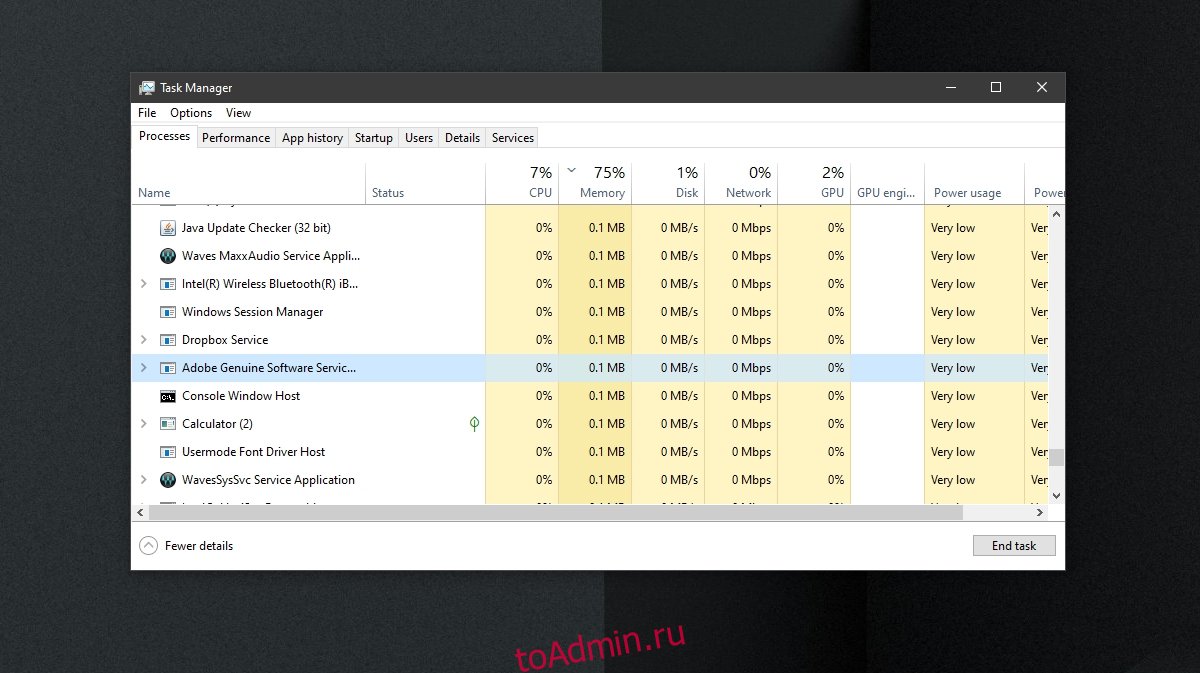
AGSService или Adobe Genuine Software Integrity Service отвечают за определение подлинности загруженного установщика продуктов Adobe. Однако, если есть некоторые внутренние проблемы, которые вызывают эту проблему, даже если вы используете подлинную версию, вы можете завершить эту задачу с помощью диспетчера задач и продолжить установку. Для этого откройте Диспетчер задач на своем компьютере, найдите AGSService.exe в Процессы и нажмите кнопку Завершить задачу.
4]Загрузите установщик с веб-сайта Creative Cloud.
Настоятельно рекомендуется скачивать установщик только с официального сайта Creative Cloud. Многие мошенники часто копируют такие веб-сайты и позволяют загружать пиратскую копию желаемого программного обеспечения. Не рекомендуется скачивать купленный продукт откуда-либо, кроме официального сайта.
5]Отключить службу целостности подлинного программного обеспечения Adobe
Если что-то работает, вы можете отключить службу Adobe Genuine Software Integrity Service из Услуги панель в Windows 11/10. Для этого сделайте следующее:
- Нажмите Win + S и введите services.
- Щелкните соответствующий результат поиска.
- Найдите службу Adobe Genuine Software Integrity Service и дважды щелкните ее.
- В раскрывающемся списке выберите параметр «Отключить».
- Щелкните кнопку ОК.
Теперь проверьте, можете ли вы обойти ошибку.
Как исправить ошибку проверки подлинности программного обеспечения Adobe?
Чтобы исправить ошибку проверки подлинности программного обеспечения Adobe, вам необходимо удалить все остатки продуктов, ранее установленных программой установки, удалить существующую установку, завершить задачу AGSService.exe и отключить службу целостности подлинного программного обеспечения Adobe. Кроме того, никогда не загружайте программу установки откуда-либо, кроме официального сайта Creative Cloud.
Как мне избавиться от службы обеспечения целостности подлинного программного обеспечения Adobe?
Пока вы используете подлинную копию любого продукта Adobe, вы не можете избавиться от службы Adobe Genuine Software Integrity Service. Он работает в фоновом режиме, чтобы проверить, является ли ваша копия продукта Adobe подлинной или пиратской. Однако вы можете отключить эту службу из Услуги панель с использованием вышеупомянутого руководства.
Что такое подлинный валидатор Adobe?
Не существует конкретной службы или инструмента под названием подлинный валидатор Adobe, потому что это общее название. Когда вы пытаетесь установить продукт Adobe, программа установки определяет вашу лицензию и сообщает вам, подлинная ваша версия или нет. Этот процесс называется подлинным валидатором Adobe.
Вот и все! Надеюсь, эти решения помогли вам исправить ошибку Adobe Genuine Software Verification Failure.
.
While installing an Adobe product, if you are getting Adobe Genuine Software Verification Failure error message, here is how you can fix the issue within moments. There are mainly two reasons you may get this problem on your computer, and both are mentioned here with solutions.
The entire message says something like this:
Installation Failed
Adobe Genuine Software Verification Failure
The product you are trying to install is not an Adobe Genuine Software and appears to be counterfeit. Please report piracy or contact customer support for assistance.
What causes Adobe Genuine Software Verification Failure error
As mentioned earlier, there are two primary reasons why you might get this problem on your computer while trying to install an Adobe product.
- Pirated copy of the Adobe software: It is the primary reason why you are getting this problem on your computer. As Adobe products are pretty expensive, many people tend to use a pirated copy of Photoshop, Illustrator, After Effects, Premiere Pro, etc. If you have bought a used PC and got this error on that computer, chances are the previous owner used a pirated copy and didn’t remove all the leftovers while uninstalling the software.
- Corrupted installer: If you have purchased an Adobe tool, you might know that users need to download the executable file from the official website of Creative Cloud. It doesn’t download the full copy of your software; and instead, it downloads an installer. This installer requires a valid internet connection to download a copy of Photoshop, Illustrator, or anything else. If you get an internet problem while downloading a copy of your software, you might get the same issue.
Either way, you can fix this issue on your Windows 11/10 computer within moments.
To fix Adobe Genuine Software Verification Failure error, follow these steps:
- Delete all leftovers
- Remove existing installation
- End AGSService.exe task
- Download installer from Creative Cloud website
- Disable Adobe Genuine Software Integrity Service
To learn more about these steps, continue reading.
1] Delete all leftovers
Deleting all leftovers is probably the most working solution you can follow before heading to other steps. When the installer detects a pirated copy while installing Photoshop or any other Adobe tool, it displays such a message. Therefore, if you are using a genuine copy and still detecting the previous pirated copy, you have to delete all leftovers. For that, you can use any junk file remover such as CCleaner, RegSeeker, etc. You can also use the Kaspersky Cleaner to get the job done.
2] Remove existing installation
If you can find an older version of any Adobe product on your computer, it is recommended to remove that installation before installing the newer version. Even if you already have Photoshop, but you are installing Lightroom, you should remove the existing installation of any software and then try to install the new Adobe product. While doing so, don’t forget to remove the leftovers.
3] End AGSService.exe task
AGSService or Adobe Genuine Software Integrity Service is responsible for detecting the genuineness of the downloaded installer of Adobe products. However, if there are some internal issues, which are causing this problem even when you are using a genuine version, you may end this task using Task Manager and go forward with your installation. For that, open the Task Manager on your computer, find out the AGSService.exe in the Processes tab, and click the End task button.
4] Download installer from Creative Cloud website
It is highly recommended to download the installer only from the official website of Creative Cloud. Many scammers often replicate such websites and allow you to download a pirated copy of your desired software. It is not recommended to download any purchased product from anywhere other than the official website.
5] Disable Adobe Genuine Software Integrity Service
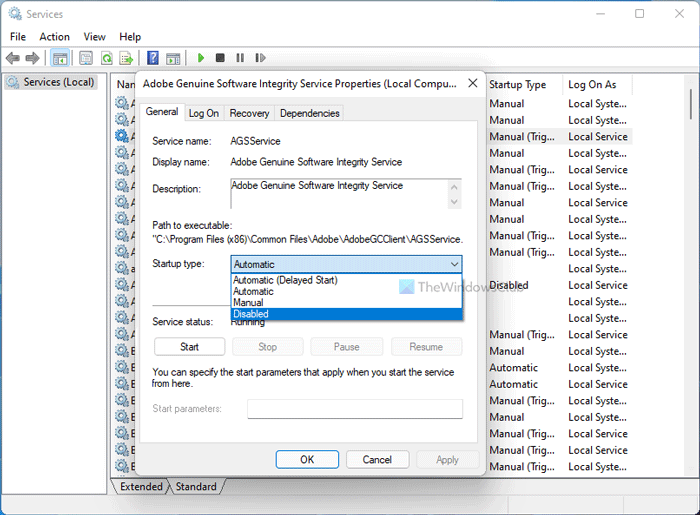
If something is working, you can disable the Adobe Genuine Software Integrity Service from the Services panel in Windows 11/10. For that, do the following:
- Press Win+S and type services.
- Click on the corresponding search result.
- Find out Adobe Genuine Software Integrity Service and double-click on it.
- Select the Disable option from the drop-down list.
- Click the OK button.
Now check if you can bypass the error or not.
How do I fix Adobe Genuine Software Verification Failure?
To fix Adobe Genuine Software Verification Failure, you need to delete all previously installer products’ leftovers, remove the existing installation, end the AGSService.exe task, and disable Adobe Genuine Software Integrity Service. Also, never download the installer from anywhere else other than the official website of Creative Cloud.
How do I get rid of Adobe Genuine Software Integrity Service?
As long as you use a genuine copy of any Adobe product, you cannot get rid of Adobe Genuine Software Integrity Service. It runs in the background to validate whether your copy of Adobe product is genuine or pirated. However, you can disable this service from the Services panel using the aforementioned guide.
What is Adobe genuine validator?
There is no particular service or tool called Adobe genuine validator because it is a generic name. When you try to install an Adobe product, the installer detects your license and tells you whether your version is genuine or not. This process is called Adobe genuine validator.
That’s all! Hope these solutions helped you fix the Adobe Genuine Software Verification Failure error.
Read: Adobe Reader not working in Windows 11/10.
While installing an Adobe product, if you are getting Adobe Genuine Software Verification Failure error message, here is how you can fix the issue within moments. There are mainly two reasons you may get this problem on your computer, and both are mentioned here with solutions.
The entire message says something like this:
Installation Failed
Adobe Genuine Software Verification Failure
The product you are trying to install is not an Adobe Genuine Software and appears to be counterfeit. Please report piracy or contact customer support for assistance.
What causes Adobe Genuine Software Verification Failure error
As mentioned earlier, there are two primary reasons why you might get this problem on your computer while trying to install an Adobe product.
- Pirated copy of the Adobe software: It is the primary reason why you are getting this problem on your computer. As Adobe products are pretty expensive, many people tend to use a pirated copy of Photoshop, Illustrator, After Effects, Premiere Pro, etc. If you have bought a used PC and got this error on that computer, chances are the previous owner used a pirated copy and didn’t remove all the leftovers while uninstalling the software.
- Corrupted installer: If you have purchased an Adobe tool, you might know that users need to download the executable file from the official website of Creative Cloud. It doesn’t download the full copy of your software; and instead, it downloads an installer. This installer requires a valid internet connection to download a copy of Photoshop, Illustrator, or anything else. If you get an internet problem while downloading a copy of your software, you might get the same issue.
Either way, you can fix this issue on your Windows 11/10 computer within moments.
To fix Adobe Genuine Software Verification Failure error, follow these steps:
- Delete all leftovers
- Remove existing installation
- End AGSService.exe task
- Download installer from Creative Cloud website
- Disable Adobe Genuine Software Integrity Service
To learn more about these steps, continue reading.
1] Delete all leftovers
Deleting all leftovers is probably the most working solution you can follow before heading to other steps. When the installer detects a pirated copy while installing Photoshop or any other Adobe tool, it displays such a message. Therefore, if you are using a genuine copy and still detecting the previous pirated copy, you have to delete all leftovers. For that, you can use any junk file remover such as CCleaner, RegSeeker, etc. You can also use the Kaspersky Cleaner to get the job done.
2] Remove existing installation
If you can find an older version of any Adobe product on your computer, it is recommended to remove that installation before installing the newer version. Even if you already have Photoshop, but you are installing Lightroom, you should remove the existing installation of any software and then try to install the new Adobe product. While doing so, don’t forget to remove the leftovers.
3] End AGSService.exe task
AGSService or Adobe Genuine Software Integrity Service is responsible for detecting the genuineness of the downloaded installer of Adobe products. However, if there are some internal issues, which are causing this problem even when you are using a genuine version, you may end this task using Task Manager and go forward with your installation. For that, open the Task Manager on your computer, find out the AGSService.exe in the Processes tab, and click the End task button.
4] Download installer from Creative Cloud website
It is highly recommended to download the installer only from the official website of Creative Cloud. Many scammers often replicate such websites and allow you to download a pirated copy of your desired software. It is not recommended to download any purchased product from anywhere other than the official website.
5] Disable Adobe Genuine Software Integrity Service
If something is working, you can disable the Adobe Genuine Software Integrity Service from the Services panel in Windows 11/10. For that, do the following:
- Press Win+S and type services.
- Click on the corresponding search result.
- Find out Adobe Genuine Software Integrity Service and double-click on it.
- Select the Disable option from the drop-down list.
- Click the OK button.
Now check if you can bypass the error or not.
How do I fix Adobe Genuine Software Verification Failure?
To fix Adobe Genuine Software Verification Failure, you need to delete all previously installer products’ leftovers, remove the existing installation, end the AGSService.exe task, and disable Adobe Genuine Software Integrity Service. Also, never download the installer from anywhere else other than the official website of Creative Cloud.
How do I get rid of Adobe Genuine Software Integrity Service?
As long as you use a genuine copy of any Adobe product, you cannot get rid of Adobe Genuine Software Integrity Service. It runs in the background to validate whether your copy of Adobe product is genuine or pirated. However, you can disable this service from the Services panel using the aforementioned guide.
What is Adobe genuine validator?
There is no particular service or tool called Adobe genuine validator because it is a generic name. When you try to install an Adobe product, the installer detects your license and tells you whether your version is genuine or not. This process is called Adobe genuine validator.
That’s all! Hope these solutions helped you fix the Adobe Genuine Software Verification Failure error.
Read: Adobe Reader not working in Windows 11/10.

СХОЖИЕ СТАТЬИБОЛЬШЕ ОТ АВТОРА

РЕШЕНО: 1с8 требуется переустановка соединения

РЕШЕНО: Медленная печать из AUTOCAD

РЕШНО: На вашем ПК возникла проблема и его необходимо перезагрузить
16 КОММЕНТАРИИ
Спасибо вам большое
Просто спасли!)
Я думал, все пропало))
Огромное спасибо)
НЕ получается удалить все файлы, говорит, что они уже используются. как быть?
Нужно закрыть все работающие приложения adobe. И заверiить все процессы adobe
Спс, сначало не удалялось, закрыл все адобки, получилось, но, я пока что эти файлы не удалил, а просто убрал в корзину, вдруг что то не так сделаю…
все снес из этой папки. вышел из адоб криэтив клауд. перехзагрузил. такая же хрень осталась
Удалил всё из этой папки и появилась новая ошибка:
adobe application manager required to verify your license is missing or damaged. Please download a new copy of Adobe Application Mager from…
Adobe Error Code 501
Below are 46 working coupons for Adobe Error Code 501 from reliable websites that we have updated for users to get maximum savings. Take action now for maximum saving as these discount codes will not valid forever. You can always come back for Adobe Error Code 501 because we update all the latest coupons and special deals weekly. View more
Press Ctrl + Shift + Esc to open the Task Manager. Navigate to the Processes
tab. Locate the reported app on the list, and right-click it. Choose End Task to close this application. Once application is closed, click Retry to download the Creative Cloud app …
Jul 11, 2019 · Once application is closed, click Retry to download the Cr
eative Cloud app again.
May 15, 2021 · adobe error code 501 Overview adobe error code 501 can off
er you many choices to save money thanks to 25 active results. You can get the best discount of up to 61% off. The new discount codes are constantly updated on Couponxoo.
You are specifying a strongly-typed object client side object nameon the cli
ent using RemoteClass metadata and a strongly typed object server side object nameon the server using item-class. If you wish to have strongly typed objects on both client and server, you must specify RemoteClass(alias=’server. Object’) where ‘server. Object’ is the target item type on the server.
Aug 04, 2020 · SUBSCRIBE if this video helped you!
Dec 06, 2020 · Hello Everyone, apa kabar! Dalam video ini saya menunjukan
cara mengatasi error code 501 pada adobe seperti adobe premiere pro atau photoshop dan lain-lain. C.
Nov 11, 2019 · The adobe forum reccomends tracking down whatever software
Jun 07, 2020 · So, my installing used to work fine before a factory reset
Simple tips to repair error code 501 for your Mac
If the error code 501 disappears in Safe Mode, there may be an issue with a
startup item, login item, or kext file. You might need to check your login items and see if the error code 501 is related to one of the programs loading up automatically on startup. You can narrow down the scope by doing so:
Mar 02, 2021 · † Limited time offer of 10% off the list price applies o
nly to the purchase of Quicken Deluxe, Premier, Home, Business & Rental Property for the first year only when you order directly from Quicken by September 30, 2021, 11:59 PM PST.
Solved: Hi Friends, was trying to copy a content node in crxde by using «cop
Official Adobe coupons, promos, special offers and discounts
Browse the official list of Adobe coupon codes, promos, special offers and d
iscounts on software. Shop and save on a variety of Adobe products. Special Offers. All Products; Make the Leap with Creative Cloud. Students and teachers, save over 60% on Adobe Creative Cloud. Get all the best apps including Photoshop, Illustrator, and over 20 more.
Adobe Zii, first released in 2016 by the TNT project is a manual bug exploit
er for the Adobe CC suite. This subreddit has the sole purpose of clarifying doubts related to the service and promoting a constructive debate about its functionalities.
How to Fix the HTTP Error Code 501 | Elegant Themes Blog
How to Solve It When Adobe Apps or Updates Won’t Download
That’s where the direct download links(DDL) below come in… They link dir
ectly to the same original and authentic program installers stored on Adobe’s servers, but without having to going through any of their intermediary download managers or interfaces. And as a side bonus, they will give you backup copies of the offline installers for the Adobe software you use and rely on every day, as well as allow you to download the software on one computer but install on another. You …
How to fix Google Play Store Error 501 | UnlockUnit
Jan 30, 2018 · A lot of Android users reported that, while trying to down
load or update some of the apps on their phones, they were getting the Google Play Store Error 501.
65% Off Adobe Coupons & Promo Codes May 2021
Activate Your Student Beans Account for 65% Off All Apps. Deal. May 14. Save
35% on Creative Cloud. Deal. May 14. Save 30% on Acrobat Pro DC with Advanced E-Sign. Deal. May 14.
Oct 14, 2020 · The error message reads *App Name* cannot be installed. Tr
y again and if the problem continues get help troubleshooting (Error code : 501). Because of this error Google Play Store android users are not able to install, download or update many apps and games in their android mobile.
Popular Adobe Discount Codes & Deals. Discount. Description. Expires. 20% OF
F. Enjoy up to 20% off Creative Cloud All Apps. 23 April. FREE APPS. Get the Adobe …
How To Fix Adobe Error Code 50 [Instant Solution]
Nov 02, 2019 · Windows. Press the Windows logo button and the letter ‘E
’ at the same time. Navigate to C: and go to Program Files (x86). Here, open the Common Files folder and open the Adobe folder. Find the OOBE folder. Click on it, press the F2 key on your keyboard and rename it. Go back to C: and click on Users.
City. Take advantage of the great deals and save even more using this adobe. com coupon code. Act immediately before the sale ends. Show Code. adobe. com coupon code.
Feb 16, 2014 · Below are instructions to enter UNIX shell commands. The c
ommands are safe and do nothing but produce human-readable output, but they must be entered exactly as given in order to work. If you question the safety of the procedure suggested here — which you should — search this site for other discussions in which it’s been followed without any report of ill effects.
Adobe Creative Cloud Discount | (60% OFF) | May 2021
There are currently 12 Adobe online coupons reported by Adobe. These deal of
fers are available online, including 0 coupon codes. Today alone, users have collectively cashed in on 49 offers. Get Adobe coupons. How do I use Adobe coupons? To use a Adobe coupon, copy the related promo code to your clipboard and apply it while checking out.
Sep 26, 2019 · Si hay problemas adicionales u otros códigos de Error, es
posible que deban usar el buscador del Registro de Windows y borrar las entradas Adobe, solo espero que no, porque el último programa que desinstalé manualmente tomó un par de horas.
May 08, 2021 · Adobe Vouchers 2021. Go To Adobe. Find the newest Adobe Di
scount Codes & Vouchers below. Save 10% off-90% off with 446 Adobe DiscountsDeals & Offers as of May 2021. Check now.
Error Codes > Konica-Minolta > bizhub 501 > Code C-3501
C-3501. Code: C-3501. Description: Fusing main sensor high temperature abnor
Oct 19, 2018 · Error code 501 can be fixed by re-installing the problemat
ic app. If your app is pre-installed and can’t be uninstalled, You can simply restore it to factory default version. This is pretty simple to do. For pre-installed app, You won’t get uninstall option.
Offer’s Details: Follow this link to get Over 60% Off Teachers & Students Di
scount from Adobe. Limited time only! Terms: Available whilst stocks last. Discount applies to selected products. See website for more details. The merchant reserves the right to cut out any offer or deal without giving prior notice.
Log in to Adobe Creative Cloud
Sign into Adobe Creative Cloud to access your favorite Creative Cloud apps,
services, file management, and more. Log in to start creating.
Feb 15, 2012 · Which is the version of Adobe Acrobat Reader installed on
your computer? 3. Have you made any changes to the computer prior to this issue? Remove all previous versions of Acrobat or Reader, and then reinstall it. a. Click on Start, clicking Control Panel, clicking Program, clicking Programs and Features. b.
**Adobe CC 2021 Products Crack Macos For Free ? 100% Working ☑️** **S
upport me guys and help to grow this community :**.
Rename the Psicon. dll file in the Program Files/Common Files/Adobe/Shell fol
der to «Psicon. old,» and then reinstall the Photoshop 7.0.1 update. (You do not need to …
Official Adobe coupons, promos, special offers and discounts
Browse the official list of Adobe coupon codes, promos, special offers and d
iscounts on software. Shop and save on a variety of Adobe products. SPECIAL OFFERS. Make the Leap with Creative Cloud. Students and teachers, save over 60% on Adobe Creative Cloud. Get all the best apps including Photoshop, Illustrator and over 20 more.
501 is the appropriate response when the server does not recognize the reque
st method and is incapable of supporting it for any resource. The only methods that servers are required to support (and therefore that must not return 501) are GET and HEAD.
Adobe Discount Hacks. Adobe offers a free trial of Creative Cloud for seven
days. Shop the Adobe Special Offers page to find current promotions and discounts. If you’re a student or a teacher, get Adobe products at a 60% or higher discount. Adobe offers 15% off of Creative Cloud for veterans; join Veterans Advantage to get this deal.
Let’s check the information you gave. You have Windows 10 (Home, Pro, Ente
75% Off adobe. com Coupons & Promo Codes, April 2021
savings on kitchen appliances when you spend £399. Make your purchase and enjoy the Adobe Student Licensing Coupon Code coupon right now. Buy more, save more. Get Code.
May 05, 2021 · The best Adobe Creative Cloud discounts available now. Ado
be CC All Apps plan (EMEA only): Up to 20% off subscriptions Adobe has knocked 20% off the price of its All Apps plan for those in EMEA regions. That means you’ll save €12 / £10 every single month. If you’ve been thinking of signing up, now is the time to buy.
Jun 12, 2019 · If you’d like to go to Adobe MAX this year in Los Angele
Dec 11, 2020 · Solution 2: Check and Update Adobe Illustrator. In some ca
ses, restarting Adobe Illustrator can’t fix Adobe Illustrator 2019 crashing issue, and the software just keeps crashing again and again. In this situation, you need to check whether it is the latest version. If not, please update it to the latest one.
Mar 23, 2021 · Step 2: Now, Right-click on the Adobe applications icon, an
d click on the Properties option from the right-click menu.. Step 3: Go to Compatibility tab in the Properties window. Here, select the check-box named “Run this program as an Administrator“. Now, click on Ok to apply the changes. The Adobe program will open with Admin rights every time you open …
Adobe Coupons & Offers: 60% OFF Promo Codes May 2021
ffers Category. Adobe Coupons & Promo Codes. adobe photoshop coupon code. Get @ ₹676/Month. Adobe Creative Cloud Discount Code 2019. Get Up to 60% Off. Adobe Students & Teachers Offer. Up to 60% Off.
(with promotion code) + 8.08% TopCashBack. 23/08/2012. 01/01/1970. More infoLess info. Get code & visit site*Get code & visit site*. Adobe are offering 10% of all orders over £350 until August 31st when entering code: Adobe10.
Error Codes > Konica-Minolta > bizhub 501 > Code C-1106
C-1106. Code: C-1106. Description: FS-523: Stapler movement motor (M6) drive
Error Code Reference Table Error Code Meaning OK Success ERR001 Registration
key format error. ERR002 User Name value is.
Please Rate Here
? Average Discount: 5.6$
? Amount Of Coupons: 46
? Highest Discount: 75% off
Filter Search
Coupon Type
Other Good Coupons
What is error code 501?
While installing or updating Creative Cloud apps using the Adobe Creative Cloud desktop app, you get Error code 501. The error summary may read as follows:
How to fix Adobe Creative Cloud error 501?
How to fix error 501 in Play Store?
It should “fix error 501”. Anyway, Here are the instructions. Navigate to Settings > Apps > All. Now, Find your app or the package name like com. youtube or something else and tap on it. Now, Touch on Uninstall. 2. Clear Cache and Data or Uninstall Play Store Update:
Are there any coupons for Adobe Creative Cloud?
Official Adobe coupons, promos, special offers and discounts Browse the official list of Adobe coupon codes, promos, special offers and discounts on software. Shop and save on a variety of Adobe products. Special Offers All Products Make the Leap with Creative Cloud. Students and teachers, save over 60% on Adobe Creative Cloud.
How can I keep track of information on Adobe Error Code 501?
The best way to update deals from an online store is to visit their homepage regularly. In parallel, you should also refer to the websites of Coupo.
Why do I have to wait for a bit when searching Adobe Error Code 501?
The reason is there are many Adobe Error Code 501 results we have discovered especially updated the new coupons and this process will take a while.
How do I use Adobe Error Code 501 offer?
After you find out all Adobe Error Code 501 results you wish, you will have many options to find the best saving by clicking to the button Get Link.
Almost your searching will be available on CouponXoo in general. The only reason you can not find th.
Almost your searching will be available on CouponXoo in general. The only reason you can not find the offer you are seeking is they don’t exist, or.
Top Stores
Tips Not To Miss Any Coupons 24/7
1. Email subscription
To receive coupons and discounts notification, sign up for email list of the retailer.
Check out Facebook, Twitter, Instagram page for upcoming sales and coupon promotions.
You have free access to different coupon sites like isCoupon to search for active discounts.
 Full advantages of Amazon Discount Hunter.
The tool filters out the lowest price and the highest discounts available, making purchase decisions easier than ever.
2. Customized search
Type in search bar whatever product you look for and the tool will show you the best deals
Not much time wasted for the results. You are just a few clicks away from accurate options for your saving.
Как исправить ошибку конфигурации 16 при запуске Adobe?
Ошибка 16 в Adobe возникает при попытке запустить любое приложение Creative Cloud – Photoshop, Acrobat и прочие. В сообщении об ошибке указывается что нужно удалить этот продукт, а затем установить его заново. Но после переустановки проблема остается, и снова будут предложены те же действия. Во многих случаях причиной может быть недостаточное разрешение на папку Adobe PCD, в некоторых случаях на каталог SLStore.

С этой неполадкой сталкиваются пользователи не только Windows, но и macOS. Тем не менее, ее просто решить.
Чем вызвана ошибка?
Как было отмечено, проблема вызвана недостаточными разрешениями на каталоги. Когда приложение не может выполнить требуемые операции с файлами из-за ограниченного к ним доступа, прекращает загрузку и выбрасывает сообщение об ошибке 16.
Чтобы ее устранить предоставьте полный доступ на эти каталоги. Также проблему можно решить путем запуска исполняемого файла приложения с администраторскими правами.
Изменение разрешений
Для устранения ошибки конфигурации с кодом 16 нужно расширить разрешения для папок лицензирования, Adobe PCD и SLStore. Перед выполнением этого решения в проводнике включите опцию просмотра скрытых элементов.
Перейдите в меню Вид и щелкните на стрелку под кнопкой Параметры. Из выпадающего списка выберите «Изменить параметры папок и поиска» и откройте вкладку Вид.
Прокрутите вниз до пункта «Показывать скрытые файлы, папки и диски». Отметьте ее флажком и примените изменения.
Теперь перейдите по пути:
Program Files (x86)Common FilesAdobe Adobe PCD
После выполните следующие шаги:
Кликните правой кнопкой мыши поочередно на каталогах и перейдите в Свойства.
На вкладке Безопасность нажмите на «Изменить».
Для Adobe PCD выделите группу Администраторы и назначьте ему полный доступ.
Относительно SLStore, выделите группы пользователей Система и Администраторы и разрешите полный доступ.
Затем выберите группу Пользователи и разрешите ей Чтение и Особые разрешения. Сохраните изменения на «ОК».
На вкладке Безопасность нажмите «Дополнительно».
В окне дополнительных параметров безопасности нужно сменить владельца, для этого нажмите на «Изменить». В открывшемся окне кликните на «Дополнительно – Найти» и укажите свою учетную запись. Примените изменения на «ОК».
Теперь установите флажок в поле «Замените все записи дочернего объекта наследуемыми…» и нажмите на «ОК».
Запуск с правами администратора
Попробуйте запустить приложение, которое вызывает ошибку 16, от имени администратора. Если открывается без каких-либо проблем, то можно настроить так, чтобы постоянно запускалось с администраторскими правами.
Щелкните правой кнопкой мыши на программе и выберите Свойства.
На вкладке Совместимость отметьте флажком поле «Запускать эту программу от имени администратора» и сохраните на «ОК».
Источники:
https://www. kovzunov. com/2016/08/resheno-oshibka-pri-proverke-na-podlinnost-programmnogo-obespecheniya-adobe/
https://iscoupon. com/adobe-error-code-501
https://compuals. ru/error/16-adobe
Adobe Photoshop не могу установить
29 May 2020 в 15:02


29 May 2020 в 15:02 #1
Срочно надо установить, но эти ошибки душат и ничего не дают сделать.

29 May 2020 в 15:04 #2
29 May 2020 в 15:06 #3
Перезагружал, не убивается.
29 May 2020 в 15:08 #4
Перезагружал, не убивается.
ну так если не убивается с перезагрузки, то убивай руками с задач. там же в отчёте пишется чё закрыть надо и к какому файлу обращается установщик. к этому же файлу обращается ещё какой-то процесс, вот его надо убить
29 May 2020 в 15:08 #5
ну так если не убивается с перезагрузки, то убивай руками с задач. там же в отчёте пишется чё закрыть надо и к какому файлу обращается установщик. к этому же файлу обращается ещё какой-то процесс, вот его надо убить
Источник
Код ошибки 501 adobe photoshop
Удаляем содержимое папки C:Program Files – Common Files – Adobe – OOBE для 32-битной системы или C:Program Files (x86) – Common Files – Adobe – OOBE для 64-битной системы. После этого можете снова запустить установку программы – ошибка пропадет.
СХОЖИЕ СТАТЬИБОЛЬШЕ ОТ АВТОРА
РЕШЕНО: 1с8 требуется переустановка соединения
РЕШЕНО: Медленная печать из AUTOCAD
РЕШНО: На вашем ПК возникла проблема и его необходимо перезагрузить
16 КОММЕНТАРИИ
Спасибо вам большое
Просто спасли!)
Я думал, все пропало))
Огромное спасибо)
НЕ получается удалить все файлы, говорит, что они уже используются. как быть?
Нужно закрыть все работающие приложения adobe. И заверiить все процессы adobe
Спс, сначало не удалялось, закрыл все адобки, получилось, но, я пока что эти файлы не удалил, а просто убрал в корзину, вдруг что то не так сделаю…
все снес из этой папки. вышел из адоб криэтив клауд. перехзагрузил. такая же хрень осталась
Удалил всё из этой папки и появилась новая ошибка:
adobe application manager required to verify your license is missing or damaged. Please download a new copy of Adobe Application Mager from…
Adobe Error Code 501
Below are 46 working coupons for Adobe Error Code 501 from reliable websites that we have updated for users to get maximum savings. Take action now for maximum saving as these discount codes will not valid forever. You can always come back for Adobe Error Code 501 because we update all the latest coupons and special deals weekly. View more
Press Ctrl + Shift + Esc to open the Task Manager. Navigate to the Processes
tab. Locate the reported app on the list, and right-click it. Choose End Task to close this application. Once application is closed, click Retry to download the Creative Cloud app …
Jul 11, 2019 · Once application is closed, click Retry to download the Cr
eative Cloud app again.
May 15, 2021 · adobe error code 501 Overview adobe error code 501 can off
er you many choices to save money thanks to 25 active results. You can get the best discount of up to 61% off. The new discount codes are constantly updated on Couponxoo.
You are specifying a strongly-typed object client side object nameon the cli
ent using RemoteClass metadata and a strongly typed object server side object nameon the server using item-class. If you wish to have strongly typed objects on both client and server, you must specify RemoteClass(alias=’server. Object’) where ‘server. Object’ is the target item type on the server.
Aug 04, 2020 · SUBSCRIBE if this video helped you!
Dec 06, 2020 · Hello Everyone, apa kabar! Dalam video ini saya menunjukan
cara mengatasi error code 501 pada adobe seperti adobe premiere pro atau photoshop dan lain-lain. C.
Nov 11, 2019 · The adobe forum reccomends tracking down whatever software
Jun 07, 2020 · So, my installing used to work fine before a factory reset
Simple tips to repair error code 501 for your Mac
If the error code 501 disappears in Safe Mode, there may be an issue with a
startup item, login item, or kext file. You might need to check your login items and see if the error code 501 is related to one of the programs loading up automatically on startup. You can narrow down the scope by doing so:
Mar 02, 2021 · † Limited time offer of 10% off the list price applies o
nly to the purchase of Quicken Deluxe, Premier, Home, Business & Rental Property for the first year only when you order directly from Quicken by September 30, 2021, 11:59 PM PST.
Solved: Hi Friends, was trying to copy a content node in crxde by using «cop
Official Adobe coupons, promos, special offers and discounts
Browse the official list of Adobe coupon codes, promos, special offers and d
iscounts on software. Shop and save on a variety of Adobe products. Special Offers. All Products; Make the Leap with Creative Cloud. Students and teachers, save over 60% on Adobe Creative Cloud. Get all the best apps including Photoshop, Illustrator, and over 20 more.
Adobe Zii, first released in 2016 by the TNT project is a manual bug exploit
er for the Adobe CC suite. This subreddit has the sole purpose of clarifying doubts related to the service and promoting a constructive debate about its functionalities.
How to Fix the HTTP Error Code 501 | Elegant Themes Blog
How to Solve It When Adobe Apps or Updates Won’t Download
That’s where the direct download links(DDL) below come in… They link dir
ectly to the same original and authentic program installers stored on Adobe’s servers, but without having to going through any of their intermediary download managers or interfaces. And as a side bonus, they will give you backup copies of the offline installers for the Adobe software you use and rely on every day, as well as allow you to download the software on one computer but install on another. You …
How to fix Google Play Store Error 501 | UnlockUnit
Jan 30, 2018 · A lot of Android users reported that, while trying to down
load or update some of the apps on their phones, they were getting the Google Play Store Error 501.
65% Off Adobe Coupons & Promo Codes May 2021
Activate Your Student Beans Account for 65% Off All Apps. Deal. May 14. Save
35% on Creative Cloud. Deal. May 14. Save 30% on Acrobat Pro DC with Advanced E-Sign. Deal. May 14.
Oct 14, 2020 · The error message reads *App Name* cannot be installed. Tr
y again and if the problem continues get help troubleshooting (Error code : 501). Because of this error Google Play Store android users are not able to install, download or update many apps and games in their android mobile.
Popular Adobe Discount Codes & Deals. Discount. Description. Expires. 20% OF
F. Enjoy up to 20% off Creative Cloud All Apps. 23 April. FREE APPS. Get the Adobe …
How To Fix Adobe Error Code 50 [Instant Solution]
Nov 02, 2019 · Windows. Press the Windows logo button and the letter ‘E
’ at the same time. Navigate to C: and go to Program Files (x86). Here, open the Common Files folder and open the Adobe folder. Find the OOBE folder. Click on it, press the F2 key on your keyboard and rename it. Go back to C: and click on Users.
City. Take advantage of the great deals and save even more using this adobe. com coupon code. Act immediately before the sale ends. Show Code. adobe. com coupon code.
Feb 16, 2014 · Below are instructions to enter UNIX shell commands. The c
ommands are safe and do nothing but produce human-readable output, but they must be entered exactly as given in order to work. If you question the safety of the procedure suggested here — which you should — search this site for other discussions in which it’s been followed without any report of ill effects.
Adobe Creative Cloud Discount | (60% OFF) | May 2021
There are currently 12 Adobe online coupons reported by Adobe. These deal of
fers are available online, including 0 coupon codes. Today alone, users have collectively cashed in on 49 offers. Get Adobe coupons. How do I use Adobe coupons? To use a Adobe coupon, copy the related promo code to your clipboard and apply it while checking out.
Sep 26, 2019 · Si hay problemas adicionales u otros códigos de Error, es
posible que deban usar el buscador del Registro de Windows y borrar las entradas Adobe, solo espero que no, porque el último programa que desinstalé manualmente tomó un par de horas.
May 08, 2021 · Adobe Vouchers 2021. Go To Adobe. Find the newest Adobe Di
scount Codes & Vouchers below. Save 10% off-90% off with 446 Adobe DiscountsDeals & Offers as of May 2021. Check now.
Error Codes > Konica-Minolta > bizhub 501 > Code C-3501
C-3501. Code: C-3501. Description: Fusing main sensor high temperature abnor
Oct 19, 2018 · Error code 501 can be fixed by re-installing the problemat
ic app. If your app is pre-installed and can’t be uninstalled, You can simply restore it to factory default version. This is pretty simple to do. For pre-installed app, You won’t get uninstall option.
Offer’s Details: Follow this link to get Over 60% Off Teachers & Students Di
scount from Adobe. Limited time only! Terms: Available whilst stocks last. Discount applies to selected products. See website for more details. The merchant reserves the right to cut out any offer or deal without giving prior notice.
Log in to Adobe Creative Cloud
Sign into Adobe Creative Cloud to access your favorite Creative Cloud apps,
services, file management, and more. Log in to start creating.
Feb 15, 2012 · Which is the version of Adobe Acrobat Reader installed on
your computer? 3. Have you made any changes to the computer prior to this issue? Remove all previous versions of Acrobat or Reader, and then reinstall it. a. Click on Start, clicking Control Panel, clicking Program, clicking Programs and Features. b.
upport me guys and help to grow this community :**.
Rename the Psicon. dll file in the Program Files/Common Files/Adobe/Shell fol
der to «Psicon. old,» and then reinstall the Photoshop 7.0.1 update. (You do not need to …
Official Adobe coupons, promos, special offers and discounts
Browse the official list of Adobe coupon codes, promos, special offers and d
iscounts on software. Shop and save on a variety of Adobe products. SPECIAL OFFERS. Make the Leap with Creative Cloud. Students and teachers, save over 60% on Adobe Creative Cloud. Get all the best apps including Photoshop, Illustrator and over 20 more.
501 is the appropriate response when the server does not recognize the reque
st method and is incapable of supporting it for any resource. The only methods that servers are required to support (and therefore that must not return 501) are GET and HEAD.
Adobe Discount Hacks. Adobe offers a free trial of Creative Cloud for seven
days. Shop the Adobe Special Offers page to find current promotions and discounts. If you’re a student or a teacher, get Adobe products at a 60% or higher discount. Adobe offers 15% off of Creative Cloud for veterans; join Veterans Advantage to get this deal.
Let’s check the information you gave. You have Windows 10 (Home, Pro, Ente
75% Off adobe. com Coupons & Promo Codes, April 2021
savings on kitchen appliances when you spend £399. Make your purchase and enjoy the Adobe Student Licensing Coupon Code coupon right now. Buy more, save more. Get Code.
May 05, 2021 · The best Adobe Creative Cloud discounts available now. Ado
be CC All Apps plan (EMEA only): Up to 20% off subscriptions Adobe has knocked 20% off the price of its All Apps plan for those in EMEA regions. That means you’ll save €12 / £10 every single month. If you’ve been thinking of signing up, now is the time to buy.
Jun 12, 2019 · If you’d like to go to Adobe MAX this year in Los Angele
Dec 11, 2020 · Solution 2: Check and Update Adobe Illustrator. In some ca
ses, restarting Adobe Illustrator can’t fix Adobe Illustrator 2019 crashing issue, and the software just keeps crashing again and again. In this situation, you need to check whether it is the latest version. If not, please update it to the latest one.
Mar 23, 2021 · Step 2: Now, Right-click on the Adobe applications icon, an
d click on the Properties option from the right-click menu.. Step 3: Go to Compatibility tab in the Properties window. Here, select the check-box named “Run this program as an Administrator“. Now, click on Ok to apply the changes. The Adobe program will open with Admin rights every time you open …
Adobe Coupons & Offers: 60% OFF Promo Codes May 2021
ffers Category. Adobe Coupons & Promo Codes. adobe photoshop coupon code. Get @ ₹676/Month. Adobe Creative Cloud Discount Code 2019. Get Up to 60% Off. Adobe Students & Teachers Offer. Up to 60% Off.
(with promotion code) + 8.08% TopCashBack. 23/08/2012. 01/01/1970. More infoLess info. Get code & visit site*Get code & visit site*. Adobe are offering 10% of all orders over £350 until August 31st when entering code: Adobe10.
Error Codes > Konica-Minolta > bizhub 501 > Code C-1106
C-1106. Code: C-1106. Description: FS-523: Stapler movement motor (M6) drive
Error Code Reference Table Error Code Meaning OK Success ERR001 Registration
key format error. ERR002 User Name value is.
Please Rate Here
? Average Discount: 5.6$
? Amount Of Coupons: 46
? Highest Discount: 75% off
Filter Search
Coupon Type
Other Good Coupons
What is error code 501?
While installing or updating Creative Cloud apps using the Adobe Creative Cloud desktop app, you get Error code 501. The error summary may read as follows:
How to fix Adobe Creative Cloud error 501?
How to fix error 501 in Play Store?
It should “fix error 501”. Anyway, Here are the instructions. Navigate to Settings > Apps > All. Now, Find your app or the package name like com. youtube or something else and tap on it. Now, Touch on Uninstall. 2. Clear Cache and Data or Uninstall Play Store Update:
Are there any coupons for Adobe Creative Cloud?
Official Adobe coupons, promos, special offers and discounts Browse the official list of Adobe coupon codes, promos, special offers and discounts on software. Shop and save on a variety of Adobe products. Special Offers All Products Make the Leap with Creative Cloud. Students and teachers, save over 60% on Adobe Creative Cloud.
How can I keep track of information on Adobe Error Code 501?
The best way to update deals from an online store is to visit their homepage regularly. In parallel, you should also refer to the websites of Coupo.
Why do I have to wait for a bit when searching Adobe Error Code 501?
The reason is there are many Adobe Error Code 501 results we have discovered especially updated the new coupons and this process will take a while.
How do I use Adobe Error Code 501 offer?
After you find out all Adobe Error Code 501 results you wish, you will have many options to find the best saving by clicking to the button Get Link.
Almost your searching will be available on CouponXoo in general. The only reason you can not find th.
Almost your searching will be available on CouponXoo in general. The only reason you can not find the offer you are seeking is they don’t exist, or.
Top Stores
Tips Not To Miss Any Coupons 24/7
1. Email subscription
To receive coupons and discounts notification, sign up for email list of the retailer.
Check out Facebook, Twitter, Instagram page for upcoming sales and coupon promotions.
You have free access to different coupon sites like isCoupon to search for active discounts.
Full advantages of Amazon Discount Hunter.
The tool filters out the lowest price and the highest discounts available, making purchase decisions easier than ever.
2. Customized search
Type in search bar whatever product you look for and the tool will show you the best deals
Not much time wasted for the results. You are just a few clicks away from accurate options for your saving.
Как исправить ошибку конфигурации 16 при запуске Adobe?
Ошибка 16 в Adobe возникает при попытке запустить любое приложение Creative Cloud – Photoshop, Acrobat и прочие. В сообщении об ошибке указывается что нужно удалить этот продукт, а затем установить его заново. Но после переустановки проблема остается, и снова будут предложены те же действия. Во многих случаях причиной может быть недостаточное разрешение на папку Adobe PCD, в некоторых случаях на каталог SLStore.
С этой неполадкой сталкиваются пользователи не только Windows, но и macOS. Тем не менее, ее просто решить.
Чем вызвана ошибка?
Как было отмечено, проблема вызвана недостаточными разрешениями на каталоги. Когда приложение не может выполнить требуемые операции с файлами из-за ограниченного к ним доступа, прекращает загрузку и выбрасывает сообщение об ошибке 16.
Чтобы ее устранить предоставьте полный доступ на эти каталоги. Также проблему можно решить путем запуска исполняемого файла приложения с администраторскими правами.
Изменение разрешений
Для устранения ошибки конфигурации с кодом 16 нужно расширить разрешения для папок лицензирования, Adobe PCD и SLStore. Перед выполнением этого решения в проводнике включите опцию просмотра скрытых элементов.
Перейдите в меню Вид и щелкните на стрелку под кнопкой Параметры. Из выпадающего списка выберите «Изменить параметры папок и поиска» и откройте вкладку Вид.
Прокрутите вниз до пункта «Показывать скрытые файлы, папки и диски». Отметьте ее флажком и примените изменения.
Теперь перейдите по пути:
Program Files (x86)Common FilesAdobe Adobe PCD
После выполните следующие шаги:
Кликните правой кнопкой мыши поочередно на каталогах и перейдите в Свойства.
На вкладке Безопасность нажмите на «Изменить».
Для Adobe PCD выделите группу Администраторы и назначьте ему полный доступ.
Относительно SLStore, выделите группы пользователей Система и Администраторы и разрешите полный доступ.
Затем выберите группу Пользователи и разрешите ей Чтение и Особые разрешения. Сохраните изменения на «ОК».
На вкладке Безопасность нажмите «Дополнительно».
В окне дополнительных параметров безопасности нужно сменить владельца, для этого нажмите на «Изменить». В открывшемся окне кликните на «Дополнительно – Найти» и укажите свою учетную запись. Примените изменения на «ОК».
Теперь установите флажок в поле «Замените все записи дочернего объекта наследуемыми…» и нажмите на «ОК».
Запуск с правами администратора
Попробуйте запустить приложение, которое вызывает ошибку 16, от имени администратора. Если открывается без каких-либо проблем, то можно настроить так, чтобы постоянно запускалось с администраторскими правами.
Щелкните правой кнопкой мыши на программе и выберите Свойства.
На вкладке Совместимость отметьте флажком поле «Запускать эту программу от имени администратора» и сохраните на «ОК».
Источник
Как исправить ошибку 501 adobe
Если вы настроили на компьютере Mac разрешение на установку только программ из App Store и пытаетесь установить программу из другого места, Mac выдаст сообщение, что эта программа не из App Store.
Решение:
В меню «Системные настройки» щелкните «Защита и безопасность» и выберите «Основные». 
Щелкните значок замка в нижнем левом углу. 
Введите пароль, чтобы внести изменения. 
Разрешите использование программ, загруженных из: App Store и от подтверждённых разработчиков.

Поздравляем, теперь вы можете запускать программы из Mac App Store и от подтверждённых разработчиков.
Если на компьютере Mac разрешена установка программ из App Store и от подтверждённых разработчиков, и вы пытаетесь установить программу, которая не зарегистрирована в компании Apple, также отобразится предупреждение.
Решение:
В Finder найдите программу, которую хотите открыть. 
Удерживая клавишу Control (или Ctrl) ⌃, нажмите на значок программы, затем выберите «Открыть» в контекстном меню. 
В диалоговом окне нажмите кнопку «Открыть».  Программа сохраняется в списке исключений из настроек безопасности, и в дальнейшем ее можно будет запускать двойным нажатием (или из Launchpad), как любую зарегистрированную программу.
Данное решение можно применять и к следующей ошибке.
В связи с вводом обязательной процедуры нотаризации приложений в Apple, macOS Catalina не позволяет запускать непроверенное приложение, даже если оно подписано зарегистрированным разработчиком. Это приводит к невозможности запуска приложения.
Решение:
В меню «Системные настройки» щелкните «Защита и безопасность» и выберите «Основные». 
Нажмите «Подтвердить вход» чтобы запустить заблокированную программу. 
В диалоговом окне нажмите «Открыть».
 Программа сохраняется в списке исключений из настроек безопасности, и в дальнейшем ее можно будет запускать двойным нажатием ( или из Launchpad), как любую зарегистрированную программу.
Данное решение можно применять и к предыдущей ошибке.
К сожалению, несмотря на простоту, инструкция настолько объёмная, что под неё пришлось выделить отдельную статью, которая доступна по этой ссылке >
Если вы запускаете приложение, которое не имеет (или имеет отозванный) сертификат разработчика, система сообщит о неожиданном завершении этого приложения и автоматически отправит отчёт в компанию Apple.
Для запуска потребуется самостоятельно подписать приложение >
Данная ошибка возникает при установке приложений Creative Cloud, для которых используются локальные пакеты установки.
Решение:
Кликните правой кнопкой мыши по файлу Install и выберите в контекстном меню пункт «Показать содержимое пакета».

Следуйте: Contents > MacOS
Запустите исполняемый Unix-файл под названием Install. 
После этого откроется терминал и запустится программа установки. Введите пароль администратора чтобы разрешить установку.  Вы можете выполнить установку в режиме пробной версии, использовать серийный номер или подтвердить свою подписку на Creative Cloud.
Но лучше использовать Adobe Zii >
Источник
Home
> Photoshop > Ошибка при проверке на подлинность программного обеспечения Adobe
August 8, 2018
zzz7net Leave a comment
Go to comments
Что делать?
Удаляем содержимое папки C:Program Files — Common Files — Adobe — OOBE для 32-битной системы или C:Program Files (x86) — Common Files — Adobe — OOBE для 64-битной системы. После этого можете снова запустить установку программы — ошибка пропадает.
Advertisement
Categories: Photoshop
Comments (1)
Trackbacks (0)
Leave a comment
Trackback
-
черный смеситель для раковины
April 21, 2021 at 1:48 pm
Reply
Спасибо за публикацию этой ценной статьи.

- No trackbacks yet.
Leave a Reply
Enter your comment here…
Fill in your details below or click an icon to log in:

Email (Address never made public)
Name
Website
You are commenting using your WordPress.com account.
( Log Out /
Change )
You are commenting using your Twitter account.
( Log Out /
Change )
You are commenting using your Facebook account.
( Log Out /
Change )
Cancel
Connecting to %s
Notify me of new comments via email.
Notify me of new posts via email.
Редактируем оглавление PDF-файла
Cannot find or open the pdb file

Adobe перешла на модель подписки. Чтобы использовать Photoshop, Illustrator, Fireworks, вы должны купить подписку на приложения, подписка будет связана с вашей учетной записью Adobe, и вы должны войти в приложение, которое хотите использовать со своей учетной записью Adobe. Если у вас есть более старая версия продуктов Adobe, на которую вы купили одноразовую лицензию, лицензия остается действительной, и вы можете продолжать использовать старую версию продуктов Adobe, если они у вас есть.
Программное обеспечение Fix Adobe не является подлинным
Adobe полагается на ключи продуктов и онлайн-учетные записи, чтобы убедиться, что их программное обеспечение используется, но для проверки учетной записи и ключа продукта она запускает базовую службу для проверки подлинности. Эта служба устанавливается при установке приложения Adobe и важна для предотвращения блокировки купленных вами приложений.
Если вы постоянно видите сообщение о том, что программное обеспечение Adobe не является подлинным, и вы законно приобрели ключ продукта или приобрели подписку на службу / приложения, попробуйте следующие исправления.
Примечание: эти исправления не позволят вам использовать продукты Adobe бесплатно, и этот пост не является руководством по взлому или исправлению программного обеспечения.
Подлинный ключ продукта
Когда Adobe перешла на модель подписки, она прекратила возможность разовой покупки своих приложений. Многие пользователи, которые смогли это сделать, купили лицензию на старую версию, пока она еще была доступна.
Если вы купили ключ продукта Adobe у стороннего производителя, он не сработает. В большинстве случаев программное обеспечение будет помечено как пиратское, если только продавец никогда не использовал ключ продукта для активации приложения Adobe в своей собственной системе. Вот как обычно работают ключи продукта; они привязаны к определенному компьютеру и не могут быть перенесены на другой.
Отключить подлинное программное обеспечение Adobe
Программное обеспечение Adobe не является подлинным. Сообщение отправлено службой подлинного программного обеспечения Adobe. Это основная служба, которая проверяет, было ли ваше программное обеспечение приобретено на законных основаниях. Вы можете выйти из него, и сообщение исчезнет.
Способ 1
Откройте диспетчер задач.
Перейдите на вкладку «Процессы».
Щелкните правой кнопкой мыши службу Adobe Genuine Integrity и выберите Открыть расположение файла (если вы не видите службу, убедитесь, что приложение Adobe открыто).
Щелкните правой кнопкой мыши службу Adobe Genuine Integrity в диспетчере задач и выберите «Завершить задачу».
В открывшейся папке удалите папку AdobeGCIClient
Способ 2
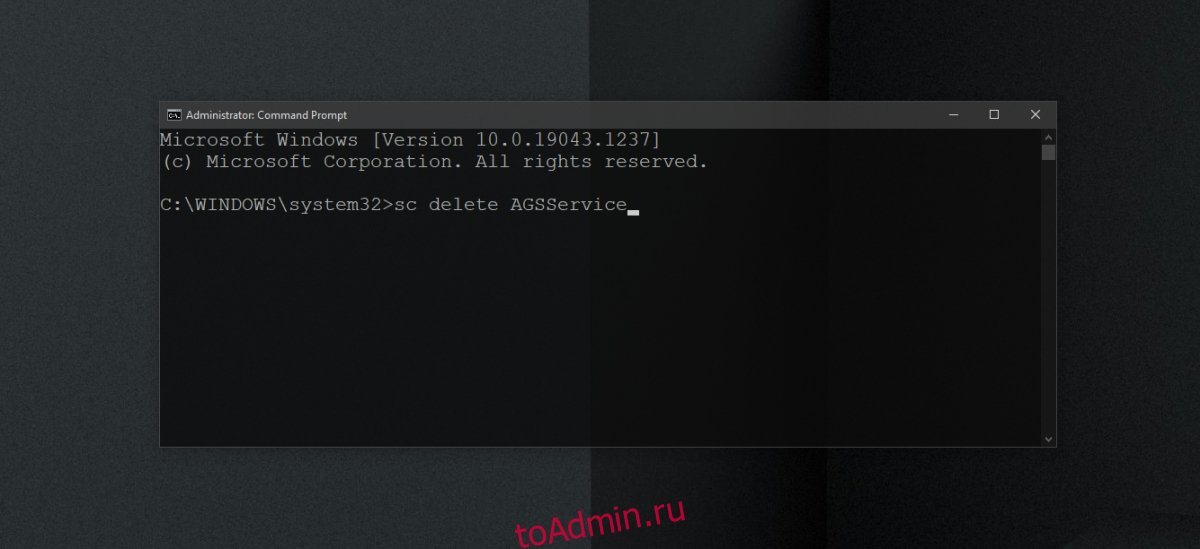
Откройте командную строку с правами администратора.
Выполните эту команду: sc удалить AGSService
Удалите утилиту запуска Adobe
Утилита запуска Adobe — одно из многих приложений, которые устанавливаются при установке продукта Adobe. При его удалении программное обеспечение Adobe будет удалено. Сообщение не является подлинным۔
Откройте командную строку с правами администратора.
Выполните эту команду: sc удалить AAMUpdater
Затем откройте планировщик заданий.
Найдите задачу с именем AdobeAAMUpdater.
Щелкните задачу правой кнопкой мыши и выберите «Удалить» (может потребоваться аутентификация у пользователя с правами администратора).
Заключение
Служба и утилиты, которые вы удаляете, могут препятствовать обновлению приложений Adobe. Они также могут быть переустановлены, когда вы обновляете приложения. Стоит отметить, что обновление приложений может решить проблему. Кроме того, может помочь удаление и повторная установка приложений Adobe.
Что вы думаете об этой статье?