Being a java developer, you must encounter numberless bugs and errors on daily basis. Whether you are a beginner or experienced software engineers, errors are inevitable but over time you can get experienced enough to be able to correct them efficiently. One such very commonly occurring error is “Illegal start of expression Java error”.
The illegal start of expression java error is a dynamic error which means you would encounter it at compile time with “javac” statement (Java compiler). This error is thrown when the compiler detects any statement that does not abide by the rules or syntax of the Java language. There are numerous scenarios where you can get an illegal start of expression error. Missing a semicolon at the end of The line or an omitting an opening or closing brackets are some of the most common reasons but it can be easily fixed with slight corrections and can save you a lot of time in debugging.
Following are some most common scenarios where you would face an illegal start of expression Java error along with the method to fix them,

1. Use of Access Modifiers with local variables
Variables that are declared inside a method are called local variables. Their functionality is exactly like any other variable but they have very limited scope just within the specific block that is why they cannot be accessed from anywhere else in the code except the method in which they were declared.
Access modifier (public, private, or protected) can be used with a simple variable but it is not allowed to be used with local variables inside the method as its accessibility is defined by its method scope.
See the code snippet below,
1.	public class classA {
2.	    public static void main(String args[])
3.	    {
4.	       public int localVar = 5;
5.	    }
6.	}
Here the public access modifier is used with a local variable (localVar).
This is the output you will see on the terminal screen:
$javac classA.java

classA.java:4: error: illegal start of expression
       public int localVar = 5;
       ^
1 error
It reports 1 error that simply points at the wrong placement of access modifier. The solution is to either move the declaration of the local variable outside the method (it will not be a local variable after that) or simply donot use an access modifier with local variables.
2. Method Inside of Another Method
Unlike some other programming languages, Java does not allows defining a method inside another method. Attempting to do that would throw the Illegal start of expression error.
Below is the demonstration of the code:
1.	public class classA {
2.	    public static void main(String args[]) {
3.	       int localVar = 5;
4.	       public void anotherMethod(){
5.	          System.out.println("it is a method inside a method.");
6.	       }
7.	    }
8.	}
This would be the output of the code,
 $javac classA.java

classA.java:5: error: illegal start of expression
       public void anotherMethod()
       ^
classA.java:5: error: illegal start of expression
       public void anotherMethod()
              ^
classA.java:5: error: ';' expected
       public void anotherMethod()
                                ^
3 errors
It is a restriction in Java so you just have to avoid using a method inside a method to write a successfully running code. The best practice would be to declare another method outside the main method and call it in the main as per your requirements.
3. Class Inside a Method Must Not Have Modifier
Java allows its developers to write a class within a method, this is legal and hence would not raise any error at compilation time. That class will be a local type, similar to local variables and the scope of that inner class will also be restricted just within the method. However, an inner class must not begin with access modifiers, as modifiers are not to be used inside the method.
In the code snippet below, the class “mammals” is defined inside the main method which is inside the class called animals. Using the public access modifier with the “mammals” class will generate an illegal start of expression java error.
1.	public class Animals {
2.	    public static final void main(String args[]){
3.	      public class mammals { }
4.	    }
5.	}
The output will be as follows,
$javac Animals.java

Animals.java:4: error: illegal start of expression
       public class mammals { }
       ^
1 error
This error can be fixed just by not using the access modifier with the inner class or you can define a class inside a class but outside of a method and instantiating that inner class inside the method.
Below is the corrected version of code as well,
1.	class Animals {
2.
3.	   // inside class
4.	   private class Mammals {
5.	      public void print() {
6.	         System.out.println("This is an inner class");
7.	      }
8.	   }
9.
10.	   // Accessing the inside class from the method within
11.	   void display_Inner() {
12.	      Mammals inside = new Mammals();
13.	      inside.print();
14.	   }
15.	}
16.	public class My_class {
17.
18.	   public static void main(String args[]) {
19.	      // Instantiating the outer class
20.	      Animals classA = new Animals();
21.	      // Accessing the display_Inner() method.
22.	      classA.display_Inner();
23.	   }
24.	}
Now you will get the correct output,
$javac Animals.java

$java -Xmx128M -Xms16M Animals

This is an inner class
4.Nested Methods
Some recent programming languages, like Python, supports nested methods but Java does not allow to make a method inside another method. You will encounter the illegal start of expression java error if you try to create nested methods.
Below mentioned is a small code that attempts to declare a method called calSum inside the method called outputSum,
1.	public class classA {
2.	    public void outputSum(int num1, int num2) {
3.	        System.out.println("Calculate Result:" + calSum(x, y));
4.	        public int calSum ( int num1, int num2) {
5.	            return num1 + num2;
6.	        }
7.	    }
8.	}
And here is the output,
$ javac classA.java
NestedMethod.java:6: error: illegal start of expression
        public int calSum ( int num1, int num2) {
        ^
classA.java:6: error: ';' expected
        public int calSum ( int num1, int num2) {
                          ^
classA.java:6: error:  expected
        public int calSum ( int num1, int num2) {
                                   ^
NestedMethod.java:6: error: not a statement
        public int calSum ( int num1, int num2) {
                                           ^
NestedMethod.java:6: error: ';' expected
        public calSum ( int num1, int num2) {
                                         ^
5 errors
The Java compiler has reported five compilation errors. Other 4 unexpected errors are due to the root cause. In this code, the first “illegal start of expression” error is the root cause. It is very much possible that a single error can cause multiple further errors during compile time. Same is the case here. We can easily solve all the errors by just avoiding the nesting of methods. The best practice, in this case, would be to move the calSum() method out of the outputSum() method and just call it in the method to get the results.
See the corrected code below,
1.	public class classA {
2.	    public void outputSum(int num1, int num2) {
3.	        System.out.println("Calculation Result:" + calSum(x, y));
4.	    }
5.	    public int calSum ( int num1, int num2) {
6.	        return x + y;
7.	    }
8.	}
5. Missing out the Curly “{ }“ Braces
Skipping a curly brace in any method can result in an illegal start of expression java error. According to the syntax of Java programming, every block or class definition must start and end with curly braces. If you skip any curly braces, the compiler will not be able to identify the starting or ending point of a block which will result in an error. Developers often make this mistake because there are multiple blocks and methods nested together which results in forgetting closing an opened curly bracket. IDEs usually prove to be helpful in this case by differentiating the brackets by assigning each pair a different colour and even identify if you have forgotten to close a bracket but sometimes it still gets missed and result in an illegal start of expression java error.
In the following code snippet, consider this class called Calculator, a method called calSum perform addition of two numbers and stores the result in the variable total which is then printed on the screen. The code is fine but it is just missing a closing curly bracket for calSum method which will result in multiple errors.
1.	public class Calculator{
2.	  public static void calSum(int x, int y) {
3.	    int total = 0;
4.	    total = x + y;
5.	    System.out.println("Sum = " + total);
6.
7.	  public static void main(String args[]){
8.	    int num1 = 3;
9.	    int num2 = 2;
10.	   calcSum(num1,num2);
11.	 }
12.	}
Following errors will be thrown on screen,
$javac Calculator.java
Calculator.java:12: error: illegal start of expression public int calcSum(int x, int y) { ^
Calculator.java:12: error: ';' expected

Calculator.java:13: error: reached end of file while parsing
}
 ^
3 error
The root cause all these illegal starts of expression java error is just the missing closing bracket at calSum method.
While writing your code missing a single curly bracket can take up a lot of time in debugging especially if you are a beginner so always lookout for it.
6. String or Character Without Double Quotes “-”
Just like missing a curly bracket, initializing string variables without using double quotes is a common mistake made by many beginner Java developers. They tend to forget the double quotes and later get bombarded with multiple errors at the run time including the illegal start of expression errors.
If you forget to enclose strings in the proper quotes, the Java compiler will consider them as variable names. It may result in a “cannot find symbol” error if the “variable” is not declared but if you miss the double-quotations around a string that is not a valid Java variable name, it will be reported as the illegal start of expression Java error.
The compiler read the String variable as a sequence of characters. The characters can be alphabets, numbers or special characters every symbol key on your keyboard can be a part of a string. The double quotes are used to keep them intact and when you miss a double quote, the compiler can not identify where this series of characters is ending, it considers another quotation anywhere later in the code as closing quotes and all that code in between as a string causing the error.
Consider this code snippet below; the missing quotation marks around the values of the operator within if conditions will generate errors at the run time.
1.	public class Operator{
2.	  public static void main(String args[]){
3.	    int num1 = 10;
4.	    int num2 = 8;
5.	    int output = 0;
6.	    Scanner scan = new Scanner(System.in);
7.	    System.out.println("Enter the operation to perform(+OR)");
8.	    String operator= scan.nextLine();
9.	    if(operator == +)
10.	  {
11.	     output = num1 + num2;
12.	  }
13.	  else if(operator == -)
14.	  {
15.	     output = num1 - num2;
16.	  }
17.	  else
18.	  {
19.	     System.out.prinln("Invalid Operator");
20.	  }
21.	  System.out.prinln("Result = " + output);
22.	}
String values must be always enclosed in double quotation marks to avoid the error similar to what this code would return,
$javac Operator.java

Operator.java:14: error: illegal start of expression
if(operator == +)
                ^
Operator.java:19: error: illegal start of expression
   if(operator == -)
                   ^
3 error
Conclusion
In a nutshell, to fix an illegal start of expression error, look for mistakes before the line mentioned in the error message for missing brackets, curly braces or semicolons. Recheck the syntax as well. Always look for the root cause of the error and always recompile every time you fix a bug to check as it could be the root cause of all errors.
See Also: Java Feature Spotlight – Sealed Classes
Such run-time errors are designed to assist developers, if you have the required knowledge of the syntax, the rules and restrictions in java programming and the good programming skills than you can easily minimize the frequency of this error in your code and in case if it occurs you would be able to quickly remove it.
Do you have a knack for fixing codes? Then we might have the perfect job role for you. Our careers portal features openings for senior full-stack Java developers and more.

Есть такая задача:
Бесконечный цикл while (true) с прерыванием break применяется для
решения достаточно ограниченного спектра задач. Чаще всего его удобнее
заменить на цикл while с условием. Потренируйтесь это делать. Эта
программа с помощью бесконечного цикла суммирует числа, которые вводит
пользователь. Она работает до тех пор, пока не будет введён 0.
Перепишите её, заменив бесконечный цикл на цикл while с условием.
Вот исходный код, который нужно дописать:
import java.util.Scanner;

class Praktikum {
    public static void main(String[] args) {
        Scanner scanner = new Scanner(System.in);
        int sum = 0; // Сумма
        int input; // Ввод пользователя

        while (true) {
            input = scanner.nextInt();
            if (input == 0) {
                break;
            }
            sum = sum + input;
        }
        System.out.println("Сумма введённых чисел: " + sum);
    }
}
Вот подсказка к решению:
- Цикл должен выполняться до тех пор, пока пользователь не введёт 0, то есть значение переменной input не равно нулю. Это и станет его
условием input != 0.- Переменной input нужно присваивать значение перед циклом и внутри него, так как считывать ввод пользователя придётся и там, и там.
Вот мой код, который компилятор не принимает:
import java.util.Scanner;

class Praktikum {
    public static void main(String[] args) {
        Scanner scanner = new Scanner(System.in);
        int sum = 0; // Сумма
        int input; // Ввод пользователя

        while (int input != 0) {
            input = scanner.nextInt();
            sum = sum + input;
        }
        if (int input == 0) {
            break;
        }
        System.out.println("Сумма введённых чисел: " + sum);
    }
}
Компилятор выдаёт следующее:
Вывод Ошибка препроцессинга: Не используйте break и while(true) Failed
compilation
Т.е., если я правильно понимаю, прерывать цикл с помощью break не разрешается. Но как тогда решить задачу? Или же я неправильно понимаю задание…
Заранее благодарю за помощь.
When we were building our automated common error feedback feature on Mimir Classroom, we analyzed millions of stack traces that our students received when completing their coursework on our platform. In this post, you will find the errors we found to be most troubling to students in Java and some tips on how to approach them.
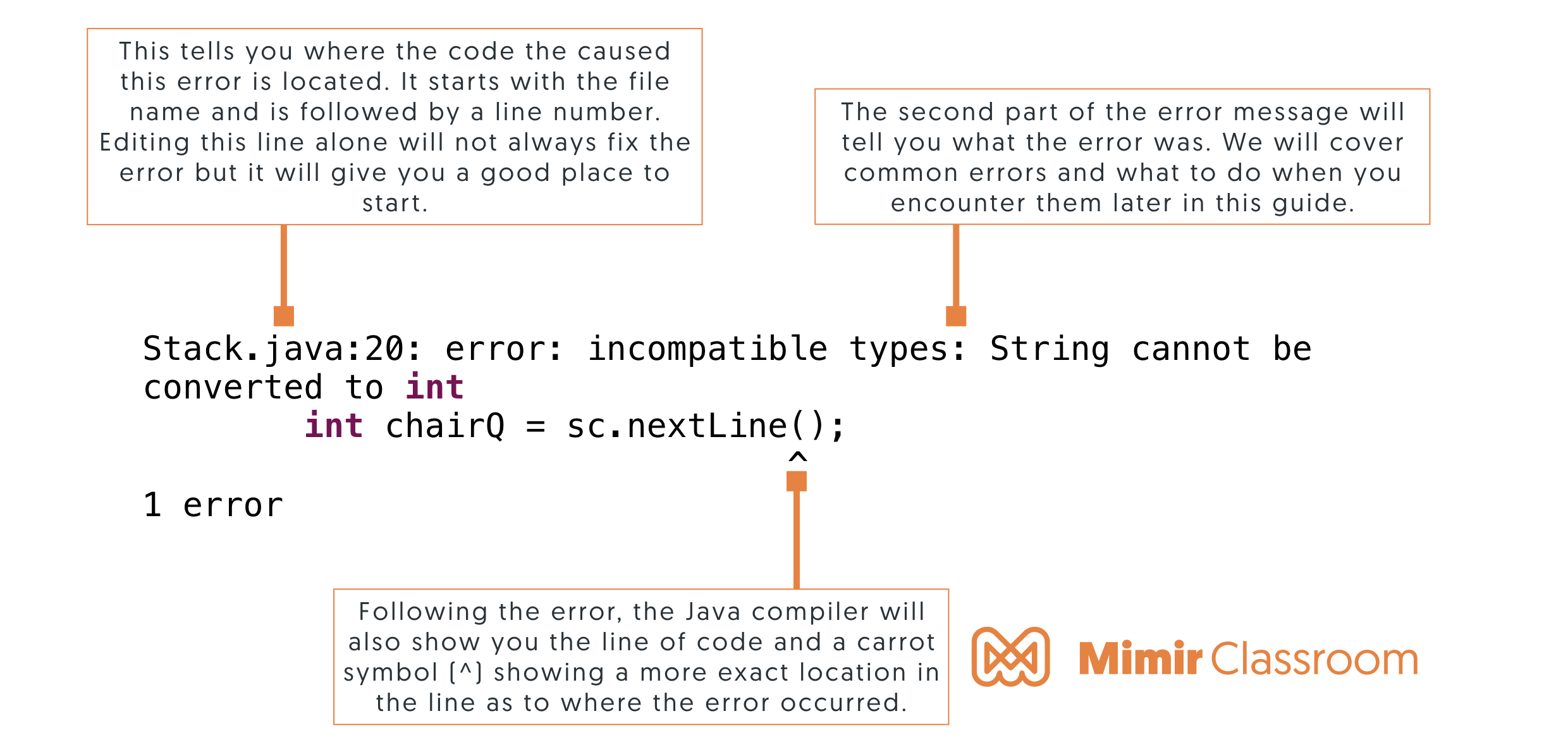
To start off, here is a quick refresher on how to read an error in the Java stack trace.
1. ’;’ expected
public class Driver{

    public static void main (String[] args){

    	System.out.println("Hello")

    }
}
This error means that you forgot a semicolon in your code. If you look at the full error statement, it will tell you where in your code you should check within a few lines. Remember that all statements in Java must end in a semicolon and elements of Java like loops and conditionals are not considered statements.
2. cannot find symbol
public class Driver{

    public static void main (String[] args){

    	int variableOne = 1;
    	int sum = variableOne + variableTwo;

    }
}
This error means that Java is unable to find an identifier that it is trying to work with. It is most often caused by the following:
- You misspelled a variable name, class name, or a keyword somewhere. Remember that Java is case sensitive.
- You are trying to access a variable or class which does not exist or can not be accessed.
- You forgot to import the right class.
3. illegal start of expression
public class Driver{

    public static void main (String[] args){

    	public int sum(){

    	}

    }
}
This error usually occurs when your code does not follow Java’s standard structure. Check the nesting of your variables and ensure that all your { } and ( ) are in the right place..
4. class, interface, or enum expected
public class Driver{

    public static void main (String[] args){

    	int variableOne = 1;

    }
}

System.out.println("Hello");
This error is usually caused by misplaced { }. All code in Java needs to be contained within a class, interface, or enum. Ensure that all of your code is within the { } of one of those. We often have seen this error when there is an extra } at the end of your code.
5. reached end of file while parsing
public class Driver{

    public static void main (String[] args){

    	int variableOne = 1;


}
This error usually occurs when you are missing a } somewhere in your code. Ensure that for every { you have one } in the right place.
6. missing return statement
public class Calculator{

	public Calculator(){

	}

	public int sum(int one, int two) {
		int sum = one + two;
	}

}
This error usually means one of two things:
- Your method is expecting a return statement but is missing one. Ensure that if you declared a method that returns something other than void and that it returns the proper variable type.
- Your return statements are inside conditionals who’s parameters may not be reached. In this case, you will need to add an additional return statement or modify your conditionals.
7. ‘else’ without ‘if’
import java.util.Scanner;
public class Driver{

    public static void main (String[] args){

    	Scanner scan = new Scanner(System.in);
    	int in = scan.nextInt();

    	else if( in > 10)
    		System.out.println("Your input is greater than 10");
    	else
    		System.out.println("Your input is less than 5");

    }
}
This error means that Java is unable to find an if statement associated to your else statement. Else statements do not work unless they are associated with an if statement. Ensure that you have an if statement and that your else statement isn’t nested within your if statement.
8. ‘(‘ expected or ‘)’ expected
import java.util.Scanner;
public class Driver{

    public static void main (String[] args){

    	Scanner scan = new Scanner(System.in);
    	int in = scan.nextInt();

    	if in > 10)
    		System.out.println("Your input is greater than 10");
    	else
    		System.out.println("Your input is less than 5");

    }
}
This error means that you forgot a left or right parenthesis in your code. If you look at the full error statement, it will tell you where in your code you should check. Remember that for every ( you need one ).
9. case, default, or ‘}’ expected
This error means that your switch statement isn’t properly structured. Ensure that your switch statement contains a variable like this: switch (variable). Also ensure that every case is followed by a colon (:) before defining your case.
10. ‘.class’ expected
public class Calculator{

	public Calculator(){

	}

	public int sum(int one, int two) {
		int s = one + two;
		return int s;
	}

}
This error usually means that you are trying to declare or specify a variable type inside of return statement or inside of a method calls. For example: “return int 7;» should be «return 7;»
11. invalid method declaration; return type required
public class Thing{

	int mode;

	public Thing(){
		mode = 0;
	}

	public setMode(int in){
		mode = in;
	}
}
Every Java method requires that you declare what you return even if it is nothing. «public getNothing()» and «public static getNumber()» are both incorrect ways to declare a method.
The correct way to declare these is the following: «public void getNothing()» and «public static int getNumber()»
12. unclosed character literal
public class Driver{

    public static void main (String[] args){

    	char a = b';

    }
}
This error occurs when you start a character with a single quote mark but don’t close with a single quote mark.
13. unclosed string literal
public class Driver{

    public static void main (String[] args){

    	System.out.println("Hello World);

    }
}
This error occurs when you start a string with a quotation mark but don’t close with a second quotation mark. This error can also occur when quotation marks inside strings are not escaped with a backslash.
14. incompatible types
This error occurs when you use the wrong variable type in an expression. A very common example of this is sending a method an integer when it is expecting a string. To solve this issue, check the types of your variables and how they are interacting with other types. There are also ways to convert variable types.
15. missing method body
public class Calculator{

	int mode;

	public Calculator(){

	}

	public void setMode(int in);{
		mode = in;
	}

}
This error commonly occurs when you have a semicolon on your method declaration line. For example «public static void main(String args[]);». You should not have a semicolon there. Ensure that your methods have a body.
16. unreachable statement
public class Calculator{

	int mode;

	public Calculator(){

	}

	public void setMode(int in);{
		mode = in;
	}

}
This error means that you have code that will never be executed. Usually, this is after a break or a return statement.
If you have any other errors that you find your students encountering often, reach out to us at hello@mimirhq.com and let us know!
