—}}
������� �������� �������
��������� ������
��������� �����
����������� / Covid-19
��������� ����� ��� ��������
������������� ��������
�������� �����
������� �����
�������
��������� ����������� �����
�������� �������
����������
��������� �������
������� �� �����
��� �����
4�4 �����
��������
������� �����
�����
������������
�������� �����
KIA-�����
���� �����
Hyundai �����
VAG �����
������ �������
����� ������: �������������� �����
����-�������� (�� ���� �������, ��������)
���������� �������
���������� �������: �����������
���������� �������: ��������
���������� �������: �������
���������� �������: ���� � �����
���������� �������: ������
���������� �������: ���� ����������, �������
���������� �������: ������
���������� �������: �������
���������� �������: ���������
���������� �������: �����
���������� ��������-�������
�������� ������
�������� ������: ��������
�������� ������: ������� ������ (��������)
�������� ������: ����-��� (�������)
�������� ������: �������
�������� ������: ���������
�������� ������: ���� ����������, �������
�������� ������: ��������
�������� ������: ������
�������� �������
�������� ������� — ����� �������
�������� ������� — ��������
�������� ������� — �������
�������� ������� — ���� ����������, �������
�������� ������� — ����������
����� �������
��� �����
��� ����� — ��������
��� ����� — ����������. �����
��� ����� — ����������: ������� ������
��� ����� — ����������: ������� �����
��� ����� — ����������: ������� ���������, �������, ������
��������
�������� (��������)
������ � ��. ��������
������� (������� ����������� �������)
������
�����������
�������� �����
������� ��������
����������� �����
�����������
��������� �����
����� ���������� �����
������. ��������.
������� �������
����������
��������� ��������
������ �� ���������
���������� �����
������� � ����
�����������
���� �����
������������� � �������������
����������
���������
�������� �����
�����, ������, ����������
���������
��������
�������� ��������
������ �����
����������
�����������
����������� �����
������� �����
������� �����: ��������
������� �����: �������� ��������
���� ����
���� ����
�������� �����
������ ����
�����������
��������-��
GPS �����
��������� �����
�����-�����
���������
����. � ������ ������
������ �����
������� � PR
����������
������������
���������� �����
��������
����� ���������
������� � �����
�����������
�����������
������ ���������
������������ ��
������������ ������
������������ ����� (��������)
����
����� ����������
������
����������������� � ����������
����� ������������ ����������
����� ���������������
��� ������������ ������
������, �����, �������
������, �����, �������
���������� ������
���� �����������
�������������
������ ���������
���������� ������� ���������
��������� ������� ���������
�����������
������������� �������
������������
������������
�������
��������� �����
���
������������� ������������
����� ������
������������� �����
���������� �����
��������� �����
��� ������ �������
������ �����
�������
����� ���������
������ �� (��. ����� ����������)
���������� ��
��������� �� (������������� ��.)
���������� ������� ��
�� ������������� ���� ��
������� ������ �� (��������� �����)
������� ���� �� (��������� �-��)
������ �� (����������� �-��)
�� �������� �� (�������� ��., � ���� 18)
������ ����� �� (�. �������)
����� �� (��. ��������� ��������)
������� ������ �� (��������� �-��)
������� �� (��������� �-��)
�� ���. (����� �������)
����������� ������ ���.
������������ ���.
����� ����� ���. (60-��� ������� ��.)
����� �� (�������� ��.)
������� ���� ��
��� ������ �����
������� ������
��������� �����
��������� ���� �����������
������� �� ����� iHerb
�������� �������
���������� � �������� �������
����� �������� ����
������ �����
����������� ������ ������
��� ������ ���������!
������-�������� �����-�������
����� ����������
������������
����� �������
������������ ���� ��������
������� ��� �����
���� �����!
����������� �����
������-��������
�����������
����� ������������ �����
��������
����� �����������
����� ����������
����� ����� �����������
������ � ����������� (������������)
�� ������ ������� ������ �� �������.
���������� ���������������� ������.
- �������
- �����������
- �����-�����
����� �����. ���-��� ����� «������� ������»…
�������� (�� ��� �����-�������)
� �������� �� NN.RU
� ��� ���� ��� ������ �� NN.RU, ������� ������ �� ���� �� ����� ���� ����������.
�������������� �������, ����� ����� ����� ������.
� ���������� �����
����������
���-��� ����� «������� ������» � �� ��������, ������ ���������.
��� ������? ������ ������� �����?
������� �� ������� ���������.
�� � ����� ��� ������ ����������� ��� ������, ����������, ����� ����� ������ ��� �������.
���� ��� ������, ���������� �� ���� ������
�������, ������� ��������� �� ��� �� �����������?

�������� ������� �������� � ���������� ��������� ��� ������� ������ — http://www.aw*ella.ru/hp1120-12.php.htm
�� ��� ��� ������� ������)
�ӣ �� ���� ������ ����������� ������� ����������)
����� ������ �����������.
����� � ������ ��� �������� ������?
�-� ���������.

��� ����� ������ ����������, �� ������� ��� ����������, ����� ���� ������������� �����, ������� ����� ������� ����� �� ����������������� �������� ������. ���������� �� ������� ��. ����� ����������� ���������� �� ���� �����������, �������� ����������, � ���������� ��� ������� ���� �������.
����� ��������: ����� ������� �� �ţ, ������ �������� ��, ����� �������� ������, ������ ������ (� ������, �� �������, �����!) � ����� «������� ������» ����� ������ ����� ��� ��� ��������?
� ��� ������ �� ����������? �� ������� ������ ����� �� ������������� ��������� ��� ������.
�������-�� �� ݣ�����, �� �ӣ ����� �����, ��� ������ �������!(
😀 ��� ��� ����)
… � ���� ������ �� �����….
�� ������� �, ���� ���� ������� ��������� ����������(
��� �����, � ������� ��������� ������.
����� ����, ���ޣ� ������� �� �������….(
��� �� ������ ���������?
…�����-�� ������� ������������� �����…
��� ������������� ��������� �� ��������. ���� ����� ��� ����� ��������.
�������� �����(�)
…�����-�� ������� ������������� �����…
���� �� �ţ ������ ��� �������� ������ �� ��� ����������?
����������� ������ ����������, ������ �� ����������, ��� �����?
���� �� ������� �� �����. ���� ������� � ������ �� ���������� �� ������ ������ ����� ��� � �������� � ��� �� ������.
����������� �ݣ ���. �� ݣ�����(
������ ���������� ���������, �������.
������� «�������������…»
������ �������, �� ��������(
«�����» �� �����(((
����� ����� ���� ��� ���� �� ) ��� �� �� ����� ������� ������ ���� ������� ������ ������ � ������� ������ ����� � ���������. � ��� �� �ӣ ����� ������ ��� �� ������. ���� �� ������ �������� ������ ��� �� ��������� ����� ���� ������� �� � ��� ���� �� �ӣ � �������.
������ ���?
������ ����� ������ ������?
��� ����� ���������?
��� ��������� �� ���� ��� ����� ������ ��� ������
?
…�� ��� ��������� ������… :-[
�������� �������. ���� �������� ��� �������������� ����������,���-������ ����� ��������� ��������� ������.
��� ��������, ��� ���������� ��� ��� ��������?
����� ��������, ��������� �� �������� � ����� ��������. �������� ������� ����� ��������.
�������!)) *yahoo*
������� ������� ���� ��������������. *yes*
����� ����� �������� �����/����� � �.�., �� � ������� ���� ��� ��������.
� �������� �� NN.RU
� ��� ���� ��� ������ �� NN.RU, ������� ������ �� ���� �� ����� ���� ����������.
�������������� �������, ����� ����� ����� ������.
� ���������� �����
����������
������� �������� �������
��������� ������
��������� �����
����������� / Covid-19
��������� ����� ��� ��������
������������� ��������
�������� �����
������� �����
�������
��������� ����������� �����
�������� �������
����������
��������� �������
������� �� �����
��� �����
4�4 �����
��������
������� �����
�����
������������
�������� �����
KIA-�����
���� �����
Hyundai �����
VAG �����
������ �������
����� ������: �������������� �����
����-�������� (�� ���� �������, ��������)
���������� �������
���������� �������: �����������
���������� �������: ��������
���������� �������: �������
���������� �������: ���� � �����
���������� �������: ������
���������� �������: ���� ����������, �������
���������� �������: ������
���������� �������: �������
���������� �������: ���������
���������� �������: �����
���������� ��������-�������
�������� ������
�������� ������: ��������
�������� ������: ������� ������ (��������)
�������� ������: ����-��� (�������)
�������� ������: �������
�������� ������: ���������
�������� ������: ���� ����������, �������
�������� ������: ��������
�������� ������: ������
�������� �������
�������� ������� — ����� �������
�������� ������� — ��������
�������� ������� — �������
�������� ������� — ���� ����������, �������
�������� ������� — ����������
����� �������
��� �����
��� ����� — ��������
��� ����� — ����������. �����
��� ����� — ����������: ������� ������
��� ����� — ����������: ������� �����
��� ����� — ����������: ������� ���������, �������, ������
��������
�������� (��������)
������ � ��. ��������
������� (������� ����������� �������)
������
�����������
�������� �����
������� ��������
����������� �����
�����������
��������� �����
����� ���������� �����
������. ��������.
������� �������
����������
��������� ��������
������ �� ���������
���������� �����
������� � ����
�����������
���� �����
������������� � �������������
����������
���������
�������� �����
�����, ������, ����������
���������
��������
�������� ��������
������ �����
����������
�����������
����������� �����
������� �����
������� �����: ��������
������� �����: �������� ��������
���� ����
���� ����
�������� �����
������ ����
�����������
��������-��
GPS �����
��������� �����
�����-�����
���������
����. � ������ ������
������ �����
������� � PR
����������
������������
���������� �����
��������
����� ���������
������� � �����
�����������
�����������
������ ���������
������������ ��
������������ ������
������������ ����� (��������)
����
����� ����������
������
����������������� � ����������
����� ������������ ����������
����� ���������������
��� ������������ ������
������, �����, �������
������, �����, �������
���������� ������
���� �����������
�������������
������ ���������
���������� ������� ���������
��������� ������� ���������
�����������
������������� �������
������������
������������
�������
��������� �����
���
������������� ������������
����� ������
������������� �����
���������� �����
��������� �����
��� ������ �������
������ �����
�������
����� ���������
������ �� (��. ����� ����������)
���������� ��
��������� �� (������������� ��.)
���������� ������� ��
�� ������������� ���� ��
������� ������ �� (��������� �����)
������� ���� �� (��������� �-��)
������ �� (����������� �-��)
�� �������� �� (�������� ��., � ���� 18)
������ ����� �� (�. �������)
����� �� (��. ��������� ��������)
������� ������ �� (��������� �-��)
������� �� (��������� �-��)
�� ���. (����� �������)
����������� ������ ���.
������������ ���.
����� ����� ���. (60-��� ������� ��.)
����� �� (�������� ��.)
������� ���� ��
��� ������ �����
������� ������
��������� �����
��������� ���� �����������
������� �� ����� iHerb
�������� �������
���������� � �������� �������
����� �������� ����
������ �����
����������� ������ ������
��� ������ ���������!
������-�������� �����-�������
����� ����������
������������
����� �������
������������ ���� ��������
������� ��� �����
���� �����!
����������� �����
������-��������
�����������
����� ������������ �����
��������
����� �����������
����� ����������
����� ����� �����������
������ � ����������� (������������)
�� ������ ������� ������ �� �������.
���������� ���������������� ������.
�����
���� (�����)
��������� �����
�������
For all guys missing support for their devices regarding this error here a few facts
The error is caused by a micro switch that is pushed by the white lever while closing the door.
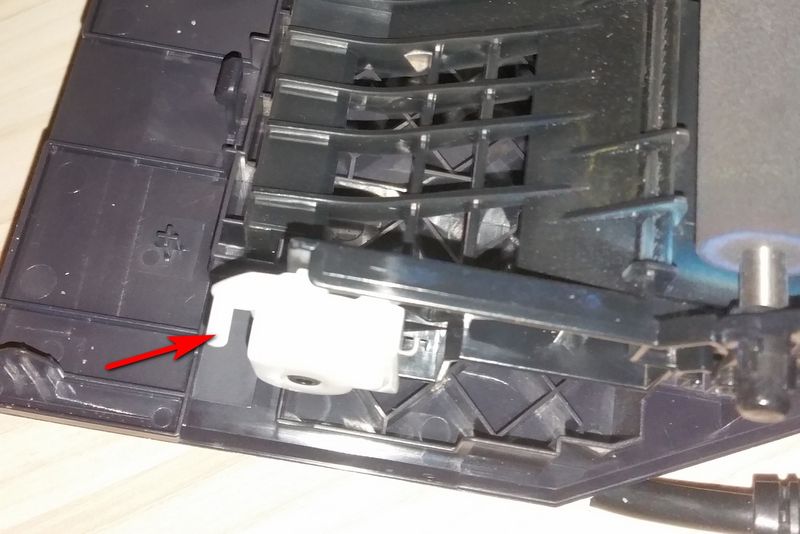
If that piece is broken switch can not work and there fore you get the error message.
Like it or not but you are a lucky one cause you only have to fix that tiny piece by glueing or by replacing it and buying it as a used part cause now I have a few of them after I had to repair.
If your piece is looking like this things become more serious cause then most likely your micro switch is dead.
You wanna know if that is dead?
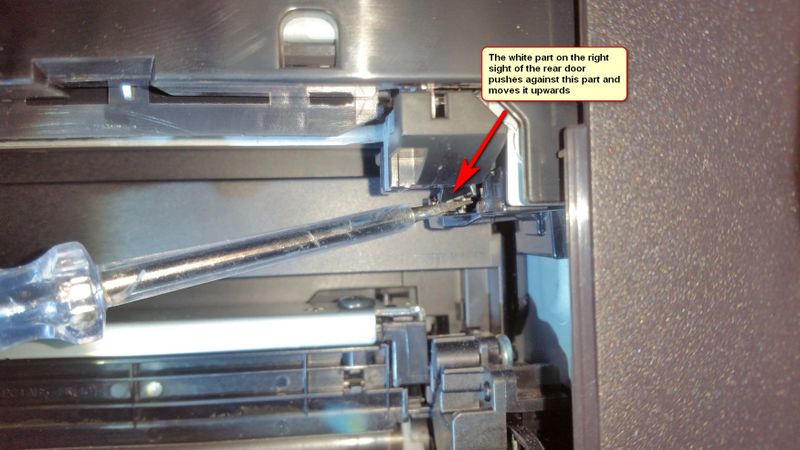
Well, that is pretty easy to check if you have understood how it works.
The rear door and its white lever is driven by a spring that let the lever press upwards.
So the micro switch must be above that point where the white lever goes into the device corpus.
Here is the picture where you can see a screwdriver starting to do the job the lever normally does.
But the screwdriver allows me to show how it works.
You have to push the micro switch a bit more upwards and then the error message will disappear assuming the door is closed.
If you are not able to work from down below the printer and in parallel checking the display there is another trick.
If you push the switch upwards you can not see or hear that it works but if you let it down again you will hear a sound of a relais and that will appear as a signal that rear door is open (again). Press the microswitch upwards and then let the switch fall down again to hear a tiny but hearable sound of a relais.
Well, at least now you can understand what is causing the problem but to solve it that is another side of the coin I have not identified yet.
But you should ask your local dealer and HP why
* they do not deliver these documentations ?
* HP uses a microswitch that breaks after 10 times of usage cause our printer have below 5000 printed pages , no jams, therefore no need to open this door ?
* HP quality control did not stop this faulty switch desaster by a new supplier / different switch ?
A micracle that HP does not explain a solution or offers these parts as far as I had checked the reference and part list. The only thing I found out is that the micro sensor or switch regarding rear door open error is called SR607 and that this SR607 is connected to the high voltage Power supply. But no part number.
How to fix that problem?
I still do not know if there is a switch I can exchange and how.
But I fear that I have to remove all body covers to get access to that area and to exchange that piece.
No, I do not know where to buy these parts and if the switch is dead or something is broken inside but I assume that your local HP dealer won`t be able to sell you the parts you need to get it fixed.
The only chance might be to buy dead M276 that died by another cause than the rear door is open error.
I will try to fix it cause I had bough dead machines as spare part donators in the hope to fix the problem.
And this is a very expensive repair cause the machines are heavy, shipping is quite expensive so I had to pay over 75$ for the complete dead machine — instead of buying a spare part from HP for 5 or 10€ including shipping.
What a shame and desaster regarding to call themselves a sustainable company while kicking the devices in to the trash can by simply not offering parts and support which could be delivered easily …
If HP does not change that I will be gone — after 30+ years of HP printer purchases.
For all guys missing support for their devices regarding this error here a few facts
The error is caused by a micro switch that is pushed by the white lever while closing the door.
If that piece is broken switch can not work and there fore you get the error message.
Like it or not but you are a lucky one cause you only have to fix that tiny piece by glueing or by replacing it and buying it as a used part cause now I have a few of them after I had to repair.
If your piece is looking like this things become more serious cause then most likely your micro switch is dead.
You wanna know if that is dead?
Well, that is pretty easy to check if you have understood how it works.
The rear door and its white lever is driven by a spring that let the lever press upwards.
So the micro switch must be above that point where the white lever goes into the device corpus.
Here is the picture where you can see a screwdriver starting to do the job the lever normally does.
But the screwdriver allows me to show how it works.
You have to push the micro switch a bit more upwards and then the error message will disappear assuming the door is closed.
If you are not able to work from down below the printer and in parallel checking the display there is another trick.
If you push the switch upwards you can not see or hear that it works but if you let it down again you will hear a sound of a relais and that will appear as a signal that rear door is open (again). Press the microswitch upwards and then let the switch fall down again to hear a tiny but hearable sound of a relais.
Well, at least now you can understand what is causing the problem but to solve it that is another side of the coin I have not identified yet.
But you should ask your local dealer and HP why
* they do not deliver these documentations ?
* HP uses a microswitch that breaks after 10 times of usage cause our printer have below 5000 printed pages , no jams, therefore no need to open this door ?
* HP quality control did not stop this faulty switch desaster by a new supplier / different switch ?
A micracle that HP does not explain a solution or offers these parts as far as I had checked the reference and part list. The only thing I found out is that the micro sensor or switch regarding rear door open error is called SR607 and that this SR607 is connected to the high voltage Power supply. But no part number.
How to fix that problem?
I still do not know if there is a switch I can exchange and how.
But I fear that I have to remove all body covers to get access to that area and to exchange that piece.
No, I do not know where to buy these parts and if the switch is dead or something is broken inside but I assume that your local HP dealer won`t be able to sell you the parts you need to get it fixed.
The only chance might be to buy dead M276 that died by another cause than the rear door is open error.
I will try to fix it cause I had bough dead machines as spare part donators in the hope to fix the problem.
And this is a very expensive repair cause the machines are heavy, shipping is quite expensive so I had to pay over 75$ for the complete dead machine — instead of buying a spare part from HP for 5 or 10€ including shipping.
What a shame and desaster regarding to call themselves a sustainable company while kicking the devices in to the trash can by simply not offering parts and support which could be delivered easily …
If HP does not change that I will be gone — after 30+ years of HP printer purchases.
Сервисные инженеры не раз сталкивались с тем, что принтеры и МФУ Samsung или Xerox выдают ошибку «закройте крышку». При этом активатор на месте, давит на планку микрика, микрик срабатывает.
Зачастую проблема кроется именно в микрике. А точнее в «налёте» на контактах внутри микровыключателя.
Проверяется просто- берёте мультиметр, замеряете сопротивление на ножках микрика. Должно быть 0 Ом. Если у вас 10 Ом или, допустим, 50 Ом, то возникает описанная выше проблема. Надо исправлять.Чем и займёмся в данной статье.
Я сталкивался с такой проблемой несколько раз на Samsung SCX-4623fn, один раз на Xerox phaser 3300MFP.
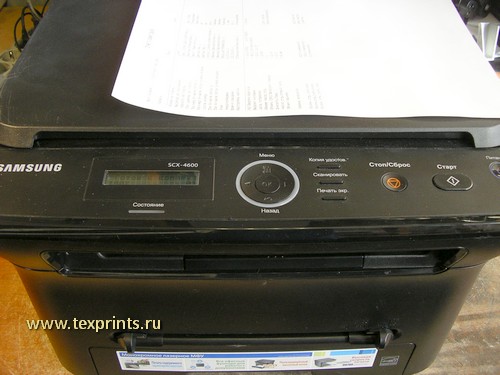
Сегодня принесли Samsung SCX-4600. На его примере наглядно доберемся до сути. На 4623f, 4623fn, принтерах с такой же базой, на ксероксах на базе этих самсунгов принцип тот же.
Начнем с инструмента. Нам понадобится:
— крестовая отвёртка (лучше с магнитным наконечником)
— тонкая шлицевая отвёртка
— изопропиловый спирт
— паяльник + необходимое к нему
— пара ватных палочек
Итак. Вот доброволец. На экранчике надпись «закройте крышку». Крышка закрыта ( на фото не видно- можете поверить наслово)
Причем аппарат после включения протестировался, прогрелся, вышел в готовность. Запустили печать отчета о конфигурации — получили ошибку.
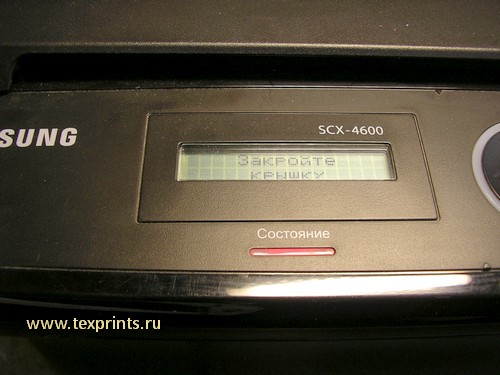
Микровыключатель(микрик) находится на плате питания JC44-00179A.
Порядок действий такой:
1. Снимаем заднюю крышку
2. Снимаем поддон с платой питания
3.
-Меняем плату питания
-разбираем микрик не выпаивая
-выпаиваем микрик и разбираем
-выпаиваем микрик и меняем
(выбирайте на своё усмотрение.)
4. Собираем.
Начнем. Вынимаем лоток с бумагой. Поворачиваем МФУ «спиной». Откручиваем пять саморезов и снимаем заднюю крышку.
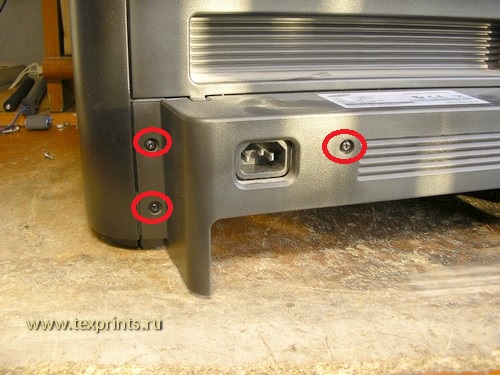
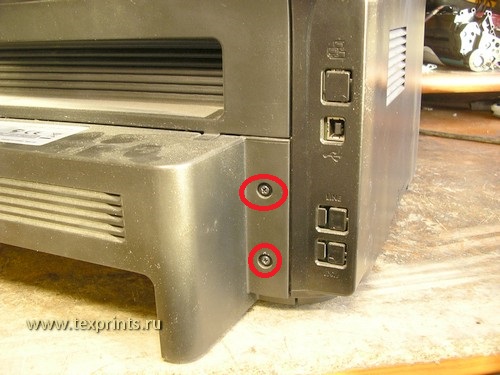
Далее сзади отключаем печной разъем. Откручиваем два самореза. Этому слева будет частично мешать боковая крышка. Можно её снять.
Но я поленился. Шлицевой отверткой отвел края крышки в сторону и выкрутил саморез. Справа ничего не мешает.
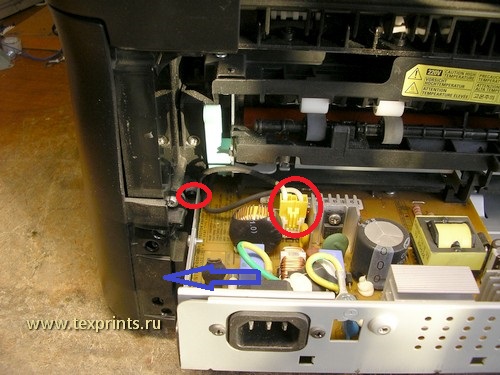
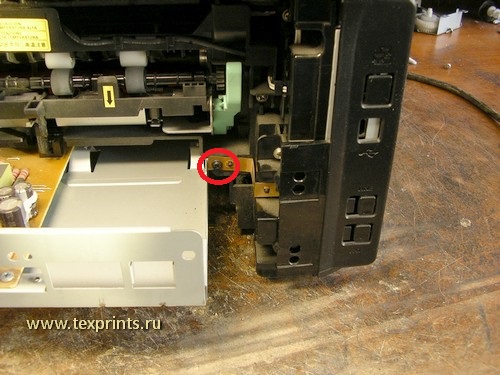
Теперь переворачиваем МФУ вверх дном. Желательно вниз что-то положить, поскольку крышка сканера легко царапается. Царапины очень заметны. Положили вверх дном и откручиваем саморезы по периметру металлического поддона. И два самореза в центре.
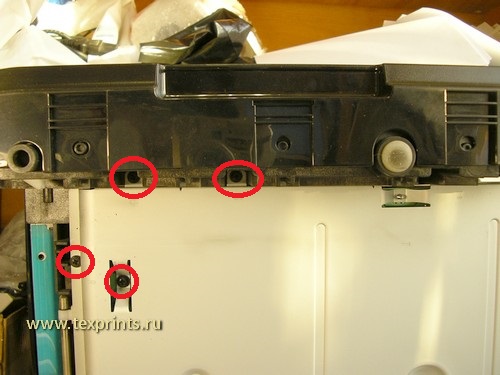
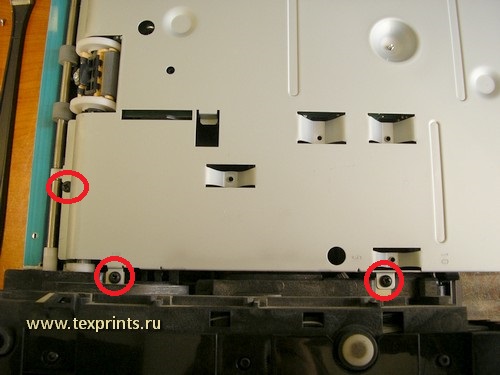
Открутили. Теперь приподнимаем поддон. Отключаем первый коннектор, поднимаем поддон вертикально и отключаем второй коннектор.
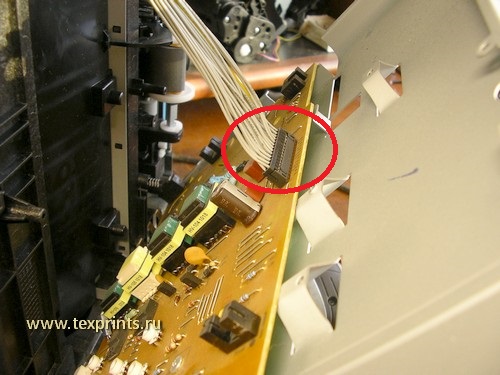
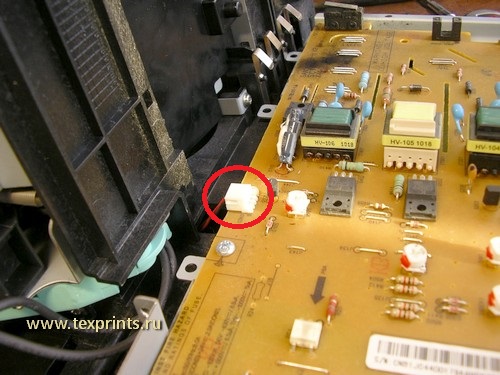
Теперь ничего не мешает снять поддон с платой. Снимаем, кладем на стол. Замеряем сопротивление микрика — 11 Ом в моём случае.
Берем тонкую шлицевую отвертку(или канцелярский нож) и аккуратно поддеваем и снимаем крышку микрика. Ниже показан микрик на плате уже со снятой крышкой. И микрик в сборе. На фото синим овалом выделена контактная группа, которую надо зачистить. Я попробовал кончиком канцелярского ножа. Это работа для извращенцев или для тех, у кого нет паяльника. В принципе получилось почистить. Чистим, замеряем сопротивление. Должен получиться чистый ноль или КЗ.
Для тех, кто не дружит с паяльником: вычистили, поставили крышку микрика обратно. Переходим к пункту обратной сборки.
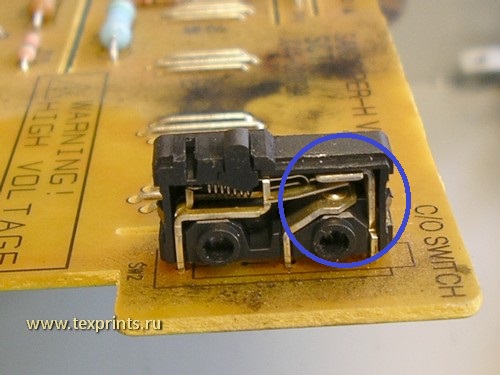
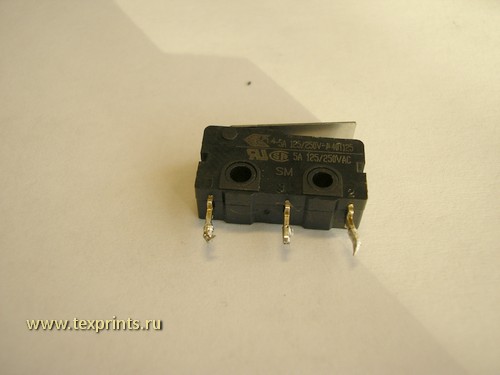
Для тех, кто старается делать качественнее, идём дальше. Надо выпаять микрик. Для этого надо снять плату с поддона.
Откручиваем винты и снимаем плату (на фото не попала пара винтов в районе разъема 220В — найдете.)
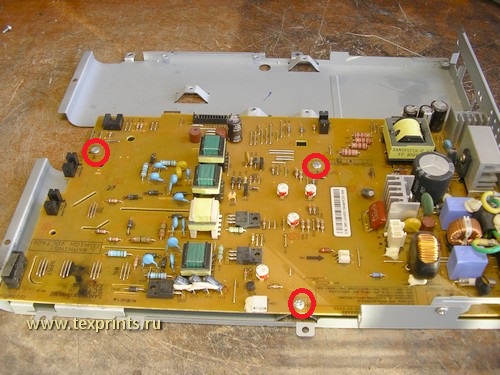
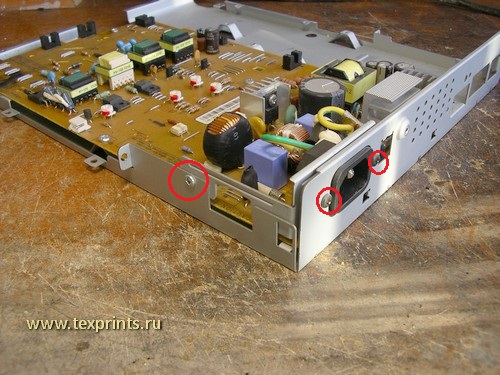
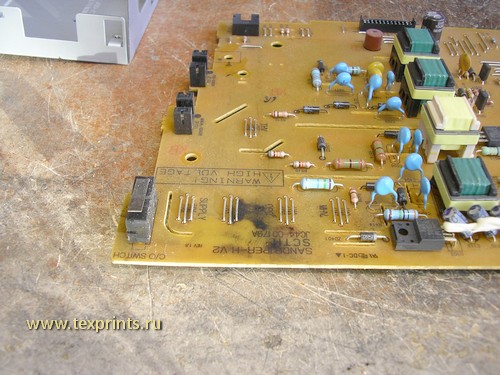
Выпаиваем микрик. Кладем на чистый лист. Снимаем крышку, снимаем планку-активатор. Вытаскиваем два контакта. Всё отчищаем.
Ставим обратно, ставим планку-активатор, ставим крышку. Замеряем сопротивление. Получаем 0 Ом, радуемся, припаиваем микрик обратно.
Прикручиваем плату к поддону.
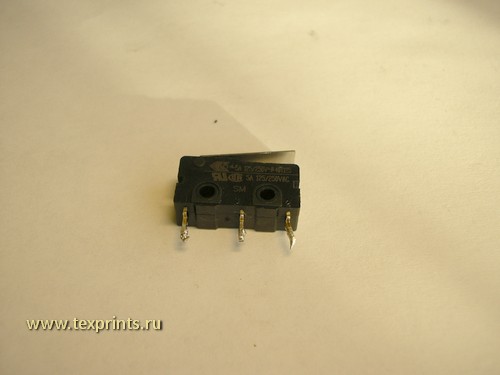
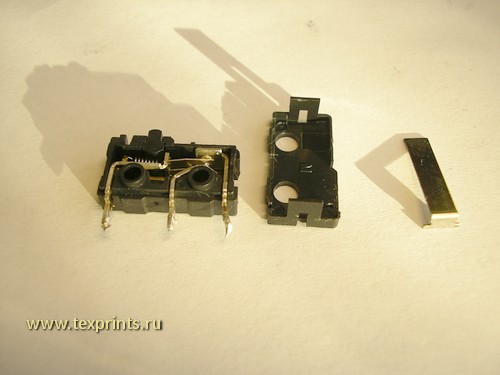
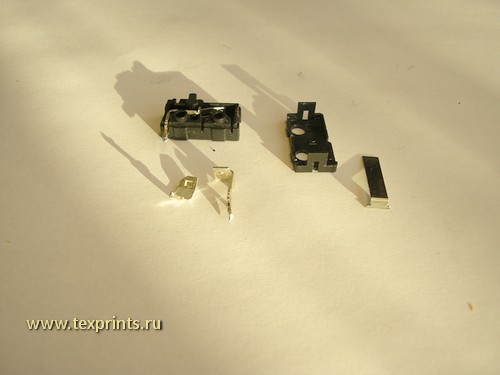
Теперь обратно собираем аппарат. Подсоединяем коннекторы в обратном порядке: сначала маленький, потом большой.
Ставим поддон, закручиваем саморезы по периметру и пару в центре поддона.
Переворачиваем с головы на ноги МФУ и поворачиваем «спиной». Закручиваем еще два самореза и подключаем коннектор 220В.
Ставим заднюю крышку, закручиваем пять саморезов.
Всё. Вставляем картридж, лоток с бумагой. Включаем, печатаем конфигурацию или копируем. Всё работает.
Протираем снаружи. Пакуем.
 Мы можем выполнить данный ремонт за вас!
Стоимость ремонта — 1700р в стационаре.
Выезд по Москве: 400р
Выезд по Московской области: 600р
(в стоимость входит профилактика и все необходимые запчасти)
Свяжитесь с нами по ремонту
- Дата: 29.07.2009
- Номер: faq00002411_005
- Печать
- Электронная почта
Все крышки устройства Brother плотно закрыты, однако, на дисплее устройства отображается сообщение «Открыта крышка». Как устранить сообщение?
Для устранения сообщения «Открыта крышка» следуйте инструкциям ниже:
- Нажмите на кнопку разблокировки передней крышки и откройте её.
- Извлеките блок фотобарабана с тонер-картриджем из устройства.
Установите заново блок фотобарабана с тонер-картриджем в устройство.
Закройте переднюю крышку и убедитесь, что левая и правая стороны крышки плотно закрыты, особенно левая.
Если сообщение «Открыта крышка» продолжает отображаться на дисплее, разверните устройство Brother задней частью к вам.
-
Откройте заднюю крышку, потянув за выступ в центре крышки. Затем откройте крышку узла термозакрепления тонера, потянув за лапки с левой и правой стороны. Лапки будут помечены синими наклейками с белым рисунком.
Если внутри устройства обнаружилась бумага, аккуратно извлеките её.
Закройте крышку узла термозакрепления тонера, а затем заднюю крышку. Закрывайте их плотно.
Т.к. вы неавторизованы на сайте. Войти.
Т.к. тема является архивной.
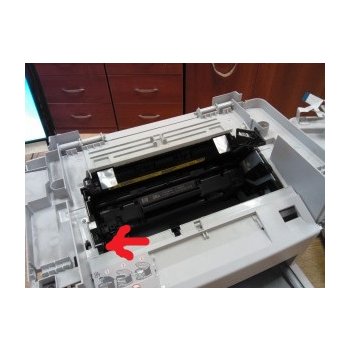
Дырку вижу, насчёт датчика не уверена. (
Как он должен выглядеть?
. какая-то полоска металлическая видна. 
Если на неё нажать при открытой крышке то что происходит? 
Район озвучила, подсказки по сервисам и ценам получила. Починкой займусь после выходных.
Пятница!)) *yahoo*
Большое спасибо всем откликнувшимся. *yes*
Объявления на НН.РУ — Техника
Продаётся отличный нетбук HP mini 110-3050er Оригинальные зарядное устройство и АКБ (батарея). Срок работы от аккумулятора примерно 3.
Цена: 6 500 руб.
Оптический привод DVD-RW Panasonic UJ8A0 от ASUS N53S Скорость записи: CD-R: 24x CD-RW: 16x DVD-RAM: 5x DVD-R.
Цена: 400 руб.
Продаю устройство для чтения и записи карт памяти EXPLAY новое.Не пользовались ни разу,в упаковке.Без торга
Цена: 250 руб.
Продам Кулер от Ноутбука Asus N53 б/у рабочий Модель кулера KSB06105HB Возможна отправка по России
Цена: 650 руб.