
Интересная ошибка – «Объект больше не существует». Но в словаре о нем есть сведения. То в чем же дело?
Возможные варианты:
- После начала рабочие мероприятия вашей сессии, кто-то удалил таблицу. Хотя реально я не представляю, как это может быть. Есть же блокировки.
- Было выполнено неполное восстановление на момент времени, когда таблица удалялась.
- Таблица имеет логическую коррупцию
- Проблемы с индексами.
Как побороть эту ошибку? Варианты:
- Нужна ли на самом деле эта таблица? Если не нужна, то удаляем. Нет таблицы — нет проблемы.
- Пересоздать индексы ( удалить, а затем создать)
- Перенести таблицу в другое табличное пространство
- Удалите таблицу и восстановите ее из копии
Обычно
ANALYZE TABLE  VALIDATE STRUCTURE
DBV
в этом случае беспомощны.
Вас заинтересует / Intresting for you:

Спасибо за подсказанное решение с ошибкой ORA-08103

apv ответил в теме #8757 5 года 3 мес. назад
Да, ошибка довольно частая. Перестройка индексов действительно часто решает проблему.

Спасибо за предложенное практическое решение проблемы!
Ваш аккаунт
Разделы
ORA-08103 occurs when we try to run a DDL statement against an object which doesn’t exist. Ah, but you say
they are always there. They will never be dropped
Database objects like tables have two identifiers in the data dictionary, the OBJECT_ID and the DATA_OBJECT_ID: we can see these in the ALL_OBJECTS view. The OBJECT_ID is constant for the lifetime of the table but the DATA_OBJECT_ID — the «dictionary object number of the segment that contains the object» — changes any time DDL is executed against the object. For instance, when a table is truncated or an index is rebuilt.
So to your situation: the ORA-08103 error indicates that the DATA_OBJECT_ID has changed since you ran the cursor. That is while you were running your procedure somebody else executed DDL against one of the tables, constraints or underlying indexes.
Probably this is an unfortunate coincidence and it won’t happen the next time you run the procedure. But you can minimize the chances of another occurrence by changing the way you run the query:
declare
    tabs dbms_debug_vc2coll := dbms_debug_vc2coll ('TABLE_01', 'TABLE_02', 'TABLE_03', 'TABLE_04');
BEGIN
    for idx in 1..tabs.count() loop
        FOR c IN (
            SELECT
                c.owner,
                c.table_name,
                c.constraint_name
            FROM user_constraints c
            WHERE c.table_name = tabs(idx)
            AND c.status = 'DISABLED'
          ) LOOP
             EXECUTE IMMEDIATE 'ALTER TABLE ' || c.table_name || ' ENABLE CONSTRAINT ' || c.constraint_name;
        END LOOP;
    END LOOP;
END;
Enabling constraints takes time (because of the need to validate them). So selecting tables one by one reduces the time you need the DATA_OBJECT_ID to remain fixed.
«How does your procedure above minimize the chance of the same error?»
Your cursor selects all four tables, and hence all four DATA_OBJECT_IDs. Suppose another session modifies TABLE_04 while you are enabling constraints on TABLE_01. When your procedure gets round to TABLE_04 the DATA_OBJECT_ID has changed and you’ll get ORA-08103.
But if you were running my version of the code it wouldn’t matter, because you would not select the DATA_OBJECT_ID for TABLE_04 until you were ready to process it. So you would get the changed DATA_OBJECT_ID (without knowing it was changed.
Причины появления ошибки ORA-08103: object no longer exists при работе с партиционированными таблицами.
Проблемая ситуация: при асихронной работе нескольких процессов возникает ошибка ORA-08103. Каждый процесс работает с одной таблицей, партиционированной по составному ключу; использовались операторы DDL для работы с партициями (создание, очистка) и DML (запросы, пакетная вставка). Каждый процесс работает только со своим диапазоном партиций, а запросы ограничиваются для чтения только из этих партиций. Ошибка возникает только при параллельной работе нескольких процессов.
Итак, вот ситуации, при которых возникает ошибка ORA-08103:
- при выполнении запроса в сессии 1 к непартиционированной таблице происходит TRUNCATE TABLE в сессии 2. Причина: TRUNCATE вызывает обновление адреса сегмента, связанного с таблицей (SYS.DBA_OBJECTS.DATA_OBJECT_ID). Решение: пересмотр алгоритма;
- при выполняющимся запросе в сессии 1 происходит создание партиций с помощью SPLIT PARTITION в сессии 2. Причина: при разрезании партиции DEFAULT на две у партиции DEFAULT обновляется адрес сегмента данных. Решение: использовать ADD PARTITION — в этом случае имеющиеся партиции остаются без изменений;
- при выполняющимся запросе в сессии 1, выбирающим данные из партиции А происходит TRUNCATE PARTITION A в сессии 2. Причина: та же, что и в предыдущих случаях. Решение: пересмотр алгоритма. Деталь: даже если в плане запроса фигурирует PARTITION LIST ALL, но запрос не выбирает данные из очищаемой партиции (например, where id = p_id or p_id is null), ошибка не возникает.
Yesterday, application team informed us about production job failure with error: ORA-08103 Object no longer exists. It was simple select query on object with type VIEW. I tried rerunning query which ran without any issue.
I tried to investigate, if the underlying objects have been dropped when job was running. But object creation time was in the year 2014 so definitely object was not dropped & recreated and it was present during job execution.
I tried to search in metalink support & found following note explaining issue:
OERR: ORA-8103 “object no longer exists” Master Note / Troubleshooting, Diagnostic and Solution (Doc ID 8103.1)
According to note: We get this error when, tables are being dropped/truncated while a SQL statement for those tables is still in execution. In the case of an index, it might be caused by an index rebuild. In other words the object has been deleted by another session since the operation began.
I had a look into aud$ & found one of the underlying table in view was truncated at same time when job was executing select on view. So I got the culprit 🙂
But why oracle gave error: ORA-08103 Object no longer exists even when object was present???
If you check DBA_OBJECTS dictionary view, it has two columns OBJECT_ID & DATA_OBJECT_ID. Each object is assigned a unique number to recognise it in the database (OBJECT_ID). In the same manner, each object is linked to a segment. The data object id is assigned to that segment and any kind of change done on the physical segment would lead to give a change in that number (DATA_OBJECT_ID). Both the numbers are same initially but when the modifications happen on the segment, the DATA_OBJECT_ID changes. Both the OBJECT_ID and DATA_OBJECT_ID are the numbers used by oracle to denote the metadata for the object that is used within the data dictionary. Operations such as Truncate, Move, Rebuild Index, Spilt Partition etc would cause change in DATA_OBJECT_ID of the objects.
So this gives enough justification for oracle error: ORA-08103 Object no longer exists!!
Hope so u will find this post very useful:-)
Cheers
Regards,
Adityanath
Today the toolbox reported the following error.
ORA-08103: object no longer exists
After checking the reason, there is a session operating the table, such as insert, update, etc.. And the toolbox operation happens to be in the select table, so the error is reported.
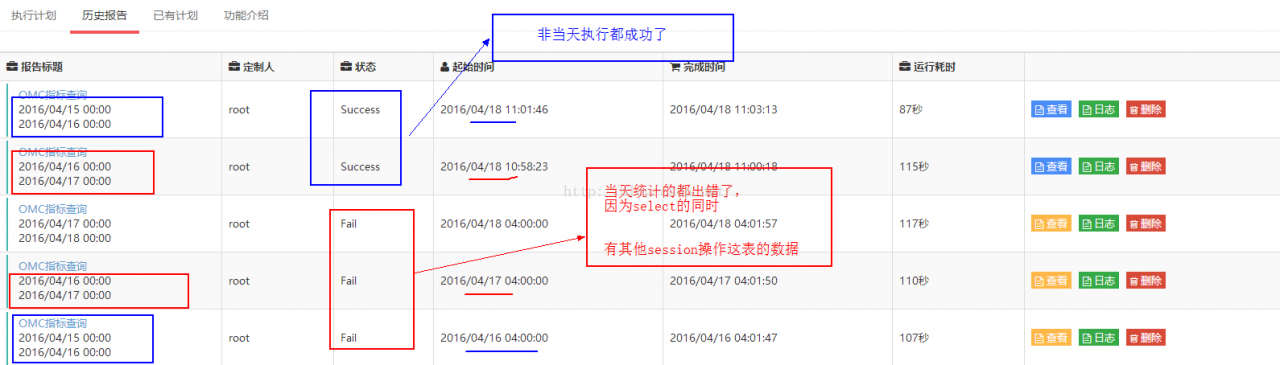
————————————————————————————
ORA-08103: object no longer exists error.
The later description is that one of the processes is performing truncate and insert actions sequentially while another process is doing a select action on the
The latter description is that one of the processes performs truncate and insert actions sequentially, while another process does select on the same table, resulting in ora-8103
metalink information:
fact: Oracle Server – Enterprise Edition 8
symptom: Error performing a SELECT statement
symptom: ORA-08103: object no longer exists
symptom: Table is being truncated by other session
symptom: Analyze table validate structure cascade returns no errors
cause: This ORA-08103 occurs on the next block read after the truncate
command.
The LOCK TABLE IN EXCLUSIVE MODE does not prevent the table from being
SELECTED from. Thus, when the query has started and while this query runs
and the truncate occurs, this ORA-08103 may surface on the next block read.
This is considered intended behavior.
When a TRUNCATE occurs the DATAOBJ# in OBJ$ gets increased by one and thus
may lead to this ORA-08103 ‘object no longer exists’
fix:
Possible solutions are:
– Use DELETE instead of TRUNCATE
– Use SELECT FOR UPDATE as this will try to lock the table
Also ora-08103 has other explanations:
Solution: ‘ORA-8103: Object no longer exists’ When Insert Into External Table after Truncate With Storage Performed
Applies to:
Oracle Server – Enterprise Edition – Version: 10.2.0.1 to 10.2.0.3
This problem can occur on any platform.
Symptoms
The following error can occur on an insert with SQL Loader into an external organized table after a truncate with storage option has been performed
ORA-08103: object no longer exists
SQL> insert
/*+ PARALLEL(a, 8)*/
into iad_o_ast_new a
select /*+ full(b) parallel(b,8)*/
* from iad_o_ast_ext b
where rownum<10000 ;
into iad_o_ast_new a
*
ERROR at line 3:
ORA-08103: object no longer exists
.
Changes
The table was truncated with storage option before the insert .
Cause
The bitmap information is not correct after truncating with the storage option. The solutions update the bitmap information in the tablespace.
Solution
There are two known solutions at this time.
1. Add another datafile to increase the size of the tablespace for the insert. You will need to still use the correct truncate option next time you truncate the table.
2. Drop the table and recreate it. You will need to still use the correct truncate option next time you truncate the table.
Do not truncate the table with the storage option.
Do not truncate the base table using:
truncate ;
truncate drop storage;
Use the following instead:
truncate reuse storage;
Read More:
One of the table is giving us error during running the Select query. Seems like any data is corrupted in it.
Error
--Running on SQLPLUS

SELECT * FROM SCOTT.EMPLOYEES

where DEPARTMENT_ID='000772'

order by 3;

ORA-08103: object no longer exists
–On analysing the index of table getting following error
SQL> analyze index “SCOTT”.”DESCRIPTION” validate structure;
analyze index “SCOTT”.”DESCRIPTION” validate structure
*
ERROR at line 1:
ORA-08100: index is not valid – see trace file for diagnostics
–Tried to export the same table getting following error
ORA-02354: error in exporting/importing data
ORA-08103: object no longer exists
Solution
We are going to create a new table based on this old table, it make loss some data the loss data can be checked in bad_rows table, it will give you detail of loss data or no of rows lost.
Steps for creating new table based on old table
1. Create similar structure of old table as New table with following query
CREATE TABLE new_table_name

AS SELECT * FROM original_table_name WHERE 1=2;
— Example
CREATE TABLE scott.employees_new
as SELECT * FROM scott.employees WHERE 1=2;
2. Create a bad row table which give you number of rows skipped in this process.
create table bad_rows (row_id rowid, oracle_error_code number);
3. Now execute the following script for taking backup and skipping errors row by executing rows one by one in cursor.
Note:
1. Replace the ORIGINAL_TABLE_NAME and NEW_TABLE_NAME
2. Check index on ORIGINAL_TABLE_NAME and check the primary index or unique index not contain null VALUE.
3. Index name should be primary or unique key.
set serveroutput on

DECLARE
  TYPE RowIDTab IS TABLE OF ROWID INDEX BY BINARY_INTEGER;

  CURSOR c1 IS select /*+ index_ffs(tab1 ) parallel(tab1) */ rowid
  from  tab1
  where  is NOT NULL
  order by rowid;

  r RowIDTab;
  rows NATURAL := 20000;
  bad_rows number := 0 ;
  errors number;
  error_code number;
  myrowid rowid;
BEGIN
  OPEN c1;
  LOOP
   FETCH c1 BULK COLLECT INTO r LIMIT rows;
   EXIT WHEN r.count=0;
   BEGIN
    FORALL i IN r.FIRST..r.LAST SAVE EXCEPTIONS
     insert into
     select /*+ ROWID(A) */
     from  A where rowid = r(i);
   EXCEPTION
   when OTHERS then
    BEGIN
     errors := SQL%BULK_EXCEPTIONS.COUNT;
     FOR err1 IN 1..errors LOOP
      error_code := SQL%BULK_EXCEPTIONS(err1).ERROR_CODE;
      if error_code in (1410, 8103, 1578) then
       myrowid := r(SQL%BULK_EXCEPTIONS(err1).ERROR_INDEX);
       bad_rows := bad_rows + 1;
       insert into bad_rows values(myrowid, error_code);
      else
       raise;
      end if;
     END LOOP;
    END;
   END;
   commit;
  END LOOP;
  commit;
  CLOSE c1;
  dbms_output.put_line('Total Bad Rows: '||bad_rows);
END;
/
4. Match the number of rows of both old and new table.
SELECT count(*) FROM original_table_name;
SELECT count(*) FROM new_Table_name;
5. Check the DDL of index created on the Original Table name.
SELECT TABLESPACE_NAME,INDEX_NAME, UNIQUENESS FROM DBA_INDEXES WHERE TABLE_NAME = 'original_table_name';
--Get DDL of indexes:

SET HEADING OFF;

SET ECHO OFF;

SET PAGES 999;

SET LONG 90000;

SELECT DBMS_METADATA.GET_DDL('INDEX','index_name','schema_name') FROM DUAL;
6. Rename the tables.
--from Original to backup table.

ALTER TABLE original_table_name RENAME TO original_table_name_backup;
--From new to Original table

ALTER TABLE new_Table_name RENAME TO original_table_name;
7. Create the index present on Original table by changing name to new table.