Имеем тестовую СУБД Oracle XE (11.2.0.1.x86_64), на Oracle Linux 5.2 x86_64.
При попытке открыть БД из sqlplus получаем ошибку:
ORA-03113: end-of-file on communication channel
Process ID: 4862
Session ID: 91 Serial number: 3
Гугл намекает, что возможны какие-либо проблемы со свободным местом. Смотрим, что с ним:
$ df -h
Видим, что на уровне операционной системы все в порядке.
Смотрим, что в alert.log
$ view /u01/app/oracle/diag/rdbms/xe/XE/trace/alert_XE.log
Видим такую запись после попытки открыть БД:
ORA-19815: WARNING: db_recovery_file_dest_size of 10737418240 bytes is 100.00% used, and has 0 remaining bytes available.
************************************************************************
You have following choices to free up space from recovery area:
1. Consider changing RMAN RETENTION POLICY. If you are using Data Guard,
then consider changing RMAN ARCHIVELOG DELETION POLICY.
2. Back up files to tertiary device such as tape using RMAN
BACKUP RECOVERY AREA command.
3. Add disk space and increase db_recovery_file_dest_size parameter to
reflect the new space.
4. Delete unnecessary files using RMAN DELETE command. If an operating
system command was used to delete files, then use RMAN CROSSCHECK and
DELETE EXPIRED commands.
************************************************************************
ARCH: Error 19809 Creating archive log file to ‘/u01/app/oracle/fast_recovery_area/XE/archivelog/2015_04_21/o1_mf_1_243_%u_.arc’
Errors in file /u01/app/oracle/diag/rdbms/xe/XE/trace/XE_ora_5607.trc:
…
Т.е. вся область восстановления чем-то забита.
Попутно понятно, куда пишутся archivelog:
/u01/app/oracle/fast_recovery_area/XE/archivelog/
Смотрим, чем забита fast recovery area:
du -sh /u01/app/oracle/fast_recovery_area/XE/*
10G /u01/app/oracle/fast_recovery_area/XE/archivelog
Видим, что 10Гб «съели» archivelog. Надо почистить.
Запускаем Recovery manager:
$ rman TARGET /
RMAN> list backup;
…
RMAN-03002: failure of list command at 04/21/2015 14:47:28
ORA-01507: database not mounted
БД должна быть примонтирована, чтобы RMAN показал бэкапы.
Монтируем:
$ sqlplus / as sysdba
SQL> alter database mount;
Database altered.
Смотрим бэкапы:
$ rman TARGET /
RMAN> list backup;
…
specification does not match any backup in the repository
Нет ни одного бэкапа. Что само по себе печально, но для тестовой БД устраивает.
Зато видим порядка 300 архивных логов:
$ rman TARGET /
RMAN> list archivelog all;
…
Чтобы исправить ситуацию, временно увеличиваем db_recovery_file_dest_size, создаем бэкап и удаляем ненужные архивные логи.
$ sqlplus / as sysdba
SQL> alter system set db_recovery_file_dest_size=12G;
System altered.
Делаем бэкап БД, controlfile и архивных логов.
$ rman TARGET /
RMAN> backup as compressed backupset database plus archivelog delete input;
Возвращаем обратно значение параметра инициализации db_recovery_file_dest_size:
$ sqlplus / as sysdba
SQL> alter system set db_recovery_file_dest_size=10G;
System altered.
It works!
I have a 400 line sql query which is throwing exception withing 30 seconds
ORA-03113: end-of-file on communication channel
Below are things to note:
- I have set the timeout as 10 mins
- There is one last condition when removed resolves this error.
- This error came only recently when I analyzed indexes.
The troubling condition is like this:
AND UPPER (someMultiJoin.someColumn) LIKE UPPER ('%90936%')
So my assumption is that the query is getting terminated from the server side apparently because its identified as a resource hog.
Is my assumption appropriate ? How should I go about to fix this problem ?
EDIT: I tried to get the explain plan of faulty query but the explain plan query also gives me an ORA-03113 error. I understand that my query is not very performant but why should that be a reason for ORA-03113 error. I am trying to run the query from toad and there are no alert log or trace generated, my db version is
Oracle9i Enterprise Edition Release 9.2.0.7.0 — Production
asked Jul 28, 2010 at 7:01

Ravi GuptaRavi Gupta
4,42812 gold badges54 silver badges85 bronze badges
4
One possible cause of this error is a thread crash on the server side. Check whether the Oracle server has generated any trace files, or logged any errors in its alert log.
You say that removing one condition from the query causes the problem to go away. How long does the query take to run without that condition? Have you checked the execution plans for both versions of the query to see if adding that condition is causing some inefficient plan to be chosen?
answered Jul 28, 2010 at 12:32

Dave CostaDave Costa
46.8k8 gold badges56 silver badges71 bronze badges
2
I’ve had similar connection dropping issues with certain variations on a query. In my case connections dropped when using rownum under certain circumstances. It turned out to be a bug that had a workaround by adjusting a certain Oracle Database configuration setting. We went with a workaround until a patch could be installed. I wish I could remember more specifics or find an old email on this but I don’t know that the specifics would help address your issue. I’m posting this just to say that you’ve probably encountered a bug and if you have access to Oracle’s support site (support.oracle.com) you’ll likely find that others have reported it.
Edit:
I had a quick look at Oracle support. There are more than 1000 bugs related to ORA-03113 but I found one that may apply:
Bug 5015257: QUERY FAILS WITH ORA-3113 AND COREDUMP WHEN QUERY_REWRITE_ENABLED=’TRUE’
To summarize:
- Identified in 9.2.0.6.0 and fixed in 10.2.0.1
- Running a particular query
(not identified) causes ORA-03113 - Running explain on query does the
same - There is a core file in
$ORACLE_HOME/dbs - Workaround is to set
QUERY_REWRITE_ENABLED to false: alter
system set query_rewrite_enabled =
FALSE;
Another possibility:
Bug 3659827: ORA-3113 FROM LONG RUNNING QUERY
- 9.2.0.5.0 through 10.2.0.0
- Problem: Customer has long running query that consistently produces ORA-3113 errros.
On customers system they receive core.log files but do not receive any errors
in the alert.log. On test system I used I receivded ORA-7445 errors. - Workaround: set «_complex_view_merging»=false at session level or instance level.
answered Aug 13, 2010 at 1:10

jlppjlpp
1,5645 gold badges23 silver badges36 bronze badges
You can safely remove the «UPPER» on both parts if you are using the like with numbers (that are not case sensitive), this can reduce the query time to check the like sentence
AND UPPER (someMultiJoin.someColumn) LIKE UPPER ('%90936%')
Is equals to:
AND someMultiJoin.someColumn LIKE '%90936%'
Numbers are not affected by UPPER (and % is independent of character casing).
answered Aug 11, 2010 at 15:50

DubasDubas
2,7851 gold badge24 silver badges37 bronze badges
From the information so far it looks like an back-end crash, as Dave Costa suggested some time ago. Were you able to check the server logs?
Can you get the plan with set autotrace traceonly explain? Does it happen from SQL*Plus locally, or only with a remote connection? Certainly sounds like an ORA-600 on the back-end could be the culprit, particularly if it’s at parse time. The successful run taking longer than the failing one seems to rule out a network problem. I suspect it’s failing quite quickly but the client is taking up to 30 seconds to give up on the dead connection, or the server is taking that long to write trace and core files.
Which probably leaves you the option of patching (if you can find a relevant fix for the specific ORA-600 on Metalink) or upgrading the DB; or rewriting the query to avoid it. You may get some ideas for how to do that from Metalink if it’s a known bug. If you’re lucky it might be as simple as a hint, if the extra condition is having an unexpected impact on the plan. Is someMultiJoin.someColumn part of an index that’s used in the successful version? It’s possible the UPPER is confusing it and you could persuade it back on to the successful plan by hinting it to use the index anyway, but that’s obviously rather speculative.
answered Aug 10, 2010 at 11:21

Alex PooleAlex Poole
180k10 gold badges178 silver badges307 bronze badges
0
It means you have been disconnected. This not likely to be due to being a resource hog.
I have seen where the connection to the DB is running over a NAT and because there is no traffic it closes the tunnel and thus drops the connection. Generally if you use connection pooling you won’t get this.
answered Jul 28, 2010 at 7:31

1
As @Daniel said, the network connection to the server is being broken. You might take a look at End-of-file on communication channel to see if it offers any useful suggestions.
Share and enjoy.

answered Jul 28, 2010 at 11:27

This is often a bug in the Cost Based Optimizer with complex queries.
What you can try to do is to change the execution plan. E.g. use WITH to pull some subquerys out. Or use the SELECT /*+ RULE */ hint to prevent Oracle from using the CBO. Also dropping the statistics helps, because Oracle then uses another execution plan.
If you can update the database, make a test installation of 9.2.0.8 and see if the error is gone there.
Sometimes it helps to make a dump of the schema, drop everything in it and import the dump again.
answered Aug 6, 2010 at 6:45

andremandrem
4012 silver badges4 bronze badges
I was having the same error, in my case what was causing it was the length of the query.
By reducing said length, I had no more problems.
answered Sep 2, 2022 at 12:10

Oerr Utility output:
Cause: The connection between Client and Server process was broken.
Action: There was a communication error that requires further investigation.
Check the alert_sid.log file on the server. This may be an indication that the communications link may have gone down at least temporarily, or it may indicate that the server has gone down.
When we are going to start the Oracle database, i am getting the ORA-03113 error during the startup command. My first step is looking into the alert log file which helps us to find cause of error.
In Research found following reasons of error:
Reason 1:
If you working on one SQLPLUS session and from another session DBA shutdown the database then on executing query from your session will give the error as follows:
SQL> select * from dual;

select * from dual

        *

ERROR at line 1:

ORA-03113: end-of-file on communication channel

Process ID: 10308

Session ID: 9 Serial number: 3
Solution 1:
Reconnect with SQLPLUS and run the command again.
Reason 2:
If you are going to start the database and your Recovery file destination is full then you will also get the following error on db_recovery_file_dest is full.
SQL> startup

ORACLE instance started.

Total System Global Area 23584982528 bytes

Fixed Size 2452778 bytes

Variable Size 4531678966 bytes

Database Buffers 2342356778 bytes

Redo Buffers 25876431 bytes

Database mounted.

ORA-03113: end-of-file on communication channel

Process ID: 2588

Session ID: 1705 Serial number: 5
Solution 2:
1. Checked the alert log find, we find the db_recovery_file_dest is full and alert log is giving following warning:
ORA-19815: WARNING: db_recovery_file_dest_size of 2456687415514 bytes is 100.00% used, and has 0 remaining bytes available.
2. Open the Database in mount state
startup mount
3. Check and increase the parameter current value:
Show parameter db_recovery_file_dest_size

-- add 10GB size more to this parameter

alter system set db_recovery_file_dest_size = 75G scope=both;
4. Open the Database.
alter database open;
5. Fixed the issue with RMAN.
RMAN> backup archivelog all delete input;
Reasons 3:
Redo log file seems inactive or corrupted.
Solution 3:
1. Startup the instance in nomount:
SQL> startup nomount

ORACLE instance started.

Total System Global Area 2147483648 bytes

Fixed Size 2926472 bytes

Variable Size 1224738936 bytes

Database Buffers 905969664 bytes

Redo Buffers 13848576 bytes
2. Open database into mount state:
 alter database mount;

Database altered.
3. Clear the redo log files having issue due to power failure or unclean shutdown of database.
SQL> alter database clear unarchived logfile group 1;

Database altered.

SQL> alter database clear unarchived logfile group 2;

Database altered.

SQL> alter database clear unarchived logfile group 3;

Database altered.
4. Shutdown the database and open it.
SQL> shutdown immediate

ORA-01109: database not open

Database dismounted.

ORACLE instance shut down.
SQL> startup

ORACLE instance started.

Total System Global Area 2147483648 bytes

Fixed Size 2926472 bytes

Variable Size 1224738936 bytes

Database Buffers 905969664 bytes

Redo Buffers 13848576 bytes

Database mounted.

Database opened.
Troubleshooting
Problem
The tabular model of a report is able to be tested, however when running the entire report, Cognos 10/Cognos Report issues the following error:
Symptom
UDA-SQL-0114 The cursor supplied to the operation ‘sqlOpenResult’ is inactive.
ORA-03113: end-of-file on communication channel
UDA-SQL-0023 The connection to the ‘Oracle’ database has been terminated due to an unrecoverable error.
RSV-SRV-0025 Unable to execute this request.
Trace back:
WPBIBusMethod.cpp(198): QSException: CCL_CAUGHT: WPBIBusMethod::runRequest
WPReportExecutionMethod.cpp(181): QSException: CCL_RETHROW: WPReportExecutionMethod::checkRequestForExceptions
WPExecuteRequestThread.cpp(169): QSException: WPExecuteRequestThread::checkException
WPEngine.cpp(1044): QSException:
WPController.cpp(263): QSException: CCL_RETHROW: WPController::executeRendering()
LWDataRetrievalEngine.cpp(756): QSException: CCL_RETHROW: LWDataRetrievalEngine::iterateResultSets
Cause
ORA-03113: end-of-file on communication channel
Cause: An unexpected end-of-file was processed on the communication channel. The problem could not be handled by the Net8 two-task software.
This message could occur if the shadow two-task process associated with a Net8 connect has terminated abnormally, or if there is a physical failure of the interprocess communication vehicle, that is, the network or server machine went down.
In addition, this message could occur when any of the following statements/commands have been issued:
ALTER SYSTEM KILL SESSION … IMMEDIATE
ALTER SYSTEM DISCONNECT SESSION … IMMEDIATE
SHUTDOWN ABORT/IMMEDIATE/TRANSACTIONAL
Action: If this message occurs during a connection attempt, check the setup files for the appropriate Net8 driver and confirm the Net8 software is correctly installed on the server. If the message occurs after a connection is well established, and the error is not due to a physical failure, check if a trace file was generated on the server at failure time. Existence of a trace file may suggest an Oracle internal error that requires the assistance of Oracle Support Services.
Resolving The Problem
In some cases, this may be resolved by setting a Query Optimization option of ‘Use With Clause’/’Use SQL With Clause’ to Yes.
- Open the report in Report Studio.
- Beneath Query Explorer, click the highlight each Query.
- Within the properties dialog for each Query, set ‘Use With Clause’/’Use SQL With Clause’ to Yes.
- Execute the Report.
[{«Product»:{«code»:»SSEP7J»,»label»:»Cognos Business Intelligence»},»Business Unit»:{«code»:»BU059″,»label»:»IBM Software w/o TPS»},»Component»:»Report Studio»,»Platform»:[{«code»:»PF002″,»label»:»AIX»},{«code»:»PF010″,»label»:»HP-UX»},{«code»:»PF016″,»label»:»Linux»},{«code»:»PF027″,»label»:»Solaris»},{«code»:»PF033″,»label»:»Windows»}],»Version»:»10.2;10.2.1;10.2.2″,»Edition»:»»,»Line of Business»:{«code»:»LOB10″,»label»:»Data and AI»}}]
ORA-03113 is quite a common error. Let us take a deep dive into it
Issue ORA-03113: end-of-file on communication channel
Cause: The connection between the Client and Server process was broken. It may also happen if the external agent extproc crashes for some reason.
Action: There was a communication error that requires further investigation. First, check for network problems and review the SQL*Net setup. Also, look in the alert.log file for any errors. Finally, test to see whether the server process is dead and whether a trace file was generated at failure time. There may be some system calls in the .NET function which might terminate the process. Remove such calls.
Cause of ORA-03113
An ORA-3113 “end of file on communication channel” error is a general error usually reported by a client process connected to an Oracle database. The error basically means ‘I cannot communicate with the Oracle shadow process. For some reason, your client machine and the database server have stopped talking to each other. As it is such a general error more information must be collected to help determine what has happened – this error by itself does not indicate the cause of the problem.
For example, ORA-3113 could be signalled for any of the following scenarios:
•Server machine crashed
•Your server process was killed at the O/S level
•Network problems
•Oracle internal errors (ORA-600 / ORA-7445) / aborts on the server
•Client incorrectly handling multiple connections
• etc.. etc.. etc.. – a lot of possible causes !!
It is common for this error to be accompanied by other errors such as:
• ORA-01041 internal error. host def extension doesn’t exist
•ORA-03114 not connected to ORACLE
• ORA-01012 not logged on
This error is sometimes caused by the simplest of things. If, however, it is caused by an Oracle internal error, look to your alert log for further information.
Checklist for resolving the ORA-3113
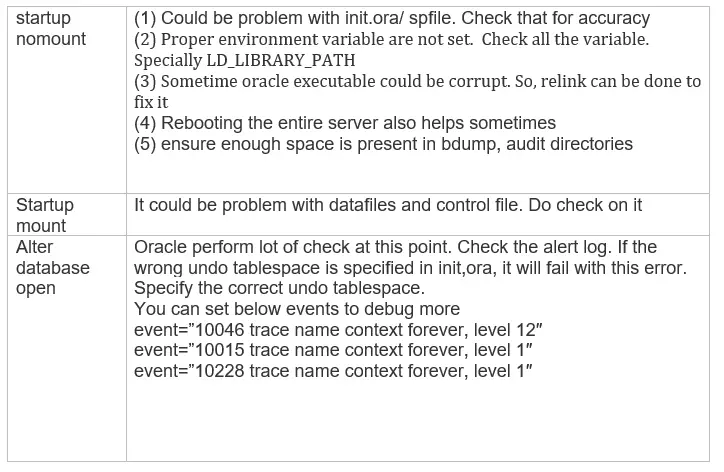
(1) ORA-3113 during startup of Oracle database
It can occur in all the stages of the startup of the Oracle database
(2) Client sees ORA-3113 running SQL / PLSQL
If the ORA-3113 error occurs AFTER you have connected to Oracle then, it is most likely that the ‘oracle’ executable has terminated unexpectedly. The server process could have died for many reasons.
(a) System Administrator killed the process deliberately by killing the process id as it may be consuming more CPU and memory
(b) It could happen because of some bug, We should look for the trace file for this session in the diagnostics directory and check for the solution in Metalink
(c) For UNIX only: If there is no trace file, check for a ‘core’ dump in the CORE_DUMP_DEST. Check as follows:
cd $ORACLE_HOME/dbs # Or your CORE_DUMP_DEST
ls -l core*
If there is a file called ‘core’ check that its time matches the time of the problem. If there are directories called ‘core_<PID>’, check for core files in each of these. It is IMPORTANT to get the correct core file. Now obtain a stack trace from this ‘core’ file. Check each of the sequences below to see how to do this – one of these should work for your platform.
If you have dbx:
% script /tmp/core.stack
% dbx $ORACLE_HOME/bin/oracle core
(dbx) where
…
(dbx) quit
% exit
If you have sdb:
% script /tmp/core.stack
% sdb $ORACLE_HOME/bin/oracle core
t
…
q
% exit
If you have xdb:
% script /tmp/core.s
(d) It may be possible a particular SQL statement or PL/SQL block is causing the error. In many cases this will be listed in the trace file produced under the heading “Current SQL statement”, or near the middle of the trace file under the cursor referred to by the “Current cursor NN” line.
If the trace file does not show the failing statement then SQL_TRACE may be used to help determine this, provided the problem reproduces. SQL_TRACE can be enabled in most client tools
We should always refer to the master Metalink note on ORA-03113
Master Note: Troubleshooting ORA-03113 (Doc ID 1506805.1)
Also Reads
ORA-01111
ORA-00900
ora-29283: invalid file operation
In my previous article i have given the resolution as well as introduction about different errors like ORA-12154: TNS listener error and ORA-00600 and ORA-01722: invalid number.The fourth most searched Error for oracle is ORA-03113: end-of-file on communication channel.This error is searched approximately 23 k times per month in google search engine.In this article i will try to explain you why this error will come and how this error will solve.There are 2 types of errors in Oracle one is syntax errors and others are the errors caused by connection.There are lot of errors in oracle where the mechanical steps does not work and we need to check N number of points to resolve the errors just like ORA-00600.There are different steps to solve ORA-03113 error.
“ORA-03113 error will be searched approximately 23 k times per month on google.”

Why ORA-03113 error will come?
This is another type of error which is most frequently coming in oracle.There should be multiple reasons for this error.This is not a simple error like syntax errors.There are following reasons for this error :
Situation 1 :
Connection between client and server is broken.
This error will come when connection between client and server is broken.The connection will broken because of multiple reasons like connection timeout.
Situation 2 :
Server machine Crash issue.
Due to some reasons if the server machine is crashed then this issue will come.The user needs to confirm that server machine is working well.
Situation 3 :
Processes kill on server side
When processes killed from server side this error will occur.In this situation user needs to restart the server so that all processes will run properly.
Situation 4 :
Incorrect connection handling
There are lot of times unknowingly user is handling multiple incorrect connections.This error will cause because of multiple wrong connection handling at a same time.
Situations 5 :
Network issue
Due to network issue this error will come.Need to check the network cause for the same.
Situation 6 :
Connection abort
Due to connection abort issue this error will come.
So This error will not come because of syntax.It is coming frequently due to network cause.There are no mechanical steps to resolve this error.But with my experience i will give the set of checkpoints using which user will solve this issue.
NO TIME TO READ CLICK HERE TO GET THIS ARTICLE
Resolution of the Error :
To resolve ORA-03113 there are no mechanical steps.But system admin as well as database administrator will solve this error by doing some task.
Solution 1 :
System administrator needs to check whether there is server crash or not.If server is crashed then using disaster recovery server need to make the connection.
Solution 2:
If server side processes aborted or stopped then just restart the server and take bounce of server.Check that all Servers as well as supporting processes are up and running.
Solution 3:
Check for the network issues and try to establish connection with oracle.
Solution 4:
Check oracle alert.log files for the errors and try to resolve the exceptions coming in alert.log file.
Solution 5:
User SQL_TRACE on sessions to find out the problem.
Solution 6:
Check USER_DUMP_DEST and BACKGROUND_DUMP_DEST directories and try to reproduce the issue again.
Solution 7 :
One of the cause of this error is firewall.So check for all firewall configurations and it is working properly and connection is made properly between oracle.
These are some solutions or checkpoints i have given to resolve this error.Hope you find this article interesting.Don’t forget to share this article with everyone.
Hi Friends,
Recently we faced this issue which was very critical. It is very
general ora alert which almost time we can ignore but sometimes it is very
critical which I have mentioned below the criticality.
ORA-03113: end-of-file on communication channel
This error can occur at the time such as:
1. While we are starting the oracle database.
2. While making any connection with database.
3. While running any SQL/PLSQL queries.
4. While mounting the database.
5. While recovering the database.
6. While opening database through Alter command.
7. While connecting as SYSDBA.
This error ORA-03113: end-of-file on
communication channel occurs while a client process trying to connect a oracle
database.
Above alert
can be because of Network issue also.
Or may be server
process was killed by some other users at OS level.
This can cause other ora alerts also such as: ora-1041, ora-3114,
ora-1012 etc.
These all are like disconnection of the client from oracle
database.
Here, I will show you as example while startup the oracle database
we faced this below issue:
SQL> startup
ORACLE instance started.
Total System Global Area 2147483648 bytes
Fixed Size 2926472 bytes
Variable Size 1224738936 bytes
Database Buffers 905969664 bytes
Redo Buffers 13848576 bytes
Database mounted.
ORA-03113: end-of-file on communication channel
Process ID: 1919
Session ID: 326 Serial number: 62214
There may
be many reasons as below:
1. May be
redo log file system has full; and there is 0% space free.
Solution:
For this, we
can clean up the old redo log file system and again startup the database.
OR
We can move
the old redo logs file system to new location file system by which there space
can available and we can try to startup the database.
If above
check is fine then we can check the alert log, from there
we can check the exact error. And will be helpful for future
investigations.
In case, If
getting error during the connecting as SYSDBA then need to check below points such as:
1. Check for
environments file properly.
2. Check for
LD_LIBRARY_PATH entries and setting should be properly.
3. Check for
correct ORACLE_SID and ORACLE_HOME path.
4. And may be
needed to check some more as per alert log error and details.
And others
many more may also reason… for more info: Doc ID 1506805.1
Hope
these above points clear and helpful. Please let us know for any concerns and
suggestions.
Some more useful links:
Regards,
ora-data
Team.
сейчас с ораклом дела практически не имею — просто у меня ранее было подобное на тяжелых запросах — коннект к ораклу был через одбс — отваливало по таймауту соединения — лечил установкой в реестре параметра ConnectionTimeout в ноль — не разрывать коннект до окончания выполнения
также — из загашников 🙂 — нытырил пока свою проблемау не разрешил
==================================================
ORA-03113: end-of-file on communication channel
Cause: The connection between Client and Server process was broken. It may also happen if the external agent extproc crashes for some reason.
Action: There was a communication error that requires further investigation. First, check for network problems and review the SQL*Net setup.
Also, look in the alert.log file for any errors. Finally, test to see whether the server process is dead and whether a trace file was generated
at failure time. There may be some system calls in the .NET function which might terminate the process. Remove such calls.
==================================================
На самом деле 3113 часто (не всегда) является следствием каких-либо багов Oracle, так что вопрос может потребовать более детального исследования вплоть до обращения в техподдержку Oracle.
Ну а alert.log в подобных случаях желательно посмотреть в любом случае
Оказывается одним из способов решения этой проблемы является простое удаление статистики. Именно статистики, а не индексов.
В случае, если это не помогло, ее всегда можно восстановить средствами Оракл
==================================================
Обычно связана с аппаратными сбоями, при этом нередко имеет
динамический характер: то есть, то нет. При возникновении нужно
искать соответствующий trace file и анализировать его.
Посмотрите хватает операционке памяти и т. п.
Возможно ваш запрос съел большую часть ресурсов и оракл не поймал их.
Скорей всего это вопрос к админам (пусть ставят патчи).
6.2.34 ORA-03113: End-of-File on Communication Channel
Cause: This error can occur under several circumstances and indicates that the
Oracle server process has failed.
Action: There is one case that may be encountered during an upgrade that has a
known solution. When running on certain 64-bit platforms, the RDBMS bug 2614728
may cause the defnavpg.sql script to fail. If you are on a 64-bit platform, check
your upgrade log file to see if the problem is encountered in the following
context:
#— Beginning inner script: wwd/defnavpg
# Create seeded navigation pages for page groups declare
*
ERROR at line 1:
ORA-03113: end-of-file on communication channel
If it is in this context, apply the patch for bug 2614728 for your platform.
Restore from your backup, and run the upgrade again.
==================================================
упс, упустил — еще непосредственно установка ODBCTimeout на сам запрос перед выполнением в 0 — тоже где то в реестре есть, но мне так проще было
After hours of misdirection from official Oracle support, I dove into this on my own and fixed it. I am documenting it here in case someone else has this problem.
To do any of this, you must be the oracle user:
$ su - oracle
Step 1: You need to look at the alert log. It isn’t in /var/log as expected. You have to run an Oracle log reading program:
$ adrci
ADRCI: Release 11.2.0.1.0 - Production on Wed Sep 11 18:27:56 2013
Copyright (c) 1982, 2009, Oracle and/or its affiliates. All rights reserved.
ADR base = "/u01/app/oracle"
adrci>
Notice the ADR base. That is not the install. You need to see the homes so you can connect to the one that you use.
adrci> show homes
ADR Homes:
diag/rdbms/cci/CCI
diag/tnslsnr/cci/listener
diag/tnslsnr/cci/start
diag/tnslsnr/cci/reload
CCI is the home. Set that.
adrci> set home diag/rdbms/cci/CCI
adrci>
Now, you can look at the alert logs. It would be very nice if they were in /var/log so you could easily parse the logs. Just stop wanting and deal with this interface. At least you can tail (and I hope you have a scrollback buffer):
adrci> show alert -tail 100
Scroll back until you see errors. You want the FIRST error. Any errors after the first error are likely being caused by the first error. In my case, the first error was:
ORA-19815: WARNING: db_recovery_file_dest_size of 53687091200 bytes is 100.00% used, and has 0 remaining bytes available.
This is caused by transactions. Oracle is not designed to be used. If you do push a lot of data into it, it saves transaction logs. Those go into the recovery file area. Once that is full (50GB full in this case). Then, Oracle just dies. By design, if anything is messed up, Oracle will respond by shutting down.
There are two solutions, the proper one and the quick and dirty one. The quick and dirty one is to increase db_recovery_file_dest_size. First, exit adrci.
adrci> exit
Now, go into sqlplus without opening the database, just mounting it (you may be able to do this without mounting the database, but I mount it anyway).
$ sqlplus /nolog
SQL*Plus: Release 11.2.0.1.0 Production on Wed Sep 11 18:40:25 2013
Copyright (c) 1982, 2009, Oracle. All rights reserved.
SQL> connect / as sysdba
Connected.
SQL> startup mount
Now, you can increase your current db_recovery_file_dest_size, increased to 75G in my case:
SQL> alter system set db_recovery_file_dest_size = 75G scope=both
Now, you can shutdown and startup again and that previous error should be gone.
The proper fix is to get rid of the recovery files. You do that using RMAN, not SQLPLUS or ADRCI.
$ rman
Recovery Manager: Release 11.2.0.1.0 - Production on Wed Sep 11 18:45:11 2013
Copyright (c) 1982, 2009, Oracle and/or its affiliates.  All rights reserved.
RMAN> backup archivelog all delete input;
If you’ve got RMAN-06171: not connected to target database, than try to use rman target / instead of just rman
Wait a long time and your archivelog (that was using up all that space) will be gone. So, you can shutdown/startup your database and be back in business.