OpenGL в Minecraft является своеобразным модулем, предназначенным для обеспечения более плавной и быстрой игра. Также опция снижает нагрузку при рендеринге, убирая из обработки те данные, которые не нудно обрабатывать. Например, текстуры, что сейчас не видны персонажу. Однако бывают и проблемы с данной технологией, одна из них связана с ошибкой OpenGL Error: 1281 (Invalid value) в Minecraft. Подробности о причинах и исправлениях данной ошибки читайте в данном руководстве.
Причины
На основе тех данных, что нам удалось получить из пользовательских отчетов, мы можем выделить следующие причины:
- Конфликт модов все еще имеет место быть.
- Проблемы с OptiFine.
- Различные сбои шейдеров.
Как исправить ошибку OpenGL 1281?
Сперва стоит сказать, что ошибка с кодом 1281 появляется по той причине, что у вас включена отладка OpenGL. Если вы не видите каких-либо проблем, кроме спама ошибки в чат игры, можно просто ее отключить. Предостережение в том, что появление данной ошибки может немного снижать ваш игровой fps. Если сбой появляется редко, это не будет проблемой. Для этого переходим в «Другие настройки» (Other Settings) и выключаем опцию «Показывать ошибки GL» (Show GL Errors).
Если же заметны какие-то проблемы с работой Minecraft, следует попробовать такие способы:
- Отключить последние установленные моды. Если ошибка 1281 в Minecraft появилась после установки новых модов, следует их отключить или удалить. Вот ссылка на источник.
- Выключить шейдеры. Дополнительные ландшафты часто провоцируют сбой в обработке при смене погоды, сезона и т. п. Для этого переходим в appdata/minecraft/ и удаляем папку shaderspack.
- Обновить OptiFine. Еще один инструмент оптимизации, который в старых версиях может сбоить. Предназначается для получения HD-текстур. Можно скачать с официального сайта.
- Отключить VBO. Данная настройка в общем-то полезна, так как улучшает скорость обработки графики. Однако она также может вызывать ошибку. В «Настройках» Minecraft ее легко можно выключить (Use VBOs: Off). Проверяем результат. Этот способ предложен здесь и, похоже, он работает.
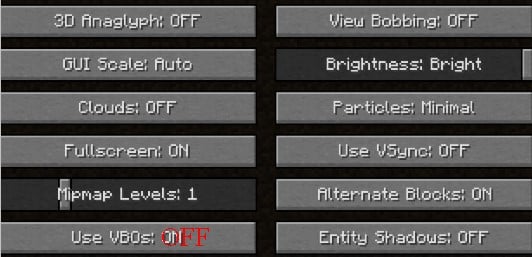
В крайнем случае вы можете переустановить Minecraft, это тоже должно сработать. Конечно, прежде стоит испробовать перечисленные настройки графики или просто отключить отладку. Мы же ждем от вас комментариев с вашими отчетами о проделанной работе и результатах процедур.
Minecraft OpenGL – одна из настроек, которая позволяет сделать игру быстрее и плавнее, «инструктируя» графический процессор не прорисовывать ничего, что находится за пределами прямого поля зрения игрока. Очевидно существует компромисс, когда нагрузка на видеокарту снижается, то увеличивается использование ресурсов центрального процессора.
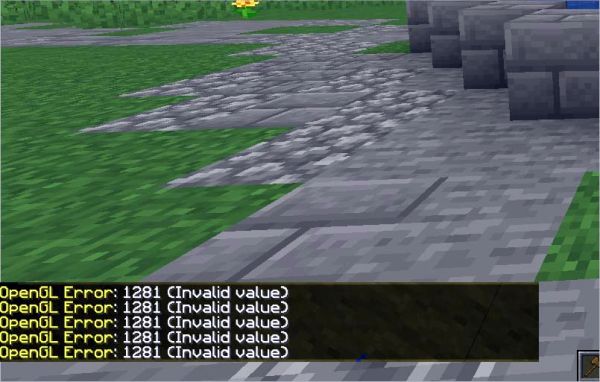
По умолчанию это параметр включен для повышения производительности Майнкрафта, поэтому часто встречаются случаи, когда игроки сталкиваются с сообщением об ошибке «OpenGL 1281 invalid value». Во многих случаях, сбой связан со сторонними переменными и модулями, работающими одновременно.
Содержание
- 1 Чем вызвана ошибка?
- 2 Удаление шейдеров
- 3 Обновление OptiFine
- 4 Конфликт из-за несовместимости версий модов
- 5 Установка Java
Чем вызвана ошибка?
Если наблюдаете ошибку OpenGL Error 1281 в ходе игры, скорее всего, конфликт вызван модулями модов. Также сбой может произойти по следующим причинам:
- Шейдеры улучшают графику, тем самым делают картинку красивее, но при повреждении одного из них столкнетесь с ошибкой.
- OptiFine – одно из сторонних приложений, которое предоставляет больше контроля над игрой. Если приложение не обновлено или возникли проблемы в его работе, игра выбросит ошибку.
- Сбой может возникнуть в случае, когда версии Forge и Shader не синхронизируются друг с другом.
- При инсталляции игры была проигнорирована установка программы Java.
Удаление шейдеров
Шейдеры — это дополнительные моды, которые украшают игру за счет изменения текстуры, приближая ее пейзажи к более реалистичному виду. Поскольку эти моды затрагивают все ресурсы игры, они могут вызывать конфликт с другими модулями.
Попробуйте по очереди их отключить, чтобы узнать, какой из них приводит к ошибке OpenGL 1281. Шейдеры можно вырезать и вставить в другую папку, если заходите включить их обратно.
Обновление OptiFine
Это приложение позволяет оптимизировать Майнкрафт. В частности, повысить FPS и улучшить картинку, за счет добавления поддержки HD текстур и расширенным настройкам графики. Однако есть много случаев, когда устаревшая версия OptiFine вызывала ошибку OpenGL 1281.
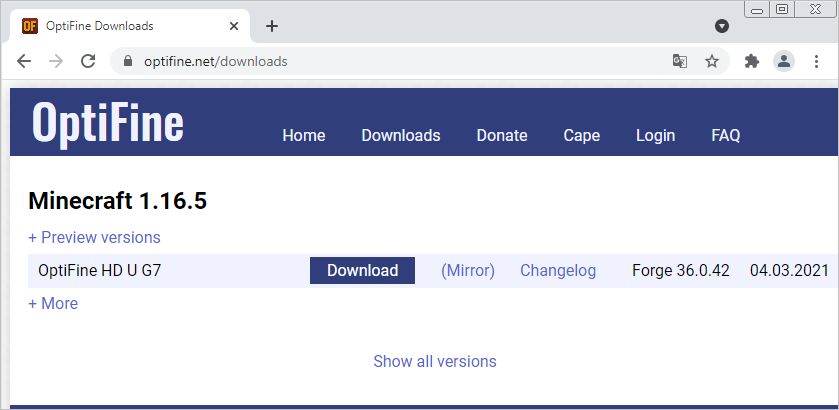
Чтобы обновить приложение, перейдите на официальный сайт OptiFine и загрузите последнюю версию. После ее установки перезагрузите ПК и попробуйте запустить игру.
Конфликт из-за несовместимости версий модов
Если добавили в Майнкрафт больше одного мода, вполне возможно, что какой-то из этих модулей не синхронизирован. Это значит, что конфликт возник из-за несовместимости версий модов.
Поэтому проверьте их версии на официальном сайте разработчика. Если обнаружите несоответствия, отключите мод и снова запустите игру.
Установка Java
Майнкрафт разработан на языке программирования Java. Соответственно, если его поддержка отсутствует в системе, компоненты игры и все моды не смогут инициализироваться, в результате игра выбросит ошибку OpenGL 1281. Если Java не установлена, выполните следующие шаги.
Перед загрузкой нужно узнать разрядность версии Windows, установленной на ПК. Откройте Проводник нажатием на Win + E и щелкните правой кнопкой мыши на «Этот компьютер», расположенный на левой панели навигации. В контекстном меню выберите «Свойства». Отобразится окно просмотра основных сведений компьютера. Разрядность ОС указана в строке «Тип системы».
После сделайте запрос «Загрузить Java» с указанием разрядности ОС. Загрузите исполняемый файл или запустите установку непосредственно на сайте Java.
После завершения установки перезагрузите ПК и попробуйте запустить Майнкрафт.
Minecraft – игра, полюбившаяся многим пользователям. Раньше ее суть сводилась к постройке домов, различных сооружений, а в ночное время – защите от монстров. Сейчас же разработчики добавили возможность играть по сети и общаться в чате. Пользователи могут заходить на специальные сервера, созданные ими либо друзьями. Однако иногда на экране может появиться ошибка с комментарием «Opengl 1281 invalid value». Давайте разберемся с причинами бага, а также рассмотрим варианты его устранения.
Содержание
- 1 Как исправить ошибку?
- 1.1 Способ 1: переустановка Java
- 1.2 Способ 2: изменение настроек графики
- 1.3 Способ 3: обновление драйверов
- 2 Заключение
Как исправить ошибку?
Существует несколько методов, способных устранить сложившуюся проблемы. Причем они не зависят от того, вылетела игра или нет. Подробно ознакомиться с ними можно ниже.
Способ 1: переустановка Java
Данный метод универсальный, поэтому работает не только с Майнкрафтом, но и с другими компьютерными играми. Первым делом откройте меню «Пуск», где перейдите в раздел «Панель управление». Далее достаточно кликнуть по названию интересующей программы, и в верхней графе нажать кнопку «Удалить».

Нажимаем «Удалить»
Подтверждаем удаление клавишей «ОК» и запускаем браузер. В поисковой строке веб-обозревателя вбиваем подобный запрос: «скачать java». После этого переходим на официальный сайт java.com и загружаем плагин с помощью кнопки «Загрузить Java бесплатно».

Нажимаем «Загрузить Java бесплатно»
На установке ПО останавливаться не будем, так она слишком простая. В завершении рекомендуем перезагрузить компьютер. Если ошибка «Opengl 1281 invalid value» не исчезла, то переходите к следующему методу.
Способ 2: изменение настроек графики
Для начала запустите Minecraft. Далее перейдите в раздел с настройками графики. В зависимости от мощности компьютера все параметры устанавливаются индивидуально, но если появился сбой, то рекомендуем изменить некоторые из них. Во-первых, в пункте «Графика» советуем установить значение «Быстро». Не беспокойтесь, что это как-то негативно отразится на игровом процессе. Единственное исчезнут капли дождя и прозрачность листвы.

Настройки графики в Minecraft
Затем рекомендуем отключить мягкое освещение, а также выключить 3D анаглиф. Теперь попробуйте зайти на сервер и проверить наличие ошибки. Если она осталась, то отключите использование V-Sync и снизьте дальность прорисовки. Зачастую проблема возникает из-за того, что игра пытается «отрисовать» текстуры с большим разрешением, чем эти текстуры были сделаны. Поэкспериментируйте с настройками для достижения правильной работы игры.
Способ 3: обновление драйверов
Сначала нужно понять, какая видеокарта установлена в компьютере. И если коробка от нее давно выброшена, то откройте меню «Пуск» и в поиске введите «dxdiag». Далее в открывшемся окне выбираем вкладку «Монитор» либо «Экран». И вот, в строке «Имя» отображается название видеокарты.

Просмотр используемой видеокарты
После получения необходимых данных открываем браузер и в поисковой строке пишем: «скачать драйвера для *», где вместо звездочки указываем название видеокарты. Затем переходим на нужный сайт и загружаем драйвера.
Обратите внимание, что для скачивания драйверов рекомендуется использовать только официальные сайты!
Заключение
Ошибка «Opengl 1281 invalid value» — сбой, для устранения которого достаточно выполнить ряд несложных действий. Чаще всего проблемы кроется в настройках графики, поэтому обратите на них особое внимание. А если ни один из представленных способов не помог, то напишите об этом в комментариях. Наша команда рассмотрит ваш вопрос и обязательно даст на него ответ.
Оценка статьи:
 (4 оценок, среднее: 5,00 из 5)
 Загрузка…
Самое читаемое:

17.03.2022
Как установить дополнительные виджеты на экран телефона Андроид
Если у Вас возникли сложности с тем, чтобы добавить виджеты приложений на смартфон, то это пошаговое руководство…
Далее

17.03.2022
Как очистить кэш телеграмма на телефоне Андроид
Люди, которые активно используют мессенджеры, зачастую не догадываются о том, что в их мобильных гаджетах…
Далее

17.03.2022
Как скопировать ссылку на свой телеграмм Андроид
Любой из пользователей мессенджера Телеграм в тот или иной момент времени задавался вопросом, как узнать, где…
Далее

02.03.2022
Ошибка 104101 в Zoom – как исправить
Содержание1 Ошибка 104101 в Zoom – как исправить1.1 Причины ошибки1.2 Смена параметров брандмауэра Windows1.2.1 Отключение…
Далее
Когда вы собираетесь исследовать бесконечные миры и строить вещи в Minecraft, вы сталкиваетесь с ошибкой Minecraft OpenGL 1281 на своем компьютере с Windows 11/10. Это может испортить вашу игровую сессию. Итак, прежде чем проблема станет слишком серьезной, попробуйте эти обходные пути, чтобы решить проблему.
Это распространенная ошибка, связанная с настройками отладки OpenGL. OpenGL, официально известная как Open Graphics Library, помогает снизить нагрузку на систему при рендеринге, тем самым делая игру на компьютере более быстрой и плавной. Игровые приложения, такие как Minecraft, в полной мере используют это преимущество. Таким образом, любая ошибка, связанная с этим, может повлиять на ваш игровой процесс.
- Обновление OptiFine для Minecraft
- Удалить шейдеры Minecraft
- Установите последнюю версию пакета файлов JAVA.
- Скрыть ошибки OpenGL.
Давайте рассмотрим вышеуказанные методы немного подробнее!
1]Обновите OptiFine для Minecraft
Люди, которые не знают, OptiFine — это мод оптимизации Minecraft, который позволяет Minecraft работать быстрее и лучше выглядеть благодаря полной поддержке HD-текстур и другим полезным параметрам конфигурации. Любые проблемы с ним могут привести к ошибке Minecraft OpenGL 1281.
Чтобы исправить это, посетите эта страница и скачать файл. Дважды щелкните файл, чтобы установить его.
Откройте программу запуска Minecraft и проверьте, был ли загружен файл под Установки.
Ударь Играть кнопку, чтобы разрешить загрузку.
2]Удалить шейдеры Minecraft
Шейдеры Minecraft, также известные как пакеты шейдеров, добавляют в игру несколько световых эффектов и 3D-текстур. Это делает его более реалистичным. Короче говоря, шейдеры для Minecraft — это своего рода дополнения к игре, которые позволяют игрокам применять различные эффекты. А поскольку эти шейдеры полагаются на ресурсы приложения, у них могут быть проблемы с совместимостью с другими модулями модов. Чтобы исправить это, отключите или удалите шейдеры Minecraft и посмотрите, решит ли это вашу проблему.
Открыть Шахтерское ремесло > перейти к Меню > выбрать Опции.
Ударь Настройки видео вкладка > Шейдеры > повернуть выключенный Шейдеры.
3]Установите последнюю версию пакета файлов JAVA.
Это не секрет! Все моды, используемые для игры Minecraft, имеют формат Java. Таким образом, если пакеты Java не установлены или неправильно настроены на вашем устройстве, это приведет к ошибке OpenGL. Это потому, что они не смогут правильно инициализироваться. Чтобы исправить это,
- Перейти к официальному веб-сайт Java.
- Прокрутите веб-страницу вниз и перейдите в раздел Windows.
- Там выберите загрузку последней версии Java для совместимой Windows, щелкнув ссылку Windows Online.
- После завершения процесса загрузки щелкните файл, чтобы установить его.
- Следуйте инструкциям на экране.
После этого перезагрузите компьютер.
4]Скрыть ошибки OpenGL
При желании вы также можете скрыть ошибку Minecraft OpenGL следующим образом:
- Запустить Майнкрафт
- Открыть параметры
- Нажмите «Настройки видео» > «Другие».
- Отключить отображение ошибок GL
- Нажмите Сохранить
- Перезапустите Майнкрафт.
Влияют ли шейдеры на FPS Minecraft?
Шейдеры Minecraft оживляют ваш опыт Minecraft, а правильный набор шейдеров может сделать мир по-настоящему сияющим. Однако, улучшая графику, они могут вызывать зависания в игре. Так что да, шейдеры могут влиять на FPS Minecraft.
Какие шейдеры наименее тормозящие?
Kuda Shaders — один из самых популярных пакетов шейдеров. Этот пакет предлагает красивые тени, которые очень плавные и помогают поддерживать нормальную работу Minecraft без каких-либо задержек. Помимо этого, есть Chocapic Lite. Он также считается одним из наименее тормозящих шейдеров.
Связанный: Нет звука в Minecraft на ПК с Windows.
Сегодня расскажем, как решить ошибку OpenGL 1281 invalid value Майнкрафт и других играх. Сначала перечислим все варианты ошибок, которые лечатся данным способом:
- Ошибка Opengl 1281 invalid value
- Ошибка Opengl 1282 invalid operation
- Ошибка Opengl 1283 stack overflow
- Ошибка Opengl 1285 out of memory
- Ошибка Opengl 1286 invalid framebuffer operation
Обновить Direct X Opengl может понадобиться в следующих играх:
- Return to Castle Wolfenstein
- MineCrfat (Майнкрафт)
- ГТА (GTA)
- WOW
- И многих других
Сперва, что такое OpenGL — это открытая графическая библиотека, которая является одним из популярных и прикладных программных интерфейсов для разработки приложений в области двухмерной и трехмерной графики. Это один из драйверов видео-карты. При запуске игр или программ бывает возникает ошибка, например в Minecraft. Самое частое явление из-за чего так происходит — результат вирусов или выход из строя видеокарты. Чтобы это решить достаточно обновить драйвера видео-карты. Этот способ аналогичен для всех Windows. А здесь смотрите что делать если перезагружается или выключается компьютер во время игры.
И Вы сможете разобрать действия пошагово с помощью нашей видео-инструкции. Приятного просмотра. И полезных знаний:
OpenGL error 1281 can occur out of nowhere when you play Minecraft. So, there is no shortage of individuals who look for a solid solution to overcome it.
If you fall into the same category and are looking for solutions, continue reading this article and fix the issue.

In general, OpenGL is a setting found in the Minecraft game for a specific purpose. It is there to make the game run faster without any hiccups in the midst of the game. The OpenGL sends a special set of commands to the GPU.
As per that command, the GPU will render only the graphics that are in the player’s direct view. In other words, the GPU renders the essential graphics only and thereby reduces the overall load on the GPU.
As per the default settings, OpenGL settings are activated on the system. As a result, the users will be able to experience a pretty smooth gaming experience. However, due to this very reason, players tend to experience the OpenGL error 1281 on their screen.
In general, this error can have connections with third-party variables and modules that are loaded on your system.
What triggers OpenGL error 1281?
Are you playing a modded version of Minecraft? If that is the case, you have a greater chance of experiencing this issue. Fully modded Minecraft may have some mod modules that can create some conflicts in the game.
As a result, the modded Minecraft version can end up giving OpenGL error 1281 more often than not. According to the information, the below-mentioned aspects can trigger OpenGL error 1281 while you play Minecraft.
PS: Get to know how to get rid of the rundll error.
● Shaders
Well, shaders are the graphics that can be imported by the user for their modded versions of the Minecraft game. If there are any faulty or corrupted shaders, the game can end up displaying OpenGL error 1281.
● OptiFine
Basically, OptiFine is a third-party app that is mainly used to enhance gameplay. Also, it gives you better control over the game. If OptiFine doesn’t work as expected, it can eventually end up causing various errors in the game.
Also, it can malfunction if it fails to get updated. This can eventually lead to OpenGL error 1281.
● Version Control
If the shader and the forge version of the game don’t sync perfectly, you can experience OpenGL error 1281.
● Java Files
Some elements of Minecraft utilize Java in the game application. In general, all those Java elements are installed when you install the game. However, due to some reasons, those elements may not get installed.
In that case, you will end up experiencing various errors. By the way, what if you could not find or load main class, don’t worry. Click here for the top solutions.
Before we take a look at the solutions, you should ensure that you log in to an Administrator account. Otherwise, you may not be able to make those changes in the operating system. In addition to that, the computer must have an internet connection with good speed and enough data.
Top Solutions to Fix OpenGL Error 1281
Method 1: Get rid of the shaders to fix ‘OpenGL Error 1281’
As we mentioned before, shaders for Minecraft are installed separately as add-ons. As a result of that, players can play on different terrains and settings for more excitement. In fact, those shades are more of mini-mods that can bring various changes to the game.
For instance, you can get a winter shader or a summer shader, depending on your preference. Those shaders use all the resources related to the application.
As a result, there is a huge possibility of conflicts with other mods in the game.

So, as a solution to OpenGL error 1281, you should disable the existing shaders. You can do it one by one, so the faulty one can be identified. You can start it by disabling the latest one that you install.
Likewise, you can go down and disable them one after the other. If necessary, you can even cut and paste those shaders to a different location. As a result, you can use them later on.
Besides, if you wonder is Voicemod safe, click to read more.
Method 2: Update the OptiFine to fix ‘OpenGL Error 1281’
Previously we mentioned that OptiFine is a tool used to optimize the gaming experience of Minecraft. It ensures that the game runs faster and shows better performance.
Also, it increases the visual experience as well. It offers full support for HD textures and various other configurations that are required for modding. The users can get an FPS boost through this element.
In a way, OptiFine can be considered the driving force of the mods that are used in Minecraft. The mods will interface with each other with the assistance of OptiFine.
As per our research, we learned about several cases in which the outdated OptiFine is the culprit. In that case, the best way to address this issue is by updating the existing OptiFine.
You should check the current version of OptiFine first. If you find it to be an outdated version, you should perform an update.
To do that, you should go to their official website and download the latest version. Once the update is done, you should restart the computer and see if it works.

Method 3: Check for the compatibility issues to fix ‘OpenGL Error 1281’
In most cases, those who have installed mods for Minecraft will experience the error more often than not. If you are using more than one mod module, the chances of experiencing the error are even greater. Also, if any module in the game fails to synchronize, errors, including OpenGL error 1281, can trigger.
So, you must double-check all the mods installed on the computer and check if their versions are compatible. If there is a mismatch between them, you should disable it first and relaunch the game. You can check the compatibility of those mods simply by visiting the website of the official developers.
Method 4: Manual install the Java Packages to fix ‘OpenGL Error 1281’
The Java file packages are required to run the Minecraft game smoothly. There is a group of Java files installed with the game installation. Due to some reason, however, the game may have corrupted or missing Java components.
As a matter of fact, the mods used in the game are designed based on Java. So, if the Java files are not installed properly on the computer, there can be various malfunctions. In other words, the absence of damage to the Java files can cause various errors in the game.
So, the best solution to address this issue is by installing the Java files manually on the computer. Then, you should restart the computer and relaunch the game. For many users, this method works perfectly.
So, let’s move to the steps to install Java and try to get this issue resolved.
- First, on your desktop, locate the icon labeled “This PC” and right-click on it.
- When you see the options on the popup menu, you should select the option called “Properties.”

- Now, you should locate the option called “System Type.” Then, you should check the type of operating system mentioned in front of it. If the type of operating system is 32-bit, you should download the 32-bit version of Java. If it is mentioned as 64-bit, you should download the compatible version for it.

- As the next step, you should extract the file you have downloaded (it can be 32- or 64-bit). Open the folder which is extracted and then copy the file version which is available.

- Now that the file is copied, you should launch Windows Explorer. To do that, you should press the “Windows” and “E” keys together. Then, you should navigate to the following directory.
C:Program FilesJava (for 32-bit)
C:Program Files (x86)Java (for 64-bit)
- Once you have done that, past the file which is already copied by you, and be sure to copy the name of the respective folder to which you have copied the file.
- You can now launch the Minecraft mod manager. Then, click on the option called “Edit Profile.” It can be found at the bottom of your screen.

- Underneath the Java Settings, you should search for the executable option. Then, you should replace the correct path.
- After completing all those steps, you should restart the computer. Then, you should launch Minecraft once again and see if it works. If the OpenGL Error 1281 issue is resolved, you are good to play the game. If the problem persists, you should move to the next step.
Method 5: Reinstall the Minecraft Game to fix ‘OpenGL Error 1281’
If none of the above options have worked for you and you are still looking for a solution, try this one. In this case, you will have to reinstall the game and see if it works. However, this process will erase all the user data.
So, if you want those data back once you play the game, you should save them against the profile. If not, you should create a backup of the data. Moreover, you can copy the corresponding user data folder to any other location from the original path.
That said, mentioned below are the steps to follow and reinstall Minecraft on your PC.
- Launch the “Run” utility by pressing both “Windows” + “R” keys together. Then, enter the text called “appwiz.cpl.” Hit “Enter” or press “OK.”
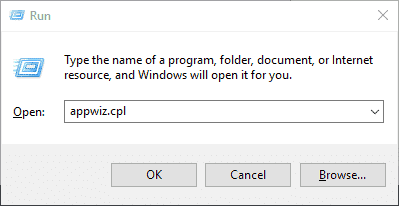
- When you are in the application manager, you should locate Minecraft. Then, you should right-click on the respective icon and choose the option called “Uninstall.”
- If not, you can uninstall the game simply using the uninstaller in the directory. You must delete the mod files and temporary settings to complete the uninstallation successfully.
- Restart the computer and download the game once again through their official website.

That’s it. Per our experience, method 05 must fix OpenGL error 1281 even if all the other methods didn’t.
This website uses cookies to ensure you get the best experience on our website
This article show information about opengl error 1281. Recently, numerous customers reported that each time you open Minecraft, an error called OpenGL Error 1281: Invalid Worth maintains popping up. You don’t recognize exactly how to remove this mistake.
For some of you, what this OpenGL error code means remains a mystery even in the meantime. As well as specifically, what does Minecraft OpenGL do? That is an unknown truth for lots of individuals, even gamers.
In this article, you can know about opengl error 1281 here are the details below;
Particularly, Minecraft OpenGL is made to make the video game run faster and also more smoothly by working within the Minecraft game to minimize the lots of rendering on the os. With this OpenGL option on, your Minecraft will only render GPU when the straight view of players is used. For this component, it would certainly be frustrating when Minecraft OpenGL Error 1281 shows up from time to time.
And also, at the same time, it is immediate for you to fix this OpenGL error 1281. And also, in some cases, the solutions below will likewise be effective to resolve other OpenGL error codes like OpenGL error 1283, 1285, and so on
Solution 1: Disable All Mods in Minecraft
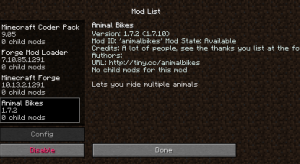
Mods are utilized to improve the video game experience of Minecraft. However, some mods will conflict with other mods when the game is running, which will certainly bring about OpenGL 1281 error. So you can try to disable all mods briefly, eliminate HD structure packs, and so on. You can disable all mods in the beginning and then enable one mod to check whether the mistake shows up or otherwise. If not, you can make it possible for another one to test it up until you locate the mod, which triggers the 1281 invalid value error.
Solution 2: Disable Show GL Errors
Minecraft provides a setup for you to disable the constant turn up of OpenGL 1281 error or various other mistake code such as 1280, 1285. Some people think this is just a caution, and also it will certainly not crashing anything. So, in the beginning, you can make it vanish. 1. Open Minecraft. 2. Mosts likely to here: Alternatives > Video Clip Setup >> Various Other >> Program GL Mistakes >>
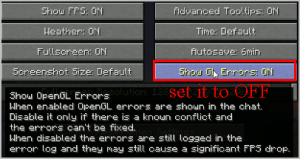
Off.
After you shut off Program GL Errors: On, although Open GL 1281 error still exists, it will certainly not show up again when you play the game.
Solution 3: Update Graphic Drivers and OpenGL
The obsolete or erroneous drivers might trigger the Minecraft OpenGL error 1281. Even if not all the visuals card assistance all GL attributes, updating graphic motorists may be handy. Another point is OpenGL. The majority of the game uses OpenGL API, and also given that this mistake is associated with OpenGL, you might too upgrade OpenGL, also. Normally, OpenGL is incorporated with the graphics card, so you just require to upgrade your graphics card motorist. You can utilize the Gadget Manager to upgrade the visuals driver or download the most up to date version of vehicle drivers from the main website, and afterward install it detailed. Certainly, you can follow this write-up to pick an automatic way.
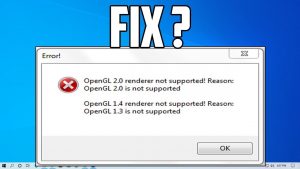
Vehicle driver Booster is a specialist chauffeur downloading and upgrading software application. With this device, you can upgrade NVIDIA, AMD, and Intel visuals motorists easily and also fast. Aside from the visuals card drivers, you can also download and install audio, key-board, computer mouse, touchpad, and also other device drivers instantly. 1. Download, mount, and also run Driver Booster on your computer. 2. Click Check. 3. In the outcomes, discover Show adapters, and also click Update.
After that, Driver Booster will start downloading and install the current graphic vehicle driver and also upgrading it instantly. Reboot your computer system and also run Minecraft to see if jobs appropriately. Associated: How to Deal With Minecraft No Sound Problem
Solution 4: Download and install opengl32.dll
Numerous Minecraft users report that after downloading and install opengl32.dll, OpenGL 1281, 1280, 1282 or 1285 errors have been solved. Here is just how to utilize opengl32.dll to repair this Minecraft error.
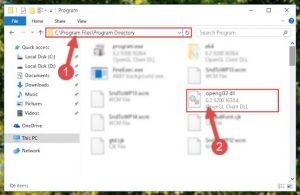
DLL Files Customer is a professional and easy-to-use DLL data downloading and install the software. It also has an online website to help you locate all the missing out on DLL files, such as opengl32.dll.
You can use this software to download it to your local disk. 1. Download and install opengl32.dll to your computer disk. 2. Locate the place, duplicate opengl32.dll for X32 or X64. 3. Right-click the Minecraft and choose Open documents location. 4. Most likely to Minecraft > Runtime > Jre-x64 > bin. 5. Paste the opengl32.dll to the bin folder. 6. Reactivate Minecraft.
After you copied the opengl32.dll submits to the container folder and also rebooted Minecraft, the OpenGL 1281 error will certainly
Solution 5: Update Java on Your Computer system.
In fact, many mods are developed utilizing java. If your computer does not have actually java mounted or the java is installed inaccurately, it may cause OpenGL 1281 error for Minecraft as well as various other
video games. For that reason, it is needed to see to it you have actually installed the latest version of Java. And also, there is a tutorial regarding just how to upgrade Java for Windows 10, 8, 7. 1. Update your Windows system. Most likely to Begin > Setups > Update & Security > Windows Update. Click Look for updates to make certain your system is updated. 2. Go to the official downloading page to download Java. Below you can download and install the most recent variation of Java online or offline.
Solution 6: Update OptiFine on Minecraft
OptiFine is a maximized mod for Minecraft, and also it is mainly used to lower lag as well as boost FPS in Minecraft. It additionally boasts a really cool zoom feature. You can also make use of OptiFine to get Shaders for Minecraft. From the responses of lots of users, the old OptiFine is just one of the major root causes of Minecraft OpenGL 1281 mistake.
So you can upgrade OptiFine. 1. Go to the OptiFine downloads center. Below you can locate all the OptiFine versions for Minecraft. You can likewise click Previews variations. 2. Download the latest version of OptiFine to your neighborhood disk. 3. Set up the OptiFine with the installment standard detailed.
If you have no concept concerning how to do it, you can comply with the TheVirtualBomb video clip tutorial: As a popular game, Minecraft will certainly face some troubles, do not fret, according to the above six methods, you can fix the OpenGL Error 1281: Void Value as well as lots of other OpenGL.
Check out over other articles:
- 100 % Fixed Avast UI Failed To Load Error [Working- 2020]
- IAStoricon.exe Delayed Launcher and How to Disable it
- Fixed | Logilda.dll Logitech mice error on Windows 10
- Fixed | A Ubisoft Service Is Currently Unavailable [Partition Magic]
- How to Fixed Rollback Nvidia Drivers in Windows 10