Hardware error 03130031-2F50 is connected to a few other error codes. They are all fairly common errors to receive as the printer is used. Though we understand it’s quite normal to feel slightly concerned when your printer stops printing and doesn’t tell you anything but some numbers, we don’t want you to worry because we’re here to help and we’ve got you covered on whatever you need
What is hardware error 03130031-2F50?
This error relates to the print heads, particularly the right side print head. If your printer only has 1 print head, then you should assume the worst! Just kidding. Depending on the printer model, it may require just 1 print head. This error code will likely be seen in Canon imagePROGRAF iPF series 8 and 12 color printers.
Please note, models that use 2 print heads are recommended to change both at the same time. Replacing both print heads together may not be the most financially friendly option, but it is the most responsible option.
Search Error Code Here
Easily Search For Individual Error Codes Using The Search Field Above. Contact Us If you are Having Difficulty Finding Your Code.
Can I Fix The Error
Good news, in most cases this one is easy to fix. The first thing to try in almost every troubleshooting situation is to simply turn the printer off, wait a few moments, and turn it back on. If the error clears itself, you have no further steps to take (aside from giving us an outstanding review on Google and subscribe to our blog).
If a power cycle doesn’t work, you should verify you have the current firmware. If neither of those options solves the problem, the next thing is try to eliminate the possibility of a false error code by verifying there is no air in the ink lines. Once you’ve done those 3 things, if the error code persists, it’s time to look at the costly options.
The False Error
As mentioned in the section above, it is entirely possible to have a false error.

If you can see air in the ink lines, your print head may be telling the main controller that something is wrong. To check if your printer has air in the lines, open the top cover (lid), and visually inspect the ink lines. Those lines should look like the ones pictured here.
Any air in the line will be quite easy to spot. If you see air, you’ll need to perform an ink system initialize (which uses a lot of ink) or perform a manual fill using a syringe. Starting with a syringe may be a fairly inexpensive solution to the problem.
If you do not see air in the ink lines, the appropriate next step is to replace the print heads (available below) or at least the right side as a minimum.
Search Print Head Models
If you are unsure of which print head your printer requires, please consult the brochure or spec sheet.
What If Print Head Replacement Doesn’t Work
If replacing one or both of the print heads did not resolve the 2F50 error code, the cost to repair can start to climb rapidly so we recommend contacting Canon tech support to discuss the options.
In some cases, replacing the main controller is the next item on the list. For other models, the carriage relay PCB would be the right fix.
Lastly, another potential item to consider is the flat cable.
Final Notes
To recap, the fix for this error can be a simple reboot or firmware update and can range up to replacing 2 print heads, carriage relay PCB, main controller, and a flat cable. Before making any investments, consider the age of the printer in relation to current technology and when you plan on buying a new computer. The former is important because legacy (older model) printers may not be compatible with upcoming computer operating systems or even recent updates. It would be a shame to spend a few thousand dollars on repairs today only to discover 6 months from now that your printer doesn’t work with your new computer.
In some cases, it may be better to replace the printer with a brand new model and get the accompanying warranty.
Related Error Codes
The 2F48, 2F49, and 2F51 error codes are similar and all apply to the print heads. The codes here to the left are active links so you may easily navigate to whichever applies and you.
2F50 isn’t my error code!
If 2F50 is not the error code displayed on your screen, please see our blog post that lists all the possible 03133310 error codes so you can learn more about your specific error.


Ron Rodgers is an Imaging Ace & Print Industry Hotshot with a passion for helping people turn print into profit! Aside from being the founder of ProPrinting Systems, he is a marketing machine, funtrepreneur (like entrepreneur but more fun), blogger, YouTuber, podcaster, musician, husband, father, sales expert, and all-around nice guy.
Related Posts

About Ron Rodgers
Ron Rodgers is an Imaging Ace & Print Industry Hotshot with a passion for helping people turn print into profit! Aside from being the founder of ProPrinting Systems, he is a marketing machine, funtrepreneur (like entrepreneur but more fun), blogger, YouTuber, podcaster, musician, husband, father, sales expert, and all-around nice guy.
resetter для печатающих головок pf-03 и памперса
Рвем китай, создаем рессетер вместе
| Сообщение #101
Отправлено 08 февраля 2020 — 19:09
Всем привет, задаром отдали несколько динозавров ipf710 с PF-03, есть желание перешить голову, вопрос! Есть ли у кого прошивка головы PF-03?
- Наверх of the page up there ^
-
0
| Сообщение #102
Отправлено 15 марта 2020 — 20:43
Turbo_spb
Если кому интересно.
Прошиваю головы PF-03 и PF-04 — 800руб.
Диагностика ПГ (тест на КЗ по дюзам) — 500 руб.
Промывка щадящая для добавления в чернила (1л) — 1000 руб.
кому интересно пишите на WhatsApp 8951бб995O5
Санкт-Петербург
- Наверх of the page up there ^
-
0
| Сообщение #103
Отправлено 14 декабря 2020 — 16:58
csv979
ошибка 2f51 HV leak (ipf670)
первая голова проработала около 2 лет выдала ошибку 2f51, перепрошить получилось но не помогло, сразу выдовал ошибку не делая никакого теста дюз или очистку, поменял… через год таже ситуация… прочитал на какойта зарубежный форум про солвентых принтеров мимаки кажется что хв леак из за некачественных чернил бывает часто лечится хорошей промывкой. никакой специальной промывки под рукой небыло прочисли средством дезинфекций спиртом воняет сильно (ковид все же) и обычном шприцом примерно по 10-15 мл/цв. поставил принер начал качать обратно чернила в голову минут 10 чистил проверял дюзы и вуаля… тест дюз идеален… первая голова простояла год но после прочистки тоже заработала так что 2f51 может еще не приговор головке
- Наверх of the page up there ^
-
0
| Сообщение #104
Отправлено 22 декабря 2020 — 13:27
Robinzon54
2F51 не приговор ни разу, но!!! Надо снять и промыть а не гонять в плоттере очистку, иначе труп — забитые дюзы не выпускают краску, голова температурная т.е. внутри нагревы, и получаем высокую температуру внутри головы и следствие пробой и сгоревшая ПГ….
- Наверх of the page up there ^
-
0
| Сообщение #105
Отправлено 10 февраля 2021 — 04:44
Robinzon54
В теме не раз мелькали вопросы «после прошивки ПГ плоттер выдает что ПГ не найдена, хотя s/n в сервис меню он ее видит, пробоя нет», кто-то нашел причину данной проблемы и решение?
вчера столкнулся с тем же вопросом, прошивки пробовал разные. В чем может быть причина?
- Наверх of the page up there ^
-
0
| Сообщение #106
Отправлено 10 февраля 2021 — 14:24
Robinzon54
Причину нашел самостоятельно….над устранением еще кумекаю…
- Наверх of the page up there ^
-
0
| Сообщение #107
Отправлено 11 февраля 2021 — 12:54
christian
Подскажите, что с этим делать? Замена ПГ?
Прочистка не помогла.


- Наверх of the page up there ^
-
0
| Сообщение #108
Отправлено 12 февраля 2021 — 17:57
Robinzon54
Встроенная и не поможет, только снимать, нежно мыть, а потом прошивать, НО быть готовым к замене, так как может и это не помочь, а 770й еще по отзывам к шитым головам не очень хорошо относится.
Показания термистров какие? Сервисное меню — function — head chk — temp
- Наверх of the page up there ^
-
0
| Сообщение #109
Отправлено 15 февраля 2021 — 09:28
christian
25 25 25 T 25
25 25 25 t 26
- Наверх of the page up there ^
-
0
| Сообщение #110
Отправлено 19 февраля 2021 — 06:51
Robinzon54
Показания термистров в норме, подгарания по тестам тоже не видно, теоритически промывка со снятием должна помочь, но тут есть другой ньюанс, шанс что плоттер при снятии запишет голову как снятую и не примет её назад присутствует.
- Наверх of the page up there ^
-
0
| Сообщение #111
Отправлено 16 февраля 2022 — 21:24
romanipk
Всем доброго времени суток.
У кого есть дамп прошивки головки PF-06 &
У меня ошибка головки EC21-2F53? ,было пару раз EC21-2F51
- Наверх of the page up there ^
-
0
| Сообщение #112
Отправлено 06 марта 2022 — 18:17
Robinzon54
у меня есть все дампы, от 03, до 06. 51 ошибка часта связана с тем что забиты каппы (чернила плохо уходят и остаются на башке), желательно менять их хоть иногда.
- Наверх of the page up there ^
-
0
| Сообщение #113
Отправлено 11 марта 2022 — 11:59
Александр П
Уважаемые коллеги, кто может поделиться прошивкой головки PF-06 для плоттера Canon TX-2000. Голова встала по ошибке EC21-2F53
- Наверх of the page up there ^
-
0
| Сообщение #114
Отправлено 14 марта 2022 — 09:36
Александр П
Правильнее будет сказать, что у меня есть 04 голова рабочая, в нее хочется залить дамп 06 головы и попробовать ее в работе.
- Наверх of the page up there ^
-
0
| Сообщение #115
Отправлено 07 июня 2022 — 12:24
Stasweb
Доброго времени суток форумчане! Подскажите пожалуйста распиновку подключения головки к программатору ch341a, пробовал как в первом посте но PonyProg2000 не считывает. Если есть возможность скинуть фото распиновки (подключения) программатора на почту stas . pavlov @ mail . ru. Скиньте пожалуйста, очень надо. Заранее спасибо кто откликнулся
- Наверх of the page up there ^
-
0
| Сообщение #116
Отправлено 08 июня 2022 — 12:24
Stasweb
Разобрался, программатор читает головку. Попробовал дамп с топика https://forum.resett…ndpost&p=408989 головка не запускается. Если есть у кого рабочий дамп дайте пожалуйста.
- Наверх of the page up there ^
-
0
| Сообщение #117
Отправлено 12 декабря 2022 — 12:49
Dymich
Прошивал голову PF-06 разными прошивками, а все равно не меняется количество напечатанных количество точек. Где в прошивке эта информация, не понятно.
- Наверх of the page up there ^
-
0
- ← Предыдущая тема
- iPF500, iPF600, iPF605, iPF610, iPF700, iPF710, iPF755, iPF6100, iPF8100
- Следующая тема →
- Вы не можете создать новую тему
- Вы не можете ответить в тему
3 человек читают эту тему
0 пользователей, 3 гостей, 0 скрытых пользователей
Как сбросить памперс Canon TM-200 видео инструкция
Как войти в сервес меню на Canon TM-200
Прописываем таблетку от жадности: продажа пластиковой коробочки (mc-31) за почти 6тр. это вверх жадности со стороны Canon.
Просто сбрасываем уровень через меню, через 2-3 сброса, промываем коробку от остатков чернил.
1. Зажимаем нижнюю левую четверть экрана.
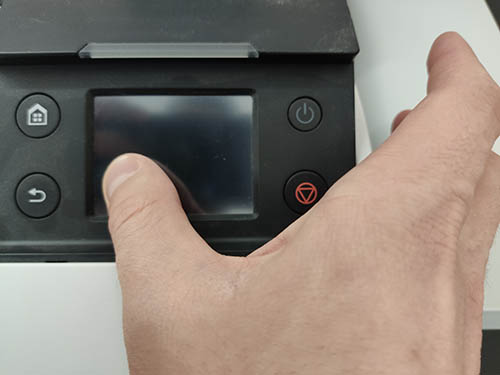
2. Не отпуская экран нажимаем и держим питание.
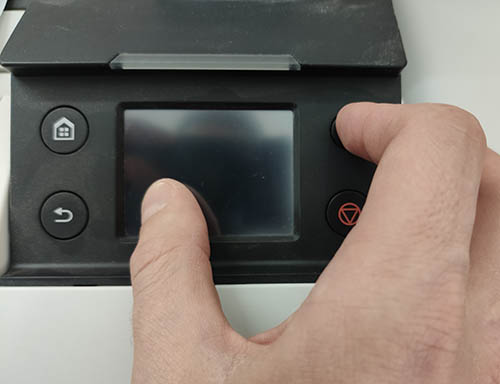
3. После появления надписи CANON, не отпуская кнопки питания, нажимаем по очереди внизу справа экрана — вверху слева экрана — вверху справа экрана и отпускаем кнопку питания.
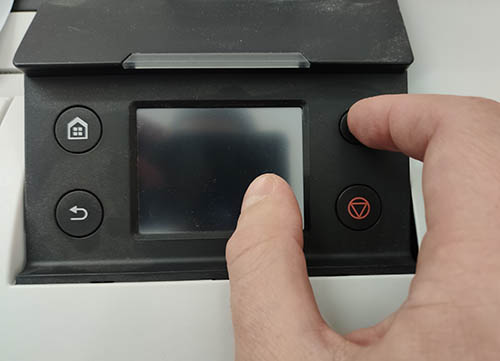
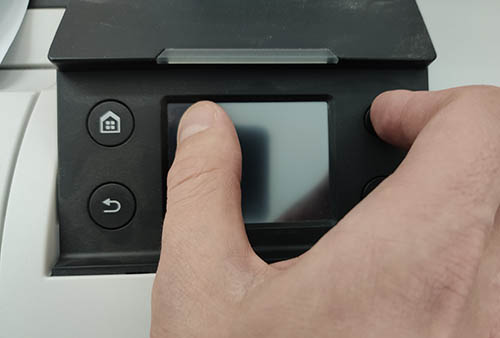
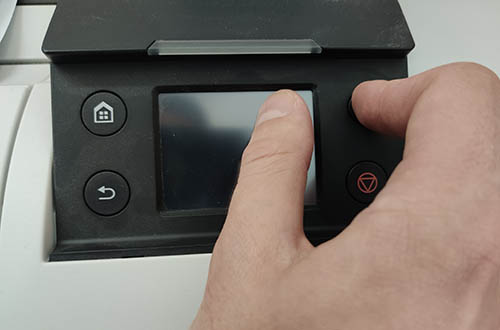
4. Индикатор загорается оранжевым цветом — вы попали в сервисное меню..
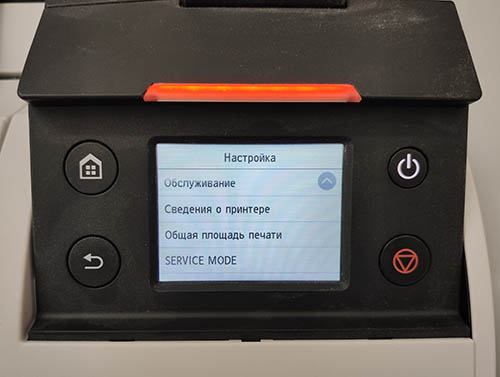
Как сбросить «памперс» Canon TM-200
Эта инструкция для пользователей, кому нужна не залповая работа начальных A1 моделей от кэнон, а в приоритете сохранение работоспособности печатающей головки на срок 2-3 года. Стоить иметь в виду, что сбрасывая «памперс» через меню, или отключая слежение чернил, вы запускается отложенный процесс блокировки ПГ.
После отключения слежения, или программного сброса памперса, система пристально следит за встроенным тестом ПГ, и, при определённом пороговом значении, блокирует вполне рабочую печатающую головку.
Если у вас эпизодическая печать малых объёмов, используйте одноразовые чипы для памперса и картриджей. Наш опыт показывает, что принтеры IPF серии, которые использовались эпизодически, отлично печатали при использовании одноразовых чипов более 3 лет. И сразу же заблокировали вполне рабочие ПГ при смене чипов на пустые и отключении уровня чернил.
Check printing results
Call for service.
Call for service.
The memory is full.
The memory is full.
The memory is full.
The parameter is out of range.
This command is not supported.
Delete unwanted data
Now printing without saving data.
Prepare to replace the ink.
Prepare to replace the ink.
Prepare to replace the ink.
Prepare to replace the ink.
Prepare to replace the ink.
Replace the ink tank.
Replace the ink tank.
Replace the ink tank.
Replace the ink tank.
Replace the ink tank.
Check ink tank.
Check ink tank.
Check ink tank.
Check ink tank.
Check ink tank.
Delete unwanted data.
Delete unneeded jobs stored on the hard disk.
Press Online to clear error.
Lift the release lever and reload the paper.
Lift the release lever and align leading edge with orange line.
Lift the release lever and reload the paper.
Lift the release lever and reload the paper.
Check the paper type.
Press Online to clear the error and readjust printhead.
Clean the printhead.
Press Online to clear the error and readjust printhead.
Clean the printhead.
Lift the release lever and replace paper with A4/ LTR (vertical) or larger.
Lift the release lever and replace paper with A3/ Ledger (vertical) or larger.
Lift the release lever and replace roll with 10 in. wide or larger roll.
Remove paper and press Load/Eject.
Lift the release lever and reload paper.
Check supported paper sizes.
Check supported paper sizes.
Press Online to clear the error.
Lift the release lever.
Reload paper.
Press Load/Eject and reload the paper.
Lift the release lever and reload the paper.
Press Online to clear the error.
Press Load/Eject and load sheets.
Press OK, remove the sheets, and load a roll.
Press Load/Eject and load a roll.
Turn printer off and install roll feed unit.
Lift the release lever and replace the roll.
Press Load/Eject and reload the paper.
Press Load/Eject and remove the roll.
03130031-2E23
Turn off printer, wait, then turn on again.
03130031-2E14
Turn off printer, wait, then turn on again.
03130031-2E16
Turn off printer, wait, then turn on again.
03130031-2E17
Turn off printer, wait, then turn on again.
03130031-2E20
Turn off printer, wait, then turn on again.
03130031-2E22
Turn off printer, wait, then turn on again.
03130031-2E23
Turn off printer, wait, then turn on again.
03130031-2E25
Turn off printer, wait, then turn on again.
03130031-2E26
Turn off printer, wait, then turn on again.
03130031-2E27
Turn off printer, wait, then turn on again.
03130031-2E1F
Turn off printer, wait, then turn on again.
03130031-2E2A
Turn off printer, wait, then turn on again.
03130031-2E29
Turn off printer, wait, then turn on again.
03130031-2E2E
Turn off printer, wait, then turn on again.
03130031-4027
Turn off printer, wait, then turn on again.
03130031-2E13
Turn off printer, wait, then turn on again.
03130031-2F32
Turn off printer, wait, then turn on again.
Replace the multi sensor unit.
03130031-2F3A
Turn off printer, wait, then turn on again.
03130031-2F3B
Turn off printer, wait, then turn on again.
03130031-260E
Turn off printer, wait, then turn on again.
03130031-2618
Turn off printer, wait, then turn on again.
03130031-260F
Turn off printer, wait, then turn on again.
Turn off printer and check roll feed unit
Turn off printer, wait a while, then turn it on again.
Turn off printer, wait a while, then turn it on again.
03130031-2F2B
Turn off printer, wait, then turn on again.
Open top cover and replace the printhead.
Open top cover and replace the right printhead.
Open top cover and replace the right printhead.
03800500-2F2F
Turn off printer, wait, then turn on again.
Replace the head management sensor unit
Replace the printhead
03800500-2F30
Turn off printer, wait, then turn on again.
Replace the head management sensor unit
Replace the printhead
Press OK and replace ink tank.
Press OK and replace ink tank.
Press OK and replace ink tank.
Press OK and replace ink tank.
Press OK and replace ink tank.
Press OK and replace ink tank.
Press OK and replace ink tank.
Press OK and replace ink tank.
Press OK and replace ink tank.
Press OK and replace ink tank.
Press OK and replace ink tank.
Press OK and replace ink tank.
Press OK and replace ink tank.
Press OK and replace ink tank.
Press OK and replace ink tank.
Press OK and replace ink tank.
Press OK and replace ink tank.
Press OK and replace ink tank.
Press OK and replace ink tank.
Press OK and replace ink tank.
Press OK and replace ink tank.
Press OK and replace ink tank.
Press OK and check ink tank.
Press OK and check ink tank.
Press OK and check ink tank.
Press OK and check ink tank.
Press OK and check ink tank.
Press OK and check ink tank.
Turn off printer, wait a while, and turn it on again.
Turn off printer, wait a while, and turn it on again.
Replace the maintenance cartridge.
Cartridge capacity.
Replace the maintenance cartridge.
Replace the maintenance cartridge.
Replace the maintenance cartridge.
Check roll position.
Online: Print Load/Eject:
Change Paper
Check paper size setting.
Online: Print
Load/Eject: Change Paper
Online: Print
Stop: Stop Printing
Load/Eject: Change Paper
Lift the release lever and reload the paper.
Press Online to clear the error.
Check the head management sensor.
Online: Print
Stop: Stop Printing
Load/Eject: Change Paper
Delete unwanted data on your computer to resume printing.
Press Stop to cancel printing.
Cannot save. Delete unwanted data on your computer to resume printing.
Press Stop to cancel printing.
Press OK to reformat
Turn off printer, wait a while, and turn it on again.
Invalid files will be deleted.
Turn off printer, wait, then turn on again.
Turn off printer, wait, then turn on again.
Install printhead.
Check the maintenance cartridge.
Lift the release lever and reload the paper.
Manually rewind roll all the way and press OK.
Confirm usage cond. of the paper.
Came across an error condition tonight and could use some help / advice.
Summary:
Canon Pro-2000 printer. Getting a few hardware errors: EC21-2F53 and EC21-2F51. Got this after installing Canon PGY and a B PFI-1700 carts in the printer. Pulled and cleaned (gently) the head surface (a good bit of ink on the substrate plate holding the heads) and reinstalled. Still not budging. Did order a new PF-10, but hoping that there may be a few things to do in the mean time.
Detail:
Got a used Pro-2000 from a guy that was moving onto other hobbies. About 2000-ish prints (per the printer status panel). He had been using 3rd party ink refilling the PFI-1100 carts and telling the printer to ignore the chip warning. Did several sample prints and all seemed to be fine at the time. Moved the printer to my house, set it up, several 8.5×11 prints later (using the USB printing the PDI chart) showed that the printer was functional.
Weighing all the carts showed that there was some ink in all carts EXCEPT the CO tank. It was dry.
Over the past weeks I�ve been ordering and installing PFI-1700 Canon official inks and finally got the last two in today. I agitated the tanks before putting them in the printer, and loaded a 24� RC Luster roll in ready to start a few more tests (and to help flush out the old ink). That�s when the fun started.
Upon starting the printer, I got the EC21-2F51 error. So I did as instructed � printer off, waited for about 3 minutes, printer back on � same error. After a couple of other restarts, I tried to print another sample image from the USB stick and now I get the EC21-2F53 error.
I pulled the print head, gently cleaned the print head surface (not touching the print nozzle areas), inspected the metal contacts, reseated the print head and the 2F53 error now constantly appears.
Googling around and looking at the forums on DP Review, Luminous-Landscapes, and the JToolman FB group, I did not find similar hits or issues.
What I am thinking is this:
1) Did Air get in the lines from me agitating the ink and putting it in the printer and then trying to get a test print out quickly? (BTW, when I did select to �change the head�, it did an ink purge, and this did not reset the issue)
2) Given that there was non-OEM ink in the immediate reservoirs, would there have been some reactions (gelling, interactions) that may have interfered with the printhead?
3) is there any other �resuscitation� processes that I can to do clean the head, or further purge the lines?
4) is there any other service menu that I can get into that may help diagnose or reset the issue?
Any and all advice is welcomed!
Thanks in advance
Mike