- Remove From My Forums
-
Question
-
Dear all,
Im exeprence replication errors bettwen site to site replication.
Error:
Repadmin can’t connect to a «home server», because of the following error. Try
specifying a different
home server with /homeserver:[dns name]
Error: An LDAP lookup operation failed with the following error:LDAP Error 81(0x51): Server Down
Server Win32 Error 0(0x0):
Extended Information:This error occurs if I’m connected by the main WAN line (satilite), but if I change to backup line wokrs fine.
I was in the way to troubleshooting this issue with Netowrk TEAM, and they ask me wich ports are use when replication occurs so they can troubleshoot it.
I will kindly ask your help and add on this issue and also if you could provide details about all ports and flow of the replication.
Thanks in advance
Answers
-
Hi,
You need to check couple of the options to fix this issue.
1. Check DNS settings on NIC (preferred should be itself if it holds DNS role)
2. Repadmin /replsum at elivated command prompt. If you notice any errors work on that.
3. Add Antivirus exceptions for SYSVOL, NTDS folders
4. Restart Netlogon, DNS and ipconfig /flushdns & ipconfig /registerdns
5. If none of the above options doesn’t work, provide us ipconfig /all and DCDiag /v logs for better understanding about the issue.
-
Edited by
Saturday, December 1, 2012 3:06 PM
-
Marked as answer by
Yan Li_
Thursday, December 6, 2012 2:23 AM
-
Edited by
-
-
Marked as answer by
Yan Li_
Thursday, December 6, 2012 2:23 AM
-
Marked as answer by
-
-
Marked as answer by
Yan Li_
Thursday, December 6, 2012 2:23 AM
-
Marked as answer by
-
You have to start that the traffic on your main WAN connection is not filtered. Active Directory ports used for AD replication should be opened in both directions:
http://technet.microsoft.com/en-us/library/bb727063.aspxYou can use PortQryUI to check the filtering.
Of course, you should also check that the routing is correctly set for this connection. This can be checked using ping requests / responses (I suppose that ICMP traffic is not blocked).
Note also that AD replication behind a NAT device is not supported. That is why you will need to check if one of the routers used or the main WAN connection is using NAT. If it is the case, you will need to disable it (In your case, with a dedicated site
to site connection, NAT should not be required).Of course, dcdiag and repadmin commands should provide you with more details about the issue.
This posting is provided «AS IS» with no warranties or guarantees , and confers no rights.
-
Edited by
Mr XMVP
Sunday, December 2, 2012 3:19 PM -
Marked as answer by
Yan Li_
Thursday, December 6, 2012 2:23 AM
-
Edited by
-
-
Marked as answer by
Yan Li_
Thursday, December 6, 2012 2:23 AM
-
Marked as answer by
-
-
Marked as answer by
Yan Li_
Thursday, December 6, 2012 2:24 AM
-
Marked as answer by
null
При неудачном подключении к LDAPs определить причину проблемы со стороны клиента крайне затруднительно по причине «информативности» вывода:
ld = ldap_sslinit("DC.domain", 636, 1);
Error 0 = ldap_set_option(hLdap, LDAP_OPT_PROTOCOL_VERSION, 3);
Error 81 = ldap_connect(hLdap, NULL);
Server error: <empty>
Error <0x51>: Fail to connect to DC.domain.
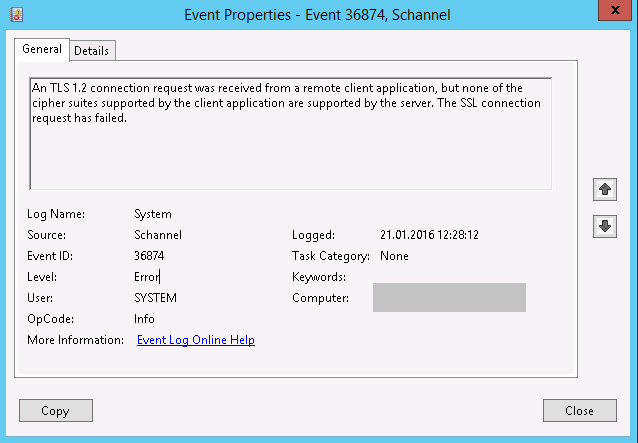
Имея доступ к журналу событий System (Event viewer) на контроллере домена можно определить причину (коих может быть великое множество).
В данной заметке раскажу про часто встречающуюся проблему после конфигурации LDAPS, а именно ошибку аутентификации в Secure Channel (Schannel)
Log Name:      System
Source:        Schannel
Date:          21.01.2016 12:28:12
Event ID:      36874
Task Category: None
Level:         Error
Keywords:
User:          SYSTEM
Computer:      DC.domain
Description:
An TLS 1.2 connection request was received from a remote client application, but none of the cipher suites supported by the client application are supported by the server. The SSL connection request has failed.
Проблема заключается в том, что по умолчанию TLS 1.2 отключен на стороне сервера.
Конкретно в Вашем случае отключено может быть что угодно (SSL…,TLS….).
Соединение не удается и следом за Event ID: 36874 следует:
Log Name:      System
Source:        Schannel
Date:          21.01.2016 12:28:12
Event ID:      36888
Task Category: None
Level:         Error
Keywords:
User:          SYSTEM
Computer:      DC.domain
Description:
A fatal alert was generated and sent to the remote endpoint. This may result in termination of the connection. The TLS protocol defined fatal error code is 40. The Windows SChannel error state is 1205.
Решение
Решением является включение TLS 1.2.
Оперативно это можно выполнить через правку реестра путем создания ключа TLS 1.2ClientDisabledByDefault в ветке реестра HKEY_LOCAL_MACHINESYSTEMCurrentControlSetControlSecurityProvidersSCHANNELProtocols
HKEY_LOCAL_MACHINESYSTEMCurrentControlSetControlSecurityProvidersSCHANNELProtocolsTLS 1.2ClientDisabledByDefault
Значение ключа DisabledByDefault должно быть выключено (1). 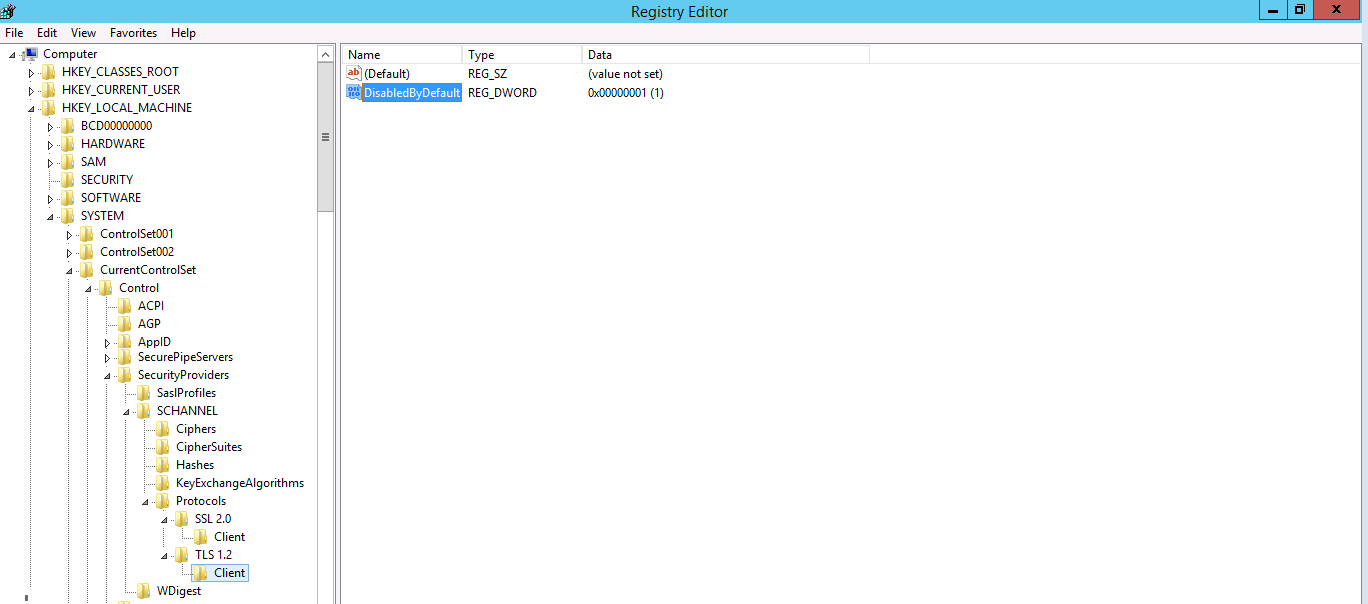
В случае проблем не с TLS 1.2 действия аналогичны. Более подробно параметры реестра для SCHANNEL можно посмотреть здесь.
- Remove From My Forums
-
Question
-
Dear all,
Im exeprence replication errors bettwen site to site replication.
Error:
Repadmin can’t connect to a «home server», because of the following error. Try
specifying a different
home server with /homeserver:[dns name]
Error: An LDAP lookup operation failed with the following error:LDAP Error 81(0x51): Server Down
Server Win32 Error 0(0x0):
Extended Information:This error occurs if I’m connected by the main WAN line (satilite), but if I change to backup line wokrs fine.
I was in the way to troubleshooting this issue with Netowrk TEAM, and they ask me wich ports are use when replication occurs so they can troubleshoot it.
I will kindly ask your help and add on this issue and also if you could provide details about all ports and flow of the replication.
Thanks in advance
Answers
-
Hi,
You need to check couple of the options to fix this issue.
1. Check DNS settings on NIC (preferred should be itself if it holds DNS role)
2. Repadmin /replsum at elivated command prompt. If you notice any errors work on that.
3. Add Antivirus exceptions for SYSVOL, NTDS folders
4. Restart Netlogon, DNS and ipconfig /flushdns & ipconfig /registerdns
5. If none of the above options doesn’t work, provide us ipconfig /all and DCDiag /v logs for better understanding about the issue.
-
Edited by
Saturday, December 1, 2012 3:06 PM
-
Marked as answer by
Yan Li_
Thursday, December 6, 2012 2:23 AM
-
Edited by
-
-
Marked as answer by
Yan Li_
Thursday, December 6, 2012 2:23 AM
-
Marked as answer by
-
-
Marked as answer by
Yan Li_
Thursday, December 6, 2012 2:23 AM
-
Marked as answer by
-
You have to start that the traffic on your main WAN connection is not filtered. Active Directory ports used for AD replication should be opened in both directions:
http://technet.microsoft.com/en-us/library/bb727063.aspxYou can use PortQryUI to check the filtering.
Of course, you should also check that the routing is correctly set for this connection. This can be checked using ping requests / responses (I suppose that ICMP traffic is not blocked).
Note also that AD replication behind a NAT device is not supported. That is why you will need to check if one of the routers used or the main WAN connection is using NAT. If it is the case, you will need to disable it (In your case, with a dedicated site
to site connection, NAT should not be required).Of course, dcdiag and repadmin commands should provide you with more details about the issue.
This posting is provided «AS IS» with no warranties or guarantees , and confers no rights.
-
Edited by
Mr XMVP
Sunday, December 2, 2012 3:19 PM -
Marked as answer by
Yan Li_
Thursday, December 6, 2012 2:23 AM
-
Edited by
-
-
Marked as answer by
Yan Li_
Thursday, December 6, 2012 2:23 AM
-
Marked as answer by
-
-
Marked as answer by
Yan Li_
Thursday, December 6, 2012 2:24 AM
-
Marked as answer by
- Remove From My Forums
-
Question
-
Dear all,
Im exeprence replication errors bettwen site to site replication.
Error:
Repadmin can’t connect to a «home server», because of the following error. Try
specifying a different
home server with /homeserver:[dns name]
Error: An LDAP lookup operation failed with the following error:LDAP Error 81(0x51): Server Down
Server Win32 Error 0(0x0):
Extended Information:This error occurs if I’m connected by the main WAN line (satilite), but if I change to backup line wokrs fine.
I was in the way to troubleshooting this issue with Netowrk TEAM, and they ask me wich ports are use when replication occurs so they can troubleshoot it.
I will kindly ask your help and add on this issue and also if you could provide details about all ports and flow of the replication.
Thanks in advance
Answers
-
Hi,
You need to check couple of the options to fix this issue.
1. Check DNS settings on NIC (preferred should be itself if it holds DNS role)
2. Repadmin /replsum at elivated command prompt. If you notice any errors work on that.
3. Add Antivirus exceptions for SYSVOL, NTDS folders
4. Restart Netlogon, DNS and ipconfig /flushdns & ipconfig /registerdns
5. If none of the above options doesn’t work, provide us ipconfig /all and DCDiag /v logs for better understanding about the issue.
-
Edited by
Saturday, December 1, 2012 3:06 PM
-
Marked as answer by
Yan Li_
Thursday, December 6, 2012 2:23 AM
-
Edited by
-
-
Marked as answer by
Yan Li_
Thursday, December 6, 2012 2:23 AM
-
Marked as answer by
-
-
Marked as answer by
Yan Li_
Thursday, December 6, 2012 2:23 AM
-
Marked as answer by
-
You have to start that the traffic on your main WAN connection is not filtered. Active Directory ports used for AD replication should be opened in both directions:
http://technet.microsoft.com/en-us/library/bb727063.aspxYou can use PortQryUI to check the filtering.
Of course, you should also check that the routing is correctly set for this connection. This can be checked using ping requests / responses (I suppose that ICMP traffic is not blocked).
Note also that AD replication behind a NAT device is not supported. That is why you will need to check if one of the routers used or the main WAN connection is using NAT. If it is the case, you will need to disable it (In your case, with a dedicated site
to site connection, NAT should not be required).Of course, dcdiag and repadmin commands should provide you with more details about the issue.
This posting is provided «AS IS» with no warranties or guarantees , and confers no rights.
-
Edited by
Mr XMVP
Sunday, December 2, 2012 3:19 PM -
Marked as answer by
Yan Li_
Thursday, December 6, 2012 2:23 AM
-
Edited by
-
-
Marked as answer by
Yan Li_
Thursday, December 6, 2012 2:23 AM
-
Marked as answer by
-
-
Marked as answer by
Yan Li_
Thursday, December 6, 2012 2:24 AM
-
Marked as answer by