The following is a list of errors and problems that can occur while using Vtex.
When listing a new error here, please follow the established format.
Contents
- 1 Local Steam Service is not running
- 2 Problem figuring out outputdir
- 3 «Unable to find gameinfo.txt»
- 4 Setup file gameinfo.txt doesn’t exist
- 5 TGA is bogus
- 6 «Warning: falling back to auto detection of vconfig» (Windows Vista)
- 7 See also
Local Steam Service is not running
Vtex will give the following error:
SteamStartup() failed: SteamStartup(0xf,0x0012F0E4) failed with error 108: The local Steam Service is not running
Steam must run while Vtex is run. Start Steam to fix this.
Problem figuring out outputdir
Vtex will give the following error:
Problem figuring out outputdir for <path>
As a first step, check that the texture to convert is really in the sourcesdk_contentgamedirmaterialsrc folder, where gamedir is the game folder (cstrike/dod/hl2/hl2mp).
If the texture is in the correct folder, the error might instead be caused by a complication with the environment variables. Primarily, this should be able to be eliminated by using VConfig and ensuring the selected mod has been run at least once. However, there are cases where this doesn’t solve the problem.
One solution is to remove the instance of the VProject Environment variable. In Windows XP this can be accomplished by the following:
- Right-click on My computer and click on Properties.
- Select the Advanced tab.
- Click on Environment Variables near the bottom of the window.
- In the System variables section scroll down and highlight the line VProject.
- Click the Delete button.
- Click OK twice to exit.
However, this solution will create the Unable to find gameinfo.txt error instead. To do: Delete this non-functioning solution alternative?
Alternative Solution
vtex.exe cannot understand spaces in the input file. One solution is to create a folder directly on the C:/ drive with the same name as the original one the vtex shortcut was pointing at. For example, create C:/tf instead of C:Program FilesSteamsteamapps<account_name>team fortress 2tf. Update the vtex.exe shortcut to point to this new folder. In this folder, put the gameinfo.txt from the original folder, as well as an empty materialsrc and materials folder. Place your file to be converted in the new materialsrc folder. Now drag-and-drop the file onto the vtex shortcut, and the output will be in the new materials folder.
«Unable to find gameinfo.txt»
Vtex will give the following error and instructions:
Unable to find gameinfo.txt. Solutions:

1. Read http://www.valve-erc.com/srcsdk/faq.html#NoGameDir
2. Run vconfig to specify which game you're working on.
3. Add -game <path> on the command line where <path> is the directory that gameinfo.txt is in.
This error will occur after VProject has been removed using the steps above.
Open Source SDK and change the Current Game.
 Note: The link at step 1 won’t provide a solution. (The page is really old.)
Setup file gameinfo.txt doesn’t exist
The Nov 7th, 2007 SDK release includes Orange Box with TF2 and trying to use vtex in this new SDK update to create a vtf file for Team Fortress 2 results in the following error message:
"Setup file 'gameinfo.txt' doesn't exist in subdirectory 'C:Program FilesSteamsteamappsplayer namesourcesdkbinorangeboxbinvconfig'. check your -game parameter or VCONFIG setting.".
Assuming that this is the same error as «Unable to find gameinfo.txt» above, then trying to run vconfig.exe results in this error:
"This application has failed to start because Steam.dll was not found. Re-installing the application may fix this problem."
Solution:
- Create a shortcut to vtex.exe which is located in «C:Program FilesSteamsteamappsplayer_namesourcesdkbinorangeboxbinvtex.exe» and select Properties.
- At the end of the Target text add -game «C:Program FilesSteamsteamappsplayer_nameteam fortress 2tf» -nop4
Valve intends to fix the problem with requirement of a -nop4 argument to be added to the target.
TGA is bogus
Vtex will give the following error:
TGA <path> is bogus!
The texture image you are trying to convert is not recognized as a valid targa (.tga) file. Make sure that it is, and that it is either 24 bit/pixel or 32 bit/pixel. (16 bit/pixel is not recognized.)
«Warning: falling back to auto detection of vconfig» (Windows Vista)
Vtex will give the following error:
To do: Please provide an exact quote of the error.
Make a shortcut for vtex.exe and add -game [path to game directory]
- Example: -game c:/steam/steamapps/sourcemods/Awakening
If there are spaces in any of the folders in your path use »
- Example: -game «c:/program files/steam/steamapps/sourcemods/insurgency»
See also
- Vtex

-
Привет всем)
У меня возникла проблема при запуске Доты 2, ошибка setup file gameinfo.txt doesn’t exist in subdirectory hl2.
Что это за ошибка и как её исправить? Кто может подскажите!
1-Переустанавливать не получилась!
2-Проверка Кеша тоже не помогла!
3-В яндексе тоже не нашёл!
4-ПОМОГИТЕ!!!! -
Проверь кеш, Если не докачает файлы вставь внутрь твоего файла в деректорию это:
«GameInfo»
{
game «DOTA 2»
gamelogo 1
type multiplayer_only
nomodels 1
nohimodel 1
nocrosshair 0
GameData «dota.fgd»
SupportsDX8 0FileSystem
{
SteamAppId 816 // This will mount all the GCFs we need (240=CS:S, 220=HL2).
ToolsAppId 211 // Tools will load this (ie: source SDK caches) to get things like materialsdebug, materialseditor, etc.//
// The code that loads this file automatically does a few things here:
//
// 1. For each «Game» search path, it adds a «GameBin» path, in <dir>bin
// 2. For each «Game» search path, it adds another «Game» path in front of it with _<langage> at the end.
// For example: c:hl2cstrike on a french machine would get a c:hl2cstrike_french path added to it.
// 3. For the first «Game» search path, it adds a search path called «MOD».
// 4. For the first «Game» search path, it adds a search path called «DEFAULT_WRITE_PATH».
////
// Search paths are relative to the base directory, which is where hl2.exe is found.
//
// |gameinfo_path| points at the directory where gameinfo.txt is.
// We always want to mount that directory relative to gameinfo.txt, so
// people can mount stuff in c:mymod, and the main game resources are in
// someplace like c:program filesvalvesteamsteamapps<username>half-life 2.
//
SearchPaths
{
Game |gameinfo_path|.
Game platform
}
}
} -
Всё сделал как ты сказал,но тока не вышло все ровно он это выдаёт!
Setup file gameinfo.txt doesn’t exist in subdirectory hl2
Check your-game parameter or VCONFIG setting.
Вот всё ошибка!
И еще Дота 2 Тест запускается! -
такая же ошибка

-
http://vk.com/vsiraem_mid заходим и подписываемся (если не педики )
-
стим — настройки — бета тестирование — выбири стим бета апдейт, может поможет
-
В ксс такая проблема сейчас была сразу начал искать в яндекса и наткнулся на ваш сайт…
Скорее всего это у меня случилось из-за того, что я папку cstrike из старой контры перекинул т.к. у меня там все моды и карт на 8гб. Так вот проверил кеш и мне сейчас докачивает 128 файлов… Скорее всего сейчас смогу зайти.
-

Adolf_BarniK
- Полковник

- Сообщения: 4128
- Зарегистрирован: 12.03.2006
- Благодарил (а): 3 раза
- Поблагодарили: 29 раз
- Контактная информация:
#1
Сообщение
19.04.2007, 15:48
При запуске выдает ошибку gameinfo.txt doesn’t exist in cprogram filessteamsteamappsakkaynthalf-life 2hl2
Кстати я слышал что перед 1 запуском Хаммера его надо настраивать?
з.ы я на стар-стиме
-

andreil
- Разработчик

- Сообщения: 781
- Зарегистрирован: 14.08.2006
- Откуда: Светлогорск, Беларусь
- Поблагодарили: 2 раза
- Контактная информация:
#2
Сообщение
19.04.2007, 15:57
Щелкни «Refresh SDK content» (вроде так) и перезапусти его.
[url=svn://forum.csmania.ru/andreil]Репозиторий с моими проектами[/url]
Занимаюсь переносом всех своих библиотек на С++, а так же созданием их кроссплатформенных версий.
В команду переводчиков манги «Ah! My Goddess!» требуются переводчики с английского и тайперы (последних можем обучить, главное — желание).
-
Adolf_BarniK
- Полковник
- Сообщения: 4128
- Зарегистрирован: 12.03.2006
- Благодарил (а): 3 раза
- Поблагодарили: 29 раз
- Контактная информация:
#3
Сообщение
19.04.2007, 16:08
Пробовал, то же самое.
Кстати перед ошибкой он еще пишет
the configuration information for the game you’re trying to edit is invalid or missing…
Может попробовать reset game configurtions?
добавлено спустя 3 минуты:
Хе! нажал и хаммер пошел. Так как его нужно настраивать?(в виде для нубов 😳 )?
-

iXsero
- Сержант

- Сообщения: 57
- Зарегистрирован: 10.10.2006
- Откуда: Санкт-Петербург
- Контактная информация:
#4
Сообщение
20.04.2007, 01:45
не надо просто запустить игру в которую собираешься играть, там стим распакует некоторые фаилики среди них и будет gameinfo.txt, а пото нажми
andreil писал(а):Щелкни «Refresh SDK content» (вроде так) и перезапусти его.
Спасибо Господу Богу что в данный момент смотрел в другую сторону.
Спасибо алфавиту за любезно предоставленные буквы.
-
Adolf_BarniK
- Полковник
- Сообщения: 4128
- Зарегистрирован: 12.03.2006
- Благодарил (а): 3 раза
- Поблагодарили: 29 раз
- Контактная информация:
#6
Сообщение
20.04.2007, 22:38
О! поперло! спасибо qwertymap1)))
-
bomjara
- Нович0к

- Сообщения: 19
- Зарегистрирован: 03.03.2006
#7
Сообщение
22.04.2007, 12:18
вощето хаммер сам все ето делать умеет
там когда он грузитса перед стартом он настраиваетса… н оиногда ето опдвисает и наджо ресет конфигуреишн юзать…
а особо его настраивать надо для мод маппинга тоесть моды хаммер наити не может поетому ему там надо указывать аппки с текстурами мода с его моделями и остальным хламом ….
-

qwertymap1
- Сотрудник VALVe

- Сообщения: 53
- Зарегистрирован: 15.09.2006
#8
Сообщение
22.04.2007, 19:30
bomjara
Не, у меня с HL2 gameinfo тоже были проблемы 😛
-

Desy
- Сержант
- Сообщения: 61
- Зарегистрирован: 26.04.2007
#9
Сообщение
20.05.2007, 00:51
Не я запустил его он ВКЛ а че дальше делать та ??


-

SilentMan
- Лейтенант

- Сообщения: 102
- Зарегистрирован: 07.02.2007
- Откуда: Ukraine
-
Контактная информация:
#10
Сообщение
18.06.2007, 13:16
source-inside.ru !!! 😮

-
3gor
- Нович0к
- Сообщения: 1
- Зарегистрирован: 29.06.2007
#11
Сообщение
03.11.2007, 00:37
Люди хелп
Создаю карту, и что бы исправить недоработки заранее компилирую и тестю. Но вот незадача: доделав карту до конца… …он выдаёт мне карту с предыдущей компиляции. Попробовал удалить нах скомпилированный файл карты- так хаммер в конце компиляции жалуется что не может найти (по идеи то, что он создаёт) BSP файл карты?! И всем кто пытается скомпилировать мою карту хаммер выдаёт туже фигню.
Умные люди посоветовали удалить строку steampatch, не помогло.
Вы моя последняя надежда.
Последнее обновление: 07/01/2022
[Время, требуемое для чтения: 3,5 мин.]
Файл gameinfo.txt использует расширение TXT, в частности известное как файл Plain Text. Классифицируется как файл Текст (Plain Text), созданный для Half-Life 2 Garry’s mod 9.04 компанией Garry.
Файл gameinfo.txt изначально был выпущен с Half-Life 2 Garry’s mod 9.04 11/30/2005 для ОС Windows 10.
По нашим данным, этот файл является последним обновлением от компании Garry.
Ниже приведены исчерпывающие сведения о файле, инструкции для простого устранения неполадок, возникших с файлом TXT, и список бесплатных загрузок gameinfo.txt для каждой из имеющихся версий файла.
Что такое сообщения об ошибках gameinfo.txt?
Общие ошибки выполнения gameinfo.txt
Ошибки файла gameinfo.txt часто возникают на этапе запуска Half-Life 2 Garry’s mod, но также могут возникать во время работы программы.
Эти типы ошибок TXT также известны как «ошибки выполнения», поскольку они возникают во время выполнения Half-Life 2 Garry’s mod. К числу наиболее распространенных ошибок выполнения gameinfo.txt относятся:
- Не удается найти gameinfo.txt.
- gameinfo.txt — ошибка.
- Не удалось загрузить gameinfo.txt.
- Ошибка при загрузке gameinfo.txt.
- Не удалось зарегистрировать gameinfo.txt / Не удается зарегистрировать gameinfo.txt.
- Ошибка выполнения — gameinfo.txt.
- Файл gameinfo.txt отсутствует или поврежден.
Библиотека времени выполнения Microsoft Visual C++

Ошибка выполнения!
Программа: C:Program Files (x86)gmod9gmod9gameinfo.txt
Среда выполнения получила запрос от этого приложения, чтобы прекратить его необычным способом.
Для получения дополнительной информации обратитесь в службу поддержки приложения.

В большинстве случаев причинами ошибок в TXT являются отсутствующие или поврежденные файлы. Файл gameinfo.txt может отсутствовать из-за случайного удаления, быть удаленным другой программой как общий файл (общий с Half-Life 2 Garry’s mod) или быть удаленным в результате заражения вредоносным программным обеспечением. Кроме того, повреждение файла gameinfo.txt может быть вызвано отключением питания при загрузке Half-Life 2 Garry’s mod, сбоем системы при загрузке или сохранении gameinfo.txt, наличием плохих секторов на запоминающем устройстве (обычно это основной жесткий диск) или заражением вредоносным программным обеспечением. Таким образом, крайне важно, чтобы антивирус постоянно поддерживался в актуальном состоянии и регулярно проводил сканирование системы.
Как исправить ошибки gameinfo.txt — 3-шаговое руководство (время выполнения: ~5-15 мин.)
Если вы столкнулись с одним из вышеуказанных сообщений об ошибке, выполните следующие действия по устранению неполадок, чтобы решить проблему gameinfo.txt. Эти шаги по устранению неполадок перечислены в рекомендуемом порядке выполнения.
Шаг 1. Восстановите компьютер до последней точки восстановления, «моментального снимка» или образа резервной копии, которые предшествуют появлению ошибки.
Чтобы начать восстановление системы (Windows XP, Vista, 7, 8 и 10):
- Нажмите кнопку «Пуск» в Windows
- В поле поиска введите «Восстановление системы» и нажмите ENTER.
- В результатах поиска найдите и нажмите «Восстановление системы»
- Введите пароль администратора (при необходимости).
- Следуйте инструкциям мастера восстановления системы, чтобы выбрать соответствующую точку восстановления.
- Восстановите компьютер к этому образу резервной копии.
Если на этапе 1 не удается устранить ошибку gameinfo.txt, перейдите к шагу 2 ниже.
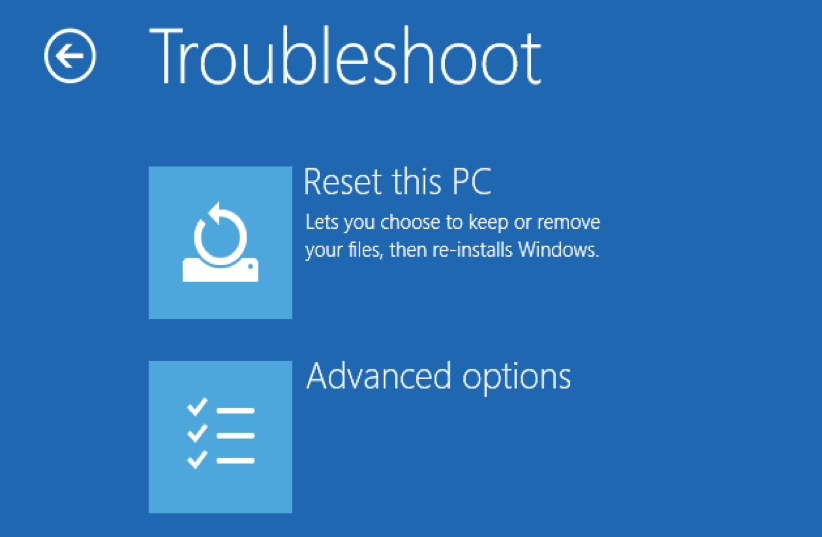
Шаг 2. Если вы недавно установили приложение Half-Life 2 Garry’s mod (или схожее программное обеспечение), удалите его, затем попробуйте переустановить Half-Life 2 Garry’s mod.
Чтобы удалить программное обеспечение Half-Life 2 Garry’s mod, выполните следующие инструкции (Windows XP, Vista, 7, 8 и 10):
- Нажмите кнопку «Пуск» в Windows
- В поле поиска введите «Удалить» и нажмите ENTER.
- В результатах поиска найдите и нажмите «Установка и удаление программ»
- Найдите запись для Half-Life 2 Garry’s mod 9.04 и нажмите «Удалить»
- Следуйте указаниям по удалению.
После полного удаления приложения следует перезагрузить ПК и заново установить Half-Life 2 Garry’s mod.
Если на этапе 2 также не удается устранить ошибку gameinfo.txt, перейдите к шагу 3 ниже.

Half-Life 2 Garry’s mod 9.04
Garry
Шаг 3. Выполните обновление Windows.
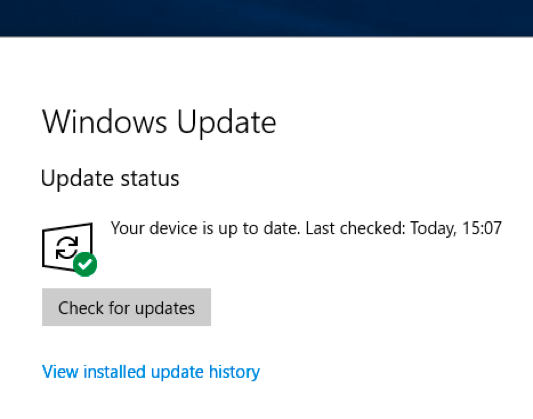
Когда первые два шага не устранили проблему, целесообразно запустить Центр обновления Windows. Во многих случаях возникновение сообщений об ошибках gameinfo.txt может быть вызвано устаревшей операционной системой Windows. Чтобы запустить Центр обновления Windows, выполните следующие простые шаги:
- Нажмите кнопку «Пуск» в Windows
- В поле поиска введите «Обновить» и нажмите ENTER.
- В диалоговом окне Центра обновления Windows нажмите «Проверить наличие обновлений» (или аналогичную кнопку в зависимости от версии Windows)
- Если обновления доступны для загрузки, нажмите «Установить обновления».
- После завершения обновления следует перезагрузить ПК.
Если Центр обновления Windows не смог устранить сообщение об ошибке gameinfo.txt, перейдите к следующему шагу. Обратите внимание, что этот последний шаг рекомендуется только для продвинутых пользователей ПК.
Если эти шаги не принесут результата: скачайте и замените файл gameinfo.txt (внимание: для опытных пользователей)
Если ни один из предыдущих трех шагов по устранению неполадок не разрешил проблему, можно попробовать более агрессивный подход (примечание: не рекомендуется пользователям ПК начального уровня), загрузив и заменив соответствующую версию файла gameinfo.txt. Мы храним полную базу данных файлов gameinfo.txt со 100%-ной гарантией отсутствия вредоносного программного обеспечения для любой применимой версии Half-Life 2 Garry’s mod . Чтобы загрузить и правильно заменить файл, выполните следующие действия:
- Найдите версию операционной системы Windows в нижеприведенном списке «Загрузить файлы gameinfo.txt».
- Нажмите соответствующую кнопку «Скачать», чтобы скачать версию файла Windows.
- Скопируйте этот файл в соответствующее расположение папки Half-Life 2 Garry’s mod:
Windows 10: C:Program Files (x86)gmod9gmod9
- Перезагрузите компьютер.
Если этот последний шаг оказался безрезультативным и ошибка по-прежнему не устранена, единственно возможным вариантом остается выполнение чистой установки Windows 10.
СОВЕТ ОТ СПЕЦИАЛИСТА: Мы должны подчеркнуть, что переустановка Windows является достаточно длительной и сложной задачей для решения проблем, связанных с gameinfo.txt. Во избежание потери данных следует убедиться, что перед началом процесса вы создали резервные копии всех важных документов, изображений, установщиков программного обеспечения и других персональных данных. Если вы в настоящее время не создаете резервных копий своих данных, вам необходимо сделать это немедленно.
Скачать файлы gameinfo.txt (проверено на наличие вредоносного ПО — отсутствие 100 %)
ВНИМАНИЕ! Мы настоятельно не рекомендуем загружать и копировать gameinfo.txt в соответствующий системный каталог Windows. Garry, как правило, не выпускает файлы Half-Life 2 Garry’s mod TXT для загрузки, поскольку они входят в состав установщика программного обеспечения. Задача установщика заключается в том, чтобы обеспечить выполнение всех надлежащих проверок перед установкой и размещением gameinfo.txt и всех других файлов TXT для Half-Life 2 Garry’s mod. Неправильно установленный файл TXT может нарушить стабильность работы системы и привести к тому, что программа или операционная система полностью перестанут работать. Действовать с осторожностью.
Файлы, относящиеся к gameinfo.txt
Файлы TXT, относящиеся к gameinfo.txt
| Имя файла | Описание | Программа (версия) | Размер файла (байты) | Расположение файла |
|---|---|---|---|---|
| airboat.txt | Plain Text | Half-Life 2 Garry’s mod 9.04 | 678 | C:Program Files (x86)gmod9gmod9settingsent… |
| sounds_csweapons.txt | Plain Text | Half-Life 2 Garry’s mod 9.04 | 25594 | C:Program Files (x86)gmod9gmod9scripts |
| balloon.txt | Plain Text | Half-Life 2 Garry’s mod 9.04 | 1013 | C:Program Files (x86)gmod9gmod9settingscon… |
| 0.1.filtertrie.interme… | Plain Text | Half-Life 2 Garry’s mod 9.04 | 5 | C:UsersTesterAppDataLocalPackagesMicrosof… |
| FailureReportMetadata_… | Plain Text | Half-Life 2 Garry’s mod 9.04 | 125 | C:WindowsTemp |
Другие файлы, связанные с gameinfo.txt
| Имя файла | Описание | Программа (версия) | Размер файла (байты) | Расположение файла |
|---|---|---|---|---|
| api-ms-win-core-sysinf… | ApiSet Stub DLL | Microsoft® Windows® Operating System (10.0.17134.12) | 19064 | C:UsersTesterAppDataLocalMicrosoftOneDriv… |
| EtwRTDiagLog.etl | Microsoft Event Trace Log | Half-Life 2 Garry’s mod 9.04 | 1792 | C:WindowsSystem32LogFilesWMIRtBackup |
| api-ms-win-core-handle… | ApiSet Stub DLL | Microsoft® Windows® Operating System (10.0.17134.12) | 18032 | C:UsersTesterAppDataLocalMicrosoftOneDriv… |
| api-ms-win-core-interl… | ApiSet Stub DLL | Microsoft® Windows® Operating System (10.0.17134.12) | 18552 | C:UsersTesterAppDataLocalMicrosoftOneDriv… |
| edb.log | Log | Half-Life 2 Garry’s mod 9.04 | 524288 | C:UsersTesterAppDataLocalPackagesMicrosof… |
Вы скачиваете пробное программное обеспечение. Для разблокировки всех функций программного обеспечения требуется покупка годичной подписки, стоимость которой оставляет 39,95 долл. США. Подписка автоматически возобновляется в конце срока (Подробнее). Нажимая кнопку «Начать загрузку» и устанавливая «Программное обеспечение», я подтверждаю, что я прочитал (-а) и принимаю Лицензионное соглашение и Политику конфиденциальности компании Solvusoft.
Обновлено: 29.01.2023
OS version: lubuntu (ubuntu + lxde) 64bit
Graphic card: «GeForce GTX 550 Ti» more specs
after installing some 32bit libs for running portal2 i (finally) get some output, but the game doesn’t start,
complete output
i tryed to:
- check game cache
- run it whit sudo
- run from console (to see the output)
nothing worked, thanks for the answers.
EDIT:
I’m running it from portal2_linux because portal2.sh gives me some problems
The text was updated successfully, but these errors were encountered:
DarkMaker64 commented Sep 15, 2015
Update: while trying to install drivers to run portal i broke kernel (don’t know how)
now i have manjaro linux with xfce, same drivers, if i type: LD_PRELOAD=’/usr/$LIB/libstdc++.so.6′ DISPLAY=:0 ./portal2.sh -game portal2 -steam in the portal2 directory it works but it crashes while loading the menu, giving me that error (translated from italian)
./portal2.sh: line 46: 7615 segmentation error (core dump created) $ «$»/$ «$@»
23 сен. 2017 в 10:27
uninstall or just update display adapter (card) i updated as i had a new recommended driver available under radeon. before i did this i defrag the hdd, until SSDs big enough for games is cheap which i plan to do (takes time to get a good performance ssd), defrags for that will be a thing of the past. update n restart. (never defrag a SSD!)
if you have hl2 installed run first, if not tf2 i guess. good luck. the bottom stuff couldnt hurt. Know your files..esp steam directories. things tend to change.
this was a noticeable apparent problem with switching monitors from 2650×1600 to 1920×1200, the res was locked and adv settings was not working. other games too did not recognise this res change and would not respond well. the above ^ sorted this, now res is changable and the games work, hopefully this is all you need to do and not have to touch the regedit configs. hope this helps
steamappscommonTeam Fortress 2tf
replace the config with >
all steam does is revalidates the failed file and reacquires. nothing happens.
i duno, got this now. with a host of other problems for just changing monitors (different res) and switching networks.
it seems to be a problem with windows, check updates. used to get factorio never starting up but run > SteamAppscommonFactoriobinx64Factorio.exe
worked, anyway. had a problem with windows recently? did it restore?
will update if i figure this out. likely i need something from windows downloads, duno what that is or what im looking for. (fyi auto update has nothing) good times.
11 дек. 2017 в 20:54
8 мар. 2020 в 9:53
uninstall or just update display adapter (card) i updated as i had a new recommended driver available under radeon. before i did this i defrag the hdd, until SSDs big enough for games is cheap which i plan to do (takes time to get a good performance ssd), defrags for that will be a thing of the past. update n restart. (never defrag a SSD!)
if you have hl2 installed run first, if not tf2 i guess. good luck. the bottom stuff couldnt hurt. Know your files..esp steam directories. things tend to change.
this was a noticeable apparent problem with switching monitors from 2650×1600 to 1920×1200, the res was locked and adv settings was not working. other games too did not recognise this res change and would not respond well. the above ^ sorted this, now res is changable and the games work, hopefully this is all you need to do and not have to touch the regedit configs. hope this helps
steamappscommonTeam Fortress 2tf
replace the config with >
all steam does is revalidates the failed file and reacquires. nothing happens.
i duno, got this now. with a host of other problems for just changing monitors (different res) and switching networks.
it seems to be a problem with windows, check updates. used to get factorio never starting up but run > SteamAppscommonFactoriobinx64Factorio.exe
worked, anyway. had a problem with windows recently? did it restore?
will update if i figure this out. likely i need something from windows downloads, duno what that is or what im looking for. (fyi auto update has nothing) good times.
Setup file gameinfo txt doesn t exist in subdirectory hl2 что делать
27 мар. 2015 в 3:49
Всегда ТФ работал хорошо, но потом у меня обновился Windows и при запуске он просто вылетает. Попробовал зайти в локальные файлы и запустить hl2.exe — пишет ошибку Setup file ‘gameinfo.txt’ doesn’t exist in subdirectory ‘hl2’. Check your -game parameter or VCONFIG setting. Пожалуйста, подскажите что мне делать.
(Заблокирован) 27 мар. 2015 в 3:52
27 мар. 2015 в 4:08
В папке с игрой (твой диск:steamSteamAppscommonTeam Fortress 2tf )пропал или попортился файл gameinfo.txt или его не видит стим
вот содержание файла:
«GameInfo»
game «Team Fortress 2»
type multiplayer_only
nomodels 1
nohimodel 1
nocrosshair 0
hidden_maps
«test_speakers» 1
«test_hardware» 1
>
nodegraph 0
GameData «tf.fgd»
InstancePath «maps/instances/»
advcrosshair 1
supportsvr 1
FileSystem
SteamAppId 440
//
// Setup engine search paths.
//
// If a search path contains «_english», and the current language is not english, then
// another search path will be inserted above the english one by replacing «_english» with
// the appropriate language.
//
// To debug how the engine has parsed this file, type «path» at the console.
//
// Search paths are relative to the base directory, which is where hl2.exe is found.
//
// |gameinfo_path| points at the directory where gameinfo.txt is.
// |all_source_engine_paths| points at the directory cintaining HL2 shared content.
//
SearchPaths
// First, mount all user customizations. This will search for VPKs and subfolders
// and mount them in alphabetical order. The easiest way to distribute a mod is to
// pack up the custom content into a VPK. To «install» a mod, just drop it in this
// folder.
//
// Note that this folder is scanned only when the game is booted.
game+mod tf/custom/*
// We search VPK files before ordinary folders, because most files will be found in
// VPK and we can avoid making thousands of file system calls to attempt to open files
// in folders where they don’t exist. (Searching a VPK is much faster than making an operating
// system call.)
game_lv tf/tf2_lv.vpk
game+mod tf/tf2_textures.vpk
game+mod tf/tf2_sound_vo_english.vpk
game+mod tf/tf2_sound_misc.vpk
game+mod tf/tf2_misc.vpk
game |all_source_engine_paths|hl2/hl2_textures.vpk
game |all_source_engine_paths|hl2/hl2_sound_vo_english.vpk
game |all_source_engine_paths|hl2/hl2_sound_misc.vpk
game |all_source_engine_paths|hl2/hl2_misc.vpk
platform |all_source_engine_paths|platform/platform_misc.vpk
// Now search loose files. We’ll set the directory containing the gameinfo.txt file
// as the first «mod» search path (after any user customizations). This is also the one
// that’s used when writing to the «mod» path.
mod+mod_write+default_write_path |gameinfo_path|.
// Add the TF directory as a game search path. This is also where where writes
// to the «game» path go.
game+game_write tf
// Where the game’s binaries are
gamebin tf/bin
// Last, mount in shared HL2 loose files
game |all_source_engine_paths|hl2
platform |all_source_engine_paths|platform
// Random files downloaded from gameservers go into a seperate directory, so
// that it’s easy to keep those files segregated from the official game files
// or customizations intentially installed by the user.
//
// This directory is searched LAST. If you visit a server and download
// a custom model, etc, we don’t want that file to override the default
// game file indefinitely (after you have left the server). Servers CAN have
// custom content that overrides the default game files, it just needs to be
// packed up in the .bsp file so that it will be mounted as a map search pack.
// The map search pack is mounted at the top of the search path list,
// but only while you are connected that server and on that map.
game+download tf/download
>
>
Setup file gameinfo txt doesn t exist in subdirectory hl2 что делать
I recently shifted my steam folder to a new hard drive. CSGO works fine but when I launch CSGO SDK Hammer world editor it gives the following error:
«Setup file ‘gameinfo.txt’ doesn’t exist in subdirectory ‘C:Program Files(x86)SteamsteamappscommonCounter-Strike Global Offensivecsgo’. Check your -game parameter or VCONFIG setting»
The current path to the ‘ csgo’ folder is actually ‘E:SteamsteamappscommonCounter-Strike Global Offensivecsgo’
How do I make it point to the correct path?
I have tried reinstalling it and verifying the integrity of both CSGO and CSGO SDK but that doesn’t solve the problem.
PS: I’m new to all this so a detailed answer would be really appreciated.
Читайте также:
- Bonetown как играть
- Как узнать долг в варфейсе
- Как посмотреть историю пополнения счета в варфейс
- Top gun кто владелец
- Кто такой кель из варкрафта
-
#1
запускаю сервер на linux.
строка запуска:
./srcds_run -console +ip ***** -port 28021 -game cstrike +map de_dust2 +maxplayers 20 +fps_max 512 +alias fps_max wait +sv_visiblemaxplayers 20 +alias sv_visiblemaxplayers wait -nohltvвыдает ошибку:
Unable to find gameinfo.txt. Solutions:

1. Read http://www.valve-erc.com/srcsdk/faq.html#NoGameDir
2. Run vconfig to specify which game you're working on.
3. Add -game <path> on the command line where <path> is the directory that gameinfo.txt is in.

Add "-debug" to the ./srcds_run command line to generate a debug.log to help with solving this problem
Tue Aug 27 11:11:40 ALMT 2013: Server restart in 10 seconds
Под рутом сервер запускается, под другими пользователями отказывается.
Сервер чистый, свежескаченный через steamcmd (app_update 240).
Как исправить данную проблему? Спасибо
-
#2
не нужно +fps_max -console,
Посмотри выставил ли ты права на папку с сервером и всех его файлов.
-
#3
1.Иди в папку с сервером.
2. пропиши в терминале:
chmod +x /srcds_run.sh
chmod +x -R /bin*.sh
Вроде так.
Писать от прав суперпользователя.
-
#4
при установке сервера через gamecp права сами выставляются автоматически. но на всякий случай сделал как писали. проблема осталась.
должен ли быть запущен стим от данного пользователя при запуске сервера ? если да, то как это сделать.
-
#5
FlipFlap, Качать так: +login anonymous +app_update 232330 validate
-
#6
FlipFlap, Качать так: +login anonymous +app_update 232330 validate
спасибо, заработало все!