Code Error 800A0408 – Invalid Character
Troubleshooting Code 800A0408 – Invalid Character
Introduction to Code 800A0408
This error code, 800A0408 occurs when you execute a VBScript. A wild guess a problem with an apostrophe, possibly in a ‘REM statement.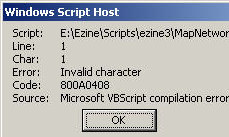
The Symptoms You Get
The script does not execute as you had hoped. Instead you get a WSH message box like this picture:
The Cause of error 800A0408
Your VBScript contains an illegal character, often at the beginning of a line. It can happen if you copy the script from word, then paste into notepad. For example, to ‘Rem out a line we need the apostrophe, which is ASCII character 39; however if you paste from word you may get ASCII 96 (Grave accent).
Note the clue Source: Microsoft VBScript compilation error, this means a syntax error in your script.
The Solutions
Check the punctuation marks in your VBScript, particularly look out for apostrophes and commas that do not display correctly. The reference to Line: 1 Char 1, means that the very first symbol that is probably wrong.
‡
Example 1 of error code 800A0408 – Invalid Character
Note: The error ‘Rem VBScript
It should be ‘ Rem VBScript
‘ Rem VBScript
Set WshShell = WScript.CreateObject(«WScript.Shell»)
Set WshNetwork = WScript.CreateObject(«WScript.Network»)
Set AllDrives = WshNetwork.EnumNetworkDrives()
DriveLetter = «N:» ‘must be capitalized
RemotePath = «\alanhome»
AlreadyConnected = False
For i = 0 To AllDrives.Count – 1 Step 2
If AllDrives.Item(i) = DriveLetter Then AlreadyConnected = True
Next
If AlreadyConnected = False then
WShNetwork.MapNetworkDrive DriveLetter, RemotePath
WshShell.PopUp «Drive » & DriveLetter & » connected successfully.»
Else
WShNetwork.RemoveNetworkDrive DriveLetter
WshShell.PopUp «Drive » & DriveLetter & » disconnected.»
End if
»
Example 2 Code 800A0408 – Invalid Character
I include this screen shot just to emphasise that Char: number need not be one. Thus Char: 20, or what ever your char number is, becomes a big clue in tracing obscure characters that may have sneaked into your script.

See More Windows Update Error Codes 8004 Series
• Error 800A101A8 Object Required •Error 800A0046 •Error 800A10AD •Error 800A000D
• Error 80048820 •Error 800A0401 •Review of SolarWinds Permissions Monitor
• Error 80040E14 • Error 800A03EA • Error 800A0408 • Error 800A03EE
 Guy Recommends: WMI Monitor and It’s Free!
Windows Management Instrumentation (WMI) is one of the hidden treasures of Microsoft operating systems. Fortunately, SolarWinds have created the WMI Monitor so that you can examine these gems of performance information for free. Take the guess work out of which WMI counters to use for applications like Microsoft Active Directory, SQL or Exchange Server.
Download your free copy of WMI Monitor
Do you need additional help?
- For interpreting the WSH messages check Diagnose 800 errors.
- For general advice try my 7 Troubleshooting techniques.
- See master list of 0800 errors.
- Codes beginning 08004…
- Codes beginning 08005…
- Codes beginning 08007…
- Codes beginning 0800A…
Give something back?
Would you like to help others? If you have a good example of this error, then please email me, I will publish it with a credit to you:
If you like this page then please share it with your friends
About The Author

Guy Thomas

- Remove From My Forums
-
Question
-
when i start my computer i get this error message Microsoft VBScript compilation error. Code 800A0408
All replies
-
Can you be more specific? ‘When I start my computer’ — does this message appear when the pc boots up? At what point does it appear?
If this is literally when the computer boots it’s not an EW issue.
Ian
MS MVP Expressionhttp://www.ew-resource.co.uk
http://www.fp-resource.co.uk
Ian Haynes
-
when the computer boots and any time i click on task manager.
-
when the computer boots and anytime i click on the task manager.
thank you. -
Sounds to me like you might have a startup script that’s doing this. Simply starting Task Manager won’t invoke any VBScript. Will this error occur if you just log in and don’t do anything else? Does it give you a file name? That error code means that there was an invalid character in a VBScript (.vbs more than likely) file.
Jim Cheshire
Jimco Software and Books
http://www.jimcosoftware.com
http://www.jimcobooks.comAuthor of:
Microsoft Expression Web 3 In Depth
Special Edition Using Microsoft Expression Web 2
The Microsoft Expression Web Developer’s Guide to ASP.NET 3.5
Special Edition Using Microsoft Expression WebMy Expression Web 3 blog on Network World:
http://www.networkworld.com/community/blog/10560 -
This error occur anytime i log in and don’t do anything else. The file name is C:WINDOWSsystem32winjpg.jpg
-
Sounds like you might have a virus.
http://www.sophos.com/security/analyses/viruses-and-spyware/w32autorunalb.html
Jim Cheshire
Jimco Software and Books
http://www.jimcosoftware.com
http://www.jimcobooks.comAuthor of:
Microsoft Expression Web 3 In Depth
Special Edition Using Microsoft Expression Web 2
The Microsoft Expression Web Developer’s Guide to ASP.NET 3.5
Special Edition Using Microsoft Expression WebMy Expression Web 3 blog on Network World:
http://www.networkworld.com/community/blog/10560 -
Since this is a Windows not an Expression Web problem I would suggest that you ask in a Windows group or if Jim is correct in one of the anti-virus forums. In any event this is not the place to resolve your Windows boot issue.
MS MVP Expression Tutorials & Help http://by-expression.com and online instructor led
Expression Classes
- Remove From My Forums
-
Question
-
Hello, reviving an old one on this forum: http://itknowledgeexchange.techtarget.com/vbscript-systems-administrator/special-characters-in-vbscript-strings/ and
also as posted on: http://itknowledgeexchange.techtarget.com/itanswers/escaping-special-characters-in-run-with-administrator-privileges-script/I used this script:
Here is a VB Script Vall Script that will get around the Password Prompt when «RunAs» is called…
‘Start
‘————————————————————————————
‘ To Run other VB Scripts or even Batch Files with Admin Priviliges’
‘———————————————————————————-
Dim WshShell, objFSO
suser
= «YourAdminAccount@YourDomain.com»sPass = «YourPassWord»
‘——————————————————————————————————————————————————————————————
‘Put your Domain Account and Password in between the qoutes, REMEMBER! the Password will be clear text. If this is a standalone just take off the @YourDomain.com
‘——————————————————————————————————————————————————————————————
sCommand = «wscript \UNCServerNameShareFolderYourScript.vbs»
‘—————————————————————————————————————————————————————————————————————
‘This will be the path were the scripted you want called will be at. Please note you can substitute the ablove for a local directory (Example: C:FolderYourScript.vbs)
‘————————————————————————————————————————————————————————————————————-
Set objComputer = CreateObject(«Shell.LocalMachine»)
Set WshNetwork = CreateObject(«WScript.Network»)
Set WshShell = CreatObject(«WScript.Shell»)
Set WshEnv = wshShell.Environment(«Process»)
WinPath = WshEnv(«SystemRoot»)&»System32runas.exe»
rc = WshShell.Run («runas /noprofile /user:» & suser & » » $ Chr(34) & sCommand & Chr(34))
WScript.Sleep 900
WshShell. AppActivate(WinPath)
WScript.quit
‘End
Answers
-
…
suser = «YourAdminAccount@YourDomain.com»
sPass = «YourPassWord»
…
rc = WshShell.Run («runas /noprofile /user:» & suser & » » $ Chr(34) & sCommand & Chr(34))
WScript.Sleep 900
WshShell. AppActivate(WinPath)
…This is definitely ill-advised. There is a reason the runas program does not accept a password on its command line. To quote
Raymond Chen:
The RunAs program demands that you type the password manually. Why doesn’t it accept a password on the command line?
This was a conscious decision. If it were possible to pass the password on the command line, people would start embedding passwords into batch files and logon scripts, which is laughably insecure.
In other words, the feature is missing to remove the temptation to use the feature insecurely.
In other words, you should not do this.
Bill
-
Proposed as answer by
Wednesday, May 2, 2012 6:16 PM
-
Marked as answer by
IamMred
Sunday, May 6, 2012 11:59 PM
-
Proposed as answer by
Я получаю сообщение об ошибке компиляции, когда пытаюсь запустить следующий код vbs из командной строки в Windows 7.
Option Explicit
Dim objNetwork, strRemotePath1, strRemotePath2, strRemotePath3
Dim strDriveLetter1, strDriveLetter2, strDriveLetter3, strUserName

Set objNetwork = CreateObject("WScript.Network")
strUserName = objNetwork.UserName

strDriveLetter1 = "H:"
strDriveLetter2 = "P:"
strDriveLetter3 = "S:"
strRemotePath1 = "\testpublicusers" & strUserName & ""
strRemotePath2 = "\testpublicgroups"
strRemotePath3 = "\testscans"


'Section which maps two drives, M: and P: and S:
objNetwork.MapNetworkDrive strDriveLetter1, strRemotePath1
objNetwork.MapNetworkDrive strDriveLetter2, strRemotePath2
objNetwork.MapNetworkDrive strDriveLetter3, strRemotePath3

'Extra code just to add a message box
WScript.Echo "Map drives " & strDriveLetter1 & " & " & strDriveLetter2 & " & " & strDriveLetter3

Wscript.Quit
В нем говорится, что проблема связана с линией 1, символ 1. Есть идеи?
3 ответы
Возможная проблема заключается в том, как был закодирован ваш файл; попробуйте сохранить его как ANSI и запустить снова.
Создан 10 янв.

FYI для тех, у кого такая же проблема в будущем, чтобы исправить это:
- Откройте .vbs в блокноте
- Перейти к файлу и «сохранить как»
- Прямо под полем имени файла вы увидите раскрывающееся меню для кодирования. Выбирать ANSI.
ответ дан 31 окт ’13, 17:10

Убедитесь, что вы не используете расширенный символ, например á é í ó ú ñ в имени переменной
Создан 07 фев.

Не тот ответ, который вы ищете? Просмотрите другие вопросы с метками
vbscript
or задайте свой вопрос.
Я получаю ошибку компиляции, когда пытаюсь запустить следующий код vbs из командной строки в Windows 7.
Option Explicit
Dim objNetwork, strRemotePath1, strRemotePath2, strRemotePath3
Dim strDriveLetter1, strDriveLetter2, strDriveLetter3, strUserName

Set objNetwork = CreateObject("WScript.Network")
strUserName = objNetwork.UserName

strDriveLetter1 = "H:"
strDriveLetter2 = "P:"
strDriveLetter3 = "S:"
strRemotePath1 = "testpublicusers" & strUserName & ""
strRemotePath2 = "testpublicgroups"
strRemotePath3 = "testscans"


'Section which maps two drives, M: and P: and S:
objNetwork.MapNetworkDrive strDriveLetter1, strRemotePath1
objNetwork.MapNetworkDrive strDriveLetter2, strRemotePath2
objNetwork.MapNetworkDrive strDriveLetter3, strRemotePath3

'Extra code just to add a message box
WScript.Echo "Map drives " & strDriveLetter1 & " & " & strDriveLetter2 & " & " & strDriveLetter3

Wscript.Quit
Он говорит, что проблема заключается в строке 1 Char 1. Есть идеи?
3 ответов
возможная проблема заключается в том, как ваш файл был закодирован; попробуйте сохранить его как ANSI и запустить его снова.
FYI для тех, кто с той же проблемой в будущем, чтобы исправить это:
- открыть .VBS в блокноте
- перейдите в файл и»сохранить как»
- справа в поле Имя файла, вы увидите выпадающее меню для кодирования. Выберите в ANSI.
Регистрация вы не используете расширенный характер, как á é í ó ú ñ в имени переменной
check
Best Answer

So I had to go through the whole file and replace invalid characters. This is rather frustrating. What I think happened is I edited in Notepad at one point rather than Notepad++.
I’ll have to change the default editor for vbs files or I’m going to do that again I’m sure of it.
Was this post helpful?
thumb_up
thumb_down
View Best Answer in replies below
5 Replies
-

In the command line or a batch file try using «type old.vbs > new.vbs» to convert the file(s) to ansi.
http:/ Opens a new window/www.robvanderwoude.com/type.php#Unicode Opens a new window
Was this post helpful?
thumb_up
thumb_down
-
You need to post a snippet of your code, maybe the line and character referenced in the error?
We do not have enough information to help with just the error.EDIT:
After searching the error, it does seen to be an encoding issue.
I have never seen that with NotePad++.
Was this post helpful?
thumb_up
thumb_down
-
AdamRPL wrote:
In the command line or a batch file try using «type old.vbs > new.vbs» to convert the file(s) to ansi.
http:/ Opens a new window/www.robvanderwoude.com/type.php#Unicode Opens a new window
Tried that and when I run the new file I get the same message. Notepad++ is showing that it is ANSI.
attach_file
Attachment
2014-01-23_13_34_…ection.png
41.1 KB
Was this post helpful?
thumb_up
thumb_down
-
Dave Rossi wrote:
You need to post a snippet of your code, maybe the line and character referenced in the error?
We do not have enough information to help with just the error.EDIT:
After searching the error, it does seen to be an encoding issue.
I have never seen that with NotePad++.It’s always line 1 character 1.
Here is the beginning of the code:
‘——————————————————————————–
‘declare variables
‘——————————————————————————–

Const ForAppending = 8

Const LogFile = “c:tempjavauninstall.txt”

‘——————————————————————————–
‘create log file
‘——————————————————————————–

Set objFSO = CreateObject(“Scripting.FileSystemObject”)

Set objLogFile = objFSO.CreateTextFile(LogFile)

sLog = “Started Java Uninstall”

Call WriteLog(sLog)
This script worked just fine until I edited it recently.
Was this post helpful?
thumb_up
thumb_down
-
So I had to go through the whole file and replace invalid characters. This is rather frustrating. What I think happened is I edited in Notepad at one point rather than Notepad++.
I’ll have to change the default editor for vbs files or I’m going to do that again I’m sure of it.
Was this post helpful?
thumb_up
thumb_down
Вопрос:
Я получаю ошибку компиляции, когда пытаюсь запустить следующий код vbs из командной строки в Windows 7.
Option Explicit
Dim objNetwork, strRemotePath1, strRemotePath2, strRemotePath3
Dim strDriveLetter1, strDriveLetter2, strDriveLetter3, strUserName

Set objNetwork = CreateObject("WScript.Network")
strUserName = objNetwork.UserName

strDriveLetter1 = "H:"
strDriveLetter2 = "P:"
strDriveLetter3 = "S:"
strRemotePath1 = "\testpublicusers" & strUserName & ""
strRemotePath2 = "\testpublicgroups"
strRemotePath3 = "\testscans"


'Section which maps two drives, M: and P: and S:
objNetwork.MapNetworkDrive strDriveLetter1, strRemotePath1
objNetwork.MapNetworkDrive strDriveLetter2, strRemotePath2
objNetwork.MapNetworkDrive strDriveLetter3, strRemotePath3

'Extra code just to add a message box
WScript.Echo "Map drives " & strDriveLetter1 & " & " & strDriveLetter2 & " & " & strDriveLetter3

Wscript.Quit
В нем говорится, что проблема связана с линией 1 Char 1. Любые идеи?
Лучший ответ:
Возможная проблема заключается в том, как ваш файл был закодирован; попробуйте сохранить его как ANSI и запустите его снова.
Ответ №1
FYI для тех, кто с той же проблемой в будущем, исправить это:
- Откройте .vbs в блокноте
- Перейдите в файл и сохраните как “
- В правой части окна с именем файла вы увидите раскрывающееся меню для кодирования. Выберите ANSI.
Ответ №2
Убедитесь, что вы не используете расширенный charater, например á é í ó ú, в имени переменной
|
12 / 11 / 5 Регистрация: 21.08.2012 Сообщений: 226 |
|
|
1 |
|
|
15.01.2014, 11:45. Показов 21892. Ответов 18
Доброго времени суток. Отдельной темы по VBScript не нашёл, поэтому пишу сюда. А вообще тема на стыке 4-х инструментов — VBScript, 1С 8.2, xslt и DIRECTUM Из функции VBScript надо запустить функцию 1С которая называется по русски и находится в модуле с русским названием. Назвать функцию по английски не проблема. Но функция находится в модуле, который называется по русски. А в модуле куча функций которые вызываются в 1С и в DIRECTUM в самых разных местах. В общем переименование модуля грозит большой трудоёмкостью и скрытыми ошибками… Собственно вопрос: Спасибо. Предполагаемая среда использования (все русские):
__________________
0 |


|
Ушел с форума
16454 / 7418 / 1186 Регистрация: 02.05.2013 Сообщений: 11,617 Записей в блоге: 1 |
|
|
15.01.2014, 13:14 |
2 |
|
Может какими-нибудь настройками можно заставить понимать VBScript русские названия модулей? Сохраняйте файл VBScript в Юникоде. Например, в UTF-16.
0 |


|
12 / 11 / 5 Регистрация: 21.08.2012 Сообщений: 226 |
|
|
15.01.2014, 13:46 [ТС] |
3 |
|
Сохраняйте файл VBScript в Юникоде. Например, в UTF-16. Мда… Функция VBScript в xslt-шаблоне. Шаблон формируется программно при выполнении. Попробую разобраться в какой кодировке всё это происходит…
0 |
|
17951 / 7587 / 889 Регистрация: 25.12.2011 Сообщений: 11,317 Записей в блоге: 17 |
|
|
16.01.2014, 01:20 |
4 |
|
Убежденный, VBScript не поддерживает Юникод-сурс.
1 |


|
Убежденный Ушел с форума
16454 / 7418 / 1186 Регистрация: 02.05.2013 Сообщений: 11,617 Записей в блоге: 1 |
||||
|
16.01.2014, 09:39 |
5 |
|||
|
Убежденный, VBScript не поддерживает Юникод-сурс. Вынужден не согласиться. Набираю в текстовом редакторе:
Сохраняю в UTF-16LE (+BOM) с расширением VBS, запускаю — все работает, Добавлено через 18 минут
0 |
|
12 / 11 / 5 Регистрация: 21.08.2012 Сообщений: 226 |
|
|
16.01.2014, 16:55 [ТС] |
6 |
|
С сообщением на русском проблем нету (в заголовках xslt и в xml кодировка стоит utf-8). Начну с простого — создам vbs-скрипты в различных кодировках с русскими названиями функций и проверю. Добавлено через 6 часов 36 минут Для всех скриптов выходила одна и та же ошибка, указывающая на строку с русским названием модуля: Если вызывать аналогичную функцию с английским названием в английском модуле то вызов функции проходит корректно (возвращается текстовая строка на русском и вставляется в текстовый файл). P.S. Попутно нашёл аналогичную тему 7-летней давности: Мне на VBS нужно написать скрипт для работы с 1С
0 |
|
1744 / 349 / 41 Регистрация: 15.10.2012 Сообщений: 547 |
|
|
17.01.2014, 22:59 |
7 |
|
Ничего не изменилось похоже… И не изменится. M$ давно уже забили на WSH. Старая игрушка, уже неинтересная
1 |
|
12 / 17 / 2 Регистрация: 02.11.2015 Сообщений: 222 |
|
|
01.04.2019, 15:18 |
8 |
|
И не изменится. M$ давно уже забили на WSH. Старая игрушка, уже неинтересная и что теперь вместо неё?
0 |
|
5286 / 2479 / 983 Регистрация: 06.06.2017 Сообщений: 8,473 |
|
|
01.04.2019, 16:56 |
9 |
|
и что теперь вместо неё? Не вместо, а вдобавок. PS — разделом выше.
0 |
|
12 / 17 / 2 Регистрация: 02.11.2015 Сообщений: 222 |
|
|
01.04.2019, 17:39 |
10 |
|
PS — разделом выше вы имели ввиду
0 |
|
5286 / 2479 / 983 Регистрация: 06.06.2017 Сообщений: 8,473 |
|
|
01.04.2019, 18:12 |
11 |
|
После указания на расположение ещё остались сомнения?
0 |

|
12 / 17 / 2 Регистрация: 02.11.2015 Сообщений: 222 |
|
|
01.04.2019, 19:38 |
12 |
|
… не поймите превратно.. просто указание на «раздел выше» по ключу «PS» может давать достаточно широкий простор для прокладки курса, в зависимости от понимания той или иной плоскости
0 |
|
5286 / 2479 / 983 Регистрация: 06.06.2017 Сообщений: 8,473 |
|
|
01.04.2019, 21:24 |
13 |
|
может давать достаточно широкий простор для прокладки курса Ну-ка, порадуйте меня. Начинаю загибать пальцы..
0 |
|
12 / 17 / 2 Регистрация: 02.11.2015 Сообщений: 222 |
|
|
01.04.2019, 21:30 |
14 |
|
это уже будет флуд на смахивать.. проще наверное сказать, что вы имели ввиду.. PS => Post Scriptum, Power Shell, PhotoShop, Play Station, Process State (из Linux), …
0 |
|
5286 / 2479 / 983 Регистрация: 06.06.2017 Сообщений: 8,473 |
|
|
01.04.2019, 21:36 |
15 |
|
Не выбивайтесь из контекста «раздел выше»…
0 |
|
12 / 17 / 2 Регистрация: 02.11.2015 Сообщений: 222 |
|
|
01.04.2019, 21:49 |
16 |
|
выше, ниже, влево, вправо.. выше над, или выше из.. вы спросили, я дал конкретный ответ.. человек говорит JS, а может подразумевать: ECMA Script или JScript можно сказать VB, а подразумевать: VBA, VBS… сказать RGB, а спутать с HEX… для этого и уточняется… если пояснить нечего или не хочется, то чего уж там
0 |

|
5286 / 2479 / 983 Регистрация: 06.06.2017 Сообщений: 8,473 |
|
|
01.04.2019, 22:48 |
17 |
|
Ещё раз повторяю — ответ дан вне контекста. Началась банальная игра слов с уходом от «разделом выше».
0 |

|
1744 / 349 / 41 Регистрация: 15.10.2012 Сообщений: 547 |
|
|
07.04.2019, 02:26 |
18 |
|
Про игрушку товарищ, конечно, загнул, а интерес был потерян у MS, пользователям WSH всё ещё по душе. Про «игрушку» имелось ввиду «MS потеряло интерес к своей игрушке»
0 |
|
5286 / 2479 / 983 Регистрация: 06.06.2017 Сообщений: 8,473 |
|
|
07.04.2019, 12:29 |
19 |
|
Smitis, то бишь появилась новая? Понятно. )
0 |