Сообщение
SyntaxError: JSON.parse: unterminated string literal
SyntaxError: JSON.parse: bad control character in string literal
SyntaxError: JSON.parse: bad character in string literal
SyntaxError: JSON.parse: bad Unicode escape
SyntaxError: JSON.parse: bad escape character
SyntaxError: JSON.parse: unterminated string
SyntaxError: JSON.parse: no number after minus sign
SyntaxError: JSON.parse: unexpected non-digit
SyntaxError: JSON.parse: missing digits after decimal point
SyntaxError: JSON.parse: unterminated fractional number
SyntaxError: JSON.parse: missing digits after exponent indicator
SyntaxError: JSON.parse: missing digits after exponent sign
SyntaxError: JSON.parse: exponent part is missing a number
SyntaxError: JSON.parse: unexpected end of data
SyntaxError: JSON.parse: unexpected keyword
SyntaxError: JSON.parse: unexpected character
SyntaxError: JSON.parse: end of data while reading object contents
SyntaxError: JSON.parse: expected property name or '}'
SyntaxError: JSON.parse: end of data when ',' or ']' was expected
SyntaxError: JSON.parse: expected ',' or ']' after array element
SyntaxError: JSON.parse: end of data when property name was expected
SyntaxError: JSON.parse: expected double-quoted property name
SyntaxError: JSON.parse: end of data after property name when ':' was expected
SyntaxError: JSON.parse: expected ':' after property name in object
SyntaxError: JSON.parse: end of data after property value in object
SyntaxError: JSON.parse: expected ',' or '}' after property value in object
SyntaxError: JSON.parse: expected ',' or '}' after property-value pair in object literal
SyntaxError: JSON.parse: property names must be double-quoted strings
SyntaxError: JSON.parse: expected property name or '}'
SyntaxError: JSON.parse: unexpected character
SyntaxError: JSON.parse: unexpected non-whitespace character after JSON data
Тип ошибки
Что пошло не так?
JSON.parse() обрабатывает (парсит) строку в формате JSON. Это строка должна соответствовать формату, иначе будет выведена ошибка, что был нарушен синтаксис.
Examples
JSON.parse() не допускает запятые
Метод JSON.parse() не разрешает использование, так называемых, trailling запятых.
Обе строки выдадут ошибку типа SyntaxError:
JSON.parse('[1, 2, 3, 4,]');
JSON.parse('{"foo": 1,}');
// SyntaxError JSON.parse: unexpected character
// at line 1 column 14 of the JSON data
Необходимо убрать последние запятые в строках и тогда ошибки не будет:
JSON.parse('[1, 2, 3, 4]');
JSON.parse('{"foo": 1}');
Названия свойств должны быть в двойных кавычках
Вы не можете использовать одинарные кавычки в именах свойств. Например, ‘foo’.
JSON.parse("{'foo': 1}");
// SyntaxError: JSON.parse: expected property name or '}'
// at line 1 column 2 of the JSON data
Вместо этого необходимо написать «foo»:
JSON.parse('{"foo": 1}');
Незначащие нули или плавающая точка без последующей цифры
Вы не можете использовать незначащие нули, например, 01. Плавающая точка должна всегда сопровождаться хотя бы одной цифрой после неё.
JSON.parse('{"foo": 01}');
// SyntaxError: JSON.parse: expected ',' or '}' after property value
// in object at line 1 column 2 of the JSON data

JSON.parse('{"foo": 1.}');
// SyntaxError: JSON.parse: unterminated fractional number
// at line 1 column 2 of the JSON data
Вместо этого напишите просто 1 без нуля и используйте хотя бы одну цифру после точки:
JSON.parse('{"foo": 1}');
JSON.parse('{"foo": 1.0}');
Смотрите также
Deeksha Agarwal
Posted On: April 5, 2018
 26533 Views
 3 Min Read
JSON or JavaScript Object Notation is a ubiquitous data format used by all sorts of mobile and web apps for asynchronous browser-server communication. JSON is an extremely popular data format, very easy to work with, compatible with every major programming language, and is supported by every major browser. However just like any programming language, it throws a lot of errors when it decide that today is not going to be your day.
JSON.Parse Syntax Errors
In most web applications, nearly all data transferred from web server is transmitted in a string format. To convert that string into JSON, we use JSON.parse() function, and this the main function that throws errors. Nearly all JSON.parse errors are a subset of SyntaxError error type. Debugging console throws around 32 different errors messages when you mess up your JSON data. And some of them are very tricky to debug; and yes I am talking about you unexpected non-whitespace character after JSON data.
Why the SyntaxError Horror?
SyntaxError is an inherited object of the main error object The main reason behind the error is usually a mistake in the JSON file syntax. You mess up and put a “ instead of a ‘ and you invite to face the SyntaxError JSON.parse: unexpected character.
Just like every programming language, a JSON file has a fixed syntax. Small syntax errors throws errors. For example, in the following code, i forgot to remove a trailing comma
|
JSON.parse(‘[a,b, c, d, e, f,]’); |

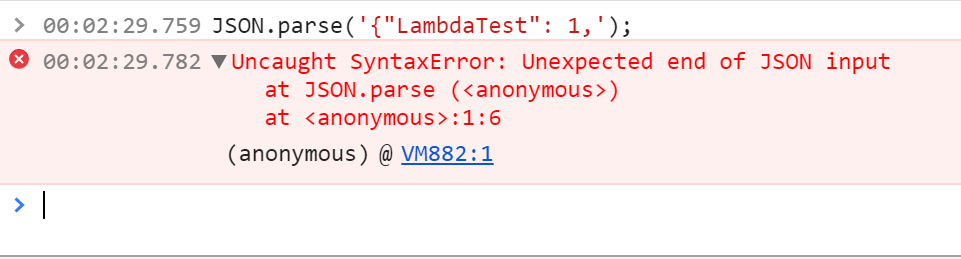
Similarly, in this example I forgot to add }
|
JSON.parse(‘{«LambdaTest»: 1,’); |
How to Catch The Error Before Hand?
The problem with debugging JSON errors are that you get to know about one error at a time. Debuggers throw the first error they find and then stop. It would be upto you to regression find the bugs. Usually it’s not as difficult as it sounds.
The first step is to make sure that your JSON file is perfect from the get go. Here you can take help from JSON linting tools like cleverly named jsonlint.com
If you don’t have any control over the receiving JSON file, then the next step is to add catch exceptions around your JSON.parse.
|
function validatingJSON (json) { var checkedjson try { checkedjson = JSON.parse(json) } catch (e) { } return checkedjson } |
Also, here are the main errors related to JSON.parse that I very painstakingly collected from a very single source [https://developer.mozilla.org/en-US/docs/Web/JavaScript/Reference/Errors/JSON_bad_parse] 😛
|
1 2 3 4 5 6 7 8 9 10 11 12 13 14 15 16 17 18 19 20 21 22 23 24 25 26 27 28 29 30 31 |
SyntaxError: JSON.parse: unterminated string literal SyntaxError: JSON.parse: bad control character in string literal SyntaxError: JSON.parse: bad character in string literal SyntaxError: JSON.parse: bad Unicode escape SyntaxError: JSON.parse: bad escape character SyntaxError: JSON.parse: unterminated string SyntaxError: JSON.parse: no number after minus sign SyntaxError: JSON.parse: unexpected non—digit SyntaxError: JSON.parse: missing digits after decimal point SyntaxError: JSON.parse: unterminated fractional number SyntaxError: JSON.parse: missing digits after exponent indicator SyntaxError: JSON.parse: missing digits after exponent sign SyntaxError: JSON.parse: exponent part is missing a number SyntaxError: JSON.parse: unexpected end of data SyntaxError: JSON.parse: unexpected keyword SyntaxError: JSON.parse: unexpected character SyntaxError: JSON.parse: end of data while reading object contents SyntaxError: JSON.parse: expected property name or ‘}’ SyntaxError: JSON.parse: end of data when ‘,’ or ‘]’ was expected SyntaxError: JSON.parse: expected ‘,’ or ‘]’ after array element SyntaxError: JSON.parse: end of data when property name was expected SyntaxError: JSON.parse: expected double—quoted property name SyntaxError: JSON.parse: end of data after property name when ‘:’ was expected SyntaxError: JSON.parse: expected ‘:’ after property name in object SyntaxError: JSON.parse: end of data after property value in object SyntaxError: JSON.parse: expected ‘,’ or ‘}’ after property value in object SyntaxError: JSON.parse: expected ‘,’ or ‘}’ after property—value pair in object literal SyntaxError: JSON.parse: property names must be double—quoted strings SyntaxError: JSON.parse: expected property name or ‘}’ SyntaxError: JSON.parse: unexpected character SyntaxError: JSON.parse: unexpected non—whitespace character after JSON data |
If this doesn’t help, then you are in for one long debugging session. Leave a comment below with your issue. I can help.

Deeksha Agarwal
Deeksha Agarwal is in Product Growth at LambdaTest and is also a passionate tech blogger and product evangelist.



Author’s Profile

Deeksha Agarwal
Deeksha Agarwal is in Product Growth at LambdaTest and is also a passionate tech blogger and product evangelist.
Got Questions? Drop them on LambdaTest Community. Visit now
Test your websites, web-apps or mobile apps seamlessly with LambdaTest.
- Selenium, Cypress, Playwright & Puppeteer Testing
- Real Devices Cloud
- Native App Testing
- Appium Testing
- Live Interactive Testing
- Smart Visual UI Testing
Book a Demo

JSON ( JavaScript Object Notation), is widely used format for asynchronous communication between webpage or mobile application to back-end servers. Due to increasing trend in Single Page Application or Mobile Application, popularity of the JSON is extreme.
Why do we get JSON parse error?
Parsing JSON is a very common task in JavaScript. JSON.parse() is a built-in method in JavaScript which is used to parse a JSON string and convert it into a JavaScript object. If the JSON string is invalid, it will throw a SyntaxError.
const json = '{"result":true, "count":42}';
const obj = JSON.parse(json);
console.log(obj.count);
// expected output: 42
console.log(obj.result);
// expected output: true
How to handle JSON parse error?
There are many ways to handle JSON parse error. In this post, I will show you how to handle JSON parse error in JavaScript.
1. Using try-catch block
The most common way to handle JSON parse error is using try-catch block. If the JSON string is valid, it will return a JavaScript object. If the JSON string is invalid, it will throw a SyntaxError.
try {
  const json = '{"result":true, "count":42}';
  const obj = JSON.parse(json);
  console.log(obj.count);
  // expected output: 42
  console.log(obj.result);
  // expected output: true
} catch (e) {
  console.log(e);
  // expected output: SyntaxError: Unexpected token o in JSON at position 1
}
2. Using if-else block
Another way to handle JSON parse error is using if-else block.
const json = '{"result":true, "count":42}';
const obj = JSON.parse(json);
if (obj instanceof SyntaxError) {
  console.log(obj);
  // expected output: SyntaxError: Unexpected token o in JSON at position 1
} else {
  console.log(obj.count);
  // expected output: 42
  console.log(obj.result);
  // expected output: true
}
3. Using try-catch block with JSON.parse()
The third way to handle JSON parse error is using try-catch block with JSON.parse().
const json = '{"result":true, "count":42}';
const obj = JSON.parse(json, (key, value) => {
  try {
    return JSON.parse(value);
  } catch (e) {
    return value;
  }
});
console.log(obj.count);
// expected output: 42
console.log(obj.result);
// expected output: true
4. Using try-catch block with JSON.parse() and JSON.stringify()
The fourth way to handle JSON parse error is using try-catch block with JSON.parse() and JSON.stringify(). If the JSON string is valid, it will return a JavaScript object. If the JSON string is invalid, it will return a SyntaxError.
const json = '{"result":true, "count":42}';
const obj = JSON.parse(json, (key, value) => {
  try {
    return JSON.parse(value);
  } catch (e) {
    return value;
  }
});
const str = JSON.stringify(obj);
console.log(str);
// expected output: {"result":true,"count":42}
Синтаксическая ошибка:JSON.parse:плохой парсинг
Исключения JavaScript, создаваемые JSON.parse() возникают, когда строку не удалось проанализировать как JSON.
Message
SyntaxError: JSON.parse: unterminated string literal
SyntaxError: JSON.parse: bad control character in string literal
SyntaxError: JSON.parse: bad character in string literal
SyntaxError: JSON.parse: bad Unicode escape
SyntaxError: JSON.parse: bad escape character
SyntaxError: JSON.parse: unterminated string
SyntaxError: JSON.parse: no number after minus sign
SyntaxError: JSON.parse: unexpected non-digit
SyntaxError: JSON.parse: missing digits after decimal point
SyntaxError: JSON.parse: unterminated fractional number
SyntaxError: JSON.parse: missing digits after exponent indicator
SyntaxError: JSON.parse: missing digits after exponent sign
SyntaxError: JSON.parse: exponent part is missing a number
SyntaxError: JSON.parse: unexpected end of data
SyntaxError: JSON.parse: unexpected keyword
SyntaxError: JSON.parse: unexpected character
SyntaxError: JSON.parse: end of data while reading object contents
SyntaxError: JSON.parse: expected property name or
SyntaxError: JSON.parse: end of data when
SyntaxError: JSON.parse: expected
SyntaxError: JSON.parse: end of data when property name was expected
SyntaxError: JSON.parse: expected double-quoted property name
SyntaxError: JSON.parse: end of data after property name when
SyntaxError: JSON.parse: expected
SyntaxError: JSON.parse: end of data after property value in object
SyntaxError: JSON.parse: expected
SyntaxError: JSON.parse: expected
SyntaxError: JSON.parse: property names must be double-quoted strings
SyntaxError: JSON.parse: expected property name or
SyntaxError: JSON.parse: unexpected character
SyntaxError: JSON.parse: unexpected non-whitespace character after JSON data
Error type
Что пошло не так?
JSON.parse() анализирует строку как JSON. Эта строка должна быть действительным JSON и вызовет эту ошибку, если будет обнаружен неправильный синтаксис.
Examples
JSON.parse()не позволяет использовать запятые в конце текста
Обе линии бросят синтаксическую ошибку:
JSON.parse('[1, 2, 3, 4,]');
JSON.parse('{"foo": 1,}');
Опустите запятые,чтобы правильно разобрать JSON:
JSON.parse('[1, 2, 3, 4]');
JSON.parse('{"foo": 1}');
Имена объектов недвижимости должны быть двузначно процитированными.
Нельзя использовать одиночные кавычки вокруг свойств,например,’foo’.
JSON.parse("{'foo': 1}");
Вместо этого напишите «фу»:
JSON.parse('{"foo": 1}');
Ведущие нули и десятичные знаки
Нельзя использовать опережающие нули,например 01,а за десятичными точками должен следовать хотя бы один знак.
JSON.parse('{"foo": 01}');


JSON.parse('{"foo": 1.}');
Вместо этого запишите только 1 без нуля и используйте по крайней мере одну цифру после запятой:
JSON.parse('{"foo": 1}');
JSON.parse('{"foo": 1.0}');
See also
JSONJSON.parse()JSON.stringify()
JavaScript
- TypeError: недопустимый операнд «экземпляр» «х»
- Исключение JavaScript «недопустимый операнд экземпляра» возникает, когда оператор правых операндов не используется с объектом конструктора, т.е.
- TypeError: ‘x’ не повторяется
- Исключение JavaScript «не является итерируемым» возникает, когда значение, заданное правой частью for…of, функции аргумента, такой как Promise.all TypedArray.from,
- Синтаксическая ошибка:Некорректный формальный параметр
- Исключение JavaScript «искаженный формальный параметр» возникает, когда список аргументов вызова конструктора Function() каким-то образом недействителен.
- URIError:некорректная последовательность URI
- Исключение JavaScript «неверная последовательность URI» возникает, когда декодирование кодирования не было успешным.