Contrary to the accepted answer you do not need a custom trust manager, you need to fix your server configuration!
I hit the same problem while connecting to an Apache server with an incorrectly installed dynadot/alphassl certificate. I’m connecting using HttpsUrlConnection (Java/Android), which was throwing —
javax.net.ssl.SSLHandshakeException:
  java.security.cert.CertPathValidatorException:
    Trust anchor for certification path not found.
The actual problem is a server misconfiguration — test it with http://www.digicert.com/help/ or similar, and it will even tell you the solution:
«The certificate is not signed by a trusted authority (checking against Mozilla’s root store). If you bought the certificate from a trusted authority, you probably just need to install one or more Intermediate certificates. Contact your certificate provider for assistance doing this for your server platform.»
You can also check the certificate with openssl:
openssl s_client -debug -connect www.thedomaintocheck.com:443
You’ll probably see:
Verify return code: 21 (unable to verify the first certificate)
and, earlier in the output:
depth=0 OU = Domain Control Validated, CN = www.thedomaintocheck.com
verify error:num=20:unable to get local issuer certificate
verify return:1
depth=0 OU = Domain Control Validated, CN = www.thedomaintocheck.com
verify error:num=27:certificate not trusted
verify return:1
depth=0 OU = Domain Control Validated, CN = www.thedomaintocheck.com
verify error:num=21:unable to verify the first certificate`
The certificate chain will only contain 1 element (your certificate):
Certificate chain
 0 s:/OU=Domain Control Validated/CN=www.thedomaintocheck.com
  i:/O=AlphaSSL/CN=AlphaSSL CA - G2
… but should reference the signing authorities in a chain back to one which is trusted by Android (Verisign, GlobalSign, etc):
Certificate chain
 0 s:/OU=Domain Control Validated/CN=www.thedomaintocheck.com
   i:/O=AlphaSSL/CN=AlphaSSL CA - G2
 1 s:/O=AlphaSSL/CN=AlphaSSL CA - G2
   i:/C=BE/O=GlobalSign nv-sa/OU=Root CA/CN=GlobalSign Root CA
 2 s:/C=BE/O=GlobalSign nv-sa/OU=Root CA/CN=GlobalSign Root CA
   i:/C=BE/O=GlobalSign nv-sa/OU=Root CA/CN=GlobalSign Root CA
Instructions (and the intermediate certificates) for configuring your server are usually provided by the authority that issued your certificate, for example: http://www.alphassl.com/support/install-root-certificate.html
After installing the intermediate certificates provided by my certificate issuer I now have no errors when connecting using HttpsUrlConnection.
Hii Developer in these Android solutions we have to solve the java security cert CertPathValidatorException API SSL Handshake Exception. Android volley error: “Trust anchor for certification path not found”, only in a real device, not an emulator. When you hit an API for the response they give you an error like this Android java.security.cert.CertPathValidatorException: Trust anchor for the certification path. you can get codeplayno Linkedin solution also.
java security cert CertPathValidatorException.
- java security cert CertPathValidatorException.
- how to solve java security cert CertPathValidatorException.
- How to Solve javax net SSL SSLHandshakeException.
- java.security.cert.certpathvalidatorexception in android.
- java security cert CertPathValidatorException Trust anchor for certification path.
- Android – Caused by: java.security.cert.CertPathValidatorException: Trust anchor for certification path not found.
- java.security.cert.CertPathValidatorException: Trust anchor for certification path not found. Android 2.3.
- javax.net.ssl.SSLHandshakeException: java.security.cert.CertPathValidatorException: Trust anchor for certification path not found
com.android.volley.NoConnectionError: javax.net.ssl.SSLHandshakeException: java.security.cert.CertPathValidatorException: Trust anchor for certification path not found.
Just Follow These Simple Steps for the Solution.
Step 1: Create a HttpsTrustManager class that implements X509TrustManager:
public class HttpsTrustManager implements X509TrustManager {

    private static TrustManager[] trustManagers;
    private static final X509Certificate[] _AcceptedIssuers = new X509Certificate[]{};

    @Override
    public void checkClientTrusted(
            java.security.cert.X509Certificate[] x509Certificates, String s)
            throws java.security.cert.CertificateException {

    }

    @Override
    public void checkServerTrusted(
            java.security.cert.X509Certificate[] x509Certificates, String s)
            throws java.security.cert.CertificateException {

    }

    public boolean isClientTrusted(X509Certificate[] chain) {
        return true;
    }

    public boolean isServerTrusted(X509Certificate[] chain) {
        return true;
    }

    @Override
    public X509Certificate[] getAcceptedIssuers() {
        return _AcceptedIssuers;
    }

    public static void allowAllSSL() {
        HttpsURLConnection.setDefaultHostnameVerifier(new HostnameVerifier() {

            @Override
            public boolean verify(String arg0, SSLSession arg1) {
                return true;
            }

        });

        SSLContext context = null;
        if (trustManagers == null) {
            trustManagers = new TrustManager[]{new HttpsTrustManager()};
        }

        try {
            context = SSLContext.getInstance("TLS");
            context.init(null, trustManagers, new SecureRandom());
        } catch (NoSuchAlgorithmException e) {
            e.printStackTrace();
        } catch (KeyManagementException e) {
            e.printStackTrace();
        }

        HttpsURLConnection.setDefaultSSLSocketFactory(context
                .getSocketFactory());
    }

}
Step 2: Add HttpsTrustManager.allowAllSSL() before you make an HTTPS request:
HttpsTrustManager.allowAllSSL();Also, You can Learn More about Android solutions and Tutorials here:- Android Soltuon

Recently I was working on a chat application for the android platform, everything regarding the remote/networking implementation worked flawlessly. I used the Retrofit networking library and socket.io. At the time, the base url was without SSL (that is the HTTP scheme — http://api.example.com)
Just before we rolled out the MVP for beta testing, we acquired a domain name and enabled SSL on the server. This meant the base URL scheme became HTTPS (e.g https://api.example.com).
The change on the app to use a secured URL broke the entire app. All the endpoints were not connecting to the server successfully. Basically the network handshake process between the client and server wasn’t successful. Below is what the the error on the log was like
<-- HTTP FAILED: javax.net.ssl.SSLHandshakeException: java.security.cert.CertPathValidatorException: Trust anchor for certification path not found.
Enter fullscreen mode
Exit fullscreen mode
After doing a little research I discovered it was an issue with the server certificate not being trusted by the android system. This could be because of any of the reasons below:
-
The Certificate Authority (CA) that issued the server certificate was unknown.
-
The server certificate wasn’t signed by a CA, but was self signed.
-
The server configuration is missing an intermediate CA.
In my case, this issue existed because the server certificate was self signed.
From android documentation there is a clean way to configure the app to trust your own self-signed certificates, which I will outline in 3 steps.
Step 1
Add the crt file to the raw folder.
This file will be retrieved from the server. You can request for the digital certificate from the backend engineer. It should come in a .crt extension.
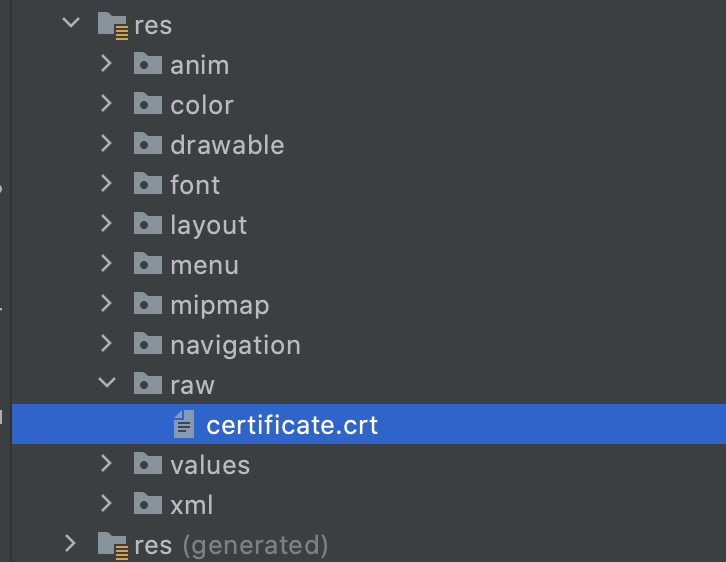
Step 2
Create an XML network security config file (network_security_config.xml) like below:
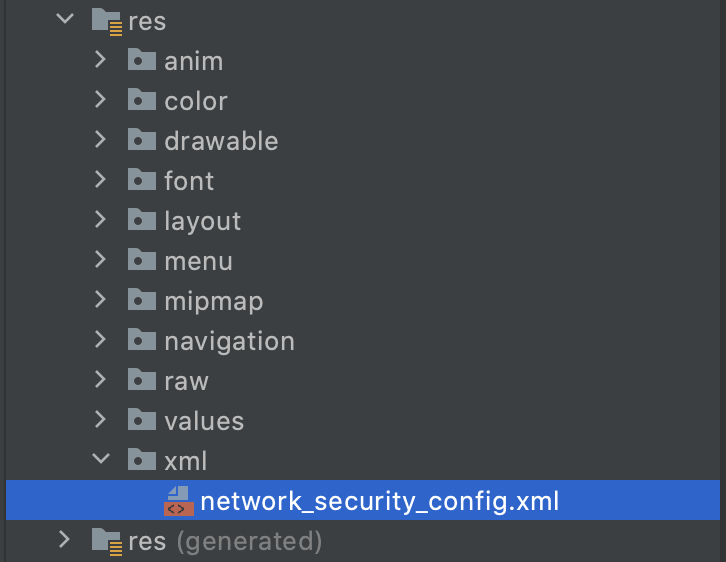
network_security_config.xml
<?xml version="1.0" encoding="utf-8"?>
<network-security-config>
    <domain-config>
        <domain includeSubdomains="true">api.example.com</domain>
        <trust-anchors>
            <certificates src="@raw/certificate" />
        </trust-anchors>
    </domain-config>
</network-security-config>
Enter fullscreen mode
Exit fullscreen mode
Step 3
Specify the network configuration settings in the Manifest.xml file of your application.
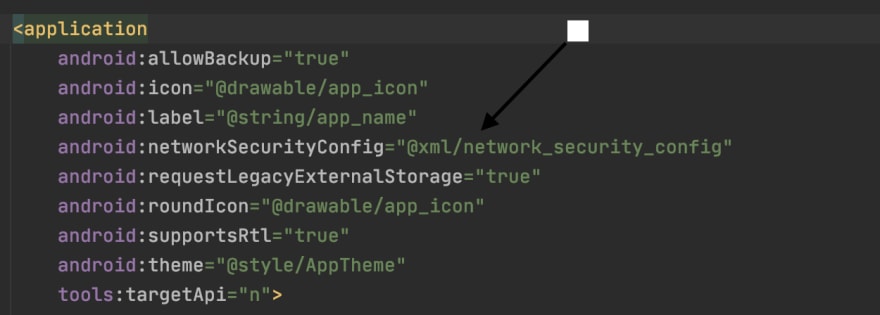
With these 3 steps done, you should connect seamlessly with the backend without any further issues.
 Want to join the conversation?
It’s easy! Become a DEV member to follow this post, comment, and more.
|
|||
| mikecool
30.07.20 — 17:18 |
Собран клиент под платформу 8.3.17.1386, запускаю на андроиде для проверки |
||
| spiller26
1 — 30.07.20 — 17:22 |
(0) Сертификат «протух» |
||
| mikecool
2 — 30.07.20 — 17:24 |
(1) не, проверено — до 24 года |
||
| mikecool
3 — 30.07.20 — 17:25 |
взял серт от сервера, поставил в телефон — ошибка не пропала |
||
| mikecool
4 — 30.07.20 — 17:27 |
«Trust anchor for certification path » — не требуется ли построить дерево сертов от корня до сервера, как в налоговой? |
||
| johnnik
5 — 30.07.20 — 17:30 |
(2) Ну мало ли, может у андроида дата кривая. И еще, сертификат протух не только когда срок действия истек, но еще и когда не наступил. Например, если дата на компе 01.01.1980 |
||
| mikecool
6 — 30.07.20 — 17:39 |
(5) уточняю: серт с 19 по 24 год, на андрюше — текущая дата |
||
| mikecool
7 — 30.07.20 — 17:39 |
меня смущает текст ошибки, требуется цепочка сертификатов? |
||
| johnnik
8 — 30.07.20 — 17:50 |
(7) Trust anchor for certification path — звучит как корневой сертификат. Когда ставишь подпись на комп (не андроид, а винда), то нужно еще устанавливать корневые сертификаты, в моем случае — это на верхнем уровне сертификат Минкомсвязь РФ, затем Калуга-Астрал (удостоверяющий центр), и затем уже клиентский. Для винды есть утилитки, которые ставят корневые сертификаты сами, при запуске экзешника, а для андроида видимо надо эти сертификаты скачивать и устанавливать ручками |
||
| stopa85
9 — 30.07.20 — 18:03 |
Нет сертификата удостоверяющего центра. То что шлёт веб-сервер невозможно проверить |
||
| mikecool
10 — 30.07.20 — 18:06 |
я решил проблему топором — отключил проверку сертификата и пока приложение заработало ) |
||
| mikecool
11 — 30.07.20 — 18:06 |
вернее, клиент заработал |
||
|
mikecool 12 — 30.07.20 — 18:07 |
(8) скачать и установить не проблема, андроид их кушает на раз |
 |
|
TurboConf — расширение возможностей Конфигуратора 1С |
ВНИМАНИЕ! Если вы потеряли окно ввода сообщения, нажмите Ctrl-F5 или Ctrl-R или кнопку «Обновить» в браузере.
Тема не обновлялась длительное время, и была помечена как архивная. Добавление сообщений невозможно.
Но вы можете создать новую ветку и вам обязательно ответят!
Каждый час на Волшебном форуме бывает более 2000 человек.
Hi Paul,
I’m experiencing a problem when invoking HttpClient.PostAsync(). I’ve tried the call from 2 Android devices (Nexus 10 KitKat & Samsung Galaxy Tablet) and in both cases I get an exception with the call stack below [1].
At first I thought it was perhaps a problem with the server certificate not being installed correctly, but I have since eliminated that by checking it with the CA via their online tool (https://www.digicert.com/help/) and the final statement on the report generated is: «Congratulations! This certificate is correctly installed.»
I also checked the security settings on the Android device to make sure the root certificate for DigiCert is installed and has the checkbox tick, which it is on both accounts (the cert is found under the system certificates)
Do you have any suggestions for what else I might check?
Steve
[1]
javax.net.ssl.SSLHandshakeException:
  java.security.cert.CertPathValidatorException:
    Trust anchor for certification path not found.
at com.android.org.conscrypt.OpenSSLSocketImpl.startHandshake(OpenSSLSocketImpl.java:430)
at com.squareup.okhttp.Connection.upgradeToTls(Connection.java:242)
at com.squareup.okhttp.Connection.connect(Connection.java:159)
at com.squareup.okhttp.Connection.connectAndSetOwner(Connection.java:175)
at com.squareup.okhttp.OkHttpClient$1.connectAndSetOwner(OkHttpClient.java:120)
at com.squareup.okhttp.internal.http.HttpEngine.nextConnection(HttpEngine.java:330)
at com.squareup.okhttp.internal.http.HttpEngine.connect(HttpEngine.java:319)
at com.squareup.okhttp.internal.http.HttpEngine.sendRequest(HttpEngine.java:241)
at com.squareup.okhttp.Call.getResponse(Call.java:271)
at com.squareup.okhttp.Call$ApplicationInterceptorChain.proceed(Call.java:228)
at com.squareup.okhttp.Call.getResponseWithInterceptorChain(Call.java:199)
at com.squareup.okhttp.Call.access$100(Call.java:34)
at com.squareup.okhttp.Call$AsyncCall.execute(Call.java:162)
at com.squareup.okhttp.internal.NamedRunnable.run(NamedRunnable.java:33)
at java.util.concurrent.ThreadPoolExecutor.runWorker(ThreadPoolExecutor.java:1112)
at java.util.concurrent.ThreadPoolExecutor$Worker.run(ThreadPoolExecutor.java:587)
at java.lang.Thread.run(Thread.java:841)
Caused by: java.security.cert.CertificateException: java.security.cert.CertPathValidatorException: Trust anchor for certification path not found.
at com.android.org.conscrypt.TrustManagerImpl.checkTrusted(TrustManagerImpl.java:282)
at com.android.org.conscrypt.TrustManagerImpl.checkServerTrusted(TrustManagerImpl.java:202)
at com.android.org.conscrypt.OpenSSLSocketImpl.verifyCertificateChain(OpenSSLSocketImpl.java:663)
at com.android.org.conscrypt.NativeCrypto.SSL_do_handshake(Native Method)
at com.android.org.conscrypt.OpenSSLSocketImpl.startHandshake(OpenSSLSocketImpl.java:426)
… 16 more
Caused by: java.security.cert.CertPathValidatorException: Trust anchor for certification path not found.
В отличие от принятого ответа вам не нужен настраиваемый менеджер доверия, вам нужно исправить конфигурацию вашего сервера!
Я столкнулся с той же проблемой при подключении к серверу Apache с неправильно установленным сертификатом dynadot/alphassl. Я подключаюсь с помощью HttpsUrlConnection (Java/Android), который метался —
javax.net.ssl.SSLHandshakeException:
java.security.cert.CertPathValidatorException:
Trust anchor for certification path not found.
Фактическая проблема — неправильная конфигурация сервера — протестируйте ее с помощью http://www.digicert.com/help/ или аналогичной, и она даже скажет вам решение:
«Сертификат не подписан доверенным органом (проверка на корневой магазин Mozilla). Если вы приобрели сертификат у доверенного органа, , вам, вероятно, просто нужно установить один или несколько промежуточных сертификатов. Обратитесь к поставщику сертификатов за помощью, чтобы сделать это для вашей серверной платформы.
Вы также можете проверить сертификат с помощью openssl:
openssl s_client -debug -connect www.thedomaintocheck.com:443
Вероятно, вы увидите:
Verify return code: 21 (unable to verify the first certificate)
и, ранее на выходе:
depth=0 OU = Domain Control Validated, CN = www.thedomaintocheck.com
verify error:num=20:unable to get local issuer certificate
verify return:1
depth=0 OU = Domain Control Validated, CN = www.thedomaintocheck.com
verify error:num=27:certificate not trusted
verify return:1
depth=0 OU = Domain Control Validated, CN = www.thedomaintocheck.com
verify error:num=21:unable to verify the first certificate`
Цепочка сертификатов будет содержать только один элемент (ваш сертификат):
Certificate chain
 0 s:/OU=Domain Control Validated/CN=www.thedomaintocheck.com
  i:/O=AlphaSSL/CN=AlphaSSL CA - G2
… но должен ссылаться на органы подписки в цепочке обратно на тот, которому доверяют Android (Verisign, GlobalSign и т.д.):
Certificate chain
 0 s:/OU=Domain Control Validated/CN=www.thedomaintocheck.com
   i:/O=AlphaSSL/CN=AlphaSSL CA - G2
 1 s:/O=AlphaSSL/CN=AlphaSSL CA - G2
   i:/C=BE/O=GlobalSign nv-sa/OU=Root CA/CN=GlobalSign Root CA
 2 s:/C=BE/O=GlobalSign nv-sa/OU=Root CA/CN=GlobalSign Root CA
   i:/C=BE/O=GlobalSign nv-sa/OU=Root CA/CN=GlobalSign Root CA
Инструкции (и промежуточные сертификаты) для настройки вашего сервера обычно предоставляются органом, выдавшим ваш сертификат, например: http://www.alphassl.com/support/install-root-certificate.html
После установки промежуточных сертификатов, предоставленных моим издателем сертификатов, у меня теперь нет ошибок при подключении с помощью HttpsUrlConnection.