Introduction: Using Native Libraries in Java
A native library is a library containing code compiled for a specific (native) architecture. There are certain scenarios like hardware-software integrations and process optimizations where using libraries written for different platforms can be very useful or even necessary. For this purpose, Java provides the Java Native Interface (JNI), which allows Java code that runs inside a Java Virtual Machine (JVM) to interoperate with applications and libraries written in other programming languages, such as C, C++, and assembly. The JNI enables Java code to call and be called by native applications and libraries written in other languages and it enables programmers to write native methods to handle situations where an application cannot be written entirely in Java [1].
Common native library formats include .dll files on Windows, .so files on Linux and .dylib files on macOS platforms. The conventional idiom for loading these libraries in Java is presented in the code example below.
package rollbar;

public class ClassWithNativeMethod {

    static {
    System.loadLibrary("someLibFile");
    }

    native void someNativeMethod(String arg);
    /*...*/
}
Java loads native libraries at runtime by invoking the System.load() or the System.loadLibrary() method. The main difference between the two is that the latter doesn’t require the absolute path and file extension of the library to be specified—it relies on the java.library.path system property instead. To access native methods from the loaded libraries, method stubs declared with the native keyword are used.
UnsatisfiedLinkError Error: What is It & When does It Happen?
If a Java program is using a native library but is unable to find it at runtime for some reason, it throws the java.lang.UnsatisfiedLinkError runtime error. More specifically, this error is thrown whenever the JVM is unable to find an appropriate native-language definition of a method declared native, while attempting to resolve the native libraries at runtime [2]. The UnsatisfiedLinkError error is a subclass of the java.lang.LinkageError class which means this error is captured at program startup, during the JVM’s class loading and linking process.
Some commonly encountered situations where this error occurs include a reference to the ocijdbc10.dll and ocijdbc11.dll libraries when trying to connect to an Oracle 10g or 11g database with the OCI JDBC driver [3], as well as dependence on the lwjgl.dll library used in game development and Java applications relying on some core legacy C/C++ libraries [4].
How to Handle the UnsatisfiedLinkError Error
To figure out the exact culprit and fix the UnsatisfiedLinkError error, there are a couple of things to consider:
- Make sure that the library name and/or path are specified correctly.
- Always call
System.load()with an absolute path as an argument. - Make sure that the library extension is included in the call to
System.load(). - Verify that the
java.library.pathproperty contains the location of the library. - Check whether the
PATHenvironment variable contains the path to the library. - Run the Java program from a terminal with the following command:
java -Djava.library.path="<LIBRARY_FILE_PATH>" -jar <JAR_FILE_NAME.jar>
An important thing to keep in mind is that System.loadLibrary() resolves library filenames in a platform-dependent way, e.g. the code snippet in the example in the Introduction would expect a file named someLibFile.dll on Windows, someLibFile.so on Linux, etc.
Also, the System.loadLibrary() method first searches the paths specified by the java.library.path property, then it defaults to the PATH environment variable.
UnsatisfiedLinkError Error Example
The code below is an example of attempting to load a native library called libraryFile.dll with the System.loadLibrary() method on a Windows OS platform. Running this code throws the UnsatisfiedLinkError runtime error with a message that reads “no libraryFile in java.library.path” suggesting that the path to the .dll library could not be found.
1
2
3
4
5
6
7
8
9
10
11
12
13
14
15
package rollbar;
public class JNIExample {
static {
System.loadLibrary("libraryFile");
}
native void libraryMethod(String arg);
public static void main(String... args) {
final JNIExample jniExample = new JNIExample();
jniExample.libraryMethod("Hello");
}
}Exception in thread "main" java.lang.UnsatisfiedLinkError: no libraryFile in java.library.path: C:WINDOWSSunJavabin;C:WINDOWSsystem32;C:WINDOWS;C:Program Files (x86)Common FilesIntelShared FilescppbinIntel64;C:ProgramDataOracleJavajavapath;C:WINDOWSsystem32;C:WINDOWS;C:WINDOWSSystem32Wbem;C:WINDOWSSystem32WindowsPowerShellv1.0;C:Program FilesMySQLMySQL Utilities 1.6;C:Program FilesGitcmd;C:Program Files (x86)PuTTY;C:WINDOWSSystem32OpenSSH;...
at java.base/java.lang.ClassLoader.loadLibrary(ClassLoader.java:2447)
at java.base/java.lang.Runtime.loadLibrary0(Runtime.java:809)
at java.base/java.lang.System.loadLibrary(System.java:1893)
at rollbar.JNIExample.<clinit>(JNIExample.java:6)There are a couple of approaches to fixing this error.
Approach #1: Updating the PATH environment variable
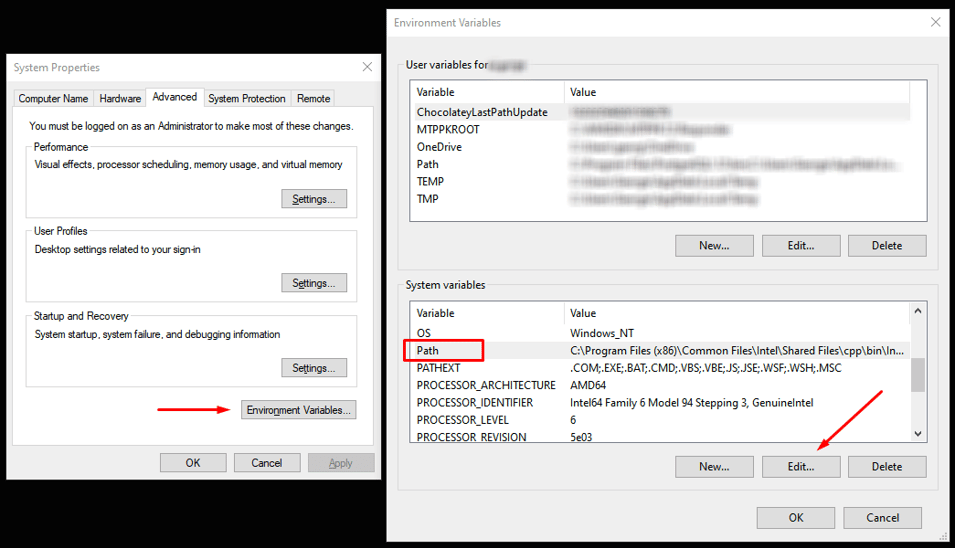
One is to ensure that the PATH environment variable contains the path to the libraryFile.dll file. In Windows, this can be done by navigating to Control Panel → System Properties → Advanced → Environment Variables, finding the PATH variable (case insensitive) under System Variables, and editing its value to include the path to the .dll library in question. For instructions on how to do this on different operating systems, see [5].
Approach #2: Verifying the java.library.path property
Another approach is to check whether the java.library.path system property is set and if it contains the path to the library. This can be done by calling System.getProperty("java.library.path") and verifying the content of the property, as shown in the code below.
1
2
3
4
5
6
7
8
9
10
11
12
13
14
15
16
17
18
19
20
21
22
23
24
25
26
27
28
package rollbar;
public class JNIExample {
static {
var path = System.getProperty("java.library.path");
if (path == null) {
throw new RuntimeException("Path isn't set.");
}
var paths = java.util.List.of(path.split(";"));
//paths.forEach(System.out::println);
if (!paths.contains("C:/Users/Rollbar/lib")) {
throw new RuntimeException("Path to library is missing.");
}
System.loadLibrary("libraryFile");
}
native void libraryMethod(String arg);
public static void main(String... args) {
final JNIExample jniExample = new JNIExample();
jniExample.libraryMethod("Hello");
}
}Exception in thread "main" java.lang.ExceptionInInitializerError
Caused by: java.lang.RuntimeException: Path to library is missing.
at rollbar.JNIExample.<clinit>(JNIExample.java:16)Technically, the java.library.path property can be updated by calling System.setProperty("java.library.path", "./lib"), but since system properties get loaded by the JVM before the class loading phase, this won’t have an effect on the System.loadLibrary("libraryFile") call that tries to load the library in the example above. Therefore, the best way to solve the issue is by following the steps outlined in the previous approach.
Approach #3: Overriding the java.library.path property
As an addendum to the previous approach, the only effective way to explicitly set the java.library.path property is by running the Java program with the —Dproperty=value command line argument, like so:
java -Djava.library.path="C:UsersRollbarlib" -jar JNIExample
And since this would override the system property if already present, any other libraries required by the program to run should also be included here.
Approach #4: Using System.load() instead of System.loadLibrary()
Lastly, replacing System.loadLibrary() with a call to System.load() which takes the full library path as an argument is a solution that circumvents the java.library.path lookup and fixes the problem regardless of what the initial cause for throwing the UnsatisfiedLinkError error was.
1
2
3
4
5
6
7
8
9
10
11
12
13
14
15
16
package rollbar;
public class JNIExample {
static {
System.load("C:/Users/Rollbar/lib/libraryFile.dll");
}
native void libraryMethod(String arg);
public static void main(String... args) {
final JNIExample jniExample = new JNIExample();
jniExample.libraryMethod("Hello");
System.out.println("Library method was executed successfully.");
}
}Library method was executed successfully.Hardcoding the path to the library might not be always desirable, however, so resorting to the other approaches might be preferable in those scenarios.
Summary
Using native libraries compiled for different platforms is a common practice in Java, especially when working with large and feature- or performance-critical systems. The JNI framework enables Java to do this by acting as a bridge between Java code and native libraries written in other languages. One of the issues programmers run into is failure to load these native libraries in their Java code correctly, at which point the UnsatisfiedLinkError runtime error is being triggered by the JVM. This article provides insight into the origins of this error and explains relevant approaches for dealing with it.
Track, Analyze and Manage Errors With Rollbar

Managing errors and exceptions in your code is challenging. It can make deploying production code an unnerving experience. Being able to track, analyze, and manage errors in real-time can help you to proceed with more confidence. Rollbar automates error monitoring and triaging, making fixing Java errors easier than ever. Sign Up Today!
References
[1] Oracle, 2021. Java Native Interface Specification Contents, Introduction. Oracle and/or its affiliates. [Online]. Available: https://docs.oracle.com/javase/8/docs/technotes/guides/jni/spec/intro.html. [Accessed Jan. 11, 2022]
[2] Oracle, 2021. UnsatisfiedLinkError (Java SE 17 & JDK 17). Oracle and/or its affiliates. [Online]. Available: https://docs.oracle.com/en/java/javase/17/docs/api/java.base/java/lang/UnsatisfiedLinkError.html. [Accessed Jan. 11, 2022]
[3] User 3194339, 2016. UnsatisfiedLinkError: no ocijdbc11 in java.library.path. Oracle and/or its affiliates. [Online]. Available: https://community.oracle.com/tech/developers/discussion/3907068/unsatisfiedlinkerror-no-ocijdbc11-in-java-library-path. [Accessed Jan. 11, 2022]
[4] User GustavXIII, 2012. UnsatisfiedLinkError: no lwjgl in java.library.path. JVM Gaming. [Online]. Available: https://jvm-gaming.org/t/unsatisfiedlinkerror-no-lwjgl-in-java-library-path/37908. [Accessed Jan. 11, 2022]
[5] Oracle, 2021. How do I set or change the PATH system variable?. Oracle and/or its affiliates. [Online]. Available: https://www.java.com/en/download/help/path.html. [Accessed Jan. 11, 2022]
Improve Article
Save Article
Improve Article
Save Article
Java.lang.UnsatisfiedLinkError is a subclass of LinkageError Class. When Java Virtual Machine(JVM) did not find the method Which is declared as “native” it will throw the UnsatisfiedLinkError.
Now let us do discuss when and why does it occur. Java.lang.UnsatisfiedLinkError occurs during the compilation of the program. It is because of the reason that compiler did not find the Native Library, a Library that contains native code which meant only for a specified operating system, Native library like .dll in Windows, .so in Linux and .dylib in Mac. The hierarchy of this Error is like the given below as follows:
Java.lang.Object
    Java.lang.Throwable
        Java.lang.Error
            Java.lang.LinkageError
                Java.lang.UnsatisfiedLinkError
Example
Java
import java.io.*;
public class GFG {
static {
System.loadLibrary("libfile");
}
native void cfun();
public static void main(String[] args) {
GFG g = new GFG();
g.cfun();
}
}
Output:

As seen above now in order to handle this error, we need to make sure that the PATH should contain the given “DLL” file in Windows. We can also check the java.library.path is set or not. If we are running the java file using the Command Prompt in Windows we can use the Java -Djava.library.path=”NAME_OF_THE_DLL_FILE” -jar <JAR_FILR_NAME.jar> to run our java file. Another thing we can use is by giving the exact file location in System.LoadLibrary(“Exact File Path”) or System.load(“Exact File Path”) Method.
Example
Java
import java.io.*;
public class GFG {
static
{
System.load(
"C:/Users/SYSTEM/Desktop/CODES/libfile.dll");
}
native void cfun();
public static void main(String[] args)
{
GFG g = new GFG();
g.cfun();
}
}
Output: When we run the above java file it will Compile Successfully and display the Output.
Hello from C file
Note:
We will generate the .dll file from this C file by using the command- ‘gcc cfile.c -I C:/Program Files/Java/jdk1.8.0_111/include -I C:/Program Files/Java/jdk1.8.0_111/include/win32 -shared -o cfile.dll‘. Now when we run the above java file it will Compile Successfully and display the Output.
When i am trying to run my program it is giving the following error
       Exception in thread "main" java.lang.UnsatisfiedLinkError: no jacob-1.14.3-x86 in java.library.path
at java.lang.ClassLoader.loadLibrary(ClassLoader.java:1682)
at java.lang.Runtime.loadLibrary0(Runtime.java:823)
at java.lang.System.loadLibrary(System.java:1030)
at com.jacob.com.LibraryLoader.loadJacobLibrary(LibraryLoader.java:184)
at com.jacob.com.JacobObject.<clinit>(JacobObject.java:108)
at javaSMSTest.main(javaSMSTest.java:18)
please help

Mark
28.5k7 gold badges60 silver badges90 bronze badges
asked Mar 15, 2010 at 10:37

GuruKulkiGuruKulki
25.4k50 gold badges140 silver badges200 bronze badges
2
From the Javadoc:
Thrown if the Java Virtual Machine cannot find an appropriate native-language definition of a method declared native.
It is an error related to JNI. loadJacobLibrary is trying to load the native library called jacob-1.14.3-x86 and it is not found on the path defined by java.library.path. This path should be defined as a system property when you start the JVM. e.g.
-Djava.library.path=<dir where jacob library is>
On Windows, the actual native library file will be called jacob-1.14.3-x86.dll while on Linux it would be called libjacob-1.14.3-x86.so
answered Mar 15, 2010 at 10:41
2
You need the jacob-1.14.3-x86 library on your java library path.
On windows, this would be jacob-1.14.3-x86.dll.
This is a binary file which is used by java to run native methods. It’s probably required by some library (jar) you’re using.
In here you can see not only a jar, but also the binary required by the jar. Pick the one for your platform.
answered Mar 15, 2010 at 10:42

extraneonextraneon
23.3k2 gold badges46 silver badges50 bronze badges
To quote http://www.velocityreviews.com/forums/t143642-jni-unsatisfied-link-error-but-the-method-name-is-correct.html:
There are two things that cause UnsatisfiedLinkError. One is when
System.loadLibrary() fails to load the library, the other is when the
JVM fails to find a specific method in the library. The text of the
error message itself will indicate which is the case…
The error which you describe clearly cannot find the library at all. As the others have said, include it in your Java library path.
The other error—when the library can be found but the method within the library is not found—looks as follows:
java.lang.UnsatisfiedLinkError: myObject.method([Ljava/lang/Object;)V
In this case you either have the wrong method name, or will have to go back and add the method and recompile the code…
answered Mar 25, 2011 at 8:16

phantom-99wphantom-99w
8981 gold badge11 silver badges21 bronze badges
In this tutorial we will discuss about Java’s UnsatisfiedLinkError and how to deal with it. The UnsatisfiedLinkError is a sub-class of the LinkageError class and denotes that the Java Virtual Machine (JVM) cannot find an appropriate native-language definition of a method declared as native. This error exists since the first release of Java (1.0) and is thrown only at runtime.
The UnsatisfiedLinkError is thrown when an application attempts to load a native library like .so in Linux, .dll on Windows or .dylib in Mac and that library does not exist. Specifically, in order to find the required native library, the JVM looks in both the PATH environment variable and the java.library.path system property.
A sample example that throws the aforementioned error is presented below:
UnsatisfiedLinkErrorExample.java:
public class UnsatisfiedLinkErrorExample {

     // Define a method that is defined externally.
     native void CFunction();

     // Load an external library, called "clibrary".
     static {
          System.loadLibrary("clibrary");
     }

     public static void main(String argv[]) {
          UnsatisfiedLinkErrorExample example = new UnsatisfiedLinkErrorExample();
          example.CFunction ();
     }
}
In this example, we define a native method called CFunction, which exists in the library under the name clibrary. In our main function we try to call that native method, but the library is not found and the following exception is thrown:
Exception in thread "main" java.lang.UnsatisfiedLinkError: no clibrary in java.library.path
     at java.lang.ClassLoader.loadLibrary(ClassLoader.java:1886)
     at java.lang.Runtime.loadLibrary0(Runtime.java:849)
     at java.lang.System.loadLibrary(System.java:1088)
     at main.java.Example.<clinit>(Example.java:10)
In order to resolve this issue, we must add the clibrary native library in the system path of our application.
How to deal with the UnsatisfiedLinkError
First of all we must verify that the parameter passed in the System.loadLibrary method is correct and that the library actually exists. Notice that the extension of the library is not required. Thus, if your library is named SampleLibrary.dll, you must pass the SampleLibrary value as a parameter.
Moreover, in case the library is already loaded by your application and the application tries to load it again, the UnsatisfiedLinkError will be thrown by the JVM. Also, you must verify that the native library is present either in the java.library.path or in the PATH environment library of your application. If the library still cannot be found, try to provide an absolute path to the System.loadLibrary method.
In order to execute your application, use the -Djava.library.path argument, to explicitly specify the native library. For example, using the terminal (Linux or Mac) or the command prompt (Windows), execute your application by issuing the following command:
java -Djava.library.path= "<path_of_your_application>" –jar <ApplicationJAR.jar>
Final comments on the Error
It is very important to discuss and notice that:
- Using native methods make your Java application code platform dependent.
- The
System.loadLibrarymethod is equivalent as executing theRuntime.getRuntime().loadLibrarymethod. - The
System.loadLibrarymethod shall be used in a static initializer block, in order to be loaded only once, when the JVM loads the class for the first time.
This was a tutorial about Java’s UnsatisfiedLinkError.
«Exception in thread «main» java.lang.UnsatisfiedLinkError: no dll in java.library.path» is one of the frustrating errors you will get if your application is using native libraries like the DLL in Windows or .SO files in Linux. Java loads native libraries at runtime from either PATH environment variable or location specified by java.library.path system property depending upon whether your Java program is using System.load() or java.lang.System.loadLibarray() method to load native libraries. If Java doesn’t find them due to any reason it throws «java.lang.UnsatisfiedLinkError: no dll in java.library.path«.
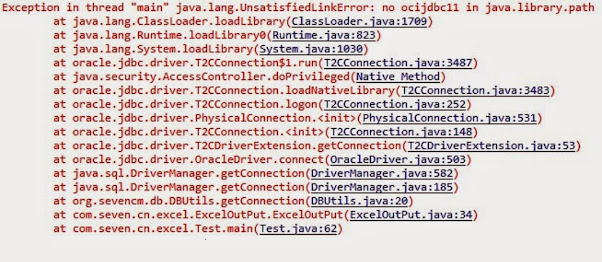
Some of the most common UnsatisfiedLinkError is «java.lang.UnsatisfiedLinkError: no ocijdbc10.dll in java.library.path» and «java.lang.UnsatisfiedLinkError: no ocijdbc11.dll in java.library.path», which comes when you try to connect to Oracle 10g or 11g database from Java program using OCI JDBC driver.
If you write games in Java program using lwjgl then you might have seen this error as well «java.lang.unsatisfiedlinkerror no lwjgl in java.library.path», which comes when Java doesn’t find a native component of the lwjgl.jar library. It also common on Java application which uses JNI to link some core legacy libraries in C and C++.
I first encountered this error while writing some Tibco Rendezvous Messaging code which uses some windows specific dll, which is installed as part of the TIBCO RV installation. I was getting «java.lang.UnsatisfiedLinkError: Native library not found» which was caused by «java.lang.UnsatisfiedLinkError: no tibrvnative in java.library.path».
I wasted a lot of hours playing with PATH, java.library.path, and others only to learn from experience. Here you will learn the root cause of «Exception in thread «main» java.lang.UnsatisfiedLinkError: no dll in java.library.path» and learn how to fix this Exception in Java.
Cause of java.lang.UnsatisfiedLinkError: no dll in java.library.path:
When you load native libraries like .so on Linux or .dll on Windows using System.loadLibrary() Java looks for those shared libraries in both PATH environment variable and java.library.path system property, If it doesn’t find shared library it throws «Exception in thread «main» java.lang.UnsatisfiedLinkError: no XXX dll in java.library.path«.
Now trick is that in Windows it picks up dll from System32 folder and most of the time System32 exists in path so we don’t usually come up with this problem, but this work only if program has put a copy of dll in that folder.
For example, the corporate installation of Tibco Rendezvous does put tibrvnative.dll in System 32 folder, but if you install let’s say Oracle 10g or 11g, the native library ocijdbc11.dll is installed at custom location usually on ORACLE_HOME/bin directory.
It also worth identifying is whether your application or third party library which is throwing this error like Oracle JDBC driver is using System.load() or System.loadLibrary() method.
You can also identify this by looking at the error message, if you see java.library.path in error message means it surely using System.loadLibrary(). This message also tells that program has provided that system property and the program is not looking for PATH for native libraries.
Anyway if you are repeatedly getting this error then you can try following steps which may help you to resolve java.lang.UnsatisfiedLinkError in your Java application.

Solution of «java.lang.UnsatisfiedLinkError: no dll in java.library.path»
 As error clearly says that Java is not able to find some native library required, it could mean either library is not exists or Java is not able to locate them due to incorrect PATH or java.library.path. Remember, when you don’t provide this system property, by default Java looks at PATH for native libraries in Windows operating system and on LD_LIBRARY_PATH in Linux.
Though it’s good practice to provide this PATH and use System.loadLibrary() method to have a consistent location for native libraries on all platforms.
Here are a couple of things you can do to solve error «java.lang.UnsatisfiedLinkError: no dll in java.library.path» :
1. Check your PATH for Java, whether it contains required dll or not.
2. Verify your java.library.path in case you have set it for required dll.
3. Run your java application with command : java -Djava.library.path= «your dll path«
4. Try specifying a base name for the library and loading library using System.loadLibaray(«name) where the name is without dll.
5. Linux loads dynamically linked library(.so) from LD_LIBRARY_PATH so you may want to have your shared library directory included in LD_LIBRARY_PATH e.g.
$ export LD_LIBRARY_PATH=/shared library (.so)
6. load library by providing absolute path like «C:/WINNT/system32/digest.dll» by using System.load(«Path of native library») method.
The main point is JVM should find your dll and providing an explicit path with -Djava.library.path always help me.
Still getting java.lang.UnsatisfiedLinkError
If you are still getting Exception in thread «main» java.lang.UnsatisfiedLinkError: no dll in java.library.path, even after adding JAR into classpath and adding the native library into PATH environment variable and providing system property java.library.path pointing to the location of native library location then there is must be some directory in your PATH which is not resolved correctly.
I was frustrated after trying every method to solve this error, when I noticed the following error, just before this error comes :
«The system cannot find the path specified» when I printed PATH variable.
since I was doing set PATH= %PATH%; (location of the native library)
The system was not able to navigate to that directory because of those non-existent paths. In order to solve that I just did opposite, added location of native library in front of PATH and it worked like a charm
$ set PATH = {location of native dll}; %PATH%
So pay attention to your PATH variable. It often happens PATH keeps directories of a uninstalled program which abruptly breaks and System stops searches further. This issue can also come in Linux and you can solve it just like this, add your native library as the first entry in PATH environment variable.
Now a bit of theory, if you use System.loadLibrary() then it searches native library in the location specified by java.library.path but if you don’t provide that system library then it defaults to PATH environment variable.
Things to Remember
Some other points worth noting while working with System dependent libraries:
1. They make Java code platform-dependent.
2. System.loadLibrary() is equivalent to Runtime.getRuntime.loadLibary().
3. load System.loadLibary(library) in static initializer block so that it only gets loaded when containing class gets loaded and avoid reloading of it, though it could also lead to ExceptionInitializerEror and NoClassDefFoundError if native libraries are not found.
4. Another worth noting point is paying attention to exact error message java.lang.UnsatisfiedLinkError throws. if it shows «Exception in thread «main» java.lang.UnsatisfiedLinkError: no dll in java.library.path« means JVM is not able to locate and load library. if it shows thread «main» java.lang.UnsatisfiedLinkError: com……’ i.e. prints class or method name then maybe something is wrong with the library itself like half copied dll.
Sometimes you may also get
Exception in thread «main» java.lang.UnsatisfiedLinkError: Expecting an absolute path of the library: digest.dll
at java.lang.Runtime.load0(Runtime.java:767)
at java.lang.System.load(System.java:1003)
to solve this just provide absolute path for library and you will be fine.
That’s all on how to fix Exception in thread «main» java.lang.UnsatisfiedLinkError: no dll in java.library.path». I have shared all the information I know about UnsatisfiedLinkError in Java like what causes this error and how you can fix this error. I have spent countless hours to figuring out the solution but you can learn from my experience and avoid that. You can also share your experience if you have faced this java.lang.UnsatisfiedLinkError before.
Other Java troubleshooting tutorials and some debugging tips for Eclipse IDE users, you may like :
- How to fix java.lang.UnSupportedClassVersionError in Java (Solution)
- How to debug Java program in Eclipse – Java Debugging tips (Tips)
- How to remote debug Java application in Eclipse (Steps)
- Difference between ClassNotFoundException vs NoClassDefFoundError in Java (difference)
- How to resolve java.lang.ClassNotFoundException in Java? (solution)
- How to fix Java.lang.OutOfMemroyError in Tomcat Server? (solution)
- How to solve Invalid Column Index Exception in Java JDBC? (solution)
- How to solve java.util.nosuchelementexception hashtable enumerator? (solution)
- How to fix java.lang.nosuchmethoderror main in Java? (solution)
- How to fix Error creating a bean with name ‘dataSource’ defined in class path resource DataSourceAutoConfiguration [solution]
- @Autowired — No qualifying bean of type found for dependency in Spring Boot? [Solution]
- How to fix «No Property Found for Type class » Exception in Spring Data JPA [Solved]
Thanks for reading this article. If this Java troubleshooting guide helped you to fix UnsatisifiedLinkError in your application, please share this with your friends. If you are still getting error and not able to solve, feel free to drop a note with details like what have you tried so far.
public
class
UnsatisfiedLinkError
extends LinkageError
| java.lang.Object | ||||
| ↳ | java.lang.Throwable | |||
| ↳ | java.lang.Error | |||
| ↳ | java.lang.LinkageError | |||
| ↳ | java.lang.UnsatisfiedLinkError |
Thrown if the Java Virtual Machine cannot find an appropriate
native-language definition of a method declared native.
Summary
Public constructors |
|---|
Constructs an |
Constructs an |
Inherited methods |
||||||||||||||||||||||||||
|---|---|---|---|---|---|---|---|---|---|---|---|---|---|---|---|---|---|---|---|---|---|---|---|---|---|---|
|
From class java.lang.Throwable
|
||||||||||||||||||||||||||
|
From class java.lang.Object
|
Public constructors
UnsatisfiedLinkError
public UnsatisfiedLinkError ()
Constructs an UnsatisfiedLinkError with no detail message.
UnsatisfiedLinkError
public UnsatisfiedLinkError (String s)
Constructs an UnsatisfiedLinkError with the
specified detail message.
| Parameters | |
|---|---|
s |
String: the detail message. |
Disclosure: This article may contain affiliate links. When you purchase, we may earn a commission.
When I was working in JNI and using native code, actually an in-house library, I realized that java.lang.UnsatisfiedLinkError: Library not found comes mainly due to two reasons
1) First reason, which happens in 90% of scenarios is that the library which you are using directly or indirectly (some external JAR is using native library or native dll e.g. if your Java application is using TIBCO libraries for messaging or fault tolerance then tibrv.jar uses tibrvnative.dll library and throws java.lang.UnsatisfiedLinkError: Library not found tibrvnative if that library (the dll) is not in the path. In order to fix this problem, you need to update your PATH environment variable to include native libraries binary. see last section for more details.
2) The second reason which is bit rare is that the library might not have right kind of permissions e.g. placed under a home directory of a user, which is not accessible. This has only happened to me once when I copied another colleague’s settings to set up my environment and forget to change the PATH of Tibco dll, which was local to him.
This one is rather simple to fix but hard to find, all I need to do is given installation folder a read-write permission for a developer group. Alternatively, you can also copy that dll to your local home directory.
This was the case with core Java application running on Windows and Linux. In Android, there could be another reason of java.lang.UnsatisfiedLinkError, where the library wasn’t built with the NDK. This can result in dependencies on function or libraries that don’t exist on the device.
How to fix java.lang.UnsatisfiedLinkError: Library not found in Java
 In order to fix this exception, just check if your PATH contains required native library or not. If PATH contains, then verify java.library.path system property, in case your application is using to find native libraries. If that doesn’t work, try running your Java program by providing an explicit path of a native library while starting JVM like java -Djava.library.path =» native library path «
If you are working in Linux then check if your native library path exists in LD_LIBRARY_PATH environment variable. You can see it’s valued as ${LD_LIBRARY_PATH} and can further use grep command to check for your native library.
That’s all about this Java troubleshooting tips to fix java.lang.UnsatisfiedLinkError: Library not found. If you have already faced this issue and your solution differ than mine then you can also share with us by commenting.