-
-
Kyocera FS-1120d индикатор «Нет бумаги»
vs-dos в форуме Принтеры, МФУ, факсы, копиры формата A4
- 11
- 14587
СТРОНЦИЙ

Вт ноя 02, 2021 2:24 pm
-
Kyocera FS-1120d индикатор «Нет бумаги»
-
-
Kyocera 1035 «бледная» печать
srMax в форуме Принтеры, МФУ, факсы, копиры формата A4
- 2
- 13545
srMax
Пт янв 23, 2015 2:49 pm
-
Kyocera 1035 «бледная» печать
-
-
[SCANNER ERROR] Lamp Error Kyocera FS-1016
мастерчип в форуме Принтеры, МФУ, факсы, копиры формата A4
- 3
- 6436
Усатый Полосатый
Вс окт 28, 2018 11:08 pm
-
[SCANNER ERROR] Lamp Error Kyocera FS-1016
-
-
Kyocera Ecosys M2635dn «поворот» изображения
Искатель в форуме Принтеры, МФУ, факсы, копиры формата A4
- 10
- 5752
MatrixAgent
Ср апр 08, 2020 5:18 am
-
Kyocera Ecosys M2635dn «поворот» изображения
-
-
Стирание вала ведущей шестерни в «печке» Kyocera M2035dn
Грецкий орех в форуме Принтеры, МФУ, факсы, копиры формата A4
- 12
- 2903
СТРОНЦИЙ
Пн дек 13, 2021 3:35 pm
-
Стирание вала ведущей шестерни в «печке» Kyocera M2035dn
Вернуться в Принтеры, МФУ, копиры формата A3
Кто сейчас на форуме
Сейчас этот форум просматривают: нет зарегистрированных пользователей и гости: 38
Оборудование оснащено функцией самодиагностики. При обнаружении проблемы, аппарат блокируется, на дисплее отображается код вида С#### с указанием характера проблемы. Также появляется сообщение необходимости обслуживания. После устранения проблемы, ошибку можно сбросить тумблером питания, выключив и включив аппарат.
При обнаружении неисправности дополнительного устройства (ошибки C8170, C8180, C8190, C8210)* производится частичная блокировка функциональности аппарата. После устранения неисправности ошибку можно сбросить в сервисном режиме U906.
Ошибки узла закрепления изображения (печные ошибки) C6###, после устранения неисправности и в целях безопасности, сбрасываются только в сервисном режиме U163.
Таблица кодов ошибок:
| Код |
Значение |
Описание |
Причина |
Решение |
| C0100 |
Backup memory (EEPROM) device problem (main) |
Reading from or writing to EEPROM cannot be performed. | Defective main/engine PWB. |
Replace the main/engine PWB and check for correct operation. |
| C0110 |
Backup memory data problem (main) |
Data in the specified area of the backup memory does not match the specified values. | Data damage of EEPROM. |
Contact the Service Administrative Division. |
| C0150 |
Backup memory device problem (engine EEPROM) |
Reading from or writing to EEPROM cannot be performed. | Defective main/engine PWB. |
Replace the main/engine PWB and check for correct operation. |
| Device damage of EEPROM. |
Contact the Service Administrative Division. | |||
| C0160 |
Backup memory data problem (engine EEPROM) |
Reading data from EEPROM is abnormal. | Data damage of EEPROM. |
Contact the Service Administrative Division. |
| C0170 |
Copy counts problem |
When the power is turned on, the total count and the scan count are abnormal both on the main and engine. | Data damage of EEPROM. |
Contact the Service Administrative Division. |
| Defective main/engine PWB. |
Replace the main/engine PWB and check for correct operation. | |||
| C0180 |
Machine number mismatch |
Machine number of main and engine does not match. | Data damage of EEPROM. |
Contact the Service Administrative Division. |
| C0210 |
Communication problem between the main and engine |
When the power is turned on, the machine does not detect the low level of SBSY and the high level of SDIR for 10 s. | Poor contact in the connector terminals. |
Reinsert the connector. Also check for continuity within the connector cable. If none, remedy or replace the cable. |
| Defective main/engine PWB. |
Replace the main/engine PWB and check for correct operation. | |||
| C0240 |
Printer PWB communication problem |
The printer PWB does not respond 120 s after the power is turned on. | Poor contact in the connector terminals. |
Reinsert the connector. Also check for continuity within the connector cable. If none, remedy or replace the cable. |
| Defective main/engine PWB. |
Replace the main/engine PWB and check for correct operation. | |||
| A0410 |
Document processor communication problem |
Communication fails five times successively. | Document processor installed incorrectly. |
Check the installation state of the document processor and adjust it if it is not properly installed. |
| Defective PWB. |
Replace the main/engine PWB or DP driver PWB and check for correct operation. | |||
| A0420 |
First paper feeder communication problem |
Communication fails five times successively. | First paper feeder installed incorrectly. |
Check the installation state of the first paper feeder and adjust it if it is not properly installed. |
| Defective PWB. |
Replace the main/engine PWB or cassette main PWB and check for correct operation. | |||
| C0440* |
Built-in finisher communication problem |
Communication fails five times successively. | Poor contact in the connector terminals. |
Check the connection of connector YC4 on the engine PWB and the connector of the built-in finisher, and the continuity across the connector terminals. Repair or replace if necessary. |
| Defective PWB. |
Replace the engine PWB or finisher main PWB and check for correct operation. | |||
| A0500 |
Second paper feeder communication problem |
Communication fails five times successively. | Second paper feeder installed incorrectly. |
Check the installation state of the second paper feeder and adjust it if it is not properly installed. |
| Defective PWB. |
Replace the main/engine PWB or cassette main PWB and check for correct operation. | |||
| A0510 |
Third paper feeder communication problem |
Communication fails five times successively. | Third paper feeder installed incorrectly. |
Check the installation state of the third paper feeder and adjust it if it is not properly installed. |
| Defective PWB. |
Replace the main/engine PWB or cassette main PWB and check for correct operation. | |||
| C0610 |
Bitmap (DIMM) problem |
There is a problem with the data or address bus of the bitmap DRAM. | Defective main/engine PWB. |
Replace the main/engine PWB and check for correct operation. |
| DIMM installed incorrectly. |
Check if the DIMM is inserted into the socket on the main/engine PWB correctly. | |||
| Defective DIMM. |
Replace the DIMM and check for correct operation. | |||
| C0620 |
Memory input interface problem |
Reading-in of an image does not complete within 10 s of the start of image transmission. | Defective main/engine PWB. |
Replace the main/engine PWB and check for correct operation. |
| C0630 |
DMA problem |
DMA transmission of compressed, decompressed, rotated, relocated or blanked-out image data does not complete within the specified period of time. | Defective main/engine PWB. |
Replace the main/engine PWB and check for correct operation. |
| C0800 |
Image processing problem |
JAM05 is detected twice. | Defective main/engine PWB. |
Replace the main/engine PWB and check for correct operation. |
| C2000 |
Drive motor problem |
A stable state does not continue for 1 s from 1 s after the drive motor is activated. | Poor contact in the connector terminals. |
Check the connection of connector YC6 on the main/engine PWB and the connector on the drive motor, and the continuity across the connector terminals. Repair or replace if necessary. |
| Defective drive transmission system. |
Check if the rollers and gears rotate smoothly. If not, grease the bushings and gears. Check for broken gears and replace if any. | |||
| Defective main/engine PWB. |
Replace the main/engine PWB and check for correct operation. | |||
| Defective drive motor. |
Replace the drive motor. | |||
| C2200 |
Drum motor problem |
A stable state does not continue for 1 s from 1 s after the drum motor is activated. | Poor contact in the connector terminals. |
Check the connection of connector YC6 on the main/engine PWB and the connector on the drum motor, and the continuity across the connector terminals. Repair or replace if necessary. |
| Defective drive transmission system. |
Check if the rollers and gears rotate smoothly. If not, grease the bushings and gears. Check for broken gears and replace if any. | |||
| Defective main/engine PWB. |
Replace the main/engine PWB and check for correct operation. | |||
| Defective drum motor. |
Replace the drum motor. | |||
| C3100 |
Scanner carriage problem |
The home position is not correct when the power is turned on or at the start of copying using the table. | Poor contact in the connector terminals. |
Check the connection of connector YC5 on the main/engine PWB and the connector on the home position switch, and the continuity across the connector terminals. Repair or replace if necessary. |
| Defective home position switch. |
Replace the home position switch. | |||
| Defective scanner motor. |
Replace the scanner motor. | |||
| The mirror frame, exposure lamp, or scanner wire is defective. |
Check if the mirror flames and exposure lamp are on the rail. And check the scanner wire winds correctly. | |||
| Defective main/engine PWB. |
Replace the main/engine PWB and check for correct operation. | |||
| C3200 |
Exposure lamp problem |
Non-lighting of the exposure lamp is detected at the beginning of copying. | Poor contact in the connector terminals. |
Check the connection of connector YC16 on the main/engine PWB and the connector on the inverter PWB, and the continuity across the connector terminals. Repair or replace if necessary. |
| Defective exposure lamp. |
Replace the exposure lamp. | |||
| Incorrect shading position. |
Adjust the position of the contact glass (shading plate). If the problem still occurs, replace the home position switch. | |||
| Defective PWB. |
Replace the main/engine PWB or inverter PWB and check for correct operation. | |||
| C3300 |
AGC problem |
After AGC, correct input is not obtained at CCD. | Poor contact in the connector terminals. |
Check the connection of connector YC27 on the main/engine PWB and the connector on the CCD PWB, and the continuity across the connector terminals. Repair or replace if necessary. |
| Defective exposure lamp. |
Replace the exposure lamp. | |||
| Defective PWB. |
Replace the main/engine PWB or CCD PWB and check for correct operation. | |||
| C4000 |
Polygon motor synchronization problem |
The polygon motor does not reach the stable speed within 20 s of the START signal turning on. | Poor contact in the connector terminals. |
Check the connection of connector YC3 on the main/engine PWB and laser scanner unit, and the continuity across the connector terminals. Repair or replace if necessary. |
| Defective polygon motor. |
Replace the laser scanner unit. | |||
| Defective main/engine PWB. |
Replace the main/engine PWB and check for correct operation. | |||
| C4010 |
Polygon motor steady-state problem |
Stable OFF is detected for 5 s continuously after polygon motor stability. | Poor contact in the connector terminals. |
Check the connection of connector YC3 on the main/engine PWB and laser scanner unit, and the continuity across the connector terminals. Repair or replace if necessary. |
| Defective polygon motor. |
Replace the laser scanner unit. | |||
| Defective main/engine PWB. |
Replace the main/engine PWB and check for correct operation. | |||
| C4200 |
BD steady-state problem |
ASIC detects a BD error for 600 ms after the polygon motor rotation has been stabilized. | Poor contact in the connector terminals. |
Check the connection of connector YC3 on the main/engine PWB and laser scanner unit, and the continuity across the connector terminals. Repair or replace if necessary. |
| Defective laser scanner unit. |
Replace the laser scanner unit. | |||
| Defective main/engine PWB. |
Replace the main/engine PWB and check for correct operation. | |||
| C6000 |
Fuser heater break |
The temperature does not reach 70 °C/ 158°F in 15 s before secondary stabilization. Temperature rise of 1°C/1.8°F does not occur in 5 s before secondary stabilization (except during printing). | Poor contact in the fuser thermistor connector terminals. |
Reinsert the connector. Also check for continuity within the connector cable. If none, remedy or replace the cable. |
| Fuser thermistor installed incorrectly. |
Check and reinstall if necessary. | |||
| Fuser thermostat triggered. |
Check for continuity. If none, replace the fuser thermostat. | |||
| Fuser heater installed incorrectly. |
Check and reinstall if necessary. | |||
| Broken fuser heater wire. |
Check for continuity. If none, replace the fuser heater. | |||
| C6020 |
Abnormally high fuser thermistor temperature |
Fuser thermistor is detected 230°C/ 446°F or more for 40 ms. | Shorted thermistor. |
Measure the resistance. If it is 0 Ω, replace the thermistor. |
| Broken heater control circuit on the power source PWB. |
Replace the power source PWB and check for correct operation. | |||
| C6050 |
Abnormally low fuser thermistor temperature |
Fuser thermistor remains below 90°C/ 194°F for 1 s. | Poor contact in the fuser thermistor connector terminals. |
Reinsert the connector. Also check for continuity within the connector cable. If none, remedy or replace the cable. |
| Broken fuser thermistor wire. |
Measure the resistance. If it is ∞ Ω, replace the fixing thermistor. | |||
| Fuser thermistor installed incorrectly. |
Check and reinstall if necessary. | |||
| Fuser thermostat triggered. |
Check for continuity. If none, replace the fuser thermostat. | |||
| Fuser heater installed incorrectly. |
Check and reinstall if necessary. | |||
| Broken fuser heater wire. |
Check for continuity. If none, replace the fuser heater. | |||
| C6400 |
Zero-cross signal error |
Interrupt of the zero-cross signal does not occur more than 1 s. | Poor contact in the connector terminals. |
Reinsert the connector. Also check for conti- nuity within the connector cable. If none, remedy or replace the cable. |
| Defective power source PWB. |
Check if the zero-crossing signal is output from YC2-2 on the power source PWB. If not, replace the power source PWB. | |||
| Defective main/engine PWB. |
Replace the main/engine PWB if C6400 is detected while YC2-2 on the power source PWB outputs the zero-crossing signal. | |||
| C7800 |
Broken external thermistor wire |
The thermistor output value is 0.5 V or less. | Poor contact in the connector terminals. |
Reinsert the connector. Also check for continuity within the connector cable. If none, remedy or replace the cable. |
| Defective humidity sensor. |
Replace the cassette PWB and check for correct operation. | |||
| C7810 |
Short-circuited external thermistor wire |
The thermistor output value is 4.5 V or more. | Poor contact in the connector terminals. |
Reinsert the connector. Also check for continuity within the connector cable. If none, remedy or replace the cable. |
| Defective humidity sensor. |
Replace the cassette PWB and check for correct operation. | |||
| C8170* |
Built-in finisher front side registration motor problem |
When the front-side registration home- position sensor is turned on during initialization, the sensor did not turn on while it has moved by 106 pulses. When the front-side registration home- position sensor is turned off during initialization, the sensor did not turn on in 3 s. | The front side registration motor connector makes poor contact. |
Reinsert the connector. Also check for continuity within the connector cable. If none, remedy or replace the cable. |
| Defective front side registration motor. |
Replace front side registration motor. | |||
| The front side registration home position sensor connector makes poor contact. |
Reinsert the connector. Also check for continuity within the connector cable. If none, remedy or replace the cable. | |||
| Defective front side registration home position sensor. |
Replace the front side registration home position sensor. | |||
| Defective finisher control PWB. |
Replace the finisher control PWB and check for correct operation. | |||
| C8180* |
Built-in finisher rear side registration motor problem |
When the rear-side registration home- position sensor is turned on during initialization, the sensor did not turn on while it has moved by 106 pulses. When the rear-side registration home- position sensor is turned off during initialization, the sensor did not turn on in 3 s. | The rear side registration motor connector makes poor contact. |
Reinsert the connector. Also check for continuity within the connector cable. If none, remedy or replace the cable. |
| Defective rear side registration motor. |
Replace rear side registration motor. | |||
| The rear side registration home position sensor connector makes poor contact. |
Reinsert the connector. Also check for continuity within the connector cable. If none, remedy or replace the cable. | |||
| Defective rear side registration home position sensor. |
Replace the rear side registration home position sensor. | |||
| Defective finisher control PWB. |
Replace the finisher control PWB and check for correct operation. | |||
| C8190* |
Built-in finisher trailing edge registration motor problem |
When the trailing edge registration home-position sensor is turned on during initialization, the sensor did not turn on while it has moved by 106 pulses. When the trailing edge registration home-position sensor is turned off during initialization, the sensor did not turn on in 3 s. | The trailing edge registration motor connector makes poor contact. |
Reinsert the connector. Also check for continuity within the connector cable. If none, remedy or replace the cable. |
| Defective trailing edge registration motor. |
Replace trailing edge registration motor. | |||
| The trailing edge registration home position sensor connector makes poor contact. |
Reinsert the connector. Also check for continuity within the connector cable. If none, remedy or replace the cable. | |||
| Defective trailing edge registration home position sensor. |
Replace the trailing edge registration home position sensor. | |||
| Defective finisher control PWB. |
Replace the finisher control PWB and check for correct operation. | |||
| C8210* |
Built-in finisher stapler problem |
The stapler home position sensor does not change state from nondetection to detection within 200 ms of the start of stapler motor counterclockwise (forward) rotation. During initialization, the stapler home position sensor does not change state from non-detection to detection within 600 ms of the start of stapler motor clockwise (reverse) rotation. | The stapler connector makes poor contact. |
Reinsert the connector. Also check for continuity within the connector cable. If none, remedy or replace the cable. |
| The stapler is blocked with a staple. |
Remove the stapler cartridge, and check the cartridge and the stapling section of the stapler. | |||
| The stapler is broken. |
Replace the front stapler and check for correct operation. | |||
| Defective finisher control PWB. |
Replace the finisher control PWB and check for correct operation. |
*) Kyocera TASKalfa 181/221
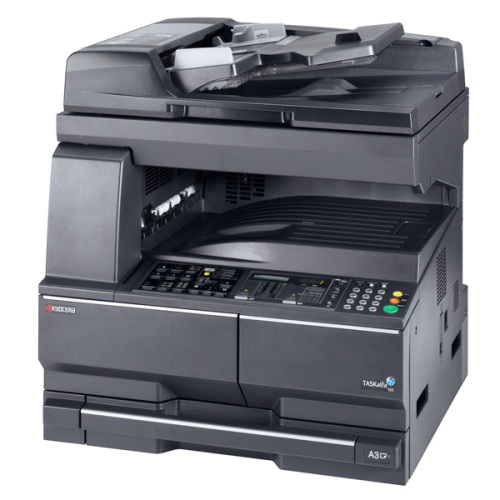
Аналогичные аппараты: Kyocera TASKalfa 180 / TASKalfa 220
Коды ошибок:
C0100 — Backup memory (EEPROM) device problem (main) (не может быть выполнено чтение или запись в EEPROM)
C0110 — Backup memory data problem (main) (проблема резервного копирования данных в память)
C0150 — Backup memory device problem (engine EEPROM) (проблема в двигателе EEPROM)
C0160 — Backup memory data problem (engine EEPROM) (проблема в двигателе EEPROM)
C0170 — Copy counts problem (проблема счетчика копий
C0180 — Machine number mismatch (не совпадает номер аппарата и главного двигателя)
C0210 — Communication problem between the main and engine (проблема связи между платой и двигателем)
C0240 — Printer PWB communication problem (проблема с питанием)
A0410 — Document processor communication problem (сбой связи процессора)
A0420 — First paper feeder communication problem (проблема с первым податчиком бумаги)
A0500 — Second paper feeder communication problem (проблема со вторым податчиком бумаги)
A0510 — Third paper feeder communication problem (проблема с третьем податчиком бумаги)
C0610 — Bitmap (DIMM) problem (проблемы с данными или адресной шиной растрового изображения DRAM)
C0620 — Memory input interface problem (проблема памяти интерфейса ввода)
C0630 — DMA problem (проблема DMA)
C0800 — Image processing problem (проблема обработки изображения)
C2000 — Drive motor problem (проблема двигателя привода)
C2200 — Drum motor problem (проблема двигателя драма)
C3100 — Scanner carriage problem (проблема каретки сканера)
C3200 — Exposure lamp problem (проблема лампы экспонирования)
C3300 — AGC problem (проблема AGC)
C4000 — Polygon motor synchronization problem (проблема синхронизации двигателя полигона)
C4010 — Polygon motor steady-state problem (проблема двигателя полигона)
C4200 — BD steady-state problem (проблема BD)
C6000 — Fuser heater break (неисправность нагревателя печки)
C6020 — Abnormally high fuser thermistor temperature (аномально высокая температура термистора в печке)
C6050 — Abnormally low fuser thermistor temperature (аномально низкая температура термистора в печке)
C6400 — Zero-cross signal error (ошибка нулевого сигнала)
C7800 — Broken external thermistor wire (поломка внешних проводов термистора)
C7810 — Short-circuited external thermistor wire (короткое замыкание термистора)

Компоненты аппарата
Pуководство по эксплуатации
1-7
Дисплей сообщений
На дисплей сообщений в панели управления выводится следующая
информация:
• данные о текущем состоянии устройства, представленные в виде
перечисленных ниже сообщений, которые выводятся на дисплей
в процессе нормальной работы;
• коды ошибок, требующих вмешательства оператора.
Данные о состоянии устройства
Коды ошибок
См. раздел Возможные неисправности.
Системное меню (режим, включающийся после завершения прогрева
аппарата или нажатия на клавишу общего сброса)
В соответствии с заводскими настройками копировальный аппарат
автоматически задает следующие параметры копирования:
коэффициент масштабирования 1:1 для бумаги того же размера, что
и оригинал, количество копий равное “1” и качество изображения
.
ПРИМЕЧАНИЕ:
Системное меню позволяет изменять настройки по
умолчанию.
Если на аппарат установлена дополнительная кассета для бумаги,
выбор используемой кассеты также изменяется в системном меню
(см. раздел Приложение).
С помощью системного меню изменяется и выбранный режим
качества изображения (см. раздел Приложение).
Настройку параметра плотности печати, заданную по умолчанию,
можно изменить на «Автомат.» (см. раздел Приложение).
Сообщение
Описание
Самодиагностика
Копировальный аппарат производит самодиагностику после включения
питания.
Пожалуйста,
подождите.
Аппарат разогревается и пока не готов к работе.
При первом включении аппарата это сообщение остается на дисплее в
течение около 20 секунд.
Готовность к
копированию.
Аппарат готов к копированию.
Kyocera TASKalfa 180 ошибка «застряла бумага«.
Цель статьи только одна, более понятно объяснить возникающую неисправность в процессе использования аппарата и по непонятным причинам возникающие ошибки, такие как «застревание бумаги», причем лист постоянно останавливается в разных местах….
Для поиска неисправности было потрачено более трех дней. Паутинная сеть интернета, так как и сервисная документация мало чем мне помогла… прозвонил все электрические соединения, заменены все ролики, соленоиды…. аппарат отполирован был так, что с завода таким никогда не поступает в продажу… Но это я так, описал свои бесполезные манипуляции…
Соответственно, все выше перечисленное нужно было делать при типовых неисправностях:
- загрязнение световых датчиков
- механические предметы , либо повреждения в узле протяжки бумаги
- износ, поломка роликов, соленойдов …
- неисправность электро — механических цепей…
схема протяжки (на всякий случай.) :
Самая страшная неисправность, которая попалась на моем пути — крылась в отличительных особенностях двух моделей аппаратов TASKalfa 180 и TASKalfa 181!!!
Смотрим на TASKalfa 181 —
Два пластиковых «отсекателя», которые приклеены почти «НАВЕЧНО». А в TASKalfa 180
— назвать словом «Отсекатель» — НЕЛЬЗЯ!!!
и кстати , у всех последующих их присутствие даже не наблюдается. Отсюда вывод — пока аппарат новенький, все ок работает, но как только где то зазор меньше, тут и начинается ни понятная блокировка.
Теперь все очень просто, как только эту модель (TASKalfa 180) вижу, отрываю так называемые отсекатели и клею нормальный (TASKalfa 181)… Во сне снится теперь этот парц каталожный номер, по которому заказываю отсекатели : 2C907530 — FILM REGIST R 2 шт!!!
_________________
Лучше доверится хирургу-профессионалу, чем «любителю»!
Последний раз редактировалось BatterFly 18 апр 2012, 11:19, всего редактировалось 2 раз(а).