I’m a newbie to shell scripts so I have a question. What Im doing wrong in this code?
#!/bin/bash
echo " Write in your age: "
read age
if [ "$age" -le "7"] -o [ "$age" -ge " 65" ]
then
echo " You can walk in for free "
elif [ "$age" -gt "7"] -a [ "$age" -lt "65"]
then
echo " You have to pay for ticket "
fi
When I’m trying to open this script it asks me for my age and then it says
./bilet.sh: line 6: [: 7]: integer expression expected
./bilet.sh: line 9: [: missing `]'
I don’t have any idea what I’m doing wrong. If someone could tell me how to fix it I would be thankful, sorry for my poor English I hope you guys can understand me.

chepner
476k70 gold badges501 silver badges650 bronze badges
asked Oct 21, 2013 at 21:36

3
You can use this syntax:
#!/bin/bash

echo " Write in your age: "
read age

if [[ "$age" -le 7 || "$age" -ge 65 ]] ; then
    echo " You can walk in for free "
elif [[ "$age" -gt 7 && "$age" -lt 65 ]] ; then
    echo " You have to pay for ticket "
fi
answered Oct 21, 2013 at 21:43

kamituelkamituel
33.8k5 gold badges80 silver badges98 bronze badges
2
If you are using -o (or -a), it needs to be inside the brackets of the test command:
if [ "$age" -le "7" -o "$age" -ge " 65" ]
However, their use is deprecated, and you should use separate test commands joined by || (or &&) instead:
if [ "$age" -le "7" ] || [ "$age" -ge " 65" ]
Make sure the closing brackets are preceded with whitespace, as they are technically arguments to [, not simply syntax.
In bash and some other shells, you can use the superior [[ expression as shown in kamituel’s answer. The above will work in any POSIX-compliant shell.

answered Oct 21, 2013 at 21:45
chepnerchepner
476k70 gold badges501 silver badges650 bronze badges
1
This error can also happen if the variable you are comparing has hidden characters that are not numbers/digits.
For example, if you are retrieving an integer from a third-party script, you must ensure that the returned string does not contain hidden characters, like "n" or "r".
For example:
#!/bin/bash

# Simulate an invalid number string returned
# from a script, which is "1234n"
a='1234
'

if [ "$a" -gt 1233 ] ; then
    echo "number is bigger"
else
    echo "number is smaller"
fi
This will result in a script error : integer expression expected because $a contains a non-digit newline character "n". You have to remove this character using the instructions here: How to remove carriage return from a string in Bash
So use something like this:
#!/bin/bash

# Simulate an invalid number string returned
# from a script, which is "1234n"
a='1234
'

# Remove all new line, carriage return, tab characters
# from the string, to allow integer comparison
a="${a//[$'trn ']}"

if [ "$a" -gt 1233 ] ; then
    echo "number is bigger"
else
    echo "number is smaller"
fi
You can also use set -xv to debug your bash script and reveal these hidden characters. See https://www.linuxquestions.org/questions/linux-newbie-8/bash-script-error-integer-expression-expected-934465/
answered Feb 9, 2018 at 11:56

Mr-IDEMr-IDE
6,5651 gold badge51 silver badges58 bronze badges
1
./bilet.sh: line 6: [: 7]: integer expression expected
Be careful with " "
./bilet.sh: line 9: [: missing `]'
This is because you need to have space between brackets like:
if [ "$age" -le 7 ] -o [ "$age" -ge 65 ]
look: added space, and no " "

Dan Lowe
48.7k18 gold badges122 silver badges111 bronze badges
answered May 11, 2017 at 14:28

Try this:
If [ $a -lt 4 ] || [ $a -gt 64 ] ; then n
     Something something n
elif [ $a -gt 4 ] || [ $a -lt 64 ] ; then n
     Something something n
else n
    Yes it works for me :) n

Juan Serrats
1,3585 gold badges24 silver badges30 bronze badges
answered Jul 10, 2017 at 8:24

Harry1992Harry1992
4551 gold badge5 silver badges12 bronze badges
1
If you are just comparing numbers, I think there’s no need to change syntax, just correct those lines, lines 6 and 9 brackets.
Line 6 before: if [ «$age» -le «7»] -o [ «$age» -ge » 65″ ]
After: if [ "$age" -le "7" -o "$age" -ge "65" ]
Line 9 before: elif [ «$age» -gt «7»] -a [ «$age» -lt «65»]
After: elif [ "$age" -gt "7" -a "$age" -lt "65" ]
answered Apr 27, 2020 at 16:37

By the look of things, your result variable has a . in it after the number making bash not recognise it as such. You can reproduce the error by simply doing:
[ 7. -gt 1 ]
If you add more of the script to your question, |I can suggest where this might be coming from.
Update
Looking at the full script, I would just replace the line:
result=$(echo "$used / $total * 100" |bc -l|cut -c -2)
With:
result=$(( 100 * used / total ))
Since used and total are integers and bash does integer arithmetic, though note the shifting of the multiplication be 100 to the beginning. Or if you want to ensure correct rounding (‘integer division’ in computing always effectively rounds down):
result=$( printf '%.0f' $(echo "$used / $total * 100" | bc -l) )
This will ensure that there are no trailing dots in result. The approach using cut is not a very good idea since it is only valid for result in the range 10-99. It will fail for a result from 0-9 (as in your case) and also numbers above 99.
Update 2
From @Stephane’s comment below, you are better to round down when comparing to thresholds. Considering this, there is another small error with the snippet in the question — notice the inconsistency between the comparisons used for the warn_level and the critical_level. The comparisons for warn_level are correct, but critical_level uses -le (lesser or equal) instead of -lt (just lesser). Consider when result is slightly larger than critical_level — it will be rounded down to critical_level and not trigger the critical warning even though it should (and would if a -lt comparison was used).
Perhaps not much of an issue, but here is the corrected code:
if [ "$result" -lt "$warn_level" ]; then
  echo "Memory OK. $result% used."
  exit 0;
elif [ "$result" -lt "$critical_level" ]; then
  echo "Memory WARNING. $result% used."
  exit 1;
else
  echo "Memory CRITICAL. $result% used."
  exit 2;
fi
The -ge tests are also redundant since these cases are implied on reaching the elif/else, so have been removed.
����� 31. ������ ���������������� ������
| � |
Turandot: Gli enigmi sono tre, la morte Caleph: No, no! Gli enigmi sono tre, una la |
| � | Puccini |
������������� ����������������� ���� � ��������� �������� �
�������� ���� ����������.
case=value0       # ����� ������� ��������.
23skidoo=value1   # ���� �����.
# ����� ����������, ������������ � ����, ��������������� ��������� ���������.
# ���� ��� ���������� ���������� � ������� �������������: _23skidoo=value1, �� ��� �� ��������� �������.

# ������... ���� ��� ���������� ������� �� ������������� ������� �������������, �� ��� ������.
_=25
echo $_           # $_  -- ��� ���������� ����������.

xyz((!*=value2    # �������� ��������� ��������.
������������� ������, � ������ ����������������� ��������, �
������ ����������.
var-1=23
# ������ ����� ������ ����������� 'var_1'.
������������� ���������� ���� ��� ���������� � �������. ���
������ �������� ������� ��� ���������.
do_something ()
{
  echo "��� ������� ������ ���-������ ������� � "$1"."
}

do_something=do_something

do_something do_something

# ��� ��� ����� �������� ���������, �� ������� �� ���������.
������������� ������ ��������. � ������� �� ������
������ ����������������, Bash ������ ����������� �� ��������� �
��������.
var1 = 23   # ���������� �������: 'var1=23'.
# � ��������������� ������ Bash ����� ���������� "var1" ��� ��� �������
# � ����������� "=" � "23".

let c = $a - $b   # ���������� �������: 'let c=$a-$b' ��� 'let "c = $a - $b"'

if [ $a -le 5]    # ���������� �������: if [ $a -le 5 ]
# if [ "$a" -le 5 ]   ��� �����.
# [[ $a -le 5 ]] ���� �����.
��������� �������� ������������� � ���, ���
�������������������� ���������� �������� «����». ��������������������
���������� �������� «������» (null) ��������, � �� ����.
#!/bin/bash

echo "uninitialized_var = $uninitialized_var"
# uninitialized_var =
����� ������������ ������ ��������� ��������� = � -eq. ���������, �������� = ������������ ��� ���������
��������� ����������, � -eq — ��� ��������� �����
�����.
if [ "$a" = 273 ]      # ��� �� ���������? $a -- ��� ����� ����� ��� ������?
if [ "$a" -eq 273 ]    # ���� $a -- ����� �����.

# ������, ������ ���� ������ ����� ���� �� ���������.
# ������...


a=273.0   # �� ����� �����.

if [ "$a" = 273 ]
then
  echo "�����."
else
  echo "�� �����."
fi    # �� �����.

# ���� ����� � ���  a=" 273"  �  a="0273".


# �������� �������� ��������� ��� ������������� "-eq" �� ���������� ����������.

if [ "$a" -eq 273.0 ]
then
  echo "a = $a'
fi  # ���������� �������� ����������� �� ������.
# test.sh: [: 273.0: integer expression expected
������ ��� ��������� ����� ����� � ��������� ��������.
#!/bin/bash
# bad-op.sh

number=1

while [ "$number" < 5 ]    # �������! ������ ����   while [ "number" -lt 5 ]
do
  echo -n "$number "
  let "number += 1"
done

# ���� �������� ���������� ��������� �� ������:
# bad-op.sh: 5: No such file or directory
������, � ��������� ��������, � �������������� ����������
������ ([ ]), ���������� ���������� ����� � ������� �������. ��.
������ 7-6, ������ 16-4 � ������ 9-6.
������ �������� �� � ��������� ��������� ������� ��-��
�������� ���� �������. ���� ������������ �� ������ ���������
������� �� ��������� ������, �� ��� ������� �� ������ ����
�������� � �� ��������. ���������� �������� �������� �������,
�������� ��� �������� ���������� ��� suid.
������������� ������� — � �������� ��������� ���������������
(������� �� �� ��������) ����� ��������� � �����������
�����������.
command1 2> - | command2  # ������� �������� ��������� �� ������� ������� command1 ����� ��������...
#    ...�� ����� ��������.

command1 2>& - | command2  # ��� �� ������������.

������� S.C.
������������� �������������� ������������ Bash ������ 2 ��� ����, �����
�������� � ���������� ���������� ��������, ����������� ���
����������� Bash ������ 1.XX.
#!/bin/bash

minimum_version=2
# ��������� Chet Ramey ��������� ��������� Bash,
# ��� ����� ������������� ������� ������ ���������� ���������� ������ $minimum_version=2.XX.
E_BAD_VERSION=80

if [ "$BASH_VERSION" < "$minimum_version" ]
then
  echo "���� �������� ������ ����������� ��� ����������� Bash, ������ $minimum ��� ����."
  echo "������������ ������������� ����������."
  exit $E_BAD_VERSION
fi

...
������������� ������������� ������������ Bash ����� ���������
� ���������� ���������� �������� � Bourne shell (#!/bin/sh). ��� �������,
� Linux �������������, sh �������� ����������� bash, �� ��� �� ������ ����� ���
UNIX-������ ������.
��������, � ������� ������ ���������� ���� �� ����� � �����
MS-DOS (rn), ����� �����������
��������, ��������� ���������� #!/bin/bashrn
��������� ������������. ��������� ��� ������ ����� �������
��������� ������� r �� ��������.
#!/bin/bash

echo "������"

unix2dos $0    # �������� ��������� ������� �������� ������ � ������ DOS.
chmod 755 $0   # �������������� ���� �� ������.
               # ������� 'unix2dos' ������ ����� �� ������ �� ��������� �����.

./$0           # ������� ��������� ���� ������.
               # �� ��� �� ��������� ��-�� ����, ��� ������ ������ ����������
               # ���� �� ����� � ����� DOS.

echo "�����"

exit 0
��������, ������������ � #!/bin/sh, �� �����
�������� � ������ ������ ������������� � Bash. ��������� ��
������������� �������, �������� Bash, ����� ���������
������������ � �������������. ��������, ������� ������� �������
������� �� ���� �����������, ��������� � Bash, ������ ����������
������� #!/bin/bash.
�������� �� ����� �������������� ���������� ������������� �������� — ��������.
����� ��� � �������, ������� ����� ������������ ����� ��������,
�� �� ���������.
WHATEVER=/home/bozo
export WHATEVER
exit 0
bash$ echo $WHATEVER

bash$
������ ������� — ��� ������ � ��������� ������ ����������
$WHATEVER ��������� ��������������������.
������������� � ����������� ���������� � ���� �� �������, ���
� � ������������ �������� ����� �� ������ ����������
����������.
������ 31-1. ������� � �����������
#!/bin/bash
# ������� � �����������.

outer_variable=�������_����������
echo
echo "outer_variable = $outer_variable"
echo

(
# ������ � �����������

echo "������ ����������� outer_variable = $outer_variable"
inner_variable=����������_����������  # ����������������
echo "������ ����������� inner_variable = $inner_variable"
outer_variable=����������_����������  # ��� �������? ������� ������� ����������?
echo "������ ����������� outer_variable = $outer_variable"

# ����� �� �����������
)

echo
echo "�� ��������� ����������� inner_variable = $inner_variable"  # ������ �� ���������.
echo "�� ��������� ����������� outer_variable = $outer_variable"  # �������_����������.
echo

exit 0
�������� ������ �� echo �� ��������� ������� read ����� ������ �����������
����������. � ���� ��������, ������� read ��������� ���, ��� ����� �� ���
���� �������� � �����������. ������ ��� ����� ������������
������� set (��. ������ 11-14).
������ 31-2. �������� ������ �� ������� echo �������
read, �� ���������
#!/bin/bash
#  badread.sh:
#  ������� ������������� 'echo' � 'read'
#+ ��� ������ �������� � ����������.

a=aaa
b=bbb
c=ccc

echo "���� ��� ���" | read a b c
# ������� �������� �������� � ���������� a, b � c.

echo
echo "a = $a"  # a = aaa
echo "b = $b"  # b = bbb
echo "c = $c"  # c = ccc
# ������������ �� ���������.

# ------------------------------

# �������������� �������.

var=`echo "���� ��� ���"`
set -- $var
a=$1; b=$2; c=$3

echo "-------"
echo "a = $a"  # a = ����
echo "b = $b"  # b = ���
echo "c = $c"  # c = ���
# �� ���� ��� ��� � �������.

# ------------------------------

#  �������� ��������: � ����������� 'read', ��� ������� ��������, ���������� ������������� ���������.
#  �� ������ � �����������.

a=aaa          # ��� �������.
b=bbb
c=ccc

echo; echo
echo "���� ��� ���" | ( read a b c;
echo "������ �����������: "; echo "a = $a"; echo "b = $b"; echo "c = $c" )
# a = ����
# b = ���
# c = ���
echo "-------"
echo "�������: "
echo "a = $a"  # a = aaa
echo "b = $b"  # b = bbb
echo "c = $c"  # c = ccc
echo

exit 0
�������� ����, ��� ������������ �������, ������������
������������� � �������� ������, � ������������� ����� «suid». [1]
������������� ��������� � �������� CGI-���������� �����
��������� � ��������� ��������� ��-�� ���������� �������� �����
����������. ����� ����, ��� ����� ����� ���� �������� ����������
�� ��� ����������� ��������.
Bash �� ������ ��������� ������������ ������, ���������� ������� ���� (//).
�������� �� ����� Bash, ��������� ��� Linux ��� BSD ������,
����� ����������� ���������, ����� ��� ��� ��� ������ ����
�������� � ������������ ������ UNIX. ����� ��������, ��� �������,
���������� GNU-������ ������ � ������, ������� ����� ������
����������������, ������ �� ������� � UNIX. ��� ��������
����������� ��� ����� ������ ��������� ������, ��� tr.
| � |
Danger is near thee — Beware, beware, beware, beware. Many brave hearts are asleep in the deep. So beware — Beware. |
| � | A.J. Lamb and H.W. Petrie |
Скрипт выкидывает ошибку: integer expression expected (Конструкция if [ $f -gt 1 -le $f < 99 ]; then использует)
Модератор: Bizdelnick
-

halo
- Сообщения: 128
- ОС: debian 4
Скрипт выкидывает ошибку: integer expression expected
Пишу скрипт, который опрашивает удаленный хост. Значение пинга периодически меняется. В зависимости от значения пинга на вебстранице должен меняться фон ячейки таблицы. Красный фон — плохо. Зеленый — хорошо.
Конструкция if [ $f -gt 1 -le $f < 99 ]; then работает только с целочисленными значениями. Соответственно в консоли при запуске скрипта появляется ошибка: integer expression expected
Код:
#!/bin/sh
f=10
while true
do
if [ $f -gt 1 -le $f < 99 ]; then
echo "0 < "f" =< 100"
f=`ping 10.104.199.1 -c 3 | tail -n 1 | awk -F/ '{print $5}'`
elif [ "$f" -gt 100 -a "$f" -le 200 ]; then
echo "* ""100 < "$f" =< 200"
f=`ping 10.104.199.1 -c 3 | tail -n 1 | awk -F/ '{print $5}'`
elif [ "$f" -gt 200 -a "$f" -le 300 ]; then
echo "****""200 < "$f" =< 300"
f=`ping 10.104.199.1 -c 3 | tail -n 1 | awk -F/ '{print $5}'`
elif [ "$f" -gt 300 -a "$f" -le 400 ]; then
echo "******""300 < "$f" =< 400"
f=`ping 10.104.199.1 -c 3 | tail -n 1 | awk -F/ '{print $5}'`
else
echo "********" $f "> 400"
f=`ping 10.104.199.1 -c 3 | tail -n 1 | awk -F/ '{print $5}'`
fi
done
Как побороть этот косяк? Спасибо. 
If I could, I would fly.
-
Sleeping Daemon
- Сообщения: 1450
-
Контактная информация:
Re: Скрипт выкидывает ошибку: integer expression expected
Сообщение
Sleeping Daemon » 25.07.2009 20:27
halo писал(а): ↑
25.07.2009 19:29
Пишу скрипт, который опрашивает удаленный хост. Значение пинга периодически меняется. В зависимости от значения пинга на вебстранице должен меняться фон ячейки таблицы. Красный фон — плохо. Зеленый — хорошо.
Конструкция if [ $f -gt 1 -le $f < 99 ]; then работает только с целочисленными значениями. Соответственно в консоли при запуске скрипта появляется ошибка: integer expression expectedКод:
#!/bin/sh
f=10
while true
doif [ $f -gt 1 -le $f < 99 ]; then
echo "0 < "f" =< 100"
f=`ping 10.104.199.1 -c 3 | tail -n 1 | awk -F/ '{print $5}'`
elif [ "$f" -gt 100 -a "$f" -le 200 ]; then
echo "* ""100 < "$f" =< 200"
f=`ping 10.104.199.1 -c 3 | tail -n 1 | awk -F/ '{print $5}'`
elif [ "$f" -gt 200 -a "$f" -le 300 ]; then
echo "****""200 < "$f" =< 300"
f=`ping 10.104.199.1 -c 3 | tail -n 1 | awk -F/ '{print $5}'`
elif [ "$f" -gt 300 -a "$f" -le 400 ]; then
echo "******""300 < "$f" =< 400"
f=`ping 10.104.199.1 -c 3 | tail -n 1 | awk -F/ '{print $5}'`
else
echo "********" $f "> 400"
f=`ping 10.104.199.1 -c 3 | tail -n 1 | awk -F/ '{print $5}'`
fidone
Как побороть этот косяк? Спасибо.
Может так? printf(«%in»,$5)
-
halo
- Сообщения: 128
- ОС: debian 4
Re: Скрипт выкидывает ошибку: integer expression expected
Сообщение
halo » 25.07.2009 22:45
Спасибо за ответы. Удалите тему!!!
i Уведомление от модератора diesel темы по просьбам пользователей на этом форуме не удаляют. Хотел написать в личку, но ящик забит. В следующей жалобе потрудитесь объяснить почему вы от нас требуете столь странных действий.
If I could, I would fly.
В этом разделе описаны все ошибки, которые могут случиться при проверке типов.
|
Сообщение |
Описание |
|---|---|
|
Error: Type mismatch |
Это может произойти во многих случаях: •Назначенная вами переменная отличается от типа, который используется в выражении •Вы вызываете функцию или процедуру с параметрами, которые несовместимы с параметрами в объявлении функции или процедуры |
|
Error: Incompatible types: got «Сообщ1» expected «Сообщ2» |
Невозможно преобразование между двумя типами. Ещё одна причина – типы объявлены в разных объявлениях: Var A1 : Array[1..10] Of Integer; |
|
Error: Type mismatch between «Сообщ1» and «Сообщ2» |
Типы не являются эквивалентными. |
|
Error: Type identifier expected |
Идентификатор не является типом, или вы забыли указать идентификатор type. |
|
Error: Variable identifier expected |
Это случается, если вы помещаете константу в процедуру (такую как Inc или Dec), в то время как процедура требует переменной. Для таких процедур в качестве параметров можно помещать только переменные. |
|
Error: Integer expression expected, but got «Сообщение» |
Компилятор ожидает выражения типа integer, но получает другой тип. |
|
Error: Boolean expression expected, but got «Сообщение» |
Выражение должно быть типа boolean. Оно должно возвращать True или False. |
|
Error: Ordinal expression expected |
Выражение должно быть порядкового типа, то есть максимум типа Longint. Эта ошибка случается, например, если вы указали второй параметр процедуры Inc или Dec, который не соответствует порядковому типу. |
|
Error: pointer type expected, but got «Сообщение» |
Переменная или выражения не являются указателем. Это случается, если вы помещаете переменную, которая не является указателем, в New или Dispose. |
|
Error: class type expected, but got «Сообщение» |
Переменная или выражение не являются типом class. Это обычно случается, если 1.Родительский класс в объявлении класса не является классом 2.Обработчик исключения (On) cсодержит идентификатор типа, который не является классом. |
|
Error: Can’t evaluate constant expression |
Эта ошибка может случиться, если границы объявленного вами массива не обозначены порядковыми константами. |
|
Error: Set elements are not compatible |
Вы пытаетесь выполнить операцию с двумя множествами, в то время как типы элементов этих множеств не являются одинаковыми. Базовые типы множеств должны быть одинаковыми при объединении. |
|
Error: Operation not implemented for sets |
Некоторые бинарные операторы не определены для множеств. Это операторы: div, mod, **, >= и <=. Последние два могут быть определены для множеств в будущих версиях. |
|
Warning: Automatic type conversion from floating type to COMP which is an integer type |
Обнаружено явное преобразование типов из real в comp. s encountered. Поскольку comp – это 64-битное целое число, то это может вызвать ошибку. |
|
Hint: use DIV instead to get an integer result |
Если подсказки включены, то целочисленное деление с оператором ‘/‘ приведёт к этому сообщению, потому что результатом будет вещественный тип. |
|
Error: string types doesn’t match, because of $V+ mode |
Если выполняется компиляция в режиме {$V+}, то строка, передаваемая вами в качестве параметра, должна быть точно такого же типа, как параметр процедуры. |
|
Error: succ or pred on enums with assignments not possible |
Если вы объявили перечисляемый тип в стиле С, например, так: Tenum = (a,b,e:=5); То вы не сможете использовать функции Succ или Pred с этим перечислением. |
|
Error: Can’t read or write variables of this type |
Вы пытаетесь прочитать или записать переменную из файла или в файл текстового типа, который не поддерживает тип переменной. Только целочисленные типы, вещественные, pchars и strings можно читать из файла или записывать в текстовый файл. Логические переменные можно только записывать в текстовый файл. |
|
Error: Can’t use readln or writeln on typed file |
readln и writeln можно использовать только с текстовыми файлами. |
|
Error: Can’t use read or write on untyped file. |
read и write допускаются только для текстовых или типизированных файлов. |
|
Error: Type conflict between set elements |
Это означает, что не менее одного элемента множества имеют неправильный тип. |
|
Warning: lo/hi(dword/qword) returns the upper/lower word/dword |
Free Pascal поддерживает перегруженную версию lo/hi для longint/dword/int64/qword, которые возвращают наименьшее/наибольшее (результат типа слово/двойное слово) значение аргумента. Turbo Pascal позволяет использовать 16-битные lo/hi, которые возвращают биты 0..7 для lo и биты 8..15 для hi. Если вы хотите получить поведение, аналогичное Turbo Pascal, вы должны использовать приведение типов к word или integer. |
|
Error: Integer or real expression expected |
Первый аргумент для str должен быть типа real или integer. |
|
Error: Wrong type «Сообщение» in array constructor |
Вы пытаетесь использовать тип в конструкторе массива, который недопустим. |
|
Error: Incompatible type for arg no. Сообщ1: Got «Сообщ2», expected «Сообщ3» |
Вы пытаетесь передать неправильный тип в указанный параметр. |
|
Error: Method (variable) and Procedure (variable) are not compatible |
Вы не можете связать метод с процедурной переменной или процедуру с указателем на метод. |
|
Error: Illegal constant passed to internal math function |
Аргумент-константа, переданный в функцию ln или sqrt выходит за пределы диапазона для этой функции. |
|
Error: Can’t take the address of constant expressions |
Невозможно получить адрес выражения-константы, потому что оно не записывается в память. Вы можете попробовать сделать типизированную константу. Эта ошибка может также появиться, если вы пытаетесь поместить свойство в параметр var. |
|
Error: Argument can’t be assigned to |
Только выражение, которое может быть в левой части присваивания, может быть передано как вызов по ссылке аргумента. Примечание: Свойства могут использоваться в левой части присваивания, тем не менее, они не могут использоваться как аргументы. |
|
Error: Can’t assign local procedure/function to procedure variable |
Не допускается присваивать локальные процедуры/функции процедурным переменным, потому что соглашение о вызовах локальных процедур/функций отличаются. Вы можете только присвоить локальную процедуру/функцию пустому указателю. |
|
Error: Can’t assign values to an address |
Не допускается присваивать значение адресу переменной, константы, процедуры или функции. Вы можете попытаться выполнить компиляцию с опцией -So, если идентификатор является процедурной переменной. |
|
Error: Can’t assign values to const variable |
Не допускается присваивать значение переменной, которая объявлена как константа. Обычно параметр объявляется как константа. Чтобы иметь возможность изменять значение, передавайте параметр по значению или параметр по ссылке (используя var). |
|
Error: Array type required |
Если вы хотите получить доступ к переменной, используя индекс ‘[<x>]‘, то тип должен быть массивом. В режиме FPC указатель также допускается. |
|
Error: interface type expected, but got «»Сообщение» |
Компилятор ожидал для нумератора имя типа интерфейса, но получил нечто другое. Следующий код приведёт к этой ошибке: Type |
|
Hint: Mixing signed expressions and longwords gives a 64bit result |
Если вы делите (или вычисляете модуль) выражения со знаком с типом longword (или наоборот), или если вы имеете переполнение и/или включена проверка диапазона и используется арифметическое выражение (+, -, *, div, mod), в котором оба числа со знаком и появляется longwords, то всё это вычисляется как 64-битная арифметическая операция, которая медленнее, чем обычная 32-битная. Вы можете избежать этого при помощи преобразования типа одного из операндов в подходящий для результата и другого операнда. |
|
Warning: Mixing signed expressions and cardinals here may cause a range check error |
Если вы используете бинарный оператор (and, or, xor) и один из операндов — это longword, в то время как другой – это выражение со знаком, то, если проверка диапазона включена, вы можете получить ошибку проверки диапазона, потому что в этом случае оба операнда преобразуются в longword перед выполнением операции. Вы можете избежать этого при помощи преобразования типа одного из операндов в подходящий для результата и другого операнда. |
|
Error: Typecast has different size (Сообщ1 -> Сообщ2) in assignment |
Преобразование типа при отличающихся размерах не допускается, когда переменная используется в присваивании. |
|
Error: enums with assignments can’t be used as array index |
Если вы объявили перечисляемый тип, который имеет С-подобные присваивания, как показано ниже: Tenum = (a,b,e:=5); Вы не можете использовать его как индекс массива. |
|
Error: Class or Object types «Сообщ1» and «Сообщ2» are not related |
Выборка из одного класса в другой, в то время как класс/объект не являются связанными. Вероятно, это ошибка ввода. |
|
Warning: Class types «arg1» and «arg2» are not related |
Выборка из одного класса в другой, в то время как класс/объект не являются связанными. Вероятно, это ошибка ввода. |
|
Error: Class or interface type expected, but got «arg1» |
Компилятор ожидал имя класса или интерфейса, но получил другой тип или идентификатор. |
|
Error: Type «Сообщение» is not completely defined |
Эта ошибка случается, если тип не завершён, например, тип pointer, который указывает на неопределённый тип. |
|
Warning: String literal has more characters than short string length |
Размер строки-константы, которая связана с shortstring, больше максимального размера для shortstring (255 символов). |
|
Warning: Comparison is always false due to range of values |
Это сравнение беззнакового значения и константы со знаком, которая меньше нуля. По причине преобразования оператор всегда будет возвращать FALSE. Выполните явное преобразование константы в правильный диапазон, чтобы избежать этой проблемы. |
|
Warning: Comparison is always true due to range of values |
Это сравнение беззнакового значения и константы со знаком, которая меньше нуля. По причине преобразования оператор всегда будет возвращать TRUE. Выполните явное преобразование константы в правильный диапазон, чтобы избежать этой проблемы. |
|
Warning: Constructing a class «Сообщ1» with abstract method «Сообщ2» |
Например, создаваемый класс содержит неисполняемые абстрактные методы. Имеется вероятность, что случится ошибка времени исполнения 211 в коде, если эта процедура будет когда-либо вызвана. Все абстрактные методы должны быть перегружаемыми. |
|
Hint: The left operand of the IN operator should be byte sized |
Левый операнд в операторе IN не является порядковым или перечислением, который помещается в 8 бит. Это может привести к ошибке проверки диапазона. На текущий момент оператор in поддерживает левый оператор только в пределах байта. В случае с перечислениями, размер элемента перечисления может изменяться опциями {$PACKENUM} или {$Zn}. |
|
Warning: Type size mismatch, possible loss of data / range check error |
Это случается, когда меньшему типу присваивается значение, большее, чем исходный тип. Это означает, что может произойти ошибка проверки диапазона или уменьшение значения. |
|
Hint: Type size mismatch, possible loss of data / range check error |
Это случается, когда меньшему типу присваивается значение, большее, чем исходный тип. Это означает, что может произойти ошибка проверки диапазона или уменьшение значения. |
|
Error: The address of an abstract method can’t be taken |
Не найдено тело абстрактного метода, поэтому адрес абстрактного метода не может быть назначен. |
|
Error: Assignments to formal parameters and open arrays are not possible |
Вы пытаетесь присвоить значение формальному параметру (нетипизированный var, const или out), или открытому массиву. |
|
Error: Constant Expression expected |
Компилятор ожидал выражение-константу, но получил выражение- переменную. |
|
Error: Operation «Сообщ1» not supported for types «Сообщ2» and «Сообщ3» |
Операция не допускается для указанных типов. |
|
Error: Illegal type conversion: «Сообщ1» to «Сообщ2» |
Когда выполняете преобразование типов, вы должны понимать, что размеры переменной и типа назначения одинаковы. |
|
Hint: Conversion between ordinals and pointers is not portable |
Если вы преобразуете тип pointer в longint (или наоборот), то код не будет компилироваться на машинах, использующих 64-разрядную адресацию. |
|
Warning: Conversion between ordinals and pointers is not portable |
Если вы преобразуете тип pointer в порядковый тип с другим размером (или наоборот), то могут возникнуть проблемы. Это предупреждение помогает в поиске 32-битного специального кода, где cardinal/longint используются для преобразования указателей в порядковые типы. Решением проблемы является использование вместо этого типов ptrint/ptruint. |
|
Error: Can’t determine which overloaded function to call |
Вы вызываете перегруженную функцию с параметром, который не связан с каким-либо объявленным списком параметров, например, когда вы имеете объявленную функцию с параметрами word и longint, а затем вызываете её с параметром типа integer. |
|
Error: Illegal counter variable |
Переменная для цикла for должна быть порядкового типа. Переменные циклов не могут быть вещественными числами или строками. |
|
Warning: Converting constant real value to double for C variable argument, add explicit typecast to prevent this. |
В C значения вещественных констант по умолчанию имеют тип double. Из этих соображений, когда вы передаёте вещественную константу в функцию С в качестве параметра, компилятор FPC по умолчанию преобразует её в тип double. Если вы хотите контролировать этот процесс, добавьте для константы явное преобразование в нужный тип. |
|
Error: Class or COM interface type expected, but got «Сообщение» |
Некоторые операторы, такие как AS, применяются только для классов или COM-интерфейсов. |
|
Error: Constant packed arrays are not yet supported |
Вы не можете объявить битовый (упакованный) массив как типизированную константу. |
|
Error: Incompatible type for arg no. Сообщ1: Got «Сообщ2» expected «(Bit)Packed Array» |
Компилятор ожидает битовый (упакованный) массив как указанный параметр. |
|
Error: Incompatible type for Сообщение no. Сообщ1: Got «Сообщ2» expected «»(not packed) Array» |
Компилятор ожидает регулярный (то есть НЕ упакованный) массив как указанный параметр. |
|
Error: Elements of packed arrays cannot be of a type which need to be initialised |
Поддержка упакованных массивов, которым необходима инициализация (таких как ansistrings, или записей, содержащих ansistrings), пока не реализована. |
|
Error: Constant packed records and objects are not yet supported |
Вы не можете объявить битовый (упакованный) массив как типизированную константу в данное время. |
|
Warning: Arithmetic «Сообщение» on untyped pointer is unportable to {$T+}, suggest typecast |
Сложение/вычитание из нетипизированных указателей может работать по разному в {$T+}. Используёте преобразование типов для типизированных указателей. |
|
Error: Can’t take address of a subroutine marked as local |
Нельзя получить адрес подпрограммы, помеченной как локальная. |
|
Error: Can’t export subroutine marked as local from a unit |
Подпрограмма, помеченная как локальная, не может быть экспортирована из модуля. |
|
Error: Type is not automatable: «Сообщение» |
Только byte, integer, longint, smallint, currency, single, double, ansistring, widestring, tdatetime, variant, olevariant, wordbool и все интерфейсы являются automatable. |
|
Hint: Converting the operands to «Сообщение» before doing the add could prevent overflow errors. |
Сложение двух типов может вызвать ошибку переполнения. Обычно вы конвертируете результат в больший тип. Вы должны предотвращать такие ошибки, преобразуя операнды в этот тип перед сложением. |
|
Hint: Converting the operands to «Сообщение» before doing the subtract could prevent overflow errors. |
Вычитание между двумя типами может вызвать ошибку переполнения. Обычно вы конвертируете результат в больший тип. Вы должны предотвращать такие ошибки, преобразуя операнды в этот тип перед вычитанием. |
|
Hint: Converting the operands to «Сообщение» before doing the multiply could prevent overflow errors. |
Умножение между двумя типами может вызвать ошибку переполнения. Обычно вы конвертируете результат в больший тип. Вы должны предотвращать такие ошибки, преобразуя операнды в этот тип перед умножением. |
|
Warning: Converting pointers to signed integers may result in wrong comparison results and range errors, use an unsigned |
Виртуальное адресное пространство на виртуальных машинах располагается от $00000000 до $ffffffff. Многие операционные системы позволяют выделять память с адресами выше $80000000. Например, как WINDOWS, так и LINUX, допускают использование указателей в диапазоне от $0000000 до $bfffffff. Если вы преобразуете типы со знаком, это может вызвать ошибки переполнения и проверки диапазона, но также $80000000 < $7fffffff. Это может вызвать случайную ошибку в коде, подобно этому: «if p>q». |
|
Error: Interface type Сообщение has no valid GUID |
Если применяется оператор as для интерфейса или класса, то интерфейс (то есть правый операнд оператора as) должен иметь правильный GUID. |
|
Error: Invalid selector name |
Селектор Objective-C не может быть пустым, он должен быть правильным идентификатором или одинарным двоеточием, а если он содержит менее одного двоеточия, он также должен быть завершён. |
|
Error: Expected Objective-C method, but got Сообщение |
Селектор может быть создан только для методов Objective-C, не для любых других процедур/функций/методов. |
|
Error: Expected Objective-C method or constant method name |
Селектор может быть создан только для методов Objective-C, при задании имени используются строковые константы или идентификатор метода Objective-C, который является видимым из текущей области видимости. |
|
Error: No type info available for this type |
Информация о типах не генерируется для некоторых типов, таких как перечисления с пропусками в их диапазоне значений (включая перечисления, нижняя граница которых отлична от нуля). |
|
Error: Ordinal or string expression expected |
The expression must be an ordinal or string type. |
|
Error: String expression expected |
The expression must be a string type. |
|
Warning: Converting 0 to NIL |
Use NIL rather than 0 when initialising a pointer. |
|
Error: Objective-C protocol type expected, but got ”arg1” |
The compiler expected a protocol type name, but found something else. |
|
Error: The type ”arg1” is not supported for interaction with the Objective-C runtime |
Objective-C makes extensive use of run time type information (RTTI). This format is defined by the maintainers of the run time and can therefore not be adapted to all possible Object Pascal types. In particular, types that depend on reference counting by the compiler (such as ansistrings and certain kinds of interfaces) cannot be used as fields of Objective-C classes, cannot be directly passed to Objective-C methods, and cannot be encoded using objc_encode. |
|
Error: Class or objcclass type expected, but got ”arg1” |
It is only possible to create class reference types of class and objcclass |
|
Error: Objcclass type expected |
The compiler expected an objcclass type |
|
Warning: Coerced univ parameter type in procedural variable may cause crash or memory corruption: arg1 to arg2 |
univ parameters are implicitly compatible with all types of the same size, also in procedural variable definitions. That means that the following code is legal, because single and longint have the same size: {$mode macpas} Type TIntProc = procedure (l: univ longint); procedure test(s: single); begin writeln(s); end; var p: TIntProc; begin p:=test; p(4); end. This code may however crash on platforms that pass integers in registers and floating point values on the stack, because then the stack will be unbalanced. Note that this warning will not flagg all potentially dangerous situations. when test returns. |
|
Error: Type parameters of specializations of generics cannot reference the currently specialized type |
Recursive specializations of generics like Type MyType = specialize MyGeneric<MyType>; are not possible. |
|
Error: Type parameters are not allowed on non-generic class/record/object procedure or function |
Type parameters are only allowed for methods of generic classes, records or objects |
|
Error: Generic declaration of ”arg1” differs from previous declaration |
Generic declaration does not match the previous declaration |
|
Error: Helper type expected |
The compiler expected a class helper type. |
|
Error: Record type expected |
The compiler expected a record type. |
|
Error: Derived class helper must extend a subclass of ”arg1” or the class itself |
If a class helper inherits from another class helper the extended class must extend either the same class as the parent class helper or a subclass of it |
|
Error: Derived record helper must extend ”arg1” |
If a record helper inherits from another record helper it must extend the same record that the parent record helper extended. |
Instead of using external commands like wc, expr, cut, you can and should use bash internal string manipulation commands. Also, your script is suited to use bash arithmetic operations.
So, I have revised your script as shown below. See also my comments in the script.
#!/bin/bash

echo -n "Enter a string > "
read str
#len=`echo $str|wc -c`
#len=`expr $len - 1`
# You could use just `echo -n ...` and skipped the subtraction.
# But, for a better alternative use this:
let len=${#str}
let i=0
let j=1
#l=`expr $len / 2`
let l=len/2
while (( i < l )) ; do
  #start=`echo $str|cut -c $j`
  start=${str:j-1:1}
  #end=`echo $str|cut -c $len`
  end=${str:len-1:1}
  echo "$start" '=?' "$end"
  if [[ "$start" != "$end" ]] ; then
    echo "Not a palindrome"
    exit 0
  fi
  #len=`expr $len - 1`
  let len=len-1
  #i=`expr $i + 1`
  let i++
  #j=`expr $j + 1`
  let j++
done
echo "String is a palindrome"
This script can still be optimized a bit further. This is left as an exercise for you! ☺
Please, note that if you are using non-ASCII characters in your test string, the appropriate locale should be set. For example:
$ LANG=C.UTF-8 ./pal.sh
Enter string > ΝΙΨΟΝΑΝΟΜΗΜΑΤΑΜΗΜΟΝΑΝΟΨΙΝ
Ν =? Ν
Ι =? Ι
Ψ =? Ψ
Ο =? Ο
Ν =? Ν
Α =? Α
Ν =? Ν
Ο =? Ο
Μ =? Μ
Η =? Η
Μ =? Μ
Α =? Α
String is a palindrome
$ LANG=C ./pal.sh
Enter string > ΝΙΨΟΝΑΝΟΜΗΜΑΤΑΜΗΜΟΝΑΝΟΨΙΝ
� =? �
Not a palindrome
Introduction
Math and arithmetic operations are essential in Bash scripting. Various automation tasks require basic arithmetic operations, such as converting the CPU temperature to Fahrenheit. Implementing math operations in Bash is simple and very easy to learn.
This guide teaches you how to do basic math in Bash in various ways.
Prerequisites
- Access to the command line/terminal.
- A text editor to code examples, such as nano or Vi/Vim.
- Basic knowledge of Bash scripting.
Why Do You Need Math in Bash Scripting?
Although math is not the primary purpose of Bash scripting, knowing how to do essential calculations is helpful for various use cases.
Common use cases include:
- Adding/subtracting/multiplying/dividing numbers.
- Rounding numbers.
- Incrementing and decrementing numbers.
- Converting units.
- Floating-point calculations.
- Finding percentages.
- Working with different number bases (binary, octal, or hexadecimal).
Depending on the automation task, basic math and arithmetic in Bash scripting help perform a quick calculation, yielding immediate results in the desired format.
Bash Math Commands and Methods
Some Linux commands allow performing basic and advanced calculations immediately. This section shows basic math examples with each method.
Arithmetic Expansion
The preferable way to do math in Bash is to use shell arithmetic expansion. The built-in capability evaluates math expressions and returns the result. The syntax for arithmetic expansions is:
$((expression))The syntax consists of:
- Compound notation
(())which evaluates the expression. - The variable operator
$to store the result.
Note: The square bracket notation ( $[expression] ) also evaluates an arithmetic expression, and should be avoided since it is deprecated.
For example, add two numbers and echo the result:
echo $((2+3))
The arithmetic expansion notation is the preferred method when working with Bash scripts. The notation is often seen together with if statements and for loops in Bash.
awk Command
The awk command acts as a selector for pattern expressions. For example, to perform addition using the awk command, use the following example statement:
awk 'BEGIN { x = 2; y = 3; print "x + y = "(x+y) }'
For variables x = 2 and y = 3, the output prints x + y = 5 to the console.
bc Command
The bc command (short for basic calculator) is a command-line utility that renders the bc language. The program runs as an interactive program or takes standard input to perform arbitrary precision arithmetic.
Pipe an equation from standard input into the command to fetch results. For example:
echo "2+3" | bc
The output prints the calculation result.
dc Command
The dc command (short for desk calculator) is a calculator utility that supports reverse Polish notation. The program takes standard input and supports unlimited precision arithmetic.
Pipe a standard input equation into the command to fetch the result. For example:
echo "2 3 + p" | dc
The p in the equation sends the print signal to the dc command.
declare Command
The Bash declare command allows integer calculations. To use declare for calculations, add the -i option. For example:
declare -i x=2 y=3 z=x+yEcho each variable to see the results:
echo $x + $y = $z
The output prints each variable to the console.
expr Command
The expr command is a legacy command line utility for evaluating integer arithmetic. An example expr command looks like the following:
expr 2 + 3
Separate numbers and the operation sign with spaces and run the command to see the calculation result.
factor Command
The factor command is a command-line utility that prints the factors for any positive integer, and the result factorizes into prime numbers.
For example, to print the factors of the number 100, run:
factor 100
The output prints the factored number.
let Command
The Bash let command performs various arithmetic, bitwise and logical operations. The built-in command works only with integers. The following example demonstrates the let command syntax:
let x=2+3 | echo $x
The output prints the results.
test Command
The test command in Linux evaluates conditional expressions and often pairs with the Bash if statement. There are two variations for the test syntax:
test 2 -gt 3; echo $?
Or alternatively:
[ 2 -gt 3 ]; echo $?
The test command evaluates whether two is greater than (-gt) three. If the expression is true, the output is zero (0), or one (1) if false.
Bash Arithmetic Operators
Bash offers a wide range of arithmetic operators for various calculations and evaluations. The operators work with the let, declare, and arithmetic expansion.
Below is a quick reference table that describes Bash arithmetic operators and their functionality.
| Syntax | Description |
|---|---|
++x, x++ |
Pre and post-increment. |
--x, x-- |
Pre and post-decrement. |
+, -, *, / |
Addition, subtraction, multiplication, division. |
%, ** (or ^) |
Modulo (remainder) and exponentiation. |
&&, ||, ! |
Logical AND, OR, and negation. |
&, |, ^, ~ |
Bitwise AND, OR, XOR, and negation. |
<=, <, >, => |
Less than or equal to, less than, greater than, and greater than or equal to comparison operators. |
==, != |
Equality and inequality comparison operators. |
= |
Assignment operator. Combines with other arithmetic operators. |
How to Do Math in Bash
Bash offers different ways to perform math calculations depending on the type of problem.
Below are examples of some common problems which use Bash math functionalities or commands as a solution. Most examples use the Bash arithmetic expansion notation. The section also covers common Bash math errors and how to resolve them.
Math with Integers
The arithmetic expansion notation is the simplest to use and manipulate with when working with integers. For example, create an expression with variables and calculate the result immediately:
echo $((x=2, y=3, x+y))
To evaluate multiple expressions, use compound notation, store each calculation in a variable, and echo the result. For example:
((x=2, y=3, a=x+y, b=x*y, c=x**y)); echo $a, $b, $c
When trying to divide, keep the following in mind:
1. Division by zero (0) is impossible and throws an error.

2. Bash arithmetic expansion does not support floating-point arithmetic. When attempting to divide in this case, the output shows zero (0).

The result of integer division must be an integer.
Incrementing and Decrementing
Bash arithmetic expansion uses C-style integer incrementing and decrementing. The operator for incrementing or decrementing is either before or after the variable, yielding different behavior.
If the operator is before the variable (++x or --x), the increment or decrement happens before value assignment. To see how pre-incrementing works, run the following lines:
number=1echo $((++number))
The variable increments, and the new value is immediately available.
If the operator is after the variable (x++ or x--), the increment or decrement happens after value assignment. To see how post-incrementing works, run the following:
number=1echo $((number++))echo $number
The variable stays the same and increments in the following use.
Floating-point Arithmetic
Although Bash arithmetic expansion does not support floating-point arithmetic, there are other ways to perform such calculations. Below are four examples using commands or programming languages available on most Linux systems.
1. Using awk for up to 6 decimal places:
awk 'BEGIN { x = 2.3; y = 3.2; print "x * y = "(x * y) }'
2. Using bc with the -l flag for up to 20 decimal places:
echo "2.3 * 3.2" | bc -l
3. Using Perl for up to 20 decimal places:
perl -e 'print 2.3*3.2'
Perl often comes preinstalled in Linux systems.
4. Using printf and arithmetic expansion to convert a fraction to a decimal:
printf %.<precision>f "$((10**<multiplier> * <fraction>))e-<multiplier>"Precision dictates how many decimal places, whereas the multiplier is a power of ten. The number should be lower than the multiplier. Otherwise, the formula puts trailing zeros in the result.
For example, convert 1/3 to a decimal with precision two:
printf %.2f "$((10**3 * 1/3))e-3"
Avoid this method for precise calculations and use it only for a small number of decimal places.
Calculating a Percentage and Rounding
Below are two ways to calculate a percentage in Bash.
1. Use printf with arithmetic expansion.
printf %.2f "$((10**4 * part/total))e-4"%For example, calculate what percent 40 is from 71:
printf %.2f%% "$((10**4 * 40/71))e-4"%
The precision is limited to two decimal places, and the answer always rounds down.
2. Use awk with printf for better precision:
awk 'BEGIN { printf "%.2f%%", (part/total*100) }'For instance, calculate how many percent is 40 from 71 with:
awk 'BEGIN { printf "%.2f%%", (40/71*100) }'
The answer rounds up if the third decimal place is higher than five, providing better accuracy.
Finding a Factorial in the Shell
To calculate a factorial for any number, use a recursive Bash function.
For small numbers, Bash arithmetic expansion works well:
factorial () {
    if (($1 > 1))
    then
        echo $(( $( factorial $(($1 - 1)) ) * $1 ))
    else

        echo 1
        return
    fi
}
To check the factorial for a number, use the following syntax:
factorial 5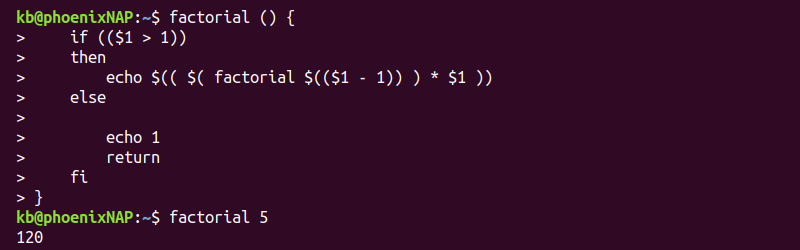
The method is slow and has limited precision (up to factorial 20).
For higher precision, faster results, and larger numbers, use the bc command. For example:
echo 'define factorial(x) {if (x>1){return x*factorial(x-1)};return 1}
 factorial(<number>)' | bc
Replace <number> with the factorial number to calculate. For example, to find the factorial of 50, use:
echo 'define factorial(x) {if (x>1){return x*factorial(x-1)};return 1} factorial(50)' | bc
The output prints the calculation result to the terminal.
Creating a Bash Calculator Function
Create a simple Bash calculator function with the following code:
calculate() { printf "%sn" "[email protected]" | bc -l; }
The function takes user input and pipes the equation into the bc command.
Alternatively, to avoid using programs, use Bash arithmetic expansion in a function:
calculate() { echo $(("[email protected]")); }
Keep the arithmetic expansion limitations in mind. Floating-point arithmetic is not available with this function.
Save the function into the .bashrc file to always have the function available in the shell.
Using Different Arithmetic Bases
By default, Bash arithmetic expansion uses base ten numbers. To change the number base, use the following format:
base#numberWhere base is any integer between two and 64.
For example, to do a binary (base 2) calculation, use:
echo $((2#1010+2#1010))
Octal (base 8) calculations use a 0 prefix as an alias. For example:
echo $((010+010))
Hexadecimal (base 16) calculations allow using 0x as a base prefix. For example:
echo $((0xA+0xA))
The output prints the result in base ten for any calculation.
Convert Units
Create a simple Bash script to convert units:
1. Open a text editor, such as Vim, and create a convert.sh script. For example:
vim convert.sh2. Paste the following code:
#!/bin/bash

## Program for feet and inches conversion

echo "Enter a number to be converted:"

read number

echo $number feet to inches:
echo "$number*12" | bc -l

echo $number inches to feet:
echo "$number/12" | bc -l
The program uses Bash read to take user input and calculates the conversion from feet to inches and from inches to feet.
3. Save the script and close:
:wq4. Run the Bash script with:
. convert.sh
Enter a number and see the result. For different conversions, use appropriate conversion formulas.
Solving «bash error: value too great for base»
When working with different number bases, stay within the number base limits. For example, binary numbers use 0 and 1 to define numbers:
echo $((2#2+2#2))Attempting to use 2#2 as a number outputs an error:
bash: 2#2: value too great for base (error token is "2#2")
The number is not the correct format for binary use. To resolve the error, convert the number to binary to perform the calculation correctly:
echo $((2#10+2#10))The binary number 10 is 2 in base ten.
Solving «syntax error: invalid arithmetic operator»
The Bash arithmetic expansion notation only works for integer calculations. Attempt to add two floating-point numbers, for example:
echo $((2.1+2.1))The command prints an error:
bash: 2.1+2.1: syntax error: invalid arithmetic operator (error token is ".1+2.1")
To resolve the error, use regular integer arithmetic or a different method to calculate the equation.
Solving «bash error: integer expression expected»
When comparing two numbers, the test command requires integers. For example, try the following command:
[ 1 -gt 1.5 ]The output prints an error:
bash: [: 1.5: integer expression expected
Resolve the error by comparing integer values.
Conclusion
You know how to do Bash arithmetic and various calculations through Bash scripting.
For more advanced scientific calculations, use Python together with SciPy, NumPy, and other libraries.
10 More Discussions You Might Find Interesting
2. Shell Programming and Scripting
Integer expression expected
Newb here
echo «$yesterdaysclose»
echo «$close»
if ; then
echo «stocks moving up»
elif ; then
echo «stock is moving down»
else
echo «no change»
fi
seems to evaluate the floating decimal correctly however returns
./shellscript1.sh: line 17: [: : integer expression expected… (3 Replies)
Discussion started by: harte
3. Shell Programming and Scripting
if condition error: integer expression expected
I am trying to run following condition with both variables having numeric values «1,2,3»
if ;when i run it i get following error:
$NEW_STATE: integer expression expected
Please correct me where I’m doing wrong.
I’m trying to check either New State is greater or Old state…. (0 Replies)
Discussion started by: kashif.live
4. UNIX for Dummies Questions & Answers
Integer expression expected error in script
When i run the following code i get an error that says Integer expression expected!
How do i fix this?
#!/bin/bash
if ;then
echo «wrong»
exit 1
fi
if ;then
for i in /dev;do
if ;then
echo $i
ls -l
fi (4 Replies)
Discussion started by: kotsos13
5. Shell Programming and Scripting
Integer expression expected: with regular expression
CA_RELEASE has a value of 6. I need to check if that this is a numeric value. if not error.
source $CA_VERSION_DATA
if * ]
then
echo «CA_RELESE $CA_RELEASE is invalid»
exit -1
fi
+ source /etc/ncgl/ca_version_data
++ CA_PRODUCT_ID=samxts
++ CA_RELEASE=6
++ CA_WEEK_NO=7
++… (3 Replies)
Discussion started by: ketkee1985
6. Shell Programming and Scripting
if script error: integer expression expected
Hi, i am making a simple program with a optional -t as the 3rd parameter.
Submit course assignment -t dir
In the script, i wrote:
#!/bin/bash
echo «this is course: ${1}»
echo «this is assignment #: ${2}»
echo «late? : ${3}»
if then
echo «this is late»
fi
but this gives me a
:… (3 Replies)
Discussion started by: leonmerc
8. Shell Programming and Scripting
Display Error [: : integer expression expected
i have lunix 5.4
i make script to tack the export from database 11g by oracle user
the oracle sheel is /bin/bash
when run this script display this error
./daily_xport_prod: line 36:
the daily_xport_prod script
#! /bin/sh
#
ORACLE_HOME=/u01/appl/oracle/product/11.2.0/db_1
export… (8 Replies)
Discussion started by: m_salah
9. Shell Programming and Scripting
integer expression expected error crontab only
I created a bash script that ran fine for awhile on a nightly crontab but then started crashing with commands not found, so I added
PATH=/usr/local/sbin:/usr/local/bin:/usr/sbin:/usr/bin:/sbin:/bin:/usr/bin/X11:/home/homedir/scripts/myscriptdir
export PATH
and now I don’t get those errors, but… (2 Replies)
Discussion started by: unclecameron
10. Shell Programming and Scripting
integer expression expected error
I’m a beginner so I might make beginner mistakes.
I want to count the «#define» directives in every .C file
I get the following errors:
./lab1.sh: line 5: ndef: command not found
./lab1.sh: line 6:
#!/bin/sh
for x in *.
do
ndef = ‘grep -c #define $x’
if ; then
… (2 Replies)