[Проблема решена, решение описано ниже]
Доброго времени суток уважаемые драйвовчане!
Обращаюсь к вам с мольбами помощи.
p.s. машину уже диагностировали, бобром через мой 20pin OBD1.
p.s.2 считывать пытаюсь E46 / Кузов / Подушка безопасности.
Собственно заказал я «чудесные» шнурки из всеми любимого Aliexpress.
( нравиться мне это дело 😀 )
Нашел замечательную статью dundukya — №12: Установка BMW Standard Tools 2.12 (INPA 5.0.6, EDIABAS 7.3, NCSExpert 4.0.1) для OBD1 + OBD2 (K-line) и OBD2 (DCAN).
Проделал всё тоже самое, позаимствовал у друга планшет на Win10 32bit.
Проблем с установкой софта не было, проблемы начались при подключении.
Первым, наперво схватил ошибку: IFH-0003: DATATRANSMISSION TO INTERFACE DISTURBED
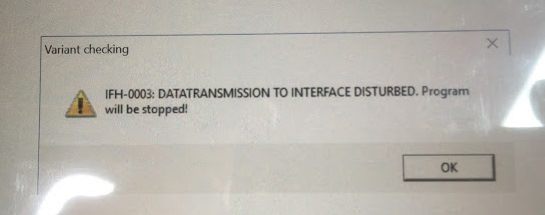
1 ошибка
Решилась (насколько я думаю) она путём выбора другого порта, так как 1 уже был кем-то или чем-то занят.
Сменил порт в диспетчере устройств на переходнике и изменил порт в obd.ini папочке Windows.
Подумал, ну всё, сейчас то я НАДИАГНОСТИРУЮ111
Вставляем ключ, заводимся.
БОЛТ
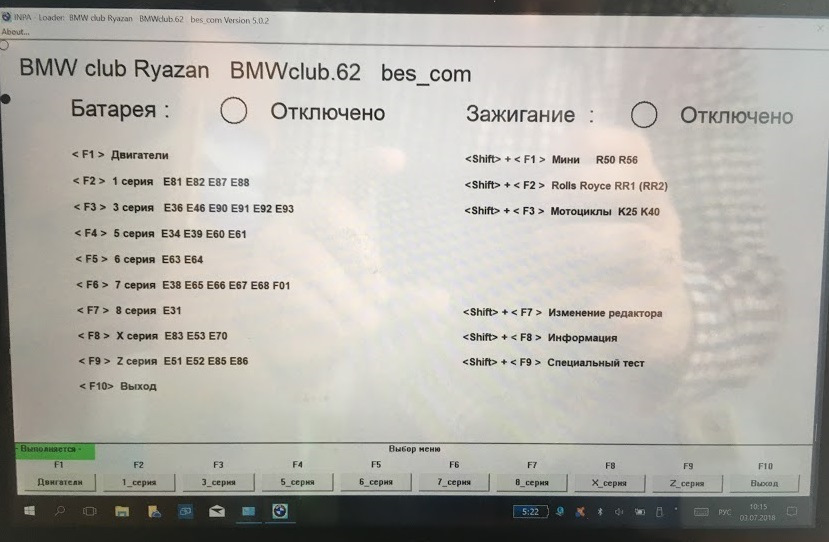
Надоевшая мне картина, которая не меняется
При попытке считать блок подушек, следующая ошибка — IFH-0018 INITIALIZATION ERROR
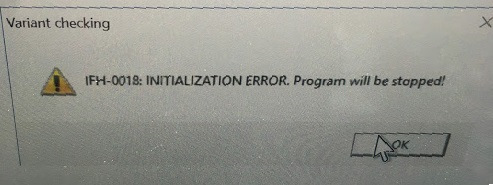
Ошибка два
Почитав статью: №12: Установка BMW Standard Tools 2.12 (INPA 5.0.6, EDIABAS 7.3, NCSExpert 4.0.1) для OBD1 + OBD2 (K-line) и OBD2 (DCAN).
Есть 4 возможные причины:
1. Проверил, изображение ниже
— проверяем настройки порта и их соотвествие obd.ini
2. Заведена
— проверяем, заведена ли машина. на заглушенной, даже с повернутым ключомв положение зажигания, на некоторых блоках может выскакивать эта ошибка.
3. Разобрал, визуально всё ок. Зеленая плата с переключателем, фото ниже.
— возможно шнурок требует модификации или неисправен, что случается очень часто, так как это дешевый китай. Раскручиваем корпус и смотрим на начинку, в частности контакты 7 и 8. В зависимости от года выпуска машины их нужно/не нужно замыкать.
4. Не пробовал? Убрать переключатель? Если да, то как лучше? просто контакты выдернуть?
НО: При переключении ошибка меняется, то есть переключатель работает.
— в последнее время популярны шнурки с встроенными переключателями, чтобы замыкать-размыкать 7 и 8 пины. Переключатели часто бывают нерабочие (легко проверить мультиметром), в таком случае вы тоже получите похожие ошибки. Чтобы решить проблему, выключатель нужно убрать, и если нужно замкнуть контакты, сделать это самостоятельно.
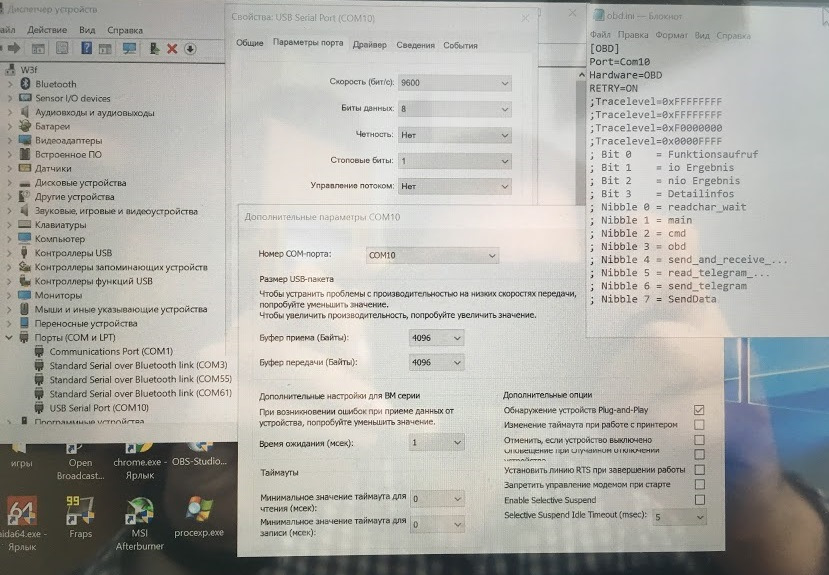
Соответствие порта и файла obd.ini в Windows
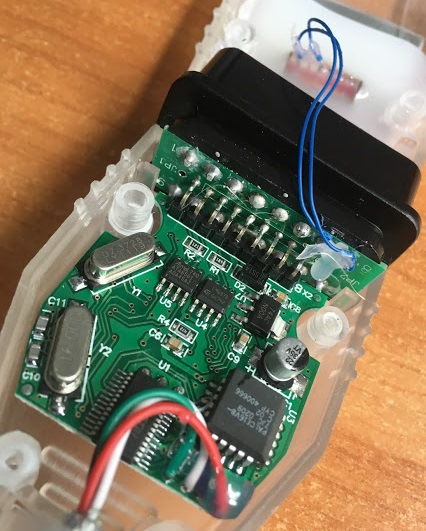
Разобранный переходник
Решение проблемы:
Всё получилось.
C:EDIABASBin есть тоже obd.ini в котором аналогично нужно менять КОМ Порт (если не стандартный 1), указал там такой же как и в папке Windows и всё заработало.
На замкнутом контакте 7+8 само собой.
-
Список форумов
По жизни с BMW
Диагностика, Кодирование BMW
-


|
№1 03 11 2016, 19:36 Приветствую уважаемые форумчане. Не ругайте сильно если задаю глупые вопросы. Почитал темы на форуме, похожего не нашел, может конечно плохо искал. Автомобиль E60, 525I, M54, бензин, американец, 2005 года. Купил китайский шнурок с софтом. Начал устанавливать по инструкции. У меня винда 10, 32 битная. Распаковал архив на диск С, две папки: BMW INPA и EDIABAS, с первой папки установил INPA,появился ярлык на рабочем столе, потом указал путь в переменных средах «;C:ediabasbin», далее с папки EDIABAS установил «ADSSETUP.EXE», только установки не увидел, что-то вроде произошло, потом перезагрузил компьютер, далее с папки BMW INPA скопировал файлы BIN и переместил их в папку EDIABAS тоже в папку BIN, в диспетчере устройств появился СОМ1 последовательный порт и еще один USB Serial port СОМ1, когда подключаю шнурок, пишет устройство работает нормально, в параметрах порта установил время отклика 1мсек, по советам «бывалых». Запускаю программу подключаю все, но кружочки батарея и еще один в статусе Off, не знаю что делать. Буду рад любым советам.
|
|
№3 04 11 2016, 07:33
у меня тоже китай,установил сразу,(не видит некоторый блоки,кетай кули),попробуй переустанови,что ты не так делаешь,у меня так было когда порт не указан был,стоит винда 10
Любишь кататься?Катись на х.й!
|

|
№5 07 11 2016, 09:50 Ребята, спасибо за ответы. переустанавливал, все так же. Единственное при установке где-то есть возможность СОМ порт указать. Или в уже установленной проге где-то СОМ порт сменить. У меня стоит СОМ1.Зажигание включаю.
|
|
№6 07 11 2016, 18:46 Спасибо ветерану за поправку, НЕ КОННЕКТИТСЯ, конечно лучше бы было получить подсказку, как машину подружить с программой, а не правила орфографии.
|
|
№7 07 11 2016, 20:44 Romanchik : Ребята, спасибо за ответы. переустанавливал, все так же. Единственное при установке где-то есть возможность СОМ порт указать. Или в уже установленной проге где-то СОМ порт сменить. У меня стоит СОМ1.Зажигание включаю. А шнур в этот порт воткнут?
|
|
Рекомендуем почитать на тему Не коннектиться автомобиль с INPA
|
|
№9 08 11 2016, 11:41 Ошибка типа IFH-0018 INITIALIZATION ERROR и IFH 0009 No Response From Control Unit, у меня еще антивирус аваст стоит, я его не отключал, но он не ругается, может дрова кривые под шнурок, но пишет, что устройство функционирует нормально. Я когда захожу в программу, выбираю свой кузов, мотор, хочу посмотреть ошибки, выскакивает ошибка с желтым треугольником.
|
|
№10 08 11 2016, 11:55 Может как-то можно СОМ порт в проге настроить, я просто не знаю какой по умолчнию.
|
|
№13 08 11 2016, 21:26 При установке INPA хвост вообще не подключал, во время установки ни где система не просила порт указывать, сделал по инструкции на диске, описал сверху. Попробую все снести и сделать все вышеописанное с подключенным хвостом. Спасибо за информацию. Отпшусь по результатам.
|
|
№15 09 11 2016, 16:44 Внимание! Качаем драйверы не новее, чем версия 2.10! Новые драйверы распознают китайские неоригинальные чипы и скидывают PID устройства на 0! В результате получаем испорченный шнурок. Если включен Windows Update — отключаем его, не даем винде ставить драйверы по умолчанию, потому что есть шанс, что автоматом поставятся именно плохие драйверы.
|
-
Список форумов
По жизни с BMW
Диагностика, Кодирование BMW
-
Кто сейчас на форуме |
|
Сейчас этот форум просматривают: нет зарегистрированных пользователей и гости: 3 |
Вы не можете начинать темы
Вы не можете отвечать на сообщения
Вы не можете редактировать свои сообщения
Вы не можете удалять свои сообщения
Вы не можете добавлять вложения
Collect all customer solutions here for BMW INPA Edibas IFH-0018: INITIALIZATION ERROR. Just for sharing!! AT RISK TO TRY IT YOURSELF.
Error message 1:
ApiCheckJobStatus: Error #95
SYS-0005: OBJECT FILE NOT FOUND
API job error or no such result !

Ediabas error #95 means that some INPA script (.IPO file) is requesting a result from some .prg file that does not exist. This is most probably caused by a missing .prg file.
Error message 2:
2.5 IFH-0018: Inizialisation Error
INPA doesn’t work but Toolset yet
The error occurs if a SGBD is running by INPA or CASCADE. If the same SGBD is loaded in
the Toolset it will not occure an inizialisation error.
Reason : The communications port COM1 doesn’ exist, but COM3 yet. The Toolset is
working without the inizialisation error, because the file OBD.ini exists in the
directory C:Ediabasbin. But the file OBD.ini has to exist in the direcory
C:Windows.
Solution: Copy the file OBD.ini in the directory C:Windows or create a new one. (Creation
of OBD.ini q.v. 3.3).
Error message 3:
Edibas error:
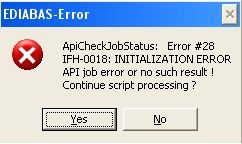
ApiCheckJobStatus: Error #28
IFH-0018: INITIALIZATION ERROR.
API job error or no such result!
Varuantenkonrolle:
IFH-0018: INITIALIZATION ERROR. Das Programm wird abgebrochen!

Reason: Ediabas is attempting to access port COM1. However, the port doesn’t exist, or it
has been taken by another programme (e.g. HotSync from Palm, infrared).
Solution: Install a COM1 interface or free it.
Real feedback on INPA initialization error with solution above:
Yesterday my BMW INPA K+DCAN software showed error: INITIALIZATION ERROR. killed several hours with this knock-off. The car i connected to is BMW 2011 – e92 – LCI.
To set the COM to 1, obd.ini is also COM1.
I seek help from forums and one of them provided a solution to the problem:
(solution offered by an experienced user with K+Dcan cable)
Modify the EDIBAS.INI as follows
RemoteHost
; Description : server address/name
; Default = –
; RemoteHost = Desmo16
Desmo16 being my computer’s name (note that this must be maximum 8 chars)
and
Port
; Description : IP communication port
; Value : 1000 < port < 30000
;
; Spezialfall OP(P)S /ICOM:
; Value : 6801 ;OBD-Treiber (CAN)
; Value : 6802 ;Most-Treiber
;
; Default = –
; Port = 6801
OBD2 notice that you should be sure port is 6801 as mine was 3000. It worked like a charm after i made these mods.
-
Help, having these errors in INPA; IFH-0018, Error #95, and Error #28
Hello I am new to software on cars and it took me a while to figure out how to get INPA to even install, but I finally got it installed and now I am getting 3 different errors and was wondering if you guys could help me.
The First:
The Second:
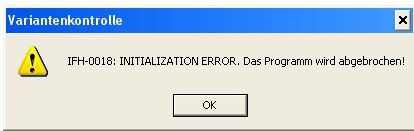
And the Third:
ApiCheckJobStatus: Error #95
SYS-0005: OBJECT FILE NOT FOUND
API job error or no such result !I have added the obd file to C:/ WINDOWS like many people have said to do in help threads on this topic, but that hasn’t help and I was wondering if you guys could give me some insight.
Thanks for the help,
Lelan
-
here you go,
1.9 Createfile_error: OPEN CONNECTION; IFH 0018- INITIALIZATION
ERRORADS Interface:
The following error appears when Ediabas is started:Createfile_error: OPEN
CONNECTION
OBD Interface:
The following error appears when Ediabas is started:Error 28: IFH 0018- INITIALIZATION
ERROR. (Also see Section 3.3)
Reason: Ediabas is attempting to access port COM1. However, the port doesn’t exist, or it
has been taken by another programme (e.g. HotSync from Palm, infrared).
Solution: Install a COM1 interface or free it.
-
Thank you very much, will be fixing it tonight
-
So I’m having the same first error you see in the OP, IFH-0018. Every single time. I can’t get past it in NCS Expert. I was thinking of making my own thread just now after hours and hours of searching and tinkering, then I saw this. To be more specific, this is what I’m getting:
EDIABAS NCS
vin is faulty
COAPI 2000 EDIABAS or SGBD error
IFH-0018 Initialization errorSo to reiterate:
— I have my own dedicated laptop running Windows XP for INPA/EDIABAS/NCS Expert
— Installed INPA/EDIABAS per instructions from:http://bmwcoders.com/forum/bmw-gt1-o…-software-328/
— My cable is this one:
http://www.ebay.com/itm/200708214373?ssPageName=STRK:MEWNX:IT&_trksid=p398 4.m1497.l2649
— I put OBD.ini in C:/Windows already.
— The program knows to look for COM1 for the cable, and cable is COM1. I also tried this with COM3 settings. No change.I’m thinking its a latency issue. I cannot adjust my latency. I’m sure its default at 16ms and I need it at 1ms. Unlike many others, when I go under Device Manager —> Ports —> COM1 Properties —> Port Settings —> Advanced, I have only the option of turning on FIFO buffers, changing the COM port number, and adjusting receive buffer and transmit buffer (both of which I set at 1, then tried it set at 8).
Does anyone know how I can adjust latency when it doesn’t show up in the Advanced Settings for COM1 menu?
Does anyone know a different root of my issue?
I’m going to reinstall the entire software suite today so I can go from a top-down approach.
Last edited by Dahmwern; 09-25-2012 at 12:27 PM.

| CSL 18″ Reps | H&R Coilovers | UUC EVO3 Short Shifter | Conforti Shark Injector | Magnaflow exhaust | TMS Power Pulleys | CAI with Custom Built Box | Drilled/Slotted Rotors | ZHP Shift Knob | Brushed Metal Trim | ECS Carbon Fiber Brake Handle | Black Grilles | Angel Eyes | DIY Clutch Stop | DEPO Smoked Corners | DEPO Sidemarkers | DEPO Smoked R/C/R Tails | DIY AUX input | DIY Red Needle Mod | CDV Delete | Front License Plate Delete | Debadged |
-
I had to set the com port on the cable the same as the com port on the computer and it worked
-
How did you do this as i am having teh same error?
-
Hi everyone!
jacek2002, have you solved your problem? I’m having the same issue, after reading 1000 post, and trying 1000 different things, no way to find any solution..

Добрового времени суток!
Собственно приобрел на AVITO D+CAN кабель за 1 500 руб, в комплекте был диск с INPA, но продавец порекомендовал скачать обновленную версию, скачал INPA 5.0.2, устанавливал все это на W7, в итоге при подключении к авто появлялась ошибка IFH 00018, в сети вычитал проблема в COM порте не хочет она работать с W7, установил на W7 Windows XP Mode (виртуальный ХР в среде W7), установил все под XP Mode в W7, пробую подключать к авто выдает ошибку IFH 0006, вычитал в инете надо установить драйвер USB serial для адаптера, установил, настроил, пробовал на COM 1, COM4, эфекта ноль, не соединяется выдает ошибку IFH 0006 снова гугл рулит, пишут надо пробовать в разных режимах ADS, ODIC, OBD, не пашет ни в одном из них, выдает ошибку при подключении, уже не знаю в чем еще может быть дело, может сам шнурок не рабочий, может программа не рабочая, кто что может посоветовать, может у кого есть настроенная прога и шнурок, так получится проверить мой шнурок, или кто что еще посоветует как все это настроить?
-
михо
- Posts: 3
- Joined: 26 Jul 2016, 22:37
- Contact:
Не работает inpa и rheingolg
Добрый день. Приобрел у Вас адаптер BMW K-dcan c программами.
Установил по инструкции
Сначала Bmw standart tools zip
Потом Ferrum rar
А сверху на все это torrent Rheingold
Установил все по инструкции (смотрел видео из форума на вашем сайте). После установки заменил 2 (файлаRheingoldCoreFramework.dll и License.xml) в папке, куда копировал:rheingoldTesterGUIbinRelease
После первого запуска у меня Rheingold запрашивает лицензию и не запускается.
INPA тоже не работает и при попытке сделать диагностику, выдает ошибку IFH-0018 INITIALIZATION ERROR
Что я не так делаю?
Еще вопрос по самому процессу диагностики:
INPA нужно запускать когда красный диод погаснет на адаптере или до этого?
В каком положении должен быть переключатель на адаптере, для диагностики бмв х5 е53 2004г?
-
ilia2108
- Posts: 3825
- Joined: 21 Mar 2012, 17:29
- Contact:
Re: Не работает inpa и rheingolg
Postby ilia2108 » 27 Jul 2016, 11:12
Там в торренте есть текстовый файлик, в котором описывается, нужно зайти в .ini файл и поменять в одном месте 0 на 1, точно название сказать не могу, сейчас нет под рукой этого файла.
Используйте только Rheingold, Инпу не надо.
Касаемо переключателя — попробуйте оба положения.
Илья
Команда AVTOадаптер.RU
-
михо
- Posts: 3
- Joined: 26 Jul 2016, 22:37
-
Contact:
Re: Не работает inpa и rheingolg
Postby михо » 27 Jul 2016, 20:21
На том диске, что я приобрел с адаптером, в текстовом файле к rheingold написано только файлы заменить:
install «Standard_Tools_Setup 2.12» , install BMWRheingoldISTA3.msi ,
then copy contents of «Rheingold 3.41» to X:rheingoldTesterGUIbinRelease
Других текстовых файлов нет
-
ilia2108
- Posts: 3825
- Joined: 21 Mar 2012, 17:29
- Contact:
Re: Не работает inpa и rheingolg
Postby ilia2108 » 29 Jul 2016, 19:04
На том диске, что я приобрел с адаптером, в текстовом файле к rheingold написано только файлы заменить:
install «Standard_Tools_Setup 2.12» , install BMWRheingoldISTA3.msi ,
then copy contents of «Rheingold 3.41» to X:rheingoldTesterGUIbinReleaseДругих текстовых файлов нет
Да, вы всё правильно говорите. Это я с другой версией перепутал.
Также нужно поменять файл NCSEXPER.exe
Илья
Команда AVTOадаптер.RU
-
михо
- Posts: 3
- Joined: 26 Jul 2016, 22:37
- Contact:
Postby михо » 12 Aug 2016, 19:55
Созвонился с Антоном, он подключился по удаленке и все настроил. Спасибо, все работает.
Who is online
Users browsing this forum: No registered users and 0 guests
Skip to content
INPA BMW Tool Set Error Messages Trouble Shooting
INPA BMW Tool Set Error Messages Trouble Shooting
INPA BMW cable is the strong diagnostic cable for BMW.Many client got problem with tool set error when using .Here vxdas.com share INPA BMW tool set error messages trouble shooting.Hope it can help every INPA BMW owner.
INPA BMW Tool Set Error Messages Trouble Shooting
1.EDIABAS error 100: SYS-0010: INITIALIZATION ERROR
Reason: This message comes when an SGBD has an automatic concept switch between
multiple diagnostics logs and is not connected to the controller.
Solution: Connect the controller
2.EDIABAS Error 126 (only up to Ediabas V6.4.x)
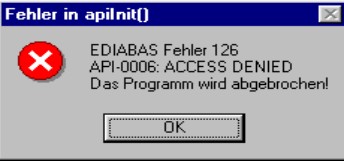
Reason: This error message appears if you start the Tool Set while an INPA BMW script is
running. This is also true the other way round. The reason for this is that only one
programme can access EDIABAS at a time.
Solution: Therefore, before you start the ToolSet, you must exit INPA!!!
3.IFH-0006: Command not accepted and IFH-0018: Initialization Error and
IFH-0038: Interface Command not implemented
Errors IFH-0006 and IFH-0018 occur if any SGBD is loaded in the Tool Set. Error IFH-0038
is generated when loading the utility file into the Tool Set.
Reason 1: The error was caused by another programme that accessed the COM1
interface. This programme could be “HotSync” for Palm or “ActiveSync”
for lpack.
Solution 1: Check the programmes that are started automatically when Windows is
started (see Chapter 4.1).
Reason 2: The COM1 interface is taken by a serial printer.
Solution 2: Uninstall the printer.
Reason 3: The infrared interface is active.
Solution 3: Deactivate the infrared interface.
Reason 4: There is no COM1 interface (COM3 instead, for example)
Solution 4a): Install the COM1 interface.
Solution 4b): Create a file with the name OBD.ini and make the following entry to set
the existing serial interface (COM3, for example)
[OBD]
Port = Com3
The file OBD.ini must be saved in the directory C:WINDOWS for
Windows XP or in directory C:WINNT for Windows NT up to the Ediabas
Package 1.3 and as of Ediabas Package 1.4 in directory
C:EDIABASBIN. The current version of the Ediabas Package can be
seen in the files C:EDIABASversion.txt or C:EDIABASpackage.pdf.
Reason 5: Only for IBM notebooks: The COM1 interface is reserved for the docking
station; the COM3 interface is installed instead.
Solution 5a): see solution 4b:
Solution 5b): Set the COM3 port to COM1: In the device manager (Windows XP:
Select “Start” “Control Panel” “System” “Hardware” and then
select COM3 from the ports under the menu item “Device Manager”.
Then use the right mouse button “Properties” “Port Settings”
“Advanced” to reach the “Advanced Settings for COM3”. Set COM1 in the
COM Port Number. The message that COM1 is already taken can be
ignored in this case.
Reason 6: The old OMITEC driver wasn’t uninstalled correctly.
Solution 6: Please uninstall the old OMITEC driver with the instructions
InstructionforOMITECInstallation.pdf via the GIS server
4 IFH-0006: Command not accepted
This error occurs if a SGBD is loaded in the Tool Set when the OBD connector is being used.
Reason 1: ODB has actually been set as the interface in Ediabas.ini, but the Tool Set uses
the multi-instance with another interface, e.g. K-Line. The setting for the multiinstance and the interfaces used here is made in the file Tool32.ini in the
directory C:Windows (for Windows XP) or alternatively C:Winnt (for Windows
NT). Then, the entries in Tool32.ini, or alternatively the interface apply and not
the ones in Ediabas.ini. The use of multi-instance in the Tool Set is identified in
the title bar, for example with “Tool32:1”, for single multi-instance.
Solution 2: Enter the interface that is being used in Tool32.ini or disable multi-instance with
the entry “No”.
Reason 2: A SGBD is loaded in the Tool Set when the diagnosis protocol UDS is being
used. For UDS-SGBDs You have to use the interface OMITEC but in the
EDIABAS.ini the setting fort he interface ist „STD:OBD“.
Solution 2: Change the setting for thr interface to „interface = STD:OMITEC“ in the
EDIABAS.ini file. The OMITEC connector has to be stressed by the voltage (blue
blinking). If the connector can’t be stressed by the voltage and You want to load
the SGBD yet, You will use the simulation mode. You can activate the simulation
mode e.g. with the menue „configuration -> EDIABAS“. Notice, if you want to use
the simulation mode, a simulation file for the interface will have to exist in the
simulation path.
5 IFH-0009: ECU isn’t connected or doesn’t respond
Reason 1: In the Ediabas.ini file, the interface is set to STD:ADS. However, you have
connected an OBD connector.
Solution 1: Modify the interface setting.
Reason 2: The ignition is switched off.
Solution 2: Switch the ignition on.
Reason 3: The device manager has been used to disable the FIFO buffer for COM1.
Solution 3: In the device manager (Windows XP: Enter “Start” “Control Panel”
“System” “Hardware” “Device Manager” Ports (COM & LPT)), and select
COM1 from the ports and under the “Port Settings” tab, select “Advanced”. There
must be a check-mark by “Use FIFO buffers” and the highest possible setting
must be selected for the receive buffer.
6 SYS-0002: ECU OBJECT FILE NOT FOUND
Reason 1: If the external table T_GRTB.prg doesn’t exist in the directory C:EDIABASECU
the error message will be displayed when You execute the job
IDENT_FUNKTIONAL of a functional SGBD.
Solution 1: You have to download the external table using the ECCO Web Export and copy it
in the directory C:EDIABASECU.
Reason 2: The SGBD, which You want to start doesn’t exist in the directory
C:EDIABASECU or is an old one.
Solution 2: You have to download the SGBD using the ECCO Web Client and copy it in the
directory C:EDIABASECU
7 SYS-0005: Controller description file not found. The programme will be
aborted!
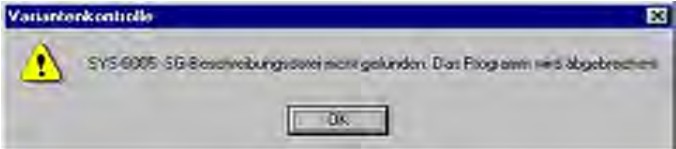
Reason 1: The SGBD is not located in the path C:EdiabasEcu.
Solution 1: Copy the SGBD into the Ecu directory.
Reason 2: This error occurs if the EcuPath in Ediabas.ini (C:EdiabasBin) isn’t set to
C:EDIABASECU.
Solution 2: Set the correct path
8 ToolSet Error: Runtime error ’372’
The following error message appears.

Reason: The old version msflxgrd.ocx exists under c:winntsystem32.
Solution: msflxgrd.ocx under c:Ediabasbin must be registered. To do this, select “Start”
“Run…” and execute regsvr32 :ediabasbinmsflxgrd.ocx in the window and
confirm with “OK“.
The following must be entered for Windows XP: “regsvr32 c:ediabasbin
msflxgrd.ocx
9 INPA BMW Tool Set Error: Run-time error ’5’ – Invalid Procedure Call
Reason: The Tool Set was started twice in a very short period of time.
Solution: Close all Tool Set processes that are running and start the Tool Set again with
only one double-click
10 INPA BMW Tool Set Problem: If an SGBD is opened, then only the hourglass
appears and the SGBD is not loaded.
Reason: An old version Richtx32.ocx exists under c:winntsystem32.
Solution: Richtx32.ocx under c:Ediabasbin must be registered. To do this, select “Start”
“Run…” and execute “regsvr32 :ediabasbinrichtx32.ocx“ in the window and
confirm with „OK“.
The following must be entered for Windows XP: „regsvr32 c:ediabasbin
richtx32.ocx
11 INPA BMW EDIABAS error 20: IFH-0010: Data transmission to control unit
disturbed
Reason 1: When using the EDIC card, the error message is issued when executing the
IDENT job.
Solution 1: Changes must be made in the file “XEDICC.ini” in the “…EdiabasBin” directory.
There, the parameters set for high-speed must be commented out and the
parameters for low-speed must be enabled:
; highspeed:
;Interface=1;
;Presc=0x01;
;SJW=0x01;
;TSEG1=0x08;
;TSEG2=0x07;
; lowspeed:
Interface=2;
Presc=0x0A;
SJW=0x02;
TSEG1=0x05;
TSEG2=0x02;
Reason 2: A SGBD is loaded in the Tool Set when the diagnosis protocol UDS is being
used. You use the interface OMITEC but the connector isn’t stressed by the
voltage (no blue blinking).
Solution 2: Connect the OMITEC wit the vehicle. The OMITEC connector has to be stressed
by the voltage (blue blinking). If the connector can’t be stressed by the voltage
and You want to load the SGBD yet, You will use the simulation mode. You can
activate the simulation mode e.g. with the menue „configuration -> EDIABAS“.
Notice, if you want to use the simulation mode, a simulation file for the interface
will have to exist in the simulation path
12 INPA BMW EDIABAS Error 134: API-0014: Result not found
The error occurs if a SGBD is loaded in the Tool Set when the diagnosis protocol UDS is
being used and the Job FS_LESEN is being executed.
Reason: You use the setting “read error like INPA”, but the Toolset can’t support the
function yet for UDS-SGBDs.
Solution: Please remove the setting “read error like INPA” in the menue “configuration ->
Toolset”.
13 INPA BMW takes too long to load an SGBD in the Tool S
Loading motor or transmission SGBDs takes an above average amount of time.
Reason: Large SGBDs often contain many and extensive tables and their information has
to be loaded.
Solution: Under the Configuration menu item in the Tool Set and then Tool Set, the
checkmark by the selection of table information must be removed
14.INPA BMW Black Windows in the Tool Set
After loading a SGBD one or more windows of the Tool Set are black windows.
Reason: The registration of the richtextbox is invalid.
Solution: You have to register the richtextbox. Execute the batch file REGSVR32.BAT in
the directory C:Ediabasbin
Finally ,for more detail information about INPA BMW ,pls click:
Professional Diagnostic Solution & Service Supplier
Website:www.vxdas.com
Follow Us To Get More Free Resource
www.facebook.com/groups/vxdas/

Share This Story, Choose Your Platform!
About the Author: Lucy

Related Posts
Page load link