Ошибка error: failed to synchronize all databases (unable to lock database) (РЕШЕНО)
При попытке обновить Arch Linux или дистрибутив на его основе (например, BlackArch) может возникнуть ошибка «error: failed to synchronize all databases (unable to lock database)».
Например, при вводе команды
Может быть выведено (в случае, если система с английской локалью):
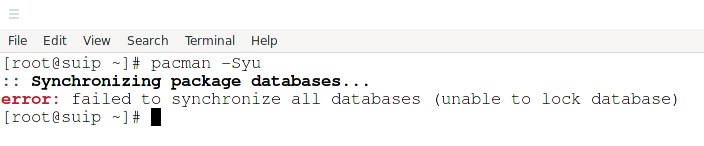
С русской локалью будет написано «ошибка: failed to synchronize all databases (не удалось заблокировать базу данных)», то есть ошибка синхронизации всех баз данных из-за того, что не получилось заблокировать базу данных.
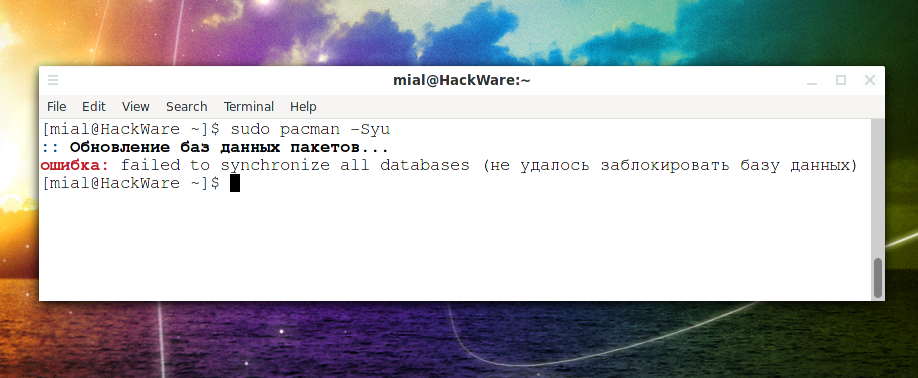
Это означает, что создан файл, который говорит о том, что база данных пакетов заблокирована для работы, поскольку в настоящее время работу с базой данной пакетов ведёт другая программа.
Если это действительно так (например, вы уже запустили pacman в другой вкладке), то рекомендуется дождаться выполнения этой команды, чтобы впоследствии не возникло ошибок в кэше и базе данных установленных пакетов.
Если вы уверены, что это сообщение выводиться исключительно по ошибке — например, вы через SSH с помощью pacman обновляли пакеты, но сессия неожиданно была прервана и вы вновь подключись к удалённому компьютеру, но при попытке использовать pacman появляется эта ошибка, то в этом случае для её исправления достаточно удалить файл /var/lib/pacman/db.lck следующим образом:
После этого вновь запустите pacman — проблема должна быть полностью решена.
Если вы не уверены, нужно ли удалять файл db.lck, то вы можете проверить дату его создания следующим образом:
Дата создания может подсказать вам, по какой причине данный файл присутствует в системе.
Если проблема не решена, то второй причиной может быть переполненность диска — на нём не осталось места чтобы записать файл блокировки. В этом случае очистите диск и повторите команду для обновления системы.
Очистку можно начать с удаления журналов. Например, для удаления логов веб-сервера:
Для удаления временных файлов:
Для удаления файлов установочных пакетов:
Близкие статьи
- Ошибка error: failed to update core (unable to lock database) (РЕШЕНО) (100%)
- Ошибка: «файл vmlinuz-linux» не найден (РЕШЕНО) (100%)
- Аналог опции —force в pacman (100%)
- Ошибка pacman «warning: failed to retrieve some files» (РЕШЕНО) (100%)
- Ошибка «ruby-bundler: /usr/share/man/man5/gemfile.5.gz exists in filesystem (owned by ruby)» (РЕШЕНО) (100%)
- Ошибка «не удалось завершить транзакцию (неверный или поврежденный пакет)» (РЕШЕНО) (RANDOM — 100%)
1 thought on “ Ошибка error: failed to synchronize all databases (unable to lock database) (РЕШЕНО) ”
OS: EndeavourOS Linux
`:+sssssssssso/. Host: B250M-DS3H
`-/ossssssssssssso/. Kernel: 5.19.7-zen2-1
`-/+sssssssssssssssso+:` Uptime: 22 mins
`-:/+sssssssssssssssssso+/. Packages: 853 (pacman
`.://osssssssssssssssssssso++- Shell: bash 5.1.16
.://+ssssssssssssssssssssssso++: Resolution: 1680×1050
.:///ossssssssssssssssssssssssso++: WM: i3
`:////ssssssssssssssssssssssssssso+++. Theme: Adwaita [GTK2]
`-////+ssssssssssssssssssssssssssso++++- Icons: Adwaita [GTK2]
`..-+oosssssssssssssssssssssssso+++++/` Terminal: xfce4-termi
./++++++++++++++++++++++++++++++/:. Terminal Font: Source
`. ——« CPU: Intel i7-7700 (8
GPU: NVIDIA GeForce G
Memory: 1018MiB / 320
OS: EndeavourOS Linux
`:+sssssssssso/. Host: B250M-DS3H
`-/ossssssssssssso/. Kernel: 5.19.7-zen2-1
`-/+sssssssssssssssso+:` Uptime: 22 mins
`-:/+sssssssssssssssssso+/. Packages: 853 (pacman
`.://osssssssssssssssssssso++- Shell: bash 5.1.16
.://+ssssssssssssssssssssssso++: Resolution: 1680×1050
.:///ossssssssssssssssssssssssso++: WM: i3
`:////ssssssssssssssssssssssssssso+++. Theme: Adwaita [GTK2]
`-////+ssssssssssssssssssssssssssso++++- Icons: Adwaita [GTK2]
`..-+oosssssssssssssssssssssssso+++++/` Terminal: xfce4-termi
./++++++++++++++++++++++++++++++/:. Terminal Font: Source
`. ——« CPU: Intel i7-7700 (8
GPU: NVIDIA GeForce G
Memory: 1018MiB / 320
Your advice is right. My sistem is update now . Thank you for your efforts.
Источник
error: failed to synchronize all databases (unable to lock database) (SOLVED)
January 14, 2022
When trying to update Arch Linux or a distribution based on it (for example, Manjaro or BlackArch), an error “failed to synchronize all databases (unable to lock database)”» may occur.
For example, when entering the command
It can be output:

This means that a file has been created that indicates that the package database is locked for processing, because another program is currently working with the package database.
If this is indeed the case (for example, you have already started pacman in another tab), then it is recommended that you wait for this command to complete so that there are no errors in the cache and database of installed packages later.
If you are sure that this message is displayed exclusively by mistake – for example, you updated packages via SSH using pacman, but the session was unexpectedly terminated and you reconnect to the remote computer, but this error appears when you try to use pacman, then in this case for fixing it is enough to delete the file /var/lib/pacman/db.lck file as follows:
After that, run pacman again – the problem should be completely resolved.
If you are unsure whether to delete the db.lck file, you can check its creation date as follows:
The creation date can tell you why this file is present in the system.
If the problem is not solved, then the second reason may be the disk is full – there is no space left on it to write the lock file. In this case, clean the disk and retry the command to update the system.
You can start the cleanup by deleting the logs. For example, to remove web server logs:
Источник
Arch Linux
You are not logged in.
#1 2012-09-16 07:53:19
[SOLVED] pacman: «unable to lock database»
I have been working hard to install my Arch Linux as all of you have but now that i finally installed it i am trying to do some
postinstalation things located here.
I first opened /etc/pacman.conf file and at the end of the file added the repository [multilib], which pacman was
supposed to look for on my 1st mirror in /etc/pacman.d/mirrorlist which is this one.
Long story short, this is the code i added in my /etc/pacman.conf:
I saved the file but while mirror is available pacman still refuses to update mirror lists using command:
This produces the error:
I am currently logged in as root and i don’t know why is the database locked, as root was supposed to be able to do whatever he likes?
What can i do to resolve the «lock database» error?
Last edited by 71GA (2012-09-16 09:28:37)
C, ARM, ARM assembly, HTML, CSS, JS, Linux
#2 2012-09-16 08:04:53
Re: [SOLVED] pacman: «unable to lock database»
Did you try to remove the db.lck file? This happens when pacman is interrupted.
#3 2012-09-16 08:06:12
Re: [SOLVED] pacman: «unable to lock database»
Did you try to remove the db.lck file? This happens when pacman is interrupted.
Is it safe to do it?
C, ARM, ARM assembly, HTML, CSS, JS, Linux
#4 2012-09-16 08:26:39
Re: [SOLVED] pacman: «unable to lock database»
I did remove /var/lib/pacman/db.lck and again used command
And it partialy worked as it did update repositories [core] [extra] and [comunity]. After this it again reports
an error about [multilib]. This is the error which i get for every mirror listed in my /etc/pacman.d/mirrorlist file:
«404 Not Found» indicates that URL cant be found which could be an internet problem, but this can’t be the issue here
as other depositories are sucessfully installed and furthermore it could never have happend to all the mirrors at once.
Last edited by 71GA (2012-09-16 08:28:06)
Источник
Pacman troubleshooting
Содержание
Various issues relating to the download and installation of software packages from the Manjaro repositories are dealt with here.
«Unrecognized archive format» Error
It has ocurred more than once, an update is issuing these messages in a seemingly never ending stream. Pacman could not open file: sync files
The error relates to a mismatch in the information contained in the db files at the mentioned location and the db files at the first mirror in your mirrorlist. Pacman checks a package in the database and sees if the signature file matches the one in the database. If it does not, then pacman will say the package is corrupted.
While it sometimes is possible to fix the issue simply by deleting the files and the running a pacman update it far from every time.
One recipe for fixing this
It is mandatory to ensure that the keyrings is current. By ensuring the keyrings are in shape and then redownloading the databases we reestablish the chain of trust between the keyrings and the packages.
You will have to find the correct names by looking at
Replace yyyymmdd and x with the info found at the above links
Remove your faulty databases
Download the databases and update the system
«Unable to lock database» Error
When downloading and installing software from the repositories, a special database lock file will be created in order to ensure that the current installation process is the only one running at that time. Otherwise, attempting to install multiple files from multiple sources simultaneously may corrupt the downloaded files, cause file conflicts — or worse still — damage your system. Once the installation has been completed, the lock file will then be automatically deleted. This error may therefore occur due to two possible reasons:
- Another installation is still taking place and has not yet finished, or
- A previous installation attempt had not finished properly (e.g. due to being aborted early)
It is therefore wise to first check to ensure that another installation is not (or had not been) in process at the time of the error. When satisfied that this is not the case, then the database lock file can be manually deleted. To do so, open up the terminal and enter the following command:
Once done, you should now be able to successfully re-attempt your intended installation.
Errors about Keys
We all have our own unique signatures which are used to authenticate who we are and to prevent fraudulent or even malicious activities by others. This is also the case with software packages available from the software repositories. They all contain encrypted codes (signature keys) unique to their developers to ensure that they are authentic and not malicious in nature.
During the installation process, once any software packages have been downloaded, your system will first check their signature keys to ensure that they are authentic prior to actually installing them. If a signature key cannot be verified for any reason, then the installation process will be aborted. This problem will usually occur due to:
- one or more signature keys contained in your system’s database being revoked, changed, corrupted, or out of date
- one or more software packages not having been signed off properly when placed in a repository
Where a package has not been signed off properly before being placed in a repository, it will be the responsibility of the developer(s) to correct this. However, as this problem will be more than likely due to a problem with your system’s verification of a signiture key, this can be solved in three easy steps. Working net connection is required. Once you have opened your terminal:
1. Remove old (and possibly broken) keys by entering this command:
2. Reinstall keyrings including the latest keys:
3. Initialize the pacman keyring:
4. Load the signature keys:
5. Refresh and update the signature keys:
6. Clear out the software packages downloaded during the aborted installation (optional):
1. Remove old (and possibly broken) keys by entering this command:
2. Initialize the pacman keyring:
3. Download the packages:
Those running ARM may also need to download archlinuxarm-keyring and manjaro-arm-keyring.
4. Remove the signatures:
5. Install the downloaded packages manually:
6. Clear out the software packages downloaded during the aborted installation (optional):
7. Remove the custom package folder: (optional):
After that try running sudo pacman -Syu to see if the errors were resolved.
Conflicting files — FILENAME exists in filesystem
If you cant can’t install or update a package because of an error like this:
Then the package manager, pacman, has detected an unexpected file that already exists on the disk.
Why is this happening?
By design pacman will not overwrite files that already exist. This is a design feature, not a flaw — package managers are designed to keep track of installed files.
This issue normally happens because you’ve manually added, copied, or created a file. It can also happen when you install software using a downloaded executable, run a make install, or use a third-party package system such as conda. It also occurs when you install an AUR package which installs files that conflict with a repo package.
When using a third-party installer you should always specify an alternative installation location, such as under your home directory, or under /opt or /usr/local/. Never install directly under / or /usr.
How can I fix this?
The first step is to identify which, if any, package owns the file. This can be easily done with:
If this identifies a conflicting package you can decide to remove it with pacman -R. If no package is identified you can delete the file (or move it to a backup location).
Where can I read more?
This post was inspired by (and adapted from):
The above post also has links to further reading.
«Configuration file. not recognized» Error
Manjaro’s package manager — pacman — uses a file called mirrorlist to tell it the internet addresses of the Manjaro servers in order to download updates and software applications from them. This error will therefore occur if one or more server addresses contained in the mirrorlist file have not been listed properly, resulting in pacman being unable to connect to them. Another tell-tale sign is that this problem will also be encountered immediately after:
- Installing Manjaro and editing the mirrorlist file during installation, or
- Editing the mirrorlist file at a later time.
See the Change to a Different Download Server guide for more detailed information on how to correctly select and enable another Manjaro server for downloading.
«GPGME error: No data» Error
The most likely cause of this issue is that an error or corruption has been detected by pacman in one or more software packages being downloaded. Package signatures and checksums are used to verify the validity of downloaded software, and should they fail, the installation attempt will be aborted to protect your system until the matter is resolved.
Option 1: Basic Resolution
To resolve this issue, first follow the basic procedure provided below. If this does not work, then there is a more comprehensive procedure available.
1. Download the package databases and update your system:
2. Clear out the software packages downloaded during the aborted installation by entering the command:
3. Re-attempt the aborted download.
Option 2: Comprehensive Resolution
If the basic proceedure still does not resolve the matter, further steps are available:
1. Resynchronise with the Manjaro servers to ensure that everything is up to date by entering the command:
2. Refresh and update the signature keys by entering the command:
3. Reload the signature keys by entering the command:
4. Clear out the software packages downloaded during the aborted installation by entering the command:
5. Re-attempt the aborted download.
If the error still persists, then it is recommended to Change to a Different Download Server.
Источник
Опять что-то с pamac-aur.
- rutgerg
- Сообщения: 29
- Зарегистрирован: 04.09.2022
Добрый день. Pamac-aur при перезагрузке ОС молчит. Но yay -Syu в терминале находит обновления. При «насильном» обновлении в pamac пишет, что не может синхронизировать базы и что-то ещё.
Я понимаю, что это что-то вроде ДЕЖАВЮ (тема старая), но быстрый поиск в инете результатов не дал. Помогите, если можете.
Последний раз редактировалось rutgerg 08.11.2022 14:00, всего редактировалось 2 раза.
- rutgerg
- Сообщения: 29
- Зарегистрирован: 04.09.2022
#
16.10.2022 08:42
Вот точный вывод pamac-aur:
не удалось заблокировать базу данных
Не удалось синхронизировать базы данных
Требуется перезапуск при применения изменений.
- NightMan
- Сообщения: 7
- Зарегистрирован: 15.08.2022
#
16.10.2022 09:51
попробуйте удалить файл /var/lib/pacman/db.lck и перезапустить pacman
- rutgerg
- Сообщения: 29
- Зарегистрирован: 04.09.2022
#
16.10.2022 10:39
Так вот самое интересное, что файла db.lck нет, и он не создается ни при каких действиях (обновление, установка, удаление и т.д.)
При команде в терминале sudo pacman -Syu все отлично, никаких ошибок. Переустановил pamac-aur после полного его удаления. Результат тот-же.
Команда pamac-manager тоже видимых ошибок не выдает.
Главный вопрос, я так думаю, — где db.lck, почему он не создается?
- rutgerg
- Сообщения: 29
- Зарегистрирован: 04.09.2022
#
16.10.2022 11:07
Удалил оставшуюся после переустановки pamac-aur папку pamac в /var/tmp/ . Пока всё нормально, сообщение пропало.
Поддержку AUR в pamac-aur пока не включал. Понаблюдаю дальше.
Получается, что проблема была в файлах или конфигах в папке pamac в /var/tmp/.
- rutgerg
- Сообщения: 29
- Зарегистрирован: 04.09.2022
#
08.11.2022 14:00
Добрый день. Pamac-aur при перезагрузке ОС опять молчит. Команда sudo pacman -Syu, например, выдаёт наличие обновления пакета shadow до версии shadow-4.11.1-4. Графический Pamac после проверки обновлений считает, что система актуальна. Не пойму куда «копать»? В интернете в основном про отсутствие пакетов обновлений из AUR, а ведь получается, что не видит обновлений даже из официального репазитория. Короче немного подзапутался. Правда последний раз снес pamac и установил из Chaotic-AUR репазитория, но вряд ли это что-то меняет.
- rutgerg
- Сообщения: 29
- Зарегистрирован: 04.09.2022
#
08.11.2022 14:40
Установил pamac-aur из исходника. Пока работает. На долго ли?
-
ugras

- Сообщения: 64
- Зарегистрирован: 11.09.2022
#
08.11.2022 15:11
Чем дальше в лес gui, тем больше дров багов. Если pamac только для проверки обновлений (а на кой чёрт он нужен ещё), то можно поставить маленький и лёгкий aarchup , который будет выводить в уведомления информацию о доступных обновлениях. Для этого в автозагрузку засунуть что-то типа
aarchupstartup.sh
#!/bin/bash
if (pidof aarchup >/dev/null); then
    kill $(pidof aarchup)
    /usr/bin/aarchup --loop-time 120 --timeout 10 --aur --icon archlinux &
else
    /usr/bin/aarchup --loop-time 120 --timeout 10 --aur --icon archlinux &
fi
Где 120 — это каждые два часа, а там как сами желаете…
- vasek
- Сообщения: 244
- Зарегистрирован: 31.08.2022
#
08.11.2022 15:26
Вы все еще используете pamac-aur? — тогда мы идем к Вам и … снесем его …
PS — Лично я с месяц назад изменил технологию обновления. Использую только pacman с периодичностью 1раз в неделю.
Удалил все пакеты из AUR (было 5 пакетов) … пересмотрел их необходимость и установил по новой всего 2 пакета, … НО, главное, установил их в ручную без использования всяких paru/yay и др., точнее, собрал ручками пакет и установил с помощью pacman. А вот обновлять эти пакеты не буду до тех пор, пока они работают и к ним нет претензий … а вместо обновления все сначала (удалим пакет AUR, а далее опять соберем его ручками и установим pacman). Вот зачем обновлять пакет из AUR если к нему нет претензий?
Посоветовал один знакомой китаец, который уже обновляется так более 5 лет.
Ну и плюс к этому, всегда перед установкой пакета из AUR желательно поискать ему замену в китайской или другой репе (но это уже все индивидульно и на личное предпочтение).
Ошибки не исчезают с опытом — они просто умнеют
- rutgerg
- Сообщения: 29
- Зарегистрирован: 04.09.2022
#
08.11.2022 16:07
ugras:
Если pamac только для проверки обновлений (а на кой чёрт он нужен ещё), то можно поставить маленький и лёгкий aarchup
Извините, уточните, а проверка обновлений только оф. репов, или и aur тоже? Естественно остальное посмотрю в нете.
- vasek
- Сообщения: 244
- Зарегистрирован: 31.08.2022
#
08.11.2022 16:17
Вот зачем нужна проверка обновлений??? — что она дает положительного???
Не проще обновляться периодичски, например, 1-2 раза в нделю … как по мне, так достаточно 1 раза в неделю … а можно и 1 раз в 10 дней.
Можно написать даже и timer …
Ошибки не исчезают с опытом — они просто умнеют
- rutgerg
- Сообщения: 29
- Зарегистрирован: 04.09.2022
#
08.11.2022 17:15
vasek:
Вот зачем нужна проверка обновлений??? — что она дает положительного???
Ничего не имею против. Но, согласитесь, нарушение работы ранее безотказно работающего (любого) пакета оставляет неприятный осадок и вопросы к дистрибутиву. Не очень люблю не выясненные обстоятельства нарушения работы приложений. Может я ошибаюсь, но принцип Arch Linux подрузамевает и (вольно не вольно) это обстоятельство. А так можно установить Win11 и не забивать себе голову ( да в него уже забыл когда заходил последний раз).
- vasek
- Сообщения: 244
- Зарегистрирован: 31.08.2022
#
08.11.2022 17:55
rutgerg:нарушение работы ранее безотказно работающего (любого) пакета оставляет неприятный осадок и вопросы к дистрибутиву
Вызывает проблемы пакет, установленный из AUR … пакеты, установленные из официальных реп проблем практически не вызывают.
Рекомендую устанавливать как можно меньше пакетов из AUR. А если уж поставил и имеешь с ним проблемы, то это не проблема ArchLinux.
Во 2-ых, если уж так нужен этот пакет, то пробуй установить его из китайской репы — возможно с ним проблем не будет, но если буду, откажись от этого пакета.
pacman -Ss pamac-aur
archlinuxcn/pamac-aur 10.4.3-1
    A Gtk3 frontend, Package Manager based on libalpm with AUR and Appstream support
Ошибки не исчезают с опытом — они просто умнеют
-
ugras
- Сообщения: 64
- Зарегистрирован: 11.09.2022
#
08.11.2022 18:09
rutgerg:а проверка обновлений только оф. репов, или и aur тоже?
У него есть доп. зависимость (кажется auracle, точно не помню — сейчас им не пользуюсь), если она будет установлена — то AUR тоже проверяется и выводится внизу сообщения с припиской, что AUR. В файле запуска который я привёл в примере, запускается с опцией проверки AUR.
UPD:
Да, я не ошибся, см. последнюю строку
Dependencies (6)
libnotify (libnotify-gtk2, libnotify-id, libnotify-git)
pacman-contrib (pacman-contrib-git)
gzip (gzip-with-pigz-symlinks, dxcompress, dxcompress-git, gzip-git, gzip-zutils, pigz-gzip-symlink) (make)
meson (meson-git) (make)
ninja (ninja-git, ninja-samurai, ninja-mem, ninja-kitware, ninja-bin) (make)
auracle (auracle-git) (optional) – AUR support(—aur)
Последний раз редактировалось ugras 08.11.2022 18:20, всего редактировалось 1 раз.
-
ugras
- Сообщения: 64
- Зарегистрирован: 11.09.2022
#
08.11.2022 18:14
vasek:Вот зачем нужна проверка обновлений???
Ну если хочется, то почему нет? 
-
RusWolf

- Сообщения: 66
- Зарегистрирован: 16.08.2022
#
08.11.2022 19:15
vasek:Вы все еще используете pamac-aur?
Использую и буду использовать, пока другие хелперы, не научат сначала качать и обновлять archlinux-keyring и только после удачного обновления этого пакета, качать и устанавливать другие пакеты для обновления.
Arch Linux x86-64 на BTRFS
- vasek
- Сообщения: 244
- Зарегистрирован: 31.08.2022
#
08.11.2022 19:41
RusWolf, это было приведено как шутка … каждый волен поступать так, как считает нужным …
Но важно другое, если уж ты сделал осознано свой выбор, то не нужно жаловаться на проблемы и винит в этом систему.
Вот за тобой этого не замечено …
А вот я кинулся в другую крайность, как писал выше — решил использовать только pacman и не использовать никакие AUR-хелперы.
Посмотрим, что из этого выйдет … это мой осознанный выбор и многим он не понравится … если будут трудности, то виноват в этом буду только сам.
Ошибки не исчезают с опытом — они просто умнеют
-
RusWolf
- Сообщения: 66
- Зарегистрирован: 16.08.2022
#
08.11.2022 20:03
vasek:
Но важно другое, если уж ты сделал осознано свой выбор, то не нужно жаловаться на проблемы и винит в этом систему.
Согласен полностью.
Правда пока pamac-aur, проблем у меня не вызывал.
Arch Linux x86-64 на BTRFS
- vasek
- Сообщения: 244
- Зарегистрирован: 31.08.2022
#
09.11.2022 15:09
RusWolf:пока другие хелперы, не научат сначала качать и обновлять archlinux-keyring
Что то мне это не совсем понятно — сколько не использовал yaourt, yay, paru никогда не испытывал проблем с ключами.
А вот проблема с ключами при использовании pacman однажды была — был затык с ключами для одного пакета, но просто сменил сервер ключей и больше проблем пока не возникало.
Когда решал проблему с ключами, то выяснил, что сервера ключей могут отставать в обновлениях, а другие вообще перестают работать и что интересно, эти сервера содержат разный набор ключей — все это частенько приводит к проблемам с ключами.
Ошибки не исчезают с опытом — они просто умнеют
-
ugras
- Сообщения: 64
- Зарегистрирован: 11.09.2022
#
10.11.2022 10:00
RusWolf:не научат сначала качать и обновлять archlinux-keyring и только после удачного обновления этого пакета, качать и устанавливать другие пакеты для обновления
Как это должно происходить? Интересует алгоритм.
Если среди пакетов доступных для обновления присутствует archlinux-keyring, то выполняется последовательно
sudo pacman -S archlinux-keyring
sudo pacman -Syu
Я правильно понял?
I am a noob on an i5 desktop. I could not update my system. Terminal reads as follows, after I type and enter «sudo pacman -Syu»
[sudo] password for user-name: ********
:: Synchronizing package databases...
error: failed to update core (unable to lock database)
error: failed to update extra (unable to lock database)
error: failed to update community (unable to lock database)
error: failed to update multilib (unable to lock database)
error: failed to synchronize all databases
Help!!
asked Mar 2, 2020 at 6:08

Thế Huynh PhạmThế Huynh Phạm
4611 gold badge4 silver badges11 bronze badges
If you’ve already deleted /var/lib/pacman/db.lck, like OP posted, and still got the same problem, try this:
sudo rm /var/tmp/pamac/dbs/db.lck
answered Nov 16, 2022 at 4:44

This can be solved by quitting Software Update program from task manager.
This worked for me.
answered Feb 16, 2021 at 17:32

I am a noob on an i5 desktop. I could not update my system. Terminal reads as follows, after I type and enter «sudo pacman -Syu»
[sudo] password for user-name: ********
:: Synchronizing package databases...
error: failed to update core (unable to lock database)
error: failed to update extra (unable to lock database)
error: failed to update community (unable to lock database)
error: failed to update multilib (unable to lock database)
error: failed to synchronize all databases
Help!!
asked Mar 2, 2020 at 6:08
Thế Huynh PhạmThế Huynh Phạm
4611 gold badge4 silver badges11 bronze badges
If you’ve already deleted /var/lib/pacman/db.lck, like OP posted, and still got the same problem, try this:
sudo rm /var/tmp/pamac/dbs/db.lck
answered Nov 16, 2022 at 4:44
This can be solved by quitting Software Update program from task manager.
This worked for me.
answered Feb 16, 2021 at 17:32
To start Code and Compile C++, must install a compiler. For my case, it is MSYS2 through which MinGW is available. According to the installation guild mentioned on the website, I installed the software without any errors. Now I was supposed to update the package database and base packages by entering pacman -Sys but it has shown an error
error: failed to synchronize all databases (unable to lock database)
After searching online for a solution I found that deleting/removing the db.lck will work, for that, I used this command rm /var/lib/pacman/db.lck
but it showed another error. Right now there is no solution to this on the internet.
I’ve also pasted the terminal output of MSYS2 MSYS for refernce.
$ pacman -Sys
:: Synchronizing package databases...
error: failed to synchronize all databases (unable to lock database)

VIRAT@DESKTOP-97BS0AB MSYS ~
$ rm /var/lib/pacman/db.lck
rm: cannot remove '/var/lib/pacman/db.lck': No such file or directory

VIRAT@DESKTOP-97BS0AB MSYS ~
$ pacman -S --needed base-devel mingw-w64-x86_64-toolchain
error: failed to init transaction (unable to lock database)
error: could not lock database: Permission denied

VIRAT@DESKTOP-97BS0AB MSYS ~
$ pacman -Su
error: failed to init transaction (unable to lock database)
error: could not lock database: Permission denied

VIRAT@DESKTOP-97BS0AB MSYS ~
$