I am trying to download java using yum on centOs which I specified in Dockerfile.
After pulling centOs image the run crushed and throw this error!?
also to mention that my server instance is AWS EC2!
Step 2/9 : RUN yum install java -y
 ---> Running in 39fc233aa965
CentOS Linux 8 - AppStream                      184  B/s |  38  B     00:00
Error: Failed to download metadata for repo 'appstream': Cannot prepare internal mirrorlist: No URLs in mirrorlist
The command '/bin/sh -c yum install java -y' returned a non-zero code: 1
asked Feb 2, 2022 at 23:01

1
Try editing your dockerfile
FROM centos

RUN cd /etc/yum.repos.d/
RUN sed -i 's/mirrorlist/#mirrorlist/g' /etc/yum.repos.d/CentOS-*
RUN sed -i 's|#baseurl=http://mirror.centos.org|baseurl=http://vault.centos.org|g' /etc/yum.repos.d/CentOS-*

RUN yum -y install java

CMD /bin/bash
Refer to this code
failed-metadata-repo-appstream-centos-8
answered Mar 1, 2022 at 13:28

BigCatBigCat
1,2411 gold badge2 silver badges4 bronze badges
5
If you don’t already have it, you’ll need the gpg keys:
wget 'http://mirror.centos.org/centos/8-stream/BaseOS/x86_64/os/Packages/centos-gpg-keys-8-3.el8.noarch.rpm'
sudo rpm -i 'centos-gpg-keys-8-3.el8.noarch.rpm'
Then it’s as simple as transitioning like so:
dnf --disablerepo '*' --enablerepo=extras swap centos-linux-repos centos-stream-repos
Don’t worry — it doesn’t remove any repos, it simply temporarily ignores all of yours, and downloads information regarding the new mirrors.
You may at this point want to actually upgrade your packages:
sudo dnf distro-sync
You’ll now be able to use «yum» as usual.

answered Feb 7, 2022 at 14:44

HashbrownHashbrown
11.6k8 gold badges71 silver badges89 bronze badges
1
Go to /etc/yum.repos.d/
cd /etc/yum.repos.d/
Run
sudo sed -i 's/mirrorlist/#mirrorlist/g' /etc/yum.repos.d/CentOS-*
sudo sed -i 's|#baseurl=http://mirror.centos.org|baseurl=http://vault.centos.org|g' /etc/yum.repos.d/CentOS-*
sudo yum update -y
Then do what you want
answered Apr 24, 2022 at 2:39

wsdzbmwsdzbm
2,7993 gold badges23 silver badges26 bronze badges
2
I tried to use CentOS 8 with wsl and got the same error. Steps to fix the problem (as root):
# sed -i 's/mirrorlist/#mirrorlist/g' /etc/yum.repos.d/CentOS-*
# sed -i 's|#baseurl=http://mirror.centos.org|baseurl=http://vault.centos.org|g' /etc/yum.repos.d/CentOS-*
# dnf distro-sync
# dnf -y install java
The top voted answer did not work for me (by @Hashbrown). The answer with Dockerfile was not for my case either.
answered Mar 23, 2022 at 11:16

4
Use these commands to update centOS8.0 on AWS EC2:
sudo sed -i -e "s|mirrorlist=|#mirrorlist=|g"
    -e "s|#baseurl=http://mirror.centos.org|baseurl=http://vault.centos.org|g"
        /etc/yum.repos.d/CentOS-*

tripleee
170k31 gold badges260 silver badges305 bronze badges
answered Jun 16, 2022 at 8:49

sfl0r3nz05sfl0r3nz05
3875 silver badges12 bronze badges
0
CentOS 8 reached EOL on 2021-12-31 (announcement).
Therefor, the URLs to the mirrors don’t work anymore. Instead of using sed to modify the URLs to point to the archived mirrors, CentOS officially recommends to convert from CentOS Linux 8 to CentOS Stream 8 via:
dnf --disablerepo '*' --enablerepo extras swap centos-linux-repos centos-stream-repos
dnf distro-sync
After that, dnf/yum will work again.
answered Aug 1, 2022 at 6:44

stackprotectorstackprotector
8,7694 gold badges29 silver badges57 bronze badges
Try this
FROM centos
RUN cd /etc/yum.repos.d/
RUN sed -i 's/mirrorlist/#mirrorlist/g' /etc/yum.repos.d/CentOS-*
RUN sed -i 's|#baseurl=http://mirror.centos.org|baseurl=http://vault.centos.org|g' /etc/yum.repos.d/CentOS-*

RUN yum -y install java

CMD /bin/bash
answered Mar 23, 2022 at 22:16

Please follow the below-mentioned steps:
-
Go to the /etc/yum.repos.d/ directory.
cd /etc/yum.repos.d/
-
Run the below commands to hash the mirror-list in all yum.repos.d files then replace the existed Baseurl with the vault.centos.org
sed -i ‘s/mirrorlist/#mirrorlist/g’ /etc/yum.repos.d/CentOS-*
sed -i ‘s|#baseurl=http://mirror.centos.org|baseurl=http://vault.centos.org|g’ /etc/yum.repos.d/CentOS-* -
Then run yum update or install any package you want
yum update -y
answered May 30, 2022 at 8:35

MahmudMahmud
1111 silver badge7 bronze badges
0
Update your docker file with below. It should work.
    RUN  sed -i 's/mirrorlist/#mirrorlist/g' /etc/yum.repos.d/CentOS-*
    RUN  sed -i 's|#baseurl=http://mirror.centos.org|baseurl=http://vault.centos.org|g' /etc/yum.repos.d/CentOS-*
    RUN yum update -y
answered Jan 5 at 19:21

viratpuarviratpuar
5141 gold badge5 silver badges21 bronze badges
Go to /etc/yum.repos.d/ directory. Open .repo file and manually edit mirrorlist from $releasever to 8-stream.
For example : /etc/yum.repos.d/CentOS-Linux-BaseOS.repo
-
open file in vi
sudo vi /etc/yum.repos.d/CentOS-Linux-BaseOS.repo -
comment
mirrorlist=http://mirrorlist.centos.org/?release=$releasever&arch=$basearch&repo=BaseOS&infra=$infra#mirrorlist=http://...... -
within vi, copy paste
mirrorlist=http://......lineyy and p -
uncomment and edit the copied line by replacing $releasever to 8-stream
mirrorlist=http://mirrorlist.centos.org/?release=8-stream&arch=$basearch&repo=BaseOS&infra=$infra -
save and exit vi
:wq
Repeat above 5-steps for other .repo files.
answered Apr 15, 2022 at 11:02

SathishSathish
12.3k3 gold badges41 silver badges58 bronze badges
Если вы столкнулись со следующей ошибкой в CentOS 8 при попытке обновить пакеты с помощью dnf update или yum update в этом руководстве мы исправим эту проблему.
Исправление в CentOS 8: “Ошибка: Failed to download metadata for repo appstream”
Error: Failed to download metadata for repo 'appstream': Cannot prepare internal mirrorlist: No URLs in mirrorlist
Исправление: Переход на CentOS Stream 8 или альтернативный дистрибутив
Пользователи CentOS переходят на альтернативные дистрибутивы CentOS, потому что CentOS перешла на Stream – дистрибутив Linux, который находится на полпути между разработкой Fedora и разработкой RHEL.
Другие перешли на CentOS Stream 8, чтобы остаться с CentOS.
Оба этих варианта позволят вам обновить CentOS 8, несмотря на то, что вы не можете этого сделать напрямую.
Переход с CentOS 8 на CentOS Stream 8:
dnf --disablerepo '*' --enablerepo=extras swap centos-linux-repos centos-stream-repos
dnf distro-sync
Это поможет вам решить проблему, с которой вы столкнулись при обновлении пакетов или установке новых.
I’m on a fresh Centos 8 install and have tried to use yum for the first time (on this machine). I get the following for any attempt to install or update anything:
yum update
CentOS-8 - AppStream                            0.0  B/s |   0  B     00:00
Failed to download metadata for repo 'AppStream'
Error: Failed to download metadata for repo 'AppStream'
Port 80 is open although nmap reports it as closed presumably because I haven’t yet installed apache. To be double sure I have added port 80 to firewalld which is confirmed:
firewall-cmd --list-ports
25/tcp 80/tcp
I have tried various advice like yum clean and clearing the yum cache but nothing helps.
This is what is in the dnf.log:
2020-03-30T19:33:01Z INFO --- logging initialized ---
2020-03-30T19:33:01Z DDEBUG timer: config: 4 ms
2020-03-30T19:33:01Z DEBUG Loaded plugins: builddep, changelog, config-manager, copr, debug, debuginfo-install, download, generate_completion_cache, needs-restarting, playground, repoclosure, repodiff, repograph, repomanage, reposync
2020-03-30T19:33:01Z DEBUG DNF version: 4.2.7
2020-03-30T19:33:01Z DDEBUG Command: yum install httpd
2020-03-30T19:33:01Z DDEBUG Installroot: /
2020-03-30T19:33:01Z DDEBUG Releasever: 8
2020-03-30T19:33:01Z DEBUG cachedir: /var/cache/dnf
2020-03-30T19:33:01Z DDEBUG Base command: install
2020-03-30T19:33:01Z DDEBUG Extra commands: ['install', 'httpd']
2020-03-30T19:33:01Z DEBUG repo: downloading from remote: AppStream
2020-03-30T19:33:02Z DEBUG error: Curl error (6): Couldn't resolve host name for http://mirrorlist.centos.org/?release=8&arch=x86_64&repo=AppStream&infra=stock [Could not resolve host: mirrorlist.centos.org] (http://mirrorlist.centos.org/?release=8&arch=x86_64&repo=AppStream&infra=stock).
2020-03-30T19:33:02Z DEBUG Cannot download 'http://mirrorlist.centos.org/?release=8&arch=x86_64&repo=AppStream&infra=stock': Cannot prepare internal mirrorlist: Curl error (6): Couldn't resolve host name for http://mirrorlist.centos.org/?release=8&arch=x86_64&repo=AppStream&infra=stock [Could not resolve host: mirrorlist.centos.org].
2020-03-30T19:33:02Z ERROR Failed to download metadata for repo 'AppStream'
2020-03-30T19:33:02Z DDEBUG Cleaning up.
2020-03-30T19:33:02Z SUBDEBUG
Traceback (most recent call last):
  File "/usr/lib/python3.6/site-packages/dnf/repo.py", line 552, in load
    ret = self._repo.load()
  File "/usr/lib64/python3.6/site-packages/libdnf/repo.py", line 394, in load
    return _repo.Repo_load(self)
RuntimeError: Failed to download metadata for repo 'AppStream'

During handling of the above exception, another exception occurred:

Traceback (most recent call last):
  File "/usr/lib/python3.6/site-packages/dnf/cli/main.py", line 65, in main
    return _main(base, args, cli_class, option_parser_class)
  File "/usr/lib/python3.6/site-packages/dnf/cli/main.py", line 98, in _main
    return cli_run(cli, base)
  File "/usr/lib/python3.6/site-packages/dnf/cli/main.py", line 114, in cli_run
    cli.run()
  File "/usr/lib/python3.6/site-packages/dnf/cli/cli.py", line 1134, in run
    self._process_demands()
  File "/usr/lib/python3.6/site-packages/dnf/cli/cli.py", line 832, in _process_demands
    load_available_repos=self.demands.available_repos)
  File "/usr/lib/python3.6/site-packages/dnf/base.py", line 406, in fill_sack
    self._add_repo_to_sack(r)
  File "/usr/lib/python3.6/site-packages/dnf/base.py", line 136, in _add_repo_to_sack
    repo.load()
  File "/usr/lib/python3.6/site-packages/dnf/repo.py", line 558, in load
    raise dnf.exceptions.RepoError(str(e))
dnf.exceptions.RepoError: Failed to download metadata for repo 'AppStream'
2020-03-30T19:33:02Z CRITICAL Error: Failed to download metadata for repo 'AppStream'
Previously, we looked at What CentOS alternative distro should you choose? That article was posted before End of Life (EOL) for CentOS 8 – December 31st, 2021. CentOS 8 will NOT automatically migrate to the next version (CentOS Stream 8). There will be no more updates to CentOS 8.
Error: Failed to download metadata for repo ‘appstream’ – CentOS 8
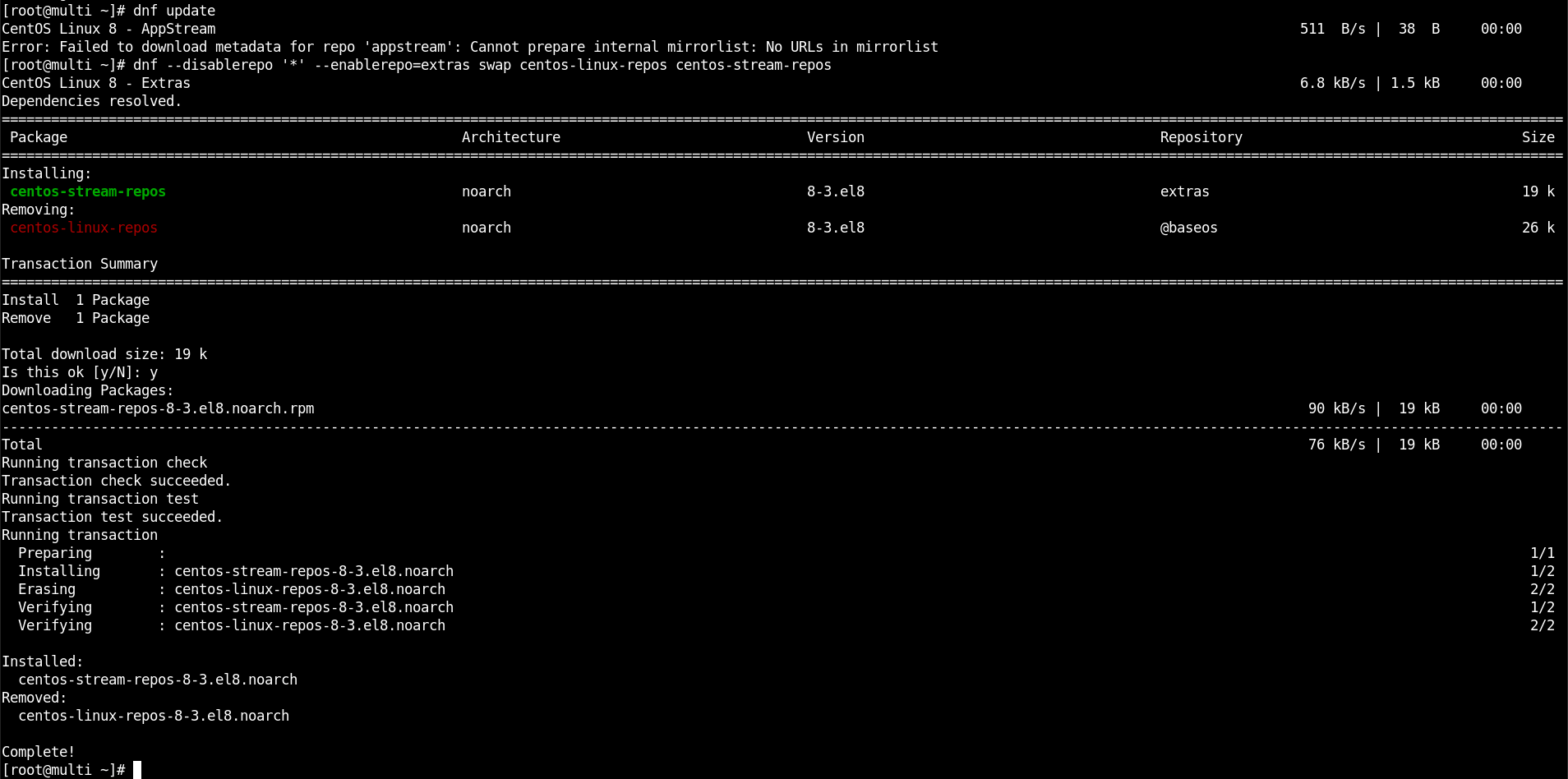
If you still manage systems running CentOS 8 and you attempt to update packages using dnf update or yum update, you will encounter the following error:
Error: Failed to download metadata for repo 'appstream': Cannot prepare internal mirrorlist: No URLs in mirrorlist
Fix: Migrate to CentOS Stream 8 or an alternative distro
Now that CentOS has shifted to Stream – a rolling-release Linux distribution, midstream between the upstream development in Fedora and the downstream development for RHEL – many users are moving to CentOS alternatives. Others have decided to stick with CentOS by migrating to CentOS Stream 8. Both of these choices will resolve not being able to update CentOS 8.
To migrate from CentOS 8 to CentOS Stream 8, run the following commands:
dnf --disablerepo '*' --enablerepo=extras swap centos-linux-repos centos-stream-repos
dnf distro-sync
Migrating to alternative distros is usually just as simple:
For example, follow this guide to migrate from CentOS 8 or CentOS Stream 8 to Rocky Linux. Also, see this list of CentOS 8 alternatives.