На чтение 3 мин. Просмотров 7.9k. Опубликовано 03.09.2019
Существует множество ошибок, возникающих во всех приложениях, даже в таких приложениях, как Microsoft Excel, которые входят в состав пакета Office.
Об ошибке, о которой мы говорим, является печально известная ошибка « Microsoft Excel ожидает другого приложения для выполнения действия OLE ».
Когда эта конкретная ошибка появляется на вашем дисплее, у вас есть несколько вариантов для ее устранения.
Содержание
- Как устранить ошибку «Microsoft Excel ожидает другого приложения…»?
- 1. Что такое OLE a?
- 2: Почему появляется ошибка OLE?
- 3: Как исправить проблему «Excel ждет OLE»
Как устранить ошибку «Microsoft Excel ожидает другого приложения…»?
- Что такое действие OLE?
- Почему появляется ошибка OLE?
- Как исправить проблему «Excel ждет OLE»
1. Что такое OLE a ?
Действие «Связывание и внедрение объектов» (OLE) – это технология, позволяющая приложениям Office взаимодействовать с другими приложениями.
Это позволяет редактирующему приложению отправлять часть документа в другие приложения, а затем импортирует его или возвращает его с дополнительным содержимым.
2: Почему появляется ошибка OLE?
Иногда следующая ошибка может отображаться на вашем экране, если требуемый ответ не приходит достаточно быстро: Microsoft Excel ожидает, пока другое приложение выполнит действие OLE .
3: Как исправить проблему «Excel ждет OLE»
Первое решение, конечно же, перезагрузить компьютер и повторить попытку. Если проблема не устранена, попробуйте следующие обходные пути:
1. Включить функцию «Игнорировать другое приложение, использующее DDE»
- Откройте лист Excel
- Перейти в меню «Файл»
- Нажмите на Опции
- Перейти на вкладку «Дополнительно»
- Прокрутите вниз до области «Общие» и установите флажок «Игнорировать другие приложения, использующие динамический обмен данными (DDE)».
- Перезапустите Excel
2. Отключить надстройки
- Откройте лист Excel
- Перейти в меню «Файл»
- Нажмите на Опции
- Нажмите на надстройки
- Выберите надстройки Excel и нажмите кнопку «Перейти».
- Снимите все флажки и нажмите ОК
3. Другие способы прикрепления книги Excel
Использование в Excel опции «Отправить с помощью электронной почты» может привести к указанной выше ошибке.
Вы можете отправить свою книгу, прикрепив ее в виде файла к электронному письму, например, в Outlook или Hotmail. Вы можете использовать любое приложение электронной почты, чтобы решить эту проблему.
Выберите свое почтовое приложение с умом! Мы пришли к нам на помощь с этим свежим списком!
С учетом сказанного, мы можем обернуть это. Сообщите нам в разделе комментариев ниже, если вам удалось устранить ошибку с помощью вышеупомянутых шагов.
Примечание редактора . Этот пост был первоначально опубликован в мае 2017 года и с тех пор был полностью переработан и обновлен для обеспечения свежести, точности и полноты.
Are you the one struggling with Excel OLE action error and looking for the ways to deal with it, then this is the right place.
Here check out the complete information about Excel OLE action error and how to get rid of it…
MS Excel is a very popular application and used for carrying out various functions. But sometimes this crucial application easily gets corrupted and starts showing Excel waiting for OLE action error.
OLE stands for Object Linking and Embedding action; this is developed by Microsoft and let the Office application to corporate with other applications. This permits an editing application to send part of the document to other apps and after that import and take it back with more content
For instance: When Excel tries to communicate with PowerPoint, it delivers the command to the OLE object and waits for PowerPoint to the response.
To recover lost Excel data, we recommend this tool:
This software will prevent Excel workbook data such as BI data, financial reports & other analytical information from corruption and data loss. With this software you can rebuild corrupt Excel files and restore every single visual representation & dataset to its original, intact state in 3 easy steps:
- Download Excel File Repair Tool rated Excellent by Softpedia, Softonic & CNET.
- Select the corrupt Excel file (XLS, XLSX) & click Repair to initiate the repair process.
- Preview the repaired files and click Save File to save the files at desired location.
Why Does OLE Error Emerge?
Well, the OLE Action Excel error appears when the response does not arrive within a specific time period. As a result, it starts showing Excel OLE action error:
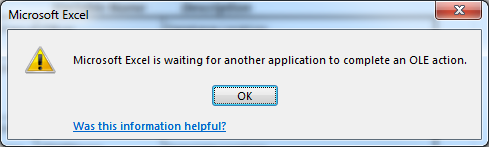
Microsoft Excel is waiting for another application to complete an OLE action.
Screenshot Of The OLE Action Excel Error:
What Are the Causes of Excel OLE Action Error?
Well, there are three common reasons behind getting the Microsoft Excel is waiting for another application to complete an OLE action message:
These are some common reasons which trigger this particular Excel waiting for ole action error.
- The very first reason for getting this ole action excel error is because of the disabling of DDE Protocol from Excel’s settings.
- Adding plenty of add-ins to the application and among then some are corrupted.
- Due to the installation of corrupted MS Office suit. To fix this out you need to either reinstall or repair the complete MS Office installation.
- When Excel try opening file created in other application or obtain data from an active one.
- Chances are also that Adobe Acrobat PDFMaker add-in is frequently conflicting with the Excel application.
- Using Excel ‘Send as Attachment’ option for sending an Excel sheet in an email.
Well, these are some of the common reasons for the Excel OLE action error. So here check out the ways to fix Excel is waiting for the OLE action issue.
How To Fix Excel Is Waiting For OLE Action Error?
The common solution to fix the error Restarting your system and try again. Now check whether the Microsoft Excel is waiting for another application to complete an ole action is fixed or not.
If the problem continues, try the given workarounds.
Solution 1: Enable the “Ignore other application that use DDE” feature
It is found that many users are getting the error due to the DDE application feature. So, here it is recommended to enable the “Ignore other application that use DDE” feature.
Follow the steps to do so:
- Open Excel sheet > go to File menu > click Options.

- Now go to the Advanced tab > scroll down to the General area.
- Here check-mark the “Ignore other applications that use Dynamic Data Exchange (DDE)” option

- And restart Excel file.
Now check whether the Excel waiting for OLE action error is fixed or not. If not then try the second solution
Solution 2: Disable add-ins
As I said above the users are getting the Excel OLE action error due to plenty of add-ins and commonly due to the corrupted ones.
Follow the steps to do so:
- Open Excel sheet > go to File menu > click Options

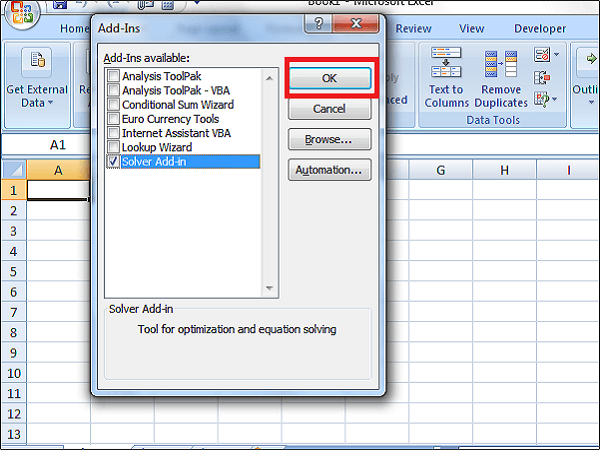
- Now click on Add-ins > choose Excel add-ins > click on Go button.

- And uncheck all boxes > click OK.
Hope this works for you to fix Excel OLE action error.
Solution 3: Use Other Ways To Attach Excel Workbook
While trying to use Excel’s “Send Using Email” option leads the error, so here it is recommended to try other ways to attach Excel workbook.
Try sending your Excel workbook by attaching it to an email as a file in Outlook or Hotmail or any other email app to fix the issue.
Well, it is estimated after following the above-given solution the Excel waiting for OLE action error is resolved. But if not then make use of the automatic MS Excel Repair Tool.
Solution 4: Disable Compatibility Mode
Some Excel users have successfully overcome this Excel ole action error by disabling the compatibility mode. Mainly this happens due to user intervention or 3rd party application. So if your Excel is also running in the compatibility mode then disable it once and check whether the OLE action error has been resolved or not.
Here is the quick guide to perform the task of disabling Compatibility Mode:
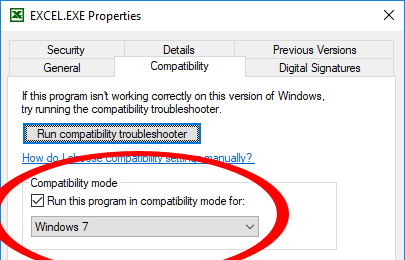
- Right-click on the Excel executable or Excel shortcut icon after then choose the Properties.
- In your opened window of Properties, hit the Compatibility Now uncheck the option “Run this program in compatibility mode”.
Automatic Solution: MS Excel Repair Tool
Make use of the professional recommended MS Excel Repair Tool to repair corrupt, damaged as well as errors in Excel file. This tool allows to easily restore all corrupt excel file including the charts, worksheet properties cell comments, and other important data. With the help of this, you can fix all sorts of issues, corruption, errors in Excel workbooks.
This is a unique tool to repair multiple Excel files at one repair cycle and recovers the entire data in a preferred location. It is easy to use and compatible with both Windows as well as Mac operating systems. This supports the entire Excel versions and the demo version is free.
* Free version of the product only previews recoverable data.
Steps to Utilize MS Excel Repair Tool:
Conclusion:
Well, this is all about the Excel OLE action error.
OLE is an important function that helps the application to communicate with one other by delivering the commands but sometimes this won’t deliver respond and start showing error.
Here I tried my best to put together the complete information about OLE action and how to fix Excel waiting for OLE action error.
Additionally, Excel is an essential application and used in daily life, so it is recommended to handle the Excel file properly and follow the best preventive steps to protect your Excel files from getting corrupted.
Despite it, always create a valid backup of your crucial Excel data and as well scan your system with a good antivirus program for virus and malware infection.
If, in case you have any additional questions concerning the ones presented, do tell us in the comments section below or you can also visit our Repair MS Excel Facebook and Linkdin account.
Good Luck….

Summary

Article Name
How to Fix “Microsoft Excel is waiting for another application to complete an OLE action” Issue
Description
Want to deal with Excel OLE action error then here follow the given solutions one by one to fix Excel is waiting for OLE action issue
Author
Publisher Name
Repair MS Excel Blog
Publisher Logo

Priyanka Sahu

Priyanka is an entrepreneur & content marketing expert. She writes tech blogs and has expertise in MS Office, Excel, and other tech subjects. Her distinctive art of presenting tech information in the easy-to-understand language is very impressive. When not writing, she loves unplanned travels.
Связывание и внедрение объектов (OLE) – это технология, разработанная Microsoft, которая позволяет приложениям Office взаимодействовать с другими приложениями. Это позволяет одному приложению для редактирования отправить часть документа в другие приложения, а затем импортировать или вернуть его вместе с другим содержимым.
Например, если Excel пытается связаться с PowerPoint, он отправляет команду объекту OLE и ожидает ответа от PowerPoint.
Однако, если требуемый ответ не получен в течение определенного периода времени, может отображаться следующая ошибка:
Microsoft Excel ожидает, пока другое приложение завершит действие OLE
Существует три распространенных причины того, что Microsoft Excel ожидает, пока другое приложение завершит сообщение OLE actio n:
- Добавление в приложение слишком большого количества надстроек, из которых один или несколько повреждены.
- Excel пытается открыть файл, созданный в каком-либо другом приложении, или извлечь данные из активного
- С помощью параметра «Отправить как вложение» в Excel можно отправить лист Excel по электронной почте.
Общее решение, которое рекомендуется, это перезагрузить компьютер и попробовать заново . Так как ошибка также может возникать из-за того, что Excel пытается взаимодействовать с другим приложением, которое не отвечает, рекомендуется закрыть Excel и все другие приложения. После этого вы можете снова открыть лист Excel и начать заново.
Однако, если проблема не устранена, вы можете попробовать любое из приведенных ниже решений.
1. Включение функции «Игнорировать другие приложения, использующие DDE».
1] Откройте лист Excel и перейдите в меню «Файл». В меню Файл выберите Параметры.
2] Откроется диалоговое окно параметров Excel. Перейдите на вкладку «Дополнительно» и прокрутите вниз до области «Общие». Там проверьте ‘Игнорируйте другие приложения, которые используют динамический обмен данными (DDE)‘.
Это должно уменьшить часть нагрузки на приложение и сделать его легче. Попробуйте перезапустить Excel после этого.
2. Отключение надстроек
1] Откройте лист Excel и перейдите в меню «Файл». В меню «Файл» выберите «Параметры».
2] Появится диалоговое окно «Параметры Excel». На вкладках слева нажмите Надстройки.
3] В нижней части этого окна находится окно управления. Выберите надстройки Excel и нажмите кнопку «Перейти» рядом с ней. Это заполняет список надстроек.
4] Снимите все флажки рядом с надстройками в поле Доступные надстройки и нажмите кнопку ОК.
Это отключает все надстройки, тем самым снижая нагрузку на приложение.
3: Использование других методов для прикрепления книги Excel
Использование встроенной в Excel опции «Отправить с помощью электронной почты» для отправки книги в виде вложения также может привести к отображению вышеуказанной ошибки OLE. Но вы можете решить эту проблему, прикрепив книгу Excel к своему сообщению через приложение электронной почты. Вы можете отправить свою книгу, прикрепив ее в виде файла к сообщению электронной почты в Outlook 2013/2010 или Hotmail. Фактически, вы можете использовать любое почтовое приложение на ваш выбор, чтобы обойти проблему.
Решения, обсуждаемые в этом посте, являются одними из самых эффективных и популярных, используемых для устранения ошибки Excel, упомянутой выше в обсуждении. Надеюсь, что-то здесь поможет вам.