Если вы столкнулись с ошибкой «истек CSRF-токен» — читайте нашу статью. Из неё вы узнаете, как работает CSRF-token защита, и что делать, если CSRF токен истек.

Что такое CSRF
CSRF (англ. cross-site request forgery) — это межсайтовая подделка запроса. Это атака, которой может подвергаться любой веб-ресурс или веб-приложение. В первую очередь это касается сайтов, которые используют cookies, сертификаты авторизации и браузерную аутентификацию. В результате атаки страдают клиенты и репутация ресурса.
Вредоносный скрипт прячется в коде сайта или обычной ссылке. С помощью него мошенник получает доступ к конфиденциальной информации: платежным реквизитам, логину и паролю, личной переписке. После того как данные “в кармане”, хакер может изменить пароль, указать свой номер телефона или email, перевести деньги на свой счёт и многое другое.
Как работает CSRF-атака
Злоумышленник может использовать фишинговую ссылку — это наиболее распространенный способ обмана. В этом случае атака работает по следующей схеме:
- Злоумышленник создаёт поддельную страницу, очень похожую на оригинальную, и встраивает её в сайт. В коде ссылка может выглядеть так: <a href=“вредоносная ссылка”>Unsubscribe here</a>.
- Пользователь переходит с одной страницы сайта на другую (например, на страницу оплаты) и вместо реальной страницы попадает на поддельную.
- Пользователь совершает действие на странице, например, оплачивает товар или вводит данные авторизации.
- Информация или денежные средства вместо оригинального сервера уходят на сервер мошенника.
CSRF-атаки случаются из-за того, что без специальных настроек сервер не может с точностью в 100% определить, кто именно выполняет действия со стороны пользователя. Он не может проверить, действительно ли на кнопку “оплатить” нажал тот пользователь, который изначально открыл страницу с оплатой. Хакеры активно используют этот люфт в безопасности HTTP-запросов и применяют вредоносные скрипты. Однако от атаки можно защититься с помощью CSRF-токенов.
Что такое CSRF-token и как он работает
В общем понимании токен — это механизм, который позволяет идентифицировать пользователя или конкретную сессию для безопасного обмена информацией и доступа к информационным ресурсам. Токены помогают проверить личность пользователя (например, клиента, который онлайн получает доступ к банковскому счёту). Их используют как вместо пароля, так и вместе с ним. Токен — это в каком-то смысле электронный ключ.
CSRF-token — это максимально простой и результативный способ защиты сайта от CSRF-мошенников. Он работает так: сервер создаёт случайный ключ (он же токен) и отправляет его браузеру клиента. Когда браузер запрашивает у сервера информацию, сервер, прежде чем дать ответ, требует показать ключ и проверяет его достоверность. Если токен совпадает, сессия продолжается, а если нет — прерывается. Токен действителен только одну сессию — с новой сессией он обновляется.
Чтобы получить ответ от сервера, используются разные методы запроса. Условно они делятся на две категории: те, которые не изменяют состояние сервера (GET, TRACE, HEAD), и те, которые изменяют (PUT, PATCH, POST и DELETE). Последние имеют большую CSRF-уязвимость и поэтому должны быть защищены в первую очередь.
При создании и использовании токена должны соблюдаться следующие условия:
-
нахождение в скрытом параметре;
-
генерация с помощью генератора псевдослучайных чисел;
-
ограниченное время жизни (одна сессия);
-
уникальность для каждой транзакции;
-
устойчивый к подбору размер (в битах);
-
невозможно переиспользовать.
Типы токенов
Существует три основных типа токенов по способу генерации:
- Synchronizer Tokens или Anti-CSRF (токены синхронизации). В этом случае инициатором ключа выступает сервер — на нём хранится исходная шифровка. Когда браузер обращается к серверу и предъявляет ему ключ, сервер сравнивает его с исходником и в зависимости от результата продолжает или прерывает сессию.
- Double Submit Cookie (двойная отправка куки). При этом способе токен нигде не хранится. Когда браузер обращается к серверу впервые за сессию, сервер генерирует и передаёт ему ключ в двух формах: через куки и в одном из параметров ответа. При следующих обращениях браузера сервер дважды проверяет правильность ключа — в параметрах и в куках.
- Encrypted Token (зашифрованный токен). Этот способ предполагает, что ключом шифруется какая-то часть информации о клиенте, которая содержится в браузере. При первом запросе браузера сервер получает информацию о пользователе, зашифровывает её и передаёт браузеру токен. При следующем взаимодействии сервер расшифровывает токен и сверяет информацию.
Помимо токенов, для защиты используется флаг Same-Site (большинство браузеров его поддерживает). Он работает напрямую для cookies и позволяет помечать куки конкретного домена. Сервер проверяет, содержатся ли нужные пометки в куках страницы, с которых происходит оплата или вносятся изменения. Если пометок нет — сессия прекращается.
Также в качестве меры защиты на страницах сайта настраивают форму с капчей. Это особенно актуально для страниц смены пароля или совершения денежных транзакций.
«Истек срок действия токена» или «CSRF-значение недопустимо»: что это значит и что делать
Даже при авторизации на сайтах, для которых настроена защита от атак, можно встретить следующие варианты сообщения об ошибке: «Недопустимое CSRF-значение»/«CSRF-токены не совпадают» или «Token expired» (в переводе — срок действия токена истек). Сообщение может отображаться как на английском, так и на русском. Пример ошибки при авторизации на сайте REG.RU:
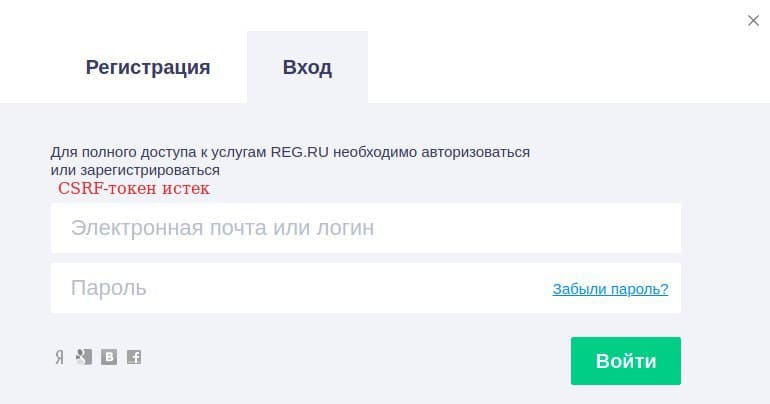
Обычно ошибка возникает по двум основным причинам:
-
сервер некорректно сгенерировал токен;
-
срок токена истек — пользователь долго не совершал никаких действий на странице.
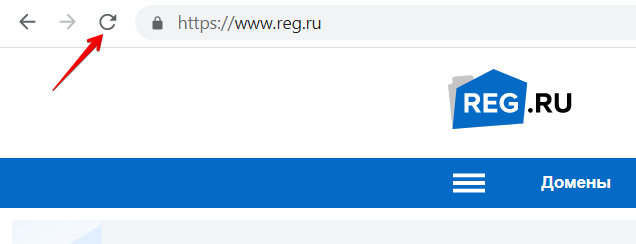
В обоих случаях исправить проблему поможет перезагрузка страницы — вы запустите новую сессию, а значит, сервер и браузер договорятся о новом рабочем токене. Для этого нажмите на значок обновления страницы:
Иногда ошибка возникает из-за расширений защиты конфиденциальности или плагинов блокировки рекламы (например, Ghostery, UBlock Origin, Blur), которые настроены у пользователя. В этом случае можно отключить расширение. Также можно добавить сайт, на котором появилось сообщение, в список доверенных сайтов.
На примере сайта reg.ru покажем, что для этого нужно:
в Google Chrome
- Откройте настройки Chrome:
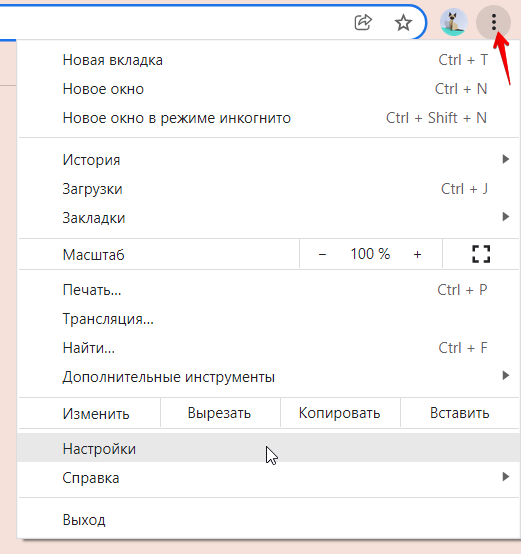
- В списке слева выберите Конфиденциальность и безопасность, а затем Файлы cookie и другие данные сайтов.
- Внизу страницы откройте Сайты, которые всегда могут использовать файлы cookie и кликните Добавить.
- Введите «[*.]www.reg.ru» и нажмите Добавить.
- Нажмите Все файлы cookie и данные сайта и удалите все записи, которые связаны с сайтом reg.ru.
- Перезагрузите браузер и выполните операцию повторно.
в Яндекс.Браузер
-
Откройте настройки браузера Яндекс:
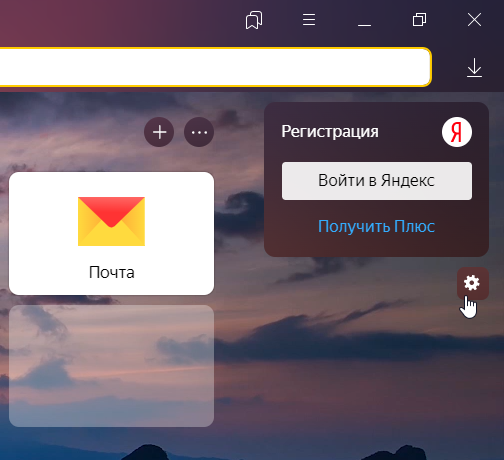
- Перейдите на Сайты — Расширенные.
- Кликните Настройки… для первого параметра в списке. Затем на вкладке «Разрешена» введите www.reg.ru и кликните Добавить.
- Добавьте адрес сайта для всех параметров списка по аналогии.
в Safari
- Откройте настройки Safari комбинацией Cmd + , (⌘,).
- Перейдите на вкладку Конфиденциальность и проверьте, что в пункте «Файлы cookie и данные веб-сайтов» не выбрано «Блокировать все файлы cookie». Если это так, снимите настройки.
- Кликните Управление данными веб-сайтов и удалите все записи, которые относятся к www.reg.ru.
- Перезагрузите браузер и выполните операцию повторно.
В некоторых случаях сгенерировать верный токен мешают локальные настройки куки в браузере. Чтобы сессия прошла успешно, достаточно вернуть дефолтные настройки.
Заключение
Успешная атака CSRF позволяет хакеру действовать на сайте от имени другого зарегистрированного посетителя. Чтобы мошенник не добрался до конфиденциальных данных, для сайта нужно настроить один из типов CSRF-токенов. Токены позволяют серверу и браузеру безопасно обмениваться информацией в течение сессии. Однако даже на безопасных сайтах можно столкнуться с ошибкой «токен CSRF истек». В этом нет ничего страшного. Чтобы возобновить подключение, достаточно обновить страницу браузера.
I have a form wher I have to fill in some information in a field.
Even if I put something inside, I am getting the error:
The CSRF token is invalid. Please try to resubmit the form
Related to this question: symfony2 CSRF invalid I am using correctly the $form->bindRequest()
if ($this->getRequest()->getMethod() == 'POST') {
   $form->bindRequest($this->getRequest());
   if ($form->isValid())
   {
       ...
   }
Here is my template (twig) code:
<div class="item item-last">
<h1>Create Affiliation</h1>
{% if valid == false %}
<div class="error">
{{ form_errors(form) }}
{{ form_errors(form.affiliation) }}
{{ error }}
</div>
{% endif %}
{% if app.session.flash('user-notice') != '' %}
<div class="flash-notice">
{% autoescape false %}
{{ app.session.flash('user-notice') }}
{% endautoescape %}
</div>
{% endif %}
</div>
<div class="item item-last">
<form action="{{ path('SciForumVersion2Bundle_user_submission_affiliation_create', {'hash_key' : submission.hashkey, 'author_id' : author.id }) }}?ajax=no" method="POST" class="authorForm" {{ form_enctype(form) }}>
<div style="float:left;">
<table width="100%" cellspacing="0" cellpadding="0">
<tr>
<td>
{{ form_label(form.affiliation) }}
</td>
<td>
{{ form_widget(form.affiliation, { 'attr': {'size': 40} }) }}
</td>
</tr>
<tr>
<td>
</td>
<td>
<div class="button button-left button-cancel">
<img src="{{ asset('bundles/sciforumversion2/images/design/new/button-red.png') }}"/>
<a href="{{ path('SciForumVersion2Bundle_user_submission_author_edit', { 'hash_key' : submission.hashkey, 'author_id' : 0 }) }}" class="submission_link">cancel</a>
</div>
<div style="float: left;"> </div>
<div class="button button-left button-cancel">
<img src="{{ asset('bundles/sciforumversion2/images/design/new/button.png') }}"/>
<input type="submit" name="login" value="submit" />
</div>
<div style="clear: both;"></div>
</td>
</tr>
</table>
</div>
{{ form_rest(form) }}
</form>
</div>
And here is the js code:
function init_submission_functions()
{

init_fck();

$(".submission_link").unbind("click").bind("click", function() {

    var href = $(this).attr("href");
    if( href == null || href == '' ) return false;

    $.ajax({
        type: "POST",
        async: true,
        url: href,
        cache: false,
        dataType: "json",
        success: function(data) {

            $("#content .contentwrap .itemwrap").html( data.content );
            init_submission_functions();
        }
    });

    return false;
});

$(".authorForm").unbind("submit").bind("submit", function() {

    var href = $(this).attr("action");
    if( href == null || href == '' ) return false;

    var affiliation = "blabla";

    $.ajax({
        type: "POST",
        async: true,
        url: href,
        affiliation: affiliation,
        cache: false,
        dataType: "json",
        success: function(data) {

            $("#content .contentwrap .itemwrap").html( data.content );
            init_submission_functions();
        }
    });

    return false;
});
}
But I am still getting the same error.
I have a form wher I have to fill in some information in a field.
Even if I put something inside, I am getting the error:
The CSRF token is invalid. Please try to resubmit the form
Related to this question: symfony2 CSRF invalid I am using correctly the $form->bindRequest()
if ($this->getRequest()->getMethod() == 'POST') {
   $form->bindRequest($this->getRequest());
   if ($form->isValid())
   {
       ...
   }
Here is my template (twig) code:
<div class="item item-last">
<h1>Create Affiliation</h1>
{% if valid == false %}
<div class="error">
{{ form_errors(form) }}
{{ form_errors(form.affiliation) }}
{{ error }}
</div>
{% endif %}
{% if app.session.flash('user-notice') != '' %}
<div class="flash-notice">
{% autoescape false %}
{{ app.session.flash('user-notice') }}
{% endautoescape %}
</div>
{% endif %}
</div>
<div class="item item-last">
<form action="{{ path('SciForumVersion2Bundle_user_submission_affiliation_create', {'hash_key' : submission.hashkey, 'author_id' : author.id }) }}?ajax=no" method="POST" class="authorForm" {{ form_enctype(form) }}>
<div style="float:left;">
<table width="100%" cellspacing="0" cellpadding="0">
<tr>
<td>
{{ form_label(form.affiliation) }}
</td>
<td>
{{ form_widget(form.affiliation, { 'attr': {'size': 40} }) }}
</td>
</tr>
<tr>
<td>
</td>
<td>
<div class="button button-left button-cancel">
<img src="{{ asset('bundles/sciforumversion2/images/design/new/button-red.png') }}"/>
<a href="{{ path('SciForumVersion2Bundle_user_submission_author_edit', { 'hash_key' : submission.hashkey, 'author_id' : 0 }) }}" class="submission_link">cancel</a>
</div>
<div style="float: left;"> </div>
<div class="button button-left button-cancel">
<img src="{{ asset('bundles/sciforumversion2/images/design/new/button.png') }}"/>
<input type="submit" name="login" value="submit" />
</div>
<div style="clear: both;"></div>
</td>
</tr>
</table>
</div>
{{ form_rest(form) }}
</form>
</div>
And here is the js code:
function init_submission_functions()
{

init_fck();

$(".submission_link").unbind("click").bind("click", function() {

    var href = $(this).attr("href");
    if( href == null || href == '' ) return false;

    $.ajax({
        type: "POST",
        async: true,
        url: href,
        cache: false,
        dataType: "json",
        success: function(data) {

            $("#content .contentwrap .itemwrap").html( data.content );
            init_submission_functions();
        }
    });

    return false;
});

$(".authorForm").unbind("submit").bind("submit", function() {

    var href = $(this).attr("action");
    if( href == null || href == '' ) return false;

    var affiliation = "blabla";

    $.ajax({
        type: "POST",
        async: true,
        url: href,
        affiliation: affiliation,
        cache: false,
        dataType: "json",
        success: function(data) {

            $("#content .contentwrap .itemwrap").html( data.content );
            init_submission_functions();
        }
    });

    return false;
});
}
But I am still getting the same error.
Я получаю это сообщение об ошибке каждый раз, когда я пытаюсь отправить форму:
Символ CSRF недействителен. Повторите отправку формы
Мой код формы:
<form novalidate action="{{path('signup_index')}}" method="post" {{form_enctype(form)}} role="form" class="form-horizontal">
    <div class="form-group">
        {{ form_label(form.email, 'Email', {'label_attr': {'class': 'col-md-1 control-label'}}) }}
        {{ form_widget(form.email, {'attr': {'class': 'col-md-2'}}) }}
        {{ form_errors(form.email) }}
    </div>

    <div class="form-group">
        {{ form_label(form.nickname, 'Nickname', {'label_attr': {'class': 'col-md-1 control-label'}}) }}
        {{ form_widget(form.nickname, {'attr':{'class': 'col-md-2'}}) }}
        {{ form_errors(form.nickname, {'attr': {'class': 'col-md-3'}}) }}
    </div>
    <div class="form-group">
        {{ form_label(form.password, 'password', {'label_attr': {'class': 'col-md-1 control-label'}}) }}
        {{ form_widget(form.password, {'attr': {'class': 'col-md-2'}}) }}
        {{ form_errors(form.password, {'attr': {'class': 'col-md-3'}}) }}
    </div>

    <div class="form-group">
        {{ form_label(form.password_repeat, 'Repeat password', {'label_attr': {'class': 'col-md-1 control-label'}}) }}
        {{ form_widget(form.password_repeat, {'attr':{'class': 'col-md-2'}}) }}
        {{ form_errors(form.password_repeat, {'attr': {'class': 'col-md-3'}}) }}
    </div>
    <div class="form-group">
        <div class="col-md-1 control-label">
        <input type="submit" value="submit">
    </div>

    </div>
</form>
Любые идеи?
Ответ 1
Вам нужно добавить _token в вашу форму i.e
{{ form_row(form._token) }}
На данный момент в вашей форме отсутствует поле токена CSRF. Если вы используете функции формы твига для рендеринга вашей формы, например form(form), это автоматически отобразит поле маркера CSRF для вас, но ваш код показывает, что вы создаете форму с необработанным HTML, например <form></form>, поэтому вам нужно вручную отобразить поле.
Или просто добавьте {{ form_rest(form) }} перед закрывающим тегом формы.
Согласно документам
Это отображает все поля, которые еще не были отображены для данного форма. Это хорошая идея всегда иметь это где-то внутри вашей формы так как это сделает скрытые поля для вас и сделает все поля, которые вы забыли чтобы сделать более очевидным (поскольку он отобразит поле для вас).
form_rest (просмотр, переменные)
Ответ 2
Также вы можете увидеть это сообщение об ошибке, если в вашей форме много элементов.
Эта опция в php.ini вызывает проблему
; How many GET/POST/COOKIE input variables may be accepted
 max_input_vars = 1000
Проблема в том, что поле _token пропускает запрос PUT (GET), поэтому вам нужно увеличить значение.
Также это касается больших файлов. Увеличение
upload_max_filesize
Опция
решит проблему.
Ответ 3
Это происходит потому, что формы по умолчанию содержат защиту CSRF, которая в некоторых случаях не нужна.
Вы можете отключить эту защиту CSRF в своем классе формы в методе getDefaultOptions следующим образом:
// Other methods omitted

public function getDefaultOptions(array $options)
{
    return array(
        'csrf_protection' => false,
        // Rest of options omitted
    );
}
Если вы не хотите отключать защиту CSRF, вам необходимо отобразить поле защиты CSRF в вашей форме. Это можно сделать, используя {{ form_rest(form) }} в вашем файле вида, например:
<form novalidate action="{{path('signup_index')}}" method="post" {{form_enctype(form)}} role="form" class="form-horizontal">
    <!-- Code omitted -->

    <div class="form-group">
        <div class="col-md-1 control-label">
            <input type="submit" value="submit">
        </div>

    </div>
    {{ form_rest(form) }}
</form>
{{ form_rest(form) }} отображает все поля, которые вы не ввели вручную.
Ответ 4
Перед тегом </form> поставьте:
{{ form_rest(form) }}
Он автоматически вставляет другие важные (скрытые) входы.
Ответ 5
В дополнение к предложениям других вы можете получить ошибки токена CSRF, если ваша память сеанса не работает.
В недавнем случае мой коллега изменил «session_prefix» на значение, в котором было пробел.
session_prefix: 'My Website'
Это сломало хранилище сеансов, что, в свою очередь, означало, что моя форма не могла получить токен CSRF из сеанса.
Ответ 6
У меня была эта проблема со странным поведением: очистка кеша браузера не исправила его, но очистка файлов cookie (то есть файлов cookie сеанса PHP) решила проблему.
Это нужно сделать после того, как вы проверили все другие ответы, включая проверку того, что у вас есть токен в поле ввода скрытой формы.
Ответ 7
У меня была эта ошибка в последнее время. Оказывается, мои настройки cookie были неправильными в config.yml. Добавление настроек cookie_path и cookie_domain в framework.session исправлено.
Ответ 8
Недавно я столкнулся с той же проблемой, и мой случай был чем-то, о чем здесь еще не говорилось:
Проблема была в том, что я тестировал его в домене localhost. Я не уверен, почему именно это было проблемой, но она начала работать после того, как я добавил псевдоним имени хоста для localhost в /etc/hosts следующим образом:
127.0.0.1 foobar
Возможно, что-то не так с сеансом при использовании Apache и localhost в качестве домена. Если кто-то может уточнить комментарии, я был бы рад отредактировать этот ответ, чтобы включить больше деталей.
Ответ 9
Если вы не хотите использовать form_row или form_rest и хотите получить доступ к значению _token в шаблоне ветки. Используйте следующее:
<input type="hidden" name="form[_token]" value="{{ form._token.vars.value }}" />
Ответ 10
В моем случае у меня возникла проблема с аннотацией maxSize в сущности, поэтому я увеличил ее с 2048 по 2004 год.
 /**
 * @AssertFile(
 *     maxSize = "20048k",
 *     mimeTypes = {"application/pdf", "application/x-pdf"},
 *     mimeTypesMessage = "Please upload a valid PDF"
 * )
 */
private $file;
надеюсь, что этот ответ поможет!
Ответ 11
Если вы преобразовали форму из простого HTML в веточку, убедитесь, что вы не пропустили удаление закрывающего тега </form>. Глупая ошибка, но поскольку я обнаружил это возможную причину этой проблемы.
Когда я получил эту ошибку, я не мог понять это сначала. Я использую form_start() и form_end() для создания формы, поэтому мне не нужно явно добавлять токен с помощью form_row(form._token) или использовать form_rest() для его получения. Он должен быть добавлен автоматически form_end().
Проблема заключалась в том, что представление, с которым я работал, было тем, что я преобразовал из простого HTML в веточку, и я пропустил удаление закрывающего тега </form>, поэтому вместо:
{{ form_end(form) }}
У меня было:
</form>
{{ form_end(form) }}
Это похоже на то, что может вызвать ошибку, но, по-видимому, это не так, поэтому, когда form_end() выводит form_rest(), форма уже закрыта. Фактически созданный источник страницы формы был таким:
<form>
    <!-- all my form fields... -->
</form>
<input type="hidden" id="item__token" name="item[_token]" value="SQAOs1xIAL8REI0evGMjOsatLbo6uDzqBjVFfyD0PE4" />
</form>
Очевидно, что решение состоит в том, чтобы удалить дополнительный закрывающий тег и, возможно, выпить еще немного кофе.
Ответ 12
Я столкнулся с подобной проблемой. Убедившись, что поле токена действительно отображено (см. Принятый ответ), я проверил свои куки. В моем браузере Chrome было 2 (!) Файла cookie для этого домена, по-видимому, потому что я запускал приложение в том же домене, что и другое приложение, но с другим портом (т.е. Mydomain.com установил исходный файл cookie во время работы приложения с ошибками). на mydomain.com:123) Теперь, видимо, Chrome отправил неправильный файл cookie, поэтому защита CSRF не смогла связать токен с правильным сеансом.
Исправление: очистите все куки для данного домена, убедитесь, что вы не запускаете несколько приложений в одном домене с разными портами.
Ответ 13
У меня была та же ошибка, но в моем случае проблема заключалась в том, что мое приложение использовало несколько доменов первого уровня, в то время как cookie использовал один. Удаление cookie_domain: ".%domain%" из framework.session в config.yml приводило к тому, что cookie по умолчанию использовался для любого домена, на котором была форма, и это config.yml проблему.
Ответ 14
Это кажется проблемой при использовании bootstrap, если вы не передаете форму {{form (form)}}. Кроме того, проблемы возникают только при вводе типа = «скрытый». Если вы проверите страницу с помощью формы, вы обнаружите, что скрытый ввод не является частью разметки вообще или визуализируется, но не представляется по какой-либо причине. Как было предложено выше, добавление {{form_rest (form)}} или перенос ввода, как показано ниже, должен сделать трюк.
<div class="form-group">
    <input type="hidden" name="_csrf_token" value="{{ csrf_token('authenticate') }}">
</div>
I’m getting this error message every time I try to submit the form:
The CSRF token is invalid. Please try to resubmit the form
My form code is this:
<form novalidate action="{{path('signup_index')}}" method="post" {{form_enctype(form)}} role="form" class="form-horizontal">
    <div class="form-group">
        {{ form_label(form.email, 'Email', {'label_attr': {'class': 'col-md-1 control-label'}}) }}
        {{ form_widget(form.email, {'attr': {'class': 'col-md-2'}}) }}
        {{ form_errors(form.email) }}
    </div>

    <div class="form-group">
        {{ form_label(form.nickname, 'Nickname', {'label_attr': {'class': 'col-md-1 control-label'}}) }}
        {{ form_widget(form.nickname, {'attr':{'class': 'col-md-2'}}) }}
        {{ form_errors(form.nickname, {'attr': {'class': 'col-md-3'}}) }}
    </div>
    <div class="form-group">
        {{ form_label(form.password, 'password', {'label_attr': {'class': 'col-md-1 control-label'}}) }}
        {{ form_widget(form.password, {'attr': {'class': 'col-md-2'}}) }}
        {{ form_errors(form.password, {'attr': {'class': 'col-md-3'}}) }}
    </div>

    <div class="form-group">
        {{ form_label(form.password_repeat, 'Repeat password', {'label_attr': {'class': 'col-md-1 control-label'}}) }}
        {{ form_widget(form.password_repeat, {'attr':{'class': 'col-md-2'}}) }}
        {{ form_errors(form.password_repeat, {'attr': {'class': 'col-md-3'}}) }}
    </div>
    <div class="form-group">
        <div class="col-md-1 control-label">
        <input type="submit" value="submit">
    </div>

    </div>
</form>
Any ideas?

Don’t Panic
40.7k10 gold badges61 silver badges78 bronze badges
asked May 4, 2014 at 11:38

Francisco AlbertFrancisco Albert
1,5372 gold badges17 silver badges32 bronze badges
1
You need to add the _token in your form i.e
{{ form_row(form._token) }}
As of now your form is missing the CSRF token field. If you use the twig form functions to render your form like form(form) this will automatically render the CSRF token field for you, but your code shows you are rendering your form with raw HTML like <form></form>, so you have to manually render the field.
Or, simply add {{ form_rest(form) }} before the closing tag of the form.
According to docs
This renders all fields that have not yet been rendered for the given
form. It’s a good idea to always have this somewhere inside your form
as it’ll render hidden fields for you and make any fields you forgot
to render more obvious (since it’ll render the field for you).
form_rest(view, variables)

answered May 4, 2014 at 11:41

M Khalid JunaidM Khalid Junaid
63.3k10 gold badges90 silver badges116 bronze badges
4
Also you can see this error message when your form has a lot of elements.
This option in php.ini cause of problem
; How many GET/POST/COOKIE input variables may be accepted
 max_input_vars = 1000
Problem is that _token field misses PUT (GET) request, so you have to increase value.
Also, it concerns a big files. Increasing the
upload_max_filesize
option will solve problem.
answered Nov 5, 2014 at 20:39

4
This happens because forms by default contain CSRF protection, which is not necessary in some cases.
You can disable this CSRF protection in your form class in getDefaultOptions method like this:
// Other methods omitted

public function getDefaultOptions(array $options)
{
    return array(
        'csrf_protection' => false,
        // Rest of options omitted
    );
}
If you don’t want to disable CSRF protection, then you need to render the CSRF protecion field in your form. It can be done by using {{ form_rest(form) }} in your view file, like this:
<form novalidate action="{{path('signup_index')}}" method="post" {{form_enctype(form)}} role="form" class="form-horizontal">
    <!-- Code omitted -->

    <div class="form-group">
        <div class="col-md-1 control-label">
            <input type="submit" value="submit">
        </div>

    </div>
    {{ form_rest(form) }}
</form>
{{ form_rest(form) }} renders all fields which you haven’t entered manually.
answered May 4, 2014 at 20:09
2
Before your </form> tag put:
{{ form_rest(form) }}
It will automatically insert other important (hidden) inputs.
answered May 4, 2014 at 11:46

LkopoLkopo
4,7588 gold badges34 silver badges60 bronze badges
I had this issue with a weird behavior: clearing the browser cache didn’t fix it but clearing the cookies (that is, the PHP session ID cookie) did solve the issue.
This has to be done after you have checked all other answers, including verifying you do have the token in a hidden form input field.
answered Mar 31, 2017 at 13:27

Benoit DuffezBenoit Duffez
11.5k12 gold badges74 silver badges123 bronze badges
In addition to others’ suggestions you can get CSRF token errors if your session storage is not working.
In a recent case a colleague of mine changed ‘session_prefix’ to a value that had a space in it.
session_prefix: 'My Website'
This broke session storage, which in turn meant my form could not obtain the CSRF token from the session.
answered Jan 18, 2017 at 3:49

HenryHenry
7,6112 gold badges37 silver badges38 bronze badges
1
If you have converted your form from plain HTML to twig, be sure you didn’t miss deleting a closing </form> tag. Silly mistake, but as I discovered it’s a possible cause for this problem.
When I got this error, I couldn’t figure it out at first. I’m using form_start() and form_end() to generate the form, so I shouldn’t have to explicitly add the token with form_row(form._token), or use form_rest() to get it. It should have already been added automatically by form_end().
The problem was, the view I was working with was one that I had converted from plain HTML to twig, and I had missed deleting the closing </form> tag, so instead of :
{{ form_end(form) }}
I had:
</form>
{{ form_end(form) }}
That actually seems like something that might throw an error, but apparently it doesn’t, so when form_end() outputs form_rest(), the form is already closed. The actual generated page source of the form was like this:
<form>
    <!-- all my form fields... -->
</form>
<input type="hidden" id="item__token" name="item[_token]" value="SQAOs1xIAL8REI0evGMjOsatLbo6uDzqBjVFfyD0PE4" />
</form>
Obviously the solution is to delete the extra closing tag and maybe drink some more coffee.
answered Mar 12, 2017 at 19:09
Don’t PanicDon’t Panic
40.7k10 gold badges61 silver badges78 bronze badges
I had this error recently. Turns out that my cookie settings were incorrect in config.yml. Adding the cookie_path and cookie_domain settings to framework.session fixed it.
answered Jun 1, 2017 at 19:20

MichaelMichael
8,4444 gold badges26 silver badges36 bronze badges
I hade the same issue recently, and my case was something that’s not mentioned here yet:
The problem was I was testing it on localhost domain. I’m not sure why exactly was this an issue, but it started to work after I added a host name alias for localhost into /etc/hosts like this:
127.0.0.1 foobar
There’s probably something wrong with the session while using Apache and localhost as a domain. If anyone can elaborate in the comments I’d be happy to edit this answer to include more details.
answered Aug 8, 2019 at 11:53

Teo.skTeo.sk
2,6095 gold badges24 silver badges30 bronze badges
In case you don’t want to use form_row or form_rest and just want to access value of the _token in your twig template. Use the following:
<input type="hidden" name="form[_token]" value="{{ form._token.vars.value }}" />
answered Jun 24, 2014 at 9:13

Imran ZahoorImran Zahoor
2,4251 gold badge28 silver badges37 bronze badges
1
In my case I got a trouble with the maxSize annotation in the entity, so I increased it from 2048 to 20048.
 /**
 * @AssertFile(
 *     maxSize = "20048k",
 *     mimeTypes = {"application/pdf", "application/x-pdf"},
 *     mimeTypesMessage = "Please upload a valid PDF"
 * )
 */
private $file;
hope this answer helps!
answered Apr 6, 2016 at 21:42
JorgeeadanJorgeeadan
33410 silver badges19 bronze badges
I faced a similar issue. After ensuring the token field was actually rendered (see accepted answer) I checked my cookies.
There were 2(!) cookies for the domain in my Chrome browser, apparently because I was running the application on the same domain as another app, but with a different port (i.e. mydomain.com set the original cookie while the buggy app was running on mydomain.com:123)
Now apparently Chrome sent the wrong cookie so the CSRF protection was unable to link the token to the correct session.
Fix: clear all the cookies for the domain in question, make sure you don’t run multiple applications on the same domain with differing ports.
answered Feb 21, 2018 at 19:12

I had the same error, but in my case the problem was that my application was using multiple first-level domains, while the cookie was using one. Removing cookie_domain: ".%domain%" from framework.session in the config.yml caused cookies to default to whatever domain the form was on, and that fixed the problem.
answered Mar 25, 2018 at 22:01

ACJACJ
2,4393 gold badges22 silver badges27 bronze badges
You need to remember that CSRF token is stored in the session, so this problem can also occur due to invalid session handling. If you’re working on the localhost, check e.g. if session cookie domain is set correctly (in PHP it should be empty when on localhost).
answered Jun 30, 2020 at 9:02

This seems to be an issue when using bootstrap unless you are rendering the form by {{ form(form)}}. In addition, the issues seems to only occur on input type=»hidden». If you inspect the page the with the form, you’ll find that the hidden input is not part of the markup at all or it’s being rendered but not submitted for some reason. As suggested above, adding {{form_rest(form)}} or wrapping the input like below should do the trick.
<div class="form-group">
    <input type="hidden" name="_csrf_token" value="{{ csrf_token('authenticate') }}">
</div>
answered Feb 3, 2016 at 21:08

0
I’m getting this error message every time I try to submit the form:
The CSRF token is invalid. Please try to resubmit the form
My form code is this:
<form novalidate action="{{path('signup_index')}}" method="post" {{form_enctype(form)}} role="form" class="form-horizontal">
    <div class="form-group">
        {{ form_label(form.email, 'Email', {'label_attr': {'class': 'col-md-1 control-label'}}) }}
        {{ form_widget(form.email, {'attr': {'class': 'col-md-2'}}) }}
        {{ form_errors(form.email) }}
    </div>

    <div class="form-group">
        {{ form_label(form.nickname, 'Nickname', {'label_attr': {'class': 'col-md-1 control-label'}}) }}
        {{ form_widget(form.nickname, {'attr':{'class': 'col-md-2'}}) }}
        {{ form_errors(form.nickname, {'attr': {'class': 'col-md-3'}}) }}
    </div>
    <div class="form-group">
        {{ form_label(form.password, 'password', {'label_attr': {'class': 'col-md-1 control-label'}}) }}
        {{ form_widget(form.password, {'attr': {'class': 'col-md-2'}}) }}
        {{ form_errors(form.password, {'attr': {'class': 'col-md-3'}}) }}
    </div>

    <div class="form-group">
        {{ form_label(form.password_repeat, 'Repeat password', {'label_attr': {'class': 'col-md-1 control-label'}}) }}
        {{ form_widget(form.password_repeat, {'attr':{'class': 'col-md-2'}}) }}
        {{ form_errors(form.password_repeat, {'attr': {'class': 'col-md-3'}}) }}
    </div>
    <div class="form-group">
        <div class="col-md-1 control-label">
        <input type="submit" value="submit">
    </div>

    </div>
</form>
Any ideas?
Don’t Panic
40.7k10 gold badges61 silver badges78 bronze badges
asked May 4, 2014 at 11:38
Francisco AlbertFrancisco Albert
1,5372 gold badges17 silver badges32 bronze badges
1
You need to add the _token in your form i.e
{{ form_row(form._token) }}
As of now your form is missing the CSRF token field. If you use the twig form functions to render your form like form(form) this will automatically render the CSRF token field for you, but your code shows you are rendering your form with raw HTML like <form></form>, so you have to manually render the field.
Or, simply add {{ form_rest(form) }} before the closing tag of the form.
According to docs
This renders all fields that have not yet been rendered for the given
form. It’s a good idea to always have this somewhere inside your form
as it’ll render hidden fields for you and make any fields you forgot
to render more obvious (since it’ll render the field for you).
form_rest(view, variables)
answered May 4, 2014 at 11:41
M Khalid JunaidM Khalid Junaid
63.3k10 gold badges90 silver badges116 bronze badges
4
Also you can see this error message when your form has a lot of elements.
This option in php.ini cause of problem
; How many GET/POST/COOKIE input variables may be accepted
 max_input_vars = 1000
Problem is that _token field misses PUT (GET) request, so you have to increase value.
Also, it concerns a big files. Increasing the
upload_max_filesize
option will solve problem.
answered Nov 5, 2014 at 20:39
4
This happens because forms by default contain CSRF protection, which is not necessary in some cases.
You can disable this CSRF protection in your form class in getDefaultOptions method like this:
// Other methods omitted

public function getDefaultOptions(array $options)
{
    return array(
        'csrf_protection' => false,
        // Rest of options omitted
    );
}
If you don’t want to disable CSRF protection, then you need to render the CSRF protecion field in your form. It can be done by using {{ form_rest(form) }} in your view file, like this:
<form novalidate action="{{path('signup_index')}}" method="post" {{form_enctype(form)}} role="form" class="form-horizontal">
    <!-- Code omitted -->

    <div class="form-group">
        <div class="col-md-1 control-label">
            <input type="submit" value="submit">
        </div>

    </div>
    {{ form_rest(form) }}
</form>
{{ form_rest(form) }} renders all fields which you haven’t entered manually.
answered May 4, 2014 at 20:09
2
Before your </form> tag put:
{{ form_rest(form) }}
It will automatically insert other important (hidden) inputs.
answered May 4, 2014 at 11:46
LkopoLkopo
4,7588 gold badges34 silver badges60 bronze badges
I had this issue with a weird behavior: clearing the browser cache didn’t fix it but clearing the cookies (that is, the PHP session ID cookie) did solve the issue.
This has to be done after you have checked all other answers, including verifying you do have the token in a hidden form input field.
answered Mar 31, 2017 at 13:27
Benoit DuffezBenoit Duffez
11.5k12 gold badges74 silver badges123 bronze badges
In addition to others’ suggestions you can get CSRF token errors if your session storage is not working.
In a recent case a colleague of mine changed ‘session_prefix’ to a value that had a space in it.
session_prefix: 'My Website'
This broke session storage, which in turn meant my form could not obtain the CSRF token from the session.
answered Jan 18, 2017 at 3:49
HenryHenry
7,6112 gold badges37 silver badges38 bronze badges
1
If you have converted your form from plain HTML to twig, be sure you didn’t miss deleting a closing </form> tag. Silly mistake, but as I discovered it’s a possible cause for this problem.
When I got this error, I couldn’t figure it out at first. I’m using form_start() and form_end() to generate the form, so I shouldn’t have to explicitly add the token with form_row(form._token), or use form_rest() to get it. It should have already been added automatically by form_end().
The problem was, the view I was working with was one that I had converted from plain HTML to twig, and I had missed deleting the closing </form> tag, so instead of :
{{ form_end(form) }}
I had:
</form>
{{ form_end(form) }}
That actually seems like something that might throw an error, but apparently it doesn’t, so when form_end() outputs form_rest(), the form is already closed. The actual generated page source of the form was like this:
<form>
    <!-- all my form fields... -->
</form>
<input type="hidden" id="item__token" name="item[_token]" value="SQAOs1xIAL8REI0evGMjOsatLbo6uDzqBjVFfyD0PE4" />
</form>
Obviously the solution is to delete the extra closing tag and maybe drink some more coffee.
answered Mar 12, 2017 at 19:09
Don’t PanicDon’t Panic
40.7k10 gold badges61 silver badges78 bronze badges
I had this error recently. Turns out that my cookie settings were incorrect in config.yml. Adding the cookie_path and cookie_domain settings to framework.session fixed it.
answered Jun 1, 2017 at 19:20
MichaelMichael
8,4444 gold badges26 silver badges36 bronze badges
I hade the same issue recently, and my case was something that’s not mentioned here yet:
The problem was I was testing it on localhost domain. I’m not sure why exactly was this an issue, but it started to work after I added a host name alias for localhost into /etc/hosts like this:
127.0.0.1 foobar
There’s probably something wrong with the session while using Apache and localhost as a domain. If anyone can elaborate in the comments I’d be happy to edit this answer to include more details.
answered Aug 8, 2019 at 11:53
Teo.skTeo.sk
2,6095 gold badges24 silver badges30 bronze badges
In case you don’t want to use form_row or form_rest and just want to access value of the _token in your twig template. Use the following:
<input type="hidden" name="form[_token]" value="{{ form._token.vars.value }}" />
answered Jun 24, 2014 at 9:13
Imran ZahoorImran Zahoor
2,4251 gold badge28 silver badges37 bronze badges
1
In my case I got a trouble with the maxSize annotation in the entity, so I increased it from 2048 to 20048.
 /**
 * @AssertFile(
 *     maxSize = "20048k",
 *     mimeTypes = {"application/pdf", "application/x-pdf"},
 *     mimeTypesMessage = "Please upload a valid PDF"
 * )
 */
private $file;
hope this answer helps!
answered Apr 6, 2016 at 21:42
JorgeeadanJorgeeadan
33410 silver badges19 bronze badges
I faced a similar issue. After ensuring the token field was actually rendered (see accepted answer) I checked my cookies.
There were 2(!) cookies for the domain in my Chrome browser, apparently because I was running the application on the same domain as another app, but with a different port (i.e. mydomain.com set the original cookie while the buggy app was running on mydomain.com:123)
Now apparently Chrome sent the wrong cookie so the CSRF protection was unable to link the token to the correct session.
Fix: clear all the cookies for the domain in question, make sure you don’t run multiple applications on the same domain with differing ports.
answered Feb 21, 2018 at 19:12
I had the same error, but in my case the problem was that my application was using multiple first-level domains, while the cookie was using one. Removing cookie_domain: ".%domain%" from framework.session in the config.yml caused cookies to default to whatever domain the form was on, and that fixed the problem.
answered Mar 25, 2018 at 22:01
ACJACJ
2,4393 gold badges22 silver badges27 bronze badges
You need to remember that CSRF token is stored in the session, so this problem can also occur due to invalid session handling. If you’re working on the localhost, check e.g. if session cookie domain is set correctly (in PHP it should be empty when on localhost).
answered Jun 30, 2020 at 9:02
This seems to be an issue when using bootstrap unless you are rendering the form by {{ form(form)}}. In addition, the issues seems to only occur on input type=»hidden». If you inspect the page the with the form, you’ll find that the hidden input is not part of the markup at all or it’s being rendered but not submitted for some reason. As suggested above, adding {{form_rest(form)}} or wrapping the input like below should do the trick.
<div class="form-group">
    <input type="hidden" name="_csrf_token" value="{{ csrf_token('authenticate') }}">
</div>
answered Feb 3, 2016 at 21:08
0